

Skip to content

Protecting ePHI in the Cloud

Protecting ePHI in the Cloud: HIPAA-Compliant Cloud Backup Strategies for US Healthcare

Managing electronic protected health information (ePHI) in the cloud has become necessary as healthcare organizations progressively choose cloud technologies. This method raises data remote access, cost-effectiveness, and accessibility.
However, it also comes with compliance and security issues. Failing to protect ePHI, even in backups, for covered entities under the Health Insurance Portability and Accountability Act (HIPAA) runs a risk of significant fines, legal action, mistrust development, and damage to patient relationships.

Thus, providers must ensure that their backup plans are safe, tested, and monitored closely against government rules. This post explores the most practical approaches and insights relevant to U.S. healthcare institutions.

HIPAA Requirements for Backing Up ePHI

ePHI protection is governed by the Health Insurance Portability and Accountability Act (HIPAA). This act also specifies how ePHI must be backed up and recovered should a disaster or failure strike. HIPAA outlines critical backup-related criteria but does not specify certain technologies:

  • Procedures must be in place for data backup to generate and preserve exact, retrievable copies of ePHI.
  • In data recovery plans, organizations must specify how ePHI would be rebuilt following a cybercrime, system outage, or natural disaster.
  • Critical systems must be able to operate in emergency conditions to protect data integrity in emergency mode plans.
  • Backup and recovery strategies must be routinely tested and changed depending on changing risk.
  • Only authorized staff members should access ePHI; audit trails are in place to track interactions.

Meeting these criteria in a traditional on-premise solution is tough enough. In a cloud-based setting, the stakes are even higher, and the strategies more complex.

On-Prem vs. Cloud Backup for HIPAA

Feature On-Prem Backup Cloud Backup 
Initial Cost High (hardware, staffing) Lower (subscription model) 
Scalability Limited by physical resources Virtually unlimited 
Maintenance Manual, resource-intensive Managed by CSP 
Redundancy May require a separate off-site site Built-in multi-region redundancy 
Disaster Recovery Requires dedicated DR planning Often included with DRaaS 
Physical Security Controlled by the IT team Dependent on CSP’s data center practices 
BAA Requirement Not applicable Mandatory with CSP 
Compliance Flexibility Complete control, slower changes Fast updates, shared responsibility 


Cloud backup offers greater flexibility and cost efficiency. However, it shifts part of the security responsibility to your provider. Vetting and partnering with the right cloud service provider (CSP) is critical.

Why Cloud Backup Requires Special Attention

Cloud backup offers agility and cost savings, but it also brings new levels of complexity, especially around shared accountability. Many healthcare businesses wrongly assume their cloud provider manages HIPAA compliance by default. In truth, compliance is a joint effort.

Cloud-specific risks include:

  • Multi-tenancy: Data hosted on shared infrastructure increases exposure.
  • Remote Access: Greater accessibility can lead to increased attack surfaces.
  • Data Sovereignty: The physical location of your data may affect compliance with US regulations.

Understanding your and the provider’s roles is crucial for protecting ePHI.

How to Build a HIPAA-Compliant Cloud Backup Strategy
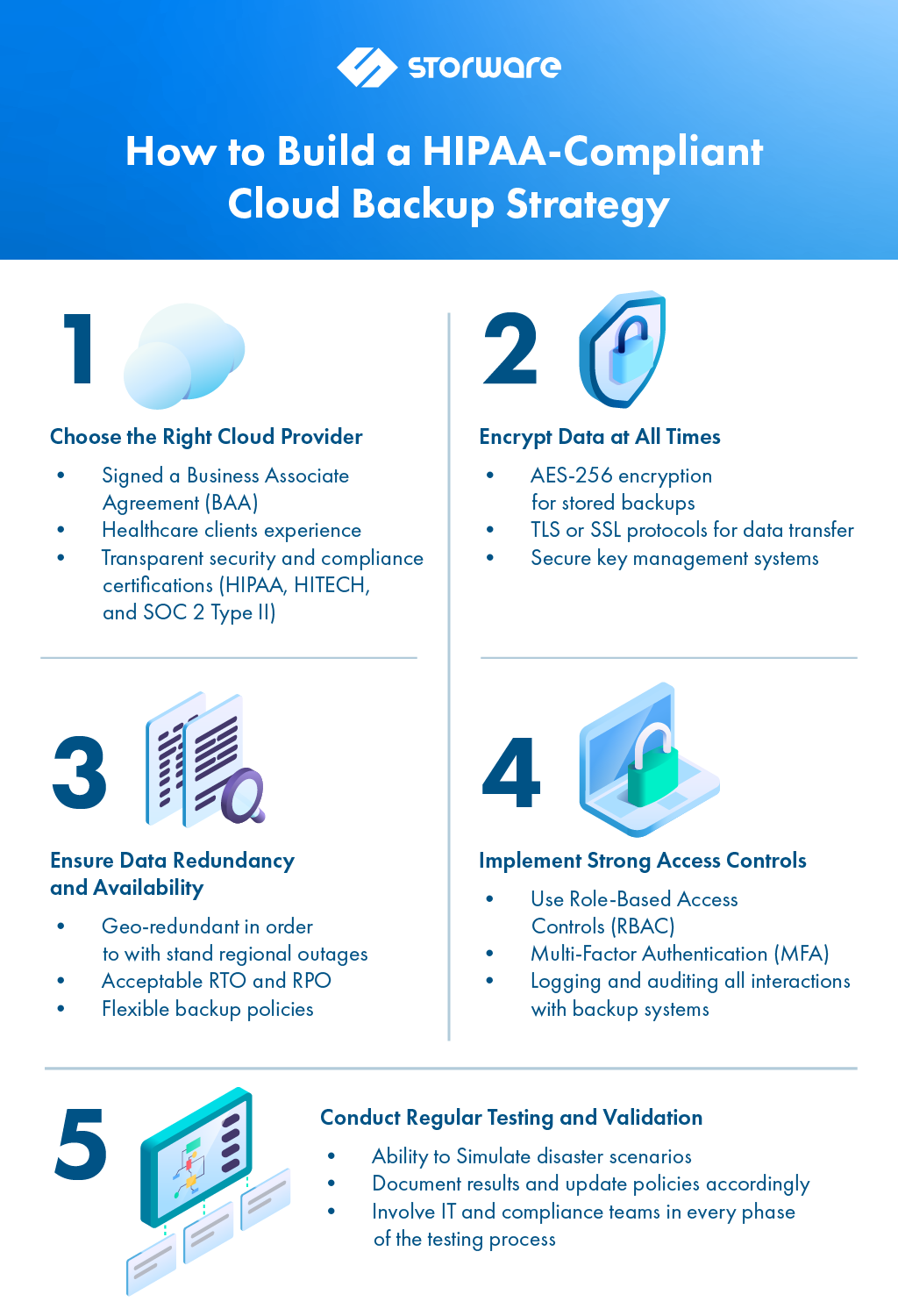
An effective cloud backup plan has to be proactive, tested several times, and compliant with HIPAA. Here’s how you approach it:

Choose the Right Cloud Provider

Not every cloud vendor is prepared to meet HIPAA’s requirements. You’ll need a provider that:

  • Offers a signed Business Associate Agreement (BAA)
  • Demonstrates a proven track record with healthcare clients
  • Provides transparent security practices and compliance certifications

Seek vendors with industry-standard certifications, including HIPAA, HITECH, and SOC 2 Type II.

Encrypt Data at All Times

HIPAA necessitates the safeguarding of ePHI both at rest and in transit. This means

  • Enabling AES-256 encryption for stored backups
  • Using TLS or SSL protocols for data transfer
  • Implementing secure key management systems

This ensures that the data remains unreadable even if unauthorized actors access backups.

Ensure Data Redundancy and Availability

Cloud backups must be:

  • Geo-redundant in order to withstand regional outages.
  • Supported by Recovery Point Objectives (RPOs) and Acceptable Recovery Time Objectives (SLAs) specifications.
  • Capability of automatic and frequent backups with choices for long-term storage.

Redundancy isn’t just a performance booster; it’s a compliance measure.

Implement Strong Access Controls

Unauthorized access is one of the most common causes of HIPAA breaches. Limit exposure by:

  • Using Role-Based Access Controls (RBAC) to grant access based on job roles
  • Enforcing the principle of least privilege
  • Deploying Multi-Factor Authentication (MFA) for cloud portal access
  • Logging and auditing all interactions with backup systems

This creates a controlled, traceable environment around your sensitive cloud data.

Conduct Regular Testing and Validation

A backup that doesn’t work is a liability. HIPAA requires regular testing and revision of all backup and disaster recovery procedures. Best practices include:

  • Simulating disaster scenarios to test recovery speed and integrity
  • Documenting results and updating policies accordingly
  • Involving IT and compliance teams in every phase of the testing process

Testing ensures that your cloud-based recovery plan isn’t just theoretical—it’s reliable when needed.

Common Pitfalls to Avoid

Even well-intentioned organizations can fall into traps that undermine their HIPAA backup strategy. Watch out for these frequent mistakes:

  • Assuming all cloud storage is HIPAA-compliant. A vendor’s offering of encryption or redundancy does not automatically satisfy all compliance criteria.
  • Failing to sign a business associate agreement (BAA) means your cloud provider is not legally obligated to follow HIPAA.
  • Using consumer-grade backup tools. For instance, the Standard edition of Dropbox or Google Drive lacks the restrictions required for healthcare data and isn’t built for HIPAA compliance.
  • Ignoring backup monitoring calls for regular validation of completion, integrity, and accessibility.

Steering clear of these traps calls for diligence, teamwork, and vendor responsibility.

The Role of Immutable Backups and Air-Gapping

Healthcare organizations should consider including immutable backups (copies of data that cannot be changed or deleted for a designated period) for extra security. These backups can stop ransomware attackers from either encrypting or destroying recovery information.

In tandem, air-gapping techniques (storing backups in physically or logically separated environments) offer another layer of protection. Appropriately utilized techniques enable you to keep HIPAA compliance even in worst-case situations.

To Sum Up: Compliance is a Continuous Process

Adoption of cloud backup systems only modifies your HIPAA responsibilities rather than absolving them. Protecting ePHI in the cloud calls for a well-crafted backup plan that strikes a compromise between security, performance, and compliance.

To recap, a HIPAA-compliant cloud backup strategy should:

  • Built with a vetted provider that offers a BAA
  • Include encryption, access controls, and redundancy.
  • Be tested and monitored regularly.
  • Align with HIPAA’s administrative, physical, and technical safeguards

Cloud backup compliance reflects your company’s dedication to data protection, patient safety, and regulatory responsibility, more than just a checkbox. Your patients and operations will be less vulnerable in the face of growing risks, the more solid your plan is.

About Version 2 Digital

Version 2 Digital is one of the most dynamic IT companies in Asia. The company distributes a wide range of IT products across various areas including cyber security, cloud, data protection, end points, infrastructures, system monitoring, storage, networking, business productivity and communication products.

Through an extensive network of channels, point of sales, resellers, and partnership companies, Version 2 offers quality products and services which are highly acclaimed in the market. Its customers cover a wide spectrum which include Global 1000 enterprises, regional listed companies, different vertical industries, public utilities, Government, a vast number of successful SMEs, and consumers in various Asian cities.

About Storware
Storware is a backup software producer with over 10 years of experience in the backup world. Storware Backup and Recovery is an enterprise-grade, agent-less solution that caters to various data environments. It supports virtual machines, containers, storage providers, Microsoft 365, and applications running on-premises or in the cloud. Thanks to its small footprint, seamless integration into your existing IT infrastructure, storage, or enterprise backup providers is effortless.

Cybersecurity as a Business Enabler – CISO’s Driving Business Value, Productivity, and Cost Efficiency

For many organizations, cybersecurity has historically been seen as a necessary expense, like an insurance policy, rather than a strategic investment. But that outdated mindset is shifting rapidly. In today’s hyper-connected world, effective security is a business enabler. It accelerates digital transformation, safeguards productivity, protects revenue, and, when approached strategically, drives measurable cost savings in cybersecurity.

Forward-thinking organizations are now optimizing their cybersecurity budget through smarter investments, tool consolidation, and security automation, transforming security from a cost center into a value driver.

As one security leader put it:

“The conversation changes when you translate security risks into business terms such as business downtime, revenue impact, regulatory exposure. That’s when security becomes not just about protection, but a core part of how the business stays productive and competitive.”

Beyond Protection: Enabling Business Continuity and Resilience

Security teams are often asked to report on patch rates, incident detection times, or technical vulnerabilities. These metrics, while important for the security team, rarely resonate at the executive or board level unless translated into business outcomes.

The real question executives care about is simple: “If something goes wrong, how quickly can we detect it, contain it, and recover, and what does that mean for the business?”

Containing an incident quickly can be the difference between a minor disruption and a multi-million-dollar crisis. One security leader drew a parallel from their experience in emergency services:

“When somebody calls the emergency number, how quickly can you get help to that person, which can be the difference between life and death? That’s a massive service-level commitment. It’s the same with cyber incidents. Faster detection and response mean reduced impact and faster recovery.”

This is why modern security strategies emphasize not just prevention, but detection, containment, and recovery, all directly tied to business resilience.

Aligning Security with Business Priorities

The fundamental question executives care about isn’t technical; it’s risk, legal, operational, and financial:

  • How does security help keep services running?
  • How does it reduce risk without slowing the business down?
  • How can we achieve cybersecurity cost savings without increasing exposure?
  • How do we make the most of our cybersecurity budget in a resource-constrained environment?

To answer these, security leaders are embracing risk-based budgeting but prioritizing investments that directly reduce business risk and support critical operations, rather than spreading resources thin across low-impact areas.

“Risk-based budgeting helps us avoid spending on security for security’s sake. It focuses us on what actually protects the business and drives value, leading to a return on investment.”

Tool Consolidation and Security Automation: Doing More with Less

The average enterprise security stack has grown bloated and complex, with overlapping tools, redundant functionality, and spiraling costs. Not only is this expensive, but it also slows response times and creates operational blind spots.  Managing a multitude of tools presents a significant resource challenge, hindering the team’s ability to develop the necessary skills and knowledge for effective oversight and visibility.

Tool consolidation addresses this challenge head-on, streamlining security operations, reducing vendor complexity, and unlocking efficiency gains.

By consolidating platforms and introducing security automation, organizations can:

✔ Reduce tool sprawl and associated costs
✔ Improve visibility and control
✔ Accelerate incident detection and response
✔ Free up security teams to focus on higher-value tasks
✔ Drive measurable cybersecurity cost savings

“Tool consolidation and automation aren’t just about saving money, though they do that. They improve resilience and keep the business moving by making security more efficient and less reactive.”

Legacy Technology Divestment: Reducing Risk and Cost

Outdated, unsupported, or redundant technologies introduce both security vulnerabilities and hidden operational costs. Yet many organizations hesitate to part ways with legacy systems due to perceived complexity or sunk costs.

However, strategic legacy technology divestment delivers significant benefits:

  • Reduced attack surface and security risk
  • Lower maintenance and licensing costs
  • Simplified technology architecture
  • Greater agility and scalability
  • Alignment with modern security and compliance standards

As security leaders increasingly tie technology decisions to business outcomes, shedding outdated systems becomes a key component of both risk reduction and cybersecurity cost savings.

“Clinging to legacy technology isn’t just a technical debt issue; it’s a business risk. And divesting from it is often one of the fastest ways to cut costs and improve security.”

The Domino Effect of Poor Access Management

Many of the most damaging breaches share a common root cause: weak or unmanaged access controls typically related to identities and credentials.

Whether it’s stolen credentials sold for a few dollars on the dark web or privileged access abuse, attackers exploit identity gaps as their easiest entry point. From there, poor internal controls, such as a lack of network segmentation or weak separation of duties, allow them to escalate privileges, move laterally, and access critical systems.

“It’s literally a domino effect. That initial access is the first domino falling. But the last domino could be your ERP system, your customer data, or your intellectual property, and when that last domino falls, the business impact is massive.”

By managing access more effectively, including privileged accounts, third-party access, and machine identities, organizations not only reduce their risk but also improve operational efficiency and simplify regulatory compliance.

Predicting the Shift: Cyber Accountability in the Boardroom

Regulatory changes, such as new disclosure requirements, are forcing security into sharper boardroom focus. Leaders predict that organizations will face tougher scrutiny, not just on whether incidents occur, but on how well access controls, credential management, and privileged user rights are governed.

This creates both a challenge and an opportunity. Security leaders who can proactively frame these controls as business enablers protecting critical services, enabling faster recovery, and safeguarding productivity will be seen not as blockers, but as strategic contributors.

The key is to avoid overwhelming executives with technical details. Instead:

✅ Keep the conversation business-centric
✅ Explain how controls directly support operational continuity
✅ Connect risks and security investments to measurable business outcomes
✅ Demonstrate readiness through realistic scenarios and response plans

As one leader advised:

“There’s going to be a tug of war. In calm times, you keep it macro, business-focused. But in a crisis, boards will dive into the weeds asking detailed questions like, ‘How did we let this happen?’ Be prepared for both.”

The Future of Security as a Competitive Advantage

Modern security isn’t about saying no, it’s about enabling the business to move faster, innovate confidently, and stay productive, all while managing risk.

Organizations that embrace risk-based budgeting, pursue tool consolidation, leverage security automation, and commit to legacy technology divestment are finding they can both improve security and achieve real, measurable cybersecurity cost savings.

Security, when aligned to business goals, does more than reduce risk. It:

✔ Supports faster, safer digital transformation
✔ Enables employees to work productively and securely
✔ Reduces downtime and the financial impact of incidents
✔ Builds customer confidence and market credibility
✔ Enhances the organization’s ability to adapt, recover, and grow

“We’ll never eliminate all risk, but we can align security to the business, reduce costs, improve resilience, and make security a true competitive advantage.”


Bottom Line:
Security isn’t just about protecting the business. It’s about enabling it to operate, innovate, and grow safely, confidently, and with resilience built in.

About Segura®
Segura® strive to ensure the sovereignty of companies over actions and privileged information. To this end, we work against data theft through traceability of administrator actions on networks, servers, databases and a multitude of devices. In addition, we pursue compliance with auditing requirements and the most demanding standards, including PCI DSS, Sarbanes-Oxley, ISO 27001 and HIPAA.

About Version 2 Digital

Version 2 Digital is one of the most dynamic IT companies in Asia. The company distributes a wide range of IT products across various areas including cyber security, cloud, data protection, end points, infrastructures, system monitoring, storage, networking, business productivity and communication products.

Through an extensive network of channels, point of sales, resellers, and partnership companies, Version 2 offers quality products and services which are highly acclaimed in the market. Its customers cover a wide spectrum which include Global 1000 enterprises, regional listed companies, different vertical industries, public utilities, Government, a vast number of successful SMEs, and consumers in various Asian cities.

Segura® 4.0: A Smarter, Simpler Experience in Privileged Access Management

Segura® is proud to announce the launch of version 4.0, a major step forward in the Privileged Access Management (PAM) user experience. With a fully redesigned interface and tighter module integration, Segura® 4.0 gives you complete visibility across the platform and a faster, more efficient All-In-One experience.

Segura® 4.0 was built with a sharp focus on simplicity, efficiency, and personalization. It’s engineered to transform how you secure your most critical assets.

We designed this version for the teams who are short on time, tired of complexity, and ready for security that just works.

Our goal: Make every interaction intuitive and valuable to your daily work. Security doesn’t need to be so complex. Keep reading to see how Segura® 4.0 proves that.


What’s New in Segura® 4.0?

These updates were designed to save you time, reduce friction, and give your team more control right from day one.

Navigate Faster with a Clean, Modern Interface

Redesigned icons and standardized visuals create a more consistent, intuitive experience. Menus have been restructured for faster, more intuitive navigation so you can find what you need in seconds.

Customize Your View with a Drag-and-Drop Dashboard

Security management made easy. Customized, easy-to-use dashboards help you prioritize what matters most when managing your credentials, optimizing your time and decision-making.

Simplify Workflows with Step-by-Step Registration Wizards

No more complex forms – the registration process is now an intuitive, easy-to-follow, step-by-step guide. Registering credentials and third parties is now divided into simple, direct stages, guided by a Wizard, to fit right into your workflow.

Stay Ahead with a Centralized Notification Center

All alerts and updates from Segura® are now centralized in a single panel, making it easier to identify necessary actions and respond quickly to critical events.

Manage Credentials with the New Access Panel

The new Access Panel simplifies credential management with optimized filters and a more intuitive interface, so you can access and manage information quickly and directly. Detailed history is now available directly in the panel, making auditing processes even easier.

Find What You Need Faster with Enhanced Global Search

Search across the entire platform with improved speed, flexibility, and precision.

Features include:

  • Keyboard shortcuts for quick actions
  • Cross-module search with no limits
  • Search history tracking
  • Partial-term search to find results faster

Stay Compliant with Built-In Access Recertification

Automatically verify that only the right people have the right access; no manual tracking needed.

Segura® 4.0 is the only traditional PAM solution with native privileged access recertification, helping you improve compliance, visibility, and operational control.


Unveiling the Invisible: Master Machine Identities and Elevate Your Organization’s Security

The most dangerous threats are often the ones we can’t see. In today’s complex, automated environments, machine identities—SSH keys, certificates, service credentials, cloud keys, and Kubernetes secrets—work quietly behind the scenes, granting access to critical systems and data.

But when these identities aren’t properly managed, they become security blind spots—creating openings for serious attacks. The good news? Segura® Platform 4.0 brings them into focus and puts you back in control.

With our new Machine Identities module, you get a unified, consolidated view of every non-human identity in your organization.

Imagine a centralized report that pulls data from multiple sources and shows you ownership, management status, and the last update for every identity clearly and in one place.

This update redefines how you protect your most valuable assets by making non-human access visible, trackable, and fully controlled.

Forget the spreadsheets and manual tracking. Segura® 4.0 gives you a complete, integrated solution to manage machine identities with clarity, speed, and confidence.

Request a demo today and see how this new module helps you eliminate hidden risks, maintain control, and protect business continuity.

Why Choose Segura® 4.0 for Privileged Access Management?

Segura® 4.0 represents a major step forward in how teams manage privileged access.

As an Information Security Architect from one of our partner companies put it: 

“I’d recommend Segura® for its ease of use, quick deployment, and local Brazilian support. It doesn’t take much technical effort to get it up and running, and the usability is excellent. It’s an everyday tool for our team.”

With a focus on user experience, personalization, and operational efficiency, the latest version is built to simplify your routine and strengthen your security posture. That means faster actions, less time spent on training, and full visibility of your most critical assets.

Curious to see it in action?
Experience how Segura® 4.0 makes enterprise-grade security feel intuitive and powerful. Request your free demo today.

About Segura®
Segura® strive to ensure the sovereignty of companies over actions and privileged information. To this end, we work against data theft through traceability of administrator actions on networks, servers, databases and a multitude of devices. In addition, we pursue compliance with auditing requirements and the most demanding standards, including PCI DSS, Sarbanes-Oxley, ISO 27001 and HIPAA.

About Version 2 Digital

Version 2 Digital is one of the most dynamic IT companies in Asia. The company distributes a wide range of IT products across various areas including cyber security, cloud, data protection, end points, infrastructures, system monitoring, storage, networking, business productivity and communication products.

Through an extensive network of channels, point of sales, resellers, and partnership companies, Version 2 offers quality products and services which are highly acclaimed in the market. Its customers cover a wide spectrum which include Global 1000 enterprises, regional listed companies, different vertical industries, public utilities, Government, a vast number of successful SMEs, and consumers in various Asian cities.

The changing DNA of organized crime, Not-So-Secret Business Passwords, and UX/UI updates: catch up with NordPass in Q2 of 2025

Media and awards

Over the past few months, we have received quite a few awards. It’s a great honor to be recognized for our work creating advanced yet easy-to-use cybersecurity solutions.

GQ’s pick for the best password manager

To our great joy, the GQ team selected NordPass as the best overall password manager this year. GQ tests password managers based on price, ease of setup, and the quality of different features like autofill or password sharing. They noted that NordPass offers an easy-to-use interface, many features, and a good free tier.

American Business Stevie Bronze Medal

Here at NordPass, we strive to bring our users the best possible experience. So when there’s an unexpected hiccup or issue, our amazing Customer Support team is there to help 24/7. It was a great pleasure to be recognized by the American Business Stevie Awards with the Bronze Medal for Customer Support Department of the Year.

CyberTech category winner of the Global Tech Awards

Not a day goes by that we don’t think about how to improve and make cybersecurity effortless for individuals and companies. So, our team is truly happy to be recognized for excellence in the Cyber Security Technology category at this year’s Global Tech Awards. The selection criteria include technical quality, user experience, scalability, social impact, and more.


Global InfoSec Award for Passwordless Authentication

Lastly, the Global InfoSec Awards recognized NordPass for its passwordless authentication. This award celebrates NordPass’ commitment to advancing secure, password-free authentication solutions. With our passwordless authentication platform, Authopia, enterprises can enable seamless, passkey-based logins, help businesses reduce account takeover risks, and improve the user experience.

We have a passwordless login for our vault as well, so our users can access their accounts via biometrics. Additionally, NordPass supports cross-platform passkey storage and integration with identity providers like Google Workspace or Azure Active Directory.


Freshest NordPass updates and improvements

Okay, now let’s get back to the core of NordPass—the product itself—and see what improvements and updates our team has made.


Sharing Hub update

As organizations grow, the question of sharing becomes more prominent. More and more credentials are moved around teams and departments, often informally or without consistent oversight.

To tackle this problem, we released Sharing Hub this autumn, which included a viewing option that allowed organization Owners to see which items could be accessed and by whom, as well as who had shared or created them. This spring, we significantly improved the feature. Now, Owners can control access to all shared company credentials by granting, modifying, or revoking access rights for any shared item or folder as needed. They can also transfer ownership if required, all from a single place—the NordPass Admin Panel.


Sharing hub


What’s new with the company-wide Data Breach Scanner?

Similarly, we have made significant improvements to our tried-and-true Data Breach Scanner.

To ensure that your company gets the most from NordPass, we will now monitor your company’s domain based on the organization Owner’s email address, eliminating the need for separate verification. Note that in this case, you’ll only get notifications about the breaches but no detailed information on them. If you want to get that additional info, you’ll have to add your domain and verify it. As for domain verification, it’s now seamless and automated.

We also gave the breach report a facelift. Now, you’ll find a detailed description of the breach, the data it compromised, a list of affected organization members, and some recommendations for resolving the breach. In addition, admins can now see which breaches have been resolved and by whom.

Lastly, the “Breach details” list is now easier to navigate because it clearly distinguishes members’ statuses within the NordPass organization. It shows whether members are uninvited, suspended, or Admins, and which groups they belong to.

Data Breach


Business Account session management

From now on, organizations can set a 1-hour, 4-hour, 1-day, 7-day, 30-day, or custom time interval, after which the member session will end, and they will be logged out from NordPass. To continue using NordPass, the member will need to log in again, either using SSO or their Business Account credentials, and then verify their account with MFA, Master Password, or biometrics. For optimal security, we recommend setting the interval to 7 days. After this time, the member will need to log in again.


Filtering the Activity Log

Up next is the filtering improvement for the Activity Log feature. The Activity Log lets organizations gain insight into user activities by tracking access updates and identifying unusual behavior. From now on, Admins and Owners can search the Activity Log by the item ID, allowing them to streamline security investigative processes by quickly identifying suspicious activities. This filtering option, together with filtering by member and date, allows admins to see all actions made to a particular item.

activity log


Integration with Microsoft Sentinel

By striving to build a seamless NordPass user experience, we have integrated with Microsoft Sentinel, an SIEM tool. From now on, our Enterprise customers can significantly strengthen their organization’s ability to meet compliance objectives by maintaining audit trails.

This integration allows Enterprise users to export and access NordPass activity logs alongside the data from other systems within Microsoft Sentinel. In doing so, companies can gain a holistic view of their security posture, conduct analysis, and quickly detect and respond to potential threats.


You asked, and we delivered

We are always eager to hear your feedback and improve accordingly. So, with that in mind, we ended last quarter with several user experience tweaks. Starting with the NordPass autofill icon, we have made 2 UX improvements:

  • You can now easily tell if your vault is locked thanks to the improved NordPass autofill icon. If you want to unlock the vault, simply click on the icon to open the pop-up window where you can enter your Master Password or use biometrics.

  • You can now turn off the NordPass autofill suggestions by clicking the icon. The choice will stay the same throughout the form you’re filling in.

autofill


NordPass’ interface redesign

The vault interface across all our platforms and the Admin Panel are where our users primarily engage with and monitor their cybersecurity status. Therefore, we want to provide the most user-friendly experience possible. This quarter, we made some design changes to the iOS, Android, and other platforms to give the UI a more modern look and feel, in line with our NordPass rebranding, which we revealed last year. Additionally, all these platforms have seen usability improvements.


Research and other reports

This quarter was equally rich with research and reports, ranging from our classic report on the most common passwords to a brand-new one on digital anxiety. So let’s see what we discovered:


TOP 20 Not-So-Secret Business Passwords

Together with NordStellar, we’ve analyzed the most common business passwords from 11 industries to uncover the habits behind office doors. Unfortunately, the password patterns are poor and truly not-so-secret. So poor, you might be able to guess the 3 most popular corporate passwords yourself. Yes, they’re “123456,” “123456789,” and “12345678.” If you guessed “password,” don’t worry, it’s on the list.

Our research also showed that using an email address as a password is just as common—it’s convenient, yes, but it’s one of the quickest ways to give your business credentials to hackers. Similarly, many people use their names for work-related passwords—another unfortunate practice that can expose the entire organization’s sensitive data to potential threats.

top 20 not so secret bisiness passwords


TOP 200 Most Common Passwords

Ah, and yes, what’s NordPass without our annual TOP 200 Most Common Passwords research? It’s our sixth year in a row—this time, in collaboration with NordStellar—analyzing people’s password habits. And not so shockingly, they are still bad.

We researched passwords from 44 countries that were stolen by malware or exposed in the data leaks. Because they were leaked with email addresses in most cases, we could distinguish corporate and personal credentials by domain name, gaining more insight into both areas.

Top 200 most common passwords


Digital Anxiety Report

This quarter, we tapped into a new field and released a study on digital anxiety. We wanted to see how many people struggle with it and what’s causing it. The results, or reasons for digital anxiety, are probably those that most people will relate to.

Nearly 80% of people have digital anxiety, which mostly comes from the fear of facing cybersecurity issues like account takeover, identity theft, or scams. However, mild to moderate anxiety was reported due to excessive ads or lack of internet access. As it turns out, even minor inconveniences online can take a toll on our mental well-being.


Stop reusing passwords

Do you have that one good and faithful password you’ve used since high school? Maybe it’s scaterrrboi!94, which ticks most sites’ requirements for password length and includes a special character and two numbers—why change it? Well, according to our recent survey, it turns out that it’s common to reuse passwords. Learn more about why people still reuse passwords in 2025 and why this habit poses a formidable threat to cybersecurity.


Ex-hacker: 5 cyber threats that password managers protect against

We seek to spread knowledge about cybersecurity in every possible way, and sometimes, showing the nitty-gritty behind it is just what might be needed. So this spring, we collaborated with Daniel Kelley, a reformed black hat hacker, to understand the 5 main cyberattacks that can be prevented using a password manager. These threats include phishing, credential stuffing, brute-force attacks, keyloggers, and database leaks. By revealing the inner workings of these attacks, Daniel shed light on why relying on a password manager is vital.

Cyber threats


2025 EU-SOCTA: the changing DNA of organized crime

The EU-SOCTA documented a serious shift in organized crime: it seeped into the online world, creating new hybrid and wholly virtual threats that require unprecedented strategies to tackle. These threats may be accelerating and becoming more dangerous and destabilizing.

For example, one of the biggest threats posed by serious and organized crime is the destabilization of the EU. Criminal organizations aim to reduce trust in the legal system and government by spreading violence, corruption, and illicit proceeds. They rely on digital innovations like AI to conceal their activities and make tracing crime back to its source harder.

Although the landscape painted by the EU-SOCTA might seem grim, it indicates potential future trends, allowing individuals and businesses alike to prepare for evolving risks. So, we took this opportunity to explain how Nord Security products, including NordPass, can help.

Breaking down SOCTA 2025


Bottom line

And that’s a wrap! This quarter was busy with research and product improvements. Yet one thing is clear: we’re not planning to stop this summer, so we’ll see you again in a few months to review what we’ve been brewing. Stay safe with NordPass!

About NordPass
NordPass is developed by Nord Security, a company leading the global market of cybersecurity products.

The web has become a chaotic space where safety and trust have been compromised by cybercrime and data protection issues. Therefore, our team has a global mission to shape a more trusted and peaceful online future for people everywhere.

About Version 2 Digital

Version 2 Digital is one of the most dynamic IT companies in Asia. The company distributes a wide range of IT products across various areas including cyber security, cloud, data protection, end points, infrastructures, system monitoring, storage, networking, business productivity and communication products.

Through an extensive network of channels, point of sales, resellers, and partnership companies, Version 2 offers quality products and services which are highly acclaimed in the market. Its customers cover a wide spectrum which include Global 1000 enterprises, regional listed companies, different vertical industries, public utilities, Government, a vast number of successful SMEs, and consumers in various Asian cities.

How to connect multiple offices with a VPN

Summary: A VPN enables companies to securely link multiple sites and provides employees with safe access to internal resources.

If your business has multiple locations, you probably want them all to stay connected, right? You need information to flow smoothly between sites, without any hiccups. But it’s not like you can achieve that by just plugging in a few cables. It doesn’t work like that.

What you need is to set up—that is, digitally build—a robust and secure network that can connect multiple offices without ever putting your company’s data at risk. That’s where a VPN enters the scene. Let’s show you how you can use it to create a secure connection between your sites.

Why companies need to connect multiple offices securely

It doesn’t matter if your company connects just two offices or a dozen—once you’ve got one network linking multiple locations, someone might be looking for a way to get into one site and use it as a gateway to others.

That is, if your connection isn’t properly secured, cybercriminals could potentially break into your internal systems from any of the connected sites. Even if not, they might try to intercept sensitive data as it moves between locations. Either way, it could lead to stolen customer information, leaked intellectual property, or exposed communication like internal emails.

And that’s not all. A weak connection between company offices can open the door for malware or ransomware to spread. Just one compromised location can put your entire network at risk. That kind of breach can bring all your operations to a halt and cost you a lot of time and money.

Last but not least, there’s compliance. As you know, many industries have strict data privacy rules—like GDPR, HIPAA, and many others. So, if your office-to-office communication isn’t well protected, you could end up not being compliant with the regulations, which can lead to fines, legal issues, or damage to your reputation.

 
How you can connect to the company network via VPN

Most people think of a VPN—short for Virtual Private Network—as software that hides their device’s IP address and keeps their internet activity private. And that’s true—but VPNs can do more than that. For example, employees can use them to connect securely to their company’s internal network.

So, how does it work from the user’s perspective? This is done using a VPN client—an application that allows your device to connect securely to a VPN server. But instead of connecting to a public or random server, you’re connecting to your company’s own virtual private network.

Of course, that VPN server isn’t open to just anyone. The company must first give you access rights or configure your account to allow VPN access. Then, each time you try to log in, you’re verified, usually through authentication methods such as passwords, TOTP (time-based one-time password) codes, or magic links.

Once you’re authenticated, the VPN client and the company’s server create an encrypted tunnel between your device and the internal network. This allows you to safely access files, apps, and other internal systems—just as if you were in the office, connected to the company Wi-Fi.

Key benefits of using a VPN to connect multiple locations securely

We’d go as far as to say that once a business grows beyond a single headquarters, setting up office-to-office VPN connectivity isn’t just a nice-to-have—it’s essential. Why? Because it brings so many benefits to how teams work and collaborate that it becomes an operational necessity.

Top reasons to use a VPN for connecting multiple sites

Here are a few key advantages of connecting your offices through a VPN:

  • Secure data sharing: By creating encrypted VPN tunnels between your offices, you ensure that sensitive information remains protected during transfer from one location to another.
  • Consistent access to company systems: Employees in different locations—including remote workers—can securely access shared systems, services, and data as if they were all working side by side.
  • Reduced costs: Rather than paying for expensive dedicated connections between offices, a VPN allows you to safely use the public internet at a fraction of the cost.
  • Improved access management: When you connect multiple offices with a VPN, your IT team can easily manage network resources, monitor activity, and enforce strict security policies—all from one central place.
  • Controlled access: VPN gateways let you restrict which parts of the company network employees can access, making sure that everyone can only reach the resources they’re authorized to use.
  • Better collaboration: When teams can share data easily and safely across locations, working together between offices just gets smoother and more productive.

Choosing the right VPN setup for your company

Decided to connect multiple offices with a VPN? Great! Now, the next step is figuring out how to set it up. There are two main options to consider: site-to-site VPN and remote access VPN.

Each of those meets different needs and works in different ways depending on your company’s size, structure, and how your teams connect to resources. So, the setup and management will look different based on which route you take. Because of that, it’s worth taking a little time to learn about both before making a decision. Here’s what you need to know.

Site-to-site VPN

Like its name suggests, Site-to-Site VPN is about connecting entire office networks that are in different physical locations.

The way it works is by using routers or firewalls at each office, which are set up as VPN gateways. These VPN gateways encrypt and decrypt data as it travels between offices. So, data is technically moving over the public internet, but it goes through a secure tunnel from start to finish, which keeps it protected while in transit.

Once configured, these site-to-site VPN tunnels are either always active or automatically turned on when needed. As a result, devices at each location can see and access each other’s resources as if they’re on the same local network—even though they’re actually miles apart.


Remote access VPN

Remote access VPN allows individual users to connect to your company’s private network from any location.

So, unlike a site-to-site VPN, which connects multiple office networks together, here each employee’s device uses a VPN client to log in and create an encrypted connection to the company’s VPN server. Once that connection is established, the user gains access to the company’s digital resources. However, administrators can—at any point—control exactly what the user can see and do by using access controls, network segmentation, firewalls, and other security tools.

As the name implies, this setup is best suited for remote work, where employees are spread out around the world but still need secure access to the same company systems, data, and tools to do their jobs effectively. This setup can also be used to connect employees from different offices, treating each office as a remote site.

Best practices for configuring office-to-office VPN

Setting up a secure connection between offices looks different for every company—after all, no two companies have the same number of offices, countries, devices, or systems. But there are a few key things every company should do when setting up this kind of connection, and they are:

  • Properly configure all VPN gateways: Set up the right IP addresses, routing rules, and firewall permissions to make sure data travels securely between locations.
  • Use strong encryption: Ensure data is encrypted while in transit using up-to-date algorithms like AES-256 or XChaCha20.
  • Implement authentication methods: Use techniques like multi-factor authentication (MFA) to ensure only trusted users and devices can connect.
  • Monitor your VPN setup at all times: Watch out for unusual activity or connection problems to catch potential threats before they escalate.

How Nordlayer can help secure your company network

As you’d expect from a truly advanced network access security platform, NordLayer brings the best of both worlds with a secure access service edge (SASE) solution that enables the creation of a hybrid setup combining site-to-site VPN and remote access VPN.

That’s right! With NordLayer, you can create an encrypted connection between your branch offices (Site-to-Site VPN) while also making it possible for individual users to securely connect to your company’s private network (Business VPN)—simultaneously, with advanced access controls for each VPN connection.

With such flexibility, along with features like Always On VPN and support for Zero Trust policies, NordLayer makes it easy to connect multiple offices without compromising your team’s workflows.


About NordLayer
NordLayer is an adaptive network access security solution for modern businesses – from the world’s most trusted cybersecurity brand, Nord Security.

The web has become a chaotic space where safety and trust have been compromised by cybercrime and data protection issues. Therefore, our team has a global mission to shape a more trusted and peaceful online future for people everywhere.

About Version 2 Digital

Version 2 Digital is one of the most dynamic IT companies in Asia. The company distributes a wide range of IT products across various areas including cyber security, cloud, data protection, end points, infrastructures, system monitoring, storage, networking, business productivity and communication products.

Through an extensive network of channels, point of sales, resellers, and partnership companies, Version 2 offers quality products and services which are highly acclaimed in the market. Its customers cover a wide spectrum which include Global 1000 enterprises, regional listed companies, different vertical industries, public utilities, Government, a vast number of successful SMEs, and consumers in various Asian cities.

×

Hello!

Click one of our contacts below to chat on WhatsApp

×
