Skip to content

Notifications Telegram: Pandora FMS

Content:

For environments where you have the need to know immediately if any issues arise, such as production environments, security or critical resources of your company, this Pandora FMS integration with Telegram is absolutely perfect, as it is the answer to that required immediacy, as well as the possibility of offering exact information about the location and cause of the problem, thanks to the powerful Pandora FMS system of alerts and macros.

Likewise, being a messaging service based on telephone communications through the data network, it guarantees your technicians, managers and on-call operators that they will find out aboutany problem at the exact moment it appears, without the need to access a computer or manually check their email.

Thanks to the plugins of your library and the flexible alert system offered by Pandora FMS, we will show you how to configure your monitoring tool to send instant messages whenever a problem is detected.

First of all, you must start from the necessary environment, whose requirements are:

  • Pandora FMS environment running on Linux, in this case we will use Rocky Linux 8, the distribution recommended by the manufacturer.
  • Our library plugin: Telegram bot CLI.
  • Telegram account available to be used as a broadcaster for alert messages.

Bot creation

First of all, create the Telegram bot that will be in charge of sending messages. From the Telegram account you wish to use, you will have to interact with the user BotFather using the “/start”command:

Then use the comman “/newbot” to create your bot.

It will ask you for the name you wish your bot to have. Here specify the name you wish for your bot. It is important for the name to end with “bot”, for example Pandora_FMS_telegram_bot.

By sending you the name, if it is not in use, it will confirm that the bot was properly created, with a link to your chat and give you a Token that is important for you to save to set up the alert later.

Group Setup

Now enter the bot that you just created in an existing group you may have or a new one that you create, to receive your alerts.

The next step is to add another bot called GetIDs Bot to the same group in order to get the group identifier. By adding it, it will leave you a message with the ID of your group, and you should also take note of that for later.

With all of this you will already have your Telegram ready to receive alerts.

Integration with Pandora FMS (versions 773 and earlier)

First you should start by downloading our plugin Telegram bot CLI.

It will download a zip file called telegram-bot-cli.zip, which you should decompress.
Inside, you will find a file called “pandora-telegram-cli.py” which must be added to your Pandora FMS server in the path “/usr/share/pandora_server/util/plugin”.

Now, from the terminal of your server, install the Python3 dependencies (if you do not already have them) by means of the command “dnf install python3”:

Once installed, run the plugin to verify that it is running, through the command “python /usr/share/pandora_server/util/plugin/pandora-telegram-cli.py”:

We will now move on to Pandora FMS server console.
Go to the “Management > Alerts > Commands” section and click “Create”:

And set up your alert command as follows:

On command, type in the following:

python3
/usr/share/pandora_server/util/plugin/pandora-telegram-cli.py -t _field1_ -c _field2_ -m “_field3_”

The command that we will use is for executing the plugin that you downloaded, with the arguments -t, -c and -m. It is important for the argument -m to be enclosed in quotation marks “”.

  • In the field of argument -t, Bot Token, enter the token of your bot.
  • In the field of argument -c, Chat ID, enter the ID of the group that bot “GetIDs Bot” provided you with.
  • And in the -m field, Alert Message, enter the alert message that you want your bot to send to the group. You may use all the alert macros you need, some examples are:
    • _module_: Name of the module that triggered the alert.
    • _agentalias_: Alias of the agent that triggered the alert.
    • _modulestatus_: Status of the module when the alert was triggered.
    • _agentstatus_: Status of the agent when the alert was triggered.
    • _data_: Data of the module that triggered the alert.
    • _timestamp_: Time and date the alert was triggered.

For example, you could use this message (which we will enter in field3): “The module _module_ of agent _agentalias_ has changed to _modulestatus_ status”

.

Once all this is filled in, click “Create”.

Now access the “Management > Alerts > Actions” section of your Pandora FMS console and click “Create” to create your action.

Enter the name you want your action to have, select the group, the alert command that you created previously and choose a Threshold. All the fields will be filled in automatically and click “Create”:

Now access the “Management > Alerts > List of Alerts” section and configure the alert for the Agent and Module you want.

In this case select that when the “Host Alive” Module of the “Router” agent goes into critical state, your previously created “Telegram Message” action will be executed:

If your module goes into critical state, you will receive this message to your Telegram group:

When your alert recovers you will receive a message like this:

Integration with Pandora FMS (versions 774 and later)

In version v7.0NG.774, the Telegram plugin of your library has been added by default to Pandora FMS alert, with a standard basic configuration.

If you access the Management > Alerts > Commands section, you will have a command called “Pandora Telegram”:

When accessing it, you will see that the command that will execute your alert is already configured.
Fill the -t “TOKEN” parameter of the command with the token given to you by BotFather and save the command:

After this, access the Management > Alerts > Actions section and access Pandora Telegram action.
At the bottom, add the Chat ID of your group that gave you the bot “GetIDs Bot” In the Triggering and Recovery sections, you may modify the message to your liking using the alert macro as you saw previously, and click “Update”:

Once saved, enter the Alert List menu from Management > Alerts > List of Alerts and create a new alert.
Select the agent and module, the action you updated “Pandora Telegram”, the template you want and create the alert:

Once your alert is triggered, you will receive your message by Telegram:

Sending alerts with data graphs

In our integration of Pandora FMS alerts and Telegram, you may add to the message a graph with the latest data of the module that triggered the alert, this applies both for version 773 and earlier and for 774 and later. You will be able to send graphs in your alerts by adding a call to the API of your Pandora FMS server to the script you used previously.

The first step that you must configure on your server is access to Pandora FMS API in the “Setup > Setup > General Setup” section, in the “API password” field you will have the API password and in the “IP list with API access” enter the IPs that need access or you may provide access to any IP (*).

Now edit the command that you had previously created to add the necessary data to send the graph. You need to add the following parameters:

  • –api_conf: Here indicate the configuration parameters of the API of your server, it is important to fill in the fields ” < >“:
    “user=,pass=,api_pass=,api_url=http:///pandora_console/include/api.php”.
    Example: “user=admin,pass=pandora,api_pass=1234,api_url=http://10.0.5.100/pandora_console/include/api.php”
  • –module_graph: Parameters of the module from which you will retrieve the graph, in this case there is two of them:
    • module_id: Where the ID of the module that triggered the alert is entered. In this case use the alert macro_id_module_ so that it is always filled in with the module ID of the alert.
    • interval: Total time interval shown in the graph, in seconds. We will use 3600 seconds by default, the equivalent of 60 minutes or 1 hour but you may configure the interval that best suits you.

The resulting full command will be as follows:

Command:

And field configuration:

And save the changes.

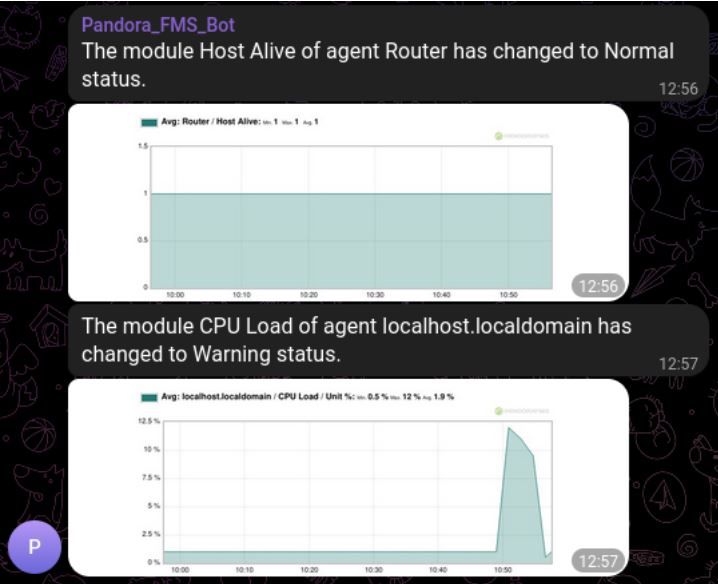
When the alert is triggered, you will receive the message with the data graph of your module:
El equipo de redacción de Pandora FMS está formado por un conjunto de escritores y profesionales de las TI con una cosa en común: su pasión por la monitorización de sistemas informáticos.

Pandora FMS’s editorial team is made up of a group of writers and IT professionals with one thing in common: their passion for computer system monitoring.



About Version 2 Digital

Version 2 Digital is one of the most dynamic IT companies in Asia. The company distributes a wide range of IT products across various areas including cyber security, cloud, data protection, end points, infrastructures, system monitoring, storage, networking, business productivity and communication products.

Through an extensive network of channels, point of sales, resellers, and partnership companies, Version 2 offers quality products and services which are highly acclaimed in the market. Its customers cover a wide spectrum which include Global 1000 enterprises, regional listed companies, different vertical industries, public utilities, Government, a vast number of successful SMEs, and consumers in various Asian cities.

About PandoraFMS
Pandora FMS is a flexible monitoring system, capable of monitoring devices, infrastructures, applications, services and business processes.
Of course, one of the things that Pandora FMS can control is the hard disks of your computers.

An optimal technology stack for SMBs: fortifying your business in today’s world

In today’s fiercely competitive business environment, small and mid-sized businesses (SMBs) must be agile and resilient— and fortify themselves against security risks. Crafting the right technology stack is critical to achieving these objectives. In this blog post, I’ll explore an optimal technology stack for SMBs, encompassing cutting-edge solutions like remote browser isolation (RBI), cloud computing, Zero Trust Network Access (ZTNA), and more. loud computing, Zero Trust Network Access (ZTNA), and more. I’ll also delve into how these technologies address today’s major threat vectors, including phishing, weak passwords, remote work, and lateral movement by threat actors. Discover how Parallels RAS can help your business — download your free trial now!

Cloud computing: the foundation of security

Building your technology stack on cloud computing provides a solid foundation for addressing various threat vectors. Cloud service providers like Amazon Web Services (AWS), Microsoft Azure, and Google Cloud Platform (GCP) offer robust security measures, including data encryption, threat detection, and identity access management. Here are some of the most common threat vectors and how cloud computing addresses them:
  • Phishing: Cloud-based email security solutions can identify and filter out phishing emails, preventing employees from falling victim to these attacks.
  • Bad passwords: Implementing multi-factor authentication (MFA) within your cloud environment enhances security by requiring additional verification beyond passwords.
  • Remote work: Cloud-based applications and data allow for secure remote access, and cloud providers ensure data encryption and security in transit.
  • Lateral movement: Proper cloud configuration and access controls reduce the risk of unauthorized lateral movement within the cloud environment.

Zero Trust Network Access (ZTNA)

In the era of remote work and evolving threats, the Zero Trust model is indispensable. ZTNA or Zero Trust Network Access models assume that no one, whether inside or outside the organization, can be trusted until their identity and device are verified. This approach is pivotal in safeguarding against the lateral movement of threat actors. Here is how ZTNA addresses various common threat vectors:
  • Phishing: ZTNA ensures that even if an employee’s credentials are compromised, access is only granted after further verification, reducing the risk of phishing attacks.
  • Bad passwords: Strong authentication policies enforced by ZTNA mitigate the impact of weak passwords.
  • Remote work: ZTNA secures remote access by requiring verification for each session, regardless of the user’s location.
  • Lateral movement: By segmenting access and verifying users and devices at every step, ZTNA reduces the risk of lateral movement by threat actors.

Remote Browser Isolation (RBI)

Phishing attacks often target web browsers, making remote browser isolation a game-changer. RBI or remote browser isolation technology keeps web browsing activities away from the local device, preventing malware and malicious code from infiltrating your network. How remote browser isolation addresses today’s major threat vectors:
  • Phishing: Remote browser isolation ensures that even if an employee clicks on a malicious link, the threat remains isolated in a remote environment, unable to access your network.
  • Bad passwords: Remote browser isolation can also protect against keyloggers, which are often used to steal passwords.
  • Remote work: With employees working from various locations, remote browser isolation provides an added layer of security for web browsing, reducing the risk of malware infections.
  • Lateral movement: Isolating web browsing activities further mitigates the risk of lateral movement via compromised web content.

Business digitization and collaboration

To effectively combat threats, SMBs must embrace digitization and collaboration tools. Modern collaboration platforms like Microsoft Teams and Slack, integrated into your technology stack, facilitate secure communication and collaboration among remote teams. Here’s business digitation and collaboration technologies can protect you against various common threat vectors:
  • Phishing: Collaboration platforms enable employees to verify suspicious emails with colleagues before taking any action, reducing the chances of falling for phishing attempts.
  • Bad passwords: Encourage the use of password managers and MFA within collaboration tools to fortify password security.
  • Remote work: Collaboration platforms centralize communication, making it easier for remote teams to collaborate securely.
  • Lateral movement: With centralized communication and access controls, collaboration platforms limit the potential for lateral movement by threat actors.
In conclusion, constructing an optimal technology stack for SMBs is a strategic move in today’s digital landscape. Cloud computing, ZTNA, remote browser isolation, and collaboration tools collectively address major threat vectors, fortifying your business against phishing attacks, weak passwords, remote work challenges, and the lateral movement of threat actors. By adopting these technologies, SMBs can not only protect their assets but also position themselves for growth and resilience in an ever-evolving threat landscape. See how you can protect your business and set yourself for success in 2024 (and beyond) with Parallels RAS. Try it now Did you enjoy this post? Check out Dr. Zero Trust’s previous blog posts on Zero Trust strategies, remote browser isolation, and more.

About Version 2 Digital

Version 2 Digital is one of the most dynamic IT companies in Asia. The company distributes a wide range of IT products across various areas including cyber security, cloud, data protection, end points, infrastructures, system monitoring, storage, networking, business productivity and communication products.

Through an extensive network of channels, point of sales, resellers, and partnership companies, Version 2 offers quality products and services which are highly acclaimed in the market. Its customers cover a wide spectrum which include Global 1000 enterprises, regional listed companies, different vertical industries, public utilities, Government, a vast number of successful SMEs, and consumers in various Asian cities.

About Parallels 
Parallels® is a global leader in cross-platform solutions, enabling businesses and individuals to access and use the applications and files they need on any device or operating system. Parallels helps customers leverage the best technology available, whether it’s Windows, Linux, macOS, iOS, Android or the cloud.

23.9.11 ‘Voyager’ released

New Features

  • Support new “Latest VM State (Changed Block Tracking)” option for Hyper-V for improved backup performance.
  • Added support for VMware ESXi hosts running on a free license. Comet now supports both the free and paid versions of VMware for backups and restores.
  • Added the ability to enforce policies created by a top-level administrator onto tenant administrators and tenant users. This allows top-level administrator to enforce settings and preferences across an entire Comet Server.

Enhancements

  • Improved the admin accounts dialogue to have a separate Policies tab in the Comet Server web interface.

Bug Fixes

  • Fixed an issue with the Comet Backup desktop app not refreshing the Job History when a new backup job is started.
  • Fixed an issue with hourly scheduler where it failed to adjust correctly to the USA Daylight Savings Time (DST)
  • Fixed an issue with the Comet Backup desktop app jumping to a different Protected Item view when there is a Protected Item being edited. This usually occurred when a scheduled backup was run.
  • Fixed an issue where VMware snapshots created in CBT mode had incomplete chunks.
  • Fixed an issue with the My Devices chart on the Comet Server web interface failing to render.

About Version 2 Digital

Version 2 Digital is one of the most dynamic IT companies in Asia. The company distributes a wide range of IT products across various areas including cyber security, cloud, data protection, end points, infrastructures, system monitoring, storage, networking, business productivity and communication products.

Through an extensive network of channels, point of sales, resellers, and partnership companies, Version 2 offers quality products and services which are highly acclaimed in the market. Its customers cover a wide spectrum which include Global 1000 enterprises, regional listed companies, different vertical industries, public utilities, Government, a vast number of successful SMEs, and consumers in various Asian cities.

About Comet
We are a team of dedicated professionals committed to developing reliable and secure backup solutions for MSP’s, Businesses and IT professionals. With over 10 years of experience in the industry, we understand the importance of having a reliable backup solution in place to protect your valuable data. That’s why we’ve developed a comprehensive suite of backup solutions that are easy to use, scalable and highly secure.

Web Security Challenges in Hospitality Business: A Case for Cloud Web Filtering

In the fast-paced world of hospitality, where customer satisfaction is of utmost importance, the digital landscape presents both opportunities and risks. Nowadays, hotels and restaurants experience a huge amount of online challenges: they become targets for cybercriminals due to their handling of sensitive data and face reputational risks associated with guests’ online experiences.

Understanding the evolving digital problems landscape and taking preventative measures such as content filtering is paramount to protecting businesses from potentially catastrophic outcomes.

The Allure of Hospitality for Hackers

Hospitality organizations store a lot of valuable information, making them attractive targets for cybercriminals. Installing malware on POS systems allows hackers to steal customers’ credit card information, causing significant reputational and financial damage to businesses. Moreover, the growing trend of ransomware attacks, where hackers paralyze systems and demand large ransoms for restoration, can result in million-dollar losses and occupancy declines of 80–90%.

Alarming Statistics: A Wake-Up Call for the Hospitality Industry

Recent research emphasizes the severity of the issue, revealing that 67% of accommodation and food businesses have fallen victim to cyberattacks. This places the industry in third place, behind only the education and arts, entertainment, and recreation sectors. Despite this alarming statistic, many businesses focus their investments on only traditional security systems and practices, often overlooking the critical human factor.

The Human Element: A Vulnerability Exploited

Latest ransomware attacks on the HoReCa sector (е.g., MGM and Caesar cases) emphasize that people might be the weakest link in the cybersecurity chain. Hackers can identify, for instance, a random tech employee of the target company and here we are: within 10-15 minutes they get access to the systems. The simplicity of many attacks usually relies on such tactics as tricking people into clicking on suspicious links and inputting credentials. This is reason enough to reflect on the critical need for employee training and measures that can prevent users from accessing potentially malicious resources.

Battles Against Explicit Content

Apart from cyberattacks, the restaurant and hospitality industry frequently faces a distinct online challenge — the potential for reputational harm in case guests encounter explicit content during their stay. Given that hotels and restaurants are typically chosen as venues for family outings or holidays, the expectation is that their networks should remain free from inappropriate content.

SafeDNS: Elevating Cybersecurity for Hospitality

Discover SafeDNS, a security beacon in the ever-changing digital landscape. The cloud web filtering solution offered by SafeDNS provides a multifaceted approach to cybersecurity, addressing challenges faced by hotels and restaurants. Besides, our web filtering assists the HoReCa sector in creating a safe environment free of inappropriate content, so that neither guests nor their children encounter anything disturbing while browsing the Internet.

Key Features of SafeDNS


  1. Cloud-Based Advantage: SafeDNS eliminates the need for physicial security concerns and complex hardware infrastructure, making our solution perfect for industry giants and small businesses.
  2. User-Friendly Interface: The account interface is highly intuitive, ensuring that everyone, regardless of technical skills, can easily install and navigate through the system.
  3. Comprehensive Categories: With 66 categories of websites available, SafeDNS empowers businesses to customize their web access policies, from blocking explicit content to restricting access to timewasters to enhance employee productivity.
  4. Advanced Scheduling: Unlike many other web filtering services, SafeDNS introduces a unique scheduling feature, allowing users to set up schedules that can adapt web filtering to the dynamic nature of the hospitality industry.
  5. Detailed Reports: You can gain valuable insights into users’ web activities with a detailed report. The best part here is that the service cannot be deceived by clearing the browser history or surfing the internet in incognito mode.
  6. Unmatched Support: SafeDNS built an exceptional support team available 24/7 to ensure any issues that arise are quickly resolved.
  7. Free Cybersecurity Awareness Training: We offer a course on the basics of online security to help increase employee cybersecurity knowledge.


As the hospitality industry navigates the digital landscape, prioritizing cybersecurity is non-negotiable. Make the proactive choice to stay protected with SafeDNS and strengthen your reputation against the ever-present threat of cyberattacks.

About Version 2 Digital

Version 2 Digital is one of the most dynamic IT companies in Asia. The company distributes a wide range of IT products across various areas including cyber security, cloud, data protection, end points, infrastructures, system monitoring, storage, networking, business productivity and communication products.

Through an extensive network of channels, point of sales, resellers, and partnership companies, Version 2 offers quality products and services which are highly acclaimed in the market. Its customers cover a wide spectrum which include Global 1000 enterprises, regional listed companies, different vertical industries, public utilities, Government, a vast number of successful SMEs, and consumers in various Asian cities.

About SafeDNS
SafeDNS breathes to make the internet safer for people all over the world with solutions ranging from AI & ML-powered web filtering, cybersecurity to threat intelligence. Moreover, we strive to create the next generation of safer and more affordable web filtering products. Endlessly working to improve our users’ online protection, SafeDNS has also launched an innovative system powered by continuous machine learning and user behavior analytics to detect botnets and malicious websites.

How to find SysAid Help Desk instances

How to find SysAid Help Desk instances

On the evening of November 8th Microsoft Threat Intelligence announced that they had discovered attacks by a ransomware gang against the SysAid Help Desk software using a zero-day exploit (CVE-2023-47246). These attacks leveraged a directory traversal vulnerability to upload a web shell and deliver the ransomware payload. SysAid has since published an advisory, complete with indicators of compromise, and made a patch available to customers. The Rapid7 blog has additional information about this issue.

What is SysAid Help Desk?

SysAid provides IT help desk and ITSM software as both a cloud service and through an on-premise option.

Are updates available?

SysAid Help Desk has released version 23.3.36 to address this issue.

How do I find potentially vulnerable versions of ActiveMQ with runZero?

SysAid Help Desk services can be found by navigating to the Service Inventory and using the following query:

_asset.protocol:{http} AND protocol:{http} AND (_service.favicon.ico.image.md5:="5f30870725d650d7377a134c74f41cfd" OR last.html.title:"SysAid")

Results from the above query should be triaged to determine if they require patching or vendor intervention.

As always, any prebuilt queries are available from your runZero console. Check out the documentation for other useful inventory queries.

About Version 2 Digital

Version 2 Digital is one of the most dynamic IT companies in Asia. The company distributes a wide range of IT products across various areas including cyber security, cloud, data protection, end points, infrastructures, system monitoring, storage, networking, business productivity and communication products.

Through an extensive network of channels, point of sales, resellers, and partnership companies, Version 2 offers quality products and services which are highly acclaimed in the market. Its customers cover a wide spectrum which include Global 1000 enterprises, regional listed companies, different vertical industries, public utilities, Government, a vast number of successful SMEs, and consumers in various Asian cities.

About runZero
runZero, a network discovery and asset inventory solution, was founded in 2018 by HD Moore, the creator of Metasploit. HD envisioned a modern active discovery solution that could find and identify everything on a network–without credentials. As a security researcher and penetration tester, he often employed benign ways to get information leaks and piece them together to build device profiles. Eventually, this work led him to leverage applied research and the discovery techniques developed for security and penetration testing to create runZero.

×

Hello!

Click one of our contacts below to chat on WhatsApp

×