Skip to content

Understanding the Differences Between Endpoint Security and Endpoint Protection

In the realm of cybersecurity, the terms “endpoint security” and “endpoint protection” are often used interchangeably, leading to some confusion. While they share a common goal of safeguarding endpoints such as computers, smartphones, and other devices connected to a network, they differ significantly in scope, approach, and functionality. This blog post aims to demystify these concepts, highlighting their unique characteristics and roles in a comprehensive cybersecurity strategy.

Endpoint Security: A Broader Umbrella

Endpoint security refers to a holistic approach to securing all endpoints within a network. It encompasses a wide range of strategies, technologies, and practices designed to protect endpoints from various types of cyber threats. Endpoint security solutions typically include multiple layers of defense to detect, prevent, and respond to threats.

Key Components of Endpoint Security

  1. Antivirus and Anti-Malware: These traditional tools detect and remove malicious software, including viruses, worms, and trojans.
  2. Firewall: A firewall monitors and controls incoming and outgoing network traffic based on predetermined security rules.
  3. Intrusion Detection and Prevention Systems (IDPS): These systems monitor network traffic for suspicious activity and potential threats.
  4. Encryption: Encryption tools protect data by converting it into a secure format that can only be accessed by authorized users.
  5. Endpoint Detection and Response (EDR): EDR solutions continuously monitor endpoints to detect and respond to advanced threats.
  6. Patch Management: Ensuring that all software and systems are up to date with the latest security patches is critical for mitigating vulnerabilities.
  7. Data Loss Prevention (DLP): DLP technologies prevent sensitive data from being lost, misused, or accessed by unauthorized users.

Endpoint Protection: Focused on Prevention

Endpoint protection, on the other hand, is a subset of endpoint security. It specifically focuses on preventing threats from compromising endpoints. Endpoint protection solutions aim to block threats before they can infiltrate an endpoint, thereby minimizing the risk of a security breach.

Key Features of Endpoint Protection

  1. Next-Generation Antivirus (NGAV): NGAV goes beyond traditional antivirus by using machine learning and behavioral analysis to detect and block sophisticated threats.
  2. Application Control: This feature allows organizations to control which applications can run on their endpoints, reducing the risk of malicious software execution.
  3. Device Control: Device control solutions manage and secure the use of external devices, such as USB drives, to prevent data exfiltration and malware introduction.
  4. Threat Intelligence: Leveraging global threat intelligence feeds helps endpoint protection solutions stay ahead of emerging threats.
  5. Endpoint Hardening: This involves configuring and securing endpoints to reduce their attack surface, making them less vulnerable to exploitation.

Key Differences

While both endpoint security and endpoint protection are critical to a robust cybersecurity posture, their differences lie in their scope and primary focus:

  1. Scope: Endpoint security is a comprehensive approach that covers a broad spectrum of defensive measures, while endpoint protection is more narrowly focused on preventative measures.
  2. Functionality: Endpoint security includes detection, response, and remediation capabilities, whereas endpoint protection primarily emphasizes threat prevention.
  3. Components: Endpoint security solutions integrate various tools and technologies to provide layered defense, while endpoint protection solutions concentrate on preemptive controls to stop threats before they cause harm.

Integration and Importance

Both endpoint security and endpoint protection are essential components of a modern cybersecurity strategy. Their integration ensures a robust defense against the constantly evolving landscape of cyber threats. By combining preventative measures (endpoint protection) with comprehensive defensive tactics (endpoint security), organizations can achieve a more resilient and adaptive security posture.

Conclusion

In summary, while endpoint security and endpoint protection share the common goal of safeguarding endpoints, they differ in their scope and focus. Understanding these differences enables organizations to deploy a more effective and layered cybersecurity strategy, ultimately enhancing their ability to protect critical assets from the myriad of threats in today’s digital world.

By prioritizing both endpoint protection and endpoint security, businesses can ensure that their endpoints are not only shielded from potential threats but also equipped to detect and respond to any security incidents that may occur.

About Version 2 Digital

Version 2 Digital is one of the most dynamic IT companies in Asia. The company distributes a wide range of IT products across various areas including cyber security, cloud, data protection, end points, infrastructures, system monitoring, storage, networking, business productivity and communication products.

Through an extensive network of channels, point of sales, resellers, and partnership companies, Version 2 offers quality products and services which are highly acclaimed in the market. Its customers cover a wide spectrum which include Global 1000 enterprises, regional listed companies, different vertical industries, public utilities, Government, a vast number of successful SMEs, and consumers in various Asian cities.

About Portnox
Portnox provides simple-to-deploy, operate and maintain network access control, security and visibility solutions. Portnox software can be deployed on-premises, as a cloud-delivered service, or in hybrid mode. It is agentless and vendor-agnostic, allowing organizations to maximize their existing network and cybersecurity investments. Hundreds of enterprises around the world rely on Portnox for network visibility, cybersecurity policy enforcement and regulatory compliance. The company has been recognized for its innovations by Info Security Products Guide, Cyber Security Excellence Awards, IoT Innovator Awards, Computing Security Awards, Best of Interop ITX and Cyber Defense Magazine. Portnox has offices in the U.S., Europe and Asia. For information visit http://www.portnox.com, and follow us on Twitter and LinkedIn.。

Introducing Parallels Desktop 19.4.0!

Introducing Parallels Desktop 19.4.0!
 

Hello, Parallels Desktop community!

I’m thrilled to announce the release of our latest Parallels Desktop update, 19.4.0. It offers improvements and fixes based on your valuable feedback.

Our Product and Engineering teams have been closely monitoring your needs and working hard to ensure Parallels Desktop continues to deliver a seamless and powerful experience.

See what’s new in this 19.4.0 update

Enhanced compatibility with Windows apps on Apple silicon Macs

Compatibility with NinjaTrader, Mathematica, and other apps

We’ve received numerous requests from customers facing issues with apps that can’t properly work with network folders.

For example, the NinjaTrader app would not start by default if you had enabled “Mirror Mac and Windows user folders” feature in the virtual machine’s configuration.

We’ve reworked how Mac user folders (Documents, Desktop, Downloads, Music, Pictures, and Movies) are presented in Windows to address this issue.

Previously, Mac folders were available in Windows via a network share. For example, the NinjaTrader app would not start when installed from a network location in Windows. Other Windows apps may have errors when saving project files to a network location.

We’ve implemented a new approach using symbolic links in Parallels Desktop 19.4.0.

These symbolic links act like pointers that direct Windows applications to the actual location of your Mac’s shared folders while still appearing to be located on the local Windows C drive.

This new approach allows Windows applications to work with Mac user folders the same way as they do with native Windows folders, without encountering compatibility issues.

If you’re interested in running NinjaTrader, Mathematica, or other apps that didn’t work before, give them a try and share your feedback with us in our forums or in the comments of this post!

Compatibility with LabVIEW

Some of you have encountered serious issues installing LabVIEW in Windows 11 on Arm, particularly experiencing the crash (BSOD) after restarting Windows.

Our research indicated that this issue stemmed from Windows drivers compatibility issues between Intel x86_64 and Arm architectures. This compatibility problem prevented the OS from loading correctly and resulting in the dreaded BSOD.

Although we can’t modify the LabVIEW app directly, we have discovered that the underlying problem stems from the app loading its x86 drivers prior to the Windows drivers. This sequence disrupts the proper loading of Windows.

We previously released a KB article that provides a workaround, but customers have still reported challenges, resulting in roadblocks when working with LabVIEW in Windows 11 on Arm.

In response, we’ve implemented a fix to resolve this issue, ensuring that Windows will no longer boot into BSOD after a restart. For more details, refer to our updated KB article.

Running Microsoft SQL Server on Apple Silicon

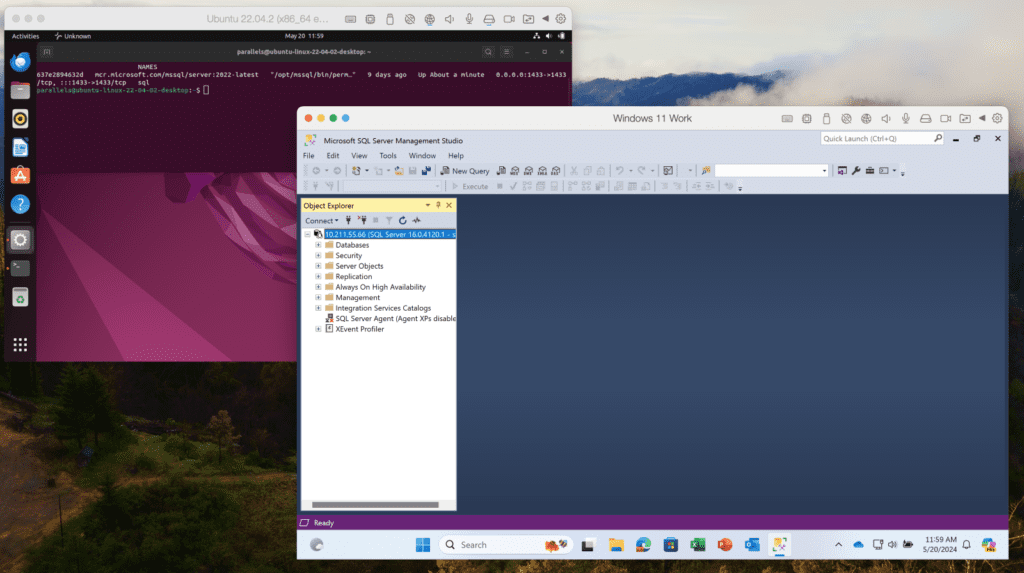
Many customers, including students and developers, have requested the ability to run Microsoft SQL Server in Windows 11 on a Mac with Apple silicon, while the MS SQL Server is not fully compatible with Windows on Arm today.

The use cases are different. Examples include:

1. Developers who need to have an SQL database for application development, which is convenient because Visual Studio and Visual Studio Code work well in Windows 11 on Arm.

2. Students who want to work with SQL Server and connect to it from SQL Management Studio — which also works well in Windows 11.

3. People who want to install certain Windows software that requires an SQL database.

Given the current compatibility challenges, we’ve explored various solutions and are excited to introduce a new approach.

In the past, we used to offer our customers various solutions, but those didn’t work for many users. Today, we believe that one of the most useful solutions would be to create an Ubuntu VM with x86_64 emulation and a preinstalled Docker engine.

This setup allows you to get Microsoft SQL Server running with a single command, making it easy to connect from Visual Studio, VS Code, or SQL Server Management Studio within your Windows VM. Detailed instructions can be found in our KB article.

This update will guide you through this process if you attempt to install SQL Server 2019/2022 in a Windows VM.

install SQL Server 2019/2022 in a Windows VM screenshot example 

Improved integration with macOS

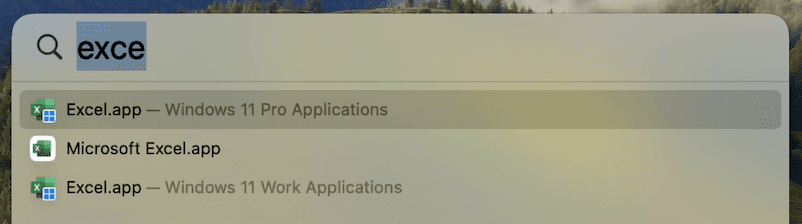
Many users enjoy using macOS Spotlight to search for applications. However, some have found it confusing when similar app names appear for their Mac and Windows/Linux apps.

To address this issue, we’ve added OS badge icons to the medium-sized icons of shared apps in Spotlight. This visual cue will help you quickly identify which OS the app belongs to without affecting your Dock icons.

os badge icons example

Command line utility improvements (only Pro and Business Editions)

We love our developer and tester community, and we are continually working to improve your experience with Parallels Desktop.

New reclaim-disk action

You can now reclaim disk space in a shutdown VM using the prlctl Command Line Utility. To reclaim free disk space, simply execute:

prlctl reclaim-disk <VM_name or VM_id>

Network conditioner control

The network conditioner is an excellent tool for users to test their applications under different network conditions and loads. We want to provide a way for this to be controlled in an automated way using prlctl.

There are two arguments supported for prlctl set now: –network conditioner and –network-conditioner-profile. For example, to run the network conditioner, execute the command below:

prlctl set <VM_name or VM_id> –network-conditioner on

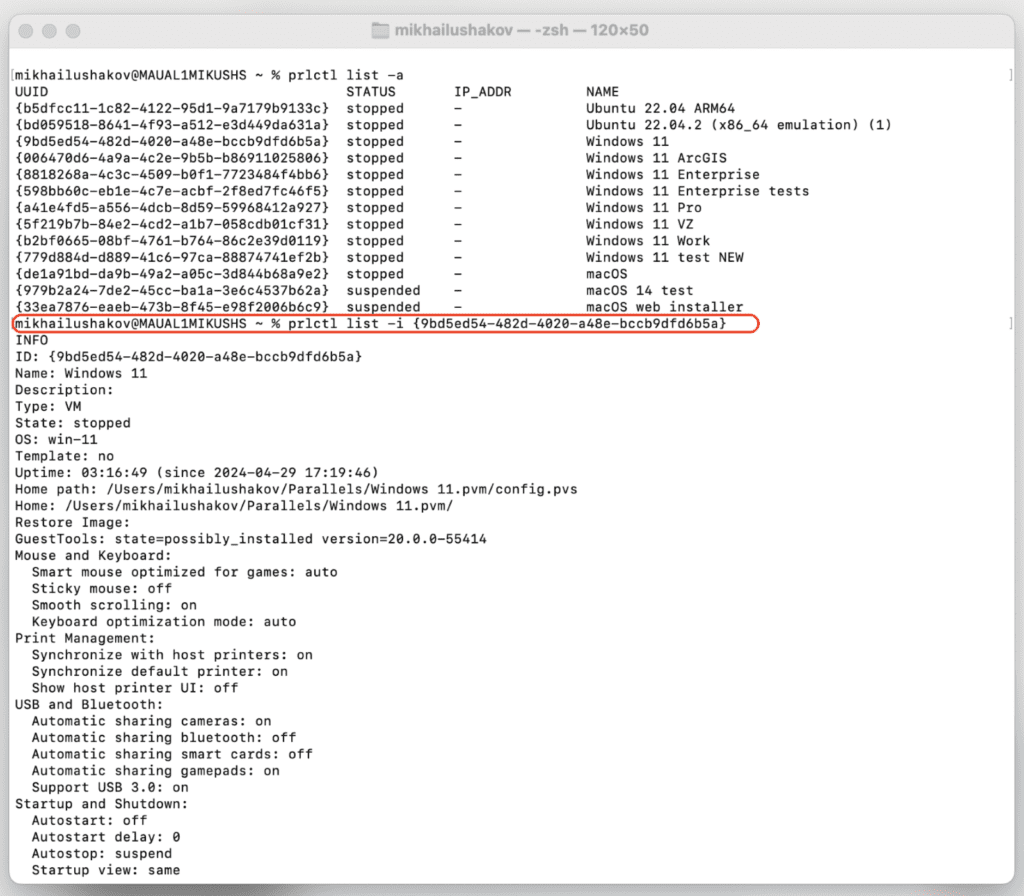
Extended output for prlctl list -i

We’ve extended the output information of the prlctl list -i command to include the IP address of running VMs, network throttling status, and whether the VM is a clone of another VM.

Here’s an example command:

prlctl list -i <VM_name or VM_id>

prlctl list -i command screenshot example

For more details, check out the Parallels Desktop developer’s guide.

Bug fixes

We’ve resolved an issue affecting our Business Edition customers. The download link in an invitation email from My Account would not activate the product with the assigned license.  We’ve restored this functionality, ensuring a smoother onboarding process for your team members.

We’ve successfully addressed an issue in which the app windows for SolidWorks, Delphi, Grammarly, and other Windows applications running in Coherence view mode were displayed as blank windows.

We’re committed to continuously improving Parallels Desktop and appreciate your feedback and support. We hope you enjoy these enhancements, and as always, we look forward to hearing your thoughts! You can post in our forums or make a comment on this post with your feedback.

New to Parallels Desktop for Mac? Get your 14-day free trial of Parallels Desktop 19.4.0 now.


About Version 2 Digital

Version 2 Digital is one of the most dynamic IT companies in Asia. The company distributes a wide range of IT products across various areas including cyber security, cloud, data protection, end points, infrastructures, system monitoring, storage, networking, business productivity and communication products.

Through an extensive network of channels, point of sales, resellers, and partnership companies, Version 2 offers quality products and services which are highly acclaimed in the market. Its customers cover a wide spectrum which include Global 1000 enterprises, regional listed companies, different vertical industries, public utilities, Government, a vast number of successful SMEs, and consumers in various Asian cities.

About Parallels 
Parallels® is a global leader in cross-platform solutions, enabling businesses and individuals to access and use the applications and files they need on any device or operating system. Parallels helps customers leverage the best technology available, whether it’s Windows, Linux, macOS, iOS, Android or the cloud.

June 2024: What’s New?

Written by Callum Sinclair – Product Engineering Manager.

“What’s New?” is a series of blog posts covering recent changes to Comet in more detail. This article covers the latest changes in Comet Voyager over June 2024. 

There were three Comet releases during June – two in the Voyager release series, plus one update for our Mimas release series.

We’ve landed a few large and exciting features:

Faster Measurement of Storage Vault Sizes

Enforcing Storage Vault Quotas is an important feature of Comet, providing our Managed Service Providers (MSPs) with the ability to restrict how much data a customer is allowed to back up. This feature offers flexibility to accommodate a wide range of business cases and ensures that resources are used efficiently.

In Comet version 24.6.1 and later, we’ve made a significant enhancement to how we measure the size of stored data in a Storage Vault. This improvement dramatically reduces the time required to start a back up job.

In our test cases, for a Storage Vault with a few terabytes of data stored it would take 10 or more minutes to measure how much data was stored. In Comet 24.6.1 this now takes a few seconds. This change benefits all our customers by enabling faster job initiation, which in turn means that jobs complete quicker.

This improvement not only enhances the user experience by reducing wait times but also optimizes resource usage, allowing our MSPs to provide even better service to their clients. We’re excited about this update and the positive impact it will have on your back up operations.

Software Build Role Tenant Settings

Software Build Role is a Comet Server feature that is responsible for generating client software installers of Comet. When enabled, it activates the Download Client Software page in the Comet Server web interface.

We have now added the ability to enable or disable the Software Build Role per tenant, providing greater flexibility for Managed Service Providers (MSPs) using Comet. Additionally, we’ve introduced support to configure whether an admin account can change these settings via policy.

These enhancements offer MSPs more control over their software build configurations, allowing for tailored management and improved service offerings.

Constellation Role Memory Improvements

Constellation Role is a Comet Server feature that provides insight across multiple Comet Servers and is essential tool for automatically removing unused storage. It works by verifying if data in a storage bucket belongs to an active user account on a Comet Server and removes data with no associated user, which can occur if a user is deleted without deleting their stored data.

In older versions of Comet, Constellation Role required a large amount of RAM to perform this function. However, in Comet 24.6.0, we have significantly reduced the RAM usage for Constellation Role, resulting in substantial speed and resource improvements. This means Constellation can prune larger amounts of data faster, and often more reliably.

This has a real benefit for our customers using Cloud Based storage, as removing unused data when it is no longer required is cost effective in the long run.

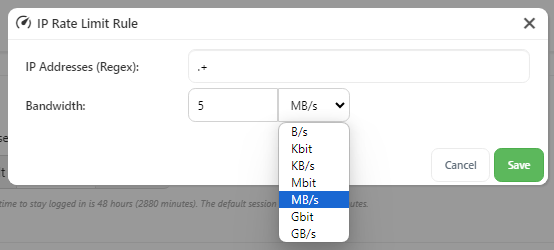
IP Rate Limiting Added to Comet Server Interface

To improve the usability of our IP rate limiting controls, we have added the ability to configure them in our Comet Server web interface. Previously this feature was only configureable via directly editing the config file of the Comet Server.

By configuring IP rate limits you can control the maximum bandwidth for IP addresses using regular expressions and set limits in bytes per second. Multiple rules can be defined, creating rate-limiting domains that match incoming requests. Rate limits apply separately to ingress and egress traffic, allowing simultaneous upload and download limits.

IP rate limiting can help maintain consistent performance and fair bandwidth usage across all users, and with our latest Comet release, it is even easier to configure.

Impossible Cloud Webinar

If you haven’t seen it, check out our recent blog post announcing our Impossible Cloud Integration as well as our joint webinar on Premier Cloud Storage & Backup for Europe’s MSPs on Wednesday, July 17th at 11am CET (Central European Time).

New Charging Model for Hyper-V and VMware Protected Items

You will notice that Hyper-V and VMware Guests will be charged daily per Protected Item from July.

This updated charging model can lead to a reduction in your overall bill. By charging per day per Protected Item, we align costs more closely with actual usage, potentially lowering your expenses.

We’re committed to continuously improving our services and look forward to delivering even more enhancements in the future. Thank you for your continued support!

About Version 2 Digital

Version 2 Digital is one of the most dynamic IT companies in Asia. The company distributes a wide range of IT products across various areas including cyber security, cloud, data protection, end points, infrastructures, system monitoring, storage, networking, business productivity and communication products.

Through an extensive network of channels, point of sales, resellers, and partnership companies, Version 2 offers quality products and services which are highly acclaimed in the market. Its customers cover a wide spectrum which include Global 1000 enterprises, regional listed companies, different vertical industries, public utilities, Government, a vast number of successful SMEs, and consumers in various Asian cities.

About Comet
We are a team of dedicated professionals committed to developing reliable and secure backup solutions for MSP’s, Businesses and IT professionals. With over 10 years of experience in the industry, we understand the importance of having a reliable backup solution in place to protect your valuable data. That’s why we’ve developed a comprehensive suite of backup solutions that are easy to use, scalable and highly secure.

Threat Protection Pro: Everyday online threats in numbers


According to new research by NordVPN, adult content, free video hosting sites, and sites that impersonate well-known and reputable brands have the most security and privacy threats, such as malware, intrusive ads, and trackers.

According to new research by NordVPN, a leading cybersecurity company, adult content, free video hosting sites, and sites that impersonate well-known and reputable brands have the most security and privacy threats, such as malware, intrusive ads, and trackers.

In May alone, NordVPN’s Threat Protection Pro feature blocked more than 5B intrusive ads, almost 40B trackers, and 60M malware infection attempts. With more than 50M malware-related incidents Americans are among the most affected among all Threat Protection Pro users globally. A thorough analysis of these suspended incidents revealed vital cybersecurity and privacy threats that users should be aware of and protect themselves.

“Every day, we face cyber threats without even noticing them. Even if we do not see malware or trackers with the naked eye or can handle the irritation caused by intrusive ads, it does not save us from severe privacy and cybersecurity issues. We should improve our knowledge and use trusted technology tools to avoid these threats. Most anti-malware features integrated into popular VPNs are usually limited to simple DNS filtering. NordVPN’s digital protection tool is now upgraded to Threat Protection Pro and helps users avoid hacking, tracking, phishing, scams, malware, and annoying ads and cookies,” says Adrianus Warmenhoven, a cybersecurity advisor at NordVPN.

Malware is malicious software: viruses, trojans, ransomware, and spyware designed to harm a user’s devices. It can steal sensitive data, encrypt important files, or even take over the devices, putting the criminal in complete control. The most common way users can get their devices infected with malware is by visiting malicious sites.

NordVPN research shows that from January 1 to May 31, Threat Protection Pro blocked more than 24M malicious links in adult content sites (or 8% from all blocked sites), as well as 16M links in uncategorized (5%), and 13M in web services (4%) sites.

Moreover, cybercriminals more often use deceptive misspellings of popular brands to trick victims into clicking phishing links and downloading infected files. As much as 99% of all phishing attacks use just 300 brands for deception. The most popular brands that users impersonated for spreading malware are Office365 (86K impersonated URLs discovered), Gazprom (60K), AT&T (28K), Facebook (19K), and Bet365 (15K)*.

“The brands themselves are not at fault — fakes like these also hurt their reputation, forcing companies to actively hunt them down. But high brand awareness can lull victims into a false sense of security and get them to lower their guard,” Warmenhoven says.

One device in The United States faces 89 malware attacks a month

The risk of getting infected with malware also varies by geographic region. These differences could be attributed to the varying levels of internet connectivity, economic development, and cybersecurity awareness in different countries.

NordVPN research showed that Threat Protection Pro blocked more than 50M attempts to infect American users’ devices during the research period. On average, one device owned by an American user is exposed to 89 malware-related incidents every month. In comparison, Ukraine is the most affected country, with 786 attempts to infect one device with malware per month.

Privacy-invading trackers reign in free video hosting websites

Web trackers are a broad category of privacy-invading tools that collect information on user activity. Trackers typically take the form of special scripts, browser cookies, or tracking pixels. Unfortunately, in the case of a data breach, the stored tracker data could end up falling into the hands of cybercriminals.

With this in mind, users should be highly attentive when using free video hosting (28% of all blocked trackers), online storage (13%), and search engines (13%), which, according to the research, are leaders in tracking user activities. Since January 1, Threat Protection Pro has blocked 39B trackers from free video hosting sites alone, while the online storage category is accountable for 18B trackers.

“Websites often share or sell data collected by trackers to third parties. But those who want to protect their privacy can use several tools to become less trackable. For example, VPN, which will change real IP address and virtual location, tracker blocker or privacy browsers”, says Warmenhoven.

Intrusive ads are not just annoying

Invasive and irrelevant ads popping up unexpectedly, blocking the host page, and opening new pages and windows are also the most common for free video hosting, adult content, and advertisement sites. Since the beginning of the year, Threat Protection Pro has detected and blocked billions of them: more than 2B, 1B, and 807M, respectively.

Moreover, intrusive ads are much more than just an annoying part of internet surfing; they are a matter of privacy and security. They can also infect users’ devices by linking to malicious sites, violate privacy by collecting data from web activity, and impact website loading speed.

How to stay safe from common cyber threats

To protect yourself from common cybersecurity threats like malware, trackers, and intrusive ads, Adrianus Warmenhoven advises to take these precautions:

  • Develop good cybersecurity habits. Cybercriminals prey on apathy, confusion, and ignorance, hoping that victims will forego due diligence. For example, most phishing attempts involve distorted names of popular brands.

  • Verify, download, scan, install. Malware executables may be disguised as or even hidden in legitimate files. Always verify the website you wish to download from, and always use anti-malware tools like Threat Protection Pro to inspect the files you download. This includes suspicious email attachments.

  • Be careful of where you go online. Certain web domain categories are much more likely to host malware that could compromise your device than others. If you visit websites that are likely to contain malware, pay attention to what you type, click, and download.

  • Let Threat Protection Pro keep you safe. Threat Protection Pro combines the best aspects of essential cybersecurity tools into one comprehensive security package. It will scan each file you download for malware, stop you from visiting malicious pages used for phishing, scams, and hosting malware, and block annoying ads.

Methodology: The statistics mentioned above were acquired by analyzing aggregated data gathered by NordVPN’s Threat Protection Pro service from January 1 to May 31, 2024. NordVPN is not endorsed by, maintained, sponsored by, affiliated, or in any way associated with the owners of the mentioned brands. Brands are indicated solely for the purpose of accurately reporting information related to brands that were most likely to be impersonated for spreading malware*.

ABOUT NORDVPN

NordVPN is the world’s most advanced VPN service provider, used by millions of internet users worldwide. NordVPN provides double VPN encryption and Onion Over VPN and guarantees privacy with zero tracking. One of the key features of the product is Threat Protection, which blocks malicious websites, malware during downloads, trackers, and ads. The latest service by the Nord Security team is Saily — a new global eSIM. NordVPN is very user friendly, offers one of the best prices on the market, and has over 6,200 servers covering 111 countries worldwide. For more information: https://nordvpn.com.

About Version 2 Digital

Version 2 Digital is one of the most dynamic IT companies in Asia. The company distributes a wide range of IT products across various areas including cyber security, cloud, data protection, end points, infrastructures, system monitoring, storage, networking, business productivity and communication products.

Through an extensive network of channels, point of sales, resellers, and partnership companies, Version 2 offers quality products and services which are highly acclaimed in the market. Its customers cover a wide spectrum which include Global 1000 enterprises, regional listed companies, different vertical industries, public utilities, Government, a vast number of successful SMEs, and consumers in various Asian cities.

About Nord Security
Nord Security is a cybersecurity company known for its flagship product, NordVPN. The company is dedicated to providing online security and privacy solutions to individuals and businesses globally.

Cybersecurity in the EU: The NIS2 Directive

Navigating the evolving landscape of network and information security is a pivotal concern in the current era. As technology becomes more complex, the need for comprehensive policies and regulations to safeguard critical infrastructure and digital services becomes ever more apparent. One such initiative set to drastically alter the cyber landscape is the NIS2 Directive.


What is the NIS2 Directive for cybersecurity?

The NIS2 Directive, or Network and Information Security Directive 2, is EU-wide legislation on cybersecurity. It was introduced as a robust step forward to heighten the overall level of cybersecurity within the European Union. The NIS2 Directive came into force in 2023 with the goal to modernize the existing legal framework of the original NIS Directive that was introduced in 2016.

This update came in response to the escalated digitization and evolving threat landscape.

The NIS2 Directive expands its coverage beyond the initial realm. It extends the cybersecurity rules to new sectors and entities. It is designed to reinforce the resilience and incident response capacities of public and private entities. It achieves this by fostering Member States’ preparedness and promoting cooperation among them.

For instance, it mandates that Member States be suitably equipped. This includes a Computer Security Incident Response Team (CSIRT) and a competent national network and information systems (NIS) authority.

What are the main goals behind NIS2?

The NIS2 Directive’s primary objective is to promote robust cybersecurity across the EU. This includes safeguarding vital sectors from cyber threats and boosting trust in important services.

It does this by:

  • Establishing a standardized level of cybersecurity protection measures across all EU member states.

  • Clearly identifying and regulating the sectors affected by the directive.

  • Expanding cyber security measures and tightening incident reporting rules.

  • Improving the cooperation and coordination among member states in handling cyber threats.

The aim of NIS2 is to establish a standardized level of protection across all EU member states. It clearly identifies affected sectors and minimum security requirements and unifies reporting obligations. It also introduces enforcement measures and sanctions. These efforts aim to protect critical infrastructure and EU citizens from cyberattacks.

One major improvement of NIS2 over its predecessor NIS 1 is its specific scope. Sectors affected include manufacturing, food, courier services, space, and digital infrastructure. Medium and large organizations operating within these sectors fall under the NIS2 scope.

NIS2 distinguishes between “essential” and “important” entities. Both types must comply with the same security measures. However, “essential” entities are under proactive supervision.

Changes include strengthened security requirements, enhanced enforcement, stricter incident reporting, and improved cooperation. It has rules for risk management, cybersecurity training, crisis management, and data encryption. It aims to eliminate the flexibility that led to vulnerabilities under the original NIS.

Incident reporting now has new mandatory stricter timeframes, with an initial report required within 24 hours of a cybersecurity issue. This enables authorities to respond better to potential threats. Moreover, NIS2 fosters cooperation and communication between member states. It does this by establishing a European Cyber Crisis Liaison Organization Network. This makes network security a collective effort.

How does the NIS2 Directive impact business?

The NIS2 Directive’s wider scope brings a broader range of businesses under its ambit. It particularly affects those providing critical infrastructure within the EU.

As such, it’s crucial for these entities to understand what the directive entails. You may need to prepare for enhanced risk management and incident reporting requirements.

One of the key areas for businesses to address under the NIS2 Directive is the security of network and information systems.

To meet the requirements of the directive, businesses are expected to establish a robust cybersecurity-risk management program. This program should include technical and organizational measures including authentication, authorization, encryption, and consistent monitoring for the security of network, information systems, and APIs.

Key steps to building a comprehensive network and information security program might include:

  • Conducting a comprehensive cybersecurity risk assessment. This should help identify any risks posed to your network, information systems, and APIs.

  • Implementing appropriate measures to manage identified risks. Key measures might include authentication, authorization, encryption, and consistent monitoring of your network and information systems.

  • Developing robust incident reporting mechanisms. You should establish systems that can detect and report security incidents related to your network and information systems.

  • Ensuring compliance with relevant regulations and standards. In addition to the NIS2 Directive, businesses should ensure they are compliant with other applicable regulations like the GDPR and other pertinent data protection laws.

  • Training and awareness. Finally, companies should educate their employees, contractors, and third-party providers about network and information system security practices. This could cover secure coding practices, secure deployment practices, and incident response procedures.

By focusing on these aspects, businesses can ensure that they are prepared for the NIS2 Directive. They can adequately protect their networks and systems from potential cyber threats. In addition, they will be better positioned to demonstrate their compliance to national cybersecurity authorities, thereby enhancing trust in their services or critical infrastructure.

Which sectors are affected by NIS2?

NIS2 Directive Affected Sectors

The NIS2 Directive expands its reach beyond the original NIS Directive, encompassing a broader range of sectors.

These include essential service operators in areas such as:

  • Energy

  • Transport

  • Banking

  • Healthcare

  • Digital service providers like online marketplaces, social networking platforms, and search engines

  • Research

  • ICT-Service management

  • Space

  • Entities providing domain name registration services

Businesses in these sectors must adhere to the regulations and requirements set forth by the NIS2 Directive.

When does NIS2 come into force?

The Member States have been given a window of 21 months until October 17, 2024, to transpose the measures outlined in the NIS2 Directive into national law.

The implication is clear: Businesses must prepare and adapt to the new network and information security landscape.

New Cybersecurity Directives – the CER Directive

Beyond the NIS2 Directive, another noteworthy legislation is the European Directive for Critical Entities Resilience (CER). The main difference between NIS2 and CER is that NIS2 is focused on cybersecurity, and CER is focused on physical security from natural disasters, floods, fires, etc.

The CER Directive replaces the European Critical Infrastructure Directive of 2008. It introduces stronger rules to enhance critical infrastructure against threats, including natural hazards, terrorist attacks, insider threats, and sabotage.

The CER Directive entered into force on January 16, 2023. Member States have until October 17, 2024, to transpose the requirements of the CER Directive into national law. By this date, each Member State is required to adopt and publish the measures necessary to comply with the directive. They must apply those measures from October 18, 2024.

Under the CER Directive, Member States must develop a strategy for enhancing the resilience of critical entities by January 17, 2026. This strategy aims to strengthen the ability of critical entities to prepare for, cope with, protect against, respond to, and recover from incidents that could disrupt the provision of essential services.

The CER Directive covers eleven sectors: energy, transport, banking, financial market infrastructures, health, drinking water, wastewater, digital infrastructure, public administration, space, and food. Member States are required to adopt a national strategy and conduct regular risk assessments.

The bottom line

The NIS2 Directive is poised to become a vital framework for cybersecurity in the EU. Businesses that fall under its scope must install rigorous technical, operational and organizational measures.

The deadline for national adoption of the directive is looming. Businesses must begin preparing to meet the NIS2 requirements.

In the context of the need for compliance with NIS2 regulations, NordPass offers valuable support as a password manager. Its features are designed to enhance your organization’s password security.

One key feature is the encrypted password vault. This securely stores all work-related passwords and information using the secure XChaCha20 encryption. NordPass’s zero-knowledge architecture ensures only authorized users can access the data.

NordPass also provides a password generator. It allows you to easily create strong and unique passwords that are resistant to guessing or brute-force attacks. The password health feature helps you assess the strength and security of your passwords. Identify any weaknesses or instances of password reuse that may put your accounts at risk.

Additionally, NordPass includes a data breach scanner. Automatically detect if any of your company’s domains or emails have been compromised in data breaches. This enables you to take immediate action to mitigate potential risks and protect your accounts. The password policy feature allows you to establish a robust password policy at the administrative level.

The activity log feature of NordPass provides transparency and accountability. This helps you maintain control over your company’s logins. Multi-factor authentication adds a layer of security, reducing the risk of unauthorized access.

These features help businesses enhance their password security and compliance with NIS2 regulations. This helps contribute to a more secure and resilient digital environment.

About Version 2 Digital

Version 2 Digital is one of the most dynamic IT companies in Asia. The company distributes a wide range of IT products across various areas including cyber security, cloud, data protection, end points, infrastructures, system monitoring, storage, networking, business productivity and communication products.

Through an extensive network of channels, point of sales, resellers, and partnership companies, Version 2 offers quality products and services which are highly acclaimed in the market. Its customers cover a wide spectrum which include Global 1000 enterprises, regional listed companies, different vertical industries, public utilities, Government, a vast number of successful SMEs, and consumers in various Asian cities.

About NordPass
NordPass is developed by Nord Security, a company leading the global market of cybersecurity products.

The web has become a chaotic space where safety and trust have been compromised by cybercrime and data protection issues. Therefore, our team has a global mission to shape a more trusted and peaceful online future for people everywhere.

×

Hello!

Click one of our contacts below to chat on WhatsApp

×