Skip to content

MELT: Understanding Metrics, Events, Logs and Traces for Effective Observability

The infrastructure must be “invisible” to the user, but visible to IT strategists to ensure the performance and service levels required by the business, where observability (as part of SRE or site reliability engineering) is essential to understand the internal state of a system based on its external results. For effective observability, there are four key pillars: metrics, events, logs, and traces, which are summarized in the acronym MELT 

Next, define each of these pillars.


Metrics

What are Metrics?

They are numerical measures, usually periodic, that provide information about the state of a system and performance.

Examples of useful metrics

Response times, error rates, CPU usage, memory consumption, and network performance.

Advantages of using metrics

Metrics allow IT and security teams to track key performance indicators (KPIs) to detect trends or anomalies in system performance.

Events

What are Events?

They are discrete events or facts within a system, which can range from the creation of a module to the login of a user in the console. The event describes the problem, source (agent), and creation.

Event examples in systems

User actions (user login attempts), HTTP responses, changes in system status, or other notable incidents.

How events provide context

Events are often captured as structured data, including attributes such as timestamp, event type, and associated metadata, providing greater elements and information to the IT team to understand system performance and detect patterns or anomalies.

Logs

What are logs?

They are detailed records of events and actions that take place in a system. Also these collected data provide a chronological view of system activity, offering more elements for troubleshooting and debugging, understanding user behavior, and tracking system changes. Logs can contain information such as error messages, stack traces, user interactions, notifications about system changes.

Common log formats

Usually, logs use plain format files, either in ASCII type character encodings or stored in text form. The best known formats are Microsoft IIS3.0, NCSA, O’Reilly or W3SVC. In addition, there are special formats such as ELF (Extended Log Format) and CLF (Common Log Format).

Importance of centralizing logs

Log centralization ensures a complete and more contextualized system view at any time. This allows you to proactively spot problems and potential problems, as well as take action before they become bigger problems. Also this centralization allows to have the essential elements for audits and regulatory compliance, since compliance with policies and regulations on safety can be demonstrated.

Traces

What are Traces?

Traces provide a detailed view of the request flow through a distributed system. This is because they capture the path of a request as it goes through multiple services or components, including the time at each step. That way, traces help to understand dependencies and potential performance bottlenecks, especially in a complex system. Also traces allow to analyze how system architecture can be optimized to improve overall performance and, consequently, the end user experience.

Examples of traces in distributed systems

  • The interval or span is a timed, named operation that represents a portion of the workflow. For example, intervals may include data queries, browser interactions, calls to other services, etc.
  • Transactions may consist of multiple ranges and represent a complete end-to-end request that travels across multiple services in a distributed system.
  • The unique identifiers for each, in order to track the path of the request through different services. This helps visualize and analyze the path and duration of the request.
  • Spreading trace context involves passing trace context between services.
  • Trace display to show the request flow through the system, which helps identify failures or performance bottlenecks.

Also, traces provide detailed data for developers to perform root cause analysis and with that information address issues related to latency, errors, and dependencies.

Challenges in trace instrumentation

Trace instrumentation can be difficult basically because of two factors:

  • Each component of a request must be modified to transmit trace data.
  • Many applications rely on libraries or frameworks that use open source, so they may require additional instrumentation.

Implementing MELT in Distributed Systems

Adopting observability through MELT involves Telemetry; that is, automatic data collection and transmission from remote sources to a centralized location for monitoring and analysis. From the data collected, the principles of telemetry (analyze, visualize and alert) must be applied to build resilient and reliable systems.

Telemetry Data Collection

Data is the basis of MELT, in which there are three fundamental principles of telemetry:

  • Analyzing the collected data allows obtaining important information, relying on statistical techniques, machine learning algorithms and data mining methods to identify patterns, anomalies and correlations. By analyzing metrics, events, logs, and traces, IT teams can uncover performance issues, detect security threats, and understand system performance.
  • Viewing data makes it accessible and understandable to stakeholders. Effective visualization techniques are the dashboards, charts, and graphs that represent the data clearly and concisely. In a single view, you and your team can monitor system health, identify trends, and communicate findings effectively.
  • Alerting is a critical aspect of observability. When alerts are set up based on predefined thresholds or anomaly detection algorithms, IT teams can proactively identify and respond to issues. Alerts can be triggered based on metrics that exceed certain limits, events that indicate system failures, or specific patterns in logs or traces.

Aggregate Data Management

Implementing MELT involves handling a large amount of data from different sources such as application logs, system logs, network traffic, services and third-party infrastructure. All of this data should be found in a single place and aggregated in the most simplified form to observe system performance, detect irregularities and their source, as well as recognize potential problems. Hence, aggregate data management based on a defined organization, storage capacity, and adequate analysis is required to obtain valuable insights.
Aggregating data is particularly useful for logs, which make up the bulk of the telemetry data collected. Logs can also be aggregated with other data sources to provide supplemental insights into application performance and user behavior.

Importance of MELT in observability

MELT offers a comprehensive approach to observability, with insights into system health, performance, and behavior, from which IT teams can efficiently detect, diagnose, and solve issues.

System Reliability and Performance Improvements

Embracing observability supports the goals of SRE:

  • Reduce the work associated with incident management, particularly around cause analysis, by improving uptime and Mean Time To Repair (MTTR).
  • Provide a platform to monitor and adapt according to goals in service levels or service level contracts and their indicators (see What are SLAs, SLOs, and SLIs?). It also provides the elements for a possible solution when goals are not met.
  • Ease the burden on the IT team when dealing with large amounts of data, reducing exhaustion or overalerting. This also leads to boosting productivity, innovation and value delivery.
  • Support cross-functional and autonomous computers. Better collaboration with DevOps teams is achieved.

Creating an observability culture

Metrics are the starting point for observability, so a culture of observability must be created where proper collection and analysis are the basis for informed and careful decision-making, in addition to providing the elements to anticipate events and even plan the capacity of the infrastructure that supports the digitization of the business and the best experience of end users.

Tools and techniques for implementing MELT

  • Application Performance Monitoring (APM): APM is used to monitor, detect, and diagnose performance problems in distributed systems. It provides system-wide visibility by collecting data from all applications and charting data flows between components.
  • Analysis AIOps: These are tools that use artificial intelligence and ML to optimize system performance and recognize potential problems.
  • Automated Root Cause Analysis: AI automatically identifies the root cause of a problem, helping to quickly detect and address potential problems and optimize system performance.

Benefits of Implementing MELT

System reliability and performance requires observability, which must be based on the implementation of MELT, with data on metrics, events, logs, and traces. All of this information must be analyzed and actionable to proactively address issues, optimize performance, and achieve a satisfactory experience for users and end customers.

Pandora FMS: A Comprehensive Solution for MELT

Pandora FMS is the complete monitoring solution for full observability, as its platform allows data to be centralized to obtain an integrated and contextualized view, with information to analyze large volumes of data from multiple sources. In a single view, it is possible to see the status and trends in system performance, in addition to generating smart alerts efficiently. It also generates information that can be shared with customers or suppliers to meet the standards and goals of services and system performance. To implement MELT:

  • Pandora FMS unifies https://pandorafms.com/en/it-topics/it-system-monitoring/ regardless of the operating model and infrastructures (physical or SaaS, PaaS or IaaS).
  • With Pandora FMS, you may collect and store all kinds of logs (including Windows events) to be able to search and configure alerts. Logs are stored in non-SQL storage that allows you to keep data from multiple sources for quite some time, supporting compliance and audit efforts. Expanding on this topic, we invite you to read the Infrastructure Logs document, the key to solving new compliance, security and business related questions.
  • Pandora FMS offers custom dashboard layouts to display real-time data and multi-year history data. Reports on availability calculations, SLA reports (monthly, weekly or daily), histograms, graphs, capacity planning reports, event reports, inventories and component configuration, among others, can be predefined.
  • With Pandora FMS, you may monitor traffic in real time, getting a clear view of the volume of requests and transactions. This tool allows you to identify usage patterns, detect unexpected spikes, and plan capacity effectively.
  • With the premise that it is much more effective to visually show the source of a failure than simply receiving hundreds of events per second. Pandora FMS offers the value of its service monitoring, which allows you to filter all information and show only what is critical for making appropriate decisions.

Market analyst and writer with +30 years in the IT market for demand generation, ranking and relationships with end customers, as well as corporate communication and industry analysis.

Analista de mercado y escritora con más de 30 años en el mercado TIC en áreas de generación de demanda, posicionamiento y relaciones con usuarios finales, así como comunicación corporativa y análisis de la industria.

Analyste du marché et écrivaine avec plus de 30 ans d’expérience dans le domaine informatique, particulièrement la demande, positionnement et relations avec les utilisateurs finaux, la communication corporative et l’anayse de l’indutrie.

About Version 2 Digital

Version 2 Digital is one of the most dynamic IT companies in Asia. The company distributes a wide range of IT products across various areas including cyber security, cloud, data protection, end points, infrastructures, system monitoring, storage, networking, business productivity and communication products.

Through an extensive network of channels, point of sales, resellers, and partnership companies, Version 2 offers quality products and services which are highly acclaimed in the market. Its customers cover a wide spectrum which include Global 1000 enterprises, regional listed companies, different vertical industries, public utilities, Government, a vast number of successful SMEs, and consumers in various Asian cities.

About PandoraFMS
Pandora FMS is a flexible monitoring system, capable of monitoring devices, infrastructures, applications, services and business processes.
Of course, one of the things that Pandora FMS can control is the hard disks of your computers.

Cisco Meraki Monitoring with Pandora FMS

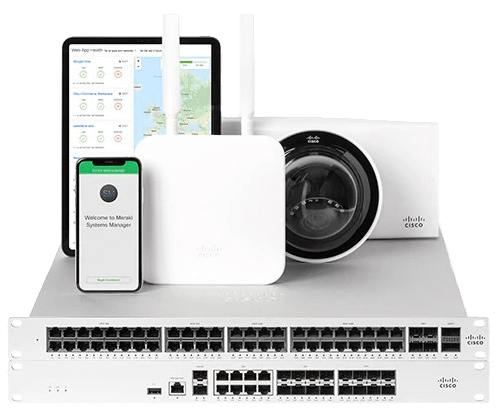
In a business world increasingly oriented towards efficiency and mobility, network management becomes a critical factor for success. Cisco Meraki stands as an undisputed leader thanks to its ability to offer a fully cloud-based technology, allowing companies of any size to manage their network devices remotely and centrally. This platform not only ensures the security and scalability required in enterprise environments, but also optimizes network performance by adapting the available bandwidth to the demands of the devices. However, to take full advantage of Cisco Meraki and ensure optimal infrastructure performance, proper monitoring becomes essential. In this context, Pandora FMS emerges as an end-to-end solution that allows adding a customized monitoring layer to the Cisco Meraki platform, facilitating early problem detection, performance analysis and scalability planning. Next, we will explore in detail why the combination of Cisco Meraki and Pandora FMS is the ideal choice for companies looking for efficient and proactive management of their network.

LThe great advantage of Cisco Meraki, which has made it stand out as a leader in its sector, is that it allows companies, regardless of the size of their network infrastructure, to offer 100% cloud-based technology. Of course, this allows you to manage devices from multiple locations remotely through a centralized tool, which has an API through which you may query through Pandora FMS, to add the whole monitoring of the environment in an easily and quickly, through plugins already designed for this function.

Why to Choose Cisco Meraki?

It is worth mentioning that the great advantage of Cisco Meraki is the technology of its cloud-based platform, which is widespread among companies of all sizes, and which includes the following advantages:
  • Security: It offers malware protection, state-of-the-art firewalls, and data encryption. The standards comply with PCI level 1 regulations.
  • Scalability: Cisco Meraki integration can be done both for one site and for thousands of devices distributed at different points. In addition, once deployed from the beginning, tools are offered to make the growth of the environment as efficient as possible.
  • Performance: It provides network administrators with optimal performance by adapting the available bandwidth to the devices available.

Why monitor Cisco Meraki?

  • Network Troubleshooting: It includes equipment malfunction or network overflow through traffic analysis tools.
  • Environment Performance Analysis: Equipment that appears to be working properly but is actually flapping at its ports or a network interface whose speed is not enough to meet bandwidth needs can be as disruptive to your infrastructure as a device that is downright down.
  • Infrastructure Scalability Scheduling: Are you sure that your devices are enough to meet the needs of your network? Monitoring the environment is key both to find out if it is necessary to add more devices, and to know whether there are lots of them for your real traffic.

Why choose Pandora FMS to monitor Cisco Meraki?

Let’s face it, Meraki’s own Cloud already includes infrastructure monitoring tools such as dashboards. So why should you worry about monitoring your Cloud devices with external software like Pandora FMS? Here are just a few of the advantages you would enjoy by adding Cloud devices to Pandora FMS:
  • Fully Custom Alerting Settings: Defining an alert when a problem is detected in a sensor (module) in Pandora FMS goes beyond notifying you by email or other notification tools, such as SMS or Telegram, the number of times and in the period of time you need. This section also includes the possibility of performing custom actions, such as trying to reboot a device automatically, writing on log files, opening an incident ticket on a ticketing platform…
  • Custom Infrastructure Definition: Differentiating between groups of agents, agents and modules is fully definable depending on how you want to define computer division in your infrastructure.
  • Stored Event History: Any status change and alert triggering from your sensors generates an event that is stored in a history that can be checked to perform a problem analysis in your network.
  • Creating custom services, reports and visual consoles: Pandora FMS services allow you to assign importance to the different computers through a weighting system, visual consoles allow you to build your whole network infrastructure through icons that may change color according to device status in real time. Reports can be configured to prepare a summary of availability of a equipment or a network interface in an estimated time… these are just some examples of the analysis that you may get by storing your device data in Pandora FMS.
  • Ease of integration between platforms: We have a plugin with which to add the devices within the Meraki Cloud with a simple execution. It is also possible to customize the modules you wish to add if you have direct access to the equipment using the SNMP protocol.

Pandora FMS Modules for Cisco Meraki

A Pandora FMS module is an information entity that stores data from a numeric or alphanumeric individual check (CPU. RAM, traffic, etc.). That is, if in a switch you wish to monitor its general CPU, and the operating state and input and output traffic of two of its interfaces, you will need to create 7 modules: one for the general CPU, two for the operating state of the two interfaces, two for the input traffic of the two interfaces and two for the output traffic of the two interfaces. Modules are stored in dummy entities called agents. Generally, each agent represents a different device. Finally, an agent always belongs to a group. Groups are sets that contain agents and are used to filter and control visibility and permissions. By knowing these terms, we can get to know the structure of devices and checks that are automatically created in Pandora FMS with the execution of the “pandora_meraki” plugin that we have to add to our monitoring the information that can be retrieved from the cloud.

Meraki device agents and modules created using plugins

We have an official PandoraFMS plugin that will hugely improve the task of adding devices from the Meraki Cloud to your monitoring. The plugin documentation can be found at the following link. It is a server plugin (it must be located on the machine where PandoraFMS server is located), which must be indicated through parameters the URL of your Cloud, the organization ID of the company and the name of the group to add the agents that will be created through the plugin. With a simple execution, agents will be created for each appliance, switch and wireless device within a Network that matches the name of the group indicated by the parameter. The modules created will be the following:
  • For each appliance device:
    • Device status
    • Operational status of its interfaces
    • Performance percentage
  • For each switch device:
    • Device status
    • Operational status of its enabled interfaces
    • Inbound traffic from its enabled interfaces
    • Outbound traffic from its enabled interfaces
  • For each wireless device:
    • Device status

Meraki device agents and modules created through SNMP checks

If it is necessary to add an extra module to those created by the plugin and there is connectivity between Pandora FMS server and the Meraki network devices, it is also possible to add monitoring through SNMP check polling network modules. SNMP version 1, 2 or 3 protocol must be activated in the configuration of the Meraki devices and a network server module must be created for each check that is needed, as in any other network device. This video explains how to create these types of modules.

Conclusions

Delving into more extensive monitoring than that offered by Meraki’s own Cloud-native systems is necessary to detect medium/long-term problems such as network saturation and perform a performance and scalability analysis. And it is downright essential for the configuration of a custom and immediate alert and the automation of tasks such as ticket creation. To delve into it, it is necessary to have a system specifically oriented to monitoring and that offers the integration of this system with the devices added to the Cloud. Pandora FMS allows, not only all this ease of integration and analysis tools for the Meraki Cloud, but also in the same environment it is possible to add the whole monitoring of the rest of the company’s areas and devices, such as servers, or the addition of metrics from other manufacturers.

About Version 2 Digital

Version 2 Digital is one of the most dynamic IT companies in Asia. The company distributes a wide range of IT products across various areas including cyber security, cloud, data protection, end points, infrastructures, system monitoring, storage, networking, business productivity and communication products.

Through an extensive network of channels, point of sales, resellers, and partnership companies, Version 2 offers quality products and services which are highly acclaimed in the market. Its customers cover a wide spectrum which include Global 1000 enterprises, regional listed companies, different vertical industries, public utilities, Government, a vast number of successful SMEs, and consumers in various Asian cities.

About PandoraFMS
Pandora FMS is a flexible monitoring system, capable of monitoring devices, infrastructures, applications, services and business processes.
Of course, one of the things that Pandora FMS can control is the hard disks of your computers.

Distributed Systems Monitoring: the Four Golden Signals

What are the Four Golden Signs?

We recently published the IT Topic “IT System Monitoring: advanced solutions for total visibility and security”, in which we present how advanced solutions for IT system monitoring optimize performance, improve security and reduce alert noise with AI and machine learning. We also mentioned that there are four golden signals that IT systems monitoring should focus on. The term “golden signals” was introduced by Google in 2014 in its book Site Reliability Engineering: How Google Runs Production Systems,where Site Reliability Engineering (SRE) is a discipline used by IT and software engineering teams to proactively create and maintain more reliable services. The four golden signs are also defined:
  • Latency: This metric is the time that elapses between a system receiving a request and subsequently sending a response. You might think of it as a unique “average” latency metric, or perhaps an established “average” latency that can be used to guide SLAs. But, as a golden signal we want to observe the latency over a period of time, which can be displayed as a histogram of frequency distribution. For instance: This histogram shows the latency of 1000 requests made to a service with an expected response time of less than 80 milliseconds (ms). Each histogram section groups requests according to the amount of time they take to complete, from 0 ms to 150 ms in increments of five.
  • Traffic: It refers to the demand in the system. For example, a system might have an average of 100 requests HTTPS per second; but averages can be misleading. Average trends can be observed for problems or averages over time. Also, traffic may increase at certain times of the day (when people respond to an offer for a few hours or inquiries are made about stock prices at market close.
  • Errors: It refers to API error codes that indicate something is not working properly. The tracking of the total number of errors that take place and the percentage of failed requests allows you to compare the service with others. Google SREs extend this concept to include functional errors of incorrect data and slow responses.
  • Saturation: There is a saturation point for networks, disks, and memory where demand exceeds the performance limits of a service. You can do load testing to identify the saturation point, as well as restrictions, when a request failed first. A very common bad practice is to ignore saturation when there are load balancers and other automated scaling mechanisms. In poorly configured systems, inconsistent scaling and other factors can prevent load balancers from doing their job properly. For that reason, monitoring saturation helps teams identify issues before they become serious problems by taking proactive actions to prevent these incidents from happening again.

The Importance of the Four Golden Signals in Monitoring

The relevance of the four golden signals in IT systems monitoring lies in the feasible tracking on latency, traffic, errors and saturation of all services, in real time, providing the elements for IT teams to identify potential or ongoing issues more quickly. Also, with the single view of everyone’s status, the work of the team devoted to monitoring IT or third-party systems is streamlined. Instead of performing different monitoring for each function or service, monitoring metrics and records can be grouped into a single location. All of this helps to better manage issues and track the whole lifecycle of an event.

How to Implement the Four Golden Signals

The four golden signals are a way to help SRE teams focus on what’s important, so they don’t rely on a plethora of metrics and alarms that might be difficult to interpret. To implement them, follow these steps:
  • Define baselines and thresholds: Sets normal operating ranges or service level targets for each signal. SLO help identify anomalies and set up significant alerts. For example, you may set a latency threshold of 200 ms; if it is higher, an alert should be triggered.
  • Implement alerts: Set up alerts to receive notifications when signals exceed predefined thresholds, ensuring issues can be responded to promptly. Combination with AI streamlines alert and notification management and escalation.
  • Analyze trends: Review historical data periodically to understand trends and patterns, as well as gather information for proactive capacity planning and identifying areas of opportunity to optimize them. Advanced analytics and AI are valuable tools to give the correct reading to these analyses.
  • Automate responses: Try to automate responses to common problems so as not to overwhelm your IT team and so that they can also focus on more strategic tasks or incidents that really deserve attention. With AI, automatic scaling can be established to help manage traffic spikes.

Monitoring Tools Open Source or Commercial Solutions?

To choose a Monitoring tool, the question may arise as to which option is more convenient: an open source one or a commercial solution. The answer should not depend only on an economic question (whether or not to pay for resources), but also on taking into account that almost all IT products cannot do without open source, since they are constantly used and that is why we do not question their value. Of course, it should be borne in mind that, to use open source, you must choose monitoring solutions supported by professional and reliable monitoring, in addition to support for correct configuration. It is also important for the open source solution to be intuitive, to not represent a consumption of valuable time spent on configuration, adjustments, maintenance and updating tasks. Remember that agility and speed are required.

Importance of Golden Signals in Observability

Monitoring allows problems to be detected before they become critical, while observability is particularly useful for diagnosing problems and understanding the root cause. Golden signals enable site reliability engineering (SRE) to be implemented based on availability, performance, monitoring, and readiness to respond to incidents, improving overall system reliability and performance. Also, monitoring based on golden signals offers the observability elements to find out what is happening and what needs to be done about it. To achieve observability, metrics from different domains and environments must be gathered in one place, and then analyzed, compared, and interpreted.

The Golden Signals as Part of Full-Stack Observability

The full-stack observability refers to the ability to understand what is happening in a system at any time, monitoring system inputs and outputs, along with cross-domain correlations and dependency mapping. Golden signals help manage the complexities of multi-component monitoring, avoiding blind spots. It also links system behavior, performance, and health to user experience and business outcomes. Also, golden signals are integrated to the principles of SRE: Risk Acceptance, Service Level Objectives, Automation, Effort Reduction, and Distributed Systems Monitoring, combining software engineering and operations to build and execute large-scale, distributed, and high-availability systems. SRE practices also include the definition and measurement of reliability objectives, the design and implementation of observability, along with the definition, testing and execution of incident management processes. In advanced observability platforms, the golden signals provide the data to also improve financial management (costs, capital decisions by use of technologies, SLA compliance), security and risk prevention.

Conclusion

The digital nature of business has caused IT security strategists to face the complexity of multi-component monitoring. Golden signals provide the key indicators that apply to almost all types of systems. In addition, it is necessary to analyze and predict system performance, where observability is essential. In this regard, MELT (Metrics, Events, Logs, and Traces) is a framework with a comprehensive approach to observability, gaining insight into the health, performance, and performance of systems.

Pandora FMS: a Complete Solution for Monitoring the Four Golden Signals

Pandora FMS stands out as a complete solution for monitoring distributed systems and implementing the Four Golden Signals. Here we explain why.

1. Versatility and Flexibility Pandora FMS (Flexible Monitoring System) is known for its ability to adapt to different environments and business needs. Whether you’re managing a small on-premise infrastructure or a complex, large-scale distributed system, Pandora FMS can scale and adapt seamlessly.

2. Comprehensive Latency Monitoring Pandora FMS enables detailed latency monitoring at different levels, from application latency to network and database latency. It provides real-time alerts and intuitive dashboards that make it easy to identify bottlenecks and optimize performance.

3. Detailed Traffic Monitoring With Pandora FMS, you may monitor traffic in real time, getting a clear view of the volume of requests and transactions. This tool allows you to identify usage patterns, detect unexpected spikes, and plan capacity effectively.

4. Error Detection and Analysis Pandora FMS platform offers a strong feature for error detection, both application errors, network errors, such as packet loss, network interface errors and device errors through SNMP traps in real time or even failures in the infrastructure. Configurable alerts and detailed reports help teams respond quickly to critical issues, reducing downtime and improving system reliability.

5. Resource Saturation Monitoring Pandora FMS monitors key resource usage, such as CPU, memory, and storage, allowing administrators to anticipate and avoid saturation. This is vital to keep system performance and availability under control, especially during periods of high demand.

6. Integration with Existing Tools and Technologies Pandora FMS integrates easily with a wide range of existing tools and technologies, enabling easier deployment and greater interoperability. This flexibility makes it easy to consolidate all monitoring data into a centralized platform.

7. Custom Reports and Intuitive Dashboards The ability to generate custom reports and interactive dashboards allows IT teams to look at the status of their systems effectively. These features are essential for informed decision making and continuous service improvement.

8. Support and Active Community Pandora FMS has strong technical support and an active community that offers ongoing resources and support. This is crucial to ensure that any issues are quickly solved and that users can get the most out of the platform.

9. Cost-Effectiveness Unlike many commercial solutions, Pandora FMS offers excellent value for money, providing advanced features at a competitive cost. This makes it an attractive option for both small businesses and large corporations.

About Version 2 Digital

Version 2 Digital is one of the most dynamic IT companies in Asia. The company distributes a wide range of IT products across various areas including cyber security, cloud, data protection, end points, infrastructures, system monitoring, storage, networking, business productivity and communication products.

Through an extensive network of channels, point of sales, resellers, and partnership companies, Version 2 offers quality products and services which are highly acclaimed in the market. Its customers cover a wide spectrum which include Global 1000 enterprises, regional listed companies, different vertical industries, public utilities, Government, a vast number of successful SMEs, and consumers in various Asian cities.

About PandoraFMS
Pandora FMS is a flexible monitoring system, capable of monitoring devices, infrastructures, applications, services and business processes.
Of course, one of the things that Pandora FMS can control is the hard disks of your computers.

What are SLA, SLO, and SLI?

Learn the differences between SLA, SLO and SLI and how to implement these metrics to improve the quality of service offered by your company. Also, learn about the challenges and best practices for implementing them, along with some real-world examples.

Importance of SLA, SLO and SLI in user experience

Talking about SLA, SLO and SLI means talking about user experience. Each of these acronyms (we will explain them later) is on the minds of developers, who are looking to achieve increasingly reliable and high-quality IT services and resources. To achieve this, they must understand and effectively manage objectives at service levels, relying on defined indicators and formal agreements that lead them to achieve user satisfaction.

Objective of metrics and their application in system performance

What is measured can be improved… so metrics help ensure a service meets its performance and reliability goals. They also help align the goals of different teams within an organization toward one goal: the best user experience.

Differences between SLA, SLO and SLI

  • Definition and scope of each metric.
    Imagine a base where SLI (Service Level Indicators) refers to the quantifiable measurement to evaluate the performance of a service. Above this base you may find SLO (Service Level Objectives), which set objectives for service performance, and SLA (Service Level Agreement), which are legally binding contracts between a service provider and a customer.
  • Example and applications in different contexts.
    For example, a cloud service provider may define latency as the amount of time it takes to process a user’s request and return a response as SLI. From there, an SLO of no more than 100 milliseconds is established for a consecutive period of 30 days; if the average latency exceeds this value, they will issue service credits to customers.
    If an SLI is set on the e-commerce website based on the error rate as a percentage of failed transactions, the SLO could set the error rate to not exceed 0.5% during any 24-hour period. The SLA agreed with the cloud service provider would include this SLO, along with penalties or compensation if it is not met.

SLI: Service Level Indicator

Meaning and function

Service Level Indicators (SLIs) measure the performance and reliability of a service, to determine whether an offer meets its quality objectives. The SLI also helps identify areas for improvement. Examples of indicators include latency (response time), error rate, throughput, and availability (uptime). These metrics are usually monitored over specific time periods to assess performance. As it can be seen, SLIs are the foundation for setting performance and reliability benchmarks for a service.

Challenges and strategies for their measurement

Based on the fact that SLI refers to metrics, the main challenge is to achieve a simple approach to the indicators, since they must be easily analyzed and compared in order to speed up decision-making based on the results. Another challenge is choosing useful tracking metrics that correspond to the actual needs of the product or service.

SLO: Service Level Objective

Definition and purpose

Service Level Objectives (SLOs) set performance and reliability objectives that service providers aim to achieve, in line with a service’s SLIs. So these SLO help to evaluate and monitor whether the service meets the desired quality level. For example, a cloud provider may say that their goal is to achieve 99.99% availability over a specific time period.

Challenges and recommendations for implementation

The main challenge is that objectives must be clear, specific and measurable, so it is recommended that the service provider works closely with stakeholders to define SLOs and their scopes.

SLA: Service Level Agreement

Concept and purpose

A service level agreement (SLA) is a legally binding contract between a service provider and a customer, outlining agreed SLOs and penalties for non-compliance. SLAs ensure that providers and stakeholders clearly understand the expectations about the quality of service and the repercussions in case of non-compliance (financial compensation or service credits) with the agreed standards. SLAs include SLOs such as latency times, error rate, and availability. Of course, before service begins, the service provider and the customer will negotiate Service Level Agreements. SLAs help to have a clear understanding of performance expectations, channels and courses of action, and service reliability, safeguarding the interests of both parties.

Challenges and best practices

One of the most important challenges of an SLA is that it does not go along the line of business priorities, so a best practice is to involve the business areas where the greatest impact on the service level is generated in the agreements. Also, monitoring the SLA and updating them can be a complex process that requires reports with data obtained from multiple sources of information. In this regard, it is recommended to acquire the technological tools that help to retrieve data from multiple sources in a more agile and automated way.

Comparison between SLA, SLO and SLI

As we have seen, SLIs are the foundation for SLOs and SLAs, with quantitative metrics to assess service performance and reliability. SLOs use data derived from SLIs to set specific objectives on service performance, ensuring that the service provider and stakeholders have clear objectives to achieve. Hence, SLAs incorporate SLOs into a contract between the service provider and the customer, so that both parties have a clear understanding of performance expectations and consequences in the event of non-compliance.
To be clearer, it helps to look at these tables that compare differences, challenges, and best practices:

Table 1: Differences between SLA, SLO and SLI

Metric

Purpose

Application

Flexibility

SLI

Actual measurement of service performance.

Internal, paid.
(actual number on performance)

High flexibility.

SLO

Internal objectives that indicate service performance.

Internal and external, free and paid.
(objectives of the internal team to comply with the service level agreement)

Moderate flexibility.

SLA

Agreement with customers on service commitments.

Payments, availability.
(the agreement between the provider and the service user)

Low flexibility.

As it can be seen in Table 1, to the extent that the metric is more specific (SLI), there is greater flexibility for its definition, AND, the more specific the metric (SLA), the more parties involved the commitment is.

Table 2: Challenges and best practices

Metric

Challenges

Best Practices

SLI

Definition of product or service associated with business needs.
Accurate and consistent measurement.

Another challenge is choosing useful tracking metrics that correspond to the actual needs of the product or service.
Track system evolution and visualize data.

SLO

Balance between complexity and simplicity.
Define the objectives must be clear, specific and measurable.

Close collaboration with the parties involved in the service to define SLOs and their scopes.
Continuously improve and select valuable metrics.

SLA

Alignment with business objectives.
Collaboration between legal and technical teams.
Retrieving data from multiple sources to measure compliance levels.

Define realistic expectations, with a clear understanding of the impact on the business.
Reach consensus with stakeholders and the technical team to define the agreements in the SLA.
Use technological tools that help to retrieve data from multiple sources in a more agile and automated way.

In Table 2, you may see that the challenges for the metric are different, due to their internal or external nature. For example, SLOs are internal objectives of the service provider, while SLAs establish a commitment between the provider and the customer (service user), as well as penalties in case of non-compliance.

Real-world applications

Examples of how these metrics are applied in different companies and services.

  • SLI:
    • Service availability/uptime.
    • Number of successful transactions/service requests.
    • Data consistency.
  • SLO:
    • Disk life must be 99.9%
    • Service availability must be 99.5%
    • Requests/transactions successfully served must reach 99.999%
  • SLA:
    • Agreement with clauses and declarations of the signing parties (supplier and user), validity of the agreement, description of services and their corresponding metrics, contact details and hours for support and escalation courses, sanctions and causes of termination in case of non-compliance, termination clauses, among others.

Conclusion

Service metrics are essential to ensure the quality of the service offered. Whether you are working with the service provider or you are on the other side of the desk, the service user, you need to have reliable and clear information about a service’s performance in order to generate better user experiences, which in turn translates into better responsiveness to internal customers (including vendors and business partners) and external customers of any organization. Additionally, do not overlook the fact that more and more companies are adopting outsourcing services, so it is helpful to be familiar with these terms, their applicability and best practices.

We also recommend these tools that Pandora FMS puts at your disposal:

Olivia Diaz

Market analyst and writer with +30 years in the IT market for demand generation, ranking and relationships with end customers, as well as corporate communication and industry analysis.

Analista de mercado y escritora con más de 30 años en el mercado TIC en áreas de generación de demanda, posicionamiento y relaciones con usuarios finales, así como comunicación corporativa y análisis de la industria.

Analyste du marché et écrivaine avec plus de 30 ans d’expérience dans le domaine informatique, particulièrement la demande, positionnement et relations avec les utilisateurs finaux, la communication corporative et l’anayse de l’indutrie.

About Version 2 Digital

Version 2 Digital is one of the most dynamic IT companies in Asia. The company distributes a wide range of IT products across various areas including cyber security, cloud, data protection, end points, infrastructures, system monitoring, storage, networking, business productivity and communication products.

Through an extensive network of channels, point of sales, resellers, and partnership companies, Version 2 offers quality products and services which are highly acclaimed in the market. Its customers cover a wide spectrum which include Global 1000 enterprises, regional listed companies, different vertical industries, public utilities, Government, a vast number of successful SMEs, and consumers in various Asian cities.

About PandoraFMS
Pandora FMS is a flexible monitoring system, capable of monitoring devices, infrastructures, applications, services and business processes.
Of course, one of the things that Pandora FMS can control is the hard disks of your computers.

eHorus and Integria IMS are now Pandora RC and Pandora ITSM

 Pandora FMS announces brand unification with Pandora ITSM and Pandora RC 

Pandora FMS, a leader in the Information Technology and Monitoring solutions market, is glad to announce that the unification of its brands, Integria IMS and eHorus, under the new names Pandora ITSM and Pandora RC, respectively, has been successfully implemented.

Pandora ITSM, formerly known as Integria IMS, represents Pandora FMS IT Service Desk and Service Management solution. It provides a comprehensive platform for managing IT incidents, issues, changes and assets, enabling organizations to improve the efficiency of their IT departments and deliver a superior service to end users.

Pandora RC, formerly known as eHorus, is the Remote Control solution from Pandora FMS. It offers a safe and effective platform to access and manage servers and devices remotely from any location in the world. Pandora RC becomes an essential tool for system administrators and support technicians looking to maintain the effective operation of their systems.

This significant advance reflects Pandora FMS’ commitment to further strengthen and consolidate its position in the technology solutions market, providing a more comprehensive and cohesive service and strategy for both its customers and partners.


Such brand unification will be completed across all Pandora FMS platforms, website and social media.

We would also like to underline that eHorus and Integria have always been part of Pandora FMS family, and this change does not alter our dedication to providing exceptional IT monitoring and management solutions.

We are excited to see how Pandora ITSM and Pandora RC brand and products are further integrated into Pandora FMS. Pandora ITSM has always represented a compelling mission and value proposition in the field of IT service management“, – Sancho Lerena CEO of Pandora FMS. 

“For a long time, IT service monitoring, IT service management (ITSM), and remote control solutions have evolved independently, but now, under the Pandora FMS umbrella, we are exceptionally unifying these three areas.”

This brand unification reflects the trend in the technology industry towards the consolidation and simplification of product and service offerings, with the aim of improving the customer experience. Pandora ITSM and Pandora RC celebrate this achievement and are committed to continuing to excel in their respective fields.

We are committed to your satisfaction and look forward to exceeding your expectations in the future.

About Version 2 Digital

Version 2 Digital is one of the most dynamic IT companies in Asia. The company distributes a wide range of IT products across various areas including cyber security, cloud, data protection, end points, infrastructures, system monitoring, storage, networking, business productivity and communication products.

Through an extensive network of channels, point of sales, resellers, and partnership companies, Version 2 offers quality products and services which are highly acclaimed in the market. Its customers cover a wide spectrum which include Global 1000 enterprises, regional listed companies, different vertical industries, public utilities, Government, a vast number of successful SMEs, and consumers in various Asian cities.

About PandoraFMS
Pandora FMS is a flexible monitoring system, capable of monitoring devices, infrastructures, applications, services and business processes.
Of course, one of the things that Pandora FMS can control is the hard disks of your computers.

×

Hello!

Click one of our contacts below to chat on WhatsApp

×