Skip to content

How ScottMadden rolled out security integration with Azure AD

ScottMaden is a management consulting group that supports Fortune 500 companies. The service provider focuses on two primary business areas: the energy sector and corporate & shared services. With 40-year experience in the industry, ScottMadden provides its clients with strategic planning through implementation across different business fields and functions.

Addressing numerous global clientele challenges represents ScottMadden’s expertise in sophisticated planning. Therefore, how does a company with up to 250 full-time employees throughout the United States and three local East Coast offices face internal security issues? Clinton Miller, IT Director of ScottMadden, shares their story on filling in the missing links in the organization’s cybersecurity strategy.

The Challenge

Securing employees on the go the right way

The company consults domestic and international clients — employees travel quite a bit to client sites and work hands-on on their projects. Hence, a hybrid work model wasn’t the new normal for the organization once the pandemic hit.

ScottMadden consultants spend a lot of time in airports and other public spaces where they would connect to the airport or mobile hotspots and hotel wifi. Yet, the company’s solution wasn’t as good for protecting and running smoothly while traveling.

“The concern was to improve the existing security model and ensure our employees had an encrypted connection regardless of which network they were on.”

Click to tweet

Having better performance, following industry best practices, and fulfilling client requirements to protect data outside the office were the driving factors in looking for a change. But is there a solution that can solve the problem effectively and efficiently onboard?

The Solution

Streamlined client drive-out to different environments

The traveling ScottMadden consultants and employees working from home used to rely on browser-based encryption. Using built-in data encoding in Office365 applications allowed them to perform job tasks and communicate with teams with some security levels.

However, the issue was the poor connection flow while video conferencing — latency is a deal breaker for online business meetings in a remote setup.

“Everyone during the pandemic did a lot of video conferencing via Google Meet, Microsoft Teams, or Zoom. We aimed to ensure there was a minimal impact on video calls.”

Click to tweet

One thing is handling latency to elevate employees’ and clients’ experience. But can the transition process administratively have a minimal impact on existing company infrastructure and cybersecurity strategy?

“One of the things we wanted to do was to push out the client fairly easily, operating on an SSO solution already in use.”

Click to tweet

ScottMadden uses solution Azure AD single sign-on solution for user identification within the organization. The company operates in macOS and Windows environments, so the chosen solution had to fit into the criteria for integration and simplicity.

Why choose NordLayer?

NordLayer solution is compatible with major service providers on the market. Thus, the company could integrate with AzureAD IAM solution and roll out organization-wide onboarding to a new solution using existing SSO.

The endpoint management solution allowed remote access in macOS and Windows environments.

“The implementation of NordLayer went a lot easier when we connected clients to Azure AD. It relieved us from setting up new individual accounts for every 250+ people in the organization.”

Click to tweet

The IT Director handled the process — it didn’t require a lot of resources and time to deploy the solution in the organization.

Organization onboarding using Azure AD by ScottMadden

According to Clinton Miller, the IT Director of the company, the longest step was to create an Azure group and add NordLayer. Once it was solved, the complete rollout to NordLayer solution took only a few hours.

The Outcome

Onboarding to a chosen solution enabled the company to secure team connections and extensive access to functionalities that comply with ScottMadden set benchmarks. Achieving data security didn’t have to compromise connection speed and video conferencing quality.

“Anytime employees are outside the office – at home or coffee shop – wherever they might be, we validated that they can reach all the services they needed, and speed wasn’t an issue.”

Click to tweet

The transition to the new tool was heavily based on the company’s SSO. The documentation, knowledge base, and support team are highly responsive with communication to walk IT leaders through the process.

“For other potential decision-makers: onboarding NordLayer isn’t a heavy lift — you have the support and knowledge base ready, so it’s pretty straightforward.”

Click to tweet

Moreover, NordLayer’s Control Panel provides a good cross-reference point for those using the tool while working outside the office by filtering ongoing active connections.

It also delivers another step in the reporting process for the IT admin and the whole organization. For instance, it verifies that the organization follows internal policies by exporting connection data to verify and justify to a third-party audit.

Pro cybersecurity tips

Different sectors, industries, and services, but the same goal unites every organization’s IT leaders — securing their company assets. Following best practices and professional knowledge helps achieve security targets easier. Clinton Miller, the IT Director at ScottMadden, shares his top-on-the-list tips:

Do you need to upgrade existing tools used in your organization to align with best practices in the industry, improve processes and performance for the team, or expand your capabilities of tracking and reviewing the implemented security strategy?

Using NordLayer, you can integrate more features and functionalities with the organization’s preferred tools, service providers, and IAM solutions. It is possible without committing to massive changes and re-organizing current policies and infrastructure. Reach out to find out about your options on how to secure connections for the off-office employees and improve their experience while working online.

About Version 2 Digital

Version 2 Digital is one of the most dynamic IT companies in Asia. The company distributes a wide range of IT products across various areas including cyber security, cloud, data protection, end points, infrastructures, system monitoring, storage, networking, business productivity and communication products.

Through an extensive network of channels, point of sales, resellers, and partnership companies, Version 2 offers quality products and services which are highly acclaimed in the market. Its customers cover a wide spectrum which include Global 1000 enterprises, regional listed companies, different vertical industries, public utilities, Government, a vast number of successful SMEs, and consumers in various Asian cities.

About NordLayer
NordLayer is an adaptive network access security solution for modern businesses – from the world’s most trusted cybersecurity brand, Nord Security.

The web has become a chaotic space where safety and trust have been compromised by cybercrime and data protection issues. Therefore, our team has a global mission to shape a more trusted and peaceful online future for people everywhere.

NordLayer features in review: DPI Lite

The lines are blurred in the modern business lifestyle. There’re no boundaries between employees working from the office or anywhere in the world. And technological privilege enables linking personal devices to work applications for user and organization convenience.

This flexibility and ability to be mobile also mean that business matters simultaneously mix with personal activities online. And mobility is not alone to blame — the internet is often a necessary tool to perform job tasks and operate in different organization layers. Uncontrolled access to the internet provides vast resources incompatible with the work environment. How to manage what employees can do online without imposing risks on the company?

Deep Packet Inspection (DPI) is one of the most straightforward tools that limit free roaming online while connected to the company network. Establishing a set of restrictions helps create a secure perimeter for online activities within the company network.

It’s an important feature that supports performance and security efforts. Non-work-related activities can distract and reduce productivity. Moreover, entering various websites and apps can lure employees into malicious activities, so DPI is a choice for IT administrators to get a grip on the company’s traffic flow.

DPI solution using NordLayer

NordLayer solution offers a DPI Lite feature that allows IT administrators to control what user-requested data goes through or gets blocked from entering the company’s network.

The DPI Lite technology at NordLayer works on nDPI open-source protocol classification engine. It offers the most popular and acknowledged services  (ports and protocols) that are used by websites and network apps to operate on the internet.

With NordLayer, admins choose specific ports and protocols they want to include in the custom-defined block list. The policy applies only when a user is connected to the organization’s virtual private gateway. Thus, employees who work on job-related projects can’t simultaneously use blocklisted online resources and network applications with restricted access.

How does NordLayer’s DPI Lite feature work?

The cloud-based feature is available only with a virtual private gateway configuration. It’s set to active within 24 hours upon request. IT admins can add or remove specific ports and protocols open to access through the company’s network. They can do it by submitting an inquiry via NordLayer’s Control Panel.

The IT administrators can navigate and choose from a wide range of alphabetically arranged services (no slot restriction) that cover dual-use online resources, potentially harmful to business operations:

  1. Apple services

  2. Domain Name System

  3. E-commerce

  4. Email client protocol/Email services

  5. File sharing

  6. Gaming

  7. Google services

  8. Hypertext Transfer Protocol

  9. Identity

  10. Infrastructure/Networking

  11. IP tunneling protocol

  12. Messaging protocol/services

  13. Microsoft services

  14. Monitoring/SCIM

  15. Music streaming services

  16. News services

  17. Peer-to-peer file sharing

  18. Remote Access

  19. Social media

  20. Software Development

  21. Streaming services

  22. VoIP protocol

  23. VPN services

  24. Other (miscellaneous)

Our internal data shows the tendency to stop services primarily related to unapproved Peer-to-peer file sharing, Social media, and Gaming categories. It comes as no surprise that customers are particularly interested in limiting access to non-work-related services that impose the biggest risks to company assets and staff performance.

Infographic for employee accessHowever, if an employee needs access to company-level blocked sources, for example, a Social Media Manager working on Facebook and LinkedIn, IT administrators can purchase a separate dedicated Virtual Private Gateway for such employees and configure it with fewer restrictions.

The categories expand to a complete list of 250 available ports and protocols. You can choose only certain types of services, like blocking all messaging services except Slack, used for organizational communication.

NordLayer’s DPI Lite feature is managed only by the IT administrator and doesn’t have an ON/OFF function on the user side. The feature operates on the Application layer (OSI model Level 7) and Browser layer (OSI model Level 3). It means DPI inspects incoming data on the web and within network apps.

Enabled DPI Lite runs when the user, connected to the company’s virtual private network (or VPN), sends a request to access online resources or uses network-dependent applications. Once disconnected from the organizational network, the DPI policy isn’t active. Thus, it’s crucial to permit access to internal resources and applications only when they are connected to the network.

deep packet inspection scheme

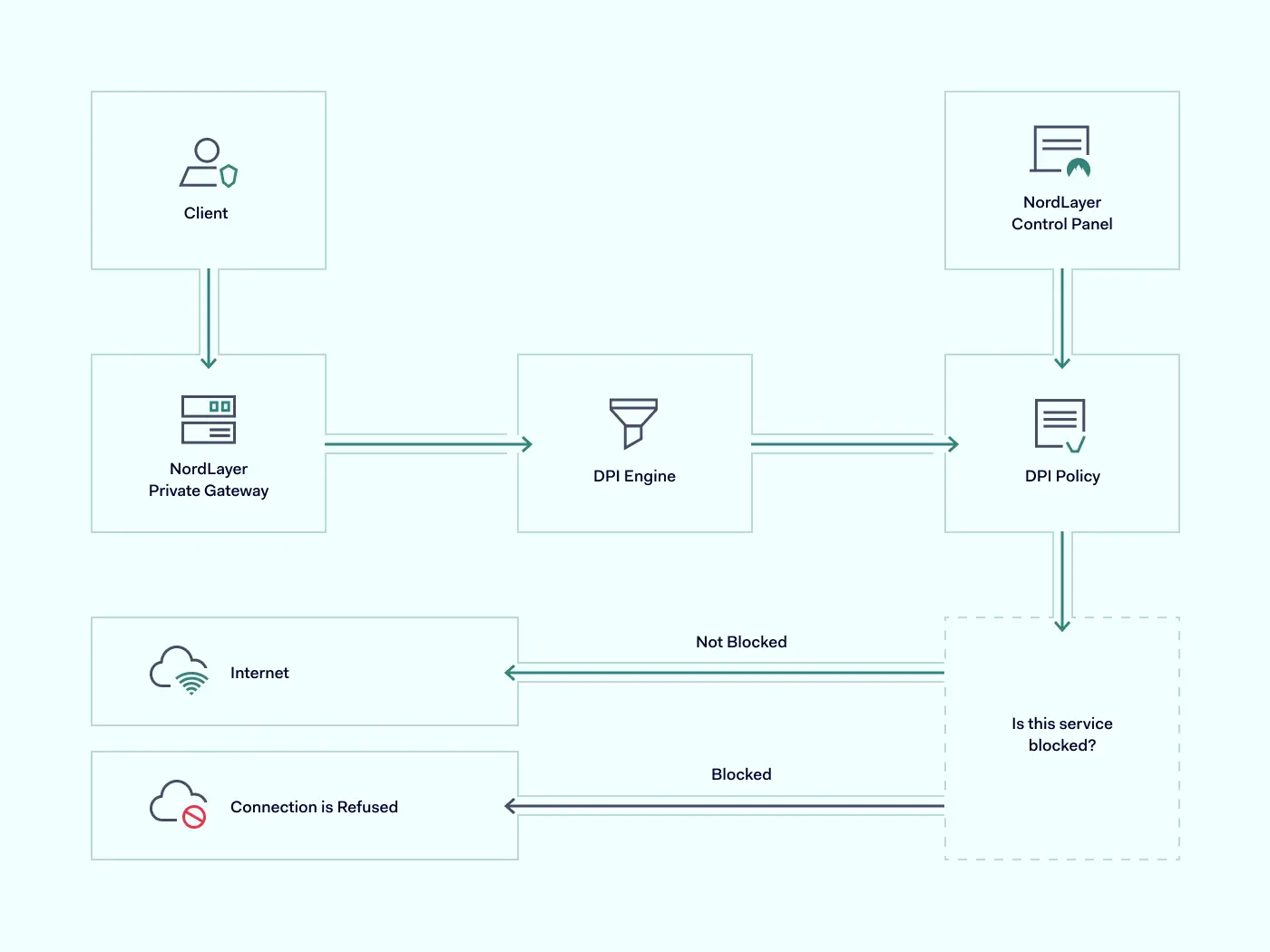
The incoming data is screened and filtered using the nDPI engine against the DPI Policy defined by the company’s IT administrator. The user is connected to a requested website if traveling data packets don’t include blocked services.

However, the connection to the requested online resource is restricted if there is a match between the data packet and the DPI block list policy.

How NordLayer’s DPI Lite is different?

Some solutions allow DPI to incorporate extensive categories and be customizable for every client’s preferences to restrict content online. However, a more complex approach may lead to excessive expenses. It may also require challenging configuration and become limiting to the company’s disadvantage.

Extensive data processing defined with all types of possible keywords can disrupt the connection flow and block access to online resources that initially weren’t intended to be restricted. On the other hand, if the company is set for hardware infrastructure and decides to continue with the same type of DPI technology, it will need to know how to configure and perform in-house maintenance. All these additional steps create an unnecessary workload for IT administrators.

To streamline the DPI implementation to the company infrastructure, NordLayer incorporates an easy-to-launch and control DPI Lite feature. It is cloud-native and easy to add or remove without investing in excessive resources. Its activation takes short notice and can be managed centrally, enabling flexibility and focus to the teams and operations:

  • Keep productivity on point. NordLayer’s DPI Lite feature encloses the company network with work-only online resources within employees’ reach. Leave no space for distractions, so teams are less likely to spend time on their personal activities and decrease the chances of human error.

  • Establish security levels. Entering unsecured websites or downloading data to work-linked endpoints can become a freeway for malicious actors accessing internal data and resources. DPI Lite can help filter out hidden remote computer access and control software planted by cybercriminals.

  • Quick implementation and adoption. DPI Lite, like all the other NordLayer features, is entirely cloud-based and thus simple to integrate into existing infrastructure. Besides short enablement time, it is compatible with other data processing features like DNS filtering by category, constructing a more robust organization security posture.

  • Easy to adhere to business needs. The categories or services of DPI Lite are simple to manage. A complete list or a few exceptions can be added or removed from the DPI Policy as required to suit the company’s service scope.

NordLayer offers a packet inspection solution that doesn’t overwhelm network security strategy and focuses on the most common business pain points. A well-sifted service list doesn’t leave space to overthink data to block or spend time researching what online resources to consider, so no openings are left. Overall, DPI Lite helps organizations handle their teams’ efficiency and activity while at work.

Benefits of DPI Lite

Establishing limits for online activity while working is like a reminder to focus on your tasks. But it’s not just about preventing employees from distractions using company gateways.

Adding DPI Lite as an additional security measure fortifies network security and advances business performance in different ways.

Prevent data leaking

Whether intentional or accidental, data leaks are damaging to businesses. DPI Lite adds to security measures by restricting the download of data-leaking apps or the usage of data-sharing and emailing services. Suppose employees try to send files from the company network via Dropbox or Google Drive. In that case, DPI Lite will recognize data packets containing related ports, protocols, and headers and will stop the action from completing the request.

Eliminate traffic overload

Online activities create traffic on network gateways: the more requests, the more overloaded infrastructure, ultimately resulting in performance issues. DPI Lite implementation to the virtual private gateways helps limit created traffic as users cannot access online resources. Online streaming and seeding services or visual-heavy social media increase network usage a few folds. Hence, with DPI blocking, fewer data packets must be inspected and unclog the network. Out of user sight, out of admin mind.

Protect static IP addresses

Unrestricted internet usage could create convenient conditions for employees to hide behind company IP addresses to perform illegal activities. For example, using torrents on a work network can result in copyright holders initiating blocked IP addresses or even legal prosecution for piracy on the organizational level.

With open internet access, scam attempts have a free pass. If law enforcement authorities identify IP during their investigation of a crime done by your employee from the company’s IP address, it might lead to the company’s liability and even hardware confiscation. Hence, whether the network is managed internally or via a vendor like Internet Service Provider (ISP), deep packet inspection as an additional security measure can help establish internal online activity limits to prevent any illicit acts from happening under the company name.

Entering NordLayer’s DPI Lite

Organization-first mindset while at work or dealing with company-related content can be seen as restricting user activity. Although it’s a strong push toward cybersecurity strategy implementation, preventing possible gaps and openings.

Deep packet inspection is part of the bigger picture when combined with other NordLayer security features like DNS filtering by category, ThreatBlock, and Jailbroken/rooted device detection. Enforcing our remote network access solution into your company infrastructure and activating the DPI Lite feature is a matter of a couple of days or less. Organization administrators need to access NordLayer Control Panel, navigate to Servers or Gateways under the Network tab, and configure it by selecting Deep Packet Inspection (Lite) categories as required.

Utilizing simple and affordable tools like NordLayer’s DPI Lite doesn’t overcomplicate the existing cybersecurity strategy and upgrades team productivity, network performance, and company security for better business performance.

About Version 2 Digital

Version 2 Digital is one of the most dynamic IT companies in Asia. The company distributes a wide range of IT products across various areas including cyber security, cloud, data protection, end points, infrastructures, system monitoring, storage, networking, business productivity and communication products.

Through an extensive network of channels, point of sales, resellers, and partnership companies, Version 2 offers quality products and services which are highly acclaimed in the market. Its customers cover a wide spectrum which include Global 1000 enterprises, regional listed companies, different vertical industries, public utilities, Government, a vast number of successful SMEs, and consumers in various Asian cities.

About NordLayer
NordLayer is an adaptive network access security solution for modern businesses – from the world’s most trusted cybersecurity brand, Nord Security.

The web has become a chaotic space where safety and trust have been compromised by cybercrime and data protection issues. Therefore, our team has a global mission to shape a more trusted and peaceful online future for people everywhere.

Azure security best practices

Microsoft Azure is a dominant cloud hosting platform, serving around 70 percent of organizations worldwide. A popular hosting environment for SQL databases, Azure also provides a flexible way to run up to 200 cloud applications.

This flexibility is a game-changer for many businesses. But there’s a catch. To function properly, it’s essential to create a secure Azure environment. Otherwise, cloud apps and databases can leak sensitive data. Credentials may be at risk, and companies can suffer huge compliance penalties.

Fortunately, solutions exist. This blog will explain how to secure your cloud environment with Azure security best practices. And we will look at how to create a layered security strategy that goes beyond Microsoft’s controls.

Why is securing access to Azure so important?

Azure security matters because Microsoft’s cloud platform hosts a range of critical assets. Companies use Azure to host .Net apps for web applications or gaming DevOps. Azure storage accounts host SQL databases containing client data, while Kubernetes clusters support private cloud infrastructure.

Whatever Azure services companies rely on, security is a priority. Insecure Azure apps can leak data and provide an entry point for cyber attackers. And you cannot rely on Microsoft to cover every security challenge.

Azure clients have wide areas of responsibility to secure their cloud configuration. Clients need to restrict access to sensitive data. Users must manage access and exclude malicious actors. They also have to manage how data flows between cloud apps. The need for an Azure security policy is obvious when you put these tasks together.

Microsoft Azure security best practices

Any companies that rely on Microsoft’s cloud services should get to know Azure security best practices.

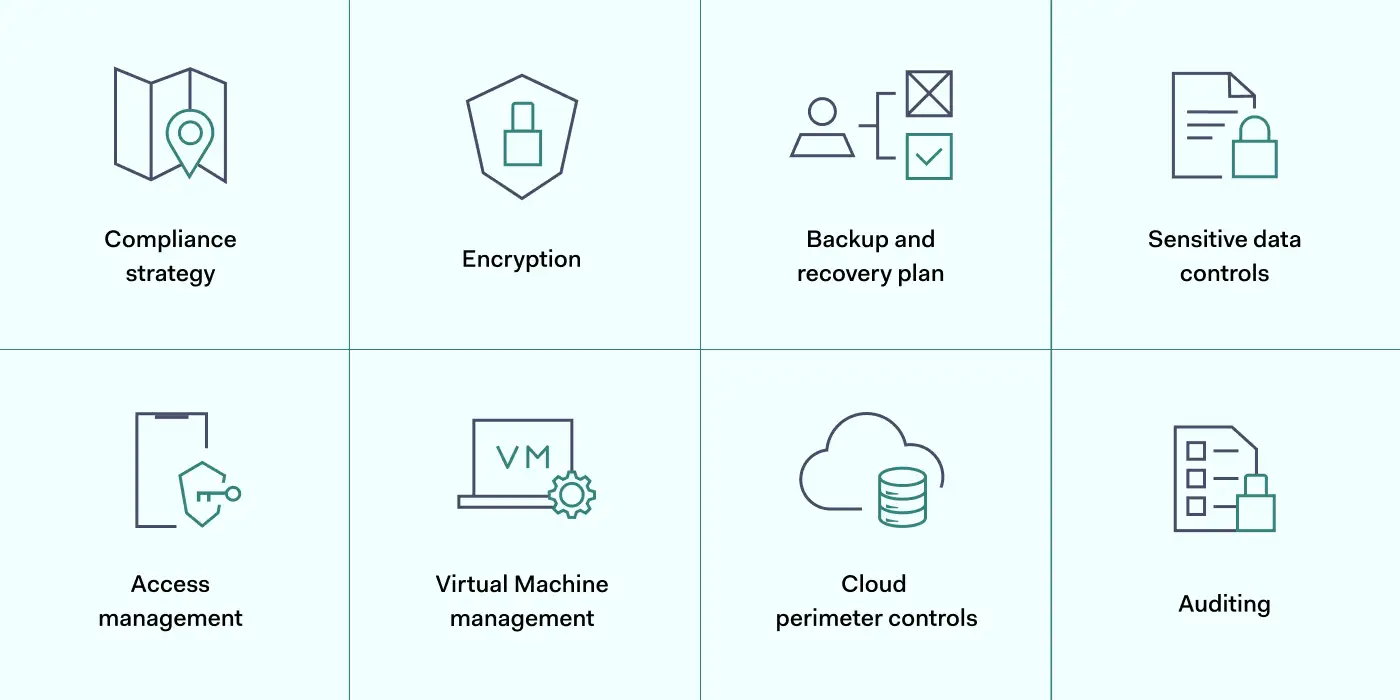
The best approach is adopting a layered strategy. Users should exploit security tools provided by Microsoft. But they should add additional security controls where necessary. These Azure security best practices will explain how the layered security approach works.

1. Map Azure assets and create a compliance strategy

The first step in layering Azure security is understanding the cloud environment. Before applying any of the best practices below, you must understand what assets need to be protected.

Map the cloud assets on your Azure platform. Include all apps and data stores, and classify data according to importance. You should know exactly where client data is stored and who has access to that data.

It is also advisable to create a clear compliance strategy for Azure environments. Define your core goals, including HIPAA, DCI-PSS, or GDPR compliance. Use these data security frameworks as a baseline to improve Azure security and meet regulatory requirements.

Track your compliance progress with the scoring tools in the Azure Security Center. The compliance dashboard provides detailed information about security levels and required actions.

2. Encrypt critical data

Data security on Azure apps is the responsibility of clients, not Microsoft. So take action to encrypt data and hide it from malicious actors.

Encrypt sensitive data at rest using Microsoft’s server-side symmetric key encryption tools. You can use these tools to segment data by importance. This ensures that operational data is available to employees. But financial or personal information is only accessible to users with specific encryption keys.

Azure Disk Encryption works alongside Microsoft’s SSE. It creates another layer of data security for virtual machines and data containers. This reduces the risk of attackers exploiting Virtual Hard Disk (VHD) files. Attackers will find it much harder to create virtual machines within Azure environments.

When you apply Azure encryption, key storage is your responsibility. Secure encryption keys in IAM controls in place to prevent unauthorized access. The Azure Key Vault is a good key management solution and integrates well with Azure app environments.

Users should also encrypt sensitive data in transit. Data constantly flows between Azure apps, remote devices, and on-premises workstations. VPN encryption provides a solution, adding another layer of protection above Azure security controls.

3. Create a backup and disaster recovery plan

A strong Azure security posture features a fall-back plan when systems fail, or attackers succeed. Microsoft offers an end-to-end DR service via Azure Site Recovery (ASR). Combine this with Azure Backup to create tailored data backup plans.

With an ASR failover plan, you can recover application states with minimal information loss. You might also add Azure Storage Replication, which regularly generates multiple copies of important files.

4. Secure sensitive data with robust controls

Encryption is not the only data security control for Azure users. Consider a range of additional tools and find a mix that secures sensitive data without compromising user experience. Options to think about include:

  • Activate auditing tools. Users can instruct Azure to audit databases. This creates a data stream that tracks database changes. Data visibility makes it easier for security teams to detect anomalies and unsafe user activity.

  • Add Azure SQL threat detection. Many Azure apps rely on SQL, but SQL presents critical security threats. Using SQL databases, turn on SQL threat detection to isolate security weaknesses and secure the threat surface.

  • Use Azure Firewall. Azure Firewall adds another layer of data security protection for Azure-hosted apps. You can manage firewall settings centrally, and coverage can increase as new apps come online. Cloud-native TLS inspection provides valuable protection against malware attacks.

  • Enable Azure Monitor alerts. Gain additional awareness by engaging Azure Monitor alerts. Users can target alerts at single resources and use many metrics to identify vulnerabilities. Azure Monitor Action Groups make it easy to automate alerts and deliver precise information when threats arise.

  • Implement Azure Defender. Defender is a subscription-based security service that leverages extended threat detection and response (XDR) and contextual security. It covers hybrid and multi-cloud environments, delivering threat protection and remediation advice. Azure Defender may well be a sensible addition when securing complex cloud environments,

  • Use Shared Access Signatures. Created via Active Directory, Shared Access Signatures let you manage access to Azure resources to third parties and employees for limited periods. Best practices include creating a SAS for all short-term network users, as it allows admins to set granular controls.

5. Manage access with IAM

Preventing illegitimate access to cloud infrastructure is one of the most important Azure security best practices. The best way to manage user access is by adding Identity and Access Management (IAM) to your security arsenal.

Microsoft provides a cloud-native IAM system called Azure Active Directory (AAD). AAD authenticates logins and compares user credentials to a secure Active Directory database.

IAM best practices for Azure include using AAD to set role-based access controls (RBAC). With RBAC, admins can put the Zero Trust ‘principle of least privilege’ into action. Every user has very limited privileges. Privileges only apply after users supply multiple credentials.

Role-based privileges have big practical benefits. Developers will not retain access to resources when their project involvement ends. Attackers obtaining their credentials will be relatively powerless. They will struggle to achieve Virtual Machine access. Breaching Azure SQL databases will be much harder.

Add another layer to your security posture by combining AAD with Single-Sign-On (SSO). SSO combines all cloud and on-premises assets. Remote workers can log in to the apps they need via a single sign-on portal.

Users can apply Multi-Factor Authentication (MFA) at this stage. This requests an extra authentication factor for each login, such as biometric data or one-time codes delivered to smartphones.

IP allowlisting also features in recommended Azure security best practices. Allowlisting lets you specify trusted IP addresses. You can add remote work devices or employee smartphones and exclude every other device until it passes MFA and IAM controls.

6. Add workload and VM protection

Azure security best practices include securing virtual machines via specialist controls. For instance, Azure includes the option of applying just-in-time controls for VMs. These Azure security controls allow users to access VMs for limited periods, removing the possibility of accessing assets after sessions expire.

VM controls also allow administrators to lock vulnerable ports and limit access to authorized users. Restrict access to RDP, WinRM, and SSH ports commonly used by VMs. Access should only be available when absolutely required.

You can apply controls easily by assigning workloads and VMs to Network Security Groups (NSGs). These groups define security procedures for each asset and add another protective layer via the Azure Firewall.

Additionally, remember to keep workload patches up to date. Unpatched Azure apps can be vulnerable to exploits. Automate software updates where possible and audit unpatched tools to minimize your exploit vulnerability.

7. Control the cloud perimeter with network security

Internal Azure cloud security works alongside general network security. Attackers can steal credentials from devices outside the cloud or launch attacks via internet-facing endpoints. This is why Azure’s best practices include measures to harden on-premises security. These measures can protect the whole network perimeter:

  • Track internet-facing cloud endpoints and minimize the contact between the wider web and company resources.

  • Use a Security Information and Event Management solution. SIEM tracks network traffic and identifies potential threats. Integrate it with Azure Defender to cover external and cloud-based vulnerabilities.

  • Apply network segmentation. Separate cloud endpoints from data centers and workstations with internet access.

  • Install a VPN or similar security tool to encrypt data and conceal user identities.

8. Audit user identities and access policies

Your Azure cloud security posture can weaken over time. What works now may degrade and create new vulnerabilities.

Azure security teams must audit every cloud security control and ensure continuing app and data protection. Audit app ownership regularly to ensure only active users have administrative privileges. Clean up Azure platforms by removing obsolete services, groups, and users.

Use the Azure Security Center to improve auditing procedures. The ASC includes machine learning analysis tools that provide feedback and suggest security posture improvements. Real-time monitoring and audit logs provide evidence to fine-tune your security setup.

How can NordLayer secure your access to Microsoft Azure?

Microsoft Azure cloud security requires a layered mix of internal cloud-based controls and solid external security. Users must protect data at the app level, followed by workgroups, platforms, and the entire company network.

The best practices listed above provide a roadmap to achieve security at the cloud level. Encrypt data and manage Active Directory identities. Leverage the Security Center to track user activity and run regular audits. And target virtual machines and apps with specific protection.

But that’s not enough. Add an extra security layer for rock-solid SaaS access control by safeguarding the network edge and protecting credentials outside the cloud.

NordLayer will help you achieve this. Encrypt in-transit data, apply for SSO, and screen access with IP allowlisting. Limit access to trusted IP addresses and exclude everything else – an important step towards a Zero Trust security posture.

Prevent data leaks by blending NordLayer’s network security tools with Microsoft Azure’s internal controls. To find out more, get in touch with our team today.

About Version 2 Digital

Version 2 Digital is one of the most dynamic IT companies in Asia. The company distributes a wide range of IT products across various areas including cyber security, cloud, data protection, end points, infrastructures, system monitoring, storage, networking, business productivity and communication products.

Through an extensive network of channels, point of sales, resellers, and partnership companies, Version 2 offers quality products and services which are highly acclaimed in the market. Its customers cover a wide spectrum which include Global 1000 enterprises, regional listed companies, different vertical industries, public utilities, Government, a vast number of successful SMEs, and consumers in various Asian cities.

These days, cybercrime is rampant. It’s no longer a matter of “if” you’re going to suffer an attack but “when” it will happen. All companies want to be ready for any crisis. And this is where a business continuity plan comes into play.

But what is a business continuity plan exactly? Why is it important? What should one include? Today, we’re exploring all these questions in-depth.

What is a business continuity plan?

A business continuity plan (BCP) is a document that sets guidelines for how an organization will continue its operations in the event of a disruption, whether it’s a fire, flood, other natural disaster or a cybersecurity incident. A BCP aims to help organizations resume operations without significant downtime.

Unfortunately, according to a 2020 Mercer survey, 51% of businesses across the globe don’t have a business continuity plan in place.

What’s the difference between business continuity and disaster recovery plans?

We often confuse the terms business continuity plan and disaster recovery plan. The two overlap and often work together, but the disaster recovery plan focuses on containing, examining, and restoring operations after a cyber incident. On the other hand, BCP is a broader concept that considers the whole organization. A business continuity plan helps organizations stay prepared for dealing with a potential crisis and usually encompasses a disaster recovery plan.

Importance of business continuity planning

The number of news headlines announcing data breaches has numbed us to the fact that cybercrime is very real and frequent and poses an existential risk to companies of all sizes and industries.

Consider that in 2021, approximately 37% of global organizations fell victim to a ransomware attack. Then consider that business interruption and restoration costs account for 50% of cyberattack-related losses. Finally, take into account that most cyberattacks are financially motivated and the global cost of cybercrime topped $6 trillion last year. The picture is quite clear — cybercrime is a lucrative venture for bad actors and potentially disastrous for those on the receiving end.

To thrive in these unpredictable times, organizations go beyond conventional security measures. Many companies develop a business continuity plan parallel to secure infrastructure and consider the plan a critical part of the security ecosystem. The Purpose of a business continuity plan is to significantly reduce the downtime in an emergency and, in turn, reduce the potential reputational damage and — of course — revenue losses.

Business continuity plan template

Password security for your business

Store, manage and share passwords.

30-day money-back guarantee

Business Continuity Plan Example

[Company Name]

[Date]

I. Introduction

  • Purpose of the Plan

  • Scope of the Plan

  • Budget

  • Timeline

The initial stage of developing a business continuity plan starts with a statement of the plan’s purpose, which explains the main objective of the plan, such as ensuring the organization’s ability to continue its operations during and after a disruptive event.

The Scope of the Plan outlines the areas or functions that the plan will cover, including business processes, personnel, equipment, and technology.

The Budget specifies the estimated financial resources required to implement and maintain the BCP. It includes costs related to technology, personnel, equipment, training, and other necessary expenses.

The Timeline provides a detailed schedule for developing, implementing, testing, and updating the BCP.

II. Risk Assessment

  • Identification of Risks

  • Prioritization of Risks

  • Mitigation Strategies

The Risk Assessment section of a Business Continuity Plan (BCP) is an essential part of the plan that identifies potential risks that could disrupt an organization’s critical functions.

The Identification of Risks involves identifying potential threats to the organization, such cybersecurity breaches, supply chain disruptions, power outages, and other potential risks. This step is critical to understand the risks and their potential impact on the organization.

Once the risks have been identified, the Prioritization of Risks follows, which helps determine which risks require the most attention and resources.

The final step in the Risk Assessment section is developing Mitigation Strategies to minimize the impact of identified risks. Mitigation strategies may include preventative measures, such as system redundancies, data backups, cybersecurity measures, as well as response and recovery measures, such as emergency protocols and employee training.

III. Emergency Response

  • Emergency Response Team

  • Communication Plan

  • Emergency Procedures

This section of the plan focuses on immediate actions that should be taken to ensure the safety and well-being of employees and minimize the impact of the event on the organization’s operations.

The Emergency Response Team is responsible for managing the response to an emergency or disaster situation. This team should be composed of individuals who are trained in emergency response procedures and can act quickly and decisively during an emergency. The team should also include a designated leader who is responsible for coordinating the emergency response efforts.

The Communication Plan outlines how information will be disseminated during an emergency situation. It includes contact information for employees, stakeholders, and emergency response personnel, as well as protocols for communicating with these individuals.

The Emergency Procedures detail the steps that should be taken during an emergency or disaster situation. The emergency procedures should be developed based on the potential risks identified in the Risk Assessment section and should be tested regularly to ensure that they are effective.

IV. Business Impact Analysis

The Business Impact Analysis (BIA) section of a Business Continuity Plan (BCP) is a critical step in identifying the potential impact of a disruption to an organization’s critical operations.

The Business Impact Analysis is typically conducted by a team of individuals who understand the organization’s critical functions and can assess the potential impact of a disruption to those functions. The team may include representatives from various departments, including finance, operations, IT, and human resources.

V. Recovery and Restoration

  • Procedures for recovery and restoration of critical processes

  • Prioritization of recovery efforts

  • Establishment of recovery time objectives

The Recovery and Restoration section of a Business Continuity Plan (BCP) outlines the procedures for recovering and restoring critical processes and functions following a disruption.

The Procedures for recovery and restoration of critical processes describe the steps required to restore critical processes and functions following a disruption. This may include steps such as relocating to alternate facilities, restoring data and systems, and re-establishing key business relationships.

The Prioritization section of the plan identifies the order in which critical processes will be restored, based on their importance to the organization’s operations and overall mission.

Recovery time objectives (RTOs) define the maximum amount of time that critical processes and functions can be unavailable following a disruption. Establishing RTOs ensures that recovery efforts are focused on restoring critical functions within a specific timeframe.

VI. Plan Activation

  • Plan Activation Procedures

The Plan Activation section is critical in ensuring that an organization can quickly and effectively activate the plan and respond to a potential emergency.

The Plan Activation Procedures describe the steps required to activate the BCP in response to a disruption. The procedures should be clear and concise, with specific instructions for each step to ensure a prompt and effective response.

VII. Testing and Maintenance

  • Testing Procedures

  • Maintenance Procedures

  • Review and Update Procedures

This section of the plan is critical to ensure that an organization can effectively respond to disruptions and quickly resume its essential functions.

Testing procedures may include scenarios such as natural disasters, cyber-attacks, and other potential risks. The testing procedures should include clear objectives, testing scenarios, roles and responsibilities, and evaluation criteria to assess the effectiveness of the plan.

The Maintenance Procedures detail the steps necessary to keep the BCP up-to-date and relevant.

The Review and Update Procedures describe how the BCP will be reviewed and updated regularly to ensure its continued effectiveness. This may involve conducting a review of the plan on a regular basis or after significant changes to the organization’s operations or threats.

What should a business continuity plan checklist include?

Organizations looking to develop a BCP have more than a few things to think through and consider. Variables such as the size of the organization, its IT infrastructure, personnel, and resources all play a significant role in developing a continuity plan. Remember, each crisis is different, and each organization will have a view on handling it according to all the variables in play. However, all business continuity plans will include a few elements in one way or another.

  • Clearly defined areas of responsibility

    A BCP should define specific roles and responsibilities for cases of emergency. Detail who is responsible for what tasks and clarify what course of action a person in a specific position should take. Clearly defined roles and responsibilities in an emergency event allow you to act quickly and decisively and minimize potential damage.

  • Crisis communication plan

    In an emergency, communication is vital. It is the determining factor when it comes to crisis handling. For communication to be effective, it is critical to establish clear communication pipelines. Furthermore, it is crucial to understand that alternative communication channels should not be overlooked and outlined in a business continuity plan.

  • Recovery teams

    A recovery team is a collective of different professionals who ensure that business operations are restored as soon as possible after the organization confronts a crisis.

  • Alternative site of operations

    Today, when we think of an incident in a business environment, we usually think of something related to cybersecurity. However, as discussed earlier, a BCP covers many possible disasters. In a natural disaster, determine potential alternate sites where the company could continue to operate.

  • Backup power and data backups

    Whether a cyber event or a real-life physical event, ensuring that you have access to power is crucial if you wish to continue operations. In a BCP, you can often come across lists of alternative power sources such as generators, where such tools are located, and who should oversee them. The same applies to data. Regularly scheduled data backups can significantly reduce potential losses incurred by a crisis event.

  • Recovery guidelines

    If a crisis is significant, a comprehensive business continuity plan usually includes detailed guidelines on how the recovery process will be carried out.

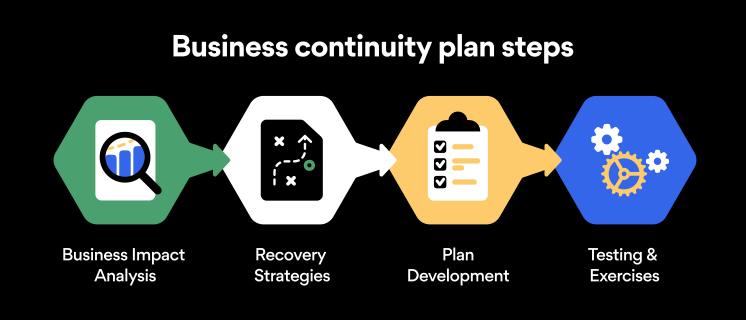
Business continuity planning steps

Here are some general guidelines that an organization looking to develop a BCP should consider:

Analysis

A business continuity plan should include an in-depth analysis of everything that could negatively affect the overall organizational infrastructure and operations. Assessing different levels of risk should also be a part of the analysis phase.

Design and development

Once you have a clear overview of potential risks your company could face, start developing a plan. Create a draft and reassess it to see if it takes into account even the smallest of details.

Implementation

Implement BCP within the organization by providing training sessions for the staff to get familiar with the plan. Getting everyone on the same page regarding crisis management is critical.

Testing

Rigorously test the plan. Play out a variety of scenarios in training sessions to learn the overall effectiveness of the continuity plan. By doing so, everyone on the team will be closely familiar with the business continuity plan’s guidelines.

Maintenance and updating

Because the threat landscape constantly changes and evolves, you should regularly reassess your BCP and take steps to update it. By making your continuity plan in tune with the times, you will be able to stay a step ahead of a crisis.

Level up your company’s security with NordPass Business

A comprehensive business continuity plan is vital for the entire organization’s security posture. However, in a perfect world, you wouldn’t have to use it. This is where NordPass Business can help.

Remember, weak, reused, or compromised passwords are often cited as one of the top contributing factors in data breaches. It’s not surprising, considering that an average user has around 100 passwords. Password fatigue is real and significantly affects how people treat their credentials. NordPass Business counters these issues.

With NordPass Business, your team will have a single secure place to store all work-related passwords, credit cards, and other sensitive information. Accessing all the data stored in NordPass is quick and easy, which allows your employees not to be distracted by the task of finding the correct passwords for the correct account.

In cyber incidents, NordPass Business ensures that company credentials remain secure at all times. Everything stored in the NordPass vault is secured with advanced encryption algorithms, which would take hundreds of years to brute force.

If you are interested in learning more about NordPass Business and how it can fortify corporate security, do not hesitate to book a demo with our representative.


About Version 2 Digital

Version 2 Digital is one of the most dynamic IT companies in Asia. The company distributes a wide range of IT products across various areas including cyber security, cloud, data protection, end points, infrastructures, system monitoring, storage, networking, business productivity and communication products.

Through an extensive network of channels, point of sales, resellers, and partnership companies, Version 2 offers quality products and services which are highly acclaimed in the market. Its customers cover a wide spectrum which include Global 1000 enterprises, regional listed companies, different vertical industries, public utilities, Government, a vast number of successful SMEs, and consumers in various Asian cities.

About NordPass
NordPass is developed by Nord Security, a company leading the global market of cybersecurity products.

The web has become a chaotic space where safety and trust have been compromised by cybercrime and data protection issues. Therefore, our team has a global mission to shape a more trusted and peaceful online future for people everywhere.

Salesforce data security: is native security enough?

Salesforce is a dominant player in the Customer Relationship Management sector. Around 150,000 companies use Salesforce to manage customer data and launch marketing campaigns, and the company enjoys a 33% market share.

It’s easy to see why. Salesforce’s cloud-based tools save costs and time, simplify customer analysis, and integrate smoothly with other SaaS services. But is Salesforce a secure environment to run your business?

While Salesforce is generally safe to use, data security in Salesforce is still something users need to consider. Data breaches have exposed potential vulnerabilities. And users need to know how to use the Salesforce data security model when making their implementation more secure.

Data security in Salesforce

Data security is the protection of sensitive data handled by an organization. In the context of Salesforce, this refers to customer records, including financial information and private personal details such as names and contact details.

The consequences can be severe if an organization loses control of data privacy protection. According to IBM, the average cost of a data breach is approximately $4.35 million. Companies that lose large volumes of sensitive customer data can expect to pay hefty compensation.

Salesforce is no exception. In 2019, Salesforce client Hanna Andersson suffered a major data breach. A malware infection on the clothing retailer’s Salesforce platform exposed over 200,000 customer accounts. Neither Hanna Andersson nor Salesforce knew anything about it.

Three months after the Salesforce breach began, law enforcement officers discovered confidential data for sale on the Dark Web. Customers immediately sued under the California Consumer Privacy Act (CCPA).

Salesforce and Hanna Andersson eventually settled the claim in 2021. Both companies accepted shortcomings in protecting user data, detecting malware, and informing customers. And they had to pay as much as $5,000 to affected customers.

Related articles


Network Access Control best practices web 1400x800

In Depth

6 Network Access Control best practices

29 Dec 202213 min read


SaaS Security Best Practices

In Depth

SaaS Security 101: The Definitive Guide

10 May 20229 min read


The Hanna Andersson settlement shows that data security is a critical vulnerability and could happen to any Salesforce user. So let’s dig deeper into the Salesforce data security model to explain how secure the platform is and what companies can do to protect their data.

The Salesforce data security model

Since the 2019 Salesforce data breach, the platform has tightened up its native security features.

Data at rest on Salesforce is encrypted, concealing it from outsiders. Logging systems allow users to track weaknesses and handle alerts. MFA adds strength to authentication processes. And users can even create bespoke protection for data analysis with the Data Mask feature.

However, one set of controls in the data security field is all-important. Permission sets enable Salesforce users to manage data access. Users can use permission sets to ensure that only authorized users can access data. Everyone else is blocked by default – until they are granted necessary privileges.

There are four Salesforce permission sets. Each one plays a role in locking down confidential customer information:

  • Organization level – At the organization level, users can manage access for all users in their enterprise. Multi-factor authentication factors make Salesforce portals more secure. Connection limits, location tracking, and IP range screening exclude malicious actors.

  • Object level – Organizations can limit access to Salesforce databases and apps. Object level controls allow administrators to set aside portions of the Salesforce environment and create restricted zones with limited access.

  • Record level – Security teams can create permission sets for specific records. Marketing teams may need access to information about customer purchases. But financial data can be locked away. Admins can set objects to read-only or allocate editing privileges for certain users.

  • Field level – At the field level, users can restrict how users interact with database fields. This provides tight control over how data is used. Many employees may have object access to CRM data. Only a tiny number will have field level access to edit and export the most sensitive data.

Salesforce security issues

Applying access controls is critical, but users must also be aware of Salesforce security vulnerabilities. Be sure to factor in these issues when planning your security strategy.

1. Inadequate data classification

Before you can protect confidential data, you need to understand the data you hold. Companies need to classify every record according to its value and vulnerability. When you have that information, you can start creating field level controls and setting permissions.

Review your databases and assign risk levels to the information they contain. Use regulations as a framework. For instance, the CCPA mandates robust protection of customer financial records. HIPAA requires tight control of any patient data.

Classification matters because it isn’t always practical to secure all customer data. Unclassified data generates noise and confusion. Security teams are presented with false positives and waste time on securing low-value data.

2. Confusing data ownership

Who is responsible for securing your Salesforce CRM system? Many companies cannot answer this question and rely on multiple stakeholders to secure customer data.

Data ownership should be clear and communicated to all Salesforce users. Assign an individual or team to manage data security. They should ensure compliance with relevant regulations, apply native Salesforce controls, and integrate enterprise-wide security systems with the CRM system.

Take advantage of Salesforce’s training materials. The platform offers courses in identity and access management (IAM). With this information, your security manager can master Salesforce permission sets and protect critical databases.

3. Poor Salesforce security awareness

Knowledge about Salesforce security should extend beyond the data security lead. Every CRM user must know security policies and the importance of protecting against phishing attacks.

Remember the Hanna Andersson case. A single Salesforce cyber attack can compromise huge data sets. Poor training and a shallow security culture can have huge implications.

Extended awareness matters because Salesforce is highly customizable. Employees can easily misconfigure communities in the Experience Cloud. And teams can add Salesforce services without IT teams knowing.

Both actions expand the threat surface, potentially compromising a Salesforce environment. Avoid them by educating Salesforce users and creating policies that explain how to use the platform safely.

4. Not understanding how shared responsibility works

As with all cloud-based products, security responsibility is shared between Salesforce and service users. Unfortunately, this is something that users easily forget.

Users may assume that Salesforce protects data, but this is partially correct. Salesforce does encrypt data and guards against malware infection. Clients are responsible for ensuring secure access and object configurations.

Companies using Salesforce can over-provision employees, giving them too much access to sensitive data. They might allow wide third-party access to databases, even down to field level. Marketing teams could create vulnerabilities as they customize their Salesforce solution.

Be aware of your responsibilities under the shared responsibility model. If not, data breaches will probably be due to your own negligence.

Why do you need additional security in SalesForce?

Native security features provided by Salesforce are powerful but insufficient to achieve data security. Companies need to combine internal controls like Salesforce data encryption with external security solutions.

The 2019 data breach demonstrates why external security is so important. Salesforce and Hanna Andersson did not know about the malware infection. Security teams had no idea that gigabytes of user data had been stolen.

While the single data breach cost both companies plenty of money, the cost could have been higher without the actions of law enforcement professionals.

The initial malware infection involved a ‘magecart’ attack that skimmed customer data from the retailer’s payment portal. This agent probably arrived via a phishing attack on a Hanna Andersson employee. None of Salesforce’s internal controls could prevent it, but external security solutions could help.

SIEM tools to scan attachments and quarantine suspicious links can stop phishers in their tracks. IP allowlisting screens devices and permits access for approved IP addresses. VPNs encrypt company networks and conceal credentials from external observers.

Salesforce allows in-depth access management and security logging. But when fine-tuning their CRM security, companies should supplement native features with additional measures.

How can NordLayer help with Salesforce security?

Salesforce makes CRM simple, allowing eCommerce businesses to thrive. But recent data breaches have shown that the cloud-based platform has some critical cybersecurity vulnerabilities.

NordLayer’s tools supplement native Salesforce security and make it easier to achieve regulatory compliance.

Our cloud security solutions include access management tools and Single Sign On that bridge company networks and cloud portals. 

IP allowlisting is another core NordLayer feature. Allowlisting lets you set approved IP addresses and block everything else. This makes it safer to admit remote workers to your Salesforce environment. It also means that credential theft does not automatically provide access to your data. Attackers without approved IP addresses will still remain outside the perimeter, unable to steal customer information. 

Discover how to create a rock-solid Salesforce security posture. Get in touch with our team and discuss your options today.

About Version 2 Digital

Version 2 Digital is one of the most dynamic IT companies in Asia. The company distributes a wide range of IT products across various areas including cyber security, cloud, data protection, end points, infrastructures, system monitoring, storage, networking, business productivity and communication products.

Through an extensive network of channels, point of sales, resellers, and partnership companies, Version 2 offers quality products and services which are highly acclaimed in the market. Its customers cover a wide spectrum which include Global 1000 enterprises, regional listed companies, different vertical industries, public utilities, Government, a vast number of successful SMEs, and consumers in various Asian cities.

These days, cybercrime is rampant. It’s no longer a matter of “if” you’re going to suffer an attack but “when” it will happen. All companies want to be ready for any crisis. And this is where a business continuity plan comes into play.

But what is a business continuity plan exactly? Why is it important? What should one include? Today, we’re exploring all these questions in-depth.

What is a business continuity plan?

A business continuity plan (BCP) is a document that sets guidelines for how an organization will continue its operations in the event of a disruption, whether it’s a fire, flood, other natural disaster or a cybersecurity incident. A BCP aims to help organizations resume operations without significant downtime.

Unfortunately, according to a 2020 Mercer survey, 51% of businesses across the globe don’t have a business continuity plan in place.

What’s the difference between business continuity and disaster recovery plans?

We often confuse the terms business continuity plan and disaster recovery plan. The two overlap and often work together, but the disaster recovery plan focuses on containing, examining, and restoring operations after a cyber incident. On the other hand, BCP is a broader concept that considers the whole organization. A business continuity plan helps organizations stay prepared for dealing with a potential crisis and usually encompasses a disaster recovery plan.

Importance of business continuity planning

The number of news headlines announcing data breaches has numbed us to the fact that cybercrime is very real and frequent and poses an existential risk to companies of all sizes and industries.

Consider that in 2021, approximately 37% of global organizations fell victim to a ransomware attack. Then consider that business interruption and restoration costs account for 50% of cyberattack-related losses. Finally, take into account that most cyberattacks are financially motivated and the global cost of cybercrime topped $6 trillion last year. The picture is quite clear — cybercrime is a lucrative venture for bad actors and potentially disastrous for those on the receiving end.

To thrive in these unpredictable times, organizations go beyond conventional security measures. Many companies develop a business continuity plan parallel to secure infrastructure and consider the plan a critical part of the security ecosystem. The Purpose of a business continuity plan is to significantly reduce the downtime in an emergency and, in turn, reduce the potential reputational damage and — of course — revenue losses.

Business continuity plan template

Password security for your business

Store, manage and share passwords.

30-day money-back guarantee

Business Continuity Plan Example

[Company Name]

[Date]

I. Introduction

  • Purpose of the Plan

  • Scope of the Plan

  • Budget

  • Timeline

The initial stage of developing a business continuity plan starts with a statement of the plan’s purpose, which explains the main objective of the plan, such as ensuring the organization’s ability to continue its operations during and after a disruptive event.

The Scope of the Plan outlines the areas or functions that the plan will cover, including business processes, personnel, equipment, and technology.

The Budget specifies the estimated financial resources required to implement and maintain the BCP. It includes costs related to technology, personnel, equipment, training, and other necessary expenses.

The Timeline provides a detailed schedule for developing, implementing, testing, and updating the BCP.

II. Risk Assessment

  • Identification of Risks

  • Prioritization of Risks

  • Mitigation Strategies

The Risk Assessment section of a Business Continuity Plan (BCP) is an essential part of the plan that identifies potential risks that could disrupt an organization’s critical functions.

The Identification of Risks involves identifying potential threats to the organization, such cybersecurity breaches, supply chain disruptions, power outages, and other potential risks. This step is critical to understand the risks and their potential impact on the organization.

Once the risks have been identified, the Prioritization of Risks follows, which helps determine which risks require the most attention and resources.

The final step in the Risk Assessment section is developing Mitigation Strategies to minimize the impact of identified risks. Mitigation strategies may include preventative measures, such as system redundancies, data backups, cybersecurity measures, as well as response and recovery measures, such as emergency protocols and employee training.

III. Emergency Response

  • Emergency Response Team

  • Communication Plan

  • Emergency Procedures

This section of the plan focuses on immediate actions that should be taken to ensure the safety and well-being of employees and minimize the impact of the event on the organization’s operations.

The Emergency Response Team is responsible for managing the response to an emergency or disaster situation. This team should be composed of individuals who are trained in emergency response procedures and can act quickly and decisively during an emergency. The team should also include a designated leader who is responsible for coordinating the emergency response efforts.

The Communication Plan outlines how information will be disseminated during an emergency situation. It includes contact information for employees, stakeholders, and emergency response personnel, as well as protocols for communicating with these individuals.

The Emergency Procedures detail the steps that should be taken during an emergency or disaster situation. The emergency procedures should be developed based on the potential risks identified in the Risk Assessment section and should be tested regularly to ensure that they are effective.

IV. Business Impact Analysis

The Business Impact Analysis (BIA) section of a Business Continuity Plan (BCP) is a critical step in identifying the potential impact of a disruption to an organization’s critical operations.

The Business Impact Analysis is typically conducted by a team of individuals who understand the organization’s critical functions and can assess the potential impact of a disruption to those functions. The team may include representatives from various departments, including finance, operations, IT, and human resources.

V. Recovery and Restoration

  • Procedures for recovery and restoration of critical processes

  • Prioritization of recovery efforts

  • Establishment of recovery time objectives

The Recovery and Restoration section of a Business Continuity Plan (BCP) outlines the procedures for recovering and restoring critical processes and functions following a disruption.

The Procedures for recovery and restoration of critical processes describe the steps required to restore critical processes and functions following a disruption. This may include steps such as relocating to alternate facilities, restoring data and systems, and re-establishing key business relationships.

The Prioritization section of the plan identifies the order in which critical processes will be restored, based on their importance to the organization’s operations and overall mission.

Recovery time objectives (RTOs) define the maximum amount of time that critical processes and functions can be unavailable following a disruption. Establishing RTOs ensures that recovery efforts are focused on restoring critical functions within a specific timeframe.

VI. Plan Activation

  • Plan Activation Procedures

The Plan Activation section is critical in ensuring that an organization can quickly and effectively activate the plan and respond to a potential emergency.

The Plan Activation Procedures describe the steps required to activate the BCP in response to a disruption. The procedures should be clear and concise, with specific instructions for each step to ensure a prompt and effective response.

VII. Testing and Maintenance

  • Testing Procedures

  • Maintenance Procedures

  • Review and Update Procedures

This section of the plan is critical to ensure that an organization can effectively respond to disruptions and quickly resume its essential functions.

Testing procedures may include scenarios such as natural disasters, cyber-attacks, and other potential risks. The testing procedures should include clear objectives, testing scenarios, roles and responsibilities, and evaluation criteria to assess the effectiveness of the plan.

The Maintenance Procedures detail the steps necessary to keep the BCP up-to-date and relevant.

The Review and Update Procedures describe how the BCP will be reviewed and updated regularly to ensure its continued effectiveness. This may involve conducting a review of the plan on a regular basis or after significant changes to the organization’s operations or threats.

What should a business continuity plan checklist include?

Organizations looking to develop a BCP have more than a few things to think through and consider. Variables such as the size of the organization, its IT infrastructure, personnel, and resources all play a significant role in developing a continuity plan. Remember, each crisis is different, and each organization will have a view on handling it according to all the variables in play. However, all business continuity plans will include a few elements in one way or another.

  • Clearly defined areas of responsibility

    A BCP should define specific roles and responsibilities for cases of emergency. Detail who is responsible for what tasks and clarify what course of action a person in a specific position should take. Clearly defined roles and responsibilities in an emergency event allow you to act quickly and decisively and minimize potential damage.

  • Crisis communication plan

    In an emergency, communication is vital. It is the determining factor when it comes to crisis handling. For communication to be effective, it is critical to establish clear communication pipelines. Furthermore, it is crucial to understand that alternative communication channels should not be overlooked and outlined in a business continuity plan.

  • Recovery teams

    A recovery team is a collective of different professionals who ensure that business operations are restored as soon as possible after the organization confronts a crisis.

  • Alternative site of operations

    Today, when we think of an incident in a business environment, we usually think of something related to cybersecurity. However, as discussed earlier, a BCP covers many possible disasters. In a natural disaster, determine potential alternate sites where the company could continue to operate.

  • Backup power and data backups

    Whether a cyber event or a real-life physical event, ensuring that you have access to power is crucial if you wish to continue operations. In a BCP, you can often come across lists of alternative power sources such as generators, where such tools are located, and who should oversee them. The same applies to data. Regularly scheduled data backups can significantly reduce potential losses incurred by a crisis event.

  • Recovery guidelines

    If a crisis is significant, a comprehensive business continuity plan usually includes detailed guidelines on how the recovery process will be carried out.

Business continuity planning steps

Here are some general guidelines that an organization looking to develop a BCP should consider:

Analysis

A business continuity plan should include an in-depth analysis of everything that could negatively affect the overall organizational infrastructure and operations. Assessing different levels of risk should also be a part of the analysis phase.

Design and development

Once you have a clear overview of potential risks your company could face, start developing a plan. Create a draft and reassess it to see if it takes into account even the smallest of details.

Implementation

Implement BCP within the organization by providing training sessions for the staff to get familiar with the plan. Getting everyone on the same page regarding crisis management is critical.

Testing

Rigorously test the plan. Play out a variety of scenarios in training sessions to learn the overall effectiveness of the continuity plan. By doing so, everyone on the team will be closely familiar with the business continuity plan’s guidelines.

Maintenance and updating

Because the threat landscape constantly changes and evolves, you should regularly reassess your BCP and take steps to update it. By making your continuity plan in tune with the times, you will be able to stay a step ahead of a crisis.

Level up your company’s security with NordPass Business

A comprehensive business continuity plan is vital for the entire organization’s security posture. However, in a perfect world, you wouldn’t have to use it. This is where NordPass Business can help.

Remember, weak, reused, or compromised passwords are often cited as one of the top contributing factors in data breaches. It’s not surprising, considering that an average user has around 100 passwords. Password fatigue is real and significantly affects how people treat their credentials. NordPass Business counters these issues.

With NordPass Business, your team will have a single secure place to store all work-related passwords, credit cards, and other sensitive information. Accessing all the data stored in NordPass is quick and easy, which allows your employees not to be distracted by the task of finding the correct passwords for the correct account.

In cyber incidents, NordPass Business ensures that company credentials remain secure at all times. Everything stored in the NordPass vault is secured with advanced encryption algorithms, which would take hundreds of years to brute force.

If you are interested in learning more about NordPass Business and how it can fortify corporate security, do not hesitate to book a demo with our representative.


About Version 2 Digital

Version 2 Digital is one of the most dynamic IT companies in Asia. The company distributes a wide range of IT products across various areas including cyber security, cloud, data protection, end points, infrastructures, system monitoring, storage, networking, business productivity and communication products.

Through an extensive network of channels, point of sales, resellers, and partnership companies, Version 2 offers quality products and services which are highly acclaimed in the market. Its customers cover a wide spectrum which include Global 1000 enterprises, regional listed companies, different vertical industries, public utilities, Government, a vast number of successful SMEs, and consumers in various Asian cities.

About NordPass
NordPass is developed by Nord Security, a company leading the global market of cybersecurity products.

The web has become a chaotic space where safety and trust have been compromised by cybercrime and data protection issues. Therefore, our team has a global mission to shape a more trusted and peaceful online future for people everywhere.

Google Cloud Security best practices

Cloud adoption continues at a rapid pace. Security is becoming a critical priority as companies move assets and data to locations like Google Cloud Platform (GCP).

Cloud platforms host customer databases, powering worldwide eCommerce empires. They allow workers in different countries to communicate, share files, and collaborate on complex projects. And they reduce hardware overheads, driving down costs.

Whatever role they play, cloud services need robust protection. This blog will look at how to secure assets on GCP. While Google’s tools offer some protection, there are plenty of things companies can do to supplement those tools. Let’s look in more detail and offer some best practices to boost your Google Cloud security.

What is GCP?

Google Cloud Platform is a collection of cloud-based services based on the powerful Google Compute Engine. GCP allows users to host apps, store data, implement machine learning processes, and manage app development. It also integrates with other Google services, including Gmail and Docs.

GCP can host a few SaaS apps or scale up to IaaS and PaaS implementations. It is a go-to platform for hosting Kubernetes cubes and cloud storage containers, with a strong record for resource availability. However, clients must implement their own security controls to protect resources hosted by GCP.

GCP security seeks to protect assets hosted on the Google Cloud Platform. The scope of security policies varies depending on each user’s cloud architecture. For example, if you use a single SaaS service, security mainly relates to access control to that individual app. But if you use a PaaS solution, security must apply across the infrastructure stack.

What challenges does Google Cloud Platform face?

GCP users face a range of security challenges. Here are some critical issues you will likely face when following GCP security best practices.

1. Ensuring visibility

The flexibility of GCP makes it popular with cloud architects. But flexibility comes with a price: confused and complex visibility. Cloud assets can come online and disappear within hours. Security teams may not know when app configurations change. Keeping track of cloud-based assets can become extremely difficult.

Tracking threats and applying security controls is impossible without strong visibility. You cannot secure apps that change constantly. Environments with poorly controlled user privileges can spiral out of control, creating huge surfaces for data thieves to exploit.

2. Managing privileges

Over-provisioned users pose a critical threat to cloud environments. If attackers gain the credentials of over-provisioned users, they can access confidential data, change app settings, and compromise cloud performance. Watertight access control is essential.

Security teams must create logical privileges for roles and individuals. Every GCP-hosted app requires a separate privileges policy. And admins must classify data, keeping sensitive information locked away from most users.

3. Application sprawl

Without clear policies on provisioning apps, GCP environments easily fall victim to application sprawl. It is extremely easy to spin up virtual machines or add new apps on the Google platform. The resource hierarchy can change in an instant.

Balancing flexibility and security is a central challenge. Companies need clear hierarchies that reflect their organizational needs. But users need the freedom to reshape cloud environments to fit different circumstances.

4. Identity management at the cloud edge

Managing access to on-premises networks is simple. Authentication occurs at a well-defined edge. But this isn’t the case with GCP. Users can access a cloud resource anywhere. They can use multiple devices and log on via insecure public networks. This makes robust IAM essential.

Security teams require ways to authenticate every connection request. This is particularly difficult in multi-cloud settings. As a result, companies often implement Single Sign On (SSO) to bring all cloud assets together.

5. Cloud misconfigurations

Poorly configured GCP apps present an open door for attackers. For instance, researchers have expressed concerns about attacks originating from misconfigured virtual machines.

Users can also misconfigure the internal IAM tools that Google provides. Administrators may fail to apply domain restricted sharing to GCP containers. Or they might fail to engage logging services to detect threats and weaknesses.

Another common issue is misconfigured VPC firewalls. These firewalls surround cloud data with additional protection. But admins can set overly broad IP address ranges, permitting too much access to sensitive data.

6. Uncontrolled outbound access

Users must secure access to networks. But they also need to manage data flows from cloud assets. Data Loss Prevention (DLP) tools can track files and data and block unauthorized exfiltration. But restrictions on outbound access are not always applied properly.

7. Unpatched GCP assets

Unpatched VMs present a constant security risk. Attackers can exploit privileged access to connected resources or launch horizontal attacks if cloud environments are improperly segmented.

GCP users are responsible for patch management. However, they are not always aware of their duties under the shared responsibility model. Legacy threat scanning tools can also miss unpatched cloud assets. Cloud-native, automated update management tools can fill the gap if security teams choose to use them.

Why is GCP security Important?

There are three core reasons to follow GCP security best practices:

  • The GCP hosts vast amounts of confidential information. Data encryption, robust authorization and authentication processes are critical to prevent malicious access to this data.

  • Assets on GCP are available 24/7 for companies to access. This maximizes uptime and availability. But it broadens the threat surface, requiring robust security counter-measures.

  • Data security regulations apply to critical assets. Users of GCP must protect information covered by GDPR, HIPAA, or PCI-DSS.

These three issues demand a comprehensive security response. Companies must classify and secure data. They must manage access and apply encryption. And they need to apply regulatory frameworks through auditing and security planning.

Cloud-based security features in GCP

Google has included a wide range of security features in GCP. Best practices include leveraging these features where possible while supplementing them with external tools. Important internal security features include:

  • Virtual Private Cloud (VPC) – Allows users to create segmented VMs or VM groups, with stateful firewalls and network security controls.

  • Data encryption – All data in transit through the GCP is encrypted. Data at rest is also encrypted and unreadable to outsiders.

  • Cloud Key Management – Centralized customer-managed keys tools allow administrators to distribute and change keys. This can integrate with hardware keys for secure remote access.

  • Logging – Google provides access to continuous activity logs. Users can visualize security easily with real-time data.

  • Data Loss Prevention (DLP) – Targets sensitive data and prevents outward transmission to unauthorized actors.

  • Binary Authorization – Secures Kubernetes clusters by creating trusted workloads.

  • Web App and API Protection (WAAP) – Monitors API activity for common cyberattacks. Allows users to assess integrations with GCP environments, making new app implementations safer.

  • Identity and Access Management (IAM) – Enable users to control access to GCP environments. Provides a way to authorize actions within apps and groups. Unifies GCP workloads into one pane of glass.

  • Cloud Asset Inventory – Allows admins to quickly inventory connected apps and track any changes as they occur.

External security systems work alongside these internal tools. For example, network penetration testing by third-party software can verify the effectiveness of GCP security. SSO and external IAM cover hybrid networks with multiple cloud deployments. VPNs encrypt data outside GCP, guarding user credentials.

Google Cloud Platform (GCP) security best practices

Companies need to create and implement a data security strategy for their GCP deployments.

This strategy should leverage the internal tools listed above while taking into account specific business needs. Best practices for GCP security include:

1. Implement Google Cloud IAM

Identity is the new battleground in cloud security. Attackers constantly seek high-value user credentials and access to confidential customer or corporate data. That’s why implementing Google’s native IAM systems should be a core priority.

Google IAM allows you to:

  • Set privileges for GCP resources – The most important role of IAM. Admins can set permissions for roles or individuals and determine which apps or workloads are available to each cloud identity. Privileges can be extremely detailed to protect sensitive data. Or they can be more general for low-value assets.

  • Enforce safe email policies. Only allow access to cloud platform services from corporate email accounts. Prevent access by personal accounts.

  • Strengthen admin accounts with security key enforcement. Security keys are even more robust than MFA factors. They apply to high-privilege users such as senior developers or administrators.

  • Prevent user access to service accounts used by VMs and automated processes. Reduce the number of user-managed service account keys to an absolute minimum.

A strong IAM system locks down user and service accounts. Insecure connections will be denied or limited. Access to resources will only be possible to authorized users based on need.

However, don’t stop with Google’s internal IAM. Some critical IAM cloud functions require outside assistance.

For example, when you use the GCP, you can allowlist IP addresses to block dangerous devices or networks. There is no realistic native way on Google Cloud to allowlist IP addresses. But you can use external allowlisting solutions like NordLayer to harden your overall cloud security setup.

2. Visualize your cloud environment

Google allows companies a lot of control over how they segment cloud environments. But to create a secure architecture, assets and data must be visible and well-understood.

Use GCP’s internal tools to discover connected apps and create a map of the assets you need to protect. Try to trace the connections between resources. If you understand data flows and user requirements, you can create efficient groups to apply security controls.

Connect roles to cloud assets and target privileges to guard resources. For example, accountants or sales teams may require access to cloud SQL instances, but other employees do not. Always map roles to assets to avoid over-privileging users.

3. Protect assets via Virtual Private Clouds (VPCs)

VPCs are guarded by internal firewalls but can communicate securely via VPC peering. IAM tools enable precise controls over VPC access, and you can create private clouds for projects or departments.

This segments the cloud environment, preventing horizontal movement for malicious actors. For instance, you can set robust barriers around cloud storage containers handling financial information – a valuable aspect of compliance strategies.

4. Use Customer Supplied Encryption Keys (CSEK)

Google Cloud Platform users can rely on keys supplied by Google. But they can also provide their own encryption keys. This is potentially a more secure option.

With CSEK, keys are only known to your employees. Nobody within Google can access them. You have total responsibility to manage and change them when needed.

By default, data handled by the Compute Engine is protected by 256-bit AES encryption. Customer-supplied keys supplement this protection. They also give you more control over assigning keys and managing access.

5. Enable MFA for Google Cloud resources

Multi-factor authentication adds an extra layer of identity protection when logging onto cloud assets.

MFA is not a default setting, so admins will need to remember to engage it via the IAM console. Google Cloud users can add third-party identity providers if required. This allows users to connect via external apps, making remote access more secure.

MFA options on GCP include various cloud identity factors. This includes one-time passwords, email codes, or secure links sent to user devices. You can use separate authentication hardware for high-security connections or rely on less secure SMS-based authentication for a smoother but less secure access process.

6. Centralize logging processes

Google Cloud’s best practices include achieving total awareness of user activity and app configurations. Google provides a suite of logging tools that collect and present information for security teams to monitor.

Users can implement Cloud Logging to collect data from Google Cloud projects. Each project has its own log bucket to contain data, and users can analyze this information via the Logs Explorer tool. You can also enable flow logs to gather information from Kubernetes clusters or VM groups.

If possible, integrate Cloud Logging with your enterprise-wide SIEM systems. Google lets you export log data to many popular SIEM solutions. This makes it easier to track network security via a single pane of glass. Specialist SIEM solutions also tend to provide more functionality than Google’s internal monitoring tools.

7. Use security foundations blueprints

Security managers do not need to work in the dark when implementing GCP best practices. Securing novel cloud settings such as GCP can be challenging without prior experience. That’s why Google offers a series of security foundation blueprints.

Blueprints provide guidance and recommended security practices. Subjects covered include critical tasks like key management, network segmentation, logging, and authentication. The information is presented in a general format but includes plenty of suggestions that will apply to most GCP implementations.

8. Automate security to boost efficiency

Administrators can automate many security functions on Google Cloud. Automation reduces the risk of human error and liberates time to spend on critical security tasks.

The Security Command Center collects threat intelligence and can automatically transfer alerts to third-party SIEM systems. Users can also create automated compliance policies to check that GCP assets are properly configured.

Admins can automate password security, demanding regular resets and enforcing strong passwords. And automated app updates help stay on top of virtual machine patches. Most tasks on Google Cloud have automation settings. Leverage them where possible as part of Cloud Security Posture Management (CSPM).

How NordLayer secures access to Google Cloud

Google Cloud Platform is an easy-to-use, flexible, and feature-rich cloud hosting platform. And many companies use Google Cloud as a location to store or exchange confidential data. This is efficient and cost-effective, but relying on GCP comes with security risks.

Following the GCP security best practices outlined above will help achieve data security. Users can encrypt information, set internal IAM policies for apps and containers, and create firewalls around virtual machines.

However, a robust GCP security posture requires a mix of Google’s internal security functions and external solutions. NordLayer provides the ideal solution when securing Google cloud deployments.

NordLayer allows admins to integrate GCP security into their general IAM setup. Users can ensure secure access to apps via MFA and use Single Sign On to access all cloud assets quickly. They can strengthen access control with IP address allowlisting, which admits authenticated users and blocks unknown or insecure IP addresses. NordLayer applies network segmentation to separate GCP assets and encrypts data in transit to hide it from outsiders.

Add another layer to your GCP security posture with NordLayer. Our tools allow you to combine external and internal security controls. The result will be a GCP security setup that covers every vulnerability. Contact the NordLayer team today to find out more.

About Version 2 Digital

Version 2 Digital is one of the most dynamic IT companies in Asia. The company distributes a wide range of IT products across various areas including cyber security, cloud, data protection, end points, infrastructures, system monitoring, storage, networking, business productivity and communication products.

Through an extensive network of channels, point of sales, resellers, and partnership companies, Version 2 offers quality products and services which are highly acclaimed in the market. Its customers cover a wide spectrum which include Global 1000 enterprises, regional listed companies, different vertical industries, public utilities, Government, a vast number of successful SMEs, and consumers in various Asian cities.

These days, cybercrime is rampant. It’s no longer a matter of “if” you’re going to suffer an attack but “when” it will happen. All companies want to be ready for any crisis. And this is where a business continuity plan comes into play.

But what is a business continuity plan exactly? Why is it important? What should one include? Today, we’re exploring all these questions in-depth.

What is a business continuity plan?

A business continuity plan (BCP) is a document that sets guidelines for how an organization will continue its operations in the event of a disruption, whether it’s a fire, flood, other natural disaster or a cybersecurity incident. A BCP aims to help organizations resume operations without significant downtime.

Unfortunately, according to a 2020 Mercer survey, 51% of businesses across the globe don’t have a business continuity plan in place.

What’s the difference between business continuity and disaster recovery plans?

We often confuse the terms business continuity plan and disaster recovery plan. The two overlap and often work together, but the disaster recovery plan focuses on containing, examining, and restoring operations after a cyber incident. On the other hand, BCP is a broader concept that considers the whole organization. A business continuity plan helps organizations stay prepared for dealing with a potential crisis and usually encompasses a disaster recovery plan.

Importance of business continuity planning

The number of news headlines announcing data breaches has numbed us to the fact that cybercrime is very real and frequent and poses an existential risk to companies of all sizes and industries.

Consider that in 2021, approximately 37% of global organizations fell victim to a ransomware attack. Then consider that business interruption and restoration costs account for 50% of cyberattack-related losses. Finally, take into account that most cyberattacks are financially motivated and the global cost of cybercrime topped $6 trillion last year. The picture is quite clear — cybercrime is a lucrative venture for bad actors and potentially disastrous for those on the receiving end.

To thrive in these unpredictable times, organizations go beyond conventional security measures. Many companies develop a business continuity plan parallel to secure infrastructure and consider the plan a critical part of the security ecosystem. The Purpose of a business continuity plan is to significantly reduce the downtime in an emergency and, in turn, reduce the potential reputational damage and — of course — revenue losses.

Business continuity plan template

Password security for your business

Store, manage and share passwords.

30-day money-back guarantee

Business Continuity Plan Example

[Company Name]

[Date]

I. Introduction

  • Purpose of the Plan

  • Scope of the Plan

  • Budget

  • Timeline

The initial stage of developing a business continuity plan starts with a statement of the plan’s purpose, which explains the main objective of the plan, such as ensuring the organization’s ability to continue its operations during and after a disruptive event.

The Scope of the Plan outlines the areas or functions that the plan will cover, including business processes, personnel, equipment, and technology.

The Budget specifies the estimated financial resources required to implement and maintain the BCP. It includes costs related to technology, personnel, equipment, training, and other necessary expenses.

The Timeline provides a detailed schedule for developing, implementing, testing, and updating the BCP.

II. Risk Assessment

  • Identification of Risks

  • Prioritization of Risks

  • Mitigation Strategies

The Risk Assessment section of a Business Continuity Plan (BCP) is an essential part of the plan that identifies potential risks that could disrupt an organization’s critical functions.

The Identification of Risks involves identifying potential threats to the organization, such cybersecurity breaches, supply chain disruptions, power outages, and other potential risks. This step is critical to understand the risks and their potential impact on the organization.

Once the risks have been identified, the Prioritization of Risks follows, which helps determine which risks require the most attention and resources.

The final step in the Risk Assessment section is developing Mitigation Strategies to minimize the impact of identified risks. Mitigation strategies may include preventative measures, such as system redundancies, data backups, cybersecurity measures, as well as response and recovery measures, such as emergency protocols and employee training.

III. Emergency Response

  • Emergency Response Team

  • Communication Plan

  • Emergency Procedures

This section of the plan focuses on immediate actions that should be taken to ensure the safety and well-being of employees and minimize the impact of the event on the organization’s operations.

The Emergency Response Team is responsible for managing the response to an emergency or disaster situation. This team should be composed of individuals who are trained in emergency response procedures and can act quickly and decisively during an emergency. The team should also include a designated leader who is responsible for coordinating the emergency response efforts.

The Communication Plan outlines how information will be disseminated during an emergency situation. It includes contact information for employees, stakeholders, and emergency response personnel, as well as protocols for communicating with these individuals.

The Emergency Procedures detail the steps that should be taken during an emergency or disaster situation. The emergency procedures should be developed based on the potential risks identified in the Risk Assessment section and should be tested regularly to ensure that they are effective.

IV. Business Impact Analysis

The Business Impact Analysis (BIA) section of a Business Continuity Plan (BCP) is a critical step in identifying the potential impact of a disruption to an organization’s critical operations.

The Business Impact Analysis is typically conducted by a team of individuals who understand the organization’s critical functions and can assess the potential impact of a disruption to those functions. The team may include representatives from various departments, including finance, operations, IT, and human resources.

V. Recovery and Restoration

  • Procedures for recovery and restoration of critical processes

  • Prioritization of recovery efforts

  • Establishment of recovery time objectives

The Recovery and Restoration section of a Business Continuity Plan (BCP) outlines the procedures for recovering and restoring critical processes and functions following a disruption.

The Procedures for recovery and restoration of critical processes describe the steps required to restore critical processes and functions following a disruption. This may include steps such as relocating to alternate facilities, restoring data and systems, and re-establishing key business relationships.

The Prioritization section of the plan identifies the order in which critical processes will be restored, based on their importance to the organization’s operations and overall mission.

Recovery time objectives (RTOs) define the maximum amount of time that critical processes and functions can be unavailable following a disruption. Establishing RTOs ensures that recovery efforts are focused on restoring critical functions within a specific timeframe.

VI. Plan Activation

  • Plan Activation Procedures

The Plan Activation section is critical in ensuring that an organization can quickly and effectively activate the plan and respond to a potential emergency.

The Plan Activation Procedures describe the steps required to activate the BCP in response to a disruption. The procedures should be clear and concise, with specific instructions for each step to ensure a prompt and effective response.

VII. Testing and Maintenance

  • Testing Procedures

  • Maintenance Procedures

  • Review and Update Procedures

This section of the plan is critical to ensure that an organization can effectively respond to disruptions and quickly resume its essential functions.

Testing procedures may include scenarios such as natural disasters, cyber-attacks, and other potential risks. The testing procedures should include clear objectives, testing scenarios, roles and responsibilities, and evaluation criteria to assess the effectiveness of the plan.

The Maintenance Procedures detail the steps necessary to keep the BCP up-to-date and relevant.

The Review and Update Procedures describe how the BCP will be reviewed and updated regularly to ensure its continued effectiveness. This may involve conducting a review of the plan on a regular basis or after significant changes to the organization’s operations or threats.

What should a business continuity plan checklist include?

Organizations looking to develop a BCP have more than a few things to think through and consider. Variables such as the size of the organization, its IT infrastructure, personnel, and resources all play a significant role in developing a continuity plan. Remember, each crisis is different, and each organization will have a view on handling it according to all the variables in play. However, all business continuity plans will include a few elements in one way or another.

  • Clearly defined areas of responsibility

    A BCP should define specific roles and responsibilities for cases of emergency. Detail who is responsible for what tasks and clarify what course of action a person in a specific position should take. Clearly defined roles and responsibilities in an emergency event allow you to act quickly and decisively and minimize potential damage.

  • Crisis communication plan

    In an emergency, communication is vital. It is the determining factor when it comes to crisis handling. For communication to be effective, it is critical to establish clear communication pipelines. Furthermore, it is crucial to understand that alternative communication channels should not be overlooked and outlined in a business continuity plan.

  • Recovery teams

    A recovery team is a collective of different professionals who ensure that business operations are restored as soon as possible after the organization confronts a crisis.

  • Alternative site of operations

    Today, when we think of an incident in a business environment, we usually think of something related to cybersecurity. However, as discussed earlier, a BCP covers many possible disasters. In a natural disaster, determine potential alternate sites where the company could continue to operate.

  • Backup power and data backups

    Whether a cyber event or a real-life physical event, ensuring that you have access to power is crucial if you wish to continue operations. In a BCP, you can often come across lists of alternative power sources such as generators, where such tools are located, and who should oversee them. The same applies to data. Regularly scheduled data backups can significantly reduce potential losses incurred by a crisis event.

  • Recovery guidelines

    If a crisis is significant, a comprehensive business continuity plan usually includes detailed guidelines on how the recovery process will be carried out.

Business continuity planning steps

Here are some general guidelines that an organization looking to develop a BCP should consider:

Analysis

A business continuity plan should include an in-depth analysis of everything that could negatively affect the overall organizational infrastructure and operations. Assessing different levels of risk should also be a part of the analysis phase.

Design and development

Once you have a clear overview of potential risks your company could face, start developing a plan. Create a draft and reassess it to see if it takes into account even the smallest of details.

Implementation

Implement BCP within the organization by providing training sessions for the staff to get familiar with the plan. Getting everyone on the same page regarding crisis management is critical.

Testing

Rigorously test the plan. Play out a variety of scenarios in training sessions to learn the overall effectiveness of the continuity plan. By doing so, everyone on the team will be closely familiar with the business continuity plan’s guidelines.

Maintenance and updating

Because the threat landscape constantly changes and evolves, you should regularly reassess your BCP and take steps to update it. By making your continuity plan in tune with the times, you will be able to stay a step ahead of a crisis.

Level up your company’s security with NordPass Business

A comprehensive business continuity plan is vital for the entire organization’s security posture. However, in a perfect world, you wouldn’t have to use it. This is where NordPass Business can help.

Remember, weak, reused, or compromised passwords are often cited as one of the top contributing factors in data breaches. It’s not surprising, considering that an average user has around 100 passwords. Password fatigue is real and significantly affects how people treat their credentials. NordPass Business counters these issues.

With NordPass Business, your team will have a single secure place to store all work-related passwords, credit cards, and other sensitive information. Accessing all the data stored in NordPass is quick and easy, which allows your employees not to be distracted by the task of finding the correct passwords for the correct account.

In cyber incidents, NordPass Business ensures that company credentials remain secure at all times. Everything stored in the NordPass vault is secured with advanced encryption algorithms, which would take hundreds of years to brute force.

If you are interested in learning more about NordPass Business and how it can fortify corporate security, do not hesitate to book a demo with our representative.


About Version 2 Digital

Version 2 Digital is one of the most dynamic IT companies in Asia. The company distributes a wide range of IT products across various areas including cyber security, cloud, data protection, end points, infrastructures, system monitoring, storage, networking, business productivity and communication products.

Through an extensive network of channels, point of sales, resellers, and partnership companies, Version 2 offers quality products and services which are highly acclaimed in the market. Its customers cover a wide spectrum which include Global 1000 enterprises, regional listed companies, different vertical industries, public utilities, Government, a vast number of successful SMEs, and consumers in various Asian cities.

About NordPass
NordPass is developed by Nord Security, a company leading the global market of cybersecurity products.

The web has become a chaotic space where safety and trust have been compromised by cybercrime and data protection issues. Therefore, our team has a global mission to shape a more trusted and peaceful online future for people everywhere.

×

Hello!

Click one of our contacts below to chat on WhatsApp

×