Skip to content

What is Security Patch Management?

It is now an undeniable truth: protecting systems, applications, and networks is essential today. A crucial element of cybersecurity, Security Patch Management is the systematic process of identifying, acquiring, testing, and applying software updates—or patches—to fix vulnerabilities within a system. 

Security patches are modifications to software systems that correct vulnerabilities potentially exploitable by hackers. They are released by software vendors to fix defects, improve functionality, or enhance security. 

By implementing robust patch management practices, organizations can more effectively address vulnerabilities, minimize exposure to cyber threats, safeguard sensitive data, and ensure operational continuity. 

Vulnerabilities and Security Patches 

vulnerability is a flaw or weakness in software, hardware, or an IT system that can be exploited to gain unauthorized access, disrupt operations, and cause significant damage. 

Vulnerabilities often result from coding errors, misconfigurations, or the absence of adequate security controls. A security patch is a fix or update provided by software vendors to address and mitigate these weaknesses. 

The speed at which a patch is released after a vulnerability is discovered has a direct impact on containing and neutralizing the risk of security breaches. 

Keeping systems updated with the latest patches is essential to reducing the likelihood of attacks and ensuring strong protection against potential threats. 

The global average cost of a data breach reached $4.88 million in 2024, marking a 10% increase compared to the previous year. 

This cost increase is linked to the expenses associated with managing disruptions and customer assistance following a breach. More than half of organizations are passing these costs onto their customers. 

However, the application of artificial intelligence (AI) and automation to security system management is opening new possibilities. 

Thanks to advanced technologies, organizations can now reduce the time needed to detect and contain a breach, often cutting costs by an average of $2.2 million

In this context, the development and adoption of security patches play a crucial role. The global Security Patch Management market was already valued at over $660 million in 2022, and this value has since increased further. Forecasts suggest it will continue growing until at least 2030, with an annual growth rate of 10.4%

This growth is driven by: 

  • The increasing adoption of third-party applications, 
  • The growing demand for secure software, 
  • Greater awareness of cybersecurity among users. 

The Importance of Security Patch Management: Key Benefits 

As of August 202452,000 new Common Vulnerabilities and Exposures (CVEs) were reported in cybersecurity, a significant increase from 2023’s 29,000 cases

Hackers exploit vulnerabilities in outdated systems to gain unauthorized access, steal information, or disrupt operations. 

Unpatched vulnerabilities are among the leading causes of data breaches. Prioritizing Security Patch Management as part of an overall cybersecurity strategy offers several key advantages

  • Reduced risk of cyberattacks: Regularly applying patches closes security gaps that attackers could exploit, significantly reducing risks from malware, ransomware, and other cyber threats. 
  • Regulatory compliance: Many industries have strict compliance requirements that mandate regular software updates. Failing to follow proper patching practices can lead to hefty fines and reputational damage.
  • Improved system performance: Beyond security, patches often enhance software functionality and efficiency, ensuring systems operate at optimal levels. 
  • Protection of sensitive data: Preventing costly data breaches helps organizations safeguard sensitive information, maintain privacy, and earn customer trust. 

The Role of Automation in Security Patch Management 

Manually managing patches across an organization’s IT infrastructure can be costly and complex, especially for large enterprises. This is where automation plays a crucial role. 

Automated patch management tools simplify the process by: 

  • Scanning for vulnerabilities and identifying outdated software, 
  • Efficiently deploying patches across multiple systems, 
  • Reducing human errors by ensuring uniform patch application across the entire IT infrastructure. 

With automation, IT teams can focus on more strategic initiatives while maintaining strong security defenses. 

To maximize these benefits, organizations should select tools that seamlessly integrate with existing systems and align IT governance with business objectives. 

Prioritizing Critical Patches 

Not all vulnerabilities pose the same level of risk. Some are more critical and require immediate attention. 

Prioritizing patches based on severity is fundamental to effective security patch management

Organizations can use the following strategies to determine which patches to apply first: 

  • Risk assessment: Analyzing the potential impact of a vulnerability on operations and data security. 
  • Vendor advisories: Software vendors often provide guidance on the urgency of patches. Organizations should always review these advisories and act accordingly. 
  • Threat intelligence: Leveraging threat intelligence tools to identify the most actively exploited vulnerabilities. 

By focusing on critical patches, organizations can mitigate the most significant risks while ensuring operational continuity

Balancing Security and Operational Continuity 

One of the biggest challenges in security patch management is balancing security with the need for uninterrupted operations. Organizations can achieve this balance by adopting the following practices: 

  • Scheduled maintenance windows: Planning patch deployments during low-activity periods to minimize disruptions for users and customers. 
  • Testing patches before deployment: Testing patches in a controlled environment to ensure they don’t introduce new issues or conflicts. 
  • Gradual rollouts: Deploying patches incrementally across different systems or departments to reduce the risk of widespread disruptions. 
  • Clear communication with stakeholders: Informing employees and customers about scheduled maintenance to manage expectations and prevent confusion. 

By carefully planning and executing patch management processes, organizations can maintain both security and operational efficiency

Challenges in Security Patch Management 

Despite advancements in technology providing more effective solutions, security patch management still faces several challenges. Some of the most common obstacles include: 

  • Complex IT environments: Modern organizations often manage diverse IT infrastructures, including on-premise systems, cloud platforms, and IoT devices. 
  • Limited resources: Budget and staffing constraints can hinder an organization’s ability to implement effective patch management, especially for small and medium-sized enterprises. 
  • Zero-day vulnerabilities: When vulnerabilities are unknown to developers or remain unpatched, organizations must rely on additional security measures, such as intrusion detection systems

Lack of awareness: Employees may unintentionally delay or ignore updates due to a lack of understanding about their importance. 

Best Practices for Security Patch Management 

To overcome these challenges and build a robust patch management framework, organizations should adopt the following best practices

  • Establish a clear patch management policy that defines how patches are identified, tested, and deployed, while also assigning roles, responsibilities, and timelines. 
  • Maintain a comprehensive asset inventory that includes all hardware, software, and devices to ensure no system is overlooked during patching. 
  • Invest in reliable patch management tools that automate patching processes, provide real-time vulnerability insights, and generate detailed reports. 
  • Regularly monitor and review the patch management process through frequent audits to identify areas for improvement. 

As cyber threats continue to evolve, the importance of Security Patch Management will only grow. 

Emerging technologies, such as AI and machine learning, will play a significant role in enhancing patch management processes, predicting vulnerabilities before they are exploited. 

The Strategic Importance of Security Patch Management 

Security Patch Management is a fundamental component of any organization’s cybersecurity strategy. 

By addressing vulnerabilities in a timely and systematic manner, organizations can reduce the risk of cyberattacks, protect sensitive data, and maintain regulatory compliance

To prioritize critical patches and balance security with operational continuity, an effective Security Patch Management system must be proactive and incorporate advanced automation tools

We have seen that challenges still exist. However, by adopting the best practices outlined above and staying informed on emerging trends, organizations can establish a strong security patch management framework

In a world where the cost of a data breach can be catastrophicinvesting in robust Security Patch Management processes is not just a good idea—it is an absolute necessity. 

FAQs 

1. What is Security Patch Management? Security Patch Management is the process of identifying, acquiring, testing, and applying software updates (patches) used to fix vulnerabilities and ensure system security. 

2. Why is applying security patches important?  Applying security patches reduces the risk of cyberattacks, protects sensitive data, ensures compliance with regulations, and improves the functionality and efficiency of systems. 

3. What are the main challenges in Security Patch Management?  Challenges include managing complex IT environments, limited resources, zero-day vulnerabilities, and a lack of awareness among employees about the importance of updates. 

4. How does automation support Security Patch Management?  Automation simplifies vulnerability scanning, patch application, and reduces human errors, allowing IT teams to focus on more strategic tasks.

About EasyVista  
EasyVista is a leading IT software provider delivering comprehensive IT solutions, including service management, remote support, IT monitoring, and self-healing technologies. We empower companies to embrace a customer-focused, proactive, and predictive approach to IT service, support, and operations. EasyVista is dedicated to understanding and exceeding customer expectations, ensuring seamless and superior IT experiences. Today, EasyVista supports over 3,000 companies worldwide in accelerating digital transformation, enhancing employee productivity, reducing operating costs, and boosting satisfaction for both employees and customers across various industries, including financial services, healthcare, education, and manufacturing.

About Version 2 Digital

Version 2 Digital is one of the most dynamic IT companies in Asia. The company distributes a wide range of IT products across various areas including cyber security, cloud, data protection, end points, infrastructures, system monitoring, storage, networking, business productivity and communication products.

Through an extensive network of channels, point of sales, resellers, and partnership companies, Version 2 offers quality products and services which are highly acclaimed in the market. Its customers cover a wide spectrum which include Global 1000 enterprises, regional listed companies, different vertical industries, public utilities, Government, a vast number of successful SMEs, and consumers in various Asian cities.
OT Secure Remote Access: Zero Trust Security for Industrial Environments

OT Secure Remote Access: Zero Trust Security for Industrial Environments


Introduction

As industrial organizations strive for greater efficiency and streamlined operations, the convergence of IT and operational technology (OT) has become essential. This integration has enabled improved visibility, real-time control, and remote access to critical systems. However, it has also significantly expanded the attack surface, making OT cybersecurity a top priority.

Traditional remote access solutions like VPNs and jump servers are proving insufficient in addressing these evolving security challenges. This article explores Thinfinity® Workspace as the ultimate OT remote access solution, offering a Zero Trust Network Access (ZTNA) approach tailored to industrial control systems (ICS) and other OT environments.


What is OT Secure Remote Access?

OT remote access enables engineers, technicians, and third-party vendors to securely connect to industrial control systems (ICS), supervisory control and data acquisition (SCADA) platforms, programmable logic controllers (PLCs), and other OT assets from remote locations. This allows organizations to monitor, troubleshoot, and maintain critical infrastructure without being physically on-site.

Benefits of OT Remote Access:

  • Operational Efficiency: Reduce downtime by enabling real-time troubleshooting and system adjustments.
  • Cost Savings: Minimize travel costs for technicians and third-party vendors.
  • Increased Flexibility: Allow personnel to access OT systems securely from anywhere.
  • Improved Incident Response: Enable rapid interventions during operational disruptions or cyber incidents.

However, traditional remote access solutions introduce major security risks, increasing vulnerability to cyber threats.

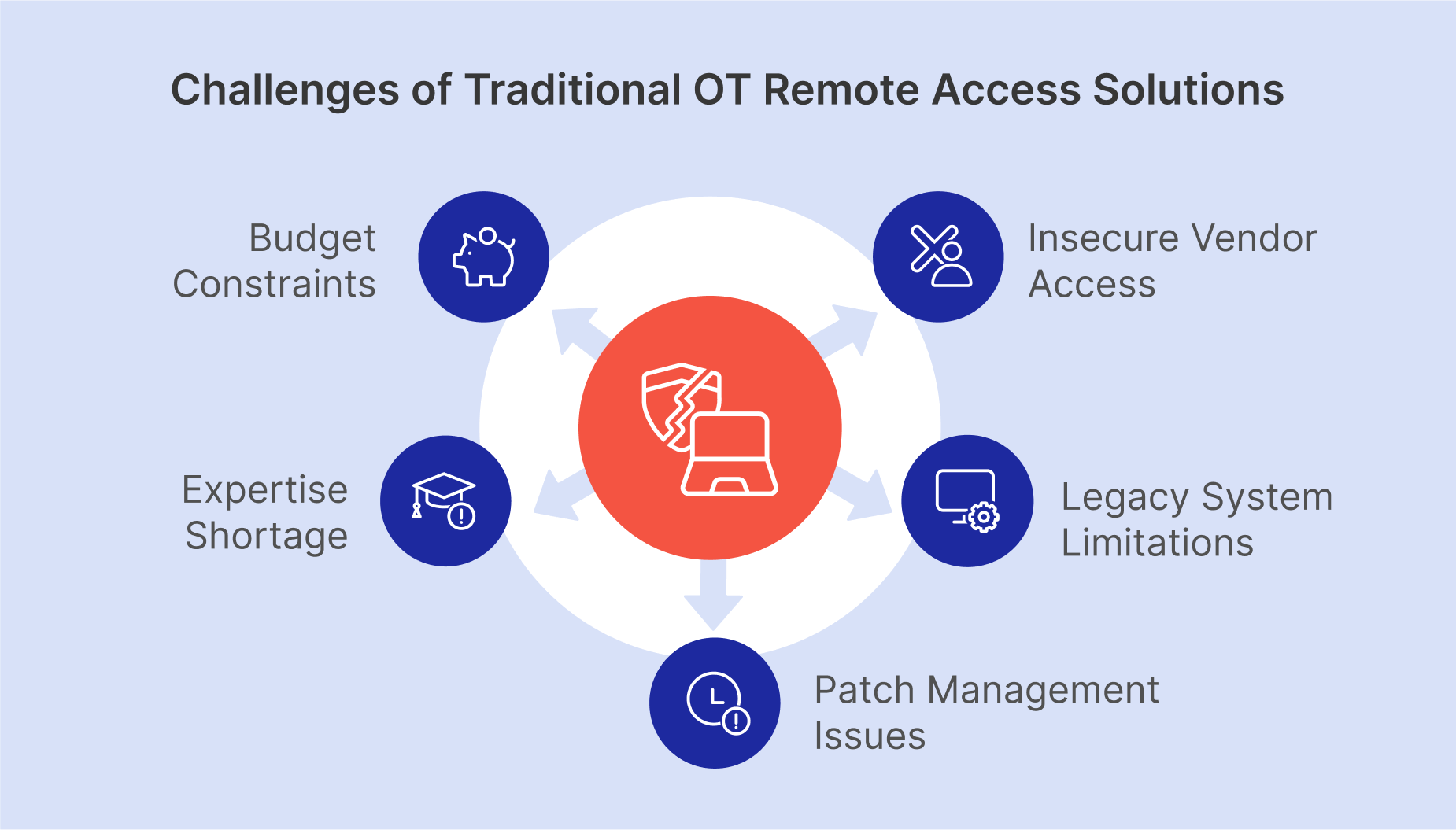
Challenges of Traditional OT Remote Access Solutions

Unlike IT environments, OT systems prioritize availability and reliability over security. This has created major security gaps, including:

1. Insecure Third-Party Vendor Access

Many industrial organizations work with hundreds of external vendors who require access to OT systems for maintenance. Managing and monitoring these connections without compromising security is extremely challenging.

2. Legacy Systems with Limited Security

OT devices often run outdated operating systems and lack modern security features. Many cannot support encryption or advanced authentication mechanisms.

3. Patch Management Challenges

Due to long equipment lifespans, software patches and updates are often delayed or avoided for fear of disrupting critical processes, leaving systems vulnerable.

4. Lack of OT Cybersecurity Expertise

Most OT environments are managed by engineers—not cybersecurity experts. This creates a skills gap in identifying and mitigating cyber threats.

5. Budget Constraints and Slow Adoption of Secure Solutions

Many organizations hesitate to invest in modern cybersecurity solutions, prioritizing operational efficiency over security improvements.

 
Challenges of Traditional OT Remote Access: insecure vendor access, legacy systems, patch delays, cybersecurity skills gap, budget limits

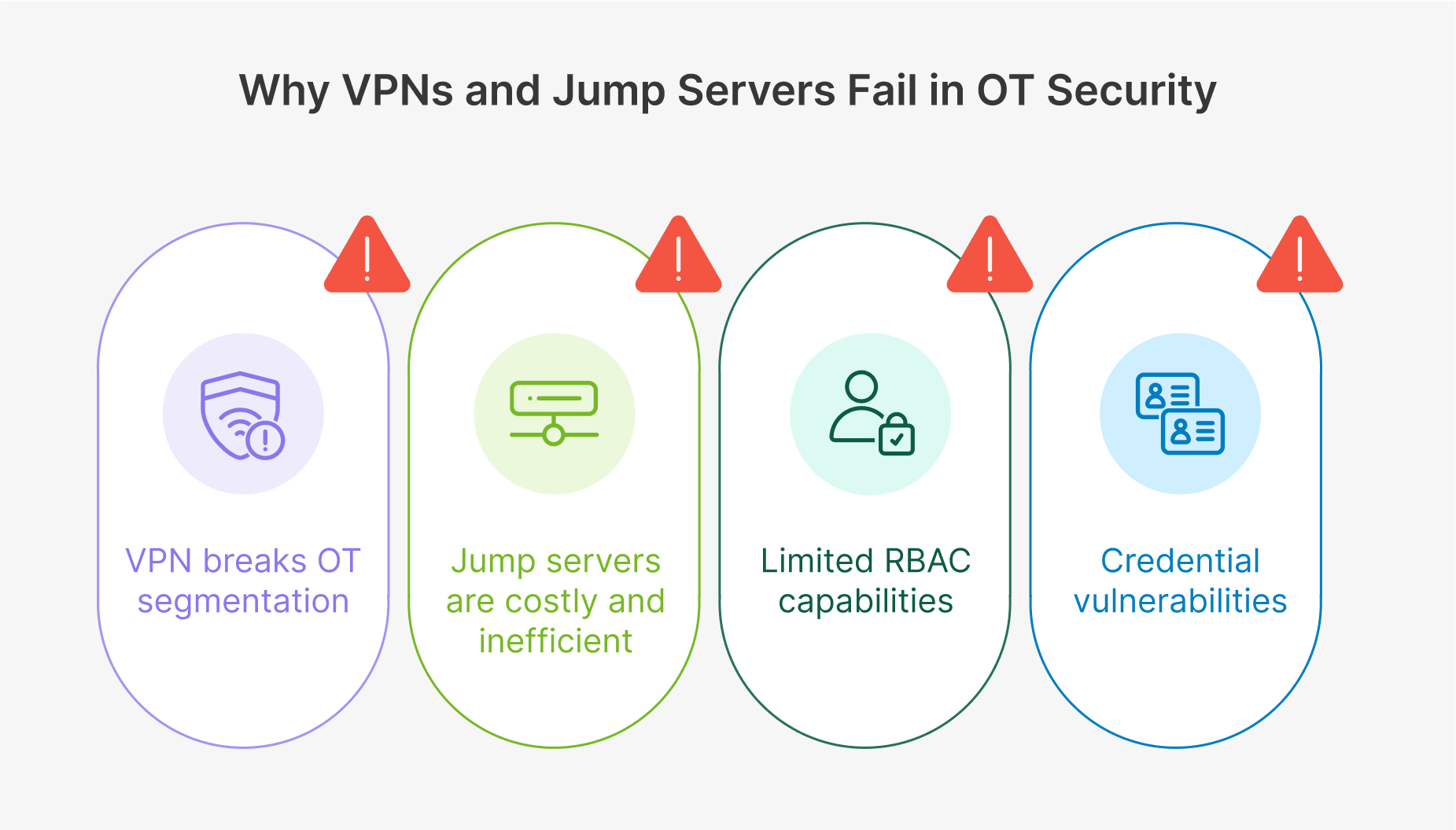
Why VPNs and Jump Servers Fail in OT Security

Many industrial organizations still rely on VPNs or jump servers for remote access, but these solutions introduce significant risks:

  • VPNs break OT segmentation: VPNs provide direct access to OT systems, bypassing security layers like the Purdue Model, increasing exposure to cyber threats.
  • Jump servers are costly and inefficient: Managing multiple jump servers across facilities creates complexity, high costs, and operational bottlenecks.
  • Lack of visibility and access control: Organizations struggle to track who is connecting to which OT assets, leading to security blind spots.
  • Credential risks: Stolen VPN credentials grant attackers unrestricted access to sensitive OT systems.

These challenges highlight the urgent need for a Zero Trust approach to OT remote access.

 
Why VPNs and jump servers fail in OT security: break segmentation, high costs, lack of visibility, credential risks. Zero Trust needed.

What is Zero Trust for OT Security?

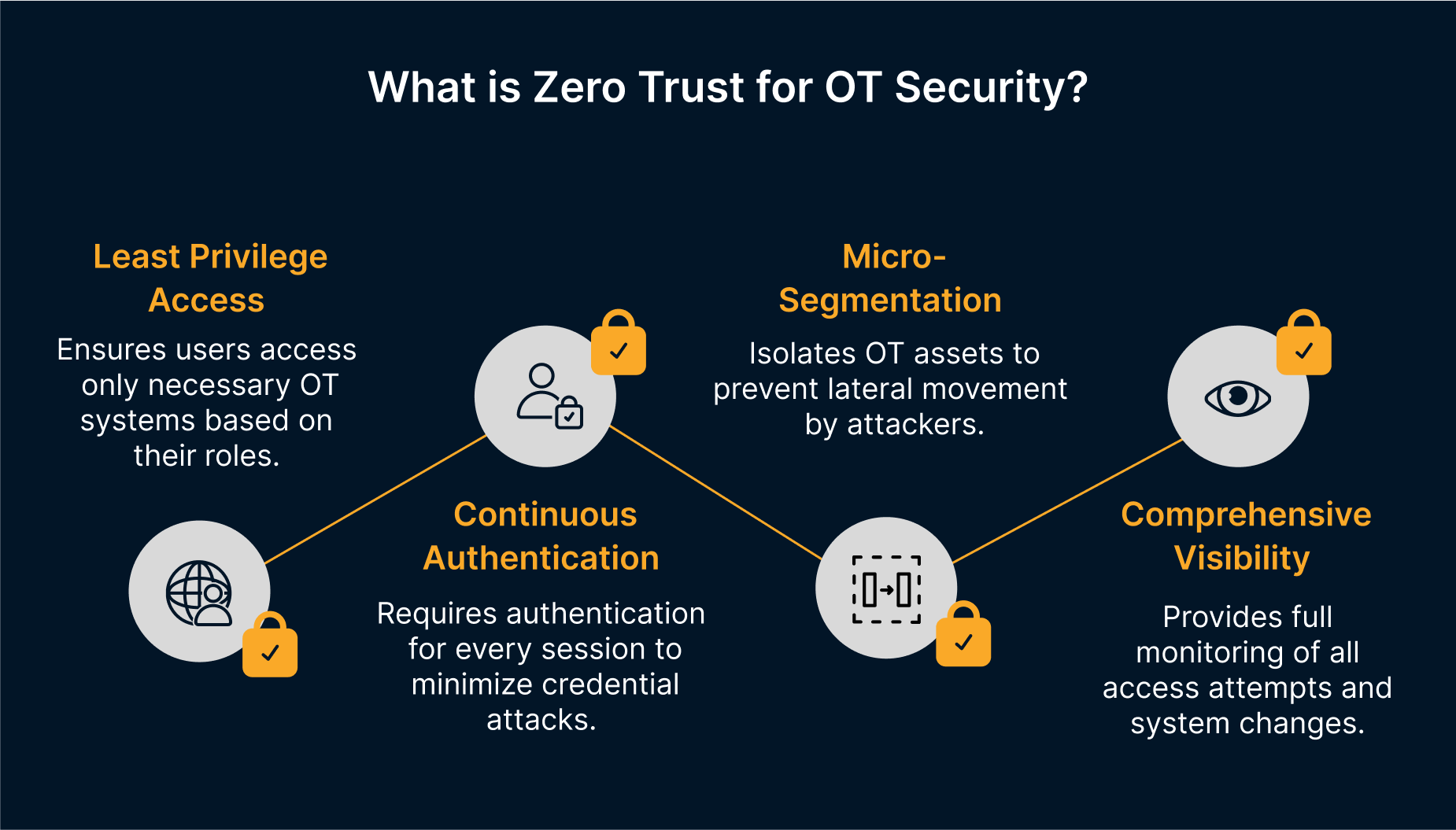
Zero Trust Network Access (ZTNA) is a security framework that eliminates implicit trust and enforces strict identity verification for every user and device trying to access OT systems. Principles of Zero Trust include:

  • Least Privilege Access: Users can only access specific OT systems based on their role.
  • Continuous Authentication: Every session requires authentication, reducing credential-based attacks.
  • Micro-Segmentation: OT assets are isolated, preventing lateral movement by attackers.
  • Comprehensive Visibility: Full monitoring of all access attempts and system changes.

Implementing Zero Trust for OT environments requires an advanced remote access platform—and this is where Thinfinity Workspace excels.

Zero Trust for OT Security: Enforces strict access, least privilege, continuous auth, micro-segmentation, full visibility. Thinfinity Workspace excels.

Thinfinity Workspace: A Secure and Scalable OT Remote Access Solution

Thinfinity Workspace is a clientless, Zero Trust-based OT remote access solution designed to replace insecure VPNs and inefficient jump servers. It enables secure, web-based access to OT assets from any device, without exposing the network.

Key Features of Thinfinity Workspace for OT Security:

✓ Zero Trust Architecture: No direct network access—users are authenticated and authorized per session.
 Granular Access Control: Limit access to specific devices, applications, or control layers.
✓ Multi-Factor Authentication (MFA): Enforce strong authentication to prevent unauthorized access.
✓ No VPN Required: Eliminates attack surface expansion caused by VPN vulnerabilities.
✓ Complete Session Monitoring: Record and audit all user interactions with OT systems.
✓ HTML5-Based, Clientless Access: Connect from any device without needing local software installations.

How Thinfinity Workspace Solves Key OT Remote Access Challenges

1. Third-Party Vendor Access Management

Thinfinity Workspace allows organizations to grant role-based access to vendors, ensuring they only connect to approved OT assets.

2. Secure Legacy Systems

Even if OT systems lack modern security features, Thinfinity provides an isolated, secure access layer to prevent direct exposure.

3. Enhanced Visibility and Auditability

Organizations gain full visibility into who is accessing what assets, reducing security blind spots.

4. Simplified Compliance

Thinfinity Workspace helps meet NIST, IEC 62443, and GDPR compliance by enforcing identity management, access control, and audit logging.

5. Cost-Effective Alternative to VPNs and Jump Servers

By eliminating VPN licensing fees and reducing infrastructure complexity, Thinfinity lowers operational costs while enhancing security.

Conclusion: Future-Proofing OT Cybersecurity with Thinfinity

As cyber threats targeting industrial control systems continue to grow, organizations must adopt secure, scalable, and efficient remote access solutions.

Thinfinity Workspace delivers a modern Zero Trust approach, eliminating the risks associated with VPNs and jump servers while providing seamless, secure, and auditable OT remote access.

About Cybele Software Inc.
We help organizations extend the life and value of their software. Whether they are looking to improve and empower remote work or turn their business-critical legacy apps into modern SaaS, our software enables customers to focus on what’s most important: expanding and evolving their business.

About Version 2 Digital

Version 2 Digital is one of the most dynamic IT companies in Asia. The company distributes a wide range of IT products across various areas including cyber security, cloud, data protection, end points, infrastructures, system monitoring, storage, networking, business productivity and communication products.

Through an extensive network of channels, point of sales, resellers, and partnership companies, Version 2 offers quality products and services which are highly acclaimed in the market. Its customers cover a wide spectrum which include Global 1000 enterprises, regional listed companies, different vertical industries, public utilities, Government, a vast number of successful SMEs, and consumers in various Asian cities.
Building a True Zero Trust Architecture with Thinfinity® Workspace

building-zero-trust-architecture-thinfinity-workspace


Introduction

Why is Zero Trust the Future of Enterprise Security

As cyber threats evolve, traditional security models like VPNs and firewalls fail to protect distributed workforces and hybrid IT environments. Zero Trust Architecture (ZTA) is the new security paradigm, ensuring that no user or device is trusted by default, requiring continuous verification.

However, many organizations struggle with Zero Trust implementation, mistakenly assuming it’s just a product purchase rather than a strategic security transformation.

Thinfinity Workspace provides a comprehensive Zero Trust Network Access (ZTNA) solution, enabling secure remote accessgranular policy enforcement, and seamless identity management—without the complexity of legacy VPNs. 

In this guide, you’ll learn:

 The biggest challenges in Zero Trust adoption (and how to fix them)

 How Thinfinity Workspace enforces Zero Trust principles

 The cost benefits of ZTNA vs. legacy VPN solutions

 A step-by-step Zero Trust implementation roadmap


Key Challenges in Zero Trust Implementation (and How to Solve Them with ZTNA)

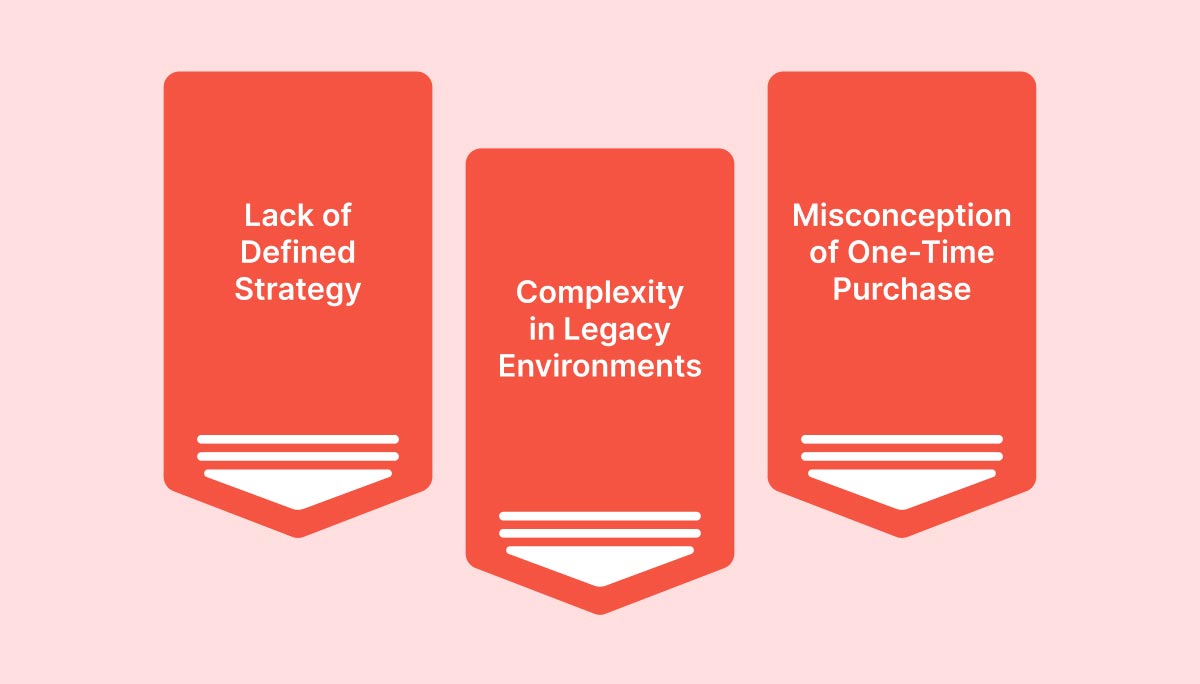
Zero Trust challenges: lack of strategy, legacy complexity, and misconceptions. Thinfinity ZTNA ensures security & seamless access.

1. Lack of a Defined Zero Trust Strategy

  • Problem: Organizations deploy security products without aligning them to business needs.

 ZTNA Solution: Thinfinity Workspace enables a policy-driven security framework, integrating Multi-Factor Authentication (MFA), Single Sign-On (SSO), and Role-Based Access Control (RBAC) to enforce identity-first security.

2. Complexity in Retrofitting Zero Trust into Legacy Environments

  • Problem: Many enterprises struggle with applying Zero Trust in existing hybrid or multi-cloud environments.

 ZTNA Solution: Thinfinity’s clientless access and agentless security model ensure seamless integration across Windows, Linux, and cloud-hosted applications—reducing complexity.

3. Misconception That Zero Trust is a One-Time Purchase

  • Problem: Many believe Zero Trust is a product, not a strategy.

 ZTNA Solution: Thinfinity Workspace supports continuous adaptive authentication, real-time session monitoring, and dynamic risk-based access, reinforcing that Zero Trust is an ongoing security process.

How Thinfinity Workspace Enforces Zero Trust Security

Identity-First Security: Continuous User & Device Verification

  • Granular RBAC Policies: Users access only the apps & data they need.
  • Adaptive Authentication: Enforces MFA, biometric authentication, and conditional access based on location, device, and behavior.
  • User Analytics & Logging: Real-time monitoring ensures proactive threat detection.

Application-Centric Security: Eliminating Overprivileged Access

  • Microsegmentation: Limits user access to specific apps, preventing lateral movement.
  • Catalog-Based Access Control: Ensures users can only interact with approved applications.
  • End-to-End Encryption (AES-256): Ensures secure communication.

Policy-Driven Enforcement: Adaptive Security for Hybrid Workforces

  • Network Segmentation: Users never gain broad network access, unlike VPNs.
  • Zero Trust Session Management: Prevents session hijacking & credential theft.
  • Cloud-Native Deployment: Works across Oracle Cloud, Ionos Cloud, AWS, Azure, Google Cloud, and on-prem.

Zero Trust vs. VPN: Why Thinfinity Workspace is the Superior Choice

FeatureThinfinityTraditional VPNLegacy RDP
Granular App AccessYesNoNo
MFA & Identity ControlYesNoNo
MicrosegmentationYesNoNo
Zero Trust Policy EngineYesNoNo
Cloud & Hybrid SupportYesNoNo
End-to-End EncryptionYesYesNo

Key Takeaway: VPNs expose the entire network to a single compromised device, while Thinfinity ZTNA grants access ONLY to verified apps & users.


Cost Analysis: Zero Trust Network Access (ZTNA) vs. VPN

Cost FactorZTNA (Thinfinity)Legacy VPN
Infrastructure CostsLower (Cloud-Native)High (Hardware Dependent)
IT MaintenanceMinimalHigh (Manual Configurations)
Security Risk ExposureLow (Granular Access)High (Broad Network Access)
Compliance & AuditingBuilt-In ControlsLimited

Why This Matters: Thinfinity’s ZTNA reduces infrastructure costs, eliminates VPN maintenance overhead, and improves security compliance.


Implementation Roadmap: Deploying Thinfinity ZTNA in Your Organization

Step 1: Define Your Zero Trust Security Policies

 Identify high-risk applications & users
 Establish granular access policies
 Implement adaptive authentication

Step 2: Deploy Thinfinity Workspace

 Set up identity-based authentication (MFA, SSO, RBAC)
 Configure application microsegmentation
 Enable session recording & auditing

Step 3: Continuous Monitoring & Optimization

 Use real-time analytics for threat detection
 Adjust Zero Trust policies dynamically
 Automate security updates & compliance reports

About Cybele Software Inc.
We help organizations extend the life and value of their software. Whether they are looking to improve and empower remote work or turn their business-critical legacy apps into modern SaaS, our software enables customers to focus on what’s most important: expanding and evolving their business.

About Version 2 Digital

Version 2 Digital is one of the most dynamic IT companies in Asia. The company distributes a wide range of IT products across various areas including cyber security, cloud, data protection, end points, infrastructures, system monitoring, storage, networking, business productivity and communication products.

Through an extensive network of channels, point of sales, resellers, and partnership companies, Version 2 offers quality products and services which are highly acclaimed in the market. Its customers cover a wide spectrum which include Global 1000 enterprises, regional listed companies, different vertical industries, public utilities, Government, a vast number of successful SMEs, and consumers in various Asian cities.
What is Self-Service Technology in IT Support? Overview and Benefits

Self-Service Technology: Transforming IT Support

Context

Self-service technology empowers users to access IT services on their own, without the help of IT staff. In other words, it significantly boosts efficiency in handling routine issues while also dramatically cutting costs.

For organizations managing increasingly complex IT environments with limited resources, self service is essential. And when scalability is a priority, it becomes absolutely vital.

But what does self-service technology in IT support look like in action? How does it benefit organizations? What are the most common use cases? In this article, we’ll dive into these questions and explore the full potential of self service in IT.

The Evolution of Self-Service: From Help Desks to Automated Solutions 

Traditionally, IT support was reactive: teams stepped in only after an issue surfaced. But with the rise of self-service technology, we’re seeing a shift to a proactive, user-centered model that transforms support from a reactive function into a dynamic, on-demand resource. 

This evolution has been remarkable. From basic help desks, we’ve advanced to sophisticated portals with self-ticketing systems and knowledge bases offering real-time, increasingly automated, and intelligent solutions. 

Now, support can be available around the clock, every day of the week, without interruptions. 

Key Components of Self-Service Technology 

User-Centric Design: Portals and Knowledge Bases 

An effective self-service platform must be designed with the user in mind. But what does this mean in practical terms? It means offering intuitive interfaces that guide users through troubleshooting steps and provide access to relevant FAQs and an extensive knowledge base. 

For recurring IT issues, having a well-designed self-service platform can dramatically reduce resolution times. 

Solutions like EasyVista’s IT Self-Service make this achievable  without writing a single line of code. To learn more, see here. 

The Role of AI: Chatbots, Virtual Agents, and Automated Workflows 

Artificial Intelligence (AI) plays a central role in self-service technology. AI-powered chatbots and virtual agents can already handle basic IT requests, providing immediate 24/7 support that minimizes wait times and keeps employees productive 

Automated workflows further enhance efficiency by routing complex issues directly to rappropriate IT technicians only when necessary.  

We are only beginning to tap into the potential of AI in self-service IT support, with vast opportunities on the horizon. 

Self-Ticketing Systems and Troubleshooting Tools 

Self-service technology shines through features like self-ticketing systems, which let users submit requests or report incidents directly through a portal. 

These systems often come equipped with troubleshooting tools that guide users through diagnostic steps, helping them resolve issues on their own. The goal is always the same: to reduce pressure on IT teams, allowing them to tackle more critical issues without distraction. 

The key to success here is user-centered design that makes the self-service process simple and effective.  

Real Benefits of Self-Service Technology in IT Support 

Reducing IT Overload: Lightening the Load for IT Teams 

One of the greatest benefits of self-service technology is its ability to reduce the workload for IT teams.  By handling routine requests, self-service frees up technicians to focus on more complex challenges, ultimately improving productivity and lowering costs, which brings us to the next point. 

Cost Reduction: Optimizing Operations Through Automation 

The efficiency of self-service directly translates into cost savings. By automating routine requests, self-service technology allows organizations to significantly reduce operational costs. Processes that once required IT personnel can now be efficiently managed through automated portals where users can operate independently. 

Enhancing Customer Experience: Faster, On-Demand Solutions 

Most importantly, self-service technology elevates the customer experience. Users today expect fast, seamless solutions that don’t always require human intervention. Self-service meets this demand, delivering on speed and convenience while ensuring IT resources remain available for high-priority needs. 

In short, self-service technology brings tangible benefits across the board—from streamlined operations to happier users and significant cost savings. 

Self-Service Technology in Action: Use Cases and Examples 

Automating Common IT Requests and Incidents 

Routine IT requests like password resets or access to specific resources, can be fully automated through solutions like EasyVista’s IT Self-Service Portal. 

By integrating automated workflows, this platform enables businesses to resolve such requests quickly and proactively, drastically reducing response times and minimizing disruptions, allowing businesses to tackle frequent issues proactively. Learn more here. 

Empowering End Users in IT Troubleshooting 

A well-designed self-service portal like EasyVista’s enables end users to solve straightforward IT issues independently without resorting to direct technical support. With  access to guides and resources, users can troubleshoot software configurations or minor issues on their own . The portal also allows them to track their requests in real time, providing transparency and reducing wait times for responses—all through an intuitive interface. 

Leveraging Knowledge Bases for Continuous Support 

The  integrated knowledge base in EasyVista’s Self-Service Portal offers continuous support by providing users with articles, FAQs, and tutorials to resolve common IT issues. This empowers users to become more self sufficient while enhancing their technical skills, creating a win-win situation for both users and IT teams.

Implementing Self-Service Technology: Key Considerations 

User Adoption: Overcoming Resistance and Driving Engagement 

The real challenge in implementing self-service technology is ensuring: user adoption. 

How do we address this? Through intuitive portal design and ongoing updates based on userfeedback to continually enhance the user experience. 

Designing an Effective Knowledge Base: What to Include 

An effective knowledge base  must continually evolve, with resources like tutorials (including videos), troubleshooting guides, and FAQs that meet users’ needs. 

Once again, there is no universal recipe: everything depends on the needs of the company and those of its target customers. Tailoring this content ensures that users can quickly access the most relevant information. 

Balancing Automation with Human Intervention 

 While self-service is highly effective for routine tasks, complex issues often require human intervention. Balancing automation with hands-on support ensures that critical requests receive the dedicated attention they need, reinforcing the value of both digital and human elements. 

From Present to Future: The Future of Self-Service Technology in IT Support 

Next-Generation Self-Service: AI, Machine Learning, and Predictive Support 

The future of self-service is closely tied to technologies like AI and machine learning. 

AI’s role in self-service technology is evolving rapidly, going beyond simple automation to incorporate intelligent, data-driven solutions. AI-powered chatbots and virtual agents now leverage natural language processing (NLP) to understand and respond to user queries with greater accuracy. 

These intelligent systems are  increasingly capable of handling complex queries and improving through each interaction to improve future responses. 

The ultimate goal? To create systems that not only respond to issues but can anticipate and resolve problems before they escalate . 

Self-Service as a Strategic Resource: Beyond IT Support to Business Support 

Self-service technology is no longer limited to IT. Organizations are beginning to recognize its potential as a strategic resource capable of improving processes across  business functions. 

EasyVista’s Enterprise Service Management (ESM) solutions centralize and optimize the management of all business services, not just IT. 

With ESM integration, organizations can extend the benefits of self-service to departments like Human Resources, Finance, and Operations, improving efficiency and operational transparency across multiple fronts.  With ESM integration, companies can automate cross-departmental workflows, breaking down silos and enhancing internal collaboration to improve service for all employees. 

Learn more about how Enterprise Service Management can revolutionize business support. 

Conclusion 

Self-service technology is transforming how organizations manage IT support, making it more efficient, automated, and user centric. 

By adopting intuitive self-service platforms, organizations can empower users to handle routine issues independently, reducing pressure on IT teams, and significantly lowering operational costs. 

Ultimately, it’s about enhancing the user experience and building loyalty through better, faster support.  

FAQ 

What are the main benefits of self-service technology in IT support? 
Self-service technology offers several advantages: it reduces the workload on IT teams, automates routine requests, lowers operational.  
By enabling users to resolve common issues through intuitive portals and knowledge bases, self-service technology streamlines IT processes. Automation of repetitive tasks further allows IT teams to focus on complex, strategic issues. 

What is the future of self-service technology in IT support? 
The future of self service lies in advanced technologies like Artificial Intelligence and Machine Learning, with a key goal: to proactively predict and resolve issues before they arise, enabling truly predictive support.

About EasyVista  
EasyVista is a leading IT software provider delivering comprehensive IT solutions, including service management, remote support, IT monitoring, and self-healing technologies. We empower companies to embrace a customer-focused, proactive, and predictive approach to IT service, support, and operations. EasyVista is dedicated to understanding and exceeding customer expectations, ensuring seamless and superior IT experiences. Today, EasyVista supports over 3,000 companies worldwide in accelerating digital transformation, enhancing employee productivity, reducing operating costs, and boosting satisfaction for both employees and customers across various industries, including financial services, healthcare, education, and manufacturing.

About Version 2 Digital

Version 2 Digital is one of the most dynamic IT companies in Asia. The company distributes a wide range of IT products across various areas including cyber security, cloud, data protection, end points, infrastructures, system monitoring, storage, networking, business productivity and communication products.

Through an extensive network of channels, point of sales, resellers, and partnership companies, Version 2 offers quality products and services which are highly acclaimed in the market. Its customers cover a wide spectrum which include Global 1000 enterprises, regional listed companies, different vertical industries, public utilities, Government, a vast number of successful SMEs, and consumers in various Asian cities.
真實案例警示:為何 Android 不應自動連接 Wi-Fi?

智能手機的世界充滿自動化功能,因此可靠的 Android 安全防護不可或缺。

大多數智能手機用戶可能知道,連接到任何可用的隨機 Wi-Fi 熱點並非明智之舉。但有時,Android 裝置可能會在您未加留意的情況下,自動連接到惡意 Wi-Fi 網絡。

試想一下:您在心儀的餐廳點完餐,正打算在美食上桌前滑滑手機。然而,您可能沒意識到,此時已有人正在暗中監控您裝置上的一切活動,包括您瀏覽的網站、使用的應用程式,以及輸入的帳號密碼等敏感資訊。

此類攻擊確實可能發生。例如,ESET 惡意軟件研究員 Lukáš Štefanko 就曾展示,若將他執行 Evil M5 韌體的 Cheap Yellow Display(CYD)工具用於不法目的會發生什麼。幸運的是,他以道德黑客(滲透測試人員)的身分發布影片,揭示要獲取智能手機傾向於自動重連的 Wi-Fi 網絡資訊是何其容易。利用這些資訊,攻擊者便可建立偽冒的 Wi-Fi 存取點(即「邪惡雙子星」網絡),藉此竊取受害者裝置內的敏感資料。

讓我們一同深入探討這類攻擊手法,並從中汲取重要的安全教訓。


便利性潛藏的危險

開發人員在設計軟件時,總會優先考量易用性、使用者舒適度與整體體驗。因此,智能手機內建自動重連至先前用過且信任的網絡功能,可謂理所當然。

然而,網絡犯罪分子最愛利用使用者掉以輕心、沉浸於無所不在的自動化便利時發動攻擊。Lukáš Štefanko 所演示的攻擊正是利用此弱點 —— 利用 Android 智能手機會持續且公開地向附近裝置透露其曾連接過、且想要自動重連的 Wi-Fi 網絡這個特性。

幸好,需要攻擊者親身到場的攻擊並不普遍,但這不代表絕無可能發生。例如,澳洲聯邦警察( AFP)於 2024 年 6 月,就一宗發生於多個國內航班和機場、疑似「邪惡雙子星」的攻擊事件,起訴了一名公民。據稱,從其查獲的裝置中搜出了數十筆被盜的個人憑證。

此外,這類攻擊也可能涉及國家級行動。例如,在最近一場審判中,檢察官便描述了一個位於英國的間諜團夥陰謀。該團夥除其他活動外,亦曾在德國活動,其成員疑使用國際移動用戶識別碼捕捉器(IMSI Catcher)來攔截來自某軍事基地(當時有烏克蘭士兵正在受訓)的手機通訊。


其他潛在威脅

由此可見,連接或自動重連至公開 Wi-Fi 網絡都可能將您置於風險之中。潛在的威脅清單不僅限於流氓熱點:

中間人攻擊(MITM)— 在此類攻擊中,網絡犯罪分子會攔截裝置與 Wi-Fi 網絡間的通訊,從而讀取未加密的敏感資訊,如密碼、信用卡號和個人訊息。

漏洞利用 — 網絡犯罪分子可利用安全性較低的公共網絡漏洞,或目標行動裝置自身的漏洞(尤其在裝置軟件未及時更新的情況下),向連線裝置散播惡意軟件。這些惡意軟件可用於竊取資料、監控使用者活動,甚至完全控制使用者裝置。

封包嗅探 — 公共 Wi-Fi 網絡通常缺乏足夠的加密保護,讓黑客得以輕易竊聽使用者的網上活動。


如何確保安全

顯然,最基本的 Wi-Fi 安全守則便是停用 Wi-Fi 自動連接功能,並且切勿使用免費的公共 Wi-Fi 網絡。若情況不允許,可參考以下建議:

使用虛擬私人網絡(VPN) — VPN 能在使用者的裝置和網際網絡之間建立一條安全加密的通道。

避免在公共 Wi-Fi 上處理敏感資料 — 避免使用要求輸入敏感資訊的網站和應用程式,例如進行網絡銀行交易或網上購物。

保持軟件更新 — 確保您的作業系統和應用程式都維持在最新版本。定期更新通常包含重要的安全修補程式,能防禦已知的安全漏洞。


ESET Mobile Security :您的堅實後盾

在網絡安全領域,ESET 的能力遠超基本的防毒軟件,這同樣適用於智能手機和流動裝置。ESET Mobile Security 採用 ESET 的「預防優先」策略,旨在攻擊釀成任何損害前即時攔截。此目標的實現,有賴於保護網絡犯罪分子入侵裝置的常見途徑,同時確保安全方案本身簡單易用。

憑藉其針對釣魚網站、簡訊詐騙等多層次的防護機制,ESET Mobile Security 已充分準備應對來自惡意網站的攻擊。例如,其反釣魚功能(透過連結掃描器強化)能保護使用者免受惡意網站侵害;而付款保護則為敏感的支付及金融 App 增添一道安全防線。


安心擁抱科技

多數人都同意,人們天生喜愛便利。事實上,整個科技產業的發展,正是由使用者不斷追求更快捷、簡易、人性化的日常解決方案所驅動。享受科技帶來的便利固然是好事,但切勿忽略潛在的風險。

幸運的是,只要具備基本的網絡安全意識,並在您的 Android 智能手機上安裝值得信賴的安全解決方案,您大致上就能安枕無憂。Wi-Fi 網絡攻擊已是眾所周知的威脅,而像 ESET 這類信譽卓著、擁有逾 30 年經驗的網絡安全公司,能為您的數碼生活保駕護航。

關於ESET
ESET成立於1992年,是一家面向企業與個人用戶的全球性的電腦安全軟件提供商,其獲獎產品 — NOD32防病毒軟件系統,能夠針對各種已知或未知病毒、間諜軟件 (spyware)、rootkits和其他惡意軟件為電腦系統提供實時保護。ESET NOD32佔用 系統資源最少,偵測速度最快,可以提供最有效的保護,並且比其他任何防病毒產品獲得了更多的Virus Bulletin 100獎項。ESET連續五年被評為“德勤高科技快速成長500 強”(Deloitte’s Technology Fast 500)公司,擁有廣泛的合作夥伴網絡,包括佳能、戴爾、微軟等國際知名公司,在布拉迪斯拉發(斯洛伐克)、布裏斯托爾(英國 )、布宜諾斯艾利斯(阿根廷)、布拉格(捷克)、聖地亞哥(美國)等地均設有辦事處,代理機構覆蓋全球超過100個國家。

關於 Version 2 Digital
Version 2 Digital 是立足亞洲的增值代理商及IT開發者。公司在網絡安全、雲端、數據保護、終端設備、基礎設施、系統監控、存儲、網絡管理、商業生產力和通信產品等各個領域代理發展各種 IT 產品。透過公司龐大的網絡、通路、銷售點、分銷商及合作夥伴,Version 2 提供廣被市場讚賞的產品及服務。Version 2 的銷售網絡包括台灣、香港、澳門、中國大陸、新加坡、馬來西亞等各亞太地區,客戶來自各行各業,包括全球 1000 大跨國企業、上市公司、公用事業、醫療、金融、教育機構、政府部門、無數成功的中小企及來自亞洲各城市的消費市場客戶。

×

Hello!

Click one of our contacts below to chat on WhatsApp

×