在網絡罪案日益增多的時代,限制和管理您的「數碼足跡」是絕對有意義的。「數碼足跡」並不是一個新事物,但足跡分佈在如此多的網站、帳戶和裝置上,到底應該從哪裡開始?
1. 減少下載應用程式
應用程式通常需要用戶輸入個人資料才可以正作運作,程式還可能會追蹤位置、瀏覽活動和其他信息,然後與第三方共享。建議適時檢視您的裝置,並刪除一些很久沒有使用的應用程式。
2. 減少建立帳號
試過在網購時建立帳號並加入信用卡資料嗎?減少建立帳號,讓系統不會紀錄您的付款信息。雖然在下次購物時會帶來不便,但可以更好的保障自己。
3. 保密行蹤
「位置追蹤」是其中一種最具侵入性的數據捕獲方式,第三方可以從中拼湊出關於您日常的活動和習慣,請務必阻止應用程式追蹤您的位置。
4. 禁用第三方 Cookie
Cookie 是在您訪問網站時,下載到您裝置上的小文件,雖然可能會改善瀏覽體驗,但當中可能會洩漏用戶名稱和密碼。如果在訪問網站時出現選擇,只需拒絕接受 Cookie,您還可以通過瀏覽器的私隱設定禁用第三方追蹤。
5. 行使刪除權
「刪除權」是歐盟 GDPR 相關的條例,您可以要求 Google 等科技公司刪除您不喜歡的信息,例如位置追蹤、搜索引擎紀錄或整個帳號。
6. 對敏感資料提高驚覺
有時為了獲得您想要的產品或服務,提供信息是不可避免的,但請對敏感資料提高驚覺,特別是電話號碼、電子郵件和家庭住址、財務等信息。
7. 不要填寫網上問卷
互聯網上充斥著網上問卷,通常以現金或禮物吸引人填寫,當中有可能會竊取您的個人信息用於網絡釣魚活動或在暗網上出售。
8. 減少訂閱品牌通訊電郵
如果您對某些品牌不太感興趣,可考慮使用專用電子郵件地址或一次性電子郵件帳戶。對大部份人來說,這些品牌通訊電郵只會堵塞我們的收件箱。
9. 謹慎使用社交媒體
考慮其他人和潛在雇主如何接收這些內容,當中是否包含有關您工作和個人生活的敏感信息,建議只添加您在現實生活中認識的人。
10. 限制您的裝置數量
最後,考慮您有多少個裝置和電腦處於活躍使用狀態。它們每一個都是潛在的數據寶庫,如果裝置丟失或被盜,這些數據可能就會洩漏。您真的需要購買那款新平板電腦嗎? 如果答案仍然是「是」,請考慮是否需要將所有個人數據同步到這個裝置?


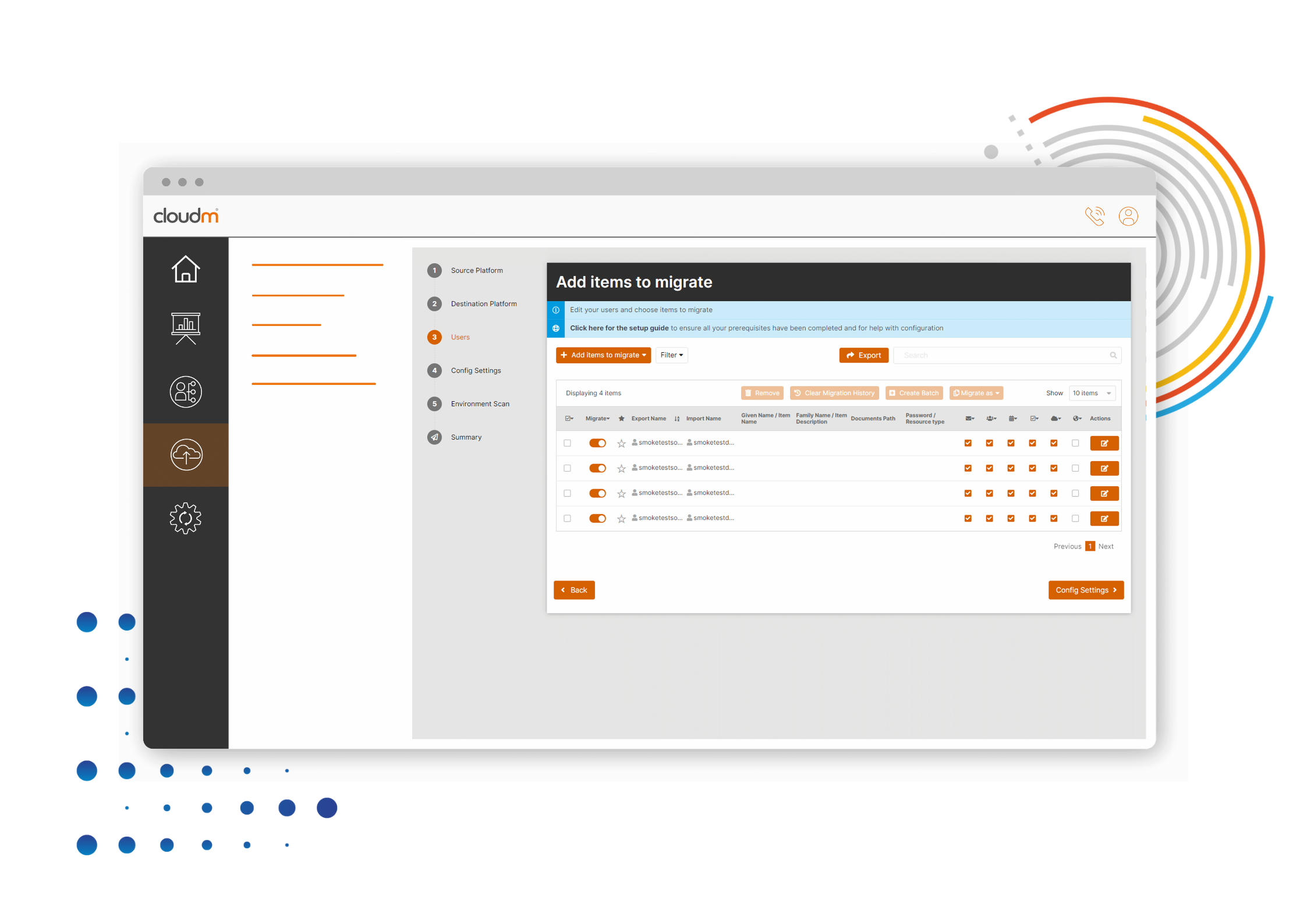 Cloud migrations are complex, always changing, and unique to every organization. You need the flexibility and control to tackle your project in the way that suits you best. This is why we have multiple migration deployment options to suit all businesses.
In this blog, we break down exactly what CloudM Migrate Self-Hosted is as well as explain security, endpoint, and installation information so you have more guidance when selecting a deployment option.
Definition
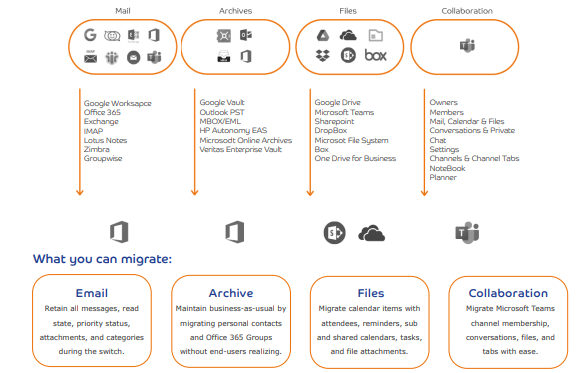
CloudM Migrate Self-Hosted is the downloadable version of CloudM Migrate, ideal for large and complex migrations. Migrate (Self-hosted) is highly configurable, allowing you to complete the most complex and demanding migrations seamlessly. Using our web interface, you can run a multitude of virtual machines to complete your self-hosted migration to Microsoft 365. Once set up in your environment, Migrate (Self-hosted) can securely migrate your mailboxes, files, SharePoint sites, mailbox archives, and more to Microsoft 365.
Security
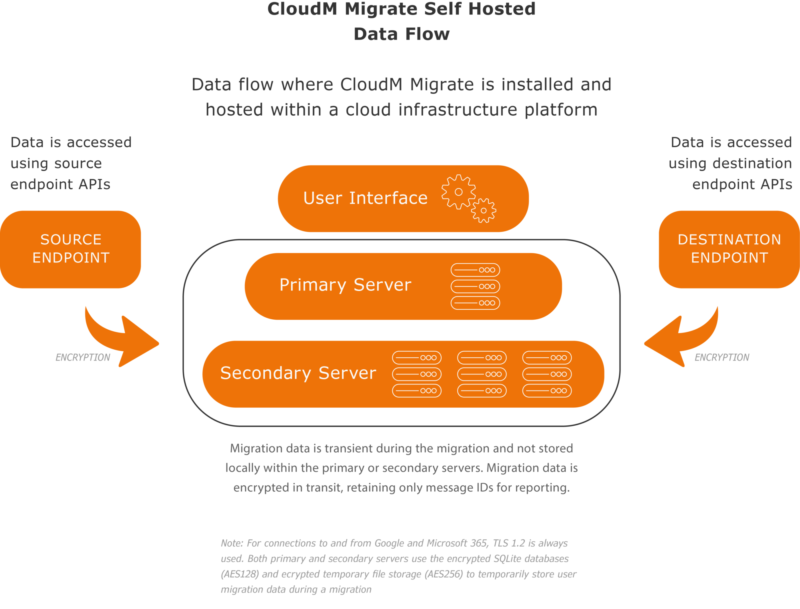
If the organization has compliance obligations that do not permit you to use a third-party service, Migrate Self-Hosted is most appropriate. The software can be run behind your own organization’s firewall, critical data is kept internally and no other party has access to it.
CloudM Migrate already has end-to-end encryption between migration endpoints. The option to Self Host CloudM Migrate will completely isolate your migration data from your source environment to the destination cloud tenant.
Cloud migrations are complex, always changing, and unique to every organization. You need the flexibility and control to tackle your project in the way that suits you best. This is why we have multiple migration deployment options to suit all businesses.
In this blog, we break down exactly what CloudM Migrate Self-Hosted is as well as explain security, endpoint, and installation information so you have more guidance when selecting a deployment option.
Definition
CloudM Migrate Self-Hosted is the downloadable version of CloudM Migrate, ideal for large and complex migrations. Migrate (Self-hosted) is highly configurable, allowing you to complete the most complex and demanding migrations seamlessly. Using our web interface, you can run a multitude of virtual machines to complete your self-hosted migration to Microsoft 365. Once set up in your environment, Migrate (Self-hosted) can securely migrate your mailboxes, files, SharePoint sites, mailbox archives, and more to Microsoft 365.
Security
If the organization has compliance obligations that do not permit you to use a third-party service, Migrate Self-Hosted is most appropriate. The software can be run behind your own organization’s firewall, critical data is kept internally and no other party has access to it.
CloudM Migrate already has end-to-end encryption between migration endpoints. The option to Self Host CloudM Migrate will completely isolate your migration data from your source environment to the destination cloud tenant.
 CloudM has adopted the ISO 27001 standard as its framework and is externally certified. ISO27001 is one of the most popular information security standards in the world, focusing on protecting three key aspects of information; confidentiality, integrity, and availability.
Installation
Basic installation will install all components to a single machine and is suitable for performing migrations from a single server or as the main server in a multi-server migration.
If you have specialized requirements, have a pre-existing SQL Server instance you would like to use, or will be performing multi-server migrations using a server farm, you should also review the advanced installation documentation.
The following components makeup and are used by CloudM Migrate:
CloudM has adopted the ISO 27001 standard as its framework and is externally certified. ISO27001 is one of the most popular information security standards in the world, focusing on protecting three key aspects of information; confidentiality, integrity, and availability.
Installation
Basic installation will install all components to a single machine and is suitable for performing migrations from a single server or as the main server in a multi-server migration.
If you have specialized requirements, have a pre-existing SQL Server instance you would like to use, or will be performing multi-server migrations using a server farm, you should also review the advanced installation documentation.
The following components makeup and are used by CloudM Migrate:
 We’re here to help inform you about the most compatible deployment options for your business. Get in touch today to discuss your available options with one of our experienced solutions architects.