Skip to content

AI-Powered Identity Authentication Is Here: What You Need To Know

It should come as no surprise that identity authentication is one of the most critical aspects of doing business in the digital age. Without verifying your users are who they say they are, you leave the doors open for fraud, data breaches, and harmful cyber attacks. But with the advent of AI, identity authentication is going through a transformation. To understand how, let’s dive into everything you need to know about AI authentication.

How Is AI Helping With Identity Verification?

Traditional authentication methods are becoming less effective today due to high levels of password reuse and the increasing number of stolen credentials available on dark web databases from previous data breaches. Luckily, AI can provide better, more secure authentication by going beyond traditional boundaries and incorporating data context, biometrics, and patterns in user behavior.

What Are the Different Types of AI Authentication?

Biometric authentication is especially popular with cyber-defense-minded companies today, and AI plays a huge role here. Some examples include keystroke dynamics (typing pattern), behavioral biometrics (analyzing user behavioral patterns to create cyber fingerprints), facial recognition, and voice recognition.

Behavioral biometrics, in particular, is quickly becoming the favored type of AI verification today. Why? Because behavioral biometrics can provide continuous authentication by tracking and verifying user behavior like typing rhythm, mouse movement, and device usage patterns. In addition, it also provides a more seamless and frictionless authentication experience, as it doesn’t require users to remember or enter passwords.

And critically, these identity authentication tools are only possible with artificial intelligence and machine learning. These technologies rely on highly precise authentication driven by large data sets and advanced algorithms. And as a result, they’re almost impossible for fraudsters to bypass.

How do AI Authentication Systems Mitigate AI Bias?

AI bias” refers to the tendency of artificial intelligence algorithms and systems to perpetuate and amplify existing biases and discrimination in the data they are trained on and in the decisions they make.

There are several ways in which AI authentication systems can mitigate bias:

  1. Diverse training data: Using a diverse and representative dataset for training the AI system can help reduce bias and improve accuracy for underrepresented groups.
  2. Fairness algorithms: These algorithms can help identify and address bias in AI systems by balancing accuracy across different demographic groups.
  3. Human oversight: Having human oversight and review in the development and deployment of AI systems can help ensure that potential biases are identified and addressed.
  4. Regular monitoring and evaluation: Regular monitoring of the AI system’s performance and outcomes can help identify any potential biases that may emerge over time and allow for appropriate corrective actions to be taken.
  5. Transparency and accountability: Making AI systems transparent and accountable can help increase trust in the technology and promote responsible use.

These measures can help mitigate AI bias in authentication systems and ensure that they are fair, unbiased, and effective in protecting the privacy and security of users.

Final Thoughts

The use of AI in cybersecurity is nothing new, but it is becoming increasingly powerful and more widespread. Today, more and more companies are looking to AI authentication to help safeguard their systems from nefarious actors.

About Version 2 Digital

Version 2 Digital is one of the most dynamic IT companies in Asia. The company distributes a wide range of IT products across various areas including cyber security, cloud, data protection, end points, infrastructures, system monitoring, storage, networking, business productivity and communication products.

Through an extensive network of channels, point of sales, resellers, and partnership companies, Version 2 offers quality products and services which are highly acclaimed in the market. Its customers cover a wide spectrum which include Global 1000 enterprises, regional listed companies, different vertical industries, public utilities, Government, a vast number of successful SMEs, and consumers in various Asian cities.

About Portnox
Portnox provides simple-to-deploy, operate and maintain network access control, security and visibility solutions. Portnox software can be deployed on-premises, as a cloud-delivered service, or in hybrid mode. It is agentless and vendor-agnostic, allowing organizations to maximize their existing network and cybersecurity investments. Hundreds of enterprises around the world rely on Portnox for network visibility, cybersecurity policy enforcement and regulatory compliance. The company has been recognized for its innovations by Info Security Products Guide, Cyber Security Excellence Awards, IoT Innovator Awards, Computing Security Awards, Best of Interop ITX and Cyber Defense Magazine. Portnox has offices in the U.S., Europe and Asia. For information visit http://www.portnox.com, and follow us on Twitter and LinkedIn.。

A true partnership for success: The evolving relationship between Kempinski Hotels and CloudM

The Company

Kempinski is a luxury hotel management group celebrating its 125th anniversary this year. Steeped in history, the iconic company dates back to 1897, crowning them Europe’s oldest luxury hotel group.

A growing collection of distinguished properties proudly bears the Kempinski name. Their illustrious portfolio currently boasts 81 of the world’s most breathtaking destinations spread across 35 countries, each possessing their trademark exclusivity and European flair.

Kempinski’s prestigious heritage is equally matched by its ambitious vision for the future. And the group understands that embracing technology is the key to offering a world-class guest experience for another 125 years.

The evolution of the relationship

Kempinski has been a valued CloudM customer since 2010 when they used CloudM Migrate to transition from Novell GroupWise to Google Workspace.

Their relatively early adoption of Google Workspace shows their early commitment to cloud solutions: they could see the value on offer and understood the pivotal role the technology would play in the future.

Moving to the cloud enabled Kempinski to create a flexible, agile platform which allowed them to react to market opportunities faster than their peers and capitalize on innovation opportunities as they’ve presented themselves.

CloudM has played a central role in Kempinski’s tech stack ever since. Kempinski benefits from the CloudM Automate features with our Staff Directory being at the heart of their staff collaboration.

CTS, our partner and sister company (as part of the CTS Group), manages the Onboarding and Offboarding Workflow features on Kempinski’s behalf, setting up automation that work behind the scenes to streamline Kempinski’s day-to-day operations.CloudM’s automated onboarding solutions help new employees integrate seamlessly into the company.

New employees are granted immediate access to the resources they need for their role, including shared documents and calendars.

From company policy and culture training, to team introductions and job benefits, everything is accessible from day one, making new employees’ experience as straightforward and stress-free as possible.

At the opposite end of the employee journey, CloudM’s Offboarding Workflow feature automates Kempinski’s offboarding process, revoking passwords and permissions for employees the moment they leave the company.

Both of these features free up untold labor hours that would otherwise be spent manually onboarding and offboarding members of staff.

Holly Simpson, the Account Manager for Kempinski at CTS, recognises the values of CloudM’s features. She said: “Our fruitful relationship with Kempinski stretches back over a decade now. And only grows stronger with each passing year. The CloudM features form an integral part of the efficient, automated, managed service that CTS delivers to keep the hotels running day-to-day.”

Shaping CloudM’s Archive solution

Kempinski’s more recent uptake of the CloudM Archive module shows a continuing confidence in CloudM (and CTS) to sit at the center of their digital operations.When Google replaced their free Vault Former Employee (VFE) licenses with paid Archive User (AU) licenses, at a cost of ~€50 each per year, Kempinski was potentially looking at an eye-watering bill in the hundreds of thousands.

So they turned to CloudM for help.CloudM rose to the challenge, providing a managed migration of thousands of Kempinski’s archived profiles to cloud storage quickly and automatically, using CloudM Migrate. This slashed their expected expenditure drastically while keeping their offboarded user data secure, easily accessible and compliant.

We used CloudM Migrate to perform this initial transfer because it was the fastest way to move the data. Then, we added the Archive step to Kempinski’s offboarding policies so anyone offboarded in the future would automatically have their data archived to the same storage bucket (or another of their choice).

Archived data can be retrieved in just a couple of clicks and data is automatically purged forever after a set length of time to keep businesses compliant.

“We’re proud to have embraced CloudM solutions for over a decade now. And we believe they are providing solutions geared for the future. They’re an essential part of our strategy going forward.”

Here’s to the future

CloudM simply wouldn’t exist without collaboration with our customers. We’ve consistently grown out of our customers’ requests, needs and feedback.

“Kempinski has been a partner in the truest sense of the word,” says Gary Bennion, CloudM’s Chief Technology and Customer Officer. “They have collaborated closely with us for years to help shape CloudM and they continue to be a key customer.”

We’re currently working with Kempinski to centralize and manage their staff user data across HR, SSO (via a third party application), Google Workspace, People Application, and CloudM. This will undoubtedly further strengthen our relationship and may even lead to the creation of new products.

Our symbiotic relationship with Kempinski has enabled both of us to achieve greater success, and our ongoing dialogue fosters continuous growth and innovation.

So, as Kempinski raises a glass and reflects on 125 years of excellence, CloudM looks forward to supporting their future success.

Want to benefit from the same features that Kempinski, and other industry leading companies such as Spotify, Netflix and Uber, use?

With over 35,000 customers worldwide, CloudM’s user management features have helped companies put office life on auto-pilot by automating time-consuming tasks, allowing them to focus on the big picture, eradicate human error and save both time and money.

For more information on our platform, request a free 15 minute demo call with one of our team.

About Version 2 Digital

Version 2 Digital is one of the most dynamic IT companies in Asia. The company distributes a wide range of IT products across various areas including cyber security, cloud, data protection, end points, infrastructures, system monitoring, storage, networking, business productivity and communication products.

Through an extensive network of channels, point of sales, resellers, and partnership companies, Version 2 offers quality products and services which are highly acclaimed in the market. Its customers cover a wide spectrum which include Global 1000 enterprises, regional listed companies, different vertical industries, public utilities, Government, a vast number of successful SMEs, and consumers in various Asian cities.

About CloudM
CloudM is an award-winning SaaS company whose humble beginnings in Manchester have grown into a global business in just a few short years.

Our team of tech-driven innovators have designed a SaaS data management platform for you to get the most from your digital workspace. Whether it’s Microsoft 365, Google Workspace or other SaaS applications, CloudM drives your business through a simple, easy-to-use interface, helping you to work smarter, not harder.

By automating time-consuming tasks like IT admin, onboarding & offboarding, archiving and migrations, the CloudM platform takes care of the day-to-day, allowing you to focus on the big picture.

With over 35,000 customers including the likes of Spotify, Netflix and Uber, our all-in-one platform is putting office life on auto-pilot, saving you time, stress and money.

ESET 發現針對香港等地區的多個假冒應用程式 附有特洛伊木馬

  • ESET 研究人員發現了一個針對東南亞和東亞地區的惡意軟件。
  • 黑客購買廣告,將假冒網站放置在 Google 搜索結果的「廣告」位置。ESET 向 Google 作出匯報後,這些廣告已被立即刪除。
  • 從這個網站下載的安裝程式大多是中文版本,部分不在中國地區提供下載。
  • 我們觀察到受害者主要在東南亞和東亞(馬來西亞、日本、菲律賓、泰國、新加坡、印度尼西亞、緬甸、中國大陸、香港和台灣)。
  • 今次傳播的惡意軟件是 FatalRAT,是一種遙距存取木馬,可以在受害者的裝置上執行各種惡意活動。

2023 年 2 月 16 日 – ESET 研究人員發現了一個針對東南亞和東亞地區的惡意軟件,通過購買誤導性廣告出現在 Google 搜索結果中,從而誘導用戶下載附有木馬的安裝程式。黑客製作了與 Firefox、WhatsApp、Signal、Skype 和 Telegram 等流行應用程式外觀相似的假冒網站,傳播一種名為 FatalRAT 的惡意軟件,它是一種遙距存取木馬,讓黑客可以控制受害者的裝置。今次的攻擊主要影響中國大陸、香港和台灣用戶。

FatalRAT 可以在受害者的裝置上執行各種惡意活動,包括捕獲按键點擊、竊取或刪除某些瀏覽器儲存的數據,以及下載和執行文件。ESET 研究人員在 2022 年 8 月至 2023 年 1 月期間觀察到今次的攻擊,但根據我們的測量,此波攻擊至少從 2022 年 5 月開始。

黑客註冊了各種域名,這些域名都指向同一個 IP 地址,讓一個伺服器託管多個下載木馬軟件的網站。假冒網站看起來與正版網站相同,黑容更將這些網站翻譯成中文,提供原本在中國地區未能下載的軟件,例如 Telegram。一家中文新聞網站報導說,他們在使用 Firefox 瀏覽器時,會看到一則指向這些惡意網站的 Google 廣告。黑客購買了廣告,將假冒網站放置在 Google 搜索結果的「廣告」位置。ESET 向 Google 作出匯報後,這些廣告已被立即刪除。

ESET 研究員 Matías Porolli 解釋:「雖然我們無法重現此類搜索結果,但我們相信這些廣告只提供給目標地區的用戶。由於攻擊者為其網站註冊的許多域名與合法域非常相似,黑客也有可能依靠 URL 劫持來吸引潛在受害者到訪他們的網站。黑客可能只對竊取網絡憑據等信息感興趣,以便在地下論壇出售它們,或將它們用於另一種類型的犯罪活動。最後,在下載軟件之前,檢查我們正在瀏覽的 URL 是十分重要的。」

ESET 在 2022 年 8 月至 2023 年 1 月期間檢測到攻擊的國家 / 地區

關於Version 2

Version 2 Digital 是立足亞洲的增值代理商及IT開發者。公司在網絡安全、雲端、數據保護、終端設備、基礎設施、系統監控、存儲、網絡管理、商業生產力和通信產品等各個領域代理發展各種 IT 產品。透過公司龐大的網絡、通路、銷售點、分銷商及合作夥伴,Version 2 提供廣被市場讚賞的產品及服務。Version 2 的銷售網絡包括台灣、香港、澳門、中國大陸、新加坡、馬來西亞等各亞太地區,客戶來自各行各業,包括全球 1000 大跨國企業、上市公司、公用事業、醫療、金融、教育機構、政府部門、無數成功的中小企及來自亞洲各城市的消費市場客戶。

關於ESET
ESET成立於1992年,是一家面向企業與個人用戶的全球性的電腦安全軟件提供商,其獲獎產品 — NOD32防病毒軟件系統,能夠針對各種已知或未知病毒、間諜軟件 (spyware)、rootkits和其他惡意軟件為電腦系統提供實時保護。ESET NOD32佔用 系統資源最少,偵測速度最快,可以提供最有效的保護,並且比其他任何防病毒產品獲得了更多的Virus Bulletin 100獎項。ESET連續五年被評為“德勤高科技快速成長500 強”(Deloitte’s Technology Fast 500)公司,擁有廣泛的合作夥伴網絡,包括佳能、戴爾、微軟等國際知名公司,在布拉迪斯拉發(斯洛伐克)、布裏斯托爾(英國 )、布宜諾斯艾利斯(阿根廷)、布拉格(捷克)、聖地亞哥(美國)等地均設有辦事處,代理機構覆蓋全球超過100個國家。

Pandora FMS NG 768 RRR

This is a minor update with new functionalities and features. The latest version with maximum stability is Pandora FMS 767 HOPE LTS (Long Term Support).

Regular releases (RRR) are monthly releases that bring together many changes and new functionalities. They are ideal for those users who need to be up to date and are not afraid of finding some unpolished detail. The LTS versions are oriented to consolidate all the changes of the RRR versions and offer maximum stability.


New features and improvements

Improvement in credential store security

From this version onwards, Pandora FMS encrypts user password hashing using the algorithm CRYPT_BLOWFISH.

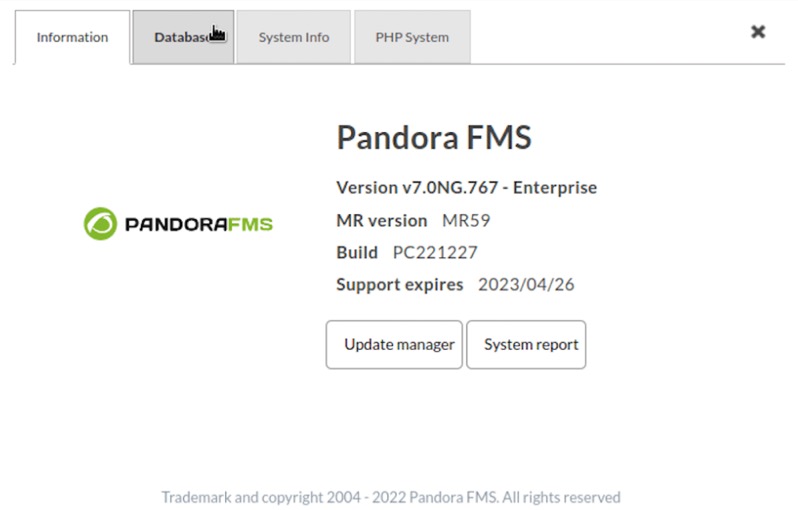
New application information display

With an “About” modal window that replaces the Web Console footer.

Pandora FMS version popup

New network monitoring: SFlow

The possibility of obtaining monitoring through SFlow has been incorporated into our flow management.

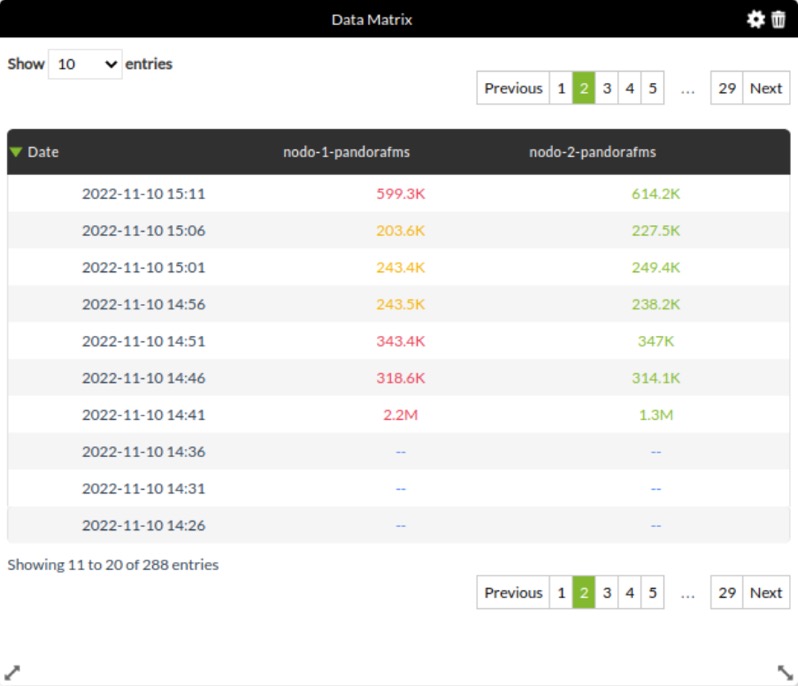
New dashboard widget: Data Matrix

The new “Data Matrix” widget has been added. Through this widget you may represent the information of the requested modules in a decompressed way, taking into account the value of the requested interval.

Pandora FMS data matrix

New macro _group_contact_

Added new macro _group_contact_ in event responses.

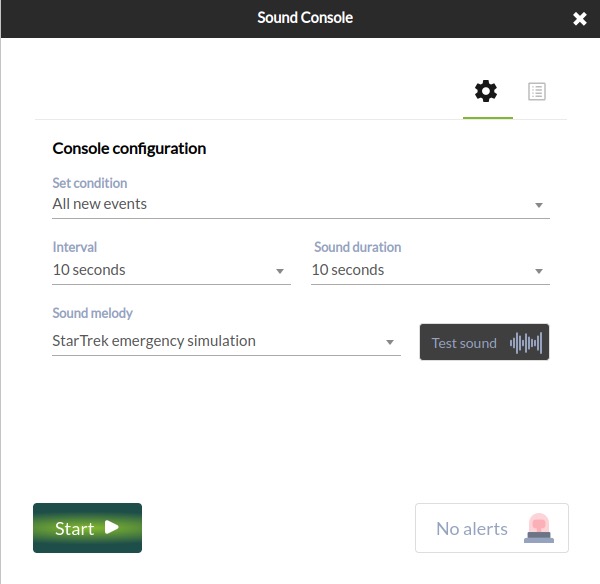
Sound alerts in Command Center

Added the sound alert configuration feature in the Command Center, just like the one from the nodes.

Pandora FMS sound console

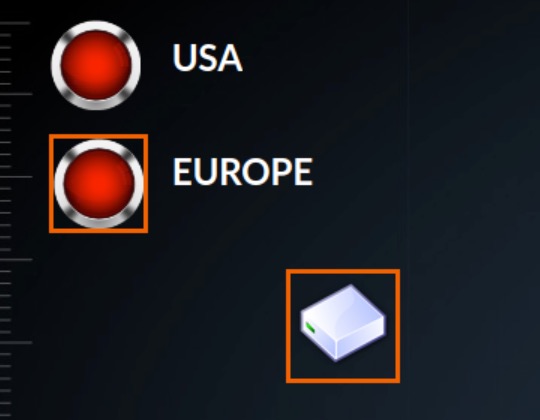
New indicator in visual console: Orange box

We rescued a feature from version 6: the ability to display an orange box on visual certain console elements if the agent or module has a triggered alert, as well as recursive elements that reflect the status of the other visual console:

Pandora FMS orange box


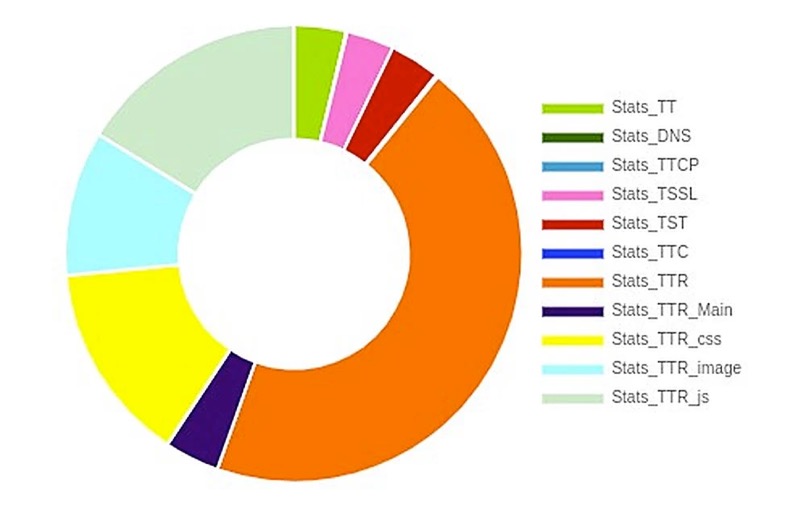
New pie charts

Pie charts have been modified for more accurate representation of their data.


LDAP
PLUGIN – ENTERPRISE

New parameters have been added, –module_prefix to add a prefix to modules and –tentacle_address and –tentacle_port to be able to send data by Tentacle and be able to see those in Pandora FMS before installing the plugin.

See in library →


Known changes and limitations

Due to the arrival of EOL from versions PHP 7.4, 7.3 and 7.2, version LTS 767 “Hope” will be the last one that will support said versions, PHP being Pandora FMS official version for the coming ones.


Fixed vulnerabilities

Case#GitLab#Description

N/A

8297

Improved Pandora FMS access management


Feature extinction

Deleted process transactional monitoring. This feature has nothing to do with WEB transaction monitoring or application monitoring (WUX, UX) that keep on working and being further developed in each version.


Changes and improvements

Case#GitLab#Description

N/A

9847

Improved remote inventory plugin for Windows for using pandorawmic binary.

14021

9325

Added the possibility of choosing the representation of the unit of a thousand.

14021

932

Added the possibility of choosing the power to represent full numerical data in reports.

N/A

9412

Made visual modifications to Satellite server remote configuration to make it easier to use.

13830

9292

Improved trap saving and representation in the SNMP view so as not to lose performance when increasing the number of elements to be viewed.

N/A

8558

The inventory feature becomes OpenSource.

N/A

9535

The cluster monitoring feature becomes OpenSource.

N/A

7386

Modified API call management in order to hide the access credentials to it.

N/A

9763

Improved asynchronous service performance and synchronization.

N/A

9624

Added the possibility of monitoring through SFlow.

N/A

9554

Changed pie chart representation.

N/A

9530

Reinstated triggered alert representation by orange boxes.

N/A

8619

Added new widget to dashboards: “Data matrix”.

N/A

9740

Added the mail configuration feature to the Command Center.

N/A

9675

Modified merging notices, so that they only fire in the strictly necessary cases.

N/A

8809

Added Custom SQL report type to the Command Center.

N/A

9709

Changed the admin user to be created as local by default.

14267

9557

Added private dashboard automatic removal when deleting the associated user.

13884

9246

Added new macro _group_contact_ in event responses.

N/A

9801

Added block in PDF/CSV/JSON file generation so as not to be able to generate more than one simultaneously and thus not affect the tool’s performance.

N/A

9286

Deleted the service forcing button for child services.

N/A

9120

Included the “not” button for a free text search in the events view.

13468

8849

Added the option to create a custom Link agent field.

13329

8770

Added the possibility of having bandwidth in absolute value in the network-bandwidth plugin.

N/A

8755

Modified the possibility of editing server plugins once they are deployed.

N/A

9135

Included the possibility of searching by name and user ID in events.

N/A

9516

Modified agent plugin editing in policies.

N/A

9447

Added entry control to the –create_event call of the CLI.

N/A

9152

Added the option to enable modules in bulk in agent views.

13786

8854

Included audible event alerts in the Command Center.

N/A

1270

Cascade automatic child, grandchild… module deletion.

N/A

7250

Visual enhancements in pandora_server.conf Web editor.

N/A

8535

Cluster monitoring from Enterprise version to the Open version.

N/A

9002

Transaction monitoring extinction (transaction server),

N/A

9059

Label and input visual correction in the agent group view.

N/A

9113

Added HTTPS support for API CHECKER.

13843

9196

Added service element edition into the Metaconsole.

N/A

9219

Deleted configuration file editing in collection or plugin ownership in policies with NMS license.

N/A

9463

Improved network map linking.

N/A

9878

Added server multiple selection in event filter editing (Metaconsole).

N/A

9903

Deleted the possibility of having different profiles with the same name.

N/A

9984

Corrected recon parameter order with SNMP v3.

N/A

9991

Renamed “skin” label by “theme” in user editing.

N/A

10037

Improvements in server auto-monitoring.

N/A

10082

Improved module double search tooltip in agent view.

N/A

10098

Better composer error control in PHP 7 when updating to Pandora 768 (it does not offer support for PHP 7).

N/A

10101

When changing from md5 to sha (access credentials) it is checked whether the table is varchar(60), if not it stays as md5.

N/A

1841

Added SO filtering to policies.

N/A

8538

Improve Azure monitoring.

N/A

9090

Added manual query to turn old plain-text “custom_data” into base64.

14021

9323

Enhanced 4-figure number display in reports to show the full number.

N/A

9587

Added double search in agent view to filter modules and alerts.

N/A

9643

Implemented pandora-exec for modern Windows (such as wmic).

N/A

9868

Deleted the footer and replaced by “About” section.

N/A

10025

Added option in the online installer to install the latest LTS version.

N/A

10096

Adapted snmp_remote.pl plugin to be able to execute it externally.

N/A

9618

Added the option to see the IP with which a remote module is being run from the agent view.


Bug fixes

Support#GitLab#Description

N/A

9684

Fixed connection error in NCM if the destination needs a prompt.

13394

8793

Fixed the deadlock in pandora_db when using Percona XtraDB cluster.

N/A

9995

Replaced the awk command by gawk for the AD plugin to avoid usage error.

N/A

9985

Fixed the use of the Deployment Center with PHP 8.

N/A

9983

Fixed error 500 in operations in bulk with PHP 8.

N/A

9982

Fixed bug in pandora-snmp-bandwith.pl plugin.

14484

9896/9275

Fixed the compilation of certain dependencies necessary for the correct use of NCM.

N/A

9833

Fixed user search in general search engine in the OpenSource version.

14523

9811

Fixed errors in reports that had availability type items.

N/A

9783

Fixed certain bugs in new network map refreshings.

14458

9780

Fixed the lack of information display in Discovery tasks.

N/A

9720

Fixed module histogram widget by not displaying state changes correctly.

14417

9706

Fixed the disappearance of drop-down menus in the module graphics view in dark mode.

N/A

9677

Fixed history database automatic partitioning.

N/A

9597

Fixed the default port in the integration with Ehorus.

N/A

9586

Modified the API call get_tree_agent, which displayed unnecessary information.

N/A

9548

Added certain fields in some database tables to avoid errors in the execution of pandora_db.

14180

9498

Fixed API call add_permission_user_to_group, which left the assigned profile group empty.

N/A

9483

Modified the correlation server to prevent its performance degradation.

14050

9349

Modified the tree view in the Command Center so that it does not show the agent hash when hovering over.

N/A

9978

Fixed enterprise ACLs to not allow configuration of a particular bulk operations page.

14580

9912

Fixed scheduled emails and report sending using Discovery tasks.

N/A

10000

Fixed error 500 in “tree_agents” API call with PHP 8.

N/A

9986

Fixed saving when creating an SNMP module that does not need a port, so that it is saved empty.

14571

9931

Fixed filtering in the event view when trying to select more than one server, where only the first one was selected.

N/A

9911

Fixed collection update when md5 is weight 0.

14569

9906

Fixed auto-refresh errors in Command Center event view.

14572

9873

Fixed custom images missing in visual console service elements.

14558

9851

Fixed wrong display of custom images on the login screen.

14463

9747

Solved the lack of some events when “Display all” is selected in filtering.

N/A

9721

Corrected the CLI call –add_event_comment that did not add the event ID into the comment.

N/A

9508

Fixed text overlay in dashboards when setting up a new widget.

14178

9496

Added input value validation in the creation of a new module using API.

12537

9221

Corrected module type’s default value when creating modules in “MySQL Server Advanced Plugin”.

12537

8950

Modified modules of the “MySQL Server Advanced Plugin” plugin that had erroneous data.

N/A

9061

Fixed Discovery section views.

N/A

9251

Added translation into sections that called to function ui_print_help_tip

N/A

9362

Modified tagent_data checking for big loads of data.

N/A

9440

Fixed “$bad_agents” counting.

14267

9556

Fixed counting and pagination in Dashboards view.

14349

9664

Removed modules in pendingdelete from the module selection view in scheduled downtimes.

N/A

9679

Fixed information sample in failed attempt register when obtaining a token.

14457

9738

Fixed node change in SQL reports after editing it (Metaconsole).

N/A

9759

Fixed common agent loading in module operations in bulk.

14480

9787

Fixed status update in the event information window in the General tab.

N/A

9817

Controlled profile duplication in agent creation.

N/A

9825

Fixed image upload through file manager in the Metaconsole.

N/A

9827

Fixed error related to external link without value as user home screen.

N/A

9831

Fixed password policy that only worked the first time.

N/A

9844

Fixed bug in alert filtering (it did not take into account “field content” in alert filter when selecting “mail to admin” in actions).

N/A

9908

Fixed failure in the Metaconsole event filter when modifying autorefresh.

N/A

9910

Fixed visual bug in template condition configuration/editing.

N/A

9922

Fixed the impossibility of filtering by tags in alert view.

N/A

9932

Fixed errors in SNMP browser.

N/A

9953

Fixed agent GIS information addition manually through PHP 8.

N/A

9966

Fixed issue with permissions from users created through API (user with manage users) of access to nodes in environments with Metaconsole.

14036

9969

Fixed errors when editing traps.

N/A

9972

Fixed typo in the log message when adding the bandwidth plugin module in Satellite.

14623

9973

Fixed error that did not allow to disable auto refresh in the Metaconsole.

N/A

9988

Fixed visual issue that did not allow to access the log view from the agent view.

N/A

9994

Fixed issue that did not allow to select “module group” when creating a modules.

N/A

9996

Fixed incorrect description in ssh module creation.

N/A

9997

Removed “using module component” from module editing.

N/A

9999

Fixed error in agent “full list of alerts” view.

N/A

10005

Fixed SQL errors when adding a new node o the Metaconsole.

N/A

10022

Fixed SQL error when adding inventory modules allowing to save without “Module” field.

N/A

10034

Fixed error that allowed to create empty/voisd ALC Enterprise profiles.

N/A

10036

Fixed visual error where the module legend overlapped with the circle graph in custom graphs.

N/A

10038

Fixed auto refreshing issue in event view (Metaconsole).

N/A

10041

Fixed error 500 in old correlation alerts.

N/A

10043

Fixed trap editing error that generated entities and did not allow editing.

N/A

10046

Fixed bug when deleting inventory modules individually.

N/A

10048

Fixed error in “Monitoring>Alert details” where when filtering by “mil to admin” it did not take into account the rest of the filters.

N/A

10049

Fixed error 500 when editing the cluster agent from the tree view (Metaconsole).

N/A

10074

Fixed error that did not allow to modify “content type” in SNMP alerts with “mail to admin” action.

14724

10075

Fixed error that did not show Compliance SLA percentage and Status in PDF reports.

N/A

10078

Fixed error 500 when deleting correlation alerts.

14706

10080

Fixed SQL error when creating external alert with action by default.

N/A

10104

Added Chrome to Ubuntu installation for proper execution in the console.

N/A

10119

Fixed alert view error in the Open version.

14783

10121

Fixed error 500 when creating custom MySQL.

N/A

10154

Fixed network map preview view with Discovery task performance.

N/A

9949

Fixed WUX widgets.

14544

10023

Fixed pandora_snmp_bandwidth.pl plugin.

N/A

10139

Fixed default visual consoles that used non-existent data.

N/A

8578

Fixed visual errors in integrations with eHorus.

N/A

9980

Fixed WUX executescript command when the response obtained 0.

N/A

10068

Fixed node collection synchronization when using PHP 8.

N/A

10040

Fixed connection error with AD in Command Center with PHP 8.

N/A

10114

Fixed error 500 in Command Center when using LDAP.

N/A

8047

fixed Kaspersky antivirus blocking to new WMIC version used by the Satellite server.

N/A

9633

Fixed typos in alert templates in french.

14650

10026

Fixed Command Center configuration order.

N/A

10123

Fixed warning due to a Js file being missing.

N/A

10052

Fixed network map calculation counting whew the mock node was taken into account.

N/A

10129

Fixed visual typo in the percentile time creation.

N/A

10088

Modified sample_agent query to improve its performance.

N/A

10131

Fixed error 500 in the module template view within an agent.

N/A

10135

Fixed error 500 in Command Center collection pagination.


Documentation update

Caso#GitLab#Descripción

N/A

10003

Fixed CLI call –create_event information.

N/A

10001

Added documentation of the tables used in the Command Center merging process.

N/A

9998

Added documentation of server plugin modification even if they are deployed.

N/A

9993

Added documentation about the use of email encryption in the Command Center.

N/A

9835

Updated Selinux documentation.

N/A

9803

Deleted transaction monitoring documentation.

N/A

9795

Added the documentation of the new “Data Matrix” widget.

N/A

9767

Updated information for installing software agents.

N/A

9743

Added documentation for the new event response macro _group_contact_.

14195

9533

Modified SQL report documentation to help perform correct queries.

N/A

9967

Updated information about visual console icons.

N/A

10113

Added cusom_data on base64 documentation.

N/A

10109

Added the new menu option “About”.

N/A

10145

Fixed support to Windows devices.

N/A

10060

Added documentation on dependencies included in ALT packages.

N/A

10128

Added IPAM documentation for importing through CSV.

N/A

10072

Updated new pie chart documentation.

N/A

10142

Updated server token “Dataserver_threads x” documentation.

N/A

9696

Added documentation to be able to use pmacct as alternate probe to that of Netflow.


Known bugs

This section presents some known bugs that will be fixed as soon as possible in upcoming versions.

Caso#GitLab#Descripción

14771

10156

The availability report content cannot be displayed without first clicking “Update Item”.

N/A

10152

It is not possible to add some groups to notifications.

14825

10146

The timestamp macro shows different date formats.

N/A

10147

There is some login slowdown in the node.

N/A

9866

Certain notifications are not fully displayed in descriptions.

N/A

10051

By setting a timeout to a module sometimes the module process is not stopped, therefore leaving a zombie process.

14803

10133

There are issues for Discovery IPAM task deletion.

14804

10136

pandora_manage does not modify the agent’s primary group from the Command Center.

14762

10132

There is an error in registration of a Windows machine when carrying out WMI requests.

N/A

9253

Failure in the usage of certain languages in the Command Center.

14800

10127

It is necessary to add the “id_nodo” field to the call to validate events from the API in the Command Center.

14417

9706

Menu display error in the module’s graph with dark mode.

N/A

9677

Failure in automatic partition creation in the history database.

N/A

10102

Visual typo in columns of service SLA reports.

N/A

10115

Login issues through LDAP when using special characters.

N/A

9924

Errors in visual console links.

14765

10112

Certain module types belonging to policies keep on running even if disabled from policies.

14735

10085

Lack of data time correspondence between graphs and serialized data.

N/A

9600

Server wrong status when there is a time zone difference between the server and the console.

N/A

9164

Process duplication creation in VMWare tasks.

About Version 2 Digital

Version 2 Digital is one of the most dynamic IT companies in Asia. The company distributes a wide range of IT products across various areas including cyber security, cloud, data protection, end points, infrastructures, system monitoring, storage, networking, business productivity and communication products.

Through an extensive network of channels, point of sales, resellers, and partnership companies, Version 2 offers quality products and services which are highly acclaimed in the market. Its customers cover a wide spectrum which include Global 1000 enterprises, regional listed companies, different vertical industries, public utilities, Government, a vast number of successful SMEs, and consumers in various Asian cities.

About PandoraFMS
Pandora FMS is a flexible monitoring system, capable of monitoring devices, infrastructures, applications, services and business processes.
Of course, one of the things that Pandora FMS can control is the hard disks of your computers.

How Does Passwordless Authentication Fit With Zero Trust Security Models?

Will 2023 be the year we finally eliminate passwords? For the last decade, cybersecurity experts have both been pushing for and predicting that a passwordless future is just around the corner. However, while passwords have been declining in recent years in favor of more robust forms of authentication, an entirely passwordless future has yet to materialize.

But that all could be set to change with the increased adoption of zero trust security models. Zero trust does away with implicit trust and requires all users and devices, whether inside or outside the corporate network, to be continuously authenticated and authorized. And critically, zero trust is also starting to mean zero passwords. But why?

Let’s dive into why passwordless authentication is important and how it fits into zero trust security models.

What is Passwordless Authentication?

As the term suggests, passwordless authentication is a way of verifying a user’s identity with something other than a password. Common types of passwordless authentication include email-based or SMS-based one-time codes, multi-factor authentication, and biometrics.

Biometrics are increasingly favored over other types of passwordless authentication because they’re virtually impossible for hackers to imitate, and they reduce user friction. Some examples of biometric authentication include retinal scans, voiceprints, facial recognition, fingerprint scans, and biometric mouse movements.

As the term suggests, passwordless authentication is a way of verifying a user’s identity with something other than a password. Common types of passwordless authentication include email-based or SMS-based one-time codes, multi-factor authentication, and biometrics.

Biometrics are increasingly favored over other types of passwordless authentication because they’re virtually impossible for hackers to imitate, and they reduce user friction. Some examples of biometric authentication include retinal scans, voiceprints, facial recognition, fingerprint scans, and biometric mouse movements.

Why Use Passwordless Authentication?

Here’s what it comes down to; passwordless authentication is simply more secure than password-based authentication.

While businesses have relied on passwords for decades, they’re no longer considered a secure way to protect our accounts and corporate networks. For example, 44% of employees reuse passwords across personal and work-related accounts. Moreover, most passwords are extremely easy to guess – the top five passwords globally are “123456”, “Password,” “12345678”, “qwerty,” and “123456789”.

As a result, hackers have long favored password attacks to breach corporate networks or personal accounts. Many different password attack methods exist, but the most common are:

  • Brute-force attacks: This hacking method uses trial and error to crack passwords, typically using lists of common passwords or leaked passwords obtained from the dark web.
  • Surgical attacks: These are a type of targeted attack where the hacker researches the intended victim, scouring their public accounts to find key details like their birthday, favorite sports team, hobbies, names of their children, etc., that the user may use in passwords.
  • Phishing/Social engineering: Here, cybercriminals pose as a trusted entity like a well-known company or another employee and trick the target into sharing their login details via a fraudulent login screen. Other methods include sending emails with a malicious link that automatically installs key-logging malware on the victim’s computer.

But by opting for passwordless authentication, you can eliminate or vastly reduce the risk of falling victim to these types of attacks.

There are also other reasons to move away from passwords. For example, passwordless authentication is more convenient for workers because it leverages something the user has or something inherent to them, eliminating the need for them to remember anything. This also means employees can log into devices faster.

Rising Zero Trust Adoption

72% of organizations are in the process of adopting zero trust or have already implemented it. Moreover, an eye-watering 90% of organizations say that advancing zero trust is one of their top three IT and security priorities. But why exactly is zero trust becoming so widespread?

Adopting a zero trust approach can the cost of a data breach by approximately $1.76 million and offer boosted efficiencies that amount to savings of 40 manhours per week. Moreover, companies that leverage zero trust network segmentation (an element of ZTNA) are two times more likely to avoid critical outages due to security incidents.

Undoubtedly, the need for continuous authentication is rising as remote working, and distributed workforces become more common. Zero Trust Network Access (ZTNA) is a critical set of technologies and functionalities here, enabling remote users to access internal applications securely. ZTNA is fast becoming essential for businesses in the modern world.

Can You Have Password-Based Zero Trust?

Yes, and many organizations do. However, cybersecurity experts are now warning that password-based zero trust does not meet the defense demands of the increasingly severe cyber threatscape of today.

Why Passwordless Zero Trust Is the Way Forward

Here’s the bottom line. Passwords are not only weak forms of security, but they also make your zero trust program slower, more expensive, and less effective.

Passwords require more tools, which drives up costs. Additional tools demand more administrators, new user licenses, and often more training for users and the help desk. All of these factors result in a more expensive security program.

Additionally companies that use passwords in conjunction with MFA often still have security gaps. This is typically because legacy systems or otherwise awkward technologies don’t play well with some MFA tools, leaving specific corporate systems protected only by passwords. There can also be MFA gaps in workstation login, VPNs, RDPs, and VDIs or IoT devices where passwords are the default.

Lastly, there are resource constraints involved with managing robust password-based security. IT and security teams are often understaffed and overwhelmed, and the current cybersecurity skills gap exacerbates this problem. Moreover, rising economic uncertainty puts more pressure on businesses of all sizes to reduce their IT budgets and take cost-cutting measures.

In this increasingly severe climate, security teams are feeling the pains of passwords more than ever before. By taking passwords out of the equation, organizations can reduce the labor burden on already over-stretched security workers and give them more time to spend on proactive cybersecurity measures.

Final Thoughts

Credential stuffing may be one of the oldest attack methods, but it’s still going strong today. For example, credential stuffing attacks became so prevalent in the first quarter of 2022 that attack traffic surpassed legitimate login traffic in some countries. And equally concerning, the first half of 2022 saw more attacks against MFA than any previous year.

Simply put, cybercriminals are increasingly targeting our traditional defense measures, namely passwords and MFA. As a result, companies embarking on their zero trust journey need to move away from passwords and weaker forms of MFA in favor of more robust passwordless authentication.

About Version 2 Digital

Version 2 Digital is one of the most dynamic IT companies in Asia. The company distributes a wide range of IT products across various areas including cyber security, cloud, data protection, end points, infrastructures, system monitoring, storage, networking, business productivity and communication products.

Through an extensive network of channels, point of sales, resellers, and partnership companies, Version 2 offers quality products and services which are highly acclaimed in the market. Its customers cover a wide spectrum which include Global 1000 enterprises, regional listed companies, different vertical industries, public utilities, Government, a vast number of successful SMEs, and consumers in various Asian cities.

About Portnox
Portnox provides simple-to-deploy, operate and maintain network access control, security and visibility solutions. Portnox software can be deployed on-premises, as a cloud-delivered service, or in hybrid mode. It is agentless and vendor-agnostic, allowing organizations to maximize their existing network and cybersecurity investments. Hundreds of enterprises around the world rely on Portnox for network visibility, cybersecurity policy enforcement and regulatory compliance. The company has been recognized for its innovations by Info Security Products Guide, Cyber Security Excellence Awards, IoT Innovator Awards, Computing Security Awards, Best of Interop ITX and Cyber Defense Magazine. Portnox has offices in the U.S., Europe and Asia. For information visit http://www.portnox.com, and follow us on Twitter and LinkedIn.。

×

Hello!

Click one of our contacts below to chat on WhatsApp

×