Skip to content

Introducing Parallels Desktop 20.3: x86_64 emulation, OBS virtual camera support, USB device support, and more


As part of the Parallels team, I’m always listening to our users and working to make your experience better.

With the latest update (20.3.0), Parallels Desktop introduces several powerful new enhancements for users—from video creators and streamers who need more flexibility for their broadcasts to IT admins and developers who need more control over their devices.

Let’s dive in!

Ready for a closer look at everything that’s new in Parallels Desktop 20.3.0? Start your free trial today.

New x86_64 emulation capabilities

First up, I’d like to say thank you to the talented folks at FEX, an open-source emulator that runs x86 games and other apps on ARM64 hardware. Their product is the basis for the new emulation engine in Parallels Desktop.

Let me also say thank you to every one of you who used the emulation engine and shared your feedback.

We released the 20.2.1 update earlier this year, addressing a popular issue related to the inability to create x86_64 machines on Apple silicon Macs with M4 chips.

We included a preview in our 20.2 update for early adopters, and now, the 20.3.0 update delivers a fix for x86_64 Linux virtual machines that can be imported without serious issues like freezes or crashes.

Support for macOS OBS virtual camera in Windows

Most of you are familiar with OBS (Open Broadcaster Software), the popular open-source broadcasting software.

Many users have expressed that they’d like to use an OBS virtual camera setup on their Mac inside a Windows virtual machine for apps like Zoom or Microsoft Teams—but until now, that wasn’t possible.

With Parallels Desktop 20.3.0, the OBS virtual camera feature in macOS is available inside your Windows virtual machine (VM).

This means you can now select your OBS feed in Windows apps—giving you more control over how your livestreams look and function.

Watch the video below for a quick look at how you can use and customize the OBS virtual camera in software like Microsoft Teams.

USB device support for macOS VMs on Apple silicon Macs

Imagine you’re a developer testing an app, an IT admin configuring security keys, or a tech enthusiast experimenting with macOS in a virtual environment.

You boot up your macOS VM on an Apple silicon Mac, plug in your USB device—and nothing happens.

Not the best experience, right?

For the longest time, macOS VMs on Apple silicon Macs simply couldn’t recognize USB devices.

This meant security professionals couldn’t test authentication keys, developers couldn’t debug hardware-dependent software, and testers couldn’t validate device compatibility.

That changes with Parallels Desktop 20.3.0!

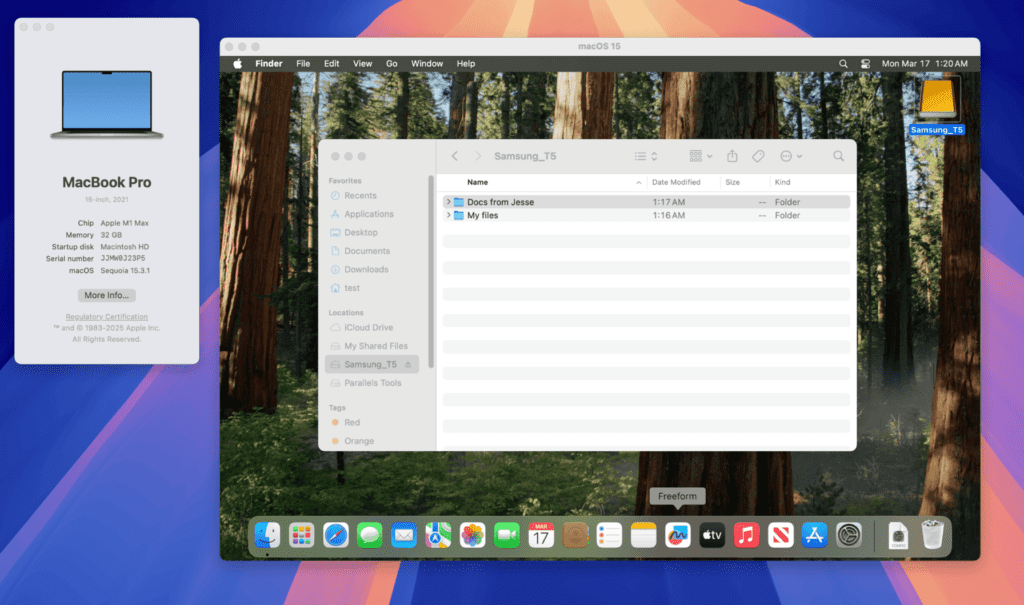
Thanks to the adjustments introduced in Apple’s framework with macOS 15, USB passthrough is now a reality for macOS VMs on Apple silicon.

With 20.3.0, you can connect a range of external USB devices directly to your macOS VM, unlocking new workflows for development, security testing, and beyond.

View of accessing USB devices on a Mac through Parallels Desktop 20.3

Heads up: While many USB devices are now supported, audio devices and iPhones are not at the moment. Additionally, this feature is only available on Macs running macOS 15 or higher.

Enhanced Mac integration for the Dragon Medical One app

Many Parallels Desktop customers working in the healthcare industry rely on the Dragon Medical One app to create voice-enabled clinical documentation on their Windows virtual machines.

Previously, dictated text from Dragon Medical One was limited to the Windows environment, creating workflow limitations for clinicians who work across both Windows and macOS.

In May 2025, that limitation will be gone.

Healthcare specialists can now dictate using Dragon Medical One in their Windows VM running in Coherence view mode and have the text appear directly in a designated macOS app.

This cross-platform text input is triggered by a defined action—such as pressing a specific button on a Nuance PowerMic Microphone—offering a more efficient documentation process that connects Windows and macOS.

Enhanced activation control for managed Macs

In Parallels Desktop 20.2, we introduced new activation management features to help IT admins speed up software deployment on managed Macs.

By using MDM configuration profiles, admins could define whether users activate Parallels Desktop with SSO or a license key, reducing confusion and support requests.

Now, we’re taking it a step further.

With this update, IT admins can enforce SSO activation as the only method for managed Macs.

Once admins deploy this configuration profile, users will no longer be able to activate Parallels Desktop with a license key or trial—ensuring strict compliance with organizational policies.

Even if a user uninstalls and reinstalls the software, the system will continue to require SSO activation from the start.

This added level of control means fewer activation-related tickets for IT teams and a smoother onboarding process for end users.

Touch ID to authenticate Parallels Desktop installation

We know that manually entering your Mac admin password can be a hassle.

That was something we all had to do when installing and managing Parallels Desktop settings locked with a Mac admin password on Macs with macOS 15.

Now, you can simply use Touch ID to authenticate, making installation and settings management more convenient in Parallels Desktop.

New to Parallels Desktop for Mac? Get your 14-day free trial of Parallels Desktop Pro Edition now. 

Updates for Parallels Desktop Enterprise customers

If you’re an Enterprise user, look out for future updates about the new Lock VM feature and the Parallels Desktop configuration profile in the Jamf library, along with much more!


About Parallels 
Parallels® is a global leader in cross-platform solutions, enabling businesses and individuals to access and use the applications and files they need on any device or operating system. Parallels helps customers leverage the best technology available, whether it’s Windows, Linux, macOS, iOS, Android or the cloud.

About Version 2 Digital

Version 2 Digital is one of the most dynamic IT companies in Asia. The company distributes a wide range of IT products across various areas including cyber security, cloud, data protection, end points, infrastructures, system monitoring, storage, networking, business productivity and communication products.

Through an extensive network of channels, point of sales, resellers, and partnership companies, Version 2 offers quality products and services which are highly acclaimed in the market. Its customers cover a wide spectrum which include Global 1000 enterprises, regional listed companies, different vertical industries, public utilities, Government, a vast number of successful SMEs, and consumers in various Asian cities.

Public Wi-Fi risks that put your business data in danger

Summary: Public Wi-Fi risks include data theft, malware, and email compromise. To stay secure while remote, businesses should combine training, VPNs, and threat protection.

We live in a world where it’s easy to send a quick work email at the airport lounge or finish design tasks in neighborhood coffee shops after hours. Remote work is great in theory. However, if we don’t understand public Wi-Fi risks, working remotely can lead to cybersecurity disasters.

Public Wi-Fi networks are often a network security blind spot. Users sometimes drop their guard, exposing online accounts and security credentials that should remain locked down. That’s why robust public Wi-Fi security is essential for business.

This article addresses Wi-Fi security, exploring critical risks, mitigation strategies, and employee best practices for public Wi-Fi users.

Key takeaways

  • Many public Wi-Fi networks lack adequate security measures such as encryption. “Evil Twin” attacks complicate the issue by creating fake hotspots that appear legitimate. Users must be vigilant and aware to protect their online security.
  • Using free Wi-Fi is extremely risky. Hackers use public Wi-Fi connections to monitor targets, extract credentials, deploy malware, and mount identity theft attacks. They can also spread phishing emails, hijack sessions, and divert users to fake websites.
  • Protect work devices on public Wi-Fi by enforcing VPNs, malware scanning, MFA, and threat intelligence. Unsecured devices should never connect to insecure Wi-Fi networks.
  • Best practices for employees include data encryption, using a VPN and firewall combination, and learning how to verify that they are using a secure network. Employees should avoid sensitive tasks on Wi-Fi networks, especially those involving financial data.

What makes public Wi-Fi networks risky?

Around 60% of us regularly use hotel or airport Wi-Fi to send emails and collaborate with colleagues. Wi-Fi liberates employees to work wherever they are. However, this freedom brings cybersecurity risks. If you exchange sensitive data or files via public networks, data loss is always a possibility.

Why is this? The problem is that many public Wi-Fi networks lack security measures to prevent hijacking and protect users from criminal activity.

Unsecured Wi-Fi networks often lack password protection and authentication or rely on default passwords that attackers can easily guess. They also use unencrypted plain text, allowing data to flow openly from user devices to the internet.

Moreover, companies that fail to secure their Wi-Fi networks are also vulnerable to spoofing (so-called “Evil Twin” attacks).

In Evil Twin attacks, criminals create a fake public Wi-Fi hotspot that resembles the real thing. For instance, they might create an access point called “Airport_StarbucksWiFi.” The fake hotspot looks normal but allows threat actors to distribute malware and hijack connections.

Evil Twin attacks are more likely when businesses outsource Wi-Fi networks to IT partners. Airports regularly outsource connectivity, losing the ability to police internet traffic and crack down on copycat hotspots. Cybercriminals leap into that accountability gap, often without detection.

As a Wi-Fi user, identifying fake nodes or poor security measures is not simple. Most of the time, we want to log on smoothly and quickly without worrying about data security. Unfortunately, that’s a mistake.

Unsafe Wi-Fi exposes everything users do online, and we must remain vigilant.

In one study, researchers monitored 11 unsecured Wi-Fi hotspots around Nara, Japan. Over 150 hours, they gathered unencrypted photos, documents, emails, and credentials. All of the harvested data was in plain text, ready to use for whatever purpose attackers desired.


Common dangers of free Wi-Fi networks

Public Wi-Fi networks are dangerous services. However, you can use them safely if you take action to mitigate critical public WiFi risks. Mitigation starts with understanding how attackers use Wi-Fi and how threats operate.

Free Wi-Fi networks, What can go wrong


Man-in-the-Middle attacks

The Man-in-the-Middle (MitM) attacks involve attackers placing themselves between user devices and the public internet. Fake public Wi-Fi networks are perfectly adapted for this attack method.

Criminals controlling a public Wi-Fi hotspot use sniffing tools to monitor data and harvest unencrypted credentials from users on the same network. They can mount session hijacking attacks to execute financial transactions or redirect users to malicious websites.

Malware distribution

Unsecured networks enable malware distribution in several ways. For instance, attackers can use compromised Wi-Fi servers to redirect network users to fake websites and deliver malicious downloads.

Attackers can also send phishing emails directly to users or leverage software exploits to implant spyware tools. The bottom line is that using unsecured public Wi-Fi connections offers an open door for malware attacks.

Identity and credential theft

Both MitM attacks and malware can extract user credentials and other confidential information. Attackers use this information to mount secondary attacks. For example, they might use login credentials to apply for loans or gain access to business networks. They can also sell extracted data on dark web marketplaces.

The trouble with identity theft attacks is that they are hard to trace. Victims do not know criminals are using their login credentials until it’s too late. That’s why we recommend that Wi-Fi users regularly request a dark web scan to check for leaked emails and login details.

Business email compromise

In business email compromise attacks, criminals pose as legitimate contacts and persuade victims to transfer money or confidential information.

Unsecured Wi-Fi allows attackers to extract your email address and monitor email contents. Attackers can learn who you are and create persuasive phishing emails to suit their strategy.

Alternatively, hackers could hijack your business email account via compromised Wi-Fi connections. They can assume your corporate identity, using it to email colleagues, clients, and bosses. This technique builds false trust, enabling criminals to arrange payments or steal data without detection.

How much can security incidents cost companies

Using public Wi-Fi without protective measures is risky. But how risky is it from a financial and reputational perspective?

The answer is, very risky. Companies that neglect public Wi-Fi safety run unacceptable risks with potentially drastic consequences. Most significantly, a single insecure Wi-Fi connection can lead to enterprise-wide data breaches.

According to IBM, the average cost of a data breach reached $4.88 million in 2024—a 10 percent increase from the previous year. 66% of consumers lose trust in companies that suffer data breaches, and 75% consider avoiding their products.

Using public Wi-Fi amplifies this critical business risk. Statista reports that 25% of those using cafe Wi-Fi networks reported identity compromise attacks. Another survey found that 18% of Wi-Fi users reported experiencing cybersecurity incidents linked to public networks.

Even worse, 45% of respondents admitted to making financial transactions via public Wi-Fi and 47% failed to verify the legitimacy of Wi-Fi hotspots. So while public Wi-Fi is risky, users often underestimate the hazards and are liable to put data at risk.

Ways to stay safe on public Wi-Fi

Identity theft and data breach attacks are costly, but employees often need flexible internet access—especially when traveling. Companies must balance flexible working practices with robust cybersecurity. That way, businesses can enjoy the benefits of public Wi-Fi and neutralize the negatives.

Let’s start with some security fundamentals to strengthen your security posture and protect users wherever they access the internet.

How to stay safe on public Wi-Fi
  • Use a Virtual Private Network (VPN)—VPNs encrypt connections and assign anonymous IP addresses to user devices. With a Business VPN installed, employees access network assets via a secure connection. Even snoopers in control of Wi-Fi nodes can’t easily decrypt web traffic. Integrate VPN usage into your remote work policies. Require employees to use an approved business VPN on all work devices.
  • Scan downloads for malicious content—Criminals use unprotected Wi-Fi networks to divert users to fake websites and seed malicious downloads. Guard against this risk with Malware Protection tools that scan incoming files and identify malicious software.
  • Implement real-time malware protection—It’s also wise to use continuous threat scanning tools. Malware can infect any device via drive-by downloads or email attachments. Real-time malware scanning detects these threats before they steal data or damage assets.
  • Leverage advanced threat intelligence—Threat intelligence provides up-to-date knowledge about active threat actors and attack techniques. Advanced knowledge makes it easier to mitigate risks and apply suitable Wi-Fi security measures.
  • Secure all user accounts with multi-factor authentication (MFA)—Attackers may obtain user IDs or passwords via packet sniffing or malware. However, if you use MFA for network logins, criminals won’t be able to access critical assets easily.


Best practices for employees using public Wi-Fi

The recommendations above will help you manage public Wi-Fi risks, but they aren’t the end of the story. Wi-Fi security is fundamentally about safe user behavior and training. Security-aware employees are far less likely to fall for Evil Twin attacks or phishing scams.

With that in mind, here are some best practices that employees should follow when connecting to public Wi-Fi networks:


Learn how to recognize fake Wi-Fi networks

Training should focus on educating employees to understand public Wi-Fi security risks and identify fake networks. Educate staff to be alert to the risk of using free Wi-Fi networks, and require users to verify the hotspot with the staff at hotels or coffee shops before connecting.


Turn off auto-connect settings

Device users often enable auto-connect at home and forget that it applies elsewhere. However, devices may automatically connect with unsafe networks. Disable this feature and require manual logins for each public Wi-Fi internet connection.


Encrypt sensitive information on devices

If users regularly work remotely, require the encryption of sensitive data in specific folders. Ban the storage of work documents in plain text files, and consider requiring end-to-end email encryption for work-related file transfers.

Enable VPNs and firewall protection

As noted earlier, business VPNs bring public Wi-Fi users within your security perimeter. Combine robust VPN encryption with approved device firewalls to block most threats before they compromise data.


Don’t use public Wi-Fi for sensitive activities

Attackers can’t steal financial credentials if you don’t type them into browsers. Tell staff to avoid sending payments via public Wi-Fi or discussing financial matters via insecure connections. The same applies to collaborating on confidential projects. If privacy is critical, use cellular hotspots or reliable Wi-Fi connections.

Require regular updates

Patch management manages the risks related to outdated operating systems and internet-facing applications. Remember: attackers look for WiFi security exploits to access devices and business networks. Make sure every critical app is up-to-date and protected against known vulnerabilities.

How NordLayer can help

Avoiding public Wi-Fi risks is not just about training. NordLayer’s security platform reinforces employee knowledge by providing the tools to safeguard data and counter cyber threats.

For example, our Business VPN applies encryption and IP address anonymization to all users when they connect to the company network. Encryption locks down the content in transit of user devices, while the Always-On VPN feature ensures complete coverage. Your internal network remains invisible to attackers; sensitive data is always off-limits.

Our Download Protection tools screen downloads for malware threats. If Man-in-the-Middle attacks divert users to fake download sites, our tools detect threats before they execute malicious code. Real-time malware protection operates in the background, ensuring a seamless user experience.

NordLayer also leverages global threat intelligence to counter emerging threats and criminal actors. Our threat intelligence solution detects attacks early based on signatures and unusual behavior. Security teams enjoy network-wide visibility via real-time internet traffic monitoring.

Companies that allow employees to use unsecured public Wi-Fi networks should expect internet security issues sooner rather than later. However, NordLayer will help you strike a strategic balance between flexible work and cybersecurity. Contact our team to reduce public Wi-Fi risks without compromising employee performance.

Frequently asked questions

What information can hackers steal while browsing on public networks?

Hackers can steal any data passing across an unsecured Wi-Fi network connection. This includes email contents and metadata, search queries, file transfers, and login credentials for network portals, social media accounts, or financial services.

Stealing data stored on user devices is harder but also possible. Attackers can deploy malware to extract files from hard drives or connected devices. In short, any information on your device is at risk when you use unsecured free WiFi connections.

What are the biggest risks when using public WiFi networks?

Public WiFi use carries many cybersecurity risks. The biggest risk is the extraction of login credentials and other sensitive information. Attackers can sniff credentials from active connections and use this information to access network resources.

Public Wi-Fi users also risk malware infections from fake websites or direct deployment. Attackers can distribute phishing emails or pop-up alerts to users on the same network. They can also use session hijacking techniques to control applications and compromise network security.

How does the use of a VPN help you stay protected?

Virtual private networks protect public Wi-Fi use by encrypting data and assigning anonymous IP addresses. Encryption conceals the data you send over free wifi connections. Attackers cannot see what you type or the emails you send and tend to shift focus to easier targets instead.


About NordLayer
NordLayer is an adaptive network access security solution for modern businesses – from the world’s most trusted cybersecurity brand, Nord Security.

The web has become a chaotic space where safety and trust have been compromised by cybercrime and data protection issues. Therefore, our team has a global mission to shape a more trusted and peaceful online future for people everywhere.

About Version 2 Digital

Version 2 Digital is one of the most dynamic IT companies in Asia. The company distributes a wide range of IT products across various areas including cyber security, cloud, data protection, end points, infrastructures, system monitoring, storage, networking, business productivity and communication products.

Through an extensive network of channels, point of sales, resellers, and partnership companies, Version 2 offers quality products and services which are highly acclaimed in the market. Its customers cover a wide spectrum which include Global 1000 enterprises, regional listed companies, different vertical industries, public utilities, Government, a vast number of successful SMEs, and consumers in various Asian cities.

ScalePad Review: A Lifecycle Manager Worth Investing In?

Managing IT assets as an MSP is a constant juggling act. From tracking aging hardware to ensuring warranties don’t lapse, every oversight can mean lost revenue, inefficiencies, or unexpected downtime for your clients. You need a smarter way to stay ahead.

This is where tools like Scalepad come into play, an automated asset lifecycle management platform designed to take the guesswork out of IT asset management. But is it the right fit for your MSP?

Integrating with your existing RMM and PSA tools, ScalePad transforms scattered asset data into a single, streamlined source. It is designed to provide actionable insights that help you make informed decisions, strengthen client relationships, and boost profitability. 

But does it deliver everything your MSP needs to stay competitive? Let’s take a closer look. Keep reading our comprehensive Scalepad review to determine whether this is the right IT lifecycle manager for your MSP. 

Key Takeaways

  • ScalePad automates IT asset lifecycle management, reducing manual workload and improving data accuracy.
  • Integration with RMM and PSA tools ensures real-time asset tracking, proactive monitoring, and compliance support.
  • MSPs can use ScalePad to create IT roadmaps, forecast budgets, and plan hardware refresh cycles.
  • The platform enables upsell and cross-sell opportunities by identifying aging hardware and expiring warranties.
  • While ScalePad enhances IT asset tracking, it does not provide cybersecurity protection, requiring additional security tools.
  • Unified Detection and Response (UDR) solutions like Guardz can fill cybersecurity gaps for MSPs managing security-sensitive clients

What Is ScalePad?

ScalePad is an automated IT asset lifecycle management platform designed for Managed Service Providers

It streamlines asset tracking, risk assessment, and client engagement by integrating with Remote Monitoring and Management (RMM) and Professional Services Automation (PSA) tools.

By consolidating hardware and software data, ScalePad provides MSPs with a centralized, real-time view of their clients’ IT environments. 

This enables proactive decision-making, warranty management, asset protection, and compliance tracking. The platform also includes reporting and roadmap features that help MSPs plan infrastructure upgrades and communicate value to clients.

ScalePad’s Lifecycle Manager automates asset discovery, warranty tracking, and replacement planning, while Lifecycle Insights supports Quarterly Business Reviews (QBRs) and strategic IT planning. Also, ControlMap helps MSPs manage compliance requirements, including SOC 2 and ISO 27001.

With over 40 integrations, ScalePad simplifies IT asset management, improves client trust, and helps MSPs drive revenue by reducing inefficiencies and identifying upgrade opportunities. Let’s discuss in greater detail how ScalePad works.

How Does ScalePad Work?

ScalePad automates IT asset lifecycle management for MSPs by systematically collecting, analyzing, and organizing asset data to support proactive decision-making. The platform follows a structured process to streamline IT asset tracking, warranty management, and compliance.

1. Integration and Data Collection

ScalePad connects with RMM, PSA, and other IT management tools to automatically pull data on hardware, software, warranties, and security risks. This eliminates manual data entry and ensures an up-to-date, centralized repository of all IT assets.

2. Asset Discovery and Monitoring

Once data is collected, ScalePad categorizes and monitors assets throughout their lifecycle. It identifies aging hardware, warranty status, compliance risks, and upcoming refresh needs, allowing MSPs to assess infrastructure health at a glance.

3. Automated Warranty and Compliance Tracking

The platform continuously tracks warranties and compliance requirements, alerting MSPs when renewals are needed or when assets no longer meet industry standards such as SOC 2 and ISO 27001. This helps MSPs prevent security vulnerabilities and maintain regulatory compliance.

4. IT Planning and Client Reporting

ScalePad generates IT roadmaps and custom reports that MSPs can use for client meetings. These insights help MSPs justify upgrade recommendations and budget planning, improve transparency, and support proactive IT management.

Let’s move on and take a closer look at the various features that ScalePad offers that allow this process to operate smoothly. 

Key Features of ScalePad for IT Asset Lifecycle Management

ScalePad provides Managed Service Providers (MSPs) with an automated solution for tracking, managing, and optimizing IT assets throughout their lifecycle. 

By integrating with existing RMM and PSA tools, ScalePad centralizes asset data, ensuring accurate tracking, improved security, and strategic decision-making.

Warranty Tracking

ScalePad automates warranty tracking, monitoring expiration dates, and providing proactive alerts to prevent lapses. This feature enables MSPs to plan hardware replacements, reduce downtime, and streamline warranty claims without manually tracking vendor information.

Asset Discovery and Insights

The platform automatically collects and consolidates hardware and software data, providing a single source of comprehensive information. MSPs gain real-time visibility into asset age, warranty status, performance, and security risks. This allows for more informed client recommendations and proactive risk mitigation.

IT Roadmaps and Budget Planning

ScalePad enables MSPs to create long-term IT roadmaps that help clients plan infrastructure investments. MSPs can proactively recommend upgrades and replacements by forecasting hardware refresh cycles, license renewals, and budget allocations, ensuring business continuity and cost predictability.

Compliance and Risk Assessments

Through ControlMap, MSPs can manage compliance with industry frameworks such as SOC 2 and ISO 27001. The platform provides automated risk assessments, policy tracking, and audit-ready reports, ensuring clients meet cybersecurity requirements and industry best practices.

Quarterly Business Review (QBR) and vCIO Tools

ScalePad simplifies QBR preparation by generating detailed reports on asset performance, lifecycle status, and security risks. The built-in vCIO (Virtual Chief Information Officer) tools help MSPs engage with clients, present risk assessments, and offer strategic recommendations that align with business goals.

Product Registration and Eligibility Verification

ScalePad streamlines the registration of client assets with vendors and the verification of warranty eligibility. By automating these tasks, MSPs can quickly determine which devices qualify for support and expedite warranty claims, reducing downtime and administrative overhead.

Asset Protection and Disposal

ScalePad provides integrated solutions for infrastructure protection, workstation assurance, and IT asset disposal. MSPs can easily procure protection plans, schedule warranty servicing, and ensure proper end-of-life hardware decommission, maintaining compliance with data protection regulations and environmental standards.

Customizable Reporting

The platform generates detailed, client-friendly reports on asset status, security risks, warranty coverage, and lifecycle projections. Reports can be tailored to each client’s needs, making it easier for MSPs to communicate the value of proactive asset management during business reviews.

Scorecards and Initiatives

ScalePad’s scorecarding and initiative planning tools help MSPs track IT infrastructure performance, set improvement goals, and measure progress over time. These features ensure clients align with best practices and make informed IT investment decisions.

Seamless Integrations

With over 40 integrations, ScalePad connects with leading RMM, PSA, and security tools. These integrations automate data collection, reduce manual data entry, improve data accuracy, and streamline asset management workflows.

Client Engagement and Strategic Planning

ScalePad’s Lifecycle Insights module provides tools to improve client engagement by presenting clear, actionable IT strategies. MSPs can segment clients based on value, assess risks, and prioritize technology recommendations, helping them transition from reactive problem solvers to proactive IT advisors.

Pros and Cons of Scalepad

As an IT lifecycle manager, there are many beneficial aspects of ScalePad for MSPs, but there are also a few notable drawbacks that may have you looking for a more comprehensive solution. Here’s what you need to know about the advantages and disadvantages of using ScalePad for IT asset lifecycle management. 

Pros of ScalePad

ScalePad’s user-friendliness, seamless integrations, and automated warranty tracking are just some of its pros, as detailed below. 

User-Friendly Interface

ScalePad features an intuitive dashboard that consolidates IT asset data into a clear, easy-to-navigate format. This allows MSPs to quickly assess infrastructure health, track warranty status, and identify upgrade opportunities.

Seamless Integrations

The platform integrates with leading RMM and PSA tools, automating data collection from multiple sources. This reduces manual data entry, ensures accuracy, and provides a real-time view of IT assets.

Customizable Reporting

MSPs can generate detailed reports tailored to their clients’ needs. These reports highlight asset lifecycle status, compliance risks, and upgrade recommendations, making client meetings more productive and data-driven.

IT Roadmaps and Budget Planning

ScalePad helps MSPs create multi-year IT roadmaps and budget forecasts, ensuring clients can plan for hardware replacements and software upgrades without unexpected costs.

Automated Warranty Tracking

The platform monitors hardware warranties, providing alerts before expiration. This allows MSPs to proactively renew warranties or replace aging equipment, minimizing downtime for clients.

Revenue Opportunities

ScalePad’s data-driven insights help MSPs identify upsell and cross-sell opportunities, such as extended warranties, asset replacements, and compliance services. This strengthens client relationships while generating additional revenue.

Quarterly Business Review (QBR) Tools

With built-in QBR tools, MSPs can efficiently prepare reports, present IT asset performance metrics, and align clients’ technology investments with business goals.

Cons of ScalePad

While ScalePad has several major benefits, it also has some glaring weaknesses, one of which is a lack of cybersecurity management. 

Lack of Cybersecurity Management

While ScalePad streamlines asset lifecycle management, it does not include advanced cybersecurity features. 

MSPs that require Unified Threat Detection and Response (UDR), endpoint protection, or security monitoring will need to integrate additional solutions. Platforms like Guardz provide comprehensive cybersecurity capabilities that complement ScalePad’s asset management functions.

Limited Customization in Reporting

Although ScalePad offers customizable reporting, some users find the options restrictive compared to other IT asset management platforms. More advanced reporting capabilities could improve client communication and strategic planning.

Inconsistent Warranty Service

Some MSPs have reported delays and inconsistencies when processing warranty claims through ScalePad. A more reliable service model would improve the overall user experience.

Data Collection Gaps

ScalePad primarily relies on integrations with RMM and PSA tools, but some MSPs have encountered issues where certain devices or software do not automatically sync. Manual intervention may be required to ensure complete asset visibility.

Pricing Concerns

Some users feel ScalePad’s pricing is high relative to its feature set, particularly for MSPs that do not frequently use warranty tracking or long-term IT planning. A more flexible pricing model could make it more accessible. 

Users and former customers also note that the cost of using Scalepad has increased drastically over the past years, with increases often coming without warning. 

Let’s discuss how ScalePad can help MSPs in managing their IT asset lifecycles. 

How ScalePad Helps MSPs Manage IT Asset Lifecycles

ScalePad automates asset lifecycle management, enabling MSPs to efficiently track, monitor, and optimize IT assets while reducing administrative overhead.

Here are the main benefits of ScalePad for MSPs: 

Automating Asset Tracking and Monitoring

Managing IT assets manually is time-consuming and prone to errors. ScalePad eliminates manual data entry by pulling real-time asset data from integrated systems, ensuring an up-to-date view of hardware, software, and warranties. 

This automation reduces the risk of outdated or inaccurate records, allowing MSPs to make informed decisions.

With continuous monitoring, MSPs receive alerts for warranty expirations, aging hardware, and potential compliance risks. These proactive notifications allow MSPs to address infrastructure weaknesses before they cause downtime, ensuring clients maintain reliable and secure IT environments.

Improving IT Lifecycle Planning

Understanding where each asset is in its lifecycle helps MSPs optimize client infrastructure. ScalePad provides full visibility from procurement to decommissioning, allowing MSPs to plan replacements and upgrades before failures occur. 

This strategic planning minimizes disruptions, extends service life, and ensures that IT investments align with business needs.

By generating IT roadmaps and budget forecasts, ScalePad helps MSPs guide their clients in planning future technology investments. With clear asset lifecycle insights, MSPs can justify upgrade recommendations, preventing reactive spending and reducing unexpected costs.

Supporting Proactive Client Engagement

Communicating asset health and IT risks effectively is essential for building client trust. ScalePad’s customizable reports present asset data in a structured, easy-to-understand format, making Quarterly Business Reviews (QBRs) more effective. 

These reports help MSPs demonstrate the value of their services, highlight infrastructure concerns, and provide strategic recommendations based on real data.

With these insights, MSPs can position themselves as trusted advisors rather than reactive problem solvers. By engaging clients in proactive IT discussions, MSPs strengthen long-term relationships and reinforce their role in optimizing IT infrastructure.

Creating Revenue Opportunities Through Lifecycle Insights

ScalePad enables MSPs to identify and act on opportunities for service expansion. The platform highlights assets nearing end-of-life, software licenses up for renewal, and outdated security tools. 

By proactively addressing these needs, MSPs can offer hardware replacements, extended warranties, compliance services, and managed security solutions, increasing revenue while improving client IT environments.

The platform also ensures MSPs stay ahead of warranty and service contract expirations. Automated alerts prevent lapses in coverage, ensuring smooth contract renewals and ongoing revenue stability.

Improving Warranty and Asset Disposal Management

Warranty management can be complex, but ScalePad simplifies the process by automating eligibility verification and tracking expiration dates. MSPs can easily manage warranty claims and coordinate support with vendors, ensuring clients receive timely hardware servicing.

Moreover, ScalePad supports IT asset disposition (ITAD), helping MSPs retire outdated equipment securely. This ensures compliance with data protection regulations while providing clients with a structured approach to hardware refresh cycles.

Comparing ScalePad to Other IT Asset Management Solutions

When evaluating IT asset management solutions, it’s essential to consider how each platform addresses cybersecurity concerns. Below is a comparison of ScalePad with InsightPro, iWarranty, and Atera, focusing on their capabilities and subtle distinctions in cybersecurity emphasis.

InsightPro

InsightPro offers a comprehensive suite of reporting features, enabling the generation of detailed asset reports, warranty summaries, and performance analyses. 

While ScalePad provides customizable reporting, InsightPro’s options are more extensive, allowing for highly specialized reports tailored to clients’ unique needs. However, this enhanced reporting functionality comes at a higher price point compared to ScalePad.

iWarranty

iWarranty is a strong contender in the IT asset management space, particularly in warranty management. The platform offers advanced features for tracking warranties, submitting claims, and managing vendor relationships. 

However, iWarranty’s integration capabilities are limited compared to ScalePad, which seamlessly integrates with popular RMM and PSA tools. This limitation may impact the ability to automate data collection and streamline workflows.

Atera

Atera is an all-in-one RMM and PSA solution that includes built-in asset management functionality. While this integration simplifies the tech stack, Atera’s asset management features lack the depth and breadth of insights provided by ScalePad. 

With ScalePad, users gain access to a comprehensive range of data-driven insights, including upsell and cross-sell opportunities, warranty expiration alerts, and asset lifecycle management capabilities.

A Lack of Cybersecurity Focus Across the Board

While each of these platforms offers valuable features, it’s important to note that their primary focus is not on cybersecurity. ScalePad, for instance, emphasizes asset lifecycle management and warranty tracking. 

Therefore, for organizations where cybersecurity is a critical concern, it may be beneficial to integrate specialized security solutions alongside these asset management tools to ensure comprehensive protection.

Is ScalePad Worth It for MSPs?

ScalePad is a valuable tool for MSPs looking to streamline IT asset lifecycle management. By automating asset tracking, warranty management, and data collection, the platform reduces manual workload and improves operational efficiency. 

Its integration with RMM and PSA tools ensures real-time asset monitoring, helping MSPs proactively address aging hardware, warranty expirations, and potential service disruptions. This automation allows MSPs to focus on higher-value services while maintaining accurate asset records.

Beyond operational efficiency, ScalePad creates opportunities for MSPs to expand their service offerings. With detailed asset insights, MSPs can identify upsell and cross-sell opportunities, such as recommending hardware replacements, extended warranties, or managed IT services. 

The platform’s customizable reporting capabilities also facilitate data-driven discussions with clients, strengthening relationships and reinforcing the MSP’s role as a strategic IT advisor. Providing proactive recommendations backed by real-time data not only improves client trust but also generates additional revenue streams.

While ScalePad optimizes IT asset lifecycle management, it does not provide cybersecurity protection. MSPs must ensure their clients are also safeguarded against cyber threats by integrating Unified Detection and Response (UDR) solutions such as Guardz

A comprehensive IT management strategy requires both asset lifecycle oversight and cybersecurity defense. By pairing ScalePad’s asset management capabilities with a robust security platform, MSPs can offer a complete solution that maximizes operational efficiency while securing their clients’ infrastructure.

Final Thoughts on ScalePad

ScalePad is a strong choice for MSPs seeking to automate IT asset lifecycle management. Its integration with RMM and PSA tools provides real-time asset tracking, warranty management, and strategic IT planning. 

By reducing manual workload and offering data-driven insights, ScalePad helps MSPs improve operational efficiency, minimize downtime, and strengthen client relationships. However, for MSPs that also want to provide their clients with comprehensive cybersecurity, a UDR solution such as Guardz stands out. 

Find out how Guardz can address your specific pain points and enhance your service offerings by visiting Guardz.com.

Frequently Asked Questions

Can ScalePad Help with Compliance Management?

Yes, through its ControlMap module, ScalePad assists MSPs in managing compliance with frameworks like SOC 2 and ISO 27001. It offers automated risk assessments, audit tracking, and policy management.

How Does ScalePad Compare to RMM and PSA Tools?

ScalePad is not a replacement for RMM or PSA tools but enhances them by centralizing asset data, automating lifecycle tracking, and improving warranty management.

Does ScalePad Provide Hardware Procurement or Disposal Services?

No, but it tracks asset lifecycles, helping MSPs determine when to retire and replace IT assets. MSPs must manage procurement and disposal separately or through integrations.

What Types of Reports Can MSPs Generate with ScalePad?

ScalePad provides customizable reports covering hardware age, security risks, warranty coverage, and budget forecasts, helping MSPs justify IT recommendations to clients.

Can ScalePad Be Used for IT Budget Planning?

Yes, the platform helps MSPs forecast IT budgets, track hardware refresh cycles, and align spending with long-term infrastructure goals.

What Are the Main Limitations of ScalePad?

ScalePad lacks cybersecurity management, advanced reporting customization, and built-in procurement features. MSPs needing cybersecurity should integrate Guardz or similar solutions.

About Guardz
Guardz is on a mission to create a safer digital world by empowering Managed Service Providers (MSPs). Their goal is to proactively secure and insure Small and Medium Enterprises (SMEs) against ever-evolving threats while simultaneously creating new revenue streams, all on one unified platform.

About Version 2 Digital

Version 2 Digital is one of the most dynamic IT companies in Asia. The company distributes a wide range of IT products across various areas including cyber security, cloud, data protection, end points, infrastructures, system monitoring, storage, networking, business productivity and communication products.

Through an extensive network of channels, point of sales, resellers, and partnership companies, Version 2 offers quality products and services which are highly acclaimed in the market. Its customers cover a wide spectrum which include Global 1000 enterprises, regional listed companies, different vertical industries, public utilities, Government, a vast number of successful SMEs, and consumers in various Asian cities.

Microsoft Joins the Club: Secure Your DNS or Risk the Junk Folder

Key Takeaways

  1. May 5, 2025, enforcement date – Outlook.com, Hotmail.com, and Live.com will start Junk‐foldering mail from domains that send 5,000+ messages per day and fail SPF, DKIM, or DMARC checks.
  2. SPF + DKIM must PASS; DMARC must align – At minimum p=none is required. Misaligned records will tank deliverability.
  3. Microsoft joins Gmail & Yahoo – All three consumer providers demand the same trio: email protocol authentication, <0.3 % spam complaints, and one‑click unsubscribe.
  4. MSPs must audit client DNS now – Waiting until May means clients risk brand damage, lost revenue, and junked newsletters.

Why Microsoft’s Move Matters

On April 2, 2025, Microsoft announced “Strengthening Email Ecosystem: Outlook’s New Requirements for High‑Volume Senders,” bringing its consumer mail properties in line with Google and Yahoo’s 2024 bulk‑sender rules. The policy targets any aggregate domain + sub‑domains that exceed 5k outbound mails per 24h, where even a single spike triggers permanent “bulk sender” status.

Unlike previous guidance, this update includes an explicit enforcement timeline:

  • May 5 → Junk for non‑compliant domains (soft landing)
  • Future TBD → Reject if issues persist

For MSPs overseeing SMB tenants, that leaves only days to get records in order.

Breakdown of the New Requirements

RequirementWhat Microsoft Wants
SPFPass; ≤10 DNS look‑ups; include all third‑party senders
DKIMPass; at least one selector; rotate keys periodically
DMARCPublish record with p=none, rua reports; align with SPF or DKIM
UnsubscribeFunctional RFC 8058 one‑click for bulk/marketing
From/Reply‑ToRFC‑compliant, deliverable addresses

How This Aligns with Gmail & Yahoo

Google and Yahoo began rejecting unauthenticated bulk mail in February 2024. Their baseline: SPF + DKIM + DMARC, complaint‑rate < 0.3%, one‑click unsubscribe. Microsoft’s announcement completes the trifecta, meaning 90%+ of consumer inboxes now share the same gate‑keeping playbook. For MSPs that already hardened client domains for Gmail/Yahoo, only minor tweaks may be needed; for everyone else, the learning curve just got steeper.

Three‑Step Action Plan for MSPs

  1. Audit & Map
    Inventory every sending source (marketing tools, CRM, scan‑to‑email devices) and export current DNS records.
  2. Fix & Align
    Flatten oversized SPF, deploy DKIM keys, and publish a DMARC p=none record with aggregate (RUA) reporting.
  3. Monitor & Enforce
    Review DMARC reports daily, then progress to p=quarantine → p=reject within 60 days.

How Guardz Accelerates Compliance

The Guardz security platform automatically scans email for authentication in the following ways:

  • Continuously Assessing the External Footprint: Guardz automatically discovers and monitors clients’ external digital assets. This includes identifying critical missing or misconfigured DNS records (SPF, DKIM, DMARC), exposed services, and other potential attack vectors. This proactive scanning helps MSPs pinpoint compliance gaps related to email authentication before they impact deliverability.
  • Facilitating Remediation and Reporting: When a misconfiguration in DNS records is discovered, Guardz triggers actionable alerts and streamlined remediation playbooks. Additionally, tools like Prospecting Reports and Business Reviews, allow MSPs to assess client risk posture (including DNS-related risks), demonstrate the value delivered by achieving compliance, and track security improvements over time.
  • Inbound Email Security: Building on top of the new rules for bulk email, Guardz uses email authentication to verify all incoming emails using SPF, DKIM, and DMARC protocols to protect against spoofing and phishing attacks. Emails failing authentication will be flagged with a warning banner or sent to quarantine.

Final Thoughts

Microsoft’s move isn’t “just another update”, it’s a significant development in the email landscape. It signals that bulk email without strong authentication is no longer a viable option. By taking action now, MSPs can protect their clients from the negative consequences of undelivered emails, unsuccessful marketing campaigns, and damaged reputations.

Need help? Schedule a demo today and discover your organization’s email security posture or connect with us on LinkedIn.

About Guardz
Guardz is on a mission to create a safer digital world by empowering Managed Service Providers (MSPs). Their goal is to proactively secure and insure Small and Medium Enterprises (SMEs) against ever-evolving threats while simultaneously creating new revenue streams, all on one unified platform.

About Version 2 Digital

Version 2 Digital is one of the most dynamic IT companies in Asia. The company distributes a wide range of IT products across various areas including cyber security, cloud, data protection, end points, infrastructures, system monitoring, storage, networking, business productivity and communication products.

Through an extensive network of channels, point of sales, resellers, and partnership companies, Version 2 offers quality products and services which are highly acclaimed in the market. Its customers cover a wide spectrum which include Global 1000 enterprises, regional listed companies, different vertical industries, public utilities, Government, a vast number of successful SMEs, and consumers in various Asian cities.

The world of ransomware sees new players and tactics. Businesses need to improve their prevention methods

Roman Cuprik

Cybercriminals increasingly utilize Ransomware as a Service boosted by EDR Killers. ESET meets the challenge with its prevention-first approach.

2024 marked a significant milestone in the fight against ransomware, bringing some good news and some bad news.

Let’s start with the good: the US Department of Justice and Europol cracked down on the infamous LockBit ransomware gang, inflicting a serious blow to the ransomware underworld.

The bad news? ESET researchers discovered new players quickly stepping in to replace those notorious but dissolving ransomware groups by using aggressive “business strategies” and tools to shut down endpoint protections.

Facing these new threats, businesses need to be prepared with prevention-oriented and multi-layered protection capable of staying one step ahead of cybercriminals.

Hotshots with fancy tools

Out of all the new players in the world of ransomware, perhaps RansomHub is the most notable, particularly due to its growth and tactics. The group posted its first victim in February 2024; by the end of that same year the group had taken a dominant position on the ransomware scene.

As any emerging Ransomware as a Service (RaaS) operator, to start, RansomHub needed to attract affiliates. To gather its “customers” quickly, the group allowed its affiliates to keep 90% of the collected ransoms, guaranteed the receipt of payments directly to the affiliate’s wallet, and offered multiple ways to enter its RaaS program, allowing even low-skilled affiliates to try their luck.

In the meantime, the group posted several updates, and by May 2024, had taken another significant step – RansomHub introduced its own Endpoint Detection and Response (EDR) killer, a type of malware designed to terminate, blind, or crash the installed security solution, typically by abusing a vulnerable driver.

RansomHub’s EDR killer, dubbed EDRKillShifter by Sophos, is a custom tool developed and maintained by the operator. This unique approach goes against the traditional strategy of reusing or slightly modifying existing proof of concepts available online or utilizing EDR killers available as a service on the dark web.

Meanwhile, ESET researchers discovered a single threat actor in possession of two EDRKillShifter samples, linked to multiple ransomware groups (BianLian, RansomHub, Medusa, and Play). This demonstrates another trend in the world of ransomware – skilled affiliates working for multiple operators in parallel, which enhances the operators’ malicious capabilities even further.

Ransomware gangs milking businesses

In 2023, organizations all around the world detected 317.59 million ransomware attempts. Manufacturing and the food/beverage industry were targeted the most.

Between 2022 and 2024, the combination of ransomware and other extortion breaches accounted for almost two-thirds (fluctuating between 59% and 66%) of financially motivated attacks, according to the Verizon 2024 Data Breach Investigations Report. The reason is simple – it works, and financially motivated threat actors have no reason to change tactics giving them the most return on investment.

Prevention vs. Response

However, even worse than the financial cost of a ransom payment is the disruption in business continuity and the sense of unease caused by malicious actors’ unfettered access, but that is not the whole story:

(-) After a successful cyberattack, revenue losses due to system downtime and missed opportunities reach on average 9% of the company’s annual revenue, and stock price value drops 2.5% on average.

(-) Subsequent forensic investigation can range from $10K to $100K based on the business size.

(-) Of the organizations that have experienced a cyberattack in 2024, 47% report greater difficulty in attracting new customers and 43% report losing customers.

As shown by IBM’s 2024 Cost of a Data Breach Report, it took 284 days to identify and contain ransomware attacks. That’s quite a lot of time to deal with a compromise. In the face of prolonged disruption, therefore, it makes sense to list some ways to prevent ransomware attacks, such as:

(+) Employee training and AI, which are the most significant factors in reducing the costs of data breaches.

(+) With AI and automation deployed extensively, organizations averaged $2.2 million less in costs of data breaches in 2024.

(+) In a scenario where a business experiences two cyberattacks over a 10-year period, the direct costs in the reactive scenario are $17 million, compared to $8 million in the proactive scenario.

To support such net-positive and cost-effective security measures, it also makes sense to discuss just how practical some security solutions can be in preventing ransomware and EDR killers from causing costly business disruptions.

How ESET protects against ransomware

ESET experts have put a lot of thought into combatting ransomware. By following a proactive and prevention-first approach, ESET regularly improves its solutions based on the latest trends and discoveries.

Let’s start with the basics. To achieve powerful multilayered protection, ESET PROTECT combines endpoint security with full disk encryption and cloud sandbox analysis of detected samples. ESET also developed a tool finetuned to catch ransomware – ESET Ransomware Shield, which detects and blocks processes that resemble the behaviors of ransomware. And this is “only” the first line of defense. Taking detection further, PROTECT integrates with Intel® Threat Detection Technology

(Intel® TDT) at the CPU level to improve detection of new ransomware variants.

Advanced users can also try their hand at using ESET Inspect, the XDR-enabling module of the ESET PROTECT Platform, which can easily pinpoint malicious behavior thanks to its AI-powered engine. As you can see on the image below, the detections are very easy to understand and can help in identifying sophisticated attempts at a compromise such as bring-your-own-vulnerable-driver (BYOVD) attacks, which can later introduce EDR killers on the impacted systems.

Worried about EDR Killers?

EDR Killers’ abuse of legitimate drivers to bypass cybersecurity solutions is a technique that is well-known to ESET experts. Therefore, ESET PROTECT allows security admins to create strong policies for Potentially Unsafe Applications (PUSA), preventing cybercriminals from abusing vulnerable drivers to breach EDR.

Admins should also look to enable or tune detections for malicious code targeting specific drivers – something providers of the most effective EDRs have already provided detections for. Locking down the components of your EDR on each endpoint is also a must; the users of that endpoint should not be able to tamper with security controls if they don’t have the necessary privileges. From this perspective, ESET has now received a prestigious anti-tampering award from AV-Comparatives for the second time, noting ESET PROTECT Elite’s 100% effectiveness in stopping tampering attacks.

Due to the increasing complexity of these solutions, a smart thing is to have all-in-one protection with all features available on a single security platform, which can deliver a comprehensive range of capabilities unified into a single pane of glass. This is exactly in line with ESET’s prevention-first approach, which promotes reducing the complexity of cyber defense. Alternatively, pursuing a highly rated managed detection and response service like ESET MDR can deliver a significant security impact without requiring costly internal security investments.

Protect your business, your money, and your reputation

Despite successful law enforcement operations against ransomware gangs, this field of cybercrime is so profitable that businesses around the world can hardly expect this threat to simply vanish. On the contrary, we can see the rise of new groups, tactics, and tools that pose new challenges.

To defend their hard-won business, companies need to be proactive, train their employees, set up reliable multilayered defenses utilizing the latest technology, and pursue a preventive security approach. As the latest data show, putting extra effort into cybersecurity is definitely worth it.


About ESET
For 30 years, ESET® has been developing industry-leading IT security software and services for businesses and consumers worldwide. With solutions ranging from endpoint security to encryption and two-factor authentication, ESET’s high-performing, easy-to-use products give individuals and businesses the peace of mind to enjoy the full potential of their technology. ESET unobtrusively protects and monitors 24/7, updating defenses in real time to keep users safe and businesses running without interruption. Evolving threats require an evolving IT security company. Backed by R&D facilities worldwide, ESET became the first IT security company to earn 100 Virus Bulletin VB100 awards, identifying every single “in-the-wild” malware without interruption since 2003.

About Version 2 Digital

Version 2 Digital is one of the most dynamic IT companies in Asia. The company distributes a wide range of IT products across various areas including cyber security, cloud, data protection, end points, infrastructures, system monitoring, storage, networking, business productivity and communication products.

Through an extensive network of channels, point of sales, resellers, and partnership companies, Version 2 offers quality products and services which are highly acclaimed in the market. Its customers cover a wide spectrum which include Global 1000 enterprises, regional listed companies, different vertical industries, public utilities, Government, a vast number of successful SMEs, and consumers in various Asian cities.

×

Hello!

Click one of our contacts below to chat on WhatsApp

×