Skip to content

What is Grafana?

Grafana is an open source platform for real-time data display and monitoring. One of its functions is the creation of interactive and customizable dashboards that make metric analysis from several sources, such as databases, monitoring systems and cloud platforms.

Its flexibility and compatibility with multiple data providers make it an essential tool for observability and decision making in IT environments.

What advantages does it offer for your infrastructure?

  • Real-time monitoring of metrics and logs.
  • Support for multiple data sources, such as Prometheus, InfluxDB, MySQL, AWS CloudWatch, and more.
  • Customizable alerts and notifications for a proactive response.
  • Intuitive and highly customizable interface for effective visual analysis.
  • Scalability and extensibility through custom plugins and boards.
Grafana is perfect for organizations looking to improve the visibility of their systems, optimize monitoring, and make data-driven decision making easier.

Grafana integration with Pandora FMS

Grafana has an integration in Pandora FMS, which allows to merge both monitoring platforms. In order to use this integration, only a few minimum prerequisites are necessary:
  • API extension loaded in Pandora.
  • Access from Grafana to Pandora machine from which you will receive the data and which has the API Extension loaded.
  • Enable the plugin ID in the Grafana configuration file.
These configurations can be done quickly by following the steps below:

1. Add Pandora FMS Extension

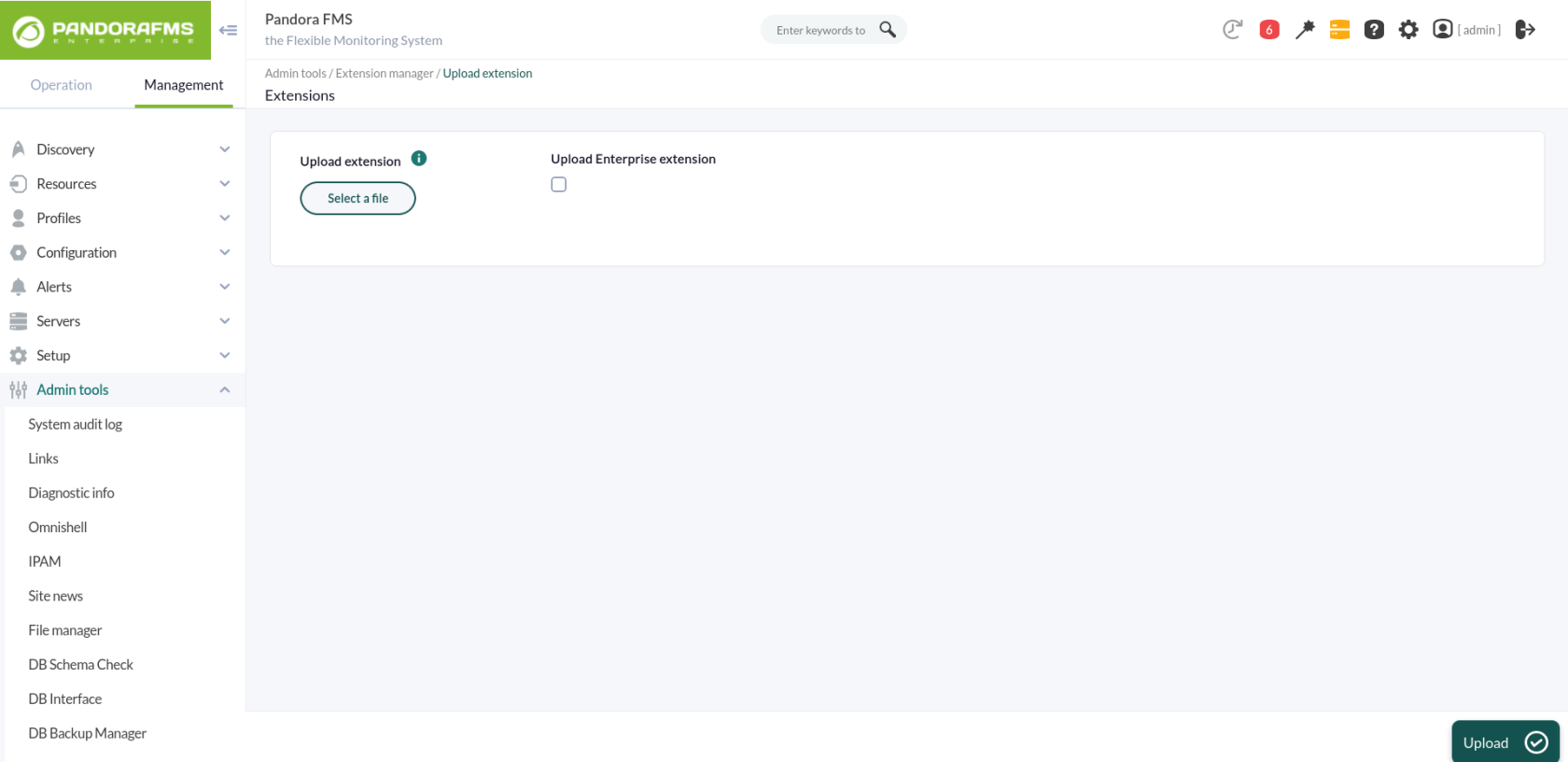
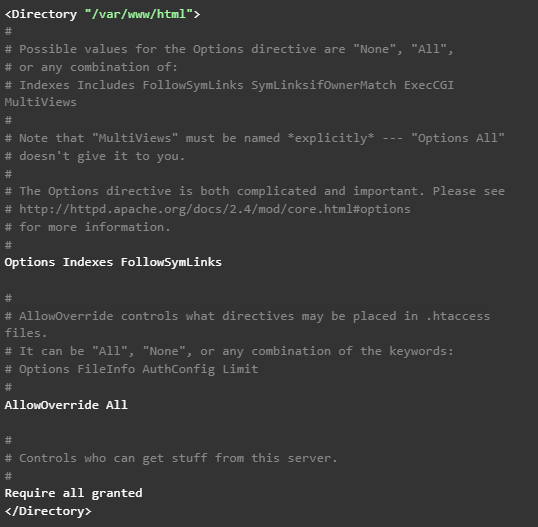
First of all, start in your Pandora FMS console the extension that will allow you to obtain the data to be represented in Grafana dashboards. To that end, just download the ZIP package that you may find in your library and upload it to Pandora FMS console from the menu: Admin tools > Extension manager > Extension uploader: It is important not to check the “Upload enterprise extension” option. In short, these steps basically locate the contents of the ZIP file in the extensions directory of Pandora FMS console, which will lead to the directory being created: /var/www/html/pandora_console/extensions/grafana If, as in this case, the installation is based on a Pandora FMS ISO, it will also be necessary to modify a configuration parameter of the Apache server. Just edit the file /etc/httpd/conf/httpd.conf, and set the parameter “AllowOverride none” as “AllowOverride All”, within the directives of the block ‘’ since that is where Pandora FMS console is located. Therefore, it should be this way: Also add a parameter in the PHP settings. Add the following line at the end of the file /etc/php.ini: serialize_precision = -1 And for these changes to go into effect, the Apache service must be restarted:
2. Loading Pandora FMS plugin for Grafana

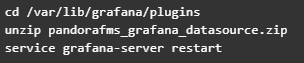
Upload the ZIP file to the Grafana server with all the plugin files and place it in the path “/var/lib/grafana/plugins”. Unzip the file on this path with the “unzip” command and restart the Grafana service to load it:
3. Configuring Pandora FMS as data source for Grafana dashboards

Add the following lines to the end of the Grafana configuration file (/etc/grafana/grafana.ini): After this change is applied, the Grafana service must be restarted using the following command: service grafana-server restart At this point, what you have to do is configure the plugin uploaded in Grafana so that it connects to the extension loaded in Pandora FMS and allows you to use its data in Grafana dashboards. Access the “Configuration > Datasources” menu in Grafana and click on the “Add datasource” button: You will see different plugins that you may configure, and at the bottom of the list, you will see the plugin that you just loaded for Pandora FMS. Click on it: This will take you to a form where you only need to fill out 3 fields for the connection with the Pandora FMS extension:


  • URL to the extension, which according to the suggestion we will see will be (by default) “http://x.x.x.x/pandora_console/extensions/grafana”, where “xxxx” is the IP address or DNS name to your Pandora FMS console.
  • Pandora FMS user, which will allow you to obtain data for Grafana dashboards. This user must have at least agent read permissions (AR) and can only obtain data from those agents on which it has permissions.
  • Pandora FMS user password.
With these fields completed, you may click on “Save & Test ” to verify the operation of your new data source:

What happens if it does not work properly?

In configuration you might see different errors, such as:
  • HTTP Error Bad Gateway → If Grafana could not connect to Pandora FMS or if the indicated IP address was incorrect.
  • HTTP Error Not Found → If the indicated URL was not correct, for example because Pandora FMS extension was not correctly loaded or just because of an error when typing in the URL in the form.
  • Datasource connection error: Unauthorized → If the user and/or password indicated were not correct or if the user did not have the minimum agent read permissions (AR).

Create your first Dashboard in Grafana

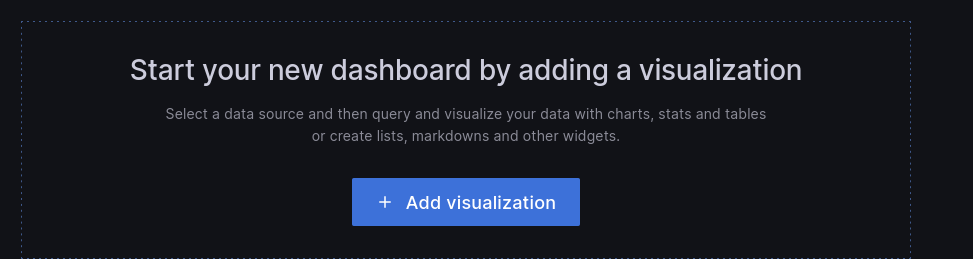
First, go to the “Create > Dashboard” menu, and in the board that will appear, click “Add query”: This will take you to a form where to choose your “Pandora FMS” data source in the “Query” drop-down. This will make the bottom of the form change and you will see a query to choose a module from which to display the data on the board:
  • Label: It will allow you to specify the tag that you wish for the data represented for this query to have.
  • Group: It is used to filter the agent about which to represent data. A group must be chosen.
  • Agent: It is used to filter the module about which to represent data. Some agent must be indicated.
  • Module: It is used to specify exactly the module about which to represent data.
  • TIP: It is a field that will allow to indicate whether the data to be represented will be compacted or not. If unchecked, the data will be compacted, which will result in easier-to-interpret and faster-loading graphs, although the data sample will not be the actual one but rather an average.
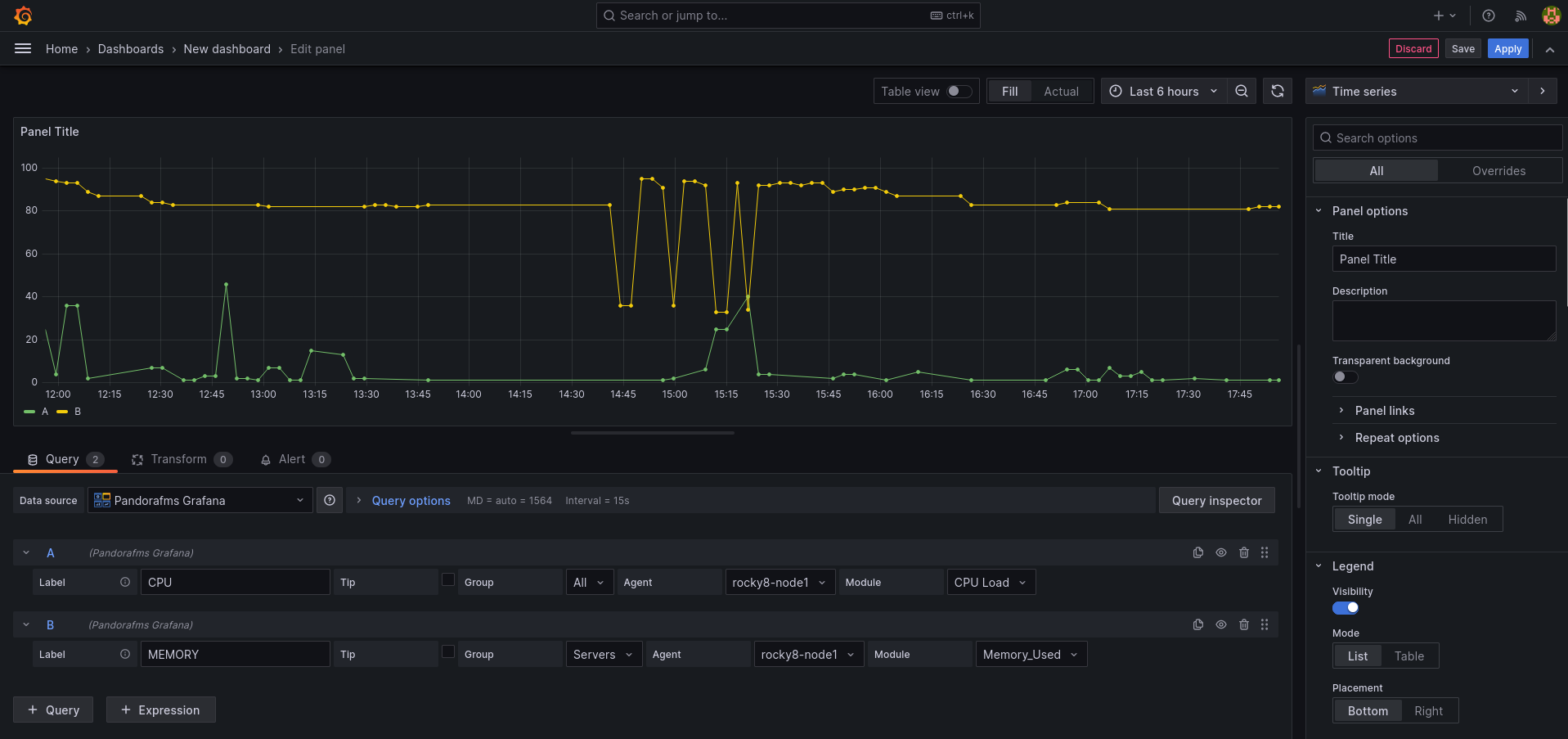
And once done, there you have your Pandora FMS data in Grafana. You may include more than one query in the same board, which allows you to compare data from different modules: And you may also add more boards within the same Grafana dashboard, so that you have all the necessary information on the same screen.

Create your first alarm in Grafana

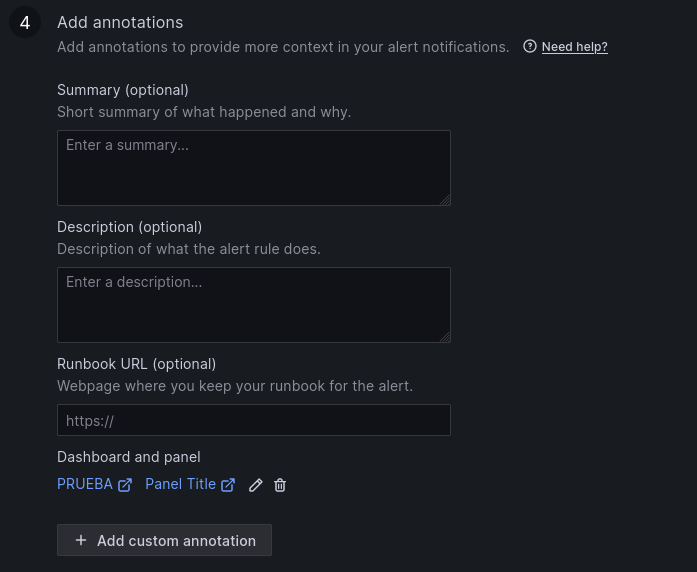
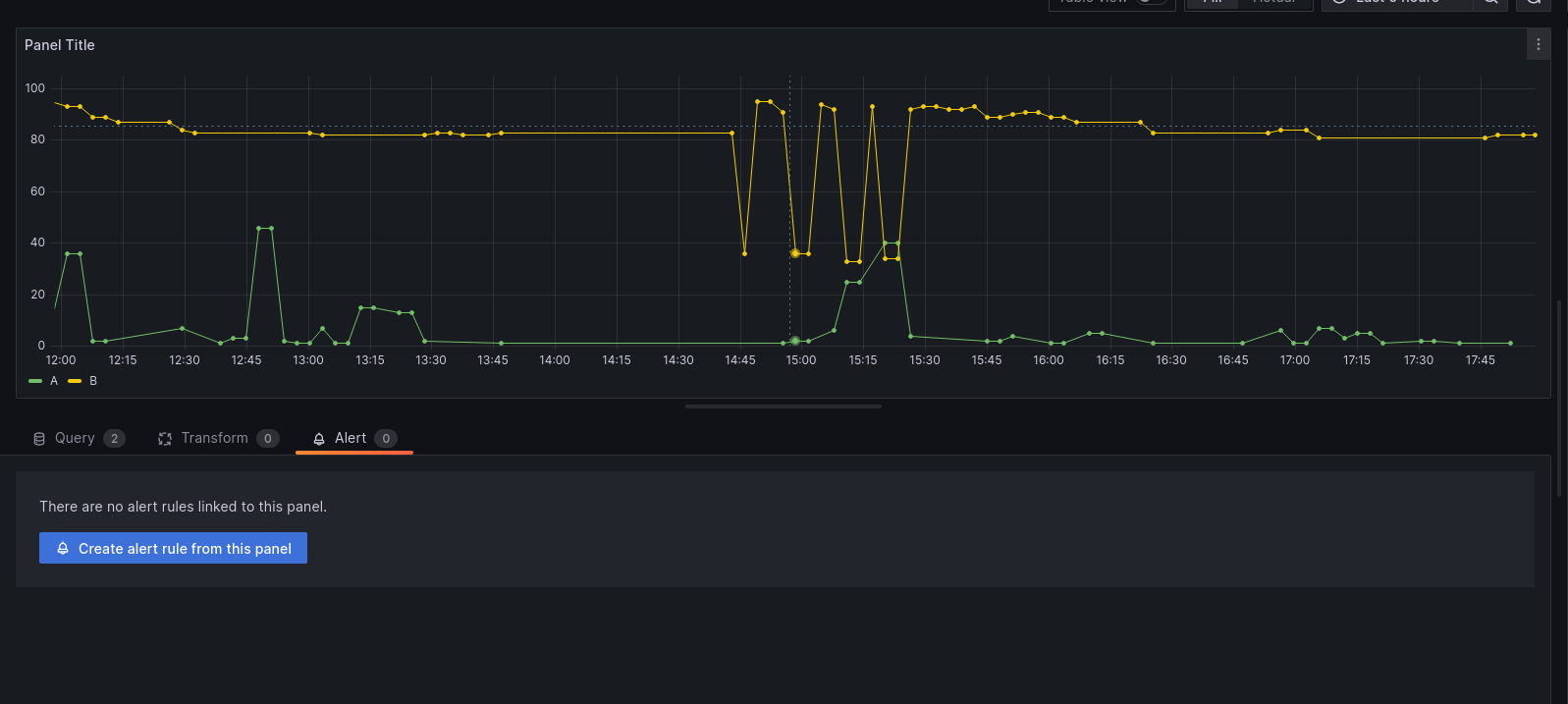
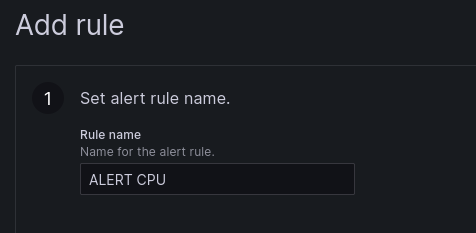
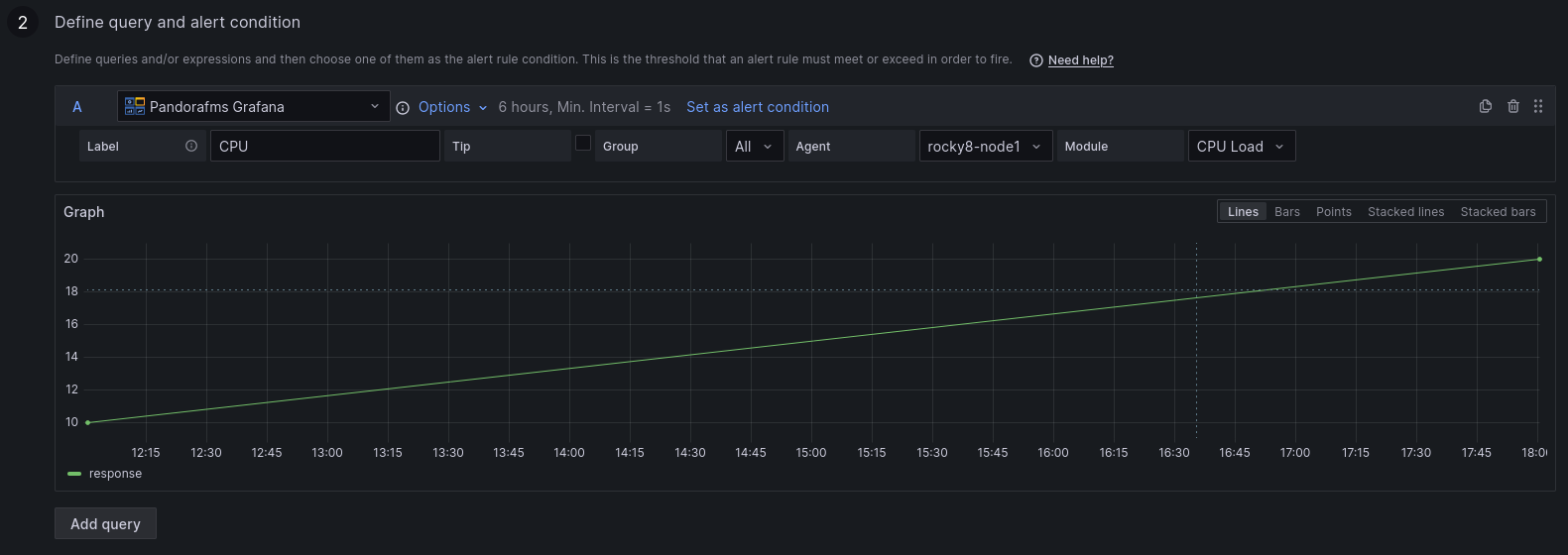
You may create an alert from the “Alert” menu, in the dashboard display (once the Dashboard is saved). In this menu, adjust a few rules to configure your alert: 1 . Set the name of the alert rule. 2. Define the query and the alert condition. 3. Establish alert evaluation behavior. 4. Add notes. 5. Set up notifications. Once the alert is configured and saved, you may see it in the dashboard:


About Version 2 Digital

Version 2 Digital is one of the most dynamic IT companies in Asia. The company distributes a wide range of IT products across various areas including cyber security, cloud, data protection, end points, infrastructures, system monitoring, storage, networking, business productivity and communication products.

Through an extensive network of channels, point of sales, resellers, and partnership companies, Version 2 offers quality products and services which are highly acclaimed in the market. Its customers cover a wide spectrum which include Global 1000 enterprises, regional listed companies, different vertical industries, public utilities, Government, a vast number of successful SMEs, and consumers in various Asian cities.

About PandoraFMS
Pandora FMS is a flexible monitoring system, capable of monitoring devices, infrastructures, applications, services and business processes.
Of course, one of the things that Pandora FMS can control is the hard disks of your computers.

CORE relies on a Dedicated IP for secure work with finance and enterprise clients

Summary: For 5 years, CORE has relied on NordLayer’s Business VPN and Fixed IP to support their cybersecurity strategy, ensuring compliance with banks and other regulated industries.

Results at a glance

CORE, a UK-based digital agency, works on branding, web design, digital marketing, and paid advertising. They handle everything from strategy to development as well as hosting and ongoing digital marketing services. We spoke with Ceri Richmond, CORE’s founder and managing director, about how NordLayer helps them stay secure and compliant.

Profile of CORE

The challenge

CORE works with banks, legal firms, and other regulated clients, as well as a rich-mix of clients from other sectors. They are Cyber Essentials Plus and ISO 27001 certified, which require strict security measures.

Banks, in particular, must comply with Financial Conduct Authority (FCA) rules and European regulations. As well as at least annual audits with the various certification bodies CORE uses Financial Supplier Qualification System (FSQS) and Risk Ledger to show they meet these standards, and they undergo annual audits to stay certified.

Before hybrid work, CORE relied on its office’s fixed IP for secure connections to clients and servers and for file transfers. Moving to a hybrid model meant they needed a Business VPN and a Server with a dedicated IP to meet their own and their clients compliance requirements.

After comparing options, they chose NordLayer because of its transparent European ownership and trusted reputation.

“Some VPN providers have unclear ownership. We wanted a reliable company we could trust.”

Step 1. Simple setup with SSO

CORE needed a VPN that was quick and easy to implement.

They use Google accounts, so new hires log in with their Google ID, which integrates directly with NordLayer. This reduces the need for extra credentials. Two-factor authentication and other measures are enabled through Google for added security.

Setting up a new user is straightforward:

  • Install NordLayer
  • Assign the user
  • Connect

Step 2. Virtual fixed IP

CORE uses NordLayer to recreate their office’s fixed IP in the cloud. This allows remote workers to securely access systems, replacing the old office-based model. This setup is crucial for hybrid work.

NordLayer Virtual Private Gateway

Step 3: Fixed IP for client data transfers

Many of CORE’s clients require access to shared resources restricted to specific IPs.

With NordLayer’s Server with a dedicated IP, CORE ensures secure, reliable connections that meet their own and their client’s firewall requirements. This is critical when working with sensitive data, especially in the financial sector.

NordLayer Server with a dedicated IP

Step 4: Dashboards for better control

CORE uses NordLayer’s Dashboards to monitor connections and confirm that only authorized users access their systems. This helps them stay compliant with their ISO 27001 ISMS (Information Security Management System) and maintain strong security practices.

“NordLayer doesn’t make certification automatic, but it’s an important part of our ISMS.”

NordLayer Dashboards

Step 5: Future plans for network segmentation

CORE plans to introduce network segmentation to assign different access levels for teams, such as developers and designers. This will give them more control over who can access specific resources while keeping the VPN in use across the company.

NordLayer Cloud Firewall

Why NordLayer works for CORE

CORE has trusted NordLayer for five years. They test other options every two years but renewed their contract in 2024 after finding NordLayer still the best choice for their needs and against the other main competitors in the VPN space.

  1. Ease of use
    Setting up the VPN is quick, and employees rarely face issues
  2. Fixed IP control
    Clients need IPs in specific locations, and NordLayer delivers
  3. Mac compatibility
    As a Mac-based company, CORE finds NordLayer’s app more user-friendly than others

“Other VPN apps feel outdated. NordLayer works smoothly without causing support headaches.”

Adding a new employee takes just 10 minutes:

“It’s simple. Part of onboarding is setting up NordLayer, and it’s done quickly.”

Pro cybersecurity tips from CORE

CORE combines an ISO 27001 training program with a strong focus on continued learning and awareness. Ceri emphasises that staying informed is essential, especially as cyber threats are constantly evolving.

Quote by Ceri Richmond

Regular training ensures everyone, regardless of experience, stays sharp and prepared for evolving threats.

Conclusion

CORE protects sensitive client data with NordLayer’s Server with a dedicated IP. This solution supports their hybrid work model and helps them meet compliance requirements for industries like banking and finance. With NordLayer, they ensure secure connections for their team and clients.


About NordLayer
NordLayer is an adaptive network access security solution for modern businesses – from the world’s most trusted cybersecurity brand, Nord Security.

The web has become a chaotic space where safety and trust have been compromised by cybercrime and data protection issues. Therefore, our team has a global mission to shape a more trusted and peaceful online future for people everywhere.

About Version 2 Digital

Version 2 Digital is one of the most dynamic IT companies in Asia. The company distributes a wide range of IT products across various areas including cyber security, cloud, data protection, end points, infrastructures, system monitoring, storage, networking, business productivity and communication products.

Through an extensive network of channels, point of sales, resellers, and partnership companies, Version 2 offers quality products and services which are highly acclaimed in the market. Its customers cover a wide spectrum which include Global 1000 enterprises, regional listed companies, different vertical industries, public utilities, Government, a vast number of successful SMEs, and consumers in various Asian cities.

How to wipe a Windows device remotely using Scalefusion?

A device getting stolen or lost can lead to devastating consequences for businesses, whether they operate on-premises, remotely, or in a hybrid model. In fact, studies show that 41% of all data breaches are the result of lost or stolen devices, highlighting the urgent need for robust security measures.[1]

Remote wiping of Windows devices is an effective solution to mitigate this risk. By remotely erasing all data on a device, organizations can prevent unauthorized access to sensitive information, ensuring that even if a device is lost or stolen, the data remains secure.

Windows remote wipe

Let’s explore how to remotely wipe data if your Windows laptop or desktop is lost or stolen, and discover the added benefits of using a UEM solution for this task. You’ll also learn how to remotely wipe a Windows device using Scalefusion UEM.

How to remote wipe a Windows computer?

1. By Enabling ‘Find My Device’ in Microsoft 

Microsoft has its built-in ‘Find My Device’ feature that can help small businesses and individuals to remotely wipe Windows-based laptops and PCs. 

Step 1. Enable Find My Device via Settings > Update & Security > Find My Device.

Step 2: Sign in to Your Microsoft Account. 

Step 3: Select the lost or compromised device and choose the ‘Erase’ option.

2. Using Command Line Scripts

For IT professionals and advanced users, leveraging command-line scripting is a direct way to remotely wipe Windows devices. This method requires prior configuration of remote desktop access and appropriate administrative privileges on the target device.

For example, you can use PowerShell to execute a disk-wiping script. Here’s a sample command:

powershell
CopyEdit
Clear-Disk -Number 1 -RemoveData -Confirm:$false

This command clears the specified disk, removing all data without requiring user confirmation. Ensure you double-check the disk number to avoid accidental data loss on unintended drives.

3. Using  third-party UEM/MDM software

Unlike the initial two methods, remote wiping your Windows-based laptop using a Unified Endpoint Management solution has additional benefits. While former methods are suitable for personal Windows computers and laptops and small deployments, managing a large and distributed fleet of Windows devices is much more difficult. UEM solutions have become indispensable for streamlining device management, including secure remote wiping.

Why choose a UEM for Remote Wiping?

  • Centralized management: UEM platforms provide a single console to manage all enrolled devices, making it easier to initiate remote actions like wiping, even for large-scale deployments.
  • Real-time control: With a UEM in place, IT admins can monitor device activity in real-time and instantly execute a remote wipe if a device is lost, stolen, or compromised. This minimizes the window of vulnerability.
  • Compliance assurance: Many industries have stringent data protection regulations. UEM solutions help organizations stay compliant by ensuring sensitive data is erased securely and effectively.
  • Automation capabilities: Advanced endpoint management tools allow for automated workflows, such as triggering a remote wipe when a device is reported lost or after multiple failed login attempts.
  • Cross-platform support: Most UEM solutions support not only Windows but also other operating systems such as iOS, macOS, Android, Linux, and ChromeOS, enabling consistent security practices across diverse device inventories.

Remote wiping Windows devices with Scalefusion UEM

Scalefusion UEM offers an organized and easy-to-navigate dashboard, allowing IT admins to monitor devices, enforce security policies, and execute remote commands like wiping or factory resetting devices from a single console. By leveraging Scalefusion, organizations enhance their ability to safeguard devices and data, making remote wiping a proactive component of their overall security strategy.

How to wipe Windows devices using Scalefusion UEM? 

Follow the step below to wipe data on Windows laptops and desktops with Scalefusion UEM

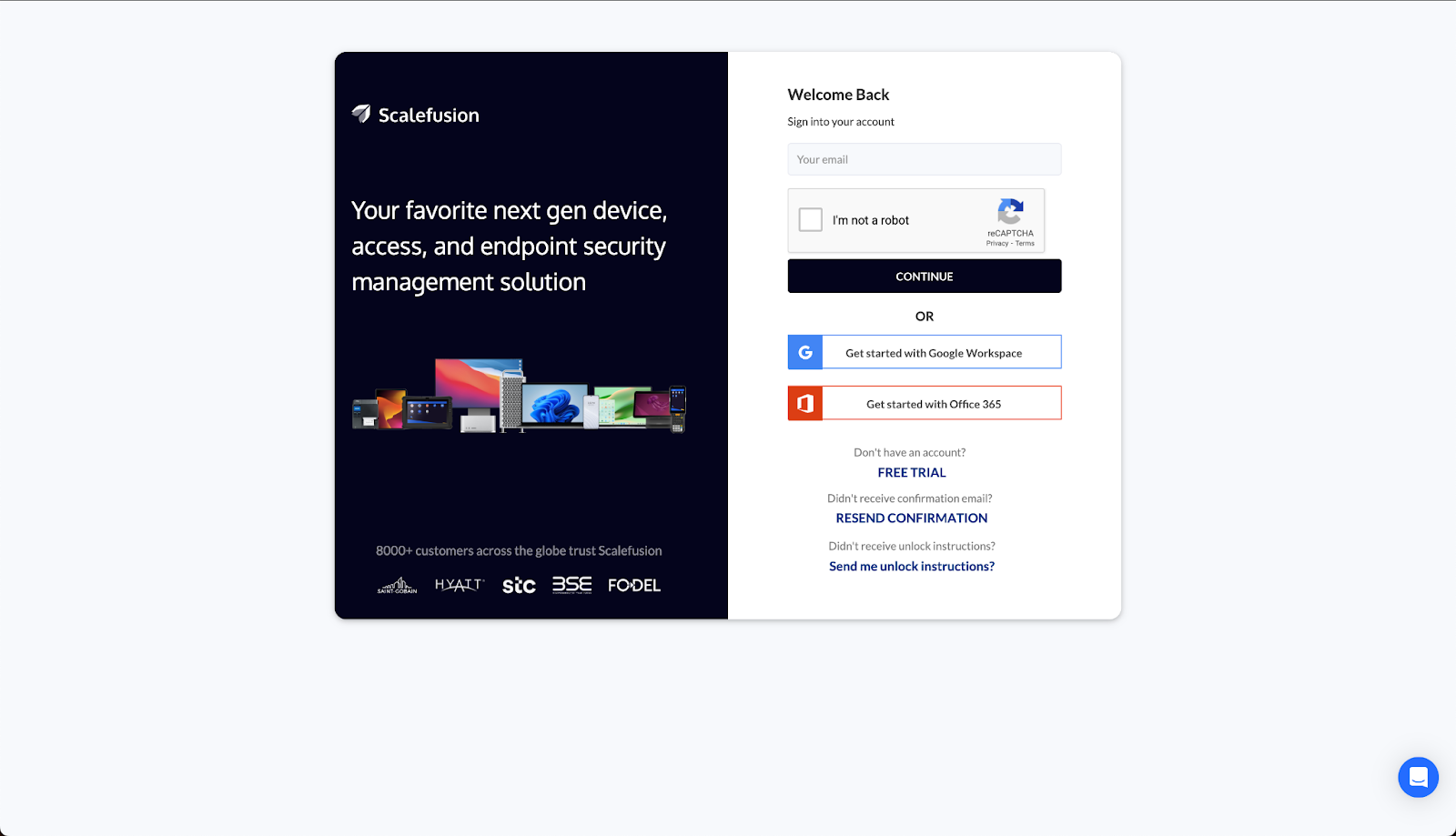
Step 1. Sign in to Scalefusion UEM dashboard.

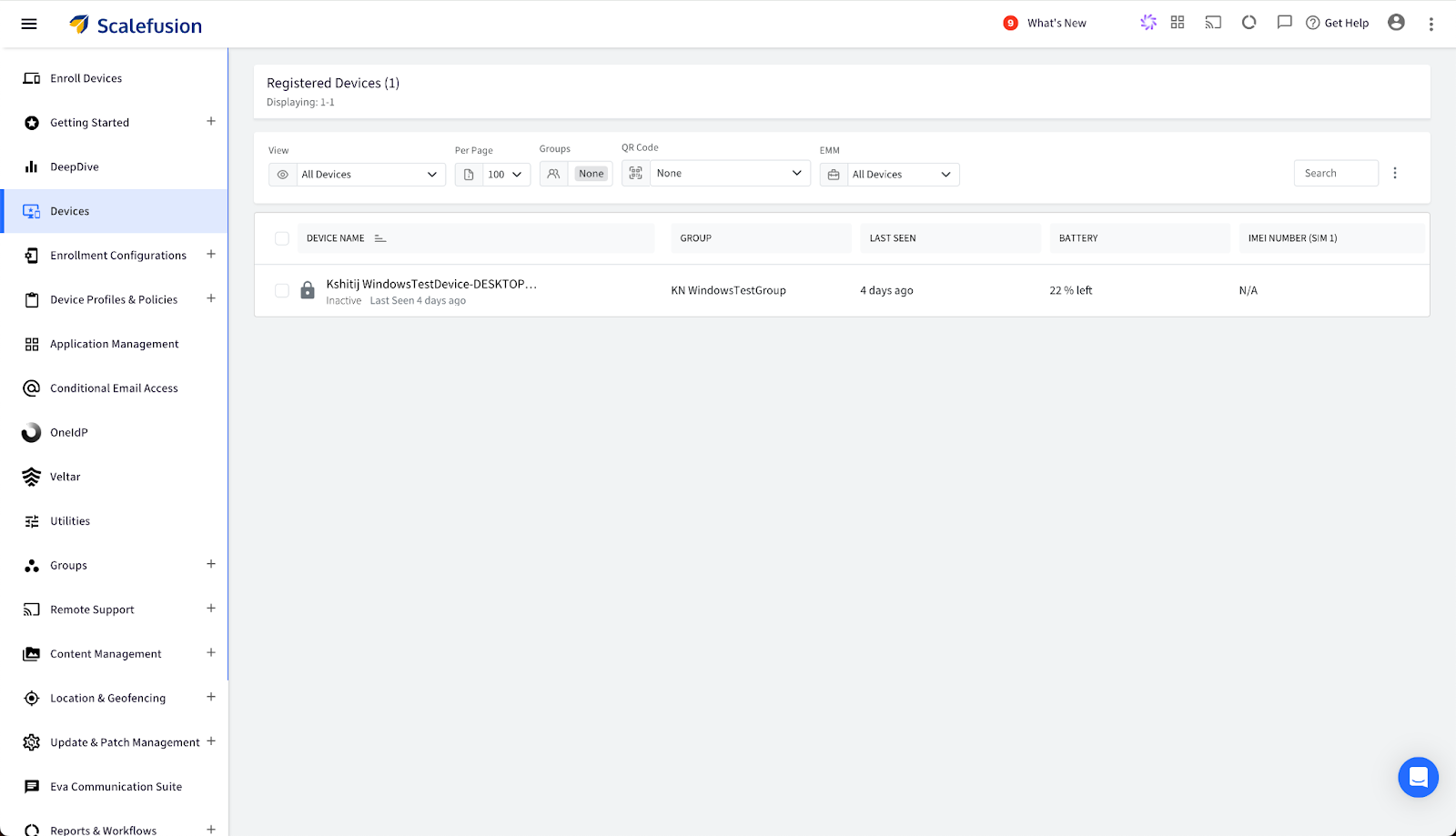
Step 2. Navigate to the ‘Devices’ tab in the panel on the right. This displays the entire list of managed devices. Now, click on the name of the Windows device you want to wipe and lock. 

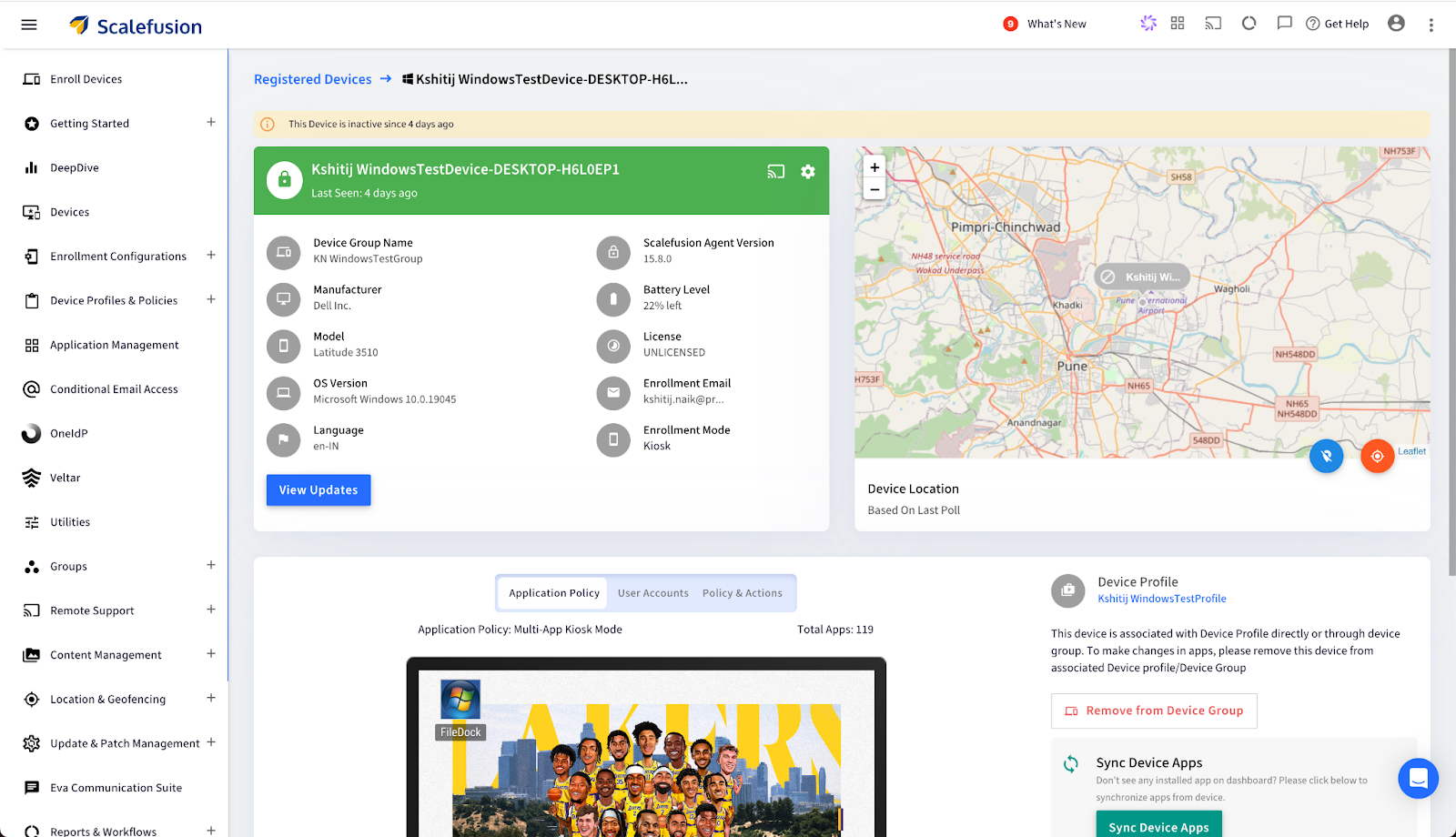
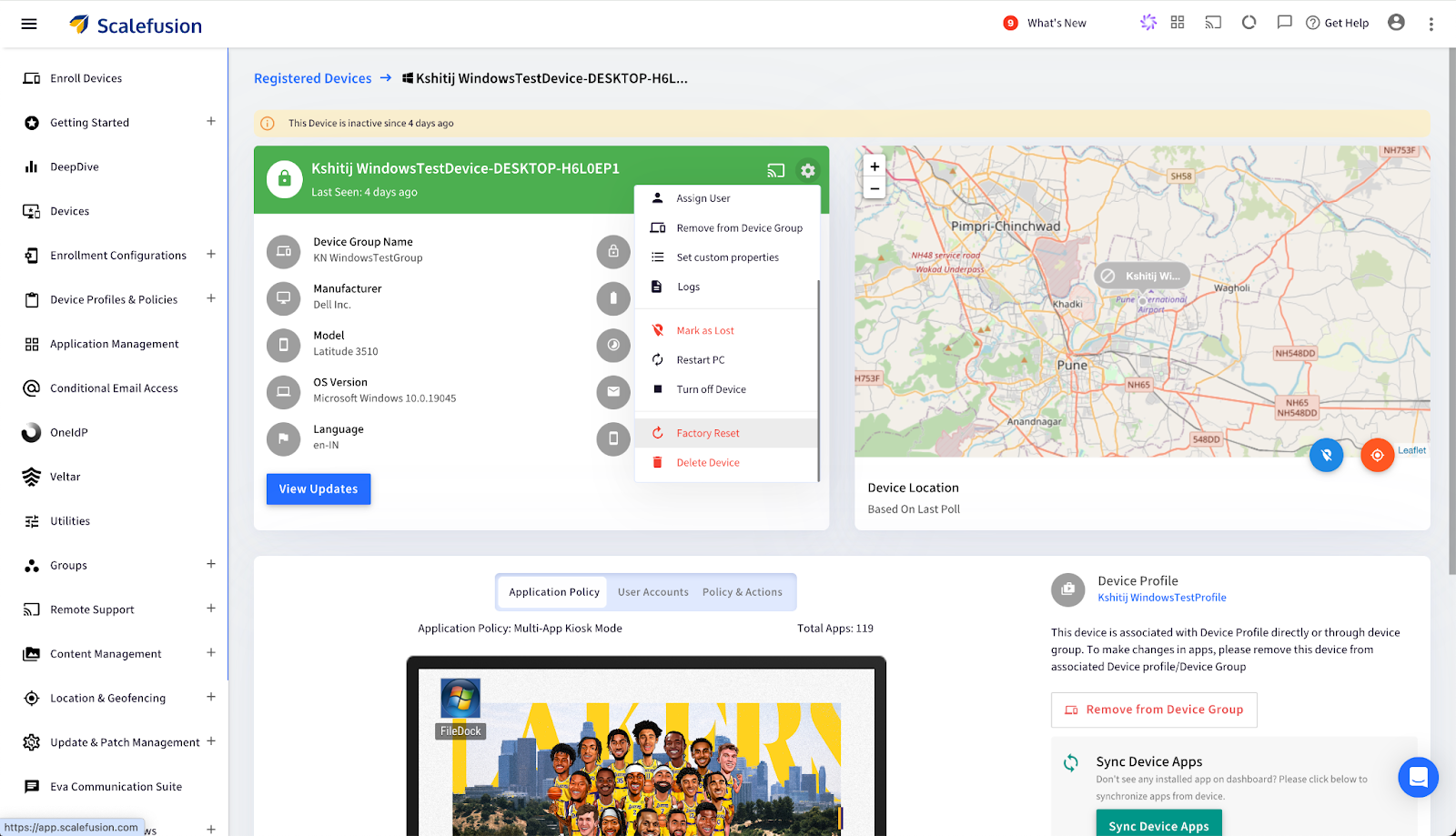
Step 3. A ‘Registered Devices’ screen will appear with all the necessary device details and device location. Click on the  ‘Settings’ icon on the top right of the device details section. 

Step 4. A drop-down menu will appear. Scroll to the bottom of the menu and click the ‘Factory Reset’ option. 

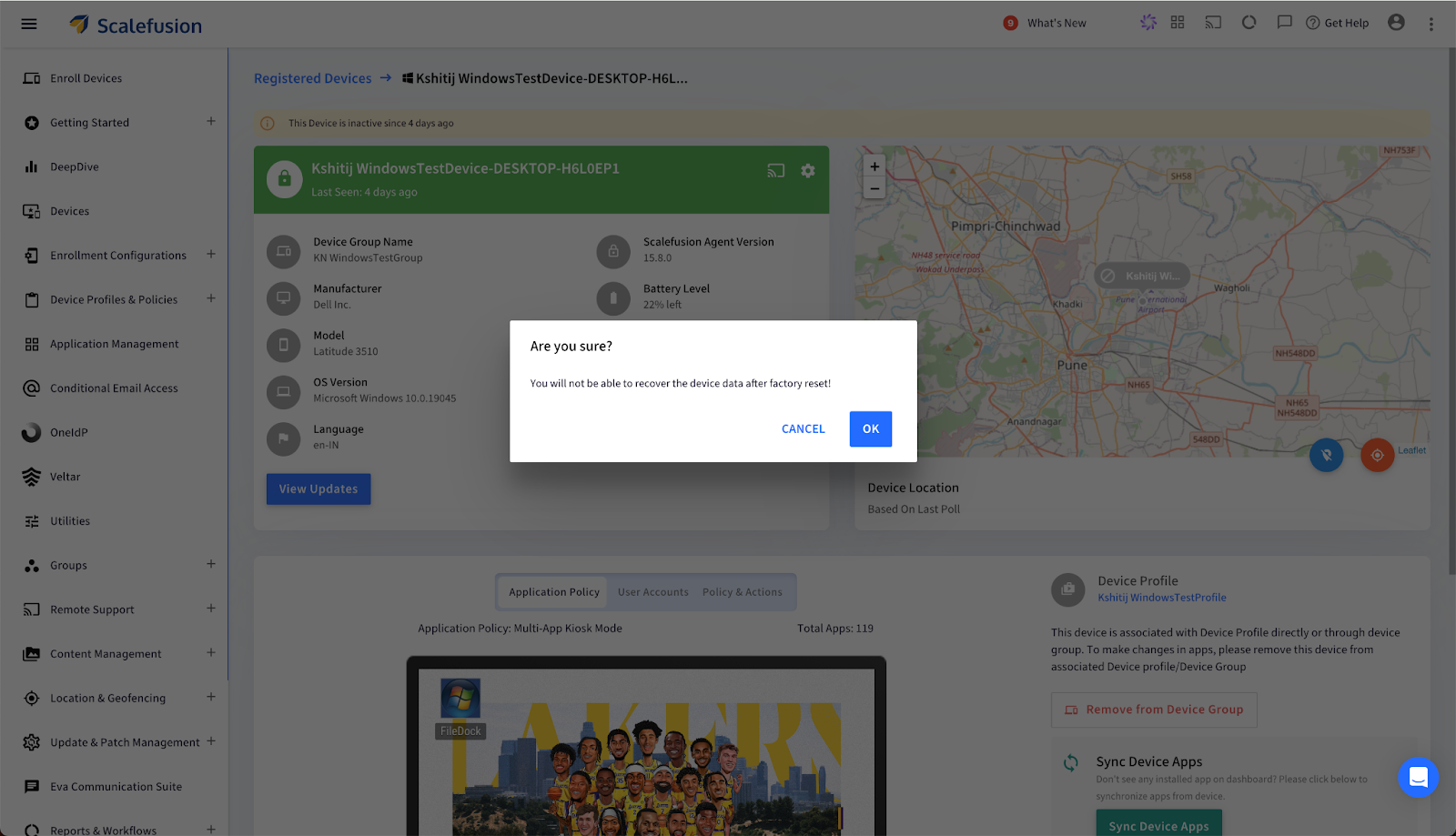
Step 5. Click on ‘Ok’ on the ‘Are you sure’ dialog box that pops up.

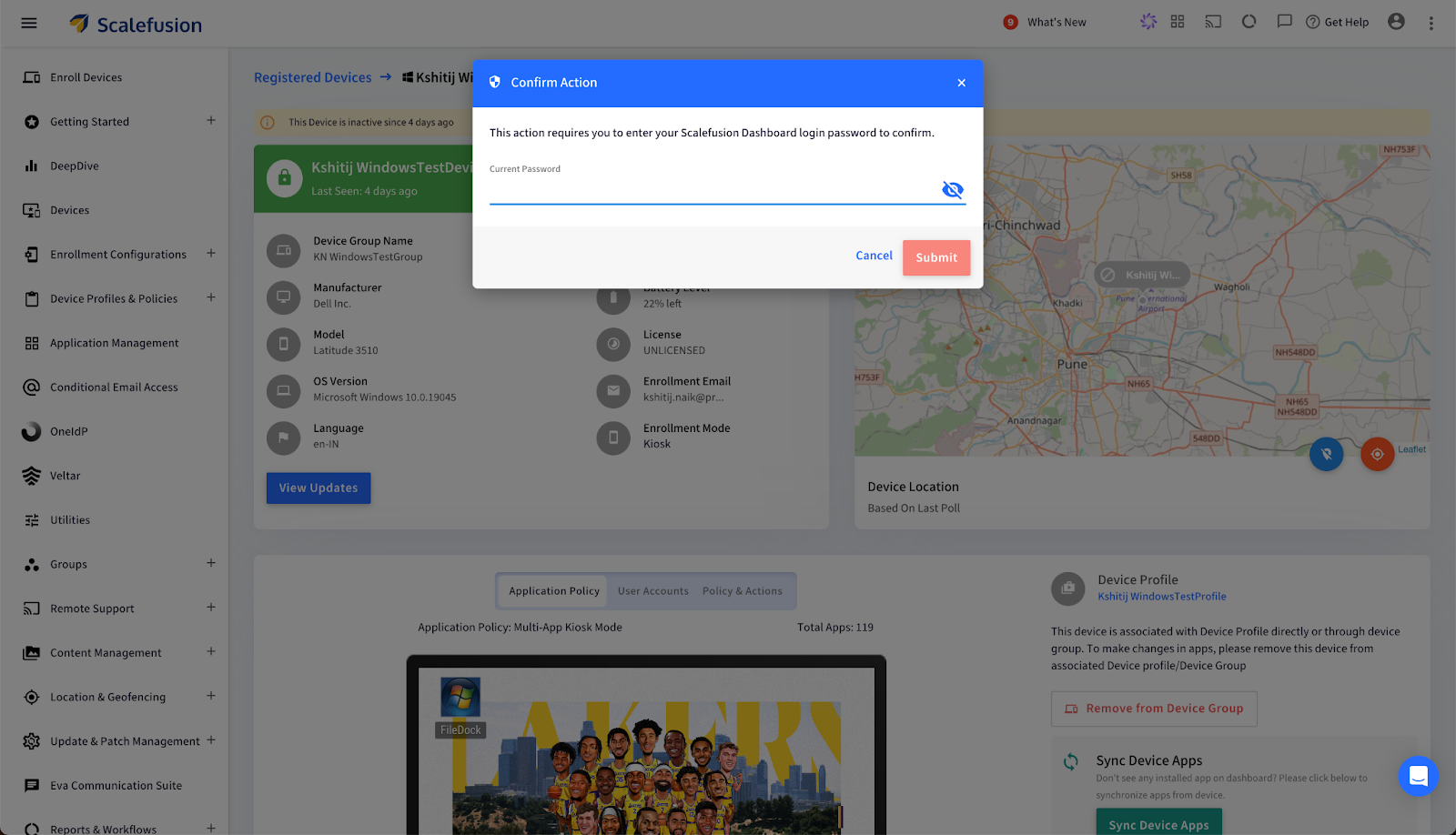
Step 6. Now, enter your Scalefusion dashboard login password in the  ‘Confirm Action’ dialog box. Click on confirm to execute. 

This wipes off the complete data of the selected device, keeping it secured and protected. 

Gain complete security of Windows devices with Scalefusion UEM

Whether you’re safeguarding devices for a small business or a large enterprise, experience top-notch Windows Endpoint Management with Scalefusion UEM. Take proactive steps to maintain data security, compliance, and peace of mind. With Scalefusion get a centralized dashboard, real-time device monitoring, and automated workflows make it an ideal choice for organizations managing diverse and distributed device fleets.


About Scalefusion
Scalefusion’s company DNA is built on the foundation of providing world-class customer service and making endpoint management simple and effortless for businesses globally. We prioritize the needs and feedback of our customers, making sure that they are at the forefront of all decision-making processes. We are dedicated to providing comprehensive customer support services, and place emphasis on customer-centric thinking throughout the organization.

About Version 2 Digital

Version 2 Digital is one of the most dynamic IT companies in Asia. The company distributes a wide range of IT products across various areas including cyber security, cloud, data protection, end points, infrastructures, system monitoring, storage, networking, business productivity and communication products.

Through an extensive network of channels, point of sales, resellers, and partnership companies, Version 2 offers quality products and services which are highly acclaimed in the market. Its customers cover a wide spectrum which include Global 1000 enterprises, regional listed companies, different vertical industries, public utilities, Government, a vast number of successful SMEs, and consumers in various Asian cities.

Proxmox Backup Server vs. Storware Backup and Recovery: A Comparative Analysis

Proxmox Backup Server and Storware Backup and Recovery are robust solutions for backing up Proxmox VE environments. However, they have distinct features, strengths, and target user bases.

Let’s delve into a comparison to help you make an informed decision:

Proxmox Backup Server

  • Open-Source and Partly Free: This is its primary advantage, making it a cost-effective choice for many. However, the free version is recommended only for testing and non-production use.
  • Simple and Intuitive: Offers a user-friendly web interface for easy management.
  • Limited Features: While it provides essential backup and restore functionalities, it may lack advanced features like automated DR testing and granular recovery options.
  • Community Support: Relies on a strong community for support and troubleshooting.

Storware Backup and Recovery

  • Free, Trial, or Commercial License: This requires a license but offers professional support and regular updates. The free license comes with community support.
  • Advanced Features: This product provides a comprehensive set of features, including automated DR testing, granular recovery, advanced backup policies, and robust security options against cyber threats. It’s also perfect for mixed virtual, cloud, and physical environments.
  • Scalability: Designed to scale with your infrastructure needs, supporting multi-node deployments and large-scale environments.
  • Enterprise-Grade Support: Offers professional support and maintenance services.
  • Backup Strategies for Proxmox VE ↗
  • YouTube ↗
  • More ↗
  • Solution PDF

Key Differences

FeatureProxmox Backup ServerStorware Backup and Recovery
LicensingOpen-source and free, paid subscriptionFree, Trial and Commercial (perpetual or subscription) license
User InterfaceSimple and intuitiveUser-friendly, but more feature-rich
FeaturesBasic backup and restoreAdvanced features, including DR testing, granular recovery, and more
SupportCommunity-based or paid support via Customer PortalCommunity-based or professional support for trial and commercial licenses
ScalabilityLimited scalabilityDesigned for large-scale environments


Here’s a detailed comparison between Proxmox Backup Server and Storware Backup and Recovery, focusing on key factors such as supported environments, backup functionality, scalability, security, and pricing considerations.

Supported Environments

  • Proxmox Backup Server: Primarily designed to work within the Proxmox ecosystem, it is optimized for Proxmox VE (Virtual Environment) but can handle backup tasks for virtual machines, containers, and physical servers through API integration. It’s popular among Proxmox users for seamless compatibility.
  • Storware Backup and Recovery: It’s a highly versatile solution that supports multiple environments, including virtual (e.g., VMware, Hyper-V, Nutanix AHV), physical, and containerized workloads. It also integrates with hybrid cloud platforms (AWS, Azure, GCP) and offers comprehensive data protection for endpoints, databases, and applications.

Backup Functionality and Features

  • Proxmox Backup Server: This server is known for efficient deduplication and compression to optimize storage. It provides full, incremental, and differential backup options for file- and VM-level backups. Proxmox emphasizes performance, leveraging open-source components for low-cost, high-speed backup.
  • Storware Backup and Recovery: This product offers a wide range of advanced backup features, such as data deduplication, compression, and application-consistent backups. Its incremental-forever backup approach minimizes storage usage and ensures faster recovery times. Additionally, Storware supports role-based access control (RBAC), storage snapshot integrations, and granular recovery options for databases and applications.

Scalability and Flexibility

  • Proxmox Backup Server: Designed to scale well within the Proxmox ecosystem, suitable for small to medium-sized environments or organizations heavily reliant on Proxmox VE. Its open-source nature provides flexibility but may require customizations or additional tools for large-scale or hybrid environments.
  • Storware Backup and Recovery: Built with scalability in mind, Storware can handle small and enterprise-level deployments across diverse infrastructures, including multi-cloud and hybrid setups. Its centralized management interface makes it ideal for large-scale operations with complex backup requirements across varied environments.

Security and Compliance

  • Proxmox Backup Server: This server includes data encryption (AES-256) for backups, both in transit and at rest. While it has essential security features, compliance with enterprise-level security or regulatory standards may require additional configurations or external tools.
  • Storware Backup and Recovery emphasizes enterprise-grade security with end-to-end encryption (complying with FIPS 140-2), air-gap backup, multi-factor authentication, RBAC, and advanced compliance reporting. Its robust security features align well with industry compliance standards, often essential for regulated sectors.

Integration and Compatibility

  • Proxmox Backup Server: Highly compatible with Proxmox products and offers some REST API integration for third-party tools. However, its ecosystem is primarily tailored for Proxmox VE and may need more compatibility with broader infrastructures.
  • Storware Backup and Recovery: Provides extensive integrations, supporting a range of hypervisors, storage solutions, and cloud providers. This makes it ideal for organizations using mixed environments and those looking to adopt a unified backup solution across platforms.

Pricing and Licensing

  • Proxmox Backup Server: It is open-source and offers optional subscription plans for enterprise support. This makes it highly cost-effective, especially for Proxmox environments, although support options are limited compared to commercial alternatives.
  • Storware Backup and Recovery: Licenses are priced based on storage or endpoint counts, offering flexibility for various business needs. Storware’s model includes support and feature upgrades, which can benefit businesses needing high-level support and regular updates.

Which One is Right for You?

  • Suppose you’re primarily using Proxmox VE and have limited backup needs. The Proxmox Backup Server may be a great fit due to its cost-effectiveness, seamless integration, and efficiency within the Proxmox ecosystem.
  • If you require a more robust, scalable, and versatile solution with extensive integration across multiple environments and need enterprise-grade security and compliance, Storware Backup and Recovery would likely be a better choice. It’s particularly suited for businesses operating in complex, multi-environment setups.

Each solution has its strengths, so the choice depends on the complexity of your infrastructure, regulatory requirements, and budget.

You can test Storware Backup and Recovery for free or book a one-on-one demo session with our engineer who will be happy to answer all your questions and concerns.

A data recovery plan (DRP) is a structured approach that describes how an organization will respond quickly to resume activities after a disaster that disrupts the usual flow of activities. A vital part of your DRP is recovering lost data.

Virtualization helps you protect your data online through virtual data recovery (VDR). VDR is the creation of a virtual copy of an organization’s data in a virtual environment to ensure a quick bounce back to normalcy following an IT disaster.

While having a virtual data recovery plan is good, you must also provide an off-site backup for a wholesome data recovery plan that can adequately prevent permanent data loss. An off-premises backup location provides an extra security layer in the event of data loss. Thus, you shouldn’t leave this out when planning your data recovery process.

Let’s try to look at this issue in a general way, knowing how diverse and capacious the issue of virtualization and disaster recovery is. Certainly, implementing a dedicated data protection solution will help streamline data protection and disaster recovery processes.

Benefits of Virtualization for Disaster Recovery

Virtualization plays a crucial role in disaster recovery. Its ability to create a digital version of your hardware offers a backup in the event of a disaster. Here are some benefits of virtualization for disaster recovery.

  • Recover Data From Any Hardware

If your hardware fails, you can recover data from it through virtualization. You can access your virtual desktop from any hardware, allowing you to recover your information quickly. Thus, you can save time and prevent data loss during disasters.

  • Backup and Restore Full Images

With virtualization, your server’s files will be stored in a single image file. Restoring the image file during data recovery requires you to duplicate and restore it. Thus, you can effectively store your files and recover them when needed.

  • Copy Data to a Backup Site

Your organization’s backups must have at least one extra copy stored off-site. This off-premise backup protects your data against loss during natural disasters, hardware failure, and power outages. Data recovery will help automatically copy and transfer files virtually to the off-site storage occasions.

  • Reduce Downtime

There’s little to no downtime when a disaster event occurs. You can quickly restore the data from the virtual machines. So recovery can happen within seconds to minutes instead of an hour, saving vital time for your organization.

  • Test Disaster Recovery Plans

Virtualization can help you test your disaster recovery plans to see if they are fail-proof. Hence, you can test and analyze what format works for your business, ensuring you can predict a disaster’s aftermath.

  • Reduce Hardware Needs

Since virtualization works online, it reduces the hardware resources you need to upscale. With only a few hardware, you can access multiple virtual machines simultaneously. This leads to a smaller workload and lower operation costs.

  • Cost Effective

Generally, virtualization helps to reduce the cost of funding virtual disaster recovery time. With reduced use of hardware and quicker recovery time, the data recovery cost is reduced, decreasing the potential loss caused by disasters.

Data Recovery Strategies for Virtualization

Below are some practical strategies to help build a robust data recovery plan for your organization’s virtual environment:

  • Backup and Replication

Create regular backups of your virtual machines that will be stored in a different location—for instance, an external drive or a cloud service. You can also create replicas and copies of your virtual machines that are synchronized with the original. You can switch from the original to a replica in case of failure.

  • Snapshot and Restore

Snapshots capture your data at specific preset moments, creating memories of them. Restore points also capture data but include all information changes after the last snapshot. You can use snapshot and restore to recover the previous state of your data before the data loss or corruption.

  • Encryption and Authentication

Encryption and authentication are essential security measures that work in tandem to safeguard data from unauthorized access. By employing both methods, you establish robust layers of defense. This, thereby, fortifies your data against potential cyber threats, ultimately mitigating the risks associated with corruption and theft.

Conclusion

Creating a disaster recovery plan is crucial for every organization as it helps prevent permanent data loss in the event of a disaster, leading to data loss or corruption. Virtualization helps in data recovery by creating a virtual copy of your hardware that can be accessed after a disaster.

Virtualization reduces downtime, helps to recover data from the hardware, reduces hardware needs, and facilitates testing your data recovery plans. However, you must note that virtual data recovery is only a part of a failproof disaster recovery plan. You must make provisions for an off-premises backup site for more robust protection.


About Version 2 Digital

Version 2 Digital is one of the most dynamic IT companies in Asia. The company distributes a wide range of IT products across various areas including cyber security, cloud, data protection, end points, infrastructures, system monitoring, storage, networking, business productivity and communication products.

Through an extensive network of channels, point of sales, resellers, and partnership companies, Version 2 offers quality products and services which are highly acclaimed in the market. Its customers cover a wide spectrum which include Global 1000 enterprises, regional listed companies, different vertical industries, public utilities, Government, a vast number of successful SMEs, and consumers in various Asian cities.

About Storware
Storware is a backup software producer with over 10 years of experience in the backup world. Storware Backup and Recovery is an enterprise-grade, agent-less solution that caters to various data environments. It supports virtual machines, containers, storage providers, Microsoft 365, and applications running on-premises or in the cloud. Thanks to its small footprint, seamless integration into your existing IT infrastructure, storage, or enterprise backup providers is effortless.

Mandatory MFA is Not Enough

Driven by regulatory mandates, insurance requirements, and the relentless rise in cyberattacks, the adoption of multi-factor authentication (MFA) has surged in recent years. While it’s undeniably more secure than relying on passwords alone, MFA isn’t without its limitations and risks. As companies strive to balance security and user experience, many are beginning to explore passwordless authentication—specifically via certificates—as a more effective, secure, and user-friendly alternative.

The Rise of Mandatory MFA

Organizations worldwide have embraced MFA as a necessary step to secure sensitive data and systems. It’s easy to see why. By requiring users to verify their identity using two or more factors—something they know (a password), something they have (a mobile device or hardware token), or something they are (biometric data)—MFA adds an additional layer of security that makes it exponentially harder for attackers to gain unauthorized access.

This rise has been fueled by several factors:

  • Regulatory Requirements: Many industries, from finance to healthcare, now require MFA as part of compliance with frameworks like GDPR, HIPAA, and CCPA.
  • Cyber Insurance: Insurers increasingly demand MFA as a baseline requirement for coverage, especially as ransomware attacks surge.
  • Remote Work: The shift to remote and hybrid work models has expanded the attack surface, making stronger access controls essential.

Despite its benefits, MFA is not a silver bullet. Attackers continue to evolve, finding new ways to bypass MFA protections and exploit its weaknesses.

The Limits & Risks of Mandatory MFA

MFA, while a step up from password-only authentication, is far from foolproof. Here are some of its most notable shortcomings:

  1. Susceptibility to Social Engineering: Techniques like phishing and smishing (SMS phishing) can trick users into sharing MFA credentials or approving fraudulent login attempts.
  2. Man-in-the-Middle Attacks: Attackers can intercept authentication codes or session tokens during transmission, effectively bypassing MFA.
  3. Push Fatigue: Many MFA implementations rely on push notifications for approval. Over time, users may inadvertently approve malicious requests out of habit or frustration, a phenomenon known as “push fatigue.”
  4. User Friction: While MFA improves security, it often comes at the expense of user experience. Constant prompts for codes or device approvals can frustrate employees and reduce productivity.
  5. Device Dependency: Many MFA methods rely on users having access to a registered device, which can create challenges in cases of lost, stolen, or damaged devices.

As these risks and limitations become more apparent, businesses are starting to look beyond MFA to more advanced authentication methods.

Going Passwordless with Certificates

Passwordless authentication represents a paradigm shift in securing access to enterprise systems. By eliminating passwords altogether, this approach addresses many of the inherent vulnerabilities of traditional authentication methods. Among the various passwordless technologies, certificate-based authentication stands out for its robust security and user-centric design.

How Certificate-Based Authentication Works

Certificate-based authentication uses digital certificates to verify a user’s identity. These certificates are issued to devices and securely stored, enabling seamless and secure access without the need for passwords or MFA codes. Here’s why this approach is gaining traction:

  1. Stronger Security:
    • Elimination of Passwords: No passwords mean no credential-based attacks, such as phishing, credential stuffing, or brute force attacks.
    • Tamper-Proof Certificates: Digital certificates are cryptographically secured, making them nearly impossible to forge.
    • Resistance to Social Engineering: Without the need for user input, there’s little opportunity for attackers to exploit human vulnerabilities.
  2. Enhanced User Experience:
    • Seamless Authentication: Once a device is issued a certificate, authentication happens automatically in the background, without user intervention.
    • Reduced Friction: Employees no longer need to juggle passwords, codes, or devices, leading to improved productivity and satisfaction.
  3. Device-Centric Security:
    • Endpoint Trust: Certificates can be tied to specific, managed devices, ensuring that only secure, compliant devices can access enterprise resources.
    • Revocation: If a device is lost or compromised, its certificate can be quickly revoked to prevent unauthorized access.
  4. Regulatory Alignment: Certificate-based authentication aligns with Zero Trust principles and modern security frameworks, helping organizations meet compliance requirements while reducing reliance on legacy methods.

Overcoming the Challenges of Certificate Deployment

Critics of certificate-based authentication often cite concerns about deployment complexity. However, advancements in cloud-native network access control (NAC) solutions are addressing these challenges. Modern platforms simplify certificate issuance, renewal, and revocation through automated workflows, making it easier than ever for enterprises to implement certificate-based authentication at scale.

The Business Case for Passwordless

While security is the primary driver, the benefits of certificate-based authentication extend beyond protection against cyber threats. Businesses can realize significant operational and financial advantages:

  • Cost Savings: Reducing password-related helpdesk calls and minimizing downtime caused by MFA disruptions can result in substantial savings.
  • Streamlined Compliance: Certificate-based authentication simplifies adherence to regulatory requirements by embedding security into the authentication process.
  • Future-Proofing: As cyber threats evolve, adopting advanced authentication methods like certificates ensures that organizations remain ahead of attackers and industry standards.

Removing the Weakest Link

Mandatory MFA has been a critical milestone in the journey toward stronger enterprise security. However, its limitations underscore the need for a more secure and user-friendly solution. Passwordless authentication via certificates offers a compelling alternative that eliminates passwords, reduces user friction, and enhances overall security. By embracing this technology, organizations can not only protect their assets but also empower their workforce with a seamless and modern authentication experience.

The future of authentication isn’t just about adding more factors; it’s about removing the weakest link altogether. And in the battle against cyber threats, that might just make all the difference.

About Portnox
Portnox provides simple-to-deploy, operate and maintain network access control, security and visibility solutions. Portnox software can be deployed on-premises, as a cloud-delivered service, or in hybrid mode. It is agentless and vendor-agnostic, allowing organizations to maximize their existing network and cybersecurity investments. Hundreds of enterprises around the world rely on Portnox for network visibility, cybersecurity policy enforcement and regulatory compliance. The company has been recognized for its innovations by Info Security Products Guide, Cyber Security Excellence Awards, IoT Innovator Awards, Computing Security Awards, Best of Interop ITX and Cyber Defense Magazine. Portnox has offices in the U.S., Europe and Asia. For information visit http://www.portnox.com, and follow us on Twitter and LinkedIn.。

About Version 2 Digital

Version 2 Digital is one of the most dynamic IT companies in Asia. The company distributes a wide range of IT products across various areas including cyber security, cloud, data protection, end points, infrastructures, system monitoring, storage, networking, business productivity and communication products.

Through an extensive network of channels, point of sales, resellers, and partnership companies, Version 2 offers quality products and services which are highly acclaimed in the market. Its customers cover a wide spectrum which include Global 1000 enterprises, regional listed companies, different vertical industries, public utilities, Government, a vast number of successful SMEs, and consumers in various Asian cities.

×

Hello!

Click one of our contacts below to chat on WhatsApp

×