Skip to content

Apple UEM: Your solution for simplified device management

How many Apple devices are in your workplace, school, or home right now?

Do you rely on an iPhone to manage your day, or perhaps a MacBook for work?

Ever wonder how many other people in the world are doing the same?

With 2.2 billion active Apple devices globally, the answer is: a lot.[1] 

Apple UEM
Apple Endpoint Management

From students browsing away on iPads to businesses running on Macs, Apple’s devices have seamlessly infiltrated our daily lives, becoming indispensable tools for productivity, creativity, and communication. But here’s the catch—as Apple’s influence grows, so does the complexity of managing these devices.

So, who’s in charge of keeping all these devices secure? How do you ensure compliance, prevent data breaches, and keep devices running smoothly—without a team of IT experts working overtime?

The answer lies in Apple Unified Endpoint Management (UEM). It’s the solution that simplifies the complexity of managing Apple devices, ensuring they remain secure, updated, and aligned with organizational policies. Whether it’s a CEO’s iPhone or a classroom full of iPads or you need to manage 10 devices or 10,000, UEM offers the structure needed to oversee a growing ecosystem.

So, how UEM for Apple can transform your device management? Let’s find out.

What is UEM, and why does Apple need it?

Managing a bunch of Apple devices without the right tools is a tricky balancing act. Basic controls aren’t enough. Unified Endpoint Management helps by offering a centralized platform that brings order to the complexity of managing Apple devices (along with other OSs), empowering IT teams to configure, secure, and monitor them all with ease.

Apple mobile device management makes sure every iPhone, iPad, and MacBook operates in sync with organizational needs. From ensuring software is up to date, to secure data, to control what users can and can’t do on their devices, UEM does it all. The better you manage your devices, the smoother your operations will run.

Apple and UEM: A perfect match for every industry

What makes Apple such a great choice across all these industries, and how does UEM play a role in managing them effectively?

Healthcare: Protecting patient data

According to a 2024 KLAS report, 64% of healthcare organizations use Apple devices, making them the most used commercial devices in healthcare.[2]   Doctors and nurses rely on iPads and iPhones for accessing patient records, prescribing medications, and communicating within the hospital. UEM ensures that these devices remain HIPAA-compliant and secure, with features like device encryption and secure app management. UEM also allows healthcare organizations to monitor and restrict access to patient data, ensuring that only authorized personnel can view sensitive information.

Education: Managing classrooms of iPads

Schools and universities have embraced Apple devices for education, using iPads, Macs, and even Apple TVs to enhance learning. With Apple UEM, institutions can easily manage a large number of devices, controlling what apps and content are accessible to students. UEM allows schools to roll out software updates, enforce security policies, and ensure that devices are used for educational purposes —preventing distractions like unauthorized browsing or gaming during class.

BFSI: Securing sensitive data

Financial institutions need to ensure that their Apple devices are secure and compliant with industry standards. UEM allows financial firms to manage apps, control data access, and track devices, all while ensuring that they meet compliance requirements like GDPR. By controlling the entire Apple ecosystem, UEM protects sensitive financial data and reduces the risk of costly breaches. Leveraging Apple for BFSI, UEM ensures a secure and compliant environment tailored for the financial sector.

Retail: Seamless operations

In retail, Apple devices are used for everything from managing inventory to running point-of-sale (POS) systems. UEM simplifies the management of these devices, enabling retail businesses to deploy, update, and secure their devices without disrupting operations. With UEM, retailers can ensure that all devices are always up to date with the latest software, providing a seamless experience for both employees and customers.

Key concepts in Apple device management

Before we explore the specific benefits of UEM for Apple devices, it’s important to understand some of the foundational concepts that drive effective device management. These concepts set the stage for why UEM is essential for organizations looking to manage and secure Apple devices at scale.

1. Device supervision: A higher level of control

Device supervision is a critical mode for managing Apple devices in business, education, and institutional settings. When Apple devices are in supervision mode, IT teams gain access to a broader set of controls, features, and configurations, far beyond what is available on unsupervised devices.

For organizations, this level of control means better security, consistent device configurations, and the ability to customize devices according to their specific use cases—whether it’s an employee’s iPhone, a classroom of iPads, or interactive kiosks in retail or hospitality settings. Supervision is achieved through the Device Enrollment Program (DEP) as the primary method, or using tools like Apple Configurator 2 (AC2). 

2. Apple Configurator 2: The deployment powerhouse

For large-scale deployments, Apple Configurator 2 is an indispensable tool. This macOS application enables organizations to configure, deploy, and manage multiple Apple devices simultaneously, ensuring that they are ready for use across various environments. Whether you need to supervise a batch of devices or enforce a particular configuration, Apple Configurator 2 is designed for efficiency.

In a UEM context, Apple Configurator 2 enables unsupervised devices to be enrolled into a management system by preparing them for deployment via DEP. It integrates with UEM solutions to configure settings, install profiles, and enforce business-specific requirements, making it ideal for organizations managing high device volumes or frequent turnover.

3. Apple ID vs. Managed Apple ID: Personal vs. organization-wide access

An Apple ID is typically associated with personal use, allowing users to access a variety of Apple services, including iCloud, app purchases, and data synchronization across devices. In an organizational setting, however, an Apple ID can quickly blur the line between personal and work-related use, potentially creating security risks and management complexities.

Managed Apple IDs provide businesses, schools, and government agencies with centralized control and enforced security settings on BYO devices. They maintain data privacy, streamline app distribution, and simplify device management, making them essential for organizations prioritizing secure Apple device usage.

4. APNs: Enabling secure communication between devices and apps

Apple Push Notification Service (APNs) acts as a bridge for delivering push notifications to devices. APNs ensures that any important updates, alerts, or information are securely delivered to iOS, iPadOS, macOS, and watchOS devices in real-time.

For organizations utilizing UEM for Apple, APNs is an essential feature. Not only does it facilitate secure communication between apps and users, but it also allows UEM solutions like Scalefusion to push updates, enforce policies, and notify users about device status, security alerts, or compliance requirements.

In a business context, APNs can be leveraged to ensure that the right messages reach the right devices, whether it’s a security alert, a device configuration change, or a software update.

5. Apple Declarative Device Management: Simplifying and Streamlining Control

Apple Declarative Device Management (DDM) takes device management to the next level by introducing a more proactive and streamlined approach. Apple DDM operates on a declarative model where devices are configured to know their desired state in advance.

This innovative method reduces back-and-forth communication with servers, making updates faster and more efficient. It also ensures devices can proactively adapt to new configurations, even in high-turnover environments.

For organizations using UEM, DDM offers a significant advantage by improving scalability and responsiveness. IT teams can push policies and settings more effectively, ensuring Apple devices remain compliant, secure, and aligned with business objectives.

How UEM simplifies Apple device management
Apple UEM

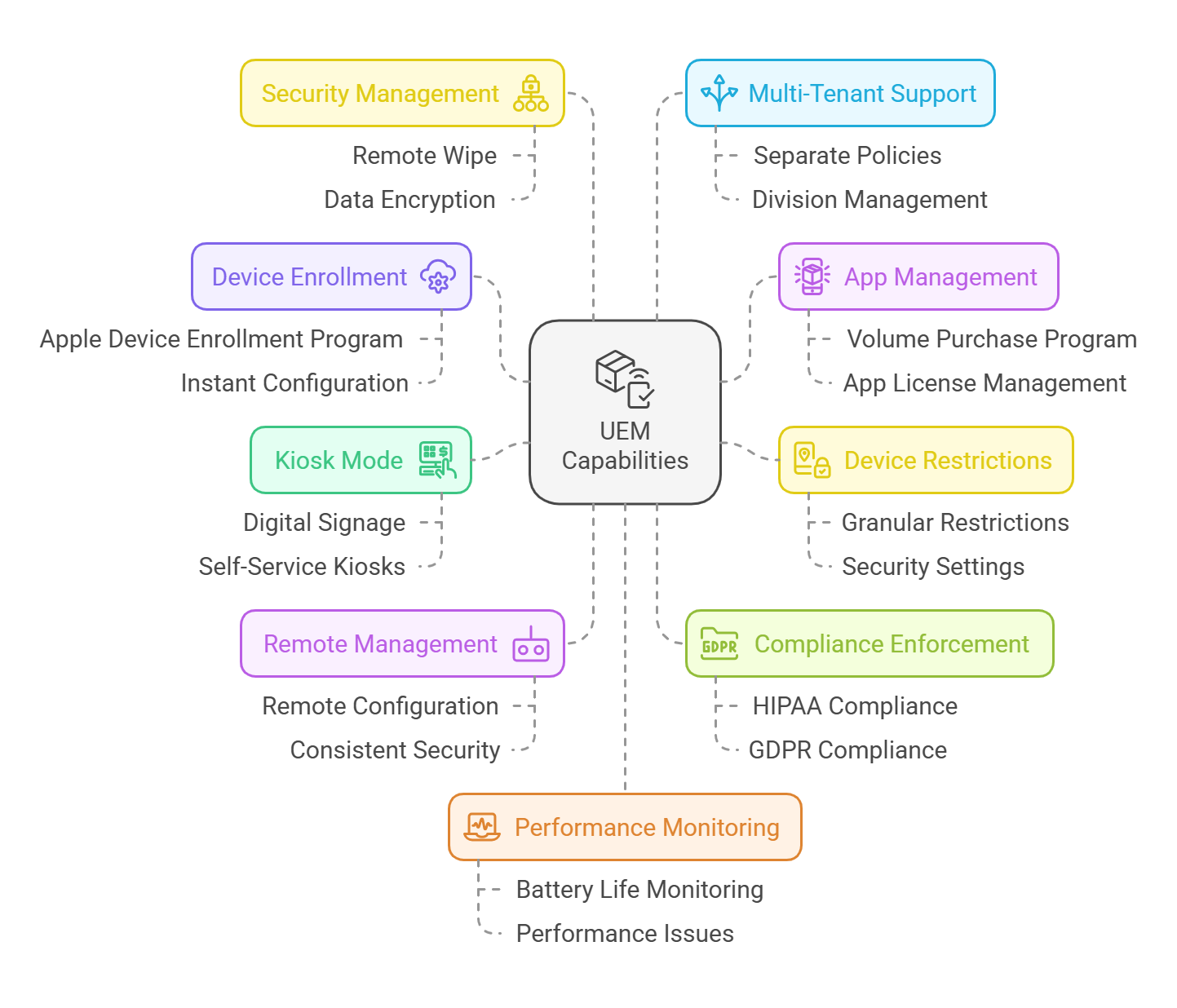
Now that we’ve gone over the basics, let’s see how UEM makes managing Apple devices easier. Apple Business Manager (ABM) helps with setup and provisioning, but it’s UEM that steps in to handle the day-to-day management, secure the devices, and keep everything running smoothly.

With Apple UEM, this job gets a lot easier.

  • Apple device enrollment program (DEP): Automates the enrollment of devices, allowing IT teams to set up Apple devices straight out of the box. This streamlines large-scale deployments and ensures devices are instantly configured and ready for use without manual intervention.
  • Volume purchase program (VPP): Enables bulk purchasing and distribution of apps across multiple Apple devices. This feature allows organizations to easily manage app licenses and ensure that every device has the necessary software installed, updated, and maintained.
  • Granular device restrictions: UEM provides the ability to implement precise device restrictions, such as limiting access to specific apps, disabling certain features (e.g., camera or AirDrop), and enforcing security settings to align with organizational policies. This is crucial in environments like healthcare, retail, or education, where device usage needs to be controlled.
  • Kiosk mode: UEM allows devices to be locked down into a specific app or set of apps, turning them into dedicated kiosks. This is perfect for situations like digital signage in retail or self-service checkouts, where devices are meant to serve a single purpose and require strict usage control.
  • Remote configuration, support, and management: IT admins can remotely configure settings, manage devices, and apply updates across all Apple devices, eliminating the need for on-site support and making it easier to maintain consistency in configurations and security policies.
  • Compliance enforcement: UEM helps ensure compliance with industry standards such as HIPAA, GDPR, and PCI-DSS by enforcing security policies like encryption, password complexity, and data protection. This is essential in sectors like healthcare, finance, and education where regulatory compliance is a priority.
  • Security management: UEM offers advanced security controls, such as remote wipe capabilities, device tracking, and data encryption, ensuring that if a device is lost or stolen, sensitive data remains protected and inaccessible.
  • Multi-tenant support: For managed service providers or businesses with different divisions, UEM can provide a multi-tenant architecture, allowing for the management of different Apple device fleets under one system, but with separate policies and configurations for each tenant.
  • Battery and performance monitoring: UEM offers real-time monitoring of device health, including battery life and overall performance, helping IT teams proactively address issues before they impact productivity.

How UEM improves endpoint security for Apple devices

There’s no end to data breaches, malware attacks, and insider threats but we can definitely prevent them with the help of a UEM solution. Endpoint security is the first line of defense when it comes to securing Apple devices within an organization. 

UEM solutions enhance security through several key features:

  1. Device Compliance and Granular Restrictions: UEM solutions enforce security policies such as password rules, encryption, OS updates, and app restrictions. These help ensure compliance with industry regulations (HIPAA, GDPR) while protecting sensitive data from unauthorized access.
  2. Zero Trust Access: UEM platforms enable a zero-trust security framework, where only authenticated users and compliant devices are allowed access to corporate resources, minimizing the risk of unauthorized entry.
  3. Remote Lock and Data Wipe: In the event of a lost or stolen device, UEM solutions allow IT admins to lock or wipe the device remotely, securing sensitive corporate data and preventing unauthorized access.
  4. Secure Network Connectivity with VPN Integration: UEM solutions configure and enforce VPN settings on Apple devices to ensure secure connections, especially for remote workers. This is further strengthened with endpoint security features like split tunneling and traffic filtering.
  5. Proactive Security with Automatic Updates: UEM solutions ensure that devices are always up to date with the latest OS versions and security patches, protecting against vulnerabilities associated with outdated software.
  6. I/O Device Access Control for macOS: UEM platforms allow organizations to manage and restrict the use of external devices like USBs and peripherals, preventing unauthorized data transfers and enhancing security on macOS.

Apple devices, while known for their robust security features, still face potential threats—whether it’s a lost iPhone with sensitive business data or a compromised app on an iPad. UEM solutions like Scalefusion, when paired with endpoint security solutions like Veltar, create an unbreakable defense against these risks. 

Why Scalefusion is ideal for Apple device management

Scalefusion goes beyond basic UEM features like supervision, app control, and compliance enforcement. It offers robust tools to simplify and enhance the management of macOS and iOS devices, making it a comprehensive solution for businesses.

  • Support for all your Apple devices – Scalefusion is compatible with a wide range of Apple devices, from iPhones and iPads to Mac computers. Whether you’re managing mobile devices or desktop setups, you can handle them all from one unified platform, streamlining operations.
  • Dive deep with DeepDive – From the Scalefusion dashboard, you can get quick, graphical insights into your device inventory. View key metrics like platform-wise enrollment, active/inactive devices, and license usage. This data allows you to make informed decisions and track your device fleet more effectively.
  • Top-notch security – Keeping your business data secure is non-negotiable, and Scalefusion goes above and beyond to protect it. With features like remote device locking, data wipe, and passcode enforcement, you can ensure Apple devices are always secure and compliant with your company’s policies.
  • Effortless enrollment – Thanks to integration with Apple’s Device Enrollment Program (DEP), setting up Apple devices is a breeze. Zero-touch enrollment allows you to quickly onboard devices without physical interaction, making the process both fast and hassle-free.
  • Kiosk Mode and App Control – Scalefusion’s Kiosk Mode lets you restrict Apple devices to just one app or a set of apps, preventing unauthorized access and ensuring the device is dedicated to its intended function.
  • Granular policy control with Groups and Subgroups – Scalefusion gives you the ability to manage devices at a granular level. By organizing devices into groups and subgroups, you can apply specific policies to different teams or departments, offering greater control and tailoring device settings based on organizational needs.
  • No-code IT Workflows – Streamline IT tasks by automating and scheduling actions without coding. Create task flows, set execution times, and maintain compliance effortlessly.
  • Remote Troubleshooting with Remote Cast and Control – With the Remote Cast and Control feature, IT teams can mirror a device’s screen in real-time and take full control of the device to resolve problems. This eliminates the need for physical access, reduces downtime, and ensures your team can quickly address issues.
  • Seamless integration with Apple’s ecosystem – Scalefusion seamlessly integrates with Apple’s native services, such as iCloud, iTunes, and Apple School Manager. This tight integration ensures smooth syncing of apps, data, and settings across your Apple devices, providing a unified experience for your business.
  • OS Updates and Patch Management – Scalefusion simplifies OS updates and patch management, automating the process to keep your Apple devices secure and up to date. Scalefusion UEM leverages Apple’s declarative device management (DDM) protocol to further streamline the update process. With DDM, you can schedule updates for macOS devices based on your local time zone, ensuring updates are applied at optimal times. This ensures that devices always install the latest version when multiple updates are available, simplifying the update management process.

Ensure long-term success with Apple UEM

With Apple devices becoming more prevalent across businesses, schools and industries, managing them efficiently is essential. Scalefusion UEM ensures your device management solution evolves alongside your organization, seamlessly adapting to the latest Apple updates.

Scalefusion UEM provides a seamless experience for managing Apple devices, with continuous updates that ensure compatibility with the latest Apple advancements. Its scalability allows organizations to easily manage growing numbers of Apple devices, while its interoperability ensures smooth integration with not just new Apple technologies and updates but also any other OS or device type that your business or employees love and use. 

Get in touch with our experts for more details and book a free demo call. Start your 14-day free trial today, with full access to all features, and discover how easy device management can be!

References:

  1. Backlinko
  2. TechTarget

About Scalefusion
Scalefusion’s company DNA is built on the foundation of providing world-class customer service and making endpoint management simple and effortless for businesses globally. We prioritize the needs and feedback of our customers, making sure that they are at the forefront of all decision-making processes. We are dedicated to providing comprehensive customer support services, and place emphasis on customer-centric thinking throughout the organization.

About Version 2 Digital

Version 2 Digital is one of the most dynamic IT companies in Asia. The company distributes a wide range of IT products across various areas including cyber security, cloud, data protection, end points, infrastructures, system monitoring, storage, networking, business productivity and communication products.

Through an extensive network of channels, point of sales, resellers, and partnership companies, Version 2 offers quality products and services which are highly acclaimed in the market. Its customers cover a wide spectrum which include Global 1000 enterprises, regional listed companies, different vertical industries, public utilities, Government, a vast number of successful SMEs, and consumers in various Asian cities.

The Do’s and Don’ts of Managing Sensitive Data in the Cloud [A Complete Checklist for MSPs]

Do You Know Where Sensitive Data Resides?

Do you know where all sensitive data resides within your organization, or more importantly, where it resides in your customers’ clouds? Those unauthorized access controls, excess permissions, inactive users, or misconfigured S3 storage buckets could be exposing terabytes of critical data by the minute. 

Research showed that more than 30% of cloud data assets contain sensitive information. But that’s where the problem begins for a busy MSP. Without clear visibility into where sensitive data resides or how it’s being accessed, securing it becomes nearly impossible, often resulting in a massive breach. 

That’s why we put this checklist together on The Do’s and Don’ts of Managing Sensitive Data in the Cloud. But first, do you know who has access to what?

Securing Data in the Cloud: Who Has Access to What? 

According to research conducted by Microsoft Security in their 2023 State of Cloud Permissions Risks Report, found that over 45% of organizations have AWS access keys that have not been rotated for at least months. The report also found that 40% of identities are inactive in AWS environments.

Let that sink in for a moment. 

How can MSPs determine who has access to which type of data across multiple cloud platforms and ensure it remains secure? 

Now factor in third parties. 

Third parties may have unmanaged access permissions that are out of your scope. Any of those permissions can provide a backdoor for attackers to exfiltrate sensitive data. 

And the risks aren’t only limited to cloud environments…

MSPs must constantly worry about shadow IT, where employees use unauthorized cloud services and other SaaS applications without the consent or knowledge of IT. This is a big problem. 

Those unauthorized cloud accounts and user roles can bypass security protocols (assuming they’ve been implemented) and leave your attack surface completely vulnerable. Even the most “harmless”-looking Chrome extension, such as Grammarly, can bring about major security threats since it has access to documents that contain financial transactions, proprietary information, and other PII. 

Once you agree to those terms, your data becomes vulnerable to those third parties. Those terms of service are often long, complex, and difficult to fully understand, making it easy for employees to overlook the risks associated with granting access.

Sure, data privacy laws have become more strict, but they can’t protect you from the risks posed by unauthorized access if you don’t know where sensitive data resides. 

Data at Rest vs. Data in Transit

In order to secure data, you first need to have a better understanding of the different types of data. 

Data at rest refers to data that is stored and not actively being transmitted or processed, such as in databases, file servers, or cloud storage. 

Data in transit or in motion, on the other hand, refers to data that is being transmitted from one location to another, such as emails or cloud-based API calls. 

All data, whether at rest or in transit, should be secured using strong encryption. This prevents unauthorized access to stored files on servers or cloud services (data at rest) and mitigates risks such as Man-in-the-Middle (MITM) attacks during transmission (data in transit).

The Do’s and Don’ts of Managing Sensitive Data in the Cloud [Complete Checklist]

Access permissions should be limited by default. But this is the part that gets tricky for MSPs.

Why?

Because an MSP may not be fully aware of how many permissions and identities are circulating within cloud environments. When was the last time your team conducted a comprehensive review of user permissions and roles across all cloud platforms? 

A month ago? A year? Longer?  

Now multiply those accounts, permissions, and identities when dealing with multiple clients simultaneously, and it’s not so hard to imagine that a data breach is only a single account login away. Research taken from Google Cloud’s 2023 Threat Horizons Report found that 86% of data breaches involve stolen credentials.

So, yeah, the threats are very real. No need to fall into that trap. 

Below are the most common cloud risks, along with best practices you can implement to prevent them and secure sensitive data.

Cloud RiskGuardz Best Practices 
Excessive access permissions– Implement the principle of least privilege across all cloud accounts
– Conduct periodic audits of user permissions 
– Provide temporary access to sensitive resources and revoke access immediately after the task is completed
Inactive identities – Remove inactive users from cloud accounts, such as employees who have left the organization or third parties whose contracts have expired
– Enforce multi-factor authentication (MFA) across all cloud accounts 
– Monitor privileged accounts closely and deactivate those that are inactive for excess periods of time (30-60 days).
Cloud storage misconfigurations (e.g. S3 buckets left public) – Restrict public access to storage buckets – this is absolutely essential
– Regularly rotate access keys and secrets every 90 days
– Enable versioning for cloud storage objects and establish regular backup procedures
Third parties Cloud storage misconfigurations (e.g., S3 buckets left public) 


But there’s a better way to manage sensitive data in the cloud. 

Keep All Sensitive Cloud Data Secured with Guardz 

Who has cloud access permissions to critical data? Don’t wait until an account gets compromised to find out. 

Guardz examines all digital assets within the customer cloud environment by scanning files and folders for excessive sharing permissions, misconfigurations, and other types of risky user behavior that can lead to a breach.

Prevent compromised credentials with Guardz cloud DLP and unified cybersecurity platform. 

See where all sensitive data resides across your organization and client cloud environments. 
Speak with one of our experts today.

About Guardz
Guardz is on a mission to create a safer digital world by empowering Managed Service Providers (MSPs). Their goal is to proactively secure and insure Small and Medium Enterprises (SMEs) against ever-evolving threats while simultaneously creating new revenue streams, all on one unified platform.

About Version 2 Digital

Version 2 Digital is one of the most dynamic IT companies in Asia. The company distributes a wide range of IT products across various areas including cyber security, cloud, data protection, end points, infrastructures, system monitoring, storage, networking, business productivity and communication products.

Through an extensive network of channels, point of sales, resellers, and partnership companies, Version 2 offers quality products and services which are highly acclaimed in the market. Its customers cover a wide spectrum which include Global 1000 enterprises, regional listed companies, different vertical industries, public utilities, Government, a vast number of successful SMEs, and consumers in various Asian cities.

How ZTNA Prevents Ransomware, VPN Hacks, and Social Engineering Attacks: Lessons from Recent Cyberattacks


Cyberattacks Are Evolving – Is Your Security Keeping Up?

Cyberattacks are becoming more sophisticated, exposing critical security flaws in outdated technologies. Three recent, high-profile breaches—the MOVEit ransomware attack, the MGM Resorts breach, and the Colonial Pipeline attack—demonstrate how insecure file transfers, weak authentication, and traditional VPNs create high-risk entry points for attackers.

These incidents prove that traditional perimeter-based security models are no longer effective. Organizations need a Zero Trust Network Access (ZTNA) approach that enforces strict access controls, continuous security monitoring, and multi-factor authentication (MFA).

Below, we explore how Thinfinity Secure File Transfer mitigates these risks, providing a proactive, Zero Trust solution for preventing ransomware, credential theft, and unauthorized access.


Recent High-Profile Cyber Threats and Their Causes

MOVEit Ransomware Attack: Exploiting Insecure File Transfer Protocols

MOVEit, a widely used file transfer application, suffered a massive ransomware attack in mid-2023 due to an SQL injection vulnerability. Attackers exploited this flaw to steal sensitive data from hundreds of organizations worldwide.

Key Security Failures:

Insecure file transfer protocols allowed remote code execution.

Unpatched software vulnerabilities left critical weaknesses exposed.

Over-reliance on perimeter-based security without strong access controls.

 
High-profile cyber attack vectors: exploiting insecure file transfers, social engineering, and VPN compromise vulnerabilities.

MGM Resorts Breach: Social Engineering and Privileged Access Exploitation

In September 2023, MGM Resorts suffered a major social engineering attack by the Scattered Spider hacking group. Attackers impersonated an IT support employee, tricking staff into granting unauthorized access. This led to network infiltration, service disruptions, and ransomware deployment.

Key Security Failures:

No Multi-Factor Authentication (MFA), making credential theft easy.

Lack of identity verification before granting IT support access.

Weak monitoring allowed attackers to move undetected within the network.


Colonial Pipeline Attack: VPN Compromise Leading to National Disruption

One of the most disruptive cyberattacks in U.S. history, the Colonial Pipeline ransomware attack (2021) was caused by a compromised VPN credential. Without MFA or network segmentation, attackers gained unrestricted access, leading to fuel shortages across the East Coast.

Key Security Failures:

❌ Traditional VPNs provided excessive access to internal networks.
No Multi-Factor Authentication (MFA), making credential-based attacks easy.
Lack of network segmentation, allowing unrestricted lateral movement.


Why Traditional Security Tools Are Failing

Traditional security failures: VPNs grant excessive access, perimeter defenses are outdated, and weak authentication enables breaches.
 

🚫 VPNs Provide Excessive Access

Once inside, VPN users can move freely, making breaches catastrophic.

  • Compromised credentials = full network access (as seen in Colonial Pipeline).
 

🚫 Perimeter-Based Security Models Are Outdated

  • Attackers can bypass the perimeter using stolen credentials.
  • Once inside, there’s little control over lateral movement.
 

🚫 Single-Factor Authentication is an Open Door for Hackers

  • Social engineering (like in MGM Resorts) bypasses weak authentication.
  • No second verification step = higher risk of unauthorized access.
 

ZTNA: The Solution to Modern Cyber Threats

Zero Trust Network Access (ZTNA) addresses these vulnerabilities by enforcing strict access controls, authentication measures, and continuous monitoring. Unlike traditional security models, ZTNA follows the principle of “never trust, always verify.”

Key Benefits of ZTNA:

Granular Access Control: Limits access only to necessary applications rather than the entire network.
Multi-Factor Authentication (MFA): Ensures identity verification beyond just a password.
Continuous Monitoring: Detects anomalies and prevents lateral movement inside the network.
Least Privilege Access: Reduces the impact of compromised credentials.

Enhancing Cybersecurity with ZTNA

ZTNA enhances cybersecurity with granular access control, MFA, continuous monitoring, and least privilege access to prevent threats.
 

How Thinfinity Can Help Organizations Prevent These Attacks

The MOVEit ransomware attack, MGM Resorts breach, and Colonial Pipeline incident highlight the risks of insecure file transfers, credential theft, and VPN vulnerabilities. Below, we explore how Thinfinity Secure File Transfer directly addresses each attack vector with Zero Trust security principles.

1. Eliminating Insecure File Transfers (MOVEit Ransomware Attack)

Attack Vector:

MOVEit was compromised due to SQL injection vulnerabilities, leading to unauthorized data exfiltration.

Thinfinity Capability: Web-Based Secure File Access with Policy-Based Controls

How Thinfinity mitigates the risk:

 Replaces legacy file transfer protocols with secure, cloud-based access.
Implements strict policy-based access controls for file sharing.
Uses TLS 1.3 encryption & end-to-end security to prevent unauthorized data exposure.

launch icon How It Helps: Even if an attacker attempts an exploit, Thinfinity blocks unauthorized file access with role-based security and encryption.
2. Preventing Credential Exploits (MGM Resorts Social Engineering Attack)

Attack Vector:

Attackers tricked IT staff into granting privileged access, leading to network infiltration.

Thinfinity Capability: Adaptive Multi-Factor Authentication (MFA) & Identity Federation

How Thinfinity prevents credential-based attacks:

Enforces Adaptive MFA, ensuring that attackers cannot log in with stolen passwords.
Supports Identity Federation (Azure AD, Okta, SAML) for secure authentication.
Implements Role-Based Access Control (RBAC) to restrict IT staff privileges.

launch icon How It Helps: Even if a hacker steals credentials, they cannot bypass MFA or elevate privileges within Thinfinity’s Zero Trust framework.

3. Secure Remote Access Without VPNs (Colonial Pipeline VPN Compromise)

Attack Vector:

Colonial Pipeline was breached through a compromised VPN credential, allowing attackers unrestricted network access.

Thinfinity Capability: Clientless ZTNA Access with Per-Session Isolation

How Thinfinity eliminates VPN-based risks:

Replaces traditional VPNs with clientless Zero Trust access.
Uses per-session isolation, restricting each user only to approved applications & files.
Employs dynamic session validation, automatically terminating suspicious activity.

launch icon How It Helps: Even if credentials are stolen, attackers cannot move laterally, since Thinfinity does not expose internal networks like a VPN.


Final Thoughts: Why Thinfinity Is the Future of Secure Access

The MOVEit ransomware attack, the MGM Resorts breach, and the Colonial Pipeline incident all highlight critical weaknesses in legacy security models—from outdated file transfer protocols to poor identity verification and unrestricted VPN access.
With Thinfinity Secure File Transfer, businesses can eliminate these risks by:

Ensuring secure, encrypted file access without exploitable third-party file transfer tools.
Using Adaptive MFA and Identity Federation to prevent credential theft and social engineering attacks.
Replacing traditional VPNs with clientless ZTNA to ensure granular, session-based access control.
By adopting Zero Trust principles, SMBs and enterprises alike can prevent cyber threats before they happen—ensuring secure, controlled, and policy-driven access to critical data.


launch icon Protect Your Business Today
Discover how Thinfinity Secure File Transfer can safeguard your organization from modern cyber threats. Contact us for a demo!

About Cybele Software Inc.
We help organizations extend the life and value of their software. Whether they are looking to improve and empower remote work or turn their business-critical legacy apps into modern SaaS, our software enables customers to focus on what’s most important: expanding and evolving their business.

About Version 2 Digital

Version 2 Digital is one of the most dynamic IT companies in Asia. The company distributes a wide range of IT products across various areas including cyber security, cloud, data protection, end points, infrastructures, system monitoring, storage, networking, business productivity and communication products.

Through an extensive network of channels, point of sales, resellers, and partnership companies, Version 2 offers quality products and services which are highly acclaimed in the market. Its customers cover a wide spectrum which include Global 1000 enterprises, regional listed companies, different vertical industries, public utilities, Government, a vast number of successful SMEs, and consumers in various Asian cities.

ConnectWise PSA™ integration: NordLayer made even simpler for MSPs

Summary: NordLayer’s certified ConnectWise PSA™ integration provides MSPs with company mapping, product linking, automated usage updates, and secure workflows.

NordLayer now integrates with ConnectWise PSA™, certified by the ConnectWise Invent program. It makes billing, invoicing, and company management easier for MSPs with smoother, automated workflows.

NordLayer Connectwise Integration

Key takeaways

  • Simplified billing and company management. MSPs can map companies and products, sync usage data, and make invoicing easier
  • Reliable partnership. MSPs can enjoy automated workflows and security standards you can rely on
  • Certified integration. NordLayer’s integration with ConnectWise PSA™ is certified for secure use

Why ConnectWise PSA™ integration is a big deal

NordLayer’s integration with ConnectWise is a major improvement. ConnectWise, a leading software company, has supported IT solution providers for SMBs worldwide for 40 years.

MSPs use Professional Services Automation (PSA) tools like ConnectWise to manage client issues, assign tasks, and monitor performance. These tools save time, improve organization, and ensure quality service. With over 24% of the PSA and Remote Monitoring and Management market, ConnectWise is essential for MSPs to manage operations effectively. Certification by ConnectWise means NordLayer passed a security review, ensuring safe and reliable operation.

How the integration works

To configure the integration, create API members with the right permissions in ConnectWise and generate API keys. Then, enter these API details in the NordLayer MSP admin panel.

Features:

  • Import and map your ConnectWise PSA™ companies and products to the NordLayer MSP admin panel
  • Automatically update ConnectWise PSA™ with monthly subscription usage for each mapped company
  • Keep billing and invoicing accurate with updated usage data, so you don’t need to enter it manually
NordLayer Connectwise Integration

See step-by-step instructions to integrate NordLayer with ConnectWise PSA™.

Why partner with NordLayer?

NordLayer helps MSPs and MSSPs grow revenue with secure, smart solutions. Our distributors, including Pax8, Ingram Micro, BlueChip, and Version 2, make it easier for MSPs to access and deliver our services.

We recently surveyed our partners and proudly received a 9/10 satisfaction rating. They love how easily NordLayer integrates, the reliable support, and the potential to boost revenue—all while keeping clients secure.

MSPs and MSSPs benefit from:

  • High-profit margins with flexible pricing
  • Scalable services and post-paid monthly billing
  • Dedicated training and fast support
  • No upfront investment


About NordLayer
NordLayer is an adaptive network access security solution for modern businesses – from the world’s most trusted cybersecurity brand, Nord Security.

The web has become a chaotic space where safety and trust have been compromised by cybercrime and data protection issues. Therefore, our team has a global mission to shape a more trusted and peaceful online future for people everywhere.

About Version 2 Digital

Version 2 Digital is one of the most dynamic IT companies in Asia. The company distributes a wide range of IT products across various areas including cyber security, cloud, data protection, end points, infrastructures, system monitoring, storage, networking, business productivity and communication products.

Through an extensive network of channels, point of sales, resellers, and partnership companies, Version 2 offers quality products and services which are highly acclaimed in the market. Its customers cover a wide spectrum which include Global 1000 enterprises, regional listed companies, different vertical industries, public utilities, Government, a vast number of successful SMEs, and consumers in various Asian cities.

DORA: Safeguarding Financial Data

The new EU regulation, DORA, is set to significantly enhance the protection of customer funds and data within financial institutions.

DORA officially entered into force on January 16, 2023. Since then, financial institutions have begun preparing to meet the new requirements, although compliance was not initially mandatory. However, the regulation will become fully enforceable on January 17, 2025.

DORA consolidates various initiatives from different European regulatory authorities, including the European Central Bank (ECB), into a single document. Essentially, DORA impacts every participant in the financial market, including banks, investment firms, asset management companies, digital asset providers, insurance companies, and others.

In Poland alone, the regulation will apply to 29 commercial banks, nearly 500 cooperative banks, over 40 payment institutions, and notably, dozens of IT solution providers.

Under DORA, financial institutions are obligated to manage information and communication technology (ICT) risks, report incidents, test operational resilience, manage third-party (ICT service providers) risks, and share information with other entities in the financial sector.

Steeper Penalties and Greater Order

While banks are accustomed to regulations, DORA introduces several new elements. It all began in 2002 with the Sarbanes-Oxley Act, which increased the responsibility of boards in financial reporting and internal controls. Then came Basel I, II, and III, PCI DSS, and numerous other regulations. So, what new aspects does DORA bring to regulations for financial institutions?

Three factors are worth highlighting:

  • DORA unifies digital security regulations in the financial sector. Regulations for the industry are scattered across various legal acts, and sometimes they simply do not align well with one another.
  • The introduction of individual penalties for board members ensures that compliance cannot be ignored. The penalties are quite severe, with maximum fines reaching up to €10 million. In the case of serious or repeated violations, the fine can be doubled, and in extreme situations, imprisonment is not excluded. This personal risk emphasizes the need for top-level managers to be actively involved in ensuring compliance with DORA.
  • For the first time, regulations include IT system providers. DORA changes the game, as financial institutions are now obligated to impose requirements on IT infrastructure providers. In practice, this means financial entities can only contract external ICT service providers that meet high and up-to-date information security standards. Moreover, certain oversights may result in penalties for infrastructure providers.

The regulation sets the bar quite high—not only for IT hardware and software manufacturers but also for cloud service providers and MSSPs (Managed Security Service Providers).

DORA and Data Protection

According to data from Check Point, banks operating in Poland must fend off more than 1,600 attacks daily. Hackers target only the military and public institutions more frequently in the country. A similar situation exists in the United States, where the financial sector ranks second in the frequency of cyberattacks.

Attackers have straightforward goals—they want money or data, and financial institutions have both. Banks and insurers handle vast amounts of personal and financial data, including bank accounts, transaction details, investment information, and credit histories. These organizations manage highly sensitive data, and breaches can result in severe consequences for both customers and the institutions themselves. For this reason, the financial sector pays close attention to the ever-growing body of privacy and data protection regulations.

The latest of these is the aforementioned DORA, which clearly defines requirements for financial institutions regarding data backup and recovery. Their obligations include configuring backup systems capable of withstanding cyber incidents, system failures, and disruptions. Notably, DORA emphasizes that creating backups is not just an IT issue but a management responsibility requiring oversight and approval from executive leadership.

Article 12 – Data Protection Guidelines

Article 12 of the DORA regulation provides detailed guidelines on the principles, procedures, and methods for data backup, restoration, and recovery. According to these provisions, financial entities are required to develop and document rules and procedures for backing up and recovering data.

The document must specify the scope of data to be backed up and the frequency of backups. When determining RTO (Recovery Time Objective) and RPO (Recovery Point Objective) for each function, it is essential to consider its criticality and the extent to which disruptions would harm the entity’s financial performance and service continuity.

In addition to regular backups of critical systems and data, DORA mandates periodic testing of backup procedures and recovery methods. Financial institutions are also required to establish clear procedures for both internal and external communication during incidents. This ensures timely and effective responses, including notifying relevant authorities and customers.

Financial institutions must conduct post-incident reviews to maintain the highest levels of data integrity. These reviews should also be carried out during the reconstruction of data from clients and partners to ensure the consistency of all data transferred between systems.

DORA also specifies requirements for central securities depositories, which must maintain at least one secondary data processing site:

a) A safe distance from the primary processing site to prevent the same event from affecting both locations.
b) Capability to ensure continuity of critical functions at the same level as the primary site or at a service level sufficient to carry out recovery processes.
c) Immediate access for financial entity personnel to ensure the continuity of critical functions if the primary site becomes unavailable.

Data Protection for SaaS

Cloud applications are the largest source of data breaches, according to 60% of respondents in The 2024 State of SaaS Resilience survey.

However, half of the respondents mistakenly believe that cloud service providers (CSPs) are solely responsible for data protection. In reality, CSPs operate under a shared responsibility model, meaning they are responsible for the security of the cloud infrastructure and the solutions they offer, while users are responsible for securing their own data and applications within the cloud.

Unfortunately, misunderstanding this principle often results in data loss caused by employee errors or cyberattacks. This issue affects banks, insurance companies, and fintech organizations alike. However, with the implementation of DORA, the situation is set to change. Financial institutions, when signing contracts with SaaS providers, will now inquire about the ability to obtain a complete copy of their data—questions that will be raised as early as the procurement stage.

If the service provider does not offer backup services, the responsibility will fall on the user. In such cases, backups must be stored in a separate local system or in the cloud of another provider.

How does Storware Backup and Recovery support Digital Operational Resilience Act (DORA)?

Storware Backup and Recovery software aligns with the principles of the Digital Operational Resilience Act (DORA) by providing robust data protection, ensuring operational continuity, and supporting compliance with regulatory requirements. Here’s how Storware helps companies meet DORA’s key principles:

1. ICT Risk Management Framework

  • Centralized management console to monitor backup and recovery activities.
  • Reporting and alerts for backup failures
  • Supports enterprise-wide implementation of ICT risk strategies.

2. Incident Reporting

  • Logs and audit trails for all backup and restore operations, facilitating incident detection and reporting.
  • Detailed insights into data integrity issues or failures.
  • Automated reporting features to notify of anomalies or recovery scenarios.

3. Digital Operational Resilience Testing

  • Built-in recovery testing features ensure backup data is recoverable and operational.
  • Non-disruptive testing capabilities to verify disaster recovery plans without impacting live environments.
  • Tools to simulate different failure scenarios and measure recovery time objectives (RTOs) and recovery point objectives (RPOs).

4. Third-Party Risk Management

  • Supports backup of data across diverse environments, including on-premises, cloud, and hybrid setups, ensuring resilience against third-party failures.
  • Vendor-neutral architecture minimizes dependency on any single third-party provider.
  • Data encryption and access controls to secure data managed by external service providers.

5. Information Sharing

  • Facilitates collaboration with IT and security teams by providing clear reports and analytics on backup-related events.
  • Promotes a unified approach to managing cybersecurity threats through visibility into data protection workflows.

6. Governance and Oversight

  • Role-based access controls (RBAC) and user activity tracking ensure accountability within the organization.
  • Simplifies audits with detailed documentation of backup configurations and recovery processes.

7. Critical ICT Providers Oversight

  • Works seamlessly with major cloud providers (AWS, Azure, Google Cloud) and ensures their data protection meets compliance requirements.
  • Encrypts backups and ensures secure data transfer, reducing risks from third-party vulnerabilities.

8. Adaptation and Compliance

  • Regular updates to the software ensure compatibility with evolving cybersecurity threats and regulations.
  • Flexible deployment options enable organizations to adapt their data protection strategy as needed.
  • Compliance-friendly features such as encryption, immutability, and detailed reporting support adherence to regulatory standards like DORA.

By delivering resilient, secure, and adaptive backup and recovery solutions, Storware enables financial entities to meet the stringent requirements of DORA, ensuring business continuity and safeguarding critical data in an increasingly digital and regulated environment.

A data recovery plan (DRP) is a structured approach that describes how an organization will respond quickly to resume activities after a disaster that disrupts the usual flow of activities. A vital part of your DRP is recovering lost data.

Virtualization helps you protect your data online through virtual data recovery (VDR). VDR is the creation of a virtual copy of an organization’s data in a virtual environment to ensure a quick bounce back to normalcy following an IT disaster.

While having a virtual data recovery plan is good, you must also provide an off-site backup for a wholesome data recovery plan that can adequately prevent permanent data loss. An off-premises backup location provides an extra security layer in the event of data loss. Thus, you shouldn’t leave this out when planning your data recovery process.

Let’s try to look at this issue in a general way, knowing how diverse and capacious the issue of virtualization and disaster recovery is. Certainly, implementing a dedicated data protection solution will help streamline data protection and disaster recovery processes.

Benefits of Virtualization for Disaster Recovery

Virtualization plays a crucial role in disaster recovery. Its ability to create a digital version of your hardware offers a backup in the event of a disaster. Here are some benefits of virtualization for disaster recovery.

  • Recover Data From Any Hardware

If your hardware fails, you can recover data from it through virtualization. You can access your virtual desktop from any hardware, allowing you to recover your information quickly. Thus, you can save time and prevent data loss during disasters.

  • Backup and Restore Full Images

With virtualization, your server’s files will be stored in a single image file. Restoring the image file during data recovery requires you to duplicate and restore it. Thus, you can effectively store your files and recover them when needed.

  • Copy Data to a Backup Site

Your organization’s backups must have at least one extra copy stored off-site. This off-premise backup protects your data against loss during natural disasters, hardware failure, and power outages. Data recovery will help automatically copy and transfer files virtually to the off-site storage occasions.

  • Reduce Downtime

There’s little to no downtime when a disaster event occurs. You can quickly restore the data from the virtual machines. So recovery can happen within seconds to minutes instead of an hour, saving vital time for your organization.

  • Test Disaster Recovery Plans

Virtualization can help you test your disaster recovery plans to see if they are fail-proof. Hence, you can test and analyze what format works for your business, ensuring you can predict a disaster’s aftermath.

  • Reduce Hardware Needs

Since virtualization works online, it reduces the hardware resources you need to upscale. With only a few hardware, you can access multiple virtual machines simultaneously. This leads to a smaller workload and lower operation costs.

  • Cost Effective

Generally, virtualization helps to reduce the cost of funding virtual disaster recovery time. With reduced use of hardware and quicker recovery time, the data recovery cost is reduced, decreasing the potential loss caused by disasters.

Data Recovery Strategies for Virtualization

Below are some practical strategies to help build a robust data recovery plan for your organization’s virtual environment:

  • Backup and Replication

Create regular backups of your virtual machines that will be stored in a different location—for instance, an external drive or a cloud service. You can also create replicas and copies of your virtual machines that are synchronized with the original. You can switch from the original to a replica in case of failure.

  • Snapshot and Restore

Snapshots capture your data at specific preset moments, creating memories of them. Restore points also capture data but include all information changes after the last snapshot. You can use snapshot and restore to recover the previous state of your data before the data loss or corruption.

  • Encryption and Authentication

Encryption and authentication are essential security measures that work in tandem to safeguard data from unauthorized access. By employing both methods, you establish robust layers of defense. This, thereby, fortifies your data against potential cyber threats, ultimately mitigating the risks associated with corruption and theft.

Conclusion

Creating a disaster recovery plan is crucial for every organization as it helps prevent permanent data loss in the event of a disaster, leading to data loss or corruption. Virtualization helps in data recovery by creating a virtual copy of your hardware that can be accessed after a disaster.

Virtualization reduces downtime, helps to recover data from the hardware, reduces hardware needs, and facilitates testing your data recovery plans. However, you must note that virtual data recovery is only a part of a failproof disaster recovery plan. You must make provisions for an off-premises backup site for more robust protection.


About Version 2 Digital

Version 2 Digital is one of the most dynamic IT companies in Asia. The company distributes a wide range of IT products across various areas including cyber security, cloud, data protection, end points, infrastructures, system monitoring, storage, networking, business productivity and communication products.

Through an extensive network of channels, point of sales, resellers, and partnership companies, Version 2 offers quality products and services which are highly acclaimed in the market. Its customers cover a wide spectrum which include Global 1000 enterprises, regional listed companies, different vertical industries, public utilities, Government, a vast number of successful SMEs, and consumers in various Asian cities.

About Storware
Storware is a backup software producer with over 10 years of experience in the backup world. Storware Backup and Recovery is an enterprise-grade, agent-less solution that caters to various data environments. It supports virtual machines, containers, storage providers, Microsoft 365, and applications running on-premises or in the cloud. Thanks to its small footprint, seamless integration into your existing IT infrastructure, storage, or enterprise backup providers is effortless.

×

Hello!

Click one of our contacts below to chat on WhatsApp

×