Skip to content

What is Windows Kiosk Mode? How to set Windows devices in Kiosk Mode?

With a market share of 73.31%, Windows remains the leading desktop operating system worldwide[1]. Both small to medium businesses and large enterprises are increasingly choosing Windows devices to meet their work needs. As organizations strive to enhance security, streamline operations, and improve user experiences, the importance of deploying Windows devices in Kiosk Mode is evident. 

Organizations can create a focused work environment with Windows kiosk mode and enhance their productivity and security. Kiosk mode restricts access to specific applications, websites, and settings, allowing businesses to deploy Windows devices in a secure manner. This setup enables users to concentrate on essential tasks without distractions or prevents the risks associated with unauthorized access.

This blog provides an overview of Windows Kiosk Mode and highlights its benefits. It offers a step-by-step guide for setting up Kiosk Mode on Windows devices, helping your organization maximize the advantages of this powerful feature.

What is Windows Kiosk Mode?

Windows kiosk mode is a security and efficiency enhancement feature. It transforms your devices running on 7, 8.1, 10, and 11 versions of Windows into dedicated, purpose-driven kiosk machines. Moreover, you can lock the Windows devices to run single or multiple applications, websites, or specific functions on full screen.

With Windows kiosk mode, you ensure that users cannot modify device settings, access other applications or features on Windows devices, or use the devices for unintended purposes. Due to its restrictive capabilities, organizations secure their Windows devices used for intended purposes such as self-check-in kiosks at airports, point-of-sale (POS) terminals in food courts, or digital signages.

Benefits of kiosk mode for Windows devices

Implementing kiosk Mode on Windows devices offers you a range of benefits:


1. Ensured security

Kiosk mode ensures Windows device security, allowing you to deploy them in public-facing environments. It secures point-of-sale systems, public access terminals, and other devices that need to be protected from unauthorized access.

Similarly, you can restrict users’ access to specific applications, websites, or device settings. This minimizes the risk of exposure to sensitive information while maintaining compliance with industry regulations such as HIPAA  and GDPR.

2.  User productivity

In business environments, Kiosk Mode can significantly enhance user productivity by offering streamlined access to essential tools and applications, eliminating the need to navigate the full Windows desktop.

This focused approach allows users to quickly engage with the specific applications they require, minimizing distractions and reducing the time spent on unnecessary tasks. As a result, employees can work more efficiently, leading to improved performance and a more productive workplace.

3. Increased operational efficiency

Applying kiosk mode to Windows devices increases efficiency by restricting access to specific applications or websites. Users can quickly navigate tasks without the confusion of unrelated options. This focused environment accelerates workflow, ensuring that users can complete their tasks with efficiency and consume less time.

Moreover, as you restrict access to the Windows desktop and other system settings, there is less chance of users unintentionally making changes or causing system errors. This reduces the need for device maintenance and troubleshooting.

4. Enhanced customer service

Deploying Windows devices in kiosk mode offers customers a smooth and focused user experience based on their needs. For instance, in a retail setting, kiosks can facilitate a self-service shopping experience, allowing customers to browse products and make purchases independently, without staff assistance.

With access to dedicated applications or websites, users can interact directly with the applications they need, free from distractions. This enhances customer engagement and streamlines the purchasing process.

5. Versatility

Windows Kiosk Mode is adaptable and applicable across various industries and settings. It is commonly utilized in retail for self-service kiosks, in museums for interactive displays, and in enterprises for dedicated task-specific workstations.

How to set up kiosk mode on Windows devices?

Organizations can enable kiosk mode on Windows 10 and 11 devices  through the following two methods:

Method 1: Using Windows Assigned Access

Windows Assigned Access is a feature in Windows operating systems that allows administrators to restrict a device to run a single application. To configure Kiosk Mode on Windows 10 devices follow these steps:

To configure Kiosk Mode on Windows 10 or Windows 11, follow these steps:

Step 1: Begin by creating a local standard user account using an Administrator account.

Step 2: Open the Settings app by pressing the Windows Key + I combination.

Step 3: Navigate to Accounts > Other Users and then select Set up assigned access.

Step 4: Choose the Standard user account you created in Step 1 by selecting Choose an Account.

Step 5: Next, click Choose an App and pick the app you want to restrict access to from the list of supported applications for Windows 10 or Windows 11 Kiosk Mode (also called Assigned Access).

Step 6: Restart the device and sign in with the Standard user account credentials to activate Kiosk Mode.

While Windows Assigned Access provides a simple way to configure Kiosk Mode, it has notable limitations. It only supports a single app at a time, which can be restrictive for more complex use cases. Additionally, it lacks the advanced security features and customization options often required for larger deployments. For organizations with more demanding needs, it is advisable to utilize comprehensive Unified Endpoint Management (UEM) solutions like Scalefusion UEM.

Method 2: Using Scalefusion UEM

Scalefusion UEM offers a modern and secure way to apply Kiosk Mode to your Windows devices. Follow this step-by-step guide to set up Windows Kiosk Mode:

Step 1: Navigate to Device Profiles & Policies Devices Profiles


Step 2: Click Create New Profile on the upper right corner of the screen

Step 3: Select the Windows tab; Enter a profile name; Click Submit


Step 4: Now, under Select Apps (on left menu), choose Multi-app Kiosk Mode


a) Configure policy mode – Select Windows MDM CSP


b) Add user info – Configure the user info


c) Select apps – Select the apps to enable on multi-app kiosk mode


Step 5: Click Create Profile on the upper right corner of the screen to finish


Step 6: Click Apply to push the multi-app kiosk profile to device groups/user groups/individual devices


Windows Kiosk Mode vs. Windows Assigned Access

Kiosk Mode offered by Scalefusion UEM provides organizations with advanced capabilities, while Windows Assigned Access offers a more basic implementation. Organizations should consider an optimum method of applying Kiosk Mode to their Windows devices that best meets their needs.

AspectScalefusion’s Windows kiosk modeWindows Assigned Access
PurposeTo provide comprehensive control over Windows devices with customizable settings, multi-app support, and remote management.To restrict a device to a single application for simplicity.
FeaturesSupports multiple apps, remote monitoring, advanced customization, and device management.Limited to single-app mode, with basic restrictions.
SecurityEnhanced security with advanced policies, remote control, and compliance management.Basic security, limited to local settings and access restrictions.
Ease of SetupQuick and centralized setup through a user-friendly interface with remote deployment options.Simple, but manual and limited to local settings.
ConfigurationHighly configurable with options for multiple apps, kiosk browser, and custom branding.Minimal configuration, restricted to a single app selection.
Use CasesSuitable for diverse industries like retail, healthcare, education, and enterprises needing multi-app or custom environments.Ideal for basic setups like kiosks displaying one app or a single-purpose device.

Get Scalefusion UEM to configure Windows kiosk mode

Scalefusion UEM’s kiosk Mode for Windows offers a robust solution to the limitations of traditional Windows Assigned Access. It provides enhanced security, advanced customization, and multi-app support, making it ideal for businesses needing versatile, secure, and scalable device management.

With centralized control and the ability to configure Windows devices remotely, Scalefusion UEM is perfect for a variety of industries—from retail to education—ensuring that your public-facing and dedicated devices are secure and optimized.

Ready to transform your operations with Windows Kiosk Mode? Connect without product experts for a free demo and unlock Scalefusion’s Windows kiosk management features. Begin your 14-day free trial now!


About Version 2 Digital

Version 2 Digital is one of the most dynamic IT companies in Asia. The company distributes a wide range of IT products across various areas including cyber security, cloud, data protection, end points, infrastructures, system monitoring, storage, networking, business productivity and communication products.

Through an extensive network of channels, point of sales, resellers, and partnership companies, Version 2 offers quality products and services which are highly acclaimed in the market. Its customers cover a wide spectrum which include Global 1000 enterprises, regional listed companies, different vertical industries, public utilities, Government, a vast number of successful SMEs, and consumers in various Asian cities.

About Scalefusion
Scalefusion’s company DNA is built on the foundation of providing world-class customer service and making endpoint management simple and effortless for businesses globally. We prioritize the needs and feedback of our customers, making sure that they are at the forefront of all decision-making processes. We are dedicated to providing comprehensive customer support services, and place emphasis on customer-centric thinking throughout the organization.

Graylog Redefines SIEM with More Efficient and Effective Threat Detection

Graylog Introduces Advanced Data Routing to Align Costs with Data Value

HOUSTON – October 21, 2024 Graylog, a leader in Threat Detection, Investigation, and Response (TDIR), today unveiled significant security advancements to drive smarter, faster, and more cost-efficient security operations. The company’s latest capabilities include advanced data routing, asset-based risk scoring, and AI-generated investigation reports. 

These enhancements, and many others in the Fall 2024 release, help organizations realign their time and financial investment with security objectives, empowering security teams to confidently reduce risk. With a detailed understanding of the threat landscape at both user and system levels, Graylog enables organizations to make more informed decisions about their security posture and respond more effectively to potential threats.

Exclusive to Graylog is its native advanced data routing that enables practitioners to send lower-value “standby” data to inexpensive storage before it is indexed by Graylog. Standby data is available for retrieval into Graylog for future incident investigations. This classification shifts the typical SIEM license model to more accurately align with the overall value of the data. Security and IT operations teams can now invest time and money in the value of the data sent, processed, and stored while minimizing the number of technology solutions managed.

“A challenge with SIEMs has been the need to bring in all the data from log sources as if all the log messages are of equal value,” said Seth Goldhammer, vice president of product management at Graylog. “Of course, if a log message is dropped, it is gone forever. Our new data routing removes this compromise, allowing practitioners to bring in all the data and only pay for the log messages delivering value.” 

Graylog’s asset-based risk modeling finds related security events across attack surfaces and prioritizes what should be investigated with context such as vulnerability state, variance, and API risk. Instead of thousands of daily alerts requiring individual triage and investigation, Graylog prioritizes the high-risk users and systems for security analysts, grouping together multiple alerts and context to expedite the investigation

Graylog’s Fall 2024 release includes a timeline visualization of events and leverages GenAI to summarize these details, including impact analysis, into an incident response report to further aid with those investigations and save analyst time.

To learn more about these new capabilities, attend Graylog’s free virtual user conference, Graylog GO, which will be held Oct. 23 – 24. 

About Graylog  
At Graylog, our vision is a secure digital world where organizations of all sizes can effectively guard against cyber threats. We’re committed to turning this vision into reality by providing Threat Detection & Response that sets the standard for excellence. Our cloud-native architecture delivers SIEM, API Security, and Enterprise Log Management solutions that are not just efficient and effective—whether hosted by us, on-premises, or in your cloud—but also deliver a fantastic Analyst Experience at the lowest total cost of ownership. We aim to equip security analysts with the best tools for the job, empowering every organization to stand resilient in the ever-evolving cybersecurity landscape.

About Version 2 Digital

Version 2 Digital is one of the most dynamic IT companies in Asia. The company distributes a wide range of IT products across various areas including cyber security, cloud, data protection, end points, infrastructures, system monitoring, storage, networking, business productivity and communication products.

Through an extensive network of channels, point of sales, resellers, and partnership companies, Version 2 offers quality products and services which are highly acclaimed in the market. Its customers cover a wide spectrum which include Global 1000 enterprises, regional listed companies, different vertical industries, public utilities, Government, a vast number of successful SMEs, and consumers in various Asian cities.

How do password managers work?

Security guidelines state that all accounts, regardless of their importance, should use unique and complicated passwords. Unfortunately, the burden of juggling different accounts with long passwords that are difficult to keep track of or enter without typos leads to people settling for simpler, repetitive, and far less resilient passwords. 

This struggle can be easily solved once you know how password managers work to support your credential handling. Whether it’s a built-in browser password manager or a dedicated third-party tool, they let you conveniently keep track of your credentials without losing out on that security factor. Let’s look into how password managers actually work, what features they may offer, and what makes them a safe choice to store all sensitive details in one place.

What is a password manager?

Password managers are pretty self-explanatory—they’re tools that let you store and manage your login credentials. They do the heavy lifting for you by storing your essential login information, such as your usernames, passwords, and email addresses.

Even if the term doesn’t ring a bell, chances are you’ve already used one before. Browsers like Chrome, Firefox, and Opera have built-in password managers that let you save your login details, saving you time whenever you need to log in. Third-party password managers are generally regarded as a more secure alternative to their browser counterparts.

What does a password manager do?

The primary purpose of a password manager is to provide secure storage for sensitive information. This is achieved through encryption—the process of scrambling data so that it can only be accessed if you have the right key to decipher it. A password manager like NordPass encrypts information on your device and, once it’s scrambled, sends it to the servers for safekeeping. This helps ensure that even in the case of a breach, the data is not accessible to unauthorized parties in plaintext.

As for the data itself—despite the name, password managers are not limited to passwords alone. They also provide storage for email addresses, personal addresses, ID information, banking details, and any other sensitive data that you want to keep safe. Password managers can even provide storage for passwordless solutions—NordPass lets its users store and manage passkeys.

Secure storage is just the tip of the iceberg. By now, password generators are a basic requirement for both browser-based and standalone password managers. Password generators help easily create unique and complex passwords that meet the standards of various security protocols. Instead of coming up with a password yourself, you can have the password manager generate a random, one-of-a-kind string of characters for you.

Password managers can take the chore out of finding the right password for the right account. Although you can use the vault search function or sort your credentials alphabetically when you need them, password managers eliminate this manual step altogether with autofill. This function instantly finds the login credentials you need and inputs them for you, instantly letting you access your account. Additionally, autosave detects whenever you’re entering credentials that aren’t in your vault and lets you store them without needing to type them out yourself.


Family password management

We usually focus on the benefits password managers offer to individuals. But did you know that you can share this tool with your friends and family and keep your entire closest circle protected online?

A password manager facilitates secure and convenient credential sharing. Imagine a family of five using a single Amazon account but scattered across different households. Using a password manager like NordPass, they can securely juggle access to the shared account. No need to send an unencrypted text message, a screenshot, or spell it out over the phone—you can simply select the password you want to share, who you want to share it with, and what access permissions you want to grant.

Managing passwords within a family is also convenient for broader security. Setting up a NordPass Family account grants access to Premium features like the Data Breach Scanner, which tracks the dark web for any signs of leaked personal information, and Password Health, which lets you know if any of your passwords are old, weak, or reused.

Multiply that by six, and you have your family’s cybersecurity sorted. And don’t forget, a family password manager doesn’t mean it has to be your relatives only—you can bring your spouse or friends along for the ride.

Business password management

Have you ever given in to the temptation to reuse one of your personal passwords for a work-related account to save time? It wouldn’t be surprising—between juggling accounts for personal and professional use, an average person has to handle 168 and 87 passwords, respectively.

A business password manager is here to keep things simple and separate personal and work credentials. It helps organizations optimize their workflows and implement centralized password usage policies that uphold high security standards.

Many features related to corporate credential security are handled from the admin side of password managers. For example, using NordPass, security managers can establish password strength requirements, such as password length, use of special characters, and frequency of updates.

Companies can set up extra layers of security, like multi-factor authentication, across the company. Additionally, NordPass offers a built-in Authenticator, allowing employees to easily generate two-factor codes for their work accounts and access login credentials all in one place.

As for employees themselves, they can handle their work-related accounts, such as corporate emails, social media communications, or banking. They can also securely share credentials with their colleagues or clients for collaboration.

NordPass allows Business users to control their shared access permissions to maintain data security. No need to fear losing track of what’s been shared—the Activity Log gives a clear overview of who created, edited, or granted access to credentials.

How to use a password manager

The hardest step in getting started with a password manager is finding the right one for you. The core will be similar everywhere—all you need to do is create an account, set up a master password, and add credentials to your encrypted vault. And if you’re looking for additional security for your cyber life, look no further than NordPass.

Whether you’re looking to cover your own personal needs, handle sensitive work-related data, or share passwords more securely with your friends and family, NordPass offers something for everyone. It’s built on zero-knowledge architecture and uses XChaCha20 encryption to provide a high level of security for both your personal and professional sensitive data. Start your hassle-free digital life with NordPass—a password manager that puts convenience first without compromising your security.

About Version 2 Digital

Version 2 Digital is one of the most dynamic IT companies in Asia. The company distributes a wide range of IT products across various areas including cyber security, cloud, data protection, end points, infrastructures, system monitoring, storage, networking, business productivity and communication products.

Through an extensive network of channels, point of sales, resellers, and partnership companies, Version 2 offers quality products and services which are highly acclaimed in the market. Its customers cover a wide spectrum which include Global 1000 enterprises, regional listed companies, different vertical industries, public utilities, Government, a vast number of successful SMEs, and consumers in various Asian cities.

About NordPass
NordPass is developed by Nord Security, a company leading the global market of cybersecurity products.

The web has become a chaotic space where safety and trust have been compromised by cybercrime and data protection issues. Therefore, our team has a global mission to shape a more trusted and peaceful online future for people everywhere.

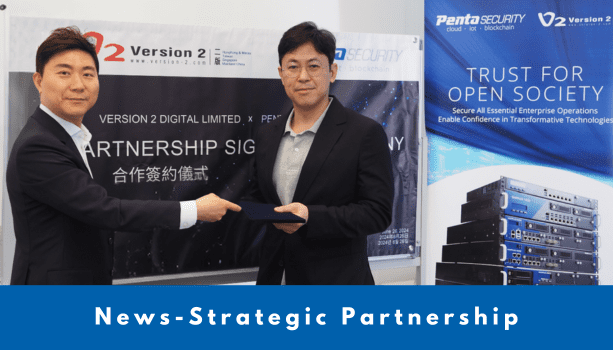
Penta Security Enhances Asian Market Presence through Strategic Partnership with Version 2 Digital

Penta Security, a leading global provider of web, data, and IoT security solutions, proudly announces its strategic partnership with Version 2 Digital, a dynamic IT company based in Hong Kong. This partnership aims to strengthen Penta Security’s presence in the Asian market by leveraging Version 2’s extensive sales network to distribute WAPPLES, Penta Security’s Web Application & API Protection (WAAP) solution, across Hong Kong, Macau, Taiwan, and Singapore.

Carlos Cheng, Founder and Managing Director of Version 2 Digital, expressed his excitement about the partnership: “We are honored to collaborate with Penta Security, a leader in cybersecurity. This partnership will enable us to bring advanced security solutions to our diverse client base, helping them safeguard their digital assets against the increasing threats in the cyber landscape.”

Ian Choi, Head of Global Business at Penta Security, added, “Partnering with Version 2 allows us to leverage their extensive network and expertise in the IT industry. Together, we aim to deliver unparalleled security solutions and services to businesses and consumers across these regions. We look forward to continuous collaboration to generate synergies not only in the security industry but also in the encryption business sector.”

About Penta Security
Penta Security takes a holistic approach to cover all the bases for information security. The company has worked and is constantly working to ensure the safety of its customers behind the scenes through the wide range of IT-security offerings. As a result, with its headquarters in Korea, the company has expanded globally as a market share leader in the Asia-Pacific region.

As one of the first to make headway into information security in Korea, Penta Security has developed a wide range of fundamental technologies. Linking science, engineering, and management together to expand our technological capacity, we then make our critical decisions from a technological standpoint.

About Version 2 Digital

Version 2 Digital is one of the most dynamic IT companies in Asia. The company distributes a wide range of IT products across various areas including cyber security, cloud, data protection, end points, infrastructures, system monitoring, storage, networking, business productivity and communication products.

Through an extensive network of channels, point of sales, resellers, and partnership companies, Version 2 offers quality products and services which are highly acclaimed in the market. Its customers cover a wide spectrum which include Global 1000 enterprises, regional listed companies, different vertical industries, public utilities, Government, a vast number of successful SMEs, and consumers in various Asian cities.

10 Questions Every CISO Should Be Able to Answer About Their Organization’s Cybersecurity Program

Chief Information Security Officers (CISOs) are at the frontline of enterprise cybersecurity, balancing technical know-how, business strategy, and regulatory compliance. So these security leaders, being unprepared to answer key questions about your organization’s security posture can spell disaster. Whether the inquiry comes from a board member, a regulator, or a concerned customer, CISOs need to have rock-solid responses. Below are the top 10 cybersecurity questions every CISO should be able to answer — and why each one matters.

1. What is our most valuable data, and how are we protecting it?

Every organization has sensitive data—whether it’s intellectual property, customer information, or financial data. CISOs must understand what data, if compromised, would cause the most harm to the business. This includes knowing where the data is stored, who has access, and the security measures in place to protect it, such as encryption and access controls.

2. What is our cybersecurity strategy, and how does it align with business objectives?

Gone are the days when security was an IT-only issue. CISOs must articulate how their cybersecurity strategy aligns with overall business goals. As far as cybersecurity questions go, it’s critical that CISO be able to answer: are there security initiatives that support business growth? How do security investments reduce risk to mission-critical operations? A solid answer demonstrates the CISO’s ability to position security as a business enabler, not just a cost center.

3. How do we manage third-party risks?

Third-party vendors and partners are often the weakest links in an organization’s security chain. A CISO should be able to detail the process for vetting vendors, monitoring compliance, and mitigating risks from third-party relationships. Key considerations include whether vendors comply with relevant standards (like SOC 2 or ISO 27001) and whether their access is controlled through solutions such as Zero Trust and network segmentation.

4. How do we ensure continuous compliance with evolving regulations?

The regulatory landscape is increasingly complex, with rules such as GDPR, CCPA, and HIPAA demanding strict adherence. A CISO needs to be on top of current and emerging regulations and should be able to answer how the organization remains compliant while keeping operations efficient. This includes automating compliance processes and preparing for audits.

5. What are our biggest cybersecurity risks today, and what’s the plan to mitigate them?

No organization is immune to risk, but CISOs should know what specific threats pose the greatest risk to their environment—whether it’s ransomware, insider threats, or supply chain attacks. They should also be able to outline the mitigation strategies in place, such as endpoint protection, NAC solutions, and employee awareness training programs.

6. What’s the incident response plan, and when was it last tested?

Every CISO needs a well-rehearsed incident response plan (IRP) to contain and recover from a cyberattack. It’s not enough to have a plan in place; it must be regularly tested and updated to reflect new threats and vulnerabilities. CISOs should be able to answer questions about the IRP’s effectiveness, who participates in incident response exercises, and how quickly operations can resume after an incident.

7. How do we protect remote workers and hybrid environments?

With the rise of remote and hybrid work, securing endpoints outside the traditional network perimeter has become critical. A CISO should explain the measures in place to protect remote workers, such as network access control (NAC), endpoint detection and response (EDR), passwordless authentication, and Zero Trust policies.

8. What’s our approach to managing insider threats?

Insider threats—whether malicious or accidental—pose a significant risk to any organization. CISOs must demonstrate that they have tools and processes to monitor suspicious behavior and detect anomalies. This includes knowing how the organization identifies high-risk insiders, limits access to sensitive data, and enforces security policies consistently.

9. How do we keep employees engaged in cybersecurity awareness?

Cybersecurity isn’t just the responsibility of the IT team; it’s a shared responsibility across the organization. A CISO needs to discuss how they build a culture of security awareness, what training programs are in place, and how they measure the effectiveness of these efforts. This also includes addressing phishing simulations, gamified training, and reward programs to reinforce positive behavior.

10. What metrics do we use to measure the effectiveness of our cybersecurity program?

CISOs must be able to back their strategies and claims with data. What key performance indicators (KPIs) and metrics are used to measure success? These might include time to detect and respond to threats, the number of incidents contained, compliance scores, and audit results. Clear metrics help justify security investments and demonstrate the value of the program to stakeholders.

Accountability for these Cybersecurity Questions

Being a CISO is no small task. These 10 cybersecurity questions are just the starting point, but they cover the fundamental aspects of an organization’s cybersecurity posture—from strategy and risk management to compliance and incident response. CISOs who can confidently answer these questions demonstrate not only a mastery of their cybersecurity program but also a deep understanding of how security supports the broader business. In today’s threat landscape, preparation is everything—and that starts with knowing the right questions to ask and answer.

About Version 2 Digital

Version 2 Digital is one of the most dynamic IT companies in Asia. The company distributes a wide range of IT products across various areas including cyber security, cloud, data protection, end points, infrastructures, system monitoring, storage, networking, business productivity and communication products.

Through an extensive network of channels, point of sales, resellers, and partnership companies, Version 2 offers quality products and services which are highly acclaimed in the market. Its customers cover a wide spectrum which include Global 1000 enterprises, regional listed companies, different vertical industries, public utilities, Government, a vast number of successful SMEs, and consumers in various Asian cities.

About Portnox
Portnox provides simple-to-deploy, operate and maintain network access control, security and visibility solutions. Portnox software can be deployed on-premises, as a cloud-delivered service, or in hybrid mode. It is agentless and vendor-agnostic, allowing organizations to maximize their existing network and cybersecurity investments. Hundreds of enterprises around the world rely on Portnox for network visibility, cybersecurity policy enforcement and regulatory compliance. The company has been recognized for its innovations by Info Security Products Guide, Cyber Security Excellence Awards, IoT Innovator Awards, Computing Security Awards, Best of Interop ITX and Cyber Defense Magazine. Portnox has offices in the U.S., Europe and Asia. For information visit http://www.portnox.com, and follow us on Twitter and LinkedIn.。

×

Hello!

Click one of our contacts below to chat on WhatsApp

×