Skip to content

Understanding File Sharing Permissions and Their Risks

In today’s fast-paced digital world, sharing files quickly and securely is a must! But while file sharing makes our work easier, it’s important to understand the potential risks if permissions aren’t handled correctly. Knowing the difference between various file-sharing options—especially between sharing files externally and sharing them publicly—can help keep your data safe. Plus, using strong data loss prevention (DLP) measures can reduce the risks even further.

Why File Sharing Permissions Matter

File sharing permissions control who can access, view, or edit a file. These settings aren’t just for convenience—they’re essential for protecting your data! If files are shared incorrectly, it could lead to unintentional data leaks, intellectual property theft, or even issues with legal compliance, especially in industries with strict privacy regulations like healthcare, finance, or government.

File sharing permissions are essential for protecting your data!

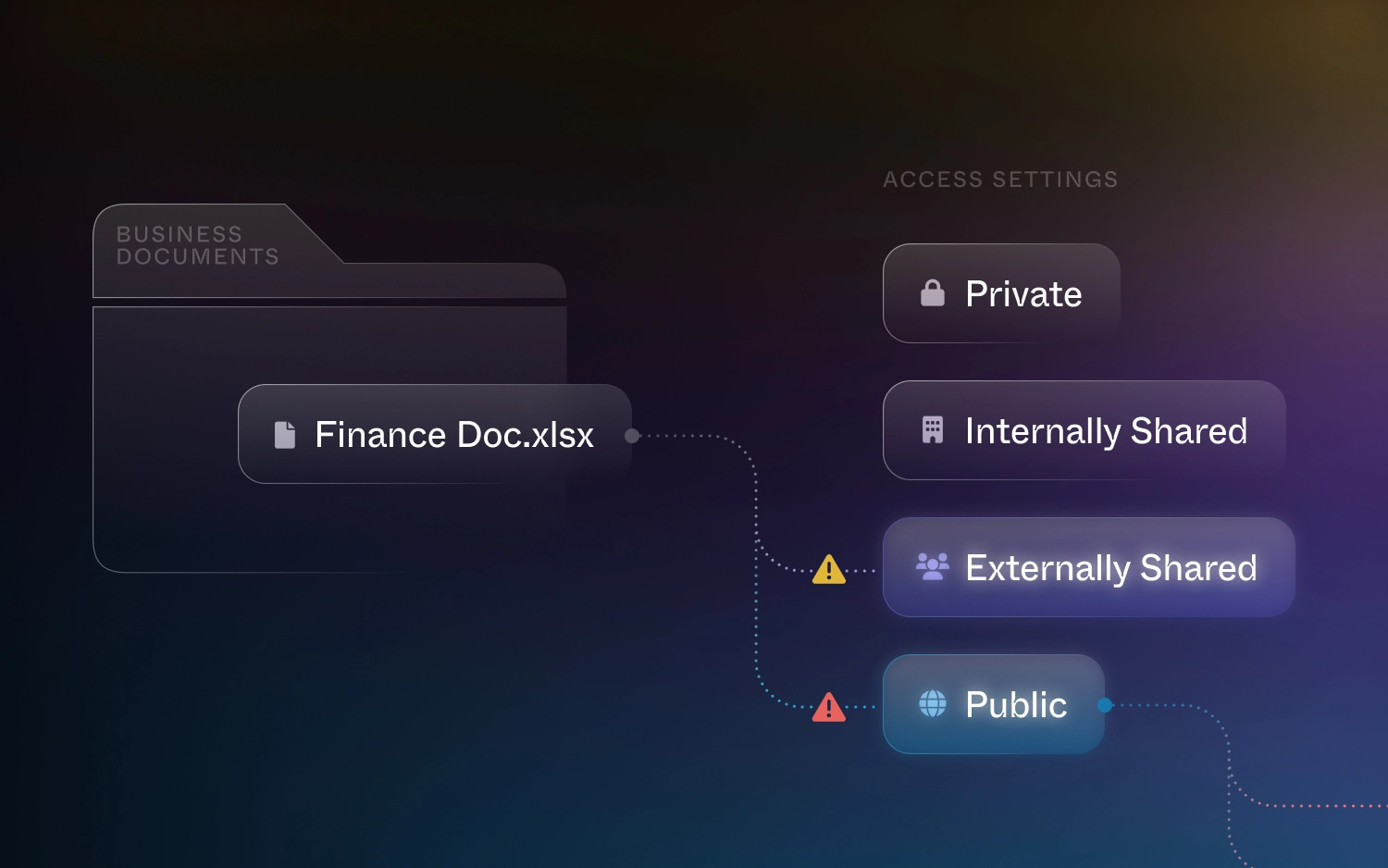
Let’s break down the four main types of file-sharing permissions and see how each one differs in terms of functionality and risk.

1. Private Sharing Within Your Organization

Private sharing lets you share files with specific people within your organization (like manually adding invitedcoworker@company.com). This is generally the safest option, especially for confidential projects, because only the people you choose can access the files. For example, sensitive documents like product development plans or financial reports should be shared this way to avoid them falling into the wrong hands.

This type of sharing works well with data loss prevention systems, which can monitor files for sensitive information—like social security numbers or intellectual property—and prevent them from being shared beyond their intended audience. Awesome, right?

2. Internal Sharing Across the Organization

Internal sharing makes files available to everyone within your organization (everyone@company.com). This is perfect for files like company-wide announcements, training materials, or resources that everyone needs access to. While it’s super convenient, it does come with some risk. If sensitive data is accidentally shared this way, it could lead to unintentional access by people who shouldn’t see it.

DLP systems can help by scanning files for any sensitive or proprietary information and flagging potential risks before they become bigger problems.

3. External Sharing with Specific Individuals

External sharing (i.e. inviteduser@external.com) is often used when working with clients, vendors, or other third parties. It allows you to share files outside of your organization in a controlled way, ensuring that only the invited people can access the file. So handy!

However, there’s still some risk. Even when you’re sharing with specific external permissions, the file could be forwarded or misused. That’s where DLP can step in, adding an extra layer of protection by encrypting files or requiring access credentials, so even if the file is forwarded, only the intended person can access it. That’s peace of mind!

4. Public Sharing: The Riskiest Option

Public sharing means anyone with a link can access the file. While it’s useful for sharing non-sensitive materials—like marketing documents or event invitations—it also poses the greatest risk for accidental data leaks.

If a sensitive file is shared publicly instead of with a specific person, the consequences can be serious. Public sharing opens up files to anyone who gets the link, making it difficult to control who sees or downloads them. This can lead to data breaches, intellectual property theft, or compliance violations. Be careful with this one!

Public sharing can lead to data breaches, intellectual property theft, or compliance violations.

Externally Shared vs. Publicly Shared: Why It Matters

The big difference between externally shared files and publicly shared files is control. Externally shared files are restricted to specific people outside your organization, while publicly shared files can be accessed by anyone who gets the link. The latter option creates a much bigger security risk because it’s hard to track who has viewed or downloaded the file, making it tough to contain any damage caused by unauthorized access.

Understanding this distinction is critical, especially in industries where data security is a top priority, like healthcare or finance. Sharing a file publicly that contains sensitive information could result in massive breaches, fines, and damage to your company’s reputation. Nobody wants that!

Understanding this distinction is critical, especially in industries where data security is a top priority.

The Role of dope.security in Data Loss Prevention (DLP)

With innovative solutions like dope.security’s CASB Neural, businesses can protect their sensitive data through behind the scenes monitoring and access control to cloud services, making sure your data stays safe from unauthorized access or transfers. By using machine learning and smart analytics, CASB Neural can flag for potential data risks in real time, and allow you to update file access permissions directly from the console.

Have a file accidentally available to anyone with the link? Remove Public access. Have a file shared with an external vendor, who doesn’t need the document anymore? Remove External access. You can rest easy knowing that even in tricky cloud environments, your information is well-managed.

CASB systems are essential for keeping your important data secure by monitoring and preventing unauthorized sharing of confidential files. CASB Neural automatically scans for sensitive content, like financial details, personal information, or proprietary data, before anything is shared. It’s like having a reliable watchdog that helps keep your data safe from accidental or intentional leaks.

Adding DLP to your file-sharing process offers an extra layer of protection, especially when using platforms where it’s easy to accidentally share files too broadly. With tools like CASB Neural, you get peace of mind knowing your sensitive information is safeguarded without any hassle. This added security lets you enjoy the flexibility and convenience of cloud-based platforms while keeping your data protected. It’s a simple, smart way to stay secure and stress-free.

Wrapping Up

As file-sharing continues to evolve, so do the risks that come with it. Understanding the difference between external and public sharing, along with using robust data loss prevention strategies, is crucial for keeping your data safe. It’s a great idea for organizations to regularly review their file-sharing policies, educate employees about the risks, and use technology to protect sensitive information from getting into the wrong hands.

With dope.security, you can easily review all Publicly and Externally shared files within CASB Neural, and with a click of the button turn your shared files Private. Integrate this with department-wide Secure Web Gateway (SWG) Policies and Cloud Application Control (CAC) settings and you’ll be flying the internet skies safely with your files secured in tow.

Stay safe and share smartly!

About Dope Security

A comprehensive security solution designed to protect individuals and organizations from various cyber threats and vulnerabilities. With a focus on proactive defense and advanced technologies, Dope Security offers a range of features and services to safeguard sensitive data, systems, and networks.

About Version 2 Digital

Version 2 Digital is one of the most dynamic IT companies in Asia. The company distributes a wide range of IT products across various areas including cyber security, cloud, data protection, end points, infrastructures, system monitoring, storage, networking, business productivity and communication products.

Through an extensive network of channels, point of sales, resellers, and partnership companies, Version 2 offers quality products and services which are highly acclaimed in the market. Its customers cover a wide spectrum which include Global 1000 enterprises, regional listed companies, different vertical industries, public utilities, Government, a vast number of successful SMEs, and consumers in various Asian cities.

ESET updates its Vulnerability and Patch Management module with new functions

  • ESET Vulnerability and Patch Management (V&PM) receives new updates, expanding its coverage and functionalities
  • ESET V&PM is now also available for Linux (desktop and server), and macOS systems
  • The new V&PM dashboard inside ESET PROTECT grants extensive visibility and transparency
  • More control for security admins, with either always-on scanning or scanning on-demand
  • Customers can now purchase ESET V&PM as a separate add-on for ESET PROTECT Entry and ESET PROTECT Advanced subscriptions

BRATISLAVAOctober 10, 2024ESET, a global leader in cybersecurity solutions, today announces its release of an update to its ESET Vulnerability and Patch Management module.

For organizations, it is crucial that they minimize their attack surface. With thousands of vulnerabilities being discovered every quarter, the threat landscape is in constant flux. A single vulnerability can bring a business, nay, a whole supply chain to a standstill. To prevent such an eventuality, vulnerability and patch management is an excellent tool, providing great cyber hygiene while helping build a proactive security posture, preventing incidents from taking place.

ESET understands all too well that threat actors continuously target an increasingly broad spectrum of devices, systems, and software. With our new update, ESET V&PM has expanded to support Linux1 (desktops and servers), as well as macOS2, covering broader parts of a business’ ecosystem.  

To support such a comprehensive endeavor, the V&PM module is now also presented in a new dashboard, improved for greater visibility and transparency, enhancing its ease of use while giving an instant overview of vulnerability and patching status across a network.

At the same time, due to ESET V&PM’s deep embedding inside the ESET PROTECT Platform, it now also supports on-demand vulnerability scanning, enabling instant insight into the status of specific machines.

While as a default, vulnerability scanning is fully automated to save you time and close the attack gap against threat actors, for Windows and Linux servers, the product gives manual control to its administrators. This is especially useful in helping security admins have more oversight over their scanning and patching processes, so that they don’t interrupt business workflows.

“We believe that top-level security shouldn’t require needless complexity, as it only makes security workflows too time-consuming, which could be better spent on other important tasks. With this new update to our ESET V&PM module, we take all of this into consideration, focusing on what matters – speed, ease of use, compliance3, and proactive prevention. Threats don’t sleep and with the always-on function, neither does our solution, keeping a constant eye on your business’ security,” said Michal Jankech, Vice President, Enterprise & SMB/MSP at ESET.

ESET’s Vulnerability & Patch Management is available in the following solutions: ESET PROTECT Complete, ESET PROTECT Elite, ESET PROTECT MDR, and ESET PROTECT MDR Ultimate. With the latest update, customers can order ESET V&PM as an add-on to ESET PROTECT Entry and ESET PROTECT Advanced subscription as well, upping business security from the smallest player to the largest. As always, the current update will be rolled out automatically without any additional costs.

1Please check our website for desktop Linux compatibility.

2Additionally, Linux patch management, as well as operating system vulnerability scanning and patching in macOS, is on the roadmap.

3Regulations such as NIS2 in the European Union require transparent vulnerability disclosure and management for compliance.

For more information about ESET Vulnerability and Patch Management, please visit its product page here.

To understand why patch management should be a necessary component of business security strategy, read our blog here.

About Version 2 Digital

Version 2 Digital is one of the most dynamic IT companies in Asia. The company distributes a wide range of IT products across various areas including cyber security, cloud, data protection, end points, infrastructures, system monitoring, storage, networking, business productivity and communication products.

Through an extensive network of channels, point of sales, resellers, and partnership companies, Version 2 offers quality products and services which are highly acclaimed in the market. Its customers cover a wide spectrum which include Global 1000 enterprises, regional listed companies, different vertical industries, public utilities, Government, a vast number of successful SMEs, and consumers in various Asian cities.

About ESET
For 30 years, ESET® has been developing industry-leading IT security software and services for businesses and consumers worldwide. With solutions ranging from endpoint security to encryption and two-factor authentication, ESET’s high-performing, easy-to-use products give individuals and businesses the peace of mind to enjoy the full potential of their technology. ESET unobtrusively protects and monitors 24/7, updating defenses in real time to keep users safe and businesses running without interruption. Evolving threats require an evolving IT security company. Backed by R&D facilities worldwide, ESET became the first IT security company to earn 100 Virus Bulletin VB100 awards, identifying every single “in-the-wild” malware without interruption since 2003.

What’s Coming in CentOS Stream 10

Information about CentOS Stream 10 has been trickling in since ISOs first became available in June. CentOS Stream 10 will be based on Fedora 40 and released sometime ahead of RHEL 10, but the current images are still in testing/development and could very well change between now and the actual release. 

So what do we know about CentOS Stream 10? Our expert weighs in and offers considerations for enterprise teams considering CentOS Stream for production workloads.

CentOS Stream Project Update 

CentOS Stream has an interesting history, with some notable developments in the past few years. After announcing in 2020 that CentOS Linux would be discontinued in favor of focusing on CentOS Stream, last year Red Hat ruffled more feathers by announcing that CentOS Stream would become the sole repository for RHEL source code. CentOS Stream 8, the first release, reached end of life in May 2024; CentOS Stream 9 has been out since 2021. 

On June 6, 2024, the CentOS Project posted links to the CentOS Stream 10 compose images, install ISOs, and container images with the following message: “Please note the compose is still taking shape. Packages are still being added and even removed at this point. Not all packages are fully onboarded to gating, so just some updates are landing. Packages are being moved between repositories. Comps groups are being updated…” Developers were encouraged to test and share feedback.

In other words, much is still to be determined. New ISOs have been made available periodically since the June announcement (as of this writing, the last batch dropped on October 22, 2024). 

Back to top

CentOS Stream vs. CentOS Linux

The main difference between CentOS Stream and CentOS Linux is that CentOS Stream is upstream of RHEL, with packages planned for upcoming releases, and CentOS Linux is a rebuild of the current RHEL release.

Another key difference is how updates are made in the two distributions. For CentOS Linux, new minor versions consist of large batches of updates, with smaller updates between versions. Rather than batch updates, packages in CentOS Stream are updated as they are ready, in a continuous stream, and there are no minor versions. 

Before all versions reached end of life, CentOS Linux had a community support lifecycle of ten years, like RHEL and many other Enterprise Linux distributions. CentOS Stream has a shorter lifecycle of five years, with EOL based on when the corresponding RHEL release leaves Full Support and enters its Maintenance Phase (security updates only). 

Back to top

How Long Will CentOS Stream 9 Be Supported?

CentOS Stream 9 will be supported until May 31, 2027, when RHEL 9 leaves Full Support.  

Back to top

CentOS Stream 10 Release Date

CentOS Stream is upstream of RHEL and all signs point to the RHEL 10 GA release sometime in the first half of 2025, so the CentOS Stream 10 release is anticipated in late 2024 or early 2025. 

Back to top

Notable Changes in CentOS Stream 10 

  • Kernel: CentOS Stream 10 will be using a 6.11-based kernel, rather than 5.14 that CentOS Stream 9 used.
  • Programming language support/compilers: CentOS Stream 10 has GCC 14.2.1 (instead of GCC 11.5), and Python 3.12 (instead of Python 3.9).
  • CPU compatibility and capabilities: one user encountered a warning message that that x86_64-v3 will be required at a minimum in the future, but as of now it is just a deprecation warning.
  • Performance: Phoronix ran some benchmarks, and a thorough comparison of performance is available here. That is for Arm64 instead of x86_64, but should still be comparable.

Back to top

Using CentOS Stream in Production

There is some debate over whether enterprises should use CentOS Stream in production. Some say the rolling release model makes it too unstable and that it’s more of a ” beta testing ground” for features, or a preview of the next version of RHEL (though not everything in Stream may make it into RHEL). Red Hat explicitly says that CentOS Stream “is not designed for production use in enterprise environments” and recommends using RHEL as a CentOS alternative.

However, depending on your use case, using CentOS Stream for production workloads may not present any issues. Some teams like that Stream gives them access to bug fixes and new features before they become available in RHEL. The notion that CentOS Stream is fundamentally less stable or reliable than RHEL is not really accurate, as everything in Stream undergoes QA and testing, and has been accepted for the next minor RHEL release before being merged into Stream.  

The main difference between RHEL and CentOS Stream comes down to commercial support and services that RHEL provides to its paying subscribers.  

Still, a lot depends on your particular use case and infrastructure to determine whether or not CentOS Stream is the right fit. 

Back to top

CentOS Stream 10 Migration and Upgrade Considerations

As usual, you will want to test thoroughly before upgrading important systems. The new kernel version may not support older hardware, and with x86_64-v3 coming in the future, some older hardware may not work at all. Information about glibc-hwcaps can be found here. RHEL 9 did the same with x86_64-v2 and a simple test under Proxmox using x86-64-v2-AES produced a kernel panic during just an install, but x86-64-v3 succeeded.

With a new kernel, glibc, gcc, Python, and other changes, some existing software may not have library versions available to run the older version. Containers or VMs could mitigate the problem, however.

Back to top

What to Expect from Future CentOS Stream Releases

In future CentOS Stream releases, you can expect continuous upgrades of packages, with new versions, security patches, and performance improvements. Future releases may introduce new features, such as updated kernels, newer versions of programming languages, and support for emerging hardware or software trends.

Back to top

Final Thoughts 

CentOS Stream 10 gives us insight into what is likely to be included in the next version of RHEL — the first major release in four years. As to whether CentOS Stream 10 is a viable alternative to CentOS Linux or the best Linux distro for your organization, I recommend checking out this CentOS Stream checklist for guidance. 

It’s always a good idea to have technical support for your mission-critical workloads, and ideally, to work with experts who have full stack expertise to troubleshoot issues with updates and integrations. If you decide to use a FOSS Linux OS, it’s wise to pair it with commercial support from OpenLogic so you always have immediate access to Enterprise Architects. 

About Version 2 Digital

Version 2 Digital is one of the most dynamic IT companies in Asia. The company distributes a wide range of IT products across various areas including cyber security, cloud, data protection, end points, infrastructures, system monitoring, storage, networking, business productivity and communication products.

Through an extensive network of channels, point of sales, resellers, and partnership companies, Version 2 offers quality products and services which are highly acclaimed in the market. Its customers cover a wide spectrum which include Global 1000 enterprises, regional listed companies, different vertical industries, public utilities, Government, a vast number of successful SMEs, and consumers in various Asian cities.

About Perforce
The best run DevOps teams in the world choose Perforce. Perforce products are purpose-built to develop, build and maintain high-stakes applications. Companies can finally manage complexity, achieve speed without compromise, improve security and compliance, and run their DevOps toolchains with full integrity. With a global footprint spanning more than 80 countries and including over 75% of the Fortune 100, Perforce is trusted by the world’s leading brands to deliver solutions to even the toughest challenges. Accelerate technology delivery, with no shortcuts.

Optimizing Data Storage Performance in Hybrid Cloud Environments

As organizations try to strike a balance between the benefits of public and private clouds, hybrid cloud systems have become very popular. Combining these two IT environments allows companies to maximize flexibility, scalability, and cost control. However, data storage performance is one of the key factors deciding how well hybrid cloud systems work. Considering the increasing amount of data produced by businesses, it is essential to provide quick access to well-kept data.

Optimizing data storage performance in hybrid cloud settings comes with both technical and strategic advantages. It helps companies to improve data accessibility across many platforms, lower latency, and simplify processes on many systems.

This article will work you through the common challenges associated with frequent hybrid cloud data storage, best practices for optimization, and the solutions accessible to solving these issues.

What are the Common Challenges in Hybrid Cloud Data Storage?

Although the hybrid cloud setup has several advantages, data storage in this model faces many challenges. These difficulties might affect the general operation of the system and compromise the data retrieval and storage efficiency.

Data Silos and Fragmentation

Data silos are one of the most common challenges. Data may get scattered across many storage systems in a hybrid cloud environment, causing inefficiencies. This fragmentation might make it challenging to rapidly access comprehensive data sets, lowering the speed of analytics systems and applications.

Inconsistent Performance Across Environments

Often linking many vendors and technologies, hybrid cloud setups might cause inconsistent data storage performance. Particularly when data is moved across environments, the performance variations between on-site storage and cloud storage might cause bottlenecks.

Security and Compliance Concerns

In a hybrid cloud setup, maintaining data security and regulatory compliance becomes increasingly difficult. The decentralized character of data storage raises the possibility of breaches. Hence, strong security measures must be followed without sacrificing efficiency.

How can Organizations Optimize their Data Storage Performance?

Organizations that wish to overcome these challenges have to implement best practices that improve data storage performance while preserving the scalability and flexibility of their hybrid cloud infrastructure.

Data Tiering and Categorization

Data tiering is the arrangement of data according to frequency of use and relative value. While less important, “cold” data may be kept in reasonably priced, lower-performance tiers. Frequently accessed or “hot” data should be kept in high-performance storage tiers. This method constantly guarantees easy access to important data, enhancing general performance.

Storage Resource Management and Monitoring

Rapidly detecting and fixing performance issues depends on ongoing observation of storage resources. Organizations should use automated technologies that provide real-time analysis of storage use, latency, and throughput. This will enable companies to aggressively improve their storage system.

Caching and Buffering Techniques

Caching, a technique for storing frequently accessed data in a temporary, high-speed storage layer, enhances cloud data optimization. Similarly, buffering helps control data flow across systems, lowering the delay effect. Improving data storage performance in hybrid clouds depends critically on both methods.

Choosing a Hybrid Cloud Storage Solution

Optimizing performance in hybrid cloud systems also depends critically on choosing appropriate storage options. Commonly used storage options include:

Object Storage vs. Block Storage

Large volumes of unstructured data are best managed using object storage solutions like IBM Cloud Object Storage, Amazon S3, and Microsoft Azure Blob Storage, as they allow for scalable storage with metadata tagging. Conversely, block storage solutions like VMware vSAN, Amazon EBS, and IBM Cloud Block Storage offer great performance for transactional data and applications needing quick read-through operations. Knowing the particular requirements of your data will enable you to choose the best kind of storage.

File Storage vs. Cloud-Native Storage

File storage is suitable for collaboration tools and file-sharing services as applications requiring shared access to data will find it most suited. Designed to fit well with cloud services, cloud-native storage provides scalability and adaptability for applications housed in the cloud. Performance may be much improved by choosing the correct storage solution depending on workload demands.

Hyperconverged Infrastructure (HCI) and Its Benefits

Integrating computation, storage, and networking into a single system, hyperconverged infrastructure (HCI) offers a streamlined and effective architecture. HCI can streamline data storage and administration in a hybrid cloud environment, lowering the complexity of integrating many systems and enhancing performance.

Performance Optimization Techniques in a Hybrid Cloud System

Beyond choosing the right storage solutions, implementing specific performance optimization techniques can further enhance data storage efficiency in hybrid cloud environments.

Data Compression and Deduplication

By reducing data size, data compression lowers transmission times. It allows more data to be kept in the same volume of space. Compressing vast amounts of data before moving it to the cloud, for example, may speed up uploads and downloads, minimizing the effect on network resources and data storage expenses.

Deduplication increases storage capacity by removing extra copies of data, complementing compression. This method works especially well in backups or disaster recovery sites where data might be stored in multiple locations. Organizations may reduce the amount of storage needed, increase access speeds, and save maintenance costs by adopting deduplication.

Storage Virtualization and Abstraction

Abstracting physical storage resources into a logical representation, storage virtualization helps to manage and maximize storage across mutiple settings. It facilitates faster access times and more effective data management. The abstraction provided by storage virtualization also facilitates seamless integration between on-premises and cloud storage systems. Supporting automatic load balancing, this abstraction layer guarantees the best use of storage resources and consistent performance throughout the whole hybrid cloud architecture.

Quality of Service (QoS) and Latency Optimization

By allowing managers to give certain categories of data or workloads top priority, QoS settings help to provide greater bandwidth and storage capacity to highly important activities. This prioritization avoids performance bottlenecks, and mission-critical programs run faultlessly even during moments of maximum demand.

In cases of data storage across geographically dispersed locations, latency—the delay between a data demand and its delivery—can be a major problem. Techniques such as edge computing—where data processing occurs closer to the data source—can help reduce latency by minimizing the distance data needs to travel.

Furthermore, latency-sensitive caching allows frequently requested material to be kept in places with the fastest access times, hence reducing user delays. Latency-aware routing systems send data searches to the closest or fastest-performing storage site and also find use cases in a hybrid setting.

The Role of Storware in Optimizing Data Storage Performance

Storware Backup and Recovery can significantly optimize data storage performance in hybrid cloud environments by offering several key features and benefits:

  • Reduced Storage Footprint: Storware’s deduplication technology identifies and eliminates redundant data, significantly reducing the amount of storage required. This can result in substantial cost savings and improved performance.
  • Faster Backups and Restores: Compression techniques further optimize data storage by reducing file sizes. This leads to faster backups and restores, improving overall data accessibility.
  • Efficient Data Movement: Storware leverages efficient data transfer mechanisms to minimize latency and optimize the movement of data between on-premises and cloud environments. This ensures that data is transferred quickly and reliably, enhancing performance and reducing downtime.
  • Adaptable to Growing Needs: Storware can scale to accommodate increasing data volumes and changing business requirements. This ensures that organizations can effectively protect their data as their workloads grow.
  • Seamless Integration: Storware integrates seamlessly with major cloud providers like AWS, Azure, and Google Cloud, enabling organizations to leverage the benefits of cloud-based storage while maintaining a centralized data protection strategy.
  • Optimized Cloud Utilization: By effectively managing data storage and backup in the cloud, Storware helps organizations optimize their cloud resource usage and reduce costs.

By leveraging these features, Storware Backup and Recovery can significantly optimize data storage performance in hybrid cloud environments, helping organizations achieve improved efficiency, cost savings, and enhanced data protection.

To Sum Up

Organizations trying to exploit the advantages of their hybrid cloud installations must first optimize their data storage performance. Businesses may improve the dependability and efficiency of their data storage by tackling issues of data silos, uneven performance, security concerns, and best practices, including data tiering, resource management, and cache.

Ultimately, organizations that focus on data optimization in their hybrid cloud systems remain agile, safe, and able to satisfy the data needs in today’s marketplace.

About Version 2 Digital

Version 2 Digital is one of the most dynamic IT companies in Asia. The company distributes a wide range of IT products across various areas including cyber security, cloud, data protection, end points, infrastructures, system monitoring, storage, networking, business productivity and communication products.

Through an extensive network of channels, point of sales, resellers, and partnership companies, Version 2 offers quality products and services which are highly acclaimed in the market. Its customers cover a wide spectrum which include Global 1000 enterprises, regional listed companies, different vertical industries, public utilities, Government, a vast number of successful SMEs, and consumers in various Asian cities.

About Storware
Storware is a backup software producer with over 10 years of experience in the backup world. Storware Backup and Recovery is an enterprise-grade, agent-less solution that caters to various data environments. It supports virtual machines, containers, storage providers, Microsoft 365, and applications running on-premises or in the cloud. Thanks to its small footprint, seamless integration into your existing IT infrastructure, storage, or enterprise backup providers is effortless.

×

Hello!

Click one of our contacts below to chat on WhatsApp

×