




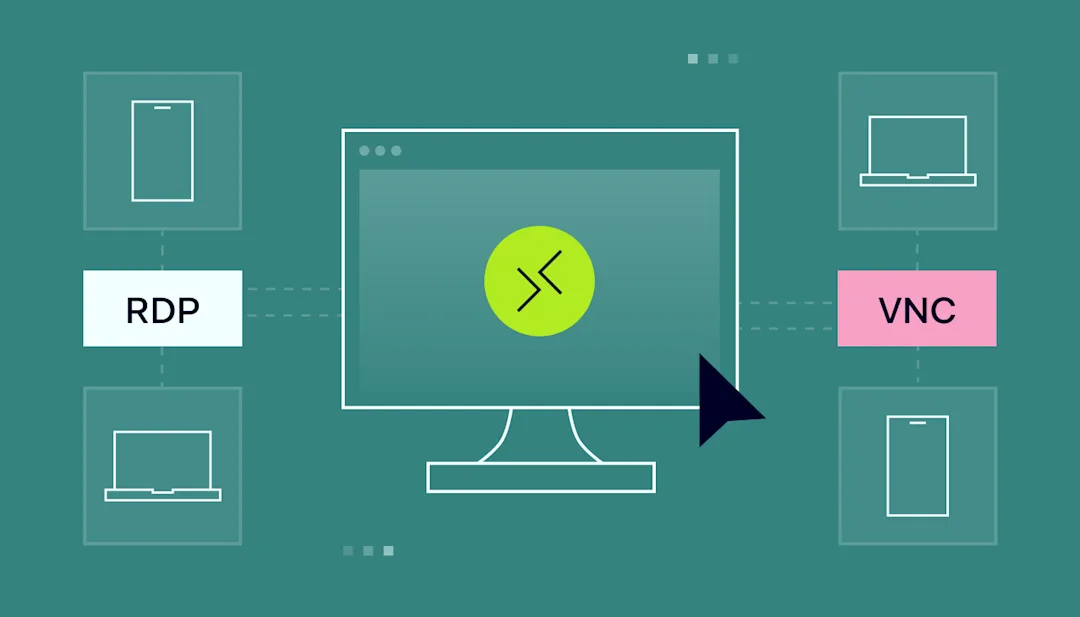
IT admins often use remote desktop solutions in their daily work. With these these tools, they can:
Remotely update, configure, and troubleshoot servers
Help users with technical issues or software problems
Perform maintenance or install software on remote computers
Choosing between Virtual Network Computing (VNC) and Remote Desktop Protocol (RDP) can be challenging. Both offer remote desktop solutions but cater to different needs and environments.
This article will explore their features, differences, and use cases.
What is VNC?
Virtual Network Computing (VNC) is a screen-sharing system that works across many platforms. It uses the Remote Framebuffer Protocol (RFB) to control another computer remotely.
VNC is platform-independent, making it a good choice for connecting different operating systems like Windows, macOS, and Linux.
How VNC works
VNC transmits keyboard and mouse events from one computer to another and relays the graphical screen updates. In other words, it sends the framebuffer (the image displayed on the screen) from the server to the client.
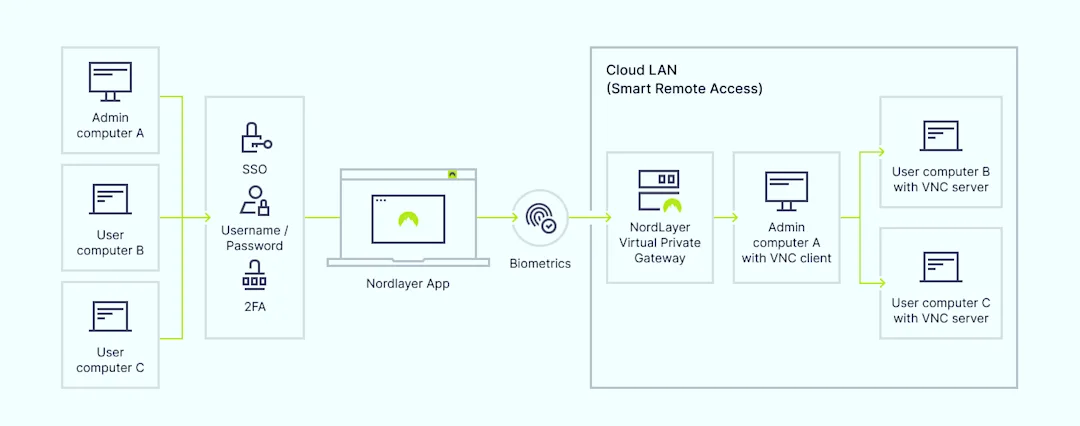
Here’s how it typically works:
The user launches a VNC client and connects to the VNC server on the remote computer
The server sends the screen updates to the client
The client sends keyboard and mouse inputs to the server
Common VNC use cases
Cross-platform remote access. VNC connects to different operating systems, which is ideal for mixed-OS environments
Remote support. VNC provides technical help to users across various operating systems
Access home computers. Users can access their home devices from work or while traveling
Security concerns with VNC
VNC security depends on the specific implementation and additional configurations:
Inconsistent encryption. Not all VNC implementations provide strong encryption, which exposes sessions to potential interception
Authentication. Weak password encryption in some VNC versions can allow attackers to intercept credentials
NordLayer enhances VNC security with features like Smart Remote Access, secure VPN connections, and traffic encryption, ensuring that remote sessions are protected from unauthorized access and data breaches.
What is RDP?
Remote Desktop Protocol (RDP) is a proprietary protocol developed by Microsoft. It allows users to connect to another computer over a network connection.
RDP provides a graphical interface, enabling users to control the remote machine as if they were sitting in front of it. Commonly used in Windows environments, RDP supports multiple features, such as file transfer, printer sharing, and remote audio.
How RDP works
RDP transmits mouse movements and keystrokes from the user’s device to the remote computer via a dedicated network channel using TCP/IP. This channel operates on network port 3389. The user’s desktop is displayed on the computer they connect to, providing a seamless experience.
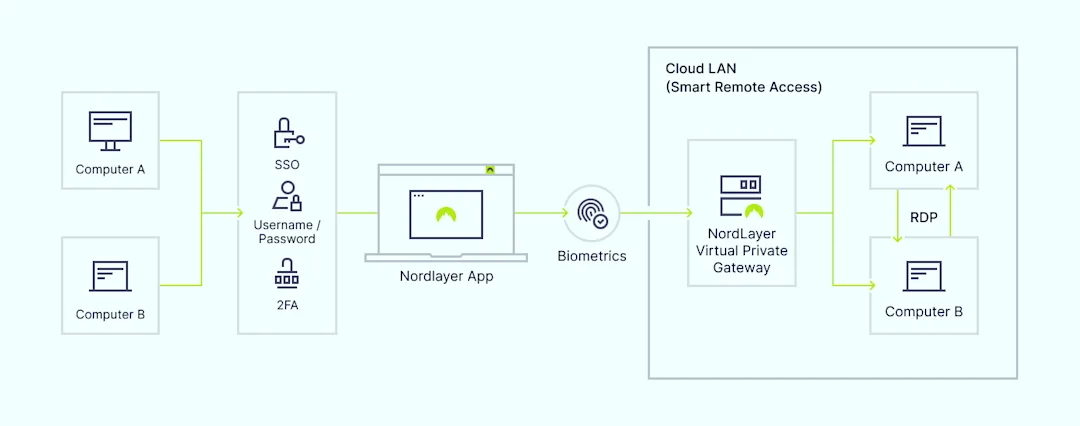
IT administrators often use RDP to access files, run applications, and perform administrative tasks on remote servers or workstations.
Here’s how it typically works:
The user initiates an RDP session using an RDP client
The client connects to the remote computer’s RDP server, usually via port 3389
The user’s input (keyboard and mouse) is transmitted to the remote computer
The remote computer’s screen updates are sent back to the user’s client
Common RDP use cases
Accessing work computers remotely. RDP allows employees to access their workstations securely from any location
Server management. IT admins use RDP to manage servers remotely, perform updates, and troubleshoot issues
Remote support. Technicians can use RDP to provide remote support to users, resolving issues without being physically present
Security concerns with RDP
While RDP offers convenience, it is not inherently secure. It requires additional measures to ensure data integrity and prevent unauthorized access:
Weak authentication. RDP’s default settings may allow weak passwords, making it vulnerable to brute-force attacks
Encryption. RDP uses encryption, but it needs to be configured properly to ensure security
NordLayer addresses these vulnerabilities with advanced security features like two-factor authentication (2FA), Single Sign-On (SSO), and Identity and Access Management (IAM) tools.
VNC vs RDP: main differences
VNC and RDP serve similar purposes but have key differences that affect their use cases.
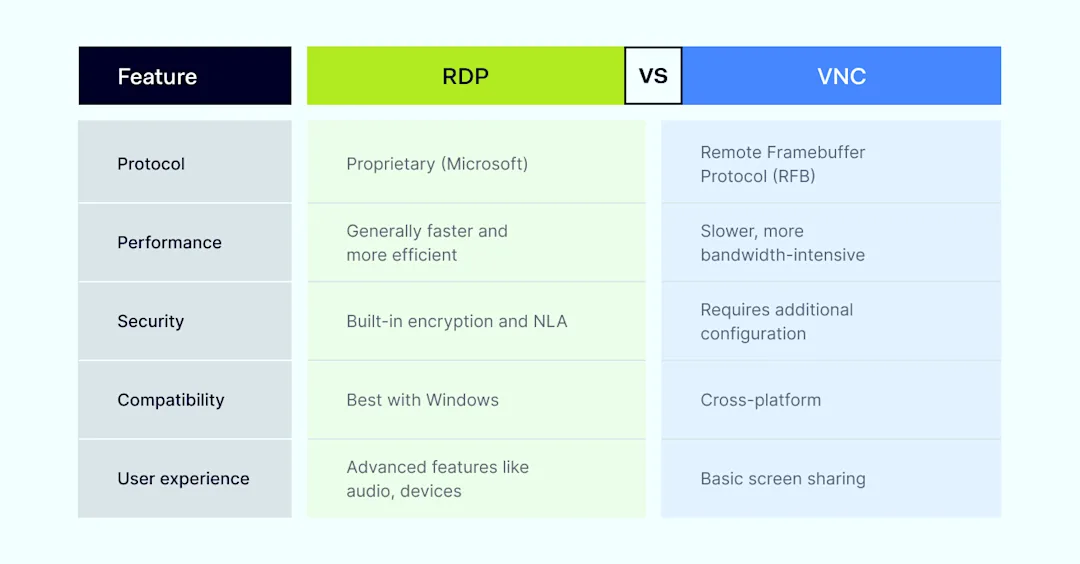

Protocol and performance. RDP uses a more efficient protocol than VNC, often resulting in faster performance and better bandwidth use. However, VNC offers better compatibility with different operating systems
Security. RDP includes built-in encryption and support for Network Level Authentication (NLA). VNC typically requires additional configuration or tools to secure connections, making it less secure out of the box
Compatibility. VNC is highly compatible across various operating systems, while RDP is optimized for Windows environments and may have limited functionality on non-Windows systems
User experience. RDP provides a smooth experience with features like remote audio and device redirection. In contrast, VNC offers basic screen sharing without these advanced features, focusing on compatibility and simplicity
VNC vs RDP: which one should you choose?
Choosing between VNC and RDP depends on your specific needs and environment.

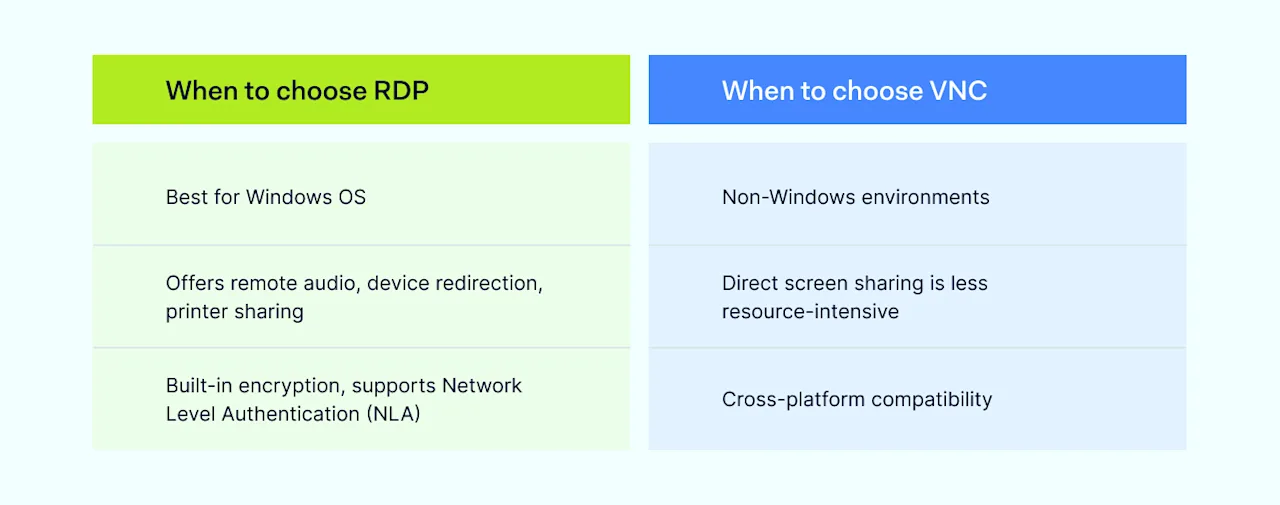
When to choose RDP
Windows-centric environments. If your organization primarily uses Windows, RDP is optimized for this OS and provides a seamless experience
Need for advanced features. RDP offers advanced features like remote audio, device redirection, and printer sharing, which can enhance productivity
Higher security requirements. RDP has built-in encryption and support for NLA, providing better out-of-the-box security
When to choose VNC
Cross-platform compatibility. If you need to connect to different operating systems, VNC is a versatile choice
Simplicity and flexibility. VNC’s simplicity and ability to work across various platforms make it suitable for mixed-OS environments
How NordLayer can help
NordLayer offers secure remote access solutions that enhance the capabilities of both VNC and RDP.
NordLayer also integrates with existing IT infrastructure, adding a strong layer of security and management for remote work environments.
SSO. Simplifies user access to multiple applications with one set of credentials, which enhances security and user experience
2FA. Adds an extra layer of security by requiring a second form of verification. It reduces the risk of unauthorized access
Smart Remote Access. Creates secure connections between devices and central network resources by using VPN-encrypted point-to-point connections for remote desktop access
Remote Access VPN. Acts like a secure bridge that connects you to your office network from anywhere by establishing an encrypted tunnel between your device and the designated network. It keeps your data private while providing access to important files and tools
AES-256 bit encryption. Creates a secure tunnel between endpoints, which blocks all traffic from outside the network
Device Posture Monitoring. Continuously checks the security posture of devices that access the network. It ensures compliance with security policies
ThreatBlock. Blocks access to malicious websites, reducing the risk of phishing and other cyber threats
Fixed IP. Utilizes a fixed IP address exclusively assigned to your company through a VPN for better control and security
IP masking. Replaces your real IP address with a new identity, which prevents easy physical location detection and enables access to geo-blocked services
In the debate of VNC vs RDP, the right choice depends on your specific needs, environment, and security requirements.
RDP is ideal for Windows-centric environments needing advanced features and better out-of-the-box security. VNC is suitable for cross-platform compatibility and simplicity.
