Skip to content

NordLayer feature release: Always On VPN

Small businesses are on the front line of cybersecurity. At any moment, cyberattacks could extract confidential data, damage network infrastructure, or even cause total business failure.

The risks are real. According to Verizon, 60% of small businesses that suffer cyber attacks go out of business within 6 months. Healthcare company Wood Ranch Medical is a great example. The small operator was bankrupted by a 2019 ransomware attack that prevented access to sensitive patient records.

Despite cases like Wood Ranch Medical, most small businesses fail to allocate enough time and resources to counter cyber-threats.

Don’t fall into that trap. Instead, follow this guide to implement robust cybersecurity measures. With our help, you can counter the most dangerous cyber threats faced by SMBs. Let’s find out more.

Understanding the threat landscape for SMBs

The first thing to understand is that small businesses face a diverse range of cyber threats. Any one of them could ruin your reputation and lead to regulatory fines.

Attackers can lurk for months and monitor traffic. They can steal sensitive client data or lock it away until victims pay a ransom. Or they could cause technical damage, ruining network infrastructure.

SMBs can’t afford these consequences. But how do you handle critical cybersecurity threats?

Prevention starts from awareness of the most common threats and how they fit into cybersecurity for small businesses.

Types of cyber attacks

Here’s a list of the most common types of online threats.


All of them threaten small businesses.

1. Phishing

Phishers use social engineering techniques to fool small business employees. With a few pieces of information, attackers can easily convince time-poor workers to make dangerous decisions. This might involve emails pretending to come from colleagues or trusted third parties. The links in these emails lead to malicious sites or initiate malware downloads.

2. Ransomware

Ransomware locks down high-value data and demands a ransom from targets. If attackers control these targets, they can demand a high price to restore access. And small businesses are not always able to pay.

3. Spyware

Spyware tracks data flowing through network assets and sends this information to controllers outside the targeted organization. Some spyware is legitimate. For instance, advertisers sometimes use it to deliver targeted ads. But the majority of spyware is malicious and linked to data extraction.

4. Viruses

Viruses spread between devices and their effects range from relatively light disruption to complete system failure. Some viruses remain dormant for long periods. Others set to work immediately. In all cases, small businesses need updated and effective antivirus software to defend their perimeter.

5. Malware

Malware extends beyond ransomware and spyware. For example, businesses might encounter trojans or worms that stay below the radar until activated. Bots are also common. These agents latch onto devices and create “swarms” to launch wide-scale attacks.

6. Man-in-the-middle attacks

Man-in-the-middle attacks target insecure wifi connections. Attackers can intervene between remote access workers and the corporate network. If the connection is unencrypted, hackers can harvest information from corporate network traffic and steal confidential data.

7. SQL injection

SQL injection uses SQL code to request access to valuable databases. This generally occurs via web forms connected to SQL databases. For small businesses, this could include employee gateways or payment forms. Securing web assets is absolutely essential.

8. DDoS attacks

Distributed denial-of-service attacks involve botnets featuring hundreds or thousands of agents. Botnets direct massive amounts of traffic at their target with the aim of overwhelming networks. Larger organizations may have the resources to absorb DDoS floods. But with attacks averaging 5.17 Gbps, small business websites can easily fold under the pressure.

9. Zero-day exploits

Zero-day exploits target recently documented software vulnerabilities. In these situations, vendors probably haven’t developed patches, exposing users to opportunist attackers. Small businesses rely on anti-virus, communications, and data management tools in everyday work. But any of these tools can become vulnerable overnight.

10. DNS tunneling

DNS tunneling injects malicious code into networks via DNS queries. This allows hackers to seize control of local DNS servers. When that happens, a small business can lose control of its website and network assets. DNS tunneling exploits insecure firewalls, but SMBs often retain legacy firewall products. That’s a bad idea when successful attacks can ruin reputations in seconds.

11. XSS attacks

XSS (or Cross Site Scripting) injects malicious code via web applications and browser-side scripts. XSS attacks allow attackers to change website designs, adding undesirable content. They can launch malicious software, infecting business networks and customer devices. It allows hackers to spoof legitimate identities by hijacking cookies. All of that is bad news for SMBs.

Cybersecurity best practices for small businesses

Small businesses need cybersecurity strategies that deal with critical threats. But how can you implement an effective strategy with a small business budget?

SMBs lack the resources of corporations. But cybersecurity for small businesses must still protect sensitive data and network resources. Here are some best practices to follow that balance cost and efficiency.

1. Implement a strong password policy

Employees should only use strong passwords to log into your company network. Weak passwords are easy to guess or brute force. This makes mounting attacks much simpler.

Require employees to use 10-15 character passwords. Demand a mixture of upper and lower case letters, numbers, and symbols. Enterprise-wide password management tools can help. They make storing and changing passwords easier, eliminating much of the risk of human error.

Combining password hygiene with anti-virus software and firewall protection is also good practice. That way, you can filter potential threats and authenticate users effectively.

2. Schedule regular backups

Cyber-attacks can lead to the deletion of data or system failures that compromise important workflows. This makes it vital to back up high-priority data regularly. Use secure cloud services or external locations away from your core network.

3. Train employees in cybersecurity basics

Digital cybersecurity controls rely upon human knowledge and behavior. The way employees act when encountering cyber threats is a crucial part of a small business security setup. That’s why it’s vital to focus on what is known as the human firewall.

Strengthen the human firewall by training employees to spot phishing emails and malicious links. They must know the company password and access management policies. Remote workers should also understand how to connect securely, as well as the risks of using an insecure public wi-fi network.

4. Use threat prevention measures to reduce cyber attack risks

Minimize cyber security risks by adding antivirus software and malware scanning tools to your network traffic. Use VPNs to encrypt data and anonymize user IP addresses. Create allowlists to screen user identities, admitting only authorized addresses.

Take action to secure your local network as well. You may need to upgrade your wifi network from WEP to WPA2. Check that your router SSID is anonymized and consider upgrading your firewall to add features like Deep Packet Inspection.

5. Implement protection for sensitive information

Encrypt high-value data like personnel records and customer financial information. If you rely on SaaS or PaaS tools, use any cloud data protection tools provided by your Cloud Service Provider.

Use privileges management to limit freedom within network boundaries. Confidential data should only be available to users who need it in their working tasks. That way, when a data breach occurs, attackers will struggle to access and extract data.

Minimize the number of users with administrative privileges. Avoid giving single users the power to make fundamental network changes.

Consider using Data Loss Prevention tools as well. These tools track the location and state of important data. They block data transfers to unauthorized devices and log potentially dangerous access requests. If you handle high-risk, high-value data, DLP could be a sound investment.

6. Create an Incident Response Plan

Small businesses must prepare for cybersecurity incidents. Aim to restore normal working conditions as soon as possible while protecting data and neutralizing active threats.

Carry out a risk assessment for the threats detailed above. Include an assessment of where critical data resides. Assign an individual with the responsibility to protect important data. And connect every resource with risk-reduction strategies.

Create a recovery plan for all critical assets. This should include security scans to identify any malware or virus infections. Document access requests during the security alerts and determine whether data loss has occurred.

SMBs need to be ready to act as soon as possible when cybersecurity issues arise. Be proactive and make sure everyone is aware of incident response procedures.

7. Focus on secure remote access

Many small businesses allow employees to work from home. Sales representatives may also travel widely but require access to central resources. In both cases, remote access creates cybersecurity risks.

Require strong passwords and MFA for remote connections. Consider requiring employees to use an approved VPN service when working from home. Staff may store confidential information on smartphones, creating additional risk. Enforce strict data protection policies for mobile devices.

Make sure your cyber security tools cover both on-premises and cloud resources. Remote workers can bypass central network routers if they connect to SaaS apps. This can create security gaps and compromise visibility.

8. Manage third parties securely

Small businesses rely on third-party vendors, but partners can act as vectors for cyber attackers. For example, CRM providers may not encrypt data securely, putting client data at risk. Virus checkers or low-quality VPNs may transmit spyware.

Check all third parties and ensure they have rock-solid security policies. Trust nobody, and always ask for security assurances if you aren’t sure.

9. Enable 2FA or MFA

Small companies need to secure the network edge with robust authentication procedures. 2-factor authentication or multi-factor authentication are the best options here. These tools request multiple identification factors whenever users connect to network assets. This makes it far harder to obtain access illegitimately.

If MFA is too burdensome for employees, consider using it only for administrator accounts. Or try user-friendly 2FA procedures such as fingerprint scanning. Balance user experience and security. But always go beyond simple password protection.

Ensure your company’s sensitive information is protected

Data protection is the most important cybersecurity goal for small businesses. Data losses lead to huge reputational damage and regulatory penalties. It’s critically important to secure data and show evidence that confidential information is protected. Basic data protection measures include:

  • Encrypting important databases

  • Filtering access with privileges management

  • Strengthening malware and firewall protection.

  • Using Data Loss Prevention tools

  • Educating employees about data security policies.

Beyond those actions, it’s also a good idea to check your data security posture. The Cybersecurity & Infrastructure Security Agency (CISA) provides a free “cyber hygiene” check. This is a good starting point. It should help you find vulnerabilities and identify areas of improvement.

Penetration testing also mimics the activities of hackers, providing a good measure of your data security setup. Robust testing will dramatically reduce the risk of data breaches in the future.

Cybersecurity checklist for small businesses

Small businesses should have a comprehensive cybersecurity plan that guides their efforts.


Follow this checklist to make sure you include the right security measures:

  1. Data protection – Apply encryption, DLP, and privileges management. Prioritize high-value data.

  2. Threat reduction – Put in place virus and malware scanning, and firewall protection.

  3. Incident response – Ensure rapid restoration of critical assets with full security checks.

  4. Backups – Regularly back up important data. Use secure cloud or external storage solutions.

  5. 2FA or Multi-Factor Authentication – Apply robust authentication to ensure legitimate access.

  6. Education – Provide full security training for all employees with a focus on phishing risks.

  7. Remote access – Ensure safe, user-friendly remote access. Enforce strong mobile device security.

  8. Strong passwords – Use strong, regularly changed passwords. Install password management tools to automate procedures.

How can NordLayer help?

Nordlayer is the ideal partner to help small businesses secure their data. We offer a variety of solutions to strengthen network defenses and manage employee identities.

Device Posture Checks make working from home safer. Nordlayer’s systems assess every device connection. If devices fail to meet security rules, posture checks deny access. Users will instantly know about access requests from unknown or compromised devices.

IP allowlisting lets you exclude unauthorized addresses at the network edge. IAM solutions use multifactor authentication and Single Sign On to admit verified identities. Virtual Private Gateways anonymize and encrypt data, adding more remote access protection. And our Cloud VPN services lock down hard-to-secure cloud assets that small businesses rely on.

Nordlayer makes achieving compliance goals easier and provides a safer customer experience. To find out more, get in touch with our sales team today.

About Version 2 Digital

Version 2 Digital is one of the most dynamic IT companies in Asia. The company distributes a wide range of IT products across various areas including cyber security, cloud, data protection, end points, infrastructures, system monitoring, storage, networking, business productivity and communication products.

Through an extensive network of channels, point of sales, resellers, and partnership companies, Version 2 offers quality products and services which are highly acclaimed in the market. Its customers cover a wide spectrum which include Global 1000 enterprises, regional listed companies, different vertical industries, public utilities, Government, a vast number of successful SMEs, and consumers in various Asian cities.

About NordLayer
NordLayer is an adaptive network access security solution for modern businesses – from the world’s most trusted cybersecurity brand, Nord Security.

The web has become a chaotic space where safety and trust have been compromised by cybercrime and data protection issues. Therefore, our team has a global mission to shape a more trusted and peaceful online future for people everywhere.

Enabling all ways of working with BYOD

Companies have the most varying takes on protecting their assets and teams. Some businesses have strict internal policies like allowing wire-only peripherals, and others force computer shutdown at the end of the working day.

However, rigid restrictions are challenging to keep up with and follow if not monitored closely, especially in hybrid environments. Remote workers, freelancers, teams on different sites, and mobile employees like consultants and salespeople extend a single-location office’s borders.

The fast pace of businesses and information flow often requires being present and removing any obstacles that disconnect employees from being out of reach. It brings us to people using their own devices in the workplace and its extended modern version.

Should organizations encourage using other than corporate-issued endpoints? And how can you manage the risks that come with them? This article will look closely into securing flexible setups of all ways of working.

Focus definitions

  • Bring Your Own Device (BYOD) is an organizational policy allowing employees to work or access corporate data and applications using or linking personal devices like computers and/or smartphones.

  • Deep Packet Inspection (DPI) is a packet filtering feature that examines data pieces against admin-defined security policies and forbidden keywords to block the information from entering the network.

BYOD in the workplace

In the modern world, incorporating employee-owned devices into the company’s technological ecosystem often rolls out with the daily operations flow. The growing tech literacy and availability influence the use of personal devices at work.

Some organizations have an unwritten rule that employees must be within reach after working hours, even though it’s not included in their job description. Or how can you quickly solve a situation when you must join a work meeting, but a corporate-issued PC just started a mandatory OS update?

Real-life situations normalize personal phones or laptops for daily or occasional use. Yet, it allows companies to save expenses for supplying extra cell phones to the staff. And the workforce is already familiar with personal phones and laptops, which allows for skipping training and adjustment periods without affecting productivity.

The BYOD strategy relieves employees from owning +1 or more devices that aren’t necessary and turns into gadget pollution. Besides, employee-owned devices are more likely to be in use and thus up to date. 

Data insights: BYOD policy adoption

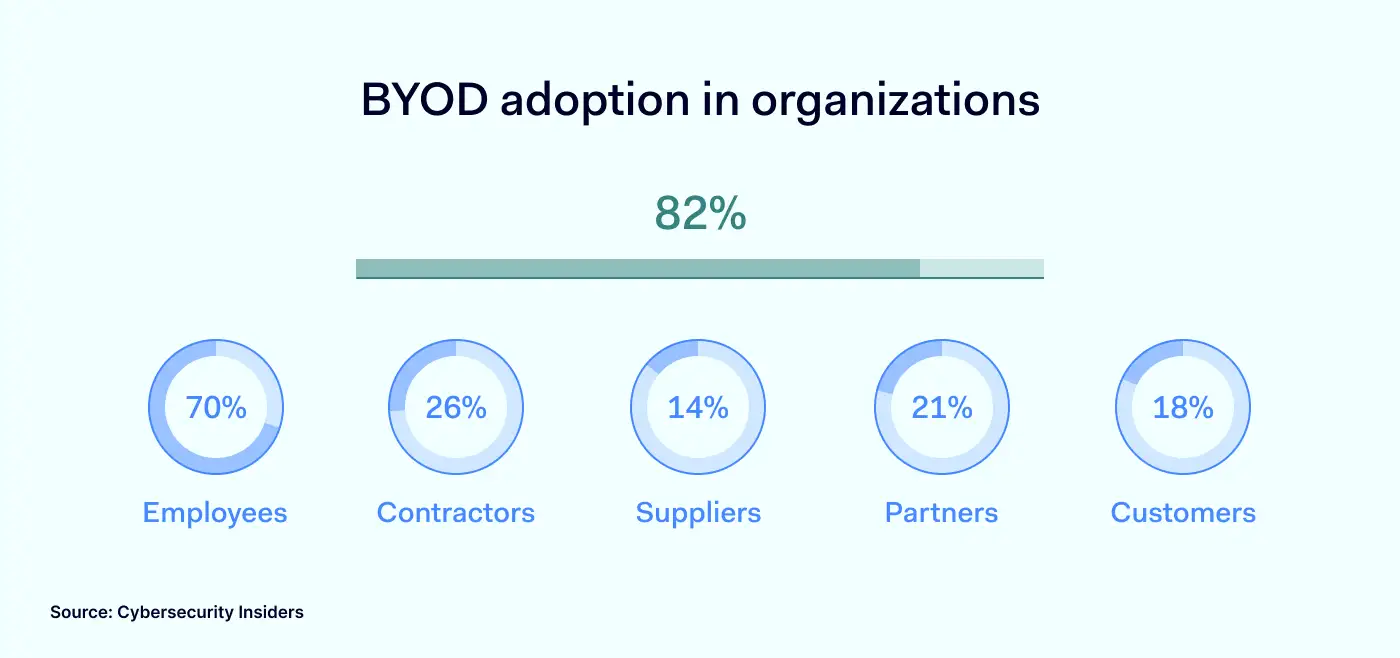
According to BYOD Security Report 2022, the vast majority — 82% of organizations have a policy that allows staff to use their own devices, at least to some extent. Although BYOD is mainly considered an employee-related topic, contractors, partners, customers, and suppliers also can become unmanaged-device sources to the organization.

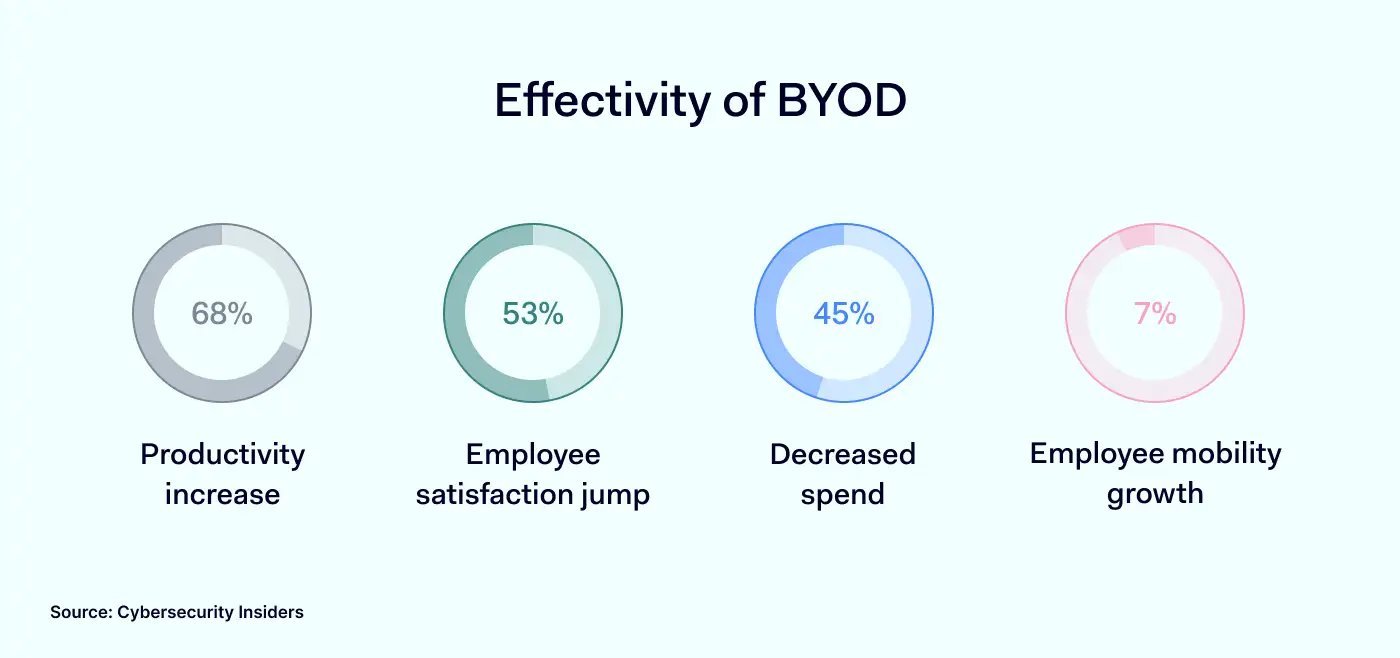
BYOD adoption in organizations 1400x658Companies with a BYOD strategy record major benefits for organizations and the workforce. Employees using their own devices at work are more satisfied as they aren’t attached to an additional piece of technology that needs to be mastered. It boosts productivity and flexibility with a cost-saving approach.

Effectivity of BYOD 1400x658However, convenience has its price. BYOD policy in an organization exposes it to a broader spectrum of risks. An employee manages non-company-issued devices, thus, contents and activity are much more challenging to supervise. 

Risks of BYOD

The idea behind the bring your own device is to incorporate unmanaged user devices into the company network as supportive work tools. Technically, it becomes a security gap as such endpoints aren’t supervised if no security measures are enforced. To what risks do pre-owned user devices expose the organization?

Unknown end-user

A personal device doesn’t mean it is completely accessed only by its owner. If no lock pattern exists, family members, friends, or anyone can use the endpoint, which easily can lead to a data breach or leak. 

Device loss

Taking your laptop or phone outside the office increases the risk of lost or stolen devices. Any hardware containing business-sensitive information compromises data security as it can be extracted or accessed with little effort.

Non-trusted apps and networks

Individual devices mean personal activities. Work-related apps, communication channels, and email accounts mix with entertainment software (at times consisting of surveillance or malicious elements), streaming services, free-roam browsing, and potential for phishing attacks. 

Security features to support BYOD

Preventive measures like single sign-on or multi-factor authentication, network segmentation, and rooted-device detection help manage various risks of BYOD.

Integration of a solution to block external threats makes internet browsing safer for users with pre-owned endpoints. NordLayer’s ThreatBlock feature enriches DNS filtering by screening connection inquiries against libraries of malicious sites and blocklisting them from visiting.

Besides only focusing on protecting the device, encryption of communication channels is a strong addition to BYOD strategy enforcement. Modern AES 256-bit encryption used in internet protocols like NordLynx encodes traveling data. It ensures the confidentiality of sensitive business information when connected to untrusted networks.

Another way to ensure device compliance with organizational security policies is to enable auto-connection to the company’s Virtual Private Network (VPN) once an internet connection is detected and use always-on VPN features. Automatization minimizes the human error vulnerability so users can’t ‘forget’ to switch their devices to the required gateway when accessing company resources.

Let’s shift from the n+1 possible strategies of enabling BYOD policy and, this time, dig deeper into one of the most prominent security functionalities – Deep Packet Inspection (DPI) – that controls what’s entering the company network despite the source of the endpoint.

What is DPI?

Deep Packet Inspection helps protect the company network by filtering out harmful or unwanted sites and applications. It scans data packets of traveling information against flagged keywords and website categories. Unlike DNS filtering, which filters only website data, DPI goes above browser-level restrictions and inspects data on the applications and device levels.

DPI processes packet filtering that may contain malicious elements leading to intrusions and viruses. Alternatively, it allows blocking out sources incompatible with work productivity, like gaming or streaming sites.

In short, the feature serves network management by controlling what ports and protocols employees can access while connected to the company gateways, effectively securing the devices as DPI inspects not only the headers but also the contents of data packets.

How does DPI enable the flexibility of BYOD policy?

In the post-pandemic era, companies are calibrating which approach – remote or on-site – works best for their organizational culture. Ultimately it shows a clear tendency for the application of hybrid work variations. Meaning the BYOD policy is implicit in such companies.

Securing remote workforces

Physical distance is the main attribute of remote work. Traveling and remote employees and freelancers are the driving force for implementing the BYOD policy since acquiring hands-on staff is easier and cheaper.

Removing the office-based restrictions of a controlled network prevents IT administrators from actively monitoring the company infrastructure within a contained perimeter. In this case, the security focus can shift from the actor to the conditions of the environment they operate in.

DPI is based on a set of rules that admins impose collectively for the whole organization or teams and selected users. They can define restrictions on what content can’t enter the company network while connected to the organization gateway.

Blocking specific ports and protocols aid security strategy by stopping:

  • Downloading file-sharing applications 

  • Accessing malicious websites that may inject malware

  • Falling victim to a man-in-a-middle attack while connected to public wifi

  • Entering links with phishing attempts

  • Installing shadow add-ons and software

  • (Un)voluntary data leaking

Office security enhancement

It is easier to manage on-premise work until it turns to online browsing. Dozens of open tabs, links, and distractions on the internet require additional precautions to improve productivity within the office borders.

DPI solution enables IT administrators to manage access to online resources that tend to impact employee effectiveness daily.

First, an organization can simply deny access to streaming, gaming, and secondary websites unrelated to performing job tasks. Less Youtube, Twitch, or Netflix streaming in the background, more focus on performance quality.

Secondly, unnecessary internet traffic slows down the bandwidth within the office. Slow connections disrupt the intended workflow, put pressure on infrastructure, and result in poor user experience. DPI feature allows IT admins to eliminate traffic overload on the company network. 

Enabling secure BYOD with NordLayer

NordLayer introduced Deep Packet Inspection (Lite) security feature focusing on the most tangible organization pain points with hybrid setups. Security and productivity are the priorities of a business; thus, DPI Lite seals the security vulnerabilities, whether you try managing globally spread teams and freelancers or unlocking workforce performance. 

NordLayer’s DPI Lite is one of the many security layers that, combined with other network management features like DNS filtering and IAM integrations, solidify any cybersecurity approach — and help you find the most straightforward way to improve your organizational security.

About Version 2 Digital

Version 2 Digital is one of the most dynamic IT companies in Asia. The company distributes a wide range of IT products across various areas including cyber security, cloud, data protection, end points, infrastructures, system monitoring, storage, networking, business productivity and communication products.

Through an extensive network of channels, point of sales, resellers, and partnership companies, Version 2 offers quality products and services which are highly acclaimed in the market. Its customers cover a wide spectrum which include Global 1000 enterprises, regional listed companies, different vertical industries, public utilities, Government, a vast number of successful SMEs, and consumers in various Asian cities.

About NordLayer
NordLayer is an adaptive network access security solution for modern businesses – from the world’s most trusted cybersecurity brand, Nord Security.

The web has become a chaotic space where safety and trust have been compromised by cybercrime and data protection issues. Therefore, our team has a global mission to shape a more trusted and peaceful online future for people everywhere.

Is a scarcity of security experts a growing global data risk?

And what you can do to protect your critical SaaS data  

Cybersecurity is a critical concern for all organizations. The rapid growth of technology and the increasing sophistication of cyberthreats have made it essential to have experts in the field of cybersecurity to protect against the potential risks. Add on to this the ever-expanding compliance demands from legislation such as the NIS2 Directive and CCPA, it becomes even more challenging to navigate.

The demand for cybersecurity and IT job roles is increasing at a pace that outstrips companies’ ability to recruit. Given that cybersecurity is a vital aspect of any enterprise that handles sensitive and confidential data, it is crucial to locate and retain specialized talent in this field, but how big is the problem?

A recent report by the World Economic Forum (WEF) has highlighted a significant shortage of security experts worldwide. They believe this shortage contributes to a growing list of global risks, including cyberattacks, data breaches, and other forms of cybercrime.

The Importance of Data Protection and Management


With the rise in cybersecurity threats, it is essential for businesses to prioritize data protection and management. This includes securing data, preventing data loss, and complying with regulations and standards. Data protection and management solutions also help businesses maintain their reputation and customer trust, as well as improve their operational efficiency.

According to WEF, the rapid pace of technological change has made it challenging for security experts to keep up with the latest developments, leading to this shortage of experienced professionals. WEF shares that this shortage of security experts is a major concern for organizations as it makes them vulnerable to a range of cyber threats. Cyber criminals are becoming increasingly sophisticated, and organizations need to be equipped with the necessary tools and expertise to protect themselves.

What is the cybercrime situation now?

The number of incidences and the costs associated with cybercrime are on a steep rise – WEF projects $10.5 trillion by 2025. Cybercrime is big business: The Conti ransomware group, according to Reuters, has targeted over 1,000 victims, garnering more than $150 million in the process. Their prolific success led to the U.S. offering a $15 million reward for information.

Cybergangs are organized and functioning like legitimate companies – the Wired’s article “The Workaday life of the World’s Most Dangerous Ransomware Gang” tells how the Conti ransomware gang has a CEO and even an HR department. These groups sure aren’t matching the image of the hacker in a mask, in a dark room, working on a laptop computer: They’re sophisticated, skilled, and clearly very successful by these dollar figures above.

In the face of this, companies are scrambling to protect themselves and their data, with more and more businesses understanding the risks and therefore are placing data security high on their agenda (and bolstering their security with bigger budgets). And they had better hurry: The threat environment is likely to only get worse. The World Economic Forum (WEF) Global Risks Report 2023 explores some of the most serious risks coming over the next two and 10 years.


What’s the expected global risk from cybercrime and cyber insecurity?

Of the global risks expected to have the greatest impact over the next two and the next 10 years, “widespread cybercrime and cyber insecurity” comes in at number eight for both timespans.

In the second visual, “cybercrime and cyber insecurity” moves all the way up to the fourth position for businesses, highlighting the heightened importance of data protection and security to companies. It’s worth mentioning that in all of these, it’s the only result within the Technological category, and perhaps the one with the most agency: Companies taking action and intervening with a data protection plan can mitigate their exposure. (More on this below.)

Increased State Intervention: Is data backup now akin to compulsory auto insurance? 

Compliance becomes an ever increasingly important part of data protection. The trend already appears to be solidified with the European Parliament recently putting forth legislation via the NIS2 Directive which adds on increased responsibility, heightened fines toward the company and C-suite of which the latter may be subject to suspensions for failures to comply. Read blog post about the NIS2 Directive here.

“Risks from Cybersecurity Will Remain a Constant Concern”

And here we get to the crux of the issue: According to the WEF, “These problems are compounded by a scarcity of security experts.”: A challenging situation made more difficult. According to Cybersecurity Ventures, there’s a total of 3.5 million unfilled cybersecurity jobs.

How are companies expected to combat the increasing risk from cybercrimes and the increased demands from state and government while at the same time there are reports of an all-too-small pool of security candidates to hire from? One SaaS data protection provider effectively addresses these concerns by providing a service that follows data protection best practices.

How Keepit can help businesses compensate for the shortage of security experts

Keepit is a software-as-a-service company that provides dedicated data protection for companies relying on cloud SaaS data. By increasing cybersecurity and resiliency and increasing the impact of a company’s existing workforce (all with an impressive ROI: Read the blog post here), Keepit supports business growth into the future by ensuring compliance and data protection. TechTarget suggests enterprises should “support [their] existing talent” as a means of addressing the cybersecurity skills gap, specifically to “automate routine tasks.”

Keepit provides an intuitive interface and simplified processes, an easy-to-use data protection solution that can enable personnel with less cybersecurity expertise to manage and maintain the system effectively. This can save companies the cost and time of hiring and training specialized cybersecurity experts while increasing cybersecurity posture.

We have been able to split the responsibilities for data protection among different teams. This setup allows teams to work efficiently and independently.

Michael Bojko, System Engineer at Porsche Informatik

By providing an easy-to-use cloud SaaS data backup and data management solution across a suite of SaaS applications including Microsoft 365, Salesforce, Google Workspace (to name but a few), Keepit enables companies to continue into the future with confidence. Businesses can even get Azure AD data protection for free with the Identity Basic offering from Keepit. Read about backup and recovery for Azure Active Directory here.

Compensate for the shortage of security experts by having an automated data protection and management system in place. This reduces the need for manual intervention, which can be time-consuming and requires specialized skills.

Our everyday is busy enough with keeping everything up and running. Keepit’s solution does its job in the background so that we can focus on other tasks.

Ken Schirrmacher, Sr. Director of IT/Interim CIO at Park ‘N Fly

Where should you start? Learn more about data management and protection

Keepit enables companies to have peace of mind, regardless of any new legislation or cybercrime events.

About Version 2 Digital

Version 2 Digital is one of the most dynamic IT companies in Asia. The company distributes a wide range of IT products across various areas including cyber security, cloud, data protection, end points, infrastructures, system monitoring, storage, networking, business productivity and communication products.

Through an extensive network of channels, point of sales, resellers, and partnership companies, Version 2 offers quality products and services which are highly acclaimed in the market. Its customers cover a wide spectrum which include Global 1000 enterprises, regional listed companies, different vertical industries, public utilities, Government, a vast number of successful SMEs, and consumers in various Asian cities.

About Keepit
At Keepit, we believe in a digital future where all software is delivered as a service. Keepit’s mission is to protect data in the cloud Keepit is a software company specializing in Cloud-to-Cloud data backup and recovery. Deriving from +20 year experience in building best-in-class data protection and hosting services, Keepit is pioneering the way to secure and protect cloud data at scale.

CISA and FBI Release ESXiArgs Ransomware Recovery Script

The US Cyber Security and Infrastructure Agency (CISA) and the Federal Bureau of Investigation (FBI) released this week a recovery guide for the ESXiArgs ransomware, which has harmed thousands of companies globally.

This was because malicious attackers were allegedly taking advantage of known vulnerabilities in unpatched, out-of-service or outdated versions of VMware ESXi software. Through these “loopholes” they would be deploying ESXiArgs ransomware on ESX servers, rendering these devices unusable.

The recovery tool can be found at this link and has been used by numerous corporations, who managed to recover encrypted items without paying a ransom to attackers.

However, CISA warns that to use this resource, it is essential to understand how it works. In this sense, companies harmed by ESXiArgs should evaluate the recommendations present in the README file, which comes with the script.

The number of servers infected by ESXiArgs in several countries has already exceeded 3 thousand. According to the victims, in order to decrypt the data, the hackers requested about 2 Bitcoins, which is equivalent to approximately US$ 22,800 (as of the present moment).

In addition, malicious attackers would have demanded payment of the ransom within three days, as a condition for not disclosing the organizations’ sensitive data.

As per Rapid 7, ESXiArgs attempted to shut down virtual machines by killing a process in the virtual machine’s kernel that handles I/O commands, however, in some cases it was unsuccessful as organizations were able to recover their data.

The recovery script developed by CISA in conjunction with the FBI is based on the work of researchers Enes Sonmez and Ahmet Aykac, and shows how victims can rebuild virtual machine metadata from disks that the malware was unable to encrypt.

In practice, the function of the script is to create new configuration files that allow access to the VMs and not delete encrypted files. However, CISA makes no guarantees that the script is secure.

VMware recommends that companies implement the patch released in 2021 for the vulnerability exploited by ESXiArgs. Organizations that do not fix the flaw should temporarily disable the ESXi Service Location Protocol (SLP) or still keep port 427 disabled.


About Version 2 Digital

Version 2 Digital is one of the most dynamic IT companies in Asia. The company distributes a wide range of IT products across various areas including cyber security, cloud, data protection, end points, infrastructures, system monitoring, storage, networking, business productivity and communication products.

Through an extensive network of channels, point of sales, resellers, and partnership companies, Version 2 offers quality products and services which are highly acclaimed in the market. Its customers cover a wide spectrum which include Global 1000 enterprises, regional listed companies, different vertical industries, public utilities, Government, a vast number of successful SMEs, and consumers in various Asian cities.

About Segura®
Segura® strive to ensure the sovereignty of companies over actions and privileged information. To this end, we work against data theft through traceability of administrator actions on networks, servers, databases and a multitude of devices. In addition, we pursue compliance with auditing requirements and the most demanding standards, including PCI DSS, Sarbanes-Oxley, ISO 27001 and HIPAA.

您的加密貨幣錢包安全嗎?ESET 研究報告揭示新攻擊手法

ESET 研究人員近日發現,黑客利用偽裝成 WhatsApp 和 Telegram 的木馬病毒,針對 Android 平台上的加密貨幣錢包展開攻擊。今次的攻擊使用了多種技巧,包括網絡釣魚、偽造程式以及利用網絡廣告等途徑,誘使用戶下載受感染的應用程式。

病毒被植入到了偽造的即時通訊應用中,當用戶下載並安裝這些程式後,木馬將開始監控用戶的行為。病毒會將手機中的加密貨幣錢包資訊盜取,並將其發送到黑客的遠端伺服器。此外,木馬還具有追蹤用戶的聊天記錄、通訊錄以及其他敏感資料的功能。

研究人員表示,這些惡意應用程式使用了多種技術來繞過 Google Play 商店的安全措施。例如,它們使用了動態代碼加載(DCL)來隱藏惡意行為,並在應用程式啟動時將木馬下載到受害者的裝置上。此外,它們還利用了短時間內大量的五星評價,以提高應用程式的排名,吸引更多用戶下載。

目前,這些偽裝成 WhatsApp 和 Telegram 的木馬病毒已經影響了數萬名用戶。為了避免成為受害者,安全專家建議用戶遵循以下幾點建議:

  • 必須從官方應用商店下載應用程式,避免使用第三方應用市場或直接下載 APK 文件
  • 在下載應用程式前,查看應用的評論和評分,並確保開發者具有良好的口碑
  • 定期更新手機操作系統和應用程式,以獲得最新的安全更新
  • 安裝可靠的安全軟件,以防範惡意軟件和其他網絡威脅
  • 對於敏感的金融資訊,使用額外的安全措施,如雙重身份驗證

關於Version 2

Version 2 Digital 是立足亞洲的增值代理商及IT開發者。公司在網絡安全、雲端、數據保護、終端設備、基礎設施、系統監控、存儲、網絡管理、商業生產力和通信產品等各個領域代理發展各種 IT 產品。透過公司龐大的網絡、通路、銷售點、分銷商及合作夥伴,Version 2 提供廣被市場讚賞的產品及服務。Version 2 的銷售網絡包括台灣、香港、澳門、中國大陸、新加坡、馬來西亞等各亞太地區,客戶來自各行各業,包括全球 1000 大跨國企業、上市公司、公用事業、醫療、金融、教育機構、政府部門、無數成功的中小企及來自亞洲各城市的消費市場客戶。


關於ESET
ESET成立於1992年,是一家面向企業與個人用戶的全球性的電腦安全軟件提供商,其獲獎產品 — NOD32防病毒軟件系統,能夠針對各種已知或未知病毒、間諜軟件 (spyware)、rootkits和其他惡意軟件為電腦系統提供實時保護。ESET NOD32佔用 系統資源最少,偵測速度最快,可以提供最有效的保護,並且比其他任何防病毒產品獲得了更多的Virus Bulletin 100獎項。ESET連續五年被評為“德勤高科技快速成長500 強”(Deloitte’s Technology Fast 500)公司,擁有廣泛的合作夥伴網絡,包括佳能、戴爾、微軟等國際知名公司,在布拉迪斯拉發(斯洛伐克)、布裏斯托爾(英國 )、布宜諾斯艾利斯(阿根廷)、布拉格(捷克)、聖地亞哥(美國)等地均設有辦事處,代理機構覆蓋全球超過100個國家。