





Salesforce is a dominant player in the Customer Relationship Management sector. Around 150,000 companies use Salesforce to manage customer data and launch marketing campaigns, and the company enjoys a 33% market share.
It’s easy to see why. Salesforce’s cloud-based tools save costs and time, simplify customer analysis, and integrate smoothly with other SaaS services. But is Salesforce a secure environment to run your business?
While Salesforce is generally safe to use, data security in Salesforce is still something users need to consider. Data breaches have exposed potential vulnerabilities. And users need to know how to use the Salesforce data security model when making their implementation more secure.
Data security in Salesforce
Data security is the protection of sensitive data handled by an organization. In the context of Salesforce, this refers to customer records, including financial information and private personal details such as names and contact details.
The consequences can be severe if an organization loses control of data privacy protection. According to IBM, the average cost of a data breach is approximately $4.35 million. Companies that lose large volumes of sensitive customer data can expect to pay hefty compensation.
Salesforce is no exception. In 2019, Salesforce client Hanna Andersson suffered a major data breach. A malware infection on the clothing retailer’s Salesforce platform exposed over 200,000 customer accounts. Neither Hanna Andersson nor Salesforce knew anything about it.
Three months after the Salesforce breach began, law enforcement officers discovered confidential data for sale on the Dark Web. Customers immediately sued under the California Consumer Privacy Act (CCPA).
Salesforce and Hanna Andersson eventually settled the claim in 2021. Both companies accepted shortcomings in protecting user data, detecting malware, and informing customers. And they had to pay as much as $5,000 to affected customers.
Related articles

In Depth
6 Network Access Control best practices
29 Dec 2022•13 min read

In Depth
SaaS Security 101: The Definitive Guide
10 May 2022•9 min read
The Hanna Andersson settlement shows that data security is a critical vulnerability and could happen to any Salesforce user. So let’s dig deeper into the Salesforce data security model to explain how secure the platform is and what companies can do to protect their data.
The Salesforce data security model
Since the 2019 Salesforce data breach, the platform has tightened up its native security features.
Data at rest on Salesforce is encrypted, concealing it from outsiders. Logging systems allow users to track weaknesses and handle alerts. MFA adds strength to authentication processes. And users can even create bespoke protection for data analysis with the Data Mask feature.
However, one set of controls in the data security field is all-important. Permission sets enable Salesforce users to manage data access. Users can use permission sets to ensure that only authorized users can access data. Everyone else is blocked by default – until they are granted necessary privileges.

There are four Salesforce permission sets. Each one plays a role in locking down confidential customer information:
Organization level – At the organization level, users can manage access for all users in their enterprise. Multi-factor authentication factors make Salesforce portals more secure. Connection limits, location tracking, and IP range screening exclude malicious actors.
Object level – Organizations can limit access to Salesforce databases and apps. Object level controls allow administrators to set aside portions of the Salesforce environment and create restricted zones with limited access.
Record level – Security teams can create permission sets for specific records. Marketing teams may need access to information about customer purchases. But financial data can be locked away. Admins can set objects to read-only or allocate editing privileges for certain users.
Field level – At the field level, users can restrict how users interact with database fields. This provides tight control over how data is used. Many employees may have object access to CRM data. Only a tiny number will have field level access to edit and export the most sensitive data.
Salesforce security issues
Applying access controls is critical, but users must also be aware of Salesforce security vulnerabilities. Be sure to factor in these issues when planning your security strategy.
1. Inadequate data classification
Before you can protect confidential data, you need to understand the data you hold. Companies need to classify every record according to its value and vulnerability. When you have that information, you can start creating field level controls and setting permissions.
Review your databases and assign risk levels to the information they contain. Use regulations as a framework. For instance, the CCPA mandates robust protection of customer financial records. HIPAA requires tight control of any patient data.
Classification matters because it isn’t always practical to secure all customer data. Unclassified data generates noise and confusion. Security teams are presented with false positives and waste time on securing low-value data.
2. Confusing data ownership
Who is responsible for securing your Salesforce CRM system? Many companies cannot answer this question and rely on multiple stakeholders to secure customer data.
Data ownership should be clear and communicated to all Salesforce users. Assign an individual or team to manage data security. They should ensure compliance with relevant regulations, apply native Salesforce controls, and integrate enterprise-wide security systems with the CRM system.
Take advantage of Salesforce’s training materials. The platform offers courses in identity and access management (IAM). With this information, your security manager can master Salesforce permission sets and protect critical databases.
3. Poor Salesforce security awareness
Knowledge about Salesforce security should extend beyond the data security lead. Every CRM user must know security policies and the importance of protecting against phishing attacks.
Remember the Hanna Andersson case. A single Salesforce cyber attack can compromise huge data sets. Poor training and a shallow security culture can have huge implications.
Extended awareness matters because Salesforce is highly customizable. Employees can easily misconfigure communities in the Experience Cloud. And teams can add Salesforce services without IT teams knowing.
Both actions expand the threat surface, potentially compromising a Salesforce environment. Avoid them by educating Salesforce users and creating policies that explain how to use the platform safely.
4. Not understanding how shared responsibility works
As with all cloud-based products, security responsibility is shared between Salesforce and service users. Unfortunately, this is something that users easily forget.
Users may assume that Salesforce protects data, but this is partially correct. Salesforce does encrypt data and guards against malware infection. Clients are responsible for ensuring secure access and object configurations.
Companies using Salesforce can over-provision employees, giving them too much access to sensitive data. They might allow wide third-party access to databases, even down to field level. Marketing teams could create vulnerabilities as they customize their Salesforce solution.
Be aware of your responsibilities under the shared responsibility model. If not, data breaches will probably be due to your own negligence.
Why do you need additional security in SalesForce?
Native security features provided by Salesforce are powerful but insufficient to achieve data security. Companies need to combine internal controls like Salesforce data encryption with external security solutions.
The 2019 data breach demonstrates why external security is so important. Salesforce and Hanna Andersson did not know about the malware infection. Security teams had no idea that gigabytes of user data had been stolen.
While the single data breach cost both companies plenty of money, the cost could have been higher without the actions of law enforcement professionals.
The initial malware infection involved a ‘magecart’ attack that skimmed customer data from the retailer’s payment portal. This agent probably arrived via a phishing attack on a Hanna Andersson employee. None of Salesforce’s internal controls could prevent it, but external security solutions could help.
SIEM tools to scan attachments and quarantine suspicious links can stop phishers in their tracks. IP allowlisting screens devices and permits access for approved IP addresses. VPNs encrypt company networks and conceal credentials from external observers.
Salesforce allows in-depth access management and security logging. But when fine-tuning their CRM security, companies should supplement native features with additional measures.
How can NordLayer help with Salesforce security?
Salesforce makes CRM simple, allowing eCommerce businesses to thrive. But recent data breaches have shown that the cloud-based platform has some critical cybersecurity vulnerabilities.
NordLayer’s tools supplement native Salesforce security and make it easier to achieve regulatory compliance.
Our cloud security solutions include access management tools and Single Sign On that bridge company networks and cloud portals.
IP allowlisting is another core NordLayer feature. Allowlisting lets you set approved IP addresses and block everything else. This makes it safer to admit remote workers to your Salesforce environment. It also means that credential theft does not automatically provide access to your data. Attackers without approved IP addresses will still remain outside the perimeter, unable to steal customer information.
Discover how to create a rock-solid Salesforce security posture. Get in touch with our team and discuss your options today.
These days, cybercrime is rampant. It’s no longer a matter of “if” you’re going to suffer an attack but “when” it will happen. All companies want to be ready for any crisis. And this is where a business continuity plan comes into play.
But what is a business continuity plan exactly? Why is it important? What should one include? Today, we’re exploring all these questions in-depth.
What is a business continuity plan?
A business continuity plan (BCP) is a document that sets guidelines for how an organization will continue its operations in the event of a disruption, whether it’s a fire, flood, other natural disaster or a cybersecurity incident. A BCP aims to help organizations resume operations without significant downtime.
Unfortunately, according to a 2020 Mercer survey, 51% of businesses across the globe don’t have a business continuity plan in place.
What’s the difference between business continuity and disaster recovery plans?
We often confuse the terms business continuity plan and disaster recovery plan. The two overlap and often work together, but the disaster recovery plan focuses on containing, examining, and restoring operations after a cyber incident. On the other hand, BCP is a broader concept that considers the whole organization. A business continuity plan helps organizations stay prepared for dealing with a potential crisis and usually encompasses a disaster recovery plan.
Importance of business continuity planning
The number of news headlines announcing data breaches has numbed us to the fact that cybercrime is very real and frequent and poses an existential risk to companies of all sizes and industries.
Consider that in 2021, approximately 37% of global organizations fell victim to a ransomware attack. Then consider that business interruption and restoration costs account for 50% of cyberattack-related losses. Finally, take into account that most cyberattacks are financially motivated and the global cost of cybercrime topped $6 trillion last year. The picture is quite clear — cybercrime is a lucrative venture for bad actors and potentially disastrous for those on the receiving end.
To thrive in these unpredictable times, organizations go beyond conventional security measures. Many companies develop a business continuity plan parallel to secure infrastructure and consider the plan a critical part of the security ecosystem. The Purpose of a business continuity plan is to significantly reduce the downtime in an emergency and, in turn, reduce the potential reputational damage and — of course — revenue losses.
Business continuity plan template
Password security for your business
Store, manage and share passwords.
30-day money-back guarantee
Business Continuity Plan Example
[Company Name]
[Date]
I. Introduction
Purpose of the Plan
Scope of the Plan
Budget
Timeline
The initial stage of developing a business continuity plan starts with a statement of the plan’s purpose, which explains the main objective of the plan, such as ensuring the organization’s ability to continue its operations during and after a disruptive event.
The Scope of the Plan outlines the areas or functions that the plan will cover, including business processes, personnel, equipment, and technology.
The Budget specifies the estimated financial resources required to implement and maintain the BCP. It includes costs related to technology, personnel, equipment, training, and other necessary expenses.
The Timeline provides a detailed schedule for developing, implementing, testing, and updating the BCP.
II. Risk Assessment
Identification of Risks
Prioritization of Risks
Mitigation Strategies
The Risk Assessment section of a Business Continuity Plan (BCP) is an essential part of the plan that identifies potential risks that could disrupt an organization’s critical functions.
The Identification of Risks involves identifying potential threats to the organization, such cybersecurity breaches, supply chain disruptions, power outages, and other potential risks. This step is critical to understand the risks and their potential impact on the organization.
Once the risks have been identified, the Prioritization of Risks follows, which helps determine which risks require the most attention and resources.
The final step in the Risk Assessment section is developing Mitigation Strategies to minimize the impact of identified risks. Mitigation strategies may include preventative measures, such as system redundancies, data backups, cybersecurity measures, as well as response and recovery measures, such as emergency protocols and employee training.
III. Emergency Response
Emergency Response Team
Communication Plan
Emergency Procedures
This section of the plan focuses on immediate actions that should be taken to ensure the safety and well-being of employees and minimize the impact of the event on the organization’s operations.
The Emergency Response Team is responsible for managing the response to an emergency or disaster situation. This team should be composed of individuals who are trained in emergency response procedures and can act quickly and decisively during an emergency. The team should also include a designated leader who is responsible for coordinating the emergency response efforts.
The Communication Plan outlines how information will be disseminated during an emergency situation. It includes contact information for employees, stakeholders, and emergency response personnel, as well as protocols for communicating with these individuals.
The Emergency Procedures detail the steps that should be taken during an emergency or disaster situation. The emergency procedures should be developed based on the potential risks identified in the Risk Assessment section and should be tested regularly to ensure that they are effective.
IV. Business Impact Analysis
The Business Impact Analysis (BIA) section of a Business Continuity Plan (BCP) is a critical step in identifying the potential impact of a disruption to an organization’s critical operations.
The Business Impact Analysis is typically conducted by a team of individuals who understand the organization’s critical functions and can assess the potential impact of a disruption to those functions. The team may include representatives from various departments, including finance, operations, IT, and human resources.
V. Recovery and Restoration
Procedures for recovery and restoration of critical processes
Prioritization of recovery efforts
Establishment of recovery time objectives
The Recovery and Restoration section of a Business Continuity Plan (BCP) outlines the procedures for recovering and restoring critical processes and functions following a disruption.
The Procedures for recovery and restoration of critical processes describe the steps required to restore critical processes and functions following a disruption. This may include steps such as relocating to alternate facilities, restoring data and systems, and re-establishing key business relationships.
The Prioritization section of the plan identifies the order in which critical processes will be restored, based on their importance to the organization’s operations and overall mission.
Recovery time objectives (RTOs) define the maximum amount of time that critical processes and functions can be unavailable following a disruption. Establishing RTOs ensures that recovery efforts are focused on restoring critical functions within a specific timeframe.
VI. Plan Activation
Plan Activation Procedures
The Plan Activation section is critical in ensuring that an organization can quickly and effectively activate the plan and respond to a potential emergency.
The Plan Activation Procedures describe the steps required to activate the BCP in response to a disruption. The procedures should be clear and concise, with specific instructions for each step to ensure a prompt and effective response.
VII. Testing and Maintenance
Testing Procedures
Maintenance Procedures
Review and Update Procedures
This section of the plan is critical to ensure that an organization can effectively respond to disruptions and quickly resume its essential functions.
Testing procedures may include scenarios such as natural disasters, cyber-attacks, and other potential risks. The testing procedures should include clear objectives, testing scenarios, roles and responsibilities, and evaluation criteria to assess the effectiveness of the plan.
The Maintenance Procedures detail the steps necessary to keep the BCP up-to-date and relevant.
The Review and Update Procedures describe how the BCP will be reviewed and updated regularly to ensure its continued effectiveness. This may involve conducting a review of the plan on a regular basis or after significant changes to the organization’s operations or threats.
What should a business continuity plan checklist include?
Organizations looking to develop a BCP have more than a few things to think through and consider. Variables such as the size of the organization, its IT infrastructure, personnel, and resources all play a significant role in developing a continuity plan. Remember, each crisis is different, and each organization will have a view on handling it according to all the variables in play. However, all business continuity plans will include a few elements in one way or another.
Clearly defined areas of responsibility
A BCP should define specific roles and responsibilities for cases of emergency. Detail who is responsible for what tasks and clarify what course of action a person in a specific position should take. Clearly defined roles and responsibilities in an emergency event allow you to act quickly and decisively and minimize potential damage.
Crisis communication plan
In an emergency, communication is vital. It is the determining factor when it comes to crisis handling. For communication to be effective, it is critical to establish clear communication pipelines. Furthermore, it is crucial to understand that alternative communication channels should not be overlooked and outlined in a business continuity plan.
Recovery teams
A recovery team is a collective of different professionals who ensure that business operations are restored as soon as possible after the organization confronts a crisis.
Alternative site of operations
Today, when we think of an incident in a business environment, we usually think of something related to cybersecurity. However, as discussed earlier, a BCP covers many possible disasters. In a natural disaster, determine potential alternate sites where the company could continue to operate.
Backup power and data backups
Whether a cyber event or a real-life physical event, ensuring that you have access to power is crucial if you wish to continue operations. In a BCP, you can often come across lists of alternative power sources such as generators, where such tools are located, and who should oversee them. The same applies to data. Regularly scheduled data backups can significantly reduce potential losses incurred by a crisis event.
Recovery guidelines
If a crisis is significant, a comprehensive business continuity plan usually includes detailed guidelines on how the recovery process will be carried out.
Business continuity planning steps
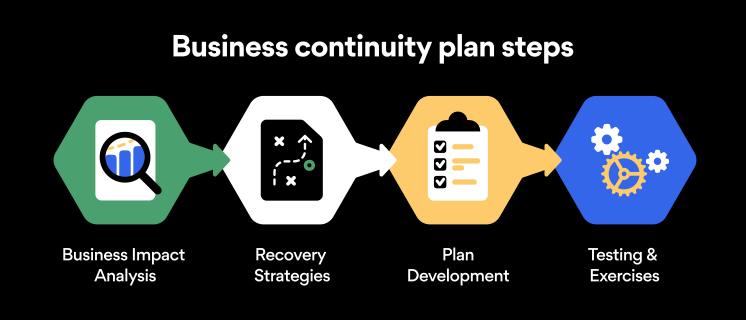
Here are some general guidelines that an organization looking to develop a BCP should consider:
Analysis
A business continuity plan should include an in-depth analysis of everything that could negatively affect the overall organizational infrastructure and operations. Assessing different levels of risk should also be a part of the analysis phase.
Design and development
Once you have a clear overview of potential risks your company could face, start developing a plan. Create a draft and reassess it to see if it takes into account even the smallest of details.
Implementation
Implement BCP within the organization by providing training sessions for the staff to get familiar with the plan. Getting everyone on the same page regarding crisis management is critical.
Testing
Rigorously test the plan. Play out a variety of scenarios in training sessions to learn the overall effectiveness of the continuity plan. By doing so, everyone on the team will be closely familiar with the business continuity plan’s guidelines.
Maintenance and updating
Because the threat landscape constantly changes and evolves, you should regularly reassess your BCP and take steps to update it. By making your continuity plan in tune with the times, you will be able to stay a step ahead of a crisis.
Level up your company’s security with NordPass Business
A comprehensive business continuity plan is vital for the entire organization’s security posture. However, in a perfect world, you wouldn’t have to use it. This is where NordPass Business can help.
Remember, weak, reused, or compromised passwords are often cited as one of the top contributing factors in data breaches. It’s not surprising, considering that an average user has around 100 passwords. Password fatigue is real and significantly affects how people treat their credentials. NordPass Business counters these issues.
With NordPass Business, your team will have a single secure place to store all work-related passwords, credit cards, and other sensitive information. Accessing all the data stored in NordPass is quick and easy, which allows your employees not to be distracted by the task of finding the correct passwords for the correct account.
In cyber incidents, NordPass Business ensures that company credentials remain secure at all times. Everything stored in the NordPass vault is secured with advanced encryption algorithms, which would take hundreds of years to brute force.
If you are interested in learning more about NordPass Business and how it can fortify corporate security, do not hesitate to book a demo with our representative.
