
Skip to content

Third-party reviews: Perimeter 81 competitors and alternatives

We know how important it is to make the right decision when it comes to selecting cybersecurity tools and solutions. This blog article will have hands-on information about how secure network access solutions and VPNs compare to the most commonly chosen alternatives in the market.

In this article, we will overview Perimeter 81 competitors and alternatives. 

Disclaimer: This article is based entirely on third-party reviews and open-source online information accessed between April 15 and 22, 2024. NordLayer is not responsible for data accuracy, as competitor information is subject to change. The competitor information was gathered through a combination of manual research and data extraction. Data points include feature comparisons and product analysis.

Overview of Perimeter 81

Perimeter 81’s mission is to simplify secure network, cloud, and application access for the modern and mobile workforce. It achieves this by transforming traditional network security technology into one unified Zero Trust Network as a Service derived from a SASE framework.

Perimeter 81 capabilities

  • Smooth integration and deployment

  • Good customer service

  • Satisfactory speed and performance

  • Offers completely audited access

Perimeter 81 benefits

According to the Perimeter 81 website, the flexible and straightforward solution is their strength.

  • Easy building and management without lengthy setups and manual configurations.

  • Fast and flexible solution deployment with a centralized dashboard for resource management.

Perimeter 81 limitations

Perimeter’s weaknesses, according to the mentioned review platforms, are:

  • Premium plans are required to access advanced features

  • Customer support has access to substantial information

  • A relatively small number of countries to select from

  • Pricing is on the higher end

Let’s overview the competition of Perimeter 81 available in the market.

Disclaimer: Product review is based on information provided on VPN review sites such as Gartner, Capterra, and Cybernews and assessed customer feedback shared on these platforms, accessed on April 22, 2024.

NordLayer

NordLayer is a multi-layered business cybersecurity tool enabling all ways of working. It is a secure remote access solution from the Nord Security powerhouse and consumer product NordVPN.

The baseline of NordLayer’s development focus is defined by Secure Access Service Edge (SASE) and Zero Trust frameworks. The solution introduces SaaS security features for the internet, resource, and network access control.

NordLayer capabilities

  • Seamless integration with existing infrastructure and intuitive deployment of a cloud-based platform

  • Scalable with an unlimited number of users and adaptable to various business needs

  • High-performance service and 24/7 tech-savvy support for all plans

  • Strong product capabilities and comprehensive cloud-native feature set

  • In-house developed NordLynx VPN protocol based on Wireguard® for unprecedented performance and speed.

NordLayer benefits

According to the NordLayer website, the solution’s strengths are in its simplicity, security capabilities, and performance.

  • Easy to start, scale, and combine, as the solution requires no hardware and is simple to deploy, set up, and maintain within minutes. It integrates seamlessly with existing infrastructures and has a user-friendly Control Panel.

  • Custom and unique security solutions like NordLayer, the fastest unique VPN protocol, or Browser Extension, a lightweight solution for traffic encryption on a browser level only.

  • Compatibility with popular security providers facilitates the smooth integration of existing Identity & Access Management (IAM) and authentication systems and tools for a quick setup.

  • NordLayer offers a 14-day money-back guarantee.

NordLayer use cases

NordLayer offers a hassle-free cybersecurity solution tailored for businesses. It enables organizations to create secure remote connections to the internet, their company network, and cloud-based resources, facilitating compliance for any way of working.

  • Secure internet access: Protect traveling employees by securing remote access through public Wi-Fi. This prevents threats while browsing the internet, allows access to geo-specific content, and ensures the masking of IP addresses for enhanced privacy and security.

  • Network & resource access management: Establish segmented access to company resources, control access by selecting specific content categories and applications, create connections between remote devices, and enable remote access to hybrid resources. This enhances overall operational flexibility and security.

  • Achieving compliance: Continuously monitor VPN activity within your organization, maintain an overview of devices present in the network, manage identity and remote access for both users and applications, and ensure the encryption of data transmissions originating from untrusted networks to bolster overall cybersecurity.

NordLayer limitations

  • No API access is available

  • Does not integrate with SIEM solutions

  • Minimum member license quota

NordLayer reviews

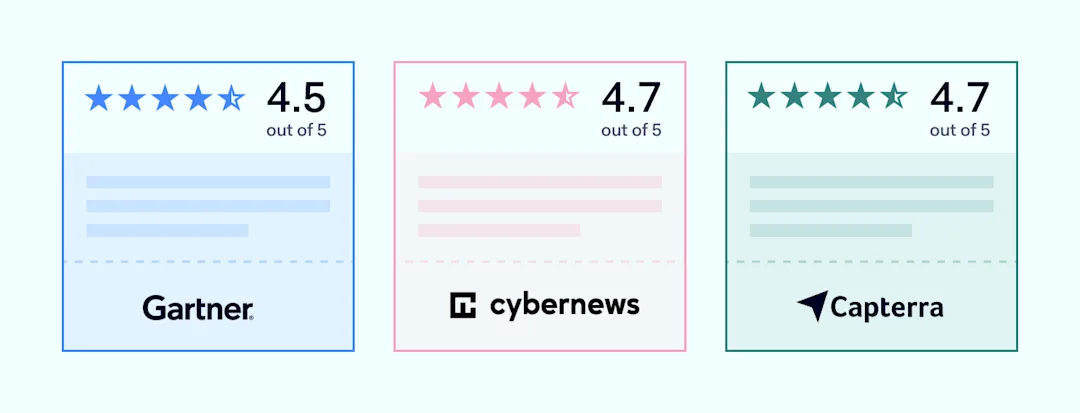
To provide an objective evaluation of the product, we will refer to major VPN review sites (Gartner, Capterra, Cybernews) and will look into client feedback shared on these websites:
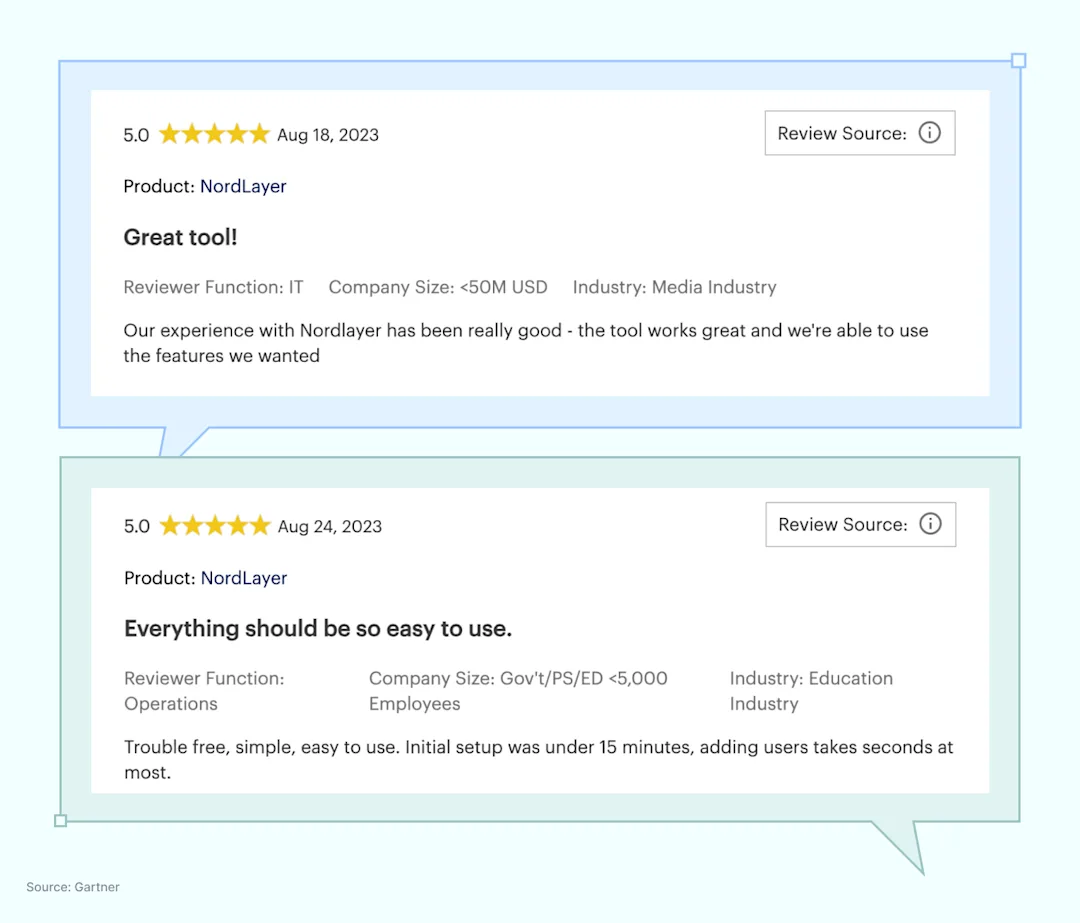
Customer feedback and insights:
NordLayer offers Security Service Edge (SSE) capabilities like Cloud Firewall (FWaaS), Zero Trust Network Access (ZTNA), and Secure Web Gateway (SWG) for creating robust security policies. To learn more about NordLayer’s secure network access solution features and plans, see our pricing information.

Twingate

Twingate is a security service that provides controlled remote access to company cloud resources through Zero Trust verification, detailed secure access policies, and multi-factor authentication. It’s deployable on multiple cloud-native services and designed for easy integration with existing tech stacks.

Twingate capabilities

  • Integrations with major IdPs, MDM/EDRs, SIEMs, and DOH providers

  • Security model based on Zero Trust Architecture

  • Centralized management

  • Free introductory plan and free trial

Twingate benefits

According to the Twingate website, the solution’s strengths are its access controls and connectivity.

  • Implementation of least privileged access to protect SaaS applications and cloud-based or on-premise resources

  • Automated Zero Trust integration with API-first design for easy integration with infrastructure as code (IaC)

Twingate limitations

  • It doesn’t provide access control at the port level

  • Requires third-party access to company infrastructure

  • Customer support is limited (i.e., forum support for mid-tier plan)

  • Twingate connector deployment for remote resource access is done via Linux systems or an OCI (docker), which requires technical knowledge

Disclaimer: This review draws on details from prominent VPN evaluation websites like TechRadar, TrustRadius, Comparitech, and customer opinions shared through these channels as of April 22, 2024.

GoodAccess

GoodAccess is a cloud-based VPN that offers secure, encrypted access to local networks with Zero Trust security, static IPs, and threat protection for remote workforce across various devices and locations.

GoodAccess capabilities

  • Static IP for business teams, enabling access to geo-blocked resources

  • High-level encryption for secure internet access and data protection

  • The global public infrastructure of 35+ locations

  • Security features include features like basic and premium threat blockers

GoodAccess benefits

According to the GoodAccess website, the solution’s strengths are its access controls and connectivity.

  • Inexpensive with a free trial and a starting capabilities plan

  • Fast setup and simplified management with an easy-to-use web management platform

GoodAccess limitations

  • Few private server locations

  • Better suits small- and medium-sized organizations

  • 24/7 live support is available for the enterprise plan only

Disclaimer: This analysis is informed by details from leading VPN comparison websites (Capterra, TechRadar, G2) and reviews shared by users on those platforms as of April 22, 2024.

Zscaler

Zscaler is a cloud-based security company providing solutions that improve the safety of users and data across various internet and private networks. It is designed to securely connect users to their applications and manage device policies without traditional hardware-based boundaries.

Zscaler capabilities

  • Offers SASE framework components: SWG, CASB, ZTNA, FWaaS

  • Access control that is detailed and customizable

  • Enhanced visibility into user activities and assets

Zscaler benefits

  • Enhanced security through a multi-layered approach

  • Suits businesses of all sizes

  • User-friendly interface

Zscaler limitations

  • Configuration complexity, which can be challenging for businesses without dedicated IT teams

  • Demands high-speed internet for optimal performance

  • Pricing details are only available through consultation

Disclaimer: Product review is based on information provided on Zscaler’s website, Gartner and TechRadar’s reviews of Zscaler, and customer feedback shared on review platforms (G2), accessed on April 22, 2024.

Cisco

Cisco is a global technology leader known for its networking and security solutions. These solutions are integrated across Cisco’s entire product portfolio and aim to protect enterprise networks, data, and applications.

Cisco capabilities

  • Provides services like malware protection, intrusion prevention, and secure internet gateways.

  • Offers an SSE-based unified defense strategy across networks, clouds, endpoints, and applications.

  • Delivers comprehensive network and cloud security analytics, ideal for large enterprises due to its scalable and detailed features.

Cisco benefits

  • Scalable, advanced threat protection, and comprehensive integration capabilities.

  • Centralized management features across its products enable simplified administration of security policies and procedures.

  • Extensive global reach.

Cisco limitations

  • Some users find the setup and management of certain Cisco security products to be complex and resource-intensive.

  • The cost can be a barrier for smaller businesses or those with limited IT budgets.

Disclaimer: This review draws from details on Cisco’s corporate site, analyses from industry analysts like Gartner and Forrester, as well as end-user reviews found on TrustRadius and G2 as of April 22, 2024.

Make an informed decision

The review of Perimeter 81 and its competitors aims to support decision-makers in securing access to the organization’s local networks and protecting their teams. However, they are struggling to find a starting point.

Explore Decision Maker’s Kit, a free tool prepared by the NordLayer team, which helps build a strategy for selecting the most suitable solution for your organization and guides you throughout the process from A to Z.

About Version 2 Digital

Version 2 Digital is one of the most dynamic IT companies in Asia. The company distributes a wide range of IT products across various areas including cyber security, cloud, data protection, end points, infrastructures, system monitoring, storage, networking, business productivity and communication products.

Through an extensive network of channels, point of sales, resellers, and partnership companies, Version 2 offers quality products and services which are highly acclaimed in the market. Its customers cover a wide spectrum which include Global 1000 enterprises, regional listed companies, different vertical industries, public utilities, Government, a vast number of successful SMEs, and consumers in various Asian cities.

About NordLayer
NordLayer is an adaptive network access security solution for modern businesses – from the world’s most trusted cybersecurity brand, Nord Security.

The web has become a chaotic space where safety and trust have been compromised by cybercrime and data protection issues. Therefore, our team has a global mission to shape a more trusted and peaceful online future for people everywhere.

About NordLayer
NordLayer is an adaptive network access security solution for modern businesses – from the world’s most trusted cybersecurity brand, Nord Security.

The web has become a chaotic space where safety and trust have been compromised by cybercrime and data protection issues. Therefore, our team has a global mission to shape a more trusted and peaceful online future for people everywhere.

What does ransomware recovery look like?

Ransomware recovery isn’t a one-size-fits all type of thing, and as such, it’s important to be thinking about data protection best practices and how to minimize the impact of an eventual ransomware attack — because it’s a matter of when it happens to you, not if.

Because of the complexity of SaaS deployments and all the differing policies, it’s easy to overlook some details and have data protection gaps — gaps that will become painfully obvious when you’re trying to recover from ransomware or another data loss scenario.

So, that’s why I want to equip you with some of my recommended steps that you can use to hopefully make good business decisions about how you can prepare for the time when ransomware comes to you.

Here’s a checklist of six points for disaster recovery and business continuity that I would encourage you to keep in mind and think about to boost your cyber resiliency:

1. You’ve done a risk assessment to find the most critical infrastructure and data assets to protect.

2. You’ve created a prioritized, granular DR (disaster recovery) plan supported by your software.

3. You’ve backed up all your mission-critical data.

4. You regularly test and verify your recovery processes.

5. You’re recovering from backups that are immutable and tamper proof.

6. Your backups remain available on a separate, air-gapped infrastructure.

Let’s dive deeper into the details of the six steps I’ve recommended

Point 1: Do a formal risk assessment 

The first thing I’d recommend you check is that you’ve done a formal risk assessment to identify what the most critical infrastructure and data assets are for you to protect. This is obviously going to vary according to your business. Where are you located? What line of business are you in? What are the biggest risks that your business faces? And so on.

It’s very likely you’ve already done some of that work for sort of generic cybersecurity reasons, but you need to carry it to the next step and say, “All right, if I have assessed the risk of different security threats and the impact that they may have, what’s the second order risk assessment if one of those risks turns into a vulnerability that is successfully exploited? What does it mean for my business continuity capabilities?” 


Point 2: Create a prioritized, granular DR plan 

Second, you should be able to check off the box that says you’ve created a prioritized, granular disaster recovery plan that’s supported by your software. I see far too many customers who come to us and say, “Hey, good news, we’re buying your solutions so our SaaS data will be protected.” I say, “OK, that’s great. Tell me about your disaster recovery plan.” And their answer is, “Well, we’re just getting started. We don’t really have a plan yet.”

If I’m honest, I’d rather you build a plan and then call Keepit rather than call Keepit and then build your plan because your plan has to incorporate things that don’t involve SaaS data recovery. Just to cite one example from a real customer that we’re working with: Suppose that your operations are in a part of the world that is subject to hurricanes.

That means for every hurricane that you see, you’re going to see several other events — high winds, flooding, storm surge, and so on. How do you tell people not to come to work because the building is flooded? You may not be able to rely on Teams or on Zoom or on another cloud-based communication system to do that. That’s a part of your disaster recovery plan. 


Point 3: Create a backup of all your mission-critical data 

I like to emphasize to people that recovering your data is the first necessary part of restoring your business operations. It’s not completely sufficient all by itself just to say, “Oh, I have a backup” because if I walked up to you and said, “Oh, you had a disaster, great, here’s a USB stick that has all of your data on it” that probably wouldn’t be enough to get your business up and running again. It would help, but it wouldn’t be enough all by itself. 


Point 4: Test regularly and verify your backups 

Having a backup of your mission critical data and knowing that that backup is valid because you have regularly tested and verified the recovery is critical. This helps you know, in the gravest extreme, where your data is, that it’s intact, that it hasn’t been tampered with, and that you have people available to you who can coordinate and execute or restore leading to a recovery. Super important.

Those are the things most people think of when they think of what does good recovery look like. Do I have a backup and does my backup work? That’s not to minimize the importance of these questions, but they’re only part of the overall evaluation that you should be doing. 


Point 5: Ensure your backups are immutable and tamper proof 

Next, when you do a recovery, ensure the source backups that you’re using to do that recovery are immutable and tamper proof — and you can prove it. Why do I say that? Well, if you have a backup and you don’t know for certain that it is immutable, then you’ve got a potential exploitable data protection gap. (Read more about immutable data protection.)

As we see persistent nation-state scale attacks becoming more common, one increasingly common tactic is for the attacker to attack your repository of backups, too. (Attacks such as Midnight Blizzard.)  When you think about how traditional backup systems are constructed, if an attacker can get into your on-premises environment, they can probably escalate privileges and pivot to kill your on-prem backups. Now you may say, “Oh hey, no problem, I’ve got backups in the cloud.”

Well, guess what?

If your cloud environment is linked to your on-prem environment, as it almost always will be with Azure and very probably is with AWS (Amazon Web Services), then an attacker who can compromise an account and then escalate privileges in the cloud can take that privilege to account, pivot to the cloud, and start blowing things up. This is the whole focus of the Mango Sandstorm attacks that Microsoft wrote about last year. So, the only way to protect yourself against that is to have your backups isolated. Which leads me to my final point. 


Point 6: Keep backups on a logically separate, air-gapped infrastructure 

You can call them air gapped, and you can call them isolated. The term isn’t as important as the notion that you want your backups to be stored somewhere that doesn’t have direct directory or security connectivity to your production systems. This way, if your production system is compromised, you’re able to get into your backup environment, verify the presence of your backups, verify the integrity of your backups before you start doing a restore. Read about why air-gapped backup is your best defense against ransomware. 


Final words 

From conducting a comprehensive risk assessment to fortifying your backups within an air-gapped, immutable backup, each step is a crucial layer in the armor of cyber defense. The importance of proactive measures can’t be overstated, so I hope the pointers outlined above are helpful for you and your DR plan.

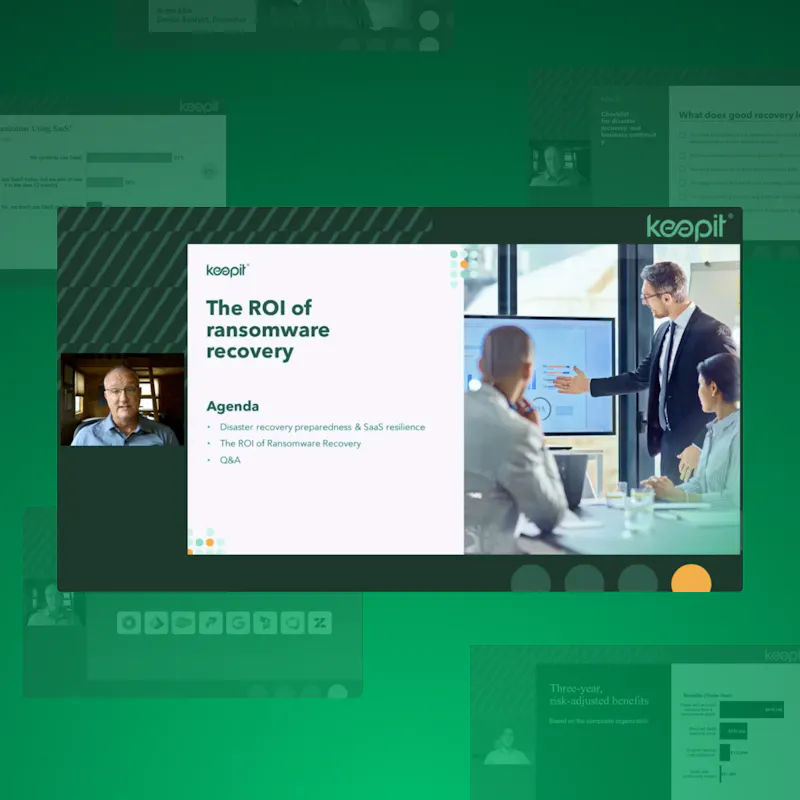
If you’d like to learn more about ransomware recovery, be sure to catch our on-demand webinar, The ROI of ransomware recovery

About Version 2 Digital

Version 2 Digital is one of the most dynamic IT companies in Asia. The company distributes a wide range of IT products across various areas including cyber security, cloud, data protection, end points, infrastructures, system monitoring, storage, networking, business productivity and communication products.

Through an extensive network of channels, point of sales, resellers, and partnership companies, Version 2 offers quality products and services which are highly acclaimed in the market. Its customers cover a wide spectrum which include Global 1000 enterprises, regional listed companies, different vertical industries, public utilities, Government, a vast number of successful SMEs, and consumers in various Asian cities.

About Keepit
At Keepit, we believe in a digital future where all software is delivered as a service. Keepit’s mission is to protect data in the cloud Keepit is a software company specializing in Cloud-to-Cloud data backup and recovery. Deriving from +20 year experience in building best-in-class data protection and hosting services, Keepit is pioneering the way to secure and protect cloud data at scale.

ESET Launches AI Advisor to Enhance Threat Detection and Response

BRATISLAVA, SlovakiaMay 29, 2024 —  ESET, a global leader in cybersecurity solutions, is proud to introduce ESET AI Advisor, an innovative generative AI-based cybersecurity assistant that transforms incident response and interactive risk analysis. First showcased at RSA Conference 2024, the new solution is now available as part of the ESET PROTECT MDR Ultimate subscription tier and ESET Threat Intelligence.

Unlike other vendor offerings and typical generative AI assistants that focus on soft features like administration or device management, ESET AI Advisor seamlessly integrates into the day-to-day operations of security analysts, conducting in-depth analysis. Building on over two decades of ESET’s expertise in AI-driven endpoint protection, the offering provides detailed incident data and offers SOC team-level advisory. This is a gamechanger for companies with limited IT resources who want to utilize the advantages of advanced Extended Detection and Response (XDR) solutions and threat intelligence feeds.

“As cybersecurity threats become increasingly sophisticated, ESET remains committed to providing cutting-edge solutions that address these challenges. The ESET AI Advisor module represents a significant leap forward in our mission to close the cybersecurity skills gap and empower organizations to safeguard their digital assets effectively,” said Juraj Malcho, Chief Technology Officer at ESET.

One of its primary benefits for this new solution is closing the cybersecurity skills gap. Security analysts of all skill levels can use ESET AI Advisor to conduct interactive risk identification, analysis, and response capabilities, which are provided in an easily understandable format. The user-friendly interface makes sophisticated threat data actionable even for less experienced IT and security professionals.
 
The ESET AI Advisor also excels in facilitating faster decision-making for critical incidents. Security analysts can simply consult the ESET AI Advisor to understand the specific threats their environment faces. Leveraging extensive XDR collected data, the ESET AI Advisor identifies and analyzes potential malware threats, providing intuitive insights into their behavior and impact. It assists in recognizing phishing attempts and advising users on how to avoid falling victim to fraudulent emails or websites. By monitoring network traffic, the ESET AI Advisor can flag unusual or suspicious behavior, helping security teams take appropriate action. Its ability to automate repetitive tasks is an additional advantage. By managing routine processes such as data collection, extraction, and basic threat detection, it allows security teams to focus on more strategic initiatives.

In ESET Threat Intelligence, the new module will help researchers analyze vast quantities of unique APT reports and understand latest development in world of cyber threats. With its conversational prompts and interactive dialogue, ESET AI Advisor empowers organizations to analyze and mitigate threats effortlessly and fortify their cybersecurity posture.
 
For more information on the use of AI in cybersecurity, download ESET’s whitepaper here: Cybersecurity in an AI Turbocharged Era.

About Version 2 Digital

Version 2 Digital is one of the most dynamic IT companies in Asia. The company distributes a wide range of IT products across various areas including cyber security, cloud, data protection, end points, infrastructures, system monitoring, storage, networking, business productivity and communication products.

Through an extensive network of channels, point of sales, resellers, and partnership companies, Version 2 offers quality products and services which are highly acclaimed in the market. Its customers cover a wide spectrum which include Global 1000 enterprises, regional listed companies, different vertical industries, public utilities, Government, a vast number of successful SMEs, and consumers in various Asian cities.

About ESET
For 30 years, ESET® has been developing industry-leading IT security software and services for businesses and consumers worldwide. With solutions ranging from endpoint security to encryption and two-factor authentication, ESET’s high-performing, easy-to-use products give individuals and businesses the peace of mind to enjoy the full potential of their technology. ESET unobtrusively protects and monitors 24/7, updating defenses in real time to keep users safe and businesses running without interruption. Evolving threats require an evolving IT security company. Backed by R&D facilities worldwide, ESET became the first IT security company to earn 100 Virus Bulletin VB100 awards, identifying every single “in-the-wild” malware without interruption since 2003.

How to block a program in a firewall

Why it’s necessary to block a program in a firewall 

A firewall is a security system designed to monitor and control incoming and outgoing network traffic based on predetermined security rules. You can think of it like border security: guards check everyone who enters or leaves a country, and sometimes deny entry to those who might pose a threat. Similarly, firewalls block programs from accessing the internet to prevent unauthorized access, malware, and other security risks that could harm your system.

By using a firewall to block a program, you can prevent online apps from automatically updating and potentially causing problems with your software. You can also stop gaming platforms from letting your children play online with strangers without supervision. Blocking apps with a firewall is also a great way to get rid of intrusive ads from free apps or prevent apps from connecting to public Wi-Fi networks, which are often unsecured and pose a significant threat to your data and devices.

So, now that we’ve explained why it’s important to block certain programs with a firewall, let us explain how to do it exactly.

How to block a program from accessing the internet in Windows 10 and 11

The most effective way to block a program on a Windows device is by using Windows Firewall. Here’s a simple guide on how to do it:

  1. Open the Start Menu and go to the Control Panel.

  2. Click on Windows Firewall in the Control Panel.

  3. On the left panel, click on Advanced Settings.

  4. Click on Outbound Rules. This is where you can revoke internet access for any particular app.

  5. In the Actions panel on the right side of the window, click on New Rule.

  6. Here you can select the type of firewall rule you want to create. Choose Program and then Next.

  7. Select This program path and click the Browse button to find the executable file of the program you want to block. Then click Next.

    Note: Alternatively, you can type in the application pathway if you already know it. An application pathway is usually one of the following:

    C:\Program Files\name of the app you want to block.exe

    C:\Program Files(x86)\name of the app you want to block.exe

  8. At this point, you can further specify how to block the app from the internet. Click Block the connection, and then click Next.

  9. Select when the rule applies (you can usually leave the defaults: Domain, Private, Public), then click Next.

  10. Give your rule a descriptive name. You can use the name of the program or write a brief note about what the program is for. Naming your rules helps you remember which apps you’ve blocked, enabling you to easily undo the block when it suits you.

  11. Click Finish.

That’s it — Your new rule is now active! You can view all of your rules in the Actions panel under Windows Firewall > Advanced Settings> Outbound Rules.

How to temporarily block a program in Windows Firewall

Windows Firewall doesn’t offer a built-in way to block a program’s internet access temporarily. However, you can manually turn an existing rule on or off to control whether a program can connect to the internet. To do so, you need to:

  1. Go to Windows Defender Firewall>Advanced Security and find the rule you created in Outbound Rules.

  2. Right-click the rule and select Disable Rule.

  3. To block the program again, right-click on the same rule and select Enable Rule.

Creating a whitelist in Windows Firewall

Firewalls keep you safe by monitoring and blocking risky or untrustworthy connections to your device. However, sometimes you need to let a specific app through your firewall to ensure it works properly. This is called whitelisting. Here’s how you can manage a whitelist in Windows Firewall:

  1. Click Start and type “firewall” into the search box. Click Windows Firewall.

  2. Click Allow an app or feature through Windows Firewall.

  3. On the next screen, click Change Settings.

  4. Check or uncheck the Private or Public boxes next to each app in the list. Selecting Public lets an app connect to public Wi-Fi, but this isn’t recommended for apps that contain your personal information, as public Wi-Fi is a common target for hackers.

Other ways to block internet access in Windows

If you’d prefer not to use Windows Firewall, please know there are other ways to temporarily block internet access. One simple option is to turn on the Airplane Mode from the Action Center. This cuts off all internet connections to your device and, therefore, to your installed programs. To reconnect, simply deactivate AirPlane mode.

You can also use a third-party firewall app. There are several free firewall apps available for Windows devices that offer robust protection. A free firewall app might be a good idea if you find the Windows interface hard to configure or simply want to play with additional firewall features.

How to set firewall access for services and apps on Mac

Mac users can also control which programs can connect to the network or the internet by setting firewall access for specific services and apps. The macOS firewall lets you manage these settings. Here’s how to do it:

  1. Go to the Apple menu in the top-left corner of the screen and open System Settings (or System Preferences on older versions of macOS).

  2. Then, select Network & Internet (or Security & Privacy, again depending on your macOS version).

  3. Click on Firewall.

  4. Click Turn On Firewall to enable it.

  5. Click Options to adjust your firewall settings. You’ll see a list of apps and services that are either allowed or blocked.

  6. Click on the + button to open an app list.

  7. Find and select the app you want to add, then click Add.

  8. Set the app status to either Allow incoming connections or Block incoming connections, depending on your preferences.

Important: If you block an app’s internet access through the firewall, it might disrupt its functionality or affect other software that relies on it.

Tips on how to further enhance your cybersecurity

Of course, it’s important to maintain a balance between security and connectivity since many programs today rely on internet access to function properly. You can’t just block everything, but you also don’t want to risk exposing your systems to threats.

Therefore, a practical solution is to use a mix of security tools to protect your devices and data. An antivirus program is essential for keeping malicious software out of your system, so that’s a must-have.

Additionally, using a reliable password manager like NordPass is critical to protecting your data and ensuring safe internet use. How so?

NordPass lets you store all your passwords, passkeys, and credit card details in one encrypted vault, ensuring that even if someone gains access to your device, they can’t easily access your sensitive information. Also, with features like multi-factor authentication and a Data Breach Scanner, NordPass gives you added security for your online accounts and allows you to check whether your data has been compromised in a breach. Additionally, NordPass can generate strong, complex passwords for you on the spot, and it lets you share credentials securely with people you trust.

There are many other reasons why NordPass can boost your cybersecurity, but the best way to understand its benefits is to try it yourself.

About Version 2 Digital

Version 2 Digital is one of the most dynamic IT companies in Asia. The company distributes a wide range of IT products across various areas including cyber security, cloud, data protection, end points, infrastructures, system monitoring, storage, networking, business productivity and communication products.

Through an extensive network of channels, point of sales, resellers, and partnership companies, Version 2 offers quality products and services which are highly acclaimed in the market. Its customers cover a wide spectrum which include Global 1000 enterprises, regional listed companies, different vertical industries, public utilities, Government, a vast number of successful SMEs, and consumers in various Asian cities.

About NordPass
NordPass is developed by Nord Security, a company leading the global market of cybersecurity products.

The web has become a chaotic space where safety and trust have been compromised by cybercrime and data protection issues. Therefore, our team has a global mission to shape a more trusted and peaceful online future for people everywhere.

Simply NUC and Scale Computing Continue to Join Forces to Deliver Next Generation Edge Solutions

Simply NUC and Scale Computing Announce Integration on the Onyx NUC

AUSTIN, Texas; BELFAST, United Kingdom; DUBLIN, Ireland — May 29, 2024 Simply NUC, a leading provider of customized computing solutions, announced an exciting collaboration with Scale Computing, a market leader in edge computing, virtualization, and hyperconverged solutions, enabling Scale Computing Platform (SC//Platform) certification and integration on the Simply NUC Onyx PC. This announcement marks a significant milestone between Simply NUC and Scale Computing in delivering superior computing and management capabilities on an expanded offering of compact hardware tailored for edge computing applications.

Edge computing, a paradigm shift in the IT landscape, demands efficient and reliable infrastructure that can handle diverse workloads while ensuring seamless management. Recognizing this need, Simply NUC and Scale Computing have come together to empower enterprise businesses with a robust solution that combines the power of Scale Computing HyperCore (SC//HyperCore) with the performance and flexibility of the Simply NUC Onyx PC.

The Onyx NUC is purpose-built for edge computing environments, offering a compact yet powerful computing solution that fits seamlessly into diverse deployment scenarios. With SC//HyperCore and Scale Computing Fleet Manager (SC//FleetManager) licenses pre-integrated on v9 and v5 units, businesses can now leverage the combined strengths of both technologies to achieve unparalleled efficiency, scalability, and manageability at the edge.

Key benefits of this collaboration include:

  1. Superior Computing Performance: The Onyx NUC, equipped with SC//HyperCore and SC//Fleet Manager, delivers exceptional computing power tailored for edge workloads, ensuring smooth operations even in demanding environments.
  2. Efficient Management: SC//Platform on Onyx NUC enables simplified management of edge infrastructure, allowing businesses to streamline operations and reduce overhead costs.
  3. Scalability: With the ability to scale resources dynamically, businesses can adapt to evolving workload demands without compromising performance or reliability.

“We are thrilled to collaborate with Simply NUC to bring this expanded and innovative small form factor hardware solution to market,” said Craig Theriac, VP of Product Management, of Scale Computing. “By combining Scale Computing’s innovative software with the Onyx NUC, we’re empowering businesses to unlock new possibilities in edge computing, enabling them to achieve greater agility, efficiency, management and performance.”

Scale Computing brings together simplicity and scalability with an edge computing platform that is easy to use, easy to manage, and easy to deploy. Scale Computing Platform (SC//Platform) replaces existing infrastructure, empowering enterprises to run applications and process data outside centralized data centers, at the edge of their networks, closest to where data is created and utilized. With SC//Fleet Manager, the industry’s first cloud-hosted monitoring and management tool built for hyperconverged edge computing infrastructure at scale, customers can quickly identify areas of concern using a single pane of glass, scaling from 1 to over 50,000 clusters. Zero-touch provisioning allows administrators to centrally monitor and manage hundreds or thousands of distributed edge infrastructure deployments with few or no on-site IT personnel.

This certification represents a commitment from both Simply NUC and Scale Computing to deliver best-in-class small form factor solutions tailored for the unique challenges of edge computing. Together, they aim to redefine the edge computing landscape and empower businesses to thrive in a rapidly evolving digital world. For more information, visit simplynuc.com/scale-computing/.

About Simply NUC

Formed in 2015 and headquartered in Round Rock, Texas, Simply NUC, Inc. is a global systems integrator and OEM specializing in customized small form factor PCs. Simply NUC provides fully configured, warrantied, and supported PC systems to businesses, as well as end-to-end NUC project development, custom operating system installations, and NUC accessories. For more information about Simply NUC visit http://www.simplynuc.com.

About Scale Computing

Scale Computing is a leader in edge computing, virtualization, and hyperconverged solutions. Using patented HyperCore™ technology, Scale Computing Platform automatically identifies, mitigates, and corrects infrastructure problems in real-time, enabling applications to achieve maximum uptime, even when local IT resources and staff are scarce. Edge Computing is the fastest-growing area of IT infrastructure, and industry analysts have named Scale Computing an outperformer and leader in the space, including being named the #1 edge computing vendor by CRN. Scale Computing’s products are sold by thousands of value-added resellers, integrators, and service providers worldwide. When ease-of-use, high availability, and TCO matter, Scale Computing Platform is the ideal infrastructure platform. Read what our customers have to say on Gartner Peer Insights, G2, and TrustRadius.

About Version 2 Digital

Version 2 Digital is one of the most dynamic IT companies in Asia. The company distributes a wide range of IT products across various areas including cyber security, cloud, data protection, end points, infrastructures, system monitoring, storage, networking, business productivity and communication products.

Through an extensive network of channels, point of sales, resellers, and partnership companies, Version 2 offers quality products and services which are highly acclaimed in the market. Its customers cover a wide spectrum which include Global 1000 enterprises, regional listed companies, different vertical industries, public utilities, Government, a vast number of successful SMEs, and consumers in various Asian cities.

About Scale Computing 
Scale Computing is a leader in edge computing, virtualization, and hyperconverged solutions. Scale Computing HC3 software eliminates the need for traditional virtualization software, disaster recovery software, servers, and shared storage, replacing these with a fully integrated, highly available system for running applications. Using patented HyperCore™ technology, the HC3 self-healing platform automatically identifies, mitigates, and corrects infrastructure problems in real-time, enabling applications to achieve maximum uptime. When ease-of-use, high availability, and TCO matter, Scale Computing HC3 is the ideal infrastructure platform. Read what our customers have to say on Gartner Peer Insights, Spiceworks, TechValidate and TrustRadius.

×

Hello!

Click one of our contacts below to chat on WhatsApp

×