Skip to content

How to change or reset your Discord password

Why change a Discord password?

You might need to perform a Discord password reset for various reasons. We recommend changing your password if you suspect that someone hacked your account, found out your login details, or leaked them. Also, it is a good practice to change your password from time to time and use strong passwords to reduce the chances of hackers or snoopers.

Using a password manager like NordPass not only helps you generate passwords that are extremely difficult to crack but also ensures that you don’t forget your passwords ever again.

How to change a Discord password

You can change your Discord password in the following ways:

Changing your password on the desktop

  1. Open the Discord app.

  2. Next to your Discord, tap the gear icon to access your User Settings.

  3. Go to My Account and click Change Password.

  4. Enter your current password and the password you want to change it to, and click Save.

  5. Your password has been changed. You should receive an email from Discord notifying you about this change. In case you received such an email but did not change your password, contact Discord support immediately.

You should follow the same steps when changing your password on the Discord website.

Changing your password on mobile

  1. Open the Discord app.

  2. Tap your profile picture in the bottom-right corner.

  3. Under the Account Settings, tap Account.

  4. Now select Password.

  5. Enter your current and new passwords.

  6. Tap Change Password.

  7. Your password has been changed. You should also receive an email from Discord notifying you about this change.

Just make sure you use strong passwords once you change them. You can use NordPass for storing your complex and safe passwords.

What should I do if I forgot my Discord password?

In case you forgot your Discord password, follow these steps:

Resetting your password

  1. Open the Discord app or visit https://discord.com/login.

  2. Enter the email address associated with your Discord account and click Forgot your password?

  3. Discord will then send you an email with instructions.

  4. Open the email, click Reset password, and follow the instructions provided. Again, report to the Discord support team in case you received such an email but do not remember requesting a password reset. The same steps apply when you reset your password from Discord’s website.

Please note that if you can no longer access that email account, you won’t be able to reset your password. In this case, you have to create a new account with a different email address. Or you can change your email address by doing the steps explained below.

About NordPass
NordPass is developed by Nord Security, a company leading the global market of cybersecurity products.

The web has become a chaotic space where safety and trust have been compromised by cybercrime and data protection issues. Therefore, our team has a global mission to shape a more trusted and peaceful online future for people everywhere.

About Version 2 Digital

Version 2 Digital is one of the most dynamic IT companies in Asia. The company distributes a wide range of IT products across various areas including cyber security, cloud, data protection, end points, infrastructures, system monitoring, storage, networking, business productivity and communication products.

Through an extensive network of channels, point of sales, resellers, and partnership companies, Version 2 offers quality products and services which are highly acclaimed in the market. Its customers cover a wide spectrum which include Global 1000 enterprises, regional listed companies, different vertical industries, public utilities, Government, a vast number of successful SMEs, and consumers in various Asian cities.

What It Means for an Enterprise to Have Threat Intelligence

Cyber threats are evolving faster than a Marvel movie villain, leaving enterprises in a high-stakes game of survival. Robust threat intelligence isn’t just a competitive edge—it’s the shield that separates secure organizations from the next headline-grabbing breach. But what does “threat intelligence” actually mean in a practical sense, and how can organizations harness it effectively?

Threat intelligence refers to the process of gathering, analyzing, and acting upon information about potential or active cyber threats that could impact an organization. It’s not just about detecting threats but understanding the “who,” “what,” “why,” and “how” behind them. This intelligence enables businesses to stay ahead of malicious actors, minimize vulnerabilities, and strengthen their cybersecurity posture proactively

Why Threat Intelligence Is Crucial for Enterprises

Threat intelligence isn’t just about reducing risk—it’s about operational resilience and strategic advantage. Here’s why enterprises need it:

  1. Proactive Defense: Understanding the tactics, techniques, and procedures (TTPs) of attackers helps organizations anticipate and thwart threats before they escalate.
  2. Incident Response: Real-time intelligence enables faster, more effective responses to cyber incidents, minimizing potential damage.
  3. Regulatory Compliance: Many regulations, such as GDPR, HIPAA, and others, require organizations to demonstrate they have proactive measures in place to protect sensitive data.
  4. Strategic Insights: Beyond IT, threat intelligence can inform broader business strategies, especially in industries where intellectual property theft or espionage is a concern.

However, effective threat intelligence requires the right combination of tools, technologies, and processes.

Key Cybersecurity Technologies Needed for Effective Threat Intelligence

Building a comprehensive threat intelligence program means leveraging cutting-edge technologies that can collect, analyze, and act on intelligence in real-time. Let’s explore some of the key technologies every enterprise should consider—and why Network Access Control (NAC) deserves a prominent spot in your arsenal.

1. Network Access Control (NAC): The Gatekeeper
  • Why It Matters: Imagine your enterprise network as a VIP lounge. NAC is the bouncer, ensuring only authorized and secure devices can enter. But it’s not just about access—it’s about dynamic access control based on real-time intelligence. Modern NAC solutions like Portnox do more than check credentials. They evaluate device health, compliance with security policies, and behavior, enabling Zero Trust enforcement. For instance, if a device connected to the network starts behaving suspiciously or becomes non-compliant with policy, NAC can immediately quarantine it, preventing lateral movement.
  • How It Integrates with Threat Intelligence: NAC serves as both a data source and enforcement mechanism for threat intelligence. It provides real-time visibility into every device on the network, including IoT and BYOD devices—often weak points in enterprise security. When combined with threat intelligence feeds, NAC can automatically block or isolate devices flagged as malicious, effectively preventing breaches before they spread.
2. Endpoint Detection and Response (EDR): Sherlock Holmes for Endpoints
  • Why It Matters: EDR tools are your digital detectives, continuously monitoring and analyzing endpoint activity to detect suspicious behavior. These tools provide detailed forensic data that can help identify the root cause of incidents and prevent future occurrences.
  • How It Integrates with Threat Intelligence: EDR platforms utilize threat intelligence to detect known indicators of compromise (IOCs), such as malicious files or IP addresses. They also feed back information to threat intelligence systems, enriching the overall knowledge base with new data on emerging threats.
3. Security Information and Event Management (SIEM): The Nerve Center
  • Why It Matters: SIEM systems collect, analyze, and correlate security event data from across the enterprise. Think of it as the command center where all logs and alerts converge, enabling centralized monitoring and response.
  • How It Integrates with Threat Intelligence: SIEM platforms are most effective when integrated with external and internal threat intelligence feeds. They can correlate logs and events with known threat signatures, flagging anomalies that might otherwise go unnoticed. Additionally, they provide historical data, allowing enterprises to determine whether a newly identified threat has previously impacted their systems.
4. Threat Intelligence Platforms (TIP): The Analyst’s Toolkit
  • Why It Matters: TIPs act as a hub for collecting, analyzing, and sharing threat intelligence data. They aggregate information from multiple sources—such as open-source feeds, commercial providers, and internal telemetry—and present it in an actionable format.
  • How It Integrates with Threat Intelligence: A TIP ensures that threat intelligence isn’t just raw data but actionable insights. It can automatically prioritize threats based on risk levels, enabling security teams to focus on what matters most. When integrated with NAC, SIEM, or EDR systems, TIPs can enable automated responses, such as blocking malicious domains or isolating compromised devices.
5. Cloud Access Security Brokers (CASB): The Cloud Watchdog
  • Why It Matters: With the shift to cloud-based applications, protecting sensitive data stored and transmitted in the cloud is a growing challenge. CASBs enforce security policies, monitor user activity, and detect anomalies across cloud environments.
  • How It Integrates with Threat Intelligence: CASBs leverage threat intelligence to identify and block malicious cloud activities, such as suspicious file uploads or unauthorized access attempts. They also provide visibility into shadow IT, a significant blind spot for many enterprises.
6. Deception Technology: Honeypots and Honeynets
  • Why It Matters: Deception tools create fake environments that lure attackers, allowing organizations to study their methods without risking actual systems. These tools provide invaluable intelligence on attack tactics and behavior.
  • How It Integrates with Threat Intelligence: Data collected through deception technology can enrich threat intelligence feeds, offering real-world insights into attacker methodologies. This information can then be used to strengthen defenses across the board, including NAC policies and endpoint security.
7. Artificial Intelligence and Machine Learning (AI/ML): The Smart Assistant
  • Why It Matters: The sheer volume of data generated by modern enterprises makes manual analysis impractical. AI/ML models can sift through this data to identify patterns, anomalies, and emerging threats.
  • How It Integrates with Threat Intelligence: AI/ML powers predictive analytics, enabling enterprises to anticipate attacks before they occur. It can also enhance existing tools like SIEMs and NAC systems by automating threat detection and response based on historical and real-time intelligence.
8. Vulnerability Management Tools: The Fixers
  • Why It Matters: Knowing your vulnerabilities is half the battle. Vulnerability management tools scan systems, applications, and networks for weaknesses, providing actionable insights on how to address them.
  • How It Integrates with Threat Intelligence: These tools can cross-reference vulnerabilities against threat intelligence data to prioritize remediation efforts based on the likelihood of exploitation. Combined with NAC, they can enforce access restrictions on vulnerable devices until they’re patched.

Building a Holistic Threat Intelligence Ecosystem

While each of these technologies plays a critical role, the real magic happens when they work together. Here’s how enterprises can create a unified threat intelligence ecosystem:

  1. Centralized Data Sharing: Use platforms like SIEM or TIPs to consolidate data from all sources, ensuring a single source of truth.
  2. Automation: Integrate systems to enable automated responses, such as NAC isolating a compromised device based on EDR alerts.
  3. Continuous Learning: Regularly update threat intelligence feeds and train AI/ML models with new data.
  4. Visibility and Control: Leverage tools like NAC and CASBs to maintain visibility and enforce security policies across all environments—on-premises, cloud, and hybrid.

Securing the Future: Why Threat Intelligence Is Your Ultimate Cyber Defense

For enterprises, threat intelligence is more than a buzzword—it’s a lifeline in the ever-changing cybersecurity landscape. By leveraging technologies like NAC, EDR, SIEM, and others, organizations can move from a reactive to a proactive security posture. Network Access Control, in particular, stands out as a linchpin technology, bridging the gap between visibility and enforcement in the fight against cyber threats. With the right tools and a strategic approach, enterprises can not only defend against today’s threats but also stay one step ahead of tomorrow’s.

And remember, in cybersecurity, the best offense is a well-informed defense. So arm your enterprise with intelligence—it’s the smartest move you’ll ever make.

About Portnox
Portnox provides simple-to-deploy, operate and maintain network access control, security and visibility solutions. Portnox software can be deployed on-premises, as a cloud-delivered service, or in hybrid mode. It is agentless and vendor-agnostic, allowing organizations to maximize their existing network and cybersecurity investments. Hundreds of enterprises around the world rely on Portnox for network visibility, cybersecurity policy enforcement and regulatory compliance. The company has been recognized for its innovations by Info Security Products Guide, Cyber Security Excellence Awards, IoT Innovator Awards, Computing Security Awards, Best of Interop ITX and Cyber Defense Magazine. Portnox has offices in the U.S., Europe and Asia. For information visit http://www.portnox.com, and follow us on Twitter and LinkedIn.。

About Version 2 Digital

Version 2 Digital is one of the most dynamic IT companies in Asia. The company distributes a wide range of IT products across various areas including cyber security, cloud, data protection, end points, infrastructures, system monitoring, storage, networking, business productivity and communication products.

Through an extensive network of channels, point of sales, resellers, and partnership companies, Version 2 offers quality products and services which are highly acclaimed in the market. Its customers cover a wide spectrum which include Global 1000 enterprises, regional listed companies, different vertical industries, public utilities, Government, a vast number of successful SMEs, and consumers in various Asian cities.

Third-party reviews: OpenVPN alternatives and competitors

Summary: Check out OpenVPN alternatives that could better match your organization’s needs.

In Q3 2024, cyber-attacks reached a new all-time high. Attacks increased by 75% from Q3 2023 and 15% from the previous quarter.

A business virtual private network (VPN) can’t guarantee security, but it reduces risks by encrypting data in transit. OpenVPN is a popular choice in the market. It’s a solid choice for small-to-medium businesses (SMBs) and organizations that need basic protection. Yet, if you need specific features or advanced security, you might need another option. We’ll explore alternatives to OpenVPN that may be a better fit for your organization.

Overview of OpenVPN Access Server

OpenVPN has been a reliable VPN for many businesses. It provides encrypted remote access and safe site access. It’s also used to connect to virtual environments.

While previously praised as a cost-effective solution for SMBs, some user opinions are shifting. Based on concurrent users, OpenVPN’s pricing suits some but frustrates others. Costs rise quickly when advanced features are added, which can stretch budgets. According to some users, for basic secure access, OpenVPN works well, but businesses should weigh the costs carefully before deciding.


Most mentioned product strengths of OpenVPN Access Server

OpenVPN offers versatile features, including:

  • Firewall and access control for enhanced security
  • Multiple simultaneous authentication methods (PAM, RADIUS, LDAP, SAML, etc.)
  • Clustering to improve availability and load capacity
  • Site-to-site VPN support for secure connections
  • SSL certificate support for encrypted access
  • Integration with Okta, Entra ID, and more
  • Support for per-user and per-group customizations, including routing and SAML

Most mentioned overall product benefits of OpenVPN Access Server

OpenVPN’s strengths focus on flexibility and ease of use:

  • Licenses based on concurrent users, not employees, for better cost efficiency
  • Easy setup for new VPN servers
  • A robust CLI that saves time when managing multiple accounts

Drawbacks of OpenVPN Access Server

Despite its strong points, OpenVPN presents significant drawbacks:

  • Initial setup can be complex and difficult for new users
  • The support team is responsive but often unhelpful
  • Free license limits to two simultaneous users
  • Lack of centralized management for clustered server configurations
  • Inability to restrict VPN connections by specific IPs or subnets
  • Lack of features to bypass deep packet inspection (DPI)

Overall, OpenVPN Access Server offers security and flexibility for many businesses. It works well for organizations needing concurrent user licensing. However, the pricing model may not fit all budgets. Additional features can raise costs sharply, which may discourage SMBs.

Disclaimer: This product review is based on information provided on the company’s website and social networking forums such as G2, as well as customer feedback shared on these platforms, accessed on October 22, 2024.

Now, let’s look at OpenVPN alternatives; they are mentioned in no particular order.

1. NordLayer

Overview of NordLayer

NordLayer is a versatile VPN solution designed for businesses that need secure internet access and remote network access management. It’s one of the top OpenVPN alternatives, providing advanced business VPN solutions. It focuses on Zero Trust principles to protect sensitive data. NordLayer also offers flexibility, allowing you to adjust security settings to meet specific needs. Its combination of powerful features and ease of use makes it a strong choice for modern companies.


Most mentioned product strengths of NordLayer

NordLayer stands out with the following strengths:

  • Secure remote access through NordLynx for fast VPN speed
  • Comprehensive offerings beyond just Business VPN, including features that contribute to the SSE framework
  • 30+ VPN server locations
  • Quantum-resilient 256-bit AES encryption
  • Application compatible with Android, iOS, Windows, macOS, Linux
  • Browser Extension available for Google Chrome, Mozilla Firefox, Microsoft Edge, and Brave
  • Smart Remote Access to interconnect remote networks and devices
  • Intuitive interface for easy navigation
  • Automated threat detection and response
  • Compatible with hybrid networks and various IAM providers
  • Always On VPN feature

Most mentioned overall product benefits of NordLayer


NordLayer brings several key benefits for users:

  • Setup takes only about 5 minutes, making it very easy to use
  • Straightforward and stable connectivity ensures smooth operation
  • The service is known for helpful support and easy troubleshooting

Drawbacks of NordLayer

While NordLayer is a versatile VPN service, it has some drawbacks:

  • Lacks support for languages other than English
  • IdP users can’t be managed from the console, causing SCIM syncing issues
  • Users can’t reduce licenses themselves; they need to contact support
  • Not available on Samsung TV or Fire TV, limiting certain use cases

NordLayer reviews

Users rate NordLayer highly across review platforms. For more insights, see NordLayer’s G2 reviews and Gartner reviews.


Overall, NordLayer is easy to use, quick to set up, and reliable. It’s a great choice for secure network access. Some users mention issues with user management and language support, but it is still affordable with clear pricing. A key advantage is 24/7 support included with all plans, ensuring help is always available.

Disclaimer: This product review is based on information provided on the company’s website, VPN review sites, and social networking forums such as Gartner and G2, as well as customer feedback shared on these platforms, accessed on October 22, 2024.

2. Tailscale

Overview of Tailscale

Tailscale is a VPN service primarily used for personal VPN connections but has become popular with small organizations. It offers simple, secure peer-to-peer connections without the need for centralized VPN servers. While it may lack certain enterprise-grade security and compliance features, companies still use it to connect remote equipment, monitor control systems, and access internal networks securely.


Most mentioned product strengths

Tailscale’s strengths reflect its simplicity and reliability:

  • Real-time data monitoring from remote sites
  • The ability to “share” devices easily, making troubleshooting more efficient
  • Enterprise-ready features like ACLs, identity management, and groups
  • Simplified SSH access for secure connections

Most mentioned overall product benefits

Tailscale offers several key benefits that users highlight:

  • Quick and simple deployment on remote stations
  • Reliable and stable performance, with fast connections
  • Efficiently finds the shortest route between devices for optimal speed
  • Reduces the need for manual VPN setup, easing the burden on IT teams

Drawbacks

Despite its strengths, Tailscale has limitations that users frequently mention:

  • The absence of an official self-hosted option forces reliance on the cloud, raising privacy concerns
  • Site-to-site connections require additional hardware, which can complicate the setup
  • The iOS app needs significant improvement to match other platforms
  • The Android client lacks important functionality

Disclaimer: This product review is based on information provided on the company’s website, VPN review sites, and social networking forums such as G2 and Reddit, as well as customer feedback shared on these platforms, accessed on October 22, 2024.


3. Check Point Harmony SASE (formerly Perimeter 81)

Overview of Check Point Harmony SASE

Check Point Harmony SASE, previously known as Perimeter 81 (now part of Check Point), is a cloud-based secure access solution. It uses a Zero Trust model and granular control over private access. This makes it easier to manage hybrid internet workflows while enhancing security for businesses working across varied networks.


Most mentioned product strengths

Check Point Harmony SASE has several features to provide comprehensive, secure access:

  • Granular Zero Trust private access for users
  • Identity-centric policies applied to all users
  • A built-in firewall that manages third-party vendor access
  • Malware protection and web filtering for enhanced security
  • Supports IPsec protocol for site-to-site connections

Most mentioned overall product benefits

Harmony SASE offers several user-approved benefits:

  • Very few delays in internet connection; smooth performance
  • Reliable documentation, ensuring quick problem resolution
  • Strong reliability across different platforms

Drawbacks

Though powerful, Check Point Harmony SASE has its drawbacks:

  • The desktop application occasionally stops working and requires reinstallation
  • The user licensing model scales poorly, limiting larger teams
  • Stability issues on macOS devices
  • Difficult to schedule 30-minute technical support sessions
  • Frustrating support experience for managed service providers (MSPs)

Disclaimer: This product review is based on information provided on the company’s website, VPN review sites, and social networking forums such as Gartner and G2, as well as customer feedback shared on these platforms, accessed on October 22, 2024.

4. GoodAccess

Overview of GoodAccess

GoodAccess provides a secure VPN solution tailored for small organizations and teams. It offers cloud-managed VPN servers and allows users to connect using static IP addresses, simplifying access management without the need for custom clients.


Most mentioned product strengths

GoodAccess offers several useful features for small businesses:

  • Built-in multi-factor authentication options for enhanced security
  • Support for Business VPNs with static IP addresses, ideal for consistent access
  • Simple to set up and manage, making it a good choice for smaller teams

Most mentioned overall product benefits

GoodAccess is known for delivering several key benefits:

  • Easy-to-manage platform with clear insights into team member usage
  • Knowledgeable and helpful support team
  • Fantastic connection speed, ensuring smooth remote access

Drawbacks

Despite its benefits, GoodAccess has some limitations:

  • Scaling costs can become high when adding extra gateways
  • Viewing credentials in the management portal may reset user passwords unexpectedly
  • Plans can be confusing and often push users to start with a yearly subscription
  • Adding additional members can be expensive
  • Occasional connection drops reduce reliability

Disclaimer: This product review is based on information provided on the company’s website, VPN review sites, and social networking forums such as Gartner and G2, as well as customer feedback shared on these platforms, accessed on October 22, 2024.

5. UTunnel VPN

Overview of UTunnel VPN

UTunnel VPN is a secure VPN solution designed for small businesses, giving flexibility with a range of subscription plans. It includes centralized management and customization options, making it a reliable choice for teams needing secure remote access.


Most mentioned product strengths

UTunnel VPN stands out with several notable strengths:

  • SCIM integration for streamlined user management
  • Single Sign-On (SSO) for secure, centralized authentication
  • Advanced controls for detailed customization
  • Support for site-to-site VPN connections, ensuring seamless communication between locations

Most mentioned overall product benefits

Users appreciate the practical benefits UTunnel VPN offers:

  • Straightforward process for adjusting and scaling the number of licenses
  • Competitively priced entry-level plans, making it affordable for small businesses
  • Simple setup process, ensuring quick deployment

Drawbacks

Despite its strengths, UTunnel VPN has some limitations:

  • Not as well-known as other VPN providers, with fewer reviews and public feedback
  • Lacks the advanced security features that larger providers offer

Disclaimer: This product review is based on information provided on the company’s website, VPN review sites, and social networking forums such as G2, as well as customer feedback shared on these platforms, accessed on October 22, 2024.

Conclusion

For basic security, OpenVPN serves many businesses well. But if you need more features, consider OpenVPN alternatives like NordLayer, Tailscale, or Check Point Harmony SASE. These alternatives to OpenVPN provide privacy and security, faster speeds, and better support. Choose a solution that matches your business needs and offers room for growth.

Disclaimer: The information in this article is for informational purposes only. It is based on publicly available third-party reviews, user feedback, and online sources accessed on October 22, 2024, and should not be considered final or permanent. While we aim for accuracy and completeness, Nord Security Inc. and its affiliates make no guarantees regarding the accuracy, completeness, or suitability of the information. We do not claim, warrant, or represent that any product or its feature is or will remain publicly regarded as better or worse than other alternatives, serve any purpose, or have mentioned features, benefits, strengths, and limitations for any period. Product features, pricing, and other details may change, and we advise readers to verify these with vendors directly. We are not liable for any errors, omissions, or actions taken based on this information. The inclusion of competitor products does not imply affiliation or endorsement, and all trademarks mentioned are the property of their respective owners. Readers should do their own research and get independent advice before making purchasing decisions.

About NordLayer
NordLayer is an adaptive network access security solution for modern businesses – from the world’s most trusted cybersecurity brand, Nord Security.

The web has become a chaotic space where safety and trust have been compromised by cybercrime and data protection issues. Therefore, our team has a global mission to shape a more trusted and peaceful online future for people everywhere.

About Version 2 Digital

Version 2 Digital is one of the most dynamic IT companies in Asia. The company distributes a wide range of IT products across various areas including cyber security, cloud, data protection, end points, infrastructures, system monitoring, storage, networking, business productivity and communication products.

Through an extensive network of channels, point of sales, resellers, and partnership companies, Version 2 offers quality products and services which are highly acclaimed in the market. Its customers cover a wide spectrum which include Global 1000 enterprises, regional listed companies, different vertical industries, public utilities, Government, a vast number of successful SMEs, and consumers in various Asian cities.

Shop Till You Drop? Not If Phishers Stop You: MSPs’ Guide to Securing SMBs This November

Key Takeaways:

  • Phishing attacks spike during November shopping festivals, targeting small and medium businesses (SMBs) at alarming rates.
  • Recent incidents in 2024 demonstrate the significant consequences of phishing, highlighting the need for robust protection and vigilance.
  • Practical measures and Guardz’s AI-powered phishing simulations empower MSPs to protect their clients better.

The November Shopping Month: A High-Risk Period for Phishing Attacks

As November rolls in, it brings with it a frenzy of online shopping from Black Friday to Cyber Monday, attracting millions of shoppers. This period, however, also marks a prime time for cybercriminals to launch sophisticated phishing attacks. For SMBs, which often lack the robust cybersecurity infrastructure of larger enterprises, these attacks can be particularly damaging, sometimes leading to devastating consequences.

2024 Phishing Attack Highlights

Phishing attacks have been on the rise in recent years, with cybercriminals deploying increasingly advanced tactics. In 2024, several notable incidents captured the cybersecurity community’s attention, shedding light on the severity of this threat:

  1. Retail Scam Targeting SMB Employees: In early November 2024, attackers launched a phishing campaign disguised as promotional emails from well-known retail brands. The emails contained links leading to cloned websites where victims unwittingly entered their business email credentials. This campaign affected several SMBs, leading to unauthorized access to internal systems and theft of sensitive data (Source: Infosecurity Magazine).
  2. Invoice Fraud Leading to Financial Losses: Another incident involved a phishing scam that targeted the finance departments of smaller companies. In this attack, emails posing as trusted vendors included fraudulent invoices. One SMB in the manufacturing sector lost over $50,000 after employees responded to what they thought was an urgent request for payment (Source: Bleeping Computer).
  3. Spear-Phishing Aimed at SMB Owners: A more tailored approach was seen when hackers targeted SMB owners and executives with spear-phishing emails designed to look like messages from prominent e-commerce partners. These emails included malicious attachments or links that led to credential theft and data exfiltration (Source: ThreatPost).

These real-world examples underscore the risks SMBs face, especially during the high-stakes shopping month. With phishing attacks becoming more sophisticated, it’s critical for Managed Service Providers (MSPs) to stay ahead of these threats to safeguard their clients.

Understanding the Impact of Phishing on Businesses

Phishing attacks are not just inconvenient; they pose a significant threat to SMBs’ financial health, reputation, and operational capabilities. Here’s how phishing can affect businesses:

  1. Financial Losses: As illustrated in the 2024 invoice fraud case, phishing can lead to unauthorized financial transactions. Many SMBs operate on tighter budgets, so losses of tens of thousands of dollars can be crippling.
  2. Data Breaches: Phishing often serves as an entry point for large-scale data breaches. Once an attacker gains access to an SMB’s network through compromised credentials, they can steal customer data, intellectual property, and sensitive business information.
  3. Reputation Damage: A data breach or successful phishing scam can erode trust between an SMB and its clients. In today’s hyper-connected world, negative news spreads fast, and customers are likely to choose more secure competitors.
  4. Operational Disruptions: Phishing can trigger a chain of events leading to operational shutdowns. For example, ransomware often begins with phishing, leaving businesses unable to access their data unless they pay a ransom.

These effects highlight why MSPs entrusted with SMB cybersecurity must prioritize education, training, and comprehensive defense measures.

Why SMBs Are Particularly Vulnerable

SMBs typically lack dedicated IT security teams and rely on MSPs for protection. This reliance makes it essential for MSPs to maintain proactive strategies that can prevent incidents before they occur. Additionally, SMB employees may not receive consistent training on how to spot phishing attempts, leaving them susceptible to deceptive schemes that mimic legitimate business communications.

Practical Tips for MSPs and SMBs to Combat Phishing Attacks

MSPs must guide SMBs in implementing a multi-layered security approach that reduces the risk of phishing attacks. Here are practical steps for MSPs and SMBs to take:

  1. Continuous Education and Training: MSPs should provide ongoing training sessions and awareness programs for SMB employees. Interactive phishing simulations help identify weak points and improve awareness.
  2. Deploy Multi-Factor Authentication (MFA): MFA adds an extra layer of security, ensuring that even if a phishing attack compromises login credentials, unauthorized access is much harder to achieve.
  3. Email Filtering and Security Protocols: Implement advanced email filtering solutions that scan for known phishing tactics and suspicious attachments.
  4. Verification Protocols: Establish clear procedures for verifying any email that requests sensitive actions or financial transactions.

Guardz’s Role in Protecting SMBs During High-Risk Periods

Guardz is dedicated to empowering MSPs with the tools and insights they need to protect their SMB clients. Our AI-powered phishing simulations are designed to replicate real-world attacks, allowing employees to experience and learn from realistic phishing scenarios in a safe environment. These simulations not only test employee responses but also provide actionable insights to reinforce training and awareness.

Guardz’s commitment to the MSP community extends beyond tools; it’s embedded in our partnerships and support strategies. We understand that protecting SMBs is a shared responsibility, and our platform integrates automated threat detection and response features to simplify the MSP’s workload.

How Guardz’s AI-Powered Phishing Simulations Help

Our phishing simulations leverage AI to adapt to the latest tactics used by cybercriminals, ensuring that MSPs and their clients stay prepared for emerging threats. By using Guardz’s solutions, MSPs can:

  • Educate employees in real time with simulation exercises that mimic current phishing trends.
  • Provide reports and feedback to improve employees’ understanding of phishing indicators.
  • Strengthen their overall cybersecurity posture by identifying areas of weakness and taking corrective actions before a real attack occurs.

Conclusion

Phishing attacks are an ever-present threat, especially during high-traffic online shopping periods. For MSPs responsible for SMB security, proactive strategies, continuous training, and robust defense tools are essential. With Guardz’s AI-powered phishing simulations and dedicated support, MSPs can confidently safeguard their clients and reduce the risk of devastating attacks during November and beyond.

About Guardz
Guardz is on a mission to create a safer digital world by empowering Managed Service Providers (MSPs). Their goal is to proactively secure and insure Small and Medium Enterprises (SMEs) against ever-evolving threats while simultaneously creating new revenue streams, all on one unified platform.

About Version 2 Digital

Version 2 Digital is one of the most dynamic IT companies in Asia. The company distributes a wide range of IT products across various areas including cyber security, cloud, data protection, end points, infrastructures, system monitoring, storage, networking, business productivity and communication products.

Through an extensive network of channels, point of sales, resellers, and partnership companies, Version 2 offers quality products and services which are highly acclaimed in the market. Its customers cover a wide spectrum which include Global 1000 enterprises, regional listed companies, different vertical industries, public utilities, Government, a vast number of successful SMEs, and consumers in various Asian cities.

What is Coffee Shop Networking?

Introduction

Quick Answer: Coffee shop networking is a flexible approach to enterprise networking that enables secure, lightweight access from any location, supporting remote and hybrid workforces without heavy infrastructure.

What is Coffee Shop Networking?

Hybrid work and lightweight network infrastructure with SD-WAN and ZTNA for coffee shop networking.

Coffee shop networking is a modern networking model designed to support today’s distributed workforce. This approach allows employees to connect to corporate resources from remote locations, such as coffee shops, home offices, or co-working spaces. Inspired by the simplicity of connecting to a coffee shop’s Wi-Fi, coffee shop networking provides seamless connectivity with the added security required for accessing sensitive business applications.

As hybrid work environments became more prevalent, the need for lightweight, flexible networking solutions grew. Traditional full-scale SD-WAN (Software-Defined Wide Area Network) infrastructures were designed for office locations with dedicated, on-premises equipment. Coffee shop networking, on the other hand, emphasizes minimal setup and relies on cloud-based resources, making it ideal for remote and mobile employees.

The Evolution of Coffee Shop Networking

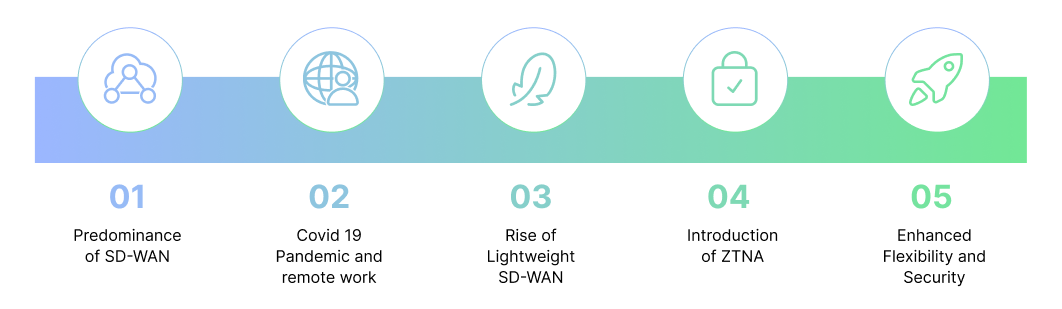
Evolution of SD-WAN, remote work growth, lightweight SD-WAN, ZTNA introduction, and increased flexibility and security

The shift toward coffee shop networking accelerated during the COVID-19 pandemic, as businesses rapidly adapted to remote work at scale. With employees working from various locations, there was a need for simple, cost-effective ways to access company resources without complex setups. This shift led to the rise of “lightweight SD-WAN” — a scaled-down version of traditional SD-WAN designed to offer remote users the connectivity they need without the heavy infrastructure associated with full-scale, office-based networks.

In many cases, however, Zero Trust Network Access (ZTNA) can entirely replace lightweight SD-WAN for remote access, especially when using solutions that support multiple protocols over SSL. ZTNA provides a streamlined, security-focused approach that eliminates the need for extensive network infrastructure, allowing employees to connect securely to corporate resources directly, regardless of their location. By supporting access via various protocols over SSL, ZTNA ensures that employees can safely connect to corporate applications without the need for a complex SD-WAN setup, enhancing both security and cost-efficiency.

This model acknowledges that remote users don’t need the same extensive infrastructure as branch offices. Instead, they need fast, secure access to the internet and corporate resources from any location. Coffee shop networking, especially when enhanced with ZTNA, provides this flexibility—ensuring connectivity and security while eliminating unnecessary components, reducing costs, and offering an adaptable solution that meets the needs of today’s mobile workforce.

How to Enhance Coffee Shop Networking with ZTNA and Thinfinity®

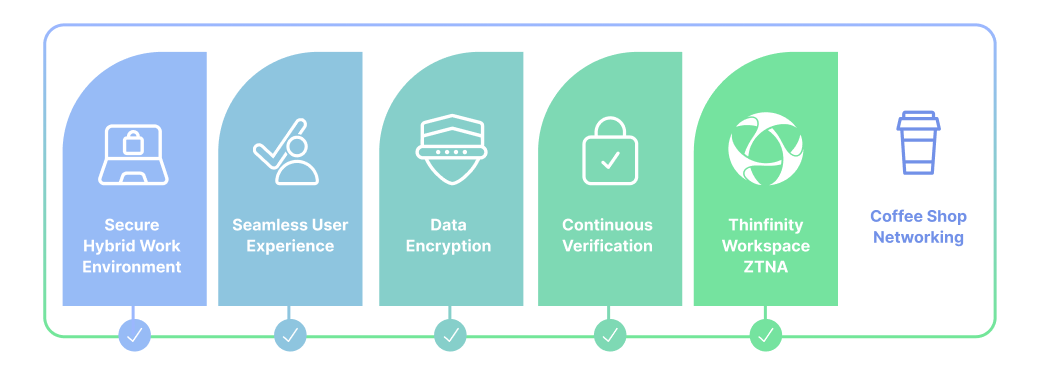
How to Enhance Coffee Shop Networking with ZTNA and Thinfinity

While coffee shop networking provides convenience and flexibility, it also comes with security risks, especially when using public Wi-Fi. Zero Trust Network Access (ZTNA) is essential to mitigate these risks. ZTNA secures connections by enforcing strict access controls, requiring continuous verification of user identity and device health. Here’s how ZTNA and Thinfinity Workspace can enhance coffee shop networking:

  1. Granular Access Control with ZTNA 
    ZTNA applies a “least privilege” approach, limiting access to only the specific resources each user needs. Unlike traditional VPNs, which provide broad network access, ZTNA allows remote employees to connect only to authorized applications, reducing potential attack surfaces. This targeted access is especially useful for coffee shop networking, where public networks are often used.
  2. Continuous Verification for Security
    ZTNA constantly checks user identity and device health throughout the session, ensuring that unauthorized access attempts are blocked immediately. This continuous monitoring safeguards corporate resources even in environments where security threats are high, such as public Wi-Fi networks in coffee shops.
  3. Encryption for Public Networks
    Coffee shop networks are often open and vulnerable to eavesdropping. ZTNA encrypts all data traffic between the remote device and corporate servers, making the data unreadable to potential attackers. This advanced encryption provides an added layer of security for employees working from locations with untrusted networks.

Thinfinity® Workspace: A Comprehensive Solution for Secure Coffee Shop Networking

Thinfinity Workspace enhances coffee shop networking by integrating ZTNA and Remote Privileged Access Management (RPAM), delivering both flexibility and robust security for remote access. Here’s how Thinfinity takes coffee shop networking to the next level:

  • Built-In Zero Trust Network Access (ZTNA)
    Thinfinity Workspace includes ZTNA, enabling secure, restricted access based on user identity and device health. This setup ensures that only verified users can connect to corporate resources, providing businesses with confidence that remote work remains secure, regardless of where employees connect.
  • Remote Privileged Access Management (RPAM)
    For companies that need additional control over high-privilege users or third-party access, Thinfinity Workspace also offers RPAM. This feature allows IT teams to control, monitor, and secure privileged access, enhancing security for critical resources. RPAM is especially valuable for organizations handling sensitive data or needing regulatory compliance.

Why Coffee Shop Networking with ZTNA Matters in a Hybrid Work Environment

As hybrid work becomes standard, coffee shop networking supported by ZTNA offers an effective balance of accessibility and security. With Thinfinity Workspace, organizations can deliver secure, high-performance access to remote employees without relying on complex, location-dependent infrastructure. Thinfinity’s integration of ZTNA and RPAM provides a comprehensive solution, enabling companies to confidently support secure, flexible work-from-anywhere options for their teams.

Conclusion

Coffee shop networking makes remote access easy and flexible, but it needs ZTNA to be secure. Thinfinity Workspace brings ZTNA and RPAM to coffee shop networking, providing businesses with a reliable, high-performance solution for remote work that doesn’t compromise on security.

About Cybele Software Inc.
We help organizations extend the life and value of their software. Whether they are looking to improve and empower remote work or turn their business-critical legacy apps into modern SaaS, our software enables customers to focus on what’s most important: expanding and evolving their business.

About Version 2 Digital

Version 2 Digital is one of the most dynamic IT companies in Asia. The company distributes a wide range of IT products across various areas including cyber security, cloud, data protection, end points, infrastructures, system monitoring, storage, networking, business productivity and communication products.

Through an extensive network of channels, point of sales, resellers, and partnership companies, Version 2 offers quality products and services which are highly acclaimed in the market. Its customers cover a wide spectrum which include Global 1000 enterprises, regional listed companies, different vertical industries, public utilities, Government, a vast number of successful SMEs, and consumers in various Asian cities.

×

Hello!

Click one of our contacts below to chat on WhatsApp

×