
Skip to content

A true partnership for success: The evolving relationship between Kempinski Hotels and CloudM

The Company

Kempinski is a luxury hotel management group celebrating its 125th anniversary this year. Steeped in history, the iconic company dates back to 1897, crowning them Europe’s oldest luxury hotel group.

A growing collection of distinguished properties proudly bears the Kempinski name. Their illustrious portfolio currently boasts 81 of the world’s most breathtaking destinations spread across 35 countries, each possessing their trademark exclusivity and European flair.

Kempinski’s prestigious heritage is equally matched by its ambitious vision for the future. And the group understands that embracing technology is the key to offering a world-class guest experience for another 125 years.

The evolution of the relationship

Kempinski has been a valued CloudM customer since 2010 when they used CloudM Migrate to transition from Novell GroupWise to Google Workspace.

Their relatively early adoption of Google Workspace shows their early commitment to cloud solutions: they could see the value on offer and understood the pivotal role the technology would play in the future.

Moving to the cloud enabled Kempinski to create a flexible, agile platform which allowed them to react to market opportunities faster than their peers and capitalize on innovation opportunities as they’ve presented themselves.

CloudM has played a central role in Kempinski’s tech stack ever since. Kempinski benefits from the CloudM Automate features with our Staff Directory being at the heart of their staff collaboration.

CTS, our partner and sister company (as part of the CTS Group), manages the Onboarding and Offboarding Workflow features on Kempinski’s behalf, setting up automation that work behind the scenes to streamline Kempinski’s day-to-day operations.CloudM’s automated onboarding solutions help new employees integrate seamlessly into the company.

New employees are granted immediate access to the resources they need for their role, including shared documents and calendars.

From company policy and culture training, to team introductions and job benefits, everything is accessible from day one, making new employees’ experience as straightforward and stress-free as possible.

At the opposite end of the employee journey, CloudM’s Offboarding Workflow feature automates Kempinski’s offboarding process, revoking passwords and permissions for employees the moment they leave the company.

Both of these features free up untold labor hours that would otherwise be spent manually onboarding and offboarding members of staff.

Holly Simpson, the Account Manager for Kempinski at CTS, recognises the values of CloudM’s features. She said: “Our fruitful relationship with Kempinski stretches back over a decade now. And only grows stronger with each passing year. The CloudM features form an integral part of the efficient, automated, managed service that CTS delivers to keep the hotels running day-to-day.”

Shaping CloudM’s Archive solution

Kempinski’s more recent uptake of the CloudM Archive module shows a continuing confidence in CloudM (and CTS) to sit at the center of their digital operations.When Google replaced their free Vault Former Employee (VFE) licenses with paid Archive User (AU) licenses, at a cost of ~€50 each per year, Kempinski was potentially looking at an eye-watering bill in the hundreds of thousands.

So they turned to CloudM for help.CloudM rose to the challenge, providing a managed migration of thousands of Kempinski’s archived profiles to cloud storage quickly and automatically, using CloudM Migrate. This slashed their expected expenditure drastically while keeping their offboarded user data secure, easily accessible and compliant.

We used CloudM Migrate to perform this initial transfer because it was the fastest way to move the data. Then, we added the Archive step to Kempinski’s offboarding policies so anyone offboarded in the future would automatically have their data archived to the same storage bucket (or another of their choice).

Archived data can be retrieved in just a couple of clicks and data is automatically purged forever after a set length of time to keep businesses compliant.

“We’re proud to have embraced CloudM solutions for over a decade now. And we believe they are providing solutions geared for the future. They’re an essential part of our strategy going forward.”

Here’s to the future

CloudM simply wouldn’t exist without collaboration with our customers. We’ve consistently grown out of our customers’ requests, needs and feedback.

“Kempinski has been a partner in the truest sense of the word,” says Gary Bennion, CloudM’s Chief Technology and Customer Officer. “They have collaborated closely with us for years to help shape CloudM and they continue to be a key customer.”

We’re currently working with Kempinski to centralize and manage their staff user data across HR, SSO (via a third party application), Google Workspace, People Application, and CloudM. This will undoubtedly further strengthen our relationship and may even lead to the creation of new products.

Our symbiotic relationship with Kempinski has enabled both of us to achieve greater success, and our ongoing dialogue fosters continuous growth and innovation.

So, as Kempinski raises a glass and reflects on 125 years of excellence, CloudM looks forward to supporting their future success.

Want to benefit from the same features that Kempinski, and other industry leading companies such as Spotify, Netflix and Uber, use?

With over 35,000 customers worldwide, CloudM’s user management features have helped companies put office life on auto-pilot by automating time-consuming tasks, allowing them to focus on the big picture, eradicate human error and save both time and money.

For more information on our platform, request a free 15 minute demo call with one of our team.

About Version 2 Digital

Version 2 Digital is one of the most dynamic IT companies in Asia. The company distributes a wide range of IT products across various areas including cyber security, cloud, data protection, end points, infrastructures, system monitoring, storage, networking, business productivity and communication products.

Through an extensive network of channels, point of sales, resellers, and partnership companies, Version 2 offers quality products and services which are highly acclaimed in the market. Its customers cover a wide spectrum which include Global 1000 enterprises, regional listed companies, different vertical industries, public utilities, Government, a vast number of successful SMEs, and consumers in various Asian cities.

About CloudM
CloudM is an award-winning SaaS company whose humble beginnings in Manchester have grown into a global business in just a few short years.

Our team of tech-driven innovators have designed a SaaS data management platform for you to get the most from your digital workspace. Whether it’s Microsoft 365, Google Workspace or other SaaS applications, CloudM drives your business through a simple, easy-to-use interface, helping you to work smarter, not harder.

By automating time-consuming tasks like IT admin, onboarding & offboarding, archiving and migrations, the CloudM platform takes care of the day-to-day, allowing you to focus on the big picture.

With over 35,000 customers including the likes of Spotify, Netflix and Uber, our all-in-one platform is putting office life on auto-pilot, saving you time, stress and money.

ESET 發現針對香港等地區的多個假冒應用程式 附有特洛伊木馬

  • ESET 研究人員發現了一個針對東南亞和東亞地區的惡意軟件。
  • 黑客購買廣告,將假冒網站放置在 Google 搜索結果的「廣告」位置。ESET 向 Google 作出匯報後,這些廣告已被立即刪除。
  • 從這個網站下載的安裝程式大多是中文版本,部分不在中國地區提供下載。
  • 我們觀察到受害者主要在東南亞和東亞(馬來西亞、日本、菲律賓、泰國、新加坡、印度尼西亞、緬甸、中國大陸、香港和台灣)。
  • 今次傳播的惡意軟件是 FatalRAT,是一種遙距存取木馬,可以在受害者的裝置上執行各種惡意活動。

2023 年 2 月 16 日 – ESET 研究人員發現了一個針對東南亞和東亞地區的惡意軟件,通過購買誤導性廣告出現在 Google 搜索結果中,從而誘導用戶下載附有木馬的安裝程式。黑客製作了與 Firefox、WhatsApp、Signal、Skype 和 Telegram 等流行應用程式外觀相似的假冒網站,傳播一種名為 FatalRAT 的惡意軟件,它是一種遙距存取木馬,讓黑客可以控制受害者的裝置。今次的攻擊主要影響中國大陸、香港和台灣用戶。

FatalRAT 可以在受害者的裝置上執行各種惡意活動,包括捕獲按键點擊、竊取或刪除某些瀏覽器儲存的數據,以及下載和執行文件。ESET 研究人員在 2022 年 8 月至 2023 年 1 月期間觀察到今次的攻擊,但根據我們的測量,此波攻擊至少從 2022 年 5 月開始。

黑客註冊了各種域名,這些域名都指向同一個 IP 地址,讓一個伺服器託管多個下載木馬軟件的網站。假冒網站看起來與正版網站相同,黑容更將這些網站翻譯成中文,提供原本在中國地區未能下載的軟件,例如 Telegram。一家中文新聞網站報導說,他們在使用 Firefox 瀏覽器時,會看到一則指向這些惡意網站的 Google 廣告。黑客購買了廣告,將假冒網站放置在 Google 搜索結果的「廣告」位置。ESET 向 Google 作出匯報後,這些廣告已被立即刪除。

ESET 研究員 Matías Porolli 解釋:「雖然我們無法重現此類搜索結果,但我們相信這些廣告只提供給目標地區的用戶。由於攻擊者為其網站註冊的許多域名與合法域非常相似,黑客也有可能依靠 URL 劫持來吸引潛在受害者到訪他們的網站。黑客可能只對竊取網絡憑據等信息感興趣,以便在地下論壇出售它們,或將它們用於另一種類型的犯罪活動。最後,在下載軟件之前,檢查我們正在瀏覽的 URL 是十分重要的。」

ESET 在 2022 年 8 月至 2023 年 1 月期間檢測到攻擊的國家 / 地區

關於Version 2

Version 2 Digital 是立足亞洲的增值代理商及IT開發者。公司在網絡安全、雲端、數據保護、終端設備、基礎設施、系統監控、存儲、網絡管理、商業生產力和通信產品等各個領域代理發展各種 IT 產品。透過公司龐大的網絡、通路、銷售點、分銷商及合作夥伴,Version 2 提供廣被市場讚賞的產品及服務。Version 2 的銷售網絡包括台灣、香港、澳門、中國大陸、新加坡、馬來西亞等各亞太地區,客戶來自各行各業,包括全球 1000 大跨國企業、上市公司、公用事業、醫療、金融、教育機構、政府部門、無數成功的中小企及來自亞洲各城市的消費市場客戶。

關於ESET
ESET成立於1992年,是一家面向企業與個人用戶的全球性的電腦安全軟件提供商,其獲獎產品 — NOD32防病毒軟件系統,能夠針對各種已知或未知病毒、間諜軟件 (spyware)、rootkits和其他惡意軟件為電腦系統提供實時保護。ESET NOD32佔用 系統資源最少,偵測速度最快,可以提供最有效的保護,並且比其他任何防病毒產品獲得了更多的Virus Bulletin 100獎項。ESET連續五年被評為“德勤高科技快速成長500 強”(Deloitte’s Technology Fast 500)公司,擁有廣泛的合作夥伴網絡,包括佳能、戴爾、微軟等國際知名公司,在布拉迪斯拉發(斯洛伐克)、布裏斯托爾(英國 )、布宜諾斯艾利斯(阿根廷)、布拉格(捷克)、聖地亞哥(美國)等地均設有辦事處,代理機構覆蓋全球超過100個國家。

The Passwordless Future Is Here at NordPass

You lightly place your thumb at the bottom of your phone screen and, lo and behold, it’s unlocked instantly. So why can’t we do the same at the bank or when logging in to Twitter or YouTube? Well, soon we’ll be able to do it all. The passwordless future is inevitable and it’s almost here.

At NordPass, we’re thrilled to be creating a passwordless future. But what is passwordless authentication? How does it work? Let’s answer these questions.

Why should we consider going passwordless?

Year after year, we see either “123456” or “password” top our Most Common Passwords List. Millions of people reuse absurdly simple passwords across multiple platforms, even though they are very easy to crack by using a dictionary or brute force attacks. It makes passwords (and the people using them) one of the weakest links security-wise in any company or service.

Weak passwords are just part of the problem. The way we treat passwords is an issue as well. One of the worst password sins that all of us can attest to is reusing passwords. Having a single password to secure multiple accounts is a huge security risk, to put it mildly. In such instances, a single compromised account indicates that all of user’s accounts are essentially compromised as well.

The solution lies in biometric authentication and passkeys, which combined become one of the safest and smoothest passwordless authentication options available.

Passkeys: The key to passwordless authentication

In an age where technology usage continues to rise, the need for secure and efficient authentication methods becomes all the more pressing. Passwords, which have long reigned supreme as a solution for securing online accounts, have over time proven to be unreliable and susceptible to hacking. In turn, many organizations and companies have been looking for new, more efficient, and robust ways to authenticate users.

One organization at the forefront of the effort to go passwordless is the FIDO Alliance. The alliance works with various companies, including NordPass, to develop and promote open standards for passwordless authentication.

According to the FIDO Alliance, the technology set to replace passwords is passkeys. Passkeys are digital credentials that are generated by the user’s device. Usually used in combination with biometric data, such as a fingerprint or facial recognition, to offer an extra layer of security, passkeys provide access to websites and other online services.

What passkeys bring to the table

One of the major advantages of passkeys is that the private key, which is used to generate the passkey, never leaves the user’s device. This makes it almost impossible for attackers to gain access to the key through phishing or other forms of cyberattack. Furthermore, passkeys are almost impossible to hack, making them more secure overall.

quotes

Unlike traditional passwords, passkeys are invisible to the user and are never revealed or entered manually.

Going passwordless will also improve user experience. A fingerprint scanner, for example, is a fast and reliable authentication method. It would also mean that there would be no more password reset procedures — IT departments throughout the world will be very grateful. Also, when it comes to biometric authentication, you don’t need to remember anything. You won’t have any Post-its on the computer screen or notes in your planner. You can’t lose, steal, or forget your fingerprint.

Room for improvement for current passkey-based authentication

Right now, passwordless authentication is gaining major traction among such tech giants as Microsoft, Apple, and Google. All of these companies have been introducing passwordless authentication solutions, and in most instances the solutions include the use of passkeys.

However, current passkey-based solutions have a long way to go. At the moment, these solutions limit users to a single ecosystem, which makes it difficult to share them between, say, an Android user and an iOS user. In addition, the current solutions do not offer any kind of sync with password managers.

But this is where NordPass comes into play. We are currently working on integrating passkeys into your favorite password manager.

Introducing passwordless authentication to NordPass

At NordPass, we’re excited to be at the forefront of the passwordless revolution. And by early 2023, NordPass is set to introduce passwordless authentication both for individuals and businesses.

Passwordless access to NordPass

We are currently working on enabling a passwordless sign-in to NordPass. It will be a faster and simpler process than the one now, since it will require a single biometric confirmation. In simple language, this means that you will be able to access your Nord Account and NordPass with a single tap of a finger. You read it right. No more manually entering your Nord Account and Master Password each time you need to log in. Passwordless access to NordPass is set to significantly improve user experience and overall security.

NordPass passkey storage

All NordPass users will have the ability to save passkeys for any website or app in the encrypted vault and use them to access those online services later. With NordPass, you’ll be able to use, share, and sync passkeys between multiple devices and platforms, whereas many passwordless authentication solutions tend to lack such functionalities. This will make NordPass a single place for all of your digital valuables, including passwords, passkeys, credit cards, and other sensitive information.

Passwordless multi-factor authentication (MFA) for businesses

Password-based authentication is still the industry standard. However, due to the inherent vulnerabilities that come with password-based authentication, most businesses face a variety of cybersecurity risks. To significantly reduce the risk of suffering a phishing or an account takeover attack, businesses need to rethink their security approach with regard to access to endpoint devices such as laptops, desktops, workstations, and mobile devices as well as applications that leverage regular passwords or even single sign-on solutions.

With the introduction of passwordless MFA, we’re looking to help businesses improve their overall security stance by eliminating the need for passwords and introducing an authentication method based solely on biometrics.

Passkey integration for online service providers

The world is already moving rapidly towards a passwordless future. Unfortunately, not everyone can adapt smoothly and efficiently. Many small to medium-sized businesses (SMBs) lack the resources and know-how to implement passkey authentication for their users. However, at NordPass we’re ready to leverage our security expertise to make the transition from passwords to passkeys as smooth as possible. We believe that the frictionless user experience offered by passkeys across multiple platforms and devices, combined with superior security, will help your business increase conversion rates, user engagement, and user satisfaction.

You can expect big things as early as 2023. So stay tuned, and be prepared for the inevitable passwordless future – it’s just around the corner.
About Version 2 Digital

Version 2 Digital is one of the most dynamic IT companies in Asia. The company distributes a wide range of IT products across various areas including cyber security, cloud, data protection, end points, infrastructures, system monitoring, storage, networking, business productivity and communication products.

Through an extensive network of channels, point of sales, resellers, and partnership companies, Version 2 offers quality products and services which are highly acclaimed in the market. Its customers cover a wide spectrum which include Global 1000 enterprises, regional listed companies, different vertical industries, public utilities, Government, a vast number of successful SMEs, and consumers in various Asian cities.

These days, cybercrime is rampant. It’s no longer a matter of “if” you’re going to suffer an attack but “when” it will happen. All companies want to be ready for any crisis. And this is where a business continuity plan comes into play.

But what is a business continuity plan exactly? Why is it important? What should one include? Today, we’re exploring all these questions in-depth.

What is a business continuity plan?

A business continuity plan (BCP) is a document that sets guidelines for how an organization will continue its operations in the event of a disruption, whether it’s a fire, flood, other natural disaster or a cybersecurity incident. A BCP aims to help organizations resume operations without significant downtime.

Unfortunately, according to a 2020 Mercer survey, 51% of businesses across the globe don’t have a business continuity plan in place.

What’s the difference between business continuity and disaster recovery plans?

We often confuse the terms business continuity plan and disaster recovery plan. The two overlap and often work together, but the disaster recovery plan focuses on containing, examining, and restoring operations after a cyber incident. On the other hand, BCP is a broader concept that considers the whole organization. A business continuity plan helps organizations stay prepared for dealing with a potential crisis and usually encompasses a disaster recovery plan.

Importance of business continuity planning

The number of news headlines announcing data breaches has numbed us to the fact that cybercrime is very real and frequent and poses an existential risk to companies of all sizes and industries.

Consider that in 2021, approximately 37% of global organizations fell victim to a ransomware attack. Then consider that business interruption and restoration costs account for 50% of cyberattack-related losses. Finally, take into account that most cyberattacks are financially motivated and the global cost of cybercrime topped $6 trillion last year. The picture is quite clear — cybercrime is a lucrative venture for bad actors and potentially disastrous for those on the receiving end.

To thrive in these unpredictable times, organizations go beyond conventional security measures. Many companies develop a business continuity plan parallel to secure infrastructure and consider the plan a critical part of the security ecosystem. The Purpose of a business continuity plan is to significantly reduce the downtime in an emergency and, in turn, reduce the potential reputational damage and — of course — revenue losses.

Business continuity plan template

Password security for your business

Store, manage and share passwords.

30-day money-back guarantee

Business Continuity Plan Example

[Company Name]

[Date]

I. Introduction

  • Purpose of the Plan

  • Scope of the Plan

  • Budget

  • Timeline

The initial stage of developing a business continuity plan starts with a statement of the plan’s purpose, which explains the main objective of the plan, such as ensuring the organization’s ability to continue its operations during and after a disruptive event.

The Scope of the Plan outlines the areas or functions that the plan will cover, including business processes, personnel, equipment, and technology.

The Budget specifies the estimated financial resources required to implement and maintain the BCP. It includes costs related to technology, personnel, equipment, training, and other necessary expenses.

The Timeline provides a detailed schedule for developing, implementing, testing, and updating the BCP.

II. Risk Assessment

  • Identification of Risks

  • Prioritization of Risks

  • Mitigation Strategies

The Risk Assessment section of a Business Continuity Plan (BCP) is an essential part of the plan that identifies potential risks that could disrupt an organization’s critical functions.

The Identification of Risks involves identifying potential threats to the organization, such cybersecurity breaches, supply chain disruptions, power outages, and other potential risks. This step is critical to understand the risks and their potential impact on the organization.

Once the risks have been identified, the Prioritization of Risks follows, which helps determine which risks require the most attention and resources.

The final step in the Risk Assessment section is developing Mitigation Strategies to minimize the impact of identified risks. Mitigation strategies may include preventative measures, such as system redundancies, data backups, cybersecurity measures, as well as response and recovery measures, such as emergency protocols and employee training.

III. Emergency Response

  • Emergency Response Team

  • Communication Plan

  • Emergency Procedures

This section of the plan focuses on immediate actions that should be taken to ensure the safety and well-being of employees and minimize the impact of the event on the organization’s operations.

The Emergency Response Team is responsible for managing the response to an emergency or disaster situation. This team should be composed of individuals who are trained in emergency response procedures and can act quickly and decisively during an emergency. The team should also include a designated leader who is responsible for coordinating the emergency response efforts.

The Communication Plan outlines how information will be disseminated during an emergency situation. It includes contact information for employees, stakeholders, and emergency response personnel, as well as protocols for communicating with these individuals.

The Emergency Procedures detail the steps that should be taken during an emergency or disaster situation. The emergency procedures should be developed based on the potential risks identified in the Risk Assessment section and should be tested regularly to ensure that they are effective.

IV. Business Impact Analysis

The Business Impact Analysis (BIA) section of a Business Continuity Plan (BCP) is a critical step in identifying the potential impact of a disruption to an organization’s critical operations.

The Business Impact Analysis is typically conducted by a team of individuals who understand the organization’s critical functions and can assess the potential impact of a disruption to those functions. The team may include representatives from various departments, including finance, operations, IT, and human resources.

V. Recovery and Restoration

  • Procedures for recovery and restoration of critical processes

  • Prioritization of recovery efforts

  • Establishment of recovery time objectives

The Recovery and Restoration section of a Business Continuity Plan (BCP) outlines the procedures for recovering and restoring critical processes and functions following a disruption.

The Procedures for recovery and restoration of critical processes describe the steps required to restore critical processes and functions following a disruption. This may include steps such as relocating to alternate facilities, restoring data and systems, and re-establishing key business relationships.

The Prioritization section of the plan identifies the order in which critical processes will be restored, based on their importance to the organization’s operations and overall mission.

Recovery time objectives (RTOs) define the maximum amount of time that critical processes and functions can be unavailable following a disruption. Establishing RTOs ensures that recovery efforts are focused on restoring critical functions within a specific timeframe.

VI. Plan Activation

  • Plan Activation Procedures

The Plan Activation section is critical in ensuring that an organization can quickly and effectively activate the plan and respond to a potential emergency.

The Plan Activation Procedures describe the steps required to activate the BCP in response to a disruption. The procedures should be clear and concise, with specific instructions for each step to ensure a prompt and effective response.

VII. Testing and Maintenance

  • Testing Procedures

  • Maintenance Procedures

  • Review and Update Procedures

This section of the plan is critical to ensure that an organization can effectively respond to disruptions and quickly resume its essential functions.

Testing procedures may include scenarios such as natural disasters, cyber-attacks, and other potential risks. The testing procedures should include clear objectives, testing scenarios, roles and responsibilities, and evaluation criteria to assess the effectiveness of the plan.

The Maintenance Procedures detail the steps necessary to keep the BCP up-to-date and relevant.

The Review and Update Procedures describe how the BCP will be reviewed and updated regularly to ensure its continued effectiveness. This may involve conducting a review of the plan on a regular basis or after significant changes to the organization’s operations or threats.

What should a business continuity plan checklist include?

Organizations looking to develop a BCP have more than a few things to think through and consider. Variables such as the size of the organization, its IT infrastructure, personnel, and resources all play a significant role in developing a continuity plan. Remember, each crisis is different, and each organization will have a view on handling it according to all the variables in play. However, all business continuity plans will include a few elements in one way or another.

  • Clearly defined areas of responsibility

    A BCP should define specific roles and responsibilities for cases of emergency. Detail who is responsible for what tasks and clarify what course of action a person in a specific position should take. Clearly defined roles and responsibilities in an emergency event allow you to act quickly and decisively and minimize potential damage.

  • Crisis communication plan

    In an emergency, communication is vital. It is the determining factor when it comes to crisis handling. For communication to be effective, it is critical to establish clear communication pipelines. Furthermore, it is crucial to understand that alternative communication channels should not be overlooked and outlined in a business continuity plan.

  • Recovery teams

    A recovery team is a collective of different professionals who ensure that business operations are restored as soon as possible after the organization confronts a crisis.

  • Alternative site of operations

    Today, when we think of an incident in a business environment, we usually think of something related to cybersecurity. However, as discussed earlier, a BCP covers many possible disasters. In a natural disaster, determine potential alternate sites where the company could continue to operate.

  • Backup power and data backups

    Whether a cyber event or a real-life physical event, ensuring that you have access to power is crucial if you wish to continue operations. In a BCP, you can often come across lists of alternative power sources such as generators, where such tools are located, and who should oversee them. The same applies to data. Regularly scheduled data backups can significantly reduce potential losses incurred by a crisis event.

  • Recovery guidelines

    If a crisis is significant, a comprehensive business continuity plan usually includes detailed guidelines on how the recovery process will be carried out.

Business continuity planning steps
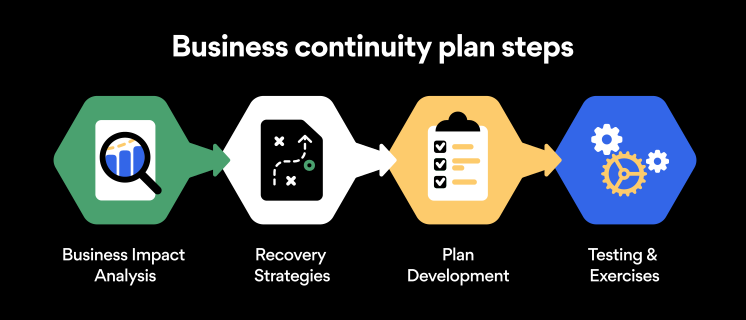
Here are some general guidelines that an organization looking to develop a BCP should consider:

Analysis

A business continuity plan should include an in-depth analysis of everything that could negatively affect the overall organizational infrastructure and operations. Assessing different levels of risk should also be a part of the analysis phase.

Design and development

Once you have a clear overview of potential risks your company could face, start developing a plan. Create a draft and reassess it to see if it takes into account even the smallest of details.

Implementation

Implement BCP within the organization by providing training sessions for the staff to get familiar with the plan. Getting everyone on the same page regarding crisis management is critical.

Testing

Rigorously test the plan. Play out a variety of scenarios in training sessions to learn the overall effectiveness of the continuity plan. By doing so, everyone on the team will be closely familiar with the business continuity plan’s guidelines.

Maintenance and updating

Because the threat landscape constantly changes and evolves, you should regularly reassess your BCP and take steps to update it. By making your continuity plan in tune with the times, you will be able to stay a step ahead of a crisis.

Level up your company’s security with NordPass Business

A comprehensive business continuity plan is vital for the entire organization’s security posture. However, in a perfect world, you wouldn’t have to use it. This is where NordPass Business can help.

Remember, weak, reused, or compromised passwords are often cited as one of the top contributing factors in data breaches. It’s not surprising, considering that an average user has around 100 passwords. Password fatigue is real and significantly affects how people treat their credentials. NordPass Business counters these issues.

With NordPass Business, your team will have a single secure place to store all work-related passwords, credit cards, and other sensitive information. Accessing all the data stored in NordPass is quick and easy, which allows your employees not to be distracted by the task of finding the correct passwords for the correct account.

In cyber incidents, NordPass Business ensures that company credentials remain secure at all times. Everything stored in the NordPass vault is secured with advanced encryption algorithms, which would take hundreds of years to brute force.

If you are interested in learning more about NordPass Business and how it can fortify corporate security, do not hesitate to book a demo with our representative.


About Version 2 Digital

Version 2 Digital is one of the most dynamic IT companies in Asia. The company distributes a wide range of IT products across various areas including cyber security, cloud, data protection, end points, infrastructures, system monitoring, storage, networking, business productivity and communication products.

Through an extensive network of channels, point of sales, resellers, and partnership companies, Version 2 offers quality products and services which are highly acclaimed in the market. Its customers cover a wide spectrum which include Global 1000 enterprises, regional listed companies, different vertical industries, public utilities, Government, a vast number of successful SMEs, and consumers in various Asian cities.

About NordPass
NordPass is developed by Nord Security, a company leading the global market of cybersecurity products.

The web has become a chaotic space where safety and trust have been compromised by cybercrime and data protection issues. Therefore, our team has a global mission to shape a more trusted and peaceful online future for people everywhere.

How to Change Your Netflix Password

You’re dozing off to one of your favorite shows on Netflix, and suddenly a notification flashes on your phone. You look down and see a weird message: “Someone signed into your Netflix account at 03:23 in Nigeria.” Odd, because you were asleep at that time – and certainly haven’t been to Nigeria before. Looks like it’s time to change your Netflix password.

Whether you have forgotten your password, want to wrangle Netflix away from your ex-spouse, or just want to update your passwords, this guide will tell you how to easily change your Netflix password.

How to change your Netflix password on desktop

Fortunately, Netflix foresaw the need for expediency when it comes to changing your password – the process is quick and straightforward.

  1. Open up your browser and go to the Netflix login page. Once you’ve logged in, bring your mouse to hover over your profile picture in the top right corner. Click on “Account.”

  2. The first thing you’ll see is a section marked “Membership and billing.” On the right-hand side of this section are a few hyperlinked options. Click on the “Change password” link.

  3. You’re now on the page where you can reset your password. Before you do, check out our password generator to craft the perfect password that will be extremely difficult to crack.

  4. There you have it — your Netflix password is now changed. Remember that you’ll need to re-enter this new password on whatever devices your Netflix account is connected to.

How to change your Netflix password on mobile devices

  1. Open the Netflix app on your mobile device and log in to your account.

  2. Tap the profile icon located in the upper-left corner of the screen and select “Account.” If you are using a tablet, tap “More” at the bottom of the screen and select “Account” there.

  3. Now tap “Change password.”

  4. Now enter your current and new passwords.

  5. Tap “Save” to confirm. The changes should take effect immediately.

How can you reset your Netflix password?

If you have forgotten your Netflix password, the only way to regain access to your account is by resetting your passwords. Here’s a quick guide on how to reset your Netflix password:

  1. Visit the “Sign in” page and select “Need help?” which is located below the “Sign in” button.

  2. Choose “Email” and enter your email address. Click “Email me.”

  3. You will receive an email from Netflix with instructions on how to reset your password and create a new one.

  4. You can also choose the “Text message” (SMS) option. Simply enter your phone number and select “Text me.”

  5. You will receive a text message from Netflix with instructions on how to reset your password and create a new one.

If it’s been years since you last had to reset your password, don’t worry: all hope is not lost yet! In the above image, you can see the option at the bottom that says “I don’t remember my email or phone.” Click on it.

Now, you can enter your personal and payment details to reset your password. Netflix’s UI is intuitive enough to make resetting the details of your account effortless. Just follow the on-screen instructions, and you’ll have a new password in no time.

Invest in a password manager

This is the most guaranteed way to never have to worry about your passwords again. NordPass can automatically generate top-tier strength passwords, store them in an encrypted vault, and then autofill them to whichever account it’s associated with. The unnecessary hassle of memorizing and creating passwords will be a thing of the past. With NordPass, online life is smoother and safer.

About Version 2 Digital

Version 2 Digital is one of the most dynamic IT companies in Asia. The company distributes a wide range of IT products across various areas including cyber security, cloud, data protection, end points, infrastructures, system monitoring, storage, networking, business productivity and communication products.

Through an extensive network of channels, point of sales, resellers, and partnership companies, Version 2 offers quality products and services which are highly acclaimed in the market. Its customers cover a wide spectrum which include Global 1000 enterprises, regional listed companies, different vertical industries, public utilities, Government, a vast number of successful SMEs, and consumers in various Asian cities.

These days, cybercrime is rampant. It’s no longer a matter of “if” you’re going to suffer an attack but “when” it will happen. All companies want to be ready for any crisis. And this is where a business continuity plan comes into play.

But what is a business continuity plan exactly? Why is it important? What should one include? Today, we’re exploring all these questions in-depth.

What is a business continuity plan?

A business continuity plan (BCP) is a document that sets guidelines for how an organization will continue its operations in the event of a disruption, whether it’s a fire, flood, other natural disaster or a cybersecurity incident. A BCP aims to help organizations resume operations without significant downtime.

Unfortunately, according to a 2020 Mercer survey, 51% of businesses across the globe don’t have a business continuity plan in place.

What’s the difference between business continuity and disaster recovery plans?

We often confuse the terms business continuity plan and disaster recovery plan. The two overlap and often work together, but the disaster recovery plan focuses on containing, examining, and restoring operations after a cyber incident. On the other hand, BCP is a broader concept that considers the whole organization. A business continuity plan helps organizations stay prepared for dealing with a potential crisis and usually encompasses a disaster recovery plan.

Importance of business continuity planning

The number of news headlines announcing data breaches has numbed us to the fact that cybercrime is very real and frequent and poses an existential risk to companies of all sizes and industries.

Consider that in 2021, approximately 37% of global organizations fell victim to a ransomware attack. Then consider that business interruption and restoration costs account for 50% of cyberattack-related losses. Finally, take into account that most cyberattacks are financially motivated and the global cost of cybercrime topped $6 trillion last year. The picture is quite clear — cybercrime is a lucrative venture for bad actors and potentially disastrous for those on the receiving end.

To thrive in these unpredictable times, organizations go beyond conventional security measures. Many companies develop a business continuity plan parallel to secure infrastructure and consider the plan a critical part of the security ecosystem. The Purpose of a business continuity plan is to significantly reduce the downtime in an emergency and, in turn, reduce the potential reputational damage and — of course — revenue losses.

Business continuity plan template

Password security for your business

Store, manage and share passwords.

30-day money-back guarantee

Business Continuity Plan Example

[Company Name]

[Date]

I. Introduction

  • Purpose of the Plan

  • Scope of the Plan

  • Budget

  • Timeline

The initial stage of developing a business continuity plan starts with a statement of the plan’s purpose, which explains the main objective of the plan, such as ensuring the organization’s ability to continue its operations during and after a disruptive event.

The Scope of the Plan outlines the areas or functions that the plan will cover, including business processes, personnel, equipment, and technology.

The Budget specifies the estimated financial resources required to implement and maintain the BCP. It includes costs related to technology, personnel, equipment, training, and other necessary expenses.

The Timeline provides a detailed schedule for developing, implementing, testing, and updating the BCP.

II. Risk Assessment

  • Identification of Risks

  • Prioritization of Risks

  • Mitigation Strategies

The Risk Assessment section of a Business Continuity Plan (BCP) is an essential part of the plan that identifies potential risks that could disrupt an organization’s critical functions.

The Identification of Risks involves identifying potential threats to the organization, such cybersecurity breaches, supply chain disruptions, power outages, and other potential risks. This step is critical to understand the risks and their potential impact on the organization.

Once the risks have been identified, the Prioritization of Risks follows, which helps determine which risks require the most attention and resources.

The final step in the Risk Assessment section is developing Mitigation Strategies to minimize the impact of identified risks. Mitigation strategies may include preventative measures, such as system redundancies, data backups, cybersecurity measures, as well as response and recovery measures, such as emergency protocols and employee training.

III. Emergency Response

  • Emergency Response Team

  • Communication Plan

  • Emergency Procedures

This section of the plan focuses on immediate actions that should be taken to ensure the safety and well-being of employees and minimize the impact of the event on the organization’s operations.

The Emergency Response Team is responsible for managing the response to an emergency or disaster situation. This team should be composed of individuals who are trained in emergency response procedures and can act quickly and decisively during an emergency. The team should also include a designated leader who is responsible for coordinating the emergency response efforts.

The Communication Plan outlines how information will be disseminated during an emergency situation. It includes contact information for employees, stakeholders, and emergency response personnel, as well as protocols for communicating with these individuals.

The Emergency Procedures detail the steps that should be taken during an emergency or disaster situation. The emergency procedures should be developed based on the potential risks identified in the Risk Assessment section and should be tested regularly to ensure that they are effective.

IV. Business Impact Analysis

The Business Impact Analysis (BIA) section of a Business Continuity Plan (BCP) is a critical step in identifying the potential impact of a disruption to an organization’s critical operations.

The Business Impact Analysis is typically conducted by a team of individuals who understand the organization’s critical functions and can assess the potential impact of a disruption to those functions. The team may include representatives from various departments, including finance, operations, IT, and human resources.

V. Recovery and Restoration

  • Procedures for recovery and restoration of critical processes

  • Prioritization of recovery efforts

  • Establishment of recovery time objectives

The Recovery and Restoration section of a Business Continuity Plan (BCP) outlines the procedures for recovering and restoring critical processes and functions following a disruption.

The Procedures for recovery and restoration of critical processes describe the steps required to restore critical processes and functions following a disruption. This may include steps such as relocating to alternate facilities, restoring data and systems, and re-establishing key business relationships.

The Prioritization section of the plan identifies the order in which critical processes will be restored, based on their importance to the organization’s operations and overall mission.

Recovery time objectives (RTOs) define the maximum amount of time that critical processes and functions can be unavailable following a disruption. Establishing RTOs ensures that recovery efforts are focused on restoring critical functions within a specific timeframe.

VI. Plan Activation

  • Plan Activation Procedures

The Plan Activation section is critical in ensuring that an organization can quickly and effectively activate the plan and respond to a potential emergency.

The Plan Activation Procedures describe the steps required to activate the BCP in response to a disruption. The procedures should be clear and concise, with specific instructions for each step to ensure a prompt and effective response.

VII. Testing and Maintenance

  • Testing Procedures

  • Maintenance Procedures

  • Review and Update Procedures

This section of the plan is critical to ensure that an organization can effectively respond to disruptions and quickly resume its essential functions.

Testing procedures may include scenarios such as natural disasters, cyber-attacks, and other potential risks. The testing procedures should include clear objectives, testing scenarios, roles and responsibilities, and evaluation criteria to assess the effectiveness of the plan.

The Maintenance Procedures detail the steps necessary to keep the BCP up-to-date and relevant.

The Review and Update Procedures describe how the BCP will be reviewed and updated regularly to ensure its continued effectiveness. This may involve conducting a review of the plan on a regular basis or after significant changes to the organization’s operations or threats.

What should a business continuity plan checklist include?

Organizations looking to develop a BCP have more than a few things to think through and consider. Variables such as the size of the organization, its IT infrastructure, personnel, and resources all play a significant role in developing a continuity plan. Remember, each crisis is different, and each organization will have a view on handling it according to all the variables in play. However, all business continuity plans will include a few elements in one way or another.

  • Clearly defined areas of responsibility

    A BCP should define specific roles and responsibilities for cases of emergency. Detail who is responsible for what tasks and clarify what course of action a person in a specific position should take. Clearly defined roles and responsibilities in an emergency event allow you to act quickly and decisively and minimize potential damage.

  • Crisis communication plan

    In an emergency, communication is vital. It is the determining factor when it comes to crisis handling. For communication to be effective, it is critical to establish clear communication pipelines. Furthermore, it is crucial to understand that alternative communication channels should not be overlooked and outlined in a business continuity plan.

  • Recovery teams

    A recovery team is a collective of different professionals who ensure that business operations are restored as soon as possible after the organization confronts a crisis.

  • Alternative site of operations

    Today, when we think of an incident in a business environment, we usually think of something related to cybersecurity. However, as discussed earlier, a BCP covers many possible disasters. In a natural disaster, determine potential alternate sites where the company could continue to operate.

  • Backup power and data backups

    Whether a cyber event or a real-life physical event, ensuring that you have access to power is crucial if you wish to continue operations. In a BCP, you can often come across lists of alternative power sources such as generators, where such tools are located, and who should oversee them. The same applies to data. Regularly scheduled data backups can significantly reduce potential losses incurred by a crisis event.

  • Recovery guidelines

    If a crisis is significant, a comprehensive business continuity plan usually includes detailed guidelines on how the recovery process will be carried out.

Business continuity planning steps

Here are some general guidelines that an organization looking to develop a BCP should consider:

Analysis

A business continuity plan should include an in-depth analysis of everything that could negatively affect the overall organizational infrastructure and operations. Assessing different levels of risk should also be a part of the analysis phase.

Design and development

Once you have a clear overview of potential risks your company could face, start developing a plan. Create a draft and reassess it to see if it takes into account even the smallest of details.

Implementation

Implement BCP within the organization by providing training sessions for the staff to get familiar with the plan. Getting everyone on the same page regarding crisis management is critical.

Testing

Rigorously test the plan. Play out a variety of scenarios in training sessions to learn the overall effectiveness of the continuity plan. By doing so, everyone on the team will be closely familiar with the business continuity plan’s guidelines.

Maintenance and updating

Because the threat landscape constantly changes and evolves, you should regularly reassess your BCP and take steps to update it. By making your continuity plan in tune with the times, you will be able to stay a step ahead of a crisis.

Level up your company’s security with NordPass Business

A comprehensive business continuity plan is vital for the entire organization’s security posture. However, in a perfect world, you wouldn’t have to use it. This is where NordPass Business can help.

Remember, weak, reused, or compromised passwords are often cited as one of the top contributing factors in data breaches. It’s not surprising, considering that an average user has around 100 passwords. Password fatigue is real and significantly affects how people treat their credentials. NordPass Business counters these issues.

With NordPass Business, your team will have a single secure place to store all work-related passwords, credit cards, and other sensitive information. Accessing all the data stored in NordPass is quick and easy, which allows your employees not to be distracted by the task of finding the correct passwords for the correct account.

In cyber incidents, NordPass Business ensures that company credentials remain secure at all times. Everything stored in the NordPass vault is secured with advanced encryption algorithms, which would take hundreds of years to brute force.

If you are interested in learning more about NordPass Business and how it can fortify corporate security, do not hesitate to book a demo with our representative.

About Version 2 Digital

Version 2 Digital is one of the most dynamic IT companies in Asia. The company distributes a wide range of IT products across various areas including cyber security, cloud, data protection, end points, infrastructures, system monitoring, storage, networking, business productivity and communication products.

Through an extensive network of channels, point of sales, resellers, and partnership companies, Version 2 offers quality products and services which are highly acclaimed in the market. Its customers cover a wide spectrum which include Global 1000 enterprises, regional listed companies, different vertical industries, public utilities, Government, a vast number of successful SMEs, and consumers in various Asian cities.

About NordPass
NordPass is developed by Nord Security, a company leading the global market of cybersecurity products.

The web has become a chaotic space where safety and trust have been compromised by cybercrime and data protection issues. Therefore, our team has a global mission to shape a more trusted and peaceful online future for people everywhere.

Should Couples Share Passwords?

So what’s the deal with password sharing? Would you give your partner the password to your banking account but not your phone? Is laying all your codes on the table a sign of trust or a massive security risk? Should couples share passwords at all? While it can help to build trust with a partner, sharing your passwords isn’t always the best idea.

We are asking some basic questions on a very touchy subject just to help keep your security tip top. Don’t worry — we’re not judging your loving relationship. We just believe in safety precautions no matter what, and you will too once you get a dose of reality from these not-so-lovely situations.

It’s all about how you share them

Sometimes the risk isn’t who you share your password with, but how you do it. Sharing your passwords over the internet, whether over unencrypted email or messaging apps, is like sharing them in plain view of the world. The next time you think about doing this, remember that any of the following situations can take hold (without you even knowing).

  • Your messaging app may not be as honest as you think. A messaging app without end-to-end encryption has full access to everything you send. End-to-end encryption means that the only person who can read your message is the person you send it to. Sounds like a given, right? Not when you consider the genuine possibility that your messaging app could be giving employees access to your private conversations.
  • Man-in-the-middle attacks. It’s true, attackers lurk in the middle of an exchange waiting to steal vital information, like passwords, credit card numbers, addresses… you name it. Without end-to-end encryption and zero-knowledge architecture, your credentials could be exposed, and a cybercriminal could be in and out of your bank account within seconds.

The easy way to share passwords securely

Looking at the potential risks that one might face when trying to share passwords online, it is quite natural to question whether couples should share passwords at all and is it worth the risk? The good news is that there’s a way to share passwords securely.

Obviously, the best defense is encryption. A messaging service or website using end-to-end encryption makes sure your data is kept safe from attackers. Password managers like NordPass help you store and share your passwords in a completely secure way.

With NordPass, encryption happens on your device, scrambling your data into gibberish before it even reaches the servers. This way everything you send remains locked, even from us – until it reaches your verified recipient.

NordPass Family is a great way for couples, families, or even groups of friends to further improve their online security. The Family plan comes with six Premium accounts and includes all the advanced security features. Best of all — you’ll be able to share passwords with other NordPass users instantly and effortlessly without sacrificing security.

The takeaway

Matters of the heart aside, always think twice before you send a password by text or messaging apps. Even if the service offers encryption, subpar ciphers and weak protocols can be broken by even a mediocre cyberattacker.

Sending a password securely with NordPass is easy. It locks your sensitive credentials in an encrypted vault. You can select them from a simple drop-down list and send in complete confidence.

The internet’s primary concern and priority is functionality. Your security and privacy probably aren’t. Don’t risk all of your accounts over something as small as sending a password.

About Version 2 Digital

Version 2 Digital is one of the most dynamic IT companies in Asia. The company distributes a wide range of IT products across various areas including cyber security, cloud, data protection, end points, infrastructures, system monitoring, storage, networking, business productivity and communication products.

Through an extensive network of channels, point of sales, resellers, and partnership companies, Version 2 offers quality products and services which are highly acclaimed in the market. Its customers cover a wide spectrum which include Global 1000 enterprises, regional listed companies, different vertical industries, public utilities, Government, a vast number of successful SMEs, and consumers in various Asian cities.

These days, cybercrime is rampant. It’s no longer a matter of “if” you’re going to suffer an attack but “when” it will happen. All companies want to be ready for any crisis. And this is where a business continuity plan comes into play.

But what is a business continuity plan exactly? Why is it important? What should one include? Today, we’re exploring all these questions in-depth.

What is a business continuity plan?

A business continuity plan (BCP) is a document that sets guidelines for how an organization will continue its operations in the event of a disruption, whether it’s a fire, flood, other natural disaster or a cybersecurity incident. A BCP aims to help organizations resume operations without significant downtime.

Unfortunately, according to a 2020 Mercer survey, 51% of businesses across the globe don’t have a business continuity plan in place.

What’s the difference between business continuity and disaster recovery plans?

We often confuse the terms business continuity plan and disaster recovery plan. The two overlap and often work together, but the disaster recovery plan focuses on containing, examining, and restoring operations after a cyber incident. On the other hand, BCP is a broader concept that considers the whole organization. A business continuity plan helps organizations stay prepared for dealing with a potential crisis and usually encompasses a disaster recovery plan.

Importance of business continuity planning

The number of news headlines announcing data breaches has numbed us to the fact that cybercrime is very real and frequent and poses an existential risk to companies of all sizes and industries.

Consider that in 2021, approximately 37% of global organizations fell victim to a ransomware attack. Then consider that business interruption and restoration costs account for 50% of cyberattack-related losses. Finally, take into account that most cyberattacks are financially motivated and the global cost of cybercrime topped $6 trillion last year. The picture is quite clear — cybercrime is a lucrative venture for bad actors and potentially disastrous for those on the receiving end.

To thrive in these unpredictable times, organizations go beyond conventional security measures. Many companies develop a business continuity plan parallel to secure infrastructure and consider the plan a critical part of the security ecosystem. The Purpose of a business continuity plan is to significantly reduce the downtime in an emergency and, in turn, reduce the potential reputational damage and — of course — revenue losses.

Business continuity plan template

Password security for your business

Store, manage and share passwords.

30-day money-back guarantee

Business Continuity Plan Example

[Company Name]

[Date]

I. Introduction

  • Purpose of the Plan

  • Scope of the Plan

  • Budget

  • Timeline

The initial stage of developing a business continuity plan starts with a statement of the plan’s purpose, which explains the main objective of the plan, such as ensuring the organization’s ability to continue its operations during and after a disruptive event.

The Scope of the Plan outlines the areas or functions that the plan will cover, including business processes, personnel, equipment, and technology.

The Budget specifies the estimated financial resources required to implement and maintain the BCP. It includes costs related to technology, personnel, equipment, training, and other necessary expenses.

The Timeline provides a detailed schedule for developing, implementing, testing, and updating the BCP.

II. Risk Assessment

  • Identification of Risks

  • Prioritization of Risks

  • Mitigation Strategies

The Risk Assessment section of a Business Continuity Plan (BCP) is an essential part of the plan that identifies potential risks that could disrupt an organization’s critical functions.

The Identification of Risks involves identifying potential threats to the organization, such cybersecurity breaches, supply chain disruptions, power outages, and other potential risks. This step is critical to understand the risks and their potential impact on the organization.

Once the risks have been identified, the Prioritization of Risks follows, which helps determine which risks require the most attention and resources.

The final step in the Risk Assessment section is developing Mitigation Strategies to minimize the impact of identified risks. Mitigation strategies may include preventative measures, such as system redundancies, data backups, cybersecurity measures, as well as response and recovery measures, such as emergency protocols and employee training.

III. Emergency Response

  • Emergency Response Team

  • Communication Plan

  • Emergency Procedures

This section of the plan focuses on immediate actions that should be taken to ensure the safety and well-being of employees and minimize the impact of the event on the organization’s operations.

The Emergency Response Team is responsible for managing the response to an emergency or disaster situation. This team should be composed of individuals who are trained in emergency response procedures and can act quickly and decisively during an emergency. The team should also include a designated leader who is responsible for coordinating the emergency response efforts.

The Communication Plan outlines how information will be disseminated during an emergency situation. It includes contact information for employees, stakeholders, and emergency response personnel, as well as protocols for communicating with these individuals.

The Emergency Procedures detail the steps that should be taken during an emergency or disaster situation. The emergency procedures should be developed based on the potential risks identified in the Risk Assessment section and should be tested regularly to ensure that they are effective.

IV. Business Impact Analysis

The Business Impact Analysis (BIA) section of a Business Continuity Plan (BCP) is a critical step in identifying the potential impact of a disruption to an organization’s critical operations.

The Business Impact Analysis is typically conducted by a team of individuals who understand the organization’s critical functions and can assess the potential impact of a disruption to those functions. The team may include representatives from various departments, including finance, operations, IT, and human resources.

V. Recovery and Restoration

  • Procedures for recovery and restoration of critical processes

  • Prioritization of recovery efforts

  • Establishment of recovery time objectives

The Recovery and Restoration section of a Business Continuity Plan (BCP) outlines the procedures for recovering and restoring critical processes and functions following a disruption.

The Procedures for recovery and restoration of critical processes describe the steps required to restore critical processes and functions following a disruption. This may include steps such as relocating to alternate facilities, restoring data and systems, and re-establishing key business relationships.

The Prioritization section of the plan identifies the order in which critical processes will be restored, based on their importance to the organization’s operations and overall mission.

Recovery time objectives (RTOs) define the maximum amount of time that critical processes and functions can be unavailable following a disruption. Establishing RTOs ensures that recovery efforts are focused on restoring critical functions within a specific timeframe.

VI. Plan Activation

  • Plan Activation Procedures

The Plan Activation section is critical in ensuring that an organization can quickly and effectively activate the plan and respond to a potential emergency.

The Plan Activation Procedures describe the steps required to activate the BCP in response to a disruption. The procedures should be clear and concise, with specific instructions for each step to ensure a prompt and effective response.

VII. Testing and Maintenance

  • Testing Procedures

  • Maintenance Procedures

  • Review and Update Procedures

This section of the plan is critical to ensure that an organization can effectively respond to disruptions and quickly resume its essential functions.

Testing procedures may include scenarios such as natural disasters, cyber-attacks, and other potential risks. The testing procedures should include clear objectives, testing scenarios, roles and responsibilities, and evaluation criteria to assess the effectiveness of the plan.

The Maintenance Procedures detail the steps necessary to keep the BCP up-to-date and relevant.

The Review and Update Procedures describe how the BCP will be reviewed and updated regularly to ensure its continued effectiveness. This may involve conducting a review of the plan on a regular basis or after significant changes to the organization’s operations or threats.

What should a business continuity plan checklist include?

Organizations looking to develop a BCP have more than a few things to think through and consider. Variables such as the size of the organization, its IT infrastructure, personnel, and resources all play a significant role in developing a continuity plan. Remember, each crisis is different, and each organization will have a view on handling it according to all the variables in play. However, all business continuity plans will include a few elements in one way or another.

  • Clearly defined areas of responsibility

    A BCP should define specific roles and responsibilities for cases of emergency. Detail who is responsible for what tasks and clarify what course of action a person in a specific position should take. Clearly defined roles and responsibilities in an emergency event allow you to act quickly and decisively and minimize potential damage.

  • Crisis communication plan

    In an emergency, communication is vital. It is the determining factor when it comes to crisis handling. For communication to be effective, it is critical to establish clear communication pipelines. Furthermore, it is crucial to understand that alternative communication channels should not be overlooked and outlined in a business continuity plan.

  • Recovery teams

    A recovery team is a collective of different professionals who ensure that business operations are restored as soon as possible after the organization confronts a crisis.

  • Alternative site of operations

    Today, when we think of an incident in a business environment, we usually think of something related to cybersecurity. However, as discussed earlier, a BCP covers many possible disasters. In a natural disaster, determine potential alternate sites where the company could continue to operate.

  • Backup power and data backups

    Whether a cyber event or a real-life physical event, ensuring that you have access to power is crucial if you wish to continue operations. In a BCP, you can often come across lists of alternative power sources such as generators, where such tools are located, and who should oversee them. The same applies to data. Regularly scheduled data backups can significantly reduce potential losses incurred by a crisis event.

  • Recovery guidelines

    If a crisis is significant, a comprehensive business continuity plan usually includes detailed guidelines on how the recovery process will be carried out.

Business continuity planning steps

Here are some general guidelines that an organization looking to develop a BCP should consider:

Analysis

A business continuity plan should include an in-depth analysis of everything that could negatively affect the overall organizational infrastructure and operations. Assessing different levels of risk should also be a part of the analysis phase.

Design and development

Once you have a clear overview of potential risks your company could face, start developing a plan. Create a draft and reassess it to see if it takes into account even the smallest of details.

Implementation

Implement BCP within the organization by providing training sessions for the staff to get familiar with the plan. Getting everyone on the same page regarding crisis management is critical.

Testing

Rigorously test the plan. Play out a variety of scenarios in training sessions to learn the overall effectiveness of the continuity plan. By doing so, everyone on the team will be closely familiar with the business continuity plan’s guidelines.

Maintenance and updating

Because the threat landscape constantly changes and evolves, you should regularly reassess your BCP and take steps to update it. By making your continuity plan in tune with the times, you will be able to stay a step ahead of a crisis.

Level up your company’s security with NordPass Business

A comprehensive business continuity plan is vital for the entire organization’s security posture. However, in a perfect world, you wouldn’t have to use it. This is where NordPass Business can help.

Remember, weak, reused, or compromised passwords are often cited as one of the top contributing factors in data breaches. It’s not surprising, considering that an average user has around 100 passwords. Password fatigue is real and significantly affects how people treat their credentials. NordPass Business counters these issues.

With NordPass Business, your team will have a single secure place to store all work-related passwords, credit cards, and other sensitive information. Accessing all the data stored in NordPass is quick and easy, which allows your employees not to be distracted by the task of finding the correct passwords for the correct account.

In cyber incidents, NordPass Business ensures that company credentials remain secure at all times. Everything stored in the NordPass vault is secured with advanced encryption algorithms, which would take hundreds of years to brute force.

If you are interested in learning more about NordPass Business and how it can fortify corporate security, do not hesitate to book a demo with our representative.

About Version 2 Digital

Version 2 Digital is one of the most dynamic IT companies in Asia. The company distributes a wide range of IT products across various areas including cyber security, cloud, data protection, end points, infrastructures, system monitoring, storage, networking, business productivity and communication products.

Through an extensive network of channels, point of sales, resellers, and partnership companies, Version 2 offers quality products and services which are highly acclaimed in the market. Its customers cover a wide spectrum which include Global 1000 enterprises, regional listed companies, different vertical industries, public utilities, Government, a vast number of successful SMEs, and consumers in various Asian cities.

About NordPass
NordPass is developed by Nord Security, a company leading the global market of cybersecurity products.

The web has become a chaotic space where safety and trust have been compromised by cybercrime and data protection issues. Therefore, our team has a global mission to shape a more trusted and peaceful online future for people everywhere.

×

Hello!

Click one of our contacts below to chat on WhatsApp

×