Skip to content

What is the principle of least privilege (PoLP)?

The Principle of Least Privilege, also known as PoLP, is a computer security rule that states that each user or group of users must have only the necessary permissions to perform their corresponding tasks.

In other words, the less power a user has, the lower the chances of them having a harmful impact on the business. 

Why is it important?

PoLP is important because it helps protect company systems and data from cyberattacks.

When a user has too many permissions, they are more likely to make mistakes or fall victim to an attack. For instance, users with access to servers could install malware or steal sensitive information.

How is it applied?

PoLP can be applied to any computer system, either on-premise or in the cloud.

Content:

PoLP in practice

What if a user needs to do something they can’t normally do?

The Principle of Least Privilege states that each user should have only the necessary permissions to perform their tasks. This practice helps protect company systems and data from cyberattacks.

However, there are circumstances where a user may need to circumvent security restrictions to perform some unplanned activity. For example, a certain user may need to create records for a new customer.

In these cases, the system administrator may grant the user temporary access to a role with greater privileges.

How is this done safely?

Ideally, the system administrator should create a job that automatically adds the user to the role and, after a defined time, removes them from the role.

For example, the administrator could grant user privileges for two hours and then automatically remove the privileges after that time.

This helps ensure that the user only has access to the necessary permissions for as long as they need them.

What about user groups?

Overall, it is safer to grant permissions to groups of users than to individual users.

This is because it is more difficult for an attacker to compromise an entire group of users than a single user.

For example, if John is an accountant, instead of granting John template creation privileges, the administrator could grant those privileges to the group of accountants.

What about processes or services?

The Principle of Least Privilege also applies to processes and services.

If a process or service works with an account, that account should have as few privileges as possible.

This helps reduce the damage an attacker could cause if they compromised the account.

Continued Importance in a Changing World

A large number of companies, following the COVID pandemic, significantly increased the number of employees working from home. Before, we only had to worry about computers within the company. Now, the security of every laptop or mobile phone accessing your network can be a security breach.

To prevent disasters, we must create security standards and train staff to prevent them from entering prohibited sites with company computers or computers that access our company. That’s why you should avoid giving administrator privileges and applying PoLP on users as much as possible. That is why a trust 0 policy is applied, giving the least amount of privileges as possible. If the user is not authenticated, they are not given privileges.

IT staff should check the security of laptops carried by the user and see how to prevent attacks from reaching enterprise or cloud servers coming from our staff working remotely.

Implementation Difficulties

However, applying the minimum security privilege is nowadays quite complex. Users with an account access countless different apps.

They may also have to access web applications that rely on Linux servers, so roles and privileges must be created in different applications. It is very common for several basic features not to work with the minimum cybersecurity privileges, so there is the temptation to grant extra privileges.

Giving minimum privileges to a single application is already something complicated. Granting PoLP to several systems that interact with each other becomes much more complex. It is necessary to carry out safety quality controls. IT engineers should do security testing and patch security holes.

Privileged accounts: Definition and Types

Privileged accounts or super accounts are those accounts that have access to everything.

These accounts have administrator privileges. Accounts are usually used by managers or the most senior people in the IT team.

Extreme care must be taken with such accounts. If a hacker or a Malware manages to access these passwords, it is possible to destroy the entire operating system or the entire database.

The number of users with access to these accounts must be minimal. Normally only the IT manager will have super user accounts with all privileges and senior management will have broad privileges, but in no case full privileges.

In Linux and Mac operating systems, for example, the superuser is called root. In the Windows system it is called Administrator.

For example, our default Windows account does not run with all privileges. If you want to run a file with administrator accounts, right-click on the executable file and select the option Run as Administrator.

This privilege to run as an administrator is only used in special installation cases and should not be used at all times.

To prevent a hacker or a malicious person from accessing these users, it is recommended to comply with these security measures:

  • Use a long, complex password that mixes uppercase, lowercase, numbers, and special characters.
  • It also tries to change the password of these users regularly. For example, changing the password every month or every two months.
  • It does not hurt to use a good anti-virus to detect and prevent an attack and also to set a firewall to prevent attacks by strangers.
  • Always avoid opening emails and attachments from strangers or entering suspicious websites. These attacks can breach accounts. Where possible, never browse with super user accounts or use these accounts unless necessary.

Privileged Cloud Accounts

Today, a lot of information is handled in the cloud. We will cover account management on major platforms such as AWS, Microsoft Azure, and Google Cloud.

AWS uses authentication type Identity and Access Management (IAM) to create and manage users. It also supports multi-factor authentication (MFA) which requires 2 ways to validate the user and thus enter, thus increasing security.

On AWS there is a root user who is a super user with all privileges. With this user create other users and protect it using it as little as possible.

Google Cloud also provides an IAM and also the KMS (Key Management Service) that allows you to manage keys.

Depending on the cloud application, there are super users who manage databases, analytics systems, websites, AI and other resources.

If, for example, I am a user who only needs to see table reports from a database, I do not need access to update or insert new data. All these privileges must be carefully planned by the IT security department.

Common Privileged Threat Vectors

If the PoLP is not applied, if a hacker enters the system, they could access very sensitive information to the company by being able to obtain a user’s password. In many cases these hackers steal the information and ask for ransom money.

In other situations, malicious users within the company could sell valuable company information. If we apply the PoLP, these risks can be considerably reduced.

Challenges to Applying Least Privilege

It is not easy to apply the PoLP in companies. Particularly if you have given them administrator privileges initially and now that you learned the risks you want to take the privileges away from them. You must make users understand that it is for the good of the company, to protect its information and that great power comes with great responsibility. That if an attack happens to the company, the reputation of the employees themselves is at stake as well as that of the company. Explain that safety is up to everyone.

Many times we give excessive privileges due to the laziness of giving only the minimum cybersecurity privilege. But it is urgent to investigate, optimize and reduce privileges to increase security.

Another common problem is that having restricted privileges reduces the productivity of the user who ends up being dependent on their superior for lack of privileges. This can cause frustration in users and inefficiency in the company as a whole. You must seek to achieve balance in terms of efficiency without affecting safety.

Benefits for Safety and Productivity

By applying the principle of granting restricted access, we reduce the attack surface. The chances of receiving a malware attack are also reduced and less time is wasted trying to recover data after an attack.

For example, Equifax, a credit company, fell victim to Ransomware in 2017. This attack affected 143 million customers. Equifax had to pay $700 million in fines and reparations. It also had to pay compensation to users.

  • It reduces the risk of cyberattacks.
  • It protects sensitive data.
  • It reduces the impact of attacks.

Principle of Least Privilege and Best Practices

In order to comply with the standards, it is advisable to carry out an audit and verify the privileges of users and security in general. An internal verification or an external audit can be done.

You may carry out security tests to see if your company meets those standards. Below are some of the best-known standards:

  • CIS is a Center for Information Security. It contains recommendations and best practices for securing systems and data globally.
  • NIST Cybersecurity Framework provides a National Institute of Standards and Technology security framework.
  • SOC 2 provides an assessment report of a company’s or organization’s security controls.

Least Privilege and Zero Trust

Separating privileges is giving users or accounts only the privileges they need to reduce risk. Just-In-Time (JIT) security policies reduce risks by removing excessive privileges, automating security processes, and managing privileged users.

JIT means giving privileges only when you need them. That is, they should be temporary. For example, if a user needs to access a database only for 2 hours, you may create a script that assigns privileges during this time and then remove those privileges.

To implement the JIT:

  • Create a plan with security policies.
  • Implement the plan by applying the PoLP and JIT with controls that may include multi-factor access and role access control.
  • It is important to train employees on safety and explain these concepts so that they understand not only how to apply them but why to apply them.
  • And finally, it is important to apply audits. This topic was already discussed in point 10.

It is also convenient to monitor permissions to see who has more privileges and also see what resources are accessed, to see if adjustments need to be made to them.

Solutions for the Implementation of Least Privilege

As mentioned above, to increase security, segment the network to reduce damage if your security is breached. Segmenting the network is dividing the network into small subnets.

The privileges granted to users should also be monitored.

Finally, security policies must be integrated with technologies to create an administrative plan according to the software you have.

How to Implement Least Privilege Effectively

To implement the principle of granting access, the proposed system must be implemented on test servers. Personnel should be asked to test actual jobs in the system for a while.

Once the errors are corrected or user complaints are resolved, it is up to you to take the system into production with minimal privileges. A trial period of at least one month is recommended where users test the system and have the old system at hand.

In most cases, the old and new systems coexist for months until the new system is approved with the least privileged security implemented.

Conclusion

The Principle of Least Privilege: A Simple but Effective Measure for Computer Security.

In an increasingly digital world, IT security is critical for businesses of all sizes. Cyberattacks are becoming more frequent and sophisticated, and can cause significant damage to businesses.

One of the most important steps businesses can take to protect their systems and data from cyberattacks is to apply the Principle of Least Privilege. The Principle of Least Privilege states that each user should have only the necessary permissions to perform their tasks.

Applying the Principle of Least Privilege is a simple but effective measure. By giving users only the necessary permissions, companies reduce the risk of an attacker compromising sensitive systems and data.

Tips for applying the principle of least privilege:

  • Identify the permissions needed for each task.
  • Grant permissions to groups of users instead of individual users.
  • Reduce process and service account privileges.
  • Review user permissions on a regular basis.
 

Daniel Cabilmonte is a writer expert in technologies. Lecturer, consultant, blogger. He is passionate about software and technology. He writes about IT topics, security, programming, AI, BI.

About Version 2 Digital

Version 2 Digital is one of the most dynamic IT companies in Asia. The company distributes a wide range of IT products across various areas including cyber security, cloud, data protection, end points, infrastructures, system monitoring, storage, networking, business productivity and communication products.

Through an extensive network of channels, point of sales, resellers, and partnership companies, Version 2 offers quality products and services which are highly acclaimed in the market. Its customers cover a wide spectrum which include Global 1000 enterprises, regional listed companies, different vertical industries, public utilities, Government, a vast number of successful SMEs, and consumers in various Asian cities.

About PandoraFMS
Pandora FMS is a flexible monitoring system, capable of monitoring devices, infrastructures, applications, services and business processes.
Of course, one of the things that Pandora FMS can control is the hard disks of your computers.

IT Support Levels: Optimizing the Support Service through Tiers 0 to 4

Information Technology (IT) support, also known as technical support, is essential for the successful and efficient operation of organizations in the digital age. It helps ensure the stability, productivity and security of your systems and those of the people who depend on them.

Its importance lies in several key aspects such as maintenance of the technological infrastructure (this includes servers, networks, operating systems, software, hardware and other essential components); and ensure business continuity, implement and maintain security measures (such as firewalls, antivirus and intrusion detection systems); periodic updating and maintenance of the software, implementation and management of data storage systems, backup and recovery of data in case of failures; resource optimization (such as server capacity management), keep up to date with the latest technological trends and evaluate how these can benefit the organization and provide data and analysis that help to decision-making.

Content:

The 5 levels of IT support: description, functions and skills

IT Support Level 0: Self-service

IT support level 0, often called “self-service,” is the initial level of technical support offered to users so they can solve technical problems on their own without needing to interact with a support technician. This tier support focuses on providing users with the tools, resources, and documentation needed to address common technical issues on your own. Some key aspects of IT Support Tier 0 include:

  • Self-service portal.
  • Knowledge base.
  • Guided self-service.
  • Online community.
  • Diagnostic tools.
  • Training.
  • Automation.

IT Support Level 1: First person-to-person contact (basic support)

Level 1 IT support, also known as “first person-to-person contact” or “basic support”, focuses on solving the simplest and most common technical problems that do not require advanced technical knowledge. Common features and responsibilities of tier 1 support are described below:

  • Helpdesk.
  • Incident logging and tracking.
  • Troubleshooting common problems.
  • Documentation and updating of the knowledge base.
  • Coordination with other teams.

IT Support Level 2: Technical support

IT Support Tier 2, also known as “technical support” or “advanced support”, handles more complex and technical issues that go beyond the capabilities of Tier 1. Some of the main features and responsibilities of tier support 2 are:

  • Root cause analysis.
  • Development and maintenance of technical documentation.
  • Interaction with suppliers and manufacturers.
  • Training and mentoring of level 1 staff.
  • Proactive monitoring and maintenance.
  • Participation in IT projects.

IT Support Level 3: Expert support

IT Support Level 3, also known as “expert support” or “high level support,” is responsible for addressing the most complex and challenging issues that require deep technical knowledge and expertise. The most outstanding features and responsibilities of tier support 3 are:

  • Research and development.
  • Design and implementation of advanced solutions.
  • Participation in strategic projects.
  • The development of policies and procedures.
  • Crisis management.

IT Support Level 4: Third Party Support

Level 4 IT support, also known as “third-party support” or “external support,” is reserved for extremely complex issues or situations where specialized expertise is required, which goes beyond what an organization can offer internally. Common features and responsibilities of tier support 4 are described below:

  • Technology vendor support.
  • Development of customized solutions.
  • Technology integration.
  • Participation in security audits and reviews.
  • Service contracts coordination and management.
  • Supplier relationship management.
  • Trend analysis and strategic recommendations.

Establishing a tiered help structure

Implementing a tiered support structure involves careful planning and execution to ensure efficient technical assistance. Among the main steps to establish a tiered help structure is the choice of the appropriate IT Service Management (ITSM) platform, which is scalable and customizable.

Once the ITSM tool has been chosen, a self-service platform or a dedicated web portal must be configured there and the IT support levels of the organization must be clearly defined. In addition, the ITSM platform must include process automation, such as ticket routing, incident prioritization or reporting; providing updated documentation at each support level; tools to measure the performance of the IT structure and demand management to plan workloads.

Finally, to create an effective structure it is essential to establish effective communication channels and perform periodic evaluations to adjust the structure and processes to the changing needs of the organization.

Conclusion

Implementing a tiered help structure in an IT environment brings multiple benefits to the organization.

Benefits of Implementing IT support levels

Support levels enable efficient distribution of support requests, ensuring that issues are addressed at the appropriate level for resolution. This operational efficiency results in an improvement of user satisfaction and in cost savings by ensuring that technical resources are used more competently.

On the other hand, quick management of critical incidents provided by the help structure by levels, escalating the problems according to their nature to the different levels of support, allows to guarantee the continuity of the business. Finally, sharing documentation and knowledge allows capacity building among company personnel.

Adapting the structure to the needs of the organization

It is important to note that there is no single and universally applicable IT levels support structure. Each organization has specific needs and requirements, so it is essential to adapt the structure to its particular circumstances taking into account the size and complexity of the organization, the nature of the operations, that it carries out according to the industry to which it belongs, the needs of the users, both internal and external, of the company; the economic and human resources that the organization has and the technological changes that take place and that require a flexible infrastructure capable of adapting to technological and business evolutions.

Frequently Asked Questions

Summary of frequent questions about IT support and careers in this field

What is IT support for?

IT support is a very useful tool, both for companies and individuals, to receive assistance in any of the tasks to be carried out in their corresponding IT environments. It guarantees that they will be able to meet their goals or continue to offer services to their customers even if they suffer hardware, software or network failures.

What are the IT support levels?

  • Level 0: Self-Service
  • Level 1: Basic support
  • Level 2: Technical support
  • Level 3: Expert support
  • Level 4: Third party support

How do I start my career in IT support?

Of course, to get a job in this field requires technical knowledge of systems and processes. To begin with, you could complete related courses or get one of the necessary certifications.

What is remote IT support?

Remote IT support allows support technicians to provide their services to customers more quickly and effectively through remote control, email or chat. Even at a distance, they are able to diagnose any problem and provide the steps to follow to solve it.

What are the skills to work in IT support?

Of course, dealing with clients will always require professional and effective communication skills. Additionally, the ability to effectively troubleshoot and keep up with all IT news is critical for any professional IT.

Expert in journalism and social networks, Laura writes technical articles specialized in technology, innovation and IT entrepreneurship. She also coordinates contents in TicPymes, a media specialized in SMEs and startups.


About Version 2 Digital

Version 2 Digital is one of the most dynamic IT companies in Asia. The company distributes a wide range of IT products across various areas including cyber security, cloud, data protection, end points, infrastructures, system monitoring, storage, networking, business productivity and communication products.

Through an extensive network of channels, point of sales, resellers, and partnership companies, Version 2 offers quality products and services which are highly acclaimed in the market. Its customers cover a wide spectrum which include Global 1000 enterprises, regional listed companies, different vertical industries, public utilities, Government, a vast number of successful SMEs, and consumers in various Asian cities.

About PandoraFMS
Pandora FMS is a flexible monitoring system, capable of monitoring devices, infrastructures, applications, services and business processes.
Of course, one of the things that Pandora FMS can control is the hard disks of your computers.

Notifications Telegram: Pandora FMS

Content:

For environments where you have the need to know immediately if any issues arise, such as production environments, security or critical resources of your company, this Pandora FMS integration with Telegram is absolutely perfect, as it is the answer to that required immediacy, as well as the possibility of offering exact information about the location and cause of the problem, thanks to the powerful Pandora FMS system of alerts and macros.

Likewise, being a messaging service based on telephone communications through the data network, it guarantees your technicians, managers and on-call operators that they will find out aboutany problem at the exact moment it appears, without the need to access a computer or manually check their email.

Thanks to the plugins of your library and the flexible alert system offered by Pandora FMS, we will show you how to configure your monitoring tool to send instant messages whenever a problem is detected.

First of all, you must start from the necessary environment, whose requirements are:

  • Pandora FMS environment running on Linux, in this case we will use Rocky Linux 8, the distribution recommended by the manufacturer.
  • Our library plugin: Telegram bot CLI.
  • Telegram account available to be used as a broadcaster for alert messages.

Bot creation

First of all, create the Telegram bot that will be in charge of sending messages. From the Telegram account you wish to use, you will have to interact with the user BotFather using the “/start”command:

Then use the comman “/newbot” to create your bot.

It will ask you for the name you wish your bot to have. Here specify the name you wish for your bot. It is important for the name to end with “bot”, for example Pandora_FMS_telegram_bot.

By sending you the name, if it is not in use, it will confirm that the bot was properly created, with a link to your chat and give you a Token that is important for you to save to set up the alert later.

Group Setup

Now enter the bot that you just created in an existing group you may have or a new one that you create, to receive your alerts.

The next step is to add another bot called GetIDs Bot to the same group in order to get the group identifier. By adding it, it will leave you a message with the ID of your group, and you should also take note of that for later.

With all of this you will already have your Telegram ready to receive alerts.

Integration with Pandora FMS (versions 773 and earlier)

First you should start by downloading our plugin Telegram bot CLI.

It will download a zip file called telegram-bot-cli.zip, which you should decompress.
Inside, you will find a file called “pandora-telegram-cli.py” which must be added to your Pandora FMS server in the path “/usr/share/pandora_server/util/plugin”.

Now, from the terminal of your server, install the Python3 dependencies (if you do not already have them) by means of the command “dnf install python3”:

Once installed, run the plugin to verify that it is running, through the command “python /usr/share/pandora_server/util/plugin/pandora-telegram-cli.py”:

We will now move on to Pandora FMS server console.
Go to the “Management > Alerts > Commands” section and click “Create”:

And set up your alert command as follows:

On command, type in the following:

python3
/usr/share/pandora_server/util/plugin/pandora-telegram-cli.py -t _field1_ -c _field2_ -m “_field3_”

The command that we will use is for executing the plugin that you downloaded, with the arguments -t, -c and -m. It is important for the argument -m to be enclosed in quotation marks “”.

  • In the field of argument -t, Bot Token, enter the token of your bot.
  • In the field of argument -c, Chat ID, enter the ID of the group that bot “GetIDs Bot” provided you with.
  • And in the -m field, Alert Message, enter the alert message that you want your bot to send to the group. You may use all the alert macros you need, some examples are:
    • _module_: Name of the module that triggered the alert.
    • _agentalias_: Alias of the agent that triggered the alert.
    • _modulestatus_: Status of the module when the alert was triggered.
    • _agentstatus_: Status of the agent when the alert was triggered.
    • _data_: Data of the module that triggered the alert.
    • _timestamp_: Time and date the alert was triggered.

For example, you could use this message (which we will enter in field3): “The module _module_ of agent _agentalias_ has changed to _modulestatus_ status”

.

Once all this is filled in, click “Create”.

Now access the “Management > Alerts > Actions” section of your Pandora FMS console and click “Create” to create your action.

Enter the name you want your action to have, select the group, the alert command that you created previously and choose a Threshold. All the fields will be filled in automatically and click “Create”:

Now access the “Management > Alerts > List of Alerts” section and configure the alert for the Agent and Module you want.

In this case select that when the “Host Alive” Module of the “Router” agent goes into critical state, your previously created “Telegram Message” action will be executed:

If your module goes into critical state, you will receive this message to your Telegram group:

When your alert recovers you will receive a message like this:

Integration with Pandora FMS (versions 774 and later)

In version v7.0NG.774, the Telegram plugin of your library has been added by default to Pandora FMS alert, with a standard basic configuration.

If you access the Management > Alerts > Commands section, you will have a command called “Pandora Telegram”:

When accessing it, you will see that the command that will execute your alert is already configured.
Fill the -t “TOKEN” parameter of the command with the token given to you by BotFather and save the command:

After this, access the Management > Alerts > Actions section and access Pandora Telegram action.
At the bottom, add the Chat ID of your group that gave you the bot “GetIDs Bot” In the Triggering and Recovery sections, you may modify the message to your liking using the alert macro as you saw previously, and click “Update”:

Once saved, enter the Alert List menu from Management > Alerts > List of Alerts and create a new alert.
Select the agent and module, the action you updated “Pandora Telegram”, the template you want and create the alert:

Once your alert is triggered, you will receive your message by Telegram:

Sending alerts with data graphs

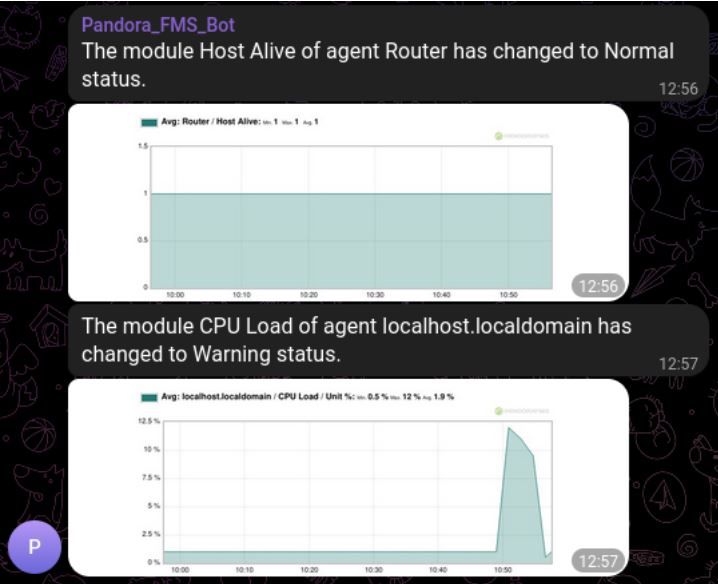
In our integration of Pandora FMS alerts and Telegram, you may add to the message a graph with the latest data of the module that triggered the alert, this applies both for version 773 and earlier and for 774 and later. You will be able to send graphs in your alerts by adding a call to the API of your Pandora FMS server to the script you used previously.

The first step that you must configure on your server is access to Pandora FMS API in the “Setup > Setup > General Setup” section, in the “API password” field you will have the API password and in the “IP list with API access” enter the IPs that need access or you may provide access to any IP (*).

Now edit the command that you had previously created to add the necessary data to send the graph. You need to add the following parameters:

  • –api_conf: Here indicate the configuration parameters of the API of your server, it is important to fill in the fields ” < >“:
    “user=,pass=,api_pass=,api_url=http:///pandora_console/include/api.php”.
    Example: “user=admin,pass=pandora,api_pass=1234,api_url=http://10.0.5.100/pandora_console/include/api.php”
  • –module_graph: Parameters of the module from which you will retrieve the graph, in this case there is two of them:
    • module_id: Where the ID of the module that triggered the alert is entered. In this case use the alert macro_id_module_ so that it is always filled in with the module ID of the alert.
    • interval: Total time interval shown in the graph, in seconds. We will use 3600 seconds by default, the equivalent of 60 minutes or 1 hour but you may configure the interval that best suits you.

The resulting full command will be as follows:

Command:

And field configuration:

And save the changes.

When the alert is triggered, you will receive the message with the data graph of your module:

El equipo de redacción de Pandora FMS está formado por un conjunto de escritores y profesionales de las TI con una cosa en común: su pasión por la monitorización de sistemas informáticos.

Pandora FMS’s editorial team is made up of a group of writers and IT professionals with one thing in common: their passion for computer system monitoring.


About Version 2 Digital

Version 2 Digital is one of the most dynamic IT companies in Asia. The company distributes a wide range of IT products across various areas including cyber security, cloud, data protection, end points, infrastructures, system monitoring, storage, networking, business productivity and communication products.

Through an extensive network of channels, point of sales, resellers, and partnership companies, Version 2 offers quality products and services which are highly acclaimed in the market. Its customers cover a wide spectrum which include Global 1000 enterprises, regional listed companies, different vertical industries, public utilities, Government, a vast number of successful SMEs, and consumers in various Asian cities.

About PandoraFMS
Pandora FMS is a flexible monitoring system, capable of monitoring devices, infrastructures, applications, services and business processes.
Of course, one of the things that Pandora FMS can control is the hard disks of your computers.

Unraveling the Dangers of Phishing: From Basics to Effective Prevention

Surely you may have at one time or another received an email warning of an outstanding invoice, a parcel shipment that you did not expect or a warning from the bank about suspicious activity in your account. These messages usually adopt an alarming tone and provide you with a link to a website that you must visit right away to verify your personal information or to complete payment information. Caution! This is a “phishing” attempt, one of the most popular scam methods on the Internet!

Content:

What is phishing?

Phishing is a form of cyberattack that uses technology and social engineering to breach user security.

The term comes from the word “fishing”, since cybercriminals employ bait tactics waiting for users to “bite” or fall into the trap. They usually aim to get hold of financial information, payment service passwords (such as PayPal), or login credentials.

Actually, phishing is nothing new. The first cases of this type of fraud date back to the mid-1990s, when a group of fraudsters posed as employees of the AOL company to steal confidential customer data. Already in the 2000s, attacks began to specialize, focusing mainly on the banking sector.

Over the years, scams have become more sophisticated and, despite advances in cybersecurity, phenomena such as the rise of teleworking or the fraudulent use of AI have contributed to the rise of new ways of phishing.

Phishing as a source of concern

Anyone can become a victim of phishing. Even though cybersecurity systems are getting more powerful by the day, scammers have also honed their skills and organized themselves into small teams, specializing in social engineering tactics.

Companies often become the preferred target of these cybercriminals who try to steal your sensitive data or trick intermediary charges into making unauthorized transfers. A fairly common example of phishing is vendor invoice fraud, in which fraudsters impersonate trusted business partners to request payment for an outstanding invoice.

Even more disturbing are cases like the one we saw at the beginning of 2020 in the magazine Forbes in which a Japanese company was the victim of an elaborate scam in which the generative AI was used to clone the voice of a manager and authorize a transfer of 35 million dollars.

Audio cloning, audiovisual deep fakes and, in general, the use of the latest technology for criminal purposes pose a great threat and, at the same time, a challenge for cybersecurity companies.

Risks associated to phishing attacks

Financial losses have an immediate impact, but there are other long-term consequences that phishing victims can experience:

  • Reputational damage: Data breaches can erode customer trust, causing permanent damage to the company’s reputation.
  • Service outage: A cyberattack can cripple the company’s computer systems, especially if it involves ransomware. It all starts by downloading a malicious file included in the phishing messages. Once in the system, it encrypts critical files and blocks access to business-critical information.
  • Fines and penalties: Violation of data protection regulations (such as GDPR) may result in sanctions by authorities.

It is important to be prepared to deal with these threats using robust cybersecurity solutions and internal employee awareness programs as the main weapons to prevent phishing attacks.

Relevant statistics and data

Email fraud already accounts for 27% of economic losses for cybersecurity breaches and is responsible for 90% of data breaches, according to the report Cybersecurity Threat Trends 2021 (CISCO). This is mainly because phishing campaigns have become massive and scammers use hundreds of emails to reach more people.

Key elements in a phishing attack

Luckily, phishing messages are usually quite clumsy and recipients quickly realize that they are facing a scam, but sometimes they are so customized that they cast doubt on whether they are legitimate or not.

To gain the trust of their victims, fraudsters impersonate institutions, banks or companies that offer their services over the Internet.

Most of these fraudulent emails consist of:

  1. An unknown sender, with generic email extensions (Gmail, Hotmail, etc.) or names that resemble those of official companies, but with strange words that we cannot identify.
  2. A generic greeting (“Dear customer”, “Dear friend”) since cybercriminals generally do not know the identity of the recipient.
  3. An urgent request for our personal information (ID, credit card number) under the pretext of solving an issue.
  4. An external link that leads to a fraudulent website with the same logo, design and colors of the brand they intend to impersonate. On this landing page you will be prompted to update your details to continue. Here is where information is stolen.
  5. There is also the possibility that the email contains an attachment infected with malicious software (malware, ransomware). If you download it, it will compromise the security of the system.

It is important to be cautious and learn to recognize these phishing signals to minimize risks.

Types of phishing

There are currently over 10,000 forms of phishing (as reported by Wikipedia). These are some of the best known embodiments.

Traditional phishing

It is the most common form of email fraud. It is based on the random issuance of emails impersonating the identity of a trusted company or institution. Messages include links to fraudulent websites or infected files.

Spear phishing

While traditional phishing is a random scam, spear phishing targets a specific person, usually an influential position within the company. To earn their trust, cybercriminals conduct extensive research on the Internet, collecting personal data from social networks such as LinkedIn, where they check information such as age, location or position within the company.

Whaling

In whaling, the target is important people within the company or executive positions (CEO, CFO, etc.). Scammers investigate their prey for weeks and send highly personalized emails, related to critical business issues.

Smishing

Fraudulent messages are sent via text messages (SMS) or WhatsApp. For example, we received a notice from our bank reporting an unauthorized purchase with our card with a link to change the PIN and login details. If YOU do, we will have fallen into the trap.

Vishing

It comes from the union of “voice” and “phishing”. In this case, the scam is done by phone call. A typical example is technical service fraud where scammers call to report a computer failure that doesn’t actually exist and convince us to install a Trojan that will steal your data.

Angler Phishing

It is a new tactic that consists of creating fake profiles on social networks with the name of prestigious institutions and companies. The goal is to steal sensitive data from other users.

How to detect Phishing attacks?

Recognizing a phishing message is not always easy, but there are some indications that may make us suspect that the request is unusual.

  • Alarmist tone: They often convey urgency and urge the user to act immediately. Cybercriminals use emotions such as fear or curiosity and use intimidation tactics to make us act irrationally.
  • Grammatical errors: Many phishing messages contain spelling and grammatical errors as they were written by non-native speakers. Anyway, nowadays many scammers use tools like Chat GPT to correct their texts, so we must be wary even of messages without spelling mistakes.
  • Suspicious links or unsolicited attachments: Does the sender ask you to click on a link? Does it include alleged unpaid bills or fines that you can’t identify? This is most likely a cyberattack.

How to prevent a Phishing attack?

  • Do not open messages from unknown senders.
  • Do not provide your personal information through a link in an email.
  • Don’t download suspicious attachments.
  • Hover over the link and check if the url starts with https. This indicates that the site has a safe certificate.

If despite these precautions you fell into the trap and provided your data, change the passwords of the affected accounts as soon as possible and report the scam to the local police. You may also contact the Internet User Security Office of INCIBE (National Institute of Security) to investigate the fraud.

Protecting your organization from phishing

IBM assures in its report Cost of a Data Breach Report 2021 that it can take an average of 213 days for a company to warn that it was the victim of a phishing attack. During this time, cybercriminals will access all kinds of confidential information: database passwords, trade secrets, access credentials to the corporate network… That is why it is important to be prepared and work proactively to stop the threat of phishing.

Some preventive measures:

Employee Awareness

Make cybersecurity part of your company’s organizational culture and create campaigns to warn your employees of the risks of Internet scams. A good measure is to implement a phishing simulation software to train them and teach them to differentiate an authentic email from a fraudulent one.

Implementing email security solutions

The first line of defense against a phishing attack is the anti-spam filter built into email. Make sure it’s up to date with the latest versions and security patches. You may also configure email authentication policies as Domain-based Message Authentication, Reporting, and Conformance (DMARC) to reduce the risk of phishing.

Endpoint monitoring and protection

Endpoints are the end devices (computers, tablets, smartphones) connected to the network. EDR solutions have been designed to monitor and detect the presence of malware on these endpoints.

Unlike antiviruses that work with previously identified patterns, EDR solutions are more advanced since they give automated and real-time responses to contain the attack. They use technologies such as AI and machine learning capable of detecting anomalous behaviors, such as the execution of malicious scripts.

Endpoint protection is a basic cybersecurity measure, but should be combined with other solutions such as network traffic monitoring or safe remote access solutions such as Pandora RC.

How does Pandora RC help improve remote access security?

More and more companies are adopting policies of teleworking or hybrid work. It is a reality that poses new challenges in terms of cybersecurity. Remote workers operate in less secure environments than those under the supervision of IT teams.

Tools like Pandora RC help monitor your systems by offering remote support and quick assistance if a phishing attack is suspected.

Other ways Pandora RC can help prevent cyberattacks:

  • It generates 100% local passwords avoiding vulnerabilities in centralized systems.
  • Remote connections must be pre-approved.
  • It uses dual authentication access policies. This reduces the risk of unauthorized access, as users have to validate their identity in two steps.
  • It is a flexible and scalable solution. In addition, it is available as a SaaS or On-Premise solution for companies that want to have more control over their infrastructures.

Other tips to prevent phishing attacks in the business environment

As phishing techniques become more sophisticated, the need for protection is increasing. Therefore, it is not a bad idea to keep in mind some basic tips:

  • Try to stay up to date on new scams, follow the news in the media, and read tech blogs like Pandora FMS blog.
  • Use strong passwords on your accounts that include a combination of numbers, letters, and special characters. Never choose personal data such as date of birth, cities or pet names for your passwords; phishers could guess this information by checking your social media.
  • Use a multi-factor authentication (MFA) system to add an extra layer of security to your connections. That way, if a hacker gets your login credentials, they would still need to know the code sent to your mobile to access your accounts.
  • Installing a firewall is critical to blocking unauthorized access to sensitive information. Make sure it’s properly configured and only allows safe transactions.
  • Keep your browser and operating system up to date as cybercriminals often take advantage of vulnerabilities in outdated systems.
  • Prevents access to sensitive information over public Wi-Fi networks. Many of these networks lack encryption protocols and transmitted data could be intercepted. Turn off the option to automatically connect to open Wi-Fi networks on your mobile.
  • Make automatic backups of company data to be able to recover information in the event of an attack. We recommend them to be immutable backups (they cannot be deleted or modified). This ensures that copies are protected and can be restored even if a ransomware attack takes place.

Conclusion

As we mentioned at the beginning, phishing has existed since the beginning of the Internet and will probably evolve and we will learn about new forms of this form of cyberattack. Although we must be vigilant in the face of these threats, slowing technological development is not the solution. The key is to adopt cybersecurity measures and educate users to minimize risks and create a safe working environment.

Estudié Filología, pero las circunstancias de la vida me llevaron a trabajar en el sector del Marketing como redactora de contenidos. Me apasiona el mundo del blogging y la oportunidad de aprender que se presenta con cada proyecto nuevo. Te invito a seguir mis publicaciones en el blog de Pandora FMS para descubrir las tendencias tecnológicas que están transformando el mundo de los negocios.

About Version 2 Digital

Version 2 Digital is one of the most dynamic IT companies in Asia. The company distributes a wide range of IT products across various areas including cyber security, cloud, data protection, end points, infrastructures, system monitoring, storage, networking, business productivity and communication products.

Through an extensive network of channels, point of sales, resellers, and partnership companies, Version 2 offers quality products and services which are highly acclaimed in the market. Its customers cover a wide spectrum which include Global 1000 enterprises, regional listed companies, different vertical industries, public utilities, Government, a vast number of successful SMEs, and consumers in various Asian cities.

About PandoraFMS
Pandora FMS is a flexible monitoring system, capable of monitoring devices, infrastructures, applications, services and business processes.
Of course, one of the things that Pandora FMS can control is the hard disks of your computers.

Keys to integrate IT support and manage your after-sales service better

We are all aware of the importance of attracting new customers for business growth purposes, but focusing solely on this goal is not actually the best decision. Delivering quality customer service is also key to success. For that reason, many companies that sell their products or services over the Internet have decided to implement an after-sales support service as a fundamental part of their business. 

How to make yourself stand out among your competitors with a good after-sales support service?

More than a century ago, the Japanese businessman and philosopher Konosuke Matsushita, known for being the founder of Panasonic and one of the promoters of the “Japanese economic miracle”, laid the foundations of a revolutionary business philosophy for his time. Matsushita was based on concepts such as social contribution, teamwork, customer focus and technological innovation as differentiating factors. He wrote several works throughout his life, projecting his particular vision on business and society. Regarding after-sales support, he was of the opinion that: “After-sales service is more important than assistance before the sale, because it is through this service that permanent customers are achieved.”

These regular customers can really become your best brand ambassadors, so they should be pampered, so that they feel satisfied and share their positive experiences or make new purchases and hires.

How to offer a customer-centric after-sales service?

One of the biggest difficulties that companies encounter when managing customer service is how to convey closeness and proximity in a service as automated as IT support and offered remotely?

In the past, when there was no Internet, customers had to call a call center to solve their doubts or report any problems. Today, IT support centers use tools like chatbots that save human teams a lot of time. The use of these virtual assistants grew dramatically during the pandemic, allowing companies to respond to very high activity peaks and continue to offer 24/7 services.

However, by returning to normal, users are demanding a more conversational and less transactional customer service. Most of them rate chatbots positively as a way to get quick answers to their questions, but they don’t want machine interactions to completely replace people. For example, McKinsey’s “Next in Personality 2021” report reveals that 71% of customers expect businesses to offer custom interactions and 76% get frustrated when this doesn’t happen.

Finding the perfect balance between automation and human support is vital to offer a fast, efficient after-sales support service based on customer needs. You cannot swim against the tide or try to put a brake on digitization. On the contrary, we must rely on the advantages of technology by integrating it into the company’s IT support to access information in a unified way and know which requests can be automated and which need personalized attention.

How to integrate the IT support center to provide customers with good after-sales service?

IT support center integration needs to be planned carefully to ensure orderly and efficient business workflow.

Some essential steps for a successful integration are as follows.

Implementing a service management system (ITSM)

To manage any type of incident or complaint, it is essential to have a structured framework in which the policies to be followed by the support department are defined.

Professionals in this area are responsible for coordinating IT services with business goals. In addition, they train the team and define which tasks can be automated.

Create an IT support infrastructure

Companies that receive a high volume of requests may be in critical situations if they don’t have the tools that allow them to create dynamic workflows.

In this sense email is a painful management tool since it does not allow you to do things as basic as prioritizing important requests, keeping track of them, or escalating them to a higher level when the frontline support team is not able to solve them.

If you try to offer an after-sales support service through this means, you will soon see that the email inbox becomes saturated until it becomes a catch-all. No employee will know where to start!

Do you already know about Pandora ITSM Ticketing Helpdesk? This tool is all you need to make things easier for the support team and build customer loyalty.

As the name suggests, Ticketing Helpdesk works through a ticketing system. Each time a customer makes a request through the platform, a new ticket is opened with their data, date and subject of the incident.

Tickets are automatically cataloged according to their status: new, pending, solved, etc. You may also prioritize those that require immediate action, define automation rules or transfer complex cases that could not be solved to higher support levels.

Helpdesk Ticketing is a flexible tool and ready to work in an omnichannel environment. It can be easily integrated with other IT infrastructure tools such as project managers or CRM, to avoid process redundancy and take advantage of all the information available to improve the operation of other departments and the after-sales service itself.

Use the information collected to optimize customer service

As already mentioned, Ticketing Helpdesk collects query data, analyzes it and generates custom reports with relevant information such as:

  • Number of tickets closed
  • Number of tickets that remain open
  • Average ticket resolution time
  • Most common incidents
  • Performance of each agent (customer feedback)
  • Tickets that were escalated to higher levels

Keeping track of these metrics is very useful to know the long-term performance of the service and detect possible anomalies that would go unnoticed when analyzing isolated data.

It also ensures compliance with contractual agreements related to the service (SLA) such as downtime and support response capacity (for example, resolution of incidents in 24 hours). Respecting these agreements is important for building customer trust. In addition, non-compliance involves financial compensation that companies must assume. With the Helpdesk tool you may manage this key information and create automatic alerts if the service remains inactive for a long time.

Finally, in addition to automatic reporting, Pandora ITSM Ticketing Helpdesk also collects information from satisfaction surveys that users may answer by email or via a web form. It is a reliable way to know if the service is working as expected and the agents in charge of the support area effectively solve customer problems.

Still unsure whether Pandora ITMS will meet your expectations?

Try it for free for 30 days. You do not need a credit card, only advanced knowledge in the IT area and some free time to become familiar with all its features.

Estudié Filología, pero las circunstancias de la vida me llevaron a trabajar en el sector del Marketing como redactora de contenidos. Me apasiona el mundo del blogging y la oportunidad de aprender que se presenta con cada proyecto nuevo. Te invito a seguir mis publicaciones en el blog de Pandora FMS para descubrir las tendencias tecnológicas que están transformando el mundo de los negocios.=

About Version 2 Digital

Version 2 Digital is one of the most dynamic IT companies in Asia. The company distributes a wide range of IT products across various areas including cyber security, cloud, data protection, end points, infrastructures, system monitoring, storage, networking, business productivity and communication products.

Through an extensive network of channels, point of sales, resellers, and partnership companies, Version 2 offers quality products and services which are highly acclaimed in the market. Its customers cover a wide spectrum which include Global 1000 enterprises, regional listed companies, different vertical industries, public utilities, Government, a vast number of successful SMEs, and consumers in various Asian cities.

About PandoraFMS
Pandora FMS is a flexible monitoring system, capable of monitoring devices, infrastructures, applications, services and business processes.
Of course, one of the things that Pandora FMS can control is the hard disks of your computers.