


Microsoft SQL Server ® on Linux GNU is here to stay. Get ready
Introduction
On December 28, 2016 – feast of the Holy Innocents, that special day when Spanish speakers make jokes throughout the day – it was announced the acquisition of a “Platinum” type membership by the company Microsoft ® in the Linux Foundation and the launch of Microsoft SQL Server ®. We took this news very seriously since for us, English-speaking people, we have April Fools’ Day on April 1st, that special day when we joke around. And if we had any doubts, it was officially published in the blog of the Microsoft ® technical team, which included a funny figure which showed a “Microsoft Linux” (sic) sign along with a penguin.
We have been using computers since 1989 with the famous MS-DOS® (Mr. Linus Torvalds wasn’t even studying at university at that point) we are still trying to conceive the idea that Microsoft SQL Server ® can be run on Linux. But nowadays, this is an unavoidable reality and those days of antagonism with former CEO Steve Ballmer are long gone. He left office in 2014 and his successor Mr. Satya Nadella led the company and he developed one of the largest computer infrastructures on the cloud computing network with the product “Microsoft Azure®” (formerly known as “Windows Azure®”).
This “Windows Azure®” product stands out because of its software development kit or “SDK” which is published as open-source (which is different from the free software license in Linux). To this day, artificial intelligence is already being developed in “Microsoft Azure®”, which is now known as “machine learning”.
This brief introduction leads us to our article today: Microsoft SQL Server ® on Linux GNU.
Microsoft SQL Server ® on Microsoft Windows®
Okay, we don’t want to fool you and yes, we are going to talk about GNU/Linux but first we need to know the framework of that popular database engine. Microsoft SQL Server ® was born in 1989 to be run on … IBM OS/2, yes, I am not joking. At that time, it was the “Ashton-Tate” company with its flagship product dBase that caused large volumes of data to flow through the local area network because each customer took a copy of the database to each computer where it was running. That’s why Microsoft bought the SQL Server ® license from Sybase which worked with the client/server model through simple commands and returned limited amounts of data (almost all the work is done separately and remotely on the server). Ashton-Tate provided its customer market and dBase worked as an interface for the user, while Microsoft and Sybase handled the work on the server side.
After some time (in 1994) the version 6 of SQL Server ® appeared, which was also run on the recent Windows NT® and that version was no longer made by Sybase. From version 7.0 onwards, it was massively rewritten in C ++ language and as of 2000, when it was time for OS/2 to be discontinued, SQL Server ® remained only for the Windows NT ® operating system. Then in 2001 its successor Windows XP® inherits the Windows NT® technology – by the way, “NT” means “New Technology” – and it was able to reach common users and their small and medium enterprises: the efficient management of relational data was no longer for exclusive use for large corporations.
In 2005, a dilemma emerged: the rise of 64-bit and multi-core processors, as well as a large amount of RAM for which Microsoft SQL Server ® was not prepared to take full advantage of all this potential. In reaction to this, it is decided to make a platform layer to contain “SQLOS layer”. A SQLOS is a “highly configurable user-level operating system with a powerful application-programming interface.” (You can have a look at the official and detailed explanation here) We will soon see why it was a very good choice, since it completely separates programming from the workloads and threads on a computer, on which Microsoft® SQL Server ® is installed.
Microsoft SQL Server ® on Linux GNU
In the world of web servers, GNU/Linux distributions have been the leading ones for many years. Debian has the Ubuntu Server, used by many companies of different sizes, to publish their sites on the Internet. But for the databases there are quite a few programmers who have chosen Microsoft SQL Server ® and because of this, companies must acquire a Microsoft Windows® operating system, this way creating additional work in the management of the local area network due to a mixed environment.
This concern gradually surfaced among Microsoft® customers and so they told the Redmond-based company (in Washington, USA) which put them on the spot because they did not know how to carry the millions of lines of code, accumulated during all these years, to the environment of the operating system of the penguin. The answer to this problem was found in a project dating back to 2011 called Drawbridge®, which was originally intended for virtualization of applications in a secure environment (called “sandbox”).
It was then necessary to “isolate” Microsoft SQL Server ®. Programmers coded in a carefree way as they worked in a well-known environment, which dealt with the various existing hardware. Once the Drawbridge processes were well understood and adapted, the following parameters were established:
- Quality and security must meet the same high bar we set for SQL Server ® on Windows
Provide the same value, both in terms of functionality, performance, and scale - Application compatibility between SQL Server ® on Windows and Linux
- Enable a continued fast pace of innovation in the SQL Server ® code base and make sure new features and fixes appear immediately across platforms
- Put in place a foundation for future SQL Server suite services (such as Integration Services) to come to Linux
To make SQL Server ® support multiple platforms, the engineering task is essentially to remove or abstract away its dependencies on Microsoft Windows®, as we can see, it wasn’t easy for the developers, who were being pushed out of their comfort zone!
This is how they created “SQL Platform Abstraction Layer” (SQL PAL) that merges the concepts of “SQLOS layer” and Drawbridge®. From now on the development team can work with a single base code and they do not need to worry about where the code will run (this includes the new Microsoft Azure® platform we talked about earlier). As we can see, so far, everything has come to fruition and the projects and resources of the computer giant, which seemed scattered, are now part of a whole.
Installing Microsoft SQL Server ®
As St Thomas once said: “Seeing is believing” that is why we took a virtual machine with 4 gigabytes of RAM (the minimum requirement is 3.25 gigabytes). Then, we downloaded Ubuntu Server 16.04 through Torrent technology and after installing it and doing the required security updates (just because it is a test server, we shouldn’t loose our good work habits!) and then we decided to install Microsoft® SQL Server ® on this “clean” machine. (Jimmy Olano, writer of this article, has made a 23 minutes recording with the complete installation process, you can watch it on YouTube by clicking on this link)
Essentially the instructions are to import the Microsoft® enabled security keys of its website so that we can certify that the content downloaded from that company has not been altered. Then we will add the link of the location of the repository in our file made for this, and then we need to update the list of components and give the order to download and install the packages. In fact, in the Microsoft® blog, where the instructions are published, it talks about the use of the “-y” parameter in order to accept the license immediately. We recommend installing without this option, so that we are always aware that we are using exclusive software and that we must stick to the license shown in the following figure of our authorship (Creative Commons Attribution-Share Alike 4.0 International):

Installing SQL Server ® command-line tools
Once we have installed our SQL Server ®, we must configure the “firewall” and establish the access policies to the computer which should be ready to start receiving data through other computers. But if we want to work directly on the console of our machine we must install the command-line tools with the command «sudo apt-get install mssql-tools unixodbc-dev» which, as expected, also contains questions for the acceptance – or denial – of accepting the conditions of use.
In our case, in that video we mentioned earlier, apart from installing the “command-line tools” we had the opportunity to create a database, as well as to create a table, and to introduce a few values and to make a simple conditional query. But, we will not forget about this tool, which can offer a lot more.
Monitoring SQL Server ®
As a monitoring tool, the Microsoft® SQLCAT12 development team concluded that three tools are needed to monitor:
- collectd.
- InfluxDB.
- Grafana.
We will focus on collectd and we will talk briefly about InfluxDB and Grafana.
“collectd”
This open source software is written in C language and is a daemon or service which we will install and run on the server where Microsoft® SQL Server ® is hosted. It is very popular in routers that use OpenWrt, which is a well-known Linux distribution specially designed for these devices, which also has more than 100 plugins, which makes it easier to configure popular Linux applications such as Apache and MySQL (When writing this article, we reviewed that list and we did not find a specific one for Microsoft® SQL Server ®, given the novelty of the arrival of this software in the GNU world.
In order to deliver the “collectd” data, you can either write them in RDD file format (“RDDfile”) so that they can then be plotted with RDDtool or they can be collected using a plugin.
Currently Pandora FMS does not have a plugin for collectd but it has no problem connecting via SNMP.
To install collectd we must have Git and Docker Engine installed and then create an account in Microsoft® SQL Server ® using the following instructions:
USE master;

GO

CREATE LOGIN [collectd] WITH PASSWORD = N'mystrongpassword';

GO

GRANT VIEW SERVER STATE TO [collectd];

GO

GRANT VIEW ANY DEFINITION TO [collectd];

GO
The latter is very important in order for collectd to have proper access to our database server. Microsoft® invites you to clone your repository in GiHub, where you can find some very detailed instructions and we can contribute with any observation, correction or we can collaborate with an improvement if we request a pull request.
“InfluxDB”
It is responsible for communicating with collectd and then it saves and organises the data collected.
“Grafana”
Software that produces stunning graphics and drawings that represent the data collected by InfluxDB. It is strongly recommended that both InfluxDB and Grafana be installed on another computer different from the one running Microsoft® SQL Server ® or even each one on their own machine if the amount of systems to be monitored is large enough.
Conclusions
Microsoft® made sure to make a good deal with its application SQL Server ®: the code will not be able to run away towards Linux and it avoids compromising its reliability. It also has a base code ready to be improved upon the arrival of new hardware or to cover other operating systems.
All trademarks named herein are accompanied by the “®” symbol and are owned by Microsoft® Corporation and comply with the proper use of such trademarks.
About Pandora FMS
Pandora FMS is a flexible monitoring system, capable of monitoring devices, infrastructures, applications, services and business processes.
Of course, one of the things that Pandora FMS can control is the hard disks of your computers.


PowerShell 101: let’s get to know its use and main commands

PowerShell 101: an alternative to command line on Linux and Mac
The Command Line Interface (CLI) in Windows® exists and resists the passage of time, from those distant days of MS-DOS® to the current PowerShell 101. Let’s see the basic PowerShell.
When I went to college in the 1980s, proprietary software reigned. The old German computers with Unix® that printed our schedules were being replaced by “modern” personal computers. The Microsoft® software house – at that time – was tied to MS-DOS®, so we learned to use the commands: dir, cls, format for our floppy disks…
A little over a decade ago, back in Redmond they decided to dust off, modernize and empower the CLI. Born as Monad®, renamed PowerShell®, today we present you with the basic PowerShell or PowerShell 101.

Description: Basic Powershell – Logo
(Wikipedia https://commons.wikimedia.org/wiki/File:PowerShell_5.0_icon.png)

Basic PowerShell
The Linux operating system has been going on strong; there are many articles in Pandora FMS blog about it. Also in the monitoring of proprietary systems we are always present; Windows®, as its maximum exponent. And every time a new version comes out we’re there, testing and checking.
I think, because of this Linux thing, Microsoft decided to make a compilation of tools along with new concepts, as a counterpart to the GNU features that come with Linux. Considering that PowerShell Core exists since 2016 as open software (MIT license) but with Windows® proprietary components, now we have it available in Ubuntu, CentOS (the OS recommended for Pandora FMS) and macOS and even in another hardware architecture such as ARM.
Installing PowerShell Core at Linux
In Ubuntu we must install the package manager snap: with sudo apt install snap we will achieve our mission. Next we’ll run snap install powershell -classic

Description: snap install powershell – classic
First commands
Having launched with the command pwsh (in Windows® we should look for powershell.exe), we will have a terminal window, with “PS” of indicative (prompt) followed by the location of the directory. In both environments the aspect is very similar, so we will generalize from now on.
Then let’s put our memory into practice:
- cls: “clears” the screen, leaving space to execute a new cycle of commands. It’s not necessary at all, but it’s similar to writing with chalk on a blackboard and erasing to begin to explain another subject.
- dir -ad: to list directories only.
- echo message: when we want to show specific text on the screen. This doesn’t seem to be useful, but when we integrate it in a script it is of tremendous utility to indicate the progress of some task or the result of the same one.
We won’t delay any longer with the old MS-DOS commands. In the twenty-first century, we would need to continue using such old technology, and in the process with those old programs that communicated or interacted with text strings (STDIN, STDOUT).
Basic Command-let in PowerShell 101
In the 21st century everything is more complex, they are years of accumulated experience. PowerShell 101 is not a simple tool like the one we use in Linux. For this tool there are command-let and its name is abbreviated as cmdlet. This means that the commands we tested are not really the ones we thought they were: they are aliases of the default cmdlet and this allows backward compatibility. Now, there’s more. Let’s analyse the case of the command date, used to remunerate the date.
Its real name is Get-Date and although it returns in a slightly different format the current date and time to that of the alias, basically both do the same thing. For monitoring tasks we need to deliver that value in a very specific format: this is when the cmdlets do their job in a totally different way.

Description: «Working with cmdlet with date and time variables»
With the cmdlet Get-Date we can:
- Display the date of the computer.
- Display it in a custom format.
- Use methods; in this case we visualize what day number is the date May 20, 2019 (it is the 140th day of the year).
- Save a date variable in a custom format.
- Convert this variable to a text string and save it in a file.
- Notice that we have used the pipe to communicate one cmdlet with another. The cmdlet you receive used to write to disk is called Add-Content. (Don’t you remember Linux?).
- The reading counterpart is Get-Content and its alias is called… “cat”, just like the one used in Linux to list the contents of a text file!
Take a pause, check this before moving on to the next point.
Working with cmdlet
With all this as a base, we can stop thinking of basic Powershell as a tool and start evoking it as a toolbox. To do this we will use the Get-Command command:
Using it without any parameter will give us back a lot of tools; the ones we have installed in our computer.
If we inquire about a particular command, for example Get-Command Get-Date will return information about the command type, name, version and source (the library it belongs to). For Get-Date it will indicate that it is a cmdlet belonging to Microsoft.PowerShell.Utility and for Clear-Host (clear screen, cls) that it is simply a function. Entering an alias will return the original cmdlet or function.
If we don’t remember the name exactly we’ll use wildcards; for example, with Get-Command *date* we’ll get a list of all the commands that contain that string.
Help with basic Powershell
The help was also thought as a repository, since with the Get-Help command we can also download content to our computer:
- Get-Help Get-Date: will show complete information about how to use Get-Date, its syntax, its aliases, etc.
- Get-Help Get-Date -Online: will open an instance of our web browser and open the latest online information about the Get-Date command.
To work offline, i.e. to save the updated help: Update-Help.
Using Get-Help, let’s learn about the commands Get-Location and Set-Location.
Let’s suppose we have to create a folder or a file; for this we will no longer use the command md or mkdir (the latter is written exactly the same in Linux) but we will use the New-Item command:
New-Item “path/name” -type directory
New-item Command.
“path/name” of the directory; quotation marks are required when interspersed.
Parameter -type and then what we have installed as provider: File, Directory, SymbolicLink, Junction or HardLink
Now let’s talk about providers: we can download the providers we need or we can create our own providers and associate them to the command. My imagination flies: we develop a program that acts as an FTP client and we offer it as a provider so we can sell it to anyone to integrate it into their PowerShell… but wait, there is more. If we do this in turn -if our license allows it- our client can add our FTP program as a library to their own projects. What do you think?
Note: PowerShell is also able to work via API and even security analysts have created their own PowerShell environments, some mixed with Python language… who don’t even need Microsoft executable files!
Pandora FMS and monitoring tasks
Pandora FMS flexibility allows us to use PowerShell to quickly access complex commands. For example, in Windows environment we need to know which patches are installed:
Get-CimInstance -ClassName Win32_QuickFixEngineering -ComputerName
We will be able to visualize the components with the Get-Member command, extract the contents and make our complement in Pandora FMS for PowerShell!
WHAT’S NEW Pandora FMS 756
What’s new in Pandora FMS latest release, Pandora FMS 755
Let’s check out together the features and improvements related to this new Pandora FMS release: Pandora FMS 756.
NEW FEATURES AND IMPROVEMENTS
Added new widget: Odometer for visual consoles
A new odometer widget has been added. It will have two types of operations, one if it is a percentage value and the other if it is an absolute value, where its maximum and minimum values will be taken as reference for its calculation.

New automatic adjustment option in visual consoles
A new option has been added so that when you add a visual console in full screen mode, its width automatically adjusts.
Mass operations on Service elements
The ability to mass create/edit/delete items has been added in Services in both Nodes and Metaconsole.
Inside the Metaconsole, the following have been added:
- Wizard within services to be able to add/edit/delete several service elements at once.
- Service list option for mass creating and deleting services.
Within Nodes, service mass creation and deletion has been implemented from mass operations, as well as the ability to add/edit/delete several service elements at once.

Metaconsole centralized mode: Command Center
In this version, we introduce a new Metaconsole component, the Command Center, which allows working in a unified way in nodes, in a much more agile and fail-safe way. Any changes to the system configuration will be propagated to the nodes automatically.


New Alert server
A new server has been added to Pandora FMS. The alert server will be in charge of processing and sending all the alerts, thus being able to free threads from the rest of the servers so as not to overload data processing while the alerts are launched in environments with many alerts. This server is optional and if it is not activated, the alerts continue to work as before.
Comparison N-Able vs Kaseya vs Pandora FMS: Fight !!!
Official comparison: N-Able vs Kaseya vs Pandora FMS
Lemons, oranges, grapefruits, limes… We know that they are not the same, but if necessary, you can make juice with all of them. And yes, we can and we will. We are in summer and it makes you want to make a good cocktail, doesn’t it? Today, in PFMS blog, we are going to analyze the commonalities of N-Able (Solarwinds MSP), Kaseya and Pandora FMS. Also their -remarkable- differences of course.
Both Kaseya and N-Able stand out for being RMM solutions and integral IT management systems in SaaS mode for MSP. In short, they are a very good solution for managing remote workstations and being able to manage and monitor them remotely. This includes tasks such as patch installation, remote software installation, network equipment configuration, remote desktop access, backups, and of course, receiving alerts when something goes wrong on managed machines.
Kaseya’s client is usually an MSP that provides services to different users, so it needs a tool that with a single license can serve different clients, managing them in an isolated, but centralized and homogeneous manner. This saves costs and is more efficient, since both Kaseya and N-Able are specific tools for Windows desktops that need to be managed remotely.
Pandora FMS client is usually an end company, or an MSP specialized in managing more complex infrastructures, which requires a tool with a more technical profile, which allows its technicians to apply their existing knowledge, scripts, etc. integrating them to compose an effective monitoring that allows them to go where other tools cannot. They are more oriented towards base infrastructure (communications, servers and applications) than to desktop computers.
In this comparison, we will also talk about prices, and both Kaseya and N-Able are above 20K USD in projects of 250 teams, yes, they are expensive tools and they also have a complex and peculiar pricing model, so much so that you will not be able to find these prices clearly on their respective websites.
A very important difference is that both Kaseya and N-Able are usually used in a cloud model (SaaS) (although they also have on-premise licensing), while Pandora FMS is a much more conservative model and is totally on-premise. This is especially relevant regarding the impact on security, since as the last hack to the Kaseya infrastructure showed us, attacking the manufacturer may imply that they can reach the end customer. As we teased long ago, Solarwinds is also not spared from this plague of security problems, and has suffered, since the first attack in 2020, several more attacks.
Given that Pandora FMS is a 100% autonomous installation (it can be installed in an environment without Internet access), and that Pandora FMS agents are not accessible from the outside nor can they be updated remotely, it is, by design, somewhat safer than Kaseya and Solarwinds. However, no one is spared, and Pandora FMS during 2020 and 2021 has published several security patches, as it can be seen in the CVE registry of Mitre.org.
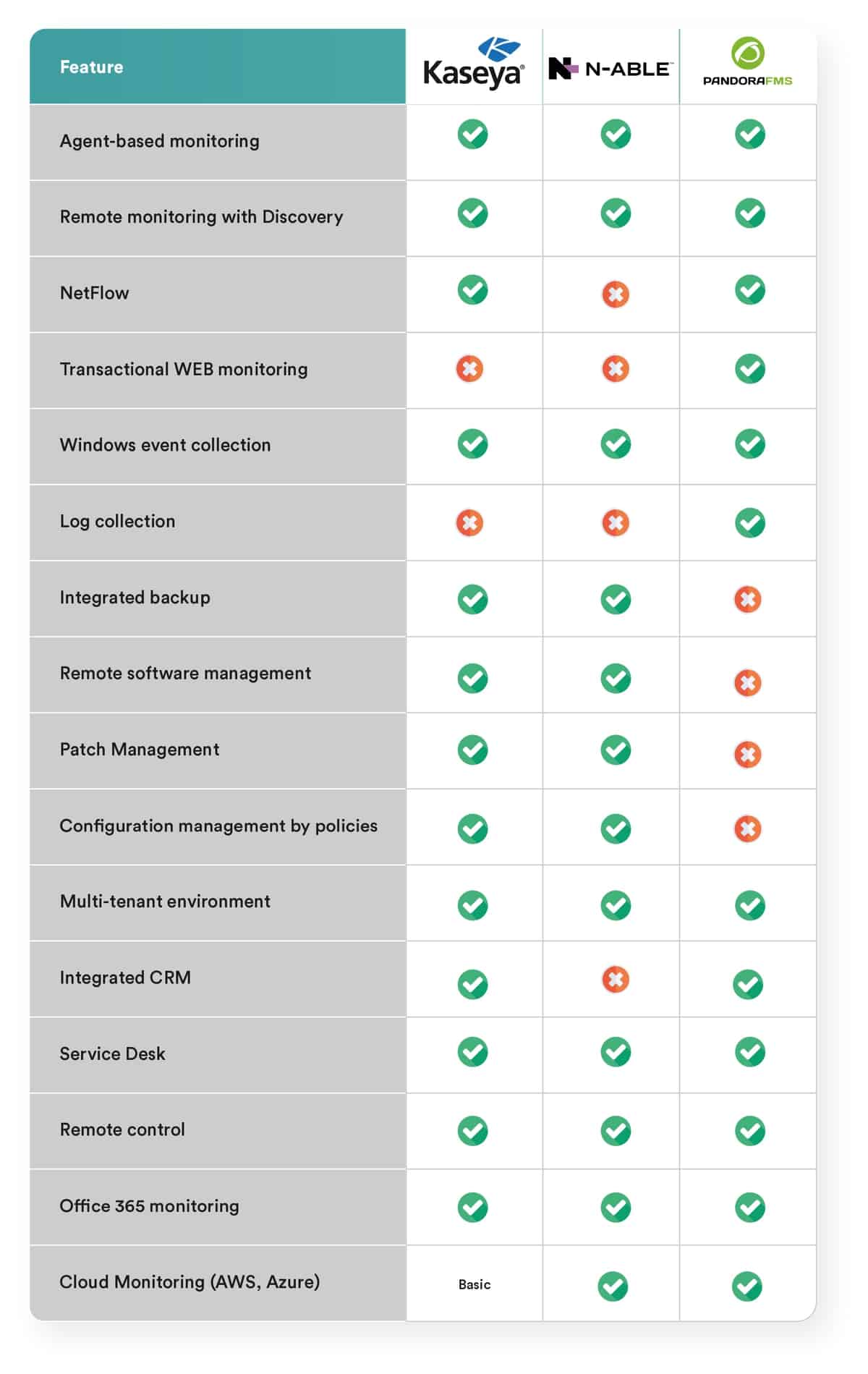
As a summary, we have created a table that describes features. Below there are some additional explanations.
N-Able vs Kaseya vs Pandora FMS
Prices
Others don’t talk about prices, we do. And we do it because it is something that everyone wants and needs to see. We know that it is very difficult to compare them because no product is licensed the same and they do not even share the same concepts. What we do is propose a more or less understandable and standard project to be able to compare the costs in three years. Let’s say, for example, that you want to monitor about 250 computers distributed among virtualized servers (30), workstations (200), physical network equipment and physical servers. Making a total of 250 teams. Well, the cost of a THREE-year project, without professional services and with standard support, would be the following:
- Kaseya: 30,000 USD
- N-Able: 50,000 USD
- Pandora FMS: 15,000 USD
Conclusions
Both N-Able and Kaseya are products that excel in desktop management capabilities: patch management, software installation, and configuration change management. They provide added value such as monitoring, backup, security policy management and remote control. To all of this, they offer a layer of additional services such as ticketing and a portal for MSPs to offer their clients an integrated management and billing platform (the latter only in the case of N-Able).
They are very oriented to job monitoring. Monitoring, although it covers many aspects, is not the main focus of the product, especially if we consider some advanced features such as:
- Distributed transaction monitoring (web applications).
- Monitoring Linux environments.
- Service-oriented monitoring (defining of service trees).
- High capacity (more than 10,000 devices).
- Advanced monitoring of enterprise technologies (Oracle, SAP, VMware …).
- Detailed monitoring of cloud environments (AWS, Azure).
In general, both N-Able and Kaseya have monitors for all kinds of applications, but only from a very superficial and remote point of view. That is, they are limited and not easily extensible.
If we add the high costs to this, Kaseya and N-Able do not seem like a good option for server monitoring projects or core infrastructure. For that, Solarwinds has a more traditional on-premise solution, although with costs of a similar order of magnitude, while Kaseya can only offer its product in an on-premise model.