Skip to content

5 costly problems you can only avoid by backing up your Zendesk data

Zendesk backs up your data for large-scale disaster recovery — a rare scenario — but it doesn’t provide granular restore of your data, nor does it protect against accidental deletion of or breaking changes to your automations.

How much the data is worth to you, and the depth of backup you are comfortable with, only you can decide. But since we’re talking about things like automations, macros, and triggers — workflow controls that your entire support organization relies on every day — you deserve to make that decision based on factual information.

If you work in IT: When something goes wrong, you may suddenly be asked to recover lost data with a quick RTO (recovery time objective). If you aren’t able to do that, it puts you in the unpleasant position of having to explain why not, not to mention the business impact of not being able to restore the data the business needs.

If you work in Support: An accidental delete or breaking change in your automations, triggers, macros, or views can tie up your support workflow, thereby risking the smooth functioning of your service organization.

How Zendesk backs up your data
Technically, Zendesk does have features to make your data in their system more available. But these are designed for a specific, very broad, purpose.

All Zendesk data is automatically backed up regularly. Not to protect your account data specifically, but the entire platform in case of a . So Zendesk can recover all accounts if there was, for example, a platform-wide hacker attack, but they don’t promise to recover information for your account specifically if an incident were to occur.

This may not seem like much of a problem; after all, Zendesk hasn’t publicly reported any large losses of customer data. But there are some significant potential problems that can still bite you despite Zendesk’s automated backups.

5 costly problems Zendesk won’t protect you from

1. Somebody accidentally breaks your workflow
Automations are one of the key reasons why companies love Zendesk. But what happens when you lose automations due to a simple mistake? A lot.

Take a look at a typical example of Zendesk automations:

  • All billing-related tickets are automatically routed to the finance team.
  • If a ticket is left untouched for more than four hours, it is automatically escalated.

Now imagine the havoc caused by losing any of these automations. If you didn’t have these automated processes to begin with, your support system would be far less effective. But if you do have them, your entire support system will suffer if you suddenly lose access to them. You would need to quickly recreate everything, get the processes up and running, and hope the customer forgives you.

In this scenario, if you have a third-party backup tool in place, your automated daily backups of your Zendesk automations mean you can simply restore to a time before the automation was deleted. Search for your automation in the system, and with a few clicks, your automation is restored.

2. You can’t restore data at a granular level
As I mentioned earlier, Zendesk has a disaster recovery feature they use in extreme cases. It is designed to recover huge amounts of data in bulk.

If a disaster happens and Zendesk performs a disaster recovery, you get your data back in a big downloadable blob of CSV or XML data. Recovering a single, important ticket or customer interaction would force you to look for a needle in a massive haystack.

On the other hand, if your data is backed up in a third-party system, you simply “Search.” “Preview,” and “Restore.” That’s it. You find the needle right there, within a minute.

3. You lose all deleted data after 40 days
When you delete an item in Zendesk, it goes in the recycle bin. But it only stays there for 40 days, then it is gone forever. It is very simple, yet far too few Zendesk users realize the finality of this functionality.

You delete so many things every day. Usually, you never think of them again, but every now and then, the wrong item is deleted. Or circumstances change, so you realize you need it back. But forget it — after that just-less-than-six-week window, it’s gone.

Not so with your data backed up with a third party. Everything is still there. You leave your options open.

4. When an employee leaves your company, all her data is automatically archived
Now and then, you probably see support agents leave the company. This is a normal part of the business. As a matter of fact, companies worldwide face a among their support agents.

When the agent is no longer an active user in Zendesk, what happens to all their views, tickets, and other data associated with their account? If you still need access to it, you have three options:

  • Continue to pay the fees for the person’s license after they leave. But with a license cost of $49 to $215 per agent per month, that will be an expensive option with a 30% turnover.
  • As a best practice, Zendesk recommends you reassign the tickets and downgrade the agent’s account and finally suspend the account. Please keep in mind that downgrading the agent’s account will automatically delete all macros and views permanently. Losing out on macros and views permanently could be a costly mistake.
  • When you back up the data with a third-party backup service, you continue to have access to all data. Your data is backed up daily, so you can simply go back to any point and restore or preview any data.

5. Zendesk’s enhanced disaster recovery is expensive
Zendesk will sell you an system that includes multi-zone data replication and a host of other features that help protect your data in event of a disaster. Please note that it is available only in enterprise plans ($215 per agent per month). Even worse, it doesn’t even protect your automations, triggers, macros, and views.

With a third-party backup you can save a lot of money for your organization and benefit from a comprehensive backup starting at a few dollars per agent per month.

A 60-second summary, with the Keepit glasses on
As I mentioned at the start, you will have to assess your risk tolerance if you conclude that suddenly losing your Zendesk data would be too costly, whether, through human error or malicious intent, the time to act is now. There are third-party solutions out there, so you just need to find the right one.

is one of them, designed for fast, easy recovery. And for your convenience, here are five quick benefits:

  1. Protect automations — automations, macros, and triggers are the lifeblood of Zendesk, and with Keepit, you can also protect these.
  2. Retain unlimited data — all your data is saved in four copies across multiple data centers.
  3. Keep backup costs down — With Keepit for Zendesk, you benefit from a comprehensive backup solution with unlimited hot storage and data archiving starting from $2.95 per agent per month.
  4. Keep it simple — with an easy interface, anyone can recover data with no training needed.
  5. Recover fast — get your data back in seconds. Search-Preview-Restore, using smart search and granular restore.

About Version 2 Digital

Version 2 Digital is one of the most dynamic IT companies in Asia. The company distributes a wide range of IT products across various areas including cyber security, cloud, data protection, end points, infrastructures, system monitoring, storage, networking, business productivity and communication products.

Through an extensive network of channels, point of sales, resellers, and partnership companies, Version 2 offers quality products and services which are highly acclaimed in the market. Its customers cover a wide spectrum which include Global 1000 enterprises, regional listed companies, different vertical industries, public utilities, Government, a vast number of successful SMEs, and consumers in various Asian cities.

About Keepit
At Keepit, we believe in a digital future where all software is delivered as a service. Keepit’s mission is to protect data in the cloud Keepit is a software company specializing in Cloud-to-Cloud data backup and recovery. Deriving from +20 year experience in building best-in-class data protection and hosting services, Keepit is pioneering the way to secure and protect cloud data at scale.

Defcon/Black Hat Papers, Presentations, Resources

I am a digital hoarder of sorts. Well, maybe not exactly a hoarder, as I don’t have a NAS with petabytes worth of files, but I do like to collect some good resources. Of course, those are all about Infosec/Cyber.

Thus, I’ve decided to share them with you! I am leaving a link to a shared Google Drive folder where I will be adding them. My idea here is to make them somewhat organized at least, as I don’t really want to dump ALL of them on you. The stuff in the drive is either collected by me, or other fellow collectors, and all the .pdfs and other stuff you will find there is free, and shared by their respective creators/owners!

I have to say that in my efforts to collect, I’ve had to rely on other such enthusiasts too, and what I’m sharing here was actually collected by Joas A Santos – a red teamer and an Infosec leader. Big shoutout, and thanks for allowing me to share, to Joas and also for his unceasing efforts to share the knowledge and resources with the community. All of the presentations and papers found in the drive are available online (and shared by their respective authors – I don’t want to infringe on anyone’s IP), I am just trying to curate them and organize them for a bit.

Stuff that’s currently in the gdrive:

  • Why Did You Lose the Last PS5 Restock to a Bot
  • Internal Server Exploitation With New Desynchronization Primitives
  • Taking A Dump In the Cloud
  • No Code Malware: Windows 11 At Your Service
  • Running Rootkits Like a Nation-State Hacker
  • The Darknet OpSec By a Veteran Darknet Vendor
  • Weaponizing Windows Syscalls as Modern 32-bit Shellcode
  • OopsSec – The Bad, the Worst, and the Ugly of APTs Operations Security
  • The Evil PLC Attack – Weaponizing PLCs
  • Phreaking 2.0 – Abusing Microsoft Teams Direct Routing
  • Let’s Dance In the Cache – Destabilizing Hash Table on Microsoft IIS
  • Trace Me If You Can – Bypassing Linux Syscall Tracing
  • How Russia Is Trying to Block TOR
  • Reversing the Original XBOX Live Protocols
  • Save the Environment (Variable) Hijacking Legitimate Applications With a Minimal Footprint
  • Android Universal Root- Exploiting xPU Drivers
  • Devils Are In the File Descriptors: It Is Time To Catch Them All
  • ELF Section Docking – Revisiting Stageless Payload Delivery
  • Better Privacy Through Offense: How To Build a Privacy Red Team
  • A Journey Into Fuzzing WebAssmebly Virtual Machines
  • Glitched on Earth by Humans: A Black-box Security Evaluation of the SpaceX Starlink User Terminal
  • Invisible Finger: Practical Electromagnetic Interference Attack on Touchscreen-based Electronic Devices
  • Trust Dies In the Darkness – Shedding Light on Samsung’s TrustZone Cryptographic Design
  • Broken Mesh: New Attack Surfaces of Bluetooth Mesh
  • Human or Not: Can You Really Detect the Fake Voices?
  • A New Trend For the Blue Team – Using a Practical Symbolic Engine to Detect Evasive Forms of Malware/Ransomware
  • Tunable Replica Circuit For Fault-Injection Detection
  • Scaling the Security Researcher to Elminate OSS Vulnerabilities Once and for All
  • AAD Joined Machines – The New Lateral Movement
  • The Growth of Global Election Disinformation: The Role and Methodology of Government-linked Cyber Actors
  • Blasting Event-Driven Cornucopia: WMI-based User-space Attacks Blind SIEMs and EDRs
  • Dragon Tails: Preserving Supply-side Vulnerability Disclosure
  • IAM Whoever I Say IAM: Infiltrating Identity Providers Using 0Click Exploits
  • Attacks From a New Front Door in 4G & 5G Mobile Networks
  • Process Injection – Breaking All macOS Security Layers With a Single Vulnerability
  • Less SmartScreen More Caffeine – ClickOnce (Ab)Use for Trusted Code Execution
  • One Bootloader to Load Them All
  • Crossing the KASM: A Webapp Pentest Story

One last disclaimer, this time from me personally: I don’t have any political affiliations nor any sort of ideologically-driven agenda; I only care about the research/technical aspects of the linked resources, also, as mentioned before, these are shared freely.

Finally, here’s the link where you can find the above documents. Enjoy!

(I might also be uploading new stuff there, that’s currently not listed, so feel free to check it out from time to time, and if something’s not working for you feel free to ping me for access, or for me to send you the files)

Cover image by Sincerely Media

#infosec #black-hat #defcon #resources

About Version 2 Digital

Version 2 Digital is one of the most dynamic IT companies in Asia. The company distributes a wide range of IT products across various areas including cyber security, cloud, data protection, end points, infrastructures, system monitoring, storage, networking, business productivity and communication products.

Through an extensive network of channels, point of sales, resellers, and partnership companies, Version 2 offers quality products and services which are highly acclaimed in the market. Its customers cover a wide spectrum which include Global 1000 enterprises, regional listed companies, different vertical industries, public utilities, Government, a vast number of successful SMEs, and consumers in various Asian cities.

About VRX
VRX is a consolidated vulnerability management platform that protects assets in real time. Its rich, integrated features efficiently pinpoint and remediate the largest risks to your cyber infrastructure. Resolve the most pressing threats with efficient automation features and precise contextual analysis.

How Does PAM Help Protect Remote Access?

With the imposition of social distancing caused by the Covid-19 pandemic, most companies began to migrate to remote work, adopting solutions such as cloud computing.

According to Forrester, more than 50% of IT leaders have revealed the need to adapt to this reality, while Gartner pointed to an even higher percentage of 70%.

In practice, cloud environments have several benefits, such as agility, scalability, and better disaster recovery strategies.

Nevertheless, ensuring digital security in remote access requires the adoption of protection models based on Zero Trust, as well as investment and implementation of the principle of least privilege through Privileged Access Management (PAM).

By reading the next topics, you will learn more about PAM tools and our senhasegura Domum solution. Keep reading it!

PAM: What is It and Why is It Important?

Privileged Access Management (PAM) is a digital security solution that allows one to control access, avoiding damage caused by external attacks and insider threats.

Considered by experts as one of the most important cybersecurity technologies on the market, this tool makes it possible to apply the principle of least privilege in IT environments, providing users only the necessary access to perform their activities.

senhasegura Domum: Zero Trust Access, No VPN Required for Users and Third Parties

Mass migration to remote work and third-party access to devices and systems require a specific solution to ensure information security.

For this reason, we created senhasegura Domum for secure remote access based on Zero Trust. This solution eliminates the need for VPN and additional licenses and is easy to use, which contributes to reducing costs with implementation and training.

Domum allows one to define devices, setting a duration time or stipulating specific days and times for access. It also makes it possible to limit the connection by geographic region.

Moreover, it guarantees privileged access without the need to create a login and password in the solution, only for authorized devices.

Finally, Domum is the best alternative for companies that need to adapt to audit criteria. This tool allows:

  • Monitoring of actions performed in real-time;
  • Session recording;
  • Threat and user behavior analysis;
  • Blocking or closing the remote session in case of suspicious behavior.

Invest in our senhasegura Domum solution and avoid damages caused by invasions and data leaks. Contact us and learn more. 

About Version 2 Digital

Version 2 Digital is one of the most dynamic IT companies in Asia. The company distributes a wide range of IT products across various areas including cyber security, cloud, data protection, end points, infrastructures, system monitoring, storage, networking, business productivity and communication products.

Through an extensive network of channels, point of sales, resellers, and partnership companies, Version 2 offers quality products and services which are highly acclaimed in the market. Its customers cover a wide spectrum which include Global 1000 enterprises, regional listed companies, different vertical industries, public utilities, Government, a vast number of successful SMEs, and consumers in various Asian cities.

About Segura®
Segura® strive to ensure the sovereignty of companies over actions and privileged information. To this end, we work against data theft through traceability of administrator actions on networks, servers, databases and a multitude of devices. In addition, we pursue compliance with auditing requirements and the most demanding standards, including PCI DSS, Sarbanes-Oxley, ISO 27001 and HIPAA.

Pandora FMS Named An Emerging Favorite In Capterra Shortlist For Server Monitoring Software and APM

The work is hard and there are high expectations, but we don’t give up! The fight goes on and every day we are happier with what we achieve and what we mean to our users.

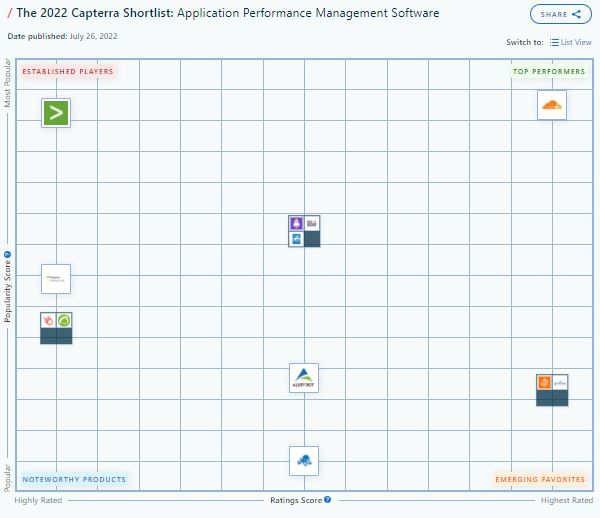
Therefore, Pandora FMS is proud to announce its mention as an  Emerging Favorite  in 2022 Shortlist for Server Monitoring Software and APM by   Capterra, a free online service that helps organizations find the right software.

Pandora FMS is always among the favorites. Capterra knows this

Capterra Shorlist

*As many of you may already know, Capterra Shortlist is an independent assessment that evaluates user reviews and online search activity to generate a list of market leaders in the software space that offer the most popular solutions. (Have a look at the Capterra Shortlist methodology here.)

As it could not be otherwise, our CEO and colleague Sancho Lerena has wanted to make some comments on this achievement:

“The first thing I would like to say is thank you. Sometimes it seems that one does not give enough thanks and there is much to thank, both to our coworkers and users, and even the Capterra platform itself. 

Especially because there are so many contributions and because it is absolutely always a huge honor to receive this kind of mention.” 

Here is a sample of our recognition in table format:

APM

About Version 2 Digital

Version 2 Digital is one of the most dynamic IT companies in Asia. The company distributes a wide range of IT products across various areas including cyber security, cloud, data protection, end points, infrastructures, system monitoring, storage, networking, business productivity and communication products.

Through an extensive network of channels, point of sales, resellers, and partnership companies, Version 2 offers quality products and services which are highly acclaimed in the market. Its customers cover a wide spectrum which include Global 1000 enterprises, regional listed companies, different vertical industries, public utilities, Government, a vast number of successful SMEs, and consumers in various Asian cities.

About PandoraFMS
Pandora FMS is a flexible monitoring system, capable of monitoring devices, infrastructures, applications, services and business processes.
Of course, one of the things that Pandora FMS can control is the hard disks of your computers.

More Than the Restore: Why Ransomware Recovery Is Hard

Many discussions about ransomware recovery focus on getting critical data back where it belongs. While this is absolutely necessary, it’s not always sufficient to allow full resumption of business-as-usual—the actual goal of disaster recovery.

In this session, we’ll discuss the key lessons we’ve learned as a SaaS data protection company about the holistic requirements for resuming normal operations after a large-scale attack or disaster, including restoration, remediation, retraining, and retrospection.

Backups are critical. We all know this is true—not just in an obvious “water is wet” way, but in a more serious “if you don’t drink enough water, you will die” way. At the same time, having a reliable backup system to capture your data and the ability to restore the right data in the right place at the right time is only part of what modern enterprises need.

Restoring data is not the same thing as recovering operations. Restoration is the first step along that path, but not the only one. You can sum this argument up with a single phrase: “restoring data is necessary but not sufficient by itself.”

Before you restore…
Re-read the first sentence above. Before we can proceed with talking about what else a full restoration will take besides just clicking the “restore” icon, I’m going to assume that you have a complete, valid, tested backup of your most important data. (And if you don’t, click to learn how Keepit can get you there!)

What you get when you restore
OK, now you’re all set, right? You’ve got a known-good backup, and you’ve tested your restore procedures. You’re comfortable with the software, you’ve ensured that everyone who needs to conduct restores has the correct permissions, and so on. If not, you probably at least know what areas of improvement you need to focus on (and quickly)!

The next step in the process is understanding exactly what you get when you execute a restore, assuming that it goes perfectly. This will obviously vary quite a bit depending on what you’re backing up in the first place. For example, there are certain Zendesk and Azure Active Directory objects that can be restored in place (that is, the restored object can overwrite the old one), but other objects will only be restored as new objects. Knowing exactly what a restore will give you, where it will go, and what, if any, manual steps might be required post-restore are all key parts of understanding the overall journey.

Now for the fun part
One crucial mistake we sometimes make when talking about restore planning is failing to think about, and plan for, what happens after the restore.

Resuming operations after a cyberattack involves many considerations that you may not have thought about during your restore planning, including the time required to install or reinstall patches and updates on users’ computers, the need to maintain an effective communications channel for your staff while your primary systems are being restored, and non-computer-related issues like making sure that you know where physical assets and people may have moved to during your outage.

There may be other unique considerations that apply to you, too. For example, in 2021, a large auto company suffered a cyberattack that prevented their dealers from ordering cars or parts—so once the company restored their systems, they had a lot of manual and unplanned work to clean up and reconcile their pending orders, update dealers with information on where their parts were, and so on.

None of that cleanup work could take place until the restore was complete and all the data they needed was present.

How to get started
The exact mechanics of how you go from “restore successful” to “we’re back in business” will vary according to many factors, including how large and/or complicated your organization is, how mature your operational processes are, how many additional regulatory requirements you have to deal with, and the nature of the problem from which you’re recovering.

There’s a huge continuum that covers the space from the simple (restoring a single critical file for one user) to the very complex (recovering operations after a large-scale disaster like a wildfire or hurricane).

Investigating, documenting, and practicing what your business needs to quickly get back to normal after the restore succeeds is perhaps the most important single thing you can do to protect your data and your business.

About Version 2 Digital

Version 2 Digital is one of the most dynamic IT companies in Asia. The company distributes a wide range of IT products across various areas including cyber security, cloud, data protection, end points, infrastructures, system monitoring, storage, networking, business productivity and communication products.

Through an extensive network of channels, point of sales, resellers, and partnership companies, Version 2 offers quality products and services which are highly acclaimed in the market. Its customers cover a wide spectrum which include Global 1000 enterprises, regional listed companies, different vertical industries, public utilities, Government, a vast number of successful SMEs, and consumers in various Asian cities.

About Keepit
At Keepit, we believe in a digital future where all software is delivered as a service. Keepit’s mission is to protect data in the cloud Keepit is a software company specializing in Cloud-to-Cloud data backup and recovery. Deriving from +20 year experience in building best-in-class data protection and hosting services, Keepit is pioneering the way to secure and protect cloud data at scale.