Default configuration should be what you’re using for a while, at least before familiarizing yourself a bit more intimately with the Tor documentation. However, aside from the GUI-based set up of the browser, I want to try and explain how you would set your Tor browser through the Torrc config file.
I will assume you’re more than familiar with Tor, or have gone through the docs, and that you know what’s the purpose of the Torrc file.
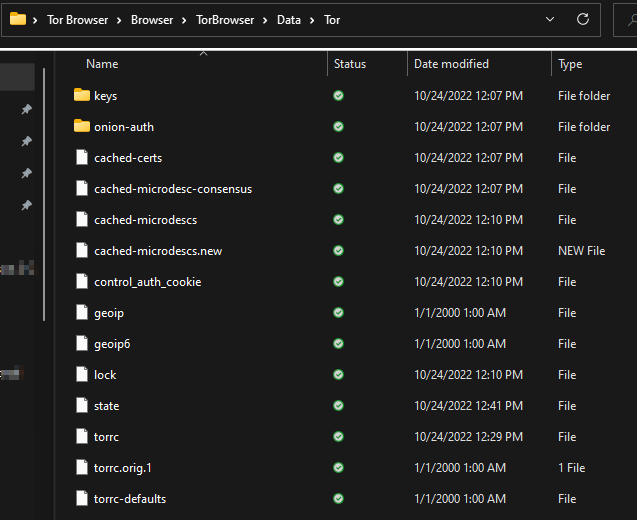
You can find your torrc file in the \Tor Browser\Browser\TorBrowser\Data\Tor path, where Tor Browser is the Tor’s installation folder.
It would look something like this (on a Windows-based machine)
On your Mac, you need to go to the Application and right-click on the Tor browser app icon, selecting the show package contents and navigate to TorBrowser/Data/Tor/Torrc.
On Linux, the file will be in the TorBrowser/Data/Tor path and Tor will also put it into /usr/local/etc/tor/torrc if compiled from source, or in the etc/tor/torrc or etc/torrc if installed as a package.
Check out the manual at this link. You will see a detailed list of options used in the torrc file. You can also do man tor, you can also check out the sample torrc file. This is good to check out since it has a lot of comments.
One of the main things people tend to change are the entry and/or exit nodes – thus changing the geographical location of the said nodes and is a good simple example for us here.
Check ExcludeNodes node,node,…
And you will notice that country codes are 2-letter ISO3166 codes and that they must be enclosed by braces. So, something like {fr} is a valid country code and would set your entry/exit node to France. Note that the country codes are not case-sensitive. And also keep in mind that {??} exists for nodes whose country can’t be identified. More about that can be found at the Tor manual link above.
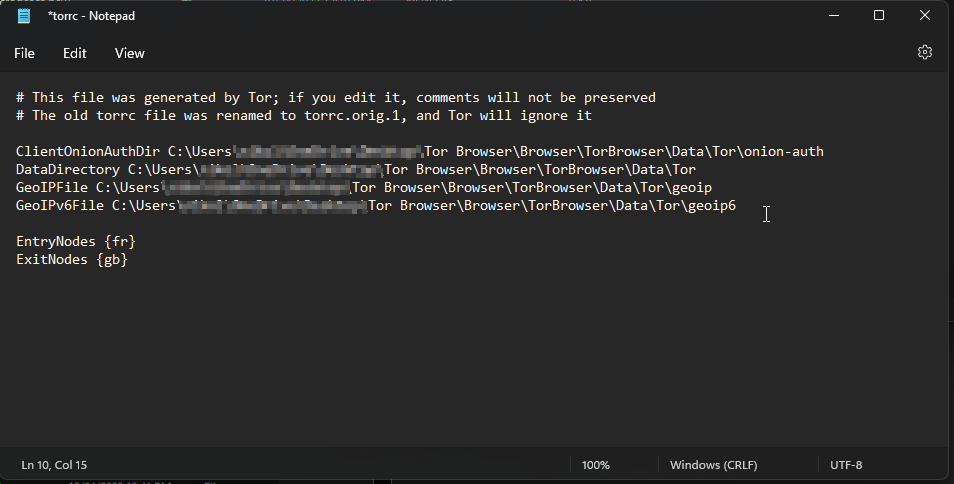
I’ve now added entry/exit nodes to the torrc file:
As shown in the image above, I want to start the Tor circuit in France, and I want to exit in Great Britain.
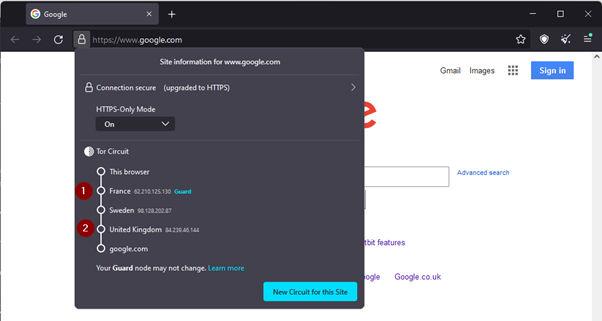
And, as you can see, the change made to the torrc file has been applied. If I click on new circuit for this site:
You will note that the entry and exit nodes stayed on the same countries that were previously specified in the torrc file.
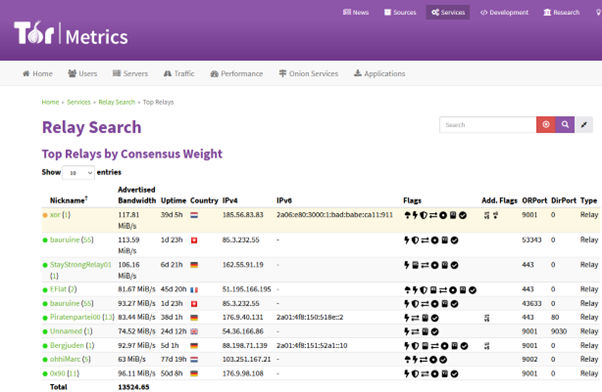
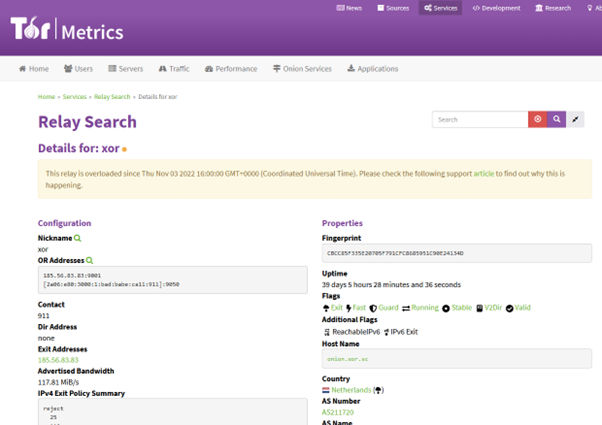
You can also specify actual relays that you want to use. Go to https://metrics.torproject.org/ and and do a relay search (bottom of the page) for a relay of your choosing. (I chose top relays options just to quickly demonstrate how you would add a relay to the torrc file)
Another important thing are the flags, they will usually tell you what’s the best use of a given relay. If its fast, suitable for entry/exit, if it is validated, and more.
If I were to pick the first relay (xor) I would copy paste the fingerprint into my torrc file
All of this depends on your risks, rather who is your adversary. For example, if they are outside those relays (and you know that) then the relay might help you stay hidden, but nothing is given. If they control the relays… well, then they might be onto you and it’s time to adapt your tactics.
One more thing, unless you’re a seasoned veteran, maybe refrain from manually changing the circuits because this can make you stand out in theory so maybe don’t do that unless you’re sure.
To apply the configuration from the newly-changed torrc file, restart the browser. You can also do pkill -sighup tor on Linux, but it might even be easier (and better) to just restart the browser.
Conclusion
Okay, this was a very short intro to the torrc but I hope you liked it and that you will find the links I shared useful! The saga continues, as I will be publishing another Tor piece shortly…
Version 2 Digital is one of the most dynamic IT companies in Asia. The company distributes a wide range of IT products across various areas including cyber security, cloud, data protection, end points, infrastructures, system monitoring, storage, networking, business productivity and communication products.
Through an extensive network of channels, point of sales, resellers, and partnership companies, Version 2 offers quality products and services which are highly acclaimed in the market. Its customers cover a wide spectrum which include Global 1000 enterprises, regional listed companies, different vertical industries, public utilities, Government, a vast number of successful SMEs, and consumers in various Asian cities.
About VRX VRX is a consolidated vulnerability management platform that protects assets in real time. Its rich, integrated features efficiently pinpoint and remediate the largest risks to your cyber infrastructure. Resolve the most pressing threats with efficient automation features and precise contextual analysis.
Make it easy to send branded email signatures when using a domain alias
ack in the very early days of CloudM, we had a problem!
Even though we were talking to customers and selling as CloudM, our emails (and their signatures) would often come from our parent company, causing unnecessary confusion.
“Who are you?”, we would hear. “I’ve been talking to CloudM”. And, where there is confusion, there’s doubt. “Who am I really dealing with here?” Even if it was never brought up as a reason, we knew it was costing us – both business and reputation.
Well, the easiest way to get around this was to use a domain alias address, allowing our employees to effortlessly switch between their parent company and CloudM email addresses depending on who they were talking to, with all responses sent to the same inbox. Even today, we have centralized staff that need to represent both sides of the company.
With so many companies now having multiple brands and domains under their umbrella, using an alias is getting even more common. Did you know that, in 2020, Unilever NV had 1,181 individual domain names including Ben & Jerry’s and Dove?
But, this brings up another problem – How do you make the email signature represent the brand you are sending the email from?
Introducing Domain Alias Signatures – a new feature for Gmail within our CloudM Email Signature Management module that allows you to set bespoke email signatures that will be displayed depending on which email address the user decides to send the email from.
It could be as simple as the primary email address displaying your company logo, and the domain alias email address displaying the logo of a specific brand.
Or, completely bespoke with different brand colors, fonts, contact details, and social media links, to name a few. And the best thing is that most of this information is added as a variable so that, as soon as a field such as job title is changed in CloudM, it is automatically changed on the email signature, quickly and easily keeping it up to date.
Domain Alias Signatures is just one of many new and exciting feature changes that we have added to our redesigned Email Signature Management module in the last 6 months, joining our brand new Template Gallery and the ability to schedule signatures for the primary domain, with many more updates in the pipeline.
Want to find out more?
Check out our Smart Teams video on YouTube and visit our CloudM website, or book a 15 minute discovery call to speak to one of our brilliant team.
About Version 2 Digital
Version 2 Digital is one of the most dynamic IT companies in Asia. The company distributes a wide range of IT products across various areas including cyber security, cloud, data protection, end points, infrastructures, system monitoring, storage, networking, business productivity and communication products.
Through an extensive network of channels, point of sales, resellers, and partnership companies, Version 2 offers quality products and services which are highly acclaimed in the market. Its customers cover a wide spectrum which include Global 1000 enterprises, regional listed companies, different vertical industries, public utilities, Government, a vast number of successful SMEs, and consumers in various Asian cities.
About CloudM CloudM is an award-winning SaaS company whose humble beginnings in Manchester have grown into a global business in just a few short years.
Our team of tech-driven innovators have designed a SaaS data management platform for you to get the most from your digital workspace. Whether it’s Microsoft 365, Google Workspace or other SaaS applications, CloudM drives your business through a simple, easy-to-use interface, helping you to work smarter, not harder.
By automating time-consuming tasks like IT admin, onboarding & offboarding, archiving and migrations, the CloudM platform takes care of the day-to-day, allowing you to focus on the big picture.
With over 35,000 customers including the likes of Spotify, Netflix and Uber, our all-in-one platform is putting office life on auto-pilot, saving you time, stress and money.
In today’s world, security teams have to strike a delicate balance between intrusiveness and security. Employees are prone to password fatigue when they have to remember numerous passwords and change them frequently. And even with those protocols in place, the mental burden it carries can push employees to reuse passwords and reduce their complexity, putting your company at risk of a data breach.
The good news is there are easier ways to ensure security while streamlining the login process and minimizing employee disruption: SSO and MFA. But what’s the difference between the two, and do they work better together?
In this post, we’ll explain how SSO and MFA work, delineate their similarities and differences, and explain how you can use them together to prevent unauthorized access and bolster your company’s security posture.
How Does Single Sign-On (SSO) Work?
Single sign-on, or SSO, only requires a user to log in once to access multiple resources. In other words, users only have to learn and provide one global set of login credentials instead of remembering multiple passwords and typing them into every single application.
On the back end, a company’s identity vendor exchanges keys with all preconfigured apps or sites. Typically, this process is driven by Security Assertion Markup Language (SAML), which uses Extensible Markup Language (XML) certificates to verify the authentication. Once everything matches, the user is authenticated, and sites and apps are ready for their use.
Employees favor SSO because of its user-friendliness and convenience. IT admins also benefit from SSO because it’s usually implemented as part of a larger identity access management (IAM) solution, which allows them to monitor network, device, app, and server permissions simultaneously.
How Does Multi-Factor Authentication (MFA) Work?
You might be familiar with 2FA, but MFA takes 2FA to the next level. Whereas 2FA only requires two verification factors to log in, MFA requires two or more.
After someone enters their username and password, they are prompted to share multiple things they have — such as a token — or things they are, like a biometric factor. Some examples of these authentication factors are codes received via SMS, security questions, time-based one-time passwords, fingerprints, or retina scans.
MFA is becoming more widely adopted because it makes hacking someone’s username and password increasingly difficult. Even if an attacker can guess or intercept one verification method, they probably won’t be able to crack several others.
SSO vs. MFA
SSO and MFA have distinct similarities and differences that security teams should keep in mind as they build their authentication plan.
Similarities
Access: Both approaches control access to various applications and websites
Passwords: Both rely on a username and password
Decreased costs: Both have the potential to cut down on time IT spends on password resets
Differences
Management: MFA is a bit more difficult to manage than SSO
Security: MFA is considered more secure than SSO
Convenience: SSO is viewed as more straightforward and quicker
How Are SSO and MFA Used?
Single sign-on is used when it makes sense to authenticate users into multiple applications at once. Google is one of the best examples of a large-scale SSO implementation. Once you’ve logged into your Google account, you’ll also be logged into Drive, Gmail, YouTube, and any other Google-managed applications.
Multi-factor authentication is used when more stringent security measures are required. For instance, say you’re logging into your health insurance portal to view your claims. After logging in, you may need to scan your face, enter a one-time password sent to you via email, and/or accept a push notification on your authenticator app.
Can SSO and MFA Be Used Together?
It’s important to note that SSO and MFA are not mutually exclusive. In fact, many companies consider a joint SSO and MFA approach the best of both worlds — you can appease employees and keep your applications safe and secure.
With a joint SSO and MFA solution, an employee will enter their password and then use their phone, email, authenticator app, finger, or face to complete the sign-in process. If one of those methods fails, cyberattackers will still have a tough time breaking into their account, let alone specific applications.
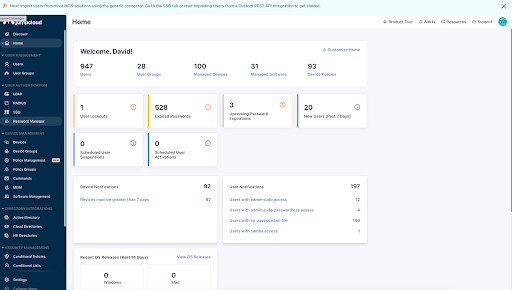
SSO and MFA With JumpCloud
Modern Identity-as-a-Service (IDaaS) solutions were built with the dual SSO-MFA concept in mind. With the added flexibility of the cloud, the best IDaaS platforms let you control access and increase your security all in one place, with password complexity management, MFA, and SSH keys.
JumpCloud’s IDaaS infrastructure does just that, unifying your company’s architecture, improving the user experience, and safeguarding your data, all while reducing total cost of ownership.
Not sure if JumpCloud is right for you? Sign up for JumpCloud Free today and test it out yourself, for up to 10 users and 10 devices.
About Version 2 Digital
Version 2 Digital is one of the most dynamic IT companies in Asia. The company distributes a wide range of IT products across various areas including cyber security, cloud, data protection, end points, infrastructures, system monitoring, storage, networking, business productivity and communication products.
Through an extensive network of channels, point of sales, resellers, and partnership companies, Version 2 offers quality products and services which are highly acclaimed in the market. Its customers cover a wide spectrum which include Global 1000 enterprises, regional listed companies, different vertical industries, public utilities, Government, a vast number of successful SMEs, and consumers in various Asian cities.
About JumpCloud At JumpCloud, our mission is to build a world-class cloud directory. Not just the evolution of Active Directory to the cloud, but a reinvention of how modern IT teams get work done. The JumpCloud Directory Platform is a directory for your users, their IT resources, your fleet of devices, and the secure connections between them with full control, security, and visibility.
Microsoft is making a steady push in identity and mobile device management with an expanding array of cloud services. Many organizations, especially managed service providers (MSPs), are considering Azure Active Directory (AAD) with Intune™ for access control and unified endpoint management. It’s primarily focused on supporting the Microsoft ecosystem with add-on options to support other platforms and increase security for enterprises. In order to integrate into existing on-premises Windows domains, however, complex connectors are required.
JumpCloud takes a different approach through its open directory platform, which can consume identities from multiple providers, through several protocols, to enable frictionless access into different resources. The platform is engineered to follow Zero Trust security principles and automate the user identity lifecycle. The open directory makes it possible for small and medium-sized enterprises (SMEs) and Managed Service Providers (MSPs) alike to provision the best resources, from any vendor, to get work done. It also provides add-ons for deeper system management and security considerations. Microsoft and JumpCloud both provide cloud-based IT management tools for identity management and device management. This article examines how they compare and the best fit for each platform.
What Is Azure AD?
AAD was created for the express purpose of extending Microsoft’s presence into the cloud. It connects users with Microsoft 365 services, providing a simpler alternative to Active Directory Federation Services (ADFS) for single sign-on (SSO). There’s similar nomenclature, but it doesn’t replace all the features of Active Directory and lacks support for key authentication protocols including LDAP and RADIUS. It provides a common identity for Azure, Intune, M365, and other Microsoft cloud products, which permits SSO and multi-factor authentication (MFA) within the Microsoft ecosystem. Cross-domain SSO and MFA are gated behind paid tiers of AAD, once a defined number of integrations per user is surpassed.
Microsoft has a structured gated licensing model with trial subscriptions and a free tier of AAD with some restrictions. For example, there are limits on stored objects and the number of apps a single user can access with SSO and group management with role-based access control (RBAC) costs extra. Microsoft also charges for MFA for external identities, per authentication. AAD’s features, which include a few time-limited trial services when users sign up, are listed on its website.
It also serves as Microsoft’s approach to a multi-tiered portfolio of identity, compliance, device management, and security products. The permutations of accompanying cloud products from Microsoft and challenges of migrating from Active Directory to the cloud have given rise to a cottage industry of consultants. This is due to the breadth of configurations, and resulting complexity, that many enterprise use cases require. However, some organizations may benefit from this approach. Integrations with other paid Microsoft services are possible such as Microsoft Intune Premium Suite, Microsoft 365, automations for management tasks, and reuse of ADMX templates from Windows 10/11.
What Is Intune?
Microsoft’s latest offering is Microsoft Intune Premium Suite. It functions as a mobile device management (MDM) solution to administer features and settings for iOS®/iPadOS®, Android®, and Windows. While it extends to macOS and Linux, it’s historically been less focused on non-Windows platforms. Microsoft is updating its services and is increasing what’s possible on other platforms. For instance, Intune supports custom/templated profiles for macOS, compliance policies, shell scripts, Apple Business Manager (ABM), and user/device enrollment options. Linux support has rolled out slowly and is focusing on compliance policies. Microsoft Edge is obligatory to utilize some of its features, such as conditional access policies for privileged users.
However, Intune bolsters Microsoft products such as Edge and Configuration Manager as first-class citizens. Windows administrators will be familiar with aspects of how it works, such as ADMX templates. Intune is most robust when it is used to manage Windows systems that are hybrid AD-joined, in combination with other services and security solutions. Separate license requirements and costs may impact what services can integrate with Intune.
What is Configuration Manager?
The following provides a quick primer on Configuration Manager:
Cloud-based MDM to control features and settings; isolation of corporate data
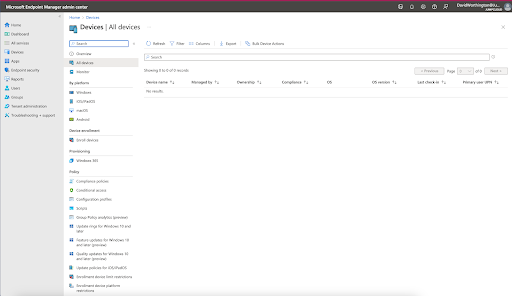
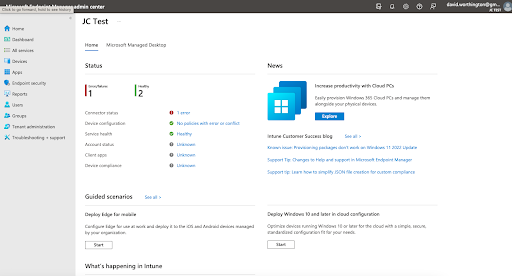
The Intune admin center offers status updates and alerts as well as device configuration and other administrative settings
Connectors for Active Directory and certificate-based authentication
ADMX templates to deploy Windows policies and benchmark group policies and Graph API for scripting, with appropriate licensing in place.
Integration with AAD, Windows (Win32) LoB apps, and other Microsoft-centric services
Application deployment and user assignments
Compliance settings creation and the ability to lock down services with granular conditional access rules based upon group Intuneberships, location, device state, and triggers for specific application access rules (Note: Additional Microsoft products are necessary to protect identities as well as to monitor and control cloud application sessions such as Enterprise Mobility + Security E5)
Reporting on apps, device compliance, operations, security, and users
Device-only subscriptions for single-use devices such as kiosks
Remote support is available as a premium add-on; unlimited federated identity, which provides SSO and MFA environment-wide requires a higher tier of AAD; and Microsoft offers pre-built connectors and SCIM synchronization through its paid SSO SKU.
What’s possible with Intune is somewhat dependent upon what other Microsoft services are being licensed (standalone or bundled), knowledge of Microsoft’s administrative tools, and how invested an organization can become in the Microsoft ecosystem. Intune is a broad product family, and it’s possible to achieve advanced enterprise-level compliance and security by spending more for additional services.
What Is JumpCloud?
JumpCloud is an open directory platform for SMEs and their MSP partners that includes zero trust identity and access control (IAM), cross-OS device management, and more. It simplifies the orchestration of identity management and access control throughout the vendor and open source landscape. Supported platforms include Linux, macOS, iOS/iPad OS, and Windows. Android support is forthcoming. JumpCloud is cloud-based and can be deployed for a domainless enterprise, without the need for AD or AAD, or extend your existing domains with a more straightforward deployment.
JumpCloud is tailored to the needs of SMEs. Some of its core features include:
An intuitive user interface and dashboard that makes IT admins more productive and highlights issues that require immediate attention.
The capacity to integrate with AAD and Google identities, with delegated authentication available for RADIUS using AAD credentials.
Unlimited, True SSO that delivers SAML, OIDC, and password-based authentication for any web application, as well as SCIM and RESTful support to manage user onboarding/authorization to third party applications. JumpCloud provides ready-to-consume connectors for many popular services.
Push and TOTP MFA everywhere, including RADIUS and LDAP connections.
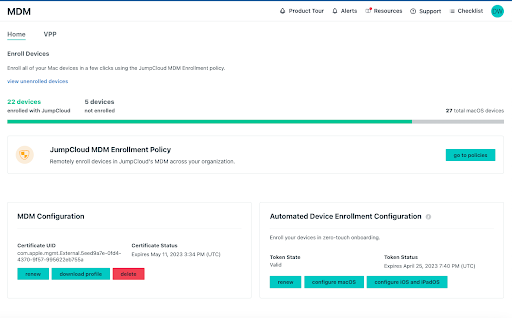
Built-in MDM, without extra costs; isolation of corporate data.
Application install and management on remote systems.
Integrated remote assistance with Remote Assist, free of charge.
Integrations with popular HRIS systems for rapid user onboarding and provisioning.
Zero-touch device enrollment and deployment for Apple devices.
Automated group memberships that leverage attribute-based access control (ABAC) to modernize the user identity lifecycle and enhance security. This provides entitlement management maturity beyond what’s possible with legacy access control paradigms. In contrast, Microsoft’s RBAC is more labor intensive with higher management overhead.
Cross-OS policies and root-level CLI interfaces for centralized IT management and commands.
A streamlined dashboard for IT teams and technicians
Reporting for Device Insights, Directory Insights, and Cloud Insights for AWS.
A cloud-based LDAP directory with available Active Directory sync tools.
Even more IT management and security essentials are serviced by the following add-on products:
Pre-built conditional access capabilities that restrict access by location, whether a device is being managed by JumpCloud, and to enforce MFA for specific groups of users
Decentralized password management that integrates with the directory platform
Comparing JumpCloud to Azure AD with Intune
AAD and Intune have some overlap with JumpCloud on a feature-by-feature basis, and it makes sense for organizations to evaluate all of their cloud-based identity and system management options. Put simply, the comparison between JumpCloud and Azure AD with Intune is really about adaptability versus maintaining the status quo and vendor lock-in.
The open directory platform solves the challenges faced by modern IT professionals versus simply extending an existing ecosystem into the cloud.
The greatest difference lies in Microsoft engineering its products for the enterprise in service of the Windows ecosystem, tooling, and its accompanying cloud services. There’s deep integrations with Microsoft products and specialized services that mostly benefit larger organizations. If you have an all-Windows® network, and are already implementing Azure with Active Directory® on-premises, then Azure AD and Intune could be the right addition for your organization. Using tools created by Microsoft in a Windows environment simply makes sense. Mobile-heavy organizations may also benefit from using Intune’s mobile device management capabilities to manage other operating systems.
JumpCloud is intended for the specific needs of the SME market, as evidenced by how its features are packaged and implemented for ease of use. It was created to address the constraints that arise when a legacy on-prem directory is modified for a new era in computing (that crosses domains). The open directory platform solves the challenges faced by modern IT professionals versus simply extending an existing ecosystem into the cloud.
It also securely connects users to more resources, without the need for additional servers or add-ons. If your organization has AWS, macOS®, Linux®, Okta®, Google Workspaces™, and other non-Windows platforms as core parts of the infrastructure, then you will benefit by choosing JumpCloud’s open directory platform. Organizations can choose the vendors that are best suited for users both now and in the future.
Ease of Use
JumpCloud is simpler and more accessible, with a more intuitive UI and pricing breakdown. A common complaint is that Microsoft’s interface changes frequently and causes confusion. That’s a consequence of product bundling and frequent product family/branding changes. Other issues involve functions such as zero-touch deployments being limited to Windows devices.
Centralized Policy Management
A key component of Active Directory is a feature known as Group Policy Objects (GPOs). GPOs allow IT admins to control the behavior of Windows systems in their environment with great precision. The key here is that Microsoft’s GPOs only work for Windows systems and are not applicable in the cloud via Azure AD, and with the recent rise of Mac® and Linux® systems in the workplace, that’s a problem. Microsoft has extended policies to other devices through Intune, which extends Windows administrative methodologies, software, and tooling elsewhere.
JumpCloud offers GPO-like policies for all three major platforms — Windows, Linux, and macOS® — as well as cloud-based resources. IT admins are able to remotely disable virtual assistants, enforce full disk encryption (FDE), and configure system updates with just a few clicks. When a prescribed policy isn’t going to get the job done, JumpCloud enables IT admins to create and execute their own commands and scripts on all three platforms. JumpCloud also provides optional policies for cross-OS patching.
Open Directory Platform
The JumpCloud platform does not need to fully own an identity to manage it. Rather, it can consume identities from different sources and sits in the middle to orchestrate access and authorization to resources. This simplifies IT management for SMEs by addressing the access control and security challenges stemming from having identities exist in silos.
For instance, Microsoft doesn’t interoperate with Google Workspace, so IT professionals must tackle authorizing and orchestrating those users between different products. An Azure AD user also won’t be able to use RADIUS to access Wi-Fi without a domain controller or third-party service. SMEs can dramatically improve security as well as save on licensing, headcount, time, and effort by consolidating orchestration into a single directory (that sits in the middle).
Mobile Device Management Capabilities
Intune and JumpCloud have MDM services for managingBYOD and BYOC devices, but the respective value propositions diverge when organizations are cost conscious, have limited resources, or must support heterogeneous environments.
Microsoft delivers cross-platform support, but Windows is the favored tenant with the capacity for zero-touch onboarding that would benefit Microsoft shops. JumpCloud is easier to adopt, learn, and works better with Mac and Linux systems. The open directory platform also adds additional value for MDM users to import user identities from non-Microsoft platforms to centrally manage or utilize them all.
Android, Apple, and Linux Devices
Intune has Mac and iOS/iPadOS support for the supervision of Apple devices through user login, device enrollment/deployment, configuration management, patch policies, and software distribution. It’s also offering services to manage Android devices and Linux. Microsoft’s full offering requires AAD, Intune, and an understanding of its Windows templates and tooling. It also has extended requirements for other Microsoft products such as Edge to be able to manage Linux users, limiting customer choice.
JumpCloud’s Apple and Linux MDM capabilities are extensive, beginning with a pre-built collection of policies, configuration options, security functions, and culminating in zero-touch device enrollment. MDM is immediately available as a core feature of the platform, and cross-OS patching is available as an add-on service. JumpCloud supports the most popular Linux distros and doesn’t impose any mandates to use a specific browser.
Affordability and Implementation
With consideration to Microsoft’s extensive stack requirements and gated licensing, JumpCloud’s bundled MDM is more affordable and user-friendly. It’s also easier for IT teams and MSP technicians to learn and manage.
Configuring Intune is a long and complex process. Intune software deployment and polling works on Microsoft’s schedule, creating management “unknowns.” The workflow is as follows: upload an MSI, create a package, apply it to a machine … and it will install atsome point. This procedure, coupled with a confusing interface, creates a learning curve. Organizations save on costs as a business/MSP by choosing a tool that’s easier to use. Jumpcloud offers more immediate actions for commands and policies.
Platform
Microsoft has devised an extensive cloud services productive portfolio in service of its enterprise customers. It’s a stepwise architecture that enlists adjunct services to build out a broad stack. The Microsoft ecosystem is as broad and comprehensive as a Microsoft shop needs it to be.
JumpCloud is specifically designed for what SMEs need, and sheds the complexity of Microsoft’s ecosystem. It offers far more functionality through one solution that can be bolstered by a mobile-specific MDM, rather than purchasing the entire Microsoft IT stack and everything else required for modern offices to manage users. Organizations that adopt JumpCloud for MDM are more likely to value heterogeneous device management and benefit from its platform approach. Namely, MDM users will obtain greater value by using more of the open directory platform.
Microsoft 365 and Google Workspace Sync
With Microsoft 365™/Google Workspace sync, organizations can access either productivity platform at will with JumpCloud credentials. The open directory platform imports attributes that decorate users with entitlements, streamlining admin workflows, increasing the accuracy of user profiles, and delivering smooth onboarding. IT admins can also manage groups in Workspaces, and the ability to import groups from AAD is launching soon.
Non-System Needs
When evaluating which identity management provider is right for you, you also want to consider your non-system needs. For instance, if you are interested in LDAP, RADIUS, Samba, SSH, and other protocol support, you might consider JumpCloud’s protocol-level hosted services. JumpCloud also implemented MFA for its LDAP and RADIUS services, which is significant when highly regulated industries like cyber insurance companies require MFA to be enabled for network devices. Otherwise, additional servers and services may be needed to be compliant.
Vendor Lock-In
Another core issue for MSPs and IT organizations is vendor lock-in. Microsoft is financially motivated to keep you on the Windows and Azure platform track, which includes its ecosystem of administrative tools and templates. Often, you need a number of additional Microsoft tools on the Azure AD and Intune path. Most organizations with AAD also use AD on-prem, AAD Connect, AAD DS, and other third-party tools to create a holistic IAM and device management approach. That’s a deep investment in budget, training, and dependency on Microsoft.
Intune belongs to an evolving family of IAM products that have undergone multiple re-namings and repackaging. Growing with Intune means licensing Intune as well as other complementary services for security and system analytics. Note that the selections are in flux, making direct comparisons with alternatives more challenging. Buying Intune sinks organizations deeper into the Microsoft stack, which limits their ability to purchase solutions outside the Microsoft domain and customize their stack for their needs. It also introduces some unpredictability in budgeting.
JumpCloud’s open directory platform allows for greater flexibility and shopping around for services, such as adding best of breed XDR integration from Crowdstrike or Sentinel One to secure identities and endpoints, versus a monolithic supply chain from Microsoft.
Total Cost of Ownership
Microsoft’s legacy requirements frequently mandate a hybrid infrastructure configuration. A hybrid infrastructure adds complexity, and complexity correlates to bigger budgets. Managing and licensing your physical servers is expensive (people, hardware, facilities, maintenance, and utilities), and the increase to your potential cyberattack surface area are all factors to consider. These factors combined raise the total cost of ownership for AAD.
A common refrain is that “Microsoft stuff works well together.” In practice, transitioning on-premises Microsoft solutions to the cloud isn’t always straightforward. For example, AD groups don’t all automatically sync over to AAD. This writer recently spoke with an Intune administrator who recounted how his organization, which is invested in Microsoft, was experiencing difficulty transitioning to AAD and Intune from ADFS and Active Directory.
In this example, consultants were brought in to set up Intune. The consultants attempted to turn on “full blown AAD” for the environment. That decision resulted in downstream problems with Virtual Desktop Infrastructure (VDI), because only persistent virtual machines (where every user’s personal desktop settings are set for each virtual desktop) are supported in on-premises ADFS. This scenario may seem arcane, but it illustrates that even migrating to Microsoft’s latest and greatest services isn’t always straightforward. Microsoft has a multitude of legacy components for SSO that tie back to AD, which introduces difficulties that are unique to its ecosystem.
The Intune administrator summed it up perfectly: “I need to focus all my time [elsewhere] but can’t because I get pulled in every direction [due to the complexity of Microsoft’s ecosystem].” Simply put, if your infrastructure’s a mess, everything’s a mess … and costs more than is necessary. The more an organization sinks into Microsoft, the less flexibility it has to go elsewhere.
Service Licensing
Cost of ownership is a key differentiator between AAD + Intune and JumpCloud. AAD is initially a great value — if you’re a heavy user of the Microsoft stack — but costs mount as use increases and third-party services and non-Windows devices are added to your infrastructure. Navigating Microsoft’s complex gated licensing scheme is another driver of rising subscription costs.
For example, organizations that are considering M365, which can bundle Intune, must assess the differences of all 30 license variations. Some consultants even specialize in demystifying Microsoft’s licensing options. Basic tiers are only the price of admission. There are additional costs involved simply to obtain a few fundamental capabilities such as federated identity in AAD to securely access resources outside of Microsoft’s stack using SSO. That’s the real-world starting point for modern IT, even before Intune or other subscriptions factor in.
Consuming external identities also costs more. Microsoft introduced a separate product family called Entra, which is its solution for decentralized identity, identity verification, and entitlement management. Entra extends Microsoft’s strategy to monetize interoperability that is focused on the enterprise market and the sale of adjacent services. In contrast, JumpCloud’s foundation supports expanding capacity to accept and incorporate other identities into workflows.
IT Infrastructure Consolidation
IT tool sprawl is just one of the many unintended consequences of today’s remote-first workforce. Adopting a consolidated stack is beneficial to avoid overlapping feature sets from many different software products. A Microsoft shop may not need to look elsewhere to meet compliance, IAM, IT management, and highly advanced security requirements with its stack (assuming they have the budget). However, there are downsides.
Smaller organizations may find themselves overextended by the breadth and complexity of Microsoft’s components and services that form its hybrid architecture. Buying, operating, and supporting a datacenter is just the start. It’s very likely that IT teams will have to employ external resources to assist with AAD + Intune implementations. Those decisions involve a substantial and costly long-term commitment.
Azure works best if organizations are fully incorporated into a Microsoft tech stack environment, but not outside of Microsoft’s cloud infrastructure (i.e., it can’t be used to manage non-Windows servers hosted in Amazon or Google clouds).
JumpCloud’s open directory platform enables IT teams to assemble a stack of best-of-breed solutions that are secure, on managed devices, and available through the identity provider of their choosing. Optional products assist with security, IT hygiene, and password management without extensive management overhead or mandates to deploy them successfully.
What’s Best for Your Shop?
If you are locked in to Microsoft solutions, or if you have corporate-owned iOS and Android mobile devices, then Azure solutions may be an acceptable fit. However, its platforms are intended for the enterprise and extend broadly through gated licensing. Alternatively, if you are an SME that’s invested in other non-Windows platforms and non-Microsoft services and identities, and wish to (or see a path to) consolidate IT resources, then you should consider JumpCloud’s open directory platform. A third option is to use both to obtain the greatest value for your organization.
JumpCloud centralizes user and system management, regardless of platform or where identities reside. This includes our Multi-Tenant Portal (MTP), designed specifically for MSPs to manage multiple client organizations from one pane of glass. JumpCloud offers cross-platform GPO-like capabilities to manage fleets of systems with policies, including local admin system controls, full disk encryption with FileVault 2 and Bitlocker, screen lock regulations, and more. Apple MDM capabilities are available for macOS machines, for machines to execute security functions and distribute configuration policies.
For MSPs, consolidation gives you the chance to proactively manage and monitor your clients’ tech with fewer providers. It decreases your monthly expenditures without sacrificing efficiency or usability, and frees you up to spend more time helping your clients reach their goals. IT consolidation has many benefits for MSPs and their clients, including cost savings, a streamlined user (and management) experience, and an increase in client trust.
The Choice Is Yours
However you choose, all options present benefits to an organization. To learn more about JumpCloud versus Azure AD with Intune, contact us or join our community to engage your peers in conversation.
As always, signing up for the JumpCloud platform is completely free, and includes 10 users and systems to get you started. The best way to learn is by doing. You also get 10 days of premium 24×7 in-app chat support. Sometimes self-service doesn’t get you everything you need. If that’s how you’re feeling, schedule a 30-minute consultation to discuss options for implementation assistance, migration services, custom scripting, and more.
Version 2 Digital is one of the most dynamic IT companies in Asia. The company distributes a wide range of IT products across various areas including cyber security, cloud, data protection, end points, infrastructures, system monitoring, storage, networking, business productivity and communication products.
Through an extensive network of channels, point of sales, resellers, and partnership companies, Version 2 offers quality products and services which are highly acclaimed in the market. Its customers cover a wide spectrum which include Global 1000 enterprises, regional listed companies, different vertical industries, public utilities, Government, a vast number of successful SMEs, and consumers in various Asian cities.
About JumpCloud At JumpCloud, our mission is to build a world-class cloud directory. Not just the evolution of Active Directory to the cloud, but a reinvention of how modern IT teams get work done. The JumpCloud Directory Platform is a directory for your users, their IT resources, your fleet of devices, and the secure connections between them with full control, security, and visibility.
The obvious question is: which discovery approaches are the most effective at finding unmanaged devices?
Why are unmanaged assets harder to find?
First, we need to examine why unmanaged devices are so difficult to find. Let’s break it down:
Shadow IT devices: DevOps teams spin up machines but without central governance. Many discovery approaches need inputs to know where to look. So knowledge of these devices does not propagate to the rest of the organization.
Rogue devices: As the name suggests, someone intended for these devices to remain under the radar and evade standard discovery techniques. Otherwise, they would only have remained rogue for a short time.
Orphaned devices: Many discovery approaches require tuning or fresh inputs to keep the inventory current. Without caretakers to ensure the necessary calibration, orphaned devices become unmanaged assets that fall out of the asset inventory if they were ever there in the first place.
What has been tried and failed
So what are the traditional approaches to finding assets, and why do they fall short?
Endpoint agent (or just “agent”)
This approach requires installing software on every device which gathers excellent detail. This method only works with managed IT assets. After all, the device is known and probably managed if you can install software on it. So this approach does not address the bane of asset inventory–unmanaged assets.
Authenticated scans
This active scanning methodology uses one or more scanners to log into every device that responds within an IP range. Once logged in (typically via SSH or WMI), the scanner gathers excellent detail about the device. Similar to the previous method, the device is known and probably managed if you already know the credentials to get on it. So, once again, this approach only really works with managed IT assets.
Passive network monitor
This technique deploys one or more appliances on a network to eavesdrop on network traffic, including chatter from unmanaged assets. The setup requires sending network traffic to the appliance(s) by either reconfiguring one or more switches to span or inserting one or more taps into the network. Where in the network you make these changes matters. Eavesdropping at a network “choke point” is ideal since it ensures visibility into all traffic. For all the work involved, you, unfortunately, get little detail. Suppose an asset rarely talks on the network or is terse. In that case, there’s little data to work with, leading to imprecise or inaccurate fingerprinting. As more devices encrypt traffic, the fingerprinting accuracy gets worse.
API import
Solutions that generate asset inventories from API imports do not discover assets independently. They rely on the rest of the security and IT stack to cobble together an inventory. Completeness and accuracy depend on data quality from those sources. API import solutions will miss unmanaged assets and produce vague fingerprinting.
Unauthenticated scans
This final approach uses one or more scanners to actively scan for information from every device within an IP range. Unlike authenticated scans, these scanners do not attempt to log in to machines. Unauthenticated scans can discover unmanaged assets, even without prior knowledge. Since it’s an active scan rather than a passive monitor, it can interrogate the devices to gather much more information for accurate fingerprinting. The one shortcoming of this approach lies with sensitive devices. These assets tend to be older or low-powered, often found in operational technology (OT) environments, and may be disrupted by aggressive scanning.
New reasons for an old problem
So which approach works best for unmanaged assets? First, it’s worthwhile to understand how this state of asset inventory came to be. There was a time when security just needed to protect the corporate office. Over the past 20 years, the following trends started or magnified, leading to a divergence of environments. In some cases, these environments teem with unmanaged assets. Others permit the deployment of unmanaged assets. Still, others allow assets to become unmanaged more easily.
More IoT devices: Network-enabled cameras and smart speakers are recent phenomena.
Convergence of IT and OT: OT networks have been overlaid onto IP networks to improve manageability and, in many cases, come under the purview of IT.
Move to the cloud: Many organizations see the cloud as a transformational journey to lower cost and increase speed & agility.
Rise of DevOps: Software development and operations teams have adopted a methodology of shared ownership, automation-at-scale, and rapid feedback resulting in dynamic attack surfaces, particularly in the cloud. Unfortunately, there isn’t always governance in this area.
More M&As: Each year in the 2010s, there were more than 2x the large M&As than each year in the 2000s.1 When you take on a new company, you take on all its unknowns and risks too.
Work from home: Pressures around talent shortage gave rise to a growing WFH trend that compounded due to the pandemic.
Against this backdrop of divergence of environments, there has been a convergence of responsibilities onto security teams. During this same time, organizations have improved their security posture around managed IT assets in on-prem environments. Assets outside this scope have become more attractive targets.
What works
Given these challenges, let’s look at the approaches that will work the most effectively.
Start with unauthenticated scans
Unauthenticated scanning is the only possible starting point–inherent limitations in the other four disqualify them as options. If only we could use an unauthenticated active scanning approach that avoids disrupting sensitive devices.
Mix in a security research-based approach
The missing ingredient is to couple a well-designed scanner with a security research-based approach. Such a recipe conducts discovery from the perspective of the adversary, someone who actively avoids disrupting devices and leaving digital footprints during recon. The scanner must use properly-formatted packets, which ensures the best chance of “good” behavior from a device and allows tuning of scan parameters, including overall and per-host scan rate. Just as important, the scanner must fingerprint as it scans, adapting the scan behavior as it learns asset details.
Zero unmanaged assets
This unauthenticated scan and security research-based approach has proven practicable in thousands upon thousands of real-world networks distributed over various environments: IT, IoT, OT, cloud, and remote. Start a runZero trial to see for yourself.
Get started with runZero in minutes
Do you know about the unmanaged assets on your network? Find them with runZero.
Version 2 Digital is one of the most dynamic IT companies in Asia. The company distributes a wide range of IT products across various areas including cyber security, cloud, data protection, end points, infrastructures, system monitoring, storage, networking, business productivity and communication products.
Through an extensive network of channels, point of sales, resellers, and partnership companies, Version 2 offers quality products and services which are highly acclaimed in the market. Its customers cover a wide spectrum which include Global 1000 enterprises, regional listed companies, different vertical industries, public utilities, Government, a vast number of successful SMEs, and consumers in various Asian cities.
About runZero runZero, a network discovery and asset inventory solution, was founded in 2018 by HD Moore, the creator of Metasploit. HD envisioned a modern active discovery solution that could find and identify everything on a network–without credentials. As a security researcher and penetration tester, he often employed benign ways to get information leaks and piece them together to build device profiles. Eventually, this work led him to leverage applied research and the discovery techniques developed for security and penetration testing to create runZero.