Skip to content

Scale Computing’s Jeff Ready and Mike O’Neil to Speak at SpiceWorld 2023

Leadership and Innovation Take Center Stage

SPICEWORLD, AUSTIN – September 5, 2023 — Scale Computing, a market leader in edge computing, virtualization, and hyperconverged solutions, today announced that CEO and cofounder, Jeff Ready, and Director of Systems Engineers, Mike O’Neil, will be presenting at the 2023 SpiceWorld IT Conference in Austin, Texas, September 5th – 7th. The three-day event boasts hundreds of tech brands and thousands of attendees, providing participants a unique opportunity to gain insights, build connections, and explore the latest innovations in the field.

“SpiceWorld 2023 is an incredible platform for knowledge-sharing and networking,” said Ready. “I am thrilled to once again be part of the event and to have the opportunity to share the story behind Scale Computing and its evolution as we enter the age of the edge computing revolution. We’ve built award-winning solutions that eliminate the need for VMware, hypervisor, storage management, server management, container management, fleet management, and disaster recovery. Our journey is a testament to the power of innovation and dedication. We were just ranked #1 in multicloud software platforms and #1 in HCI in CRN’s latest annual report card—beating out brands like VMware and HPE—and we’re going to continue to push the envelope. This year’s SpiceWorld event has a stellar lineup of some of the top industry professionals, including many of our esteemed channel partners, and we can’t wait to show them what we’ve got on the horizon.”

Ready will present his talk, “Moving Beyond VMware: Trust, Innovation, and the Edge – The Personal Story Behind Scale Computing” on Tuesday, September 5th at 7:00pm CDT at the Tech Talk Theatre in the Expo Hall. On Wednesday, O’Neil will share his presentation, “IT Infrastructure – Harness the Power of the Edge,” at 2:15pm CDT in the breakout space.

Conference attendees can meet with the Scale Computing team at booth 133 during the event. On Thursday, September 7th, the company will host the Annual Scale Computing Bat Boat Tour beginning at 6:30pm CDT. Tickets are limited and will be issued on a first-come, first-served basis at the booth, where attendees can also enter to win a Millennium Falcon Lego set.

About Version 2 Digital

Version 2 Digital is one of the most dynamic IT companies in Asia. The company distributes a wide range of IT products across various areas including cyber security, cloud, data protection, end points, infrastructures, system monitoring, storage, networking, business productivity and communication products.

Through an extensive network of channels, point of sales, resellers, and partnership companies, Version 2 offers quality products and services which are highly acclaimed in the market. Its customers cover a wide spectrum which include Global 1000 enterprises, regional listed companies, different vertical industries, public utilities, Government, a vast number of successful SMEs, and consumers in various Asian cities.

About Scale Computing 
Scale Computing is a leader in edge computing, virtualization, and hyperconverged solutions. Scale Computing HC3 software eliminates the need for traditional virtualization software, disaster recovery software, servers, and shared storage, replacing these with a fully integrated, highly available system for running applications. Using patented HyperCore™ technology, the HC3 self-healing platform automatically identifies, mitigates, and corrects infrastructure problems in real-time, enabling applications to achieve maximum uptime. When ease-of-use, high availability, and TCO matter, Scale Computing HC3 is the ideal infrastructure platform. Read what our customers have to say on Gartner Peer Insights, Spiceworks, TechValidate and TrustRadius.

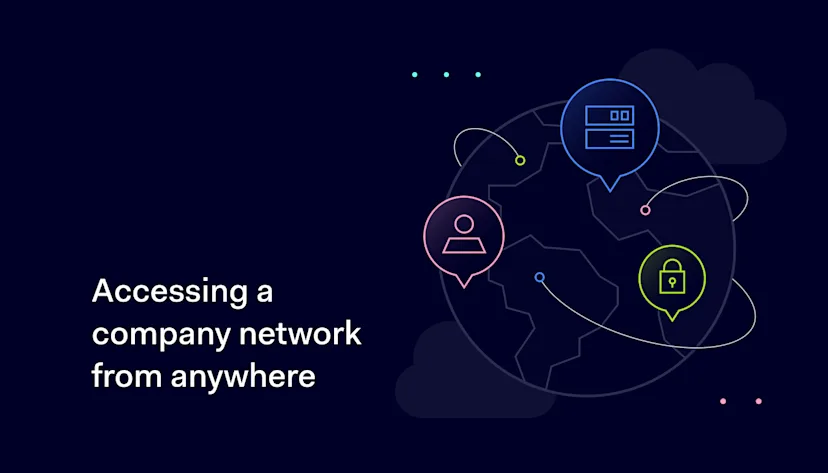
How to access a company network from different locations

Secure and easy access to workplace networks isn’t just a perk in the remote work era. Yet, remote work brings security and connectivity challenges businesses can’t ignore. We’ve all have come across the term Virtual Private Networks or VPNs in our work, whether we’re technology professionals, IT administrators, or just everyday remote employees. 

In this article, we’ll break down the A-Z of VPNs. From secure access to a company’s network from different locations to understanding why free VPNs might cost you more than you think. Plus, we’ll explore why business VPN might be one of your best business decisions.

What is a VPN?

A simple yet profound technology

Understanding what a Virtual Private Network (VPN) is the first step in learning how to access and share data on many branches of a company network from different locations.

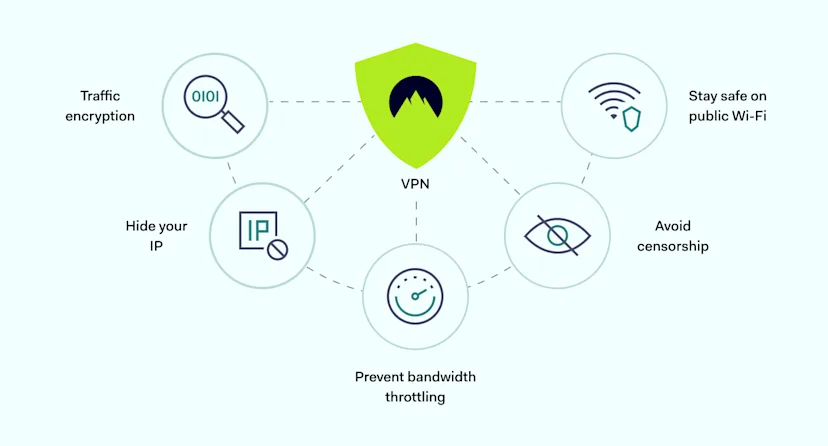
A VPN creates a secure tunnel between your device and the internet, using advanced encryption algorithms to safeguard data in transit. This tunnel acts as a secure conduit through which data such as usernames, passwords, and sensitive files are sent and received.

This encrypted tunnel ensures that even if someone could intercept your data, they would not be able to decode it.

The secondary but equally important aspect of VPNs is masking your IP address. Every time you connect to the internet, your device is assigned an IP address, a unique identifier that can reveal your location.

A VPN replaces your IP address with one from its server, shielding your true location. This dual functionality of encryption and new IP address masking makes VPN both straightforward and robust. And it helps companies protect their privacy, data, and assets.

Role of VPNs in internet safety and remote work

VPNs: the gatekeepers of internet safety

VPNs create a digital barrier that protects your data from cyber threats like ransomware attacks, phishing scams, and data breaches. Given the alarming rise in cybercrime, their role in preventing business disruption and financial loss is crucial.

VPNs standardize technology processes for organizations spread across many locations, even internationally.

Businesses can use VPNs to securely share data and connect various locations to different network nodes, such as branch offices, cloud-based services, or mobile employees.

This standardization ensures uniform security across the entire organization, reducing vulnerabilities that cybercriminals could exploit.

Remote access facilitating offsite connection in business

Before, secure remote work was difficult due to complex security protocols and the limitations of traditional WANs. VPNs have dramatically simplified this process by offering secure, seamless remote access to a company’s internal network from anywhere in the world.

With a VPN, remote employees can securely access many company resources, like files, applications, on-site servers, and internal communications tools.

For most businesses operating under a remote or hybrid work model, a VPN is indispensable. It ensures that employees can work as efficiently from home—or any global location—as they could if they were present at the office.

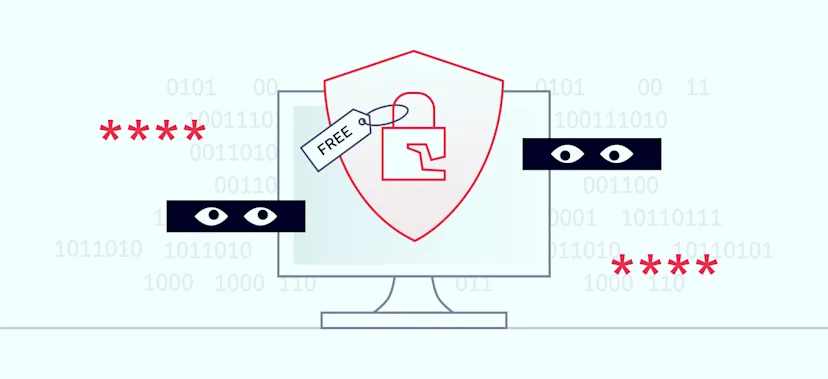
3 risks of free VPN services: why quality matters

1. Compromised speed and limited server choices

The appeal of free VPN services often hinges on the absence of initial costs. Yet, these services frequently limit the internet speed available to users. These speed caps can significantly hamper productivity and efficiency for many businesses that need fast and uninterrupted access to data and communication tools.

Moreover, free VPN services usually offer a restricted range of server locations. This limitation can be problematic for businesses that need to connect to servers in specific geographic locations for compliance or operational reasons. The lack of server choices may also lead to network congestion, further slowing your connection.

2. Security risks: lax encryption and data logging

One of the most critical drawbacks of free VPN services is their inadequate security features. Many free VPNs lack state-of-the-art encryption protocols, leaving your data vulnerable to interception and unauthorized access. This compromised security is a severe issue, especially for businesses handling sensitive or confidential information.

Some free VPN services may log your browsing activities, a practice that contradicts the purpose of using a VPN for enhanced privacy.

These logs can be susceptible to data breaches or be sold to third parties for marketing purposes, putting your data and privacy at risk.

3. Suitability for businesses: high stakes, higher risks

Regarding business applications, relying on a free VPN can be a grave mistake.

The risks include slower internet speeds or fewer server choices. More seriously, they can extend to more consequential matters like compromised data integrity and potential breaches of customer information.

Businesses face greater risks in a cyber-incident, such as financial losses and damage to their reputation and customer trust. Given their many limitations, free VPN services aren’t appropriate for corporate use, where data security and privacy stakes are significantly higher.

Elevating enterprise security with a business VPN

Ensuring business infrastructure security

If you are serious about business data security, an enterprise VPN is the way to go.

These VPNs provide tailor-made solutions for businesses, unlocking capabilities such as IP allowlisting for secure resource access and offering more robust encryption protocols. This enables businesses to securely access company networks from various locations.

This technology setup ensures the security of your central server, and the software safeguards cloud computing services, on-site servers, remote offices, local area networks, and even individual computers at various business locations.

Distance entry: the future of work

The COVID-19 pandemic showed us that remote work is not just a trend—it’s here to stay. A corporate VPN is essential for companies that have embraced this shift.

With this software setup, employees can securely access company networks from home and seamlessly share and receive data with colleagues globally.

The glue keeps your dispersed team on the same page: secure file sharing, one office environment, and one network.

Enabling remote access: bridging on-site servers with cloud services

Businesses nowadays are not just confined to physical office spaces or two offices—they also operate in virtual private networks in the cloud. So, how do you access the company network from different office locations, and can you bridge these two worlds? And what about static IP addresses?

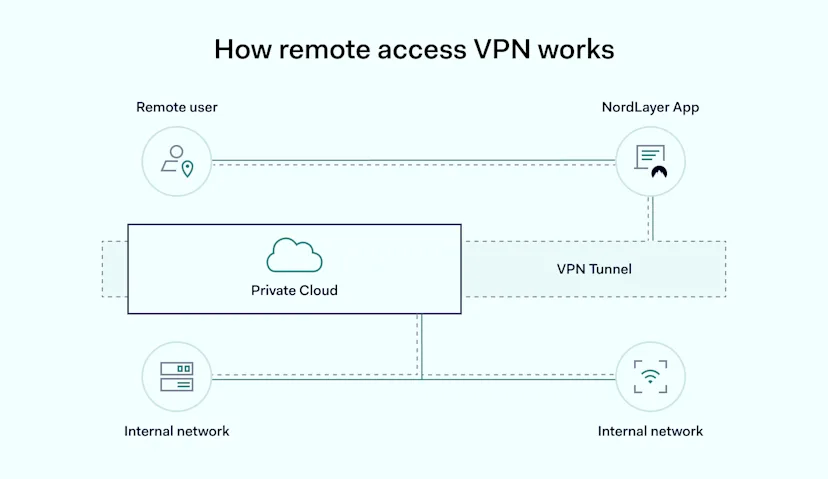
Remote access VPNs are essential for cloud computing, requiring static IP addresses to establish connections to on-site servers and other cloud resources. These addresses aren’t just for enhanced security, they’re fundamental for any remote connection to a physical network or device. By following these prerequisites, users can significantly minimize risks associated with remote access, allowing employees to work securely, no matter where they are.

Boosting your business security with a VPN

The importance of wireless connection safety

While convenient, public Wi-Fi networks are a breeding ground for various cybersecurity threats. There are numerous vulnerabilities, from Man-in-the-Middle (MITM) attacks to cybercriminals eavesdropping on your data to unauthorized access.

These are not just fears—they’re real threats. They can translate into concrete security breaches involving sensitive personal or business data. This has been particularly underscored by the increasing cyber-attack incidents targeting users on public Wi-Fi networks.

Beyond the basics: advanced VPN features for enhanced online protection

Beyond the essential security features, corporate VPNs offer additional layers of protection. Advanced features like:

  • Split tunneling

  • Zero-knowledge architecture

  • Multi-hop connections

What does all of this mean for businesses? More options for keeping your internet connection safe, secure, and tailored to your needs. The saying goes, “The best defense is a good offense.”

Conclusion: why a business VPN is an essential digital protection tool

Remote work demands robust security beyond standard business applications and software. Just as NordLayer’s VPN sets the bar high for a secure connection for remote work, your choice of a business VPN should meet similar standards. It’s not just about better secure connections in remote offices, it’s also about comprehensive data protection, user management, and ease of use, all while enabling all ways of working.

Don’t settle for basic security features. Elevate your business operations with NordLayer’s Business VPN solution. Move today to ensure a secure, virtual private network and efficient remote office work environment tailored to your needs.

Contact us today, and let us help you create a security solution that fits your business needs.

About Version 2 Digital

Version 2 Digital is one of the most dynamic IT companies in Asia. The company distributes a wide range of IT products across various areas including cyber security, cloud, data protection, end points, infrastructures, system monitoring, storage, networking, business productivity and communication products.

Through an extensive network of channels, point of sales, resellers, and partnership companies, Version 2 offers quality products and services which are highly acclaimed in the market. Its customers cover a wide spectrum which include Global 1000 enterprises, regional listed companies, different vertical industries, public utilities, Government, a vast number of successful SMEs, and consumers in various Asian cities.

About NordLayer
NordLayer is an adaptive network access security solution for modern businesses – from the world’s most trusted cybersecurity brand, Nord Security.

The web has become a chaotic space where safety and trust have been compromised by cybercrime and data protection issues. Therefore, our team has a global mission to shape a more trusted and peaceful online future for people everywhere.

6 Ways to Fight Security Alert Fatigue

Cybersecurity teams stand as the unsung heroes of every organization. These dedicated professionals are at the forefront of defending their company’s digital infrastructure, tirelessly monitoring security alerts to prevent and mitigate potential threats. However, with the ever-expanding landscape of cyber threats, these defenders are facing a new adversary: security alert fatigue. As the sheer volume of security alerts escalates, experts are rallying to find innovative ways to reduce alert fatigue and ensure that no genuine threat goes unnoticed.

The Peril of Security Alert Fatigue 

Picture this: a cybersecurity analyst staring at a wall of screens, each flashing with a seemingly endless stream of security alerts. In an environment where the number of alerts can easily number in the thousands per day, it’s no wonder that many analysts experience alert fatigue. This phenomenon occurs when the sheer volume of alerts overwhelms the human ability to respond effectively. As a result, fatigue sets in, causing analysts to become desensitized and potentially miss critical indicators of a breach (not to mention generally burned out).

alert fatigue portnox

Alert fatigue can have dire consequences. Missed alerts mean that potential threats might go unchecked, giving cybercriminals a window of opportunity to exploit vulnerabilities and cause significant damage. In the worst-case scenario, it can lead to massive data breaches, financial losses, and irreparable reputational damage.

The Deluge of Alerts: A Growing Challenge

The information technology landscape has evolved significantly in recent years, giving rise to increasingly complex cyber threats. As organizations adopt more sophisticated security measures, cybercriminals respond by devising more intricate and subtle attacks. This arms race has led to a surge in the number of security tools and systems deployed, generating a corresponding flood of alerts.

From intrusion detection systems to firewalls, each layer of defense generates its own set of alerts. Multiply this by the various devices and applications within an organization, and it becomes clear why cybersecurity teams are grappling with alert overload. This not only strains human resources but also taxes the efficiency of the entire cybersecurity apparatus.


A Multi-Faceted Approach to Tackling Alert Fatigue

Addressing security alert fatigue requires a multi-faceted approach that combines technological advancements, process optimizations, and human-centered strategies.

I. Automation and AI

Leveraging automation and artificial intelligence (AI) is crucial in filtering out noise and identifying patterns in the deluge of alerts. Machine learning algorithms can be trained to differentiate between routine events and potential threats, reducing the number of false positives that analysts need to sift through.

II. Contextualization

Providing analysts with contextual information about alerts can significantly enhance their ability to prioritize and respond effectively. Integrating threat intelligence feeds, historical data, and asset inventory details can help analysts understand the potential impact of an alert and its relevance to the organization.

III. Consolidation and Integration

Rather than relying on a plethora of disparate security tools, organizations are adopting unified security platforms (*cough* like the Portnox Cloud *cough*) that centralize data and streamline alert management. This not only reduces the number of tools analysts need to monitor but also facilitates a more holistic view of the organization’s security posture.

IV. Tuning and Refinement

Regularly tuning and refining alerting thresholds can minimize false positives. This iterative process involves fine-tuning tools to align with the organization’s specific network and application behaviors, ensuring that only meaningful alerts are escalated.

V. Human Factors

Recognizing the pivotal role of human analysts, organizations are taking steps to alleviate the mental strain of constant alert monitoring. Implementing shift rotations, providing opportunities for skill development, and fostering a supportive work environment can help combat burnout and maintain analysts’ vigilance.

VI. Incident Response Plans

Having well-defined incident response plans in place can help analysts navigate high-stress situations with clarity and confidence. Knowing the precise steps to take when a threat is confirmed reduces uncertainty and facilitates a more coordinated and efficient response.

A Brighter Horizon

The battle against alert fatigue is an ongoing one, but with a concerted effort from cybersecurity professionals, organizations can reclaim their edge in the fight against cyber threats. By embracing a combination of technological advancements, procedural refinements, and a deep understanding of human factors, the cybersecurity community is paving the way for a more effective and resilient defense.

As cyber threats continue to evolve, cybersecurity teams must evolve with them. This includes not only staying updated on the latest attack vectors but also ensuring that the mechanisms in place to detect and respond to these threats are as robust as possible. By addressing alert fatigue, organizations can fortify their digital defenses, protect sensitive data, and ensure a safer digital future for all.

In a world where a single missed alert can have far-reaching consequences, the efforts to reduce alert fatigue are not just about technology—they’re about safeguarding the very foundations of our interconnected world. As cybersecurity teams rise to this challenge, their triumph over alert fatigue will undoubtedly be a beacon of security and resilience for years to come.

About Version 2 Digital

Version 2 Digital is one of the most dynamic IT companies in Asia. The company distributes a wide range of IT products across various areas including cyber security, cloud, data protection, end points, infrastructures, system monitoring, storage, networking, business productivity and communication products.

Through an extensive network of channels, point of sales, resellers, and partnership companies, Version 2 offers quality products and services which are highly acclaimed in the market. Its customers cover a wide spectrum which include Global 1000 enterprises, regional listed companies, different vertical industries, public utilities, Government, a vast number of successful SMEs, and consumers in various Asian cities.

About Portnox
Portnox provides simple-to-deploy, operate and maintain network access control, security and visibility solutions. Portnox software can be deployed on-premises, as a cloud-delivered service, or in hybrid mode. It is agentless and vendor-agnostic, allowing organizations to maximize their existing network and cybersecurity investments. Hundreds of enterprises around the world rely on Portnox for network visibility, cybersecurity policy enforcement and regulatory compliance. The company has been recognized for its innovations by Info Security Products Guide, Cyber Security Excellence Awards, IoT Innovator Awards, Computing Security Awards, Best of Interop ITX and Cyber Defense Magazine. Portnox has offices in the U.S., Europe and Asia. For information visit http://www.portnox.com, and follow us on Twitter and LinkedIn.。

Install Pandora FMS with our online installation tool

Hello again, Pandoraphiles! Today on our beloved blog we want to introduce you to a video. You know that from time to time we do just that, don’t you? Bringing back some video from our channel, the nicest and most relevant one, no question, and break it down a little bit in writing. 

All of that so that you may have the book and the audiobook, so to speak.

Well, today we are going with… drum roll:

In this article, as in the video, we will guide you through the installation process of Pandora FMS environment, using the handy online installation script.

With this tool, you can quickly set up your system and start taking advantage of all the monitoring and management possibilities offered by Pandora FMS.

Before we begin, make sure you meet the following requirements to ensure a successful installation:

  1. First of all, your machine must have access to the internet, since the installation script requires access to multiple URLs and official repositories of the distribution you are using.
  2. Likewise, check if you have the “curl” command installed, which usually comes by default in most distributions.
  3. It is important to have the recommended minimum hardware requirements, for optimal system performance.
  4. When you are ready to start the installation, make sure to run the commands as root user.
  5. Finally, make sure you have a compatible OS. In this case, the installation can be done on CentOS 7, Red Hat Enterprise Linux 8, or Rocky Linux 8. If you’re using a Red Hat distribution, make sure it’s activated with a license and subscribed to standard repositories.

In the specific case of this video/article, we created a machine with Rocky Linux 8.

If you already have all the other requirements, just check that you are actually running the commands as root user, and proceed with the execution of the online installation tool. This process will install the latest available version of Pandora FMS.

Installation

Now wait for the installation process to finish.

Once the installation process is completed, you will be able to access Pandora FMS console through your browser.

In the video, in addition, we present you with a valuable addition:

We will check out the environment variables that you may modify prior to installing Pandora FMS.

Among the variables that you may adjust there is:

  • The time zone, through the TZ variable.
  • The database host, as well as the database name, username, and password.
  • You may also specify the database port and password of the root user, which is “pandora” by default.

In addition, you are given the option to skip checking for a previous Pandora FMS installation, skip the installation of a new database, or the recommended kernel optimization.

These options allow you to adapt the installation to your specific needs.

Likewise, there are variables such as MYVER or PHPVER that allow you to define which version of MySQL and PHP you want to install.

With MySQL, you may specify “80” for MySQL 8 or “57” as the default option for MySQL 5.7. In the case of PHP, you may specify “8” for PHP8 or “7” by default for PHP7.

Continuing with the customization of Pandora FMS environment, you will also have the option to define the URLs of the RPM packages of Pandora FMS server, console and agent.

By default, these URLs point to the latest available version, ensuring that you are always using the latest improvements and bug fixes.

It is important to note that there is also the possibility to indicate whether you want to install the packages of the latest beta version available.

However, it is recommended to use this option only in test environments, as beta versions may contain experimental features and may not be as stable as stable versions.

If you want to install specific packages, this option will be automatically ignored.


About Version 2 Digital

Version 2 Digital is one of the most dynamic IT companies in Asia. The company distributes a wide range of IT products across various areas including cyber security, cloud, data protection, end points, infrastructures, system monitoring, storage, networking, business productivity and communication products.

Through an extensive network of channels, point of sales, resellers, and partnership companies, Version 2 offers quality products and services which are highly acclaimed in the market. Its customers cover a wide spectrum which include Global 1000 enterprises, regional listed companies, different vertical industries, public utilities, Government, a vast number of successful SMEs, and consumers in various Asian cities.

About PandoraFMS
Pandora FMS is a flexible monitoring system, capable of monitoring devices, infrastructures, applications, services and business processes.
Of course, one of the things that Pandora FMS can control is the hard disks of your computers.

Enabling remote access to the office network without security compromises

After the pandemic, the shift to working from home and hybrid work models increased severely. Most office employees were allowed to choose where they wanted to work. The problem was that security was often left as an afterthought regarding remote access. This also meant that cyberattacks increased on an unprecedented scale, threatening businesses even more. 

Ensuring that work networks are reachable from the convenience of the employees’ homes is still crucial for business continuity. However, this also means navigating the complex and intricate world of network security, which can be a challenge. Therefore, this article will guide you through various techniques and solutions for achieving remote work with proper attention to data security.

Key takeaways

  • Secure network access to internal systems for remote employees and third-party vendors is crucial.

  • VPN software helps keep your connection secure, hides your IP address, and lets you access the company’s network from anywhere in the world.

  • To ensure you can safely access your system from anywhere, it’s important to use a list of approved users and set up multiple verification forms.

  • Regular check-ins, routine upkeep, and staying informed about security can help reduce cyber risks for remote teams.

How to safely access the company network from any location?

Remote and hybrid work provides unparalleled flexibility for remote workers to figure out how to tackle their tasks. The challenge is to figure out network access control mechanisms for third-party vendors, clients, and remote employees working from home. It’s a paradox: the resources must be made available but not too available so that it becomes a security liability.

Without proper precautions, unauthorized users might take advantage of weak security. For this reason, businesses seek to improve their network security stance by implementing various network access control solutions or adopting good practices for their IT infrastructure management. Here are some examples of how secure remote access could be arranged.

Protect your network with a Virtual Private Network

A Virtual Private Network (VPN for short) is an online security staple in remote access. It encrypts users’ connections, securing them from any potential external eavesdropping. This helps ensure that the data transmitted between the device and the company network remains secure. Data encryption stops criminals from capturing the data in transit as they don’t have the decryption key. It’s invaluable for remote employees working from public Wi-Fi or other unsecure networks.
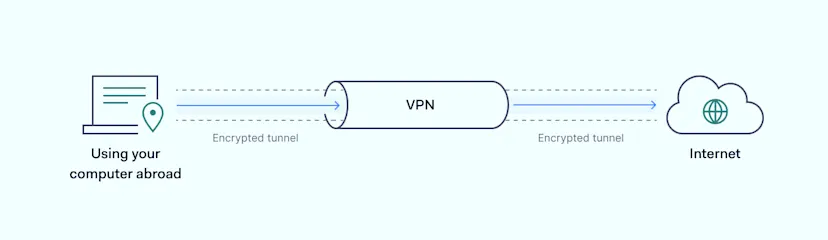
In addition, business VPN software helps to maintain the anonymity of your employees’ identities by masking the user’s IP address. This can help prevent third-party tracking and ensure that sensitive information about the company’s operations remains confidential. Hiding the remote worker’s IP address also makes it more difficult for hackers to monitor their online behavior or exploit any vulnerabilities in the network.

Finally, VPNs allow employees to connect to the company’s network from anywhere worldwide. This can be particularly useful in remote work scenarios where resources must be shared securely with a large group of people. It helps to maintain the privacy, integrity, and availability of the data and services essential for the company’s operations and stay productive.

Secure access to cloud storage

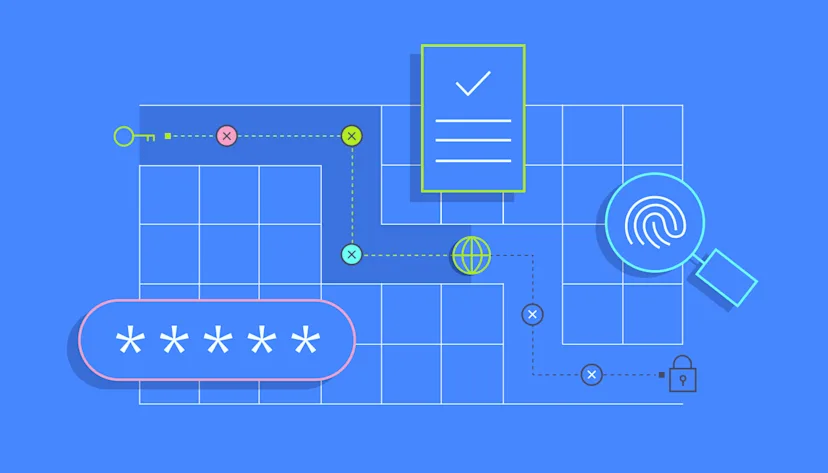
Safeguarding cloud-stored assets goes beyond mere passwords. A holistic security strategy requires methods like IP whitelisting, network segmentation, and advanced authentication techniques such as MFA and biometrics to secure access to cloud resources.
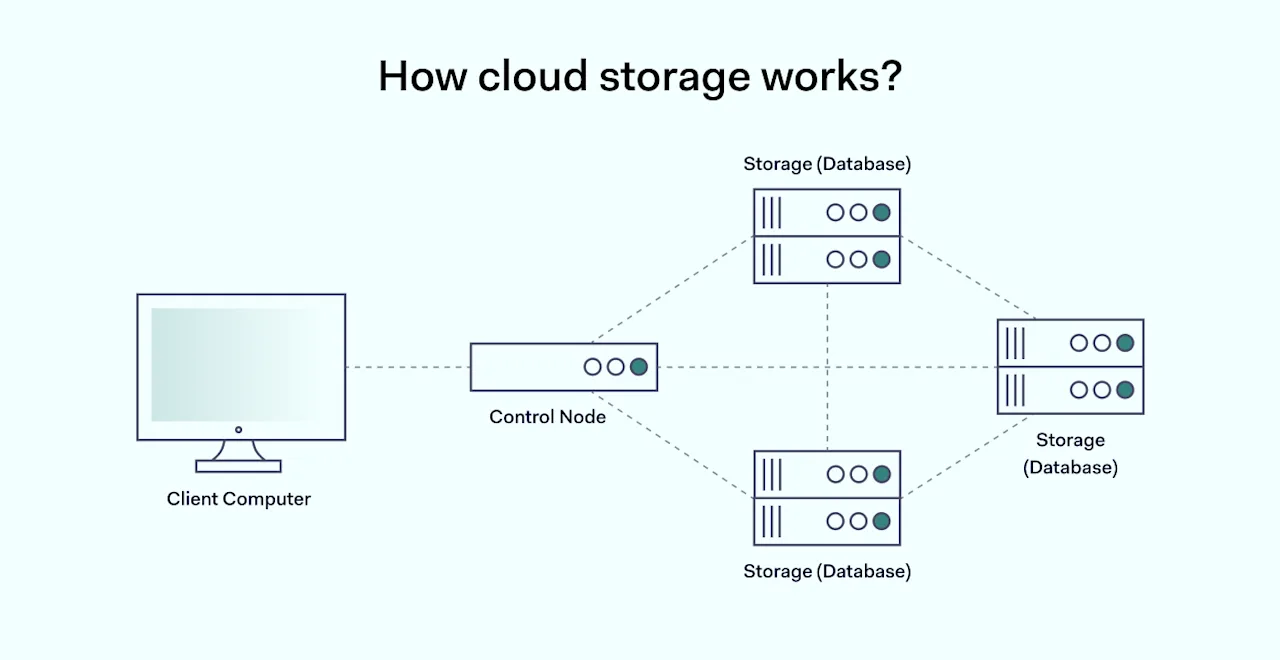
Allow Remote Access To Your Office Network Without Compromising Security 2 1400x722

These measures protect data and ensure that tools like Confluence, Jira, and Salesforce are accessed solely by authorized users. When it comes to remote work, the challenge amplifies. Solutions like site-to-site VPNs have become invaluable, allowing employees to securely connect to the office network from afar, guaranteeing a secure and seamless connection to essential data.

Use cases for secure remote access

Secure remote access has grown exponentially in importance, particularly during the shifts of digital transformation, remote working, and global collaboration. Here are some key use cases for secure remote access that organizations and individuals are leveraging.

Remote work and collaboration

With the rise of remote work, employees across the globe need secure access to their organization’s network and resources. It allows staff to work outside the office, accessing files, applications, and internal systems without compromising security. Businesses must keep sensitive information only to authorized users, maintaining its confidentiality and integrity.

Remote monitoring and management

In our globally connected environment, keeping a close eye on devices everywhere is more important than ever. This goes beyond just watching; it means having the ability to access and manage these devices securely. It’s a vital tool, especially when teams are spread across different locations, helping maintain strict security standards. This includes setting specific security guidelines, regulating access based on these rules, and getting timely alerts about any non-compliant connections.

Adopting remote monitoring ensures smooth operations and can quickly address potential issues, no matter where they arise, keeping your business running seamlessly and efficiently.

Disaster recovery and business continuity

In the event of natural disasters or unexpected disruptions that affect your physical network or infrastructure, flexible remote access solutions enable organizations to continue their operations. Employees can connect to the cloud tools and resources safely, and IT teams can remotely manage and restore systems to maintain business continuity.

How to enable secure remote workers’ network access?

For the remote workforce, secure access to the company’s network is essential for productivity. Here are a couple of things you can do to ensure that remote access is secure for your employees.

Establish secure connections to your network

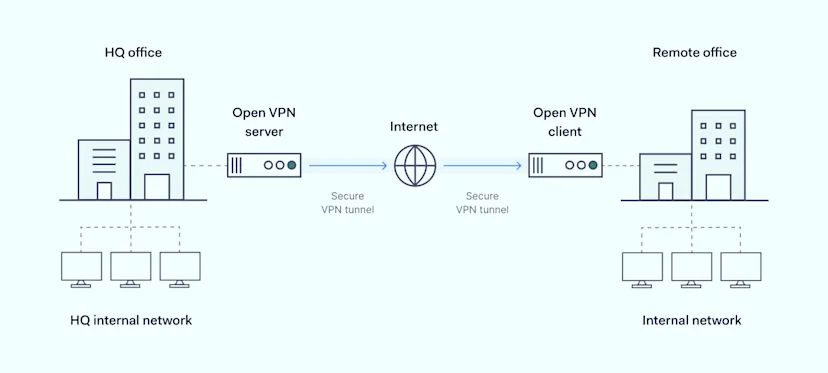
Secure remote access is vital in today’s network security, ensuring both digital and physical aspects of networks and devices are safeguarded. There are two primary use cases: site-to-site access, which connects separate locations securely through VPNs, authentication, monitoring, and firewalls, and smart remote access, which allows to connect to devices that don’t support VPN applications.
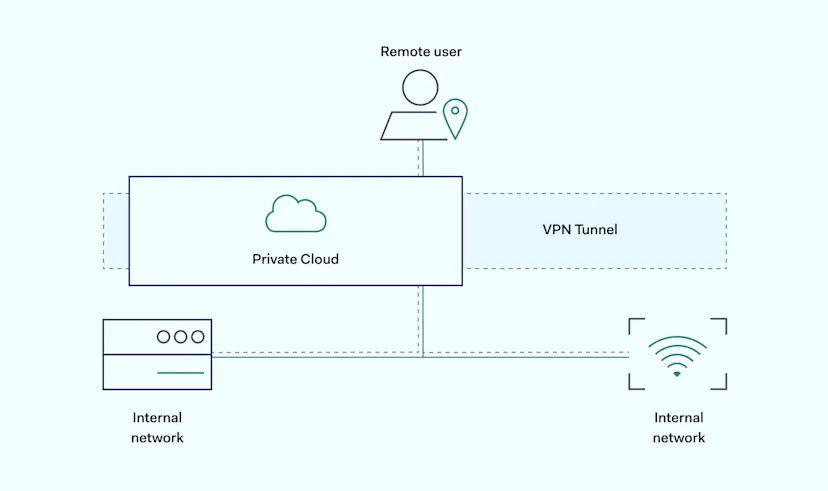
For site-to-site access, the goal is to encrypt, monitor, and authorize data exchange between locations. In contrast, smart remote access emphasizes dynamic access based on context, seamless maintenance, and timely security updates. Both approaches aim to provide secure and efficient remote connections in our ever-evolving digital landscape in which SaaS access control is key.

Implement IP allowlisting

Allowlisting gives specific applications, IP addresses, or devices permission to access certain resources. This boosts security by only allowing trusted sources. However, managing varying IPs can be tough when remote workers from different global locations access resources.

For easier management, this works best when IP allowlisting is combined with Virtual Private Gateways with a fixed IP. This means only one fixed IP to handle, reducing complications. It helps to filter out unverified connections and ensure that only authorized personnel can access sensitive information.

Use multi-factor authentication (MFA)

MFA is vital for remote work, enhancing security by requiring at least two types of identification before access is granted. This can be a combination of a password, a device like a phone, or even a fingerprint.

With remote work, there are increased risks compared to an office environment. Devices are more susceptible to theft, and ensuring physical workspace security is challenging. MFA serves as a barrier against unauthorized access. Simple tasks might need a password and a text code, but sensitive data requires stronger authentication, like combining a password, fingerprint, and a smart card. This extra security helps counteract the risks of remote work.

Strict authentication is essential

Weak passwords can often be guessed or cracked through brute force or dictionary attacks. Yet even strong passwords can fall pretty to cyberattacks if they’re reused. It’s much more secure to use single sign-on (SSO) and phase out email-password logins, which can be vulnerable.

SSO provides centralized control over user access, making it easier to manage permissions and revoke access when needed. This is especially crucial in organizations where employees or users come and go. As technology advances, it’s crucial to stay ahead of the curve and prioritize security measures that adapt to the changing threat landscape.

Enable endpoint security

Endpoint security is super important today. It ensures that devices like laptops and phones are up to security standards. Since everyone’s personal device can be different, some might not be as secure as others or even be at risk.

That’s where endpoint security tools come in. They keep an eye on these devices and help tech teams spot and handle risks. This stops unwanted access and keeps our data safe. As more people work remotely and use their own devices, having good endpoint security is like having a protective shield for our digital workspace.

Monitor and log access

Regularly monitoring and logging who is accessing your network helps detect any unusual behavior or unauthorized access patterns. This may indicate external hackers trying to breach the network and internal users trying to access resources they shouldn’t have permission to access.

All the logs help to check and ensure that all those who ‘should’ be using secure connections are actually doing so. This provides visibility into network activities, supports incident response, and enables proactive security measures.

How to provide secure access to your network for third parties?
Businesses often need to give third-party vendors, consultants, or partners access to their networks. While third-party collaboration is unavoidable, it comes with the risk of compromising the network’s security. Implementing proper protocols and safeguards is vital to ensure the system’s integrity.

Here’s how you can give third-party network access without jeopardizing security.

Clearly define access requirements

Before providing access to your third-party partners, you must outline what resources need access and why. This tailored approach to data access minimizes the total attack surface and leaves hackers less wiggle room. In the long run, this helps to minimize the risk of unauthorized access, data breaches, and potentially malicious activities.

Still, the company that wants to initiate this access model will require a structured approach. All held networks and their resources must be well-documented for them to work. After that’s done, third parties can be joined within the infrastructure with lesser privileges.

Create separate subnetwork for external partners

Breaking networks into smaller segments can help stop hackers from moving around easily if they get in. It also lets us design specific areas of the network just for outside groups. This means the main system is safer if an outsider’s system is hacked. If an internal system breach happens, it stays within that smaller area and doesn’t spread everywhere.

Use role-based access controls (RBAC)

RBAC restricts system access to authorized users. It’s essential for managing and controlling access within an organization’s network, especially when third parties are involved. By setting up roles, it’s possible to limit third-party access only to the areas necessary for them to fulfill their functions. This minimizes the risk of accidental or intentional data misuse, enhancing security.

Additionally, RBAC provides a clear record of who has access to what. This can be crucial for auditing and monitoring purposes, making it easier to track who accessed certain resources and when. If an incident does occur, the organization can easily trace back actions to spot individuals or roles.

Draft a Comprehensive Security Agreement

A Comprehensive Security Agreement (CSA) outlines the responsibilities and obligations of both parties. It establishes what the third party expects regarding security protocols and clarifies what the organization will provide in return. This agreement should include how data is handled, stored, and destroyed and what actions will be taken if there’s a security breach.

The agreement serves as a legally binding pact that holds both parties accountable. This ensures that both sides have taken necessary precautions and can be used in legal proceedings.

How can NordLayer help

In today’s dynamic business landscape, providing remote access to your office network is crucial. However, it must be done cautiously to protect sensitive data and ensure business continuity. Cybersecurity shouldn’t be left for a chance. Finding trustworthy allies is important, as malicious actors aren’t showing any signs of slowing down.

NordLayer is perfect for businesses shifting to a mix of office and home work. As more companies adopt this hybrid work style, NordLayer provides easy-to-use services that ensure remote work is both safe and convenient for everyone.

Virtual Private Gateways with a dedicated server by NordLayer can help a lot. It keeps your online data safe by encrypting traffic, adjusts easily to your needs, and lets you control who gets access by setting role-based privileges. Plus, it pairs seamlessly with all major login providers, ensuring only the right people get in.

We provide tools that make your local networks and Cloud resources super secure. Enjoy top-notch VPN protection, extra security with multi-factor authentication, and always-on network monitoring. The best part? Our solutions don’t require any hardware and can be adjusted easily to fit your business needs.

If any of these challenges sound familiar to your organization, reach out to our team. We’re here to help you explore various ways to strengthen your network’s cybersecurity.

About Version 2 Digital

Version 2 Digital is one of the most dynamic IT companies in Asia. The company distributes a wide range of IT products across various areas including cyber security, cloud, data protection, end points, infrastructures, system monitoring, storage, networking, business productivity and communication products.

Through an extensive network of channels, point of sales, resellers, and partnership companies, Version 2 offers quality products and services which are highly acclaimed in the market. Its customers cover a wide spectrum which include Global 1000 enterprises, regional listed companies, different vertical industries, public utilities, Government, a vast number of successful SMEs, and consumers in various Asian cities.

About NordLayer
NordLayer is an adaptive network access security solution for modern businesses – from the world’s most trusted cybersecurity brand, Nord Security.

The web has become a chaotic space where safety and trust have been compromised by cybercrime and data protection issues. Therefore, our team has a global mission to shape a more trusted and peaceful online future for people everywhere.

×

Hello!

Click one of our contacts below to chat on WhatsApp

×