Skip to content

Creating a successful remote work policy: examples and best practices

Remote work is now a key part of how many businesses operate. It offers new ways of working, like flexible hours and the chance to save money on office space. Because of this, it’s important to have a clear plan for remote employees and those who work both in the office and at home. 

In this article, we’ll take a look at how to put together a remote work agreement for your company. We’ll cover why you need one, what should be included, and some helpful tips for making it work. By planning ahead, businesses can make the move to remote work smoothly, leading to a successful and energetic work environment.

What is the remote work policy?

A remote work policy is like a set of rules that bosses and workers follow when working from home or outside the office. It explains everything you need to know about working remotely, like your job duties, when you should be working, the technical help you can get, and other important information.

This policy helps to protect both the company and the workers so nobody gets into legal trouble. It sets fair rules for everyone and ensures all employees understand what they need to do when working remotely.

A remote work policy might talk about things like:

  • What equipment you’ll need

  • Making sure you have a good internet connection

  • How you’ll talk to your co-workers

  • Ways to keep computer information safe

Having a remote work policy helps businesses be more flexible, letting people work where they want while ensuring everyone does their job right and keeps information secure.

The details of a remote work policy can change depending on things like what kind of business you’re in, how big your company is, and what laws you have to follow. But no matter what, certain things are always important regarding remote work policies.

Why does your company need a remote work policy?

After the COVID-19 pandemic, there was a shift in employees’ view of remote work. A well-defined remote work agreement becomes crucial with the increasing prevalence of remote workers. Here are the main arguments for it:

Work flexibility is not a bonus but an expectation

Work flexibility is in greater demand than ever before. According to the American Opportunity Survey, when people have an opportunity to work flexibly, 87% of them take it. This is noticeable across occupations, demographics, and geographies. The data shows that the remote work trend continues to shape the future of work relationships.

According to the same research, the third most popular reason for workplace changes was a search for more flexible work arrangements. This means businesses that have already adopted remote work policies have the advantage of attracting top talent. Yet, it’s first necessary to form a remote work policy to move forward with remote work as a practice.

Remote work brings value to the company

There are tangible business benefits directly attributed to flexible working conditions. Working from home did increase productivity by 5%. This shows that giving employees the freedom to choose how they work enables them to be more efficient regarding their work scope. In this case, the business wins, as it reaps the productivity benefits.

Additionally, remote work expands the pool of potential employees. This means that the workplace can attract global talents while fostering innovation, ultimately leading to improved profitability. Far from just being something that exists to please employees, remote work has direct and quantifiable effects on business performance. Yet, it also needs a remote work policy to be viable.

Compliance must remain a priority

Remote work, just like any other job, has to follow specific laws and rules. Employers need to know where their employees are working to avoid legal and tax problems. Since these rules can be very different in various places, it can be tricky for companies with remote workers in different regions or countries.

They also have to think about things like health insurance, which plays a big part in shaping remote work policies.

It’s crucial to regularly check and update remote work rules with the help of legal, HR, IT, and other important departments. This helps to keep everything running smoothly and legally. There may be limits on where or for how long employees can work remotely, and these rules should be part of your remote work policy. By putting these rules in place, you can protect your organization against future misunderstandings and communication breakdowns.

Data security and confidentiality

Employees working from home or elsewhere can create security risks for the company’s information and digital assets. To keep everything safe, the company needs a clear policy for remote work. This policy should spell out the rules everyone must follow to protect sensitive data and other important information.

The remote work policy should also include other safety measures, like:

  • Making sure that remote workers are using safe, up-to-date software.

  • Requiring them to use virtual private networks (VPNs) to keep their connections private.

  • Making them use multi-factor authentication to access company systems, which means they have to provide more than one piece of information to prove who they are.

  • Requiring encrypted communication tools for sensitive conversations.

  • Regularly updating and patching remote devices to guard against possible weaknesses.

By following these steps, the company can keep its valuable assets safe and maintain the trust of its clients, partners, and stakeholders in a world where more and more work is being done remotely.

Working from home best practices

Remote work policy components and examples

To help you create your remote work policy, we drafted a potential structure that could be used as an example.

Objective

This guide outlines the conditions and regulations for staff members working from places other than designated work locations such as [office, building, floor, etc.]. It aims to ensure that both employees and supervisors know the remote work conditions and guidelines.

The relevant authorities must first approve all remote work requests [supervisor, manager, Human Resources, etc.]. This remote work regulation stays effective until [an end date is set or the policy is reviewed].

Applicability

This policy is relevant only to [full-time employees, suitable part-time employees, staff not in training, etc.].

Guidelines

Eligible staff members are required by [Company name] to work remotely on a [temporary or permanent] basis. Work can be carried out [anywhere, specific city or state, etc.].

The following criteria must be outlined for positions that qualify for remote work:

Work timing and presence

Specified times when remote employees must be working

Example: “Remote employees should be actively working according to the schedule outlined in their contract. If an alternative work schedule is desired, written consent from a supervisor must be obtained, and the new schedule must be communicated to the team.”

Remote work setting

Standards related to the remote working space

Example: “To ensure optimal productivity, remote workers must select an environment without distractions, with stable internet access, and conducive to focused work during working hours.”

On-location work

Steps remote employees need to follow when working on-site

Example: “If planning to work at the office, remote employees should use [Company Name] ‘s reservation system to check and reserve available workspaces to prevent overcapacity.”

Communication expectations

Preferred methods of communication and expected response times

Example: “Remote employees should be accessible through Slack or phone during working hours and should reply to emails within a day unless specified differently in the client’s statement of work. Regular check-ins with teammates and attendance at mandatory meetings are also required.”

Tools and technology

What will the company supply in terms of hardware and software

Example: “[Company Name] will furnish remote employees with the necessary tools and technology tailored to their roles and responsibilities. This equipment must be used exclusively for business and kept secure.”

Information security

Instructions for safeguarding confidential information

Example: “Remote employees are expected to follow the company’s acceptable use policy (AUP) and bring your device (BYOD) policy, taking necessary measures to reduce cybersecurity risks and safeguard sensitive and proprietary information.”

We made a helpful template for remote work guidelines

Best practices for implementing a remote work policy

Best practices for implementing a remote work policy 1400x495Implementing a remote work policy benefits employees and employers, allowing flexibility and the ability to tap into a broader talent pool. However, to ensure success, it’s a good idea to consider the following best practices.
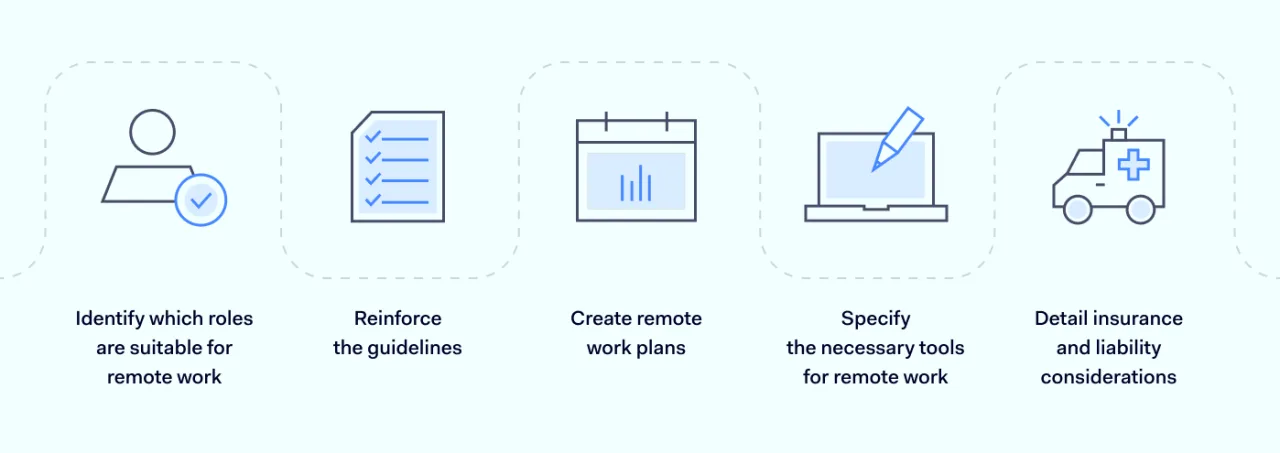
1. Identify which roles are suitable for remote work

Not every position in an organization can seamlessly transition to remote work arrangement. While a software developer may easily work from home, an office administrator may not fulfill all job obligations remotely. Therefore it’s necessary to outline which roles can function in a home environment without decreasing employee performance.

Secondly, it’s also important to look at the tasks themselves and determine whether they can be done remotely, even when factoring that some job roles are more suited to remote work. In those cases, setting a fixed amount of time for in-person and remote work is a good compromise.

2. Reinforce the guidelines

It’s important to know which company rules and guidelines need to be followed, even if employees are working from home. All the usual company rules still apply, but we need to make sure everyone understands that these rules aren’t put on hold just because they’re working remotely.

By providing clear and easy-to-understand guidelines, we can set clear expectations for everyone. This will help prevent confusion and make managing remote work much easier. It creates a level of openness and trust that will make remote working a smooth and efficient process for all involved.

3. Create remote work plans

Company goals need to be broken down into clear and achievable targets. Department heads can help turn these big objectives into practical tasks and responsibilities. This gives employees a clear path to follow, making their jobs easier during changes or transitions.

Managers should make it a habit to lay out these plans and talk them over with their teams. They should also keep an eye on progress to make sure everyone is on track to meet the goals. This helps prevent confusion, especially when shifting to a remote work model that may require more effort from employees outside the office. It keeps everyone on the same page and ensures a smooth transition.

4. Specify the necessary tools for remote work

Remote workers need the right technology and help to do their jobs and work together with their team. This means making sure they have what they need to do their tasks from home or elsewhere. Sometimes, you might even need to buy extra software or tools to help remote workers handle the special demands of working away from the office.

Remote work often causes communication problems and mix-ups. But by supporting remote employees with different tools, you can help them stay in touch in real-time. This makes it easier to sort out any problems that might come up.

5. Detail insurance and liability considerations

If you’re working from home, it’s essential to know your rights and how things like injuries or losses will be dealt with. A good remote work policy will cover all these details, including benefits, insurance, and liability considerations. It’s not just important for employees; employers need this too, to make sure that everyone’s working in a safe and secure way.

What does all this mean in practice? Well, it helps create a positive work environment and makes sure that the company is following the law, reducing legal risks. Plus, it shows that the company really cares about its employees’ well-being and safety. By being clear and open about the rules and policies, it can help build trust and make remote workers feel like a part of the team, boosting productivity and inclusion within the company culture.

Easier cybersecurity with NordLayer

Remote working is quickly transforming traditional employment models. Yet, in this arrangement, the company and its employees share the responsibility of maintaining security and the well-being of company data. Achieving this may only be feasible with the right tools and solutions for network management.

NordLayer offers a package for hybrid work security that enhances the safety of working remotely. We enhance collaboration between remote employees and modern businesses allowing them to control access to company resources and safeguard critical assets.

Without needing any special hardware, NordLayer provides an accessible solution suitable for businesses of all sizes and easily enables secure remote work from anywhere. Solve your remote work challenges with effective solutions to make your setup safer.

Contact our sales department to learn more about our solutions and uplift your remote work capabilities today.

About Version 2 Digital

Version 2 Digital is one of the most dynamic IT companies in Asia. The company distributes a wide range of IT products across various areas including cyber security, cloud, data protection, end points, infrastructures, system monitoring, storage, networking, business productivity and communication products.

Through an extensive network of channels, point of sales, resellers, and partnership companies, Version 2 offers quality products and services which are highly acclaimed in the market. Its customers cover a wide spectrum which include Global 1000 enterprises, regional listed companies, different vertical industries, public utilities, Government, a vast number of successful SMEs, and consumers in various Asian cities.

About NordLayer
NordLayer is an adaptive network access security solution for modern businesses – from the world’s most trusted cybersecurity brand, Nord Security.

The web has become a chaotic space where safety and trust have been compromised by cybercrime and data protection issues. Therefore, our team has a global mission to shape a more trusted and peaceful online future for people everywhere.

How the next ransomware attack will hurt you: The numbers are in

75% of organizations have been victims of at least one successful ransomware attack in the past year, disrupting them operationally and financially.  

These attacks have become a constant battle between ever more sophisticated attackers and the IT and cybersecurity professionals tasked with keeping them at bay. 

In fact, a new survey (co-sponsored by Keepit) tells us that 65% of those IT and cybersecurity professionals name ransomware among the top 3 threats to their organization’s viability, and 13% of those even name it the biggest threat. 

If you are responsible for protecting your organization’s data, are you prepared for the next ransomware attack? If you are concerned about gaps in your strategy, you’re not alone. Many feel their organizations do not have the proper preparation in place to handle the increase in frequency and impact of attacks. So read on, learn where attacks are being targeted, and how to increase your level of preparedness. 

The statistics are fresh and based on a new Enterprise Strategy Group survey of 600 European and North American IT and cybersecurity professionals personally involved with protecting against and recovering from ransomware attacks. 

Get all the latest numbers on ransomware attacks in the full report. Download it for free.

What ransomware attackers go after

We have reliable data both on which parts of your IT environment are at risk, and which data classes the attackers are most likely to go after. So, let’s take them each in turn.

The parts of your IT environment most at risk

Attackers can enter your network at many different points, placing a significant burden on IT departments. But with this data, you will have a better idea of where to strengthen your defenses.  

 
The element most affected by ransomware attacks – indicated by 38% of survey respondents whose organization experienced a successful ransomware attack – is their key IT infrastructure. Anyone who controls even a small part of your IT infrastructure has tremendous power over you. They no longer even need to kidnap your files. For example, if they can disrupt, or gain control over, your Active Directory, they can shut your operations down for all practical purposes. 

For obvious reasons, your storage systems are also an attractive destination for attackers. Whether on-prem or in the cloud, there is a lot of gold in your data assets.  

But the survey respondents tell us that there are also plenty of other targets under assault in their IT environments. These include networks and connectivity, cloud-based data, IoT operations infrastructure, and last but not least data protection infrastructure.


Especially the last one deserves a special mention. Ransomware attacks are increasingly targeting backup copies of data – something that 74% of survey respondents were concerned about.  

This is why at Keepit we have gone to great lengths to create backup solutions that eliminate this very risk to the data protection infrastructure by insulating your backup in our independent cloud. With our true third-party protection, your data is stored in separate, isolated, immutable storage that is physically and logically separated from the rest of your IT environment. So the risk of attackers being able to reach your backups is greatly reduced.  

While the industry is slowly realizing the importance of such “air-gapped” and immutable solutions, this is not common practice within the backup solutions industry just yet. 

The data classes most at risk

The data class most targeted by the attackers—cited by 58% of the respondents whose organization had experienced a successful ransomware attack —is the one that you are required by law to protect: regulated data. This hurts in any way you can imagine, both for you and those that entrust you with their data. 

 
But a close second is sensitive infrastructure configuration data. Affecting the infrastructure at its core is a very effective way for attackers because it makes it easier for them to steal or damage data and to evade detection.  

In essence, this is how many attackers first gain entry. Once inside, they “climb the ladder” to compromise an account with admin privileges. And then, they can start breaking things such as configuration settings and access rules, and start stealing.  

We recently saw a brazen example of just such an attack. In this case, attackers caused major disruptions and financial losses by compromising both on-prem and cloud-based systems. The attacker: 

  1. Entered the target network by compromising an on-premises account 
  2. Leveraged that account to compromise the on-prem Active Directory 
  3. Used that access to pivot to and compromise Azure AD 

 
All of the target’s Azure storage and compute resources were deleted. If you don’t have a backup of your Azure AD data, building your settings and access control up from the ground again will be difficult and time-consuming, leaving you vulnerable to further attacks in the interim. 

Other data classes the survey respondents indicated are usually targeted are intellectual property data and mission-critical data. Any attack on mission-critical data is frustrating and costly as companies struggle to restore data and operations. But temporary or permanent loss of sensitive intellectual property information is not only hurtful in the short-term until operations are resumed, but can be enormously damaging in the long-term. 

All these four types of data are highly desired by the attackers. You can see exactly how much, and a lot more, in the report itself.

As you can see, your IT infrastructure has a major bullseye on its back that bad actors constantly try to hit. Unfortunately, sometimes they will succeed. So, you had better have the right plan in place to deal with the consequences when it happens. 

How the ransomware attacks hurt


When asked in the survey how all those successful ransomware attacks have impacted the respondents’ businesses, the two standout examples were data loss and data exposure.


But the list of painful effects is long. Some worth mentioning are operational disruptions, direct impact on employees, customers and partners (such as access to personally identifiable information), and financial, compliance and reputational damage

If you want to know in more detail what pains to expect and prepare for, I recommend that you look through the the official report.

Storytime: Scary ransomware stories from the real world


Now that you know what the attackers are after, where they hit you and what the main effects will be, let’s get a bit more tangible and look at some recent examples of successful attacks. 

Ransomware attackers sure are creative, so you need to be able to anticipate their moves. And for that, it is useful to follow the related news and learn what has worked (for the attackers) in the past.


Here is some recommended reading to bring yourself up to date:

  • An attack on one of Toyota’s key suppliers disrupted their production. During the shutdown, Toyota lost a third of its global output and suffered a significant financial loss. Read the story here
  • Third-party, unauthorized access was made at Bridgestone Americas, prompting a shutdown of the computer network and production at its factories in North and Middle for about one week. Read the story here.
  • A ransomware attack hit agricultural equipment manufacturer AGCO, causing it to shut down manufacturing facilities. It took 17 days to return to full operation. Read the story here.

What to make of all this

Attacks will happen, and some of them will succeed—you can’t stop them all. But with the right preparation, you can take a lot of the power out of the attackers’ hands by being able to immediately restore the data you’ve lost and clean up after the attack. So it’s all about resilience and management.  

 
Arm yourself with the right insight. The above information is a great start – you now know which data classes and elements of your IT environment to prioritize — but it only scratches the surface. Download the full report to get the full picture.

Prevention will only take you so far, so move beyond a simple defensive strategy. How much downtime and data loss can your business really afford? Ensure you can handle the disruption and keep your business operational through the storm. To help mitigate the operational disruptions and avoid the data loss that is so common-place today, you need to invest in a solid plan to protect your business-critical data. 

Now is the time to secure your data and improve your resilience levels – before the next ransomware attack hits you.

About Version 2 Digital

Version 2 Digital is one of the most dynamic IT companies in Asia. The company distributes a wide range of IT products across various areas including cyber security, cloud, data protection, end points, infrastructures, system monitoring, storage, networking, business productivity and communication products.

Through an extensive network of channels, point of sales, resellers, and partnership companies, Version 2 offers quality products and services which are highly acclaimed in the market. Its customers cover a wide spectrum which include Global 1000 enterprises, regional listed companies, different vertical industries, public utilities, Government, a vast number of successful SMEs, and consumers in various Asian cities.

About Keepit
At Keepit, we believe in a digital future where all software is delivered as a service. Keepit’s mission is to protect data in the cloud Keepit is a software company specializing in Cloud-to-Cloud data backup and recovery. Deriving from +20 year experience in building best-in-class data protection and hosting services, Keepit is pioneering the way to secure and protect cloud data at scale.

Mitigating risk – data loss prevention helps prevent security disasters

Organizations have increasingly become targets of hacking that result in massive data breaches, calling to attention both the increasing importance of proper cybersecurity software, but also an overall change in security strategy.

According to a recent report, the average cost of a data breach globally in 2022 reached a sum of $4.35 million, up from the previous year. In the United States alone, the average cost is as high as $9.44 million – a staggering number, with businesses increasing prices to accommodate for the resulting costs.

While mitigating cyber threats is challenging, having a sound security strategy to tackle threats is key. Among some of the strategies employed is data loss prevention (DLP), which should be a part of any company’s data protection repertoire.

What is data loss prevention, and how does it work?

DLP is designed to prevent accidental or intentional losses of data. The idea basically is to protect confidential data and information to prevent fraudulent access, both within a company and outside it.

Some of the ways DLP works and helps data protection is by classifying types of data into various categories, identifying security violations, and automating certain processes, so that data management becomes easier to handle. Flagging data into categories based on confidentiality or access level is just one-way DLP helps, as access management is important in mitigating potential loss in the form of unwanted leaks, for example.

For DLP to work, it can be done in-house by an internal IT team, but it can also be outsourced, depending on where the priorities of a business lie. With the sheer number of endpoint devices a company usually manages, it makes sense to use outside help to properly secure data on all of them, while letting their IT teams tackle other matters. However, just like any business, DLP companies can also be the targets of attacks.

The various types of DLP

DLP solutions are adaptable, so they can be easily configured to suit any company’s needs. Depending on this, a company can pick from different DLP types, as each one has its own strengths and weaknesses.

For example, endpoint DLP focuses on securing data on all company endpoints. It involves the implementation of user monitoring and other security policies to prevent data loss allowing for visibility into data usage on devices.

However, since data is not only stored or moves only through endpoint devices, there is also network DLP, which takes care of monitoring data in use across an organization’s network. It can easily identify and prevent unauthorized movement of data by leveraging its power to see how various forms of data move on the network, like who accessed what and when, which is very useful when looking for anomalous behavior.

Also worth mentioning is a different subsection of network DLP. While organizations are increasingly moving to adopt cloud services, protecting data stored on them is important. Hence why cloud DLP helps protect data stored by businesses on cloud repositories. Sometimes a business enables access to its cloud storage to partners, for example, in which case cloud DLP is very useful to ward off potential data security failures.

These three previously mentioned types of DLP solutions can also work together to provide comprehensive protection across different stages of data in motion – at rest, at motion, and in use. Implementing all three types can help organizations prevent data loss and maintain a proper data security posture.

Compliance – the added benefit of DLP

A company should have DLP for several reasons, including compliance with regulations, as many industries are subject to strict data protection and privacy regulations, such as the General Data Protection Regulation (GDPR), Health Insurance Portability and Accountability Act (HIPAA), or the Payment Card Industry Data Security Standard (PCI DSS) among others.

Specifically, since GDPR involves stringent measures on respecting user privacy and data, DLP gives the right amount of protection to shield companies from potential issues stemming from data breaches, for example.

ESET and Data Loss Prevention

ESET, as part of its technology alliance, has a trusted partner in Safetica, offering data loss prevention services with Safetica ONE and Safetica NXT, to prevent data leakage, guide staff on data protection, and to stay compliant with regulations.

While ESET protects you by offering award-winning endpoint security and detection and response solutions through the ESET PROTECT Platform, Safetica’s products add another layer of protection, protecting data both inside and outside a company, being tough on insider threats and data loss in an era of hybrid work, during which endpoints and data can move all around the world.

To sum it up, having a well-functioning DLP toolset can help any organization in exercising proper data control. It is an enormously important component of any comprehensive data security strategy in today’s world of ever-evolving threats.


About Version 2 Digital

Version 2 Digital is one of the most dynamic IT companies in Asia. The company distributes a wide range of IT products across various areas including cyber security, cloud, data protection, end points, infrastructures, system monitoring, storage, networking, business productivity and communication products.

Through an extensive network of channels, point of sales, resellers, and partnership companies, Version 2 offers quality products and services which are highly acclaimed in the market. Its customers cover a wide spectrum which include Global 1000 enterprises, regional listed companies, different vertical industries, public utilities, Government, a vast number of successful SMEs, and consumers in various Asian cities.

About ESET
For 30 years, ESET® has been developing industry-leading IT security software and services for businesses and consumers worldwide. With solutions ranging from endpoint security to encryption and two-factor authentication, ESET’s high-performing, easy-to-use products give individuals and businesses the peace of mind to enjoy the full potential of their technology. ESET unobtrusively protects and monitors 24/7, updating defenses in real time to keep users safe and businesses running without interruption. Evolving threats require an evolving IT security company. Backed by R&D facilities worldwide, ESET became the first IT security company to earn 100 Virus Bulletin VB100 awards, identifying every single “in-the-wild” malware without interruption since 2003.

Navigating Online Compliances for UK Schools: Safeguarding Minors in the Digital Age

With the widespread integration of digital tools and the internet into educational practices, it becomes imperative for institutions to prioritize online safety and adhere to essential compliances. Protecting minors from online abuse is not just a moral responsibility but also a legal obligation.

The Importance of Online Safety in Schools

The internet has brought boundless educational opportunities to students, enabling access to information, collaboration, online relationships, and engagement on an unprecedented scale. However, this digital realm also presents inherent risks, making the protection of minors online a critical concern. Young individuals are particularly vulnerable to online risks like cyberbullying, inappropriate content, and predatory behavior. By implementing stringent online safety measures, schools contribute to the holistic development of students, fostering an environment where they can explore the digital world securely.

Key Compliances for UK Schools

UK schools are entrusted with not just education but also the protection of students in the online realm. This responsibility involves adhering to essential compliances that address data privacy, online conduct, and student well-being. These compliances not only outline rules but also provide valuable guidance and best practices for fostering a secure online environment. From the online safety principles safeguarding personal data to promoting safe internet habits, these regulations form the foundation of a protective framework that schools must adopt.

Children’s Online Privacy Protection Act (COPPA): This regulation governs the collection of personal information from children and young people under 13 years of age. UK schools should have robust protocols for obtaining parental consent before students engage in online activities that require sharing personal information.

General Data Protection Regulation (GDPR): Even though the UK has left the European Union, GDPR continues to influence data protection standards. Schools must handle student data with utmost care, ensuring transparent data practices and obtaining explicit consent when necessary.

Keeping Children Safe in Education (KCSIE): This statutory guidance provides schools with the framework to teach online safety and create a safe environment for students. It includes guidelines for identifying and reporting concerns related to online safety, as well as the responsibilities of school staff members in ensuring students’ protection.

Tips for Creating a Safer Online Environment

Creating a secure online atmosphere within educational settings requires a multifaceted approach that goes beyond compliance. Here are some effective strategies that UK schools can employ to ensure the safety and well-being of their students online.

Understand the key requirements of the safe internet strategy. Develop a clear and concise internet use policy that outlines acceptable online behaviour, prohibited activities, and consequences for violations. Ensure that students, teachers, and parents are aware of this policy.


Understand the key requirements of the safe internet strategy.

Develop a clear and concise internet use policy that outlines acceptable online behavior, prohibited activities, and consequences for violations. Ensure that students, teachers, and parents are aware of this policy.

Technology Assessment & Deployment.

Evaluate the need for essential technologies such as firewalls, content filters, and monitoring tools while also assessing the scalability and compatibility of your existing infrastructure. Once identified, deploy these technologies effectively, ensuring proper installation, updates, and monitoring. Set up reporting mechanisms to promptly address any violations or concerns, fostering a secure online educational space.

Training & Awareness.

Integrate online safety education into the curriculum. Empower students with the knowledge to identify risks, report incidents, and make informed decisions while navigating the digital landscape. Consider incorporating topics such as “online safety training” and “internet safety” into the curriculum to address these issues explicitly.

Regular Audits and Analyses.

Periodically review your school’s online safety measures to identify gaps and areas for improvement. Engage with experts and utilize online assessment tools to gauge the effectiveness of your efforts. Make sure your existing curriculum requirements align with updated safety guidelines.

Parental Involvement.

Foster open communication with parents about the school’s online safety initiatives. Provide resources and workshops to educate parents on how to protect their children online and recognize potential threats.

Maintain Records.

Document all actions, from technology implementation and training to updates. Securely store reports of violations and concerns as essential references to assess safety measures and ensure a consistently secure online environment.


By adhering to essential compliances and implementing proactive measures, institutions can create a secure environment where students can explore, learn, and grow without compromising their safety. As technology continues to evolve, schools play a pivotal role in nurturing responsible digital citizens who are equipped to navigate the online world with confidence and resilience.

To access further guidance and resources on online safety, consider reaching out to the UK Safer Internet Centre, which offers valuable guidance outlines on creating a safe digital space for students. Additionally, when addressing sensitive topics such as “sex education” in the digital age, it’s crucial for schools to adapt and ensure that appropriate content and discussions exist online.

About Version 2 Digital

Version 2 Digital is one of the most dynamic IT companies in Asia. The company distributes a wide range of IT products across various areas including cyber security, cloud, data protection, end points, infrastructures, system monitoring, storage, networking, business productivity and communication products.

Through an extensive network of channels, point of sales, resellers, and partnership companies, Version 2 offers quality products and services which are highly acclaimed in the market. Its customers cover a wide spectrum which include Global 1000 enterprises, regional listed companies, different vertical industries, public utilities, Government, a vast number of successful SMEs, and consumers in various Asian cities.

About SafeDNS
SafeDNS breathes to make the internet safer for people all over the world with solutions ranging from AI & ML-powered web filtering, cybersecurity to threat intelligence. Moreover, we strive to create the next generation of safer and more affordable web filtering products. Endlessly working to improve our users’ online protection, SafeDNS has also launched an innovative system powered by continuous machine learning and user behavior analytics to detect botnets and malicious websites.

Remote workforce technologies for secure work

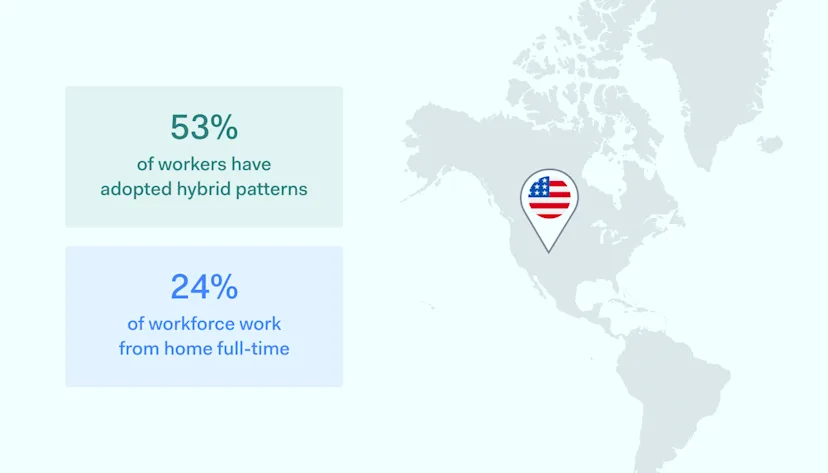
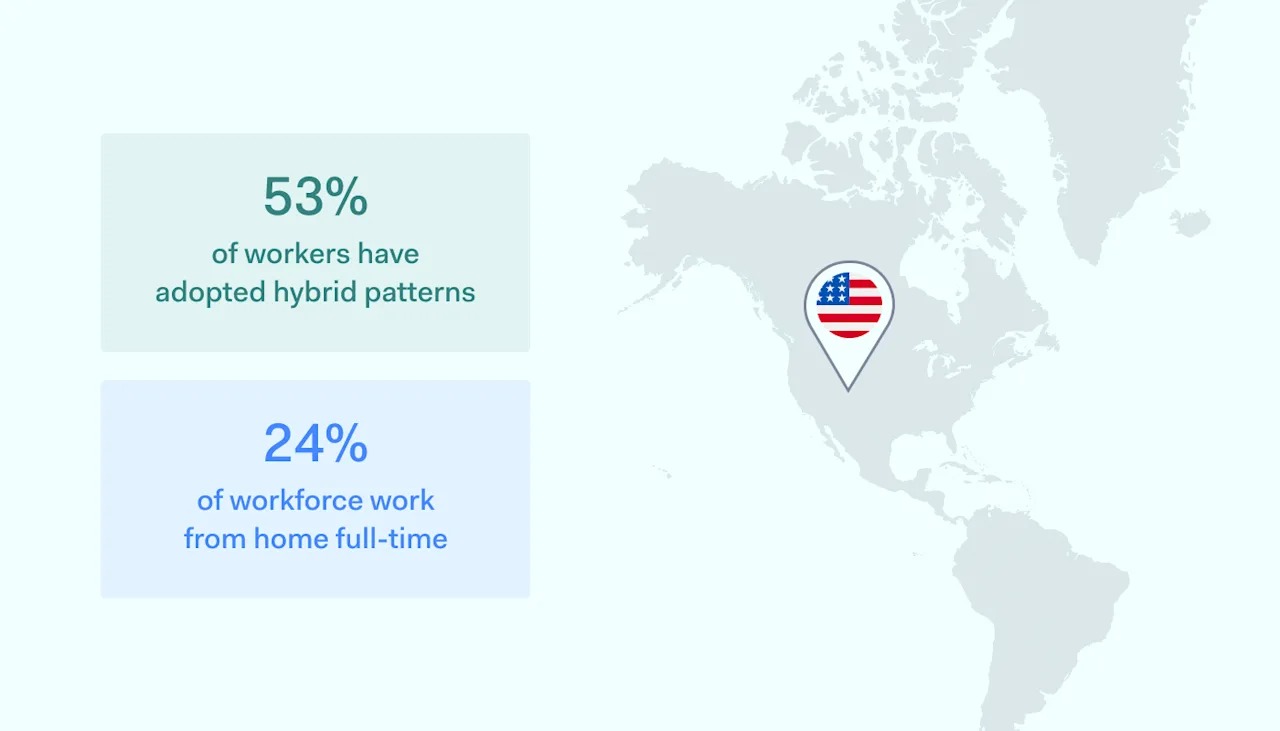
The traditional office is becoming harder to find these days. Across the world, millions of people have shifted to hybrid or fully remote work lifestyles. In the USA, 53% of workers have adopted hybrid patterns, and 24% work from home full-time. Those numbers are likely to rise with employee expectations drifting towards flexible working. 

But how should companies respond? Enabling remote working can be risky, but it comes with many benefits. In this article, we’ll introduce the best security tools for remote work, making it easier to relocate employees without creating extra cybersecurity risks.

Key takeaways

  • Remote working is more popular than ever. Choosing the right software and hardware tools allows off-site workforces to operate safely and productively.

  • Efficient video conferencing solutions connect team colleagues, managers, and third parties seamlessly. And they secure communications against eavesdroppers.

  • Messaging apps ensure consistent information flows between remote employees. They should allow regular updates, quality assurance checks, and assist with team building.

  • Project management systems make it easier to control dispersed teams. Managers can monitor remote workforces and set schedules for project delivery.

  • Secure storage solutions keep critical data safe. Access controls and encryption make data available for team members while preventing illegitimate access.

The evolution of remote work

Remote work is not a new phenomenon. And in the past 20 years, remote work has become routine for occupations like IT support.

However, the number of remote employees was relatively small until the Covid pandemic. When it hit, millions of workers were suddenly barred from workplaces. But companies needed to continue operations, which sparked a search for remote solutions.

Apps like Zoom became household names overnight. And organizations suddenly had to adapt their working practices to accommodate working remotely.

Fortunately, Covid-19 coincided with technological developments that made remote working easier. Internet bandwidth is increasing at a rate of around 29% per year. This allowed employees to collaborate via video conferencing without lag issues. And remote security solutions like Virtual Private Networks (VPNs) and multi-factor authentication enabled companies to create secure remote work connections.

The pandemic and technological change have paved the way for an age of flexible remote working. And this change is mainly driven by employees.

As the Covid pandemic receded, many people didn’t return to their workplaces. Workers became accustomed to spending more time at home. Now, as many as 65% of workers seek full-time remote work, and the employers need to adapt fast.

country statistics for remote work 1400x800

However, not all sectors have embraced remote work. Healthcare and care professions still generally rely on face-to-face contact. Manual trades like mining or construction may always require employees to be present on site. Despite that, many industries support remote work strategies.

The IT sector has the highest proportion of home workers right now. But jobs as diverse as accounting, non-profit administration, tutoring, and graphic design are also compatible with home working.

Recent years have also seen the emergence of remote workforce technologies that enable productive and secure remote work. Project management tools, VPNs, collaboration and video conferencing apps, and cloud storage platforms make remote work easier than ever. Thus, the future of remote working seems bright.

Evaluating remote work effectiveness

Remote work is already mainstream. But it isn’t necessarily the best solution for all companies and employees.

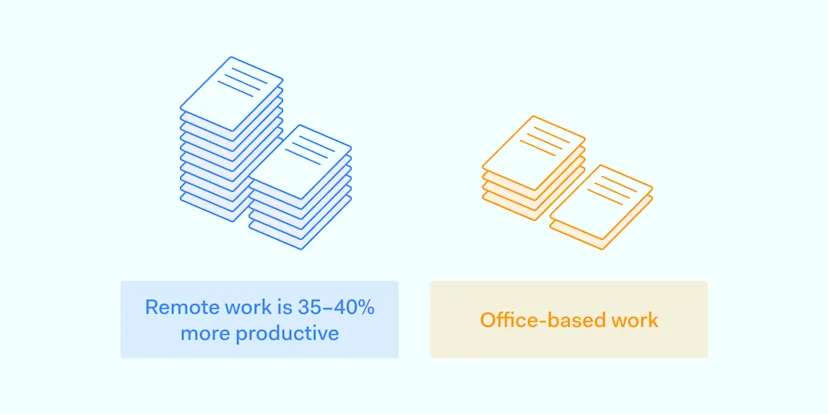
On the positive side, statistics suggest that working from home boosts productivity and streamlines corporate operations. Additionally, major companies say that remote work is 35-40% more productive than office-based alternatives.

This increase could be due to the absence of distractions. Remote employees put time spent on commutes to better use. Or they might just be happier and energized by controlling their working lives.

On the other hand, remote work isn’t suitable for many occupations. As this list from the New York Times shows, this trend has barely touched plenty of jobs. Education, medicine, and construction are just a few good examples.

The pandemic forced teachers to run classes remotely. Such a method led to frustration and stress for educators and damaged educational outcomes for learners. Therefore, organizations should think long and hard before relocating any jobs involving face-to-face contact.

Companies must be aware of potential problems with remote or hybrid work models. Researchers report that remote work can come with a “promotion penalty.” Employees away from managers and offices may lose out during internal recruitment.

On-site staff also benefit from the assistance of more experienced colleagues. Younger remote workers may be disconnected from sources of knowledge. Isolation hurts productivity and dents the career prospects of remote employees.

Poorly-organized remote working systems can also lead to problems with managing them. As a result, managers may gradually extend surveillance reach to track projects and productivity. Because of that, surveillance can negate the feeling of freedom that makes working remotely so appealing.

To sum up, there are good reasons to embrace remote work. But companies should be careful when designing home working setups as this comes with new risks. Let’s explore some tools to simplify this critical task.

The best remote workforce technologies in 2023

Organizations should employ a suite of technologies for working remotely. These cover critical areas like cloud storage, project management, communication, data security, and secure remote access. Let’s see what are the top options in each category.

Cloud storage tools

Remote work teams should use secure cloud storage to host workloads and communication apps. Secure platforms apply encryption to protect data at rest. Furthermore, firewalls block illegitimate external access, and physical controls protect data centers.

data centers banners 1400x750

Cloud platforms couple security with ease of use, meaning remote users can share files and databases instantly. Moreover, teams can update work documents, client databases, or code bases in real time. And cloud data protection tools keep the workloads safe from external intruders.

It usually makes sense to build remote work setups around cloud environments. But which cloud services provider should you choose?

Microsoft Azure

This is a popular option for cloud storage. Azure Bastion provides secure shell access for remote connections. It also features the ability to create virtual desktop infrastructure with ease. That way, remote employees can access central resources without storing data locally.

Microsoft’s cloud platform has other remote security benefits. Learn more by reading our Azure best practices guide.

Amazon Web Services (AWS)

AWS is another good cloud storage option and virtual workspace. For instance, it’s ideal for creatives working remotely who need virtual workstations for graphic design or video production.

Users can encrypt data easily and manage data retention policies. And they can track data movements between home and cloud locations.

Finally, cybersecurity is very tight if you follow AWS security best practices.

Google Cloud

Google Cloud offers excellent document storage and editing features. Flexible bucket storage is a core feature of Google’s platform. When cloud services fail in one region, remote workers can access workloads hosted elsewhere.

Google’s storage systems scale smoothly. They are fitted with critical remote security tools like encryption, cloud-native access controls, signed URLs, and data retention locks. By following Google Cloud security best practices, you can design a remote work solution that secures data and serves employee needs.

Project management

Managing projects is a crucial aspect of any remote workplace. Managers need to set targets and monitor employee progress. They need awareness of project achievements. Finally, they require the ability to change plans as projects develop.

Project management tools make these tasks much more manageable. What’s more, they give an overall awareness to their users. Also, some solutions enable detailed worker surveillance via time-tracking tools.

Jira

Atlassian’s Jira platform is a good solution for creating a flexible remote team. Targeted at code developers, Jira enables complete awareness of production status. Managers can track progress with productivity reports and timeline tools. In the meantime, task management hubs allow them to set flexible workflows for each team member.

Jira is a solid option for DevOps teams that depend on distributed remote workers. That’s because it blends flexibility and security. For instance, users can encrypt data at rest and in transit, and they can set permissions for each object. NordLayer’s guide to Jira security best practices offers a comprehensive overview of the product’s remote security features.

Microsoft Teams

Teams is the most popular platform for remote work operations. However, it doesn’t include native project management features.

Instead, users can create integrations with third-party management tools like Monday or Brightworks. These tools link together the video conferencing and messaging functions that make Teams useful. And they let managers schedule events and track progress easily.

Microsoft Teams is part of Office 365. This suite allows easy assimilation of Excel or Word into remote workflows. But this solution might come with security vulnerabilities. Learn more by reading our blog about Office 365 best practices.

Figma

Product designers rely on Figma to collaborate and develop ideas. The platform’s Juncture tool enables in-depth project management for every team and product. Co-creation spaces bring workers together to share prototypes or test apps. And tools like FigJam provide online whiteboards for real-time collaboration.

Figma is an excellent development platform for remote teams. But as with Microsoft Teams, it’s not entirely secure. Therefore, be sure to implement Figma security best practices before teams go online.

Communication and collaboration tools

Communication and collaboration are critical to the success of every remote team. And for that, there are many different tools to choose from.

communication tools for teams

The most secure options are end-to-end encrypted messaging apps. Troop Messenger and Element are designed to suit business communications. They encrypt messages between remote team members without compromising performance.

Other communication tools bring team members together to discuss ongoing projects. For example, Slack features customizable one-to-one, enterprise-wide, or departmental group chats, including live voice communications. It includes encryption, key management, audit logs, and data loss prevention.

Video collaboration is another must-have for most remote work operations. Zoom is optimized for distributed teams, with collaborative whiteboards, up to 100 meeting attendees, and instant team meetings for spur-of-the-moment contact. Zoom Events is another neat feature that helps build togetherness within a distributed workforce.

Video communication tools improve collaboration, but they can bring remote security risks. During the Covid pandemic, there were many cases of attackers recording Zoom calls. That’s because threat actors can steal credentials or hijack calls over insecure connections.

Companies should couple collaboration tools with a reliable B2B VPN and access management systems. They ensure that calls are private and only legitimate invitees will be present.

Access control and data security tools

Remote work setups should always include filters to exclude unauthorized users from corporate resources. Therefore, authentication and access control solutions are critically important. After all, managers will probably want to give the IT admins more freedom than a trainee.

authentication and authorization tools

Authentication

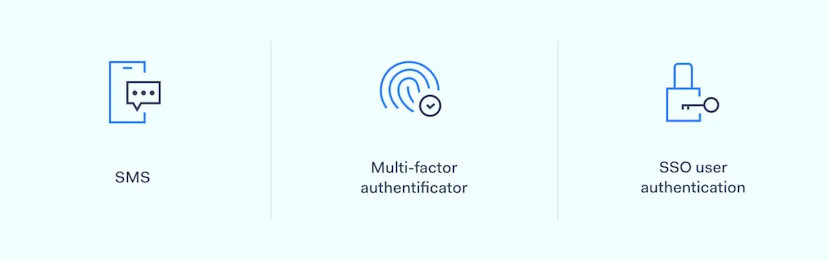
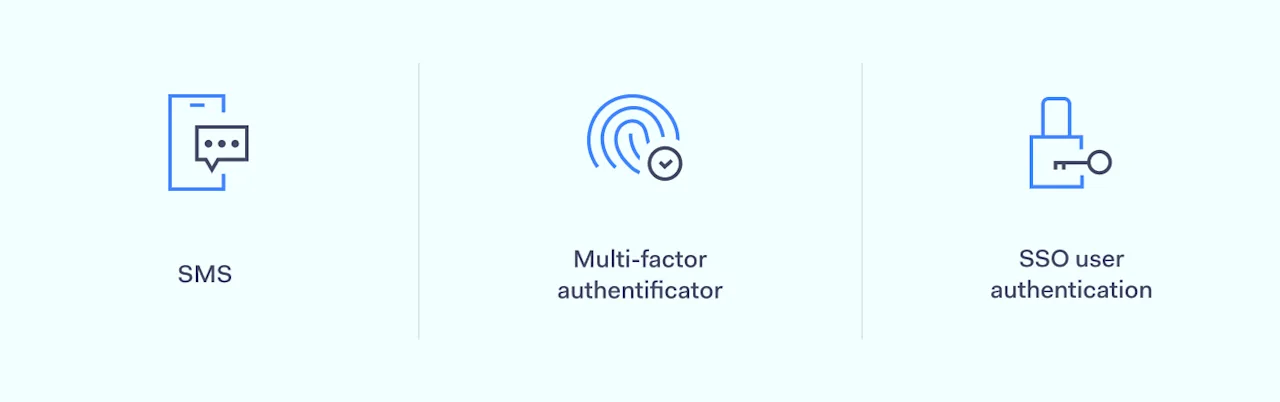
Authentication compares user access credentials to secure credentials databases. The gold standard for remote access is multi-factor authentication (MFA). This demands more than one unique identifier when users access work resources.

MFA can involve passwords and one-time codes sent via SMS or email. But more secure versions deliver encrypted codes to mobile apps. This avoids security issues related to email and SMS. Organizations can also switch from passwords to hardware tokens provided to remote workers.

Access management

Access control portals complement authentication tools. Identity and Access Management (IAM) systems verify users’ identities and connect them to the correct privileges.

Remote workers can access resources needed by their team or project. However, under the Zero Trust model, IAM tools limit access to all other network assets. This strengthens the network perimeter and boosts cybersecurity.

Encryption

Encryption is another critical aspect of secure remote working. Companies should leverage encryption features on apps and cloud platforms to safeguard sensitive information. And they should use encrypted channels to connect remote devices and central resources.

Data Loss Prevention (DLP)

DLP tools can also help businesses a lot with their remote workforce. They track sensitive data and prevent misuse by remote users. This way, managers can protect the most important databases and documents. As a result. extracting valuable data will be much more difficult.

In summary, strong encryption is essential when designing remote work setups. Insecure user devices can become entry points for malware and data thieves. Moreover, weak authentication and authorization systems make access easy for anyone with a functioning user ID and password.

Secure remote access solutions

Remote access workforces expand the threat surface and create new cybersecurity risks. This makes it critical to secure every remote connection. Encrypting cloud platforms and implementing MFA is not enough. Companies must lock down connections between remote devices and network assets.

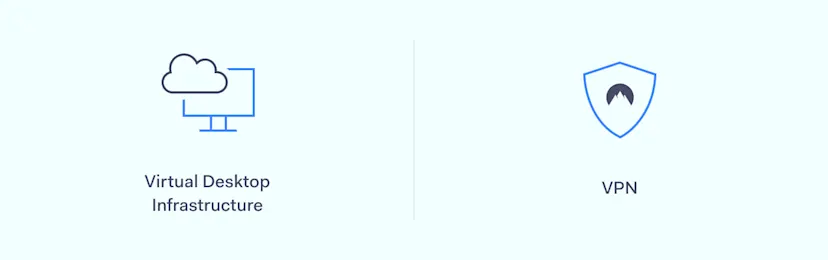
Virtual Desktop Infrastructure (VDI) is one way to do so. It creates centralized servers on the cloud. These servers host workloads and data, meaning nothing is stored locally on employee devices. However, users can run apps hosted on the VDI in their home office.

VDI tools create encrypted connections between local devices and the virtualized environment. This is relatively secure. Unfortunately, attackers can still gain network access if they have legitimate credentials.

Companies can also use Virtual Private Networks (VPNs) to create encrypted tunnels for remote connections. VPN providers operate servers across the world, which can even improve connection speeds.

They apply cutting-edge encryption that is virtually impossible to crack. Moreover, your IP address will stay hidden, increasing anonymity. This makes it harder for hackers to mount interception and other types of attacks.

VPNs are a flexible security and privacy option for on-site and remote workforces. What’s more, these tools can secure access points in public locations. In the meantime, access company networks or attend client meetings while traveling.

NordLayer’s VPN solutions make creating safe remote work setups easier. Our Remote Access VPN encrypts connections via a simple client interface. Users can protect their devices instantly, whether they are accessing cloud platforms or central offices.

Make remote work secure with NordLayer

Remote work should always be protected. However, companies may struggle to secure data as employees shift away from centralized offices. This blog post has introduced key technologies and tools for keeping remote workers safe and boosting productivity.

Businesses should always choose the most secure project management and communication tools. While Azure or Zoom have their own security features, they alone are not enough. Organizations must be able to create gateways, use MFA authentication, protect remote access, and manage team member privileges.

It’s time to make your remote and on-site work safe. Get in touch with NordLayer, and we’ll help you create a solution that fits your business needs.

About Version 2 Digital

Version 2 Digital is one of the most dynamic IT companies in Asia. The company distributes a wide range of IT products across various areas including cyber security, cloud, data protection, end points, infrastructures, system monitoring, storage, networking, business productivity and communication products.

Through an extensive network of channels, point of sales, resellers, and partnership companies, Version 2 offers quality products and services which are highly acclaimed in the market. Its customers cover a wide spectrum which include Global 1000 enterprises, regional listed companies, different vertical industries, public utilities, Government, a vast number of successful SMEs, and consumers in various Asian cities.

About NordLayer
NordLayer is an adaptive network access security solution for modern businesses – from the world’s most trusted cybersecurity brand, Nord Security.

The web has become a chaotic space where safety and trust have been compromised by cybercrime and data protection issues. Therefore, our team has a global mission to shape a more trusted and peaceful online future for people everywhere.

×

Hello!

Click one of our contacts below to chat on WhatsApp

×