
Skip to content

runZero 3.8: Identify and triage your riskiest assets, track goals, identify even more things, and delete your password

What’s new with runZero 3.8?

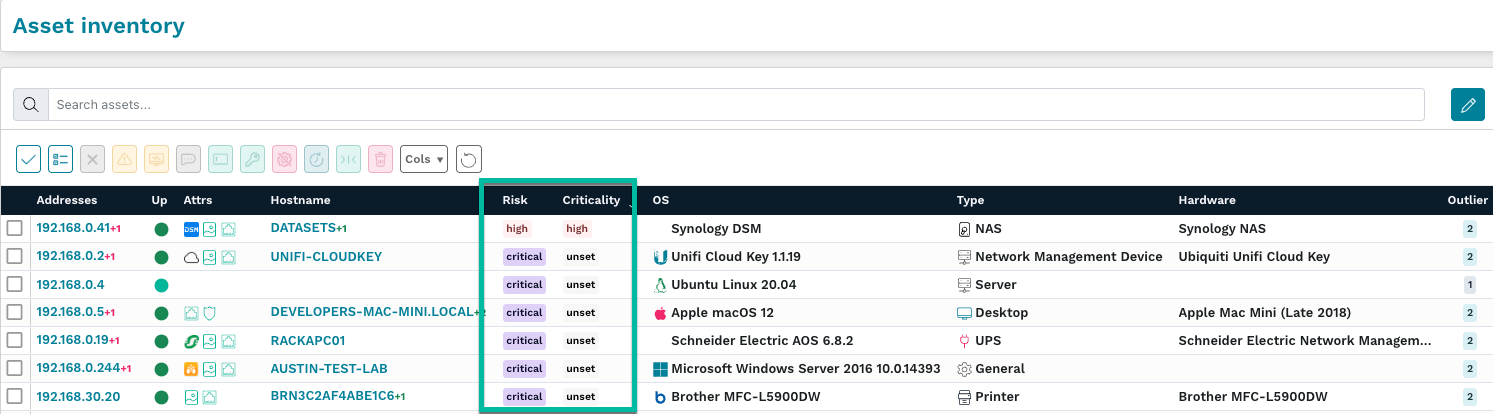
Identify and triage risky assets

runZero customers can now identify risky assets across their environment and assign them to users for triage and remediation. Asset risk and criticality are presented as new fields in the inventory that can be used for both queries and alerts. The asset risk field is automatically set to the highest risk level of associated vulnerabilities; this data can be sourced from third-party vulnerability management imports as well as runZero queries. Asset risk can be overridden individually in the asset detail page or by applying a new risk level to assets matching a query. In addition to the changes above, a new Asset risk report is now available, which summarizes asset risk across each level of criticality.

The 3.8.0 release includes 34 new queries that automatically apply vulnerability records to matching assets. These queries are shown in the screenshot below and the full list can be found at the end of this post.

Although the new runZero queries are focused on unintended exposure, any query can be used to associate vulnerabilities to the corresponding asset, which also updates the asset risk level, and ties into the Security Ownership model for triage.

These queries can run against the assets, services, software, and vulnerability inventories. If you are importing software inventory through an integration, you can now create a query that automatically associates a vulnerability with assets with specific software installed.

As an example, if you would like to identify and remove all instances of Photoshop in your environment, create a new software query for name:photoshop, enable the new vulnerability association setting, and provide a unique vulnerability ID for the query. On the next update, a new vulnerability will be associated with every matching asset, and these vulnerabilities can be assigned through the console.

Queries can also be used to prioritize existing vulnerabilities. To add a critical finding when a low-risk vulnerability is reported on an asset with a public IP address, create a new vulnerability inventory query using the public:true asset filter, add additional conditions for the specific vulnerabilities that you would like to match, provide a unique vulnerability ID, and finally set the risk to Critical. On the next update, any assets with the specified vulnerabilities will have an additional critical risk finding attached if they also have a public IP address.

Users can find a list of assigned assets in the asset and vulnerability inventory pages by clicking their owner name in the inventory table or by viewing their user detail page under Your Team > Users.

Once a vulnerability has been remediated, the next update will remove the vulnerability from the asset and update the risk of the associated asset. Risky asset triage and query-based vulnerability associations are available to all runZero Professional and runZero Enterprise users.
Public preview of goal tracking

Measuring progress toward your security and organizational goals can be challenging and difficult to communicate to leadership. With the introduction of goals, runZero customers can set time-bound and query-driven goals that are customizable to what matters most to your team. Goals can be used with new features like asset risk as well as existing features like asset ownership. If you can query for it in runZero, it can now be a goal!

Some examples of goals could include:

  • Managing expiring TLS certificates
  • Remediating critical risk vulnerabilities on assets within a set timeframe
  • Keeping insecure management services off external networks

This feature is in a public preview and we would love your feedback via email or through the in-product support form.

Protocol improvements

The default TCP port list has grown to almost 600 ports (from ~500) for better coverage. Protocol support has been added for Brother’s proprietary scanner protocol, allowing us to identify Brother scanners or Brother multi-function devices that include a scanner. SNMP enumeration is more configurable through the disable-bulk-walk and max-repetitions settings in the advanced scan configuration. Protocol detection has also been improved for TNS Listener and Android Debug Bridge services.

New and improved fingerprints

New fingerprints were added for products by Advantech, Amazon, Apache, ASUSTeK, AV Costar, Avaya, AVM, Bosch, Canon, Canonical, Cisco, Citrix, Codonics, Cognosys, CostarHD, Cradlepoint, Cubic Transportation Systems, DataDirect Networks, Dahua, Daktronics, Datamax, Debian, Dell, DigitalOcean, Eaton, Econolite, EnGenius, Entrust, EVGA, ExaGrid, F5, Fortinet, Getinge, Glenayre, Grandstream, HP, HPE, Huawei, iCAD, Kali, LAVA, March Networks, Microsoft, Moen, MSI, MultiTech, Multitone, Netgear, Oce, Okidata, OpenLogic, The Ottawa Hospital Cancer Center, Palo Alto Networks, Panasonic, PaperCut, Proxim, Prusa, Qualys, Red Hat, RICOH, The Royal Marsden NHS Foundation Trust, Saulmatics, Schneider Electric, Somfy, Sonos, SUSE, Ubiquiti, VMware, and ZTE.

Other research improvements

We published a Rapid Response post and new query for finding servers running the PaperCut MF and ND software.

In addition to the above protocol and fingerprinting improvements, we improved our normalization of x509 certificate issuer and subject values, allowing us to more consistently apply fingerprints regardless of ordering/formatting variants found in the field or due to tech stacks.

Passwordless logins

We don’t want your password.

From the beginning, runZero has supported single sign (SSO) for all users, including the free Starter Edition. From this version (3.8.0) of runZero onward we now support using a one-time authentication link in addition to any configured MFA token.

This feature is no less secure than an email-based password reset and prevents runZero from storing even the hashed and encrypted passwords on our servers. If you are unable to set up SSO, using passwordless logins with a WebAuthn token is the next best thing.

See runZero 3.8 in action

Watch the video to see a demonstration of the newest features in runZero, including asset risk and criticality, goal tracking, and applying vulnerabilities from queries.

Release notes

The runZero 3.8 release includes a rollup of all the 3.7.x updates, which includes all of the following features, improvements, and updates.

New features

  • Risk and criticality levels can now be assigned to assets through third-party integrations, the asset inventory, and custom rules.
  • runZero Preview Program: Goal tracking helps users with Professional and Enterprise licenses track progress toward completing their security initiatives. Use built-in goals for asset ownership coverage or system queries, or create goals with custom queries to fit your needs.
  • runZero system and custom queries can now be used to create vulnerability records.
  • Passwordless authentication is now available, allowing users to request one-time authentication links via email rather than storing a password. This provides a secure authentication alternative when SSO cannot be configured.
  • Added support for Azure and Intune GCC, GCC High, and DoD environments.
  • Improved compatibility with WireGuard and Tailscale on macOS and *BSD.
  • Added support for searching software attributes.
  • Alert channels now support more than one email address.
  • Asset limit warnings have been updated to be more clear about whether or not scans will be affected.
  • A bug preventing explorer reassigned to a previous organization and picking up assigned tasks has been resolved.
  • A bug causing software search links to navigate to a 404 page has been resolved.
  • A bug causing task-failed events to ignore the site restriction has been resolved.
  • A bug causing the hostname override tag to not update the hostname displayed has been resolved.
  • A bug that prevented clearing Insights from the dashboard has been resolved.
  • A bug where the copy scan button was cut off in the recurring tasks tab has been resolved.

New vulnerability queries

  • Application: Apache HTTP Server versions vulnerable to CVE-2021-41773 or CVE-2021-42013
  • Application: HPE iLO 4 authentication bypass
  • Application: HPE iLO 5 firmware versions known to be vulnerable
  • Application: OMI WSMAN versions vulnerable to OMIGOD
  • Application: OpenSSH servers vulnerable to CVE-2023-25136
  • Application: SolarWinds Serv-U MFT
  • Application: VMware ESXi vulnerable to CVE-2021-21974 (OpenSLP)
  • Hardware: Accellion legacy file transfer appliances
  • Hardware: Cisco VPN routers vulnerable to CVE-2022-20825
  • Policy: Android debug bridge
  • Policy: Cassandra (unauthenticated)
  • Policy: CouchDB (unauthenticated)
  • Policy: Distributed Ruby service
  • Policy: Elastic Search (unauthenticated)
  • Policy: HTTP directory index
  • Policy: InfluxDB (unauthenticated)
  • Policy: IPMI cipher type zero authentication bypass
  • Policy: Java RMI service
  • Policy: Memcached (unauthenticated)
  • Policy: MongoDB (limited)
  • Policy: MongoDB (unauthenticated)
  • Policy: Neo4J (unauthenticated)
  • Policy: NFS world-readable exports
  • Policy: Redis (unauthenticated)
  • Policy: Remote desktop service on internet-facing host
  • Policy: Riak (unauthenticated)
  • Policy: SMB signing not required
  • Policy: SMB v1 enabled
  • Policy: SNMP default communities
  • Policy: SSH password authentication on internet-facing host
  • Policy: SSLv2 / SSLv3 services
  • Policy: Windows management service on internet-facing host
  • Policy: Zabbix agent without ACL
  • Policy: Zookeeper (unauthenticated)

Product improvements

  • Improved error message when attempting to delete a scan template twice
  • Grace period for tasks can now be configured from the task template page.
  • Improved asset correlation for multi-source assets.
  • Public API endpoints to view hosted zones have been added.
  • The API endpoints for managing scan tasks now accept an argument to select a hosted zone.
  • Validation for stored queries has been improved to prevent saving queries with warnings or errors.
  • Excerpts of task log messages are now available on the task details page for tasks that are in error status.
  • The display of datagrid warning and error messages has been improved.
  • Improved asset processing when FortiGuard endpoints with “Policy Override Authentication” enabled are present.
  • Self-hosted installs now support an option to disable TLS validation between Explorers and the console application
  • The max-repetitions and disable-bulk parameters have been added to SNMP probes.
  • Task failures are now reported in the Task details pane.
  • All queries, including runZero-provided system queries, can now be copied.
  • The configuration for runZero-provided system queries can be modified.

Integration improvements

  • Credential verification is now allowed only after all required fields have been completed.
  • Third-party vulnerability integrations now support a more granular risk filter.
  • Third-party integrations now support more granular vulnerability filters.
  • Crowdstrike will now use Connection IP and Connection MAC for asset matching.

Bug fixes

  • A bug that could result in a panic while performing a scan has been resolved.
  • A bug that could prevent the API from creating valid scan tasks has been resolved.
  • A bug that negatively impacted fingerprinting via TLS certificates has been resolved.
  • A bug preventing TLS negotiation in some cases has been resolved.
  • A bug that was triggered when submitting Azure credentials for verification with a subscription ID has been resolved.
  • A bug that could cause deadlocks in the TCP LDAP probe and Active Directory integration has been resolved.
  • A bug that caused an infinite redirect when clicking on site breadcrumbs has been resolved.
  • A bug causing recurring tasks to be incorrectly sorted by start time on the tasks page has been resolved.
  • A bug allowing “Verify & save” on the credentials update page to error has been resolved.
  • A bug where Dell laptops were identified as desktops or servers has been resolved.
  • A bug preventing TLS negotiation in some cases has been resolved.
  • A bug that caused imported queries to be parsed improperly has been resolved.
  • A bug with the default webhook Slack alert template has been resolved.
  • A recent update in Explorer and Scanner behavior which could inadvertently trigger CrowdStrike EDR detection has been disabled
  • A bug regarding Intune rate limiting and intermittent failures has been resolved.
  • A bug where certain tasks could not be edited has been resolved.
  • A bug regarding erroneously returned results from unscanned runZero assets when searching the asset inventory has been resolved.
  • A bug marking assets “unscanned” has been resolved.
  • A bug that resulted in a 500 error when running the asset attribute report has been resolved
  • A bug that could prevent custom integration results from merging into existing assets has been resolved.
  • A bug that could cause the save button on the credential edit form to be disabled has been resolved.
  • A bug where clicking links on the Query page of a self-hosted instance may return a 500 has been resolved.
  • A bug where clicking links in the Tasks column of the Credentials page would result in an error has been resolved.
  • A bug where paginated results could display Viewing 0 – N for the first page has been resolved to now display Viewing 1 – N.
  • A bug that could result in duplicate offline assets has been resolved.
  • A bug that prevented CSV exports of assets when using free text search has been resolved.
  • A bug where the number of hops could be incorrectly set to zero when ARP is present as a service has been resolved.
  • A bug that prevented searching assets using the task search key has been resolved.

Want to take runZero for a spin?

Sign up today to test out these capabilities free for 21 days.

Get runZero now

Join our team

About Version 2 Digital

Version 2 Digital is one of the most dynamic IT companies in Asia. The company distributes a wide range of IT products across various areas including cyber security, cloud, data protection, end points, infrastructures, system monitoring, storage, networking, business productivity and communication products.

Through an extensive network of channels, point of sales, resellers, and partnership companies, Version 2 offers quality products and services which are highly acclaimed in the market. Its customers cover a wide spectrum which include Global 1000 enterprises, regional listed companies, different vertical industries, public utilities, Government, a vast number of successful SMEs, and consumers in various Asian cities.

About runZero
runZero, a network discovery and asset inventory solution, was founded in 2018 by HD Moore, the creator of Metasploit. HD envisioned a modern active discovery solution that could find and identify everything on a network–without credentials. As a security researcher and penetration tester, he often employed benign ways to get information leaks and piece them together to build device profiles. Eventually, this work led him to leverage applied research and the discovery techniques developed for security and penetration testing to create runZero.

IoT Device Monitoring: Safeguarding Your Connected World

From smart homes to industrial automation, IoT devices have become ubiquitous in our daily lives. However, as the number of devices increases, so do the security risks. Hackers are constantly finding new ways to exploit vulnerabilities and gain access to sensitive information. This is where IoT device monitoring comes in – a crucial tool for businesses to keep their networks secure and their data safe.

With this in mind, let’s explore why IoT device monitoring is essential and how it can help organizations mitigate the risks associated with IoT devices.

What is IoT Device Monitoring?

IoT device monitoring involves tracking and analyzing the behavior of Internet of Things (IoT) devices and using that data to gain insights into the health, performance, and security of those devices. In short, it helps you provision, monitor, and maintain the growing sprawl of connected devices in your organization, and it’s becoming increasingly vital in today’s ever-connected world.

With the growing complexity of IoT ecosystems, it’s crucial to maintain robust control over the devices in your network and how they’re being used. When you have many connected devices, it’s easy for something to go wrong. Whether it’s a malfunctioning sensor, a compromised device, or a network outage, any disruption can have severe impacts on your business.

IoT device monitoring typically involves a range of activities, including:

  1. Real-time data collection: IoT device monitoring systems collect data from devices in real time, often using sensors or other types of monitoring tools.
  2. Performance analysis: Data collected from IoT devices can be analyzed to understand how well devices are performing, including factors such as response time, uptime, and energy consumption.
  3. Predictive maintenance: By monitoring IoT devices, it’s possible to identify potential problems before they occur, enabling organizations to take preventive measures and minimize downtime.
  4. Security monitoring: IoT device monitoring can also help detect and prevent security breaches, such as unauthorized access to IoT devices or data theft.

What is IoT Device Management?

There are over 15 billion connected IoT devices worldwide, and the number of active IoT devices is expected to double by 2030. With this surge in IoT devices, organizations are under increasing pressure to manage and maintain these devices or risk broken connected systems or cyberattacks. This is where IoT device management comes in. It comprises both the technologies and processes you need to govern your IT landscape.

Here are some of the critical components of IoT device management:

  • Device onboarding: IoT devices require onboarding to the network, involving steps like credential checks and assigning device identity.
  • Device configuration: Each device needs to be configured according to business needs, such as grouping devices based on the area of operation.
  • Operational diagnostics: Diagnostics offer valuable insights, but most devices lack the resources to analyze them, requiring centralized management.
  • Device security: IoT device management applies necessary security protocols, bringing all endpoints under organizational oversight.
  • Device maintenance: Maintenance includes updating firmware and watching for security vulnerabilities, performed in bulk via over-the-air (OTA) updates.
  • End-of-life: End-of-life policies specify how to retire devices, decommissioning steps, and recycle materials for a minimal carbon footprint.

IoT device monitoring and IoT device management are closely related, but not interchangeable. IoT device monitoring falls under IoT device management, which is a more comprehensive approach to all things IoT.

The Shadow IoT Risk

IoT devices have proven to be incredibly useful, but they do come with unique challenges that network administrators must be wary of. One of the most significant issues is that these devices can seamlessly join any wireless network, allowing them to be installed without prior authorization from IT. This is known as Shadow IoT, a common problem in many organizations.

The trouble with Shadow IoT devices is that they don’t support additional software installs, and they don’t use typical network monitoring methods like SNMP, making them difficult to detect. When these devices go unnoticed, they can increase your attack surface, leaving you vulnerable to attack. Upgrading the device’s OS or firmware can also be a painful task, making it challenging to stay on top of device security.

But the risks of Shadow IoT don’t end there. These unmanaged devices can cause network issues, leading to slow performance or outages. They may also violate compliance regulations, leading to hefty fines and damage to the company’s reputation.

How To Secure IoT Devices

Securing IoT devices is no easy feat, but it’s vital in today’s increasingly severe threat landscape. One technique gaining prominence is IoT fingerprinting.

IoT fingerprinting involves identifying and profiling IoT devices on a network by analyzing their unique attributes, such as device type, operating system, firmware version, or even specific vendor characteristics. This allows network administrators can gain valuable insights into their IoT ecosystem and improve their overall security posture. In addition, IoT fingerprinting is particularly useful for detecting Shadow IoT devices that may be lurking on the network and not visible through traditional network monitoring methods.

Beyond IoT fingerprinting, here are some essential techniques to help ensure IoT device security:

  1. Encryption: Always use encryption to secure data transmission and storage on IoT devices.
  2. Authentication: Use robust authentication protocols to verify device identity, user credentials, and device-to-device communication.
  3. Access control: Implement strict access controls to limit access to IoT devices based on user roles and permissions.
  4. Regular monitoring: Continuously monitor your IoT devices to detect and respond to any security threats or anomalies.
  5. Firmware updates: Keep your IoT devices up-to-date with the latest firmware updates to patch vulnerabilities and address security issues.
  6. Physical security: Physically securing IoT devices can help prevent theft, tampering, or unauthorized access. Consider using locks or security cages for devices in public areas or high-risk environments.
  7. Network segmentation: Segregate your IoT devices from other parts of your network to prevent attackers from moving laterally across your environment in the event of a successful attack.
  8. Behavioral analysis: Analyze the behavior of IoT devices to identify potential anomalies or threats. This can help you detect suspicious activity and take action before any damage occurs.
  9. Vulnerability scanning: Conduct regular vulnerability scans on your IoT devices to identify and remediate potential security risks.
  10. Incident response planning: Have a comprehensive incident response plan for IoT security incidents, including roles and responsibilities, escalation paths, and communication protocols.

Final Thoughts

IoT devices are here to stay, which means we need to start taking a more dedicated and proactive approach to ensuring IoT security. Without IoT device monitoring and management, organizations leave themselves vulnerable to a wide range of potential threats, including data breaches and system outages. Fortunately, with the right combination of policies, processes, and technology, organizations can effectively secure their IoT devices and minimize risk.

About Version 2 Digital

Version 2 Digital is one of the most dynamic IT companies in Asia. The company distributes a wide range of IT products across various areas including cyber security, cloud, data protection, end points, infrastructures, system monitoring, storage, networking, business productivity and communication products.

Through an extensive network of channels, point of sales, resellers, and partnership companies, Version 2 offers quality products and services which are highly acclaimed in the market. Its customers cover a wide spectrum which include Global 1000 enterprises, regional listed companies, different vertical industries, public utilities, Government, a vast number of successful SMEs, and consumers in various Asian cities.

About Portnox
Portnox provides simple-to-deploy, operate and maintain network access control, security and visibility solutions. Portnox software can be deployed on-premises, as a cloud-delivered service, or in hybrid mode. It is agentless and vendor-agnostic, allowing organizations to maximize their existing network and cybersecurity investments. Hundreds of enterprises around the world rely on Portnox for network visibility, cybersecurity policy enforcement and regulatory compliance. The company has been recognized for its innovations by Info Security Products Guide, Cyber Security Excellence Awards, IoT Innovator Awards, Computing Security Awards, Best of Interop ITX and Cyber Defense Magazine. Portnox has offices in the U.S., Europe and Asia. For information visit http://www.portnox.com, and follow us on Twitter and LinkedIn.。

Strengthening Corporate Networks: Ensuring GDPR Compliance for Enhanced Cybersecurity

In today’s interconnected world, where digital transformation has become the norm, safeguarding sensitive data and protecting corporate networks against cyber threats has become a critical priority for companies across Europe. In light of the General Data Protection Regulation (GDPR), it is not only a legal requirement but also a strategic imperative for organizations to ensure their corporate networks are GDPR compliant. This article explores the significance of GDPR compliance in fortifying cybersecurity defenses against a range of cyber attacks, including ransomware, malware, phishing, and more.

Examining GDPR Compliance and Cybersecurity

The GDPR, which came into effect in May 2018, has revolutionized data protection and privacy laws in the European Union. It sets stringent guidelines on how organizations collect, process, store, and transfer personal data of EU citizens. Compliance with GDPR not only demonstrates a company’s commitment to protecting individuals’ privacy rights but also provides a strong foundation for strengthening its overall cybersecurity posture.

Cybersecurity plays a crucial role in GDPR compliance as it focuses on protecting personal data from unauthorized access, ensuring data confidentiality, integrity, and availability. Here’s a quick overview of some of the cybersecurity areas that the GDPR covers:

  • Data Encryption: Implementing robust data encryption measures is essential to GDPR compliance. Encryption safeguards sensitive information by rendering it unreadable to unauthorized individuals or cybercriminals. By encrypting data both in transit and at rest, organizations can minimize the risk of data breaches and enhance the security of their corporate networks.
  • Access Controls: Controlling access to personal data is a fundamental aspect of GDPR compliance. Adopting stringent access controls ensures that only authorized individuals within an organization can access sensitive information. Implementing multi-factor authentication, strong password policies, and user privilege management helps prevent unauthorized access and mitigate the risk of insider threats.
  • Data Minimization: GDPR emphasizes the principle of data minimization, encouraging organizations to collect and retain only the personal data necessary for legitimate purposes. By reducing the volume of stored data, companies limit their vulnerability to cyber attacks. Implementing data retention policies and regular data purges not only reduces the attack surface but also improves network performance and efficiency.
  • Incident Response and Data Breach Notification: GDPR mandates that organizations have effective incident response plans in place to handle data breaches promptly and effectively. Implementing a robust incident response framework enables organizations to detect, respond to, and mitigate cyber threats efficiently. Timely data breach notification to relevant authorities and affected individuals is crucial for maintaining transparency and trust.
  • Employee Training and Awareness: Employees play a vital role in ensuring GDPR compliance and bolstering cybersecurity defenses. Organizations must provide comprehensive training programs to educate employees about the importance of data protection, safe online practices, and identifying and reporting potential security incidents. Regular awareness campaigns help cultivate a security-conscious culture and empower employees to be the first line of defense against cyber threats.

The Benefits of GDPR Compliance for Cybersecurity

By implementing robust cybersecurity measures and aligning them with the GDPR’s requirements, organizations can enhance their data protection practices, reduce the risk of data breaches, and demonstrate compliance with the regulation’s security obligations. Major benefits of GDPR compliance for cybersecurity include:

  • Heightened Data Protection: Achieving GDPR compliance enhances data protection practices, ensuring personal information is safeguarded against unauthorized access, manipulation, or theft. By implementing the necessary controls and measures, organizations reduce the likelihood of data breaches and associated reputational damage.
  • Mitigation of Cyber Risks: Complying with GDPR requirements compels companies to adopt best practices in cybersecurity. Organizations are better equipped to identify vulnerabilities, proactively implement security measures, and mitigate potential risks such as ransomware, malware, phishing, and other cyber threats.
  • Enhanced Customer Trust: GDPR compliance demonstrates a commitment to protecting individuals’ privacy and earning their trust. When customers perceive an organization as responsible and dedicated to data protection, they are more likely to engage in long-term relationships and feel confident in sharing their personal information.

How Does Network Access Control (NAC) Support GDPR Compliance?

Network Access Control (NAC) plays a vital role in supporting GDPR compliance by helping organizations enforce access controls, ensure data privacy, and enhance network security. Here’s how NAC contributes to GDPR compliance:

  • Enforcing Access Controls: NAC solutions enable organizations to implement granular access controls and authentication mechanisms for users connecting to the corporate network. By enforcing strong authentication, such as multi-factor authentication, NAC ensures that only authorized individuals can access sensitive data. This aligns with the GDPR’s principle of data protection by design and default, ensuring that personal data is accessible only to those with legitimate rights.
  • Identity and Device Authentication: NAC solutions verify the identity and security posture of devices seeking access to the corporate network. They authenticate and authorize devices based on predefined policies and security standards. This helps prevent unauthorized devices from connecting to the network and accessing sensitive data, thus reducing the risk of data breaches and enhancing GDPR compliance.
  • Monitoring and Auditing User Activity: NAC solutions provide visibility into user activities on the network. They monitor user behavior, track network access events, and generate audit logs. This audit trail helps organizations demonstrate compliance with GDPR requirements, such as maintaining records of data processing activities and implementing security measures. In the event of a data breach or security incident, NAC logs can aid in investigating the incident and identifying the scope of potential data exposure.
  • Segmentation and Data Isolation: NAC allows organizations to segment their networks based on user roles, departments, or sensitivity of data. This segmentation helps isolate personal data, restricting access to only authorized individuals or specific network segments. By implementing network segmentation, NAC reduces the potential impact of a data breach, limits lateral movement of threats within the network, and strengthens data protection measures required by the GDPR.
  • Compliance Monitoring and Remediation: NAC solutions provide continuous monitoring of devices and users on the network, ensuring ongoing compliance with security policies and GDPR requirements. If a device or user violates established policies or exhibits suspicious behavior, NAC can trigger automated responses, such as isolating the device or blocking access, to mitigate potential risks and maintain compliance.
  • Incident Response and Data Breach Management: In the event of a data breach or security incident, NAC plays a crucial role in incident response and data breach management. NAC solutions can assist in identifying the source of the breach, isolating affected devices or users, and taking immediate remedial actions. This supports GDPR compliance by enabling organizations to promptly detect, respond to, and report data breaches as required by the regulation.

In Conclusion

NAC helps organizations enforce access controls, authenticate users and devices, monitor network activity, segment data, and respond to security incidents. By implementing NAC solutions, companies can enhance their GDPR compliance efforts, strengthen data protection practices, and reduce the risk of data breaches and associated regulatory penalties.

Achieving GDPR compliance not only fulfills legal obligations but also provides European companies with a robust framework to protect their corporate networks against a variety of cyber threats. By implementing stringent data protection measures, such as encryption, access controls, data minimization.

About Version 2 Digital

Version 2 Digital is one of the most dynamic IT companies in Asia. The company distributes a wide range of IT products across various areas including cyber security, cloud, data protection, end points, infrastructures, system monitoring, storage, networking, business productivity and communication products.

Through an extensive network of channels, point of sales, resellers, and partnership companies, Version 2 offers quality products and services which are highly acclaimed in the market. Its customers cover a wide spectrum which include Global 1000 enterprises, regional listed companies, different vertical industries, public utilities, Government, a vast number of successful SMEs, and consumers in various Asian cities.

About Portnox
Portnox provides simple-to-deploy, operate and maintain network access control, security and visibility solutions. Portnox software can be deployed on-premises, as a cloud-delivered service, or in hybrid mode. It is agentless and vendor-agnostic, allowing organizations to maximize their existing network and cybersecurity investments. Hundreds of enterprises around the world rely on Portnox for network visibility, cybersecurity policy enforcement and regulatory compliance. The company has been recognized for its innovations by Info Security Products Guide, Cyber Security Excellence Awards, IoT Innovator Awards, Computing Security Awards, Best of Interop ITX and Cyber Defense Magazine. Portnox has offices in the U.S., Europe and Asia. For information visit http://www.portnox.com, and follow us on Twitter and LinkedIn.。

Fortifying Your Corporate Network Against a Man-in-the-Middle (MitM) Attack

In an era where cyber threats loom large, organizations worldwide are grappling with the need to secure their networks from sophisticated attacks. Man-in-the-Middle (MitM) attacks, in particular, pose a significant risk to corporate networks, potentially leading to devastating consequences. To combat this menace, experts are turning to network access control (NAC) solutions as a powerful defense mechanism. With their ability to mitigate or eliminate an MitM attack, NAC solutions are emerging as a crucial pillar in safeguarding corporate networks.

An MitM attack occur when a cybercriminal intercepts communication between two parties, effectively inserting themselves as an unauthorized intermediary. This insidious technique allows hackers to eavesdrop on confidential information, manipulate data, or even masquerade as legitimate entities to deceive unsuspecting victims. With corporate networks serving as a treasure trove of valuable and sensitive data, such attacks can lead to financial loss, reputational damage, and legal repercussions.

The Role of NAC in the Midst of an MitM Attack

Network access control solutions provide organizations with a multi-layered security approach that fortifies their network infrastructure. By enforcing stringent access policies and authentication mechanisms, NAC solutions ensure that only authorized devices and users can connect to the network. This prevents malicious actors from gaining unauthorized access and effectively thwarts MitM attacks right at the entry point.

One of the key components of NAC solutions is device authentication. By verifying the identity and trustworthiness of every device attempting to connect to the network, NAC solutions significantly reduce the risk of unauthorized access. Through techniques such as digital certificates, device health checks, and multi-factor authentication, organizations can establish a robust authentication framework that leaves no room for cybercriminals to exploit vulnerabilities.

Furthermore, NAC solutions go beyond device authentication to monitor and control network activity in real-time. They continuously assess the behavior of connected devices, detecting any suspicious or abnormal activities that could indicate the presence of a MitM attack. By swiftly identifying and isolating compromised devices or suspicious traffic patterns, NAC solutions nip potential attacks in the bud, preventing the escalation of threats.

Another strength of NAC solutions lies in their ability to segment network resources. By dividing the network into distinct segments, each with its own access rules and restrictions, organizations can contain the impact of any successful MitM attack. Even if an attacker manages to infiltrate one segment, their ability to move laterally within the network is significantly limited, thanks to the controlled access granted by NAC policies. This containment reduces the scope of damage and provides additional time for security teams to detect and respond to the threat.

Considerations When Fortifying the Corporate Network

Implementing NAC solutions does come with its own set of considerations. Organizations must carefully plan and design their NAC infrastructure, considering factors such as scalability, compatibility with existing systems, and user experience. Additionally, proper employee education and awareness programs are vital to ensure that users understand the importance of adhering to NAC policies and best practices.

Nonetheless, the benefits of deploying NAC solutions to mitigate MitM attacks on corporate networks far outweigh the challenges. The enhanced security posture provided by NAC solutions can save organizations from costly data breaches, customer trust erosion, and regulatory compliance issues. With the threat landscape continually evolving, a proactive and comprehensive approach to network security is no longer optional but imperative.

As cybercriminals become increasingly sophisticated, businesses must rise to the occasion by embracing robust security measures. Network access control solutions, with their ability to mitigate or eliminate man-in-the-middle attacks, offer organizations a fighting chance against the relentless onslaught of cyber threats. By investing in NAC solutions, companies can fortify their networks and protect their most valuable assets, ensuring a safer digital landscape

About Version 2 Digital

Version 2 Digital is one of the most dynamic IT companies in Asia. The company distributes a wide range of IT products across various areas including cyber security, cloud, data protection, end points, infrastructures, system monitoring, storage, networking, business productivity and communication products.

Through an extensive network of channels, point of sales, resellers, and partnership companies, Version 2 offers quality products and services which are highly acclaimed in the market. Its customers cover a wide spectrum which include Global 1000 enterprises, regional listed companies, different vertical industries, public utilities, Government, a vast number of successful SMEs, and consumers in various Asian cities.

About Portnox
Portnox provides simple-to-deploy, operate and maintain network access control, security and visibility solutions. Portnox software can be deployed on-premises, as a cloud-delivered service, or in hybrid mode. It is agentless and vendor-agnostic, allowing organizations to maximize their existing network and cybersecurity investments. Hundreds of enterprises around the world rely on Portnox for network visibility, cybersecurity policy enforcement and regulatory compliance. The company has been recognized for its innovations by Info Security Products Guide, Cyber Security Excellence Awards, IoT Innovator Awards, Computing Security Awards, Best of Interop ITX and Cyber Defense Magazine. Portnox has offices in the U.S., Europe and Asia. For information visit http://www.portnox.com, and follow us on Twitter and LinkedIn.。

Hackers Can Use Your Smartphone to Gain Unauthorized Network Access

The proliferation of smartphones has long been underway, giving hackers potent and growing avenue for infiltrating corporate networks: the very devices carried by employees. As the use of personal smartphones for work purposes becomes increasingly prevalent, hackers are capitalizing on this trend, exploiting vulnerabilities in mobile devices to gain unauthorized access to sensitive corporate networks. Below, we shed light on the tactics employed by these hackers and emphasizes the critical need for organizations to enhance their mobile security posture.

Threat Landscapes Are Becoming More Mobile

Mobile devices, especially smartphones, have become an integral part of our personal and professional lives. These devices are goldmines for sensitive data, making them an attractive target for cybercriminals seeking unauthorized access to corporate networks. Employees often use their smartphones for work-related activities, such as accessing corporate email, documents, and applications. Hackers recognize this reliance and seek to exploit vulnerabilities in mobile devices as a means to breach corporate defenses.

Some of the common techniques hackers use to conduct this activity include:

  • Malware and Malicious Apps: Hackers leverage malware and malicious apps to compromise smartphones and establish a foothold within the corporate network. These malicious programs can be disguised as legitimate apps, enticing unsuspecting users to install them. Once installed, they can grant attackers access to sensitive data, capture keystrokes, or initiate unauthorized communications.
  • Phishing Attacks: Phishing techniques that are effective on desktops are equally potent on smartphones. Hackers employ deceptive emails, text messages, or social media posts to trick employees into revealing login credentials or downloading malicious content. The smaller form factor and potential for distraction on mobile devices make it easier for users to fall victim to these attacks.
  • Network Spoofing: Wi-Fi networks have become an integral part of our mobile experience, but they also present an avenue for attackers. Hackers can create rogue Wi-Fi networks that mimic legitimate ones, tricking users into connecting to them. Once connected, attackers can intercept and manipulate network traffic, capturing sensitive information or injecting malware.
  • OS and App Vulnerabilities: Operating systems and applications running on smartphones are not immune to vulnerabilities. Hackers exploit these weaknesses by leveraging known vulnerabilities or developing zero-day exploits to gain control over the device. From there, they can pivot into the corporate network, compromising data and systems.

Preventing Unauthorized Access in a Mobile-Heavy World

Organizations must adopt a multi-faceted approach to mitigate the risks associated with employee smartphones. This approach can and should incorporate the following tools and measures:

  • Mobile Device Management (MDM): Implementing an MDM solution allows organizations to enforce security policies, manage device configurations, and remotely wipe corporate data from lost or stolen devices. MDMs also facilitate timely updates and patches, reducing the risk of exploitation.
  • User Education and Awareness: Conduct regular training sessions to educate employees about mobile security best practices. Teach them to recognize and report suspicious emails, texts, or apps. Promote the use passwordless authentication and encrypted communication channels.
  • Mobile App Security: Employ rigorous vetting and testing processes for mobile apps used within the organization. Encourage employees to download apps from reputable sources and avoid third-party app stores. Promptly update apps to ensure they are free from known vulnerabilities.
  • Network Security: Organizations should implement robust network security measures, including network access control, which can regulate authentication to the network and segment users based on their role, device type, location and more. IT security teams should also regularly scan for rogue Wi-Fi networks and ensure employees are educated on safe Wi-Fi usage practices.

How Can Network Access Control (NAC) Help Here?

NAC solutions can play a critical role in mitigating the risk of unauthorized access to a corporate network through an employee’s smartphone. By implementing NAC, organizations can enforce stringent access policies and strengthen their security perimeter. Specifically, there are several unique NAC capabilities that address this issue head-on:

  • Device Authentication and Profiling: NAC solutions authenticate devices before granting access to the network. When an employee’s smartphone connects to the network, the NAC solution verifies its identity and ensures it meets the organization’s security standards. This process helps identify and isolate unauthorized or compromised devices, preventing them from gaining access to sensitive resources.
  • Endpoint Security Checks: NAC solutions conduct comprehensive endpoint security checks to ensure smartphones meet the organization’s security requirements. These checks can include verifying the presence of up-to-date antivirus software, patched operating systems, and approved security configurations. If a smartphone fails to meet the criteria, it can be denied access or redirected to a restricted network segment until the security issues are resolved.
  • Role-Based Access Control (RBAC): NAC solutions enable organizations to enforce granular access policies based on user roles, device types, and other contextual factors. By utilizing RBAC, organizations can restrict the access of employee smartphones to specific resources or segments of the network, reducing the potential attack surface. For example, an employee’s smartphone may be limited to accessing email and a few approved applications but restricted from accessing sensitive databases.
  • Continuous Monitoring and Enforcement: NAC solutions continuously monitor devices and their activities while connected to the network. They can detect suspicious behavior, such as abnormal data transfers, unauthorized access attempts, or the presence of malicious applications. If such activities are detected, the NAC solution can automatically quarantine or remediate the affected device, minimizing the impact of potential security breaches.
  • Integration with Mobile Device Management (MDM): Integrating NAC with MDM solutions enhances the overall security posture. As mentioned above, MDM solutions provide centralized management and control over mobile devices, ensuring they comply with security policies, receive necessary updates, and have proper security configurations. NAC can leverage MDM data to make more informed access decisions, dynamically adapting network access based on the device’s compliance status and security posture.
  • Guest and BYOD Segregation: NAC allows organizations to segregate guest and Bring Your Own Device (BYOD) networks from the main corporate network. By isolating guest and personal devices, the potential risk posed by compromised smartphones is contained, limiting their ability to access critical resources. NAC solutions can enforce different security policies and provide restricted access for these segregated networks.
  • Threat Intelligence Integration: NAC solutions can integrate with threat intelligence feeds to enhance their detection capabilities. By leveraging up-to-date threat intelligence, the NAC solution can identify devices associated with known malicious activities or IP addresses, proactively blocking access to prevent potential security incidents.

A robust NAC solution provides organizations with the means to secure their corporate network from unauthorized access via employee smartphones. By enforcing strong authentication, conducting comprehensive security checks, implementing RBAC, continuously monitoring devices, integrating with MDM, segregating guest and BYOD networks, and leveraging threat intelligence, NAC helps thwart hackers’ attempts, ensuring the integrity and confidentiality of corporate resources.

About Version 2 Digital

Version 2 Digital is one of the most dynamic IT companies in Asia. The company distributes a wide range of IT products across various areas including cyber security, cloud, data protection, end points, infrastructures, system monitoring, storage, networking, business productivity and communication products.

Through an extensive network of channels, point of sales, resellers, and partnership companies, Version 2 offers quality products and services which are highly acclaimed in the market. Its customers cover a wide spectrum which include Global 1000 enterprises, regional listed companies, different vertical industries, public utilities, Government, a vast number of successful SMEs, and consumers in various Asian cities.

About Portnox
Portnox provides simple-to-deploy, operate and maintain network access control, security and visibility solutions. Portnox software can be deployed on-premises, as a cloud-delivered service, or in hybrid mode. It is agentless and vendor-agnostic, allowing organizations to maximize their existing network and cybersecurity investments. Hundreds of enterprises around the world rely on Portnox for network visibility, cybersecurity policy enforcement and regulatory compliance. The company has been recognized for its innovations by Info Security Products Guide, Cyber Security Excellence Awards, IoT Innovator Awards, Computing Security Awards, Best of Interop ITX and Cyber Defense Magazine. Portnox has offices in the U.S., Europe and Asia. For information visit http://www.portnox.com, and follow us on Twitter and LinkedIn.。