Skip to content

Do you need to sacrifice privacy for security?

It is a commonly held belief of many people that using software that watches what happens on their devices means giving up their privacy. However, even though privacy and security are intertwined, they are not the same.

Security software usually works in either one of these four ways:

  • It scans all or chosen programs and files as they enter your device and compares them to the vendor’s malware database to determine whether they are harmless or pose a threat.
  • It analyzes programs and files already present on your device, looking for any suspicious activity.
  • It uploads unknown files to the vendor’s cloud for a deeper analysis.
  • It does multiple or all of the above-mentioned options at once.

All four of these options could sound like an invasion of one’s privacy. Imagine your bodyguard always looking over your shoulder and standing next to you in every action you take and every conversation you have. It all sounds intrusive and you probably wouldn’t want that. This is how some may view security software.

But this is actually not the case. Imagine an army of bodyguards around you, making sure nothing harmful gets to you. They have their previous experiences and compare anything getting to you to the things they’ve come across before. In this sense, anything would be a cyber threat. Now, these bodyguards are also protecting other people, so they need to remember what they´ve encountered. But here is the trick. They do not share that data with anyone, except the bodyguard company they work for, aka your security vendor. And the only data that is collected and shared with the company is for the purpose of increased protection and making security solutions better for all users.

The company (security vendor) is interested in the types of threats so that it can learn and better protect you and others. It’s not really interested in personal files, such as photos, or birthdays. The sole and only purpose of any data collection is to strengthen security. And that is what ESET is doing as well.

We live in an age where people – quite rightly – are increasingly concerned about who has access to their personal information and how it is being used. The same goes for security software and its data sharing, which is required for the software to be able to properly protect the user. However, this does not mean users are surrendering all their personal information to the provider without consent.

The independent testing organization AV-Comparatives has recently put 20 consumer security vendors to the test, ESET being one of them. It conducted an analysis of data-sharing practices, policies, accessibility, and transparency. ESET emerged as one of the top-performing vendors, receiving 4.5 stars out of 5.

We have talked about data privacy many times before and it has been the concern of not only individuals but governments as well. The recent TikTok bans are one example. Privacy is a crucial part of our online presence, more than ever before. Therefore, it is very important to consider it when choosing your security vendor.

ESET at the heart of European Digital Security

Of course, as with any software company, security vendors need to comply with local and international regulations. ESET (as an EU-based company) was one of the first IT security companies to be awarded the label by the European Cyber Security Organization (ECSO). The label recognizes a company’s capabilities and commitment to protecting citizens, businesses, and government bodies from cyber threats. It also underscores the quality and values of the security vendors . ESET does not share data with third parties, and prefers to process its data in the European Union (EU). With a proportion of the company’s cybersecurity research and development taking place in the EU, the company also meets the requirements of the General Data Protection Regulation (GDPR), as well as local privacy regulations.

Data-sending practices are something to take seriously, and making sure to choose a provider that aligns with what you are looking for is very important. Users should be cautious with the data they provide companies of any kind, including how and what they collect and how it’s being used. User privacy is and always will be of the utmost importance for ESET. That is why personally identifiable files, such as pictures, documents, and databases, are by default excluded from automated uploads to ESET’s cloud analysis systems in case unknown and suspicious behavior were detected. Of course, this list can always be expanded or redacted by users and admins alike. ESET is also one of the very few vendors that allow the use of protection of the cloud without having to contribute their own data.

As the digital world expands and changes rapidly, our vigilance and caution need to evolve with it. It is vital to remember that not only companies, corporations, and governments can fall prey to cyber criminals. The need to protect oneself in the online world is just as important as in the offline. And just like you wouldn’t choose an inexperienced bodyguard, in the same way, you need to choose a security vendor that takes users’ privacy seriously.

About Version 2 Digital

Version 2 Digital is one of the most dynamic IT companies in Asia. The company distributes a wide range of IT products across various areas including cyber security, cloud, data protection, end points, infrastructures, system monitoring, storage, networking, business productivity and communication products.

Through an extensive network of channels, point of sales, resellers, and partnership companies, Version 2 offers quality products and services which are highly acclaimed in the market. Its customers cover a wide spectrum which include Global 1000 enterprises, regional listed companies, different vertical industries, public utilities, Government, a vast number of successful SMEs, and consumers in various Asian cities.

About ESET
For 30 years, ESET® has been developing industry-leading IT security software and services for businesses and consumers worldwide. With solutions ranging from endpoint security to encryption and two-factor authentication, ESET’s high-performing, easy-to-use products give individuals and businesses the peace of mind to enjoy the full potential of their technology. ESET unobtrusively protects and monitors 24/7, updating defenses in real time to keep users safe and businesses running without interruption. Evolving threats require an evolving IT security company. Backed by R&D facilities worldwide, ESET became the first IT security company to earn 100 Virus Bulletin VB100 awards, identifying every single “in-the-wild” malware without interruption since 2003.

August 2023: What’s New?

“What’s New?” is a series of blog posts covering recent changes to Comet in more detail. This article covers the latest changes in Comet Voyager over August 2023.

There were six Comet software releases during August – five releases in the 23.6.x Voyager release series, plus one release for the launch of our new quarterly 23.8.x Adrastea release series.

New design for the Comet Backup desktop app

We’re very pleased to announce a visual refresh for the Comet Backup desktop app:

This work followed on from the new design for the Comet Server web interface that was released earlier this year for the previous 23.5 quarterly series. This is the first major layout change to the desktop app in Comet’s history; the current desktop app has had the same layout for the past six years.

Our goal for the new interface design was to make the product simpler for new users, while still keeping it familiar for existing users. The tabs, icons, buttons, fonts and colors have all been refreshed with a modern rounded style, but you are still greeted with your familiar Protected Items and charts on the home screen.

The most fundamental change was made to navigation within the app: the previous left-side navigation bar has been removed, meaning your Protected Items are always clearly visible, and we have refreshed the breadcrumb bar appearance to help orient you to this landmark interface element. The removed left-side navigation bar has been replaced with a top navigation bar which puts more emphasis on your branded company logo, and offers clearer, more distinctive focus on the calls-to-action for the key backup and restore functionality.

In the top-right corner, you will see a a dropdown overflow menu, using modern and intuitive UX iconography. Inside this menu, you can get quick access to detailed job history; creating recovery media for restoring Disk Image backups; and a new Settings dialog. The new Settings dialog contains Storage Vault management, account and login settings, email reporting settings, your devices, and the ability to import settings from other supported backup products.

If you had configured a custom Help webpage for embedded use, it will now appear as a button on the main screen.

VMware beta program

We’ve been hard at work developing the next Protected Item type for Comet, to add VMware support.

This has been a highly upvoted feature on our Feature Request page for some time. We’ve spent extra time and effort on making this Protected Item type as polished and performant as possible.

The details are subject to change before release, but we expect to be able to support major versions of VMware ESXi (6 / 7 / 8) and vCenter, using either free or paid licenses. Your backup jobs can be accelerated using changed block tracking (CBT) to produce synthetic full disk images that are deduplicated inside your Storage Vault. The new Protected Item type will work seamlessly with Comet’s scheduling, deduplication, compression, encryption, job reporting, tenants, and granular restore of single files from supported virtual disk filesystems.

We’re in the final stages of the beta program and are currently accepting new partners to help us ensure that this new Protected Item type is a good fit for your production VMware infrastructure. If you are interested in getting early access to this feature, please follow this link to register your interest – we would greatly appreciate any feedback you might be able to give us before the official launch later this year.

Price change notice for Backblaze B2

Comet has supported Backblaze B2 as a storage platform for over six years, since our 17.6.4 release back in July 2017. Over the years Backblaze B2 has proven to be a reliable, trustworthy, performant, and cost-effective solution. Together with Wasabi, these are the two most popular cloud storage providers amongst Comet users.

This month, Backblaze B2 have announced a price change. The base storage cost is increasing from $5 USD / TB to $6 USD / TB, but egress bandwidth costs are being reduced. For full details, please see their official announcement.

WebDAV

WebDAV is a storage protocol like FTP, SFTP, or the S3-compatible protocol, that can be used to store files in a remote location. It’s based on HTTP technology and supports password based authentication, as well as transport layer security over HTTPS. The protocol has been around since 1996 and was standardized by the IETF in RFC 4918.

Accessing a remote WebDAV server is a built-in feature of Windows Explorer, as well as macOS Finder and the KDE and GNOME file managers.

Because the capability for accessing remote storage is built into the operating system, WebDAV is simple to use with a very low barrier to entry, helping it maintain a broad user base amongst enterprises, universities, and commercial service providers including Hetzner Storage Box, DreamHost, Yandex Disk, pCloud, and many others.

You can easily host your own WebDAV storage server as the protocol is built into NextCloud, OwnCloud, and the Apache and Microsoft IIS web servers. In particular, users of Synology NAS devices can install the WebDAV Server app from the Synology Package Center for a more reliable alternative than configuring SMB credentials.

WebDAV is available as a storage type for Storage Vaults and for Comet Server Storage Role in 23.6.9 and later.

Quick feedback

The next time you visit the account.cometbackup.com dashboard, you might notice a new “Feedback” tab on the right-hand side of the screen:

Clicking the “Feedback” text will open a short survey asking for any short thoughts you have about your impressions of Comet and how easy our product is to use. Our Customer Success team would really appreciate any answer you give. After submitting feedback, the tab will disappear, but you can submit more feedback at any time by clicking the “Give us Feedback” link in the page footer area.

If you have long feedback or any questions, we would appreciate this via the existing communication channels, such as a support ticket or an email.

23.8.0 Adrastea

Earlier this week, we put the finishing touches on our latest quarterly release, Comet 23.8.0 Adrastea. This is the the latest entry in our quarterly rollup series, that branches off from our main rolling Voyager development into a fixed target for you to qualify and build your service offering upon.

As with all our recent quarterly release series, Adrastea is named after a moon of Jupiter, which in turn takes its name from an ancient Greek mythological figure. It is the second-closest moon to Jupiter and the smallest of the four inner moons, orbiting at the edge of Jupiter’s main ring. It is thought to be the main contributor of material to the rings of Jupiter.

For users coming from the previous 23.5 Thebe quarterly release series, Adrastea adds 7 features and 24 enhancements, including the new Comet Backup desktop app design and WebDAV support mentioned above; single sign-on support with OpenID Connect (OIDC); Protected Items that can stay linked with the user’s Policy; additional admin permission options; and many performance improvements.

The 23.8.0 series does remove support for some old versions of macOS. If you have users with old Mac machines that are not able to upgrade the OS, the previous 23.5.x Comet Backup client will remain capable and working when connected to a 23.8.x Comet Server.

The full set of changes can be found in the release notes.

Webinar announcement

If you’d prefer to watch rather than read, we’re hosting a webinar next week to discuss this new quarterly release and all the new changes. Please register for a notification before we go live on September 5th (5pm EDT / 2pm PDT) to catch up on all the latest Comet news with me – and as usual, there will be time for a live question-and-answer session at the end of the presentation.

As well as that, we have many more videos available on our YouTube channel, including guides on getting started with Comet, individual features, demonstrations with our technology partners, and webinars for previous quarterly software releases.

About Version 2 Digital

Version 2 Digital is one of the most dynamic IT companies in Asia. The company distributes a wide range of IT products across various areas including cyber security, cloud, data protection, end points, infrastructures, system monitoring, storage, networking, business productivity and communication products.

Through an extensive network of channels, point of sales, resellers, and partnership companies, Version 2 offers quality products and services which are highly acclaimed in the market. Its customers cover a wide spectrum which include Global 1000 enterprises, regional listed companies, different vertical industries, public utilities, Government, a vast number of successful SMEs, and consumers in various Asian cities.

About Comet
We are a team of dedicated professionals committed to developing reliable and secure backup solutions for MSP’s, Businesses and IT professionals. With over 10 years of experience in the industry, we understand the importance of having a reliable backup solution in place to protect your valuable data. That’s why we’ve developed a comprehensive suite of backup solutions that are easy to use, scalable and highly secure.

DNS Tunneling: An Overview of Cybersecurity Risks

Amidst the ever-changing landscape of cybersecurity, new threats continue to emerge, and among them lies the covert menace of DNS tunneling. This elusive technique enables cybercriminals to exploit the Domain Name System, covertly transferring data without detection.

What is DNS Tunneling?

DNS tunneling is a sophisticated cybersecurity technique that enables attackers to establish covert communication channels by utilizing the DNS protocol, which was originally designed for translating domain names into IP addresses. In a typical DNS transaction, a user’s device sends a query to a DNS resolver, which then returns the corresponding IP address. However, malicious actors exploit this communication process to hide and transport unauthorized data within DNS queries and responses.

This method of data exfiltration and communication poses a significant threat to network security, as it allows attackers to bypass traditional security mechanisms, such as firewalls and proxies, that usually monitor and filter internet traffic based on standard protocols. As a result, DNS tunneling becomes a preferred choice for cybercriminals seeking to remain undetected while transferring sensitive information or controlling compromised systems.

How Does DNS Tunneling Work?

DNS tunneling works by infiltrating a malware command and control (C&C) server into the network, which then sends DNS requests to external malware-controlled servers. These servers resolve the DNS queries to reveal and communicate additional information, usually in the form of a hidden payload.

The malware can then hide its activities in these DNS requests and responses since they are often overlooked by firewalls. The hackers can then use the incoming DNS queries to extract data from the network and covertly transmit the payloads to a remote C&C server.


Note!

DNS tunneling takes place not in real-time, but rather from a
compromised machine.


DNS tunneling is a dangerous tactic that malicious actors can use to bypass standard security measures. In this attack, an attacker will infiltrate an internal DNS server and send DNS requests to an external target DNS server. The internal DNS server will then send the request to the target DNS server, which will resolve it and return additional information in the form.

Risks Associated with DNS Tunneling

DNS tunneling poses severe risks to organizations. One of the most significant dangers is that it can allow cybercriminals to bypass firewalls and other security protocols.

It can also lead to the theft of sensitive information, such as confidential business data and personal customer information, that might be encrypted or not secured correctly, opening up the possibility for it to be exfiltrated from the network.

Moreover, DNS tunneling can make it particularly challenging for IT teams to detect and prevent attacks from taking place because the attack traffic typically uses the same protocol that the organization uses for its everyday operations.


Real-Life Examples of DNS Tunneling Attacks and Their Impact

DNS tunneling attacks have been used to great effect by malicious actors in the real world, leading to significant damage to industries and organizations.

In 2019,

researchers discovered a DNS tunneling attack targeting a large international energy company. In this case, attackers managed to gain access to the company’s internal network via a compromised domain name system server. After gaining access, they used DNS tunneling techniques to send malicious payloads into the network that allowed them to exfiltrate sensitive data.

In 2020,

an attacker targeted an Australian logistics firm with a DNS tunneling attack, resulting in the theft of confidential business information and customer data. The attacker was able to bypass security protocols by sending out malicious requests hidden in standard DNS queries.


DNS tunneling attacks can also be used as part of more sophisticated campaigns. In one instance, attackers created a fake domain name system server that they then used to launch distributed denial-of-service (DDoS) attacks against multiple organizations simultaneously. By hiding their traffic in DNS queries, they were able to use their own fake server as the source of the attack without detection.

DNS tunneling is a particularly dangerous type of cyberattack that has caused significant damage to various industries and organizations around the world. It allows attackers to bypass standard security measures and exfiltrate sensitive data from networks undetected. As such, it is important for organizations and businesses alike to remain vigilant against this form of attack and take steps towards mitigating its risk whenever possible.

Recognizing DNS Tunneling

DNS tunneling can be difficult to spot due to the fact that it uses the same protocol as other network activities, making it hard to differentiate malicious traffic from legitimate traffic.

However, there are a few signs that IT professionals can look for when attempting to recognize DNS tunneling. For example, if an internal server is sending requests or receiving data from strange IP addresses, this could be a sign of DNS tunneling. Additionally, spikes in DNS query volume or unusually high amounts of traffic coming from a particular domain name could indicate malicious activity.

Other indicators of DNS tunneling include unusual port connections and unencrypted data being sent over the network. Monitoring services such as netflow and packet capture can help businesses detect these suspicious patterns and alert them of any potential threats.

Organizations should also look out for any anomalous behavior from trusted users; while most users will only use standard DNS protocol commands, any sudden changes or unfamiliar commands could signify malicious intent. In addition, Domain Name System Security Extensions (DNSSEC) should be enabled on all systems to prevent attackers from manipulating records and bypassing security protocols.

How to Protect Against DNS Tunneling

To avoid falling victim to DNS tunneling, it is crucial to have a multi-layered approach to cyber defense in your organization.


First,

it is essential to strengthen your gateway defenses. Install quality firewalls that can detect and block DNS tunneling attacks. Moreover, monitor incoming and outgoing network traffic by setting up an intrusion detection system (IDS) to analyze DNS traffic.

Secondly,

keep all your software updated and apply strict patch management practices. Ensure that DNS servers are patched and kept up-to-date with the latest security standards, which can help fix vulnerabilities.

Finally,

establish security protocols for your users, including access policies, credentials, and dynamic passwords across your network.


Conclusion

DNS tunneling poses significant threats to organizations. Preventing these attacks requires a multi-layered approach to network security to ensure all potential exploits and system vulnerabilities are detected and prevented. From protective firewalls to critical system processes implementation, there is much that companies can do to protect themselves against DNS tunneling attacks and other similar cybersecurity threats. Employing proper security measures, IT teams can shrug off network vulnerabilities.

About Version 2 Digital

Version 2 Digital is one of the most dynamic IT companies in Asia. The company distributes a wide range of IT products across various areas including cyber security, cloud, data protection, end points, infrastructures, system monitoring, storage, networking, business productivity and communication products.

Through an extensive network of channels, point of sales, resellers, and partnership companies, Version 2 offers quality products and services which are highly acclaimed in the market. Its customers cover a wide spectrum which include Global 1000 enterprises, regional listed companies, different vertical industries, public utilities, Government, a vast number of successful SMEs, and consumers in various Asian cities.

About SafeDNS
SafeDNS breathes to make the internet safer for people all over the world with solutions ranging from AI & ML-powered web filtering, cybersecurity to threat intelligence. Moreover, we strive to create the next generation of safer and more affordable web filtering products. Endlessly working to improve our users’ online protection, SafeDNS has also launched an innovative system powered by continuous machine learning and user behavior analytics to detect botnets and malicious websites.

Is Your CISO Championing Cybersecurity?

Navigating the Complex Landscape of Modern Business Threats Demands CISOs to Articulate and Advocate for Cybersecurity

In the ever-evolving landscape of modern business, where the intricate tapestry of digital interconnectivity weaves together opportunities and vulnerabilities, Chief Information Security Officers (CISOs) stand as sentinels guarding their organizations against a relentless tide of cyber threats. These security custodians face a daunting challenge: how to effectively defend the importance of cybersecurity within their organizations and, in a world of constrained resources, secure the budgets necessary to fortify their digital ramparts.

Today, cyber threats loom large, threatening not just financial loss, but also reputational damage and customer trust erosion. Cyberattacks have evolved from crude viruses to sophisticated, state-sponsored campaigns and ransomware attacks that can cripple entire industries. As organizations become more reliant on digital processes, data, and technology, the role of CISOs becomes pivotal in ensuring operational continuity and data integrity.

Articulating the Imperative: Translating Tech Speak into Business Speak

To garner support for increased cybersecurity budgets, CISOs must first bridge the communication gap between technical jargon and the boardroom’s language of risk and return on investment. Rather than bombarding executives with technical intricacies, successful CISOs have learned to articulate the cybersecurity imperative in terms of business impact. By translating potential security incidents into tangible financial losses, reputation damage, and regulatory fines, CISOs can present cybersecurity as a strategic investment rather than a mere IT expense.

Drawing analogies to physical security can also be a powerful communication tool. Just as a physical store would invest in locks, alarms, and security personnel, digital assets too require safeguards against unauthorized access, breaches, and data leaks. Analogies like these help bridge the comprehension gap and underline the urgency of bolstering cybersecurity defenses.

Cultivating a Culture of Security: Education as a Shield

Championing cybersecurity goes beyond presenting budget proposals; it necessitates nurturing a company-wide culture of security awareness. CISOs can engage employees through targeted education and training programs that empower them to become the first line of defense against cyber threats. Regular workshops, simulated phishing attacks, and informative newsletters can collectively foster a sense of shared responsibility towards cybersecurity.

When employees understand the implications of their actions on the organization’s security posture, they become more vigilant against potential threats like phishing emails, social engineering attempts, and data mishandling. This proactive engagement can significantly reduce the overall risk profile of the organization, ultimately reducing the potential financial impact of a successful cyberattack.

Elevating the CISO Role: From Technical Expert to Strategic Advisor

Traditionally seen as tech experts tucked away in the IT department, CISOs are gradually rising to a more prominent and strategic role within organizations. They now serve as vital advisors to executive leadership, providing insights on how cybersecurity intersects with strategic decision-making. To effectively advocate for larger budgets, CISOs must leverage this expanded role to demonstrate how robust cybersecurity aligns with the broader organizational goals.

For instance, CISOs can emphasize how a secure digital environment fosters innovation by enabling safe experimentation with new technologies. They can also showcase how regulatory compliance, a growing concern in a data-centric world, can be a competitive advantage when approached proactively. By positioning cybersecurity as an enabler of business growth and resilience, CISOs can transcend the perception of cybersecurity as a necessary evil and instead portray it as a strategic asset.

Quantifying the Unseen: Making a Business Case for Cybersecurity Investment

Measuring the return on investment (ROI) for cybersecurity initiatives can be a complex task due to the intangible nature of security itself. However, CISOs can harness metrics that spotlight the value of their efforts. These may include metrics like reduced incident response time, percentage decrease in successful phishing attempts, and time-to-remediation for vulnerabilities. Such metrics not only offer insights into the effectiveness of security measures but also provide a tangible basis for justifying budgetary allocations.

Moreover, aligning cybersecurity initiatives with industry benchmarks and compliance standards can substantiate the need for budget increases. Demonstrating that the organization is keeping pace with or surpassing industry peers in terms of security readiness can underline the seriousness of the cybersecurity agenda.

Leveraging Real-World Examples: The Power of Cautionary Tales

CISOs can draw upon the ever-growing pool of high-profile cyber incidents to drive home the consequences of inadequate cybersecurity investment. High-impact incidents like data breaches, ransomware attacks, and supply chain vulnerabilities underscore the gravity of the situation. By presenting these real-world examples, CISOs can illustrate how even the most seemingly invulnerable organizations can fall victim to cyber threats.

These cautionary tales not only serve as a wake-up call but also provide valuable insights into the potential financial and reputational losses that can result from insufficient cybersecurity measures. They paint a vivid picture of the stakes involved, compelling stakeholders to take action and allocate resources to bolster their defenses.

In the digital age, the role of CISOs extends beyond the confines of technology; they are stewards of trust, custodians of data integrity, and guardians of organizational resilience. To defend the importance of cybersecurity within their organizations and secure larger budgets, CISOs must step into the role of communicators, educators, strategists, and advocates. By articulating the business impact, fostering a culture of security, leveraging their strategic advisory role, quantifying their efforts, and weaving narratives from real-world incidents, CISOs can ensure that the digital ramparts remain fortified in the face of an ever-evolving cyber threat landscape. After all, in a world where information is power, safeguarding it is paramount.

About Version 2 Digital

Version 2 Digital is one of the most dynamic IT companies in Asia. The company distributes a wide range of IT products across various areas including cyber security, cloud, data protection, end points, infrastructures, system monitoring, storage, networking, business productivity and communication products.

Through an extensive network of channels, point of sales, resellers, and partnership companies, Version 2 offers quality products and services which are highly acclaimed in the market. Its customers cover a wide spectrum which include Global 1000 enterprises, regional listed companies, different vertical industries, public utilities, Government, a vast number of successful SMEs, and consumers in various Asian cities.

About Portnox
Portnox provides simple-to-deploy, operate and maintain network access control, security and visibility solutions. Portnox software can be deployed on-premises, as a cloud-delivered service, or in hybrid mode. It is agentless and vendor-agnostic, allowing organizations to maximize their existing network and cybersecurity investments. Hundreds of enterprises around the world rely on Portnox for network visibility, cybersecurity policy enforcement and regulatory compliance. The company has been recognized for its innovations by Info Security Products Guide, Cyber Security Excellence Awards, IoT Innovator Awards, Computing Security Awards, Best of Interop ITX and Cyber Defense Magazine. Portnox has offices in the U.S., Europe and Asia. For information visit http://www.portnox.com, and follow us on Twitter and LinkedIn.。

Simplify remote employee onboarding with a complete checklist

Remote working is now a standard feature of the work landscape. From IT support to DevOps, companies rely on armies of remote workers to keep things moving.

As remote work has expanded, companies have had to adapt their onboarding processes. Remote onboarding has become critical when ensuring a smooth transition for new hires. But how does remote employee onboarding work, and what challenges can HR teams expect?

This article presents a comprehensive remote employee onboarding checklist. Our step-by-step checklist simplifies the onboarding process, making challenges easy to overcome. The result will be a more positive experience for IT professionals and remote workers.

Challenges with remote employee onboarding

Remote onboarding integrates new hires into company culture and introduces IT systems that power the organization. But unlike standard hiring procedures, remote employee onboarding is a virtual experience.

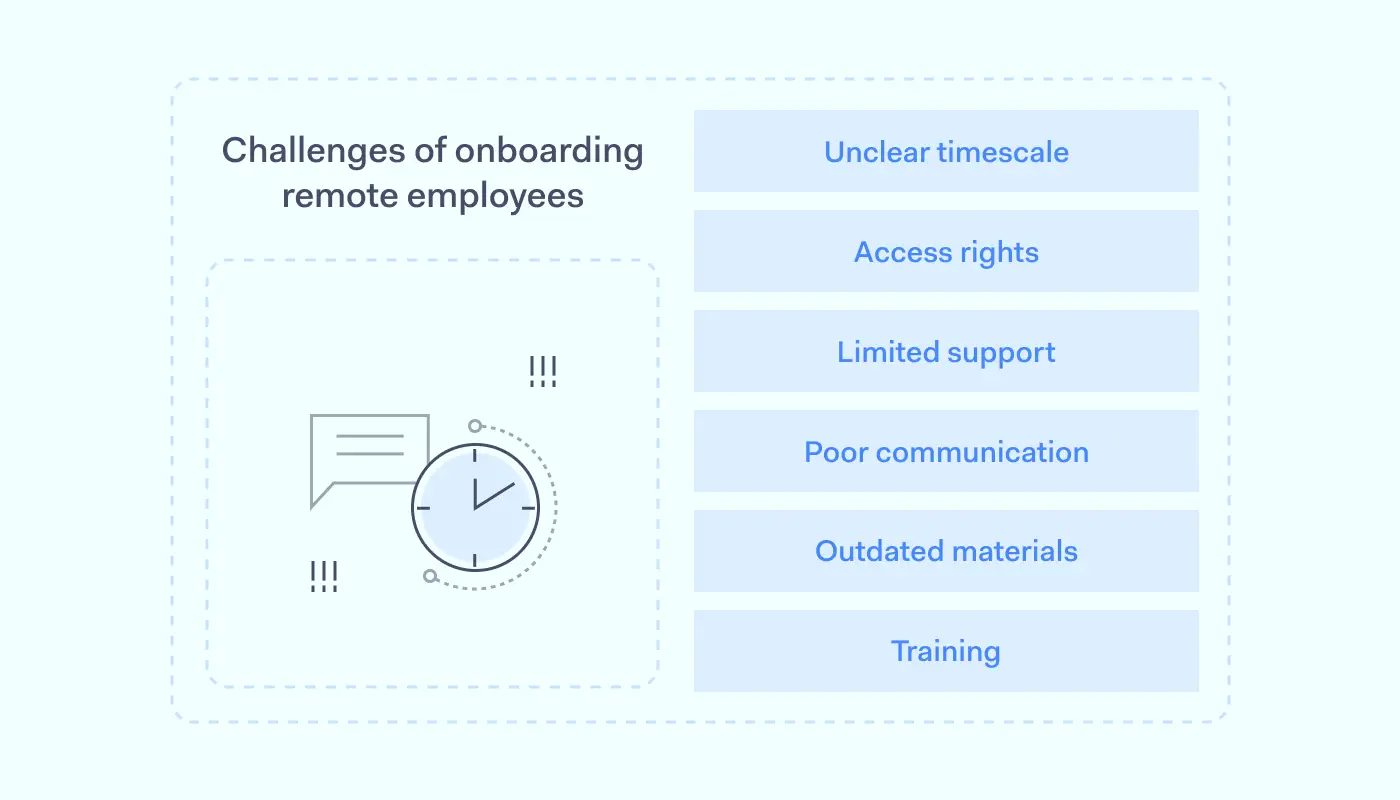
Challenges of onboarding remote employees 1400x800

HR teams do not have face-to-face contact with new hires during remote onboarding. Employees meet managers and colleagues virtually via emails, Teams meetings, and Slack discussions. This creates some unique challenges that companies need to think about.

1. Lack of a clear onboarding timescale

Onboarding tasks like creating access profiles, logging devices, and providing security training takes time. New hires may need to arrange calls with IT teams, HR professionals, and departmental colleagues.

Companies may provide employees with approved hardware like authentication tokens or access cards. And contracts and confidentiality agreements are often part of the process.

As a result, onboarding processes aren’t usually over in hours. They can even extend beyond the first week. New hires can wait over a week before accessing applications and databases. So HR teams must set itineraries for each stage of the remote onboarding process.

2. Managing access credentials and permissions

Each new hire must have an appropriate access control profile before accessing network assets. But establishing access controls for different resources can be challenging.

Security teams must create accurate profiles for new employees and connect permissions to their corporate role. They must also ensure that new hires have suitable credentials and train workers to use enterprise-wide 2FA or Multi-factor authentication systems.

3. Limited technical and administrative support

Remote onboarding can be highly technical. Employees sometimes need to update their hardware and security setups to meet company requirements. Companies often use unique platforms and apps that require orientation training. Collaboration tools can also lead to bottlenecks, making it harder to start work efficiently.

Every remote hire needs support to overcome these issues. But with many new employees entering an organization and limited IT resources, providing this support can be difficult.

4. Communication problems

Ideally, HR teams and managers would introduce new hires to the company via face-to-face meetings. But that’s not possible with remote onboarding. The distance between new hires and central offices can result in communication issues.

Without instant feedback, it’s also easy to lose critical information the new hire needs. And this is even more challenging when workers speak a different language.

New hires may also struggle to create personal connections with their colleagues. Integrating a new hire into the company culture becomes very difficult. Companies thrive when workers are connected and willing to share information. But disconnected remote workers rarely collaborate effectively.

5. Out-of-date onboarding materials

New remote employees require relevant information about technology, access, and cybersecurity. But company policies constantly change. HR teams may not maintain up-to-date onboarding databases. And they often provide the wrong information during remote onboarding processes.

For example, a company might install a data loss prevention (DLP) system to protect critical client data. But new hires may not receive guidance about classifying and handling data. This results in security risks and frustration when they begin work.

6. Delivering cybersecurity training

Cybersecurity in the workplace now extends to home offices. New remote employees need the knowledge required to use company assets securely, wherever they are. Whether you are hiring managers or freelance designers, delivering the correct cybersecurity training is challenging.

Video calls, emails, and downloadable presentations are a robust basis for security training. But they do not always add up to a productive learning environment. New hires may have questions about policies and processes. Technical problems could interfere with training events. And managers may lack assurance that employees retain critical information.

Remote employee onboarding checklist: what you need to know

When done well, remote onboarding allows workers to hit the ground running. It makes sure employees are cybersecurity aware. And it minimizes the workload on IT support teams as hires become familiar with corporate systems.

But a poorly executed remote onboarding program can be disastrous. Companies can lose the social connections that make teams effective. IT staff can become overwhelmed. Poor security practices creep into everyday work, raising the risk of phishing and malware attacks.

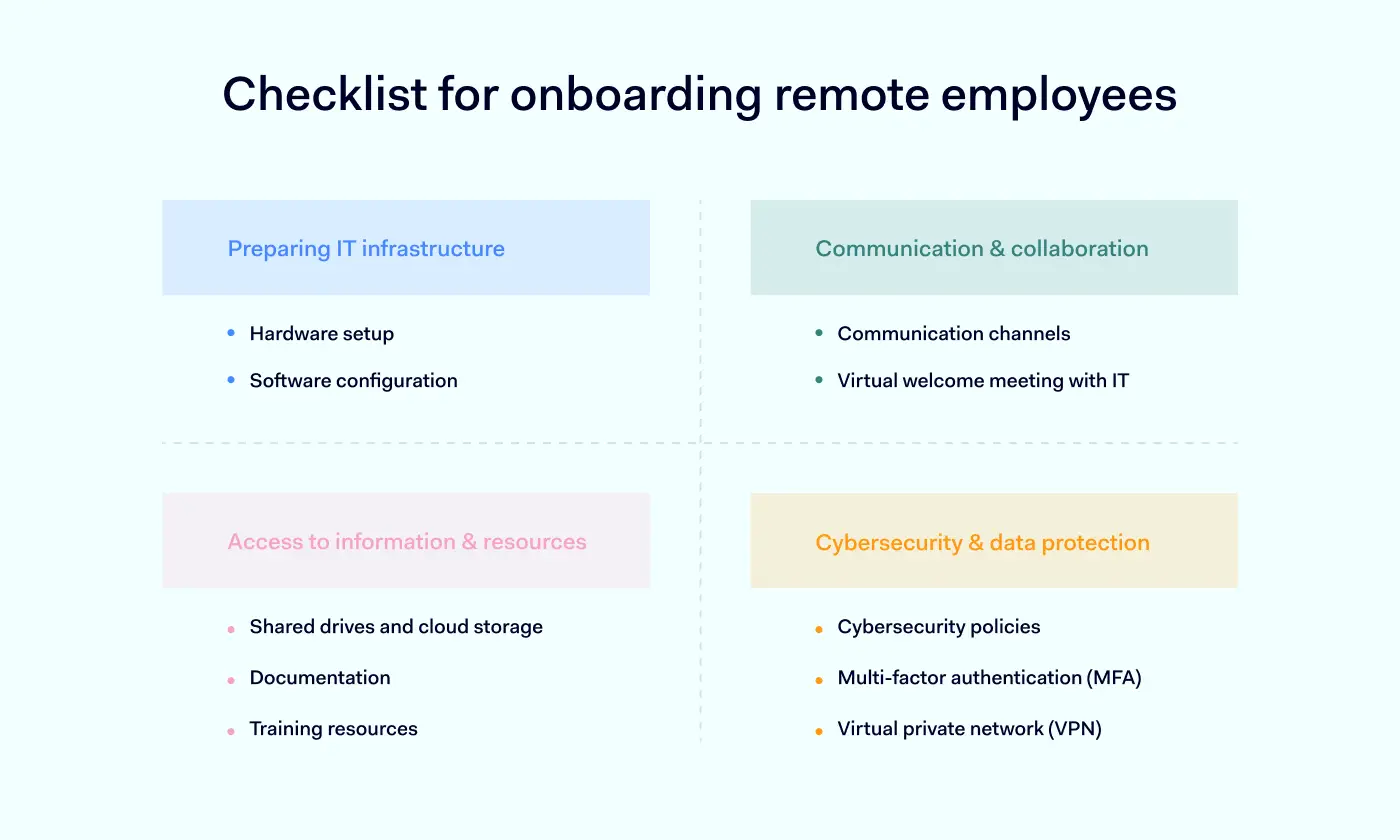
A well-structured remote onboarding policy streamlines the process. And creating effective systems relies on IT professionals. The following checklist provides a roadmap to design onboarding systems that integrate new hires without raising security risks or damaging productivity.

1. Preparing the IT infrastructure

New hires must usually make changes to their home IT setup. IT teams need to ensure staff have appropriate workstations and operating systems. They need to consider cybersecurity, as well as providing critical communication tools. And IT staff must provide proper support to make IT infrastructure operational.

Hardware setup

At the start of the onboarding process, prepare any necessary hardware. Match up new hires with required laptops or authentication peripherals. Prepare the hardware for shipment as quickly as possible.

OSHA can also fine companies that put the health and safety of remote workers at risk. In any case, protecting worker health is crucial. Verify that each workspace meets ergonomic requirements. And provide any necessary furniture to create safe, comfortable environments.

Software configuration

Remote employees need access to essential applications. IT teams should prioritize the configuration of video conference software and communication tools. Set up messaging apps and virtual meeting platforms. This will keep new hires informed and help to integrate them quickly.

IT must check that software supplied to remote devices has the correct licenses. And technicians should test every critical app. Ensure the worker can access central or cloud-hosted resources and that performance meets minimum benchmarks.

2. Cybersecurity and data protection

Remote workers can create cybersecurity risks to both network assets and sensitive data. IT teams need to prioritize security when introducing new employees.

Cybersecurity policies

Review your security policies before onboarding new workers. Security policies should cover all critical risks. For example, they should clearly explain password policies for remote workers. And they should include details about penalties for policy breaches.

Provide cybersecurity training for every hire. Remote workers should understand the main phishing risks and the importance of using updated threat detection tools. They should be aware of corporate data handling policies. Including a list of best practices in the employee handbook is advisable. This list should provide guidelines for critical security issues.

Multi-factor authentication (MFA)

Remote workers should connect via secure authentication systems. Implement multi-factor authentication for all access requests. MFA requires multiple authentication factors for each login request. It can apply to SSO portals or individual messenger apps.

Ensure every employee has correct credentials and that authentication tools connect seamlessly with privileges management systems.

Virtual Private Network (VPN)

Virtual private networks encrypt data passing between remote workers and central network resources. They provide an essential layer of protection for information and should be part of every remote onboarding process.

Inform new hires how to access the company VPN. Provide client software and any required hardware. And check connection speeds to ensure seamless connectivity.

3. Communication and collaboration

Create smooth communication channels between your new hire and the IT department. Onboarding remote workers involves a lot of technical information. And employees usually have queries or issues to resolve. Following these communication best practices will help.

Communication channels

Add remote employees to relevant team chats and email lists. Introduce them to colleagues in team chat rooms, and ensure staff can use communication tools effectively. If you need to provision specialist collaboration tools, go ahead and do so.

Introduce virtual meeting tools and check for bandwidth or configuration issues. Licensing problems can interfere with some video meeting tools. Double-check to ensure everything is up to date.

Virtual welcome meeting with IT

Schedule a virtual introduction meeting with relevant IT professionals. This is an opportunity to explain critical technology issues and reinforce cybersecurity training.

The meeting is a social event that introduces personalities and gives new hires the confidence to raise questions. Take onboard employee feedback and use it to make the onboarding process more efficient. The meeting also allows technicians to test video conferencing tools, allowing IT staff to fine-tune configurations.

4. Access to information and resources

Network resources should be available to remote employees when they complete security training. This should take place as quickly as possible. IT teams should plan so that access privileges slot into place automatically.

Shared drives and cloud storage

Link each new hire to a role-based access management profile. Access management tools document which resources are available to the user. Users should have easy access to data and apps that are relevant to their role, including company intranets and cloud environments. But IT teams should block access to all other resources on shared drives and cloud containers.

Be careful to provide the right privileges for each role. If you are hiring a large group of remote workers for a project, you can use generic RBAC profiles. But hiring managers requires a more tailored approach for each individual.

Documentation

Make security and IT policies available to every new hire. At the introductory meeting, explain how to access documentation and how policies are updated and maintained. If possible, create an employee handbook that includes everything remote workers need to know.

Training resources

Remote employees require virtual training. So prioritize access to digital training materials and resources. From the start, security training is a core part of the company culture. And make access to resources as flexible as possible, allowing workers to fit training into their onboarding routine.

Checklist for HR professionals

The other side of the remote onboarding coin relates to Human Resources teams. HR professionals are critical in introducing new employees and making the onboarding experience more enjoyable.

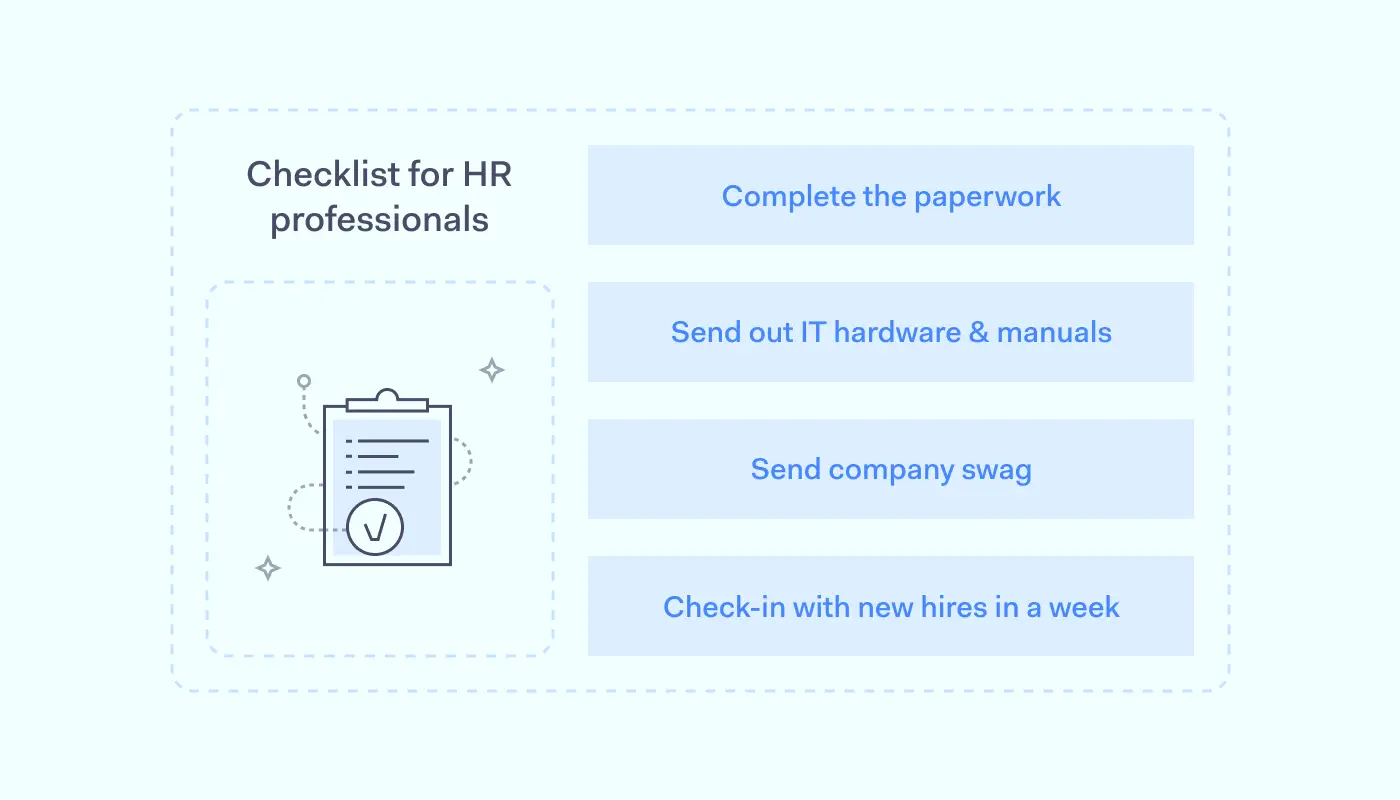
Company orientation tasks complement the work of IT departments. Here are the key actions that HR officers need to consider:

Ensure paperwork is done

Nothing is more frustrating during onboarding than receiving an endless stream of documents to sign. Make this task pain-free by creating a single cache of necessary paperwork for each onboarding procedure.

Automate the provisioning of key documents. This reduces the number of times the new employee needs to provide digital signatures and makes human error less likely. Assign a team member to field queries about forms or policies. And apply encryption to secure any personal information transmitted during onboarding procedures.

Send pre-boarding IT hardware and manuals

Ensure employees are comfortable and safe by providing ergonomic furniture and peripherals like back supports and ergonomic mice. And field requests for specific hardware. Employees may need more powerful laptops or software upgrades. Provide whatever hires need to work safely and productively.

Manuals are an important part of the HR onboarding process. Produce an appealing employee manual that blends clarity and accessibility. Include information about cybersecurity and how to access critical workloads. But also add sections on company history and employee benefits the company provides.

Send company swag

One of the most important HR tasks during remote onboarding is creating a sense of belonging to the company culture. That isn’t easy to achieve without face-to-face contact. HR professionals need to think creatively about the onboarding experience and make every new employee feel welcome from the start.

Providing company swag in the first week is an easy win. Simple branded items like cups, mouse pads, pens, or diaries can add a human touch. But you can go as far as you like. Some companies like to send hoodies or T-shirts. Others send laptop cases, beach towels, or practical items like reusable water bottles.

Check up on new hires in the first week

HR is the first point of contact for each new employee during their first days on the job. Make HR professionals available to talk via video calls. And proactively check up on remote workers to keep them in the loop.

HR can also encourage staff to complete the onboarding schedule within the agreed timescale. Don’t force new hires to finish the onboarding process too quickly. Everyone adjusts at their own pace. But be clear about what employees must do, and let them know when everything is complete.

Simplify and secure remote onboarding with NordLayer

Remote onboarding is a challenge for businesses in every area of the economy. Workers need to receive training and information. They need the tech to carry out their duties. And they must have the right access privileges and authentication credentials to work securely.

NordLayer will help you create a secure and streamlined onboarding experience. Our solutions make the IT side of remote onboarding much easier.

Companies can use our secure remote access solutions to replace existing Virtual Private Networks. NordLayer’s business gateway encrypts traffic passing from remote workstations to the company intranet. And they scale easily. Organizations can easily add more workers as the need arises.

Our remote access systems facilitate network segmentation for assigning role-based privileges, offering network administrators precise controls over the network. They integrate with all major authentication providers. And they do so cost-effectively. Companies can onboard hires rapidly, safely, and affordably.

If you are struggling with remote employee onboarding, NordLayer can assist. Use our checklist to guide you and feel free to get in touch with our team today.

About Version 2 Digital

Version 2 Digital is one of the most dynamic IT companies in Asia. The company distributes a wide range of IT products across various areas including cyber security, cloud, data protection, end points, infrastructures, system monitoring, storage, networking, business productivity and communication products.

Through an extensive network of channels, point of sales, resellers, and partnership companies, Version 2 offers quality products and services which are highly acclaimed in the market. Its customers cover a wide spectrum which include Global 1000 enterprises, regional listed companies, different vertical industries, public utilities, Government, a vast number of successful SMEs, and consumers in various Asian cities.

About NordLayer
NordLayer is an adaptive network access security solution for modern businesses – from the world’s most trusted cybersecurity brand, Nord Security.

The web has become a chaotic space where safety and trust have been compromised by cybercrime and data protection issues. Therefore, our team has a global mission to shape a more trusted and peaceful online future for people everywhere.