Skip to content

runZero 3.3: Unmatched visibility into your Google ecosystem

What’s new with runZero 3.3?

  • Extended visibility into Google Workspace
  • Queries for Google Workspace users and groups
  • Fingerprinting for Google assets
  • Identification of OpenSSL services
  • Improvements to the runZero Console

Extended visibility into Google Workspace
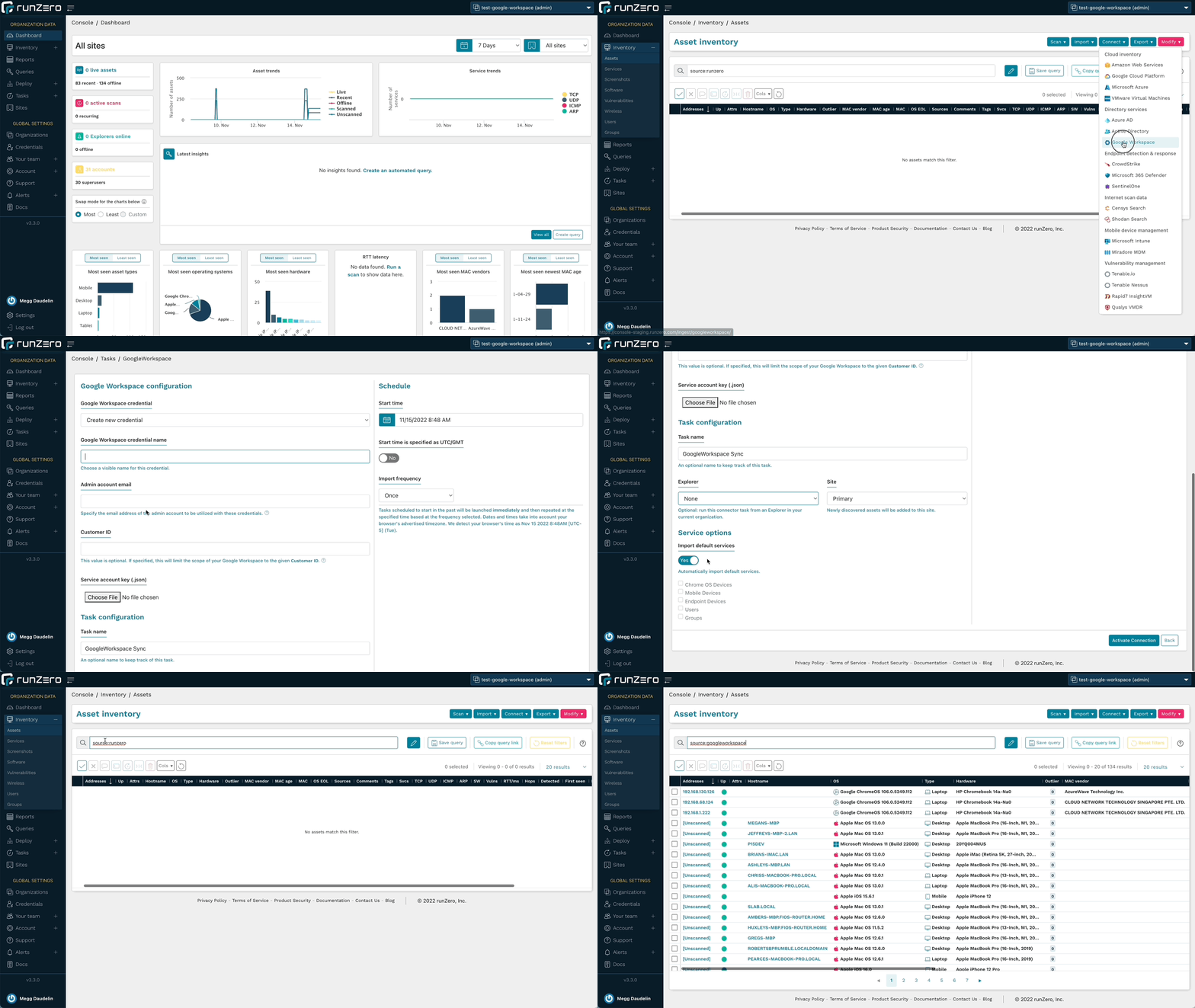
runZero 3.3 furthers the visibility into your Google ecosystem through a new integration with Google Workspace. runZero Professional+ users will be able to sync Google Workspace asset details from mobile devices, endpoints, and managed Chrome systems, while runZero Enterprise users will also be able to sync Users and Groups. Once the integrations are configured, users can view, search, analyze, export, and alert on attributes from both Google Workspace and Google Cloud Platform.

One of the key reasons to leverage the runZero integrations is to get better insight into the scope of your environment and completeness of coverage since MDM and IAM platforms can’t provide any insights into devices that haven’t been onboarded. To identify assets on your network that aren’t onboarded to Google Workspace, use the query source:runZero AND NOT source:googleworkspace. Conversely, use this query to find assets from Google Cloud Platform or Google Workspace that have not been scanned by runZero yet: (source:gcp OR source:googleworkspace) AND NOT source:runzero. These queries can help you keep pace with unmanaged and disconnected assets.

The integration also pulls in many Google Workspace attributes to give you comprehensive asset visibility. This could include attributes like when a device was last synced, whether a device has a password enabled or is encrypted, or whether it supports the use of a work profile. The Recent Users list in the asset details can also provide insight into device ownership and usage. You can filter for a specific user by using the @googleworkspace.mobile.email attribute for mobile devices or the @googleworkspace.chromeos.recentUsers attribute for ChromeOS devices. To find mobile devices that aren’t locked with a password try the query @googleworkspace.mobile.devicePasswordStatus:=”Off”, or use @googleworkspace.mobile.encryptionStatus:=”Not Encrypted” to find ones without encryption enabled. The wildcard operator also lets you find results with a range of OS versions, such as using @googleworkspace.endpoint.osVersion:=”MacOS 12.% to find Google Workspace assets running macOS Monterey.

runZero offers unmatched active network scanning, while also integrating with an ever-growing list of data sources so that you have a complete asset inventory at your fingertips. To get started, set up a connection to Google Workspace or Google Cloud Platform.
Queries for Google Workspace users and groups
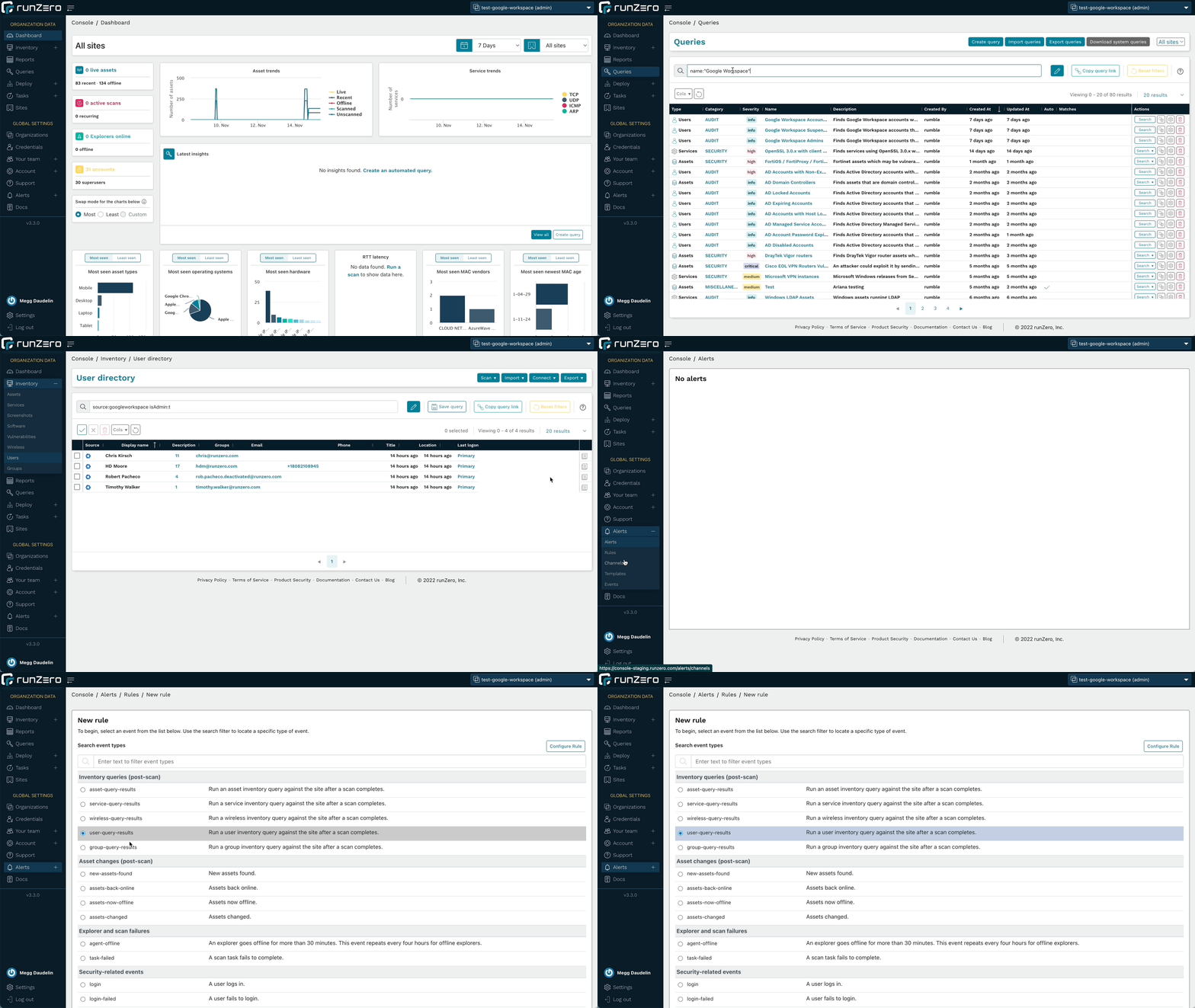
runZero Enterprise users can leverage the new queries tailored for the Google Workspace integration to quickly find and alert on accounts that match particular parameters, in addition to being able to run searches in the Users and Groups inventories. Identify administrator accounts, suspended accounts, and accounts without MFA to improve IAM efforts and better protect your environment. These queries are included in the Query Library and can also be used to create alerts.

Run queries about Google Workspace users or create an alert rule to find assets of interest.
Fingerprinting for Google assets
runZero includes fingerprints for the metadata returned by the Google integrations, including Google Cloud Platform and Google Workspace. This will help provide the most accurate operating system and hardware data about the assets in your inventory.

In addition to Google fingerprints, runZero has also improved fingerprinting coverage of Microsoft 365 Defender assets and SNMP devices. Additional support was added or improved for products by Apache, Aruba, Avaya, Axon, Cisco, CyberPower, Debian, Eaton, Epson, Fortinet, Fujifilm, Geist, Hikvision, Lexmark, Oracle, Sato, Sony, Vivi, and VMware.

Identification of OpenSSL services
In preparation for the OpenSSL vulnerability announcement, runZero released remote, unauthenticated fingerprinting for OpenSSL 3 services, allowing our users to get ahead of the mitigation process prior to the vulnerability details becoming public. This capability has since expanded to detect even more TLS implementations and track the TLS stacks in use on each asset. runZero users can find OpenSSL endpoints using the query product:openssl, in the assets, services, and software inventories.

The server-side exposure only applies to services that process client certificates. runZero already performs checks for this, even though it is not a common configuration. To identify services running OpenSSL 3.0.x variants that may be vulnerable to exploitation, use the following query in the service inventory search: _service.product:”OpenSSL:OpenSSL:3″ AND tls.requiresClientCertificate:”true”.

Improvements to the runZero Console
The 3.3 release includes several changes to the user interface to improve the performance of the runZero console. The tables on the Explorers, Sites, Organizations, and Your team pages now perform and load faster. This will let users query and sort the results in tables more efficiently, getting to the answers they need faster.

The release also extends the availability of the All Organizations view. All users now have a view that will show them the results from all of the organizations that they have access to. The available permissions in that view reflect their per-organization permissions so that they can manage resources just like they would when viewing a single organization.

Release notes
The runZero 3.3 release includes a rollup of all the 3.2.x updates, which includes all of the following features, improvements, and updates.

New features

  • runZero Professional and Enterprise customers can now sync assets from Google Workspace.
  • runZero Enterprise customers can now sync users and groups from Google Workspace.
  • The “All Organizations” view is now available to restricted users with a filtered scope.
  • User interface tables were revamped for Organizations,
  • Sites, Explorers, and Teams.
  • Live validation is no longer required for Qualys VMDR and InsightVM credentials.
    Fingerprint updates.

Product improvements

  • The subnet utilization report now supports filtering by site.
  • CSV export of assets now includes the same hostname information as the inventory view.
  • Up-to-date ARM64 builds of the standalone scanner are now available.
  • The account API endpoint for creating organizations now accepts the argument types documented.
  • Merging two assets now correctly updates the date of the newest MAC address for the resulting asset.
  • Disabling all scan probes now disables the SNMP probe.
    Service Provider information is now displayed with a default domain before SSO settings are configured.
  • Explorers are now ordered alphabetically on the scan configuration and connector configuration pages.
  • runZero users logging in via SSO are now presented with the terms and conditions acceptance dialogue.
  • A new tls.stack attribute that tracks the TLS software provider and version has been added for assets and services.
  • A new canned query for OpenSSL 3.0.x with client certificate authentication has been added.
  • The scanner now reports OpenSSL versions via TLS fingerprinting.
    The scanner now reports Tanium agent instances on the network.
  • The scanner now reports additional detail for SSLv3 services.
  • The search keywords has_os_eol and has_os_eol_extended are now supported on the Assets and Vulnerabilities inventory pages.
  • The “last seen” link to the most recent scan details has been restored on the asset details page.

Performance improvements

  • Improved performance when scanning from macOS hosts that have certain EDR solutions installed.
  • Improved performance of Intune integration when importing a large number of users and devices.
  • Scan task processing speed has been improved for SaaS and self-hosted customers.
  • The baseline memory usage of Explorers has been reduced.
  • Error handling of misconfigured fingerprints has been improved to reduce Explorer and scanner crashes.

Fingerprinting changes

  • Improved fingerprinting coverage of Microsoft 365 Defender for Endpoints assets.
  • Improved fingerprinting coverage of SNMP devices.
  • Tanium agent detection now sets the edr.name attribute.
  • Added fingerprinting of OpenSSL, GnuTLS, and Windows TLS stacks, including version when possible.
  • Apple ecosystem OS fingerprint updates.
  • Additional support added-or-improved for products by Apache, Aruba, Avaya, Axon, Cisco, CyberPower, Debian, Eaton, Epson, Fortinet, Fujifilm, Geist, Hikvision, Lexmark, Oracle, Sato, Sony, Vivi, and VMware.

Integration improvements

  • The AWS integration now includes an option to delete AWS-only assets that were not seen in the most recent import.
  • The Qualys integration now includes an option to import unscanned assets and is disabled by default.
  • Processing speed for large Qualys imports has been improved.
  • GCP credentials can now be configured to import assets from multiple projects.
  • The error message indicating that an AWS integration credential has insufficient permissions has been improved.

Bug fixes

  • A bug that could prevent the use of third-party credentials when using TLS thumbprints or the insecure connection option with a public URL has been resolved.
  • A bug which sometimes prevented GCP imports from completing has been fixed.
  • A bug in how Service Inventory searches were launched from the
  • Asset details page had been resolved.
  • A bug that could prevent TLS probes from completing has been resolved.
  • A bug that could prevent updating site metrics has been resolved.
  • A bug that could prevent the Intune integration from completing long-running tasks has been resolved.
  • A bug that could prevent the GCP integration from returning all assets has been resolved.
  • A bug that could result in a recurring integration running again before the previous task finished has been resolved.
  • A bug that could prevent importing assets from Microsoft Intune has been resolved.
  • A bug that could prevent importing assets from Microsoft 365 Defender has been resolved.
  • A bug that could prevent importing assets from Microsoft 365 Defender has been resolved.
  • A bug that could cause broken asset links has been resolved.
  • A bug that could cause missing service data for services with conflicting virtual hosts has been resolved.
  • A bug that could cause inaccurate user counts for imported directory groups has been resolved.
  • A bug that affected tooltip display has been resolved.
  • A bug that prevented “open in new tab” navigation using middle/right click has been resolved.
  • A bug that could prevent Azure AD imports has been resolved.

About Version 2 Digital

Version 2 Digital is one of the most dynamic IT companies in Asia. The company distributes a wide range of IT products across various areas including cyber security, cloud, data protection, end points, infrastructures, system monitoring, storage, networking, business productivity and communication products.

Through an extensive network of channels, point of sales, resellers, and partnership companies, Version 2 offers quality products and services which are highly acclaimed in the market. Its customers cover a wide spectrum which include Global 1000 enterprises, regional listed companies, different vertical industries, public utilities, Government, a vast number of successful SMEs, and consumers in various Asian cities.

About runZero
runZero, a network discovery and asset inventory solution, was founded in 2018 by HD Moore, the creator of Metasploit. HD envisioned a modern active discovery solution that could find and identify everything on a network–without credentials. As a security researcher and penetration tester, he often employed benign ways to get information leaks and piece them together to build device profiles. Eventually, this work led him to leverage applied research and the discovery techniques developed for security and penetration testing to create runZero.

Which discovery approach works best for unmanaged devices

Unmanaged devices are the Achilles heel of any asset inventory. Shadow IT, rogue, or orphaned devices are easy targets for the adversary to gain potential footholds onto the network.

The obvious question is: which discovery approaches are the most effective at finding unmanaged devices?

Why are unmanaged assets harder to find?

First, we need to examine why unmanaged devices are so difficult to find. Let’s break it down:

  • Shadow IT devices: DevOps teams spin up machines but without central governance. Many discovery approaches need inputs to know where to look. So knowledge of these devices does not propagate to the rest of the organization.
  • Rogue devices: As the name suggests, someone intended for these devices to remain under the radar and evade standard discovery techniques. Otherwise, they would only have remained rogue for a short time.
  • Orphaned devices: Many discovery approaches require tuning or fresh inputs to keep the inventory current. Without caretakers to ensure the necessary calibration, orphaned devices become unmanaged assets that fall out of the asset inventory if they were ever there in the first place.

What has been tried and failed

So what are the traditional approaches to finding assets, and why do they fall short?

Endpoint agent (or just “agent”)

This approach requires installing software on every device which gathers excellent detail. This method only works with managed IT assets. After all, the device is known and probably managed if you can install software on it. So this approach does not address the bane of asset inventory–unmanaged assets.

Authenticated scans

This active scanning methodology uses one or more scanners to log into every device that responds within an IP range. Once logged in (typically via SSH or WMI), the scanner gathers excellent detail about the device. Similar to the previous method, the device is known and probably managed if you already know the credentials to get on it. So, once again, this approach only really works with managed IT assets.

Passive network monitor

This technique deploys one or more appliances on a network to eavesdrop on network traffic, including chatter from unmanaged assets. The setup requires sending network traffic to the appliance(s) by either reconfiguring one or more switches to span or inserting one or more taps into the network. Where in the network you make these changes matters. Eavesdropping at a network “choke point” is ideal since it ensures visibility into all traffic. For all the work involved, you, unfortunately, get little detail. Suppose an asset rarely talks on the network or is terse. In that case, there’s little data to work with, leading to imprecise or inaccurate fingerprinting. As more devices encrypt traffic, the fingerprinting accuracy gets worse.

API import

Solutions that generate asset inventories from API imports do not discover assets independently. They rely on the rest of the security and IT stack to cobble together an inventory. Completeness and accuracy depend on data quality from those sources. API import solutions will miss unmanaged assets and produce vague fingerprinting.

Unauthenticated scans

This final approach uses one or more scanners to actively scan for information from every device within an IP range. Unlike authenticated scans, these scanners do not attempt to log in to machines. Unauthenticated scans can discover unmanaged assets, even without prior knowledge. Since it’s an active scan rather than a passive monitor, it can interrogate the devices to gather much more information for accurate fingerprinting. The one shortcoming of this approach lies with sensitive devices. These assets tend to be older or low-powered, often found in operational technology (OT) environments, and may be disrupted by aggressive scanning.

New reasons for an old problem

So which approach works best for unmanaged assets? First, it’s worthwhile to understand how this state of asset inventory came to be. There was a time when security just needed to protect the corporate office. Over the past 20 years, the following trends started or magnified, leading to a divergence of environments. In some cases, these environments teem with unmanaged assets. Others permit the deployment of unmanaged assets. Still, others allow assets to become unmanaged more easily.

  • More IoT devices: Network-enabled cameras and smart speakers are recent phenomena.
  • Convergence of IT and OT: OT networks have been overlaid onto IP networks to improve manageability and, in many cases, come under the purview of IT.
  • Move to the cloud: Many organizations see the cloud as a transformational journey to lower cost and increase speed & agility.
  • Rise of DevOps: Software development and operations teams have adopted a methodology of shared ownership, automation-at-scale, and rapid feedback resulting in dynamic attack surfaces, particularly in the cloud. Unfortunately, there isn’t always governance in this area.
  • More M&As: Each year in the 2010s, there were more than 2x the large M&As than each year in the 2000s.1 When you take on a new company, you take on all its unknowns and risks too.
  • Work from home: Pressures around talent shortage gave rise to a growing WFH trend that compounded due to the pandemic.

Against this backdrop of divergence of environments, there has been a convergence of responsibilities onto security teams. During this same time, organizations have improved their security posture around managed IT assets in on-prem environments. Assets outside this scope have become more attractive targets.

What works

Given these challenges, let’s look at the approaches that will work the most effectively.

Start with unauthenticated scans

Unauthenticated scanning is the only possible starting point–inherent limitations in the other four disqualify them as options. If only we could use an unauthenticated active scanning approach that avoids disrupting sensitive devices.

Mix in a security research-based approach

The missing ingredient is to couple a well-designed scanner with a security research-based approach. Such a recipe conducts discovery from the perspective of the adversary, someone who actively avoids disrupting devices and leaving digital footprints during recon. The scanner must use properly-formatted packets, which ensures the best chance of “good” behavior from a device and allows tuning of scan parameters, including overall and per-host scan rate. Just as important, the scanner must fingerprint as it scans, adapting the scan behavior as it learns asset details.

Zero unmanaged assets

This unauthenticated scan and security research-based approach has proven practicable in thousands upon thousands of real-world networks distributed over various environments: IT, IoT, OT, cloud, and remote. Start a runZero trial to see for yourself.

Get started with runZero in minutes

Do you know about the unmanaged assets on your network? Find them with runZero.

Get started

Join our team

About Version 2 Digital

Version 2 Digital is one of the most dynamic IT companies in Asia. The company distributes a wide range of IT products across various areas including cyber security, cloud, data protection, end points, infrastructures, system monitoring, storage, networking, business productivity and communication products.

Through an extensive network of channels, point of sales, resellers, and partnership companies, Version 2 offers quality products and services which are highly acclaimed in the market. Its customers cover a wide spectrum which include Global 1000 enterprises, regional listed companies, different vertical industries, public utilities, Government, a vast number of successful SMEs, and consumers in various Asian cities.

About runZero
runZero, a network discovery and asset inventory solution, was founded in 2018 by HD Moore, the creator of Metasploit. HD envisioned a modern active discovery solution that could find and identify everything on a network–without credentials. As a security researcher and penetration tester, he often employed benign ways to get information leaks and piece them together to build device profiles. Eventually, this work led him to leverage applied research and the discovery techniques developed for security and penetration testing to create runZero.

Introducing the runZero Infinity Partner Program

We don’t know what’s on our network anymore. Networks are more complex than ever. Unmanaged and agentless devices are constantly spinning up and down, and there’s a never ending surge of smart and IoT devices.

The tools used for asset discovery today haven’t changed in the past 20 years, but the devices sure have. This leaves unknowns across networks. Unknowns = big risk. 

Strong security posture starts with an authoritative source of truth for the network. Frameworks, like CIS, NIST, and the new CISA directive, all start with asset inventory for good reason: if we don’t know what’s on our network, we can’t protect, secure, and manage it. runZero was designed to solve this critical, universal problem.

Better together with our partners

runZero’s goal is to bring cyber asset management to networks around the world. Our partner community is one of the most meaningful and significant ways to achieve this goal and meet the market demands for asset inventory.

Over the summer, I joined runZero as the Director of Channel to build and scale our partner team and ecosystem with three clear goals:

  1. Deliver an exceptional experience for partners.
  2. Accelerate sales and revenue growth alongside our partners.
  3. Grow our partner attach rate to 80% of revenues.

Over the past four months, our partner team has grown 4x, and we’ve got a lot more growth planned (we’re hiring). Our team’s top priority has been building a partner-first framework to revamp how we work with our partners.

Introducing the runZero Infinity Partner Program

When partners ask about runZero’s partner culture, I can truly and emphatically say we have a “partner first” mindset. Today, I’m excited to introduce our runZero Infinity Partner Program!

With its launch, our partners now have the resources, enablement, content, training, and support to deliver a powerful cyber asset management solution to our joint customers globally. The Infinity Partner Program puts the partner experience front and center by matching how our partners do business and serve their end customers. The program builds on our already strong channel presence and focuses on helping partners maximize their investments with us.

Our team will be here to support our partners on every step of their journey with us. From that initial first meeting all the way to creating joint go to markets, we’re in this together.

You can find all of this and more in our brand new Infinity Partner Portal.

What’s coming today

  • A best-in-class portal experience empowering partners through training, certification programs, and exclusive partner-only collateral
  • Collaborative go-to-market support, including industry events, joint marketing efforts, and co-sell motions
  • Extensive partner enablement and learning content
  • Rewards-based incentive framework and discount structure

What’s coming in the future

  • Advanced training and certifications
  • Exciting partner SPIFs and new incentives
  • Additional content and joint go to market opportunities
  • runZero partner team growth to best support our partners
  • Alliance and technical integration opportunities
  • MSP specific content
  • And more!

Stay tuned as we move to infinity and beyond!

Learn more about the runZero Infinity Partner Program.

About Version 2 Digital

Version 2 Digital is one of the most dynamic IT companies in Asia. The company distributes a wide range of IT products across various areas including cyber security, cloud, data protection, end points, infrastructures, system monitoring, storage, networking, business productivity and communication products.

Through an extensive network of channels, point of sales, resellers, and partnership companies, Version 2 offers quality products and services which are highly acclaimed in the market. Its customers cover a wide spectrum which include Global 1000 enterprises, regional listed companies, different vertical industries, public utilities, Government, a vast number of successful SMEs, and consumers in various Asian cities.

About runZero
runZero, a network discovery and asset inventory solution, was founded in 2018 by HD Moore, the creator of Metasploit. HD envisioned a modern active discovery solution that could find and identify everything on a network–without credentials. As a security researcher and penetration tester, he often employed benign ways to get information leaks and piece them together to build device profiles. Eventually, this work led him to leverage applied research and the discovery techniques developed for security and penetration testing to create runZero.

What you need to know about the OpenSSL 3.0.x critical vulnerability

The OpenSSL project team recently patched two buffer overflow vulnerabilities that affect 3.0.0 through 3.0.6 releases of  OpenSSL. These vulnerabilities exist within X.509 certificate verification (specifically within name constraint checking logic) and affect both client and server side applications. Attackers can exploit these vulnerabilities to cause a denial-of-service by crashing applications/services (CVE-2022-3786, CVE-2022-3602) or potentially achieve remote code execution (CVE-2022-3602). The OpenSSL project team fixed these vulnerabilities in OpenSSL 3.0.7. OpenSSL 1.x versions do NOT contain these vulnerabilities.

Is runZero affected by these OpenSSL vulnerabilities?

The runZero platform does not use OpenSSL. The runZero operations team is ensuring that appropriate updates and mitigations are being rolled out to all of our supporting systems, including endpoints, infrastructure, and supporting services.

What are the details around these vulnerabilities?

The OpenSSL project team put together a thorough blog post that covers the details.

How to find vulnerable OpenSSL 3.0.x in your network

You can use runZero to discover vulnerable 3.0.x versions of OpenSSL in your environment. We shipped initial support for remote OpenSSL version detection in runZero version v3.2.6 on Sunday, October 30th, and scans run by our SaaS users after this time will report OpenSSL in the software inventory along with the version number when possible. Self-hosted users can enable this feature by applying the v3.2.6 (or later) update and rescanning their environment. In both cases, the runZero Explorer will be automatically upgraded as needed before the scan is launched.

After your scans complete, you can find assets running OpenSSL endpoints using the query: product:openssl. This query also works for the services and software inventory.

The server-side exposure only applies to services that process client certificates. This is not a common configuration, but runZero already performs checks for it. To identify services running OpenSSL 3.0.x variants that may be vulnerable to exploitation, use the query _service.product:"OpenSSL:OpenSSL:3" AND tls.requiresClientCertificate:"true" in the service inventory search.

The runZero scanner will reliably detect OpenSSL 3.0.x versions on any TLS-enabled ports identified during a normal scan. This includes both 3.0.x and 1.1.x OpenSSL versions when TLS-enabled service uses either TLS 1.2 or 1.3. The current fingerprints handle protocols that expose TLS directly. STARTTLS and additional service support are due in the near future.

What is the impact of these vulnerabilities?

The two issues are in the punycode parsing function used to process email addresses within certificates. Punycode is a way to transform a domain name using a non-ASCII character set into a standardized label. Punycode formatting can also convert emoji unicode characters into usable domain names. For example, ☃.net is encoded as xn--n3h.net.

Both client and server applications using OpenSSL 3.0.x include the vulnerability. Exploitation requires presenting a malicious certificate to the application. This only occurs after certificate validation, which is a mitigating control, in theory. Unfortunately, some applications disable certificate validation, either entirely (in insecure mode) or via a custom validator in the application.

To attack an exposed service:

  1. An attacker would need to present a client-side certificate that triggers this issue, and
  2. The server would need to have client certificate authentication enabled.

Even under these conditions, the client certificate would either need a valid signature or the application would need to be configured to skip validation. The number of applications that meet these requirements vary from organization to organization.runZero automatically checks for the use of both OpenSSL 3.0.x and client-side certificate support (tls.requiresClientCertificate) by default.

The client-side scenario may be harder to solve. Utilities like curl and wget, system update frameworks like apt and yum, and other client-side applications, may be impacted if they disable certificate validation. Some scripts may disable validation (e.g., using curl -k) to work around missing root certificates. The script can validate the hash of the received file, but still potentially exposes the script’s host to attack by a server presenting a malicious certificate with a punycode email address attribute.

Servers that make outbound calls to other HTTP endpoints (e.g., APIs and webhooks) also fall under this client-side scenario. Finding these embedded client-side instances are trickier, since every binary on every platform is suspect until proven otherwise. While many applications use the system library for OpenSSL, quite a few also statically link the library. These instances must be individually patched even if the system libraries are up-to-date.

How to respond

First things first: identify any externally exposed network services using OpenSSL 3.0.x that support client certificate authentication. This is the most likely scenario for remote exploitation today. runZero Enterprise customers can use our hosted scan engines to quickly scan their externally-facing assets.

Next, categorize internal services using OpenSSL 3.0.x and leverage existing software inventory capabilities (like the SentinelOne and Miradore integrations in runZero) to make a list of systems that use OpenSSL 3.0.x. Ensure that these systems are configured to receive frequent updates. Spot check that updates are applied once available.

Finally, identify third-party, statically-linked applications that might be using OpenSSL. There is great work happening with YARA rules that can help.

How to remediate

Thorough remediation of this vulnerability requires:

  • Shifting all applications/services that use vulnerable OpenSSL 3.0.x software to OpenSSL 3.0.7.
  • Deleting all files associated with vulnerable OpenSSL 3.0.x software, to ensure nothing attempts to use them.

You can accomplish the above by doing the following per asset:

  • Update system and non-system OpenSSL 3.0.x libraries to 3.0.7.
  • Update installed applications that are statically linked to (or are packaged with) a vulnerable OpenSSL version.
  • Ensure older files associated with vulnerable OpenSSL 3.0.x versions are gone.

If your organization maintains applications or services which use OpenSSL:

  • Rebuild applications/services that statically link to a vulnerable OpenSSL 3.0.x version to link with 3.0.7.
  • Rebuild applications/services that repackage or specify a vulnerable OpenSSL 3.0.x version.

Software developers might also consider switching to a non-vulnerable TLS implementation, including the older OpenSSL 1.1.x branch, the LibreSSL project, or the BoringSSL project.

How to mitigate

If remediation in the near term is not an option, doing one of the following can help reduce your attack surface:

  • Disable TLS client authentication for services using a vulnerable OpenSSL version that have it enabled.
  • Stop running applications/services that use a vulnerable OpenSSL version (e.g., sshd, httpd, etc.).
  • Use access control rules in your firewalls or routers to block access to ports associated with services that use a vulnerable OpenSSL version on affected assets.
  • Disconnect from the network (or power down) devices that have services/applications/OSes using a vulnerable OpenSSL version.

Mitigation should be considered a temporary measure until remediation is possible.

How to stay on top of these vulnerabilities

Many individuals and organizations are compiling information on software affected by these OpenSSL vulnerabilities. See our Acknowledgements section below for links to those resources.

Acknowledgements


About Version 2 Digital

Version 2 Digital is one of the most dynamic IT companies in Asia. The company distributes a wide range of IT products across various areas including cyber security, cloud, data protection, end points, infrastructures, system monitoring, storage, networking, business productivity and communication products.

Through an extensive network of channels, point of sales, resellers, and partnership companies, Version 2 offers quality products and services which are highly acclaimed in the market. Its customers cover a wide spectrum which include Global 1000 enterprises, regional listed companies, different vertical industries, public utilities, Government, a vast number of successful SMEs, and consumers in various Asian cities.

About runZero
runZero, a network discovery and asset inventory solution, was founded in 2018 by HD Moore, the creator of Metasploit. HD envisioned a modern active discovery solution that could find and identify everything on a network–without credentials. As a security researcher and penetration tester, he often employed benign ways to get information leaks and piece them together to build device profiles. Eventually, this work led him to leverage applied research and the discovery techniques developed for security and penetration testing to create runZero.

How runZero finds unmanaged devices on your network

Unmanaged assets are connected to the network, but lack an identified owner and may exist outside the visibility of those responsible for the network. These devices can pose real security risks to a company or organization for numerous reasons, such as running older vulnerable operating systems or software, using insecure protocols, or having nefarious intent. Plus, they can be difficult to discover or locate, sometimes using unmanaged subnets within a network. Arising from both intentional and inadvertent situations, unmanaged assets can be classified into several categories, including:
  • Orphaned – Assets that lost their original owner but are still present on the network
  • Shadow IT – Devices/systems that are connected to the network without permission
Transient devices, such as portable, mobile, or IoT devices that “come and go” on the internal network, including bring your own device (BYOD), might be better categorized as “unmanageable” rather than “unmanaged” and can also be easily discovered via runZero scanning. Let’s take a look at how runZero is able to locate unmanaged devices on your networks.

Peek under the hood of our scan engine

At runZero, we intentionally built our offering around unauthenticated, active scanning, while complementing our technology through integrations with cloud, virtualization, and security infrastructure to provide full visibility into IT, OT, cloud, and remote devices. To start, let’s dig into our scanning capabilities. Our built-from-the-ground-up scanning logic in runZero Explorers and scanners will reach out to elicit a response from devices connected to the network. Replies received from our scan traffic are then captured for processing.

Benefits to our approach

No prior knowledge required: Our active, unauthenticated scanning approach doesn’t assume any “prior knowledge” of network-connected devices (e.g., credentials to authenticate into devices, deployed agents on managed devices, etc.), rather our network discovery capabilities are research-driven to find-and-surface every network-connected asset, whether managed or unmanaged. Highly configurable: Our scans allow you to go beyond basic subnet and speed settings. You can tune scans for specific ports or protocols that you want to know about, which can help quickly locate unmanaged devices that are running unsafe or company-prohibited protocols. Standard packets: All of our scanning packets, including probes and port/service querying, is done using standard packets to keep things safe. We never send malformed or otherwise unusual packets. Research driven: We use applied research to maximize scan result discoveries while still utilizing a “safe approach” for interacting with devices. This helps avoid any unexpected or unwanted side effects that are sometimes seen with other active scanning solutions, particularly when scanning ICS/OT and other traditionally sensitive devices/endpoints.

Comprehensive inventory of internal assets

A comprehensive asset inventory is not complete unless you know about the assets that aren’t managed by your organization. Here are some ways that runZero can help you zero in on assets you may not know about.

See your RFC 1918 coverage

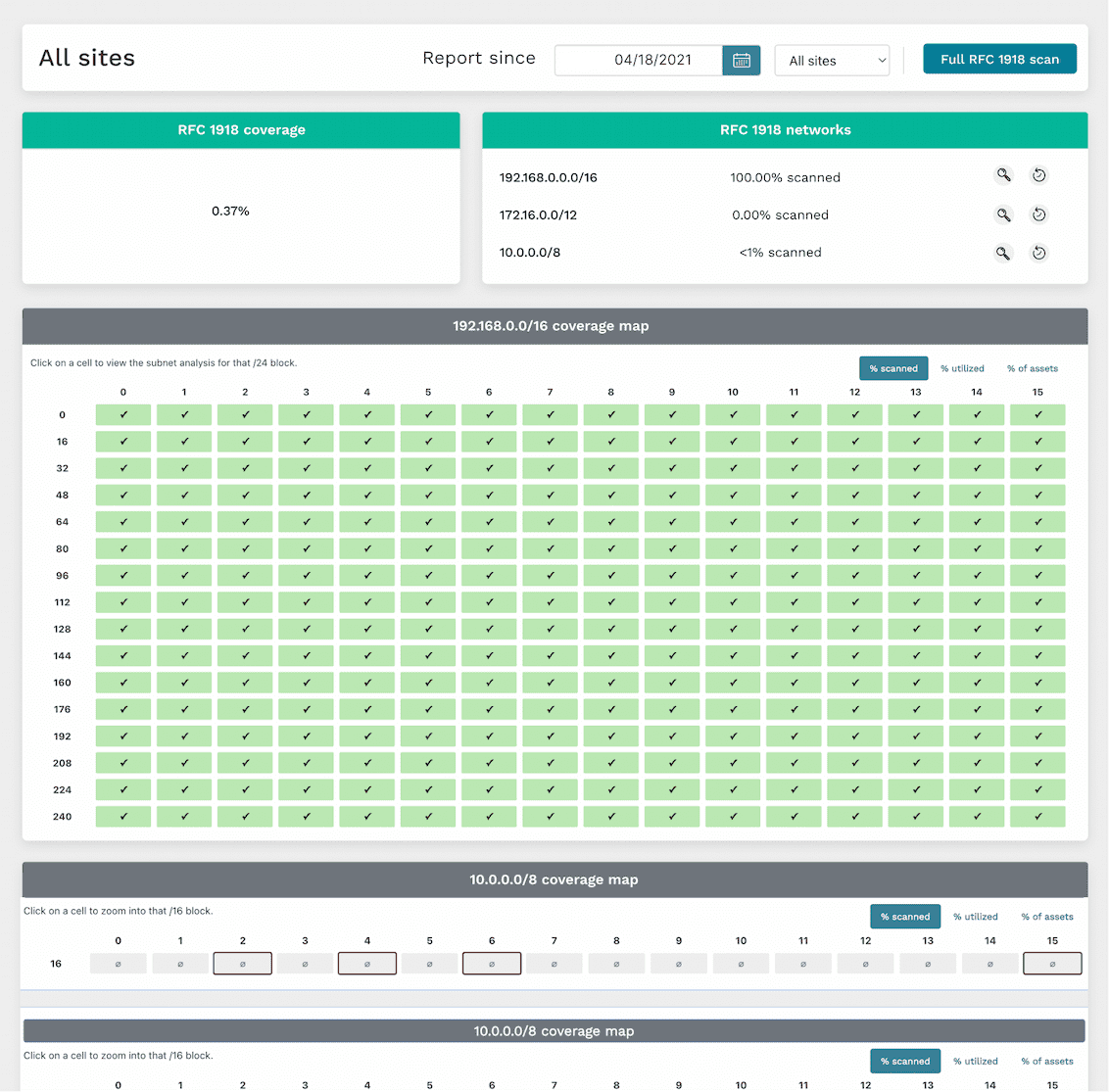
runZero’s scans can help surface unmanaged subnets in your internal network, which may harbor a bunch of unmanaged devices. Our RFC 1918 scan capability can cover the entire IPv4 internal network address space (more than 21 million addresses), checking all potential places unmanaged devices could be hiding in your network. We’ve also developed a “subnet sampling” option as an informed approach to focus on statistically-likely-to-have-devices subnets so that the RFC 1918 scan runs in shorter time while still providing good coverage. The interactive RFC 1918 coverage report presents discovered data in an easy-to-consume layout to show which subnets have been scanned, and includes additional data for unscanned subnets which might be active based on devices leaking secondary network interface information. This report allows you to “drill down” into subnets by clicking them to view discovered asset details within an address block.

Find unmapped assets

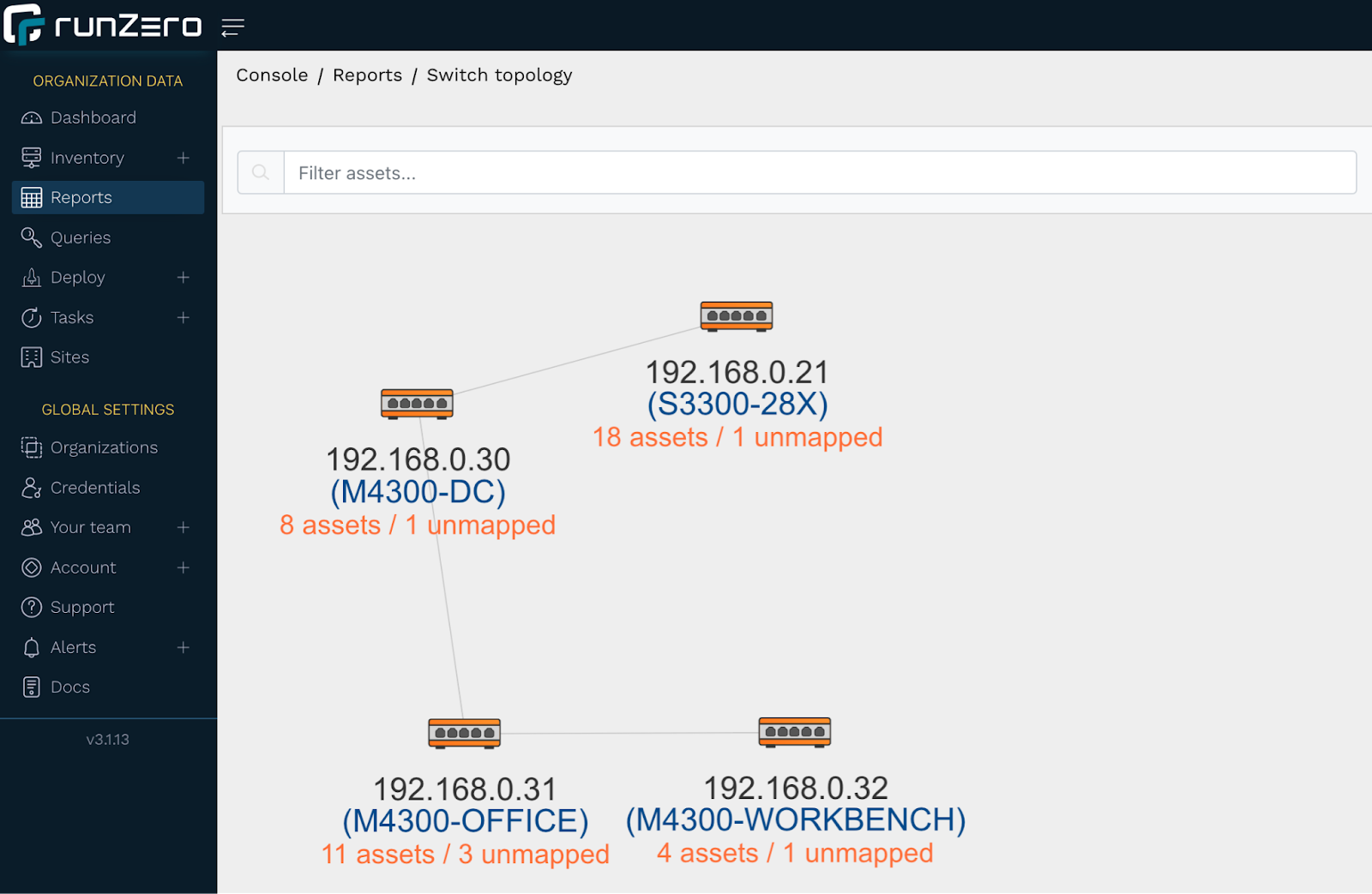
Unmanaged devices on your network can also surface in runZero as an unmapped asset. An unmapped asset is a MAC address connected to a switch, but not found in an ARP cache or through any of the other techniques runZero uses for remote MAC address discovery. Unmapped assets could be unmanaged assets, but could also be managed assets that were not included in the scope of a particular scan. You can get a visual overview of where unmapped assets appear on your network via the switch topology report, with each switch showing the number of assets (including unmapped assets) attached to it. A single click on a switch with unmapped assets will bring up a “View unmapped assets” link to the associated unmapped MACs report, which provides MAC details and the switch port the asset is connected to. This is potentially helpful for further investigation.

Search for devices missing agents in runZero

runZero uses applied research to identify other agent technologies that may be required on assets managed by your company or organization. You can find unmanaged assets that are missing these agents via runZero inventory queries. The following query example will surface any Windows assets on the network that are not running an Avast agent:
os:Windows and not edr.name:Avast
You can also search for unauthorized operating systems or applications on your network, which can be indicative of an unmanaged asset. For example, if all or your Windows systems are only allowed to be running Windows 11 or Windows Server 2022, you can create a query to surface any potentially unmanaged Windows assets not running these recent versions:
os:Windows and not (os:"Windows 11" or os:"Windows Server 2022")

Track unmanaged assets with tags

Tags are another runZero mechanism that can be used to surface unmanaged assets and also help “keep on top of” current asset ownership. This requires a bit of work up front to tag all managed assets, but requires little maintenance once in place.

Stay on top of unmanaged assets with alerts

Alerts are a powerful way to leverage queries into timely notifications in-app or via email or webhook. For example, we can build alerts for any of the queries used in this article. Rules are checked when a scan completes, and for any rule that evaluates as “true”, an alert can be generated. Check out our “Tracking asset ownership with tags” article to learn how to set up an alert rule.

Comprehensive inventory of external assets

Internal networks aren’t the only places unmanaged devices may exist. A public-facing web server could become orphaned, or a bad actor could DNS spoof/hijack a lesser-used company domain to redirect traffic to a phishing site they control. With just a domain name or ASN number set in the scan configuration, runZero can resolve the associated external-facing URLs and IP addresses to scan. And our hosted zone scanners can seamlessly run the scan, removing the step of installing an external-facing Explorer.

Uncovering unmanaged assets through integrations

At runZero, we understand the power of “better together”, and our development teams have been busy adding support for many product and service integrations. Some of these integrations can be leveraged to surface unmanaged assets in your network. For example, let’s say your organization uses SentinelOne on all managed macOS assets. One day an employee connects their personal MacBook to the corporate network without authorization: a macOS device without SentinelOne installed. You can create a runZero inventory query to surface this asset (and any others like it):
os:macOS and not source:SentinelOne
As another example, let’s say your company uses Microsoft Intune on all managed Windows 10 and Windows 11 assets. You can create a runZero inventory query to surface any Windows 10 or Windows 11 assets connected to your network that are not known by your Intune integration:
((os:"Windows 10" or os:"Windows 11") and not source:Intune
Prefer to surface your runZero-discovered assets, managed and unmanaged, via another tool? We offer integrations for several popular services, including ServiceNow and Splunk, allowing you to leverage the power of runZero’s best-in-class discovery and asset fingerprinting with other applications.

Zero unmanaged assets

Getting a handle on unmanaged assets is important, but it can feel like “one more thing” to do in an already-lengthy list of responsibilities. At runZero, we’ve done our homework through research and development to make finding your unmanaged network assets quick and easy.

About Version 2 Digital

Version 2 Digital is one of the most dynamic IT companies in Asia. The company distributes a wide range of IT products across various areas including cyber security, cloud, data protection, end points, infrastructures, system monitoring, storage, networking, business productivity and communication products.

Through an extensive network of channels, point of sales, resellers, and partnership companies, Version 2 offers quality products and services which are highly acclaimed in the market. Its customers cover a wide spectrum which include Global 1000 enterprises, regional listed companies, different vertical industries, public utilities, Government, a vast number of successful SMEs, and consumers in various Asian cities.

About runZero
runZero, a network discovery and asset inventory solution, was founded in 2018 by HD Moore, the creator of Metasploit. HD envisioned a modern active discovery solution that could find and identify everything on a network–without credentials. As a security researcher and penetration tester, he often employed benign ways to get information leaks and piece them together to build device profiles. Eventually, this work led him to leverage applied research and the discovery techniques developed for security and penetration testing to create runZero.