With the growing trend of remote work, there’s a demand for a more flexible and convenient way to stay online while on the go. Business travelers, distributed teams, remote contractors – they all need a reliable, stable internet connection without the surprise roaming charges or low data caps that come with major carriers.
Therefore, to make long-distance ventures smoother, Saily just introduced Saily Business—the new eSIM for professionals that enables teams to keep in touch seamlessly wherever they are in the world.
“From the first day of launching Saily, we received numerous requests from customers traveling for business purposes. Staying connected while working from abroad is paramount for today’s companies. This is why we listened to our customer feedback and launched Saily Business. This solution was created with ease of use in mind – no matter whether your employees are tech-savvy or not, they will be able to stay connected,” says Vykintas Maknickas, CEO at Saily.
Key features of Saily Business include:
Tailored to your business need: Choose from regional, country-specific, or global plans that fit your business’s specific needs. From short business trips to long-term assignments, we’ve got you covered with the flexibility to adapt.
Super-simple setup: No need for complicated installations or tech expertise. Saily Business offers one-tap eSIM activation, so your team can connect in minutes. Once they land, they’re online – no SIM swapping required.
Always there when you need us: 24/7 customer assistance, and a dedicated account manager, ensures your team has help whenever it’s needed – no matter where they are in the world.
About Saily
Saily is an affordable, user-friendly, and sustainable eSIM service that helps people manage mobile and internet connections from anywhere in the world. Saily offers 24/7 instant customer support, flexible plans, and global coverage. Saily was created by the experts behind NordVPN – the advanced security and privacy app. For more information: saily.com.
About Version 2 Digital
Version 2 Digital is one of the most dynamic IT companies in Asia. The company distributes a wide range of IT products across various areas including cyber security, cloud, data protection, end points, infrastructures, system monitoring, storage, networking, business productivity and communication products.
Through an extensive network of channels, point of sales, resellers, and partnership companies, Version 2 offers quality products and services which are highly acclaimed in the market. Its customers cover a wide spectrum which include Global 1000 enterprises, regional listed companies, different vertical industries, public utilities, Government, a vast number of successful SMEs, and consumers in various Asian cities.
About NordPass NordPass is developed by Nord Security, a company leading the global market of cybersecurity products.
The web has become a chaotic space where safety and trust have been compromised by cybercrime and data protection issues. Therefore, our team has a global mission to shape a more trusted and peaceful online future for people everywhere.
Facebook remains an important hub for personal and professional interactions, as well as a service that is quite commonly linked to other accounts, making the security of your Facebook account significant to say the least.
The process for changing your Facebook password is largely consistent across desktop, iOS, and Android devices. However, if you’re specifically looking for how to change Facebook password on iPhone or Android, always ensure you have the latest version of the Facebook app installed for the most up-to-date instructions.
So, whether you’re taking proactive measures or responding to a potential concern, updating your password is a simple yet effective step. Here’s a detailed guide to help you change your Facebook password with ease.
Changing Facebook password on desktop
Facebook has made it relatively straightforward to update your security settings on a desktop device.
Here’s a step-by-step guide to changing your password on a PC or Mac:
Sign in to your Facebook account.
Click the downward-pointing arrow in the upper-right corner.
Select “Settings and privacy” followed by “Settings.”
In the left sidebar, click on “Security and login.”
Under the “Login” section, find and click “Change password.”
Enter your current password and then, enter your new password in both the “New” and “Retype new” fields.
Click “Save changes.”
Your password is now updated.
Changing Facebook password on mobile
With the increasing reliance on mobile devices for our daily online activities, it’s essential to know how to secure your Facebook account on the go. Whether you’re using an iPhone or an Android device, here’s how you can change your Facebook password:
For both iOS and Android:
Open the Facebook app on your mobile device.
Tap your profile picture.
Select “Settings and privacy” and tap “Settings.”
Scroll to find the “Security and login” option and tap it.
Under the “Login” section, tap “Change password.”
Enter your current password, then your new password in both the “New password” and “Retype new password” fields.
Tap “Update password.”
Your password is now updated.
Remember, while changing your password is a great security measure, always consider additional protective steps like enabling multi-factor authentication for enhanced account safety.
Changing Facebook password in Accounts Center
You can also change your Facebook password in the Accounts Center, a centralized hub where you can manage all of your connected Meta experiences, including Facebook and Instagram.
Here’s how to change your Facebook password via Accounts Center:
Go to “Accounts Center.”
Navigate to the “Password and security” section.
Select Facebook from the list of connected accounts.
Click on “Change password” and follow the instructions to create a new password.
Confirm and save the changes.
Once you’ve completed all the steps, your Facebook password will be updated, and you’ll be able to use it to log in to Facebook on any of your devices.
How to reset your password on Facebook
You can try a few methods if you have forgotten your Facebook password. The most straightforward one is to use the “Forgot password?” functionality, but you must have access to the email account or a phone number you used when you signed up for Facebook.
But what should you do if you no longer have access to the email address you signed up with? No worries – you can still recover your Facebook account through a backup email address or phone number or recover your account using the Find Your Account page. Here’s how it works:
Try to log in with the last password you remember using.
If it’s incorrect, click “Forgot password?”
You will be redirected to the “Find your account” page. Type into the search field the email address, phone number, full name, or username associated with your Facebook account.
Follow further on-screen instructions.
If you can’t access the email account that you used when signing up for Facebook or you haven’t set up a backup email or phone number, then unfortunately, you won’t be able to log in to your Facebook account. There is no way to verify that it’s you trying to regain access to your Facebook.
How to set recovery email or phone number
If you managed to remember your password and login, it’s best to add additional verification and recovery methods, like an email address or a phone number. You never know when you might forget your password or someone might try to hack your account – it’s best to have a few different verification methods.
Here’s how to add a recovery email address:
Log in to your Facebook account, click on your profile picture on the upper right side of the screen, and select “Settings and privacy.”
Click “Settings.”
Go to “Accounts Center,” then “Personal Details.”
Navigate to “Contact info.”
Click “Add new contact,” then choose “Add email address.”
Enter the email address you want to add, select the account, and click “Next.”
Complete the process by entering the confirmation code sent to your email.
Here are the steps for adding a recovery phone number:
Log in to Facebook, click on your profile picture on the upper right side of the screen, and choose “Settings and privacy.”
Go to “Settings.”
Navigate to “Accounts Center,” then “Personal Details.”
Go to “Contact info.”
Click “Add new contact,” then choose “Add mobile number.”
Enter the phone number you want to add, select the account, and click “Next.”
Facebook will text you a confirmation code to verify your new phone number. Use it to confirm your new number.
Improve your Facebook account security
While you’re at it, you can tweak other security and privacy settings to further improve your Facebook account security. Here are a few quick tips on leveling up your security posture on Facebook.
Enable two-factor authentication
Log in to your Facebook account, click your profile image on the upper right side of the screen, and select “Settings and privacy.”
Click “Settings.”
Go to “Accounts Center,” then “Password and security.”
Choose “Two-factor authentication,” and then select the account for which you want to enable it.
Select the security method you wish to add and follow the instructions displayed on the screen.
Set up alerts for unrecognized logins
Log in to your Facebook account, click your profile image on the upper right side of the screen, and select “Settings and privacy.”
Click “Settings.”
Go to “Accounts Center,” then “Password and security.”
Select “Login alerts.”
Choose your preferred method for receiving alerts, such as via email or through a Facebook notification on a recognized device.
Change your password to something long and complex
A long and complex password might be tough to remember, but it might be the best way to keep your Facebook account safe.
Consider using a password that’s at least 12 characters long and includes a mix of numbers, special symbols, and upper- and lowercase letters. Determining whether your new password is as strong as it should be can be tricky, and that’s where our password strength checker can help.
While long and complex passwords are your best bet to keeping your online accounts secure, it can be challenging to remember them on the spot. And that’s one of the reasons why password managers such as NordPass exist. NordPass provides an all-around solution for passwords and passkeys management. With the ability to automatically prompt users to save passwords for new websites, NordPass streamlines the often tedious process of having to manually type out your passwords. Additionally, with NordPass you get secure password sharing, biometric authentication, and encrypted note storage, ensuring a holistic approach to online security.
About Version 2 Digital
Version 2 Digital is one of the most dynamic IT companies in Asia. The company distributes a wide range of IT products across various areas including cyber security, cloud, data protection, end points, infrastructures, system monitoring, storage, networking, business productivity and communication products.
Through an extensive network of channels, point of sales, resellers, and partnership companies, Version 2 offers quality products and services which are highly acclaimed in the market. Its customers cover a wide spectrum which include Global 1000 enterprises, regional listed companies, different vertical industries, public utilities, Government, a vast number of successful SMEs, and consumers in various Asian cities.
About NordPass NordPass is developed by Nord Security, a company leading the global market of cybersecurity products.
The web has become a chaotic space where safety and trust have been compromised by cybercrime and data protection issues. Therefore, our team has a global mission to shape a more trusted and peaceful online future for people everywhere.
Backend-driven UI is a fresh approach to user interface development that hasn’t gotten much attention in UI design circles. The reasons for that include high upfront costs and the dominance of frontend-driven setups. However, there’s much more to the story.
As a Senior Frontend Engineer at NordLayer, I recently dove into BDUI to see what makes it stand out. In this article, I’ll break down where UI development is now and how adding more server-side power could improve the usual frontend-focused methods.
Frontend-only UI development
Imagine a simple UI feature, like the banner at the top of a page. How does our team create this banner? Let’s take a look at the 6-step development lifecycle for a single feature.
A basic development cycle for a UI feature.
Development starts with requirement gathering, where the product owner (PO) outlines the desired functionality of the UI element. In this case, we want it to display a static message. So we design the banner, and as it’s a frontend-only feature, we may skip backend development and go straight into frontend development, then testing. After that, there’s only one step left – deployment. That’s it – the job’s done…
… or is it?
Emphasizing the backend’s role
Let’s say this whole process takes a week, depending on your setup. But features don’t simply stay the same indefinitely – we iterate upon them.
For example, we’d like to show a different message for the second iteration. However, realizing that the message will change a lot, we’d move its management to the backend. To ensure a smooth integration between departments, the backend engineers build an API and provide it to the frontend team. After testing and deployment, everything’s ready to go.
Let’s iterate further. Now we want to deliver tailored messages to different user segments, as part of an A/B testing strategy. The beautiful part? No more frontend changes required! The frontend’s role now is simply to call the backend to retrieve the display message. Our UI approach is now effectively ‘backend-driven,’ enabling faster iterations and more flexible content management and delivery.
The goal of backend-driven UI
Simply stated, backend-driven UI aims to make user interfaces a function of state.
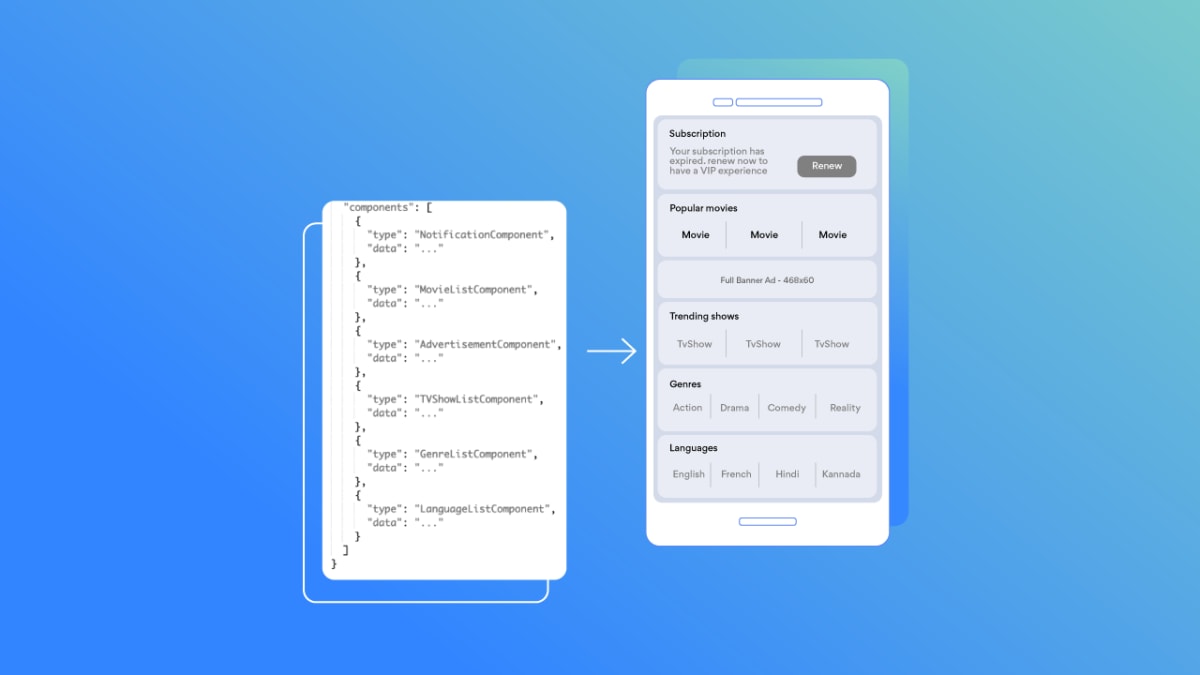
Spotify expressed BDUI as UI = fn(state) in one of its early talks on the subject. This distills the idea beautifully. What we’re trying to achieve here is making the interface depend entirely on the state provided to it. Imagine a webpage structured using JSON data objects, which in our case, become the state. Each object represents a component on the frontend client.
A mobile UI defined by JSON components.
The benefits of backend-driven UI
Redesigning our interface becomes streamlined: This can be achieved by simply changing the order of our objects. We can also add components without any frontend redeployment.
Backend-driven UI allows us to unify our client approach because this state can be used to populate any client, whether it’s mobile, desktop, or otherwise. This way, users get new features at the same time, regardless of what client they’re using. In terms of development, this helps developers across various teams follow a similar workflow.
Easier A/B testing. All we need to focus on is how to deliver different states based on user feedback, and with that, we can get really flexible when conceptualizing and experimenting with new UIs.
The cons of backend-driven UI
Uneven developer distribution
As mentioned before, every useful software development approach will have downsides. Implementing backend-driven UI means migrating all logic from the frontend. Naturally, this will result in higher workloads for backend developers. Keeping that in mind, does the usual developer distribution change when using this approach? Generally, yes, but this ultimately depends on the product/app/service you’re building. Some are already more backend-heavy than others.
Workload will vary depending on the stage of implementation. When starting with backend-driven UI, designing the architecture, agreeing on the contract, and executing the switch is heavily dependent on all engineers. Questions mostly arise when the migration is complete. From then on, backenders will have bigger workloads.
High cost
The upfront cost of introducing backend-driven UI can be significant. When making a UI reliant only on the state provided to it, the implementation can quickly become overcomplicated. This impacts the pace of development. It’s not an easy task, but we’re trading high upfront costs for being faster and more flexible in the future.
You should first consider whether this approach is even useful for your specific business. Spotify popularized this approach because it wanted the ability to experiment fast and flexibly with novel UI features. But if you’re building an admin panel, does it need to be backend-driven? Will the interface change a lot, or will you be conducting A/B tests for the users? Implementing BDUI should align with your tech setup and business goals.
Sanity check: Is BDUI for you?
With the pros and cons in mind, let’s address some common questions:
How much should you commit initially?
Backend-driven UI doesn’t need to replace the entire system. You can also take a modular approach when determining viability. As an example, you can identify specific parts of the application that you could make backend-driven. The banner example that we discussed above could be something to start with. If that works, try it out on a more challenging feature like a table or carousel.
Are we inventing HTML again?
Avoid being too detailed. Taking a simple feature like a text box, we could go overboard and start thinking about allowing different text colors, size changes, or other modifications… But then we’d come dangerously close to CSS and HTML, which is certainly not the goal! Remember: Enable backend-driven UI using general components, not detailed blocks.
Do we have the foundation to implement a backend-driven UI?
Do you have a design system? As we said above, being too detailed will cause problems. With a design system in place, we have a very clear direction on where to go. Development becomes very logical as long as our frontend can handle our designed components. Everyone uses the same components to describe UIs: Whether you’re a mobile developer, frontender, or designer, we all speak the same language. A button means the same component across different contexts.
Big Tech and backend-driven UI
Most of this article’s content is based on findings from Lyft, Spotify, Airbnb, and others. These are huge companies with the resources to make backend-driven UI a reality.
And even though BDUI can be a pricy upfront investment that requires developer redistribution, its long-term benefits – including flexibility and faster adaptation to user feedback – are a huge upside for many teams, products, and apps.
Version 2 Digital is one of the most dynamic IT companies in Asia. The company distributes a wide range of IT products across various areas including cyber security, cloud, data protection, end points, infrastructures, system monitoring, storage, networking, business productivity and communication products.
Through an extensive network of channels, point of sales, resellers, and partnership companies, Version 2 offers quality products and services which are highly acclaimed in the market. Its customers cover a wide spectrum which include Global 1000 enterprises, regional listed companies, different vertical industries, public utilities, Government, a vast number of successful SMEs, and consumers in various Asian cities.
About NordPass NordPass is developed by Nord Security, a company leading the global market of cybersecurity products.
The web has become a chaotic space where safety and trust have been compromised by cybercrime and data protection issues. Therefore, our team has a global mission to shape a more trusted and peaceful online future for people everywhere.
Before you go about resetting or changing your Apple ID password, it’s important to have all the necessary information for the process. Here’s what you’ll need:
Email address: Make sure you have access to the email address that you’ve used with your Apple ID.
Security questions: Have answers ready to any security questions if required.
Multi-factor authentication (MFA): If you’ve enabled MFA, ensure you have access to the trusted device or phone number.
Recovery email or phone number: If you’ve set up a recovery email or phone number, ensure you can access it.
On top of that, it is also crucial to note that Apple has a set of specific requirements for passwords, including:
A password has to be at least eight characters long.
A password must include a number.
A password must include both uppercase and lowercase letters.
How to reset your Apple ID password on iPhone and iPad
Go to “Settings” and tap on your name.
Select “Sign-In & Security.”
Tap “Change password.”
Enter your device’s passcode. Then, enter your new password and confirm it.
Tap “Change” or “Change Password.”
How to reset your Apple ID password on a Mac
Click on Apple’s logo at the top left of your screen.
Select “System Preferences” and click on your name.
On the left, select “Sign-In & Security.”
In the next window, select “Change password.”
You will need to enter your device’s password.
You will be able to enter your new password in the next window. Then, select “Change” and “Done.”
Enter your email address or phone number, enter the CAPTCHA code, and click “Continue.”
You will receive a prompt to change your password on one of your Apple devices.
If you don’t have the device with you, you will have to either answer security questions or confirm your identity via email. If you are unable to do that, you will be asked to enter the 2FA recovery key to reset your password. You can create a new password only after you’ve confirmed your identity.
How to reset your Apple ID on a new device
During the setup of a new Apple device, you will be asked to enter your Apple ID.
Select “Forgot password or don’t have an AppleID?”
Finish the setup of a new device.
As soon as the setup is complete, select an app that requires you to sign in to your Apple ID. On iPhone, iPad, or Apple Watch, you can simply select Messages. On a Mac, follow the instructions above.
What to do if the standard Apple ID reset methods haven’t worked for you
In case the outlined methods for resetting or changing your Apple ID password don’t work for you, there are still a few alternative strategies you can try. These methods can help you recover your account and regain access to all your Apple devices and services.
Check for devices already signed in with your Apple ID: If you have other Apple devices already signed in with your Apple ID, you can use one of those devices to reset your password. This can often be the quickest solution since it allows you to bypass additional verification steps.
Use recovery information: When setting up your Apple ID, you may have provided a recovery email address or phone number. If so, Apple can send you a verification code or reset link to help you regain access to your account.
Contact Apple Support: If you’ve tried the above methods without success, reaching out to Apple Support is your next best option. Apple Support can assist you in verifying your identity and recovering your account. While this might take a bit more time, it’s a reliable way to resolve the issue.
Best practices for managing and securing your passwords
To avoid the frustration of forgetting your Apple ID password in the future, we highly recommend adopting strong password management practices.
Create strong, complex passwords
Whenever you’re creating a password for a website, app, or service, remember that a strong password is a password that’s at least eight characters long and includes a healthy mix of uppercase and lowercase letters, numbers, as well as special characters. During password creation, it is also important to avoid using any easily guessable information such as your name or birthdate. If you’re looking for inspiration and practical tips for creating a strong and complex password, check out our Five Strong Password Ideas post.
Enable multi-factor authentication (MFA)
Beyond strong passwords, enabling multi-factor authentication (MFA) can further secure your accounts. MFA provides an extra layer of security by requiring a second form of verification in addition to the traditional username and password combination. This could be a code sent to your phone, a biometric scan, or a prompt on a trusted device.
Use a password manager
Finally, managing multiple strong passwords can be challenging and quite frustrating. This is where a password manager like NordPass can come in handy. NordPass simplifies password management and life online in general by offering a single secure place to safely store it all: passwords, passkeys, credit cards, personal information, secure notes, and more. On top of that, NordPass is designed to automatically save and fill in your credentials when you need to log in, saving you time and reducing the risk of password fatigue. NordPass for iOS even allows you to sync your passwords across all your devices, ensuring you have access to your digital valuables whenever, wherever. Even when you’re offline.
Start using passkeys instead of passwords
Passkeys are a new, convenient, and phishing-resistant way to sign up for and access apps, websites, and other various online services. In essence, a passkey is a digital login credential that uses your device—be it a phone, laptop, tablet, or desktop—to authenticate you instead of a traditional combination of a username and password. Cybersecurity experts see passkeys as the future of authentication technology, which will inevitably replace passwords. Tech giants such as Microsoft, Google, and Apple already allow users to opt for passkey-based authentication on their services. If you want to take your access security to the next level, we highly advise moving toward passkey-based authentication. To learn the ins and outs of setting up and using passkeys on your Apple devices, be sure to check out our latest blog entry on that exact topic.
By adopting these practices into your routine, you’ll significantly reduce the risk of unauthorized access to your accounts and minimize the stress of managing multiple passwords. Not only will your Apple ID be more secure, but you’ll also have the peace of mind of knowing that all your online accounts are protected.
About Version 2 Digital
Version 2 Digital is one of the most dynamic IT companies in Asia. The company distributes a wide range of IT products across various areas including cyber security, cloud, data protection, end points, infrastructures, system monitoring, storage, networking, business productivity and communication products.
Through an extensive network of channels, point of sales, resellers, and partnership companies, Version 2 offers quality products and services which are highly acclaimed in the market. Its customers cover a wide spectrum which include Global 1000 enterprises, regional listed companies, different vertical industries, public utilities, Government, a vast number of successful SMEs, and consumers in various Asian cities.
About NordPass NordPass is developed by Nord Security, a company leading the global market of cybersecurity products.
The web has become a chaotic space where safety and trust have been compromised by cybercrime and data protection issues. Therefore, our team has a global mission to shape a more trusted and peaceful online future for people everywhere.
So, whether in your personal life or business, every activity involves some level of risk, and you just have to consider it. Of course, the bigger the potential reward or value of your aim, the greater the risk usually is. Nevertheless, the main takeaway is that, regardless of the risk’s scale, it is unavoidable.
The key, then, is to learn how to manage and minimize the risks commonly associated with the activities you perform by first recognizing that these risks even exist and then understanding their magnitude. This is where the concept of inherent risk comes into play.
What is inherent risk?
In basic terms, inherent risk is the natural risk associated with any process or activity before you add any controls or safety measures. So, to measure inherent risk is to assess how risky something is on its own, without any safety nets in place. Once you recognize the scale of a given inherent risk, you can then determine how much you can reduce that risk with the appropriate controls, policies, and resources.
To measure inherent risk, an organization needs to go through a thorough process that involves risk identification (discovering activities that could pose risks) and risk evaluation (determining how serious the potential impact could be), examining the risks in their raw form. Once you’ve established this baseline, you can decide where to add new controls and policies to manage the inherent risks effectively.
Does the term “inherent audit risk” ring a bell?
If so, that’s because inherent risk is one of the key components of overall audit risk. Audit risk is a term that usually refers to the risk that the company’s financial statements can be materially misstated and the auditor fails to detect these misstatements, leading to a misleading audit opinion. Audit risk consists of three elements:
Detection risk: The risk that the auditor’s procedures will fail to identify a mistake in the financial statements.
Control risk: The risk that the company’s own controls won’t identify or prevent mistakes in its financial statements.
Inherent risk: The risk of mistakes caused by the nature of the business or industry before any controls are put to use.
Knowing about these risks helps auditors plan and carry out their work more effectively, so they can give a trustworthy opinion on the company’s financial statements.
Which industries have high inherent risk?
Generally speaking, industries that are heavily regulated tend to face higher inherent risks. For example, the financial services sector is quite exposed due to its need to navigate market fluctuations, regulatory compliance, and cybersecurity threats. Similarly, the oil and gas industry contends with environmental regulations, geopolitical uncertainties, and various operational hazards. The IT and cybersecurity sector also grapples with rapid technological changes, intellectual property issues, and persistent cybersecurity threats.
But it’s not just these high-profile sectors. Most industries, whether it’s agriculture, travel, healthcare, or any other field, deal with their own sets of inherent risks. What’s important is to recognize these risks in your daily processes and have strategies in place to address them effectively.
There’s another key term in risk management that pairs with inherent risk—think of it as the yang to inherent risk’s yin—and that’s residual risk. Simply put, residual risk is the level of risk that remains after you’ve applied controls or mitigating measures. In other words, it helps you gauge how much of the inherent risk you’ve reduced or eliminated, and how much is still left to address.
So, to sum it up quickly, inherent risk is the natural level of risk before you do anything to prevent it, while residual risk is what’s left after you’ve taken steps to manage the inherent risk.
Popular inherent risk examples
Risk is part of almost everything we do, so the examples of inherent risk are practically endless. But when it comes to managing risk in a business setting, there are a few key areas that really stand out. Here are some important ones to keep an eye on:
Insufficient audit processes: Without thorough audits, companies may fail to identify internal weaknesses or compliance issues, putting their whole operation at risk.
Security incidents caused by human error: Mistakes made by employees, such as mishandling sensitive data or falling for phishing scams, can lead to significant security breaches, resulting in financial losses and damage to the company’s reputation.
Management’s failure to uphold operational standards: Without the right processes from management, things can get pretty disorganized. This often leads to poor-quality work, reduced productivity, and non-compliance with industry regulations.
Financial interactions between related businesses: The value of an asset in financial transactions between related parties, like subsidiaries or affiliates, might be reported incorrectly, leading to financial discrepancies and compliance issues.
All online activities are inherently risky
No matter what you do online, there’s always some risk involved. This is especially important for businesses to keep in mind. When you’re running a company with dozens or even hundreds of employees, all using company accounts and accessing company resources, you’re dealing with many different types of inherent risk. People make mistakes—they click on malicious links, use weak passwords, or share credentials in ways they shouldn’t (like on sticky notes or via email).
So, how can you mitigate such risks? One option is to use NordPass Enterprise. It’s more than just an encrypted password manager—it’s a cybersecurity solution that helps you manage access to company resources, enforce strong password policies across your organization, give your employees tools to securely share data, and even check if their information has been compromised in a data breach.
If you want to reduce the risks that come with modern business, give NordPass Business a try and see how it can enhance both your cybersecurity and productivity.
About Version 2 Digital
Version 2 Digital is one of the most dynamic IT companies in Asia. The company distributes a wide range of IT products across various areas including cyber security, cloud, data protection, end points, infrastructures, system monitoring, storage, networking, business productivity and communication products.
Through an extensive network of channels, point of sales, resellers, and partnership companies, Version 2 offers quality products and services which are highly acclaimed in the market. Its customers cover a wide spectrum which include Global 1000 enterprises, regional listed companies, different vertical industries, public utilities, Government, a vast number of successful SMEs, and consumers in various Asian cities.
About NordPass NordPass is developed by Nord Security, a company leading the global market of cybersecurity products.
The web has become a chaotic space where safety and trust have been compromised by cybercrime and data protection issues. Therefore, our team has a global mission to shape a more trusted and peaceful online future for people everywhere.





:format(avif))


:format(avif))
:format(avif))
