Skip to content

Future-proofing PC fleets with the powerful pairing of Intel® Threat Detection Technology and AI-Native endpoint protection

Everyone enjoys a PC refresh – Processor performance joined by security as an important factor

The continued shift to hybrid work (and play) marked a significant departure from pandemic norms. While health protocols reverted, the digital realm saw enduring changes. Amidst this transformation, security has emerged as a crucial but often overlooked aspect of personal and business computing, joining (speed) processor power as a significant factor in users upgrading PCs.

And, despite the recent passing of co-founder Gordon Moore, Intel has continued to advance in its approach to innovation, including prioritization of attributes like security and efficiency, which speak to the needs of modern computing.

Hardware evolves for our new hybrid reality

Looking back, PC sales surged during the peak of COVID restrictions in 2020 and 2021.1 They saw a significant decline by 13.7% in 2022 and the first half of 2023 as restrictions eased, according to International Data Corporation data from August 2023.

This post-COVID normalization of PC sales may have served to mask a notable transformation underway in the form of hardware-based threat detection. For the past several years, business PCs have shipped with Intel Threat Detection Technology (Intel TDT), providing an added layer of security. This enhanced protection may already be integrated into your endpoint security software, which when paired with an Intel vPro powered machine can deliver an effective hardware plus software solution, helping to keep you safe from advanced threats.

Why boost security from the silicon layer?

Enabling security directly from the silicon layer adds a hardware ‘eye’ for malicious payloads like cryptomining and ransomware by applying AI to low-level silicon data for runtime threat execution monitoring. Intel is the world’s only chipmaker that has developed the capability to enable CPU-level telemetry to assist endpoint security software from leading vendors.

In order to avoid potential strain on computing resources from AI computations, Intel’s optimization of Intel TDT can shift compute-intensive workloads from the CPU to the integrated GPU, allowing threat detection to operate at high performance, while ensuring little to no impact on the end user’s other critical tasks. Integration with endpoint security software like ESET PROTECT also allows for shared detections, enhancing security for PC fleets.

When coupled with modern endpoint software like ESET PROTECT, recognized for its low impact on performance, low false positives rates, and multi-layered technology fed by industry-leading malware and threat research, security receives an immediate boost. While PC fleets with integrated security are becoming increasingly widespread in 2024, the ongoing demand for compute power highlights that security remains a journey, especially in the context of the demanding hybrid work model, which introduces new threats and demands for both processor power and efficiency.

Powering integrated security

Intel engineers aim to establish collective security through Intel TDT’s integration with leading security software vendors, delivering scalable protections primarily tailored for business fleets. ESET, with millions of business endpoints in the SMB segment alone, integrated Intel TDT with ESET PROTECT in March 2022 via ESET Endpoint Security. This integration allows the ESET detection engine to co-validate threats with Intel TDT, leveraging ESET’s telemetry and both protection and prevention capabilities, and simultaneously ensuring high efficacy security without compromising system performance.

The collaboration extends from select 9th Gen Intel® Core™ processors to the latest Intel® Core™ Ultra processors, leveraging improved hardware telemetry capabilities in Intel’s processors for enhanced threat monitoring. These enhanced detections leveraging TDT’s CPU telemetry + AI-based technology and ESET Endpoint Security provide an additional layer of security for SMBs, augmenting ESET’s multilayered security solution without requiring additional micromanagement by security admins.

Hybrid work demands performance, efficiency, and security

Hybrid work necessitates steady advances in performance, efficiency, and security, which means that Moore’s Law remains relevant in supporting these demands, particularly with hardware-based security. While updates to processors still prioritize performance, there’s a noticeable shift toward deploying multicore solutions with distinct cores built for performance and those built for power efficiency.

In March 2023, IDC recognized Intel’s success in advocating for a PC refresh to enhance the end-user experience, elevate remote management capabilities, and establish a layered defense between hardware and software2 via Intel TDT. Furthermore, this alignment with modern work methods, such as hybrid work arrangements and online collaboration, enhances productivity while keeping efficiency and security in mind, without a compromise.

Regarding security, IDC also highlights the effectiveness of Intel vPro’s hardware-based AI threat detection and silicon-based Windows 11 virtualization in improving detection efficacy while reducing a computer’s attack surface.

Conclusion: Securing hybrid work is influencing hardware and software providers

In conclusion, the integration of ESET PROTECT with Intel TDT reflects a collaborative shift in the cybersecurity landscape, offering opportunities for wider integration among hardware and software providers. IDC emphasizes that modern endpoint security extends beyond software products, encompassing collaboration among various stakeholders in the ecosystem. This collaborative approach is timely, given the evolving cybersecurity needs of hybrid work environments, collaboration tools, and cloud services.

While the holistic approach demonstrated by the ESET – Intel integration is delivering immediate value to ESET’s customers, it also underscores the importance of incorporating enhanced prevention and protection measures when refreshing PC fleets for hybrid work. ESET R&D teams are collaborating with Intel to leverage future generations of processors to ensure the best of hardware and software are working together to deliver robust security solutions.

1Forbes, July 10, 2020 – Gartner’s preliminary PC sales results for the second quarter of 2020 show huge gains for several of the leading PC makers, not least HP, which saw sales increase by 17.1% year-on-year to push the company within a whisker of reclaiming its spot as the world’s biggest maker. Lenovo clings to that title, shipping 16.197m units in the quarter to HP’s 16.165m.

2IDC, Quick Take, Can your PCs deliver the end-user experience, manageability, and security you need now and in the future?, #lcUS50531323; March 2023

About Version 2 Digital

Version 2 Digital is one of the most dynamic IT companies in Asia. The company distributes a wide range of IT products across various areas including cyber security, cloud, data protection, end points, infrastructures, system monitoring, storage, networking, business productivity and communication products.

Through an extensive network of channels, point of sales, resellers, and partnership companies, Version 2 offers quality products and services which are highly acclaimed in the market. Its customers cover a wide spectrum which include Global 1000 enterprises, regional listed companies, different vertical industries, public utilities, Government, a vast number of successful SMEs, and consumers in various Asian cities.

About ESET
For 30 years, ESET® has been developing industry-leading IT security software and services for businesses and consumers worldwide. With solutions ranging from endpoint security to encryption and two-factor authentication, ESET’s high-performing, easy-to-use products give individuals and businesses the peace of mind to enjoy the full potential of their technology. ESET unobtrusively protects and monitors 24/7, updating defenses in real time to keep users safe and businesses running without interruption. Evolving threats require an evolving IT security company. Backed by R&D facilities worldwide, ESET became the first IT security company to earn 100 Virus Bulletin VB100 awards, identifying every single “in-the-wild” malware without interruption since 2003.

Why business continuity belongs in the cloud?

Resilience in today’s liquid business environment demands flexibility. The term “observability” replaces monitoring, reflecting the need to adapt and be agile in the face of challenges. The key is to dissolve operations into the cloud, integrating tools and operational expertise for effective resilience.

I remember that when I started my professional career (in a bank) one of the first tasks I was handled was to secure an email server exposed to the internet. Conversations around coffee were about these new trends that seemed suicidal, they wanted to take away service exploitation to servers on the internet!

There wasn’t even talk of the cloud at that time. The first steps of software as a service were already being taken, but in short, everything was on-premise, and infrastructure was the queen of computing, because without a data center, there was no business.

Two decades have gone by and the same thing that happened to Mainframes has happened to data centers. They are reminiscences of the past, something necessary, but outside of our lives. No one builds business continuity around the concept of the data center anymore, who cares about data centers anymore?

The number of devices worldwide that are connected to each other to collect and analyze data and perform tasks autonomously is projected to nearly triple, from 7 billion in 2020 to over 29.4 billion in 2030.

How many of those devices are located in a known data center?, furthermore, does it really matter where these devices are?

We don’t know who they are, who they are maintained by, or even what country they are in many times, no matter how much data protection laws insist, technology evolves a lot faster than legislation.

The most important challenge is ensuring business continuity, and that task is at the very least difficult when it is increasingly harder to know how to manage a business’ critical infrastructure, because the concept of infrastructure itself is changing.

What does IT infrastructure mean?

The suite of applications that manages the data needed to run your business. Below those applications is “everything else”, from databases, engines, libraries, full technology stacks, operating systems, hardware and hundreds of people in charge of each piece of that great babel tower.

What does business continuity mean?

According to ISO 22301, business continuity is defined as the “ability of an organization to continue the delivery of products and services in acceptable timeframes at a predefined capacity during an interruption.”

In practice, there is talk of disaster recovery and incident management, in a comprehensive approach that establishes a series of activities that an organization can initiate to respond to an incident, recover from the situation and resume business operations at an acceptable level. Generally, these actions have to do with infrastructure in one way or another.

Business continuity today

Before IT was simpler, infrastructure was located in one or more datacenters.

Now, we don’t even know where it is, beyond a series of intentionally fuzzy concepts, but what we do know is that neither the hardware is ours, nor the technology is ours, nor the technicians, nor the networks are ours. Only the data (supposedly).

What does business resilience mean?

It is funny that this term has become trendy, when the basic concept of the creation of the Internet was resilience. It means neither more nor less than that it is not a matter of hitting a wall and getting up, but that of accepting mistakes and moving forward, in other words, being a little more elegant and flexible when facing adversity.

Resilience and business continuity

In these liquid times, where everything flows, you have to be flexible and change the paradigm, that is why there is no longer talk of monitoring but of observability, because that of the all-seeing eye is a bit illusory, there is too much to see. Old models don’t work.

It’s not a scalability problem (or at least it’s not just a scalability problem), it’s a paradigm shift problem.

Let’s solve the problem using the problem

Today all organizations are somehow dissolved in the cloud. They mix their own infrastructure with the cloud, they mix their own technology with the cloud, they mix their own data with the cloud. Why not mix observability with cloud?

I’m not talking about using a SaaS monitoring tool, that would be to continue the previous paradigm, I’m talking about our tool dissolving in the cloud, that our operational knowledge dissolves in the cloud and that the resilience of our organization is based on that, on being in the cloud.

As in the beginnings of the internet, you may cut off a hydra’s head, but the rest keeps biting, and soon, it will grow back.

Being able to do something like this is not about purchasing one or more tools, hiring one or more services, no, that would be staying as usual.

Tip: the F of FMS in Pandora FMS, means Flexible. Find out why.

Resilience, business continuity and cloud

The first step should be to accept that you cannot be in control of everything. Your business is alive, do not try to corset it, manage each element as living parts of a whole. Different clouds, different applications, different work teams, a single technology to unite them all? Isn’t it tempting?

Talk to your teams, they probably have their own opinion on the subject, why not integrate their expertise into a joint solution? The key is not to choose a solution, but a solution of solutions, something that allows you to integrate the different needs, something flexible that you do not need to be in control of, just take a look, just have a complete map, so that whatever happens, you can move forward, that’s what continuity is all about.

Some tips on business continuity, resilience and cloud

Why scale a service instead of managing on-demand items?

A service is useful insofar as it provides customers with the benefits they need from it. It is therefore essential to guarantee its operation and operability.

Sizing a service is important to ensure its profitability and quality. When sizing a service, the amount of resources needed, such as personnel, equipment, and technology, can be determined to meet the demand efficiently and effectively. That way, you will avoid problems such as long waiting times, overwork for staff, low quality of service or loss of customers due to poor attention.

In addition, sizing a service will allow you to anticipate possible peaks in demand and adapt the capacity appropriately to respond satisfactorily to the needs of customers and contribute to their satisfaction. Likewise, it also helps you optimize operating costs and maximize service profitability.

Why find the perfect tool if you already have it in-house?

Integrate your internal solution with other external tools that can enhance its functionality. Before embarking on a never-ending quest, consider what you already have at home. If you have an internal solution that works well for your business, why not make the most of it by integrating it with other external tools?

For example, imagine that you already have an internal customer management (CRM) system that adapts to the specific needs of your company. Have you thought about integrating it with digital marketing tools like HubSpot or Salesforce Marketing Cloud? This integration could take your marketing strategies to the next level, automating processes and optimizing your campaigns in a way you never imagined before.

And if you’re using an internal project management system to keep everything in order, why not consider incorporating online collaboration tools like Trello or Asana? These platforms can complement your existing system with additional features, such as Kanban boards and task tracking, making your team’s life easier and more efficient.

Also, let’s not forget IT service management. If you already have an internal ITSM (IT Service Management) solution, such as Pandora ITSM, why not integrate it with other external tools that can enhance its functionality? Integrating Pandora ITSM with monitoring tools like Pandora FMS can provide a more complete and proactive view of your IT infrastructure, allowing you to identify and solve issues before they impact your services and users.

The key is to make the most of what you already have and further enhance it by integrating it with other tools that can complement it. Have you tried this strategy before? It could be the key to streamlining your operations and taking your business to the next level.

Why force your team to work in a specific way?

Incorporate other equipment and integrate it into your team (it may be easier than you imagine, and much cheaper).

The imposition of a single work method can limit the creativity and productivity of the team. Instead, consider incorporating new teams and work methods, seamlessly integrating them into your organization. Not only can this encourage innovation and collaboration, but it can also result in greater efficiency and cost reduction. Have you explored the option of incorporating new teams and work methods into your organization? Integrating diverse perspectives can be a powerful driver for business growth and success.

Why choose a single cloud if you can integrate several?

The supposed simplicity can be a prison of very high walls, never take your chances on a single supplier or you will depend on it. Use European alternatives to protect yourself from legal and political changes in the future.

Choosing a single cloud provider can offer simplicity in management, but it also carries significant risks, such as over-reliance and vulnerability to legal or political changes. Instead, integrating multiple cloud providers can provide greater flexibility and resilience, thereby reducing the risks associated with relying on a single provider.

Have you considered diversifying your cloud providers to protect your business from potential contingencies? Integrating European alternatives can provide an additional layer of protection and stability in an increasingly complex and changing business environment.

Why choose high availability?

Pandora FMS offers HA on servers, agents and its console for demanding environments ensuring their continuity.

High availability (HA) is a critical component in any company’s infrastructure, especially in environments where service continuity is key. With Pandora FMS, you have the ability to deploy HA to servers, agents, and the console itself, ensuring your systems are always online even in high demand or critical environments.

Imagine a scenario where your system experiences a significant load. In such circumstances, equitable load distribution among several servers becomes crucial. Pandora FMS allows you to make this distribution, which ensures that, in the event of a component failure, the system remains operational without interruptions.

In addition, Pandora FMS modular architecture allows you to work in synergy with other components, assuming the burden of those that may fail. This contributes to creating a fault-resistant infrastructure, where system stability is maintained, even in the face of unforeseen setbacks.

Why centralize if you can distribute?

Choose a flexible tool, such as Pandora FMS.

Centralizing resources may seem like a logical strategy to simplify management, but it can limit the flexibility and resilience of your infrastructure. Instead of locking your assets into a single point of failure, consider distributing your resources strategically to optimize performance and availability across your network.

With Pandora FMS, you have the ability to implement distributed monitoring that adapts to the specific needs of your business. This solution allows you to deploy monitoring agents across multiple locations, providing you with full visibility into your infrastructure in real time, no matter how dispersed it is.

By decentralizing monitoring with Pandora FMS, you may proactively identify and solve issues, thus minimizing downtime and maximizing operational efficiency. Have you considered how distributed monitoring with Pandora FMS can improve the management and control of your infrastructure more effectively and efficiently? Its flexibility and adaptability can offer you a strong and customized solution for your IT monitoring needs.

Contact our sales team, ask for a quote, or solve your doubts about our licenses. Pandora FMS, the integral solution for monitoring and observability.

About Version 2 Digital

Version 2 Digital is one of the most dynamic IT companies in Asia. The company distributes a wide range of IT products across various areas including cyber security, cloud, data protection, end points, infrastructures, system monitoring, storage, networking, business productivity and communication products.

Through an extensive network of channels, point of sales, resellers, and partnership companies, Version 2 offers quality products and services which are highly acclaimed in the market. Its customers cover a wide spectrum which include Global 1000 enterprises, regional listed companies, different vertical industries, public utilities, Government, a vast number of successful SMEs, and consumers in various Asian cities.

About PandoraFMS
Pandora FMS is a flexible monitoring system, capable of monitoring devices, infrastructures, applications, services and business processes.
Of course, one of the things that Pandora FMS can control is the hard disks of your computers.

How to analyze network traffic: a step-by-step guide

Network traffic is the data that passes through on-premises, cloud, and hybrid cloud networks. Traffic consists of larger files divided into data packets. Packet data flows between network nodes before being put back together at destination devices.

Network traffic is crucial because it enables users and applications to communicate. Traffic carries data files and queries, extracting data from cloud resources for employees to use. It connects users with devices like cameras and printers, facilitates video streaming, and links local workstations to internet resources.

Understanding and managing network traffic includes learning how to analyze network traffic effectively. This analysis helps monitor and interpret these data flows to optimize performance, ensure security, and manage resources effectively. One method to model and understand network traffic relates to network topography, which illustrates how data moves through the network.

  • North-south data passes from data centers to connected devices on a hub and spoke model. This data class includes web browser traffic originating outside the network.

  • East-west traffic travels inside a data center, such as communications between on-premises workstations.

Another method models network traffic based on priority.

  • Real-time network traffic includes high-priority packet data requiring instant transmission and high levels of accuracy. For instance, voice-over-IP can’t work well without high fidelity, instant transfers.

  • Non-real-time traffic includes routine email transfers and FTP downloads that are not operationally crucial.

Network traffic types also relate to how we inspect data.

  • Flow data aggregates simple information about network traffic. Examples include packet origins and data quantities.

  • Packet data involves granular analysis of individual packets through techniques like deep packet inspection. This level of analysis assists security investigations and micro-level performance optimization.

Engineers must consider how these network traffic types interact. Monitoring systems must take account of network topography and implement solutions to capture relevant, high-value data about network traffic.

What is network traffic analysis (NTA)?

Network traffic analysis applies continuous monitoring of network traffic. This has two main functions: ensuring network availability and securing network assets.

NTA determines the availability of network assets. Tools detect anomalies and performance issues, alerting IT teams to enable prompt responses. For instance, monitoring may identify and suppress high-volume data transfers or bursts of inbound traffic.

Network monitoring tools also have a critical security role. Tracking tools enforce security policies by detecting and blocking threats. They scan for suspicious activity and flag potential issues before data breaches or system outages result.

Monitoring systems check for vulnerable protocols or encryption ciphers, informing administrators if data becomes insecure. Tools also identify blind spots in network architecture. Technicians can plug gaps in the attack surface created by new devices or user activity.

Good reasons to adopt network traffic analysis

Analyzing network traffic is a wise move for all companies. Modern business depends on constant data flows and reliable network performance. Measuring how data travels empowers IT managers to make improvements and optimize network performance

Understanding and implementing strategies on how to improve network performance can significantly enhance the efficiency and reliability of data flow. It will also ensure that business operations remain smooth and uninterrupted.

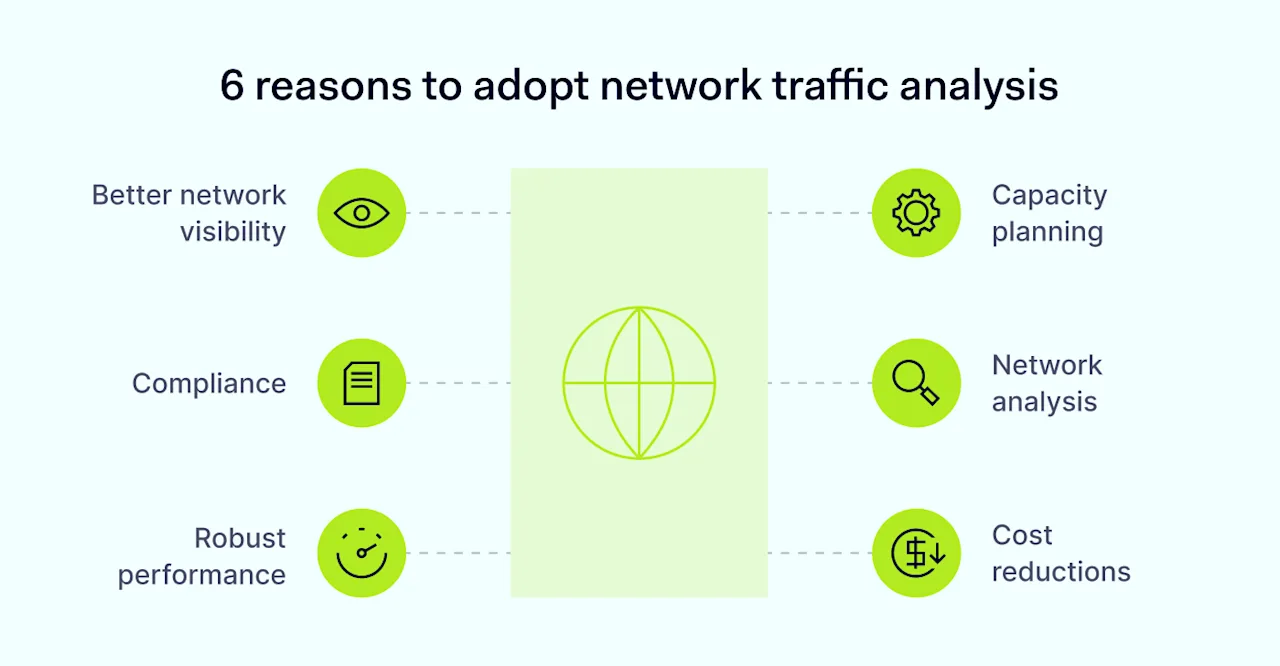
6-reasons-to-adopt-network-traffic-analysis

Beyond that general benefit, network traffic analysis has the following advantages:

#1 Better network visibility

Network visibility tools create inventories of devices connected to the network. Companies can add new devices securely and secure network traffic to existing devices.

#2 Compliance

Businesses that monitor network traffic are well-placed to detect threats and safeguard customer data in line with GDPR and HIPAA regulations.

#3 Robust performance

Continuous monitoring identifies technical problems with the availability of applications and data centers. IT teams can troubleshoot issues before downtime occurs.

#4 Capacity planning

Engineers can model future network traffic loads and plan for smooth change management.

#5 Network analysis

Engineers can leverage monitoring logs to analyze performance and find fixes to improve speed or reliability. Monitoring provides network context to investigate security incidents.

#6 Cost reductions

Monitoring network traffic identifies redundant components and suggests efficient ways to route data, cutting networking costs.

Related articles


In Depth, Remote Work

Best practices for achieving cybersecurity visibility in hybrid work environments

18 Apr 20246 min read

Cybersecurity visibility


In Depth

Data speaks volumes: how analytics improves network visibility

21 Nov 20237 min read

Data speaks volumes web cover 1400x800


How to get started with network traffic analysis

The benefits of network traffic analysis are clear. However, analyzing network traffic is harder to grasp. Businesses need monitoring systems that cover relevant data sources. Monitoring must be accurate and deliver usable outputs, but analyzing network traffic must not affect speeds or general performance.

Follow the step-by-step guide below to analyze network traffic in a way that meets those core conditions.

1. Assess your data sources

Before analyzing network traffic, you must understand what data flows through your network. Traffic monitoring can only track visible data flows. A thorough data assessment is essential.

On the device side, data sources include routers, servers, and switches that facilitate data transfers. Firewall appliances and proxy gateways may also be relevant if you use them. User workstations lie inside the scope of network traffic monitoring, as do remote work devices and IoT accessories.

Data sources also include the applications that process or store network data. Include applications stored on-site alongside cloud services that users rely on.

Automation helps you discover connected devices and apps and model device dependencies. Application and network discovery tools scan endpoints, and data flows to assess network topography.

Manually assessing network maps is also possible but time-consuming. Maps also become outdated without regular updates, while automation tools adapt as network traffic changes.

The outcome of this exercise should be a clear map of critical data flows, including a list of device and application dependencies.

2. Decide how to collect network traffic

Now, we need to create systems to extract information from data sources. There are two basic approaches: agent-based collection and agentless collection.

Agent-based systems deploy agents on devices. Agents are tiny apps that continually collect data about performance, availability, traffic volume, and inbound or outbound communications.

Agents are essential to monitor network traffic at the level of network packets. However, they can interfere with network speeds or lead to storage problems.

Agentless collection does not rely on agents to gather information. These solutions generally use protocols like the Simple Network Management Protocol (SNMP) or APIs supplied by data source vendors.

Agentless systems send monitoring queries to apps or devices. Targets respond, supplying data about their availability and security status. Agentless collection is a slightly less detailed way of analyzing network traffic. However, network traffic data is still sufficient for most monitoring purposes.

3. Configure context-based network visibility

Now, set the rules for network traffic analysis. Robust network visibility is not just about collecting masses of network traffic. IT teams must also consider network context to understand the reason for data spikes or speed issues.

Contextual information includes user authentication requests, app usage, or threat intelligence. This information may explain why traffic is spiking on particular devices. The absence of contextual data could indicate an imminent threat.

Combining raw network traffic data with situational knowledge empowers security teams and technicians. The more you know about your network environment, the easier it is to identify problems and avoid security incidents.

Choose a traffic analysis solution that integrates with threat detection and response systems. Even better, opt for a network visibility solution that blends threat detection and performance monitoring.

4. Check network restrictions

Before turning on network traffic monitoring, engineers must check local network restrictions and verify that monitoring will function properly.

For example, encrypted traffic may not be visible to tracking systems without key sharing. Bandwidth restrictions may apply, and some ports may be inaccessible to monitoring protocols. Monitoring cloud data can also be challenging. Providers operate their own data restrictions, potentially compromising network visibility.

Legacy systems often co-exist with cloud implementations. Engineers should ensure traffic monitoring covers all data sources and replace applications or devices you cannot monitor. Firewall appliances and network traffic segmentation can also influence data collection.

Compliance is another consideration. Privacy regulations prohibit the unauthorized collection of private data. Network traffic collection should not extend to user or customer identities without consent.

Finally, network traffic analysis must consider malicious threats. Can monitoring tools identify suspicious traffic and work around obfuscation techniques? If not, alternative solutions may be preferable.

5. Decide how to collect tracking data

Collecting network traffic is useless without a secure and accessible storage solution. This storage facility guards your collection tools and is a reliable destination for harvested traffic.

Separating tracking systems from general network traffic is advisable. Separation protects data from external attacks or outages. The best solution is using a secure cloud-based provider to store tracking data or building separate on-premises hardware.

Virtualized storage solutions suit multi-cloud or single-cloud networks with low on-premises involvement. Hardware is ideal for traditional office networks with few cloud components.

6. Put in place traffic analysis tools

IT teams need the ability to view, analyze, and use network traffic data. Beware: not all monitoring systems include visualization panels and ways to aggregate tracking logs.

Without visualization features, engineers face libraries of text files, and it takes hard labor to extract data from tracking logs. Unless you are comfortable with those processes, choose a tracking partner that makes analysis easy.

Effective solutions allow users to generate reports for audits and investigations. They enable application and user-level traffic analysis. Automating routine security tasks and network traffic map generation are also helpful features.

Don’t forget: Systems for analyzing network traffic also need alert functions to trigger user responses. Choose network traffic analysis solutions with customized alerts and robust measures to detect false positives.

7. Test network traffic analysis before going live

Deploy network traffic analysis gradually. Measured deployment gives you time to check components are functional and deliver the data you need. Rushed implementations waste resources and may lead to inadequate long-term coverage – giving you a false sense of security.

Begin by tracking a small group of data sources. Start with a single data server or cloud-based application. Only expand network traffic analysis when you know that everything works as designed.

How NordLayer can help you achieve network visibility

Network traffic analysis identifies performance and security problems before they impact business operations. In a world of constant data breaches and evolving cybersecurity threats, visibility is everything. Companies that remain in the dark will eventually suffer.

Fortunately, effective network visibility solutions are available for all business contexts. NordLayer’s network visibility tools track relevant traffic and simplify analysis – putting you back in control of network data flows.

Our tools let you dive deep into network activity. Device posture monitoring, server usage analysis, and user activity tracking deliver invaluable insights to guide security teams. Detect suspicious connections, only admit compliant devices, and keep track of network availability.

Network traffic analysis is the key to understanding performance and improving network security

About Version 2 Digital

Version 2 Digital is one of the most dynamic IT companies in Asia. The company distributes a wide range of IT products across various areas including cyber security, cloud, data protection, end points, infrastructures, system monitoring, storage, networking, business productivity and communication products.

Through an extensive network of channels, point of sales, resellers, and partnership companies, Version 2 offers quality products and services which are highly acclaimed in the market. Its customers cover a wide spectrum which include Global 1000 enterprises, regional listed companies, different vertical industries, public utilities, Government, a vast number of successful SMEs, and consumers in various Asian cities.

About NordLayer
NordLayer is an adaptive network access security solution for modern businesses – from the world’s most trusted cybersecurity brand, Nord Security.

The web has become a chaotic space where safety and trust have been compromised by cybercrime and data protection issues. Therefore, our team has a global mission to shape a more trusted and peaceful online future for people everywhere.

About NordLayer
NordLayer is an adaptive network access security solution for modern businesses – from the world’s most trusted cybersecurity brand, Nord Security.

The web has become a chaotic space where safety and trust have been compromised by cybercrime and data protection issues. Therefore, our team has a global mission to shape a more trusted and peaceful online future for people everywhere.

24.3.7 Voyager released

Changes compared to 24.3.6

New Features

  • Added support for selecting Windows drives by drive letter when configuring a Disk Image Protected Item

Enhancements

  • Added a label in the Comet Server web interface and the Comet Backup desktop app to distinguish if Protected Items are enforced via the policy
  • Added the ability to convert Windows System Backup Protected Items to Disk Image Protected Items via the Users tab and Bulk Actions dropdown in the Comet Server web interface
  • Improved Microsoft 365 Drive downloads by adding configurable account concurrency and adding concurrency to single file downloads

Bug Fixes

  • Fixed an issue with default Protected Items, allowing edit and delete options when the configured policy doesn’t strictly enforce it
  • Fixed an issue with the Comet Backup desktop app deleting DeviceIdentificationEntropy and DeviceIdentificationHardwareIDOverride registry keys when uninstalled
  • Fixed an issue causing a deadlock when too many requests to a Storage Vault fail during decompression in a single job
  • Fixed an issue causing restores to panic when Comet fails to load a directory included in the files being restored
  • Fixed an issue with some search results not appearing when multiple partial matches exist in the Comet Server web interface
  • Fixed an issue with search results not appearing for results with non-ASCII characters in the Comet Server web interface
  • Fixed an issue allowing search invocation underneath an active dialog in the Comet Server web interface
  • Fixed an issue causing Comet Server to segfault when starting on Linux
  • Fixed an issue causing clients running on Windows Server 2008R2 and Windows 7 to lose their live connection and become unable to be remotely upgraded after a Comet Server upgrade

About Version 2 Digital

Version 2 Digital is one of the most dynamic IT companies in Asia. The company distributes a wide range of IT products across various areas including cyber security, cloud, data protection, end points, infrastructures, system monitoring, storage, networking, business productivity and communication products.

Through an extensive network of channels, point of sales, resellers, and partnership companies, Version 2 offers quality products and services which are highly acclaimed in the market. Its customers cover a wide spectrum which include Global 1000 enterprises, regional listed companies, different vertical industries, public utilities, Government, a vast number of successful SMEs, and consumers in various Asian cities.

About Comet
We are a team of dedicated professionals committed to developing reliable and secure backup solutions for MSP’s, Businesses and IT professionals. With over 10 years of experience in the industry, we understand the importance of having a reliable backup solution in place to protect your valuable data. That’s why we’ve developed a comprehensive suite of backup solutions that are easy to use, scalable and highly secure.

Enhancing Parallels RAS: Explore what’s new in version 19.4

The latest Parallels® RAS release, version 19.4, introduces remarkable new features that refine and enhance the capabilities of Parallels RAS 19 and 19.3. 

Among these enhancements are expanded go-to-market opportunities for our partners to promote Parallels RAS and extended support for Nutanix AHV for the latest image management features.

Additionally, there are improved security measures, newly introduced customizable administrative options, and improved end-user functionality. Now, let’s take a closer look at the exciting additions in Parallels RAS 19.4.

New go-to-market (GTM) opportunity for partners

Extended GTM route for partners with Azure Marketplace listing (coming soon)

Parallels RAS is now listed as a transactional offering in the Microsoft Azure Marketplace in addition to the current bring your own license (BYOL) listing. This enables Parallels RAS to be more accessible and efficient through deployment automation.

Parallels partners can benefit through private offerings and simplified selling through personalized offerings, allowing for easier access and connecting Parallels solutions with businesses and organizations across the globe.

Provisioning and Automation

Extended image management for Nutanix AHV (AOS)

We’re thrilled to announce a significant expansion of our image management capabilities, initially introduced in the 19.3 release. It is now available for Microsoft Azure, Azure Virtual Desktop, Hyper-V and VMware vCenter, and ESXi and includes support for Nutanix AHV (AOS).

This is a pivotal step forward, enabling businesses considering migration to Nutanix to do so seamlessly with Parallels RAS. This comprehensive support encompasses a suite of powerful features, including template versioning, enhanced image lifecycle management facilitated by tags, and convenient template scheduling functionalities.

By extending our support to Nutanix AHV, we’re providing organizations with unparalleled flexibility to select their preferred infrastructure. This empowerment enables businesses to tailor their virtual environments precisely to their unique needs and preferences.

Find out more about the latest image management features with our Tech Bytes videos.

Support for scale computing SC//HyperCore 9.2

With Parallels RAS 19.4, integration with SC//HyperCore 9.2 is now available as a provider option. This enables organizations to use the latest supported SC//HyperCore versions 9.1 and 9.2 with Parallels RAS to automate provisioning, scaling, and power management of session host workloads.

Streamlined admin experience with Agent Auto-Upgrade

Managing upgrades across numerous backend session hosts can be daunting for IT administrators. To alleviate this challenge, Parallels RAS 19.4 introduces Agent Auto-upgrade, a feature that automates the upgrading of RDSH, VDI, AVD, and Remote PC (within a host pool) guest agents according to a maintenance schedule set by the IT administrator.

Whether operating on-premises, in the cloud, or in hybrid environments, this functionality simplifies upgrades, enabling administrators to focus on more strategic initiatives while ensuring all endpoints remain up to date.

Continuous improvement of template versioning

Building upon our commitment to improvement and optimization, the latest release of Parallels RAS includes several updates aimed at enhancing template versioning capabilities.

These improvements are designed to optimize the IT administrator experience, ensuring more seamless management and better version control for virtualization templates.

Security

Self-service registration for email-based one-time passwords (OTPs)

Security remains a top priority in today’s digital landscape. Accordingly, Parallels RAS 19.4 introduces a new, robust multi-factor authentication option with email OTP.

This feature provides organizations with an additional layer of security by delivering one-time passwords directly to user email addresses. Even external email addresses not stored in the company’s Active Directory are supported, ensuring comprehensive protection against unauthorized access. This capability provides a simple yet efficient use of email-based OTPs without relying on complex, third-party dependencies services.

Validate host headers

We have introduced HTTP host header validation at the gateway. This validation process serves to mitigate vulnerabilities associated with HTTP host header injection, enhancing the overall security posture of our platform.

With this feature implementation, administrators gain comprehensive control over custom HTTP host headers with the high availability load balancers and secure gateways being automatically included in the approved list.

Activation of this feature ensures that any request lacking a recognized host header from the specified list will result in a 404 error, thereby fortifying our defenses against potential security breaches originating from unauthorized host headers.

Configuring certificate authority templates

Administrators of Parallels RAS for organizations using SAML for their enrollment servers can now leverage a larger key size for security purposes.

This new feature enables the configuration of the PrlsEnrollmentAgent and the PrlsSmartcardLogon certificate templates used by the Enrollment Server at a minimum key size of 4096 bits. Previously, the minimum key size was 2048 bits.

User experience

Enhanced user experience with multi-monitor support

End-users leveraging the Parallels Client for Web will benefit from enhanced productivity with the introduction of multi-monitor support.

This feature empowers users to fully utilize all available displays during published sessions, whether they’re working within an application or in a desktop environment. By maximizing screen real estate, multi-monitor support enhances the overall user experience, facilitating seamless multitasking and workflow efficiency.

New built-in reports

The Parallels RAS 19.4 release introduces new host pool reporting options for IT administrators, further improving its reporting capabilities. These new reports track areas in user sessions and include:

  • Sessions disconnect for host pool

New reports are dedicated to monitoring session disconnects within host pools, akin to session activity reports for individual sessions.

  • Transport protocol for host pool

New reports tailored to track the transport protocol usage within host pools, mirroring the functionality of session activity reports for host pools.

  • Bandwidth availability for host pool

New reports focused on assessing bandwidth availability within host pools, providing insights like session activity reports but at the pool level.

  • Latency for host pool

New reports aimed at measuring latency within host pools, offering analysis akin to session activity reports while focusing on pool-wide latency metrics.

  • Connection quality for host pool

New reports designed to evaluate connection quality within host pools, providing insights like session activity reports but focusing on the overall connection quality across the pool.

  • UX evaluator for host pool

New reports dedicated to assessing the user experience (UX) within host pools, offering insights like session activity reports but focusing on UX metrics at the pool level.

  • Log-on duration for host pool

New reports aimed at analyzing logon duration within host pools, providing insights like session activity reports while focusing on pool-wide logon duration metrics.

SAML SSO capability

SAML SSO capability is now available when using Parallels RAS + Azure Virtual Desktop under the standard feature set.

Administration experience

Custom administration for tailored control

This feature introduces a custom menu under ‘Help’ within the RAS Console and allows customization of a URL in the management portal Support section.

This URL can redirect power or custom administrators to local or internal support or any other designated URL. It’s particularly beneficial for organizations that utilize Security Event and Incident Management frameworks, using local support to address IT tickets and enhance the efficiency of the support process.

Active Directory-based (AD) permissions for session management

Administrators can now define session management permissions tailored to Parallels custom administrators based on their AD group membership. This feature enhances the granularity of session management administration, ensuring that only designated administrators can oversee specific end-user sessions. This capability is particularly advantageous for service providers or larger enterprises with multiple designated help desk administrators.

View “license” permission options

This feature introduces a dedicated license view permission for administrators, available in both the RAS console and Web Management portal, tailored for both power and customer administrators. It provides the flexibility to restrict the visibility of certain license information from other administrators who have access to all license data.

Ready for Parallels RAS 19.4?

Parallels RAS continues to raise the bar with its feature offerings while ensuring the best possible admin and user experience.

From Nutanix AHV image management support to multi-factor authentication options and streamlined administrative controls, Parallels RAS empowers organizations to achieve greater efficiency, security, and flexibility in their virtual environments.

For a full list of features, refer to the Parallels RAS 19.4 release notes.

Frequently asked questions (FAQs)

1. What is the release date for 19.4?

The general availability date for Parallels RAS 19.4 is April 30, 2024.

2. What do I need to do to install the latest version of Parallels RAS?

IT managers can access the latest version of Parallels RAS through the management console two weeks after GA by going to Parallels RAS Console > Administration > Settings > Check now > Update and following the instructions from there. To access the new version immediately, managers can go to public downloads or through My Parallels Account.

3. Is there any supporting information to help me learn more about these features?

Yes, the best place for more information is in our 19.4 release notes.

Ready to explore what’s new in Parallels RAS 19.4? Get started here!


About Version 2 Digital

Version 2 Digital is one of the most dynamic IT companies in Asia. The company distributes a wide range of IT products across various areas including cyber security, cloud, data protection, end points, infrastructures, system monitoring, storage, networking, business productivity and communication products.

Through an extensive network of channels, point of sales, resellers, and partnership companies, Version 2 offers quality products and services which are highly acclaimed in the market. Its customers cover a wide spectrum which include Global 1000 enterprises, regional listed companies, different vertical industries, public utilities, Government, a vast number of successful SMEs, and consumers in various Asian cities.

About Parallels 
Parallels® is a global leader in cross-platform solutions, enabling businesses and individuals to access and use the applications and files they need on any device or operating system. Parallels helps customers leverage the best technology available, whether it’s Windows, Linux, macOS, iOS, Android or the cloud.

×

Hello!

Click one of our contacts below to chat on WhatsApp

×