Skip to content

常見的 WhatsApp 詐騙方式及自保方法

使用社交媒體或通訊可能會帶來許多風險,例如在 Whatsapp 上遇到詐騙。這些詐騙可能會導致您失去個人資訊、金錢或者網絡安全。在這篇文章中,我們將介紹一些常見的 Whatsapp 詐騙和如何避免成為受害者。

1. 恐嚇式詐騙
恐嚇式詐騙是一種騙取金錢的詐騙,詐騙者會聲稱擁有您的私人資訊或裸照,並威脅公開這些資訊,除非您支付贖金。為了避免這種詐騙,請勿將任何私人資訊或裸照傳送給陌生人,並將您的私隱設定為僅限好友或家人可見。

2. 獎金詐騙
獎金詐騙是一種騙取個人資訊的詐騙,詐騙者會聲稱您已獲得一個大獎金,但需要您提供個人資訊或支付手續費才能領取獎金。為了避免這種詐騙,請不要相信任何您沒有參加的獎項或比賽,並避免向陌生人提供個人資訊。

3. 購物詐騙
購物詐騙是一種騙取金錢的詐騙,詐騙者會聲稱他們可以提供高品質、低價格的產品或服務,但實際上他們只會收取您的金錢但不履行承諾。為了避免這種詐騙,請避免在 Whatsapp 上向陌生人購買產品或服務,而應該選擇可信賴的網上商店進行購物。

4. 假冒身份詐騙
假冒身份詐騙是一種騙取個人資訊的詐騙,詐騙者會冒充一個權威機構或公司,要求您提供個人資訊或登錄帳戶。為了避免這種詐騙,請先驗證該機構或公司是否真實存在,可以通過他們的官方網站或聯繫他們的客戶支援部門。同時,不要在 Whatsapp 上向任何人透露您的帳戶資訊或密碼。

5. 鏈結詐騙
鏈結詐騙是一種通過向您發送有害鏈結來騙取個人資訊或網絡安全的詐騙。這些鏈結可能會帶有惡意軟件或病毒,一旦您點擊了這些鏈接,詐騙者就能夠在您的設備上偷取您的個人資訊。為了避免這種詐騙,請不要點擊任何來自陌生人或未知來源的鏈接,同時,請使用最新的防病毒軟件保護您的設備。

總結
在使用 Whatsapp 時,請注意上述常見的詐騙,避免成為受害者。同時,請保護您的私隱和網絡安全,不要將任何私人資訊傳送給陌生人,並使用最新的防病毒軟件保護您的設備。如果您收到任何可疑信息,請勿點擊鏈結或提供個人資訊。

About Version 2

Version 2 Digital is one of the most dynamic IT companies in Asia. The company distributes a wide range of IT products across various areas including cyber security, cloud, data protection, end points, infrastructures, system monitoring, storage, networking, business productivity and communication products. Through an extensive network of channels, point of sales, resellers, and partnership companies, Version 2 offers quality products and services which are highly acclaimed in the market. Its customers cover a wide spectrum which include Global 1000 enterprises, regional listed companies, different vertical industries, public utilities, Government, a vast number of successful SMEs, and consumers in various Asian cities.

關於ESET
ESET成立於1992年,是一家面向企業與個人用戶的全球性的電腦安全軟件提供商,其獲獎產品 — NOD32防病毒軟件系統,能夠針對各種已知或未知病毒、間諜軟件 (spyware)、rootkits和其他惡意軟件為電腦系統提供實時保護。ESET NOD32佔用 系統資源最少,偵測速度最快,可以提供最有效的保護,並且比其他任何防病毒產品獲得了更多的Virus Bulletin 100獎項。ESET連續五年被評為“德勤高科技快速成長500 強”(Deloitte’s Technology Fast 500)公司,擁有廣泛的合作夥伴網絡,包括佳能、戴爾、微軟等國際知名公司,在布拉迪斯拉發(斯洛伐克)、布裏斯托爾(英國 )、布宜諾斯艾利斯(阿根廷)、布拉格(捷克)、聖地亞哥(美國)等地均設有辦事處,代理機構覆蓋全球超過100個國家。

February 2023: What’s New?

“What’s New?” is a series of blog posts covering recent changes to Comet in more detail. This article covers the latest changes in Comet Voyager over February 2023.

There were just three Comet software releases during February – two in the 22.12.x Voyager release series, plus the launch of our latest quarterly series 23.3.0 “Leda”.

February is a short month, and it was also a quiet month for new feature development as we focused on quality assurance ahead of the new quarterly software release. Most new feature development this month has been held back as a result, so you will see many more exciting new features land in the 23.3.x “Voyager” series when it reopens shortly next month in March.

Better email reports

The latest 22.12.x versions of Comet included improvements to the email reporting features that launched at the start of the 22.12.x series.

The Recent Activity email report template now includes a table legend in the email footer, helping to distinguish the color series from each other. By way of comparison, when you view Comet Server’s Recent Activity page in a web browser, it’s possible to hover the mouse over each color segment to display more detailed information about the breakdown of different job types. However, email is a more limited technology medium and an equivalent hover feature is not available. The legend is a simple solution that makes the Recent Activity email report more accessible to Comet Server operators who are not yet familiar with the colors.

The email feature has received more attention to detail, leading to us developing additional fixes for email report previews; for filtering the subset of customers; and for partial configuration of time boundaries.

Better granular restore

Another one of our areas of focus this month has been the granular single-file restore system, that now shares some common core functionality across both the Disk Image and Hyper-V Protected Item types. Granular restore now supports more types of NTFS compressed file, including a fix for files that have been compressed with the LZNT1 algorithm. We also fixed an issue with reading single files from within NTFS partitions that have a highly fragmented MFT (Master File Table).

Additionally, we have fixed additional issues with the new Hyper-V single-file restore if a single Protected Item contains multiple virtual machines with multiple VHDX images, as well as fixing cosmetic issues when toggling between Protected Item types in the Comet Backup desktop app.

Better syncing with Gradient MSP

There have been improvements to the process of syncing Comet data with Gradient MSP. As a reminder, this is an external service that can correlate your Comet user accounts and storage usage with RMM invoices in systems such as Autotask, Syncro RMM, Connectwise, and many more.

The latest versions of Comet Server allow more fine-grained control of the connected feature set; the ability to toggle sending backup job failures to the RMM; optimizing the number of alerts that are sent; and providing clearer error messages if there is an error from Gradient’s service.

Comet 23.3.0 “Leda”

All of our focus on bugfixes this month has been building up to one thing – a smooth and seamless release of our latest quarterly milestone software version. This time, it’s named “Leda”, and this rolls up the whole quarter’s worth of 22.12.x enhancements into a new fixed point for you to build your business on.

Like Comet’s previous recent quarterly software releases, “Leda” is named after a moon of Jupiter. Jupiter has a great number of moons and more are continuing to be discovered. When Leda was discovered as recently as 1974, it was one of Jupiter’s 13 known moons. Today, Jupiter has 92 known moons, with the most recent discovered just this month in February 2023!

You can read the full release notes for Comet 23.2.0 “Leda” to see the full details – or if you’d prefer to watch rather than read, I’m hosting a webinar next week to discuss this new quarterly release and all its new features. Please register for a notification before we go live on March 7th (PST) to catch up on all the latest Comet news with me – there will be a free live Q&A session after the presentation.

As well as that, we have many more videos available on our YouTube channel, including guides on getting started with Comet, individual features, demonstrations with our technology partners, and webinars for previous quarterly software releases.

About Version 2 Digital

Version 2 Digital is one of the most dynamic IT companies in Asia. The company distributes a wide range of IT products across various areas including cyber security, cloud, data protection, end points, infrastructures, system monitoring, storage, networking, business productivity and communication products.

Through an extensive network of channels, point of sales, resellers, and partnership companies, Version 2 offers quality products and services which are highly acclaimed in the market. Its customers cover a wide spectrum which include Global 1000 enterprises, regional listed companies, different vertical industries, public utilities, Government, a vast number of successful SMEs, and consumers in various Asian cities.

About Comet
We are a team of dedicated professionals committed to developing reliable and secure backup solutions for MSP’s, Businesses and IT professionals. With over 10 years of experience in the industry, we understand the importance of having a reliable backup solution in place to protect your valuable data. That’s why we’ve developed a comprehensive suite of backup solutions that are easy to use, scalable and highly secure.

CVE-2022-44666: Microsoft Windows Contacts (VCF/Contact/LDAP) syslink control href attribute escape vulnerability

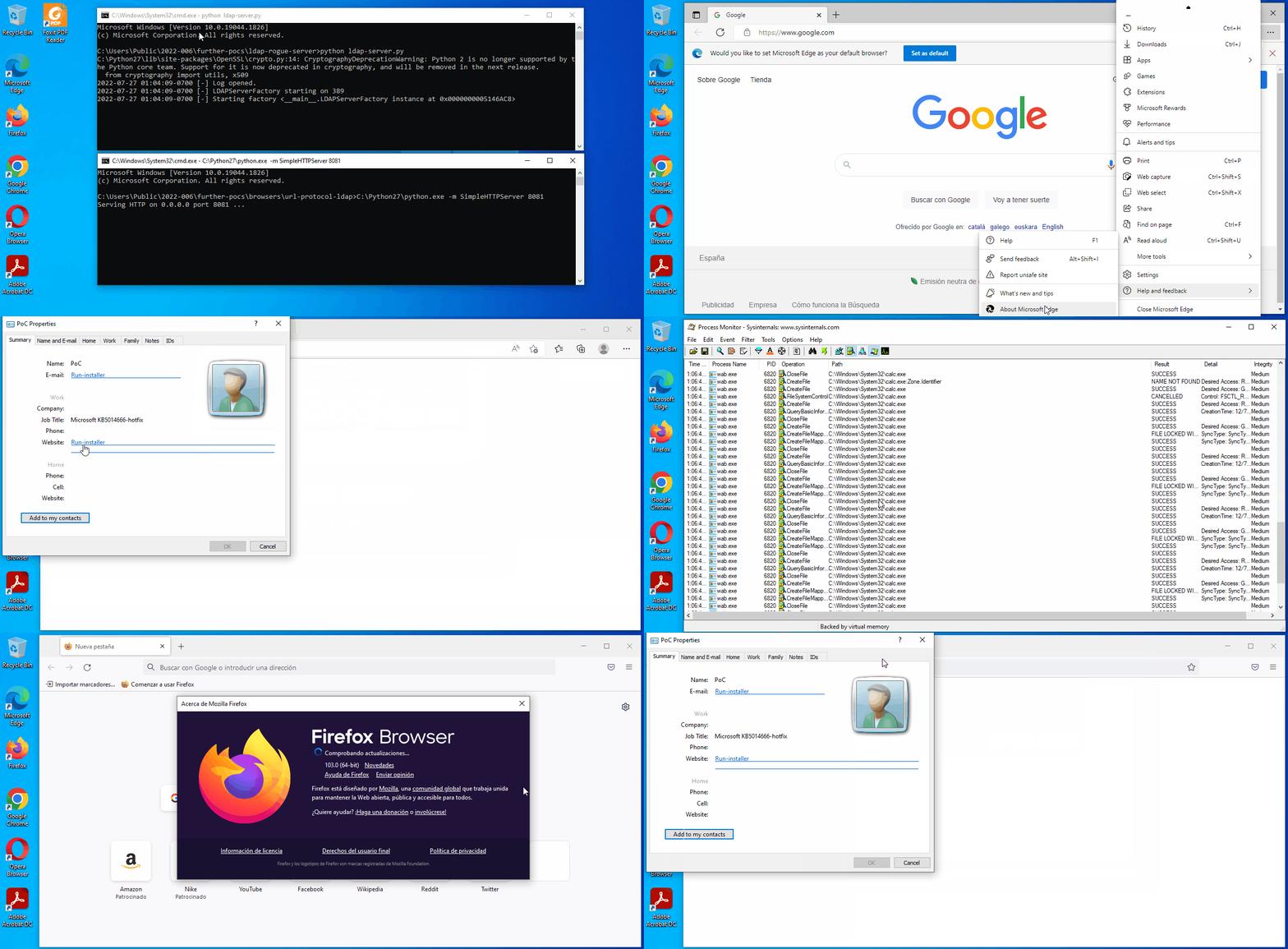
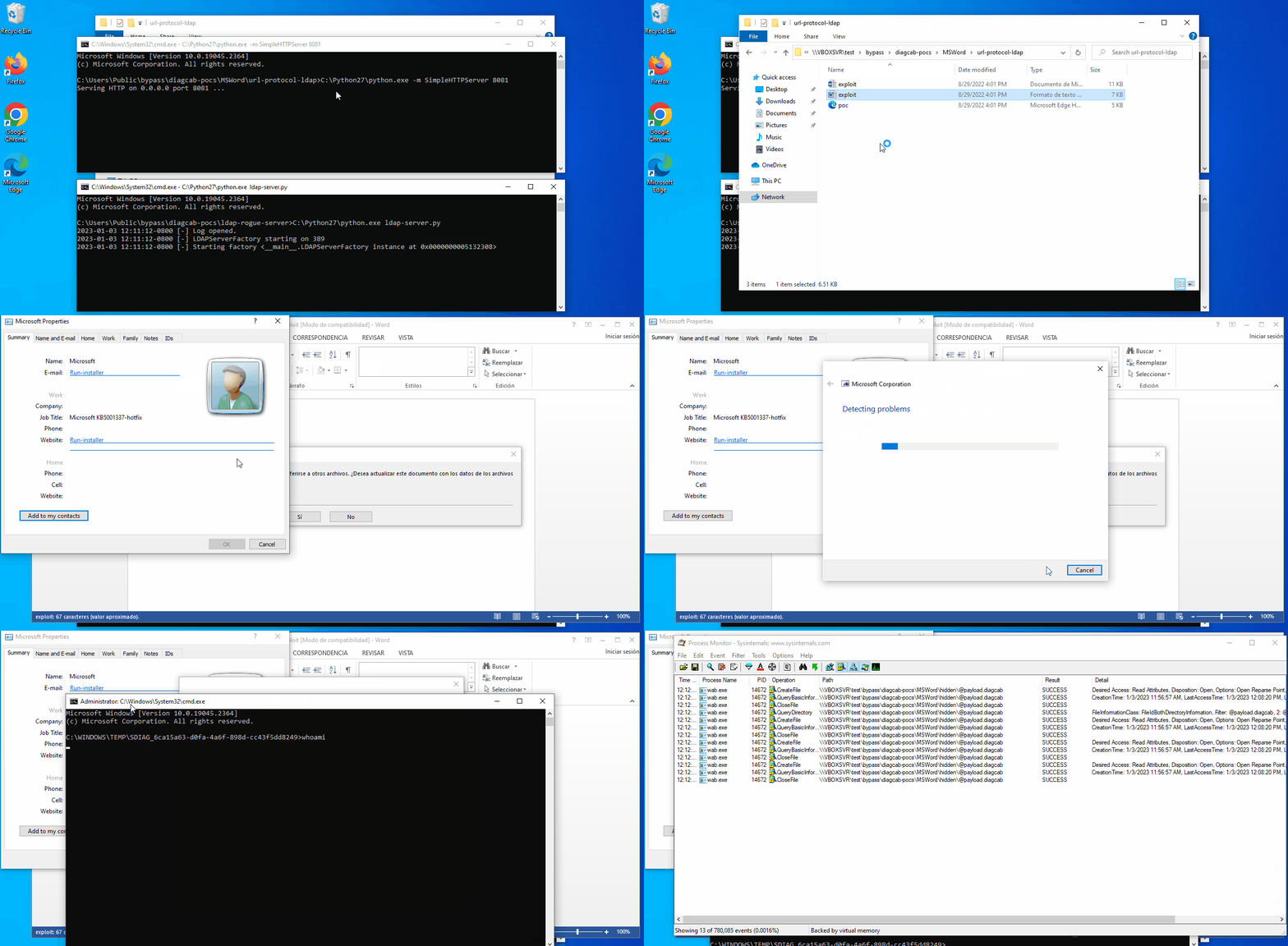
CVE-2022-44666 (still 0day) is a Microsoft Windows Contacts (wab.exe) vulnerability while parsing “href” attributes into syslink controls, which was originally discovered, reported through ZDI and publicly disclosed by John Page (aka hyp3rlinx) of ApparitionSec long time ago (~ 5 years). Full credits for discovery go to him!

Last summer I started to study this vulnerability, either finding out further vectors to exploit this by using URL protocol handlers such as search-ms and LDAP, or file types accepted for the latest Windows versions (VCF vs Contact files). Thanks to URL protocols, there are more applications which might trigger the vulnerability (Microsoft Office + remote templates aka linked htmlfile OLE objects, web browsers and even PDF Readers).

My best contribution was using LDAP URL protocol which makes the impact a bit higher given that the crafted contact file will be opened without further user interaction for Microsoft Word.

On December 2022, Microsoft decided to release a patch for this vulnerability but unfortunately the fix stays incomplete and was easy to find a variant out by using a single char “@” before the target payload. So this vulnerability still remains as 0day nowadays.

There are some caveats for this vulnerability:

✅ Windows Contacts application (wab.exe) does not verify MoTW flag.

✅ It’s triggerable by URI protocol LDAP.

✅ This file type (.contact) associated by default to Windows Contacts application (wab.exe).

✅ Downloads of these file types (.contact & .vcf) aren’t blocked by browsers, mail servers and so on.

❌ Syslink control click is necessary to trigger the vulnerability (1-click).

❌ The payloads have to already be somehow on the target system, this might imply security warnings, MoTW prompts… What about diagcab files? There are some cons but higher impact occasionally.

❌ Network share paths as “href” attribute are blocked by default.

❌ Full paths as “href” attribute are blocked by default.

Long time ago, 0patch released a micropatch for this issue which has been successfully working with some minor fixes (offsets) in order to cover all the Windows versions, something that, some weeks ago, has already been deployed. It’s the only unofficial fix which actually is full patching the vulnerability right now, waiting for an official patch that hopefully comes soon.

My full write-up can be found in this GitHub repository and John’s post in his website.

#CVE-2022-44666 #0day

Tags

  • #0day

  • #vicarius_blog

  • #CVE-2022-44666

” alt=”users/photos/clemvjnl46kz30juk5c0ta59k.jpg” data-v-5bf3e860=”” data-v-85c4bf60=”” data-v-0bbc59dc=”” />

Written by

j00sean (https://twitter.com/j00sean)


About Version 2 Digital

Version 2 Digital is one of the most dynamic IT companies in Asia. The company distributes a wide range of IT products across various areas including cyber security, cloud, data protection, end points, infrastructures, system monitoring, storage, networking, business productivity and communication products.

Through an extensive network of channels, point of sales, resellers, and partnership companies, Version 2 offers quality products and services which are highly acclaimed in the market. Its customers cover a wide spectrum which include Global 1000 enterprises, regional listed companies, different vertical industries, public utilities, Government, a vast number of successful SMEs, and consumers in various Asian cities.

About VRX
VRX is a consolidated vulnerability management platform that protects assets in real time. Its rich, integrated features efficiently pinpoint and remediate the largest risks to your cyber infrastructure. Resolve the most pressing threats with efficient automation features and precise contextual analysis.

Understanding the Business Continuity Plan and Its Importance

These days, cybercrime is rampant. It’s no longer a matter of “if” you’re going to suffer an attack but “when” it will happen. All companies want to be ready for any crisis. And this is where a business continuity plan comes into play.

But what is a business continuity plan exactly? Why is it important? What should one include? Today, we’re exploring all these questions in-depth.

What is a business continuity plan?

A business continuity plan (BCP) is a document that sets guidelines for how an organization will continue its operations in the event of a disruption, whether it’s a fire, flood, other natural disaster or a cybersecurity incident. A BCP aims to help organizations resume operations without significant downtime.

Unfortunately, according to a 2020 Mercer survey, 51% of businesses across the globe don’t have a business continuity plan in place.

What’s the difference between business continuity and disaster recovery plans?

We often confuse the terms business continuity plan and disaster recovery plan. The two overlap and often work together, but the disaster recovery plan focuses on containing, examining, and restoring operations after a cyber incident. On the other hand, BCP is a broader concept that considers the whole organization. A business continuity plan helps organizations stay prepared for dealing with a potential crisis and usually encompasses a disaster recovery plan.

Importance of business continuity planning

The number of news headlines announcing data breaches has numbed us to the fact that cybercrime is very real and frequent and poses an existential risk to companies of all sizes and industries.

Consider that in 2021, approximately 37% of global organizations fell victim to a ransomware attack. Then consider that business interruption and restoration costs account for 50% of cyberattack-related losses. Finally, take into account that most cyberattacks are financially motivated and the global cost of cybercrime topped $6 trillion last year. The picture is quite clear — cybercrime is a lucrative venture for bad actors and potentially disastrous for those on the receiving end.

To thrive in these unpredictable times, organizations go beyond conventional security measures. Many companies develop a business continuity plan parallel to secure infrastructure and consider the plan a critical part of the security ecosystem. The Purpose of a business continuity plan is to significantly reduce the downtime in an emergency and, in turn, reduce the potential reputational damage and — of course — revenue losses.

Business continuity plan template

Password security for your business

Store, manage and share passwords.

30-day money-back guarantee

Business Continuity Plan Example

[Company Name]

[Date]

I. Introduction

  • Purpose of the Plan

  • Scope of the Plan

  • Budget

  • Timeline

The initial stage of developing a business continuity plan starts with a statement of the plan’s purpose, which explains the main objective of the plan, such as ensuring the organization’s ability to continue its operations during and after a disruptive event.

The Scope of the Plan outlines the areas or functions that the plan will cover, including business processes, personnel, equipment, and technology.

The Budget specifies the estimated financial resources required to implement and maintain the BCP. It includes costs related to technology, personnel, equipment, training, and other necessary expenses.

The Timeline provides a detailed schedule for developing, implementing, testing, and updating the BCP.

II. Risk Assessment

  • Identification of Risks

  • Prioritization of Risks

  • Mitigation Strategies

The Risk Assessment section of a Business Continuity Plan (BCP) is an essential part of the plan that identifies potential risks that could disrupt an organization’s critical functions.

The Identification of Risks involves identifying potential threats to the organization, such cybersecurity breaches, supply chain disruptions, power outages, and other potential risks. This step is critical to understand the risks and their potential impact on the organization.

Once the risks have been identified, the Prioritization of Risks follows, which helps determine which risks require the most attention and resources.

The final step in the Risk Assessment section is developing Mitigation Strategies to minimize the impact of identified risks. Mitigation strategies may include preventative measures, such as system redundancies, data backups, cybersecurity measures, as well as response and recovery measures, such as emergency protocols and employee training.

III. Emergency Response

  • Emergency Response Team

  • Communication Plan

  • Emergency Procedures

This section of the plan focuses on immediate actions that should be taken to ensure the safety and well-being of employees and minimize the impact of the event on the organization’s operations.

The Emergency Response Team is responsible for managing the response to an emergency or disaster situation. This team should be composed of individuals who are trained in emergency response procedures and can act quickly and decisively during an emergency. The team should also include a designated leader who is responsible for coordinating the emergency response efforts.

The Communication Plan outlines how information will be disseminated during an emergency situation. It includes contact information for employees, stakeholders, and emergency response personnel, as well as protocols for communicating with these individuals.

The Emergency Procedures detail the steps that should be taken during an emergency or disaster situation. The emergency procedures should be developed based on the potential risks identified in the Risk Assessment section and should be tested regularly to ensure that they are effective.

IV. Business Impact Analysis

The Business Impact Analysis (BIA) section of a Business Continuity Plan (BCP) is a critical step in identifying the potential impact of a disruption to an organization’s critical operations.

The Business Impact Analysis is typically conducted by a team of individuals who understand the organization’s critical functions and can assess the potential impact of a disruption to those functions. The team may include representatives from various departments, including finance, operations, IT, and human resources.

V. Recovery and Restoration

  • Procedures for recovery and restoration of critical processes

  • Prioritization of recovery efforts

  • Establishment of recovery time objectives

The Recovery and Restoration section of a Business Continuity Plan (BCP) outlines the procedures for recovering and restoring critical processes and functions following a disruption.

The Procedures for recovery and restoration of critical processes describe the steps required to restore critical processes and functions following a disruption. This may include steps such as relocating to alternate facilities, restoring data and systems, and re-establishing key business relationships.

The Prioritization section of the plan identifies the order in which critical processes will be restored, based on their importance to the organization’s operations and overall mission.

Recovery time objectives (RTOs) define the maximum amount of time that critical processes and functions can be unavailable following a disruption. Establishing RTOs ensures that recovery efforts are focused on restoring critical functions within a specific timeframe.

VI. Plan Activation

  • Plan Activation Procedures

The Plan Activation section is critical in ensuring that an organization can quickly and effectively activate the plan and respond to a potential emergency.

The Plan Activation Procedures describe the steps required to activate the BCP in response to a disruption. The procedures should be clear and concise, with specific instructions for each step to ensure a prompt and effective response.

VII. Testing and Maintenance

  • Testing Procedures

  • Maintenance Procedures

  • Review and Update Procedures

This section of the plan is critical to ensure that an organization can effectively respond to disruptions and quickly resume its essential functions.

Testing procedures may include scenarios such as natural disasters, cyber-attacks, and other potential risks. The testing procedures should include clear objectives, testing scenarios, roles and responsibilities, and evaluation criteria to assess the effectiveness of the plan.

The Maintenance Procedures detail the steps necessary to keep the BCP up-to-date and relevant.

The Review and Update Procedures describe how the BCP will be reviewed and updated regularly to ensure its continued effectiveness. This may involve conducting a review of the plan on a regular basis or after significant changes to the organization’s operations or threats.

What should a business continuity plan checklist include?

Organizations looking to develop a BCP have more than a few things to think through and consider. Variables such as the size of the organization, its IT infrastructure, personnel, and resources all play a significant role in developing a continuity plan. Remember, each crisis is different, and each organization will have a view on handling it according to all the variables in play. However, all business continuity plans will include a few elements in one way or another.

  • Clearly defined areas of responsibility

    A BCP should define specific roles and responsibilities for cases of emergency. Detail who is responsible for what tasks and clarify what course of action a person in a specific position should take. Clearly defined roles and responsibilities in an emergency event allow you to act quickly and decisively and minimize potential damage.

  • Crisis communication plan

    In an emergency, communication is vital. It is the determining factor when it comes to crisis handling. For communication to be effective, it is critical to establish clear communication pipelines. Furthermore, it is crucial to understand that alternative communication channels should not be overlooked and outlined in a business continuity plan.

  • Recovery teams

    A recovery team is a collective of different professionals who ensure that business operations are restored as soon as possible after the organization confronts a crisis.

  • Alternative site of operations

    Today, when we think of an incident in a business environment, we usually think of something related to cybersecurity. However, as discussed earlier, a BCP covers many possible disasters. In a natural disaster, determine potential alternate sites where the company could continue to operate.

  • Backup power and data backups

    Whether a cyber event or a real-life physical event, ensuring that you have access to power is crucial if you wish to continue operations. In a BCP, you can often come across lists of alternative power sources such as generators, where such tools are located, and who should oversee them. The same applies to data. Regularly scheduled data backups can significantly reduce potential losses incurred by a crisis event.

  • Recovery guidelines

    If a crisis is significant, a comprehensive business continuity plan usually includes detailed guidelines on how the recovery process will be carried out.

Business continuity planning steps
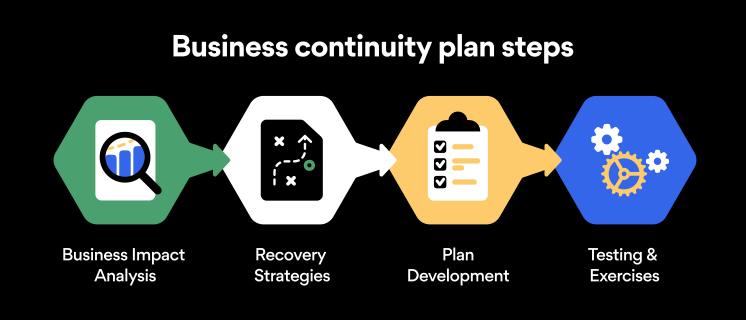
Here are some general guidelines that an organization looking to develop a BCP should consider:

Analysis

A business continuity plan should include an in-depth analysis of everything that could negatively affect the overall organizational infrastructure and operations. Assessing different levels of risk should also be a part of the analysis phase.

Design and development

Once you have a clear overview of potential risks your company could face, start developing a plan. Create a draft and reassess it to see if it takes into account even the smallest of details.

Implementation

Implement BCP within the organization by providing training sessions for the staff to get familiar with the plan. Getting everyone on the same page regarding crisis management is critical.

Testing

Rigorously test the plan. Play out a variety of scenarios in training sessions to learn the overall effectiveness of the continuity plan. By doing so, everyone on the team will be closely familiar with the business continuity plan’s guidelines.

Maintenance and updating

Because the threat landscape constantly changes and evolves, you should regularly reassess your BCP and take steps to update it. By making your continuity plan in tune with the times, you will be able to stay a step ahead of a crisis.

Level up your company’s security with NordPass Business

A comprehensive business continuity plan is vital for the entire organization’s security posture. However, in a perfect world, you wouldn’t have to use it. This is where NordPass Business can help.

Remember, weak, reused, or compromised passwords are often cited as one of the top contributing factors in data breaches. It’s not surprising, considering that an average user has around 100 passwords. Password fatigue is real and significantly affects how people treat their credentials. NordPass Business counters these issues.

With NordPass Business, your team will have a single secure place to store all work-related passwords, credit cards, and other sensitive information. Accessing all the data stored in NordPass is quick and easy, which allows your employees not to be distracted by the task of finding the correct passwords for the correct account.

In cyber incidents, NordPass Business ensures that company credentials remain secure at all times. Everything stored in the NordPass vault is secured with advanced encryption algorithms, which would take hundreds of years to brute force.

If you are interested in learning more about NordPass Business and how it can fortify corporate security, do not hesitate to book a demo with our representative.

About Version 2 Digital

Version 2 Digital is one of the most dynamic IT companies in Asia. The company distributes a wide range of IT products across various areas including cyber security, cloud, data protection, end points, infrastructures, system monitoring, storage, networking, business productivity and communication products.

Through an extensive network of channels, point of sales, resellers, and partnership companies, Version 2 offers quality products and services which are highly acclaimed in the market. Its customers cover a wide spectrum which include Global 1000 enterprises, regional listed companies, different vertical industries, public utilities, Government, a vast number of successful SMEs, and consumers in various Asian cities.

About NordPass
NordPass is developed by Nord Security, a company leading the global market of cybersecurity products.

The web has become a chaotic space where safety and trust have been compromised by cybercrime and data protection issues. Therefore, our team has a global mission to shape a more trusted and peaceful online future for people everywhere.

10 Best Practices for Email Security to Protect Your Business

With the rise of remote working came a surge in cybercrime. Business Email Compromise (BEC) attacks have seen a 150% year-over-year increase, so the odds are not in any business’s favor. However, staying vigilant and educated can protect your company and avoid such attacks. Keep reading to find out the main dangers business email accounts face and get 10 business email security tips.

What is Business Email Compromise (BEC)?

BEC is a type of cybercrime that involves impersonating a trusted business contact, such as a CEO or supplier, in order to trick employees into transferring money or sensitive information to the criminal’s account. These schemes often involve careful research and social engineering to create a convincing ruse.

According to the FBI, BEC fraud has cost companies over $26 billion globally since 2016, and the threat continues to grow. Small businesses are particularly vulnerable, as they may not have the resources or expertise to detect and prevent these attacks.

One example of a BEC scam involved the director of Puerto Rico’s Industrial Development Company, Ruben Rivera, who mistakenly made the transaction of $2.6 million to a fake bank account. In another case, Ubiquiti Networks Inc., the San Jose-based manufacturer of high-performance networking technologies, fell victim to a BEC attack that resulted in a loss of $46.7 million.

As the use of email continues to be an essential aspect of business communication, it is crucial for companies to remain vigilant and take proactive measures to defend against the threat of BEC.

Phishing is the number one email security threat

Phishing is a type of digital scam that is especially common in emails. It’s a form of social engineering where a hacker tries to deceive an employee into believing the email is coming from a credible source. Phishing emails usually have some sort of CTA: it’s like a form of marketing, if you will. Except that phishing CTAs usually involve clicking on a malicious link or revealing sensitive company data to outsiders.

Well, just like any other marketer, hackers employ creative techniques to improve the conversion rates of their scams. The more deceitful the email, the higher the conversion rate. That’s why phishing emails can be difficult to spot at times. Examples of phishing emails include:

  • Account verification scam. You may receive a phishing email that looks something like this: “Due to a recent security threat, we would like to ask you to verify your account by signing in through the link below. Failing to do so will result in the permanent deactivation of your account.”

  • Fake invoice scam. Hackers may send out emails saying, “We still haven’t received your payment for our services. Please use the link below to complete the transaction.”

  • Spear phishing. This is a more advanced and tailored form of phishing that requires hackers to do some research on your company. For instance, an employee may receive an email that looks like it’s coming from a specific coworker, instructing them to visit a website or disclose information.

Password security for your business

Store, manage and share passwords.

30-day money-back guarantee

Best practices for business email security

Falling for phishing scams can expose your company to data breaches and malware. Taking steps to appropriately ensure the security of your email will help protect your business from phishing and other forms of cybercrime:

1. Conduct phishing awareness training

Emails usually get breached through employee negligence and lack of knowledge. So the first way to increase email cybersecurity is to raise awareness about the main threat: phishing. All employees should receive in-depth training on recognizing and avoiding attempted phishing schemes. The main points to cover here are:

  • Becoming familiar with the main phishing schemes

  • Being suspicious about unusual requests

  • Never clicking on random links received through email

Once employees are familiar with these precautions, your company’s susceptibility to phishing emails will significantly decrease and your business email security will improve in general.

Email attachments and suspicious links are the most common methods cybercrooks use to spread malicious software. Ensure that your employees are well aware of these devious practices and are trained to spot them in real-life situations. With time and a lot of practice, your team will develop a sense for suspicious email links and attachments, which should considerably lower the potential attack vector and significantly improve your overall security posture.

3. Enable multi-factor authentication

You can make your account safer from hackers by connecting your smartphone to your email. Even if the passwords to your email accounts are leaked, no outsiders will be able to access them without having access to the device it’s connected to. All vital business accounts, not just email accounts, should have multi-factor authentication enabled.

4. Avoid using email when on public Wi-Fi

Public Wi-Fi poses massive risks to email security. If it’s unencrypted (which it often is), anybody can connect to the same network. You never know when a hacker will be that someone.

If a hacker intercepts your connection with unencrypted public Wi-Fi and catches you logging into your email, they can steal your email password. It’s best to steer clear of public Wi-Fi altogether, but if connecting to it is necessary, never transmit important data while on it.

5. Avoid using business emails for private purposes and vice versa

Most office jobs these days come with an email address. Some people get the temptation to use the new email address for all sign-ins. Need to sign up for a new streaming service? Well, why not use your brand new business email for that? Everybody else does it, anyway, right?

At first, it might sound like a great idea. Yet using your enterprise email for private purposes and vice versa could cause significant security concerns for you as an individual and the company.

First, using a company email for your personal online activities allows for easier and simpler profiling. Consequently, that could lead to spear-phishing — a targeted phishing campaign or other targeted cyberattacks.

6. Encrypt company email

Encrypting company email using special email security software is a great way to steer hackers away. Encryption ensures that the only people able to view the emails are the sender and recipient. If a hacker intercepts an employee’s Wi-Fi connection or email account, they will not see any sensitive data.

7. Set up email security protocols

Email security protocols are immensely important because they provide an extra layer of security to your digital communications. The protocols are designed to ensure the safety of your communications as they pass through webmail services over the internet. Without the aid of email security protocols, bad actors can intercept communication in a relatively easy manner. Please familiarize yourself with different email security protocols and enable them to ensure secure communications.

8. Improve endpoint security

To further fortify your security stance, take action to improve your endpoint security. Often the easiest and most effective way to boost endpoint security is by implementing security tools for company-wide use.

Consider deploying a VPN like NordLayer — a tool that encrypts the internet connection and data transferred over your business network. Antivirus software is another tool that should be used on all business workstations to ensure a proactive defense.

9. Don’t change passwords too often

Password fatigue is a fact of life — today, the average user has about 100 passwords on their hands. Keeping track of all the passwords is a challenge.

The conventional wisdom regarding password security is that you should change your passwords every 90 days. While that might sound like a reasonable security practice, it could lead to simpler and easy-to-crack passwords being used.

If you know that your employees take password hygiene seriously and craft hard-to-guess passwords and that none of their passwords were ever leaked, then they should stick to the passwords they already use. If any password (no matter how strong it is) is leaked or breached — the change should be immediate.

10. Use strong passwords for email accounts

Strong passwords are the backbone of account safety. Yet businesses often fail to secure their emails with strong passwords. If your business is like this, you should know that the easier the password, the easier it is to hack, especially through brute-force attacks. Brute-force attacks are when hackers try to guess a password by flooding your account with thousands of attempts.

To protect your business email from such attacks, ensure everyone in your organization secures their passwords. Secure email passwords are:

  • Long

  • Complicated

  • Contain different types of characters

  • Unique (never reused from other accounts)

These points are crucial if you want to ensure the safety of your business. However, passwords that are difficult to hack are also difficult to remember. The last thing anyone would want is to secure their account so well that they couldn’t even access it themselves.

Luckily, the business password manager by NordPass can come to the rescue. If all members of your company use it for their accounts, their emails will be safe, and they won’t need to scratch their heads trying to remember their passwords.

Bottom line

Business email security is never a given. Even though platforms like Gmail or Outlook do their best to ensure the safety of their users, you can easily fall victim to hackers if you don’t actively protect your account. By following these five email security best practices, the chances of getting your business emails hacked will be much slimmer because hackers will likely prefer more vulnerable prey.

About Version 2 Digital

Version 2 Digital is one of the most dynamic IT companies in Asia. The company distributes a wide range of IT products across various areas including cyber security, cloud, data protection, end points, infrastructures, system monitoring, storage, networking, business productivity and communication products.

Through an extensive network of channels, point of sales, resellers, and partnership companies, Version 2 offers quality products and services which are highly acclaimed in the market. Its customers cover a wide spectrum which include Global 1000 enterprises, regional listed companies, different vertical industries, public utilities, Government, a vast number of successful SMEs, and consumers in various Asian cities.

About NordPass
NordPass is developed by Nord Security, a company leading the global market of cybersecurity products.

The web has become a chaotic space where safety and trust have been compromised by cybercrime and data protection issues. Therefore, our team has a global mission to shape a more trusted and peaceful online future for people everywhere.

×

Hello!

Click one of our contacts below to chat on WhatsApp

×