

Skip to content

XML External Entity (XXE) Attack

In this article, I will write about the XML External Entity attack. For this attack to occur, the application must have logic for parsing XML input.

This injection will happen if there is a weakly configured XML parser. A successful attack would be if the attacker would be able to view files on the application server and interact with the backend. This XXE vulnerability could be used to perform server-side request forgery (SSRF) attacks, denial of service (DoS) Billion Laughs Attack, and many more.

What are XXE types?

There is no strict classification of XXE attacks, but we can divide them into two types: in-band and out-of-band(blind).

· In-band are more common than out-of-band ones. In this case, the attacker will receive an immediate response to the XXE payload.

· Out-of-band or so-called Blind XXE, there is no immediate response. This type involves the creation of an external Document Type Definition. For this type, the XML parser also needs to make an additional request to an attacker-controlled server.

What are the cases when attacker can execute this injection?

· In old applications where the version of SOAP is less than 1.2

· Applications where users are logged in based on their sessions – SAML(single sign-on (SSO) login standard). Chances for this attack to happen in this case can be very high because SAML uses XML for identity assertions

· If there are XML inputs or XML uploads into XML documents that can be added from untrusted data and parsed by an XML processor after that.

· There is a high risk when Document Type Definitions (DTD) is enabled

When would application parse XML?

XML is often used in both: frontend and backend web development.

Examples:

The Frontend side of the application can request, for example, an XML file from API and create and present a UI form based on the data in XML. Then we can have an option to add a new field into the form and if we would like to save the changes. Afterward, the XML input would be added into the XML document.

From the backend parsing, XML would be used to transfer the data in some standard format. Also, in mobile development, Android applications use it to create layouts and store configurations.

On the OWASP site, you can find more examples of XXE attacks. Portswigger has a nicely explained example of this attack:

For example, suppose a shopping application checks for the stock level of a product by submitting the following XML to the server:
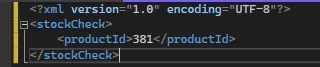
The application performs no particular defenses against XXE attacks, so you can exploit the XXE vulnerability to retrieve the /etc/passwd file by submitting the following XXE payload:

<?xml version=”1.0″ encoding=”UTF-8″?>
<!DOCTYPE foo [ <!ENTITY xxe SYSTEM “file:///etc/passwd”> ]>
<stockCheck><productId>&xxe;</productId></stockCheck>

This XXE payload defines an external entity &xxe; whose value is the contents of the /etc/passwd file and uses the entity within the productId value. This causes the application’s response to include the contents of the file:

Invalid product ID:

root:x:0:0:root:/root:/bin/bash
daemon:x:1:1:daemon:/usr/sbin:/usr/sbin/nologin
bin:x:2:2:bin:/bin:/usr/sbin/nologin
…

List of preventions for XXE

  • Using JSON instead of XML and avoiding serialization of sensitive data
  • As I mentioned before, this attack can happen easily when the application is using SOAP < 1.2, so try to update to the higher version
  • Implement XSD validation in your application (“XML Schemas”) for all XML file inputs
  • Patch or upgrade all XML libraries
  • Use SAST tools for checking out if there are XXE vulnerabilities.

How to prevent if you are using SAML?

SAML language is used to construct authorization statements, whose authenticity is protected by the XML digital signature applied over the statements.

Many attacks happen because of wrong assumptions made by developers; for example, the token is always properly formed XML compliant with SAML schema.

The developers can assume that SAML would have just one Assertion tag in the document (the properly formed SAML would have). With that fact, developers can validate just the first element they get when searching for elements by the tag name in the XML document.

To get list of nodes JS “getElementsByTagName” method can be used:

NodeList xmlNodes = doc.getElementsByTagName(“saml:Assertion”);

To xmlNodes will be assigned the list of matching elements from document with tag Name “saml:Assertion”.

As developers can assume that this is the properly formed SAML with one Assertion tag, they will get the first element and validate it after:

let firstElement = (Element)xmlNodes.item(0);

*As you can guess, this is not the proper way to validate the tag because the attacker can also assume that developers used this approach for the validation. In this case, the attacker can catch the first element (tag) and replace it with a malicious assertion before the original one, and it will never be detected.

With the same logic, some developers use “getElementsByTagNameNS” but the result would be the same: easily inserted malicious script in the first element.

Proper prevention would be:

· Parsing the XML document. Using structure validation based on the supplied schema. Never allow automatic download of schemas from the third party but prefer to use local trusted copies. It would also be good if it is possible to inspect schemas and perform schema hardening. This could be used to disable possible wildcard types or relaxed processing statements.

· Digital signature validation, which verifies the authenticity and integrity of the assertion embedded in the SAML document. This prevents forgery.

**Most important when writing schema is to describe the intended document’s structure precisely.

How to prevent using XSD validation?

I will explain how to create a C# solution to validate XML data.

The most important reason we want to use XSD (XML Schema Definition) validation is that we want the sender and receiver to have the same “expectations” about the content. Using schemas, we need to describe exactly the data so both parties would be clear about them.

Steps:

· Add XML file into the code

When adding XML file, you will just see xml tag:

<?xml version=”1.0″ encoding=”utf-8″ ?>

I will add object User with properties FirstName, LastName, Address, so xml file would look like this:

· Create XML Schema for this file

You will get XML schema structure like this:

· Modify XSD

Now you can modify the file- add validations for FirstName and Address. In this case, I just show how to add validations for these fields, but they will, of course, not prevent the attack; they will just validate the length and the type of mentioned fields.

· Validate XML using XSD

What am I doing in the code?

  • Getting the local path of Assembly so I can after add XML file name and XSD file name to get their full paths
  • Creating schema using XmlSchemaSet and XmlSeverityType which are from System.Xml.Schema
  • Using XMLReader from System.XML so I can create XDocument imported from System.Xml.Linq
  • When I create document, I want to use validate method that class has and pass schema by which I will validate and the method ValidationEventHandler (I named it like that) which is throwing exception if type is error. In this method you should add all validation logic.

This is just an example on how to create XSD for XML file and which libraries you can use for the validation.

How to prevent with implementation of DTD?

We can also validate XML file using DTD. Here are some differences between XSD and DTD on site.

In this example, I am validating an XML file using a DTD file with DtdProcessing.

Steps:

  • Setting the validation settings using XmlReaderSettings
  • Creating the XmlReader object so I can parse the file using the method read()
  • Creating ValidationEventHandler method which is throwing an exception if the type is an error. In this method, you should add all validation logic.

List of SAST testing tools

SAST testing tools will help you with static application security testing.

SAST tools can be free, commercial, and open-source tools.

A list of the most popular SAST Tools currently are:

  • Veracode
  • LGTM
  • Checkmarx
  • Klocwork
  • Reshift
  • SpectralOps
  • HCL AppScan
  • Codacy
  • Insider CLI
  • Argon


Why is SOAP version < 1.2 vulnerable to XXE attack and why you should use later versions?


Before version 1.2 external entities were allowed within SOAP messages.

Since version 1.2 some changes were introduced to the envelope and encoding schemas. Both schemas have been updated to be compliant with the XML Schema Recommendation.

You can see the list of recommendations which were used:

· http://www.w3.org/TR/2001/REC-xmlschema-1-20010502/

· http://www.w3.org/TR/2001/REC-xmlschema-2-20010502/

· http://www.w3.org/TR/1999/REC-xml-names-19990114

· http://www.w3.org/TR/2000/REC-xml-20001006

· http://www.w3.org/TR/2000/PR-xlink-20001220/

Also, additional changes occurred in this version, within the names of datatypes in the XML Schema specification, and some datatypes were removed. If you want check out all changes which were made you can go to this site.


Conclusion

This article presented some prevention steps that could help you defend your application from XXE attack.

The OWASP team, which is constantly working to discover new ways the attackers can exploit your application and perform their malicious actions, are always updating their Prevention Cheat Sheet.

The best way to secure your application would be to always be up to date with the new prevention ways: best libraries to use, best detection tools, etc.

In the end, secure code is the cheapest code!    

Cover photo by Joshua Woroniecki

#XXE_attack #XSD #DTD #SAML #vicarius_blog

About Version 2 Digital

Version 2 Digital is one of the most dynamic IT companies in Asia. The company distributes a wide range of IT products across various areas including cyber security, cloud, data protection, end points, infrastructures, system monitoring, storage, networking, business productivity and communication products.

Through an extensive network of channels, point of sales, resellers, and partnership companies, Version 2 offers quality products and services which are highly acclaimed in the market. Its customers cover a wide spectrum which include Global 1000 enterprises, regional listed companies, different vertical industries, public utilities, Government, a vast number of successful SMEs, and consumers in various Asian cities.

About VRX
VRX is a consolidated vulnerability management platform that protects assets in real time. Its rich, integrated features efficiently pinpoint and remediate the largest risks to your cyber infrastructure. Resolve the most pressing threats with efficient automation features and precise contextual analysis.

Day in the life of a front-end developer

Meet Samantha Ponce, a front-end developer at NordPass, and take an insider’s view on what it’s like to build leading cybersecurity solutions from our office in Berlin. She’ll lead you through her typical workday and tell you more about her team and work challenges.


sam ponce


Frame 1


Wake up time

WFH: 7.30 AM

Office: 7.00 AM

My usual routine is to wake up, shower, get dressed, and maybe fix my hair or do my makeup. However, that depends on my time and or my mood. Since I’m located in Berlin, and most of my team works in Lithuania, I’ve chosen to work different hours from 8.00 AM to 5.00 PM from the rest of the company (9.00 AM to 6.00 PM). It allows me to be more in sync and have more free time in the afternoon.

Breakfast o’clock

WFH: 8.00 AM

Office: 7.30 AM

I usually have German bread with cheese and ham for breakfast during the week since it’s fast and easy to prepare. And, of course, a nice liter of tea. I would say a cup, but I like to drink lots of tea. Not a fan of coffee, unlike most of the developers that I know.

Frame 2


Head to work

7.40 AM

When I go to the office, I usually take public transport because it’s better for the environment, and we have a monthly ticket compensation as a benefit.

It usually takes 20 minutes to reach the office with the U-Bahn.

Frame 10


Welcome to the office

8.00 AM

Two things that I do when I get to the office – wash my hands (crucial after the public transport) and get another cup of tea (also crucial for a productive day ahead).

Frame 3


First work portion

WFH: 8.00 AM – 2.00 PM

Office: 8.00 AM – 12.00 PM

Daily standup: 9.30 AM (5-10 minutes)

NordPass Update/Meeting: 10.00 AM – 11.00 AM

Normally I don’t have a lot of meetings. I know – the dream of every developer. I usually have my daily standup, and on Mondays, we have an update about what’s going on in the company or any other relevant theme.

Guild meetings happen once a month, where all the front-end developers from NordPass get together and talk about things: from cool tech we just read about to important information about upcoming changes.

Frame 9


So I usually check my emails and some merge requests before my first meeting. And afterward, I just work completely on any task or bug I choose from our sprint board.

Frame 4


WFH: 2.00 PM

Office: 12.00 PM

My lunchtime normally changes a lot when I work from home because I like to cook and eat with my husband. Therefore, we must agree on a time that suits both of us. We take turns preparing the food, but it normally happens after 1.00 PM.

We like to eat Mexican food because we’re from Mexico, so we try to include tacos and other foods with lime and chili on our menus.

Frame 5


WFH: 3.00 PM – 5.00 PM

Office: 1.00 PM – 5.00 PM

After lunchtime, I prefer to finish up my tasks and start testing and fixing anything that’s not working properly. If I haven’t finished my tasks, then I continue working on them, maybe pausing for a couple of minutes to stretch out and eat a snack. Especially if I’m at the office, where I get the chance to talk with people from other teams.

Frame 6


Getting my sweat on

My ideal schedule would include going to the gym after work every day. However, currently, I go only once a week or less. But it’s good to have a goal for improvement.

Sprechen sie deutsch?

I’m learning German because I want to be able to communicate better in Berlin. Even though almost everyone here speaks English or even Spanish, I still think it’s important to know the local language.

The classes are held online on Tuesday, Wednesday, and Thursday from 6.30 PM until 8.00 PM. At the moment, I’m learning B1 level – so not a complete beginner.

Frame 8


Family bonding

Both my and my husband’s family live in Mexico. Therefore, we have to wait until they have some free time to talk with us. We aim to have long video calls with everyone at least once a week.

Light dinner (mostly)

I usually have dinner around 8.00 or 9.00 PM while talking with our families. It makes me feel as if we’re sitting down together for a meal. I prefer something light for dinner, like cereal, but sometimes we spice it up with pizza or some Korean chicken.

Night night

I mostly go to bed around 11.00 PM after washing the dinner dishes and making all the preparations for the next day ahead.

Frame 7


Which one do you prefer, working from the office or home? Why?

I prefer working from home because I like cooking my own lunch. However, sometimes taking a break and going for lunch with people from the office is also nice.

At what time of the day do you feel most productive, and what tasks do you do then?

I think the time after my daily stand-up and before lunch is my most productive time – I do most of my work then. After lunch is more for testing, fixing, and other pending things.

Things that you like most about being a front-end developer at Nord Security?

My teammates, hands down. They are supporting me at all times and encourage me to learn more and be better.

Things you wouldn’t miss being a front-end developer?

The fun issues with CSS.

What are the front-end stereotypes that you’d like to break?

That we don’t know anything about the back-end. In fact, I worked as a full-stack developer before. And, of course, we need to know how the back-end works to do our jobs better.

What challenges are you currently working on, and what have been the most interesting ones you had to deal with at Nord Security?

Developing new features is always challenging, but it’s the most interesting part of the job. So figuring out how to implement new stuff while ensuring everything else still works fine is the most stimulating thing about being a developer.

Also, migrating to newer versions of libraries and other tools is always a way to keep learning while suffering a bit. However, when everything works in the end – it’s truly awesome.

Please, briefly describe your team? What kind of people work there, and how do you collaborate?

My team is the best. Everyone is always eager to help. We always have the best team buildings. And even if we’re located in different countries, we still keep in touch and are close to each other.

About Version 2 Digital

Version 2 Digital is one of the most dynamic IT companies in Asia. The company distributes a wide range of IT products across various areas including cyber security, cloud, data protection, end points, infrastructures, system monitoring, storage, networking, business productivity and communication products.

Through an extensive network of channels, point of sales, resellers, and partnership companies, Version 2 offers quality products and services which are highly acclaimed in the market. Its customers cover a wide spectrum which include Global 1000 enterprises, regional listed companies, different vertical industries, public utilities, Government, a vast number of successful SMEs, and consumers in various Asian cities.

About Nord Security
The web has become a chaotic space where safety and trust have been compromised by cybercrime and data protection issues. Therefore, our team has a global mission to shape a more trusted and peaceful online future for people everywhere.

UNDERSTANDING OBSERVABILITY VS. MONITORING. PART 1

The development of clouds, the DevOps movement, and distributed microservice-based architecture have come together to make observability vital for modern architecture. We’re going to dive into what observability is and how to approach the metrics we need to track.

Observability is a way of spotting and troubleshooting the root causes of problems involving software systems whose internals we might not understand. It extends the concept of monitoring, applying it to complex systems with unpredictable and/or complex failure scenarios.

I’ll start with some of the basic principles of observability that I’ve been helping to implement across a growing number of products and teams at Nord Security.


observability


Monitoring vs. Observability

“Monitoring” and “observability” are often used interchangeably, but these concepts have a few fundamental differences.

Monitoring is the process of using telemetry data to understand the health and performance of your application. Monitoring telemetry data is preconfigured, implying that the user has detailed information on their system’s possible failure scenarios and wants to detect them as soon as they happen.

In the classical approach to monitoring, we define a set of metrics, collect them from our software system, and react to any changes in the values of these metrics that are of interest to us.

For example:

Excessive CPU usage can indicate that we need to scale it up to compensate for increasing system loads;

A drop in successfully served requests after a fresh release can indicate that the newly released version of the API is malfunctioning;

Health checks process binary metrics that represent whether the system is alive at all or not.

Observability extends this approach. Observability is the ability to understand the state of the system by performing continuous real time analysis of the data it outputs.

Instead of just collecting and watching predefined metrics, we continuously collect different output signals. The most common types of signals – the three pillars of observability – are:

  • Metrics: Numeric data aggregates representing software system performance;

  • Logs: Time-stamped messages gathered by the software system and its components while working;

  • Traces: Maps of the paths taken by requests as they move through the software system.

The development of complex distributed microservice architectures has led to complex failure scenarios that can be hard or even impossible to predict. Simple monitoring is not enough to catch them. Observability helps by improving our understanding of the internal state of the system.

Metrics

Choosing the right metrics to collect is key to establishing an observability layer for our software system. Here are a few different popular approaches that define a unified framework of must-have metrics in any software system.

USE

Originally described by Brendan Gregg, this approach focuses more on white-box monitoring – monitoring of the infrastructure itself. Here’s the framework:

  • Utilization – resource utilization.

    • % of CPU / RAM / Network I/O being utilized.

  • Saturation – how much remaining work hasn’t been processed yet.

    • CPU run queue length;

    • Storage wait queue length;

  • Errors – errors per second

    • CPU cache miss;

    • Storage system fail events;

Note: Defining “saturation” in this approach can be a tricky task and may not be possible in specific cases.

Four Golden signals

Originally described in the Google SRE Handbook, the Four Golden signals framework is defined as follows:

  • Latency – time to process requests;

  • Traffic – requests per second;

  • Errors – errors per second;

  • Saturation – resource utilization.

RED

Originally described by Tom Wilkie, this approach focuses on black-box monitoring – monitoring the microservices themselves. This simplified subset of the Four Golden Signals uses the following framework:

  • Rate – requests per second;

  • Errors – errors per second;

  • Duration – time to process requests.

Choosing and following one of these approaches allows you to unify your monitoring concept throughout the whole system and make it easier to understand what is happening. They complement one another, and your choice may depend on which part of a system we want to monitor. These approaches also don´t exclude additional business-related metrics that vary from one component of the software system to another.

Logs

System logs are a useful source of additional context when investigating what is going on inside a system. They are immutable, time-stamped text records that provide context to your metrics.

Logs should be kept in a unified structured format like JSON. Use additional log storage/visualization tools to simplify interaction with the massive amount of text data the software system provides. One very well-known and popular solution for log storage is ElasticSearch.

Traces

Traces help us better understand the request flow in our system by representing the full path any given request takes through a distributed software system. This is very helpful in identifying failing nodes and bottlenecks.

Traces themselves are hierarchical structures of spans, where each span is a structure representing the request and its context in every node in its path. Most common tracing visualization tools like Jaeger or Grafana display traces as waterfall diagrams showing the parent and child spans caused by the request.

Conclusion

Building an observable software system lets you identify failure scenarios and possible risks during the whole system life cycle. A combination of metrics, extensive log collection, and traces helps us understand what’s happening inside our system at any moment and speeds up investigations of abnormal behavior.

This article was just the first step. We’ve covered the standard approaches to metrics and briefly discussed traces and logs. But to implement an observable software system, we need to set up its components correctly to supply us with the signals we need. In part 2, we’ll discuss instrumentation approaches and modern standards in this field.

About Version 2 Digital

Version 2 Digital is one of the most dynamic IT companies in Asia. The company distributes a wide range of IT products across various areas including cyber security, cloud, data protection, end points, infrastructures, system monitoring, storage, networking, business productivity and communication products.

Through an extensive network of channels, point of sales, resellers, and partnership companies, Version 2 offers quality products and services which are highly acclaimed in the market. Its customers cover a wide spectrum which include Global 1000 enterprises, regional listed companies, different vertical industries, public utilities, Government, a vast number of successful SMEs, and consumers in various Asian cities.

About Nord Security
The web has become a chaotic space where safety and trust have been compromised by cybercrime and data protection issues. Therefore, our team has a global mission to shape a more trusted and peaceful online future for people everywhere.

GREYCORTEX Mendel 3.9

We have released a new version of GREYCORTEX Mendel

GREYCORTEX Mendel 3.9 is more interactive, safer and allows even deeper data analysis than ever before. We have increased the interoperability of Mendel with other tools and extended the hardware support.

GREYCORTEX Mendel 3.9 Features List

Interactive Visualization of Detected Threats

Detect an attack on your infrastructure easily and in time

You’ll see the detected events even clearer thanks to the new interactive dashboard, based on GREYCORTEX’s and MITRE ATT&CK®’s knowledge. You’ll easily see if someone is attacking your infrastructure according to known tactics and techniques, no matter whether Mendel is helping secure your IT or OT environment.

New API features

Connect Mendel to other systems via APIs

New two-way connectivity with other security tools (SIEM, BI and others) enables external visualization or deeper data analysis. Mendel’s API currently covers:

  • direct database access to stored network data
  • capturing traffic and downloading data in pcap data format
  • management of false positives
  • third-party security information sources (blacklists based on IP addresses and malicious files)
  • integration with the MISP security platform

User Activity Log

Control who is looking into your Mendel

Mendel is even more secure. It records user activity in the system itself, helping to meet even the strictest of security policies and corporate standards.

Extended Support of Hardware Devices

No more surprises from unavailable devices

We optimized Mendel to run on up-to-date hardware devices with new generations of CPUs, such as DELL and HP servers, and have wide support for new network card models from Napatech, Intel and Broadcom.

Improved Visibility and Data Analysis

Understand completely what happened in your network

You can now view the data for all the use cases you have defined and get broader insights than the system views already set up by the standard user interface. In combination with the new attributes and metrics, you can stipulate your database queries over stored network data even more precisely. You can also export or import saved views between machines and for further investigation, use Mendel’s ability to bring the parameters of the displayed data into the main filter.

Working on: Microsensors for IT and OT Networks

Find out basic information about the devices in your network

A microsensor, either as a small device or in a virtualized form, scans your network and in a follow-up report you can see: what devices are in the network; what vulnerabilities they have; which manufacturers they are from; or what protocols they use.

The tool is already ready to use in an alpha version. If you are interested in the solution, please contact us for more information.

About Version 2 Digital

Version 2 Digital is one of the most dynamic IT companies in Asia. The company distributes a wide range of IT products across various areas including cyber security, cloud, data protection, end points, infrastructures, system monitoring, storage, networking, business productivity and communication products.

Through an extensive network of channels, point of sales, resellers, and partnership companies, Version 2 offers quality products and services which are highly acclaimed in the market. Its customers cover a wide spectrum which include Global 1000 enterprises, regional listed companies, different vertical industries, public utilities, Government, a vast number of successful SMEs, and consumers in various Asian cities.

About GREYCORTEX
GREYCORTEX uses advanced artificial intelligence, machine learning, and data mining methods to help organizations make their IT operations secure and reliable.

MENDEL, GREYCORTEX’s network traffic analysis solution, helps corporations, governments, and the critical infrastructure sector protect their futures by detecting cyber threats to sensitive data, networks, trade secrets, and reputations, which other network security products miss.

MENDEL is based on 10 years of extensive academic research and is designed using the same technology which was successful in four US-based NIST Challenges.

GREYCORTEX Mendel 3.9 Now Available

June 20, 2022 – We have released a new version of GREYCORTEX Mendel. Version 3.9 is more interactive, safer and allows even deeper data analysis than ever before. We have increased the interoperability of Mendel with other tools and extended the hardware support.

More about GREYCORTEX Mendel 3.9

About Version 2 Digital

Version 2 Digital is one of the most dynamic IT companies in Asia. The company distributes a wide range of IT products across various areas including cyber security, cloud, data protection, end points, infrastructures, system monitoring, storage, networking, business productivity and communication products.

Through an extensive network of channels, point of sales, resellers, and partnership companies, Version 2 offers quality products and services which are highly acclaimed in the market. Its customers cover a wide spectrum which include Global 1000 enterprises, regional listed companies, different vertical industries, public utilities, Government, a vast number of successful SMEs, and consumers in various Asian cities.

About GREYCORTEX
GREYCORTEX uses advanced artificial intelligence, machine learning, and data mining methods to help organizations make their IT operations secure and reliable.

MENDEL, GREYCORTEX’s network traffic analysis solution, helps corporations, governments, and the critical infrastructure sector protect their futures by detecting cyber threats to sensitive data, networks, trade secrets, and reputations, which other network security products miss.

MENDEL is based on 10 years of extensive academic research and is designed using the same technology which was successful in four US-based NIST Challenges.