Skip to content

ESET wins long-running patent dispute against Finjan

Jury vindicates ESET following eight-year court battle 

BRATISLAVA — September 14, 2023 — ESET has welcomed a California federal jury’s ruling in its favor, finding that the leading digital security provider has not committed patent infringement on Finjan Holdings LLC technologies.

The court case focused on a number of ESET’s products and technologies, including ThreatSense, LiveGrid and LiveGuard, which protect over a billion users worldwide. Despite Finjan’s claims that its patents were infringed upon, ESET staunchly defended its position and received favorable judgement.

The ruling draws to a close a lengthy legal dispute which started in 2015 and  encountered a mistrial in March 2020 due to the impending danger of the COVID-19 pandemic. Finjan was originally seeking tens of millions of dollars in compensation. “Describing this legal case as a battle is entirely accurate,” said Richard Marko, CEO of ESET. “We have dedicated significant resources to fighting the claims, both in terms of legal fees and internal human resources. However, when faced with spurious accusations, our company values guide us to maintain our integrity and courage — conceding was never an option, as we always believed in our evaluation that our technologies do not infringe their patents.”

Juraj Malcho, ESET’s chief technology officer, added, “Defending is in our nature. We are passionate about cybersecurity and take pride in developing the best security technologies possible. With decades of experience at our disposal, having invented and implemented numerous efficient protective layers, we have enough arguments to defend against unfounded patent infringement claims.”

About Version 2 Digital

Version 2 Digital is one of the most dynamic IT companies in Asia. The company distributes a wide range of IT products across various areas including cyber security, cloud, data protection, end points, infrastructures, system monitoring, storage, networking, business productivity and communication products.

Through an extensive network of channels, point of sales, resellers, and partnership companies, Version 2 offers quality products and services which are highly acclaimed in the market. Its customers cover a wide spectrum which include Global 1000 enterprises, regional listed companies, different vertical industries, public utilities, Government, a vast number of successful SMEs, and consumers in various Asian cities.

About ESET
For 30 years, ESET® has been developing industry-leading IT security software and services for businesses and consumers worldwide. With solutions ranging from endpoint security to encryption and two-factor authentication, ESET’s high-performing, easy-to-use products give individuals and businesses the peace of mind to enjoy the full potential of their technology. ESET unobtrusively protects and monitors 24/7, updating defenses in real time to keep users safe and businesses running without interruption. Evolving threats require an evolving IT security company. Backed by R&D facilities worldwide, ESET became the first IT security company to earn 100 Virus Bulletin VB100 awards, identifying every single “in-the-wild” malware without interruption since 2003.

23.8.1 ‘Adrastea’ released

Changes compared to 23.8.0

Enhancements  

  • Updated language translations

Bug Fixes

  • Fixed an issue with the caching layer used by the “Prefer temporary files instead of RAM (slower)” setting using more memory than expected

About Version 2 Digital

Version 2 Digital is one of the most dynamic IT companies in Asia. The company distributes a wide range of IT products across various areas including cyber security, cloud, data protection, end points, infrastructures, system monitoring, storage, networking, business productivity and communication products.

Through an extensive network of channels, point of sales, resellers, and partnership companies, Version 2 offers quality products and services which are highly acclaimed in the market. Its customers cover a wide spectrum which include Global 1000 enterprises, regional listed companies, different vertical industries, public utilities, Government, a vast number of successful SMEs, and consumers in various Asian cities.

About Comet
We are a team of dedicated professionals committed to developing reliable and secure backup solutions for MSP’s, Businesses and IT professionals. With over 10 years of experience in the industry, we understand the importance of having a reliable backup solution in place to protect your valuable data. That’s why we’ve developed a comprehensive suite of backup solutions that are easy to use, scalable and highly secure.

Remotely: Tips from the UnderDefense Team

A recent survey by our friends at learning platform ELVTR discovered 68% of US employees still access their work devices while on vacation – leaving the door wide open for malicious attackers to penetrate business devices. While summer holidays are over, the issue is not closed given the high number of remote workers internationally. So, let’s dive into the top risks highlighted by top cybersecurity expert and our CEO at UnderDefense, Nazar Tymoshyk, and uncover how to conquer them.

Risk #1: Surfing the Cyber Waves Unprotected 

The scene is set: your personal laptop, your favorite cafe, and the allure of free Wi-Fi. But here’s the catch – that free Wi-Fi can be a gateway for cybercriminals to sneak into your digital kingdom. Connecting to public networks and personal devices introduces significant security risks, leaving you vulnerable to data breaches, identity theft, and financial losses.

Solution:Nazar’s advice rings loud and clear: Get yourself a reputable Virtual Private Network (VPN). It’s like an invisibility cloak for your data, encrypting your internet traffic and keeping your sensitive information away from prying eyes.

Risk #2: The Stealthy Rogue Access Points

Imagine this: you’re lounging at the mall, connecting to what seems like a legit Wi-Fi network. Except, it’s a trap – a rogue access point set up by attackers. These sneaky networks mimic real ones, intercepting your internet traffic and potentially accessing your personal data. Scary, right?

Solution:Stay one step ahead of these tricksters by confirming the Wi-Fi’s legitimacy with the staff. And whenever you’re on public networks, fire up that trusty VPN for added protection.

Risk #3: The Web of Spoofed Sites

Cybercriminals have an uncanny knack for creating fake websites that look exactly like the real deal. You might think you’re logging into your bank’s website, but you’re actually giving away your credentials to a malicious actor. This trick, known as website spoofing, can lead to phishing attacks and compromised accounts.

Solution: Before you click any link, give it a hover to see the full URL. And always look for that trusty padlock icon in the address bar – it’s your digital seal of approval.

The SOS Plan for Suspicious Networks

If you suspect you’ve used insecure Wi-Fi, don’t panic. Just follow Nazar’s quick steps:

  • Change Passwords:Update passwords for your important accounts.
  • Financial Check:Keep an eye on your financial statements for any suspicious transactions.
  • Sweep Your Devices: Scan your personal devices with trusted antivirus and antimalware software.
  • Set Up Alerts:Enable account notifications for any unusual activities.
  • Call in Reinforcements:When in doubt, seek guidance from cybersecurity professionals or your IT department.

As we embrace the freedom of remote work, let’s not forget that with great freedom comes great responsibility – especially when it comes to security.

Check out the full article on staying secure on vacation here, and don’t hesitate to get in touch with us if you need support! 

About Version 2 Digital

Version 2 Digital is one of the most dynamic IT companies in Asia. The company distributes a wide range of IT products across various areas including cyber security, cloud, data protection, end points, infrastructures, system monitoring, storage, networking, business productivity and communication products.

Through an extensive network of channels, point of sales, resellers, and partnership companies, Version 2 offers quality products and services which are highly acclaimed in the market. Its customers cover a wide spectrum which include Global 1000 enterprises, regional listed companies, different vertical industries, public utilities, Government, a vast number of successful SMEs, and consumers in various Asian cities.

About UnderDefense
UnderDefense, a globally top-ranked firm by Gartner and Clutch, provides cyber resiliency consulting and technology-enabled services to anticipate, manage and defend against cyber threats. We empower clients to predict, prevent, detect, and respond to threats.

Why Every MSP Needs a Password Manager: Benefits and Features

You’re returning from a delicious and restful lunch break, ready to tackle the afternoon’s challenges.

You take a deep breath, power up your computer, and open your ticketing queue.

The first 20 tickets? All password resets.

Can’t your valuable time and expertise be used for something other than such a basic, tedious task?

The answer is yes. And it’s made possible by MSP password management tools. With all users’ passwords and MFA tokens stored and shared in a centralized platform, you stop wasting time on useless tasks and spend your energy going above and beyond for your clients — ultimately boosting your retention and revenue numbers.

But what’s so special about password managers, and what should you look for in a vendor? Below, we’ll explain why managed service providers (MSPs) need password management, the benefits of a robust password manager like JumpCloud, and best practices for implementation and adoption.

Why MSPs Need Password Management

Every employee has heard the same refrain, “Use a long, hard-to-crack password, and never share your credentials with anyone.”

And yet:

Even scarier? 80% of all data breaches are linked to passwords. All it takes is one good guess or one great hacker to wreak havoc on one of your clients. Scarier still, the fines and reputational damage associated with compliance violations can be enough to shut your clients down for good.

Managed service providers can’t let that happen. MSP-centric password managers can keep cybercriminals at bay by enforcing password creation rules, sending update reminders, and safely sharing access to resources, team credit cards, and more. They can also require the use of two-factor or multi-factor authentication (MFA) for an extra layer of security and be integrated with other identity and access management (IAM) solutions to monitor user activity and ensure companies are operating under a Zero Trust security framework.

At the same time, password managers take pressure off of your clients’ users. By remembering one master password, they can unlock access to all of their online accounts, drastically decreasing the volume of password reset requests. 

7 Benefits of JumpCloud Password Manager for MSPs

JumpCloud Password Manager has officially been released to our customers and MSP partners! MSPs have long requested an enterprise password management tool that allows their users to share passwords and MFA tokens, and now, we have a solution of our own built right into the core of our platform. 

Say goodbye to the days of juggling 14-day trials and countless promotional emails just to get a few days of password management. As a JumpCloud MSP partner, your account executives can have you up and running with Password Manager before your next password reset ticket — implementation comes free.

If you’re not a current JumpCloud MSP partner and you’re still weighing your various password management options, it can be difficult to determine which solution is best. To help you make the best decision for your company and your clients, let’s review some of the concrete advantages of implementing JumpCloud Password Manager.

1. Multi-Tenant Capabilities

As an MSP scales, it becomes nearly impossible to keep track of individual clients’ password managers and other IAM solutions. That’s one reason why MSPs or VARs steer clear of offering password management — it’s too many moving parts without a high enough ROI.

But JumpCloud Password Manager was built specifically for multi-tenant user management, unifying MSP operations to deliver services to all clients at once. All controls are in one place, and all controls are configured the same way, making it easier to standardize your SOPs and password policies across all of your clients. JumpCloud’s multi-tenant user management features also have built-in tracking and reporting, empowering MSPs to share KPIs and proactively detect any sketchy user activity.

From JumpCloud’s Multi-Tenant Portal (MTP), MSPs can easily enforce other identity and access management features, like single sign-on (SSO), multi-factor authentication, and RADIUS management. And because JumpCloud is a cloud-based platform, MSPs can provide IAM services from anywhere.

2. Centralized Password Storage

Keeping user credentials stored in the same platform makes it easier for MSPs to track and manage. MSPs gain visibility into all password-related activity, and they can institute rules to restrict all access to sensitive applications when employees leave their job. In a centralized password management system, users benefit from password sharing capabilities, reducing friction and enabling productivity. With cloud-based password managers like JumpCloud, end users can access and sync password vaults from multiple devices, enabling remote work and hybrid models.

3. Improved Security Measures

JumpCloud’s password management and multi-tenant access control capabilities are designed to protect MSP clients’ sensitive data in an encrypted vault. Not only do secure password vaults prevent internal and external threats, they also allow MSPs to enforce stricter requirements in accordance with GDPR, HIPAA, or other general IT controls that clients must abide by. Because JumpCloud’s Password Manager is a part of JumpCloud’s broader identity and access management solution, it also comes with extra protections like multi-factor authentication and role-based access control features.

JumpCloud Password Manager can also help users generate sufficiently unique, complex passwords on a specific cadence and monitor the average user’s security score and average password strength. On the backend, it has tiered permissions and audit logs to hold all MSP admins responsible. Leveraging JumpCloud’s latest and greatest security features gives you and your clients greater peace of mind.

4. Streamlined Client Onboarding and Offboarding

JumpCloud’s Multi-Tenant Portal makes client onboarding and offboarding a seamless process. Within JumpCloud’s role-based access control architecture, MSPs can add and edit orgs, add and delete admins, manage individual devices and users, and process master password resets straight from the cloud in a matter of clicks. JumpCloud’s permission structure decreases the odds of making errors during client transitions. You can assign team members specific roles ranging from Admin w/Billing (effectively a super user) to Help Desk to Read Only.

5. Simplify Vendor Management Process

An MSP’s vendor management responsibilities can be as complex as another full-time client. And the more vendors you have to rely on to provide a comprehensive tech stack, the less time you have to win that new account. That’s why we built our Password Manager directly into the JumpCloud platform. 

Whether you’re a new partner or JumpCloud’s already part of your tech stack, you’ll enjoy both SSO and password management directly within one portal – without increasing your stack’s complexity.

6. Meet Popular Client Requests on Your Terms

Password management can be a bit of a touchy subject for MSPs. Since it’s often an a la carte or add-on feature, many clients try to do their own research on the cheapest solution and bring it to their MSP to implement. 

Unfortunately, this scenario rarely works out for either party. MSPs are forced to complicate their tech stack, often with a product they don’t trust or recommend. And the cheapest possible solutions rarely prioritize intuitive user experiences, leading to frustrations for the technicians and admins that must manage the product. 

MSPs can readily recommend JumpCloud Password Manager to any of their clients currently using JumpCloud, with assignment and deployment being only a few clicks away. In addition to a seamless rollout experience, you can avoid the long process of convincing your client that they can trust this new vendor you are introducing into their environments.

7. Grow Revenue and Productivity — Without Increasing Costs

With JumpCloud Password Manager, you are no longer forced to choose between affordability and security. If you’re enrolled in JumpCloud for MSPs, Password Manager is included in your plan, making implementing it for your clients a no-brainer. If you’re considering switching to JumpCloud, combining SSO and password manager into one platform may lower your total cost of ownership.

Adding password management to your tech stack can also increase your team’s productivity and efficiency, decreasing your need for additional staff. Password resets make up anywhere from 20% to 50% of an organization’s support ticket load, meaning your technicians waste valuable time handling one of the most easily solved problems in the technology industry. This can translate into a situation where even offering password management as a service to your clients for free can have a real impact on your bottom line.

Best Practices for MSPs Using a Password Manager

Password managers have the potential to improve security, effectiveness, and efficiency. But reaping the full benefits of a password manager depends on:

  • Regularly checking password-related activity. MSPs have a duty to prevent insider threats. And to do that, they must have a process in place to review who is accessing sensitive applications or information and when. If they notice any suspicious activity, they need to report it to their clients’ IT department and work with their security team to swiftly resolve the issue.
  • Enabling password generation. We all know end users have trouble creating robust passwords. So why not have a tool to do it for them? Solutions like JumpCloud Password Manager come with built-in password generation to form passwords to your character and length specifications.
  • Rotating passwords. Not only do employees tend to use passwords that are easy to remember, they will also keep the same password until they receive a notice to change it. As a best practice, use your password manager to automatically prompt password changes (to a completely new, non-recycled password) at least once every 1-3 months. These prompts should be inclusive of network applications, cloud applications, in-house systems, and other department-specific software or hardware. Be sure you configure your password manager to change the passwords to any applications former staff had access to following their departure as well.
  • Activating multi-factor authentication. MFA adds another layer of security against cyber threats beyond password management. Biometric factors like a person’s face or fingerprint or authenticator app tokens are tough for hackers to replicate or hack. Enabling MFA further reduces client risk and may be mandated by their own security and compliance policies.
  • Employee enablement. Employees won’t use a new tool if they don’t know how to use it or why it exists. It’s the MSP’s job to explain how password managers work and onboard employees to the new platform. Conduct trainings, create leave-behind materials employees can reference later, and be on standby for questions pre- and post-implementation to encourage adoption. Emphasize the why behind using a password manager and stress its importance to the organization’s overall security.

Learn More About JumpCloud for MSPs

Here at JumpCloud, we are working hard to meet the needs of our MSP Partners, their clients, and the users that rely upon our platform every day. With the arrival of JumpCloud Password Manager, we have taken yet another step in the direction of making the open directory platform more powerful than ever. 

If you have any questions about Password Manager, reach out to your account executive today or check out our FAQ.
If you’re new here, visit our JumpCloud for MSPs page or get started with our platform for free.

About Version 2 Digital

Version 2 Digital is one of the most dynamic IT companies in Asia. The company distributes a wide range of IT products across various areas including cyber security, cloud, data protection, end points, infrastructures, system monitoring, storage, networking, business productivity and communication products.

Through an extensive network of channels, point of sales, resellers, and partnership companies, Version 2 offers quality products and services which are highly acclaimed in the market. Its customers cover a wide spectrum which include Global 1000 enterprises, regional listed companies, different vertical industries, public utilities, Government, a vast number of successful SMEs, and consumers in various Asian cities.

About JumpCloud
At JumpCloud, our mission is to build a world-class cloud directory. Not just the evolution of Active Directory to the cloud, but a reinvention of how modern IT teams get work done. The JumpCloud Directory Platform is a directory for your users, their IT resources, your fleet of devices, and the secure connections between them with full control, security, and visibility.

Optimizing access to third-party resources in cloud environments

Third-party resources enhance cloud deployments, allowing businesses to expand their operations and add new services. However, using third parties can also lead to security issues. Installing third-party services correctly is critical if you want to extract maximum benefit. 

This article will examine the issue of third-party vendor integration. We will look at why third-party resources bring so many benefits. We will discuss some critical challenges and best practices to achieve successful integrations. The result will be a clear understanding of how to optimize access to third-party resources.

Understanding third-party resource integration

Third-party integrations are cloud resources or services supplied by external providers. The end user or site owner does not own them. However, third parties may still have access to a client’s cloud-hosted data.

For example, Google Maps integrations allow website visitors to locate retail locations. In this case, the Maps infrastructure is located off-site and delivered by a third party.

Third-party resources reduce the workload for cloud users by replacing tools that would otherwise be locally hosted or developed in-house.

Third parties add functionality. Companies can spin up apps or APIs supplied by external vendors. This accelerates development times and allows businesses to serve customers more effectively.
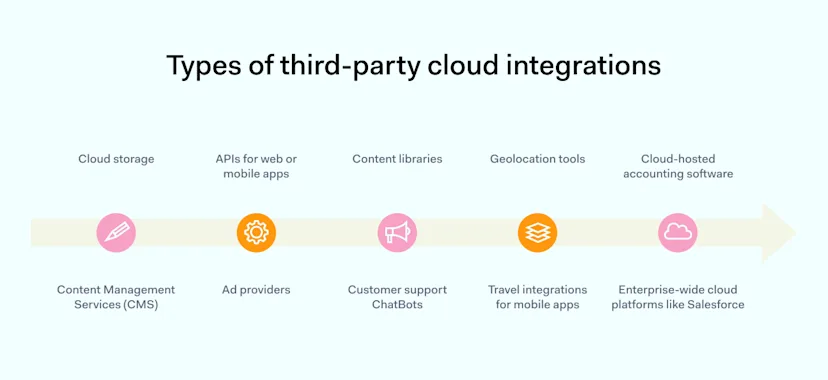
There are many types of third-party cloud integrations. Examples include:

  • Cloud data storage such as Amazon Web Services (AWS)

  • Content Management Services (CMS) like Drupal or WordPress

  • APIs for web or mobile apps

  • Ad providers like Google Ads

  • Content libraries for images or product listings

  • Customer support ChatBots like PipeDrive

  • Geolocation tools like Google Maps

  • Travel integrations for mobile apps such as Uber

  • Cloud-hosted accounting software like Xero

  • Enterprise-wide cloud platforms like Salesforce

The diagram above shows a typical third-party or Software-as-a-Service (SaaS) cloud integration. Most integrations require regular connectivity between third-party vendors and your organization’s network. This makes managing third-party cloud resource access a critical task for cloud architects.

Incorrect access processes can create openings for cyber attackers. Admins must always secure third-party vendor access. But at the same time, network managers must allow access for partners to carry out their assigned duties. Striking this balance is not easy, and careful planning is essential.

The need for third-party resources in today’s cloud infrastructure

Until recently, many organizations maintained on-premises networks. Workstations or local servers stored apps and data. Organizations purchased licenses to use software developed by others. And that’s where their relationships with third parties ended.

Cloud computing has changed this picture. Software and services developed and managed by third-party vendors are widely used for accounting, customer relationship management, data hosting, payment APIs, and staff collaboration. In-house operations have receded into the background.

Companies tend to incur higher costs when they build websites or virtualized networks on their own. Third-party vendors provide the necessary skills and products.

Vendors provide cross-app support—for instance, Slack links to Google Drive and Gmail. Gmail connects with other cloud integrations like Salesforce. Cloud setups like this involve many access points where third parties interface with your network resources.

Benefits and challenges of third-party integration

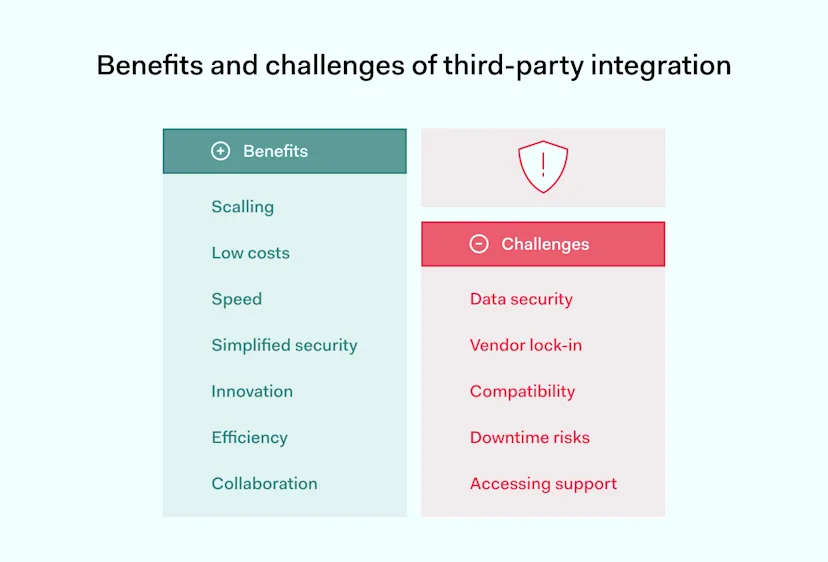
Outsourcing cloud services to third-party vendors has pros and cons. Third parties are not a magic bullet that meets every need of modern businesses. Businesses must consider benefits and challenges when commissioning third-party cloud services.
Benefits

  • Scaling – third-party cloud vendors make it much easier to grow cloud-based enterprises. Companies can increase workloads, knowing cloud providers can handle increased data throughput. There is no need to make huge investments when products succeed. Cloud assets scale smoothly as sales and operations expand.

  • Low costs – traditional software licenses demand high up-front fees or subscriptions. Up-front billing still applies to many cloud providers. But cloud services also operate pay-as-you-go models where companies pay for the resources they use. This kind of billing-per-usage can result in cost savings.

  • Speed – many organizations use SaaS tools to expand operations quickly. Time-to-market decreases. And companies can rapidly expand into new geographic markets. They do not need to set up regional offices. Virtualized systems are available almost instantly.

  • Simplified security – high-quality third-party vendors put in place robust security controls. They meet regulatory standards and secure client data. This reduces the workload on IT managers. Users simply access SaaS resources, and third parties manage security needs.

  • Innovation – third parties have technical capabilities that clients lack. For instance, they carry out complex data analysis and machine learning to understand the behavior of eCommerce customers. Companies can embrace new technologies without running internal R&D departments.

  • Efficiency – third parties let companies focus on their critical missions. Organizations don’t need to waste time creating solutions that can be purchased off the shelf. This allows clients to become leaner and more competitive.

  • Collaboration – cloud services like Slack or Zoom simplify employee communication, allowing information to flow freely. Remote work teams can collaborate on projects regardless of location. Managers can easily monitor project performance.

Challenges

  • Data security – third parties handle large amounts of private business data. This could include customer financial information or Protected Health Information (PHI). This creates a data breach risk if third-party vendors operate weak private data management and security practices. Ensuring each third party complies with security regulations is challenging. And every extra third party adds another potential data leak source.

  • Vendor lock-in – vendor lock-in creates problems when you wish to switch to a more capable provider, when business strategy changes, or when the vendor you committed to for years introduces new terms of services or new business models that do not work with your company’s vision.

  • Compatibility – third-party suppliers must work seamlessly with existing cloud assets. Cloud architects must plan data flows and test apps to ensure smooth operations. This requires expertise that third parties may not possess.

  • Regulatory risks – using third parties can sometimes contravene industry regulations. For example, healthcare organizations must carefully check third parties to ensure compliance with HIPAA.

  • Customer support – some cloud service providers offer excellent client support. Others are less efficient. Clients may lack support to handle operational or security issues. They may not possess the internal expertise needed to find solutions.

Common misconceptions about using third-party resources

Using third parties carries significant benefits. But the list of challenges above shows that there is a downside. Many of the potential problems are related to managing:

  • Methods of third-party access

  • How much private data is exposed to third parties during integration

Busting these myths about third parties is vital to make the best use of cloud resources. Let’s look at some common issues that confuse companies when they enlist third-party cloud vendors.

Myth #1: Third-party solutions handle every security issue

Cloud security is a shared responsibility. Under the shared responsibility model, third-party providers protect their applications and infrastructure. Vendors must ensure their products are properly configured and safe to use.

Network owners must secure their own cloud platforms and data. Companies need to apply robust access controls to external partners. And  IT teams must audit third parties to detect security vulnerabilities.

Myth #2: Third parties always prioritize data privacy

The same rules apply to data privacy as to security. Third parties often have strict privacy policies. These partners don’t extract customer data. They secure private data according to the industry’s best practices. But this isn’t always the case. Check the fine print and read privacy policies before installing any third-party services.

Myth #3: Access controls apply to internal assets, not third-party resources

Companies need to secure their networks with comprehensive access controls. However, access controls should also limit what users can do when accessing third-party resources.

Assigning excessive privileges to users can lead to security incidents. For example, users might share private data with unauthorized Slack users. Controls should apply wherever users can compromise data security. And that includes third-party apps.

Best practices for optimizing access to third-party resources

Organizations need streamlined cloud strategies to achieve optimal performance and adaptability. With that in mind, here are some concise best practices to allow secure third-party resource access.

1. Carry out third-party risk assessments

Assess third parties before commissioning services. Check their security and privacy policies and research their reliability and customer support. And only choose partners that comply with relevant regulations.

Some third parties pose a limited security risk as they process relatively little sensitive data. For example, website ad providers are unlikely to access customer data. However, SaaS accountancy tools could create a data breach risk.

2. Implement privileged access management (PAM) for third parties

Privileged access management systems create a secure interface between third parties and cloud deployments.

PAM avoids direct connections between third parties and network assets. The system screens network requests. It limits what third parties can do and makes damaging cyber-attacks less likely.

  • Multi-factor authentication (MFA) portals request more than one unique ID before granting access.

  • Access controls implement Zero Trust Network Access (ZTNA) principles. Users only have access to resources they need and nothing more.

  • Just-in-time controls provide third parties with access for specified periods and revoke access after that period elapses

  • PAM integrates with password management systems to enforce strong password policies.

3. Use NordLayer’s data encryption solutions

Always encrypt sensitive data, both at rest and in transit. NordLayer’s security tools encrypt data flows from and to third parties. Users can shield network traffic with our business VPN and keep traffic away from malicious actors.

4. Monitor third-party vendor security

Companies should remain aware of third-party security issues. Subscribe to alerts and vendor notifications. And integrate third-party monitoring into security information and event management (SIEM) solutions.

5. Audit third-party performance

Assess all third-party providers annually. Check for access control violations and security issues—track cloud resource and license usage to detect inefficiencies.

6. Have an exit plan for every third party

Third parties can go out of business or lose customer trust. And when that happens, customers must be prepared to change partners.

For example, you might currently use a certain VPN to protect cloud resources. But if that relationship fails, it makes sense to have a plan to transition to NordLayer or other alternatives.

Plan to migrate data and user activity smoothly. Design contracts to activate the exit plan if partners fail to meet security requirements.

Using VPNs to allow third-party cloud access

As we mentioned earlier, VPNs are a way to engineer secure third-party connections. However, traditional VPNs are a poor fit for third-party cloud access systems.

VPN users may experience slow connection speeds. And slow speeds compromise the performance of third-party services. This can negate the benefits of third-party integrations.

There are security issues on the client side. VPNs grant broad access to network resources. Firewalls are more precise, operating fine-grained access controls. Despite these issues, companies can use virtual private networks to secure cloud vendor connections.

Cloud VPNs represent a potential solution. They encrypt traffic passing between private and public clouds. Also, they create virtualized encrypted networks that protect data moving between SaaS servers and companies.

For example, Salesforce Private Connect defends traffic moving between Salesforce integrations and AWS servers. NordLayer’s cybersecurity solutions offer comprehensive protection for remote teams and cloud deployments.

Cloud VPNs combined with PAM and firewalls provide a robust level of security for third-party integrations. Companies can ensure access while limiting third-party privileges. And they can encrypt data flows in the cloud, hiding the content from malicious actors.

Cloud computing is growing rapidly. In 2023, the market for public cloud services was projected to grow by 21.7%. Companies continue to shift from fixed on-premises setups to agile cloud deployments. And they are embracing third-party cloud integrations on a massive scale.

As a result, third-party resource access will expand and evolve. For instance, Identity-as-a-Service (IDaaS) is becoming mainstream. IDaaS is a cloud-native service that blends the benefits of PAM and VPN tools.

IDaaS provides cloud-native authentication tools that include MFA and single sign-on (SSO) components. Clients can set access policies to implement Zero Trust policies. Tools like Security Assertion Markup Language (SAML) protect user credentials. Self-service portals allow users to change credentials without referring to company IT teams. And data gathering systems make SaaS audits more precise.

In the future, we can expect similar holistic cloud solutions. Tools like IDaaS will allow companies to control access across hybrid clouds. And they will make managing large communities of SaaS vendors easier.

Emerging technologies and their impact

New technologies are reshaping the way third parties connect to client networks. And these technologies go beyond traditional access management.

Machine Learning and AI will make threat detection and third-party monitoring more precise. Behavioral analysis will track suspicious access patterns and deliver instant alerts. Companies will also be able to carry out AI-assisted risk assessments. And they will assess third-party performance in real-time.

Blockchain technology may also contribute to third-party security. Blockchain ledgers can record access requests in tamper-proof formats. This will enhance the integrity of audit trails. And it will make the relationship between clients and third parties more transparent.

Looking forward: how the landscape might change in the next 5 years

Cloud architects should always be a step ahead of potential threats. So, what should we expect in the next few years?

The trend toward hybrid clouds will continue. Companies want easy-to-scale public clouds. They want the speed and flexibility provided by third-party integrations. But they also want secure zones for data storage.

Cloud users will need flexible solutions. They must protect critical data on private clouds while allowing third-party access to the public cloud.

Cloud security threats aren’t going away. Privileged access management will remain a critical security task for cloud engineers. The next 5 years will be an opportunity for companies that adopt secure cloud architecture. However, companies that stick with legacy technologies will struggle.

Conclusion: manage cloud third-party integrations with NordLayer

NordLayer can help you secure third-party resources in the cloud and on-premises. Our security tools enable clients to protect critical data from eavesdropping or leaks whilst browsing on insecure networks. Our virtual private gateways make it much easier to integrate external resources smoothly. Here’s what we offer our clients:

  • Cloud VPN that protects data and apps. Encrypted tunnels shield north-south traffic. Additional checks and traffic filtering take place in the cloud.

  • Simplified identity management. NordLayer integrates with industry-leading SSO and SCIM providers to ensure users can authenticate easily and retain access levels and privileges defined in your AD.

  • Allowlisting tools add extra protection. Set lists of trusted users for the critical resources. Create secure zones for sensitive data. And apply looser controls for less risky traffic flows.

  • Cloud firewall (FWaaS). Cloud firewall takes traditional firewall protection into the cloud. Companies can use strict firewall rules to set exceptions for third parties, enabling secure access to private data on a very granular level.

  • Zero Trust solution. NordLayer implements Zero Trust principles for all cloud assets. Users must verify their identity before accessing internal network resources. And they only have access to assets they need, nothing more.

Find the right third-party access solution for your cloud deployment. Contact NordLayer today and discuss your options with our security experts.

About Version 2 Digital

Version 2 Digital is one of the most dynamic IT companies in Asia. The company distributes a wide range of IT products across various areas including cyber security, cloud, data protection, end points, infrastructures, system monitoring, storage, networking, business productivity and communication products.

Through an extensive network of channels, point of sales, resellers, and partnership companies, Version 2 offers quality products and services which are highly acclaimed in the market. Its customers cover a wide spectrum which include Global 1000 enterprises, regional listed companies, different vertical industries, public utilities, Government, a vast number of successful SMEs, and consumers in various Asian cities.

About NordLayer
NordLayer is an adaptive network access security solution for modern businesses – from the world’s most trusted cybersecurity brand, Nord Security.

The web has become a chaotic space where safety and trust have been compromised by cybercrime and data protection issues. Therefore, our team has a global mission to shape a more trusted and peaceful online future for people everywhere.

×

Hello!

Click one of our contacts below to chat on WhatsApp

×