Skip to content

Cloud-based collaboration and productivity tools are old hat; securing them is new school

Advanced preventive protection for cloud email, collaboration and storage

When a company asks itself whether or not to go off premises with its IT infrastructure, security may not be a top consideration. However, with the massive shift to working from home, and the vast employment of cloud-based collaboration and productivity tools, it should be.

Along with lockdowns and vaccine trials, news of the large-scale hack of the SolarWinds Orion platform and an intrusion campaign targeting IT services companies that ran outdated versions of the Centreon IT monitoring tool sent users a wake-up call early this year. These events drove home the point that cyberthreats are increasingly homing in on cloud-based systems, productivity and collaboration platforms, their users and the IT admins tasked with making it all run smoothly. These are the very means that enable businesses to find efficiencies, focus on core competencies, and ensure business continuity; they are also fast becoming critical points of business security.

While clearly critical, what few IT admins, SOC teams or CISOs may have counted on was the scale of risks unleashed when entire service platforms are targeted by threat actors. In March 2021, a third large-scale disruption reminded business users of cloud services of the vulnerabilities faced by our new productivity and collaboration architecture. If you haven’t guessed, we are discussing the rampant exploitation of Microsoft Exchange, in which ESET researchers identified more than 10 different threat actors or groups that likely leveraged this vulnerability chain, feasting off exposed internet-facing servers and sending shock waves across the IT industry.

New behaviors require new security
If we rewind to the time just prior to the COVID-19 pandemic and look at businesses hunting for security solutions, we’d find that ESET had just introduced ESET Cloud Office Security (ECOS). Bolstering security for Microsoft 365, including OneDrive and Exchange Online, ECOS proved easy to implement and manage for SMB and Enterprise customers alike. Within weeks of its launch, MSPs could also offer ECOS in managed environments, simplifying security provision and reporting for cloud customers via the ECOS dashboard.

As ECOS was put through its paces, the pandemic accelerated the need to overcome issues around productivity costs and business continuity, driving ever more businesses to the cloud. We’ve seen “crowd everything” – from funding to gaming and, of course, business collaboration, all of which have blossomed over the past 15-plus months. Yet, while the pandemic has cemented these as common practices and tools, increasing attention must be paid to securing them.

To that end, ECOS now extends protection to Microsoft Teams and SharePoint Online. This is a big plus for SMBs and others who are operating in the cloud because it hardens protection for business continuity via the very tools that allow distributed work and collaboration.

The protection of organizations from supply-chain attacks as per SolarWinds Orion, intrusions like the Centreon case, or exploitations of internet-facing services like the Microsoft Exchange attacks – impacting thousands of businesses and institutions globally – can be a major challenge to organizations, especially to those ill-prepared. In some of these cases, attackers appear to have infiltrated systems and persisted there for substantial periods of time. These attacks were primarily carried out – at least in the initial stages – by advanced threat actors who command high levels of skills and resources. Simply said, you have to fight your own (network’s) battles, and service providers have to fight theirs.

What ESET Cloud Office Security can do
While the onus of properly configuring and securing the large-scale infrastructure described above lies on both service providers and their clients, it can, does and will impact any and all users of the technology. Endpoint protection, cloud-based or not, will not change the fact that the duty to prevent and mitigate these incidents falls rather heavily on end users as well.

When these incidents do occur, we can expect super blooms of ransomware and other malicious campaigns that seek to leverage the extensive periods of vulnerability and access to impacted networks. As such, if you use the tool, you have signed up for a role in securing your environment; that is the status quo.

While the majority of attacks and disruptions faced by organizations haven’t stemmed from these large-scale events, mitigating the impact largely mirrors more common threats and comes down to addressing the “what can be controlled” in a business’s own environment. Considering the near-universal uptake of productivity tools, a product like ECOS goes a long way in adding immediate protections for the most popular, including Exchange Online, OneDrive, SharePoint Online and Teams.

Spam and malware
For the benefit of IT admins who need to manage protection for 25 seats or more, ECOS delivers an effective multitenant and scalable service, protecting all major Microsoft 365 cloud services, such as Exchange Online mailboxes, OneDrive, Teams and SharePoint Online, against malware. On top of that, Exchange Online is also protected against phishing and spam emails.

ESET Cloud Office Security can be managed through a web-based console with user-centric, issue-centric and group-centric views. It also checks all incoming emails delivered to a customer’s Microsoft 365 inbox. Our award-winning antispam technology works as the first layer, filtering out spam messages with near-100% accuracy. The second layer is our malware scanner, which detects malicious or suspicious attachments. The third layer protects against phishing (anti-phishing). Learn more about these features here.

Every file that is uploaded to OneDrive, shared via SharePoint, or transferred via Teams, is checked using our powerful malware detection engine, which leverages the same technology as ESET’s endpoint solutions. If the engine detects a dangerous file, it is placed in quarantine, where it is accessible only by administrators; the user remains protected.

To back that up, admins benefit from ECOS’s easy-to-use cloud console, which gives an overview of quarantined items and immediately notifies them when a detection occurs.

Images 1. and 2. ECOS mangement dashboard view of Detections and Quarantined items

Renewing the promise of the cloud?
The large-scale attacks seen in Q1 2021 certainly put a few dents into cloud operations and collaboration platforms; however, one of the main benefits of moving infrastructure to the cloud, and also common to this product, is the ease of initial deployment. ECOS can secure these systems quickly.

In cases where customers have a Microsoft 365 plan, purchase an eligible ECOS license and have an ESET Business Account (for which registration is free) or an ESET MSP Account, it takes an average of five minutes to connect ECOS to a Microsoft 365 environment and initiate protection.

Scaling for maturity of security operations
A major benefit to scalable systems like ECOS is that configuration can be suited to company size and maturity of IT security staff. First, you’ll get your protection, then options to leverage further features.

ECOS ensures admins get a quick overview of what is happening in their company’s instance of Microsoft 365 from a security perspective. It also provides crucial information about the total number of protected users, license usage, those users who are the largest spam, malicious and phishing email recipients, and the top suspicious OneDrive, SharePoint and Teams accounts or groups/sites. This can be viewed over a timescale of 24 hours, 7 days and 30 days. Also provided is a dedicated view for Exchange Online, OneDrive, SharePoint and Teams detections with spam, malware and phishing traffic charts and numbers of detections.

What has Cloud Office Security seen in its first year?
Many businesses that have onboarded the (now) indispensable productivity tools have done so confident that the inbuilt security provided by Microsoft is sufficient to maintain business continuity, and, more broadly, to keep their systems safe. By Microsoft’s own account, a lot of “us” are on Microsoft 365 and Teams. As of Q3 2020, Microsoft reported 258 million monthly active Microsoft 365 business users, and 75 million daily active Teams users. That’s on top of the 1.2 billion active users of Microsoft Office.

The wide acceptance of these products enables, to a large degree, modern business and governance the world over. Their success also means they are targeted in various ways, from poisoned macros in Word documents sent via Outlook emails to incidents of exploitation of Microsoft Exchange servers. Neither security by design nor Microsoft’s native security have completely stopped these security challenges for users. This is to be expected for such large infrastructure, and for the outsized user numbers.

With cloud-based elements like Microsoft 365, Teams and SharePoint, using these key Microsoft products strongly warrants users adding further security measures. ECOS is cost-effective, easy/rapid to deploy and scalable across the entire range of business and institutional sizes.

ESET’s award-winning engine, the same as used in ESET Mail Security, is used in ECOS to scan all incoming and outgoing emails and attachments in Exchange Online for spam, phishing and malware. Read more about ECOS’s protection against threats vectoring from email here:

Images 3-7. ECOS Dashboard views for: Exchange, OneDrive, Teams, and SharePoint

In 2021, via the ECOS’s many dashboards, IT Admins and SOC Teams alike were able to see threats – significant threat types that slipped by Microsoft’s native security:

  1. HTML/Fraud: A detection name covering a diversity of HTML-based content, distributed with the aim of gaining money or other profit from the victim’s involvement. This includes scam websites, as well as HMTL-based emails and email attachments.
  2. HTML/Phishing.Agent: A detection name for malicious HTML code often used in a phishing email’s attachment. When such an attachment is opened, a phishing site is opened in the web browser, posing as an official banking, payment service or social networking website. The website requests credentials or other sensitive information, which is then sent to the attacker.
  3. DOC/Fraud: A detection name mainly covering Microsoft Word documents with various types of fraudulent content, primarily distributed via email. The goal of this threat is to profit from the victim’s involvement, often by persuading the disclosure of online account credentials or sensitive data. Documents often contain links to websites where victims are asked to fill in personal data.

While malicious documents vectoring from email and poisoned websites still comprise the largest proportion of threats to business ecosystems, we shouldn’t forget these also track to newer SharePoint-based features that mushroomed in popularity under COVID-19. These files can and do make their way to SharePoint.

Company culture and IT administrator settings are critical here. Adding a layer to securing collaboration platforms is essential because part of productivity entails speed. Users’ caution or attention may flag when working within Teams or SharePoint, which raises the risk of compromised documents making it into your environment.


About Version 2 Digital

Version 2 Digital is one of the most dynamic IT companies in Asia. The company distributes a wide range of IT products across various areas including cyber security, cloud, data protection, end points, infrastructures, system monitoring, storage, networking, business productivity and communication products.

Through an extensive network of channels, point of sales, resellers, and partnership companies, Version 2 offers quality products and services which are highly acclaimed in the market. Its customers cover a wide spectrum which include Global 1000 enterprises, regional listed companies, different vertical industries, public utilities, Government, a vast number of successful SMEs, and consumers in various Asian cities.

About ESET
For 30 years, ESET® has been developing industry-leading IT security software and services for businesses and consumers worldwide. With solutions ranging from endpoint security to encryption and two-factor authentication, ESET’s high-performing, easy-to-use products give individuals and businesses the peace of mind to enjoy the full potential of their technology. ESET unobtrusively protects and monitors 24/7, updating defenses in real time to keep users safe and businesses running without interruption. Evolving threats require an evolving IT security company. Backed by R&D facilities worldwide, ESET became the first IT security company to earn 100 Virus Bulletin VB100 awards, identifying every single “in-the-wild” malware without interruption since 2003.

快為電腦的重要檔案戴上口罩 防範勒索病毒就用FAC資料夾防護

近日新冠病毒疫情趨嚴,人人戴口罩、勤洗手、保持社交距離、減少不必要外出。同樣面對網路世界盛行的勒索病毒,企業如何有效保護電腦中的重要檔案,除備份外,還有其他方法? 有的!透過端點防護機制,利用應用程式白名單限制保護資料夾存取行為,就有如口罩的保護篩選作用,做到事前阻斷惡意程式,讓電腦中重要的文件多一層保護。

 於台北南港展覽2館落幕的年度台灣資安盛會CYBERSEC 2021,是近年受政府及業界重視的資安交流充電平台,有著高知識含量的專業演講,分享最新資安研究、攻擊手法與防禦策略,幫助資訊人士了解及訂立規劃企業資安藍圖。精品科技亦分享多場精彩的主題論壇,本次盛會向隅能參加的客戶,可洽精品科技窗口諮詢相關精彩內容:

  1. 阻斷勒索!端點控管讓 EDR 反應更直覺快速

  2. 自適應政策讓安全政策隨行動辦公室的時空主動變換

  3. 解構 Target Ransom & Malware Steal 的技術手法分群

  4. 透過 X-FORT 解構非常規操作行為

  5. 記錄可視性,X-FORT 追根究柢

  6. 文件加密保護的應用,安全分享第三方


FAC資料夾防護(Folder Access Control)

在精品科技的攤位,也舉辦了 ”填問卷>>體驗>>送好禮”活動,搭配現場六台電腦展示介紹,針對勒索病毒的對策,講師們以二個資料夾內的文件保護作為對比,受到應用程式白名單保護的資料夾,在遇到勒索病毒發動攻擊時,能有效過濾阻斷非白名單的程式存取,檔案完好如初,相對開放性的一般資料夾就看著惡意程式如入無人之境一般的迅速將導案加密破壞,重現一般企業組織內電腦遇到勒索病毒發作時束手無策的窘境。

X-FORT端點防護系統推出的FAC資料夾防護,能針對特定資料夾提供應用程式白名單的保護機制,還能加入排程備份,管理者透過政策設定,可自動將各部門電腦中的重要檔案,排程(間隔最少可設為每一小時) 備份至安全的本機資料夾內,也可指定備份至空間更大的檔案伺服器上,同時做到備份 + 防護,即使遇到惡意程式攻擊,重要檔案擁有固若金湯的防護,讓損失大幅度降低。如同口罩帶來的防護一樣,除了疫苗外,口罩是最重要的防線,保護生命健康的安全,也請為您企業的重要檔案戴上口罩,避免成為勒索病毒的目標。

About Version 2

Version 2 Digital is one of the most dynamic IT companies in Asia. The company distributes a wide range of IT products across various areas including cyber security, cloud, data protection, end points, infrastructures, system monitoring, storage, networking, business productivity and communication products. Through an extensive network of channels, point of sales, resellers, and partnership companies, Version 2 offers quality products and services which are highly acclaimed in the market. Its customers cover a wide spectrum which include Global 1000 enterprises, regional listed companies, different vertical industries, public utilities, Government, a vast number of successful SMEs, and consumers in various Asian cities.

關於精品科技
精品科技(FineArt Technology) 成立於1989年,由交大實驗室中,一群志同道合的學長學弟所組合而成的團隊,為一家專業的軟體研發公司。從國內第一套中文桌上排版系統開始,到投入手寫辨識領域,憑藉著程式最小、速度最快、辨識最準等優異特性,獲得許多國際大廠的合作與肯定。歷經二十個寒暑,精品科技所推出的產品,無不廣受客戶好評。

Google Authenticator and Pandora FMS, defend yourself from cyberattacks

Double authentication with Google Authenticator in Pandora FMS

Introduction – Internet and its issues

For a long time, the Internet has been an easily accessible place for most people around the world, full of information, fun, and in general, it is an almost indispensable tool for most companies, if not all, and very useful in many other areas, such as education, administration, etc. But, since evil is a latent quality in the human being, this useful tool has also become a double-edged sword.

We speak of “cyberattacks”, or computer attacks. These “cyberattacks” are a set of code in a programming language, usually C, prepared to exploit a vulnerability in a system, or to find them. Although the most effective ones are created by people with great computer knowledge, some use already created programs, although yes, less effective than the first. That is why we hear news about cyberattacks on a daily basis. With each year that goes by, these cyberattacks multiply exponentially, being one of the biggest concerns for companies around the world. Because of this, protecting your system must be your highest priority in fighting against this problem.

From firewalls to applications, you must add all the security measures at your reach to your computing devices, both in the work environment and in your personal space, to guarantee the highest security. Although cybercriminals are more focused on attacking companies, obviously because there are more benefits, it never hurts to protect your personal life.

Problem Description – Password Attacks

Among all possible computer attacks, one of the most frequent ones is the brute force attack or password attack. This attack consists of using a series of commands or programs, together with a combination of alphanumeric characters and sets of symbols, simulating a username and password. Later, these data are launched against the entity, application or web page, as can be the case of Pandora FMS. It has that name because it is a constant attack, it does not try to exploit any specific vulnerability, but simply seeks to crack the username and password by constantly launching that code, with all possible user and password combinations. Although there are thousands of other attacks, we will focus on this one in particular, since it is one of the easiest to perform.

Solution – Google Authenticator

One of the simplest and most useful solutions to try to minimize this problem is to use a two-step authentication program (2FA). The most recommended and used one is the Google version, called “Google Authenticator“. It is a mobile application, available for both Android and iOS. This application consists of linking our account with the application itself, by scanning a QR code. Once you scan it, it will show you a 6-digit number that you must enter to verify your identity and link your account with Google’s. After having linked it, the application will provide you with a 6-digit number, with an expiration of thirty seconds, which you must enter each time you log into your account, and thus verify that you are the owner of said account.

Pandora FMS offers the possibility of configuring this application integrating its use with the server. That way, when you want to log in to Pandora FMS console, it will be necessary to enter a “code”, and thus guarantee that only the user who can obtain that code through the application can log in.

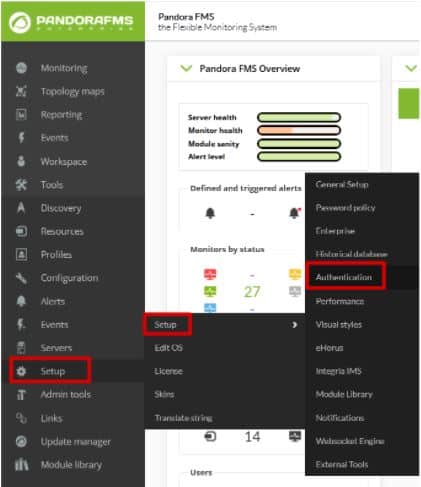
Configuring that tool is as simple as going to the “Authentication” section within the “Setup” tab.

Google-Authenticator

Here the task will be as simple as activating “Double authentication” and, if desired, forcing its use on all users. Once it is done, click on “Update”.

Google-Authenticator

Google-Authenticator

When updating, a window will appear asking you to download the Google authenticator application. Remember it is a mobile application, and, although the link redirects you to the website, you may download it from the Android Play Store or Apple App Store. If you already had it, you would only have to click continue.

Google-Authenticator

Then, open the application and scan the QR code with it. This will add an account to your application’s registry where a 6-digit number will appear. In case this fails, click “Refresh code”. If everything goes well, continue.

Google-Authenticator

The last window that will appear will be to ask you for the code that was generated in the application, to finish linking your Pandora FMS user with the device where the codes are generated. You will only have to enter this code and you will have finished the configuration of your double authenticator.

Google-Authenticator

To do the test, log out of Pandora FMS and re-enter the credentials of your user, and this time instead of showing you the console it will ask you to enter the application code.

Google-Authenticator

Farewell

Once you have correctly configured this tool, your system will be somewhat more secure, although of course, that does not mean that it is impenetrable, since every day, the so-called “hackers” create new codes to violate this type of security. That is why we always recommend changing passwords frequently and keeping all your devices updated to the latest version of their programs and software in general and continue adding new security measures throughout your network.

About Version 2 Digital

Version 2 Digital is one of the most dynamic IT companies in Asia. The company distributes a wide range of IT products across various areas including cyber security, cloud, data protection, end points, infrastructures, system monitoring, storage, networking, business productivity and communication products.

Through an extensive network of channels, point of sales, resellers, and partnership companies, Version 2 offers quality products and services which are highly acclaimed in the market. Its customers cover a wide spectrum which include Global 1000 enterprises, regional listed companies, different vertical industries, public utilities, Government, a vast number of successful SMEs, and consumers in various Asian cities.

About PandoraFMS
Pandora FMS is a flexible monitoring system, capable of monitoring devices, infrastructures, applications, services and business processes.
Of course, one of the things that Pandora FMS can control is the hard disks of your computers.

PuTTY from a monitoring perspective

What is PuTTY and some useful tips to use it easily

PuTTY is a free program (MIT license) for x86 and AMD 64 architectures (now in experimental stages for ARM). It was developed in 1997!, by Simon Tatham, a British programmer. In this blog, we have been reviewing this useful program for several years, and even the great Pandora FMS team has confirmed it just now in 2020, in the list of network commands for Microsoft Windows® and GNU/Linux®. What if it deserves its own article? Read and judge for yourselves.

Before GNU/Linux®

For those of you who visit us for the first time (welcome all) I will tell you that, when I started hitting the keyboard keys, Mr. Linus Torvalds had not even begun to study at the University of Helsinki, Finland. Age aside, we didn’t even have a graphical environment on our computers, as we know them today. Each program managed the best it could, making calls directly to the hardware, which was expensive and primal and in turn did not allow for more powerful operating systems.

The command line or terminal window was the one we used for almost everything and when operating systems with a graphical interface arrived, this resource was relegated to communicating network computers, given its low cost in terms of data transmission and its powerful use (for example, with a single command you may shut down or restart a computer, and many other things). The surprising thing is that even today we continue to use this work scheme, and even more so in terms of monitoring.

The world of computers today

Since the birth of GNU/Linux® its natural niche has been the server sector, especially web servers. By 2012, Pandora FMS team, with a keen eye, noticed the irruption of Android® in computing and we surely know that today the number of mobile phones with this operating system far exceeds the rest of devices.

Oh, I almost forgot, Android® is a somewhat weird GNU/Linux®, because manufacturers and phone operators do not let us use our “own” computers as root users. Leaving aside the arrival of 5G technology and new mobile operating systems, Android® has no major problems downloading multiple applications, to connect our beloved and precious servers with GNU/Linux (administration, monitoring).

The Windows® platform still retains a powerful slice on desktop systems (mostly for its use in video games). For administration and/or monitoring tasks just getting your hands on a handful of applications is more than enough. Here is where PuTTY, a free tool written in C language, comes into play. I guess here the name PuTTY is the complement of getty (short for get TTY) a program written in Unix by Wietse Zweitze Venema (co-author of the popular Postfix email server) and ported to GNU/Linux. In both worlds, getty has the function of detecting a connection, requesting user credentials, and authenticating them. PuTTY would then be, I guess, an abbreviation for put TTY. Let us also take into account that TTY is the abbreviation of TeleTYpewriter, the first devices based on a typewriter but electrically connected for sending and receiving written messages by telegraph (Télétype® or teletype).

Of course, PuTTY is not the only one – nor will it be the last – that you can use for teletasks: I recognize that Cmder is also a very useful program that includes more options for Windows®: cmd, Powershell® and SSH. But that, ladies and gentlemen, that is another story.

putty
PuTTY main screen

EU-FOSSA 2

European Union Free and Open Source Software Auditing project included PuTTY, in 2019, in the rewards program for hunting software bugs (bug bounty), which I consider shows its importance for computing.

To date, the European Commission has committed € 320,000 in reward payments (up to € 10,000 for revealing a software bug) in this project, and in the case of PuTTY (January to July 2019) they made 34 reports that were rewarded with an average of 285 euros each (I estimate more than twenty thousand euros in total, the highest prize was 6,772.08 euros). With such incentives it is clear that version 0.71 was born specifically by the initiative of all of Europe, considering PuTTY a common good. In this article I talk about the most recent version 0.74, paying my tribute.

Human resources

While money is important, we human beings are even more important, since we bear symbols and we give meaning to this Universe. PuTTY has, apart from Simon Tatham, a small but very select group of developers:

  • Alexandra Lanes: code reviewer who… responds to development emails. Yes, after the bug bounty program, sponsored by the European Commission, they went back to their previous scheme of receiving all improvements, criticisms, comments, etc., by email. Back to old school!
  • Jacob Nevins: Helps receiving email, and sometimes also encrypts.
  • Ben Harris: With high character encoding studies, he helps in the process of porting to other platforms.

In detail, what does PuTTY do for us?

Don’t ask that, ask what you can do with PuTTY. To sum it up a lot, PuTTY turns your powerful computer with a certain number of cores and huge amounts of RAM (with hard disk space and a monitor that would make film director George Lucas turn pale) into… a dumb terminal window. Yes, sometimes little things do titanic jobs, and the other way around!

Do not take the dumb terminal the wrong way, I call it that because everything we write on this side is sent to a Unix or Linux machine (this is usually abbreviated as *nix) and everything sent from there is reflected on our screen.

At a higher level (and I respect that opinion) there are those who think that personal computers have died… If we see it that way, anyone would say let’s move on this is over, but wait, there are still a few things left.

putty
PuTTY special commands for SSH

PuTTY Features

  • PuTTY, by default, will communicate with you through SSH safely, through certificates (public and private key), although if you want to skip security, you have to explicitly request SSH-1.
  • PuTTY has its own format (PuTTY Private Key or PPK) to store the public key without encryption on your disk but with the guarantee of Message Authentication Code (MAC – yes, yet another repeated acronym). That means you need an extra step if you already had a certificate made for OpenSSH, which is the current standard. Otherwise, PuTTY has its own certificate generator in several different formats. The author indicates that the difficulty for PuTTY to stop using PPK is the number of tweets they send them: the more messages, the easier it is. Their account on Twitter is… they don’t have an account on that social network (humor is also an indication of intelligence).
  • If you wish for higher security, you can use a security sentence to your pair of keys when generating them, but then you have to enter that sentence in each connection, each time. PuTTY has Pageant, who stays in memory and does that work for you.
  • PuTTY can use the connection protocol created by Richard Stallman himself – father of the free software movement – back in 1983: SUPDUP. I in particular did not know about it, so I just learned something new with you… Who uses that protocol currently? You see, geek stuff!
  • The PuTTY code has been used by third parties as the basis for an experimental SSH server (developing free software is spreading). PuTTY is written in C language and it is monolithic, it does not use dynamic link libraries, so if you download the appropriate version already compiled in 32 or 64 bits, it is ready to be executed.

putty
“PuTTY preferences for serial port”

  • Some Cisco® brand network switches use a serial port, conveniently disguised as an RJ-45 terminal, through which you can manage and/or monitor these devices (some other commercial brands do the same). I recommend using the serial port of the motherboard (buy an extension cable for the external slot of the case) which guarantees a better connection than USB to 9-pin serial port adapter cables. Once you have all this, PuTTY will kindly connect you to the serial port, usually COM1
  • In a similar way, you can set a graphical server X on the *xnix machine you will connect to and forward said output through PuTTY to your local machine, in order to use a program like Xming to monitor user experience (in a web browser, for example)./li>

putty
PuTTY preferences X11 forwarding

Tips to save time

When working with PuTTY, these suggestions are very welcomed:

By clicking and dragging directly, it will be copied to the clipboard, without using CTRL + C. If you want to select a rectangular area just press the ALT key before clicking in the session window opened with PuTTY. Remember that clicking with the right button inside the window will paste (CTRL + V) what you have on the clipboard, although you may also use SHIFT + INSERT to paste.

By secondary clicking on the title bar of the window you will have some very interesting options, such as:

  • Work in full screen. This allows you to work without distractions.
  • Duplicate the session, that is, another terminal window with the same server (there is also another option to open a totally new connection or choose between the profiles you have saved).
  • In the configuration option, you can check the option to reuse the connection and then when connecting, right click and choose to duplicate session. From there, all the connections you make will use a single path, even if you use CMD.exe to run other PuTTY executables (psftp,plink, etc.) followed by the profile name you use for the connection and the rest of required parameters.
  • Depending on the type of connection you have established, PuTTY can offer the most used special commands, for example in SSH you will have SIGKILL, SIGTERM, etc
  • Remember that PuTTY stores, by default, the last 200 lines that you worked with (regardless of how keyboard shortcuts are handled in the terminal), because with the configuration option you can increase it to 5,000, just as an example. What use is this to us? Well, if for some reason you lose the connection, then right click again on the title bar of the window and select “Restart connection” and you will still keep everything you have written up to 5,000 lines up!

Remember the lock icon on web pages? Based on that same concept, and to avoid malicious SSH servers (ask them to send you questions of some kind about your passwords) PuTTY has an ingenious method of drawing an icon to differentiate – and legitimize – the warnings and questions that PuTTY asks you in the terminal window. However, this defense cannot be done in Windows CMD windows like for Plink (this executable is used to automate connections and you may never use it directly, but I make an exception).

If you use Powerline to give each of your remote machines a professional look (and to differentiate them as well), you can clone the repository and take the fonts and install them in Windows®. Then upload the necessary profile and set the recently installed font to your liking. In any case, PuTTY also allows customizing colors, styles and behaviors when resizing the terminal window and many other things.

putty
PuTTY configured with Powerline font

PuTTY and Pandora FMS

As you can see, PuTTY is actually an additional tool for monitoring as it helps you test and/or debug applications in general because, although SSH is its strength, it has other protocols such as Telnet and even live TCP! How can you contribute to PuTTY? Apart from receiving donations through Paypal, there is something you can do that will make the authors happier: spread and tell others about this software. For example, you can set up your very own mirror site that syncs monthly with the original. If you want to get more committed you can download its source code and help debugging.

About Version 2 Digital

Version 2 Digital is one of the most dynamic IT companies in Asia. The company distributes a wide range of IT products across various areas including cyber security, cloud, data protection, end points, infrastructures, system monitoring, storage, networking, business productivity and communication products.

Through an extensive network of channels, point of sales, resellers, and partnership companies, Version 2 offers quality products and services which are highly acclaimed in the market. Its customers cover a wide spectrum which include Global 1000 enterprises, regional listed companies, different vertical industries, public utilities, Government, a vast number of successful SMEs, and consumers in various Asian cities.

About PandoraFMS
Pandora FMS is a flexible monitoring system, capable of monitoring devices, infrastructures, applications, services and business processes.
Of course, one of the things that Pandora FMS can control is the hard disks of your computers.

Top 5 Mobile Security Threats

COVID-19 has made us rethink the way we work, adjusting how we socialise, and adapting to contact tracing regulations. With a new reliance on our mobile devices in multiple aspects of our lives, mobile security vulnerabilities, exploits, and threats have evolved significantly during the pandemic.

There have been numerous reported cases of fake, malicious mobile applications imitating contact tracing applications that give attackers access to smartphone data or encrypt devices for ransom. With mobile devices and apps becoming increasingly important in a contactless world, they have started receiving extra attention from cybercriminals. As a result, cyber threats against mobile devices have gotten more diverse. Let’s look into the types of mobile security threats and how you can protect yourself and your loved ones.

Top Mobile Security Threats

1. Malicious applications & websites

Mobile malware has grown more prevalent alongside the increasing capabilities of our mobile devices. In Singapore, the rise of mobile malware is considered one of the top threats in the country’s cybersecurity landscape.

Like desktops, most mobile devices today have internet access. This allows threat actors to target them through malicious apps and websites, resulting in data theft, data encryption, surveillance, etc.

Furthermore, these apps come in a range of different types. The most infamous among these smartphone apps are trojans that pose as popular apps only to try to obtain private login credentials illegally.

2. Mobile ransomware

In line with the nationwide rise in ransomware incidents, CSA received 61 reports of mobile-targeted attacks in 2020, a considerable number of which were mobile ransomware. The number represented a sharp surge in ransomware incidents reported to CSA.

The mobile ransomware variant has grown to be particularly damaging due to the increased usage of mobile devices in Singapore. It encrypts personal data and files on your mobile device and then demands a ransom to release the decryption key that can restore access to the encrypted data.

3. Phishing

One of the most common attack vectors, phishing, enables other forms of cyberattacks. Most of them begin with a phishing email containing a malicious link or attachment containing malware. In fact, 70% of incidents reported to SingCERT by members of the public occurred via phishing attacks. On smartphones, phishing attacks can exploit a range of media for delivering malicious links and attachments, which include email, SMS, trojan apps, and even social media platforms.

4. Man-in-the-Middle (MitM) attacks

Man-in-the-Middle (MitM) attacks revolve around attackers intercepting your network to eavesdrop and modify the data being transmitted. While this form of attack is possible on different systems, mobile devices are particularly susceptible to it. Unlike desktops, where web traffic uses encrypted HTTPS for safe communication, mobile devices do not use such encryption for services such as SMS. As a result, these messages can be easily intercepted through malicious mobile applications using unencrypted HTTP and can be used to transfer personal information.

5. Advanced jailbreaking & rooting techniques

Jailbreaking, much like rooting, is a term for gaining root (admin) access to the underlying operating system (OS) of the device. It involves taking advantage of vulnerabilities in your mobile device’s OS to gain admin access to it. This increased permission enables threat actors to access more data and inflict greater damage than others with limited permissions can.

How to protect yourself from mobile threats

As the mobile landscape rapidly expands and diversifies, the scope for newer threats keeps rising too, prompting a need for mobile security solutions. This is especially true as remote working arrangements make these devices a more popular and crucial component of work. An effective mobile threat defence solution needs to be able to detect and respond to a variety of different attacks while providing a positive user experience.

For more robust mobile protection, ESET Mobile Security provides anti-malware, app-lock, and anti-theft features, along with offering a 360-degree view of security across mobile devices.

At the same time, don’t neglect to protect your desktops and laptops either. Powerful antivirus software such as ESET Smart Security Premium and ESET Internet Security can keep your devices safe from ransomware attacks and data breaches.

About Version 2 Digital

Version 2 Digital is one of the most dynamic IT companies in Asia. The company distributes a wide range of IT products across various areas including cyber security, cloud, data protection, end points, infrastructures, system monitoring, storage, networking, business productivity and communication products.

Through an extensive network of channels, point of sales, resellers, and partnership companies, Version 2 offers quality products and services which are highly acclaimed in the market. Its customers cover a wide spectrum which include Global 1000 enterprises, regional listed companies, different vertical industries, public utilities, Government, a vast number of successful SMEs, and consumers in various Asian cities.

About ESET
For 30 years, ESET® has been developing industry-leading IT security software and services for businesses and consumers worldwide. With solutions ranging from endpoint security to encryption and two-factor authentication, ESET’s high-performing, easy-to-use products give individuals and businesses the peace of mind to enjoy the full potential of their technology. ESET unobtrusively protects and monitors 24/7, updating defenses in real time to keep users safe and businesses running without interruption. Evolving threats require an evolving IT security company. Backed by R&D facilities worldwide, ESET became the first IT security company to earn 100 Virus Bulletin VB100 awards, identifying every single “in-the-wild” malware without interruption since 2003.