Skip to content

Automation, Orchestration and Data Protection Efficiency

Growth and development never stop, and this also rings true when it comes to data management technologies. In recent years, automation tools and orchestration platforms have significantly improved, and these advancements help frame and optimize data backup and recovery, enhancing efficiency, speed, and reliability. With advancements in automation tools and orchestration platforms, their benefits have more than doubled, giving organizations a better edge over cyber threats and other potential data disasters. This article explores five advancements in recent years and the benefits of automation and orchestration in the backup and recovery process.

Benefits of Automation and Orchestration in Backup and Recovery Processes

1. Consistency and Reliability Automated backup procedures ensure backups are done consistently and reliably at proper intervals, preventing human errors or missed backups. This gives you confidence that your data is consistently protected. 2. Economical Use of Time and Resources Automating backup tasks gives the IT staff free time to concentrate on other, more significant issues than merely routine activities associated with backups. In one turn, these automated solutions will execute the backup and recovery workflows quickly and very effectively. 3. Improved Data Management Choosing to automate backup and recovery employs tools like data deduplication and compression to optimize space usage and minimize costs. A centralized management interface also gives better visibility and control of the status of the backups and storage utilization, ensuring that organizations can monitor and manage the process. 4. Shortened Recovery Times Automated recovery processes will help restore data quickly and reduce business operation downtime if data is lost or there is a system failure. Automated recovery tools can promptly trace and retrieve the necessary data quickly, thus reducing the recovery process to a few minutes from what would have taken hours or even days. This ensures that your organization bounces back and returns to the usual business operation on time. 5. Data Protection An automated backup system, developed using encryption, access controls, and compliance enforcement, will ensure the protection of backup data and guarantee the satisfaction of regulatory requirements. Thus, when using an automated system, you can rest assured that your data is appropriately secured. Incremental backups and continuous data protection also ensure that data doesn’t get lost during disasters. 6. Eliminating Human Related Errors Another risk it eliminates is human-related mistakes. Mistakes such as selecting the incorrect backup files and overwriting vital information could occur during manual recovery processes. Automated tools eliminate these errors by following predefined protocols and procedures, ensuring consistent and proper implementation of the recovery process each time. 7. Scalability With advanced backup tools, companies don’t have to worry about growing data sizes. They can easily back up data and handle storage demands, ensuring all data is sufficiently covered. As the organization grows, accommodating increasing data needs, these advanced solutions scale along with the data size.

Five Advancements in Automation Tools and Orchestration Platforms

1. Continuous Data Protection (CDP) A groundbreaking technology called continuous data protection captures every change that happens with data and tracks changes in real-time. Unlike traditional backup, which depends on periodic snapshots, CDP creates an unbroken data stream that organizations can use instantly in recovery. It guarantees restored data up to any point and minimizes data loss and downtime. 2. AI-powered Backup Optimization Now, backup processes are optimized using artificial intelligence and machine learning algorithms. By analyzing historical data and patterns, these technologies can single out redundant or unnecessary backups, reuse them, optimize storage usage, and even automate data retention and deletion. This doesn’t just help drive greater efficiency; it also reduces overall storage costs. 3. Cloud-Native Backup Solutions With the advent of cloud computing, cloud-native backup solutions can leverage their scalability, flexibility, and cost-effectiveness. Most of these solutions are directly tied to leading cloud platforms and typically feature automated scheduling for backups, off-site replication, and instant recovery. Unlike the on-premises hardware necessary for many cloud services, a cloud-native backup solution streamlines infrastructure management while taking some of the responsibility off the IT team. 4. Orchestrated Disaster Recovery These days, disaster recovery processes are much easier and more automated because of orchestration platforms. This allows organizations to redefine the DR (disaster recovery) workflows they must configure during a disaster. It orchestrates task execution, such as failover, failback, and testing, to ensure consistent and reliable recovery procedures. Orchestration of DR reduces complex management in the DR infrastructure, improving overall resilience. 5. Self-healing Data Protection Some modern backup and recovery solutions can now self-heal. These systems can detect and automatically correct data corruption, missing backups, or configuration errors. With constant monitoring of the backup infrastructure, self-healing technology ensures robust data protection continuously, even after unexpected failures or human errors.

Implementation Challenges of Automation and Orchestration

Although the benefits of automation and orchestration on data management are huge, there might still be a few challenges while trying to implement these technologies. Common problems include the following:

Compatibility Problem:

If compatibility issues exist, automation and orchestration tools may not easily integrate with a company’s systems and infrastructures. This can incur extra expenses, as you may have to replace their infrastructure.

Skill Gaps:

Organizations may lack the in-house expertise to operate these infrastructures. Hence, you must employ an extra hand with the appropriate technical know-how. Leverage their expertise in implementation techniques to help assist in the implementation process. Also, you need to educate and develop IT staff to be competent in managing and supporting new technologies, ensuring the smooth running of the organization’s backup and recovery system.

Change Management: 

Migrating from manual to automated data management processes instills an entirely new culture within a company. Therefore, organizations must develop robust strategies to effectively manage this change and allow staff to transition seamlessly from the former system to the advanced one.

Conclusion

Advancements in data automation tools and orchestration platforms bring data backup and recovery to a whole new level of efficiency, reliability, and affordability. An organization can protect vital data and assure business continuity through continuous data protection, AI-powered optimization, cloud-native solutions, orchestrated disaster recovery, and self-healing functionalities. These technologies empower the organization to manage data effectively and efficiently, mitigate potential human errors, and ensure the quick restoration of critical data in the case of a disaster or system failure.

About Storware
Storware is a backup software producer with over 10 years of experience in the backup world. Storware Backup and Recovery is an enterprise-grade, agent-less solution that caters to various data environments. It supports virtual machines, containers, storage providers, Microsoft 365, and applications running on-premises or in the cloud. Thanks to its small footprint, seamless integration into your existing IT infrastructure, storage, or enterprise backup providers is effortless.

About Version 2 Digital

Version 2 Digital is one of the most dynamic IT companies in Asia. The company distributes a wide range of IT products across various areas including cyber security, cloud, data protection, end points, infrastructures, system monitoring, storage, networking, business productivity and communication products.

Through an extensive network of channels, point of sales, resellers, and partnership companies, Version 2 offers quality products and services which are highly acclaimed in the market. Its customers cover a wide spectrum which include Global 1000 enterprises, regional listed companies, different vertical industries, public utilities, Government, a vast number of successful SMEs, and consumers in various Asian cities.

The Future Of Virtualization Infrastructure

When the Broadcom company announced its acquisition of VMware on the 26th of May 2022, the virtualization industry was brazing for another great evolution. And this time, we might witness a greater blast in the evolution of virtualization infrastructures. So, at the back of this announcement and the introduction of many virtualization-enhancing features, are we getting into the fourth-age evolution of virtualization infrastructures?

The inception of data virtualization infrastructures focused on relieving the huge task accompanying big data issues of physical machines by granting end-users the opportunity to access and modify data stored across various systems through a single view. Using the ESX hypervisor machine, VMware gained huge momentum in the data management sector. However, while this infrastructure was widely accepted, it contains a series of challenges that made users desire significant improvement.

At the back of this development, the second age of virtualization infrastructures comes into play. This time, a cloud-based data virtualization infrastructure was announced, taking virtualization to a new level where users can access data on popular platforms like Azure, Amazon web, and more. Again, this transition gave users timely access to the database with minimum stress. Then, big companies and the public sector with a data center utilized OpenStack for data positioning. Thus, increasing their accessibility to end users.

The Third virtualization infrastructure age introduced the use of containers in database management on Kubernetes. This transformation aims to allow developers to present their database in independent containerized microservices. Thus, they can promote their services to test, stage, and promotion environments and become readily available to users.

Utilizing ETCD, Kubernetes stores the containerized services, which are only accessible with the help of an API. This development was a big upgrade on the seemingly cumbersome traditional VMs and Hypervisors as it provides users with the needed database at the minimum interval. While data virtualization keeps enjoying a series of upgrades, we might as well say that we are already witnessing the fourth age of evolution. This development makes users curious about what the fourth evolution has in stock and about what the future holds for data virtualization.

So, before moving on to the future of virtualization infrastructures, let’s look at what the buzzing fourth-age evolution is all about and why this development is all for the customer’s good.

The fourth age virtualization infrastructures

Like every other evolution mentioned earlier, the fourth age virtualization comes with another view on virtualization. It is also called the age of evolution and convergence on cloud-native platforms. It aimed at running virtual machines alongside Kubernetes through the help of KubeVirt. The KubeVert project allows KVM-enabled machines to be managed as pods on Kubernetes.

Despite the fame of Kubernetes in recent years, it’s surprising that many projects are still run on virtual machines. With the prolonged coexistence between these two virtualization tools, the new evolution is about having both works as a single system without a requirement for the actual application.

This innovation combines the features of both Virtual machines and Kubernetes to provide a good user experience. In addition to this benefit, KubeVirt grants Virtual machines the opportunity to utilize Kubernetes abilities, as seen with projects like Tetkton, Knative, and the like. These projects work as both Virtual machines and container-based applications.

Features of the fourth age evolution Virtualization Infrastructures

Combining virtual machines and containers into a single system, the fourth-age virtualization tools possess several amazing features that provide a great user experience. Here are the features:

  • Virtualization Monitoring
  • Pipelines Incorporations
  • Utilization of GitOps
  • Serverless Architecture
  • Service Mesh

Virtualization Monitoring

This is an automated and manual technique that ensures appropriate analysis and monitoring of virtual machines and other virtualization infrastructures. The virtualization monitoring technique has three main processes that enhance its efficacy. This process includes monitoring, troubleshooting, and reporting. This feature guides against untoward occurrences, performance-related issues, unexplainable or architectural changes, and risks.

Also, it allows you to plan capacity better and manage resources adequately. Another benefit associated with virtualization monitoring is the absence of server overload, which makes data processing faster and better. Lastly, virtualization monitoring improves the general performance of virtualization infrastructures by quickly detecting impending issues. With total control of virtualization monitoring processes, a feature seen in previous ages, virtualization monitoring is a key feature in the new infrastructures with more efficiency.

Pipelines Incorporations

Pipelines are aggregates of tasks assembled in a defined order of execution through the help of pipeline definitions. With this feature, a continuous flow integration and delivery of your applications’ CI/CD workflow become organized.

OpenShift Pipeline, based on Kubernetes resources, is an example of how this feature works. In addition, it utilizes Teckton for optimum accuracy. With CI/CD pipeline automation, you can easily escape human errors and maintain a consistent process for releasing software.

Utilization of GitOps

GitOps aims at automated processing, ensuring secure collaboration among teams across repositories. This feature utilizes Git for applications and infrastructure management. GitOps allows for maximum productivity through its ability to offer continuous deployment and delivery. Also, it allows you to create a standardized workflow using a single set of tools.

Furthermore, GitOps provides more reliability through the revert and fork feature. There’s also the provision of additional visibility and fewer attacks on your server. GitOps provides easier compliance and auditing due to the ability of Git to track and log changes. Git also affords users an augmented developer experience while managing Kubernetes updates, even as a newbie to the Kubernetes services.

Serverless Architecture

Serverless computing is an as-used backend service provision method that ensures users face less stress while computing databases. In addition, it allows users to work on a budgeted amount as the user only pays for what they consume. Also, the scalability of this feature makes it possible to process many requests in less time. You can easily update, fix or add a new feature to an application with minimal effort. Moreover, the serverless architecture significantly reduces liabilities as there’s no backend infrastructure to account for.

Lastly, with serverless architecture, efficiency is hundred percent because there’s no idle capacity, as it is usually evoked only on request.

Service Mesh

A feature that uses a sidecar to control service-to-service communication over a network. Service mesh allows different parts of an application to work hand in hand. This feature is commonly seen in microservices, cloud-based applications, and containers. With the service mesh feature, you can effectively separate and manage service-to-service communication in your application. Also, detecting communication errors becomes easier because each exists on an individual infrastructure layer.

Furthermore, the service mesh offers security features such as authorization, encryption, and authentication. As a result, application development, testing, and deployment also become faster. Lastly, having a sidecar beside a cluster of containers is good for managing network services. With this and other amazing features of the fourth-age evolution virtualization, you can incorporate your VMs and containers into a cloud-native platform.

How can you incorporate cloud-native platforms into your business?

While you might be wondering how to get started with a cloud-native platform, the simplest thing to do is research the essence of using Kubernetes and containers and how you can incorporate them into your business. Furthermore, you can also look into organizations running a similar business as you and how they use the cloud-native platform. Then, after understanding how this platform works and how you can transition into the platforms, proceed to download the Red Hat OpenShift.

Install the application, and after the installation, you can download the OpenShift Migration Toolkit for Virtualization. This Toolkit is a guide for efficiently transitioning into the OpenShift Virtualization from the current virtual machines. With this development, you can incorporate your virtual machines into the current Kubernetes. Also, virtual machines will be able to offer OpenShift capabilities such as cluster management, cloud storage, cloud-native platform services, and other amazing features.

Just as the transition from the big old data to the growing virtualization era, virtual machines are fast becoming a thing of the past and should be replaced by more efficient cloud-native platforms. Moreover, with the growing demand for data sharing in the digital world, sticking with an old-time virtualization system might impact your business negatively. Therefore, you need to embrace this latest trend for maximum output.

What does the future hold for virtualization infrastructures?

Looking at how far virtualization infrastructures have changed over the years, it’s safe to say that more exciting features await the evolution of virtualization infrastructures. The digital world keeps expanding with jaw-dropping developments in all sectors. Moreover, cryptocurrency has come to challenge the legal notes for making digital transactions, with robots gradually replacing human efforts, among other innovations.

So, the wave in the evolution of virtualization infrastructures is expected to become stronger over the years. Soon enough, we might expect the innovation of the fifth-age virtualization infrastructures.

About Storware
Storware is a backup software producer with over 10 years of experience in the backup world. Storware Backup and Recovery is an enterprise-grade, agent-less solution that caters to various data environments. It supports virtual machines, containers, storage providers, Microsoft 365, and applications running on-premises or in the cloud. Thanks to its small footprint, seamless integration into your existing IT infrastructure, storage, or enterprise backup providers is effortless.

About Version 2 Digital

Version 2 Digital is one of the most dynamic IT companies in Asia. The company distributes a wide range of IT products across various areas including cyber security, cloud, data protection, end points, infrastructures, system monitoring, storage, networking, business productivity and communication products.

Through an extensive network of channels, point of sales, resellers, and partnership companies, Version 2 offers quality products and services which are highly acclaimed in the market. Its customers cover a wide spectrum which include Global 1000 enterprises, regional listed companies, different vertical industries, public utilities, Government, a vast number of successful SMEs, and consumers in various Asian cities.

Backup and Restore OpenStack Volumes and Snapshots with Storware

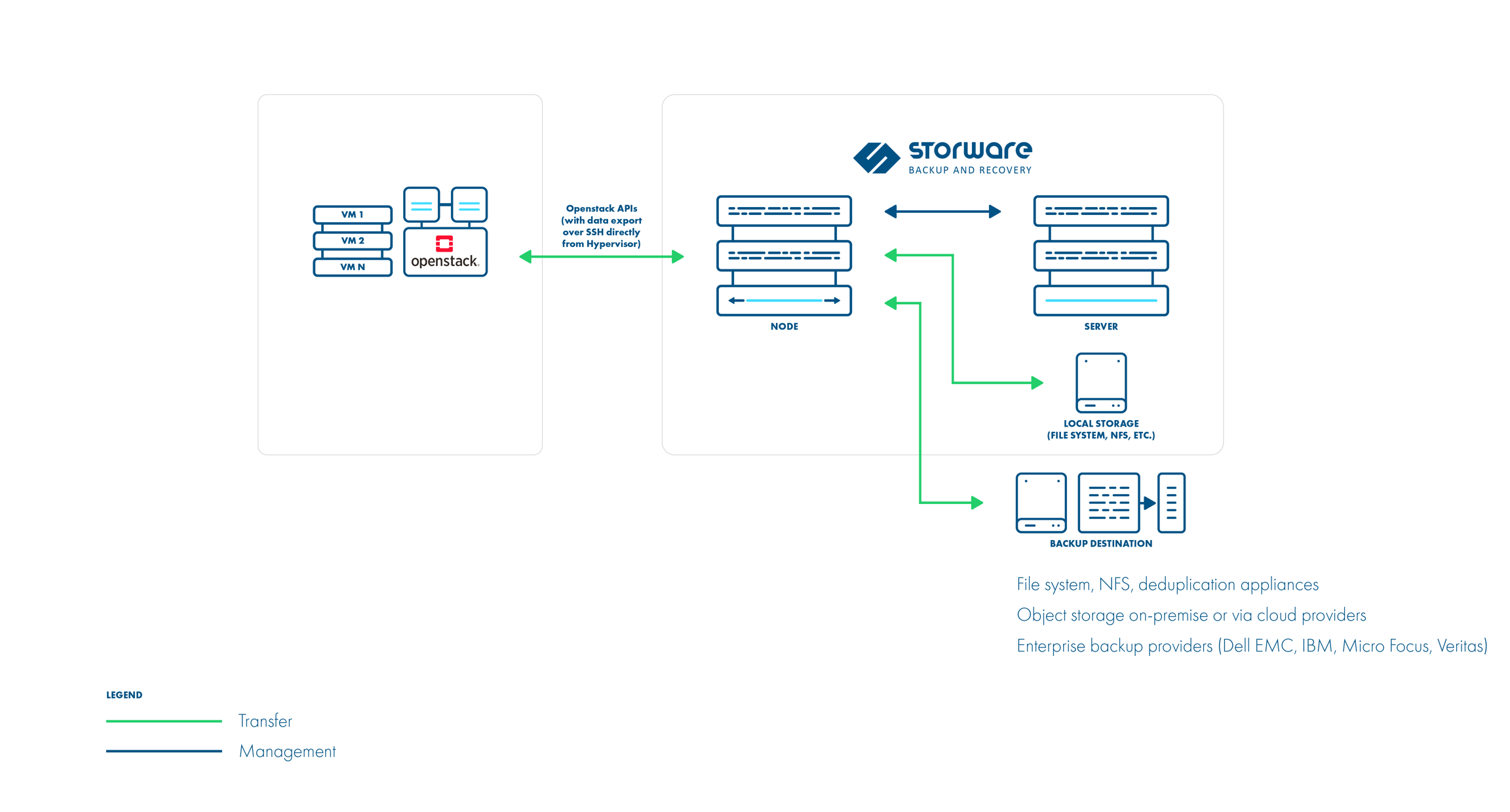
Storware Backup and Recovery offers a comprehensive solution for protecting your OpenStack environment.

Here’s a step-by-step guide to get you started with backups and recovery:

Prerequisites:

  • OpenStack environment using KVM hypervisor and VMs with QCOW2 or RAW files.
  • Storware Backup and Recovery software.

Deployment:

1. Install Storware Backup and Recovery Node: The Storware node can be installed on a separate machine. Ensure it has access to OpenStack APIs and hypervisor SSH.
2. OpenStack API Integration: Configure Storware to communicate with OpenStack APIs like Nova and Glance for metadata collection and VM restore processes.

Backup Configuration:

1. OpenStack UI Plugin (Optional): Install the Storware OpenStack UI plugin to manage backups directly from the OpenStack dashboard. This simplifies backup creation, scheduling, and restores.

2. Backup Schedules: Define backup schedules for your VMs. Storware supports both full and incremental backups.

3. Backup Options:

  • Libvirt strategy
  • Disk attachment strategy
  • Ceph RBD storage backend

All three strategies support full and incremental backups.

Libvirt strategy works with KVM hypervisors and VMs using QCOW2 or RAW files. It directly accesses the hypervisor over SSH to take crash-consistent snapshots. Optionally, application consistency can be achieved through pre/post snapshot command execution. Data is then exported over SSH.

Disk attachment strategy is used for OpenStack environments that use Cinder with changed block tracking. It uses a proxy VM to attach disks to the OpenStack instances. Snapshots are captured using the Cinder API. Incremental backups are supported. Data is read from the attached disks on the proxy VM.

Ceph RBD storage backend

Storware Backup & Recovery also supports deployments with Ceph RBD as a storage backend. Storware Backup & Recovery communicates directly with Ceph monitors using RBD export/RBD-NBD when used with the Libvirt strategy or – when used with the Disk-attachment method – only during incremental backups (snapshot difference).

Libvirt strategy

Disk attachment strategy

Retention Policies: Set retention policies to manage how long backups are stored.

Backup Process:

1. Storware interacts with OpenStack APIs to gather VM metadata.
2. Crash-consistent snapshots are taken directly on the hypervisor using tools like virsh or RBD snapshots.
3. (Optional) Pre-snapshot scripts run for application consistency.
4. VM data is exported using the chosen method (SSH or RBD).
5. Metadata is exported from OpenStack APIs.
6. Incremental backups leverage the previous snapshot for faster backups.

Recovery Process:

1. Select the desired VM backup from the Storware interface.
2. Choose the recovery point (specific backup version).
3. Storware recreates VM files and volumes based on the backup data.
4. The VM is defined on the hypervisor.
5. Disks are attached (either directly or using Cinder).
6. (Optional) Post-restore scripts can be run for application-specific recovery steps.

Additional Notes:

  • Storware supports both full VM restores and individual file/folder recovery.
  • The OpenStack UI plugin provides a user-friendly interface for managing backups within the OpenStack environment.
  • Refer to Storware documentation for detailed configuration steps and advanced options -> https://storware.gitbook.io/backup-and-recovery

By following these steps and consulting the Storware documentation, you can leverage Storware Backup and Recovery to safeguard your OpenStack VMs and ensure a quick recovery process in case of data loss or system failures.

About Storware
Storware is a backup software producer with over 10 years of experience in the backup world. Storware Backup and Recovery is an enterprise-grade, agent-less solution that caters to various data environments. It supports virtual machines, containers, storage providers, Microsoft 365, and applications running on-premises or in the cloud. Thanks to its small footprint, seamless integration into your existing IT infrastructure, storage, or enterprise backup providers is effortless.

About Version 2 Digital

Version 2 Digital is one of the most dynamic IT companies in Asia. The company distributes a wide range of IT products across various areas including cyber security, cloud, data protection, end points, infrastructures, system monitoring, storage, networking, business productivity and communication products.

Through an extensive network of channels, point of sales, resellers, and partnership companies, Version 2 offers quality products and services which are highly acclaimed in the market. Its customers cover a wide spectrum which include Global 1000 enterprises, regional listed companies, different vertical industries, public utilities, Government, a vast number of successful SMEs, and consumers in various Asian cities.

Step-by-Step Guide to Backup OpenStack Using Storware

Learn how to safeguard your OpenStack environment with Storware. This step-by-step guide provides a comprehensive overview of backup processes, ensuring data integrity and disaster recovery. 

Prerequisites:

  • OpenStack environment setup and running.
  • Storware Backup and Recovery software installed and configured.
  • Administrative access to both OpenStack and Storware systems.
  • Backup storage configured in Storware.
 

Step 1: Configure Storware to Connect with OpenStack

1. Login to Storware Backup and Recovery Console:

  • Open a web browser and navigate to the Storware Backup and Recovery console URL.
  • Log in with administrative credentials.

2. Add OpenStack Environment:

  • Go to the Environments section.
  • Click on Add Environment.
  • Select OpenStack from the list of supported environments.

3. Enter OpenStack Credentials:

  • Provide the OpenStack API endpoint.
  • Enter the necessary credentials (username, password, tenant/project name).
  • Specify the domain name if using Keystone v3.

4. Test Connection:

  • After entering the details, click on Test Connection to ensure Storware can communicate with your OpenStack environment.
  • Once the connection is successful, save the configuration.

Step 2: Define Backup Policies

1. Create Backup SLA:

  • Navigate to the SLA Policies section.
  • Click on Create SLA Policy.
  • Define the backup schedule (e.g., daily, weekly), retention period, and any other relevant parameters.
  • Save the policy.

2. Assign SLA Policy to OpenStack Instances:

  • Go to the Virtual Machines or Instances section under your OpenStack environment in Storware.
  • Select the instances you want to back up.
  • Assign the previously created SLA policy to these instances.

Step 3: Perform Backup

1. Initiate Manual Backup (Optional):

  • Although backups will be performed according to the SLA policy, you can initiate a manual backup.
  • Select the instance you want to back up.
  • Click on Backup Now.
  • Monitor the backup progress in the Job Monitor section.

2. Monitor Backup Jobs:

  • Check the status of backup jobs in the Job Monitor section.
  • Ensure that backups are completed successfully.

Step 4: Recovery of OpenStack Instances

1. Identify the Backup to Restore:

  • Navigate to the Backup section.
  • Select the OpenStack environment.
  • Choose the instance you want to restore.
  • Browse through the available backup points.

2. Initiate Restore Process:

  • Select the backup point you wish to restore.
  • Click on Restore.
  • Choose the restore options (e.g., restore to the original instance or create a new instance).

3. Specify Restore Details:

  • If restoring to a new instance, provide the necessary details (e.g., instance name, flavor, network).
  • Confirm the restore operation.

4. Monitor Restore Jobs:

  • Go to the Job Monitor section to track the progress of the restore job.
  • Once the job completes, verify that the instance is restored correctly.

Step 5: Verify and Validate Backup and Restore

1. Verify Backups:

  • Periodically check the backups to ensure they are performed as per the defined schedule.
  • Conduct test restores to validate that backups are not corrupted and are usable.

2. Automate Monitoring:

  • Configure alerts and notifications in Storware to be informed of backup and restore job statuses.
  • Regularly review logs and reports for any anomalies or issues.

Step 6: Maintenance and Best Practices

1. Regular Updates:

  • Keep both OpenStack and Storware Backup and Recovery software updated to the latest versions to ensure compatibility and security.

2. Audit and Compliance:

  • Maintain logs of backup and restore activities for auditing purposes.
  • Ensure compliance with organizational data protection policies and regulatory requirements.

3. Disaster Recovery Planning:

  • Develop a comprehensive disaster recovery plan that includes detailed procedures for backup and restore.
  • Regularly test the disaster recovery plan to ensure readiness in case of an actual disaster.

By following these steps, you can effectively manage the backup and recovery of your OpenStack environment using Storware Backup and Recovery, ensuring data protection and minimizing downtime.

About Storware
Storware is a backup software producer with over 10 years of experience in the backup world. Storware Backup and Recovery is an enterprise-grade, agent-less solution that caters to various data environments. It supports virtual machines, containers, storage providers, Microsoft 365, and applications running on-premises or in the cloud. Thanks to its small footprint, seamless integration into your existing IT infrastructure, storage, or enterprise backup providers is effortless.

About Version 2 Digital

Version 2 Digital is one of the most dynamic IT companies in Asia. The company distributes a wide range of IT products across various areas including cyber security, cloud, data protection, end points, infrastructures, system monitoring, storage, networking, business productivity and communication products.

Through an extensive network of channels, point of sales, resellers, and partnership companies, Version 2 offers quality products and services which are highly acclaimed in the market. Its customers cover a wide spectrum which include Global 1000 enterprises, regional listed companies, different vertical industries, public utilities, Government, a vast number of successful SMEs, and consumers in various Asian cities.

Autonomous Data Protection

Will robots take over data management? In recent years, backup and disaster recovery system vendors have introduced several significant innovations. But the best is yet to come. 

Modern data protection solutions, encompassing backup, disaster recovery, replication, and deduplication, are constantly evolving. Manufacturers have moved from a stage of manual configuration to automation. However, this is not the end of the road. There is increasing talk about the era of autonomous backup and even autonomous data management. Is this a near future reality, or just a fantasy?

Opinions on this matter are divided. Skeptics cite the example of autonomous cars. Although prototypes have appeared on the streets of San Francisco, the road to their widespread adoption seems to be a long way off. On the other hand, proponents point to robotic vacuum cleaners that are displacing traditional vacuum cleaners from homes. If humans can be eliminated from processes that require high precision, why not do the same in areas closely related to IT?

Automation and autonomy are very similar concepts, sometimes incorrectly used interchangeably. Nevertheless, there are some subtle differences between them. Automation means that the tasks performed are based on pre-defined parameters that must be updated as the situation changes. This is how elevators, office software, washing machines, robotic assembly lines, and most backup and DR systems work.

On the other hand, autonomous processes differ from automated ones in that they are constantly learning and adapting to the environment. In such cases, human intervention is not needed or is minimal. A great example is the aforementioned robotic vacuum cleaners or driverless cars.

The authors of the concept of autonomous data management assume that processes should take place invisibly, although under human control. Autonomy somehow combines automation with artificial intelligence (AI) and machine learning (ML), so that the data protection system intuitively adapts to the situation.

AI and ML technologies enable the automation of data management processes and minimize human intervention and supervision. Proponents of such a solution argue that it increases operational efficiency, extends uptime, improves security, and the level of services offered.

Clouds Force Change

If companies only stored data in on-premises environments, it would be possible to do without autonomous tools, but in the last two years, things have become much more complicated. Enterprises have moved some of their assets to the public cloud, which has contributed to the growing importance of hybrid and multi-cloud environments. It was supposed to be easier and cheaper, but the ongoing adoption of cloud services is causing sleepless nights for many IT managers.

The main problem lies in the excessive dispersion of data, which is located both in the local data center and in external service providers such as Amazon, Google, Microsoft, or smaller local providers. Managing, and especially protecting, digital assets scattered across various locations is a challenge. The situation is worsened by the relatively narrow range of vendors’ tools optimized for managing corporate data for hybrid and multi-cloud environments.

Part of the products provide support for multiple clouds through centralized control, although they consume many expensive resources. There are also efficient solutions, but only within a single cloud environment. Their main drawback is scalability in the clouds of different providers. In any case, in both of the aforementioned cases, operating costs are higher than desired.

Another problem is the excessive haste in implementing cloud technologies, leading to an increase in the number of point solutions. Cloud environment architects, application developers, and analysts implement independent data management solutions, which deepens the chaos and limits the possibilities of central management.

The data protection strategy in the cloud environment also leaves much to be desired. Security specialists emphasize that in today’s world, the most effective way to stop attackers is through preventive measures. Unfortunately, most modern technologies take a passive approach to resources stored in the cloud. In practice, this means that they create backups and restore backups after an attack, which results in unplanned downtime.

In summary, autonomous backup supports operations in multiple clouds, eliminates functional silos, automates all processes with minimal human intervention, and increases cyber resilience through active methods of detecting and preventing ransomware attacks.

It has long been known that people are the weakest link in the data protection system. This is particularly evident in environments that require fast and data-driven decision-making. It is also undeniable that people are prone to errors and slower than AI-based solutions, especially when it comes to mundane, repetitive tasks.

So will robots send IT department employees to the pasture in the near future? So far, no one is talking about it loudly. According to the authors of the concept of autonomous data management, the best solution in a complex, hybrid and multi-cloud environment is autonomous work. This means that data will self-optimize and repair itself, as well as move between different environments. Self-optimization uses artificial intelligence and machine learning to adapt to the principles and services related to data protection and management. Self-healing is the ability to predict, identify, and correct service errors or performance issues.

On the other hand, self-service assigns appropriate protection policies and manages and deploys applications and services without human intervention. What does this mean?

In the traditional model, a programmer deploying a new application relies on manual processes, which lengthens it. Autonomous data management eliminates all manual tasks, while protecting the application throughout the process, without the need for additional actions on the part of the application developer or IT staff.

Autonomous Data Management – Is It Worth It?

The concept of autonomous data management looks very promising. Importantly, some backup and DR system vendors are announcing the launch of such solutions in the near future, not in the coming years. On the market, you can already find products that use Machine Learning to early detect anomalies that signal an attempt to attack the backup system. Some companies also use partially AI-based solutions combined with DLP systems, which helps classify and tag information, and thus copy and protect the most important data.

However, only the widespread adoption of systems that provide autonomous data management will allow us to answer the fundamental question – is it worth the effort?

Some data protection specialists warn against excessive optimism. In their opinion, the biggest obstacle to the adaptation of autonomy in backup and DR processes may be the collection of a sufficiently wide range of data to be able to analyze various scenarios. It is difficult to imagine that vendors of solutions would share such information with each other.

It is also difficult to count on the openness of IT department employees, as they may fear that new products will deprive them of their jobs. It can also be safely assumed that the term “autonomy” will be overused by marketers, which on the one hand encourages customer investment, and on the other hand, threatens that low ratings of disappointed users will deter potential customers. It is possible that there will be limitations related to computing power, as well as the costs of such a solution. Nevertheless, it is worth closely following such initiatives, especially as it concerns large companies and institutions storing data in different environments.

Storware develops towards autonomous

While full autonomy might still be a distant goal, Storware’s focus on AI and automation is a significant step in that direction. These features have the potential to significantly improve efficiency, reduce human error, and enhance overall data protection.

In the near future, Storware will implement a number of improvements that will allow for:

  • Automation: The Backup Assistant and conversational layer aim to automate routine tasks and provide intelligent responses, reducing human intervention.
  • Intelligence: Storebrain’s ability to learn from collective data and provide optimal configurations demonstrates a move towards intelligent decision-making.
  • Proactive Protection: The integration of AI into Isolayer for threat prevention showcases a proactive approach to data management, essential for autonomous systems.

However, key to achieving full autonomy would be further development in areas like:

  • Self-healing capabilities: The system should be able to identify and resolve issues independently.
  • Predictive analytics: Accurate forecasting of system behavior and potential problems.
  • Continuous learning: The system should constantly improve its performance based on new data and insights.

About Storware
Storware is a backup software producer with over 10 years of experience in the backup world. Storware Backup and Recovery is an enterprise-grade, agent-less solution that caters to various data environments. It supports virtual machines, containers, storage providers, Microsoft 365, and applications running on-premises or in the cloud. Thanks to its small footprint, seamless integration into your existing IT infrastructure, storage, or enterprise backup providers is effortless.

About Version 2 Digital

Version 2 Digital is one of the most dynamic IT companies in Asia. The company distributes a wide range of IT products across various areas including cyber security, cloud, data protection, end points, infrastructures, system monitoring, storage, networking, business productivity and communication products.

Through an extensive network of channels, point of sales, resellers, and partnership companies, Version 2 offers quality products and services which are highly acclaimed in the market. Its customers cover a wide spectrum which include Global 1000 enterprises, regional listed companies, different vertical industries, public utilities, Government, a vast number of successful SMEs, and consumers in various Asian cities.