Top 5 Benefits of Business VPN Solution

Do you know what the drill is while running a business? Data security, smooth workflows and keeping your team connected, no matter where they are. But how do you manage all of that without your business being vulnerable to cyber threats or losing control of sensitive information? 

Business VPN Solution

A business VPN is your armor where cyber threats are everywhere. It allows your employees to work remotely, access company data securely, and even prevent hackers from sneaking in through the cracks.

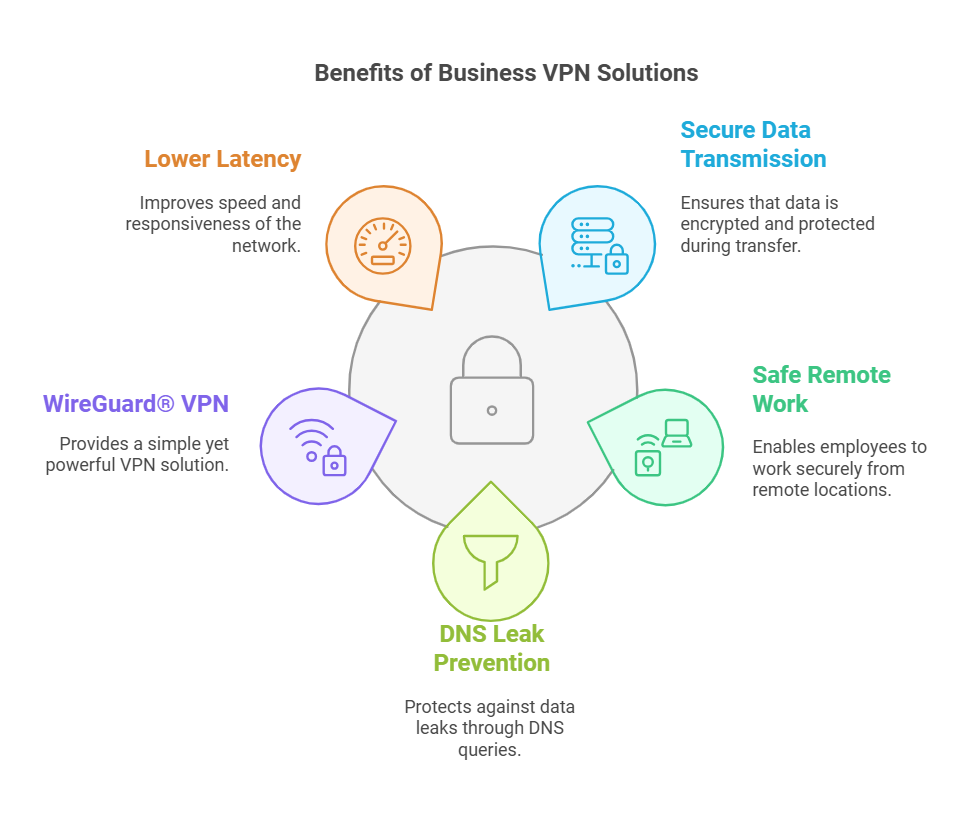
Still, that’s just the tip of the iceberg. Let’s dive into the 5 top benefits of a business VPN that will change the way you operate.

5 Benefits of Business VPN Solution

1. Secure Data Transmission

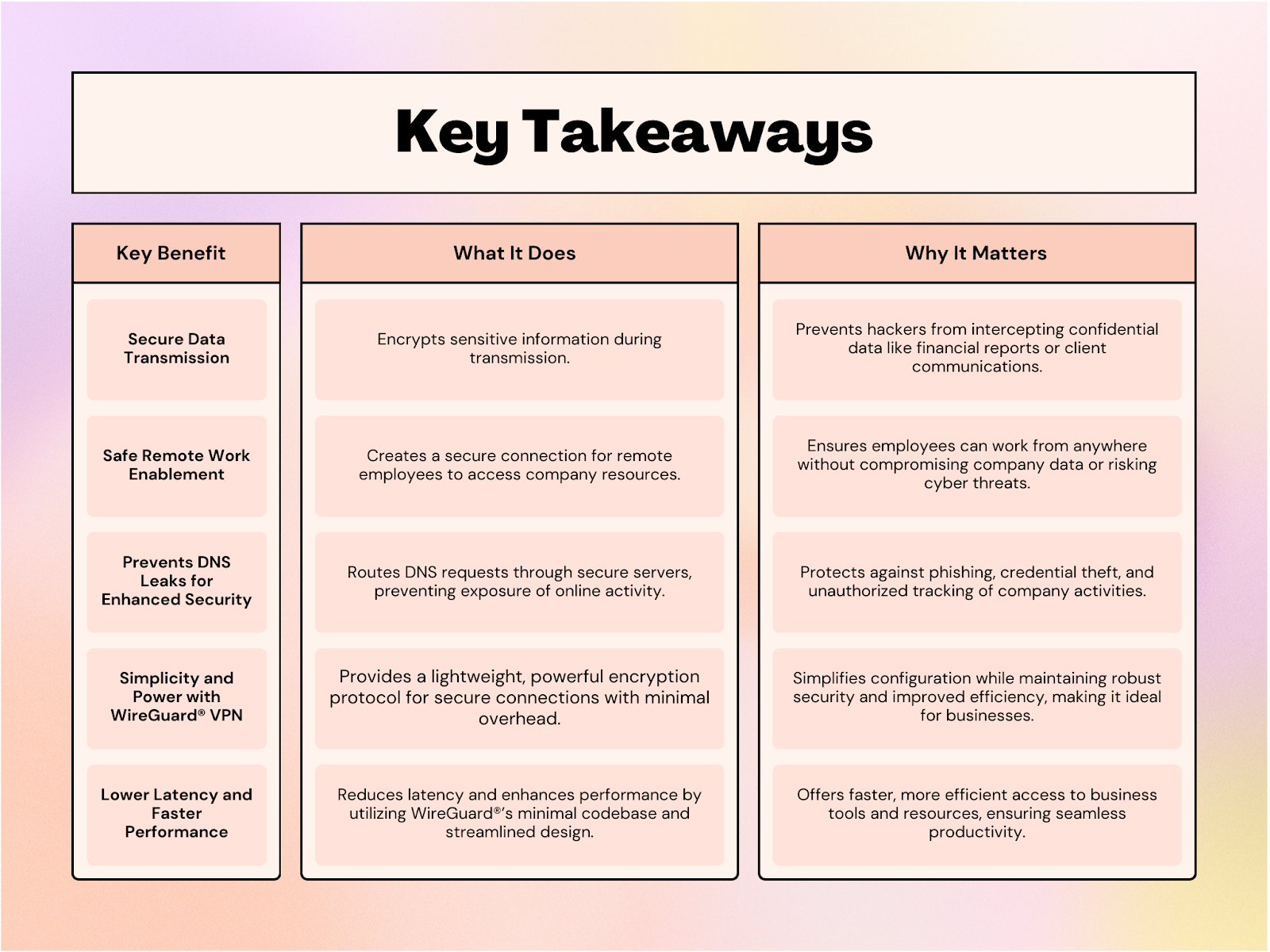
Consider sending sensitive information to a client or sharing company reports over an email. Without the right security measures, those communications could be intercepted by hackers. Here, by encrypting your data, a VPN ensures that what you send stays private, no matter what.

Encryption means that any data traveling across your network is scrambled into unreadable code until it reaches the intended recipient. Without encryption, your business is exposed to a whole world of potential breaches. VPNs make sure no one can eavesdrop or manipulate your communications.

So, whether it’s financial information, employee details, or client data, a business VPN is your lock and key for secure data transmission. You’ll never have to worry about sending a document or email and wondering who might be watching.

2. Safe Remote Work Enablement

With employees scattered across the globe, it’s essential to ensure that they can safely access company resources around the world. This secure connection allows them to access company files, applications, and resources without risking exposure to hackers. VPNs create a secure tunnel between the employee’s device and the company network, ensuring no one can hijack the connection.

Plus, with VPNs, you avoid the headaches that come with managing multiple devices and work environments. Whether employees are on a laptop, tablet, or phone, a VPN ensures their connection is secure, empowering them to work from anywhere without compromising security.

3. Prevents DNS Leaks for Enhanced Security

A Domain Name System (DNS) leak can expose sensitive information about your online activities, even when you’re using a secure network. Details like your network’s IP address, browsing history, and the IP addresses of websites visited can fall into the wrong hands. Hackers often exploit this seemingly minor information to launch targeted attacks, such as stealing employees’ login credentials or carrying out phishing scams.

A business VPN prevents DNS leaks by routing all DNS requests through its secure servers instead of your internet service provider (ISP). This ensures that your company’s online activities remain private and protected. By encrypting DNS queries, a VPN minimizes the risk of unauthorized access to sensitive data and shields your business from potential cyber threats.

4. Simplicity and Power with Veltar VPN

When it comes to balancing security and simplicity, Veltar VPN stands out. Known for its lightweight yet robust encryption, Veltar ensures data integrity without the complexity of traditional VPN protocols. Its streamlined design eliminates unnecessary overhead, making configuration incredibly simple for IT teams while maintaining powerful security features.

Veltar’s minimal codebase not only enhances performance but also reduces the chances of vulnerabilities. Whether it’s setting up secure connections or managing network traffic, the simplicity of Veltar makes it an ideal choice for businesses. With Veltar at its core, a business VPN ensures seamless integration, efficient operation, and uncompromised security, allowing your team to focus on productivity without getting bogged down in technical hurdles.

5. Lower Latency and Faster Performance

One of the standout benefits of WireGuard®-powered VPNs is the ability to offer lower latency and faster performance compared to traditional VPN solutions. Its streamlined design and minimal codebase result in quicker connection speeds and reduced lag, even when accessing resources remotely.

Businesses can enjoy smooth, uninterrupted access to critical tools and data, improving overall productivity. Whether it’s for real-time communication or accessing cloud-based applications, the reduced latency ensures that your teams can work seamlessly, regardless of their location. In a world where speed matters, this performance-enhancing feature provides a crucial advantage for businesses looking to stay ahead of the curve.

Essential Benefits of Business VPNs

Business VPN Solution

Unlock the Full Potential of Business VPN with Veltar

Incorporating a VPN into your business operations benefits you with unlocking efficiency, enabling seamless remote work, and safeguarding your competitive edge. With Veltar, you gain more than just a secure tunnel. Powered by WireGuard®, Veltar provides customizable VPN tunneling, enhanced encryption, and centralized management, making it an essential tool for modern businesses. 

Whether you need to secure sensitive data, optimize traffic routing, or maintain effortless control through a user-friendly console, Veltar empowers your IT admins to keep your corporate resources protected and accessible. 

To know more, contact our experts and schedule a demo. Secure your operations and elevate your business workflows with Veltar. 

About Scalefusion
Scalefusion’s company DNA is built on the foundation of providing world-class customer service and making endpoint management simple and effortless for businesses globally. We prioritize the needs and feedback of our customers, making sure that they are at the forefront of all decision-making processes. We are dedicated to providing comprehensive customer support services, and place emphasis on customer-centric thinking throughout the organization.

About Version 2 Digital

Version 2 Digital is one of the most dynamic IT companies in Asia. The company distributes a wide range of IT products across various areas including cyber security, cloud, data protection, end points, infrastructures, system monitoring, storage, networking, business productivity and communication products.

Through an extensive network of channels, point of sales, resellers, and partnership companies, Version 2 offers quality products and services which are highly acclaimed in the market. Its customers cover a wide spectrum which include Global 1000 enterprises, regional listed companies, different vertical industries, public utilities, Government, a vast number of successful SMEs, and consumers in various Asian cities.

Scalefusion Launches Veltar: Enhancing Device Management with Endpoint Security

ProMobi Technologies announced today that Scalefusion, its leading unified endpoint management solution (UEM), introduces Veltar, an innovative endpoint security product. Designed to enhance the enterprise security posture, Veltar combines advanced threat protection with seamless device management, enabling organizations to operate confidently in an increasingly complex digital landscape.

Veltar has been introduced to tackle the critical challenges posed by fragmented security tools and limited visibility into devices and their security. With the addition of Veltar, Scalefusion now seamlessly combines unified endpoint management (UEM), identity and access management (IAM), and endpoint security (EPS) into one comprehensive solution. As the third pillar of the product, Veltar aims to complete the solution so users can now effectively manage devices, access, and security within organizations.

With Veltar, IT admins get a curated set of security tools with the prime goal of protecting data loss, securing data at rest and in motion. Its features include VPN tunneling to secure data transmission to and from on-prem assets, secure web gateway (SWG) to block domains and websites based on categories, application control to ensure only trusted software runs on your devices, and I/O device control, among others.

“Veltar marks a major leap forward in endpoint security and management, bringing crucial security features together into a single platform. It is a critical component that combines endpoint security driven by the insights of device management. We had a goal of enabling enterprises to enhance their security posture while simplifying device, identity and access management and Veltar is the third piece of the puzzle.” — said Sriram Kakarala, Chief Product Officer at Scalefusion

Veltar is designed for organizations looking to streamline operations, and management of devices that hold critical data without compromising security.

About Scalefusion
Scalefusion’s company DNA is built on the foundation of providing world-class customer service and making endpoint management simple and effortless for businesses globally. We prioritize the needs and feedback of our customers, making sure that they are at the forefront of all decision-making processes. We are dedicated to providing comprehensive customer support services, and place emphasis on customer-centric thinking throughout the organization.

About Version 2 Digital

Version 2 Digital is one of the most dynamic IT companies in Asia. The company distributes a wide range of IT products across various areas including cyber security, cloud, data protection, end points, infrastructures, system monitoring, storage, networking, business productivity and communication products.

Through an extensive network of channels, point of sales, resellers, and partnership companies, Version 2 offers quality products and services which are highly acclaimed in the market. Its customers cover a wide spectrum which include Global 1000 enterprises, regional listed companies, different vertical industries, public utilities, Government, a vast number of successful SMEs, and consumers in various Asian cities.

Web filtering software for schools: Keeping students safe online

338,144,752 children. Yes, you read that right, roughly 300 million children have been exposed to harmful content online. It’s more than just some numbers. It’s the collective innocence of our future generations at stake. According to UNICEF, the global population of children under 18 stands at a staggering 2,415,319,658, and of those aged 9-13—roughly 483,063,932 children—seven out of 10 have encountered inappropriate or dangerous content while browsing the internet.[1][2]
Web filtering software for schools
Content Filtering Software for Schools
The internet, while a way to infinite knowledge, has also become a minefield of risks for children, from explicit material to cyberbullying and scams. With such a massive number of young minds under threat, the pressing question is: are we doing enough to shield them? How can we unravel the problem and explore the solution?

Understanding web filtering in schools

After reading the numbers you might wonder that you were sending your kids to school every day to learn but they might be the ones distracted by harmful content, cyberbullies, or sites that offer nothing but junk. Sounds like a nightmare, right? Well, that’s exactly why web content filtering exists. It helps make sure that students stay on track, focused on their education, and away from all the dangerous stuff lurking online.
Internet filtering in schools isn’t as complicated as it might sound. In simple terms, it’s a system that blocks access to websites or content that could be harmful—whether that’s explicit material, violent content, or even distractions like social media. But here’s the thing: web filters don’t just stop at blocking bad content. They also help students stay focused on the right stuff—learning. With the right filters, schools can ensure that students aren’t sidetracked by online games, random videos, or other distractions during study time. It’s as if setting a study timer on your phone—but for the entire school. On top of that, web filters act as shields against the growing number of cyber threats. We’re talking about phishing scams, malware, and cyberbullying—risks that can wreak havoc not just on a student’s safety but on their mental health as well. These dangers are kept at bay with web filtering software for schools, creating a safer and more productive environment.

The Problem: The real dangers of an unfiltered internet

The internet, for all its potential, is full of dangers. And without proper web filtering, schools leave students vulnerable to a range of problems. Here are the top 5 threats that make web filtering a must-have:

1. Exposure to explicit content

We’re talking about graphic images, violence, and explicit material—things that no child should stumble upon while browsing the web. Yet, without web filters, students are just a click away from encountering inappropriate content.

2. Cyberbullying

It’s not just face-to-face bullying that we need to worry about anymore. Cyberbullying is a major concern, and it can have devastating effects on a child’s mental health. With web filters in place, students can be shielded from harmful interactions, ensuring they have a safer space to learn.

3. Scams and phishing attacks

The internet is a goldmine for scammers, and children are prime targets. From fake websites to phishing emails, it’s easy for students to fall for tricks that could steal their personal information. Web filters block these sites, preventing students from becoming victims.

4. Malware and viruses

The internet is full of shady websites and downloads that can infect devices with malware or viruses. These threats can compromise school networks and put personal data at risk. A strong web filter stops these malicious sites in their tracks, ensuring students and their devices stay safe.

5. Distractions that waste time

Think about the number of times you’ve clicked on random videos or games while you should be doing something else. Now imagine students doing the same during class. Without proper web filtering, distractions are everywhere, preventing students from focusing on their studies.

The Solution: web filtering software to the rescue

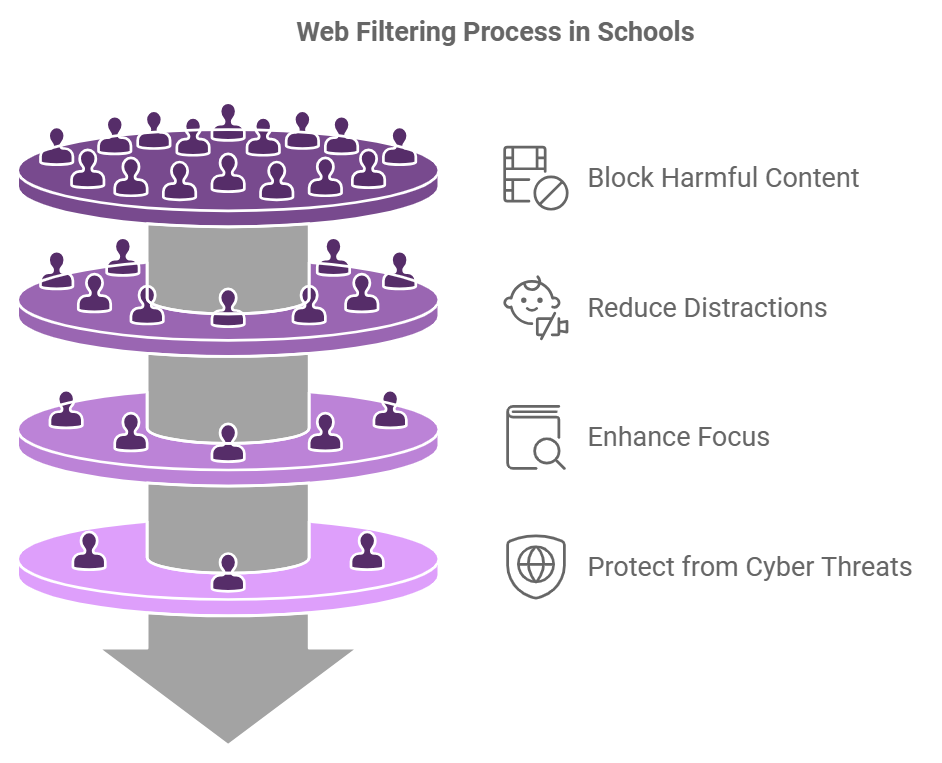
So, how do we stop these problems from derailing our kids’ education and safety? Solution: Web filtering software for schools. Here’s how it works:

Blocks harmful content

Web filters prevent access to inappropriate websites by scanning for specific keywords, categories, or URLs. Schools can customize these filters to block everything from explicit material to violent content, making sure students can’t stumble upon harmful websites.

Focuses students’ attention

With distractions like social media, games, and random videos out of the equation, web filtering helps students stay focused on the task at hand—learning. This is particularly important during school hours when students need to stay engaged in their lessons and educational resources.

Protects against cyber threats

A solid web filter does more than block inappropriate sites—it also protects students from cyber threats like phishing scams, malware, and identity theft. By stopping these dangerous sites before they can do harm, web filters keep students safe and secure while they navigate the web.

Protection for schools

One of the best parts of content filtering software for schools is that it can be tailored to meet specific needs. Filters can be set based on the grade level, the subject being studied, or even specific content areas that need to be restricted or encouraged.

Real-time monitoring and reporting

Most web filtering systems offer real-time monitoring and reports, which means educators and administrators can track what students are accessing online. This allows for quick action if anything inappropriate or dangerous is spotted, keeping everyone accountable.

A safer, smarter digital world for students with Veltar

At the end of the day, the internet is an incredible resource, but without the proper safeguards, it can also be a dangerous place. With the alarming statistics highlighting that approximately 338 million children have been exposed to harmful content online, it’s imperative for educational institutions to implement measures to protect their students. One effective solution is the deployment of web filtering software, such as Veltar. Veltar is a comprehensive endpoint security solution that helps protect data at rest and in motion. It offers features like web content filtering, VPN tunneling, I/O device access control, and application control, providing a unified approach to endpoint security. By integrating Veltar into school networks, administrators can prevent access to inappropriate websites by scanning for specific keywords, categories, or URLs. You can select categories of websites to block and enter specific domains to restrict. Keep students immersed in meaningful learning by cutting out distractions like social media and games.  

About Scalefusion
Scalefusion’s company DNA is built on the foundation of providing world-class customer service and making endpoint management simple and effortless for businesses globally. We prioritize the needs and feedback of our customers, making sure that they are at the forefront of all decision-making processes. We are dedicated to providing comprehensive customer support services, and place emphasis on customer-centric thinking throughout the organization.

About Version 2 Digital

Version 2 Digital is one of the most dynamic IT companies in Asia. The company distributes a wide range of IT products across various areas including cyber security, cloud, data protection, end points, infrastructures, system monitoring, storage, networking, business productivity and communication products.

Through an extensive network of channels, point of sales, resellers, and partnership companies, Version 2 offers quality products and services which are highly acclaimed in the market. Its customers cover a wide spectrum which include Global 1000 enterprises, regional listed companies, different vertical industries, public utilities, Government, a vast number of successful SMEs, and consumers in various Asian cities.

Dedicated Device Management: Everything You Need to Know

The use of mobile devices has increased dramatically in recent years and will continue to do so with the rapid growth of EMM (enterprise mobility management). Managing these devices is crucial to safeguarding data and the devices that handle critical business information and functions. UEM is the best solution for managing and securing dedicated devices.


What are Dedicated Devices?

Dedicated devices are company-owned devices that can be employee-facing or customer-facing. They include self-check-in systems, point-of-sale (POS) systems, digital signage, retail store billing, checkout systems, and airport ticket printing desks, to name a few. The devices fulfill a single-use case by running in kiosk mode which can be single-app or multi-app. Dedicated devices perform essential business functions and hence need to run without any interruptions.

Some common examples of customer-facing dedicated devices are ATMs for cash transactions, digital signage in hotels for advertisements, baggage check-in at airports, POS terminals, handheld devices used as barcode scanners as well as for navigation, and dedicated tablets used for educational purposes.

Some employee-facing dedicated devices are for inventory management in logistics, handheld devices used by healthcare professionals, and vehicle-mounted devices used by drivers in transportation.

However, these devices can’t run independently and are required to be managed remotely. Usually, the devices are unattended and run in dedicated kiosk mode. Communicating with these devices in the field and ensuring timely updates on these devices can be best done using a dedicated device management solution like a Unified Endpoint Management (UEM) solution.

Corporate-owned dedicated devices don’t store content and information, and it’s crucial to push updated content regularly to these devices as they perform mission-critical functions. UEM enables you to update, troubleshoot, interact, and pass commands to devices remotely. UEM also simplifies configuring devices and provisioning them, enforcing policies, and ensuring device and data security.

How Does Dedicated Device Management Work?

A dedicated computer or dedicated hardware is often locked to a single application or a set of applications to serve a specific purpose, ensuring efficiency and security. This is achieved using either single-app kiosk mode or multi-app kiosk mode, based on the use case:

  • Multi-app kiosk mode: When a device needs to run multiple applications, it operates in a multi-app kiosk mode. With the help of a kiosk launcher, admins can easily switch between apps and manage various functions. This approach is perfect for devices used in environments that demand versatility while still maintaining the dedicated purpose of the hardware.
  • Single-app kiosk mode: In this setup, the device is locked to a single application, providing IT admins extensive control over the device’s functionality. They can configure peripheral settings to ensure seamless operation. Once locked, the application launches automatically and remains on the screen, even after the device restarts or shuts down. This makes it ideal for scenarios requiring a focused, dedicated hardware solution.
Learn More: What is Kiosk Mode?
Free trial

Types of Dedicated Devices

When it comes to types of hardware devices, dedicated hardware plays a pivotal role in streamlining specific operations across various industries. These devices are categorized based on their purpose and functionality:

  1. Single-Use Hardware Devices
    These devices are designed to perform one specific task, often operating in single-app kiosk mode. Examples include:
    • Point-of-Sale (POS) Systems: Optimized for transaction processing.
    • Digital Signage Devices: Built to display content like advertisements or announcements.
    • Self-Service Kiosks: Used for ticketing, check-ins, or orders.
  2. Multi-Function Hardware Devices
    These devices run multiple applications while maintaining a dedicated purpose, utilizing multi-app kiosk mode for flexibility. Examples include:
    • Retail Tablets: Supporting inventory management, customer assistance, and payment apps.
    • Educational Tablets: Configured with a suite of learning applications for students.
    • Medical Devices: Designed for patient records, monitoring, and diagnostics.
  3. Industrial Hardware Devices
    Built for durability and reliability, these devices are essential in demanding environments, such as:
    • Barcode Scanners: Used for inventory tracking and warehouse management.
    • Fleet Management Devices: Installed in vehicles to monitor operations and logistics.
    • IoT Sensors: Designed for data collection and automation in industrial setups.

Benefits of Using Dedicated Devices

Using dedicated devices, particularly those managed with a UEM solution, brings numerous advantages for businesses.

Here are the key benefits:

Manage Content and Applications

The purpose of a dedicated device can evolve, requiring changes in the content or applications it runs. UEM software ensures smooth updates by allowing admins to silently install or uninstall apps without relying on end users. This reduces device downtime significantly. Through the UEM dashboard, admins can push apps from the Play Store or deploy enterprise apps directly from the Enterprise Store, making management efficient.

Ensure Endpoint Security

UEM solutions play a critical role in securing Android-dedicated devices and other platforms. They encrypt sensitive corporate data, preventing unauthorized access. With kiosk mode, admins gain full control over device settings, including peripherals, ensuring minimal end-user interference. Furthermore, network configurations such as Wi-Fi are managed to connect devices exclusively to corporate-approved networks. Automated OS updates ensure devices remain protected from malware and viruses.

Protect Lost or Stolen Devices

When devices are lost or stolen, UEM solutions provide critical security features like factory reset protection for Android devices. Admins can remotely lock the device, wipe sensitive data, and prevent misuse of corporate information. Location tracking and location history monitoring via the UEM dashboard ensure admins can quickly locate devices or enforce location-specific policies.

Remote Troubleshooting of Devices

Remote cast and control capabilities allow IT admins to address technical issues immediately. By casting the device screen to the UEM dashboard, admins can resolve glitches or sync files remotely, significantly reducing downtime. This feature is particularly valuable for dedicated devices operating in unattended locations, where physical access is challenging during disruptions.

G2 Review
G2 Review

Some Popular Examples of Dedicated Devices

Dedicated devices are designed to serve specific purposes, offering reliability and efficiency across various industries. Here are some dedicated devices examples that showcase their diverse applications:

  1. Point-of-Sale (POS) Terminals: Used in retail and hospitality, these devices handle transactions and ensure smooth customer checkouts.
  2. Digital Signage Systems: Display advertisements, announcements, or schedules in retail stores, airports, and public spaces.
  3. Self-Service Kiosks: Found in ticketing counters, restaurants, and banks, these kiosks simplify customer interactions and reduce wait times.
  4. Rugged Industrial Devices: Built for warehouse or field operations, these include barcode scanners and handheld terminals.
  5. Healthcare Monitoring Devices: Used in hospitals for patient monitoring, diagnosis, and medical record access.

Key Considerations When Choosing Dedicated Devices

Selecting the right dedicated device is essential for meeting business needs while ensuring reliability and security. Here are some key factors to consider:

  1. Purpose and Use Case: Clearly define the device’s role in your operations. Whether it’s for digital signage, POS, or rugged fieldwork, understanding the requirements will guide your choice.
  2. Durability and Environment Suitability: If the device will be used in challenging environments, like warehouses or outdoor locations, ensure it has a rugged design and supports extreme conditions.
  3. Management and Configuration Support: Choose devices that integrate seamlessly with a UEM solution to allow for remote management, app updates, and network configuration.
  4. Security Features: Devices must offer strong security measures, such as encryption, kiosk mode, and remote locking or wiping capabilities, especially for corporate data protection.
  5. Compatibility: Ensure the dedicated devices work with your existing software and infrastructure, including enterprise apps or specific operating systems like Android or iOS.

Pick Your UEM Alongside Your Dedicated Hardware

When investing in dedicated hardware, it’s crucial to pair it with a robust Unified Endpoint Management (UEM) solution. Here’s why this combination matters:

  1. Streamlined Device Management
    A UEM solution allows IT admins to manage, monitor, and secure devices remotely. It ensures that the dedicated hardware always functions optimally by pushing updates, configuring settings, and deploying apps.
  2. Enhanced Security
    Protect sensitive corporate data on your dedicated hardware through features like encryption, kiosk mode, and remote locking or wiping in case of theft or loss.
  3. Flexible Adaptation to Business Needs
    UEM lets you reconfigure devices for new tasks or applications without replacing the hardware, extending its lifespan and value.
  4. Minimized Downtime
    With remote troubleshooting and monitoring capabilities, admins can address technical issues immediately, ensuring uninterrupted device performance.

By choosing the right UEM solution alongside your dedicated hardware, you can maximize the functionality, security, and reliability of your devices, empowering your business operations.

The Final Words

Though dedicated devices help in executing different strategies for various businesses, the security of these devices is extremely important. Scalefusion UEM stands out as a versatile solution to efficiently manage a fleet of dedicated devices from a single console, offering robust data security and seamless management capabilities.

About Scalefusion
Scalefusion’s company DNA is built on the foundation of providing world-class customer service and making endpoint management simple and effortless for businesses globally. We prioritize the needs and feedback of our customers, making sure that they are at the forefront of all decision-making processes. We are dedicated to providing comprehensive customer support services, and place emphasis on customer-centric thinking throughout the organization.

About Version 2 Digital

Version 2 Digital is one of the most dynamic IT companies in Asia. The company distributes a wide range of IT products across various areas including cyber security, cloud, data protection, end points, infrastructures, system monitoring, storage, networking, business productivity and communication products.

Through an extensive network of channels, point of sales, resellers, and partnership companies, Version 2 offers quality products and services which are highly acclaimed in the market. Its customers cover a wide spectrum which include Global 1000 enterprises, regional listed companies, different vertical industries, public utilities, Government, a vast number of successful SMEs, and consumers in various Asian cities.

5 Best Windows MDM Solutions in 2025

The current global tech space, irrespective of the industry, has been fast and disruptive. In 2024, global technology spending is projected to grow by 5.3%, reaching $4.7 trillion. This growth is driven by robust investments, particularly a 5.4% increase in North America and 5.1% in Europe 5.7% in the Asia Pacific region[1]

As businesses increasingly rely on technology, managing and securing Windows devices has become more critical than ever. Mobile Device Management (MDM) solutions offer a way to manage and secure these devices while providing a seamless user experience.

best mdm for windows

Windows MDM solutions simplify this process by providing centralized tools for managing endpoints, deploying policies, and ensuring seamless device operations. Here’s a deep dive into some of the best Windows MDM solutions to consider.

This blog has a curated list of the five best Windows device management solutions you must consider in 2025. 

Best Windows Mobile Device Management Software

1. Scalefusion MDM

best mdm for windows 10

Scalefusion is an intuitive and powerful MDM solution that offers device management for Windows 10 & 11 desktops and laptops across all available operating system versions. The Scalefusion Windows MDM platform provides complete management and control over corporate-owned, employee-owned, and shared Windows devices. Scalefusion is known for its all-encompassing suite of Windows 10 & 11 device management features that simplify and automate the everyday complex and mundane tasks of IT teams.

Why Scalefusion?

Scalefusion MDM offers modern device management Windows devices. The platform provides a user-friendly interface through a logically organized dashboard. This makes it easy for IT admins to remotely manage and secure Windows devices. Scalefusion offers some of the advanced features such as software metering to track and analyze the usage of software applications, location tracking and geofencing for location-based Windows device security.  

Who It’s For?

Scalefusion MDM is suitable for businesses of all sizes looking to manage their Windows devices from a single platform. From enterprise IT teams to IT admins of educational institutes and NGOs, Scalefusion has the right set of offerings across industries.

Key Features

  • App management and deployment
  • OS and patch management 
  • Single and multi-app kiosk mode 
  • Device encryption and compliance management
  • Remote Command for Windows
  • Integration with other enterprise software (like ITSM, CRM, etc.)
  • Remote cast & control with VoIP
  • PowerShell scripts
  • Single- and multi-app kiosk mode for Windows (POS/mPOS management)

Unique Feature

One unique feature of Scalefusion Windows device management is its remote cast & control (with session recording and file transfer) feature that allows IT admins to remotely access Windows devices to troubleshoot any issue. This saves time and increases productivity for both IT teams and end users. 

Pros

  • Easy and swift enrollment to ensure business ready devices
  • Conditional exchange settings for Windows (Office 365) device access
  • Secure user access to corporate devices with Conditional Email Access 
  • Azure Active Directory (AD) integration
  • Best-in-class support and training with the fastest average response time

Cons

  • No self-service features

Reasons to Buy

  • OS and third-party app patch management
  • Windows BitLocker encryption management for additional device and data security
  • Browser configuration for Microsoft Edge and Chrome on Windows devices
  • Extensive analytics and reporting
  • On-premise and VPC deployment

Pricing

2. Microsoft Intune

windows mdm solutions

Microsoft Intune is a cloud-based mobile device management platform designed to help businesses manage mobile endpoints remotely. The platform provides comprehensive security features to protect devices and data, including conditional access policies, app protection, and device encryption.

Why Intune?

Microsoft Intune offers integration with other Microsoft products, making it an ideal choice for businesses that use Microsoft software. The platform offers comprehensive device management and security features and is suitable for businesses of all sizes.

Who It’s For?

Microsoft Intune is suitable for businesses of all sizes that want to manage devices remotely. The platform is especially useful for businesses that use other Microsoft products.

Key Features

Unique Feature

One unique feature of Microsoft Intune is its conditional access policies that allow businesses to set up security policies based on the user’s identity, device, and location. This ensures that only authorized users can access company data and enterprise apps.

Pros

  • Suitable for businesses of all sizes
  • Self-service features

Cons

  • The platform can be complex to set up and manage for non-technical users
  • Lot of add-on features with additional costs not suitable for SMBs
  • Incomplete App installations and updates
  • Complicated UI

Reasons to Buy

  • Technical expertise of support team
  • Data protection for un-enrolled devices as well

Pricing

  • Starts at $4 per user
  • Free trial available for 30 days

3. VMware Workspace ONE

windows device management software

VMware Workspace ONE is an MDM solution that provides a unified endpoint management platform for Windows devices. The platform offers a range of features for device management, security, and mobile application management.

Why Workspace ONE?

VMware Workspace ONE offers comprehensive device management and security features. The platform provides a range of tools for managing multiple devices, including remote management, app management, and security policies.

Who It’s For?

VMware Workspace ONE is suitable for large, globally distributed enterprises that want to manage their Windows devices remotely. The platform is especially useful for businesses that use other VMware products.

Key Features

  • AI and ML-powered IT automation
  • Unified security across device fleet
  • Integration with other VMware products
  • Multi-factor authentication (MFA) for secure access control

Unique Feature

One unique feature of VMware Workspace ONE is its multi-factor authentication, which provides an extra layer of security to protect devices and data. This ensures that only authorized users can access company data and applications.

Pros

  • Comprehensive device management and security features
  • Intelligent insights and analytics

Cons

  • Steep product learning curve
  • Requires frequent maintenance
  •  Prohibitive for smaller businesses or organizations

Reasons to Buy

  • Good option for frontline workers
  • Simplified access management

Pricing

  • Essential plans start at $3 per user
  • 30-day free trial

4. Cisco Meraki Systems Manager

best windows mdm

Cisco Meraki Systems Manager is a cloud-based mobile device management platform that provides comprehensive management and security features for Windows devices. The platform offers a range of features for device management, security, and application management.

Why Meraki?

Cisco Meraki Systems Manager has security features for comprehensive device management capabilities. The platform offers a range of tools for securing and managing mobile devices, including remote management, app management, and security policies.

Who It’s For?

Cisco Meraki Systems Manager suits enterprises that want to manage their Windows devices remotely. The platform is especially useful for businesses that use other Cisco products.

Key Features

  • App access with remote control capabilities
  • Integration with other Cisco products
  • Network visibility and control

Unique Feature

One unique feature of Cisco Meraki Systems Manager is its network visibility and control, which allows IT admins to monitor network activity and block suspicious traffic. This prevents data breaches and ensures compliance with industry regulations.

Pros

  • Zero-trust network support
  • Automated network security

Cons

  • Location tracking can be inconsistent
  • Limited support for advanced networking features.
  • Pushing device configuration can be time-consuming

Reasons to Buy

  • Scalability
  • Prompt customer support 

Pricing

  • Available on request
  • Free trial available

5. IBM MaaS360

windows device management software

IBM MaaS360 is a cloud-based mobile device management platform that provides comprehensive management and security features for Windows devices. The platform offers a range of features for device management, security management, and application management.

Why MaaS360?

IBM MaaS360 offers a range of tools for managing and securing Windows devices, including remote management, app management, and security policies.

Who It’s For?

IBM MaaS360 is suitable for enterprises of all sizes that want to manage their Windows devices remotely. The platform is especially useful for businesses that use other IBM products.

Key Features

  • AI-driven UEM
  • Integration with other IBM products
  • Containerization for secure access to corporate data

Unique Feature

One unique feature of IBM MaaS360 is its containerization feature, which allows IT administrators to create secure containers on Windows devices that provide access to corporate data without compromising device security. 

Pros

  • Watson integration
  • Native security features

Cons

  • The platform can be complex to set up and manage for non-technical users
  • Some features require additional licensing fees
  • Poor user access management capabilities 

Reasons to Buy

  • Granular patch management
  • AI-based policy recommendations

Pricing

  • Starts at $4 per device/month
  • 30-day free trial

Key Takeaways

Here’s a concise overview of the key features and strengths of leading MDM solutions—Scalefusion, Microsoft Intune, VMware Workspace ONE, Cisco Meraki Systems Manager, and IBM MaaS360—designed to help you make an informed choice for your organization.

  1. Scalefusion MDM

A unified Windows management platform for managing legacy and modern devices laptops, desktops, tablets, POS terminals, and digital signage displays. Experience modern management features for advanced management of Windows-based devices and servers. 

  1. Microsoft Intune

Enterprise-level MDM solution with integration across the Microsoft product suite. Offers mobile devices and app management, conditional access, and endpoint protection.

  1. VMware Workspace ONE

MDM solution for enterprises with a large number of devices. Offers device enrollment, app management, and security features.

  1. Cisco Meraki Systems Manager

Cloud-based MDM solution with network security and endpoint management features. Offers remote access feature for device control and monitoring.

  1. IBM MaaS360

Comprehensive MDM solution with app management, security policies, and containerization for secure access to corporate data. Offers integration with other IBM products.

Choosing the Right Windows MDM Solution for Your Business in 2025

Managing Windows devices effectively requires robust MDM solutions that balance security and ease of use. The five MDM solutions outlined—Scalefusion MDM, Microsoft Intune, VMware Workspace ONE, Cisco Meraki Systems Manager, and IBM MaaS360—are among the top choices for Windows device management in 2025.

These solutions provide comprehensive device management and security features tailored for Windows 10 and 11, making them suitable for businesses of all sizes. Each platform offers distinct features that set it apart from competitors. By evaluating the pros and cons of each, you can determine which Windows MDM solution best aligns with your business needs.

References 

1. Forrester 

About Scalefusion
Scalefusion’s company DNA is built on the foundation of providing world-class customer service and making endpoint management simple and effortless for businesses globally. We prioritize the needs and feedback of our customers, making sure that they are at the forefront of all decision-making processes. We are dedicated to providing comprehensive customer support services, and place emphasis on customer-centric thinking throughout the organization.

About Version 2 Digital

Version 2 Digital is one of the most dynamic IT companies in Asia. The company distributes a wide range of IT products across various areas including cyber security, cloud, data protection, end points, infrastructures, system monitoring, storage, networking, business productivity and communication products.

Through an extensive network of channels, point of sales, resellers, and partnership companies, Version 2 offers quality products and services which are highly acclaimed in the market. Its customers cover a wide spectrum which include Global 1000 enterprises, regional listed companies, different vertical industries, public utilities, Government, a vast number of successful SMEs, and consumers in various Asian cities.