Skip to content

Building a winning enterprise cloud strategy: a comprehensive guide

Summary: Cloud computing delivers huge benefits for modern organizations. However, companies need to think strategically to realize the key benefits of the cloud. An effective enterprise cloud strategy provides a route from planning to deployment. With a strategy in place, companies can move assets and applications smoothly. And they can secure data in the cloud without leaving security gaps. In this article, you will find all the essential information required for crafting a successful plan to embrace cloud technology.

Key takeaways

  • Cloud services can be categorized into three types: IaaS, PaaS, and SaaS, each catering to different user needs and skill requirements

  • Cloud adoption should align with core business needs, considering factors such as workload suitability, team readiness, and the need for customization

  • Compliance with regulations like PCI-DSS or HIPAA is crucial when planning a cloud strategy to avoid potential violations

  • A well-designed enterprise cloud strategy ensures functional and secure cloud deployment.

  • Careful planning and monitoring are essential to counter risks and prevent critical problems during cloud migration.

This article will provide everything you need to know to create an effective cloud adoption plan. Let’s start at the beginning with a definition of what we mean by “enterprise cloud strategy” and why strategic thinking is so important.

Core concepts of enterprise cloud strategy

Definition of enterprise cloud

An enterprise cloud is a virtualized environment that contains flexible and scalable computing infrastructure. Cloud infrastructure provides on-demand access to shared resources. This includes the servers, apps, and data required to host workloads and virtualize key enterprise operations.

A well-designed enterprise cloud has many benefits.

  • Virtualized infrastructure reduces the need for on-premises network infrastructure. This reduces the burden on IT teams to maintain physical hardware and lowers overall operating costs.

  • Enterprise clouds are easy to customize and reshape. As businesses change, their cloud environment can follow.

Enterprise cloud architecture also has cybersecurity benefits.

  • Companies can protect sensitive data with robust security measures located inside the cloud. Organizations can encrypt data, apply access controls, and leverage cloud-native threat detection tools.

  • Centralized administrative tools provide full visibility of user activity and data integrity. And cloud-based logging systems assist with both auditing and incident responses.

Different types of cloud services

The nature of your enterprise cloud strategy depends on the type of cloud services you use. Cloud technologies can be divided into three overall categories:

IaaS

Infrastructure-as-a-Service provides access to cloud infrastructure. This is usually provisioned on a pay-as-you-go model. IaaS users purchase access to servers, storage containers, and cloud networking capacity. They can use this infrastructure to create custom-built cloud solutions. IT teams can retain control over every aspect of their cloud deployment. IaaS is flexible, but users will need cloud architect skills. Additional training may be needed to realize the benefits of this cloud solution.

PaaS

Platform-as-a-Service provides access to off-the-shelf cloud development platforms. Development platforms include basic cloud infrastructure and the tools needed to build cloud apps. This reduces the time required to launch new cloud services. Cloud tenants can focus on building streamlined solutions. They do not need to manage the underlying infrastructure. Microsoft Azure and Google Cloud are examples of this kind of cloud product.

SaaS

Software-as-a-Service provides access to individual cloud apps or services. Apps are provided in ready-to-use format and are generally accessible via web browsers. SaaS tools include eCommerce platforms, collaboration apps, and CRM systems. These services require no on-site installation. And they scale automatically as businesses grow.

Understanding cloud strategy in an enterprise context

The adoption of cloud services should align with core business needs.

Companies must assess workloads and decide which cloud system suits their operations. They must ask whether teams can operate in the cloud and whether existing SaaS solutions suit their needs. If not, custom PaaS solutions may be necessary.

Capacity also influences cloud strategy. Businesses should only commission cloud services that they can afford to build, maintain, and secure. Securing IaaS and PaaS environments is complex and resource-intensive. Some enterprises may find that lightweight SaaS alternatives are preferable.

Compliance is another critical consideration. A successful cloud migration delivers efficiency gains and enhances flexibility. But cloud adoption can lead to violations of regulations such as PCI-DSS or HIPAA. Organizations must plan their strategy with compliance goals in mind.

Why do you need a cloud strategy?

The importance of an enterprise cloud strategy

An enterprise cloud strategy maps a clear route to a functional and secure cloud deployment. And a well-designed strategy offers many benefits.

  • The strategy assesses existing systems, understanding what to retain and what to discard.

  • Planners determine what applications and data will migrate to the cloud.

  • They decide which cloud technologies to use, and include any necessary security measures.

  • Planning teams set timescales for the cloud strategy. This avoids delays and ensures that deployments are not rushed.

Enterprise cloud strategies deliver the benefits of cloud computing while avoiding problems associated with chaotic deployments.

Around 90% of companies use multi-cloud solutions that divide data and apps between various hosting providers. About a third of companies using the cloud do not encrypt their data. And figures from 2022 show that 27% of cloud-using enterprises experienced a data breach on the public cloud.

Chaotically organized cloud deployments compromise security. They make it harder to locate and protect sensitive data. And they reduce efficiency. Silos can limit the flow of information. App configurations may vary across the cloud environment. But an enterprise cloud strategy solves these problems.

Benefits of cloud adoption for businesses

The cloud has revolutionized digital business. Every month, companies gain a competitive advantage by migrating functions to the cloud. Cloud storage providers offer cheaper, faster, and more secure solutions. And development tools make it easier to build customized cloud environments.

Despite these benefits, many companies have not yet embraced the cloud or have staged partial migrations. Benefits of full cloud adoption for businesses include:

Operational efficiency

A cloud-first strategy eliminates the need to maintain extensive hardware infrastructure. Cloud deployments scale rapidly and easily. Companies can automate resource provisioning and deliver workloads wherever they are needed. Administrators can also manage network assets centrally. The result is streamlined operations and greater productivity.

Enhanced security

The cloud benefits cybersecurity in many ways. Enterprises can encrypt data hosted on cloud assets. They can implement granular access controls and regulate access according to job roles. Cloud platforms enable real-time activity monitoring and alerts, resulting in rapid incident responses. Moreover, trusted cloud providers focus on securing their products against malware and exploits. Not all enterprises have the capacity to do so.

Cost-effectiveness

Cloud adoption allows cost optimization by shifting computing into a virtualized environment. Enterprises do not need to make large up-front infrastructure investments. There is less need for on-site servers or routers. Scalable systems optimize resource use and allow companies to expand smoothly. And the payment models of PaaS or IaaS providers cater to different enterprise needs.

Exploring cloud strategy options: finding the perfect fit

Single public cloud strategy: unlocking provider offerings

A single public cloud strategy uses a single public cloud provider to host assets in the public cloud. This strategy has numerous benefits. Single public cloud systems are simpler than multi-cloud alternatives. This enables companies to focus on their core competencies.

Administrators can easily integrate application communities and standardize operations in the cloud. A single cloud is easy to monitor and secure and will carry a much lower compliance burden. Pay-as-you-go models also make single public cloud deployments the most cost-effective cloud solutions.

The single public cloud strategy suffers from loss of control and potential insecurity. Users must apply tight access controls to guard the network edge. They also have little control over the infrastructure that supports cloud assets.

Single private cloud strategy: balancing control and security

A single private cloud strategy involves the creation of a dedicated cloud environment to host corporate assets. The private cloud is separate from the public internet. Users can customize security controls and network protocols. This allows companies to prioritize data security and minimize the risk of external attacks.

Companies using a single private cloud strategy have complete ownership of their deployment. Consistent ownership can deliver performance improvements. And users can tailor their cloud environment to enable flexible scaling.

The downside of this strategy is complexity. Organizations must dedicate resources to create and maintain cloud environments. They also have complete responsibility for security and must rely on internal expertise.

Hybrid cloud strategy: integrating the best of both worlds

Hybrid cloud strategies feature a combination of public and private cloud infrastructure. When designed correctly, a hybrid cloud environment delivers the benefits of both strategies.

Hybrid deployments can leverage the flexibility and scalability of public clouds. Organizations can experiment with different cloud components and allocate resources to workloads as required. They can mobilize AI tools to analyze large data sets. And they can create failover systems in the public cloud. This supports incident response strategies.

At the same time, security teams can use private cloud environments to protect critical data. Administrators can create strict access controls for secure private clouds. These controls grant access based on employee roles. They can also combine with multi-factor authentication for added security.

Multiple-public cloud strategy: orchestrating a dynamic cloud ecosystem

Multi-cloud strategies involve the use of multiple public cloud providers. For instance, companies may use Google Cloud Platform for collaboration and AWS for cloud storage. This model has various potential benefits.

Multiple cloud service models balance agility and cost. Companies can use leading cloud providers for specialist tasks. They can also compare different providers to find the most cost-effective solution.

Multi-cloud solutions suit globally-distributed workforces. Companies can locate cloud resources close to users by leveraging cloud computing services around the world. They also make cloud deployments more resilient. Multiple clouds avoid single points of failure. Organizations can shift workloads between CSPs when outages occur.

Building an effective enterprise cloud strategy

1. Create a cloud strategy team

Your cloud strategy team will see the project through to completion and must include input from outside the IT department. Bring in key stakeholders from finance, operations, HR, marketing, and security. Every department will use the cloud environment. Buy-in from managers is essential when changing IT infrastructure.

Establish communication channels and collaboration tools. And set out a timescale to meet project goals. Every team member should have clear responsibilities and know exactly what role they will play as cloud adoption takes place.

  • Form a cloud strategy team with representatives from various departments

  • Establish effective communication channels and collaboration tools to facilitate coordination

  • Define specific milestones to track progress and meet project goals

  • Assign clear responsibilities to each team member

  • Provide necessary training and support to team members

2. Carry out application analysis

Application analysis assesses the apps that employees currently use to carry out core workloads. Assess whether applications are compatible with cloud platforms, and any dependencies they have. Some apps may be suitable for cloud migration. Others may require complete replacement. Identify necessary actions and add them to the cloud strategy document.

Security is a key concern here. If apps handle sensitive data, assess whether this data will be adequately secured in the cloud. If not, define additional security controls to ensure data security after cloud adoption.

  • Determine compatibility of applications with cloud platforms and identify any dependencies

  • Classify apps as suitable for cloud migration or requiring complete replacement

  • Document necessary actions in the cloud strategy document based on the analysis

  • Assess if sensitive data handled by the apps will be securely stored in the cloud

  • Define additional security controls if needed to ensure data security post-cloud adoption

3. Build a hybrid cloud strategy roadmap

Use the results of application analysis to create a cloud adoption roadmap. Describe how every workload will be moved to the cloud. Include a clear explanation of how access controls will apply and any other security controls linked to the workload.

At the cloud migration planning stage, decide which assets will remain in the public cloud, and which assets to store in private cloud environments. Categorize assets according to data sensitivity and risk. High-risk, high-value data should always be stored in the private cloud.

The cloud roadmap should explain how to migrate data and apps to the cloud. This may include information about data integration and transfer methods. For instance, data may require encryption during the transfer process.

  • Develop a detailed plan for migrating every workload to the cloud

  • Clearly define access controls and security measures associated with each workload

  • Evaluate assets and categorize them based on data sensitivity and risk levels

  • Determine which assets will be kept in the public cloud and which ones will be stored in private cloud

  • Document information on data integration and transfer methods

4. Upskill your workforce for cloud computing

Comprehensive staff training should be a key part of cloud adoption strategies. This should include basic security training. Introduce and explain cloud security policies. Ensure workers know how to access cloud assets securely and reinforce the penalties for policy breaches.

Training goes beyond security. Enterprises should upskill their workforce to capitalize on cloud technology. Invest in specialized courses in cloud architect skills. This could include DevOps courses or training related to specific cloud platforms. For example, it may be advisable to invest in AWS certification courses.

  • Prioritize basic security training for all employees involved in cloud operations

  • Introduce and explain cloud security policies clearly to the workforce

  • Reinforce the consequences and penalties associated with policy breaches

  • Invest in specialized courses for cloud architect skills to enhance proficiency

  • Consider offering DevOps courses or training specific to the chosen cloud platforms

5. Implement the enterprise cloud strategy

Strategies are useless if they are only paper exercises. Implementation is all-important. Assign a skilled employee to implement the organizational cloud strategy. This officer should be responsible for meeting project milestones. They should also manage communication with relevant stakeholders.

During implementation, enterprises should make their cloud deployment secure and resilient. Put in place monitoring technology to track user activity. Make sure auditing and scanning policies meet regulatory guidelines. And constantly test cloud assets to protect data against external intrusion.

  • Assign a skilled employee as the officer responsible for implementing the organizational cloud strategy

  • Oversee that cloud deployment is secure and resilient

  • Implement monitoring technology to track user activity

  • Regularly audit and scan cloud assets to ensure compliance with regulatory guidelines

  • Continuously test cloud assets to protect data against external intrusion

Overcoming challenges in enterprise cloud strategy

Tackling cloud migration challenges

Cloud migrations can encounter many obstacles. For instance:

  • Companies may lack the bandwidth to transfer files.

  • Applications may be incompatible with cloud platforms.

  • Dependency mapping can fail, compromising operational efficiency.

  • Risk management issues can arise, putting data at risk.

  • Cloud migration requires a deep understanding of cloud technologies, architecture, and best practices, so a shortage of specialists can be considered a challenge.

Carefully plan a strategy that counters these risks. Monitor the process to detect problems before they become critical.

Managing cloud security risks

Securing data in the cloud is a critical challenge. Organizations must:

  • Guard systems against unauthorized access

  • Encrypt sensitive data without compromising availability

  • Maintain visibility of user activity

  • Managing hybrid private and public clouds

  • Manage app profiles and prevent unauthorized app installations

Security planning ensures that organizations put in place effective controls. Ongoing monitoring and regular security audits will detect threats. Security teams will be well-placed to make necessary changes.

Addressing compliance and legal issues

Cloud investments must comply with data security regulations. Enterprise architects must research the regulatory landscape and understand their obligations. Compliance should feed into the cloud strategy at all times. For instance, security controls should be tailored to fit PCI-DSS rules.

Companies also need to understand the shared responsibility model. Your IT department should assess each service provider. Create clear policies for mission-critical applications that define how to use them securely. And seek external help if you require extra assurance.

How can NordLayer help?

Security is one of the key elements of any digital transformation. And it is particularly important when adopting cloud technology. Cloud strategies must include access controls, encryption, firewall systems, and security auditing. But building cloud security systems is not always easy.

NordLayer can help you secure your cloud deployment strategy. Our Virtual Private Gateways enable secure access to cloud apps. IP allowlisting and Site-to-Site tunnels ensure that only authorized personnel can access your cloud environments  and police the network edge. Users can also mobilize 2FA and SSO to ensure secure authentication. Combining our solutions makes movement to the cloud safer and easier to manage.

Robust cloud security lets you meet your business goals. Contact the NordLayer team to learn more.

About Version 2 Digital

Version 2 Digital is one of the most dynamic IT companies in Asia. The company distributes a wide range of IT products across various areas including cyber security, cloud, data protection, end points, infrastructures, system monitoring, storage, networking, business productivity and communication products.

Through an extensive network of channels, point of sales, resellers, and partnership companies, Version 2 offers quality products and services which are highly acclaimed in the market. Its customers cover a wide spectrum which include Global 1000 enterprises, regional listed companies, different vertical industries, public utilities, Government, a vast number of successful SMEs, and consumers in various Asian cities.

About NordLayer
NordLayer is an adaptive network access security solution for modern businesses – from the world’s most trusted cybersecurity brand, Nord Security.

The web has become a chaotic space where safety and trust have been compromised by cybercrime and data protection issues. Therefore, our team has a global mission to shape a more trusted and peaceful online future for people everywhere.

Rendering Storyblok Rich Text in Astro

Rendering Rich Text elements in headless content management systems (CMS) like Storyblok can be challenging. We decided to carry out this process with Astro. Here is what we learned in the process.


Using an official integration

The Storyblok CMS has many integrations for various frontend frameworks, including React, Vue, and Svelte. Luckily for us, they also integrated it for Astro. Astro is the new kid on the block, with a vibrant and active community and a responsive developer team. These are just a few of the reasons that we chose Astro for website development.

Headless CMS platforms are designed to provide content through APIs, allowing developers to use that content in various applications and front-end frameworks. The most straightforward way of using Storyblok in the Astro framework is through its official storyblok-astro integration.

Rich Text elements often contain HTML tags, inline styles, and other formatting options that need to be properly rendered on the front end. Besides common WYSIWYG (“what you see is what you get”) editor capabilities, Storyblok is capable of allowing content editors to embed such elements as inline blocks (components), custom styling, emojis, quotes, and code snippets.

The official integration provides an easy way to render Rich Text by using the renderRichText function that comes with @storyblok/astro:

import { RichTextSchema, renderRichText } from “@storyblok/astro”;
import cloneDeep from “clone-deep”;
const mySchema = cloneDeep(RichTextSchema);
const { blok } = Astro.props;
const renderedRichText = renderRichText(blok.text, {
schema: mySchema,
resolver: (component, blok) => {
switch (component) {
case “my-custom-component”:
return `<div class="”my-component-class”">${blok.text}</div>`;
break;
default:
return `Component ${component} not found`;
}
},
});
 

A challenge

Although the renderRichText from @storyblok/astro works fine and covered our most basic needs, it quickly turned out to be limiting and problematic for the following reasons:

  1. The renderRichText utility cannot map Rich Text elements to actual Astro components and so cannot render embedded Storyblok components inside the Rich Text field in CMS.

  2. Links that you might want to pass through your app’s router cannot be reused because they require the actual function to be mapped with data.

    It is hard to maintain the string values, especially when complex needs arise — for example, when setting classes and other HTML properties dynamically. It may be possible to minimize the complexity by using some HTML parsers like ultrahtml, but that does not eliminate the problem entirely.

The solution

Instead of dealing with HTML markup, storyblok-rich-text-astro-renderer provides a capability to convert any Storyblok CMS Rich Text data structure into the nested component nodes structure — { component, props, content } — and render it with Astro. The configuration is easily extended to meet all project needs.

The package delivers:

  • The RichTextRenderer.astro helper component, which provides options to map any Storyblok Rich Text element to any custom component (for example, Astro, SolidJS, Svelte, or Vue).

  • The resolveRichTextToNodes resolver utility can potentially reuse the transform utility before rendering the structure manually.

Using the package

The usage of storyblok-rich-text-astro-renderer is simple, yet flexible:

—–
import RichTextRenderer, { type RichTextType } from “storyblok-rich-text-astro-renderer/RichTextRenderer.astro”;
import { storyblokEditable } from “@storyblok/astro”;
export interface Props {
blok: {
text: RichTextType;
};
}
const { blok } = Astro.props;
const { text } = blok;
—–
 
<RichTextRenderer content={text} {…storyblokEditable(blok)} />
 

Sensible default resolvers for marks and nodes are provided out of the box. You only have to provide resolvers if you want to override the default behavior.

Use resolver to enable and control the rendering of embedded components, and schema to control how you want the nodes and marks to be rendered:

<RichTextRenderer
content={text}
schema={{
nodes: {
heading: ({ attrs: { level } }) => ({
component: Text,
props: { variant: `h${level}` },
}),
paragraph: () => ({
component: Text,
props: {
class: “this-is-paragraph”,
},
}),
},
marks: {
link: ({ attrs }) => {
const { custom, …restAttrs } = attrs;
return {
component: Link,
props: {
link: { …custom, …restAttrs },
class: “i-am-link”,
},
};
},
}
}}
resolver={(blok) => {
return {
component: StoryblokComponent,
props: { blok },
};
}}
{…storyblokEditable(blok)}
/>

Conclusion

That’s all there is to it! We just made rendering Storyblok Rich Text in Astro much easier.

The storyblok-rich-text-astro-renderer package offers customization options and improves frontend development workflow, enabling you to tailor the rendering behavior to your project’s specific requirements.

Even though Astro supports numerous integrations of React, Svelte, and Vue, when you want to go with bare Astro, the storyblok-rich-text-astro-renderer package is the right choice.

About Version 2 Digital

Version 2 Digital is one of the most dynamic IT companies in Asia. The company distributes a wide range of IT products across various areas including cyber security, cloud, data protection, end points, infrastructures, system monitoring, storage, networking, business productivity and communication products.

Through an extensive network of channels, point of sales, resellers, and partnership companies, Version 2 offers quality products and services which are highly acclaimed in the market. Its customers cover a wide spectrum which include Global 1000 enterprises, regional listed companies, different vertical industries, public utilities, Government, a vast number of successful SMEs, and consumers in various Asian cities.

About NordLayer
NordLayer is an adaptive network access security solution for modern businesses – from the world’s most trusted cybersecurity brand, Nord Security.

The web has become a chaotic space where safety and trust have been compromised by cybercrime and data protection issues. Therefore, our team has a global mission to shape a more trusted and peaceful online future for people everywhere.

Jira security best practices: keeping your data safe

Jira’s cloud-hosting solutions serve major corporate giants like the Coca-Cola Company, Delta Airlines, and CostCo. Every day, millions of people rely on Jira to access development apps and collaborate with colleagues. But Jira deployments require watertight security. Companies can easily fall victim to cloud data theft. This can inflict reputational damage or – in worst-case scenarios – lead to bankruptcy.

This article will explore how to secure your Jira assets. We will look at best practices for Jira security and learn how shared responsibility works. We will also explain some of the most urgent cloud security threats. The result will be a solid foundation in Jira cloud security.

Understanding the significance of Jira security

Cloud platforms are critical to the modern economy. The cloud hosts websites, customer databases, development environments, and collaboration tools. Lightweight cloud tools also dramatically lower networking costs. This makes it easier to create customized business architecture.

Operated by Atlassian, Jira is a cloud-hosting service known for supporting agile network deployments. Its development tools suit rapidly changing companies and scale smoothly. But as with all major cloud platforms, Jira is a tempting target for cyber attackers.

Jira security is shared between the cloud provider and customers. As we will see, Jira has many native security features that guard customer data. But customers retain responsibility for:

  • Access management

  • Endpoint security

  • Application installation and management

  • Protecting customer data

Jira security best practices

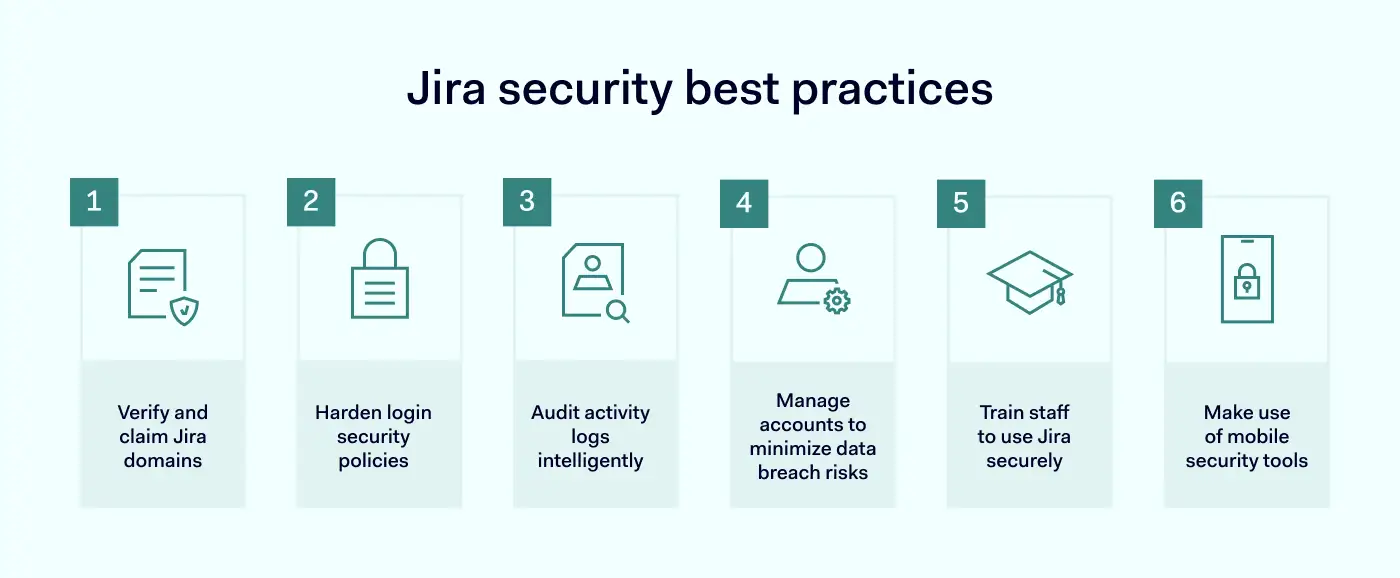
Jira security aims to protect sensitive data stored on the cloud platform. Users (or “tenants”) must minimize data breach risks while understanding security areas covered by Jira’s systems. This checklist covers actions required to secure Jira environments.

jira security best practices listSecurity best practices include:

  • Verifying your domains

  • Hardening your login security policies

  • Auditing activity logs intelligently

  • Managing accounts to minimize data breach risks

  • Training staff to use Jira securely

  • Making use of mobile security tools

1. Verify and claim Jira domains

The first step in improving your security setup is verifying the Jira domains you own. Domain verification allows administrators to take control of access management policies for Jira assets. Admins can claim domains via the Atlassian admin panel.

Domain verification also enables admins to use Atlassian Access. After verifying their domains, admins need to subscribe to Access. When that’s done, you can start applying security controls across your Jira-hosted assets.

2. Harden login security policies

Login portals are a critical security vulnerability. Jira tenants must exclude malicious actors while allowing legitimate requests. This is not always an easy balance to strike. Users should:

  • Implement two-factor authentication

2FA requires more than one authentication factor when logging on. Atlassian supports popular authentication providers like Google Authenticator and Authy. These tools integrate with Jira and deliver secure passcodes to smartphones. SMS verification is also possible, although it’s seen as a less secure option.

  • Enforce two-step verification

This tool supplements 2FA for Jira. Enforced verification makes it impossible to access Jira assets without supplying two authentication factors. Admins configure enforced verification via the centralized access management panel.

  • Create SSO portals 

Single Sign On combines all Jira cloud assets via a single set of credentials. SSO integrates smoothly with identity providers. You can transfer existing directories and groups to Jira while adding authentication tools.

  • Prevent third-party access

Access requests from third-party cloud platforms presents a security risk. Restricting access requests from Slack, Google Cloud, or Apple platforms is a good idea. Enforce additional authentication procedures to prove user identities before granting access.

  • Use strong passwords

Admins must require solid passwords for all accounts. Strong passwords feature a mix of characters and numbers and are usually between 12 and 15 characters long. This makes them very difficult to guess or brute force. Admins should also set password expiry deadlines that force users to change passwords regularly.

  • Exclude non-human users from authentication policies

Bots and API service accounts may require access to Jira assets. But they do not require the same authentication processes. Admins should configure these users to remove SSO and two-step verification tools.

3. Audit activity logs intelligently

Product audit logs record activity across the Jira environment. This makes it possible to detect patterns of suspicious behavior and remediate network security vulnerabilities before threats emerge.

Atlassian operates separate audit processes for Confluence and Jira. In both cases, companies can track any changes made to their cloud setup. Tenants can determine which events to monitor. This includes group creation, data imports and exports, deletions, and changes to global settings.

By default, logs are kept for one year. Tenants can change this setting, reducing the audit period to as little as one month. However, retaining audit data for the maximum period is a security best practice. This will deliver more actionable insights to improve security settings.

4. Manage accounts to minimize data breach risks

Jira tenants should audit both activity and user accounts. Account audits look at the entire range of active user accounts. And they perform a couple of important security tasks:

  • De-escalation of administrative privileges when they are no longer needed.

  • Deletion of obsolete accounts. Without timely audits, user accounts may remain active after employees leave the organization. This creates a security risk and should be avoided if possible.

Carry out account audits regularly. Integrate external identity providers covered by Jira, such as SCIM or G Suite. This makes it easier to automate user provisioning and deletion tools. But do not assume that orphaned accounts have been deleted. Check thoroughly and make deletions as necessary.

5. Train staff to use Jira securely

Security teams are responsible for educating all Jira users. Solid training teaches employees to follow security best practices and should be critical to your cloud security policy. Training issues to focus on include:

  • The importance of strong, regularly-changed passwords.

  • Eliminating confidential data from Jira tickets or pages. This could include cardholder data or personal health information.

  • Creating access controls for any pages that contain sensitive information.

  • Using two step-verification to access Atlassian products.

  • Using API tokens to access Confluence Cloud or Jira resources.

  • Avoiding phishing attacks related to the Atlassian cloud environment.

Schedule regular training events and log the participation of all cloud users. Include additional security training for administrative-level account holders. Admins have extensive powers to change global settings that regular users lack. Enforce prohibitions against shared admin accounts and reinforce the need for strong password security.

6. Make use of mobile security tools

Employees may require access from home workstations, industry events, or during global travel. But mobile access carries security risks. In these situations, companies should leverage the mobile security features supplied with Jira software.

Atlassian Access allows tenants to create Mobile Application Management (MAM) policies. This is a good option if your organization relies on either work-from-home or bring-your-own-device (BYOD). MAM policies should:

  • Enforce multi-factor authentication for remote access to the Atlassian cloud.

  • Check that devices have anti-malware protection and that the operating system is up to date.

  • Allow only authorized BYOD devices and require registration for new devices.

  • Mandate encryption for all remote connections. This could include Virtual Private Network connectivity or the use of other forms of secure gateway.

If you are not an Atlassian Access member, you can integrate external MDM solutions with Jira deployments. Jira software supports Microsoft Intune, JAMF, and MobileIron. It should be possible to transfer existing MDM settings directly to the Atlassian cloud.

Understanding Jira security basics

It is important to apply the security best practices outlined above. But Jira tenants must also understand what their cloud provider secures before taking action. There is no need to duplicate security measures. Tenants should be aware of tools available within the Jira platform before sourcing external solutions.

jira security best practices glossary

Atlassian is vocal about its commitment to security, and the company builds both internal and client-side security features into its products. Let’s start with client-side features that tenants can control.

Client-side features:


  • Authentication

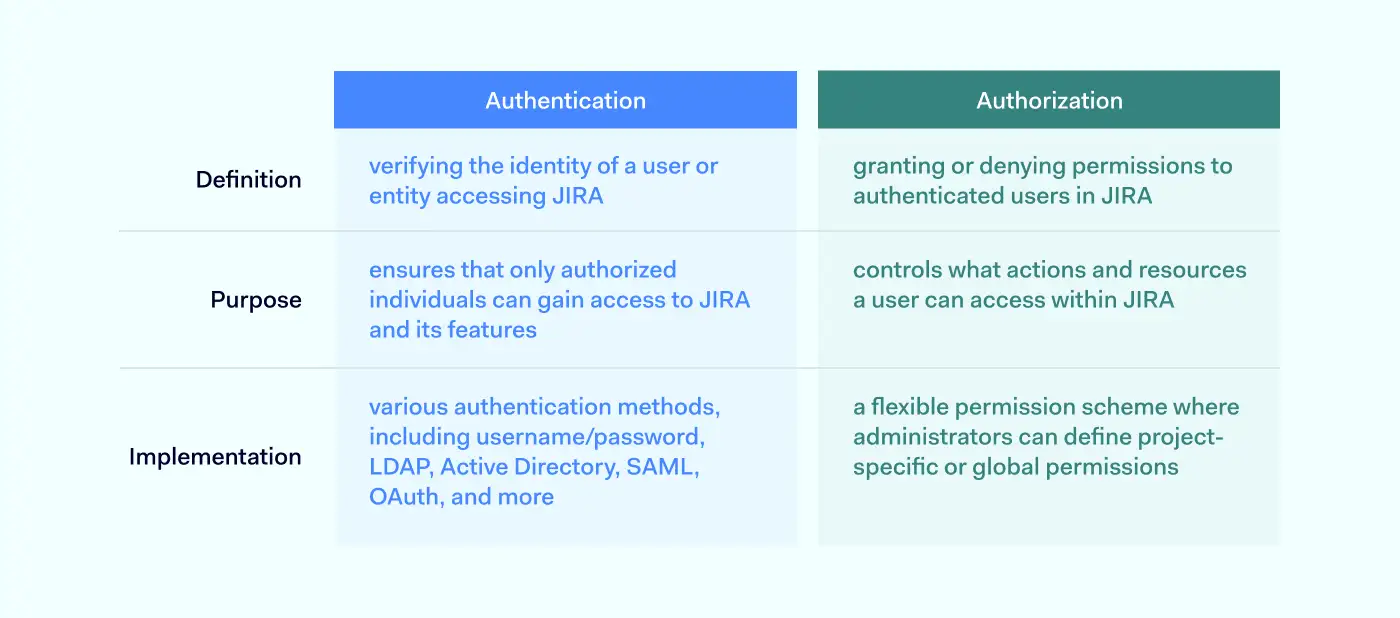
Authentication verifies the identity of every user accessing the cloud environment. These mechanisms compare user credentials to secure directories. If supplied credentials match the database, the network grants access. Jira authentication options include Basic Authentication via Atlassian Account. However, Jira also supports OAuth tokens, which offer more security. These secure tokens add an extra layer of protection against illegitimate access.

  • Authorization

Authorization determines what users can do within the Jira environment. Each user receives a set of permissions. These permissions grant access to resources according to the user’s role and work requirements. Admins can create temporary groups or assign precise powers to users. For instance, the user could possess create, view, and edit privileges. But they may not be able to delete records on Jira apps.

  • Logging

Jira logs key activities and presents the data via the central administration console. The audit log captures project changes, user permissions, workflow changes, custom fields, data deletion, and suspicious access requests. Admins can export audit data via CSV files and amalgamate the information with other cloud platforms. Retention periods vary from one month to a year.

  • Incident management

Jira’s incident response systems include collaboration tools, automated alerts, incident timelines, and incident response templates. Tenants can plan to neutralize threats and restore systems as quickly as possible.

Internal security features:

Atlassian products secure hosting infrastructure with internal security controls. In keeping with the shared responsibility model, the company undertakes to ensure the “security, availability, and performance of the applications we provide, the systems they run on, and the environments within which those systems are hosted.”

  • Encryption

Jira encrypts data at rest and in transit. Data on the Rest API is encrypted using 256-bit AES ciphers. Data in transit is secured by TLS 1.2+ with perfect forward secrecy. Passwords are also encrypted, along with API keys. Tenants don’t need to apply encryption to data hosted on the Jira platform. But it is necessary to encrypt data passing across the network edge, for example, via remote work connections.

  • Zero Trust architecture

Jira’s network is constructed in line with the Zero Trust principle “never trust, always verify”. Private cloud routing, firewalls, and software-defined networking create secure zones. A three-tier access policy ensures that only authorized employees can access network resources.

  • Data center security

Atlassian uses Amazon Web Services (AWS) to store data. Redundancy and failover are built into a global AWS architecture. Multiple physical security controls also guard Jira’s data centers against malicious intruders.

Common security threats to Jira

Jira’s cloud hosting services face many threats. Security controls should always be designed with threats in mind. Any of these threats could result in loss of data, system downtime, and regulatory penalties:

  • Insider threats

Malicious individuals exploit legitimate access rights to carry out illegal actions. But insiders can also be unaware of the risks they pose. For example, employees might accidentally introduce malware via flash drives. Insiders can sabotage assets or steal data for sale. But identifying them isn’t easy. Jira tenants can leverage activity monitoring logs to detect unusual access patterns, off-board orphaned accounts, and apply MFA to make access difficult.

  • Social engineering

Also known as phishing. Social engineering involves persuading legitimate users to carry out risky actions. This could include opening attachments, clicking links, or even providing payment data directly. Training is the best remedy for social engineering attacks. Data Loss Prevention tools and tight access policies also help to prevent illicit data removal.

  • External threats

 Malware can spread throughout insecure cloud deployments. Worms and Trojans leak information to outsiders. Other agents damage performance by leaching network resources for other purposes. Robust threat detection systems, network segmentation, and regular software updates are essential.

  • Data breaches 

Data breaches require a specific strategy because the risks of suffering data loss are critical. Tenants should secure confidential data with encryption at rest and in transit. Limit access with MFA and RBAC. And track critical data via audits and threat alerts.

FAQ

How to keep my organization secure?

Follow these basic steps to secure your organization on Atlassian’s Jira platform:

  • Understand your Jira landscape. Inventory all apps and classify data held on Jira according to risk categories.

  • Ensure all assets are visible via the Atlassian admin panel.

  • Integrate your identity provider with Atlassian’s SSO solution.

  • Test configurations to balance access and security.

  • Create role-based access controls. Limit access to high-risk data.

  • Schedule regular audits and monitor activity logs.

  • Manage user accounts and remove users when they leave the organization.

  • Train your staff on security best practices.

  • Create a mobile device management solution for secure remote work.

What are the security features of Jira?

Jira is equipped with many security features. Use relevant features to secure cloud assets under the shared responsibility model. Tenants can configure Jira to include:

  • 256-bit at rest encryption of sensitive data and TLS encryption for data in transit.

  • Flexible access controls. SSO and MFA options that integrate with identity providers.

  • Regular network scanning and audits of Jira infrastructure. Constant monitoring for cloud security threats.

  • Compliance with major standards such as GDPR and ISO 27001.

  • The Bug Bounty program rewards developers who find security weaknesses.

  • Secure development under the Peer Review/Green Build system. Testing of all new app deployments before they go live.

Atlassian has covered the most crucial security themes. But this still leaves customers with the responsibility to extend access controls to users, encrypt data outside the Jira environment, and train staff to use the cloud safely.

Key takeaways

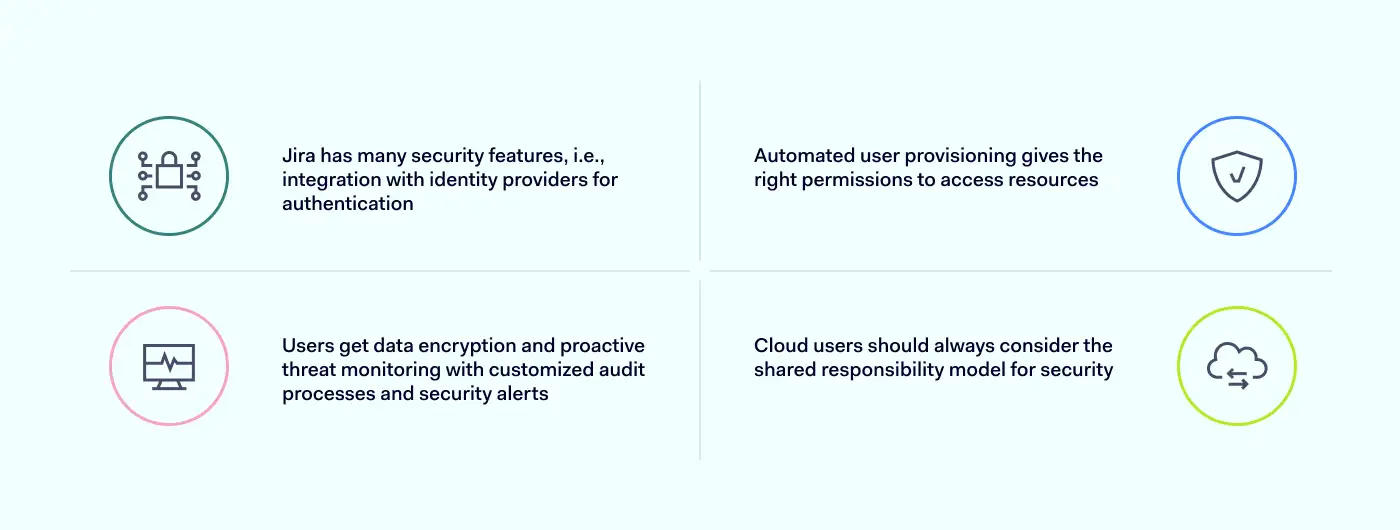
  • Jira provides a wide range of security features to assist cloud tenants. This includes authentication systems that integrate easily with identity providers.

  • Automated user provisioning offers users the right permissions to access essential resources.

  • Tenants benefit from data encryption and proactive threat monitoring. Jira tools include customized audit processes and security alerts.

  • Cloud users must always be aware of the shared responsibility model when designing security solutions.

How can NordLayer help?

The Atlassian suite enables businesses to manage projects of varying scope and complexity effectively, but its security leaves much room for improvement. This is where NordLayer can reach out a helping hand to companies that are struggling to find the right balance between ease of use and security.

Using Virtual Private Gateways, network administrators have much better control over user access. Only gateway-connected users are allowed to reach the Jira portal. The login to NordLayer itself can be further secured by enabling Single-sign on and multi-factor authentication, ensuring that the connecting user’s identity is genuine.

With IP allow-listing (whitelisting), companies can permit access to Atlassian suite only from trusted IPs, which also shrinks the attack surface. The connections from unrecognized IP addresses are immediately blocked.

NordLayer’s suite of ZTNA and SSE-focused features allows additional layers of security and combines built-in Jira security tools with NordLayer’s solutions. This combination is a sure way to improve SaaS access control.

Get in touch with us, and discover how to reap the benefits of Atlassian suite without putting your sensitive data at risk.

About Version 2 Digital

Version 2 Digital is one of the most dynamic IT companies in Asia. The company distributes a wide range of IT products across various areas including cyber security, cloud, data protection, end points, infrastructures, system monitoring, storage, networking, business productivity and communication products.

Through an extensive network of channels, point of sales, resellers, and partnership companies, Version 2 offers quality products and services which are highly acclaimed in the market. Its customers cover a wide spectrum which include Global 1000 enterprises, regional listed companies, different vertical industries, public utilities, Government, a vast number of successful SMEs, and consumers in various Asian cities.

About NordLayer
NordLayer is an adaptive network access security solution for modern businesses – from the world’s most trusted cybersecurity brand, Nord Security.

The web has become a chaotic space where safety and trust have been compromised by cybercrime and data protection issues. Therefore, our team has a global mission to shape a more trusted and peaceful online future for people everywhere.

What is cloud network security?

Cloud network security is a general term for the measures needed to secure virtualized cloud environments. It covers policies, processes, controls, and technologies. And it applies to private, public, and hybrid cloud deployments.

Basics of cloud network security

Cloud network security resembles traditional on-premises network security but with important divergences related to defending virtualized environments.

Like on-premises security, cloud network security defends network assets against external threats. Security systems for the cloud assess access requests and authorize users to access resources. They provide visibility for security managers, including real-time alerts and audit logs. And they neutralize malware and illegitimate data transfers.

Unlike standard security solutions, cloud defenses are not based on-site. Cloud security systems function via software-defined networking tools. Virtual gateways reside in the cloud, where they can protect applications and data from access requests – wherever users may be.

The context: understanding cloud computing

Cloud computing is the use of virtualized platforms to host applications and store data. The cloud exists as a worldwide network of servers and is accessible via a standard internet connection.

The user’s apps and data reside off-site, removing the need for on-premises hardware. Instead, network resources are “virtualized”. Resources are accessible to the owner or user, but they are hosted by cloud providers.

Users can choose to access software-as-a-service (SaaS) apps. Or they can build customized cloud deployments via platform-as-a-service (PaaS). In all cases, security is a shared responsibility between users and cloud service providers (CSPs).

Providers must secure hardware used to host cloud apps or data. Users must protect any data passing through cloud environments. They are also responsible for managing access to cloud assets.

Elements of cloud network security

Cloud network security solutions vary, but could include:

  • Integrated cloud security stacks – Includes next-generation firewall protection, anti-virus and anti-bot tools, intrusion prevention systems, controls for individual apps, IAM, and data loss prevention tools.

  • Sanitization – Systems can filter low-level traffic and remove potential threats, without the need for full-scale inspection.

  • Exploit protection – Protection against known Zero Day Exploits, with data derived from the latest threat intelligence.

  • Traffic inspection – Inspection of SSL/TLS traffic passing throughout virtualized environments. Analyzes encrypted traffic without compromising speed.

  • Centralized security administration – Solutions cover all cloud applications and storage assets. They integrate seamlessly with existing resources (including on-premises networks), providing total awareness of network activity.

  • Segmentation – Cloud network security applies micro-segmentation to limit user permissions and guard confidential data.

  • Remote access – Ensures secure access for remote workers and third parties. Users can connect to cloud assets safely from any location.

  • Automation tools – Includes automated extension to newly installed cloud services. Automated workflows blend ease of use and security, allowing companies to harness the potential of the cloud.

  • Simple integration – Cloud security tools integrate with legacy applications, operating systems, and third-party security systems.

The importance of cloud network security

The cloud is everywhere in modern life. Businesses, non-profits, and government agencies all rely on cloud infrastructure to deliver services and host workloads. But the rise of the cloud has created new security vulnerabilities. This means that organizations need to rethink their network security policies.

Traditional on-premises networks have simple security architecture. Central resources are protected by the network perimeter. Endpoints are few in number and easy to monitor. Access patterns and user communities change slowly, if at all. In this context putting in place firewalls and threat detection systems is relatively simple.

Cloud network security presents a different set of challenges.

  • In the cloud, there is no standard network perimeter. Users can access cloud gateways anywhere. IT teams rarely manage on-premises resources. Instead, cloud assets are maintained by cloud providers on servers across the world.

  • A public cloud environment can change rapidly. Employees might spin up new SaaS instances or cloud APIs. Staff could bring online new cloud storage containers to backup data or handle overflows.

  • Security teams need to maintain awareness, track user activity, and neutralize threats. Organizations need a cloud network security strategy that locks down critical cloud assets while enabling users to take advantage of cloud computing.

Cloud network security benefits

Adopting a cloud network security strategy has many advantages. The benefits of retooling your security setup for the cloud include:

Improved data security

The most important benefit of cloud network security is enhanced protection for sensitive data.

Cloud security solutions encrypt data at rest on the cloud. If files are stolen, cybercriminals will not be able to read data easily. Encryption of data in transit also makes it harder to track information flows and launch targeted interception attacks.

Micro-segmentation separates confidential data from the rest of an organization’s cloud network. Data resides in software-defined compartments that are accessible with the right credentials. Cloud security systems can define these segments at a granular level.

Better visibility for administrators

IT teams need visibility to monitor threats and user activity. But legacy security solutions are not well-adapted to discovering cloud apps and tracking activity in a cloud environment.

Cloud-native network security systems bring together all virtualized assets. Admins can monitor network activity in real-time via a single pane of glass. And automated alerts deliver information about potential threats before they become critical.

Simplified cloud policy management

Security policies should reflect the security needs of network owners and be delivered to all users. But delivering security policies consistently in cloud settings is a complex task. Unified cloud network security systems solve this problem.

IT teams can automatically deliver updated security policies to endpoints. Cloud-native solutions also make it easier to deliver policies across hybrid or multi-cloud environments.

Threat analysis and neutralization

Cloud resources are vulnerable to data breach attacks. Compromised remote access devices, phishing emails, and credential theft are common entry methods. Cloud-native security controls are the only effective response.

Robust security systems detect, contain, and neutralize malicious threats before they cause damage.

Cloud network security uses threat intelligence to counter the latest threats. Intrusion detection systems guard cloud gateways and scan network traffic. Anti-bot scanners also track emerging DDoS attacks. This prevents downtime from traffic flood attacks.

Security automation

Automation allows IT teams to work efficiently and securely. Users can automatically extend access controls and threat detection to new cloud resources. There is no need for lengthy manual configuration processes. New services receive instant coverage, limiting the risk of human error.

Cloud network security challenges

Cloud network security systems make sense for organizations that manage pure cloud or hybrid networks. But implementing cloud security is not a simple process. Challenges faced by organizations include:

Understanding shared responsibility

Under the shared responsibility model, CSPs and users share responsibility for securing cloud resources. This is accepted by users when they source cloud solutions. But determining areas of security responsibility can be difficult.

  • Cloud users must secure apps and data stored on the cloud. They must manage user access and monitor external threats.

  • CSPs are responsible for securing cloud infrastructure. They harden cloud servers to block data thieves or viruses.

This model leaves scope for overlap and confusion. For example, cloud users may rely on encryption provided by their cloud service provider. As a result, users may not apply encryption for data in transit or use Data Loss Prevention tools.

It’s essential to define areas of responsibility before activating cloud services. Most SaaS providers build security features into their products. But users always have a role to play, and this varies between different cloud contexts.

Managing dynamic cloud environments

Change is a core feature of cloud deployments. Apps come online constantly. Configurations may change to reflect developing workflows. New users connect from home or abroad. And individual employees can connect cloud containers with a few mouse clicks.

Automation can sometimes make this problem worse. For instance, companies may use autoscaling to build cloud deployments quickly. This boosts efficiency, but it also leaves security teams scrambling to catch up.

Cloud network security systems need to adapt to change. Admins must track access requests, respond to alerts, and discover threats if they infiltrate network infrastructure. This is even harder in hybrid environments that mix on-premises systems with extensive public and private cloud deployments.

Cloud network security best practices

Achieving cloud security can be challenging. But managing cloud security is far from impossible, even for small businesses. Follow these cloud network security best practices and build a security solution that meets your goals:

1. Apply Zero Trust principles

Zero Trust Network Architecture (ZTNA) is a security model that teaches users to trust no one. This is a good rule to apply when securing cloud infrastructure.

Avoid situations where users have global network privileges, and adopt a denial-by-default stance. Require more than one authentication factor when allowing user access. And segment cloud environments to limit east-west movement within the network.

Zero Trust changes the focus of security strategies to meet cloud computing needs. Instead of policing the network edge, admins concentrate on managing identities. This is a good fit for dynamic cloud environments. Deployments may constantly change. But user communities are easier to manage.

2. Lock down interfaces between the cloud and the internet

Internet-facing assets are a critical security risk. Access portals, web forms, and email accounts connect with the wider internet. This makes them common vectors for malware and data theft attacks.

Configure cloud apps to minimize contact with the internet. If necessary, leverage threat protection tools to guard vulnerable points. Web Application Firewalls (WAF) can deny access to suspicious network traffic. DDoS and intelligent detection systems handle malicious agents that breach the firewall.

Set automated alerts to inform admins about potential risks. When building cloud network security systems, prioritize internet-facing assets. Carry out enhanced risk assessments, log user activity, and test access controls to secure entry points.

3. Use micro-segmentation to protect critical data

Cloud security systems usually include the ability to micro-segment networks. Micro-segmentation lets you guard critical data with an additional layer of protection. This has security benefits, while also helping companies comply with relevant data security regulations.

4. Use private cloud solutions to enhance security

Private clouds allow users to communicate and collaborate without creating links to the external internet. This limits the scope for attackers, whether they use email phishing or malware injection.

Build networks that blend private and public cloud tools without compromising security. Determine which workflows require internet access. Switch everything else to private access technology that does not require external IP addresses.

5. Work with partners to establish security responsibilities

The principle of shared responsibility divides security functions between service providers and consumers.

Before commissioning new SaaS or IaaS products, be clear about security responsibilities. Create a security policy for each cloud service explaining your areas of responsibility and the security controls you will use. This should complement your cloud partner’s security policy. There should be no areas of ambiguity.

6. Write and deliver clear cloud security policies

Robust cloud network security rests upon good documentation and organization.

Cloud security policies define the controls used to secure cloud resources. This could include multi-factor authentication, Identity and Access Management, and data encryption. Policies also inform users about their security responsibilities.

Every SaaS app or cloud-hosted database should have a security policy. Store policies centrally. And use automated delivery to ensure that policies are implemented consistently and rapidly.

The role of AI and machine learning in cloud network security

Cloud network security is advancing all the time. And one of the most exciting research areas is the application of Artificial Intelligence to secure cloud environments.

AI harnesses machine learning to assess cloud security threats. Also known as User and Entity Based Analytics (UEBA), this technology scans user activity to detect malicious agents. AI engines compare real-time user behavior to logs of previous activity. In theory, this information helps to authenticate legitimate users and unmask intruders.

However, UEBA faces some challenges before becoming mainstream. For example, AI requires structured data sets and huge amounts of information to function properly. Generating useful data takes time and may also breach privacy regulations.

Attackers will also adapt to the use of machine learning. Expect to see Advanced Persistent Threats (APTs) that gather user activity data and build fake profiles to fool UEBA scanners. If IT teams rely too much on AI, this could become a security threat.

Cloud network security: key takeaways

Legacy security systems were designed for on-premises networking. Next-generation cloud security tools are built into the cloud, where they operate alongside SaaS apps and cloud infrastructure.

  • Threat detection systems neutralize malware attacks.

  • Access management tools block unauthorized users.

  • Segmentation keeps high-value assets safe behind additional barriers.

  • Encryption conceals data from external intruders

These features work together to mitigate security risks associated with the cloud. In a world where businesses depend on cloud infrastructure, robust cloud network security is essential.

Looking for a cloud network security solution?

NordLayer will help you build customized cloud network security architecture. Our products include a range of cloud-native features to protect data and enable secure collaboration. For example, users benefit from:

  • Seamless identity management.

  • Threat blocking tools to analyze network traffic and block cloud threats.

  • Secure gateways link remote workers to the cloud

  • Control access with IP allowlisting.

Achieve reliable, comprehensive cloud network security. Get in touch with NordLayer and discuss your options today.

About Version 2 Digital

Version 2 Digital is one of the most dynamic IT companies in Asia. The company distributes a wide range of IT products across various areas including cyber security, cloud, data protection, end points, infrastructures, system monitoring, storage, networking, business productivity and communication products.

Through an extensive network of channels, point of sales, resellers, and partnership companies, Version 2 offers quality products and services which are highly acclaimed in the market. Its customers cover a wide spectrum which include Global 1000 enterprises, regional listed companies, different vertical industries, public utilities, Government, a vast number of successful SMEs, and consumers in various Asian cities.

About NordLayer
NordLayer is an adaptive network access security solution for modern businesses – from the world’s most trusted cybersecurity brand, Nord Security.

The web has become a chaotic space where safety and trust have been compromised by cybercrime and data protection issues. Therefore, our team has a global mission to shape a more trusted and peaceful online future for people everywhere.

Creating a safe cyber future with UN Global Compact

Being on a mission to create a safe cyber future, we believe that the same dedication should extend to the physical world. With this in mind, Nord Security joined the United Nations Global Compact (UNGC), giving prominence to our company’s sustainability program and bringing our social responsibility initiatives into sharper focus on the world stage.

A Global Compact

The UN Global Compact (UNGC) is the world’s largest corporate sustainability initiative, with more than 15,000 companies and 3,000 non-business signatories in over 160 countries. Its mission is to mobilize businesses in aligning their operations and strategies with UN principles and values in four key areas: human rights, labor, environment, and anti-corruption.

 Eimantas Sabaliauskas, co-founder of Nord Security, speaking about the company's commitment to the UN Global Compact. Commitment to a better world

As a global tech company, our commitment to upholding these values has been unwavering long before joining the UN Global Compact. Every year, we announce our corporate responsibility contributions in the annual Impact Report.

In recent years, we have identified 6 impact areas and 8 Sustainable Development Goals (SDGs) in our Corporate Responsibility strategy. This strategy functions as the core of our pledge to build a safe, inclusive, and sustainable future for people, their personal information, and the digital world.

Human rights

We continuously support human rights causes by providing financial aid and free services to activists, independent journalists, and non-profits.

  • In 2022, we donated over $80K to organizations and the world’s leading events on human rights, such as “Access Now,” “EDRi,” “EBEC,” “Thinking Digital,” and “Open Rights Group.”

  • We supported individuals from Ukraine and Iran by donating 800+ emergency VPNs to help them express their opinions safely under conditions of heavy censorship and surveillance.

  • Over 1,300 accounts were donated to various non-profit organizations, including “Women without Borders”, “Razom”, and others, to stand for inclusion, human rights, and a safer digital world for all.

Labor

At Nord Security, we encourage continuous personal growth and a safe, healthy, and violence-free work environment. And we value every single community member regardless of their gender, sexual orientation, race, age, socio-economic background, or other factors. We’ve assembled a diverse workforce, with colleagues of 55 nationalities and women representing nearly 40% of our tech company. And we’re constantly striving to ensure our work environment is fair and supportive. We organize trainings on topics like anti-mobbing and inclusion, encourage a healthy work-life balance with our hybrid working model, and offer paid time off for special occasions or challenging times, among other things.

Environment

When possible, we avoid or mitigate the harmful effects of our operations on the natural environment and its limited resources. To this end, we’ve greatly reduced our rates of paper, plastic, and electronic waste. Most of our premises have been granted BREEAM and Fitwel certificates demonstrating the quality, performance, and sustainable credentials of our premises. We also take active steps in measuring our environmental footprint.

Anti-corruption

In every aspect of our operations, we uphold stringent anti-corruption measures, promoting transparency, accountability, and integrity. We firmly stand against any form of deceitful practice such as bribery, gift manipulation, double-dealing, or clandestine transactions. It’s all part of our commitment to a fair and ethical workplace.

Moving forward

By becoming a member of the UN Global Compact community, we’re recommitting to positively impact people, communities, and the environment on our mission to build a radically better internet.

About Version 2 Digital

Version 2 Digital is one of the most dynamic IT companies in Asia. The company distributes a wide range of IT products across various areas including cyber security, cloud, data protection, end points, infrastructures, system monitoring, storage, networking, business productivity and communication products.

Through an extensive network of channels, point of sales, resellers, and partnership companies, Version 2 offers quality products and services which are highly acclaimed in the market. Its customers cover a wide spectrum which include Global 1000 enterprises, regional listed companies, different vertical industries, public utilities, Government, a vast number of successful SMEs, and consumers in various Asian cities.

About NordLayer
NordLayer is an adaptive network access security solution for modern businesses – from the world’s most trusted cybersecurity brand, Nord Security.

The web has become a chaotic space where safety and trust have been compromised by cybercrime and data protection issues. Therefore, our team has a global mission to shape a more trusted and peaceful online future for people everywhere.