Skip to content

Multi-factor authentication best practices & strategy

Multi-factor authentication (MFA) requests more than one identification factor when users log into network services. These factors could be one-time codes delivered by secure third-party providers. Or they could be biometric identifiers.

The aim of MFA is to verify user identities and strengthen network protection beyond the level provided by traditional passwords. But how should you achieve this goal?

This blog will explain some core MFA best practices. It will also lead you through a step-by-step guide to implementing multi-factor authentication. The result should be an MFA system that ensures rock-solid network protection where it matters most.

MFA best practices

Multi-factor authentication is an essential addition to cybersecurity setups. Properly configured, MFA allows workers to relocate to their homes, connect remotely as they travel, and use cloud resources anywhere.

These MFA best practices will help you create an authentication system that meets your needs.

1. Plan the right MFA solution for your business

Multi-factor authentication is not a one-size-fits-all technology. Choose the right authentication system for your business needs. For instance, types of MFA to think about include:

  • Biometric scanning, such as retinal scans and fingerprints.

  • One-time passwords (OTP) delivered by tokens, email, or SMS.

  • Hardware devices such as security badges, cards and tokens.

  • Contextual factors such as keyboard behavior, location data, and the network are used to make a connection.

Workers could benefit from biometric scanning if your business relies on mobile devices. Quick, user-friendly biometrics can provide secure access away from the office. Smartphones are well-suited to techniques like fingerprint scans.

Workforces where remote working is routine, might prefer hardware tokens or tags. These small devices are easy to carry between work and home. The tokens will still be required to access network resources if devices are lost or stolen. So they are a good extra defense measure.

Whatever solution you choose, it must comply with network infrastructure. Find an MFA system that is compatible with critical apps and employee devices.

2. Create an enterprise-wide MFA solution

Multi-factor authentication solutions must cover all access points to network resources.

Carry out a device audit before sourcing any technologies. This will help you understand which types of MFA tech to choose and how to train employees to use authentication systems.

Cloud assets and on-premises resources should all be included. Protect all cloud endpoints with more than one authentication factor, with additional protections for high-value assets.

3. Manage change to bring users on board

The biggest problem with multi-factor authentication is ensuring employees use authentication tools consistently and safely. Workers may lapse into unsafe behavior if MFA is too time-consuming or complex. That’s why change management is all-important.

Plan a staged introduction that makes every user feel part of the process. Extra authentication methods will disrupt working practices, at least for a while. But if you approach employees as participants in the process, they will respond positively.

Inform users about upcoming changes at the start of the project. Explain how MFA will benefit workers and how user identification works. Answer any questions as the project unfolds. Workers need to know exactly what is required and how to comply with security policies.

Change managers can isolate areas of potential resistance. Focus on chokepoints like using third-party devices, managing biometrics, and password management. Provide training and refresh user knowledge after MFA comes online.

4. Create user-friendly MFA systems

When mainstreaming MFA, companies need to craft user-friendly solutions. Systems should minimize friction and maximize speed while remaining secure.

Explore ways to reduce the work of users. Adaptive authentication can remove the need for passwords and use device or location information alongside biometrics. Single sign-on portals can bring services together and make logging on easier.

Where possible, provide multiple options for users. Some workers will embrace retina or fingerprint scanning. For others, it could be impractical or intrusive. They might prefer hardware tokens.

When people choose their own solutions, they are more likely to feel in control. When they “own” their authentication choices, workers will be less likely to back-slide and abandon MFA.

5. Combine MFA with single sign-on (SSO)

As hinted above, one common solution for MFA is single sign-on (SSO). SSO creates a single identity security portal. This gateway allows users to access core resources according to their individual privileges.

SSO fits neatly with MFA. You can combine standard password portals with biometrics and one-time passwords. Using a single portal and extra identity verification factors balances user experience and network security.

  • SSO reduces employee workloads, providing instant system access to all relevant resources. That’s particularly useful when connecting remote workers to cloud assets.

  • MFA supplements password security. This solves some problems associated with SSO, including the repeated use of passwords or the reliance on weak passwords that are easy to hack.

6. Make use of contextual factors

Multi-factor authentication systems use more than biometric scanners and hardware tokens. MFA can also leverage contextual information about individual users and their devices.

Contextual information is passive. Users do not need to provide information consciously. Instead, agents detect data about the user’s device or location. Agents on user laptops can tell whether the computer is in the owner’s home or connected to insecure public wifi. Blacklisting screens out unknown devices or those accessing from unsafe locations.

Users move. They won’t always be located at home. And if employees request access from elsewhere, MFA systems ask them for additional information. That complicates matters for laptop or smartphone thieves with access to worker devices.

More advanced authentication factors are also available for extremely high-security situations. Techniques like liveness testing and biometric keyboard verification provide maximum information about user identities. These contextual factors represent an extremely strong barrier against data thieves when used with physical tokens.

7. Think about passwordless solutions

In some cases, MFA allows companies to remove traditional password access from their network perimeter. Passwords are clumsy to use. Few employees use strong passwords or store them safely. Going passwordless can make a lot of sense from a security perspective.

MFA can use contextual information about mobile devices, user locations, or even user behavior. These factors may be sufficient to allow access when combined with biometric data. This saves time while providing a degree of security. However, strong passwords should be retained to access sensitive data and critical workloads.

8. Implement the least privilege to secure network assets

MFA can apply uniformly to all users, but it’s also better to implement role-based MFA to enforce the principle of least privilege. Part of Zero Trust Network Access (ZTNA), this principle states that users should only have access to essential data and applications. All non-essential resources should be off-limits.

Identity and Access Management and network segmentation are core ZTNA technologies, but MFA also plays a role.

MFA systems can ask for additional information when users try to exercise administrative functions. MFA can also apply conditional access to high-security databases and request additional user credentials at regular intervals.

9. Use provisioning protocols for cloud compatibility

Companies can combine MFA systems and critical cloud assets by using provisioning protocols. For instance, Microsoft Azure Active Directory supports protocols like RADIUS and Oauth 2.0.

Standard protocols like RADIUS make it easier to combine legacy network tools and cloud applications. MFA systems must operate across all network devices and resources. Adopting an approach based on standard protocols makes this possible.

10. See MFA as an ongoing process

Deploying MFA doesn’t end when users start to apply biometrics or hardware tokens. Companies must see authentication as an ongoing challenge requiring constant attention and regular audits.

The threat landscape does not stand still. New phishing techniques emerge monthly. Novel malware threats can compromise previously secure endpoints. Network managers must be aware of these developments. Security teams must update MFA systems to reflect real-world cybersecurity risks.

Regularly assess MFA systems to ensure they are delivering effective security. Are workers using them properly? Do you need to use more or different authentication factors? Are any gaps not covered by authentication processes?

Companies also need to be persistent and determined when deploying MFA. Most MFA solutions experience problems. Users regularly report difficulties, which can cause IT teams to roll back authentication projects. Resist this urge.

Provide support to any departments or individuals experiencing issues. Drill down into the concerns reported by users. They may detect technical issues that were not apparent to security professionals.

Above all, don’t expect overnight success. MFA eventually becomes embedded in everyday work, but this won’t happen immediately.

Step-by-step MFA implementation strategy

When implementing MFA, here are the steps to follow:

1. Train users in how MFA works

Employee education is critical when implementing MFA. Every process must be centered around upskilling and reassuring users.

Poorly informed workers may resist authentication techniques or back-slide to unsafe practices. Here are some things to bear in mind when training staff:

  • Regularly communicate via email from the start of the project. Timely emails will ensure staff are aware of timescales and security policies. They can include contact details for project leaders.

  • Create ways for staff to engage with project managers. Messaging apps like Slack are a good option here. Make staff available to field any queries and provide updates if requested.

  • Stress the positive aspect of MFA. Always focus on why you are introducing MFA and how it will help individuals.

2. Design an MFA system to suit your needs

Choosing the right form of multi-factor authentication is critically important. Some companies find that biometric scanners like facial recognition are appropriate. This works well when end users have access to smartphones with reliable cameras and fingerprint scanners.

Other companies prefer to distribute hardware tokens to remote workers. Tokens provide one-time passwords and can be tracked remotely by security managers.

Questions to ask when choosing an MFA solution:

  • What kind of devices will use your MFA system?

  • Is there a mixture of work-from-home and on-premises end users?

  • Is ease of use more important than pure identity security?

  • Do you need sophisticated solutions with fine-grained MFA controls?

  • Is cost an overriding factor, or can you afford to spend more?

  • What apps and services will your MFA solution interact with? Compatibility is essential to avoid friction and improve the user experience.

3. Apply privileges to roles and individuals

Create privilege levels for different access requests. This allows individuals to access core resources while keeping sensitive data off-limits to those who do not need it.

You might want to request extra identity data when accessing customer records or executing admin commands on cloud platforms. MFA requests every few hours may also be needed when accessing financial records.

Some resources may not need MFA at all. Contextual controls and passwords could be sufficient to protect low-sensitivity resources. However, risk assesses each asset to avoid leaving confidential data exposed.

4. Make sure your MFA implementation is compliant

Authentication is a core aspect of major data security regulations, including HIPAA, GDPR, and PCI-DSS. Sectors like health care or financial processing have specific requirements absent from other business areas. Knowing which regulations affect your business is absolutely vital.

For example, PCI-DSS requires:

  • Strong encryption of all customer data

  • Three-factor MFA for any servers handling customer data

  • Identity management to ensure customer records can only be accessed by authorized individuals

Third-party authentication providers should possess the accreditation. Look for an Attestation of Compliance (AOC) with PCI-DSS or HIPAA. This means the provider has been independently assessed as meeting compliance standards.

5. Create a streamlined way to request backup factors

Sometimes employees lose authentication hardware or business laptops. In these cases, they will probably also lose MFA data. Security best practice involves resetting the user’s account with a backup factor and creating a new set of authentication information.

One option is to enable multiple devices on a single account. If users have more than one authorized device, they can use it to request backup factors and reset their accounts.

Security teams should also be prepared to remove authentication factors from user accounts when thefts occur. There should be a clear process for quarantining compromised factors, making it tough for thieves to use stolen identity credentials.

6. Plan to on-board new remote workers

All work-from-home equipment must be audited and authorized with MFA software installed. But setting up MFA with remote workers can be time-consuming. It may leave security vulnerabilities if staff is left to their own devices.

Many companies provide work laptops for new hires. If you take this route, take time to lead staff through the MFA onboarding process. If necessary, schedule video meetings to explain the process. That way, you can verify that staff properly follow every step.

7. Configure adaptive MFA controls

Before MFA goes live, explore additional security controls your provider offers. This should include adaptive systems to detect anomalies and meet threats proactively.

At this stage, you can blacklist certain access locations. For instance, you may blacklist all public wifi hotspots. But you could even limit access from entire continents.

8. Plan to audit your MFA solution

Plan to reassess your authentication setup regularly. Every MFA implementation experiences some problems. They are generally not deal-breakers and tend to involve easing users into the authentication process.

Check that users are following MFA practices. And make sure privileges match up with risk assessments. Do multiple factors protect confidential data, or can general users access databases?

As new threats emerge, authentication systems can become outdated. Be prepared to update software or add new factors if the situation changes.

How can NordLayer help with MFA implementation?

NordLayer offers a suite of security tools allowing companies to create secure SSE architecture at the network edge. Guard cloud assets, on-premises data centers, and remote work laptops. And make life easy for workers to carry out their tasks.

Our products include 2FA or MFA for authentication to increase security levels while connecting to company networks. NordLayer caters to apps like Google Authenticator or Authy and USB devices to deliver security keys.

Adding MFA is quick and easy, especially when you combine authentication and SSO. The result is all-around security for critical business assets. To find out more, get in touch with the NordLayer team today.
About Version 2 Digital

Version 2 Digital is one of the most dynamic IT companies in Asia. The company distributes a wide range of IT products across various areas including cyber security, cloud, data protection, end points, infrastructures, system monitoring, storage, networking, business productivity and communication products.

Through an extensive network of channels, point of sales, resellers, and partnership companies, Version 2 offers quality products and services which are highly acclaimed in the market. Its customers cover a wide spectrum which include Global 1000 enterprises, regional listed companies, different vertical industries, public utilities, Government, a vast number of successful SMEs, and consumers in various Asian cities.

These days, cybercrime is rampant. It’s no longer a matter of “if” you’re going to suffer an attack but “when” it will happen. All companies want to be ready for any crisis. And this is where a business continuity plan comes into play.

But what is a business continuity plan exactly? Why is it important? What should one include? Today, we’re exploring all these questions in-depth.

What is a business continuity plan?

A business continuity plan (BCP) is a document that sets guidelines for how an organization will continue its operations in the event of a disruption, whether it’s a fire, flood, other natural disaster or a cybersecurity incident. A BCP aims to help organizations resume operations without significant downtime.

Unfortunately, according to a 2020 Mercer survey, 51% of businesses across the globe don’t have a business continuity plan in place.

What’s the difference between business continuity and disaster recovery plans?

We often confuse the terms business continuity plan and disaster recovery plan. The two overlap and often work together, but the disaster recovery plan focuses on containing, examining, and restoring operations after a cyber incident. On the other hand, BCP is a broader concept that considers the whole organization. A business continuity plan helps organizations stay prepared for dealing with a potential crisis and usually encompasses a disaster recovery plan.

Importance of business continuity planning

The number of news headlines announcing data breaches has numbed us to the fact that cybercrime is very real and frequent and poses an existential risk to companies of all sizes and industries.

Consider that in 2021, approximately 37% of global organizations fell victim to a ransomware attack. Then consider that business interruption and restoration costs account for 50% of cyberattack-related losses. Finally, take into account that most cyberattacks are financially motivated and the global cost of cybercrime topped $6 trillion last year. The picture is quite clear — cybercrime is a lucrative venture for bad actors and potentially disastrous for those on the receiving end.

To thrive in these unpredictable times, organizations go beyond conventional security measures. Many companies develop a business continuity plan parallel to secure infrastructure and consider the plan a critical part of the security ecosystem. The Purpose of a business continuity plan is to significantly reduce the downtime in an emergency and, in turn, reduce the potential reputational damage and — of course — revenue losses.

Business continuity plan template

Password security for your business

Store, manage and share passwords.

30-day money-back guarantee

Business Continuity Plan Example

[Company Name]

[Date]

I. Introduction

  • Purpose of the Plan

  • Scope of the Plan

  • Budget

  • Timeline

The initial stage of developing a business continuity plan starts with a statement of the plan’s purpose, which explains the main objective of the plan, such as ensuring the organization’s ability to continue its operations during and after a disruptive event.

The Scope of the Plan outlines the areas or functions that the plan will cover, including business processes, personnel, equipment, and technology.

The Budget specifies the estimated financial resources required to implement and maintain the BCP. It includes costs related to technology, personnel, equipment, training, and other necessary expenses.

The Timeline provides a detailed schedule for developing, implementing, testing, and updating the BCP.

II. Risk Assessment

  • Identification of Risks

  • Prioritization of Risks

  • Mitigation Strategies

The Risk Assessment section of a Business Continuity Plan (BCP) is an essential part of the plan that identifies potential risks that could disrupt an organization’s critical functions.

The Identification of Risks involves identifying potential threats to the organization, such cybersecurity breaches, supply chain disruptions, power outages, and other potential risks. This step is critical to understand the risks and their potential impact on the organization.

Once the risks have been identified, the Prioritization of Risks follows, which helps determine which risks require the most attention and resources.

The final step in the Risk Assessment section is developing Mitigation Strategies to minimize the impact of identified risks. Mitigation strategies may include preventative measures, such as system redundancies, data backups, cybersecurity measures, as well as response and recovery measures, such as emergency protocols and employee training.

III. Emergency Response

  • Emergency Response Team

  • Communication Plan

  • Emergency Procedures

This section of the plan focuses on immediate actions that should be taken to ensure the safety and well-being of employees and minimize the impact of the event on the organization’s operations.

The Emergency Response Team is responsible for managing the response to an emergency or disaster situation. This team should be composed of individuals who are trained in emergency response procedures and can act quickly and decisively during an emergency. The team should also include a designated leader who is responsible for coordinating the emergency response efforts.

The Communication Plan outlines how information will be disseminated during an emergency situation. It includes contact information for employees, stakeholders, and emergency response personnel, as well as protocols for communicating with these individuals.

The Emergency Procedures detail the steps that should be taken during an emergency or disaster situation. The emergency procedures should be developed based on the potential risks identified in the Risk Assessment section and should be tested regularly to ensure that they are effective.

IV. Business Impact Analysis

The Business Impact Analysis (BIA) section of a Business Continuity Plan (BCP) is a critical step in identifying the potential impact of a disruption to an organization’s critical operations.

The Business Impact Analysis is typically conducted by a team of individuals who understand the organization’s critical functions and can assess the potential impact of a disruption to those functions. The team may include representatives from various departments, including finance, operations, IT, and human resources.

V. Recovery and Restoration

  • Procedures for recovery and restoration of critical processes

  • Prioritization of recovery efforts

  • Establishment of recovery time objectives

The Recovery and Restoration section of a Business Continuity Plan (BCP) outlines the procedures for recovering and restoring critical processes and functions following a disruption.

The Procedures for recovery and restoration of critical processes describe the steps required to restore critical processes and functions following a disruption. This may include steps such as relocating to alternate facilities, restoring data and systems, and re-establishing key business relationships.

The Prioritization section of the plan identifies the order in which critical processes will be restored, based on their importance to the organization’s operations and overall mission.

Recovery time objectives (RTOs) define the maximum amount of time that critical processes and functions can be unavailable following a disruption. Establishing RTOs ensures that recovery efforts are focused on restoring critical functions within a specific timeframe.

VI. Plan Activation

  • Plan Activation Procedures

The Plan Activation section is critical in ensuring that an organization can quickly and effectively activate the plan and respond to a potential emergency.

The Plan Activation Procedures describe the steps required to activate the BCP in response to a disruption. The procedures should be clear and concise, with specific instructions for each step to ensure a prompt and effective response.

VII. Testing and Maintenance

  • Testing Procedures

  • Maintenance Procedures

  • Review and Update Procedures

This section of the plan is critical to ensure that an organization can effectively respond to disruptions and quickly resume its essential functions.

Testing procedures may include scenarios such as natural disasters, cyber-attacks, and other potential risks. The testing procedures should include clear objectives, testing scenarios, roles and responsibilities, and evaluation criteria to assess the effectiveness of the plan.

The Maintenance Procedures detail the steps necessary to keep the BCP up-to-date and relevant.

The Review and Update Procedures describe how the BCP will be reviewed and updated regularly to ensure its continued effectiveness. This may involve conducting a review of the plan on a regular basis or after significant changes to the organization’s operations or threats.

What should a business continuity plan checklist include?

Organizations looking to develop a BCP have more than a few things to think through and consider. Variables such as the size of the organization, its IT infrastructure, personnel, and resources all play a significant role in developing a continuity plan. Remember, each crisis is different, and each organization will have a view on handling it according to all the variables in play. However, all business continuity plans will include a few elements in one way or another.

  • Clearly defined areas of responsibility

    A BCP should define specific roles and responsibilities for cases of emergency. Detail who is responsible for what tasks and clarify what course of action a person in a specific position should take. Clearly defined roles and responsibilities in an emergency event allow you to act quickly and decisively and minimize potential damage.

  • Crisis communication plan

    In an emergency, communication is vital. It is the determining factor when it comes to crisis handling. For communication to be effective, it is critical to establish clear communication pipelines. Furthermore, it is crucial to understand that alternative communication channels should not be overlooked and outlined in a business continuity plan.

  • Recovery teams

    A recovery team is a collective of different professionals who ensure that business operations are restored as soon as possible after the organization confronts a crisis.

  • Alternative site of operations

    Today, when we think of an incident in a business environment, we usually think of something related to cybersecurity. However, as discussed earlier, a BCP covers many possible disasters. In a natural disaster, determine potential alternate sites where the company could continue to operate.

  • Backup power and data backups

    Whether a cyber event or a real-life physical event, ensuring that you have access to power is crucial if you wish to continue operations. In a BCP, you can often come across lists of alternative power sources such as generators, where such tools are located, and who should oversee them. The same applies to data. Regularly scheduled data backups can significantly reduce potential losses incurred by a crisis event.

  • Recovery guidelines

    If a crisis is significant, a comprehensive business continuity plan usually includes detailed guidelines on how the recovery process will be carried out.

Business continuity planning steps
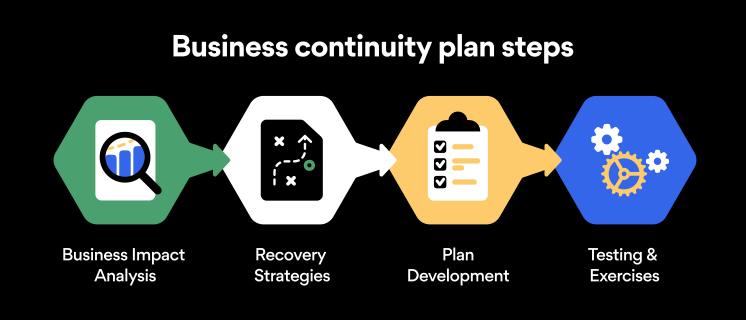
Here are some general guidelines that an organization looking to develop a BCP should consider:

Analysis

A business continuity plan should include an in-depth analysis of everything that could negatively affect the overall organizational infrastructure and operations. Assessing different levels of risk should also be a part of the analysis phase.

Design and development

Once you have a clear overview of potential risks your company could face, start developing a plan. Create a draft and reassess it to see if it takes into account even the smallest of details.

Implementation

Implement BCP within the organization by providing training sessions for the staff to get familiar with the plan. Getting everyone on the same page regarding crisis management is critical.

Testing

Rigorously test the plan. Play out a variety of scenarios in training sessions to learn the overall effectiveness of the continuity plan. By doing so, everyone on the team will be closely familiar with the business continuity plan’s guidelines.

Maintenance and updating

Because the threat landscape constantly changes and evolves, you should regularly reassess your BCP and take steps to update it. By making your continuity plan in tune with the times, you will be able to stay a step ahead of a crisis.

Level up your company’s security with NordPass Business

A comprehensive business continuity plan is vital for the entire organization’s security posture. However, in a perfect world, you wouldn’t have to use it. This is where NordPass Business can help.

Remember, weak, reused, or compromised passwords are often cited as one of the top contributing factors in data breaches. It’s not surprising, considering that an average user has around 100 passwords. Password fatigue is real and significantly affects how people treat their credentials. NordPass Business counters these issues.

With NordPass Business, your team will have a single secure place to store all work-related passwords, credit cards, and other sensitive information. Accessing all the data stored in NordPass is quick and easy, which allows your employees not to be distracted by the task of finding the correct passwords for the correct account.

In cyber incidents, NordPass Business ensures that company credentials remain secure at all times. Everything stored in the NordPass vault is secured with advanced encryption algorithms, which would take hundreds of years to brute force.

If you are interested in learning more about NordPass Business and how it can fortify corporate security, do not hesitate to book a demo with our representative.

 

About Version 2 Digital

Version 2 Digital is one of the most dynamic IT companies in Asia. The company distributes a wide range of IT products across various areas including cyber security, cloud, data protection, end points, infrastructures, system monitoring, storage, networking, business productivity and communication products.

Through an extensive network of channels, point of sales, resellers, and partnership companies, Version 2 offers quality products and services which are highly acclaimed in the market. Its customers cover a wide spectrum which include Global 1000 enterprises, regional listed companies, different vertical industries, public utilities, Government, a vast number of successful SMEs, and consumers in various Asian cities.

About NordPass
NordPass is developed by Nord Security, a company leading the global market of cybersecurity products.

The web has become a chaotic space where safety and trust have been compromised by cybercrime and data protection issues. Therefore, our team has a global mission to shape a more trusted and peaceful online future for people everywhere.

Projections of Zero Trust security

Recent years took cybersecurity to a new level — digital transformation, migration to the cloud environments, and remote work became the synonyms of technological business evolution. The new approach pushed such tech terms as VPN (Virtual Private Network), S(A)SE (Secure (Access) Service Edge), MFA (Multi-Factor Authentication), and many more that turned into essential modern cybersecurity elements.

Zero Trust is one of those most critical terms that already live rent-free in IT managers’ heads. It’s way past the emerging buzzword stage — now, Zero Trust is a security model that dictates organizational cybersecurity strategies and general security approaches. 

But how influential is the Zero Trust model? What’s its role in the near future and its place in a broader picture of cybersecurity? Let’s take a look at what trends to expect in the Zero Trust department.

Password is dead; long live Zero Trust?!

The new cybersecurity era will likely be marked by another iconic moment in the digital age. Rumor has it that we will be done with the passwords in 2023. Hard to say if it’s true, but passwords as single-factor authentication are outdated in the context of the current cybersecurity landscape.

Lost or stolen credentials surge black markets imposing risk to data security. A glance at the high numbers of the latest data breaches of 2022:

  • Slash Next reports 255 million phishing-related attacks in 6 months — a 61% increase compared to 2021.

  • According to Verizon, weak or stolen passwords contributed to 81% of hacking-related data breaches. 82% of breaches were triggered by human error (including social engineering attacks).

  • Nvidia suffered an attack and lost the credentials (email addresses and Windows password hashes) of 71,000 employees.

Keeping in mind that 73% of employees recycle the same personal passwords for work-related accounts – NordLayer’s research about bad cybersecurity habits concluded weak passwords as one of the top vulnerabilities of organization security – the number of leaked personal credentials is a huge red flag for organizations.

Despite education and targeted reminders of password hygiene, more than half (59%) of workers tend to reuse passwords while being familiar with existing risks.

The remaining high data breach statistics only confirm the insufficiency of current actions regarding securing credentials and company data accordingly.

The Zero Trust mindset to ‘trust none; verify all’ is a straightforward change for companies to dismiss careless passwords from their systems and elevate security levels effectively. 

A quick recap: ZT, ZTA, and ZTNA

Zero Trust (ZT) is a trust algorithm that ensures resources within specific networks can be accessed only by verified endpoints — devices or users. Yet when discussing cybersecurity, additional concepts of Zero Trust Architecture (ZTA) and Zero Trust Network Access (ZTNA) emerge — what’s the difference?

overlaping charts showing differences between cybersec solutions

An easy way to differentiate Zero Trust, Zero Trust Architecture, and ZTNA is to define Zero Trust as the driving idea, model, or mindset that puts the theoretical foundation for the application of the method.

The Zero Trust principle turns attention to the main focus points:

  • Make sure to check and verify every endpoint connection request to the network.

  • Solely job-mandatory access rights must be granted to perform role objectives. 

  • Plan for the maximum constraint of user movement in the network in case of a breach.

Zero Trust Architecture is a practical application of the Zero Trust approach when building security policies and IT infrastructure as if there was no traditional perimeter. ZTA combines and implements solutions for:

  • Endpoint verification

  • Network supervision. 

ZTNA is a segment of Zero Trust Architecture that provides a solution to trusted-only application access. ZTNA is integral to the SASE and SSE frameworks for establishing security in remote cloud environments.

What changes does Zero Trust employ: ZTNA’s focus

Instead of discussing Zero Trust at theoretical levels, it’s beneficial to investigate ZTNA to understand what changes it suggests and how companies apply them.

According to Statista, the most common solution organizations used to enable Zero Trust segmentation in 2021 was ZTNA. Identity, Credential, and Access Management followed it.

The popularity of ZTNA comes from its adoption as a more efficient identity- and context-supported solution for controlling increasing attack surfaces in hybrid environments.

As ZK Research indicates, VPN was a go-to solution to manage and protect companies’ IT perimeters. However, VPN performance and security fallbacks brought by backhauling network traffic and open network access make it refer to VPN as a remote work solution only as a temporary one.

Therefore, to secure and connect remote workers while managing distributed endpoint, user, and application networks under the organization’s scope, companies turned to secure network access (SaaS, cloud, and edge) solutions, including ZTNA.

Shrinking the attack surface – limiting the threat actor’s activity in the network by requesting additional authentication or assigned permits to access internal applications – is the key feature of the ZTNA solution.

Prospects of Zero Trust in cybersecurity

Cyberattacks continuously challenge everyone, from consumers to federal agencies, hitting the weakest link — passwords. Attacks are disrupting business operations from intelligence businesses to manufacturers — any company with internet-connected systems and networks is vulnerable.

The Zero Trust approach can mitigate hardly controllable external and internal factors that might lead to a breach. ZTNA enables IT administrators to monitor, manage and interact with connections between endpoints and ultimately conclude whether the connection should be approved or denied.

Driving factors of ZTNA adoption

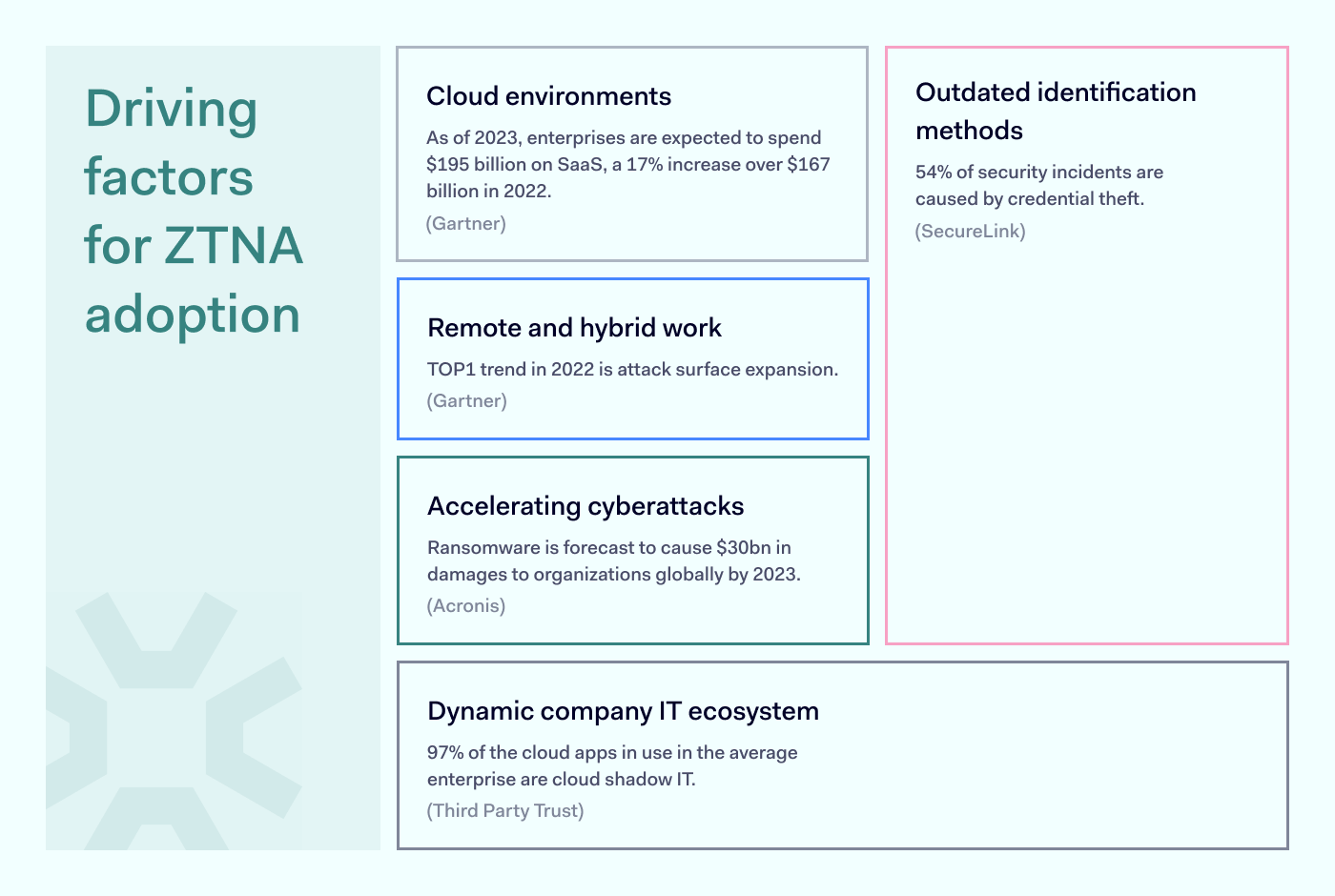
The peak of ZTNA matched with hybrid and remote work developments globally introduced by the COVID-19 pandemic. Although opinions tend to clash, remote work is here to stay, and ZTNA maintains its importance to business network security.

main factors driving ZTNA adoption

To securely return to old ways of working – the static office-contained perimeter, which is the least challenging to maintain and control – all of the workforce should come back to their corporate desks.

Migration to the cloud is gaining momentum as it offers more flexibility and reduces the complexity of traditional IT perimeter.

The password more often causes security issues than prevents it and needs to be reconsidered and redesigned to move to more sustainable solutions.

Evolved understanding of a workplace with WFA (Work From Anywhere) quickly showed the comforts of working from home or cafe, answering work emails from a personal phone, or watching TV series on a corporate laptop after working hours. Yet these blurred lines stretch the reach of unapproved applications and devices blending into the company network.

Although the digital landscape and new modern habits might be alarming, going backward seems unrealistic. Thus ZTNA helps manage current cybersecurity challenges in this technological evolution.

State of remote work 

There’s no denying that companies will have to accept the turned tables — employees now consider not how many days they will decide to work from home but how often they are willing to show up in the office.

If the workforce is not to return to the office full-time, ZTNA naturally cannot be discarded from the company’s cybersecurity strategy.

banner showing remote work statistics

According to ZK Research 2022 Work-from-Anywhere Study, just one – or even less – out of 10 employees consider 100% work on-site, leaving most of the workforce a risk factor to data and application security.

How do companies adopt Zero Trust? 

Zero Trust is dominant in creating security strategies. Statista survey revealed that one-third of polled companies, as of January 2022, already had a formal strategy actively embracing a Zero Trust policy. Only 20 percent of respondents had no Zero Trust strategy as of 2022.

Statista also concluded that almost one-fifth of respondent organizations completely discard the Zero Trust model as a cloud security strategy while the vast majority (81%) fully or partially embrace Zero Trust model guidelines for building internal security policies.

It’s safe to say that Zero Trust has been assigned an important and influential role in shaping the security infrastructure face. The mindset combines Zero Trust backed practices of accountability, consistency, dependability, and transparency to activities and processes within the organization network.

How to transition to Zero Trust?

Benefits for businesses that adopt ZTNA to enhance the security of their network. Deploying Zero Trust-based features establishes secure cloud access and allows network segmentation for least privileged access to resources.

The model reduces insider threat by protecting internal applications and lowering the potential of account breach risk. Overall, ZTNA adoption supports the company’s journey to achieving compliance requirements.

ztna quote from internal expert at NordLayer

Zero Trust Network Access is a predominant framework of any setup that deals with hybrid work as an alternative to VPN. NordLayer solution makes implementation of ZTNA easy and integrable despite the existing infrastructure in your company. Reach out to learn more about securing your business network with ZTNA within minutes.

About Version 2 Digital

Version 2 Digital is one of the most dynamic IT companies in Asia. The company distributes a wide range of IT products across various areas including cyber security, cloud, data protection, end points, infrastructures, system monitoring, storage, networking, business productivity and communication products.

Through an extensive network of channels, point of sales, resellers, and partnership companies, Version 2 offers quality products and services which are highly acclaimed in the market. Its customers cover a wide spectrum which include Global 1000 enterprises, regional listed companies, different vertical industries, public utilities, Government, a vast number of successful SMEs, and consumers in various Asian cities.

These days, cybercrime is rampant. It’s no longer a matter of “if” you’re going to suffer an attack but “when” it will happen. All companies want to be ready for any crisis. And this is where a business continuity plan comes into play.

But what is a business continuity plan exactly? Why is it important? What should one include? Today, we’re exploring all these questions in-depth.

What is a business continuity plan?

A business continuity plan (BCP) is a document that sets guidelines for how an organization will continue its operations in the event of a disruption, whether it’s a fire, flood, other natural disaster or a cybersecurity incident. A BCP aims to help organizations resume operations without significant downtime.

Unfortunately, according to a 2020 Mercer survey, 51% of businesses across the globe don’t have a business continuity plan in place.

What’s the difference between business continuity and disaster recovery plans?

We often confuse the terms business continuity plan and disaster recovery plan. The two overlap and often work together, but the disaster recovery plan focuses on containing, examining, and restoring operations after a cyber incident. On the other hand, BCP is a broader concept that considers the whole organization. A business continuity plan helps organizations stay prepared for dealing with a potential crisis and usually encompasses a disaster recovery plan.

Importance of business continuity planning

The number of news headlines announcing data breaches has numbed us to the fact that cybercrime is very real and frequent and poses an existential risk to companies of all sizes and industries.

Consider that in 2021, approximately 37% of global organizations fell victim to a ransomware attack. Then consider that business interruption and restoration costs account for 50% of cyberattack-related losses. Finally, take into account that most cyberattacks are financially motivated and the global cost of cybercrime topped $6 trillion last year. The picture is quite clear — cybercrime is a lucrative venture for bad actors and potentially disastrous for those on the receiving end.

To thrive in these unpredictable times, organizations go beyond conventional security measures. Many companies develop a business continuity plan parallel to secure infrastructure and consider the plan a critical part of the security ecosystem. The Purpose of a business continuity plan is to significantly reduce the downtime in an emergency and, in turn, reduce the potential reputational damage and — of course — revenue losses.

Business continuity plan template

Password security for your business

Store, manage and share passwords.

30-day money-back guarantee

Business Continuity Plan Example

[Company Name]

[Date]

I. Introduction

  • Purpose of the Plan

  • Scope of the Plan

  • Budget

  • Timeline

The initial stage of developing a business continuity plan starts with a statement of the plan’s purpose, which explains the main objective of the plan, such as ensuring the organization’s ability to continue its operations during and after a disruptive event.

The Scope of the Plan outlines the areas or functions that the plan will cover, including business processes, personnel, equipment, and technology.

The Budget specifies the estimated financial resources required to implement and maintain the BCP. It includes costs related to technology, personnel, equipment, training, and other necessary expenses.

The Timeline provides a detailed schedule for developing, implementing, testing, and updating the BCP.

II. Risk Assessment

  • Identification of Risks

  • Prioritization of Risks

  • Mitigation Strategies

The Risk Assessment section of a Business Continuity Plan (BCP) is an essential part of the plan that identifies potential risks that could disrupt an organization’s critical functions.

The Identification of Risks involves identifying potential threats to the organization, such cybersecurity breaches, supply chain disruptions, power outages, and other potential risks. This step is critical to understand the risks and their potential impact on the organization.

Once the risks have been identified, the Prioritization of Risks follows, which helps determine which risks require the most attention and resources.

The final step in the Risk Assessment section is developing Mitigation Strategies to minimize the impact of identified risks. Mitigation strategies may include preventative measures, such as system redundancies, data backups, cybersecurity measures, as well as response and recovery measures, such as emergency protocols and employee training.

III. Emergency Response

  • Emergency Response Team

  • Communication Plan

  • Emergency Procedures

This section of the plan focuses on immediate actions that should be taken to ensure the safety and well-being of employees and minimize the impact of the event on the organization’s operations.

The Emergency Response Team is responsible for managing the response to an emergency or disaster situation. This team should be composed of individuals who are trained in emergency response procedures and can act quickly and decisively during an emergency. The team should also include a designated leader who is responsible for coordinating the emergency response efforts.

The Communication Plan outlines how information will be disseminated during an emergency situation. It includes contact information for employees, stakeholders, and emergency response personnel, as well as protocols for communicating with these individuals.

The Emergency Procedures detail the steps that should be taken during an emergency or disaster situation. The emergency procedures should be developed based on the potential risks identified in the Risk Assessment section and should be tested regularly to ensure that they are effective.

IV. Business Impact Analysis

The Business Impact Analysis (BIA) section of a Business Continuity Plan (BCP) is a critical step in identifying the potential impact of a disruption to an organization’s critical operations.

The Business Impact Analysis is typically conducted by a team of individuals who understand the organization’s critical functions and can assess the potential impact of a disruption to those functions. The team may include representatives from various departments, including finance, operations, IT, and human resources.

V. Recovery and Restoration

  • Procedures for recovery and restoration of critical processes

  • Prioritization of recovery efforts

  • Establishment of recovery time objectives

The Recovery and Restoration section of a Business Continuity Plan (BCP) outlines the procedures for recovering and restoring critical processes and functions following a disruption.

The Procedures for recovery and restoration of critical processes describe the steps required to restore critical processes and functions following a disruption. This may include steps such as relocating to alternate facilities, restoring data and systems, and re-establishing key business relationships.

The Prioritization section of the plan identifies the order in which critical processes will be restored, based on their importance to the organization’s operations and overall mission.

Recovery time objectives (RTOs) define the maximum amount of time that critical processes and functions can be unavailable following a disruption. Establishing RTOs ensures that recovery efforts are focused on restoring critical functions within a specific timeframe.

VI. Plan Activation

  • Plan Activation Procedures

The Plan Activation section is critical in ensuring that an organization can quickly and effectively activate the plan and respond to a potential emergency.

The Plan Activation Procedures describe the steps required to activate the BCP in response to a disruption. The procedures should be clear and concise, with specific instructions for each step to ensure a prompt and effective response.

VII. Testing and Maintenance

  • Testing Procedures

  • Maintenance Procedures

  • Review and Update Procedures

This section of the plan is critical to ensure that an organization can effectively respond to disruptions and quickly resume its essential functions.

Testing procedures may include scenarios such as natural disasters, cyber-attacks, and other potential risks. The testing procedures should include clear objectives, testing scenarios, roles and responsibilities, and evaluation criteria to assess the effectiveness of the plan.

The Maintenance Procedures detail the steps necessary to keep the BCP up-to-date and relevant.

The Review and Update Procedures describe how the BCP will be reviewed and updated regularly to ensure its continued effectiveness. This may involve conducting a review of the plan on a regular basis or after significant changes to the organization’s operations or threats.

What should a business continuity plan checklist include?

Organizations looking to develop a BCP have more than a few things to think through and consider. Variables such as the size of the organization, its IT infrastructure, personnel, and resources all play a significant role in developing a continuity plan. Remember, each crisis is different, and each organization will have a view on handling it according to all the variables in play. However, all business continuity plans will include a few elements in one way or another.

  • Clearly defined areas of responsibility

    A BCP should define specific roles and responsibilities for cases of emergency. Detail who is responsible for what tasks and clarify what course of action a person in a specific position should take. Clearly defined roles and responsibilities in an emergency event allow you to act quickly and decisively and minimize potential damage.

  • Crisis communication plan

    In an emergency, communication is vital. It is the determining factor when it comes to crisis handling. For communication to be effective, it is critical to establish clear communication pipelines. Furthermore, it is crucial to understand that alternative communication channels should not be overlooked and outlined in a business continuity plan.

  • Recovery teams

    A recovery team is a collective of different professionals who ensure that business operations are restored as soon as possible after the organization confronts a crisis.

  • Alternative site of operations

    Today, when we think of an incident in a business environment, we usually think of something related to cybersecurity. However, as discussed earlier, a BCP covers many possible disasters. In a natural disaster, determine potential alternate sites where the company could continue to operate.

  • Backup power and data backups

    Whether a cyber event or a real-life physical event, ensuring that you have access to power is crucial if you wish to continue operations. In a BCP, you can often come across lists of alternative power sources such as generators, where such tools are located, and who should oversee them. The same applies to data. Regularly scheduled data backups can significantly reduce potential losses incurred by a crisis event.

  • Recovery guidelines

    If a crisis is significant, a comprehensive business continuity plan usually includes detailed guidelines on how the recovery process will be carried out.

Business continuity planning steps

Here are some general guidelines that an organization looking to develop a BCP should consider:

Analysis

A business continuity plan should include an in-depth analysis of everything that could negatively affect the overall organizational infrastructure and operations. Assessing different levels of risk should also be a part of the analysis phase.

Design and development

Once you have a clear overview of potential risks your company could face, start developing a plan. Create a draft and reassess it to see if it takes into account even the smallest of details.

Implementation

Implement BCP within the organization by providing training sessions for the staff to get familiar with the plan. Getting everyone on the same page regarding crisis management is critical.

Testing

Rigorously test the plan. Play out a variety of scenarios in training sessions to learn the overall effectiveness of the continuity plan. By doing so, everyone on the team will be closely familiar with the business continuity plan’s guidelines.

Maintenance and updating

Because the threat landscape constantly changes and evolves, you should regularly reassess your BCP and take steps to update it. By making your continuity plan in tune with the times, you will be able to stay a step ahead of a crisis.

Level up your company’s security with NordPass Business

A comprehensive business continuity plan is vital for the entire organization’s security posture. However, in a perfect world, you wouldn’t have to use it. This is where NordPass Business can help.

Remember, weak, reused, or compromised passwords are often cited as one of the top contributing factors in data breaches. It’s not surprising, considering that an average user has around 100 passwords. Password fatigue is real and significantly affects how people treat their credentials. NordPass Business counters these issues.

With NordPass Business, your team will have a single secure place to store all work-related passwords, credit cards, and other sensitive information. Accessing all the data stored in NordPass is quick and easy, which allows your employees not to be distracted by the task of finding the correct passwords for the correct account.

In cyber incidents, NordPass Business ensures that company credentials remain secure at all times. Everything stored in the NordPass vault is secured with advanced encryption algorithms, which would take hundreds of years to brute force.

If you are interested in learning more about NordPass Business and how it can fortify corporate security, do not hesitate to book a demo with our representative.


About Version 2 Digital

Version 2 Digital is one of the most dynamic IT companies in Asia. The company distributes a wide range of IT products across various areas including cyber security, cloud, data protection, end points, infrastructures, system monitoring, storage, networking, business productivity and communication products.

Through an extensive network of channels, point of sales, resellers, and partnership companies, Version 2 offers quality products and services which are highly acclaimed in the market. Its customers cover a wide spectrum which include Global 1000 enterprises, regional listed companies, different vertical industries, public utilities, Government, a vast number of successful SMEs, and consumers in various Asian cities.

About NordPass
NordPass is developed by Nord Security, a company leading the global market of cybersecurity products.

The web has become a chaotic space where safety and trust have been compromised by cybercrime and data protection issues. Therefore, our team has a global mission to shape a more trusted and peaceful online future for people everywhere.

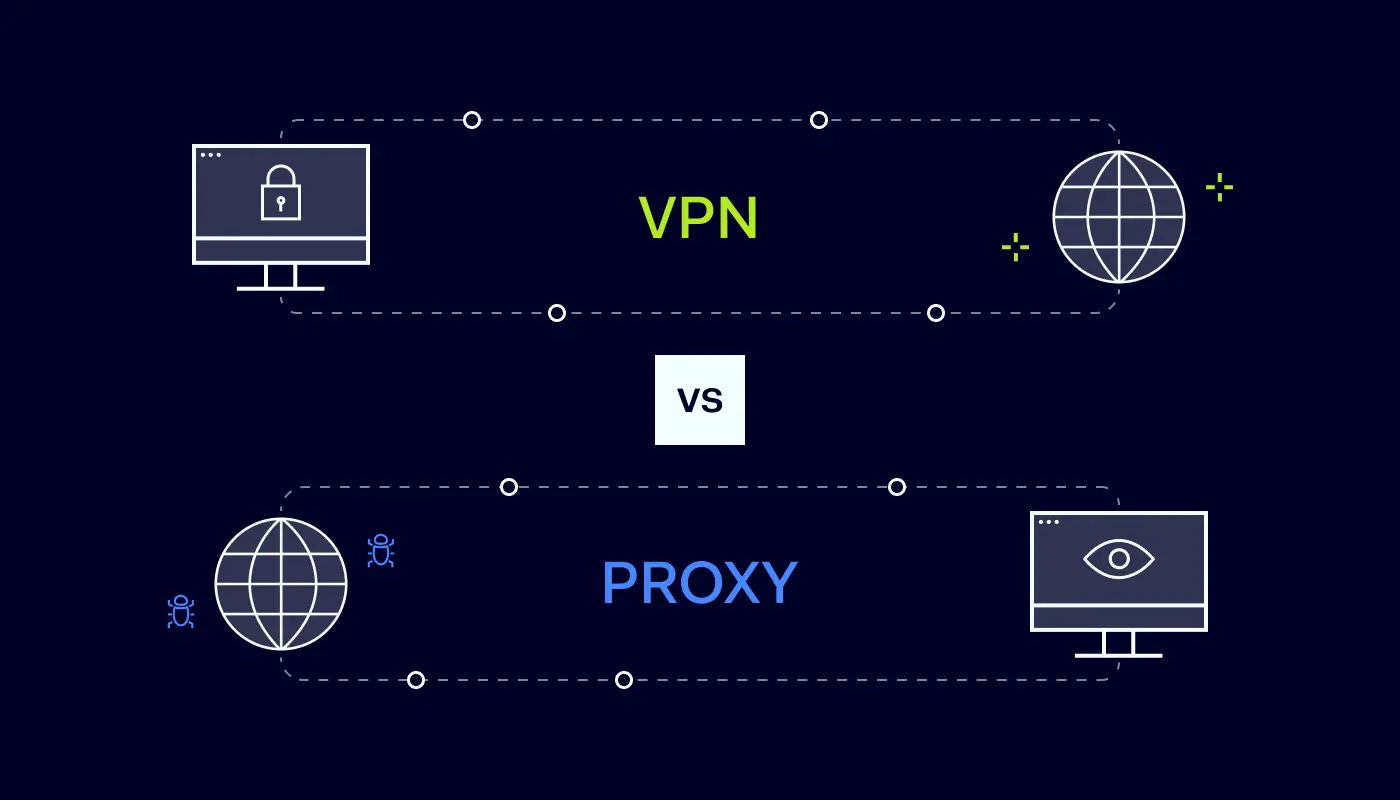
VPN vs. proxy: which should your business choose?

Are you worried about employees leaking private information as they browse the web? If so, you’re probably considering setting up a Virtual Private Network (VPN) or proxy server.

Both technologies mask traffic and conceal your location. But there are significant differences between proxies and VPNs that users need to know. Let’s explore the VPN vs proxy contest in more detail and help you find the ideal privacy solution.

What is a VPN and how does it work?

VPNs are networks that route traffic through private servers before sending it to its destination. When users log onto their VPN client, the service uses special protocols to create a “tunnel” connecting data sources and destinations.

VPNs offer a couple of important security and privacy services:

  • Anonymization. Traffic routed through Virtual Private Network servers is assigned a new IP address. This anonymizes the data source, making it hard for outsiders to track online activity. Outside observers may know you’re using a VPN connection, but your original IP address will be inaccessible.

  • Encryption. VPNs encrypt data from the user device to the virtual private gateway. Any web traffic passing through a remote access VPN server is basically unreadable to outside observers while it is encrypted. Users can still browse the web or access streaming content. But their information and activity will remain private. This is very useful when dealing with financial data.

VPNs are usually paid services. A third-party VPN provider will maintain servers around the world and manage encryption. Users log on via clients, which can be integrated into web browsers if desired.

VPNs also work at the operating system level. This means they cover all traffic leaving or entering a network. They are not restricted to single apps.

What is a proxy and how does it work?

Proxies also use external servers. These proxy servers route traffic from user devices and give each data packet a new IP address. As far as outsiders are concerned, user traffic comes from the proxy’s remote server. This is a major benefit when accessing geo-restricted web content.

On the downside, proxies do not feature data encryption. They can anonymize the identity of a user but not the data they send. Sensitive data remains exposed to attackers, making proxies unsuitable for a business internet connection.

Proxies also tend to be associated with individual applications. They process traffic from web browsers or streaming games. But proxies do not provide all-around privacy at an operating system level.

Understanding the main proxy types

There are various different types of proxy servers, and each has its own use cases:

  • HTTP proxies. Designed to work with web pages and browsers. You can configure Chrome or Edge to route all HTTP traffic through a proxy, or just assign proxy routing to specific websites.

  • SOCKS5 proxies. SOCKS proxies work on the application level and route traffic from specific apps. For example, a SOCKS5 proxy could be assigned to route Skype conversations securely. SOCKS5 proxies are flexible but tend to be slower than HTTP versions.

  • Transparent proxies. Generally invisible to network users. A transparent proxy can filter web traffic and monitor activity. This makes them useful in settings like schools and libraries. Parents could also use them to filter the content available to children.

  • Private proxies. Private proxies provide a dedicated IP address for each user. This does not provide as much privacy as VPNs. However, it can help unblock geo-restricted websites and improve proxy speeds.

Key differences between proxy and VPN

We now know the main features of proxies and VPNs. But here’s the all-important question. How do VPNs and proxies differ, and which one should you choose?

1. VPNs provide encryption

Encryption is the most important difference between VPNs and proxies and probably the key consideration for business users. When you use a VPN, all of your internet traffic is encrypted.

The best paid providers use AES-256 encryption that has no known weaknesses. Encrypted data will be off-limits to thieves, limiting the risk of leaking commercial data. A remote work VPN will also lock down connections between home workers and central offices. So you can establish a secure connection between workloads and user devices.

Proxies never encrypt traffic. All they do is re-route packets and provide IP address anonymization. That can be useful when accessing blocked web pages. But data security will be relatively weak.

2. VPNs handle all traffic, proxies work with individual apps

VPNs function at the operating system layer. They apply encryption and anonymization to all data passing across network boundaries. Businesses do not have to install software on individual apps or configure settings for each service. Privacy controls apply over-the-top – a more convenient solution.

Because they work on the application level, proxies are used with specific software or services. They won’t cover all network connections, potentially leaving security gaps.

3. Proxies may be faster

Proxies don’t need to encrypt data as they route it worldwide. VPNs do. This imposes extra bandwidth overheads. VPNs may be slower, as a result, sometimes making them unworkable for streaming tasks.

However, the best VPNs match proxies in terms of speed. Free proxies generally use cheaper, less extensive infrastructure. So while they use more basic technology, they may be slower than VPN alternatives.

4. You’ll usually pay for VPNs

Proxies have low maintenance costs for providers and are usually free for users. At least, they are free at the point of use. As with most free services, proxy customers are the product. Expect your data to be stored and sold to third parties for marketing purposes.

There are free VPNs as well. However, paid services are recommended for business customers. Paid VPNs charge small fees and provide higher-quality encryption, speed, reliability, and anonymization. They also have stricter anti-logging policies. Your data should remain private and won’t be resold.

Unlike most proxies, good VPNs combine these services with customer support. All-in-all, they deliver much better online privacy for high-end users.

5. VPNs are more reliable

As a general rule, VPNs are more reliable. Your connection will drop less frequently. Speeds will be more regular. A host server around the world should be available at all times.

Proxies can be very reliable but do not have such a strong reputation. Expect connections to drop every now and then, especially when using free proxy services.

VPNs also offer more reliable DNS leak protection. Poor-quality proxies will likely leak DNS information to your internet service provider or the websites you visit. This completely compromises the privacy service.

Similarities between proxies and VPNs

As you can see, there are plenty of divergences between VPNs and proxies. But it’s important to remember the similarities as well.

  • Both proxies and VPNs allow anonymous web browsing. Customers use them to change their IP address. This enables access to previously blocked online services.

  • VPNs and proxies use third-party routers. While you can set up an in-house VPN server or proxy, both services are generally sourced from external partners.

  • Both can be used to control network access. Proxies are often used to block access for employees to certain websites. VPNs can also blacklist websites.

  • Neither represents a complete privacy solution. VPNs are more effective when anonymizing network traffic but are not completely watertight. Both proxies and VPNs can have technical flaws that expose your location. They may collect data to share with commercial partners or governments.

When should you use VPN and when proxy?

A basic rule is that VPNs should be used wherever users need security and privacy. VPNs combine reliable IP anonymization with encryption. This means company data will be protected twice as it passes over the internet. Proxies provide very little protection at all.

VPN connections can be used to enable secure remote work. Employees can install VPN clients on work devices at home and use an encrypted tunnel to join the central company network. Without VPN protection, any data sent from workers to the network will be exposed to attackers.

Site-to-Site VPNs can connect different work locations securely. They extend the main network to other sites, allowing every department or branch to access data safely.

VPNs are also used to transfer sensitive financial data. Companies can use them to make transactions or discuss commercial arrangements. Without encryption, using proxies for these tasks is extremely risky.

Proxies can play a role in some situations. Transparent proxies are often used to prevent access to undesirable websites. Companies could use HTTP proxies to wall off social media during working hours.

A proxy server may also be handy for researching content worldwide, assuming security concerns are secondary. You can use a proxy server to pose as a buyer from different countries and see how prices vary. Or you might access videos and bypass content restrictions.

VPN vs proxy: which is better for your business?

By now, you probably have an idea of which privacy solution to choose. Most businesses should opt for virtual private networks over proxies. A proxy server offers minimal security features. The service may be free of charge and fast, but data sent via a proxy server is always vulnerable.

By contrast, VPNs encrypt data – usually at levels that protect information from attackers. The best VPNs use military-grade encryption. Some offer add-ons like Double VPN protection that makes it hard to tell whether users are even employing a VPN.

VPNs come in business-friendly forms. You can set them up for remote workers, link departments, and integrate VPNs with cloud computing. If you choose a reliable provider, you can talk to support staff and optimize security and privacy. This just isn’t available with any proxies.

How can NordLayer help?

NordLayer can help you implement a secure, fast, and business-friendly VPN solution. Our software-based products include VPN services powered by the NordLynx protocol. This combines speed and cutting-edge encryption.

Create site-to-site setups to cover every workstation. Cater for remote workers, and implement Single Sign On that extends protection to all network assets. To find out more, get in touch with the NordLayer team today.

FAQ

Is a proxy server the same as a VPN?

No. Proxy and VPN servers both route internet traffic and assign anonymous IP addresses. VPNs add encryption to data transfers. They act at OSI layers 3 or 4, while proxies operate at layers 5 to 7.

Do you need a proxy server if you have a VPN?

Probably not. VPNs deliver the same services as proxy servers, with better security, performance, and support. In some cases, you could use a VPN to work around a transparent proxy if you use one to regulate internet activity. But this is relatively rare.

Are proxy servers safe?

Maybe, but how can you be sure? Free proxy services are notorious for leaking and selling data. Users should assume that someone is tracking their activity. A proxy server should never be used to send sensitive data.

Which is faster, VPN or proxy?

Proxies are often faster than VPNs as they do not require encryption. However, speeds also depend on the number of proxy server users, available servers, and the quality of those servers. In many cases, a well-managed VPN will be faster than a cheap, poorly run proxy.

Is Tor a VPN or a proxy server?

Neither. Tor is a network of nodes located around the world. These nodes are free to access. They act as a relay, bouncing traffic between nodes until it reaches its destination. It has some VPN features, such as encryption. However, Tor traffic can often be seen by volunteers, and its exit nodes are often blacklisted. Tor speeds also tend to be slower than proxies and VPNs.

About Version 2 Digital

Version 2 Digital is one of the most dynamic IT companies in Asia. The company distributes a wide range of IT products across various areas including cyber security, cloud, data protection, end points, infrastructures, system monitoring, storage, networking, business productivity and communication products.

Through an extensive network of channels, point of sales, resellers, and partnership companies, Version 2 offers quality products and services which are highly acclaimed in the market. Its customers cover a wide spectrum which include Global 1000 enterprises, regional listed companies, different vertical industries, public utilities, Government, a vast number of successful SMEs, and consumers in various Asian cities.

These days, cybercrime is rampant. It’s no longer a matter of “if” you’re going to suffer an attack but “when” it will happen. All companies want to be ready for any crisis. And this is where a business continuity plan comes into play.

But what is a business continuity plan exactly? Why is it important? What should one include? Today, we’re exploring all these questions in-depth.

What is a business continuity plan?

A business continuity plan (BCP) is a document that sets guidelines for how an organization will continue its operations in the event of a disruption, whether it’s a fire, flood, other natural disaster or a cybersecurity incident. A BCP aims to help organizations resume operations without significant downtime.

Unfortunately, according to a 2020 Mercer survey, 51% of businesses across the globe don’t have a business continuity plan in place.

What’s the difference between business continuity and disaster recovery plans?

We often confuse the terms business continuity plan and disaster recovery plan. The two overlap and often work together, but the disaster recovery plan focuses on containing, examining, and restoring operations after a cyber incident. On the other hand, BCP is a broader concept that considers the whole organization. A business continuity plan helps organizations stay prepared for dealing with a potential crisis and usually encompasses a disaster recovery plan.

Importance of business continuity planning

The number of news headlines announcing data breaches has numbed us to the fact that cybercrime is very real and frequent and poses an existential risk to companies of all sizes and industries.

Consider that in 2021, approximately 37% of global organizations fell victim to a ransomware attack. Then consider that business interruption and restoration costs account for 50% of cyberattack-related losses. Finally, take into account that most cyberattacks are financially motivated and the global cost of cybercrime topped $6 trillion last year. The picture is quite clear — cybercrime is a lucrative venture for bad actors and potentially disastrous for those on the receiving end.

To thrive in these unpredictable times, organizations go beyond conventional security measures. Many companies develop a business continuity plan parallel to secure infrastructure and consider the plan a critical part of the security ecosystem. The Purpose of a business continuity plan is to significantly reduce the downtime in an emergency and, in turn, reduce the potential reputational damage and — of course — revenue losses.

Business continuity plan template

Password security for your business

Store, manage and share passwords.

30-day money-back guarantee

Business Continuity Plan Example

[Company Name]

[Date]

I. Introduction

  • Purpose of the Plan

  • Scope of the Plan

  • Budget

  • Timeline

The initial stage of developing a business continuity plan starts with a statement of the plan’s purpose, which explains the main objective of the plan, such as ensuring the organization’s ability to continue its operations during and after a disruptive event.

The Scope of the Plan outlines the areas or functions that the plan will cover, including business processes, personnel, equipment, and technology.

The Budget specifies the estimated financial resources required to implement and maintain the BCP. It includes costs related to technology, personnel, equipment, training, and other necessary expenses.

The Timeline provides a detailed schedule for developing, implementing, testing, and updating the BCP.

II. Risk Assessment

  • Identification of Risks

  • Prioritization of Risks

  • Mitigation Strategies

The Risk Assessment section of a Business Continuity Plan (BCP) is an essential part of the plan that identifies potential risks that could disrupt an organization’s critical functions.

The Identification of Risks involves identifying potential threats to the organization, such cybersecurity breaches, supply chain disruptions, power outages, and other potential risks. This step is critical to understand the risks and their potential impact on the organization.

Once the risks have been identified, the Prioritization of Risks follows, which helps determine which risks require the most attention and resources.

The final step in the Risk Assessment section is developing Mitigation Strategies to minimize the impact of identified risks. Mitigation strategies may include preventative measures, such as system redundancies, data backups, cybersecurity measures, as well as response and recovery measures, such as emergency protocols and employee training.

III. Emergency Response

  • Emergency Response Team

  • Communication Plan

  • Emergency Procedures

This section of the plan focuses on immediate actions that should be taken to ensure the safety and well-being of employees and minimize the impact of the event on the organization’s operations.

The Emergency Response Team is responsible for managing the response to an emergency or disaster situation. This team should be composed of individuals who are trained in emergency response procedures and can act quickly and decisively during an emergency. The team should also include a designated leader who is responsible for coordinating the emergency response efforts.

The Communication Plan outlines how information will be disseminated during an emergency situation. It includes contact information for employees, stakeholders, and emergency response personnel, as well as protocols for communicating with these individuals.

The Emergency Procedures detail the steps that should be taken during an emergency or disaster situation. The emergency procedures should be developed based on the potential risks identified in the Risk Assessment section and should be tested regularly to ensure that they are effective.

IV. Business Impact Analysis

The Business Impact Analysis (BIA) section of a Business Continuity Plan (BCP) is a critical step in identifying the potential impact of a disruption to an organization’s critical operations.

The Business Impact Analysis is typically conducted by a team of individuals who understand the organization’s critical functions and can assess the potential impact of a disruption to those functions. The team may include representatives from various departments, including finance, operations, IT, and human resources.

V. Recovery and Restoration

  • Procedures for recovery and restoration of critical processes

  • Prioritization of recovery efforts

  • Establishment of recovery time objectives

The Recovery and Restoration section of a Business Continuity Plan (BCP) outlines the procedures for recovering and restoring critical processes and functions following a disruption.

The Procedures for recovery and restoration of critical processes describe the steps required to restore critical processes and functions following a disruption. This may include steps such as relocating to alternate facilities, restoring data and systems, and re-establishing key business relationships.

The Prioritization section of the plan identifies the order in which critical processes will be restored, based on their importance to the organization’s operations and overall mission.

Recovery time objectives (RTOs) define the maximum amount of time that critical processes and functions can be unavailable following a disruption. Establishing RTOs ensures that recovery efforts are focused on restoring critical functions within a specific timeframe.

VI. Plan Activation

  • Plan Activation Procedures

The Plan Activation section is critical in ensuring that an organization can quickly and effectively activate the plan and respond to a potential emergency.

The Plan Activation Procedures describe the steps required to activate the BCP in response to a disruption. The procedures should be clear and concise, with specific instructions for each step to ensure a prompt and effective response.

VII. Testing and Maintenance

  • Testing Procedures

  • Maintenance Procedures

  • Review and Update Procedures

This section of the plan is critical to ensure that an organization can effectively respond to disruptions and quickly resume its essential functions.

Testing procedures may include scenarios such as natural disasters, cyber-attacks, and other potential risks. The testing procedures should include clear objectives, testing scenarios, roles and responsibilities, and evaluation criteria to assess the effectiveness of the plan.

The Maintenance Procedures detail the steps necessary to keep the BCP up-to-date and relevant.

The Review and Update Procedures describe how the BCP will be reviewed and updated regularly to ensure its continued effectiveness. This may involve conducting a review of the plan on a regular basis or after significant changes to the organization’s operations or threats.

What should a business continuity plan checklist include?

Organizations looking to develop a BCP have more than a few things to think through and consider. Variables such as the size of the organization, its IT infrastructure, personnel, and resources all play a significant role in developing a continuity plan. Remember, each crisis is different, and each organization will have a view on handling it according to all the variables in play. However, all business continuity plans will include a few elements in one way or another.

  • Clearly defined areas of responsibility

    A BCP should define specific roles and responsibilities for cases of emergency. Detail who is responsible for what tasks and clarify what course of action a person in a specific position should take. Clearly defined roles and responsibilities in an emergency event allow you to act quickly and decisively and minimize potential damage.

  • Crisis communication plan

    In an emergency, communication is vital. It is the determining factor when it comes to crisis handling. For communication to be effective, it is critical to establish clear communication pipelines. Furthermore, it is crucial to understand that alternative communication channels should not be overlooked and outlined in a business continuity plan.

  • Recovery teams

    A recovery team is a collective of different professionals who ensure that business operations are restored as soon as possible after the organization confronts a crisis.

  • Alternative site of operations

    Today, when we think of an incident in a business environment, we usually think of something related to cybersecurity. However, as discussed earlier, a BCP covers many possible disasters. In a natural disaster, determine potential alternate sites where the company could continue to operate.

  • Backup power and data backups

    Whether a cyber event or a real-life physical event, ensuring that you have access to power is crucial if you wish to continue operations. In a BCP, you can often come across lists of alternative power sources such as generators, where such tools are located, and who should oversee them. The same applies to data. Regularly scheduled data backups can significantly reduce potential losses incurred by a crisis event.

  • Recovery guidelines

    If a crisis is significant, a comprehensive business continuity plan usually includes detailed guidelines on how the recovery process will be carried out.

Business continuity planning steps

Here are some general guidelines that an organization looking to develop a BCP should consider:

Analysis

A business continuity plan should include an in-depth analysis of everything that could negatively affect the overall organizational infrastructure and operations. Assessing different levels of risk should also be a part of the analysis phase.

Design and development

Once you have a clear overview of potential risks your company could face, start developing a plan. Create a draft and reassess it to see if it takes into account even the smallest of details.

Implementation

Implement BCP within the organization by providing training sessions for the staff to get familiar with the plan. Getting everyone on the same page regarding crisis management is critical.

Testing

Rigorously test the plan. Play out a variety of scenarios in training sessions to learn the overall effectiveness of the continuity plan. By doing so, everyone on the team will be closely familiar with the business continuity plan’s guidelines.

Maintenance and updating

Because the threat landscape constantly changes and evolves, you should regularly reassess your BCP and take steps to update it. By making your continuity plan in tune with the times, you will be able to stay a step ahead of a crisis.

Level up your company’s security with NordPass Business

A comprehensive business continuity plan is vital for the entire organization’s security posture. However, in a perfect world, you wouldn’t have to use it. This is where NordPass Business can help.

Remember, weak, reused, or compromised passwords are often cited as one of the top contributing factors in data breaches. It’s not surprising, considering that an average user has around 100 passwords. Password fatigue is real and significantly affects how people treat their credentials. NordPass Business counters these issues.

With NordPass Business, your team will have a single secure place to store all work-related passwords, credit cards, and other sensitive information. Accessing all the data stored in NordPass is quick and easy, which allows your employees not to be distracted by the task of finding the correct passwords for the correct account.

In cyber incidents, NordPass Business ensures that company credentials remain secure at all times. Everything stored in the NordPass vault is secured with advanced encryption algorithms, which would take hundreds of years to brute force.

If you are interested in learning more about NordPass Business and how it can fortify corporate security, do not hesitate to book a demo with our representative.
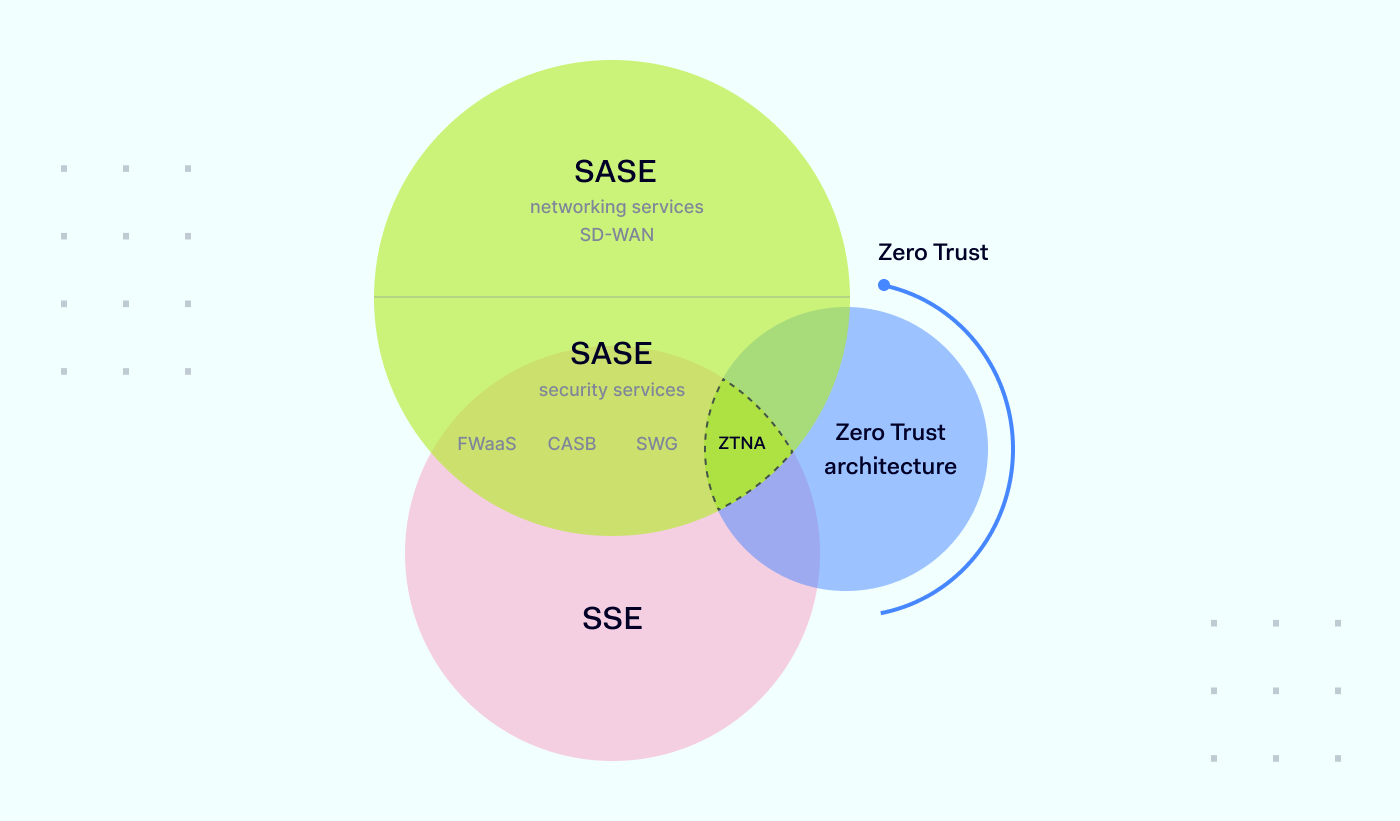
 

About Version 2 Digital

Version 2 Digital is one of the most dynamic IT companies in Asia. The company distributes a wide range of IT products across various areas including cyber security, cloud, data protection, end points, infrastructures, system monitoring, storage, networking, business productivity and communication products.

Through an extensive network of channels, point of sales, resellers, and partnership companies, Version 2 offers quality products and services which are highly acclaimed in the market. Its customers cover a wide spectrum which include Global 1000 enterprises, regional listed companies, different vertical industries, public utilities, Government, a vast number of successful SMEs, and consumers in various Asian cities.

About NordPass
NordPass is developed by Nord Security, a company leading the global market of cybersecurity products.

The web has become a chaotic space where safety and trust have been compromised by cybercrime and data protection issues. Therefore, our team has a global mission to shape a more trusted and peaceful online future for people everywhere.

Thriving as an app security engineer: 6 reasons to work in cybersecurity

Although the application security (app sec) role can seem the same in every industry, it’s not. Businesses operating in general industries offer fewer possibilities for comprehensive professional growth than security-focused companies. That was the case for Marvin Petzolt, a Senior Application Security Engineer at Nord Security, who jumped from an application security engineer role at a music-sharing business to a security-oriented company. Let Marvin tell us in his own words what factors make app sec professionals thrive at our company.
Marvin Petzolt, Senior Application Security Engineer at Nord Security

#1 You make an impact

Many people, including me, enjoy working at a place where you can make an impact. As an app security engineer at Nord, I can influence security design and the implementation of some of the greatest cybersecurity products in the industry – NordVPN, NordPass, NordLayer, and NordLocker. By ensuring high-security standards for each product, I contribute to building meaningful, user-friendly, and security-centric consumer solutions valued by millions of people and businesses worldwide.

However, having a tangible impact on security products is not the only way I can make a difference. My security recommendations and guidelines are also taken into account when improving business operations or team workflow. For example, when I joined the Application Security Team, we would be notified of upcoming Nord product updates mainly via our automatization and notification bots. However, this approach left us very little time between security testing of the upcoming feature and release to production, which naturally increased pressure on the team.

So I initiated the concept of security product owners, establishing a bi-directional exchange between a specific Nord product and the Application Security team. This concept allowed us to improve communication between developers, team leads, and the Application Security team.

We’re now notified about upcoming changes significantly earlier, leaving us enough time for all the necessary app security tests.

#2 You can reach your full professional potential

The truth is that being an application security specialist in the general industry doesn’t let you reach your full professional potential due to the limited app security cases and tasks you’re working on. This was one of the key reasons why I left a promising application security engineer role at one of the best-known music-sharing companies. There I was securing mainly one app, so the security issues that challenged me were limited.

I wanted to face different app security cases, advance my career, and concentrate more on technical work, security design, and cryptography – things I’m passionate about.

A security-focused company like Nord Security, with its wide range of applications and potential for different security cases, seemed like a natural solution to fulfill all these goals.

#3 You work with meaningful products and interesting challenges

At Nord Security, I’m contributing to building meaningful products – such as NordVPN, NordPass, NordLayer, and NordLocker – that secure people and businesses online.

Most of the time, I focus on cryptography, security architecture, and low-level, client-side implementations. I perform occasional design reviews, threat model sessions, pentesting of features and release candidates, and security code reviews.

Still, my tasks are pretty diverse and depend on what I want to work on. One day I might look into NordLocker’s architecture and how it will encrypt files in the future. The next day, I’ll focus on reviewing the code of NordVPN’s Meshnet feature, establishing a peer-to-peer connection between two endpoints to exchange data or route internet traffic to verify that it is implemented securely. I’ll sometimes also do a black-box security assessment on the NordPass Android release client.

#4 You work with an experienced team

Working in a security-centric company like Nord Security, you can be sure that you’ll always be guided by some of the best professionals in the cybersecurity field.

If you’re facing a challenging situation that is too difficult or complex for you to cope with on your own, the whole Application Security team comes in to help. The team member with the most experience assesses the issue based on severity and validity. If it’s valid, as a team, we determine how we can support in escalating this issue and jump in to help resolve it as fast as possible.

One of the most useful insights I have received from my team is that an app sec professional doesn’t have to know or be involved in all aspects of the team’s work. Application security has many subcategories and specializations, such as Windows Security, Linux Security, Android, and iOS security. It’s hard enough to keep up with one specialization, but keeping up with all of them is nearly impossible. So it’s OK not to be an expert in all of these technologies, and this is where you can rely on the other members of your team.

Another valuable tip – don’t over-complicate. Keep it user-friendly. The perfect security solution usually doesn’t exist or comes with a heavy impact on the user experience. Having a 32-character password requirement or providing your biometric authentication for every action you take on the app doesn’t help anybody. So it is important to focus on realistic threats and put minor theoretical risks aside for later.

Finally, my team taught me how important it is to keep the cryptographic systems simple. When designing a cryptographic system, the key is to keep it as simple as possible so that anybody can understand it and be able to securely extend this system. The more features and changes are added, the more complex the system becomes. That’s why it is necessary to redesign and realign the cryptographic design from the ground up to better fit the new requirements. If you don’t do that, you have a design that nobody understands. That makes it impossible to apply the necessary security and confidentiality measures.

#5 You are given opportunities to learn

If you’re just starting out in an app security position, coming from a slightly different field, such as web or cloud security, or simply want to learn more, even in a senior position, your team and the whole company will be there to help you grow.

If you’re a newbie, one member of your team will become your onboarding buddy, helping you to get up to speed with everything that is going on in the Application Security team. Additionally, you will be provided with a dedicated document leading you through your 30- and 90-day milestones and a checklist of all the tools and access you require to get started.

To keep our team performing at its best, we have knowledge-sharing sessions, pairing sessions, and daily standups. All this helps us stay updated on each other’s work, share best practices, and sharpen our skills in the app security field. As a team, we also have a Friday tradition of “self-allocated time” when we learn something new. What we choose to learn can be anything from technologies, reading blog posts, news articles, or methodologies. Did you ever want to learn how to develop iOS applications or do a CTF? Then self-allocated time is meant for that.

Collaboration with other teams also has a huge impact on advancing your expertise in app security. It improves your soft skills and teaches effective communication about the risks and severities of security issues. It also gives you a direct connection to developers, which means that they will come to you with questions and concerns during the development process. In turn, it gives you a unique inside look into the technical foundation of the developed software. Just like that, I learned new technologies and programming languages on the fly since they were required to understand the source code and implementation details.

At the company level, we have knowledge-sharing events. One such example is Tech Days, allowing our people to stay in tune with the latest tech and cybersecurity news, trends, and advancements.

Nord Security also offers a personal development budget that can be used for training or certifications, helping us improve in our field. Moreover, teams often visit various conferences, such as Black Hat, to keep a finger on the pulse of the latest in the field of information security.

Last but not least, everybody can have their own personal development plan. It helps me stay aligned with the overall goals of the security team and how my part might fit in the bigger picture. Personally, I would like to dive even deeper into security architecture and cryptography, so I have aligned this goal on my personal development plan in cooperation with my manager.

#6 You don’t have to convince everyone of the importance of security

As an app security specialist, you understand that security should be a top priority in every company. And if you ask a company about it, of course, they will indicate security is their number one priority but is this actually true? From my experience, you always end up arguing with product managers, product owners, and engineering managers about security improvements. Yet, in a company that has security as its main selling point, it becomes easier to motivate security changes and push people in the right direction.

All these reasons are why application security professionals thrive at Nord Security. If you also want to advance your career in this field, join the Application Security team in Lithuania, Germany, or remotely by applying HERE.

About Version 2 Digital

Version 2 Digital is one of the most dynamic IT companies in Asia. The company distributes a wide range of IT products across various areas including cyber security, cloud, data protection, end points, infrastructures, system monitoring, storage, networking, business productivity and communication products.

Through an extensive network of channels, point of sales, resellers, and partnership companies, Version 2 offers quality products and services which are highly acclaimed in the market. Its customers cover a wide spectrum which include Global 1000 enterprises, regional listed companies, different vertical industries, public utilities, Government, a vast number of successful SMEs, and consumers in various Asian cities.

About Nord Security
The web has become a chaotic space where safety and trust have been compromised by cybercrime and data protection issues. Therefore, our team has a global mission to shape a more trusted and peaceful online future for people everywhere.

OpenTelemetry: A modern observability standard

Blog thumbnail 2022 11 24 2

OpenTelemetry

Please check out our first article on observability to gain a fuller context for the topic we’re about to discuss. OpenTelemetry is currently the most actively developed standard in the field of observability. It is being adopted as the Cloud Native Computing Foundation incubating project. Born primarily as a merging of former OpenTracing and OpenCensus standards, OpenTelemetry continues to gain popularity, with its supporters including representatives of Google, Microsoft, and Uber.

The goal of the OpenTelemetry project is to introduce a standardized open solution for any development team to enable a proper observability layer in its project. OpenTelemetry provides a standard protocol description for metrics, tracing, and logging collection. It also collects APIs under its nest instrumentation for different target languages and data infrastructure components.

Below is a visualization of the overall scope of OpenTelemetry (credits to CNCF):

The development of specifications and all related implementations is being run in an open way in Github, so anyone involved can propose changes.

Different instrumentation implementations for different languages are in development. The current state of readiness can always be found on a related page of official documentation (for example, PHP).

Logs

Logs are the oldest and best-known type of telemetry signals, and they have a significant legacy. Log collection and storage is a well-understood task, with many solutions being established and widely adopted to carry it out. For example, the infamous ELK (or EFK) stack, Splunk, and Grafana Labs recently introduced the Loki project, a lighter alternative to ElasticSearch.

The main problem is that logs are not integrated with other telemetry signals – no solutions offer an option to correlate a log record with a relative metric or trace. Having the opportunity to do this can form a very powerful introspection framework.

OpenTelemetry specifications try to solve this problem with a logging format standard proposal. It allows correlating logs via execution context metadata, timing, or a log emitter source.

However, right now the standard is at an experimental stage and under heavy development, so we won’t focus on it here. The current specifications can be found here.

Metrics

As discussed previously, metrics are numeric data aggregates representing the software system’s performance. Through aggregation, we can develop a combination of measurements into exact statistics during a time window.

The OpenTelemetry metrics system is flexible. It was designed to be like this to cover the existing metric systems without any loss of functionality. As a result, a move to OpenTelemetry is less painful than other alternatives.

The OpenTelemetry standard defines three metrics models:

  • Event model — metric creation by a developer on the application level.

  • Stream model — metric transportation.

  • Time Series model — metric storage.

The metrics standard defines three metric transformations that can happen in between the Event and Stream models:

  • Temporal reaggregation reduces the number of high frequency metrics being transmitted by changing the resolution of the data.

  • Spatial reaggregation reduces the number of high frequency metrics being transmitted by removing some unwanted attributes and data.

  • Delta-to-cumulative reduces the size of high frequency metrics being transmitted via a move from absolute numbers (cumulative) to changes between different values (delta).

We will talk about the Stream and Time Series models in the third part of our blog series, where we will discuss signal transportation and storage. For now, let’s focus on the Event model, which is related to instrumentation.


The process of creation for every metric in OpenTelemetry consists of three steps:

  • Creation of instruments that will generate measurements – particular data points that we evaluate.

  • Aggregation of measurements into a View – a representation of a metric to output from the instrumented software system.

  • Metric output – the transportation metrics to storage using a push or pull model.

The OpenTelemetry measurements model defines six types:

  1. Counter – non-negative, continually increasing monotonic measurement that receives increments. For example, it may be a good fit for counting the overall number of requests the system has processed.

  2. UpDownCounter – the same as the Counter, but non-monotonic, allowing negative values. It may be a good fit for reporting the amount of requests being currently processed by the system.

  3. Histogram – multiple statistically relevant values distributed among a list of predefined buckets. For example, we may be interested not in particular response time but in the percentile of response time distribution, it falls into (a Histogram would be useful here).

  4. Asynchronous Counter – the same as the Counter, but values are emitted via a registered callback function, not a synchronous function call.

  5. Asynchronous UpDownCounter – the same as the UpDownCounter, but values are emitted via a registered callback function, not a synchronous function call.

  6. Asynchronous Gauge – a specific type for values that should be reported as is, not summed. For example, it may be a good fit for reporting the usage of multiple CPU cores – in this case, you will likely want to have the maximum (or average) CPU usage, not summed usage.

Through Aggregations in OpenTelemetry, measurements are being aggregated into end metric values that afterward will be transported to storage. OpenTelemetry defines the following measurements as Aggregations:

  • Drop – full ignore of all measurements.

  • Sum – a sum of measurements.

  • Last Value – only the last measurement value.

  • Explicit Bucket Histogram – a collection of measurements into buckets with explicitly predefined bounds.

  • Exponential Histogram (optional) – the same as the Explicit Bucket Histogram but with an exponential formula defining bucket bounds.

A developer can define their own aggregations, but in most cases, the default ones predefined for each type of measurement will suit the developer’s needs.

After all aggregations have been done, additional filtering or customization can be carried out on the View level. To summarize, an example of a simple metric creation is the following (in GoLang):

import “go.opentelemetry.io/otel/metric/instrument”
counter := Meter.SyncInt64().Counter(
“test.counter”,
instrument.WithUnit(“1”),
instrument.WithDescription(“Test Counter”),
)

// Synchronously increment the counter.
counter.Add(ctx, 1, attribute.String(“attribute_name”, “attribute_value”))

Here we create a simple metric consisting of one counter-measurement. As you can see, many details we discussed are hidden but can be exposed if the developer needs them.

In the next part of our blog series, we will talk about metrics transportation, storage, and visualization.

Traces and spans

As we discussed previously, traces represent an execution path inside a software system. The execution path itself is a series of operations. A unit of operation is represented in the form of a span. A span has a start time, duration, an operation name, and additional context attached to it. Spans are interconnected via context propagation and can be nested (one operation can consist of multiple smaller operations inside itself). The resulting hierarchical tree structure of spans represents the trace – an entire execution path inside a software system.

The internal span structure can be visualized like this:

Here is an example of the simplest span creation (in GoLang):

import “go.opentelemetry.io/otel/trace”

var tracer = otel.Tracer(“test_app”)

// Create a span
ctx, span := tracer.Start(ctx, “test-operation-name”,
trace.WithSpanKind(trace.SpanKindServer))

testOperation()

// Add attributes
if span.IsRecording() {
span.SetAttributes(
attribute.Int64(“test.key1”, 1),
attribute.String(“test.key2″,”2”),
)
}

// End the span
span.End()

Now we have our first trace.

A trace can be distributed through different software microservices. In this case, so as not to lose the interconnection, OpenTelemetry SDK can automatically propagate context through the network according to the protocol being used. One example is the W3C Trace Context HTTP headers definition. However, not all language SDKs support automatic context propagation, so you may have to instrument it manually depending on the language you use.

Detailed documentation about traces with format explanations can be found here.

Signal interconnections

The ability to interconnect different types of signals makes an observability framework powerful. For example, it allows you to identify a service response that took too long via metrics and, in one click, jump to the correlating trace of this response execution to identify what part of the system caused the slow processing.

Signals in OpenTelemetry can be interconnected in a couple of ways. One is the use of Exemplars – specific values supplied with trace, logs, and metrics. These consist of a particular record ID, time of observation, and optional filtered attributes specifically dedicated to allowing a direct connection between traces and metrics. Detailed documentation about Exemplars can be found here.

Another approach to signal interconnection is the association of the same metadata with the use of Baggage and Context. Baggage is a specific value supplied with traces, logs, and metrics that allows you to annotate it and consists of user-defined pairs of keys and values. By annotating corresponding metrics and traces with the same values in Baggage, the user can correlate them. Detailed documentation about Baggage can be found here.

Conclusion

We covered the pillars of OpenTelemetry and some details of application instrumentation. But we don’t just need to instrument our applications – we should also introduce tooling for the aggregation, storage, and visualization of the signals we supply. In the third part of this series, we will discuss tooling and the OpenTelemetry collector component in detail.

About Version 2 Digital

Version 2 Digital is one of the most dynamic IT companies in Asia. The company distributes a wide range of IT products across various areas including cyber security, cloud, data protection, end points, infrastructures, system monitoring, storage, networking, business productivity and communication products.

Through an extensive network of channels, point of sales, resellers, and partnership companies, Version 2 offers quality products and services which are highly acclaimed in the market. Its customers cover a wide spectrum which include Global 1000 enterprises, regional listed companies, different vertical industries, public utilities, Government, a vast number of successful SMEs, and consumers in various Asian cities.

About Nord Security
The web has become a chaotic space where safety and trust have been compromised by cybercrime and data protection issues. Therefore, our team has a global mission to shape a more trusted and peaceful online future for people everywhere.

×

Hello!

Click one of our contacts below to chat on WhatsApp

×