Skip to content

Why Every MSP Needs a Password Manager: Benefits and Features

You’re returning from a delicious and restful lunch break, ready to tackle the afternoon’s challenges.

You take a deep breath, power up your computer, and open your ticketing queue.

The first 20 tickets? All password resets.

Can’t your valuable time and expertise be used for something other than such a basic, tedious task?

The answer is yes. And it’s made possible by MSP password management tools. With all users’ passwords and MFA tokens stored and shared in a centralized platform, you stop wasting time on useless tasks and spend your energy going above and beyond for your clients — ultimately boosting your retention and revenue numbers.

But what’s so special about password managers, and what should you look for in a vendor? Below, we’ll explain why managed service providers (MSPs) need password management, the benefits of a robust password manager like JumpCloud, and best practices for implementation and adoption.

Why MSPs Need Password Management

Every employee has heard the same refrain, “Use a long, hard-to-crack password, and never share your credentials with anyone.”

And yet:

Even scarier? 80% of all data breaches are linked to passwords. All it takes is one good guess or one great hacker to wreak havoc on one of your clients. Scarier still, the fines and reputational damage associated with compliance violations can be enough to shut your clients down for good.

Managed service providers can’t let that happen. MSP-centric password managers can keep cybercriminals at bay by enforcing password creation rules, sending update reminders, and safely sharing access to resources, team credit cards, and more. They can also require the use of two-factor or multi-factor authentication (MFA) for an extra layer of security and be integrated with other identity and access management (IAM) solutions to monitor user activity and ensure companies are operating under a Zero Trust security framework.

At the same time, password managers take pressure off of your clients’ users. By remembering one master password, they can unlock access to all of their online accounts, drastically decreasing the volume of password reset requests. 

7 Benefits of JumpCloud Password Manager for MSPs

JumpCloud Password Manager has officially been released to our customers and MSP partners! MSPs have long requested an enterprise password management tool that allows their users to share passwords and MFA tokens, and now, we have a solution of our own built right into the core of our platform. 

Say goodbye to the days of juggling 14-day trials and countless promotional emails just to get a few days of password management. As a JumpCloud MSP partner, your account executives can have you up and running with Password Manager before your next password reset ticket — implementation comes free.

If you’re not a current JumpCloud MSP partner and you’re still weighing your various password management options, it can be difficult to determine which solution is best. To help you make the best decision for your company and your clients, let’s review some of the concrete advantages of implementing JumpCloud Password Manager.

1. Multi-Tenant Capabilities

As an MSP scales, it becomes nearly impossible to keep track of individual clients’ password managers and other IAM solutions. That’s one reason why MSPs or VARs steer clear of offering password management — it’s too many moving parts without a high enough ROI.

But JumpCloud Password Manager was built specifically for multi-tenant user management, unifying MSP operations to deliver services to all clients at once. All controls are in one place, and all controls are configured the same way, making it easier to standardize your SOPs and password policies across all of your clients. JumpCloud’s multi-tenant user management features also have built-in tracking and reporting, empowering MSPs to share KPIs and proactively detect any sketchy user activity.

From JumpCloud’s Multi-Tenant Portal (MTP), MSPs can easily enforce other identity and access management features, like single sign-on (SSO), multi-factor authentication, and RADIUS management. And because JumpCloud is a cloud-based platform, MSPs can provide IAM services from anywhere.

2. Centralized Password Storage

Keeping user credentials stored in the same platform makes it easier for MSPs to track and manage. MSPs gain visibility into all password-related activity, and they can institute rules to restrict all access to sensitive applications when employees leave their job. In a centralized password management system, users benefit from password sharing capabilities, reducing friction and enabling productivity. With cloud-based password managers like JumpCloud, end users can access and sync password vaults from multiple devices, enabling remote work and hybrid models.

3. Improved Security Measures

JumpCloud’s password management and multi-tenant access control capabilities are designed to protect MSP clients’ sensitive data in an encrypted vault. Not only do secure password vaults prevent internal and external threats, they also allow MSPs to enforce stricter requirements in accordance with GDPR, HIPAA, or other general IT controls that clients must abide by. Because JumpCloud’s Password Manager is a part of JumpCloud’s broader identity and access management solution, it also comes with extra protections like multi-factor authentication and role-based access control features.

JumpCloud Password Manager can also help users generate sufficiently unique, complex passwords on a specific cadence and monitor the average user’s security score and average password strength. On the backend, it has tiered permissions and audit logs to hold all MSP admins responsible. Leveraging JumpCloud’s latest and greatest security features gives you and your clients greater peace of mind.

4. Streamlined Client Onboarding and Offboarding

JumpCloud’s Multi-Tenant Portal makes client onboarding and offboarding a seamless process. Within JumpCloud’s role-based access control architecture, MSPs can add and edit orgs, add and delete admins, manage individual devices and users, and process master password resets straight from the cloud in a matter of clicks. JumpCloud’s permission structure decreases the odds of making errors during client transitions. You can assign team members specific roles ranging from Admin w/Billing (effectively a super user) to Help Desk to Read Only.

5. Simplify Vendor Management Process

An MSP’s vendor management responsibilities can be as complex as another full-time client. And the more vendors you have to rely on to provide a comprehensive tech stack, the less time you have to win that new account. That’s why we built our Password Manager directly into the JumpCloud platform. 

Whether you’re a new partner or JumpCloud’s already part of your tech stack, you’ll enjoy both SSO and password management directly within one portal – without increasing your stack’s complexity.

6. Meet Popular Client Requests on Your Terms

Password management can be a bit of a touchy subject for MSPs. Since it’s often an a la carte or add-on feature, many clients try to do their own research on the cheapest solution and bring it to their MSP to implement. 

Unfortunately, this scenario rarely works out for either party. MSPs are forced to complicate their tech stack, often with a product they don’t trust or recommend. And the cheapest possible solutions rarely prioritize intuitive user experiences, leading to frustrations for the technicians and admins that must manage the product. 

MSPs can readily recommend JumpCloud Password Manager to any of their clients currently using JumpCloud, with assignment and deployment being only a few clicks away. In addition to a seamless rollout experience, you can avoid the long process of convincing your client that they can trust this new vendor you are introducing into their environments.

7. Grow Revenue and Productivity — Without Increasing Costs

With JumpCloud Password Manager, you are no longer forced to choose between affordability and security. If you’re enrolled in JumpCloud for MSPs, Password Manager is included in your plan, making implementing it for your clients a no-brainer. If you’re considering switching to JumpCloud, combining SSO and password manager into one platform may lower your total cost of ownership.

Adding password management to your tech stack can also increase your team’s productivity and efficiency, decreasing your need for additional staff. Password resets make up anywhere from 20% to 50% of an organization’s support ticket load, meaning your technicians waste valuable time handling one of the most easily solved problems in the technology industry. This can translate into a situation where even offering password management as a service to your clients for free can have a real impact on your bottom line.

Best Practices for MSPs Using a Password Manager

Password managers have the potential to improve security, effectiveness, and efficiency. But reaping the full benefits of a password manager depends on:

  • Regularly checking password-related activity. MSPs have a duty to prevent insider threats. And to do that, they must have a process in place to review who is accessing sensitive applications or information and when. If they notice any suspicious activity, they need to report it to their clients’ IT department and work with their security team to swiftly resolve the issue.
  • Enabling password generation. We all know end users have trouble creating robust passwords. So why not have a tool to do it for them? Solutions like JumpCloud Password Manager come with built-in password generation to form passwords to your character and length specifications.
  • Rotating passwords. Not only do employees tend to use passwords that are easy to remember, they will also keep the same password until they receive a notice to change it. As a best practice, use your password manager to automatically prompt password changes (to a completely new, non-recycled password) at least once every 1-3 months. These prompts should be inclusive of network applications, cloud applications, in-house systems, and other department-specific software or hardware. Be sure you configure your password manager to change the passwords to any applications former staff had access to following their departure as well.
  • Activating multi-factor authentication. MFA adds another layer of security against cyber threats beyond password management. Biometric factors like a person’s face or fingerprint or authenticator app tokens are tough for hackers to replicate or hack. Enabling MFA further reduces client risk and may be mandated by their own security and compliance policies.
  • Employee enablement. Employees won’t use a new tool if they don’t know how to use it or why it exists. It’s the MSP’s job to explain how password managers work and onboard employees to the new platform. Conduct trainings, create leave-behind materials employees can reference later, and be on standby for questions pre- and post-implementation to encourage adoption. Emphasize the why behind using a password manager and stress its importance to the organization’s overall security.

Learn More About JumpCloud for MSPs

Here at JumpCloud, we are working hard to meet the needs of our MSP Partners, their clients, and the users that rely upon our platform every day. With the arrival of JumpCloud Password Manager, we have taken yet another step in the direction of making the open directory platform more powerful than ever. 

If you have any questions about Password Manager, reach out to your account executive today or check out our FAQ.
If you’re new here, visit our JumpCloud for MSPs page or get started with our platform for free.

About Version 2 Digital

Version 2 Digital is one of the most dynamic IT companies in Asia. The company distributes a wide range of IT products across various areas including cyber security, cloud, data protection, end points, infrastructures, system monitoring, storage, networking, business productivity and communication products.

Through an extensive network of channels, point of sales, resellers, and partnership companies, Version 2 offers quality products and services which are highly acclaimed in the market. Its customers cover a wide spectrum which include Global 1000 enterprises, regional listed companies, different vertical industries, public utilities, Government, a vast number of successful SMEs, and consumers in various Asian cities.

About JumpCloud
At JumpCloud, our mission is to build a world-class cloud directory. Not just the evolution of Active Directory to the cloud, but a reinvention of how modern IT teams get work done. The JumpCloud Directory Platform is a directory for your users, their IT resources, your fleet of devices, and the secure connections between them with full control, security, and visibility.


6 Hidden Costs of Sticking with On-Prem Infrastructure

For most IT managers, making purchase decisions is a delicate balancing act that requires careful consideration. 

Project managers often find themselves grappling with several questions before pulling the trigger: Is this the best solution for us right now and long term? What is thetotal cost of ownership (TCO)? And how can we best project its return on investment (ROI)? 

Of course, everyone wants to get the best value for their money. Such considerations become even more relevant when you realize IT purchases often come with hidden costs. 

This post will examine six expenses hidden “under the hood” of IT products and services. We’ll also explore factors worth considering to avoid buyer’s remorse.

JumpCloud

Reduce Your Organization’s IT Sprawl

Exchange disparate point solutions for a full-scale IT management platform to unify your environment.

Factors That Influence IT Total Cost of Ownership

TCO is a metric that analyzes the financial impact of a purchase decision. It identifies all of the costs associated with owning and using a product or service over its lifetime. 

TCO includes direct and indirect costs, such as acquisition, installation, operation, support, and disposal costs. TCO analysis is instrumental when evaluating high-value systems with a long lifespan and ongoing costs, such as security systems or workspace collaboration tools.

In recent times, IT managers have needed to calculate the TCO of running on-site systems versus that of cloud-based ones. As evidenced by a Microsoft Insight, they’ve often found that cloud-based infrastructure is less expensive than their on-premise counterparts.

Let’s examine the six elements that contribute to both model’s TCO:

1. Infrastructure Equipment

Large server room illuminated by overhead lights

Operating an on-prem infrastructure often means incurring higher costs compared to cloud-based solutions. The expenses associated with acquiring and maintaining servers, storage devices, and networking equipment can be substantial. 

Not only do these costs include initial investments, but they also involve ongoing expenses for maintenance, even if some equipment remains underutilized.

For instance, Company X may choose to operate an on-prem infrastructure, sparing no expense in acquiring the required equipment. For some time, its data needs would be less than its data capacity. Yet, Company X would continue to expend costs for maintaining both the functioning and non-functioning servers.

Not to mention that when the organization’s data needs eventually exceed its capacity, it will need to invest in acquiring more servers and integrating them with the existing system.

Cloud alternatives offer a more economical option as organizations only pay for what they use. They also don’t need to worry about acquiring and maintaining expensive hardware other than networking equipment.

Better still, cloud-based solutions are more scalable than on-premise options, making them cost-effective and more flexible than on-premise solutions.
While some IT admins often cite security concerns over cloud-based solutions, a Gartner study indicated that at least 60% fewer security issues will occur in public cloud service workloads than in traditional data centers.

2. Data Center/Hosting Costs

Person with overlapping gears

Data collected and used by organizations has to be stored somewhere. On-prem solutions demand physical space, either on-site or in leased commercial data centers. Scaling the on-premise infrastructure to accommodate business growth can lead to further costs, as additional hardware and resources need to be purchased and integrated. 

For instance, if Company X chooses to operate an on-prem infrastructure, it would need to expend resources to get floor space either on-site or in leased areas in a commercial data center.

There are also ongoing expenses related to power consumption and regular maintenance. Throw in more variable costs of physical security, HVAC systems, and backup solutions, and you can see how the organization pays significantly more than the sticker price long term.

3. Software and Tooling

Organizations often rely on a variety of software solutions to address different needs within their IT infrastructure. However, managing a diverse set of individual software applications can lead to significant cost implications.

In an on-prem environment, each software tool typically requires separate licensing, maintenance, and support costs. As the number of individual software solutions grows, so does the cumulative cost of ownership. 

Additionally, integrating and managing these disparate tools can become complex and time-consuming, requiring skilled IT staff and potentially leading to higher labor costs.

For example, Company X, running on-prem infrastructure, may invest in mobile device management (MDM), single sign-on (SSO), file sharing, and password management software individually. In contrast, Company Y may invest in a cloud operator integrating some of these technologies into its offerings.

In the long run, Company Y is likely to enjoy more services than Company X while benefiting from the integrated ecosystem that the cloud vendor offers from a single dashboard, and with fewer costs too.

4. Employee Devices

Employee sitting at desk with a computer

Whether operating cloud infrastructure or an on-premise one, employees need to use company-provided or employee-owned devices.

From smartphones to laptops and everything in between, employee-owned devices, or bring your own devices (BYOD), have become ubiquitous in the modern workplace.

While this trend has led to increased flexibility and reduced costs as organizations spend less on acquiring work devices, it can increase costs in other areas.

For example, if employees use their own devices for work purposes, the organization may need to purchase additional licenses for some software applications.

Furthermore, devices of different platforms like Android, iOS, etc., need to be configured to work with the organization’s network and security settings, which can add to increased MDM costs.

Fortunately, there are many ways to reduce the TCO of employee devices. One is to select the right mix of devices for your workforce carefully.

Another is to invest in cloud-vendor solutions like JumpCloud that provide mobile device management (MDM) and security solutions that streamline support and security operations.

As an example, consider two IT companies, ABC and XYZ:

ABC operates a BYOD policy and utilizes the services of a cloud operator that offers security and MDM capabilities across different device platforms. On the other hand, XYZ provides employees with company devices and operates on-site infrastructure while acquiring disparate security and MDM solutions.

Company ABC is likely to operate well on a lower budget than Company XYZ, which spends more on different cost headings.

5. Support, Labor, and Personnel

On-premise IT equipment is not particularly plug, play, and forget. They require constant monitoring and maintenance that is distinct from their day-to-day use. Hence, organizations need to hire new staff or train existing personnel to support their systems and keep them in good shape.

Ultimately, this increases the TCO of the system as organizations need to pay more salaries and training fees. The time spent in maintaining this infrastructure also amounts to cost as the IT staff could have put the time to other purposes.

By contrast, cloud-based infrastructures don’t require extensive maintenance, and they often include support services as part of their package.

Computers connected through a cloud-based infrastructure

6. Data Onboarding and Migration

Data onboarding and migration from on-premise infrastructure to a cloud-based platform can be disruptive to business operations. This is due to systems being taken temporarily offline for the transfer to take place. The longer the migration process takes, the more costly the downtime becomes. 

Data validation and quality assurance efforts during the migration can require additional resources, such as specialized tools, adding to the overall migration costs.

However, cloud-based solutions are often more reliable in the long term. They also offer better uptime than on-premise infrastructure.

The increased uptime is because these solutions are not reliant on a single point of failure. In other words, if one component of the system goes down, the others can pick up the slack.

This redundancy ensures that businesses can remain operational even in an unforeseen outage. Moreover, cloud providers often have experts dedicated to guaranteeing that their systems are always up and running.

Hence, the minor hiccups encountered during migration to a cloud platform would amount to a lower TCO and a small price to avoid the costly downtime attendant with on-prem infrastructure.

Overcome Sunken Costs by Embracing the Future

It’s understandable to feel hesitant about leaving behind on-prem equipment, especially when you have already invested substantial resources into building and maintaining it. 

However, clinging to outdated infrastructure solely due to past investments may lead to even greater challenges and expenses in the long run. As on-premi equipment ages over time, it becomes more susceptible to maintenance issues, inefficiencies, and reduced performance. 

The cost of maintaining aging infrastructure can quickly escalate, eroding any perceived benefits of sticking with familiar but obsolete systems.

While the transition to the cloud may seem daunting, it’s  a strategic move that will ultimately drive down costs and improve efficiency. Waiting too long to make this shift can exacerbate the challenges posed by aging on-premise equipment. 

Reduce IT Costs with Tool Consolidation 

If you’re still operating on-premise, it’s time to embrace the future and migrate to the cloud while consolidating your IT tools. Understand your total cost of ownership (TCO) better, reduce IT expenses, and embrace the future of IT with JumpCloud.

JumpCloud provides you with access to a comprehensive IT platform, enabling you to centrally manage and secure identities, devices, and the resources your people access every day. With JumpCloud’s tool consolidation capabilities, bid farewell to redundant systems and welcome a streamlined, cost-effective cloud-based solution.

Explore JumpCloud’s array of features at your own pace, from user identity management to device control and resource access. Each step of your tool consolidation journey will lead you to enhanced efficiencies and reduced costs.

Ready to experience the benefits firsthand? Sign up today to start your free trial of the JumpCloud Directory Platform.

About Version 2 Digital

Version 2 Digital is one of the most dynamic IT companies in Asia. The company distributes a wide range of IT products across various areas including cyber security, cloud, data protection, end points, infrastructures, system monitoring, storage, networking, business productivity and communication products.

Through an extensive network of channels, point of sales, resellers, and partnership companies, Version 2 offers quality products and services which are highly acclaimed in the market. Its customers cover a wide spectrum which include Global 1000 enterprises, regional listed companies, different vertical industries, public utilities, Government, a vast number of successful SMEs, and consumers in various Asian cities.

About JumpCloud
At JumpCloud, our mission is to build a world-class cloud directory. Not just the evolution of Active Directory to the cloud, but a reinvention of how modern IT teams get work done. The JumpCloud Directory Platform is a directory for your users, their IT resources, your fleet of devices, and the secure connections between them with full control, security, and visibility.

How to Keep Rocky Linux Up to Date

Jump to Tutorial

Keeping Rocky Linux up to date is crucial to maintaining optimal security, stability, and performance of your distribution. These updates ensure that you have the latest technology and solutions to keep your server secure against various threats and vulnerabilities. Any given update may include improvements in the following areas. 

  • Security: Many updates include patches that will enhance your security by addressing known vulnerabilities, strengthening the security posture of your server, or reducing the risk of unauthorized access and system compromises.
  • Bug Fixes: Bugs can lead to system crashes, unexpected behavior, or even data corruption. With each update, developers from the Rocky Linux community work to identify and fix these bugs, improving the overall stability and reliability of the system. 
  • Performance Optimization: Updates often include performance improvements, optimizations, and enhancements to your Rocky Linux system. These improvements result in faster execution times, reduced resource usage, and improved responsiveness. 
  • Compatibility: Compatibility is crucial when switching from other Linux distributions like Red Hat Enterprise Linux (RHEL) or CentOS to Rocky Linux. Rocky Linux is a community-driven distribution that’s built on RHEL’s source code and aims to maintain binary compatibility with RHEL. This means that applications and packages developed or tested on RHEL or CentOS should work smoothly on Rocky Linux without any issues.

How to keep your Rocky Linux Up to Date

Keeping a Rocky Linux server up to date is essential for maintaining optimal security, stability, and performance. In this tutorial, we will explore the best practices to ensure your system is regularly updated, providing you with the latest bug fixes, security patches, and feature enhancements.

Step 1: Log in to your Rocky Linux system

First, make sure that you have a terminal or SSH client installed on your local machine. If you’re using Linux or macOS, you can use the built-in terminal application. For Windows users, you will most likely use the Putty SSH client.

Open the terminal and type the following command replacing username and server_ip_address with your own:

ssh username@server_ip_address

If it’s your first time connecting to the server, you will see a security warning about the authenticity of the host. You can verify authenticity by typing ‘yes’ in the terminal.

tutorial code screenshot

Then, enter the password so you can log in to the system:

tutorial code screenshot

Step 2: Enable automatic updates

In Rocky Linux, the package manager dnf offers two primary methods for performing a comprehensive system upgrade. 

The first method is by using a utility called dnf-automatic, designed to automate the installation of security patches and other crucial upgrades for your server. To install this tool, you can utilize the dnf package manager with the appropriate command. 

The second method is executing the upgrade command without specifying a particular package, which upgrades all packages on the system. Alternatively, the upgrade-minimal command can be used to update packages solely to the latest bug fix or security patch release. This approach ensures necessary maintenance, while minimizing the risk of encountering disruptive changes from upstream sources. 

In order to set up the automatic update process, you’ll first need to install the dnf-automatic since it’s not available by default on your Rocky Linux server. 

This command requires either sudo or root privileges in order to be executed.

sudo dnf install dnf-automatic

Type ‘yes’ to install the package.

tutorial code screenshot

After that, the installation is complete.

Step 3: Configure the dnf-automatic service

Once the installation is complete, edit the configuration file using your preferred text editor.

sudo vi /etc/dnf/automatic.conf

In the configuration file, locate the line that starts with upgrade_type, then press the ‘i’ key in order to enter the edit mode. Replace the value from ‘default’ to ‘security.’

tutorial code screenshot

By default, this option in this .conf file is set to ‘default’. If your intention is to enable automatic upgrades in a proactive manner, it is advisable to modify the default behavior to only include security upgrades. This ensures that unexpected changes in functionality are avoided. 

In order to write the changes and exit the file using Vi editor, press ‘Shift + :’ then type ‘wq’ and press ‘Enter’. 

Step 4: Enable the service and check the update schedule

You want to make sure that the dnf-automatic service is enabled when you start or reboot your system. To do that, open Systemd on your server and run the following command:

sudo systemctl enable dnf-automatic-install.timer

tutorial code screenshot

In contrast to certain Systemd services, dnf-automatic operates as a timer rather than a continuously running background service. Consequently, it is normal for the status to appear as ‘Active: inactive (dead)’ as long as the service is loaded and the logs indicate successful executions.

You can check the current status of dnf-automatic by running the following command:

sudo systemctl status dnf-automatic-install

As an output, you will see that the service is currently inactive.

tutorial code screenshot

Next, check when your security updates are usually performed on schedule. Again, you’ll use Systemd to check your timer unit:

sudo systemctl cat dnf-automatic-install.timer

tutorial code screenshot

Based on the output, you can see that dnf-automatic-install.timer is a Systemd timer unit that triggers the dnf-automatic-install service. It is scheduled to activate every day at 6:00 AM, with a randomized delay of up to 1 hour.

Step 5: The manual update process

There are certain times when you may need more control and oversight over the update process. Manually updating packages on your Rocky Linux system allows you to carefully review and test updates before applying them to your system, ensuring compatibility and stability. 

This is beneficial in scenarios where you have certain custom configurations, critical applications, or specific dependencies that require careful consideration. In that way, you can minimize the risk of breaking packages or data corruption on your system.

In order to check available updates on your system, run the following command:

sudo dnf check-update

You will get a similar output:

tutorial code screenshot

If you want to update only one package from this list, you can do so by running the following command:

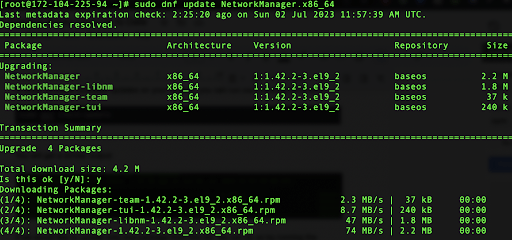
sudo dnf update NetworkManager.x86_64

Type ‘yes’ for the confirmation. This will start the upgrade process.

tutorial code screenshot

You can also use the upgrade-minimal command to only install important bug fixes and security patches without the risk of introducing potentially damaging changes.

sudo dnf upgrade-minimal

When executed, this command performs the following tasks:

  • Retrieves the package metadata from the configured repositories
  • Compares the installed packages on the system with the available updates
  • Installs the latest bug fix or security patch releases of the packages while avoiding any major updates or changes that could potentially cause compatibility issues
tutorial code screenshot

If you want to update all, without any package selection, you can do so by running the following command:

sudo dnf update

tutorial code screenshot

Carefully review the list and type ‘yes’ in the terminal prompt. This will install new packages (in this case, a new kernel version or upgrade version of existing packages).

Review the output of the update command to ensure that the desired packages were successfully updated without encountering any errors.

tutorial code screenshot

You can also verify package updates by running the rpm command:

rpm -q package_name

Replace package_name with the name of the package you updated. This command verifies the updated package’s version. When executed, the command will display the version, release, and other relevant details of the specified package if it is installed on the system. If the package is not found, the command will return an error message.

In this example, you can verify one of the packages:

rpm -q avahi-libs-0.8-12.el9_2.1.x86_64

and you should get the following format:

tutorial code screenshottutorial code screenshot

If you try to search for a package that doesn’t exist, you will get an error message:

rpm -q nginx

tutorial code screenshot

Learn More about Managing Rocky Linux 

If you found this tutorial helpful and you’re interested in more Rocky Linux how-tos, check out our other tutorials on this distro: 

About Version 2 Digital

Version 2 Digital is one of the most dynamic IT companies in Asia. The company distributes a wide range of IT products across various areas including cyber security, cloud, data protection, end points, infrastructures, system monitoring, storage, networking, business productivity and communication products.

Through an extensive network of channels, point of sales, resellers, and partnership companies, Version 2 offers quality products and services which are highly acclaimed in the market. Its customers cover a wide spectrum which include Global 1000 enterprises, regional listed companies, different vertical industries, public utilities, Government, a vast number of successful SMEs, and consumers in various Asian cities.

About JumpCloud
At JumpCloud, our mission is to build a world-class cloud directory. Not just the evolution of Active Directory to the cloud, but a reinvention of how modern IT teams get work done. The JumpCloud Directory Platform is a directory for your users, their IT resources, your fleet of devices, and the secure connections between them with full control, security, and visibility.

New Enhancements to Remote Assist

About Version 2 Digital

Version 2 Digital is one of the most dynamic IT companies in Asia. The company distributes a wide range of IT products across various areas including cyber security, cloud, data protection, end points, infrastructures, system monitoring, storage, networking, business productivity and communication products.

Through an extensive network of channels, point of sales, resellers, and partnership companies, Version 2 offers quality products and services which are highly acclaimed in the market. Its customers cover a wide spectrum which include Global 1000 enterprises, regional listed companies, different vertical industries, public utilities, Government, a vast number of successful SMEs, and consumers in various Asian cities.

About JumpCloud
At JumpCloud, our mission is to build a world-class cloud directory. Not just the evolution of Active Directory to the cloud, but a reinvention of how modern IT teams get work done. The JumpCloud Directory Platform is a directory for your users, their IT resources, your fleet of devices, and the secure connections between them with full control, security, and visibility.

How to Write a Zero Trust Proposal

About Version 2 Digital

Version 2 Digital is one of the most dynamic IT companies in Asia. The company distributes a wide range of IT products across various areas including cyber security, cloud, data protection, end points, infrastructures, system monitoring, storage, networking, business productivity and communication products.

Through an extensive network of channels, point of sales, resellers, and partnership companies, Version 2 offers quality products and services which are highly acclaimed in the market. Its customers cover a wide spectrum which include Global 1000 enterprises, regional listed companies, different vertical industries, public utilities, Government, a vast number of successful SMEs, and consumers in various Asian cities.

About JumpCloud
At JumpCloud, our mission is to build a world-class cloud directory. Not just the evolution of Active Directory to the cloud, but a reinvention of how modern IT teams get work done. The JumpCloud Directory Platform is a directory for your users, their IT resources, your fleet of devices, and the secure connections between them with full control, security, and visibility.