Skip to content

Common Questions During a Tenant-to-Tenant Migration

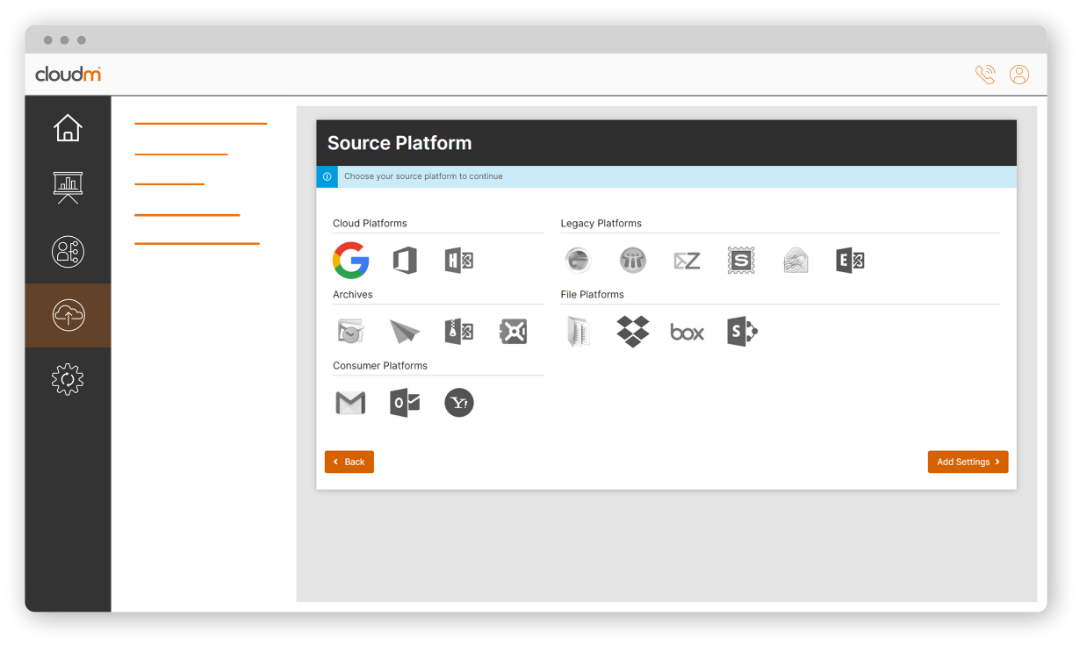
Tenant-to-tenant migrations are fast becoming the most common type of migration performed due to mergers and acquisitions. CloudM’s Technical Architects, Scott Chuhran and Lloyd Deverick answer some common questions that are asked during a tenant-to-tenant migration.If you would prefer to listen to listen to this blog, please click the audio link below. 1. Can you describe the difference between an On-Premise install and a SaaS solution? With on-premise, the customer owns everything including the network and hardware. This is a quick and easy install. With our SaaS solutions, this is stored in a dedicated VM in Azure cloud and is owned by CloudM. 2. How does CloudM Migrate handle data security between the source and destination? Data is encrypted from the source to the destination, at rest from the source to our server, again across the server, and once more at rest to the destination. 3. What are the endpoint sources we can use for M365 as a destination? Endpoint sources include Google, Microsoft 365, and on-prem exchange. Also included are legacy endpoints such as Lotus Notes, Zimbra, and also IMAP. 4. Can I migrate Google Vault to M365? Our tool allows Google Vault migrations. Enter the query inside the tool and we will pull directly what we get outside of Google and paste it directly into the tenant as we get it from Google. 5. When merging 2 domains into one, how do we handle changing aliases? This is done by uploading a config file with 2 columns in the csv. Every time it reads the word on the source, it will automatically convert to the destination. This works for permissions and email. 6. Can I migrate Google Forms to M365? Yes, the form is taken out of Google and we capture answers, questions, and permissions. This is made into a cell spreadsheet and put into the Microsoft Tenant with all the data. 7. Can you explain the shrinking mailbox feature? Simply, we can select a maximum item size and anything that is over this will be stripped out of the email and added to OneDrive. A link will be provided to the user with the item’s OneDrive destination. 8. How is Microsoft Teams content from M365 migrated during a tenant-to-tenant migration? There are two elements to this as it differs depending on channels and chats. Channels are migrated like for like. One-to-one chats that are older than 7 days will go into Outlook and will be searchable. One-to-one chats that are newer than 7 days will go directly into Teams with a link to guide them to reference Outlook for older chats.

About Version 2 Digital

Version 2 Digital is one of the most dynamic IT companies in Asia. The company distributes a wide range of IT products across various areas including cyber security, cloud, data protection, end points, infrastructures, system monitoring, storage, networking, business productivity and communication products.

Through an extensive network of channels, point of sales, resellers, and partnership companies, Version 2 offers quality products and services which are highly acclaimed in the market. Its customers cover a wide spectrum which include Global 1000 enterprises, regional listed companies, different vertical industries, public utilities, Government, a vast number of successful SMEs, and consumers in various Asian cities.

About CloudM
CloudM is an award-winning SaaS company whose humble beginnings in Manchester have grown into a global business in just a few short years.

Our team of tech-driven innovators have designed a SaaS data management platform for you to get the most from your digital workspace. Whether it’s Microsoft 365, Google Workspace or other SaaS applications, CloudM drives your business through a simple, easy-to-use interface, helping you to work smarter, not harder.

By automating time-consuming tasks like IT admin, onboarding & offboarding, archiving and migrations, the CloudM platform takes care of the day-to-day, allowing you to focus on the big picture.

With over 35,000 customers including the likes of Spotify, Netflix and Uber, our all-in-one platform is putting office life on auto-pilot, saving you time, stress and money.

Things to Consider with Tenant to Tenant Migrations

Tenant-to-tenant migrations

As the great migration from physical servers to the Cloud continues, tenant-to-tenant migrations are fast becoming the most common type of migration performed. In this post, we break down how to prepare for them, and what it takes for a successful migration.

Tenant to tenant migrations are typically required when a company has rebranded, an organization is subject to divestiture, a merger and acquisition has taken place or an organization is looking to move to the cloud. Here’s some steps to help you prepare for a tenant-to-tenant migration.

How to prepare for a tenant-to-tenant migration

During a tenant-to-tenant migration, both parties might be using Microsoft, however, there are still a large number of technical components to the project. Any migration brings pitfalls and challenges, which is why the most important part is planning. Knowing exactly what you’re doing, how you’re going to do it, and when to do it is essential for a successful tenant-to-tenant migration.Here are a few tips to get you started.

Know where your data is coming from

The first thing to do is perform an extensive discovery of the source tenant and data usage. Take note of things such as:

  • What workloads and M365 licenses are in use?
  • How many of each workload type are in scope of migration e.g. User mailboxes, SharePoint document libraries, Teams etc.
  • Is there any legal hold or archived data that needs to be migrated?
  • Are there any workflows that are critical to the business to be mindful of?
  • What external sharing is required post-migration (if any)?
  • Understand what additional projects are scheduled that may impact the migration of data.

Set boundaries and expectations

Before a tenant-to-tenant migration begins, everyone needs to be on the same page. It’s important to understand what is and is not possible during the process, where priorities lie, and who is responsible for what.

  • Agree on what project metrics are important. Is it the speed of the migration or the user experience that will define project success?
  • Understand which data can and cannot be migrated using available tools e.g. CloudM Migrate
  • Understand the cost, time, and effort required to complete the migration in agreed timeframes
  • Design the migration approach with business stakeholder buy-in. Will you perform a phased or ‘big-bang’ cutover?
  • Build-in project time to perform a Pilot phase to ensure the migration approach and experience is as expected
  • Think about the user experience and plan communications accordingly.

Prepare the destination tenant

Where your data is going to is the final piece of the puzzle. Make sure your destination is prepared for the new data arriving.

  • Provision of necessary destination objects and associated licenses
  • Compare policy settings (e.g. retention policies) and plan accordingly
  • Check for user name conflicts or similar Teams/SharePoint sites and decide to merge or keep the data separate
  • Plan for contingency. Migrations are complex, make sure additional time is added to timelines for unexpected events and clean-up at the end of the migration.

Tenant-to-tenant migrations are a specialized area

Tenant-to-tenant migrations bring with them their own unique challenges and solutions.

Even though the migration is from Microsoft to Microsoft, it’s still a technical feat and you need a tried-and-tested third party tool to make it happen. CloudM has performed over 70 million migrations with an astonishing 99.8% success rate. We work with huge brands like Netflix, Spotify and Uber, and we’re proud to be a Gold Microsoft Partner.

Alongside our powerful tool, we can also provide a Managed Migration Service which takes the stress out of the project. Our team of migration experts can take control of the project and perform the migration for you, handling everything so you don’t have to.

If you sign up for a Managed migration, you are assigned a project manager that will constantly keep you up to date with everything, reporting back regularly so you never have to ask how things are going. All our clients are also assigned a deployment specialist – a migration expert that can fix issues before they become a problem. Being able to spot a bump in the road ahead of time means it can be resolved before you are even aware there was anything to worry about.

Don’t take risks with your data. Tenant-to-tenant migrations are our domain. Let us handle it for you.

About Version 2 Digital

Version 2 Digital is one of the most dynamic IT companies in Asia. The company distributes a wide range of IT products across various areas including cyber security, cloud, data protection, end points, infrastructures, system monitoring, storage, networking, business productivity and communication products.

Through an extensive network of channels, point of sales, resellers, and partnership companies, Version 2 offers quality products and services which are highly acclaimed in the market. Its customers cover a wide spectrum which include Global 1000 enterprises, regional listed companies, different vertical industries, public utilities, Government, a vast number of successful SMEs, and consumers in various Asian cities.

About CloudM
CloudM is an award-winning SaaS company whose humble beginnings in Manchester have grown into a global business in just a few short years.

Our team of tech-driven innovators have designed a SaaS data management platform for you to get the most from your digital workspace. Whether it’s Microsoft 365, Google Workspace or other SaaS applications, CloudM drives your business through a simple, easy-to-use interface, helping you to work smarter, not harder.

By automating time-consuming tasks like IT admin, onboarding & offboarding, archiving and migrations, the CloudM platform takes care of the day-to-day, allowing you to focus on the big picture.

With over 35,000 customers including the likes of Spotify, Netflix and Uber, our all-in-one platform is putting office life on auto-pilot, saving you time, stress and money.

Migrate your VFE licenses to Google Cloud Storage to save thousands at renewal time

It’s that time of the year again.

No, not the holiday season. It’s nearly the start of Google’s financial year, and, with that, time for a lot of you to renew your Google Workspace licenses. This year though, you might get hit by an unexpected surprise. Umer Hamid, one of our dedicated Google Sales Architects at CloudM, explains why.
“Around this time of year, I find customers getting in touch with me in a panic. In January, they will be renewing their Google Workspace license, but this time, it’s going to cost thousands more. Why? Because they have a few hundred Vault Former Employee (VFE) licenses gathering dust. As Google phases out free VFE and replaces them with paid Archived User (AU) licenses, many businesses find $$$ added to their bill.”

Ouch!

Well, what can you do to beat the bill (or at least make a considerable dent in it), whilst keeping compliant with data retention rules and regulations? Especially when you have a lot of data to move, are short on time, and you are restricted by Google’s limit of allowing only 20 VFE licenses to be migrated at any one time? Don’t worry! Here is the approach that Umer has suggested to our customers that are also facing this daunting situation.

Step 1

Quite simply, use CloudM Migrate to move all the required data in bulk and at speed from Google Vault into your own Google Cloud Storage, completely owned and managed by you as part of your Google Cloud Platform. Instead of paying for individual AU licenses for every offboarded employee, you will only have to pay the data storage cost. With the VFE data export limit of 20 concurrent users in place, some businesses might struggle to move all of their suspended users to storage before the renewal deadline, but CloudM Migrate is one of the fastest and most reliable ways to chip away at the number of AU licenses you might need, significantly reducing the figure you will need to pay out.  

Step 2

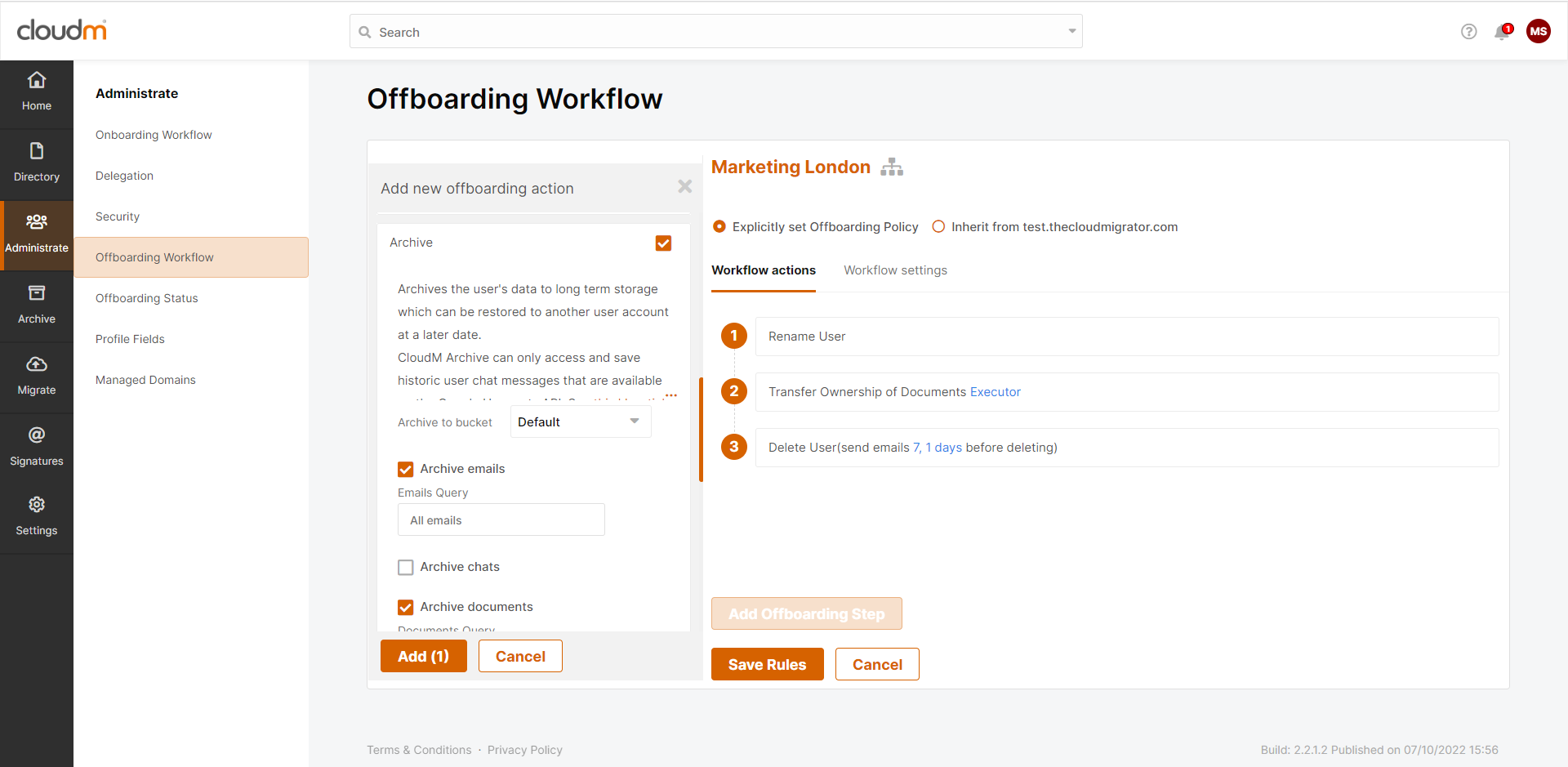
Phew! It was close but you’ve managed to migrate all that data (or at least a significant chunk) before your renewal date. Now though, how do you make sure that you never have a large amount of expensive Google licenses sitting idle, and costing you money at renewal time, ever again? CloudM Archive comes to your rescue! All you need to do is configure CloudM Archive so that it can offboard data to your Google Cloud Storage buckets, and add the Archive step to your CloudM Automate Offboarding Workflows. When an employee leaves, their email and drive data will automatically be sent to whichever bucket you specify on the Workflow. Using CloudM Archive, your data is secure, easily searchable and instantly restorable, and will automatically be deleted as part of data retention policies so you always stay compliant.  

Read our Counting the (recurring) costs of AU licenses blog for a more in-depth look at how CloudM Archive continues to save you money and time, year in, year out.

If your Google Workspace license renewal is coming up quickly, and you want to avoid paying out for unnecessary AU licenses, the quicker you act, the more you will save. Umer and the team are on hand to help you so get in touch today.

About Version 2 Digital

Version 2 Digital is one of the most dynamic IT companies in Asia. The company distributes a wide range of IT products across various areas including cyber security, cloud, data protection, end points, infrastructures, system monitoring, storage, networking, business productivity and communication products.

Through an extensive network of channels, point of sales, resellers, and partnership companies, Version 2 offers quality products and services which are highly acclaimed in the market. Its customers cover a wide spectrum which include Global 1000 enterprises, regional listed companies, different vertical industries, public utilities, Government, a vast number of successful SMEs, and consumers in various Asian cities.

About CloudM
CloudM is an award-winning SaaS company whose humble beginnings in Manchester have grown into a global business in just a few short years.

Our team of tech-driven innovators have designed a SaaS data management platform for you to get the most from your digital workspace. Whether it’s Microsoft 365, Google Workspace or other SaaS applications, CloudM drives your business through a simple, easy-to-use interface, helping you to work smarter, not harder.

By automating time-consuming tasks like IT admin, onboarding & offboarding, archiving and migrations, the CloudM platform takes care of the day-to-day, allowing you to focus on the big picture.

With over 35,000 customers including the likes of Spotify, Netflix and Uber, our all-in-one platform is putting office life on auto-pilot, saving you time, stress and money.

How free migration tools end up costing you more

Discover how the true cost of migrations can often be hidden.

Everyone likes a freebie, there’s no denying it. But the truth is, when something’s free, it usually comes at a price.

Free software is a good example of this. Usually it’s just a “taster”, something to whet your appetite or grab your attention, and further down the line you end up paying for a more robust version.

Free migration software is like this; a good foundation to start, but if you want all the bells and whistles to do it properly, then it’s worth paying a little extra.

Free Migration Tools

Migrations are incredibly complex, and the results can make or break a business. It’s not the kind of thing you want to put into the hands of the cheapest option available.

There are basically three serious options when it comes to free migration tools; Microsoft FastTrack, Google Workspace Migrate and third-party open-source software

Open-source software

There are plenty of free open-source software migration tools out there, and most of them are fit for purpose if you’re only moving small amounts of data that have no real importance. But when it comes to a large-scale data migration that’s part of the growth and development of your business, you will want to set your sights a little higher.

As you might expect, open-sourced migration software has limitations. The software takes longer to set up, will usually only migrate certain things (like files and folders, but not emails), and, most importantly, has a higher fail rate, meaning there’s more chance of your migration turning into a catastrophe.

As the software is open-sourced, there will be no guarantee of security because it will come without accreditation. For something as important as your company’s data, you should only ever use software that meets international standards of security, like CloudM.

Microsoft

FastTrack is a migration service provided by Microsoft and it’s available to all Microsoft 365 subscribers for free.

While FastTrack is suitable for simple file migrations, but it was not designed for anything more complicated.

When you are handling a big migration project, you want to be kept abreast of its progress.There is no update on the project until it’s complete, so there is no way of telling how long is left, how much data has been moved, and which files are still pending.

If you have additional requirements, special instances that need specific attention, or simply want someone to help fix unforeseen issues, then unfortunately there’s not much help available.

If any issues come up, there is no telephone or video support, only an email address to use, so a response is usually slow, by which time the issue might have done serious damage.

FastTrack is only available for customer tenants with 150 or more licenses and is also limited to a certain number of users, so for larger projects, you need more than one migration to move your data.

So to sum up Microsoft’s free migration tool, it might be worth it if you’re a small business with basic data to transfer. Anything larger or complicated should be left to bespoke migration software.

Google

For full migrations, Google will only transfer from one Google domain to another. That means if you’re on Microsoft or some other platform, you can’t use their tool.

Google does have GWMMO (Google Workspace Migration for Microsoft Outlook), but some categories of Email, Calendar, and Contacts are not supported to import in Gmail, while Journal entries, Outlook Notes, tasks, and RSS feeds aren’t imported at all through this method.

Google Migration is not always the speediest: you are allocated one server for your project and you’re migrated on that one server.

In fact, for more complicated migrations, Google often turns to third-party software themselves – like CloudM. So if your migration project needs to happen quickly, securely and effectively, you can cut out the middleman and come to us directly.

What can go wrong?

Unfortunately, a lot could go wrong during a data migration, which is why you should never go for the cheapest option. As we mentioned, migrations are complex, and the bigger the job, the more issues can potentially arise.

Losing data, leaving user information behind and data corruption are just a few of the common problems seen during a large migration.

These issues can have serious, real-world consequences. From reputation damage to hefty fines for data protection breaches, a problematic migration can be a nightmare for a company.

Any kind of problem is going to mean more work for your IT team – because here’s the thing with free migration software – if things do go wrong, who do you talk to about it? Who is accountable for lost or corrupted data? What number do you call to speak to someone? Who do you email about the issue?

Invariably, the answer is no one. And that’s where the true cost of free migration tools appears.

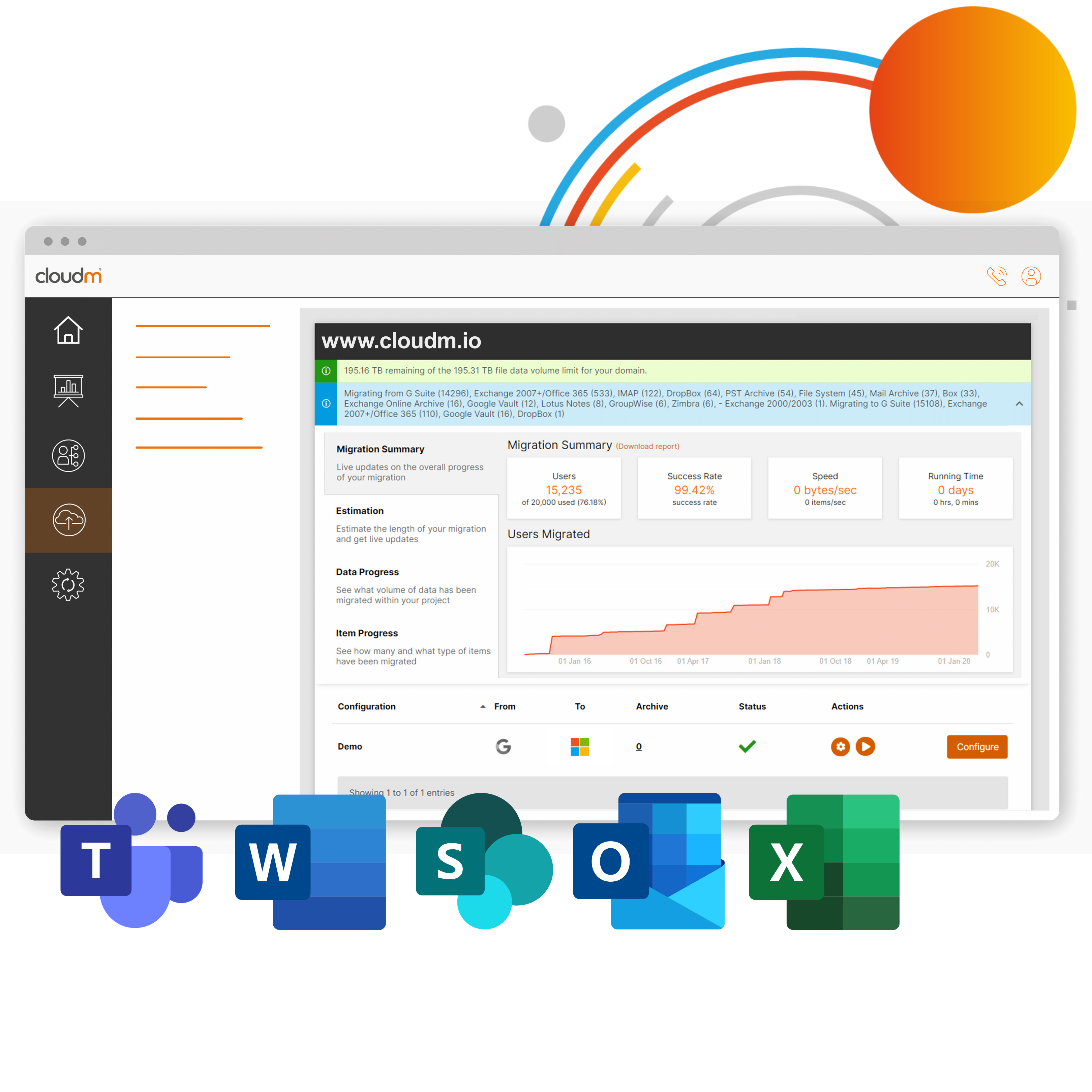
Migrate Reporting Status UI Graphics

Why you should use us

CloudM has a 99.8% success rate when it comes to data migrations, with over 68 million users migrated in 107 countries.

We offer a host of advantages over a free migration service, including speed, security, accountability, and perhaps most important of all, peace of mind.

Migrations can be stressful, and if you choose free software, you’ll increase that stress exponentially. You’ll have no regular updates, no sign of how successful your migration has been so far, and no idea of how long is left.

With us, you’ll have a personalized account manager, someone to oversee your project and keep you up to date with developments. You’ll be in full control of your data, you’ll know exactly what has been transferred and when, how far the project has come, and any issues that have arisen. Plus, with 24/7 product support available you know an expert is never far away.

We also provide Delta Migrations, allowing your business to carry on as normal during the project, so you have zero downtime. A Delta Migration works by migrating all your historical data – say everything up until the past three months – and then once that’s done, we do the last three months over a weekend when no one is working.

Working with us rather than a restrictive service or open-source software with no experts on hand gives you more options and greater agility in your migration. We can course correct if something comes up, and of course, handle everything for you instead of making you do all the work as free software would.

If done incorrectly, problems during a migration can lead to downtime, data loss and, in worse-case scenarios, legal troubles.

It simply isn’t worth the risk to use free, open-source software for something as important as your data. Let the professionals handle it.

You’re not just paying for the software, you’re paying for peace of mind. You’re paying for data security and accountability if anything goes wrong. You’re paying for a successful migration, and at the end of the day, that’s all that matters.

About Version 2 Digital

Version 2 Digital is one of the most dynamic IT companies in Asia. The company distributes a wide range of IT products across various areas including cyber security, cloud, data protection, end points, infrastructures, system monitoring, storage, networking, business productivity and communication products.

Through an extensive network of channels, point of sales, resellers, and partnership companies, Version 2 offers quality products and services which are highly acclaimed in the market. Its customers cover a wide spectrum which include Global 1000 enterprises, regional listed companies, different vertical industries, public utilities, Government, a vast number of successful SMEs, and consumers in various Asian cities.

About CloudM
CloudM is an award-winning SaaS company whose humble beginnings in Manchester have grown into a global business in just a few short years.

Our team of tech-driven innovators have designed a SaaS data management platform for you to get the most from your digital workspace. Whether it’s Microsoft 365, Google Workspace or other SaaS applications, CloudM drives your business through a simple, easy-to-use interface, helping you to work smarter, not harder.

By automating time-consuming tasks like IT admin, onboarding & offboarding, archiving and migrations, the CloudM platform takes care of the day-to-day, allowing you to focus on the big picture.

With over 35,000 customers including the likes of Spotify, Netflix and Uber, our all-in-one platform is putting office life on auto-pilot, saving you time, stress and money.

Counting the (recurring) costs of AU licenses

How much is keeping users on Archive User licenses costing your business and how much could you save if you used CloudM Archive instead?

Gone but not forgotten.

Even years after an employee has left your business, data compliance regulations such as GDPR and Freedom of Information requests require you to keep their data in some form.

You obviously don’t want to keep these legacy leavers on a full Google license as it is a) expensive and b) it means that if the former employee (or someone else) can access the account, they can use your business’s applications and access sensitive business data.

So, businesses like yours have had to find ways to keep the data (and allow it to be searchable and restorable) without allowing access, and preferably, cheaper.

Historically, they would simply change the user’s full license to a VFE (Vault Former Employee) license. This license SKU was free and archived the data to Vault. Perfect!

What is the issue then?
Well, Google introduced the AU (Archive User) license as a replacement for the VFE, and charged for it (currently ~$60 per user per year). If you had 1000 users on a VFE, this would cost you $60,000…every year (+ any additional offboarded users you apply an AU license too).

Now, this is obviously cheaper and more secure than a full license. But, it’s not exactly pocket change when it’s coming out of your budget (especially when it used to be free).

How does CloudM Archive solve the issue?
The only real legal requirements for data when an employee leaves is to make sure that it is stored somewhere, can easily be restored or retrieved (down to a single file or email) if required, and deleted after a set amount of time. CloudM Archive does all of that for you!

CloudM Archive will automatically send the data of any offboarded user straight to a Google Storage bucket that you own and control, as an optional step in our innovative Offboarding Workflow process. If the step is in the workflow for the user, you do not need to do anything except press a button to trigger the offboarding.

If you need anything back (e.g. you receive a Freedom of Information request), CloudM Archive allows you to see all the data stored in the Storage bucket, indexed by user, so you can quickly find and restore any and all the data you want, and you can restore it to any user within CloudM Manage. All in a matter of minutes.

Oh, and when the time comes when you want are legally obliged to delete the data, CloudM Archive will use data retention policies to automatically purge the data when it’s been stored for a set time. Remember John who left 7 years ago? Of course you don’t. You started 4 years ago. CloudM will remember to delete his data on time so you don’t have to (and so you don’t get hit with a massive data regulation fine too).

And, best of all, you don’t need to pay for a Google license (full or AU) for the user you just archived. You just need to pay for CloudM Archive and the cost of storing your data in your Google Storage buckets, which, even when combined, works out considerably cheaper than an AU license. We’ve done the math and some businesses could be saving up to 75%. Whether that’s Euros, Dollars, Pounds or Pesos, that’s gotta look good on your balance sheet.

The full Google license can even be removed from the user and returned to your license pool as part of the offboarding workflow, ready to be instantly reassigned. You will only ever need to pay for the licenses you actually use.

This all sounds great, right? But, what if it would actually work out cheaper to keep a specific power user’s data on an AU license instead of incurring the cost of storage? Well, we’ve got you covered as well. Simply create a Smart Team of Power / High Volume users and create a bespoke offboarding policy that has the “Apply Google Archived User (AU) license” step included.

CloudM Archive is already helping (and saving) organizations around the world, big and small. If you would like the opportunity to cut the costs and manual effort of keeping former employee data, why not have a quick 15 minute call with one of our expert CloudM Team.

About Version 2 Digital

Version 2 Digital is one of the most dynamic IT companies in Asia. The company distributes a wide range of IT products across various areas including cyber security, cloud, data protection, end points, infrastructures, system monitoring, storage, networking, business productivity and communication products.

Through an extensive network of channels, point of sales, resellers, and partnership companies, Version 2 offers quality products and services which are highly acclaimed in the market. Its customers cover a wide spectrum which include Global 1000 enterprises, regional listed companies, different vertical industries, public utilities, Government, a vast number of successful SMEs, and consumers in various Asian cities.

About CloudM
CloudM is an award-winning SaaS company whose humble beginnings in Manchester have grown into a global business in just a few short years.

Our team of tech-driven innovators have designed a SaaS data management platform for you to get the most from your digital workspace. Whether it’s Microsoft 365, Google Workspace or other SaaS applications, CloudM drives your business through a simple, easy-to-use interface, helping you to work smarter, not harder.

By automating time-consuming tasks like IT admin, onboarding & offboarding, archiving and migrations, the CloudM platform takes care of the day-to-day, allowing you to focus on the big picture.

With over 35,000 customers including the likes of Spotify, Netflix and Uber, our all-in-one platform is putting office life on auto-pilot, saving you time, stress and money.