Skip to content

Forgot your X/Twitter password? Here’s a short guide to X/Twitter password reset

After a long stint away from social media, it’s time to sit down and plug yourself back into the grid. You log into Facebook, nothing interesting there. Instagram – same stuff, different day. How about X/Twitter? What social faux pas has your favorite political figure committed today? You enter your username, a familiar password, and wait for your feed to pop up. Instead, you’re greeted by this message: “The password you entered did not match our records.”

In today’s fast-paced digital landscape, it’s not uncommon to forget a password or two. It happens to the best of us. But forgetting your X/Twitter password or getting it compromised can be particularly frustrating and disconcerting, especially given the platform’s history of data breaches.

So, whether you’ve forgotten your password or your login details are compromised, or maybe you want to keep on top of your security – this guide is here to get you through changing or resetting your X/Twitter password as painlessly as possible.

How to change your X/Twitter password

Luckily, if you already know your password and merely want to change it to keep up with your account security, changing your password is an easy and swift process.

  1. Log into X/Twitter.

  2. Click “More” at the bottom of the dashboard on the left.

  3. Now select “Settings and privacy.”

  4. Click “Your account” and select “Change your password.”

  5. Type your “Current password.”

  6. Now enter your new passwords twice and click “Save” to confirm the change

When creating a new password, you should be aware of the X/Twitter password requirements, which are designed to help you create a complex and unique password. The X/Twitter password requirements ask for a password to be at least 10 characters long with a mix of lower- and upper-case letters, numbers, as well as symbols. Additionally, users are asked not to use common dictionary words or phrases, which are predictable and easy to compromise.

How to reset your X/Twitter password

Resetting your X/Twitter password is a simple process, whether you’re using the desktop site or the mobile app on iOS or Android devices. However, you should be aware that the following instructions can only work if you’ve supplied an extra level of authentication when setting up the X/Twitter account. Here are a few different ways that you can reset your X/Twitter password:

Reset your X/Twitter password via email

To reset your X/Twitter password via email, you need to:

  1. Go to the X/Twitter login page or open the app on your mobile device.

  2. Click the “Forgot password?” link.

  3. Enter your email address, and click “Search.”

  4. Select “Send email” to receive a password reset link in your inbox.

  5. Check your email and click on the link provided in the password reset email from X/Twitter.

  6. Enter a new password, confirm it, and click “Submit” to complete the process.

Reset your X/Twitter password via SMS text message

To reset your X/Twitter password via SMS text message, you need to:

  1. Ensure that your phone number is linked to your X/Twitter account.

  2. Go to the X/Twitter login page or open the app on your mobile device.

  3. Click the “Forgot password?” link.

  4. Enter the phone number, associated with your X/Twitter account, and click “Search.”

  5. Select “Send SMS” to receive a password reset code via text message.

  6. Enter the code received in the SMS text message and click “Submit.”

  7. Enter a new password, confirm it, and click “Submit” to complete the process.

How to reset X/Twitter password without email or phone number

If you don’t have access to your email or phone number, follow these steps:

  1. Go to X/Twitter’s Help Center.

  2. Select “I need help resetting my password.”

  3. Complete the form with the required information. Provide all additional information about your account.

  4. X/Twitter support will review your request and may contact you for further information before resetting your password.

How to make your account more secure

Securing your X/Twitter account is crucial to protect your personal information and avoid unauthorized access. The following tips are designed to help you fortify the security of your X/Twitter account.

1. Enable password reset protection.

Enable the password reset protection feature on your X/Twitter account and add an extra layer of security when resetting your password. To enable this functionality, you need to:

  • Click on your profile icon and select “Settings and privacy.”

  • Choose “Account” and then click on “Security settings.”

  • Toggle on the “Password reset protection” option.

  • Save the changes.

With this feature enabled, you’ll be required to provide additional information when attempting a password reset, making it more difficult for hackers to gain access to your account.

2. Set up two-factor authentication (2FA).

Two-factor authentication is a powerful security measure that requires you to provide a second form of identification when logging in, such as a code sent to your mobile device. This makes it much harder for someone to access your account, even if they know your password. To set up 2FA on X/Twitter:

  • Click on your profile icon and select “Settings and privacy.”

  • Choose “Account” and then click on “Security settings.”

  • Click “Two-factor authentication” and choose your preferred method (text message, authentication app, or security key).

  • Follow the on-screen instructions to complete the setup process.

By implementing 2FA, you’ll enjoy greater peace of mind knowing your account has an additional layer of protection.

3. Watch out for fake emails and phishing attempts.

Cybercriminals often use phishing emails to trick unsuspecting users into providing sensitive information. These emails often look like they’re from X/Twitter. The sophistication of social engineering scams in recent years has skyrocketed. To avoid falling for such scams:

  • Verify the sender’s email address before opening any email that claims to be from X/Twitter.

  • Keep an eye out for inconsistencies in the email’s design, grammar, or links.

  • Never click on suspicious links or download attachments from unknown sources.

  • Never provide sensitive information via email, even if the message appears to be legitimate.

4. Switch to passkeys.

If you’re really serious about securing your X/Twitter account, it’s time to rethink your reliance on passwords. Instead, consider a safer alternative: passkeys. They represent a novel authentication approach that allows users to securely access their accounts and devices through passwordless methods such as biometrics, leveraging unique characteristics of individuals, including fingerprints, voice patterns, or even iris scans. In January 2024, X introduced passkey support for iOS devices, providing users with a more secure login option. So, if you own an iPhone or iPad, switch to passkeys and boost your online security today.

By following these tips and remaining vigilant, you’ll significantly improve the security of your X/Twitter account and enjoy a safer online experience.

Fortify your passwords using NordPass

In today’s digital era, the security of your passwords is a top priority and that is where NordPass can offer a lot of help. With NordPass, you can forget the hassle of remembering multiple passwords and enjoy a smoother browsing experience without compromising your security.

NordPass uses the XChaCha20 encryption technology to deliver unmatched security for your passwords. This advanced encryption ensures that your passwords and other sensitive information remain secure at all times.

In addition to helping you secure and use passwords more effectively, NordPass also lets you bid farewell to passwords altogether for even greater security and convenience. This is made possible thanks to NordPass’s support for passkeys. With them, you can quickly and safely log in to your online accounts without passwords. Instead, you can use, for example, a fingerprint scanner or other biometric tools to get instant access.

NordPass also enhances your online experience through its autosave and autofill features. When setting up a new account or updating your password, NordPass seamlessly saves the information in your encrypted vault.

The Autofill function guarantees you’ll never have to manually type out your login details again. Once you’ve saved your login credentials in NordPass, the app will automatically populate the necessary fields when you return to the site. This not only saves time but also mitigates the risk of typing blunders that could result in losing access to your account.

These days, a password manager is an essential tool for anyone who wishes to remain secure online. Secure your digital life by making NordPass an integral security tool in your toolbox. Try it now, and discover how smooth and secure life online can be with NordPass.

About Version 2 Digital

Version 2 Digital is one of the most dynamic IT companies in Asia. The company distributes a wide range of IT products across various areas including cyber security, cloud, data protection, end points, infrastructures, system monitoring, storage, networking, business productivity and communication products.

Through an extensive network of channels, point of sales, resellers, and partnership companies, Version 2 offers quality products and services which are highly acclaimed in the market. Its customers cover a wide spectrum which include Global 1000 enterprises, regional listed companies, different vertical industries, public utilities, Government, a vast number of successful SMEs, and consumers in various Asian cities.

About NordPass
NordPass is developed by Nord Security, a company leading the global market of cybersecurity products.

The web has become a chaotic space where safety and trust have been compromised by cybercrime and data protection issues. Therefore, our team has a global mission to shape a more trusted and peaceful online future for people everywhere.

Who’s Liable in a Breach? Why Every MSP Needs Cyber Insurance

Having trouble logging into your client’s network? Can’t access any files?

That’s most likely because you’ve been breached or one of your clients has.

But the question is who should be held accountable if a data breach occurs? In this article, we’ll explore ways to prevent breaches, understand who has access to which sensitive data assets, and discuss the importance of why every MSP should have cybersecurity insurance coverage.

.

Understanding Where Sensitive Data Is Stored

Do you know who has access permissions to your CSP resources, such as Google Drive? A study that analyzed 6.5 million Google Drive files found that 40.2% contained sensitive data that could put an organization at risk of a data breach and suggested that 34.2% of the scrutinized files were shared with external contacts outside the company’s domain files. A single compromised file can place your MSP business at risk of a potential lawsuit since you are responsible for managing and securing your clients’ data once you’ve signed that NDA.

But it gets even more complicated.

Can you be 100% certain that your clients’ employees’ are even aware of the risks associated with Bring Your Own Devices (BYOD) when logging into corporate accounts from outside of the office? And how many devices have unsecured endpoints? We’re not talking about a client with 20-50 employees. Imagine an enterprise with thousands of potentially vulnerable endpoints just ripe for the picking.

Consider the risks of AI-generated phishing attacks or other forms of malware a remote employee might download from an unsecured Wi-Fi hotspot connection. Multiply this threat by the number of servers and devices they access, and the risks of a breach increase exponentially.

A study conducted by the Ponemon Institute found that 68% of organizations have experienced one or more endpoint attacks that successfully compromised data and/or their IT infrastructure.

And then there’s the real threat of external third-party suppliers and contractors that your clients work with, who are granted access ‘carte blanche’ to applications, shared cloud service providers, and systems without your knowledge. Something as simple as removing an inactive user from a shared Slack account can wind up costing you down the line.

Any of these scenarios can point back to you if you don’t know where sensitive data resides.

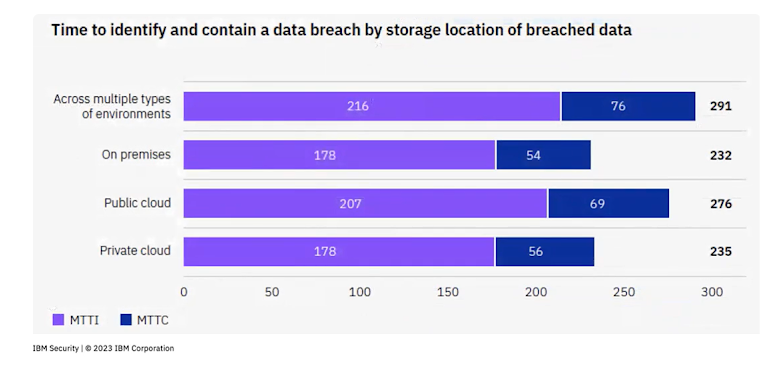
Research conducted by IBM Security found that the time it takes to contain a breach was 291 days across multiple types of environments.

Time is a valuable commodity in a security incident. Every second counts if proper security measures aren’t locked in place.

Conducting a Cyber Risk Assessment is a Good Start

One way to protect yourself from a potential breach is by conducting a thorough cyber risk assessment to get a clear understanding of your critical vulnerabilities and security posture. A cyber risk assessment can show you a detailed breakdown of what data is at risk and how third-party access could compromise any of your systems or critical infrastructure.

Assessments should be performed at least annually to ensure that your security measures are up-to-date.

Here are a few other use cases to perform a cyber risk assessment:

  • Immediately after a security event occurs
  • When integrating new technologies to evaluate any risks
  • To ensure that compliance regulations are met
  • Onboarding new third-party vendors, partners, and suppliers
  • When employees change roles or leave the organization

Cyber risk assessments show you where sensitive data is stored, how long it is kept, who has access to the data, and if the data is secured.

Assessments can help you determine if you have the right security policies and controls to protect the data effectively. Once you have a detailed inventory of all assets at risk, you can prioritize future mitigation strategies to reduce the likelihood of a breach.

Cyber risk assessments are a crucial piece of the security puzzle. But what happens when a client decides to file a lawsuit against your business if their data has been compromised?

Why MSPs Need Cyber Insurance

Although you can’t control access permissions of third parties assigned by clients, you can protect yourself in terms of liability and legal ramifications in the event of an actual breach. Cyber insurance can provide financial protection, cover legal expenses, support incident response efforts, and help repair any reputational impact if a breach occurs.

Cyber insurance policies can shield you from the financial fallout of cyber incidents and breaches, including first-party losses like business interruption, data recovery, and ransom extortion fees. It also protects against third-party liabilities such as legal defense costs, settlements, regulatory fines, and penalties.

Another benefit of having cyber insurance coverage is that the insurer can act as the mediator in the event of a dispute. This might involve negotiating with third parties, managing communications with affected clients, or handling regulatory bodies to ensure compliance and mitigate further liabilities.

And it’s not only MSPs who need to have cyber insurance. Data showed that 87% of MSPs are seeing an increase in demand for cyber insurance from clients. Breaches can stem from unpatched software, leaked credentials from a misconfigured AWS S3 cloud bucket to an employee falling for a phishing scam. Regardless of how it happened, the cause is less relevant than the outcome.

That’s why every MSP should have premium cyber insurance coverage.

Protect Your Business from Breach Disputes with Guardz Cyber Insurance Coverage

Guardz Cyber Insurance can help cover the costs associated with data breaches and legal expenses. Manage and mitigate the impact of a cyber incident without disrupting business operations. Guardz also covers the costs incurred by MSPs and SMEs in investigating the incident and implementing recovery measures to keep business flowing.

Don’t leave anything to chance. Protect your critical assets and demonstrate cyber risk readiness to your clients with Guardz Cyber Insurance.

About Version 2 Digital

Version 2 Digital is one of the most dynamic IT companies in Asia. The company distributes a wide range of IT products across various areas including cyber security, cloud, data protection, end points, infrastructures, system monitoring, storage, networking, business productivity and communication products.

Through an extensive network of channels, point of sales, resellers, and partnership companies, Version 2 offers quality products and services which are highly acclaimed in the market. Its customers cover a wide spectrum which include Global 1000 enterprises, regional listed companies, different vertical industries, public utilities, Government, a vast number of successful SMEs, and consumers in various Asian cities.

About Guardz
Guardz is on a mission to create a safer digital world by empowering Managed Service Providers (MSPs). Their goal is to proactively secure and insure Small and Medium Enterprises (SMEs) against ever-evolving threats while simultaneously creating new revenue streams, all on one unified platform.

How to Improve Collaboration Between OT and IT Security Teams in Discrete Manufacturing


OT and IT teams are used to talking about “interoperability” when it comes to devices.

Continue reading

Latest Check Point Software vulnerabilities

Latest Check Point Software vulnerabilities

On May 28, 2024, Check Point disclosed a serious vulnerability in Check Point Security Gateway Devices with certain remote access software blades (security modules) enabled. Per their guidance, devices are impacted if one of the following conditions are met:

  • The IPsec VPN Blade is enabled, but ONLY when included in the Remote Access VPN community.
  • The Mobile Access Software Blade is enabled.

The issue, identified as CVE-2024-24919, allows reading arbitrary files on the targeted appliance by unauthenticated remote attackers. This vulnerability could be leveraged to read sensitive files such as those containing password hashes, certificates, and ssh keys.

This vulnerability has a CVSS score of 8.6 out of 10, indicating that this is a high risk vulnerability. According to their disclosure and information provided by CISA this vulnerability is being actively exploited. A report from mnemonic.io states that they have observed attacks at least as far back as April 30, 2024.

What is the impact?

Upon successful exploitation of the vulnerability, unauthenticated remote attackers could access password hashes for local users. If the hashes are cracked the attacker may be able to log into these user accounts if secondary controls, such as MFA, are not enforced. This includes service accounts that may be used to access Active Directory or other services. Attackers could leverage this information to move across a target’s network.

Are updates or workarounds available?

Check Point has released a software updates to address this vulnerability. They also provide guidance for other measures that should be taken after the vulnerability has been addressed. These can be found in their advisory.

How do I find potentially vulnerable Check Point devices with runZero?

From the Asset Inventory, use the following query to locate assets that may be running the vulnerable operating system in your network:

hardware:"Check Point" AND (_service.last.http.body:"Check Point Mobile" OR _service.http.body:"Check Point Mobile" OR udp_port:500)

About Version 2 Digital

Version 2 Digital is one of the most dynamic IT companies in Asia. The company distributes a wide range of IT products across various areas including cyber security, cloud, data protection, end points, infrastructures, system monitoring, storage, networking, business productivity and communication products.

Through an extensive network of channels, point of sales, resellers, and partnership companies, Version 2 offers quality products and services which are highly acclaimed in the market. Its customers cover a wide spectrum which include Global 1000 enterprises, regional listed companies, different vertical industries, public utilities, Government, a vast number of successful SMEs, and consumers in various Asian cities.

About runZero
runZero, a network discovery and asset inventory solution, was founded in 2018 by HD Moore, the creator of Metasploit. HD envisioned a modern active discovery solution that could find and identify everything on a network–without credentials. As a security researcher and penetration tester, he often employed benign ways to get information leaks and piece them together to build device profiles. Eventually, this work led him to leverage applied research and the discovery techniques developed for security and penetration testing to create runZero.

CloudM chooses Royal Manchester Children’s Hospital as 2024 charity partner

CloudM has chosen Royal Manchester Children’s Hospital as its charity partner of the year in 2024. As a Manchester-based business, CloudM was keen to support local organisations and help make a difference in its local community. 

Royal Manchester Children’s Hospital is the largest children’s hospital in the country, and the work of the Manchester Foundation Trust Charity helps maintain the hospital as one of the best. The hospital provides specialist treatments and care for children from the local community and across the country. 

Among the reasons for choosing the Royal Manchester Children’s Hospital as its charity of the year, was the inspiring story of local lad, Hughie Higginson and his friend Freddie. Hughie was diagnosed with leukaemia when he was just 10 years old and was treated at the hospital. While he was undergoing treatment, Freddie set out to raise money to support his friend by running 2 kilometres per day for 50 days. Hughie is now cancer-free, and alongside Freddie ‘Hughie & Freddie’s Play Appeal’ has raised a staggering £340,000 for the charity. 

It is the support of community and corporate fundraisers that allow the hospital to go beyond the treatment offered on the NHS and improve the experience of the children, and their families, that they treat. Fundraising helps provide state-of-the art equipment, support the very best research and help to deliver exceptional care.  

“Over the years CloudM has supported lots of charities, this year we really wanted to support a local organisation. It was an easy choice to support a charity in Royal Manchester Children’s Hospital that really goes above and beyond to ensure that poorly children receive the very best treatment and care possible. We’re really excited to support and raise funds in a real variety of ways.”

CloudM employees will be supporting the charity in a variety of ways, from raising funds and taking part in some of the hospital’s existing fundraising events, to holding our own fundraising efforts. Employees will also be giving up their time to help volunteer within the charity. 

When Hughie and Freddie discovered they were the inspiration behind CloudM choosing Royal Manchester’s Children Hospital, they were keen to say “A massive thank you, it will help so many patients and families, thank you so much!”


“We are so very grateful for CloudM colleagues choosing to support Manchester Foundation Trust Charity as their new Charity of the Year, raising funds for Royal Manchester Children’s Hospital,” said Jack Bright, Relationship Manager at Manchester NHS Foundation Trust Charity. “We can’t wait to meet more of the CloudM team as they get stuck in with their fundraising, which will make a difference to thousands of patients and their families who need our hospital each and every year. Welcome to our family of fantastic supporters and we look forward to working with you!”

We’ll provide regular updates on activities and our fundraising events throughout the year, and if any customers or partners would like to get involved, please reach out to your account manager.

About Version 2 Digital

Version 2 Digital is one of the most dynamic IT companies in Asia. The company distributes a wide range of IT products across various areas including cyber security, cloud, data protection, end points, infrastructures, system monitoring, storage, networking, business productivity and communication products.

Through an extensive network of channels, point of sales, resellers, and partnership companies, Version 2 offers quality products and services which are highly acclaimed in the market. Its customers cover a wide spectrum which include Global 1000 enterprises, regional listed companies, different vertical industries, public utilities, Government, a vast number of successful SMEs, and consumers in various Asian cities.

About CloudM
CloudM is an award-winning SaaS company whose humble beginnings in Manchester have grown into a global business in just a few short years.

Our team of tech-driven innovators have designed a SaaS data management platform for you to get the most from your digital workspace. Whether it’s Microsoft 365, Google Workspace or other SaaS applications, CloudM drives your business through a simple, easy-to-use interface, helping you to work smarter, not harder.

By automating time-consuming tasks like IT admin, onboarding & offboarding, archiving and migrations, the CloudM platform takes care of the day-to-day, allowing you to focus on the big picture.

With over 35,000 customers including the likes of Spotify, Netflix and Uber, our all-in-one platform is putting office life on auto-pilot, saving you time, stress and money.

×

Hello!

Click one of our contacts below to chat on WhatsApp

×