Skip to content

訊連科技宣布推出FaceMe® Platform人臉辨識API平台,供開發人員快速打造各式刷臉應用

訊連科技正式推出FaceMe® Platform人臉辨識API平台,除可運用豐富多元的人臉辨識功能進行開發,還能以最全面的管理測試工具提升導入效率

【2022年5月5日,台北訊】AI人臉辨識領導廠商訊連科技(5203.TW)宣布正式推出專為開發人員打造的人臉辨識API平台FaceMe® Platform。全新的FaceMe Platform主打彈性穩定、簡單易用,開發人員得以API形式,將各項人臉辨識功能整合至各種系統、工作流程或IoT解決方案中,並可部署於本地端、以網頁瀏覽器操作,避免外部不當存取,大幅提高安全性。其故障備援與負載平衡機制亦提供用戶穩健且經濟實惠的新選擇。

FaceMe Platform涵蓋一系列人臉辨識的HTTP API與管理測試工具。該系統專為伺服器部署而設計、擁有負載平衡與故障備援能力,確保服務的高可用性、高效能。此外,FaceMe Platform具自動擴展架構,不論用戶將服務部署於單一地點或遍及全球,皆可實現部署最佳化。而開發人員也只需要利用網頁瀏覽器,即可於單一介面上存取、管理、監控所有資料庫與系統服務,即便同時部署各種AI模型和演算法都能輕鬆管理。

豐富多元的人臉辨識API
FaceMe Platform提供一系列人臉辨識API,如:臉部特徵值擷取、1:1人臉比對、1:N人臉搜尋、影像分析、影像品質檢測、人員分群等,提供各項開發人臉辨識應用所需之核心功能。FaceMe Platform也具備API測試工具,開發人員僅需最少的手動編碼就能完成測試,大幅節省IT人力。

彈性擴充架構
FaceMe Platform具備高擴展性;當業務擴展使辨識需求量增加時,您僅需安裝並擴充工作站數量,系統將自動偵測運算需求的增加並重新分配工作負載,使其發揮最佳效能,讓您不僅能快速部署、替換既有系統中的工作站,還能避免閒置資源浪費。

高可用性與自動負載平衡設計
FaceMe Platform內建的故障備援功能可實現高可用性。當工作站意外停機或終止時,系統會根據負載狀況,自動調配資源並指派任務給其他工作站。自動調整資源配置亦可避免工作負載受干擾,並節省費用。

最全面的管理功能
FaceMe Platform提供網頁版管理主控台,擁有各項人臉辨識測試暨監控工具:

  • 開發人員儀錶板:即時儀錶板可供檢視即時系統狀態、告警與紀錄檔(log)
  • 人臉辨識紀錄:可檢視1:1人臉比對或1:N人臉搜尋紀錄,亦可在PoC和開發階段呼叫API並檢查相關紀錄
  • 資料庫管理:只需匯入單一臉部特徵值即可將人員新增至多個群組,方便配對人員資料、控管權限。並可針對群組設定規則、進行精細的1:N人臉搜尋或攝影機搜尋
  • 開發人員設置:可管理API金鑰、SSL憑證、系統webhook,以及API測試

「我們發現,客戶既想運用FaceMe一流的人臉辨識技術,又希望同時保有自行開發的彈性,」訊連科技董事長暨執行長黃肇雄表示,「FaceMe Platform的推出,就是試圖在軟體開發套件與完整一站式解決方案之間取得平衡,讓開發人員能彈性靈活地依據自身需求,打造專屬的人臉辨識應用。」

About Version 2

Version 2 Digital is one of the most dynamic IT companies in Asia. The company distributes a wide range of IT products across various areas including cyber security, cloud, data protection, end points, infrastructures, system monitoring, storage, networking, business productivity and communication products. Through an extensive network of channels, point of sales, resellers, and partnership companies, Version 2 offers quality products and services which are highly acclaimed in the market. Its customers cover a wide spectrum which include Global 1000 enterprises, regional listed companies, different vertical industries, public utilities, Government, a vast number of successful SMEs, and consumers in various Asian cities.

關於CyberLink
訊連科技創立於1996年,擁有頂尖視訊與音訊技術的影音軟體公司,專精於數位影音軟體及多媒體串流應用解決方案產品研發,並以「抓準技術板塊,擴大全球行銷布局」的策略,深根台灣、佈局全球,展現亮麗的成績。訊連科技以先進的技術提供完美的高解析影音播放效果、以尖端的科技提供完整的高解析度擷取、編輯、製片及燒錄功能且完整支援各種高解析度影片及音訊格式。產品包括:「威力導演」、「PowerDVD」、「威力製片」、「威力酷燒」等。

What is NIST and Why Is It Critical to Cybersecurity?

But along with the efficiency ofIn a completely digital world, it is normal for all sensitive data of a person or company to circulate and be stored on computers or mobile devices. Whether through websites, folders or applications.

 control and information disclosure, risks also came along. In different corners of the Internet, there are hidden threats that can steal personal data and cause a tremendous headache to any user.

Among these most common threats in everyday virtual life, we can highlight malware, short for malicious software.

What is Malware?

Malware is a type of computer program designed to infect a person’s device and harm them in many ways. It has various means of infecting computers and mobile devices, and it can also take many forms.

Spyware, viruses, worms, and Trojans are among these threats. Viruses are perhaps the most well-known type of malware and so are called because they are able to replicate various forms of themselves and spread across the network.

Each of them has a different “function”. Spyware, for example, copy and transmit personal information such as credit card numbers. Therefore, being well disguised in any corner of the Internet, the user must know how to identify them to protect themselves in every way.

Looking for more protection for your network? Then visit our website

and request a demo of our services!

How to Identify Malware

Malware can manifest itself in many different ways on devices. Paying attention to these signs is important to be able to neutralize any threat right away.

  • Reduced operating system speed, when browsing the internet or using local applications;
  • System shutdown, crash, or Blue Screen;
  • System and antivirus update failures;
  • Sudden appearance of new toolbars, extensions, or plugins;
  • Mysterious loss of disk space;
  • Change of browser homepage without permission or links that lead to unwanted destinations on the Internet;
  • Excessive ads in pop-up windows on the screen of devices;
  • The high usage of system resources and the computer’s fan working at a fast pace.

Nevertheless, even if everything is working normally on the devices, it does not mean everything is fine. A more powerful malware can hide on the computer and perform illegal activities without awakening any system alerts, managing to steal passwords or sensitive files.

How is The User Infected with Malware?

There are many ways in which a user can be tricked, infected by malware, and put their system and data at risk. The two most common ways it can access your system are on the Internet and through email.

Anything downloaded from the Internet to a device that does not have a quality anti-malware security application can pose risks to the user. The most common ways by which this can happen are:

  • Browsing on compromised websites;
  • Downloading infected music files;
  • Installing new toolbars from an unknown provider;
  • Clicking on game demos;
  • Configuring software from a risky source;
  • Opening suspicious email attachments.

But some can also hide in legitimate apps, especially when downloaded from websites or via messages, rather than through an app store.

Therefore, it is recommended to always use reliable sources of mobile apps or install apps from reputable providers, always downloading directly from the provider and never from other websites.

Even if a user installs something from a reputable source, failing to pay attention to requests for permission to install other program packages at the same time could end up installing unwanted software.

But there are much simpler ways to come across malware. Just visiting a malicious website, for example, or viewing a page and/or an infected ad, a malware download can take place.

How to Protect Yourself from Malware?

In order to protect your computer or network from malware, two things are necessary: always being vigilant to everything that appears on the Internet and using protection tools. It is always good to be on the lookout for any messages or suspicious activity on the system.

Sending emails is one of the main paths where malware is found. Seemingly harmless and unsuspecting messages can be the perfect trick to deceive the

user. It can be disguised as a message from a well-known company, banks, or even people you know in your family and friendship circles.

Emails that ask for passwords (mainly their confirmation) through links are quite common and dangerous. Thus, it is always good to be aware of everything you receive and analyze the situation carefully to find out if it is in fact true.

But personal surveillance alone is not enough. As already mentioned, malware can hide very well over the network and deceive any type of person, whether they are experienced in the matter or not.

When it comes to data security, especially for companies, it is essential to have reinforced security so that there is no risk of data leaks that could compromise an entire work.

An antivirus software package that is very efficient is what guarantees a technological defense capable of protecting computers and other electronic devices. It does a general system check to ensure it is malware-free.

It has a regular update that allows it to recognize the latest threats. It is also possible to warn of previously unknown malware threats based on their own technical resources.

With this anti-virus protection, it is also possible to detect suspicious websites, especially those that might trick the user into revealing passwords or account numbers. Effective protection also helps finances. They protect account information and provide password management.

However, this protection should be easy to use, simple to download and install. No protection is completely absolute, but using the right protection tools and having an awareness of what’s happening on the network ensures your data can be as protected as possible.

Do you want to learn more about how to protect your data from malicious attacks? Then visit our blog for more information and stay on top of everything you need to know!

About Version 2 Digital

Version 2 Digital is one of the most dynamic IT companies in Asia. The company distributes a wide range of IT products across various areas including cyber security, cloud, data protection, end points, infrastructures, system monitoring, storage, networking, business productivity and communication products.

Through an extensive network of channels, point of sales, resellers, and partnership companies, Version 2 offers quality products and services which are highly acclaimed in the market. Its customers cover a wide spectrum which include Global 1000 enterprises, regional listed companies, different vertical industries, public utilities, Government, a vast number of successful SMEs, and consumers in various Asian cities.

About Segura®
Segura® strive to ensure the sovereignty of companies over actions and privileged information. To this end, we work against data theft through traceability of administrator actions on networks, servers, databases and a multitude of devices. In addition, we pursue compliance with auditing requirements and the most demanding standards, including PCI DSS, Sarbanes-Oxley, ISO 27001 and HIPAA.

How to secure remote access in education in 2022

Remote learning and remote teaching are indispensable concepts in higher education around the world. Since the shift to remote working and online learning, the sector is facing more and more cybersecurity challenges. Where before the biggest part of school operations stayed in the school’s environment, there is now an increased use of technology in a remote environment. That means that there are also more potentially vulnerable access points for attackers. But how can you let staff and students securely access a desktop or application without putting the school network at risk?

IT admins of universities and colleges are thus looking for secure remote access solutions in education, as security is one of the primary worries in an increasingly digital world. We’re talking about enormous user groups (dozens of teachers and often thousands of students) that use many different devices to access applications and files with a lot of personal and sensitive data.

Remote learning is a standard part of the curriculum, but it comes with its own cybersecurity challenges

In this blog, we will be looking at  the top 4 remote access solutions used in education. Those are Teamviewer, VPN, RDP and secure unified workspaces. Needless to say, all these solutions are valid options to enable remote access in education – but they’re not always equally secure. Nevertheless, it’s important to keep the specific problems you want to solve in mind. Define how you want to enable remote access, and what remote access solution fits your query. That way, it will be clear that some solutions offer more advantages, often in terms of security, than others.

Why have remote access for staff and students?

In their courses, students often have to use very class-specific applications and software, which are installed on computers in university PC rooms. In times where (partially) remote learning is the norm rather than the exception, it is usually not possible to offer this software personally to students, as it is very expensive for the university and/or cannot be installed on any hardware. A way to solve this, could then be to give students remote access to the school computers via their own device (Chromebook, tablet, …) . Depending on what type of access your provide for these forms or remote learning, they can easily access the software – even if it’s legacy software (that needs to be installed on the device) from outside the university or college.

Another often-heard use-case is that of network-restricted third-party services. Educational institutions often have memberships for services like JSTOR that they offer to their students and academic personnel. Often, access to those services is limited to the network of the university or college. If a researcher or student can get access to these services from anywhere, this would greatly benefit the institution’s (and their personal) academic prowess.

However, enabling remote access is not only a necessity for the students. There are also many administrative staff members working in universities and colleges who would like the option of working remotely. For example, they may need access to personnel files or work with accounting applications from home. For those people, universities and colleges should be looking for a secure and simple solution, because this administrative staff often works with personal data of staff and students. There must be absolutely no risk of data loss, so security is very important. Furthermore, the IT team should not be burdened with the fact that these employees want to work at home, so a school should look for a simple solution that requires few support (tickets). Of course, this is also the case for teachers who want to be able to access files and applications they need for lessons remotely.

Remote access solutions in education in 2022

There are many remote access solutions for education on the market. However, some of them are complex to use or to manage, and others pose a risk to the educational organization’s critical cybersecurity. Let’s take a look at the top 4 remote access solutions in education in 2022:

TeamViewer

TeamViewer is a remote control computer software, that allows you to maintain computers and other devices. In an educational context it is sometimes used by IT teams to give remote support to students or teachers when one of those parties is not present at school. With the software, users can share their screens, application window and even an entire remote desktop.

This solution is especially useful to share a remote desktop view between users to collaborate or support. However, it is a less ideal software for teachers and students to connect with lab computers in the school.

Disadvantages of TeamViewer

TeamViewer is used to remotely control a computer. It’s simple, but comes with a set of security issues.

  • It is free for home/personal use, but it cannot be used for free in the commercial settings. Prices are steep: $130/mo for 3 concurrent sessions – at that rate, giving entire classes remote access quickly becomes a costly affair.
  • TeamViewer offers built-in MFA, but there is as of yet no way to enforce its use. This is a long outstanding request by the TeamViewer community
  • Because integration of AD and MFA are not mandatory, you risk leaked credentials. Students will log in with a username and password, and they’re in. It is unwise to have thousands of credentials shared with users that can access your network, and that don’t necessarily adhere to the privacy protocols you have put up
  • In the past years, researchers (and hackers) have discovered multiple 0day exploits in the TeamViewer software, such as CVE-2018-16550 (brute-force vulnerability) and CVE-2020-13699 (allowing malicious websites to launch the host device’s TeamViewer application)
  • Depending on your license, you can miss out on mass deployment. If you’re configuring (and maintaining) accounts for the entire school, this can become a very time-consuming effort. Furthermore, users report that its AD integration is cumbersome and requires many steps (it requires an additional software download (the TeamViewer AD connector), API key generation, etc.)
  • TeamViewer doesn’t have the ability to use full screen with high-resolution screens
  • A student or teacher needs a fast and continuous internet connection if they want to use TeamViewer
  • Students and staff are not able to share large files in an easy way
  • Every system needs to have a TeamViewer and the same version installed on it to work which is not efficient when students work remotely on an unmanaged device

About Version 2 Digital

Version 2 Digital is one of the most dynamic IT companies in Asia. The company distributes a wide range of IT products across various areas including cyber security, cloud, data protection, end points, infrastructures, system monitoring, storage, networking, business productivity and communication products.

Through an extensive network of channels, point of sales, resellers, and partnership companies, Version 2 offers quality products and services which are highly acclaimed in the market. Its customers cover a wide spectrum which include Global 1000 enterprises, regional listed companies, different vertical industries, public utilities, Government, a vast number of successful SMEs, and consumers in various Asian cities.

About Parallels 
Parallels® is a global leader in cross-platform solutions, enabling businesses and individuals to access and use the applications and files they need on any device or operating system. Parallels helps customers leverage the best technology available, whether it’s Windows, Linux, macOS, iOS, Android or the cloud.

Nmap Advanced Uses Pt.4: NSE

Intro

Now that we have covered some of the more important features of Nmap, we would like to talk about one of the most, if not the most, important features: NSE, short for Nmap Scripting Engine. Firstly, let’s mention the fact that the set of NSE scripts is quite diverse and constantly growing. NSE was designed to be flexible, specifically for network discovery, more sophisticated version detection, backdoor detection, vulnerability detection and exploitation.

NSE Scripts

NSE scripts are written in the Lua programming language. They are tagged with the -sC option (default scripts option) or with –script when we want to specify an exact set of scripts. Note that there are two types of scripts that are supported – host and service scripts. 

Service scripts pertain to some service (open port) that’s running on our target host. All results are shown next to the port in the Nmap output. Host scripts run only once for every target IP.

Before delving further into usage of NSE scripts, and some examples, we would like to provide a bit more context on what spurred the genesis of NSE and what was the original intention for them.

From the Nmap Network Scanning book:

Network discovery – “Examples include looking up whois data based on the target domain, querying ARIN, RIPE, or APNIC for the target IP to determine ownership, performing identd lookups on open ports, SNMP queries, and listing available NFS/SMB/RPC shares and services.”

More sophisticated version detection – “The Nmap version detection system is able to recognize thousands of different services through its probe and regular expression signature based matching system… Nmap could also recognize more SNMP services if it tried a few hundred different community names by brute force. Neither of these tasks are well suited to traditional Nmap version detection, but both are easily accomplished with NSE…”

Vulnerability detection – “When a new vulnerability is discovered, you often want to scan your networks quickly to identify vulnerable systems before the bad guys do. While Nmap isn’t a comprehensive vulnerability scanner, NSE is powerful enough to handle even demanding vulnerability checks. Many vulnerability detection scripts are already available and we plan to distribute more as they are written.”

Backdoor detection – “Many attackers and some automated worms leave backdoors to enable later reentry. Some of these can be detected by Nmap’s regular expression based version detection. For example, within hours of the MyDoom worm hitting the Internet, Jay Moran posted an Nmap version detection probe and signature so that others could quickly scan their networks for MyDoom infections. NSE is needed to reliably detect more complex worms and backdoors.”

NSE – Usage

As mentioned above, to use most common scripts, specify -sC. With –script, we can use a specific script we need, but we can also use this switch to further customize our scripts by providing them with some arguments. For example, we can say —script-args (for arguments), or —script-trace and –script-updatedb if we want to debug our script.

NSE scripts are defined by categories, and current categories are:

  • auth
  • default
  • discovery
  • external
  • intrusive
  • malware
  • safe
  • version
  • vuln
auth

As the name implies, these scripts try to decide what the authentication credentials are for the target machine. Some examples are: snmp-brute, ftp-anon.

default

These are run when we use the -A or -sC options. But, we can also explicitly specify them with the —script option. Some factors to consider when trying to decide if you should be running a script by default:

  • Speed
  • Verbosity
  • Usefulness
  • Reliability
  • Intrusiveness
  • Privacy

Of course, these are mostly subjective and subject to your discretion, as the limitations in their usage will vary depending on your use case. Thus, you should ponder which ones you would like to promote to the default category.

discovery

These look for information about our target network, mostly by querying SNMP-enabled devices, public registries, etc. Some examples would be: smb-enum-shares, html-title (looks for the root path of a website).

external

External scripts may, at times, send data to a db owned by a third-party. (Whois for example) Meaning, if that service is logging activity (which is very likely) they might see and record all that you’ve sent, which will most likely include your IP address. Note that most scripts send traffic strictly between the target (scanned machine) and the scanning machine (attacker machine). Those that don’t send traffic that way are placed in the external category.

intrusive

Scripts that do not end up in the safe category, due to the risks being too high (use a lot of resources – CPU, bandwidth, etc.) and/or considered to be malicious, end up within the intrusive category. Some of the examples are: snmp-brute, http-open-proxy,

malware

Scripts in this category check to see if the target is infected with malware. Some examples are: smtp-strangeport, auth-spoof. Strangeport looks for SMTP servers that are running on unorthodox ports. Auth-spoof looks for spoofing daemons that love giving fake answers even before queried. These are all signs of malware infected behavior.

safe

As the name implies, these scripts are designed specifically not to crash anything that’s running, hence they’re categorized as safe. However, they can still anger an administrator! Still, most usually do some regular things and are thus not considered to be a particular threat, or overly aggressive in behavior. Examples: ssh-hostkey, html-title.

version

These scripts basically extend the version detection, but cannot be specified explicitly. They’re covered under the -sV command. Examples include: skypev2-version, pptp-version, iax2-version.

vuln

Vuln scripts check against a specific known vulnerability. They only report results if the vulns are found. Examples would be: realvnc-auth-bypass, xampp-default-auth.

Mainly, there are five arguments when it comes to script scanning.

  • -sC – the default set of scripts, equivalent to –script=default
  • –script <script-categories> | <directory> | <filename> | all

Please note that Nmap scripts are stored in the scripts directory of Nmap. All would execute all scripts in the Nmap script db. Similarly, if we were to specify a directory, Nmap would load (and run) all the scripts inside – rather, all the files that have .nse extension. Also, note that these can harm your system since they are not run in a sandbox. Verify first. Always.

  • –script-args – with this, we can give arguments to our scripts
  • –script-trace – this option is akin to the –packet-trace, but with one main difference: it runs at the application layer.
  • –script-updatedb – only used if you’ve removed or added some scripts to the default scripts directory, or if some of the categories have been changed. It is ran by specifying the following command – nmap –script-updatedb

Conclusion

Network Scripting Engine, or NSE for short, is a big and important part of Nmap. We hope that by covering the basics in this article, you’re now at least a bit more familiar with some of the ways in which it works.

Remember that anyone can contribute to this project, too. So, if you have some special use cases that you would like to automate, or tweak further, this might be an option for you. There’s also many great resources on the Internet about NSE, so you can see what are some of the uses of it. For example, in the aftermath of the whole Log4j debacle, someone made an NSE script that will check against log4shell or LogJam vulns (CVE-2021-44228). You can check out the Github repo here.

Just typing Nmap in Github search gave us 4,577 hits!
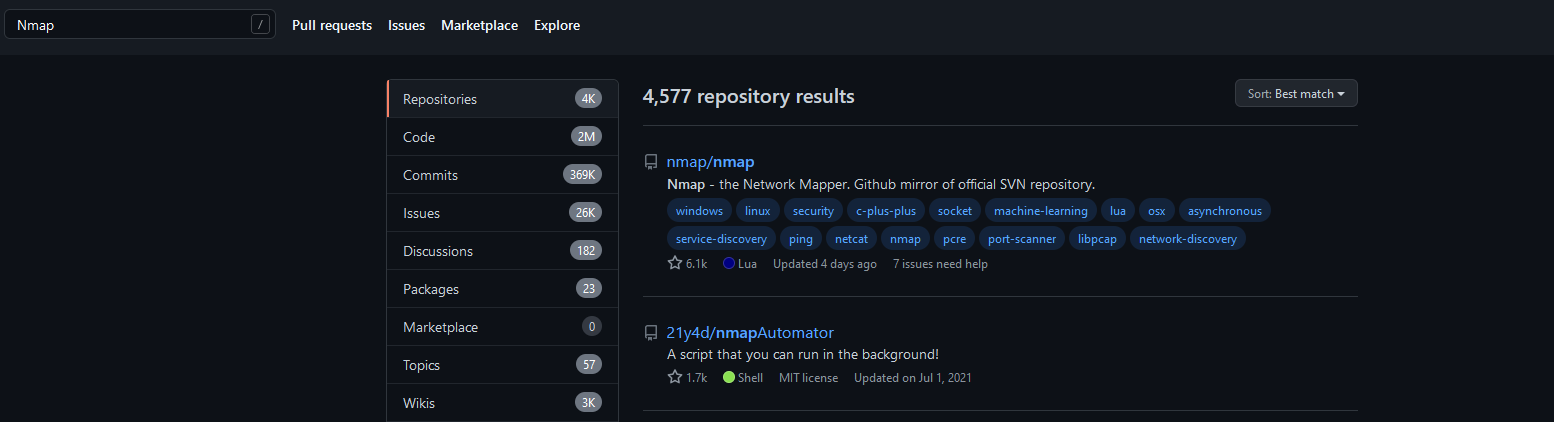
And there you have it! Boosted with your knowledge of NSE, you can further improve on your Nmap mastery, and if you’re interested in writing your own NSE scripts, go and check out this link for NSE script writing tutorial. There is also a simple example script on Nmap’s official website, called finger, that might be a good starting point for you!

Resources

Below are some interesting links on the topic of NSE, but we greatly encourage you to go out and search them yourselves.

About Version 2 Digital

Version 2 Digital is one of the most dynamic IT companies in Asia. The company distributes a wide range of IT products across various areas including cyber security, cloud, data protection, end points, infrastructures, system monitoring, storage, networking, business productivity and communication products.

Through an extensive network of channels, point of sales, resellers, and partnership companies, Version 2 offers quality products and services which are highly acclaimed in the market. Its customers cover a wide spectrum which include Global 1000 enterprises, regional listed companies, different vertical industries, public utilities, Government, a vast number of successful SMEs, and consumers in various Asian cities.

About VRX
VRX is a consolidated vulnerability management platform that protects assets in real time. Its rich, integrated features efficiently pinpoint and remediate the largest risks to your cyber infrastructure. Resolve the most pressing threats with efficient automation features and precise contextual analysis.

Why ESET is a leader for managed service providers serving SMBs

Michal Jankech, ESET Vice President of SMB and MSP Segment

In a unique report put out by Analysys Mason in 2021, ESET scored among the leaders for small- and medium-sized business (SMB) endpoint security vendors. The reason for this placement is clear: backed by a strong managed service provider (MSP) program tailored to the needs of SMBs, ESET has shown consistent financial growth in serving the SMB market around the world.)

Similarly, in 2022, Canalys published a unique report called the MSP Tech Stack, which layers five core MSP technologies positioning cybersecurity at the bottom. Although ESET did not feature among the cybersecurity vendors in this report, ESET is poised to reach a milestone in product development where it will meet the two entry criteria:

1.    Over 10% of revenue sourced via MSPs.
2.    A strong detection and response capability ready for MSPs.

The first criterion on revenue source is a mark already hit by ESET. The second criterion is on track to be met with the release of ESET Inspect Cloud – ESET’s XDR-enabling technology, which was already released for businesses in March 2022 – into ESET’s MSP program later this year.

The Canalys MSP Tech Stack serves as an insightful lens into the MSP world because it reveals the delicate balance between trust and freedom sought by MSPs: the trust to select any one vendor as a long-term, stable partner committed to its MSP program, and the freedom to mix and match several trusted vendors from the tech stack to access the best technologies available.

Finding a trusted security partner

Many events cause MSPs concern, like unwanted changes to partner programs, acquisitions between vendors serving the MSP community, or the widespread blocking of sales in the wake of the Ukraine invasion followed by the breaking and forging of many partnerships. In addition to this tumultuous time for service chains around the world, the concerns about cyberthreats remain ever present with governments simultaneously advising the solicitation of help from security experts and caution about the security posture of third-party vendors.

For many MSPs trudging through this complexity, turning to ESET as an EU-headquartered security provider may be a perfect fit, to put it boldly. Since its origins 35 years ago, ESET has been proud to be a privately owned company not beholden to stockholders and thus free to engage with partners to design an MSP program built on their feedback and the actual needs of SMBs. This means that ESET can offer partners a stable relationship set to last for many years.

But to be stable is not to be stagnant. ESET continually strives to enhance its MSP portfolio and improve the quality of its security products along with their integrations and features for MSPs. The key examples demonstrating this commitment are ESET PROTECT and ESET Inspect.

Prevent, detect, and respond from the cloud

ESET PROTECT represents ESET’s tiered approach to providing businesses with subscriptions for scalable protection centered around a management console. When this move was made in 2021, a key feature was the release of a cloud-based version of ESET PROTECT. This new foray to the cloud was not an isolated event but a paradigm shift of becoming cloud first in the way ESET plans to serve businesses and MSPs in the future.

Of course, ESET was already leveraging the power of the cloud to provide increased protection for many years. But the birth of ESET PROTECT was a new way for MSPs to scale their efforts and focus their time now unencumbered by on-premises concerns. This was followed in 2021 by the genesis of yet another cloud product – ESET Cloud Office Security – which directly protects cloud-based tools, chiefly Microsoft 365.

Yet, after having traversed all this ground to the cloud, the appetite of MSPs for cloud-provisioned protection has only been sharpened. And the succulent steak for this meal, ESET Inspect Cloud, is the detection and response module laying the foundation of ESET’s pursuit of XDR.

Interested in partnering via ESET’s MSP program? Read more here.

Apart from ESET Inspect, other plans are in store for MSPs. To give only a few hints now, ESET has long-term plans to offer multifactor authentication from the cloud, to build a vulnerability and patch management solution, and to launch a unified license management solution capable of serving the needs of all partners’ distribution model types.


Further reading:

  1. MSPs must master cybersecurity II
  2. Criminal hacking hits managed service providers: Reasons and responses
  3. No-cost ESET plugins for MSPs streamline security via low-effort dashboard
  4. With more businesses moving to the cloud and adopting SaaS, ESET Cloud Office Security provides easily managed security to MSPs and their Microsoft 365 clients
  5. A new business offering for a new business world
  6. Bringing cloud-based management to the managed service providers’ tool kit with ESET PROTECT Cloud

About Version 2 Digital

Version 2 Digital is one of the most dynamic IT companies in Asia. The company distributes a wide range of IT products across various areas including cyber security, cloud, data protection, end points, infrastructures, system monitoring, storage, networking, business productivity and communication products.

Through an extensive network of channels, point of sales, resellers, and partnership companies, Version 2 offers quality products and services which are highly acclaimed in the market. Its customers cover a wide spectrum which include Global 1000 enterprises, regional listed companies, different vertical industries, public utilities, Government, a vast number of successful SMEs, and consumers in various Asian cities.

About ESET
For 30 years, ESET® has been developing industry-leading IT security software and services for businesses and consumers worldwide. With solutions ranging from endpoint security to encryption and two-factor authentication, ESET’s high-performing, easy-to-use products give individuals and businesses the peace of mind to enjoy the full potential of their technology. ESET unobtrusively protects and monitors 24/7, updating defenses in real time to keep users safe and businesses running without interruption. Evolving threats require an evolving IT security company. Backed by R&D facilities worldwide, ESET became the first IT security company to earn 100 Virus Bulletin VB100 awards, identifying every single “in-the-wild” malware without interruption since 2003.



