黑客註冊了各種域名,這些域名都指向同一個 IP 地址,讓一個伺服器託管多個下載木馬軟件的網站。假冒網站看起來與正版網站相同,黑容更將這些網站翻譯成中文,提供原本在中國地區未能下載的軟件,例如 Telegram。一家中文新聞網站報導說,他們在使用 Firefox 瀏覽器時,會看到一則指向這些惡意網站的 Google 廣告。黑客購買了廣告,將假冒網站放置在 Google 搜索結果的「廣告」位置。ESET 向 Google 作出匯報後,這些廣告已被立即刪除。
ESET 研究員 Matías Porolli 解釋:「雖然我們無法重現此類搜索結果,但我們相信這些廣告只提供給目標地區的用戶。由於攻擊者為其網站註冊的許多域名與合法域非常相似,黑客也有可能依靠 URL 劫持來吸引潛在受害者到訪他們的網站。黑客可能只對竊取網絡憑據等信息感興趣,以便在地下論壇出售它們,或將它們用於另一種類型的犯罪活動。最後,在下載軟件之前,檢查我們正在瀏覽的 URL 是十分重要的。」
ESET 在 2022 年 8 月至 2023 年 1 月期間檢測到攻擊的國家 / 地區
About Version 2
Version 2 Digital is one of the most dynamic IT companies in Asia. The company distributes a wide range of IT products across various areas including cyber security, cloud, data protection, end points, infrastructures, system monitoring, storage, networking, business productivity and communication products.
Through an extensive network of channels, point of sales, resellers, and partnership companies, Version 2 offers quality products and services which are highly acclaimed in the market. Its customers cover a wide spectrum which include Global 1000 enterprises, regional listed companies, different vertical industries, public utilities, Government, a vast number of successful SMEs, and consumers in various Asian cities.
You lightly place your thumb at the bottom of your phone screen and, lo and behold, it’s unlocked instantly. So why can’t we do the same at the bank or when logging in to Twitter or YouTube? Well, soon we’ll be able to do it all. The passwordless future is inevitable and it’s almost here.
At NordPass, we’re thrilled to be creating a passwordless future. But what is passwordless authentication? How does it work? Let’s answer these questions.
Why should we consider going passwordless?
Year after year, we see either “123456” or “password” top our Most Common Passwords List. Millions of people reuse absurdly simple passwords across multiple platforms, even though they are very easy to crack by using a dictionary or brute force attacks. It makes passwords (and the people using them) one of the weakest links security-wise in any company or service.
Weak passwords are just part of the problem. The way we treat passwords is an issue as well. One of the worst password sins that all of us can attest to is reusing passwords. Having a single password to secure multiple accounts is a huge security risk, to put it mildly. In such instances, a single compromised account indicates that all of user’s accounts are essentially compromised as well.
The solution lies in biometric authentication and passkeys, which combined become one of the safest and smoothest passwordless authentication options available.
Passkeys: The key to passwordless authentication
In an age where technology usage continues to rise, the need for secure and efficient authentication methods becomes all the more pressing. Passwords, which have long reigned supreme as a solution for securing online accounts, have over time proven to be unreliable and susceptible to hacking. In turn, many organizations and companies have been looking for new, more efficient, and robust ways to authenticate users.
One organization at the forefront of the effort to go passwordless is the FIDO Alliance. The alliance works with various companies, including NordPass, to develop and promote open standards for passwordless authentication.
According to the FIDO Alliance, the technology set to replace passwords is passkeys. Passkeys are digital credentials that are generated by the user’s device. Usually used in combination with biometric data, such as a fingerprint or facial recognition, to offer an extra layer of security, passkeys provide access to websites and other online services.
What passkeys bring to the table
One of the major advantages of passkeys is that the private key, which is used to generate the passkey, never leaves the user’s device. This makes it almost impossible for attackers to gain access to the key through phishing or other forms of cyberattack. Furthermore, passkeys are almost impossible to hack, making them more secure overall.
Unlike traditional passwords, passkeys are invisible to the user and are never revealed or entered manually.
Going passwordless will also improve user experience. A fingerprint scanner, for example, is a fast and reliable authentication method. It would also mean that there would be no more password reset procedures — IT departments throughout the world will be very grateful. Also, when it comes to biometric authentication, you don’t need to remember anything. You won’t have any Post-its on the computer screen or notes in your planner. You can’t lose, steal, or forget your fingerprint.
Room for improvement for current passkey-based authentication
Right now, passwordless authentication is gaining major traction among such tech giants as Microsoft, Apple, and Google. All of these companies have been introducing passwordless authentication solutions, and in most instances the solutions include the use of passkeys.
However, current passkey-based solutions have a long way to go. At the moment, these solutions limit users to a single ecosystem, which makes it difficult to share them between, say, an Android user and an iOS user. In addition, the current solutions do not offer any kind of sync with password managers.
But this is where NordPass comes into play. We are currently working on integrating passkeys into your favorite password manager.
Introducing passwordless authentication to NordPass
At NordPass, we’re excited to be at the forefront of the passwordless revolution. And by early 2023, NordPass is set to introduce passwordless authentication both for individuals and businesses.
Passwordless access to NordPass
We are currently working on enabling a passwordless sign-in to NordPass. It will be a faster and simpler process than the one now, since it will require a single biometric confirmation. In simple language, this means that you will be able to access your Nord Account and NordPass with a single tap of a finger. You read it right. No more manually entering your Nord Account and Master Password each time you need to log in. Passwordless access to NordPass is set to significantly improve user experience and overall security.
NordPass passkey storage
All NordPass users will have the ability to save passkeys for any website or app in the encrypted vault and use them to access those online services later. With NordPass, you’ll be able to use, share, and sync passkeys between multiple devices and platforms, whereas many passwordless authentication solutions tend to lack such functionalities. This will make NordPass a single place for all of your digital valuables, including passwords, passkeys, credit cards, and other sensitive information.
Passwordless multi-factor authentication (MFA) for businesses
Password-based authentication is still the industry standard. However, due to the inherent vulnerabilities that come with password-based authentication, most businesses face a variety of cybersecurity risks. To significantly reduce the risk of suffering a phishing or an account takeover attack, businesses need to rethink their security approach with regard to access to endpoint devices such as laptops, desktops, workstations, and mobile devices as well as applications that leverage regular passwords or even single sign-on solutions.
With the introduction of passwordless MFA, we’re looking to help businesses improve their overall security stance by eliminating the need for passwords and introducing an authentication method based solely on biometrics.
Passkey integration for online service providers
The world is already moving rapidly towards a passwordless future. Unfortunately, not everyone can adapt smoothly and efficiently. Many small to medium-sized businesses (SMBs) lack the resources and know-how to implement passkey authentication for their users. However, at NordPass we’re ready to leverage our security expertise to make the transition from passwords to passkeys as smooth as possible. We believe that the frictionless user experience offered by passkeys across multiple platforms and devices, combined with superior security, will help your business increase conversion rates, user engagement, and user satisfaction.
You can expect big things as early as 2023. So stay tuned, and be prepared for the inevitable passwordless future – it’s just around the corner.
About Version 2 Digital
Version 2 Digital is one of the most dynamic IT companies in Asia. The company distributes a wide range of IT products across various areas including cyber security, cloud, data protection, end points, infrastructures, system monitoring, storage, networking, business productivity and communication products.
Through an extensive network of channels, point of sales, resellers, and partnership companies, Version 2 offers quality products and services which are highly acclaimed in the market. Its customers cover a wide spectrum which include Global 1000 enterprises, regional listed companies, different vertical industries, public utilities, Government, a vast number of successful SMEs, and consumers in various Asian cities.
These days, cybercrime is rampant. It’s no longer a matter of “if” you’re going to suffer an attack but “when” it will happen. All companies want to be ready for any crisis. And this is where a business continuity plan comes into play.
But what is a business continuity plan exactly? Why is it important? What should one include? Today, we’re exploring all these questions in-depth.
What is a business continuity plan?
A business continuity plan (BCP) is a document that sets guidelines for how an organization will continue its operations in the event of a disruption, whether it’s a fire, flood, other natural disaster or a cybersecurity incident. A BCP aims to help organizations resume operations without significant downtime.
Unfortunately, according to a 2020 Mercer survey, 51% of businesses across the globe don’t have a business continuity plan in place.
What’s the difference between business continuity and disaster recovery plans?
We often confuse the terms business continuity plan and disaster recovery plan. The two overlap and often work together, but the disaster recovery plan focuses on containing, examining, and restoring operations after a cyber incident. On the other hand, BCP is a broader concept that considers the whole organization. A business continuity plan helps organizations stay prepared for dealing with a potential crisis and usually encompasses a disaster recovery plan.
Importance of business continuity planning
The number of news headlines announcing data breaches has numbed us to the fact that cybercrime is very real and frequent and poses an existential risk to companies of all sizes and industries.
Consider that in 2021, approximately 37% of global organizations fell victim to a ransomware attack. Then consider that business interruption and restoration costs account for 50% of cyberattack-related losses. Finally, take into account that most cyberattacks are financially motivated and the global cost of cybercrime topped $6 trillion last year. The picture is quite clear — cybercrime is a lucrative venture for bad actors and potentially disastrous for those on the receiving end.
To thrive in these unpredictable times, organizations go beyond conventional security measures. Many companies develop a business continuity plan parallel to secure infrastructure and consider the plan a critical part of the security ecosystem. The Purpose of a business continuity plan is to significantly reduce the downtime in an emergency and, in turn, reduce the potential reputational damage and — of course — revenue losses.
The initial stage of developing a business continuity plan starts with a statement of the plan’s purpose, which explains the main objective of the plan, such as ensuring the organization’s ability to continue its operations during and after a disruptive event.
The Scope of the Plan outlines the areas or functions that the plan will cover, including business processes, personnel, equipment, and technology.
The Budget specifies the estimated financial resources required to implement and maintain the BCP. It includes costs related to technology, personnel, equipment, training, and other necessary expenses.
The Timeline provides a detailed schedule for developing, implementing, testing, and updating the BCP.
II. Risk Assessment
Identification of Risks
Prioritization of Risks
Mitigation Strategies
The Risk Assessment section of a Business Continuity Plan (BCP) is an essential part of the plan that identifies potential risks that could disrupt an organization’s critical functions.
The Identification of Risks involves identifying potential threats to the organization, such cybersecurity breaches, supply chain disruptions, power outages, and other potential risks. This step is critical to understand the risks and their potential impact on the organization.
Once the risks have been identified, the Prioritization of Risks follows, which helps determine which risks require the most attention and resources.
The final step in the Risk Assessment section is developing Mitigation Strategies to minimize the impact of identified risks. Mitigation strategies may include preventative measures, such as system redundancies, data backups, cybersecurity measures, as well as response and recovery measures, such as emergency protocols and employee training.
III. Emergency Response
Emergency Response Team
Communication Plan
Emergency Procedures
This section of the plan focuses on immediate actions that should be taken to ensure the safety and well-being of employees and minimize the impact of the event on the organization’s operations.
The Emergency Response Team is responsible for managing the response to an emergency or disaster situation. This team should be composed of individuals who are trained in emergency response procedures and can act quickly and decisively during an emergency. The team should also include a designated leader who is responsible for coordinating the emergency response efforts.
The Communication Plan outlines how information will be disseminated during an emergency situation. It includes contact information for employees, stakeholders, and emergency response personnel, as well as protocols for communicating with these individuals.
The Emergency Procedures detail the steps that should be taken during an emergency or disaster situation. The emergency procedures should be developed based on the potential risks identified in the Risk Assessment section and should be tested regularly to ensure that they are effective.
IV. Business Impact Analysis
The Business Impact Analysis (BIA) section of a Business Continuity Plan (BCP) is a critical step in identifying the potential impact of a disruption to an organization’s critical operations.
The Business Impact Analysis is typically conducted by a team of individuals who understand the organization’s critical functions and can assess the potential impact of a disruption to those functions. The team may include representatives from various departments, including finance, operations, IT, and human resources.
V. Recovery and Restoration
Procedures for recovery and restoration of critical processes
Prioritization of recovery efforts
Establishment of recovery time objectives
The Recovery and Restoration section of a Business Continuity Plan (BCP) outlines the procedures for recovering and restoring critical processes and functions following a disruption.
The Procedures for recovery and restoration of critical processes describe the steps required to restore critical processes and functions following a disruption. This may include steps such as relocating to alternate facilities, restoring data and systems, and re-establishing key business relationships.
The Prioritization section of the plan identifies the order in which critical processes will be restored, based on their importance to the organization’s operations and overall mission.
Recovery time objectives (RTOs) define the maximum amount of time that critical processes and functions can be unavailable following a disruption. Establishing RTOs ensures that recovery efforts are focused on restoring critical functions within a specific timeframe.
VI. Plan Activation
Plan Activation Procedures
The Plan Activation section is critical in ensuring that an organization can quickly and effectively activate the plan and respond to a potential emergency.
The Plan Activation Procedures describe the steps required to activate the BCP in response to a disruption. The procedures should be clear and concise, with specific instructions for each step to ensure a prompt and effective response.
VII. Testing and Maintenance
Testing Procedures
Maintenance Procedures
Review and Update Procedures
This section of the plan is critical to ensure that an organization can effectively respond to disruptions and quickly resume its essential functions.
Testing procedures may include scenarios such as natural disasters, cyber-attacks, and other potential risks. The testing procedures should include clear objectives, testing scenarios, roles and responsibilities, and evaluation criteria to assess the effectiveness of the plan.
The Maintenance Procedures detail the steps necessary to keep the BCP up-to-date and relevant.
The Review and Update Procedures describe how the BCP will be reviewed and updated regularly to ensure its continued effectiveness. This may involve conducting a review of the plan on a regular basis or after significant changes to the organization’s operations or threats.
What should a business continuity plan checklist include?
Organizations looking to develop a BCP have more than a few things to think through and consider. Variables such as the size of the organization, its IT infrastructure, personnel, and resources all play a significant role in developing a continuity plan. Remember, each crisis is different, and each organization will have a view on handling it according to all the variables in play. However, all business continuity plans will include a few elements in one way or another.
Clearly defined areas of responsibility
A BCP should define specific roles and responsibilities for cases of emergency. Detail who is responsible for what tasks and clarify what course of action a person in a specific position should take. Clearly defined roles and responsibilities in an emergency event allow you to act quickly and decisively and minimize potential damage.
Crisis communication plan
In an emergency, communication is vital. It is the determining factor when it comes to crisis handling. For communication to be effective, it is critical to establish clear communication pipelines. Furthermore, it is crucial to understand that alternative communication channels should not be overlooked and outlined in a business continuity plan.
Recovery teams
A recovery team is a collective of different professionals who ensure that business operations are restored as soon as possible after the organization confronts a crisis.
Alternative site of operations
Today, when we think of an incident in a business environment, we usually think of something related to cybersecurity. However, as discussed earlier, a BCP covers many possible disasters. In a natural disaster, determine potential alternate sites where the company could continue to operate.
Backup power and data backups
Whether a cyber event or a real-life physical event, ensuring that you have access to power is crucial if you wish to continue operations. In a BCP, you can often come across lists of alternative power sources such as generators, where such tools are located, and who should oversee them. The same applies to data. Regularly scheduled data backups can significantly reduce potential losses incurred by a crisis event.
Recovery guidelines
If a crisis is significant, a comprehensive business continuity plan usually includes detailed guidelines on how the recovery process will be carried out.
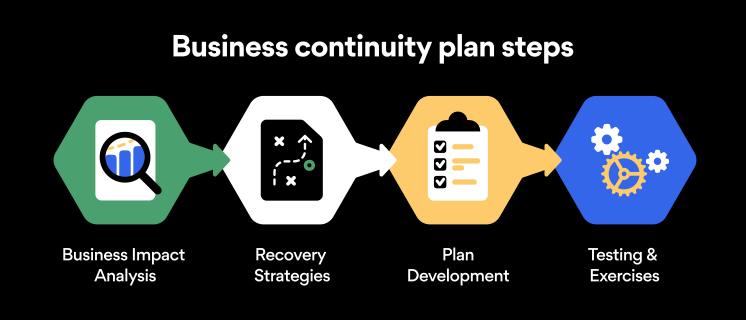
Business continuity planning steps
Here are some general guidelines that an organization looking to develop a BCP should consider:
Analysis
A business continuity plan should include an in-depth analysis of everything that could negatively affect the overall organizational infrastructure and operations. Assessing different levels of risk should also be a part of the analysis phase.
Design and development
Once you have a clear overview of potential risks your company could face, start developing a plan. Create a draft and reassess it to see if it takes into account even the smallest of details.
Implementation
Implement BCP within the organization by providing training sessions for the staff to get familiar with the plan. Getting everyone on the same page regarding crisis management is critical.
Testing
Rigorously test the plan. Play out a variety of scenarios in training sessions to learn the overall effectiveness of the continuity plan. By doing so, everyone on the team will be closely familiar with the business continuity plan’s guidelines.
Maintenance and updating
Because the threat landscape constantly changes and evolves, you should regularly reassess your BCP and take steps to update it. By making your continuity plan in tune with the times, you will be able to stay a step ahead of a crisis.
Level up your company’s security with NordPass Business
A comprehensive business continuity plan is vital for the entire organization’s security posture. However, in a perfect world, you wouldn’t have to use it. This is where NordPass Business can help.
Remember, weak, reused, or compromised passwords are often cited as one of the top contributing factors in data breaches. It’s not surprising, considering that an average user has around 100 passwords. Password fatigue is real and significantly affects how people treat their credentials. NordPass Business counters these issues.
With NordPass Business, your team will have a single secure place to store all work-related passwords, credit cards, and other sensitive information. Accessing all the data stored in NordPass is quick and easy, which allows your employees not to be distracted by the task of finding the correct passwords for the correct account.
In cyber incidents, NordPass Business ensures that company credentials remain secure at all times. Everything stored in the NordPass vault is secured with advanced encryption algorithms, which would take hundreds of years to brute force.
If you are interested in learning more about NordPass Business and how it can fortify corporate security, do not hesitate to book a demo with our representative.
About Version 2 Digital
Version 2 Digital is one of the most dynamic IT companies in Asia. The company distributes a wide range of IT products across various areas including cyber security, cloud, data protection, end points, infrastructures, system monitoring, storage, networking, business productivity and communication products.
Through an extensive network of channels, point of sales, resellers, and partnership companies, Version 2 offers quality products and services which are highly acclaimed in the market. Its customers cover a wide spectrum which include Global 1000 enterprises, regional listed companies, different vertical industries, public utilities, Government, a vast number of successful SMEs, and consumers in various Asian cities.
About NordPass NordPass is developed by Nord Security, a company leading the global market of cybersecurity products.
The web has become a chaotic space where safety and trust have been compromised by cybercrime and data protection issues. Therefore, our team has a global mission to shape a more trusted and peaceful online future for people everywhere.
You’re dozing off to one of your favorite shows on Netflix, and suddenly a notification flashes on your phone. You look down and see a weird message: “Someone signed into your Netflix account at 03:23 in Nigeria.” Odd, because you were asleep at that time – and certainly haven’t been to Nigeria before. Looks like it’s time to change your Netflix password.
Whether you have forgotten your password, want to wrangle Netflix away from your ex-spouse, or just want to update your passwords, this guide will tell you how to easily change your Netflix password.
How to change your Netflix password on desktop
Fortunately, Netflix foresaw the need for expediency when it comes to changing your password – the process is quick and straightforward.
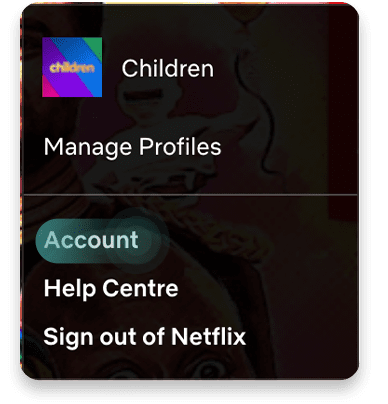
Open up your browser and go to the Netflix login page. Once you’ve logged in, bring your mouse to hover over your profile picture in the top right corner. Click on “Account.”
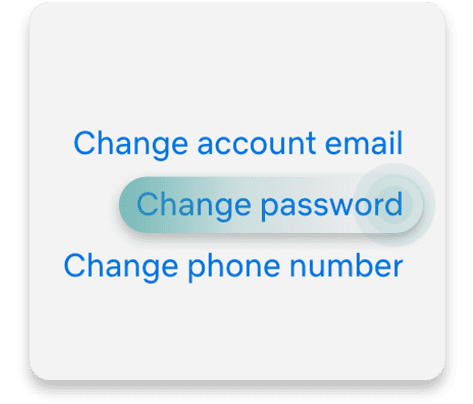
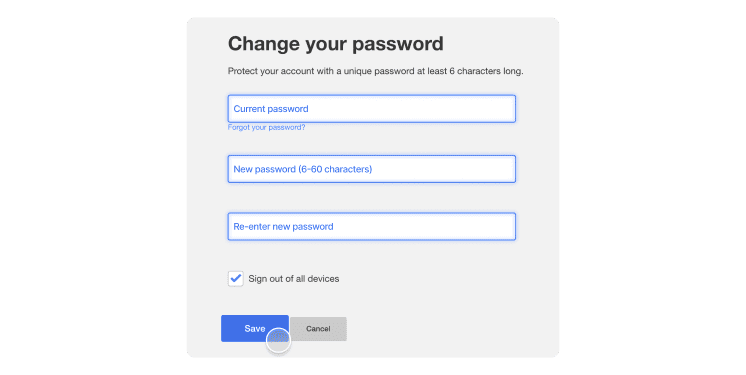
The first thing you’ll see is a section marked “Membership and billing.” On the right-hand side of this section are a few hyperlinked options. Click on the “Change password” link.
You’re now on the page where you can reset your password. Before you do, check out our password generator to craft the perfect password that will be extremely difficult to crack.
There you have it — your Netflix password is now changed. Remember that you’ll need to re-enter this new password on whatever devices your Netflix account is connected to.
How to change your Netflix password on mobile devices
Open the Netflix app on your mobile device and log in to your account.
Tap the profile icon located in the upper-left corner of the screen and select “Account.” If you are using a tablet, tap “More” at the bottom of the screen and select “Account” there.
Now tap “Change password.”
Now enter your current and new passwords.
Tap “Save” to confirm. The changes should take effect immediately.
How can you reset your Netflix password?
If you have forgotten your Netflix password, the only way to regain access to your account is by resetting your passwords. Here’s a quick guide on how to reset your Netflix password:
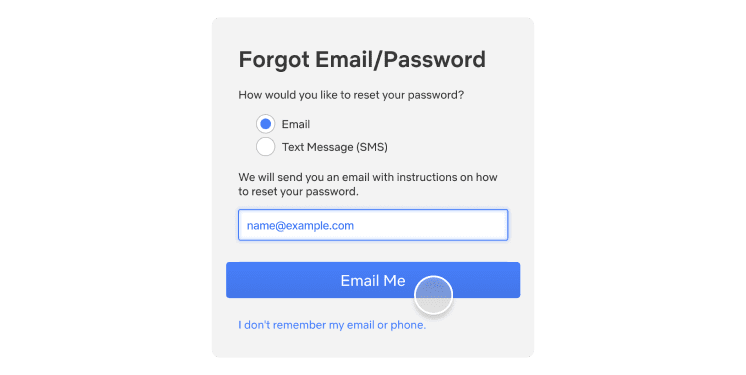
Visit the “Sign in” page and select “Need help?” which is located below the “Sign in” button.
Choose “Email” and enter your email address. Click “Email me.”
You will receive an email from Netflix with instructions on how to reset your password and create a new one.
You can also choose the “Text message” (SMS) option. Simply enter your phone number and select “Text me.”
You will receive a text message from Netflix with instructions on how to reset your password and create a new one.
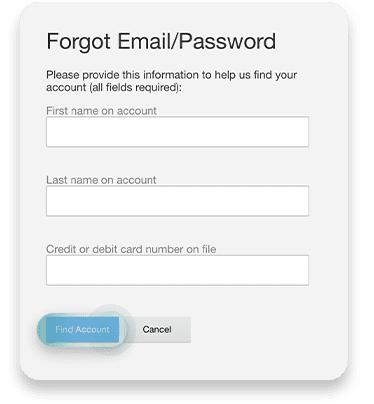
If it’s been years since you last had to reset your password, don’t worry: all hope is not lost yet! In the above image, you can see the option at the bottom that says “I don’t remember my email or phone.” Click on it.
Now, you can enter your personal and payment details to reset your password. Netflix’s UI is intuitive enough to make resetting the details of your account effortless. Just follow the on-screen instructions, and you’ll have a new password in no time.
Invest in a password manager
This is the most guaranteed way to never have to worry about your passwords again. NordPass can automatically generate top-tier strength passwords, store them in an encrypted vault, and then autofill them to whichever account it’s associated with. The unnecessary hassle of memorizing and creating passwords will be a thing of the past. With NordPass, online life is smoother and safer.
About Version 2 Digital
Version 2 Digital is one of the most dynamic IT companies in Asia. The company distributes a wide range of IT products across various areas including cyber security, cloud, data protection, end points, infrastructures, system monitoring, storage, networking, business productivity and communication products.
Through an extensive network of channels, point of sales, resellers, and partnership companies, Version 2 offers quality products and services which are highly acclaimed in the market. Its customers cover a wide spectrum which include Global 1000 enterprises, regional listed companies, different vertical industries, public utilities, Government, a vast number of successful SMEs, and consumers in various Asian cities.
These days, cybercrime is rampant. It’s no longer a matter of “if” you’re going to suffer an attack but “when” it will happen. All companies want to be ready for any crisis. And this is where a business continuity plan comes into play.
But what is a business continuity plan exactly? Why is it important? What should one include? Today, we’re exploring all these questions in-depth.
What is a business continuity plan?
A business continuity plan (BCP) is a document that sets guidelines for how an organization will continue its operations in the event of a disruption, whether it’s a fire, flood, other natural disaster or a cybersecurity incident. A BCP aims to help organizations resume operations without significant downtime.
Unfortunately, according to a 2020 Mercer survey, 51% of businesses across the globe don’t have a business continuity plan in place.
What’s the difference between business continuity and disaster recovery plans?
We often confuse the terms business continuity plan and disaster recovery plan. The two overlap and often work together, but the disaster recovery plan focuses on containing, examining, and restoring operations after a cyber incident. On the other hand, BCP is a broader concept that considers the whole organization. A business continuity plan helps organizations stay prepared for dealing with a potential crisis and usually encompasses a disaster recovery plan.
Importance of business continuity planning
The number of news headlines announcing data breaches has numbed us to the fact that cybercrime is very real and frequent and poses an existential risk to companies of all sizes and industries.
Consider that in 2021, approximately 37% of global organizations fell victim to a ransomware attack. Then consider that business interruption and restoration costs account for 50% of cyberattack-related losses. Finally, take into account that most cyberattacks are financially motivated and the global cost of cybercrime topped $6 trillion last year. The picture is quite clear — cybercrime is a lucrative venture for bad actors and potentially disastrous for those on the receiving end.
To thrive in these unpredictable times, organizations go beyond conventional security measures. Many companies develop a business continuity plan parallel to secure infrastructure and consider the plan a critical part of the security ecosystem. The Purpose of a business continuity plan is to significantly reduce the downtime in an emergency and, in turn, reduce the potential reputational damage and — of course — revenue losses.
The initial stage of developing a business continuity plan starts with a statement of the plan’s purpose, which explains the main objective of the plan, such as ensuring the organization’s ability to continue its operations during and after a disruptive event.
The Scope of the Plan outlines the areas or functions that the plan will cover, including business processes, personnel, equipment, and technology.
The Budget specifies the estimated financial resources required to implement and maintain the BCP. It includes costs related to technology, personnel, equipment, training, and other necessary expenses.
The Timeline provides a detailed schedule for developing, implementing, testing, and updating the BCP.
II. Risk Assessment
Identification of Risks
Prioritization of Risks
Mitigation Strategies
The Risk Assessment section of a Business Continuity Plan (BCP) is an essential part of the plan that identifies potential risks that could disrupt an organization’s critical functions.
The Identification of Risks involves identifying potential threats to the organization, such cybersecurity breaches, supply chain disruptions, power outages, and other potential risks. This step is critical to understand the risks and their potential impact on the organization.
Once the risks have been identified, the Prioritization of Risks follows, which helps determine which risks require the most attention and resources.
The final step in the Risk Assessment section is developing Mitigation Strategies to minimize the impact of identified risks. Mitigation strategies may include preventative measures, such as system redundancies, data backups, cybersecurity measures, as well as response and recovery measures, such as emergency protocols and employee training.
III. Emergency Response
Emergency Response Team
Communication Plan
Emergency Procedures
This section of the plan focuses on immediate actions that should be taken to ensure the safety and well-being of employees and minimize the impact of the event on the organization’s operations.
The Emergency Response Team is responsible for managing the response to an emergency or disaster situation. This team should be composed of individuals who are trained in emergency response procedures and can act quickly and decisively during an emergency. The team should also include a designated leader who is responsible for coordinating the emergency response efforts.
The Communication Plan outlines how information will be disseminated during an emergency situation. It includes contact information for employees, stakeholders, and emergency response personnel, as well as protocols for communicating with these individuals.
The Emergency Procedures detail the steps that should be taken during an emergency or disaster situation. The emergency procedures should be developed based on the potential risks identified in the Risk Assessment section and should be tested regularly to ensure that they are effective.
IV. Business Impact Analysis
The Business Impact Analysis (BIA) section of a Business Continuity Plan (BCP) is a critical step in identifying the potential impact of a disruption to an organization’s critical operations.
The Business Impact Analysis is typically conducted by a team of individuals who understand the organization’s critical functions and can assess the potential impact of a disruption to those functions. The team may include representatives from various departments, including finance, operations, IT, and human resources.
V. Recovery and Restoration
Procedures for recovery and restoration of critical processes
Prioritization of recovery efforts
Establishment of recovery time objectives
The Recovery and Restoration section of a Business Continuity Plan (BCP) outlines the procedures for recovering and restoring critical processes and functions following a disruption.
The Procedures for recovery and restoration of critical processes describe the steps required to restore critical processes and functions following a disruption. This may include steps such as relocating to alternate facilities, restoring data and systems, and re-establishing key business relationships.
The Prioritization section of the plan identifies the order in which critical processes will be restored, based on their importance to the organization’s operations and overall mission.
Recovery time objectives (RTOs) define the maximum amount of time that critical processes and functions can be unavailable following a disruption. Establishing RTOs ensures that recovery efforts are focused on restoring critical functions within a specific timeframe.
VI. Plan Activation
Plan Activation Procedures
The Plan Activation section is critical in ensuring that an organization can quickly and effectively activate the plan and respond to a potential emergency.
The Plan Activation Procedures describe the steps required to activate the BCP in response to a disruption. The procedures should be clear and concise, with specific instructions for each step to ensure a prompt and effective response.
VII. Testing and Maintenance
Testing Procedures
Maintenance Procedures
Review and Update Procedures
This section of the plan is critical to ensure that an organization can effectively respond to disruptions and quickly resume its essential functions.
Testing procedures may include scenarios such as natural disasters, cyber-attacks, and other potential risks. The testing procedures should include clear objectives, testing scenarios, roles and responsibilities, and evaluation criteria to assess the effectiveness of the plan.
The Maintenance Procedures detail the steps necessary to keep the BCP up-to-date and relevant.
The Review and Update Procedures describe how the BCP will be reviewed and updated regularly to ensure its continued effectiveness. This may involve conducting a review of the plan on a regular basis or after significant changes to the organization’s operations or threats.
What should a business continuity plan checklist include?
Organizations looking to develop a BCP have more than a few things to think through and consider. Variables such as the size of the organization, its IT infrastructure, personnel, and resources all play a significant role in developing a continuity plan. Remember, each crisis is different, and each organization will have a view on handling it according to all the variables in play. However, all business continuity plans will include a few elements in one way or another.
Clearly defined areas of responsibility
A BCP should define specific roles and responsibilities for cases of emergency. Detail who is responsible for what tasks and clarify what course of action a person in a specific position should take. Clearly defined roles and responsibilities in an emergency event allow you to act quickly and decisively and minimize potential damage.
Crisis communication plan
In an emergency, communication is vital. It is the determining factor when it comes to crisis handling. For communication to be effective, it is critical to establish clear communication pipelines. Furthermore, it is crucial to understand that alternative communication channels should not be overlooked and outlined in a business continuity plan.
Recovery teams
A recovery team is a collective of different professionals who ensure that business operations are restored as soon as possible after the organization confronts a crisis.
Alternative site of operations
Today, when we think of an incident in a business environment, we usually think of something related to cybersecurity. However, as discussed earlier, a BCP covers many possible disasters. In a natural disaster, determine potential alternate sites where the company could continue to operate.
Backup power and data backups
Whether a cyber event or a real-life physical event, ensuring that you have access to power is crucial if you wish to continue operations. In a BCP, you can often come across lists of alternative power sources such as generators, where such tools are located, and who should oversee them. The same applies to data. Regularly scheduled data backups can significantly reduce potential losses incurred by a crisis event.
Recovery guidelines
If a crisis is significant, a comprehensive business continuity plan usually includes detailed guidelines on how the recovery process will be carried out.
Business continuity planning steps
Here are some general guidelines that an organization looking to develop a BCP should consider:
Analysis
A business continuity plan should include an in-depth analysis of everything that could negatively affect the overall organizational infrastructure and operations. Assessing different levels of risk should also be a part of the analysis phase.
Design and development
Once you have a clear overview of potential risks your company could face, start developing a plan. Create a draft and reassess it to see if it takes into account even the smallest of details.
Implementation
Implement BCP within the organization by providing training sessions for the staff to get familiar with the plan. Getting everyone on the same page regarding crisis management is critical.
Testing
Rigorously test the plan. Play out a variety of scenarios in training sessions to learn the overall effectiveness of the continuity plan. By doing so, everyone on the team will be closely familiar with the business continuity plan’s guidelines.
Maintenance and updating
Because the threat landscape constantly changes and evolves, you should regularly reassess your BCP and take steps to update it. By making your continuity plan in tune with the times, you will be able to stay a step ahead of a crisis.
Level up your company’s security with NordPass Business
A comprehensive business continuity plan is vital for the entire organization’s security posture. However, in a perfect world, you wouldn’t have to use it. This is where NordPass Business can help.
Remember, weak, reused, or compromised passwords are often cited as one of the top contributing factors in data breaches. It’s not surprising, considering that an average user has around 100 passwords. Password fatigue is real and significantly affects how people treat their credentials. NordPass Business counters these issues.
With NordPass Business, your team will have a single secure place to store all work-related passwords, credit cards, and other sensitive information. Accessing all the data stored in NordPass is quick and easy, which allows your employees not to be distracted by the task of finding the correct passwords for the correct account.
In cyber incidents, NordPass Business ensures that company credentials remain secure at all times. Everything stored in the NordPass vault is secured with advanced encryption algorithms, which would take hundreds of years to brute force.
If you are interested in learning more about NordPass Business and how it can fortify corporate security, do not hesitate to book a demo with our representative.
About Version 2 Digital
Version 2 Digital is one of the most dynamic IT companies in Asia. The company distributes a wide range of IT products across various areas including cyber security, cloud, data protection, end points, infrastructures, system monitoring, storage, networking, business productivity and communication products.
Through an extensive network of channels, point of sales, resellers, and partnership companies, Version 2 offers quality products and services which are highly acclaimed in the market. Its customers cover a wide spectrum which include Global 1000 enterprises, regional listed companies, different vertical industries, public utilities, Government, a vast number of successful SMEs, and consumers in various Asian cities.
About NordPass NordPass is developed by Nord Security, a company leading the global market of cybersecurity products.
The web has become a chaotic space where safety and trust have been compromised by cybercrime and data protection issues. Therefore, our team has a global mission to shape a more trusted and peaceful online future for people everywhere.
So what’s the deal with password sharing? Would you give your partner the password to your banking account but not your phone? Is laying all your codes on the table a sign of trust or a massive security risk? Should couples share passwords at all? While it can help to build trust with a partner, sharing your passwords isn’t always the best idea.
We are asking some basic questions on a very touchy subject just to help keep your security tip top. Don’t worry — we’re not judging your loving relationship. We just believe in safety precautions no matter what, and you will too once you get a dose of reality from these not-so-lovely situations.
It’s all about how you share them
Sometimes the risk isn’t who you share your password with, but how you do it. Sharing your passwords over the internet, whether over unencrypted email or messaging apps, is like sharing them in plain view of the world. The next time you think about doing this, remember that any of the following situations can take hold (without you even knowing).
Your messaging app may not be as honest as you think. A messaging app without end-to-end encryption has full access to everything you send. End-to-end encryption means that the only person who can read your message is the person you send it to. Sounds like a given, right? Not when you consider the genuine possibility that your messaging app could be giving employees access to your private conversations.
Man-in-the-middle attacks. It’s true, attackers lurk in the middle of an exchange waiting to steal vital information, like passwords, credit card numbers, addresses… you name it. Without end-to-end encryption and zero-knowledge architecture, your credentials could be exposed, and a cybercriminal could be in and out of your bank account within seconds.
The easy way to share passwords securely
Looking at the potential risks that one might face when trying to share passwords online, it is quite natural to question whether couples should share passwords at all and is it worth the risk? The good news is that there’s a way to share passwords securely.
Obviously, the best defense is encryption. A messaging service or website using end-to-end encryption makes sure your data is kept safe from attackers. Password managers like NordPass help you store and share your passwords in a completely secure way.
With NordPass, encryption happens on your device, scrambling your data into gibberish before it even reaches the servers. This way everything you send remains locked, even from us – until it reaches your verified recipient.
NordPass Family is a great way for couples, families, or even groups of friends to further improve their online security. The Family plan comes with six Premium accounts and includes all the advanced security features. Best of all — you’ll be able to share passwords with other NordPass users instantly and effortlessly without sacrificing security.
The takeaway
Matters of the heart aside, always think twice before you send a password by text or messaging apps. Even if the service offers encryption, subpar ciphers and weak protocols can be broken by even a mediocre cyberattacker.
Sending a password securely with NordPass is easy. It locks your sensitive credentials in an encrypted vault. You can select them from a simple drop-down list and send in complete confidence.
The internet’s primary concern and priority is functionality. Your security and privacy probably aren’t. Don’t risk all of your accounts over something as small as sending a password.
About Version 2 Digital
Version 2 Digital is one of the most dynamic IT companies in Asia. The company distributes a wide range of IT products across various areas including cyber security, cloud, data protection, end points, infrastructures, system monitoring, storage, networking, business productivity and communication products.
Through an extensive network of channels, point of sales, resellers, and partnership companies, Version 2 offers quality products and services which are highly acclaimed in the market. Its customers cover a wide spectrum which include Global 1000 enterprises, regional listed companies, different vertical industries, public utilities, Government, a vast number of successful SMEs, and consumers in various Asian cities.
These days, cybercrime is rampant. It’s no longer a matter of “if” you’re going to suffer an attack but “when” it will happen. All companies want to be ready for any crisis. And this is where a business continuity plan comes into play.
But what is a business continuity plan exactly? Why is it important? What should one include? Today, we’re exploring all these questions in-depth.
What is a business continuity plan?
A business continuity plan (BCP) is a document that sets guidelines for how an organization will continue its operations in the event of a disruption, whether it’s a fire, flood, other natural disaster or a cybersecurity incident. A BCP aims to help organizations resume operations without significant downtime.
Unfortunately, according to a 2020 Mercer survey, 51% of businesses across the globe don’t have a business continuity plan in place.
What’s the difference between business continuity and disaster recovery plans?
We often confuse the terms business continuity plan and disaster recovery plan. The two overlap and often work together, but the disaster recovery plan focuses on containing, examining, and restoring operations after a cyber incident. On the other hand, BCP is a broader concept that considers the whole organization. A business continuity plan helps organizations stay prepared for dealing with a potential crisis and usually encompasses a disaster recovery plan.
Importance of business continuity planning
The number of news headlines announcing data breaches has numbed us to the fact that cybercrime is very real and frequent and poses an existential risk to companies of all sizes and industries.
Consider that in 2021, approximately 37% of global organizations fell victim to a ransomware attack. Then consider that business interruption and restoration costs account for 50% of cyberattack-related losses. Finally, take into account that most cyberattacks are financially motivated and the global cost of cybercrime topped $6 trillion last year. The picture is quite clear — cybercrime is a lucrative venture for bad actors and potentially disastrous for those on the receiving end.
To thrive in these unpredictable times, organizations go beyond conventional security measures. Many companies develop a business continuity plan parallel to secure infrastructure and consider the plan a critical part of the security ecosystem. The Purpose of a business continuity plan is to significantly reduce the downtime in an emergency and, in turn, reduce the potential reputational damage and — of course — revenue losses.
The initial stage of developing a business continuity plan starts with a statement of the plan’s purpose, which explains the main objective of the plan, such as ensuring the organization’s ability to continue its operations during and after a disruptive event.
The Scope of the Plan outlines the areas or functions that the plan will cover, including business processes, personnel, equipment, and technology.
The Budget specifies the estimated financial resources required to implement and maintain the BCP. It includes costs related to technology, personnel, equipment, training, and other necessary expenses.
The Timeline provides a detailed schedule for developing, implementing, testing, and updating the BCP.
II. Risk Assessment
Identification of Risks
Prioritization of Risks
Mitigation Strategies
The Risk Assessment section of a Business Continuity Plan (BCP) is an essential part of the plan that identifies potential risks that could disrupt an organization’s critical functions.
The Identification of Risks involves identifying potential threats to the organization, such cybersecurity breaches, supply chain disruptions, power outages, and other potential risks. This step is critical to understand the risks and their potential impact on the organization.
Once the risks have been identified, the Prioritization of Risks follows, which helps determine which risks require the most attention and resources.
The final step in the Risk Assessment section is developing Mitigation Strategies to minimize the impact of identified risks. Mitigation strategies may include preventative measures, such as system redundancies, data backups, cybersecurity measures, as well as response and recovery measures, such as emergency protocols and employee training.
III. Emergency Response
Emergency Response Team
Communication Plan
Emergency Procedures
This section of the plan focuses on immediate actions that should be taken to ensure the safety and well-being of employees and minimize the impact of the event on the organization’s operations.
The Emergency Response Team is responsible for managing the response to an emergency or disaster situation. This team should be composed of individuals who are trained in emergency response procedures and can act quickly and decisively during an emergency. The team should also include a designated leader who is responsible for coordinating the emergency response efforts.
The Communication Plan outlines how information will be disseminated during an emergency situation. It includes contact information for employees, stakeholders, and emergency response personnel, as well as protocols for communicating with these individuals.
The Emergency Procedures detail the steps that should be taken during an emergency or disaster situation. The emergency procedures should be developed based on the potential risks identified in the Risk Assessment section and should be tested regularly to ensure that they are effective.
IV. Business Impact Analysis
The Business Impact Analysis (BIA) section of a Business Continuity Plan (BCP) is a critical step in identifying the potential impact of a disruption to an organization’s critical operations.
The Business Impact Analysis is typically conducted by a team of individuals who understand the organization’s critical functions and can assess the potential impact of a disruption to those functions. The team may include representatives from various departments, including finance, operations, IT, and human resources.
V. Recovery and Restoration
Procedures for recovery and restoration of critical processes
Prioritization of recovery efforts
Establishment of recovery time objectives
The Recovery and Restoration section of a Business Continuity Plan (BCP) outlines the procedures for recovering and restoring critical processes and functions following a disruption.
The Procedures for recovery and restoration of critical processes describe the steps required to restore critical processes and functions following a disruption. This may include steps such as relocating to alternate facilities, restoring data and systems, and re-establishing key business relationships.
The Prioritization section of the plan identifies the order in which critical processes will be restored, based on their importance to the organization’s operations and overall mission.
Recovery time objectives (RTOs) define the maximum amount of time that critical processes and functions can be unavailable following a disruption. Establishing RTOs ensures that recovery efforts are focused on restoring critical functions within a specific timeframe.
VI. Plan Activation
Plan Activation Procedures
The Plan Activation section is critical in ensuring that an organization can quickly and effectively activate the plan and respond to a potential emergency.
The Plan Activation Procedures describe the steps required to activate the BCP in response to a disruption. The procedures should be clear and concise, with specific instructions for each step to ensure a prompt and effective response.
VII. Testing and Maintenance
Testing Procedures
Maintenance Procedures
Review and Update Procedures
This section of the plan is critical to ensure that an organization can effectively respond to disruptions and quickly resume its essential functions.
Testing procedures may include scenarios such as natural disasters, cyber-attacks, and other potential risks. The testing procedures should include clear objectives, testing scenarios, roles and responsibilities, and evaluation criteria to assess the effectiveness of the plan.
The Maintenance Procedures detail the steps necessary to keep the BCP up-to-date and relevant.
The Review and Update Procedures describe how the BCP will be reviewed and updated regularly to ensure its continued effectiveness. This may involve conducting a review of the plan on a regular basis or after significant changes to the organization’s operations or threats.
What should a business continuity plan checklist include?
Organizations looking to develop a BCP have more than a few things to think through and consider. Variables such as the size of the organization, its IT infrastructure, personnel, and resources all play a significant role in developing a continuity plan. Remember, each crisis is different, and each organization will have a view on handling it according to all the variables in play. However, all business continuity plans will include a few elements in one way or another.
Clearly defined areas of responsibility
A BCP should define specific roles and responsibilities for cases of emergency. Detail who is responsible for what tasks and clarify what course of action a person in a specific position should take. Clearly defined roles and responsibilities in an emergency event allow you to act quickly and decisively and minimize potential damage.
Crisis communication plan
In an emergency, communication is vital. It is the determining factor when it comes to crisis handling. For communication to be effective, it is critical to establish clear communication pipelines. Furthermore, it is crucial to understand that alternative communication channels should not be overlooked and outlined in a business continuity plan.
Recovery teams
A recovery team is a collective of different professionals who ensure that business operations are restored as soon as possible after the organization confronts a crisis.
Alternative site of operations
Today, when we think of an incident in a business environment, we usually think of something related to cybersecurity. However, as discussed earlier, a BCP covers many possible disasters. In a natural disaster, determine potential alternate sites where the company could continue to operate.
Backup power and data backups
Whether a cyber event or a real-life physical event, ensuring that you have access to power is crucial if you wish to continue operations. In a BCP, you can often come across lists of alternative power sources such as generators, where such tools are located, and who should oversee them. The same applies to data. Regularly scheduled data backups can significantly reduce potential losses incurred by a crisis event.
Recovery guidelines
If a crisis is significant, a comprehensive business continuity plan usually includes detailed guidelines on how the recovery process will be carried out.
Business continuity planning steps
Here are some general guidelines that an organization looking to develop a BCP should consider:
Analysis
A business continuity plan should include an in-depth analysis of everything that could negatively affect the overall organizational infrastructure and operations. Assessing different levels of risk should also be a part of the analysis phase.
Design and development
Once you have a clear overview of potential risks your company could face, start developing a plan. Create a draft and reassess it to see if it takes into account even the smallest of details.
Implementation
Implement BCP within the organization by providing training sessions for the staff to get familiar with the plan. Getting everyone on the same page regarding crisis management is critical.
Testing
Rigorously test the plan. Play out a variety of scenarios in training sessions to learn the overall effectiveness of the continuity plan. By doing so, everyone on the team will be closely familiar with the business continuity plan’s guidelines.
Maintenance and updating
Because the threat landscape constantly changes and evolves, you should regularly reassess your BCP and take steps to update it. By making your continuity plan in tune with the times, you will be able to stay a step ahead of a crisis.
Level up your company’s security with NordPass Business
A comprehensive business continuity plan is vital for the entire organization’s security posture. However, in a perfect world, you wouldn’t have to use it. This is where NordPass Business can help.
Remember, weak, reused, or compromised passwords are often cited as one of the top contributing factors in data breaches. It’s not surprising, considering that an average user has around 100 passwords. Password fatigue is real and significantly affects how people treat their credentials. NordPass Business counters these issues.
With NordPass Business, your team will have a single secure place to store all work-related passwords, credit cards, and other sensitive information. Accessing all the data stored in NordPass is quick and easy, which allows your employees not to be distracted by the task of finding the correct passwords for the correct account.
In cyber incidents, NordPass Business ensures that company credentials remain secure at all times. Everything stored in the NordPass vault is secured with advanced encryption algorithms, which would take hundreds of years to brute force.
If you are interested in learning more about NordPass Business and how it can fortify corporate security, do not hesitate to book a demo with our representative.
About Version 2 Digital
Version 2 Digital is one of the most dynamic IT companies in Asia. The company distributes a wide range of IT products across various areas including cyber security, cloud, data protection, end points, infrastructures, system monitoring, storage, networking, business productivity and communication products.
Through an extensive network of channels, point of sales, resellers, and partnership companies, Version 2 offers quality products and services which are highly acclaimed in the market. Its customers cover a wide spectrum which include Global 1000 enterprises, regional listed companies, different vertical industries, public utilities, Government, a vast number of successful SMEs, and consumers in various Asian cities.
About NordPass NordPass is developed by Nord Security, a company leading the global market of cybersecurity products.
The web has become a chaotic space where safety and trust have been compromised by cybercrime and data protection issues. Therefore, our team has a global mission to shape a more trusted and peaceful online future for people everywhere.
Regular releases (RRR) are monthly releases that bring together many changes and new functionalities. They are ideal for those users who need to be up to date and are not afraid of finding some unpolished detail. The LTS versions are oriented to consolidate all the changes of the RRR versions and offer maximum stability.
New features and improvements
Improvement in credential store security
From this version onwards, Pandora FMS encrypts user password hashing using the algorithm CRYPT_BLOWFISH.
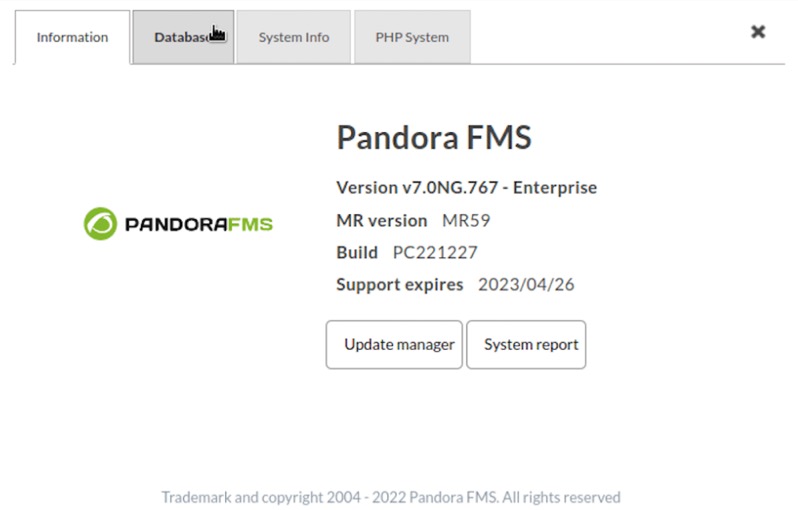
New application information display
With an “About” modal window that replaces the Web Console footer.
New network monitoring: SFlow
The possibility of obtaining monitoring through SFlow has been incorporated into our flow management.
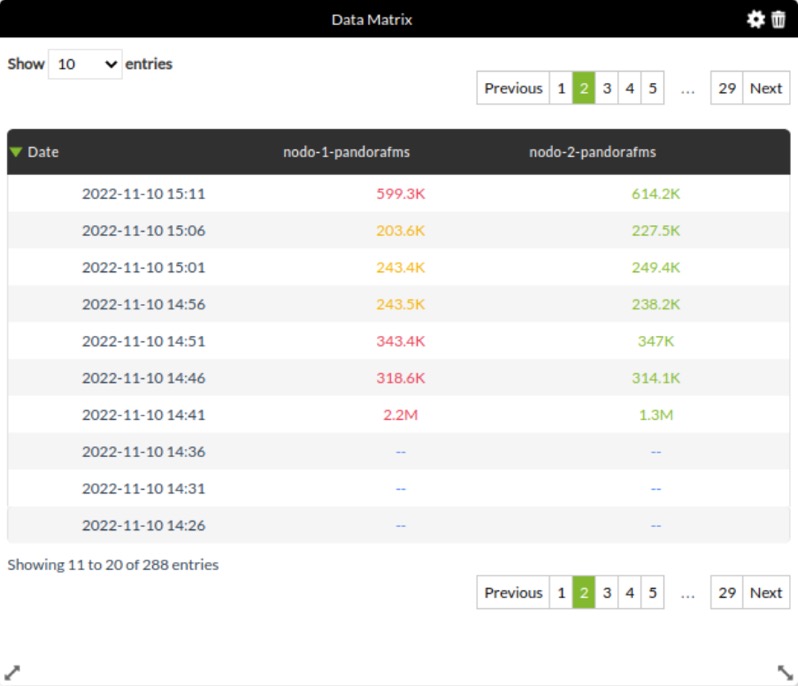
New dashboard widget: Data Matrix
The new “Data Matrix” widget has been added. Through this widget you may represent the information of the requested modules in a decompressed way, taking into account the value of the requested interval.
New macro _group_contact_
Added new macro _group_contact_ in event responses.
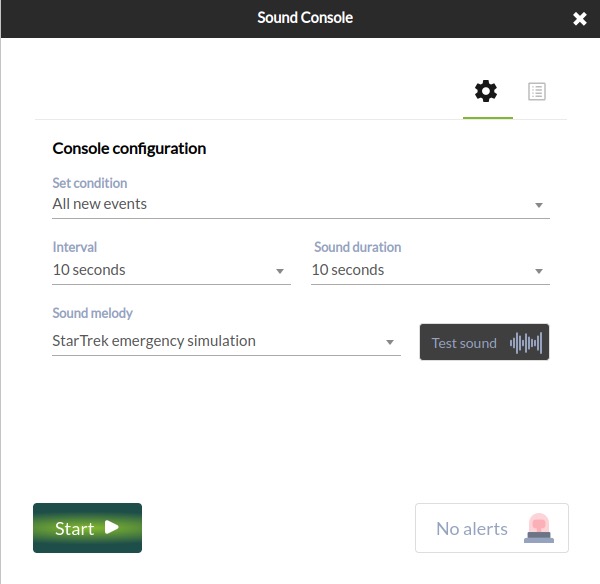
Sound alerts in Command Center
Added the sound alert configuration feature in the Command Center, just like the one from the nodes.
New indicator in visual console: Orange box
We rescued a feature from version 6: the ability to display an orange box on visual certain console elements if the agent or module has a triggered alert, as well as recursive elements that reflect the status of the other visual console:
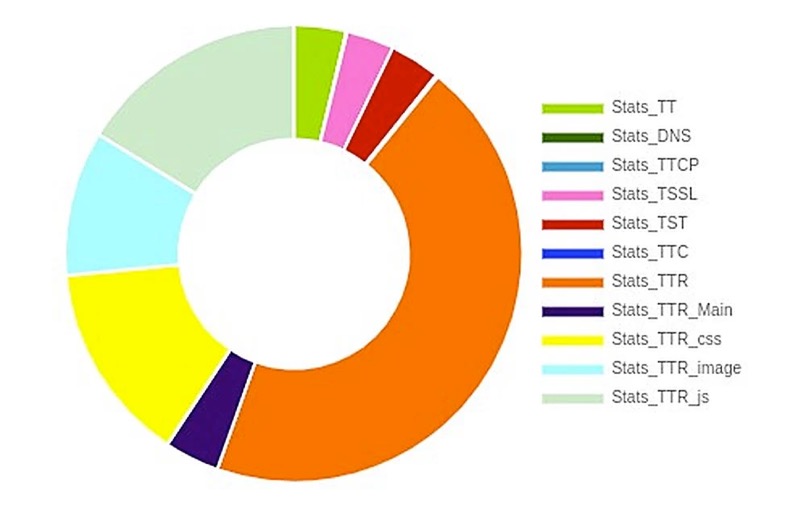
New pie charts
Pie charts have been modified for more accurate representation of their data.
LDAP PLUGIN – ENTERPRISE
New parameters have been added, –module_prefix to add a prefix to modules and –tentacle_address and –tentacle_port to be able to send data by Tentacle and be able to see those in Pandora FMS before installing the plugin.
Due to the arrival of EOL from versions PHP 7.4, 7.3 and 7.2, version LTS 767 “Hope” will be the last one that will support said versions, PHP being Pandora FMS official version for the coming ones.
Fixed vulnerabilities
Case#
GitLab#
Description
N/A
8297
Improved Pandora FMS access management
Feature extinction
Deleted process transactional monitoring. This feature has nothing to do with WEB transaction monitoring or application monitoring (WUX, UX) that keep on working and being further developed in each version.
Changes and improvements
Case#
GitLab#
Description
N/A
9847
Improved remote inventory plugin for Windows for using pandorawmic binary.
14021
9325
Added the possibility of choosing the representation of the unit of a thousand.
14021
932
Added the possibility of choosing the power to represent full numerical data in reports.
N/A
9412
Made visual modifications to Satellite server remote configuration to make it easier to use.
13830
9292
Improved trap saving and representation in the SNMP view so as not to lose performance when increasing the number of elements to be viewed.
N/A
8558
The inventory feature becomes OpenSource.
N/A
9535
The cluster monitoring feature becomes OpenSource.
N/A
7386
Modified API call management in order to hide the access credentials to it.
N/A
9763
Improved asynchronous service performance and synchronization.
N/A
9624
Added the possibility of monitoring through SFlow.
N/A
9554
Changed pie chart representation.
N/A
9530
Reinstated triggered alert representation by orange boxes.
N/A
8619
Added new widget to dashboards: “Data matrix”.
N/A
9740
Added the mail configuration feature to the Command Center.
N/A
9675
Modified merging notices, so that they only fire in the strictly necessary cases.
N/A
8809
Added Custom SQL report type to the Command Center.
N/A
9709
Changed the admin user to be created as local by default.
14267
9557
Added private dashboard automatic removal when deleting the associated user.
13884
9246
Added new macro _group_contact_ in event responses.
N/A
9801
Added block in PDF/CSV/JSON file generation so as not to be able to generate more than one simultaneously and thus not affect the tool’s performance.
N/A
9286
Deleted the service forcing button for child services.
N/A
9120
Included the “not” button for a free text search in the events view.
13468
8849
Added the option to create a custom Link agent field.
13329
8770
Added the possibility of having bandwidth in absolute value in the network-bandwidth plugin.
N/A
8755
Modified the possibility of editing server plugins once they are deployed.
N/A
9135
Included the possibility of searching by name and user ID in events.
N/A
9516
Modified agent plugin editing in policies.
N/A
9447
Added entry control to the –create_event call of the CLI.
N/A
9152
Added the option to enable modules in bulk in agent views.
13786
8854
Included audible event alerts in the Command Center.
Label and input visual correction in the agent group view.
N/A
9113
Added HTTPS support for API CHECKER.
13843
9196
Added service element edition into the Metaconsole.
N/A
9219
Deleted configuration file editing in collection or plugin ownership in policies with NMS license.
N/A
9463
Improved network map linking.
N/A
9878
Added server multiple selection in event filter editing (Metaconsole).
N/A
9903
Deleted the possibility of having different profiles with the same name.
N/A
9984
Corrected recon parameter order with SNMP v3.
N/A
9991
Renamed “skin” label by “theme” in user editing.
N/A
10037
Improvements in server auto-monitoring.
N/A
10082
Improved module double search tooltip in agent view.
N/A
10098
Better composer error control in PHP 7 when updating to Pandora 768 (it does not offer support for PHP 7).
N/A
10101
When changing from md5 to sha (access credentials) it is checked whether the table is varchar(60), if not it stays as md5.
N/A
1841
Added SO filtering to policies.
N/A
8538
Improve Azure monitoring.
N/A
9090
Added manual query to turn old plain-text “custom_data” into base64.
14021
9323
Enhanced 4-figure number display in reports to show the full number.
N/A
9587
Added double search in agent view to filter modules and alerts.
N/A
9643
Implemented pandora-exec for modern Windows (such as wmic).
N/A
9868
Deleted the footer and replaced by “About” section.
N/A
10025
Added option in the online installer to install the latest LTS version.
N/A
10096
Adapted snmp_remote.pl plugin to be able to execute it externally.
N/A
9618
Added the option to see the IP with which a remote module is being run from the agent view.
Bug fixes
Support#
GitLab#
Description
N/A
9684
Fixed connection error in NCM if the destination needs a prompt.
13394
8793
Fixed the deadlock in pandora_db when using Percona XtraDB cluster.
N/A
9995
Replaced the awk command by gawk for the AD plugin to avoid usage error.
N/A
9985
Fixed the use of the Deployment Center with PHP 8.
N/A
9983
Fixed error 500 in operations in bulk with PHP 8.
N/A
9982
Fixed bug in pandora-snmp-bandwith.pl plugin.
14484
9896/9275
Fixed the compilation of certain dependencies necessary for the correct use of NCM.
N/A
9833
Fixed user search in general search engine in the OpenSource version.
14523
9811
Fixed errors in reports that had availability type items.
N/A
9783
Fixed certain bugs in new network map refreshings.
14458
9780
Fixed the lack of information display in Discovery tasks.
N/A
9720
Fixed module histogram widget by not displaying state changes correctly.
14417
9706
Fixed the disappearance of drop-down menus in the module graphics view in dark mode.
N/A
9677
Fixed history database automatic partitioning.
N/A
9597
Fixed the default port in the integration with Ehorus.
N/A
9586
Modified the API call get_tree_agent, which displayed unnecessary information.
N/A
9548
Added certain fields in some database tables to avoid errors in the execution of pandora_db.
14180
9498
Fixed API call add_permission_user_to_group, which left the assigned profile group empty.
N/A
9483
Modified the correlation server to prevent its performance degradation.
14050
9349
Modified the tree view in the Command Center so that it does not show the agent hash when hovering over.
N/A
9978
Fixed enterprise ACLs to not allow configuration of a particular bulk operations page.
14580
9912
Fixed scheduled emails and report sending using Discovery tasks.
N/A
10000
Fixed error 500 in “tree_agents” API call with PHP 8.
N/A
9986
Fixed saving when creating an SNMP module that does not need a port, so that it is saved empty.
14571
9931
Fixed filtering in the event view when trying to select more than one server, where only the first one was selected.
N/A
9911
Fixed collection update when md5 is weight 0.
14569
9906
Fixed auto-refresh errors in Command Center event view.
14572
9873
Fixed custom images missing in visual console service elements.
14558
9851
Fixed wrong display of custom images on the login screen.
14463
9747
Solved the lack of some events when “Display all” is selected in filtering.
N/A
9721
Corrected the CLI call –add_event_comment that did not add the event ID into the comment.
N/A
9508
Fixed text overlay in dashboards when setting up a new widget.
14178
9496
Added input value validation in the creation of a new module using API.
12537
9221
Corrected module type’s default value when creating modules in “MySQL Server Advanced Plugin”.
12537
8950
Modified modules of the “MySQL Server Advanced Plugin” plugin that had erroneous data.
N/A
9061
Fixed Discovery section views.
N/A
9251
Added translation into sections that called to function ui_print_help_tip
N/A
9362
Modified tagent_data checking for big loads of data.
N/A
9440
Fixed “$bad_agents” counting.
14267
9556
Fixed counting and pagination in Dashboards view.
14349
9664
Removed modules in pendingdelete from the module selection view in scheduled downtimes.
N/A
9679
Fixed information sample in failed attempt register when obtaining a token.
14457
9738
Fixed node change in SQL reports after editing it (Metaconsole).
N/A
9759
Fixed common agent loading in module operations in bulk.
14480
9787
Fixed status update in the event information window in the General tab.
N/A
9817
Controlled profile duplication in agent creation.
N/A
9825
Fixed image upload through file manager in the Metaconsole.
N/A
9827
Fixed error related to external link without value as user home screen.
N/A
9831
Fixed password policy that only worked the first time.
N/A
9844
Fixed bug in alert filtering (it did not take into account “field content” in alert filter when selecting “mail to admin” in actions).
N/A
9908
Fixed failure in the Metaconsole event filter when modifying autorefresh.
N/A
9910
Fixed visual bug in template condition configuration/editing.
N/A
9922
Fixed the impossibility of filtering by tags in alert view.
N/A
9932
Fixed errors in SNMP browser.
N/A
9953
Fixed agent GIS information addition manually through PHP 8.
N/A
9966
Fixed issue with permissions from users created through API (user with manage users) of access to nodes in environments with Metaconsole.
14036
9969
Fixed errors when editing traps.
N/A
9972
Fixed typo in the log message when adding the bandwidth plugin module in Satellite.
14623
9973
Fixed error that did not allow to disable auto refresh in the Metaconsole.
N/A
9988
Fixed visual issue that did not allow to access the log view from the agent view.
N/A
9994
Fixed issue that did not allow to select “module group” when creating a modules.
N/A
9996
Fixed incorrect description in ssh module creation.
N/A
9997
Removed “using module component” from module editing.
N/A
9999
Fixed error in agent “full list of alerts” view.
N/A
10005
Fixed SQL errors when adding a new node o the Metaconsole.
N/A
10022
Fixed SQL error when adding inventory modules allowing to save without “Module” field.
N/A
10034
Fixed error that allowed to create empty/voisd ALC Enterprise profiles.
N/A
10036
Fixed visual error where the module legend overlapped with the circle graph in custom graphs.
N/A
10038
Fixed auto refreshing issue in event view (Metaconsole).
N/A
10041
Fixed error 500 in old correlation alerts.
N/A
10043
Fixed trap editing error that generated entities and did not allow editing.
N/A
10046
Fixed bug when deleting inventory modules individually.
N/A
10048
Fixed error in “Monitoring>Alert details” where when filtering by “mil to admin” it did not take into account the rest of the filters.
N/A
10049
Fixed error 500 when editing the cluster agent from the tree view (Metaconsole).
N/A
10074
Fixed error that did not allow to modify “content type” in SNMP alerts with “mail to admin” action.
14724
10075
Fixed error that did not show Compliance SLA percentage and Status in PDF reports.
N/A
10078
Fixed error 500 when deleting correlation alerts.
14706
10080
Fixed SQL error when creating external alert with action by default.
N/A
10104
Added Chrome to Ubuntu installation for proper execution in the console.
N/A
10119
Fixed alert view error in the Open version.
14783
10121
Fixed error 500 when creating custom MySQL.
N/A
10154
Fixed network map preview view with Discovery task performance.
N/A
9949
Fixed WUX widgets.
14544
10023
Fixed pandora_snmp_bandwidth.pl plugin.
N/A
10139
Fixed default visual consoles that used non-existent data.
N/A
8578
Fixed visual errors in integrations with eHorus.
N/A
9980
Fixed WUX executescript command when the response obtained 0.
N/A
10068
Fixed node collection synchronization when using PHP 8.
N/A
10040
Fixed connection error with AD in Command Center with PHP 8.
N/A
10114
Fixed error 500 in Command Center when using LDAP.
N/A
8047
fixed Kaspersky antivirus blocking to new WMIC version used by the Satellite server.
N/A
9633
Fixed typos in alert templates in french.
14650
10026
Fixed Command Center configuration order.
N/A
10123
Fixed warning due to a Js file being missing.
N/A
10052
Fixed network map calculation counting whew the mock node was taken into account.
N/A
10129
Fixed visual typo in the percentile time creation.
N/A
10088
Modified sample_agent query to improve its performance.
N/A
10131
Fixed error 500 in the module template view within an agent.
N/A
10135
Fixed error 500 in Command Center collection pagination.
Documentation update
Caso#
GitLab#
Descripción
N/A
10003
Fixed CLI call –create_event information.
N/A
10001
Added documentation of the tables used in the Command Center merging process.
N/A
9998
Added documentation of server plugin modification even if they are deployed.
N/A
9993
Added documentation about the use of email encryption in the Command Center.
N/A
9835
Updated Selinux documentation.
N/A
9803
Deleted transaction monitoring documentation.
N/A
9795
Added the documentation of the new “Data Matrix” widget.
N/A
9767
Updated information for installing software agents.
N/A
9743
Added documentation for the new event response macro _group_contact_.
14195
9533
Modified SQL report documentation to help perform correct queries.
N/A
9967
Updated information about visual console icons.
N/A
10113
Added cusom_data on base64 documentation.
N/A
10109
Added the new menu option “About”.
N/A
10145
Fixed support to Windows devices.
N/A
10060
Added documentation on dependencies included in ALT packages.
N/A
10128
Added IPAM documentation for importing through CSV.
N/A
10072
Updated new pie chart documentation.
N/A
10142
Updated server token “Dataserver_threads x” documentation.
N/A
9696
Added documentation to be able to use pmacct as alternate probe to that of Netflow.
Known bugs
This section presents some known bugs that will be fixed as soon as possible in upcoming versions.
Caso#
GitLab#
Descripción
14771
10156
The availability report content cannot be displayed without first clicking “Update Item”.
N/A
10152
It is not possible to add some groups to notifications.
14825
10146
The timestamp macro shows different date formats.
N/A
10147
There is some login slowdown in the node.
N/A
9866
Certain notifications are not fully displayed in descriptions.
N/A
10051
By setting a timeout to a module sometimes the module process is not stopped, therefore leaving a zombie process.
14803
10133
There are issues for Discovery IPAM task deletion.
14804
10136
pandora_manage does not modify the agent’s primary group from the Command Center.
14762
10132
There is an error in registration of a Windows machine when carrying out WMI requests.
N/A
9253
Failure in the usage of certain languages in the Command Center.
14800
10127
It is necessary to add the “id_nodo” field to the call to validate events from the API in the Command Center.
14417
9706
Menu display error in the module’s graph with dark mode.
N/A
9677
Failure in automatic partition creation in the history database.
N/A
10102
Visual typo in columns of service SLA reports.
N/A
10115
Login issues through LDAP when using special characters.
N/A
9924
Errors in visual console links.
14765
10112
Certain module types belonging to policies keep on running even if disabled from policies.
14735
10085
Lack of data time correspondence between graphs and serialized data.
N/A
9600
Server wrong status when there is a time zone difference between the server and the console.
N/A
9164
Process duplication creation in VMWare tasks.
About Version 2 Digital
Version 2 Digital is one of the most dynamic IT companies in Asia. The company distributes a wide range of IT products across various areas including cyber security, cloud, data protection, end points, infrastructures, system monitoring, storage, networking, business productivity and communication products.
Through an extensive network of channels, point of sales, resellers, and partnership companies, Version 2 offers quality products and services which are highly acclaimed in the market. Its customers cover a wide spectrum which include Global 1000 enterprises, regional listed companies, different vertical industries, public utilities, Government, a vast number of successful SMEs, and consumers in various Asian cities.
About PandoraFMS
Pandora FMS is a flexible monitoring system, capable of monitoring devices, infrastructures, applications, services and business processes.
Of course, one of the things that Pandora FMS can control is the hard disks of your computers.