Cybersecurity is a critical concern for organizations worldwide. In 2022, we saw an unprecedented increase in the number and severity of cyber attacks. With more people working remotely, organizations have become more vulnerable to attacks. Cybercriminals continue to target businesses across all industries, using various tactics to breach networks and access personal data.
This article will delve into the most significant cybersecurity statistics of 2022, including the key numbers, data breaches with the most substantial impact, vulnerable industries, types of attacks, prevention actions, and the cost of cybercrime. Understanding these statistics is mandatory for businesses to develop effective security strategies and protect their data from malicious actors.
Key numbers of 2022
A staggering 82% of all breaches involved the “human element” using stolen credentials, phishing, human error, and misuse. (Verizon)
Data compromises, such as data breaches, exposure, and leakage, impacted over 422 million people. (ITRC)
Supply chain attacks accounted for 19% of all cyber security incidents. (IBM)
In Q4 of 2022, the number of cyberattacks worldwide reached an unparalleled level, with each organization experiencing an average of 1168 attacks per week. (Checkpoint)
Servers were involved in 84% of all cyber security incidents, with web application servers and mail servers accounting for 56% and 28% of these incidents, respectively. (Verizon)
Nearly half of all cyber security incidents (47%) pertained to personally identifiable information (PII), while another 46% involved authentication credentials. Payment card data was affected in only 7% of the incidents. (Verizon)
Cyberattacks surged in the USA, with a staggering 57% increase. Latin America experienced a 29% increase, while Europe and Singapore both saw a 26% increase. Meanwhile, the UK encountered a shocking 77% spike in cyberattacks. (Checkpoint)
83% of organizations experienced more than one data breach. (IBM)
There was a 38% increase in global cyberattacks compared to the previous year. (Checkpoint)
Almost 1 billion emails were exposed, affecting one in five internet users. (AAG)
The top 10 most significant data breaches of 2022
We present the most impactful data breaches of the last year.
10. The Axie Infinity’s crypto theft
Axie Infinity is an online video game that uses Ethereum-based cryptocurrencies and NFTs. As the games services heavily rely on blockchain service Ronin, cyber criminals managed to infiltrate the system. They were able to take control of the network and send 173,600 ethers worth about $600 million and withdraw $25.5 million worth of coin. This has now become one of the largest thefts in the history of cryptocurrencies and online gaming.
9. Cash App data breach
In April, a disgruntled former employee of Cash App, a payment company, took it upon himself to breach the company’s system. The hacker managed to access sensitive reports, including the names, portfolio values, and brokerage account numbers of more than 8 million clients, which they then stole.
8. Costa Rica’s government ransomware attack
The Costa Rican government suffered a major cyberattack when the Conti ransomware gang successfully breached their systems. The group gained access to highly valuable data, which they stole and then demanded a hefty ransom of $20 million.
This forced the Central American government to declare a state of emergency. Shockingly, weeks after the attack, 670 GB of data, representing 90% of the information that had been accessed, was posted to a leak site by the threat group.
7. Neopets data breach
Last July, a database with account details of 69 million Neopets game users was found for sale on an internet forum. The data included names, email addresses, zip codes, genders, and birth dates. An inquiry found that cyber attackers had infiltrated the Neopets IT systems and had unauthorized access to it for a prolonged period, from January 3, 2021, to July 19, 2022, spanning over 18 months.
6. Revolut data breach
In September 2022, a data breach occurred at fintech start-up Revolut, resulting in personal information of more than 50,000 users being accessed by a third-party. The breached data included names, addresses, and partial payment card information. However, Revolut assured that the card details were masked. The Lithuanian government commended Revolut for taking immediate action to eliminate the attacker’s access to the data once the breach was detected.
5. Shein data breach
In October, Shein and Romwe’s parent company Zoetop Business was fined $1.9 million by the state of New York for not disclosing a data breach that impacted 39 million customers. The breach occurred in July 2018 when a malicious third party accessed Shein’s payment systems. Shein was informed by their payment processor that their system had been infiltrated and customer card data had been stolen. The discovery was made after the credit card network found Shein customers’ payment details for sale on the dark web.
4. Hacker allegedly hits both Uber & Rockstar
Between September 15-19, a hacker allegedly targeted both Uber and Rockstar. In the Uber breach, the hacker accessed the company’s internal servers using malware installed on a contractor’s device. They then posted a message to a company-wide Slack channel and reconfigured Uber’s OpenDNS to display a graphic image to employees on some internal sites.
In the same timeframe, the Rockstar Games’ developer suffered a network intrusion, leading an unauthorized third party to illegally access and download confidential information, including gameplay footage of the unreleased Grand Theft Auto 6 game. The hacker claimed they obtained the footage by hacking into a Slack channel used for communication about the game.
3. Medibank data leak
Australian healthcare and insurance provider Medibank detected “unusual activity” on its internal systems on October 13. By November 7, Medibank announced that a hacker had stolen the confidential data of 9.7 million past and present customers, including personally identifying information and medical procedure codes. Despite the hacker’s demands for ransom, Medibank refused to pay.
On November 9, the hacker released files containing customer data labeled “good-list” and “naughty-list,” with the latter reportedly including sensitive information on those who sought medical treatment for HIV, drug addiction or alcohol abuse, and mental health issues like eating disorders. The hacker posted a file labeled “abortions” containing information on claimed procedures to a site backed by the Russian ransomware group REvil on November 10.
2. BidenCash data breach
On October 12, carding marketplace BidenCash made public the details of 1.2 million credit cards expiring between 2023 and 2026. The leaked information, which included other necessary details for making online transactions, was posted on the dark web site for free.
BidenCash had leaked the details of a few thousand credit cards in June, likely as a promotional stunt, and as the site had launched new URLs in September due to a series of DDoS attacks, some experts speculated that this new release could be another attempt at advertising.
1. Twitter data breach
Twitter faced accusations of attempting to cover up a major data breach that compromised the personal information of millions of users. In July, a hacker who went by the name ‘devil’ claimed to have the data of 5.4 million Twitter accounts for sale on BreachForums, including email addresses and phone numbers belonging to celebrities, companies, and regular users.
The stolen data also included information from “OGs,” which are highly desirable Twitter handles consisting of one or two letters or a word with no misspelling, numbers, or punctuation. The hacker demanded a minimum of $30,000 for the database. The data breach, resulting from a vulnerability in Twitter’s system that was discovered in January, caused significant concern among the public and further highlighted the ongoing need for strong cybersecurity measures.
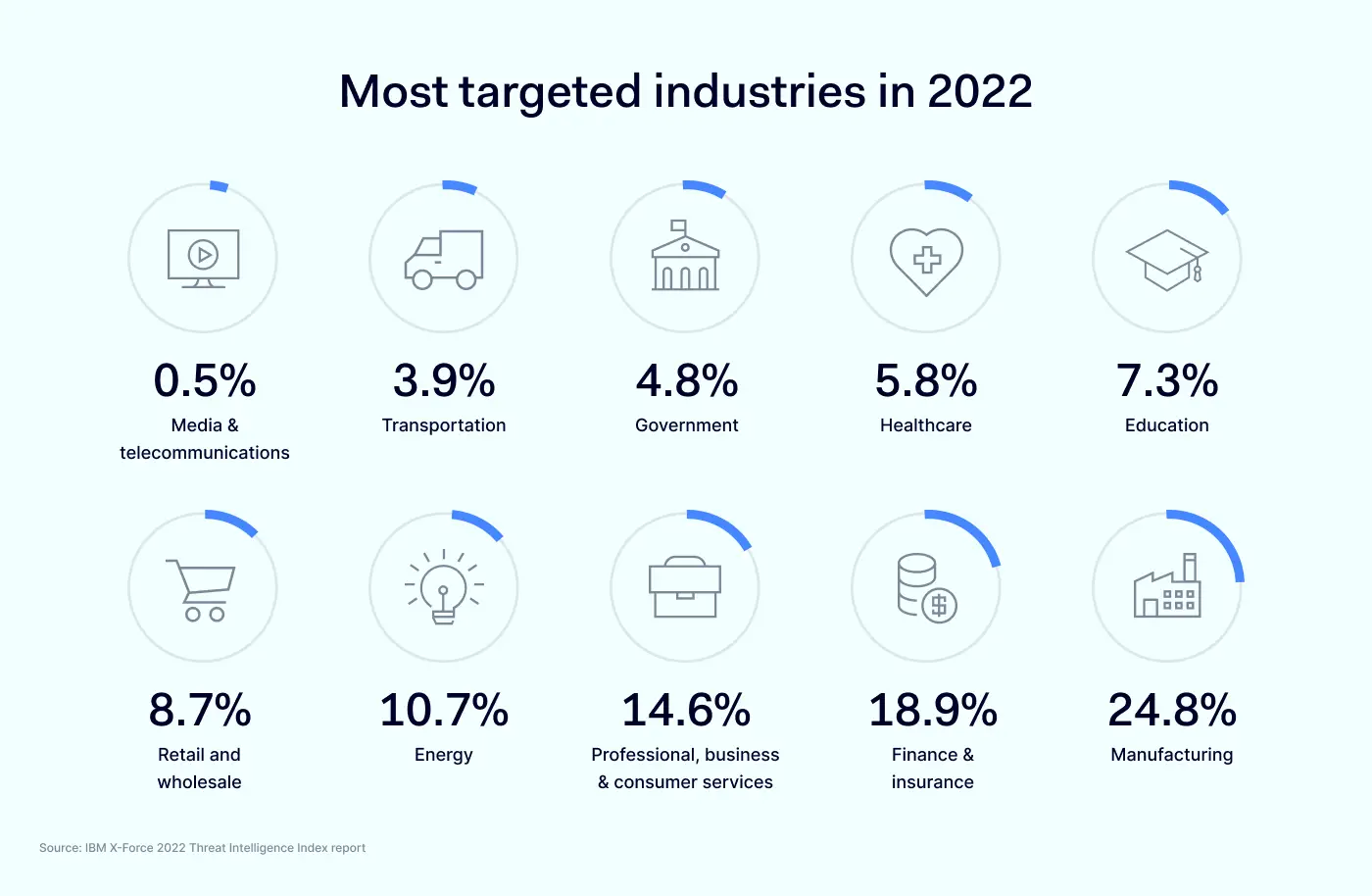
Most targeted industries in 2022
As we embark on a new year, the cyber threat landscape is continuously evolving, making it more challenging for organizations to keep up with the pace of these attacks. From ransomware to phishing scams, no industry is immune to cyber threats.
Media & telecommunications – 0.5%
Last year, media and telecommunications industries remained relatively unscathed, with a mere 0.5% of incidents reported. However, it is worth noting that external remote services such as VPNs and valid domain accounts were often exploited to gain unauthorized access, resulting in ransomware attacks.
The consequences of these attacks were severe, ranging from data theft, leaks, and destruction to extortion, and involved the deployment of data exfiltration tools and ransomware. Despite their low incidence rate, the potential impact of cyber threats on media and telecom companies cannot be underestimated.
Transportation – 3.9%
Transportation dropped from seventh to ninth place in the 2022 X-Force report, but the industry remained a frequent target, accounting for 3.9% of incidents. Phishing was the primary method of initial access, with links, attachments, and spear phishing equally represented. Valid local accounts were also exploited in 33% of cases, while valid cloud accounts were used in 17%.
The top objectives were server access and deployment of remote access tools, followed by spam campaigns, ransomware, backdoors, and defacement. Data theft was the most common outcome, occurring in half of all cases, with extortion and brand reputation damage also common. European transportation entities were the hardest hit, accounting for 62% of cases, with Asia-Pacific in second place at just over 37%.
Government – 4.8%
Government entities were one of the prime targets of cyberattacks in 2022, with backdoors and DDoS attacks accounting for 25% of cases each. Public sector networks contain a wealth of sensitive information, making them a popular objective for cyber espionage campaigns aimed at stealing PII and other data. Malicious Office documents were found in 17% of cases, while the remaining 83% involved cryptominers, credential acquisition tools, ransomware, and web shells.
X-Force attributed incidents in this sector to cybercriminals, insider threats, hacktivists, and state-sponsored groups conducting espionage, each accounting for an equal share. Infection vectors were primarily public-facing applications and spear phishing attachments, with valid default accounts exploited in 20% of cases. Asia-Pacific governments were hit the hardest, with 50% of cases, followed by Europe at 30% and North America at 20%.
Healthcare – 5.8%
Still being the top object of international cyberattacks, the healthcare industry experienced a decline from sixth place in 2021. X-Force responded to approximately 5%-6% of healthcare cases in the last three years. Backdoor attacks and web shells were prevalent, accounting for 27% and 18% of cases, respectively.
Adware, BEC, cryptominers, loaders, reconnaissance and scanning tools, and remote access tools made up 9% of cases each. Most of the observed impacts were from reconnaissance at 50%, while data theft and digital currency mining each accounted for 25% of cases. European-based healthcare entities were targeted the most, comprising 58% of incidents, with the remaining 42% in North America.
Education – 7.3%
Backdoor attacks in the education sector comprised 20% of incidents X-Force responded to. Ransomware, adware, and spam each accounted for 13% of incidents. Exploitation of public-facing applications was the most common initial access vector at 42%, followed by spear phishing attachments at 25%. Asia-Pacific was the region with the highest number of cases at 67%, followed by North America at 27%, and Latin America at 6%.
Retail and wholesale – 8.7%
The retail and wholesale industry maintained its position as the fifth-most targeted industry, as per the X-Force report for 2022. Spear phishing emails with malicious links were the most common initial access vector at 33%. Ransomware, backdoors and BEC were the most common attack types, each accounting for 19% of incidents.
Victims experienced extortion in half of the cases, while credential harvesting and financial loss were observed in 25% of cases each. North America and Latin America had the highest number of cases at 39% each, while Europe accounted for 22% of incidents.
Energy – 10.7%
The energy sector, encompassing electric utilities and oil and gas companies, was the fourth-most targeted industry with 10.7% of attacks. Attackers commonly gained initial access through the exploitation of public-facing applications (40%), spear phishing links (20%), or external remote services (20%). Botnets were the top method of attack in 19% of cases, followed by ransomware and BEC at 15% each.
North American organizations were the most targeted at 46%. Incidents involved data theft and extortion in 23% of cases, while credential harvesting and botnet infections were observed in 15% of cases each. The energy sector faces pressure from various global factors, particularly those exacerbated by Russia’s aggression in Ukraine and its impact on the already unstable global energy trade.
Professional, business & consumer services – 14.6%
The professional services industry, including consultancies and law firms, was the target of 52% of cyber attacks in this category. Business services, such as IT and advertising, accounted for 37% of attacks, while consumer services made up 11%.
Ransomware and backdoor attacks were the most frequent types of attacks, with public-facing applications and remote services being the top infection vectors. Extortion was the most common attack type.
Finance & insurance – 18.9%
Last year the finance and insurance organizations were the target of 18.9% of cyber attacks, earning it second place in this list. Despite a slight decrease in attacks over the past few years, finance and insurance organizations remain prime targets due to their advanced digital transformation and cloud adoption progress.
Backdoor attacks were the most common objective at 29%, followed by ransomware and maldocs at 11% each. Spear phishing attachments were the top infection vector, responsible for 53% of attacks. Europe experienced the highest volume of attacks at 33%, followed by Asia-Pacific at 31%. Latin America, North America, and the Middle East and Africa experienced approximately 15%, 10%, and 10% of incidents, respectively.
Manufacturing – 24.8%
The manufacturing industry was the most targeted in 2022, with backdoors being deployed in 28% of incidents and spear phishing and public-facing applications being the top infection vectors at 28% each. External remote services accounted for 14% of incidents, while spear phishing links and valid default accounts were tied for third place at 10%.
Extortion was the top impact on manufacturing organizations, followed by data theft and leaks. The Asia-Pacific region had the most incidents at approximately 61% of cases, while Europe and North America tied for second place at 14%. Latin America accounted for 8% of incidents, and the Middle East and Africa had 4%.
Most common cyber attacks in 2022
With the increasing use of technology in our daily lives, cybercriminals are finding new ways to exploit vulnerabilities in web applications, cloud services, Internet of Things (IoT) devices, and human behavior.
We present to you the top 10 list of cyber attacks with the hope that you can take steps to protect yourself and your data from potential cyber threats in the future.
10. SQL injection & Cross-site Scripting (XSS)
SQL injection and Cross-site Scripting (XSS) are common types of cyber attacks in 2022 that exploit vulnerabilities in web applications. SQL injection attacks can be used to insert malicious code into an SQL database, potentially giving attackers access to sensitive information or control over the entire system. Use parameterized queries to prevent SQL injection attacks and keep your software up-to-date.
XSS attacks use third-party online resources to insert malicious scripts into legitimate websites or applications to obtain user information. Attackers commonly use JavaScript, Microsoft VBScript, ActiveX, or Adobe Flash for XSS attacks. Web apps are often vulnerable to XSS attacks when they receive user input without validating or encoding it in their output.
9. Cloud jacking
Cloud jacking, also known as cloud hijacking, targets data stored in external cloud services such as Salesforce or Microsoft Azure. Hackers exploit poorly secured loopholes to steal data since modern enterprises increasingly use cloud-based services. Since most users do not store many files locally, cyber criminals find targeting the centers housing the data more worthwhile. Common methods include exploiting cloud provider management software vulnerabilities or cracking default security configurations.
8. Internet of Things (IoT) attacks
An IoT attack targets Internet of Things devices or networks, allowing hackers to take control of devices, steal data, or join a network of infected devices to execute DoS or DDoS attacks. The IoT encompasses a wide range of internet-connected devices, from smartphones to smart home appliances, making them vulnerable to cyberattacks.
Attackers can exploit IoT devices to launch attacks on other devices, causing significant damage that can be challenging to detect. There was a noticeable increase of IoT attacks last year.
7. Insider threats
Insider threats refer to the risks associated with an organization’s own staff. These threats can come from rogue employees with malicious intent or from employees who are simply negligent. In some cases, hackers can bribe insiders to help them gain access to sensitive information. However, the line between insider threat and whistleblower can sometimes be blurry.
Unlike social engineering, where attackers pretend to have legitimate access, insiders actually have legitimate access but use it for malicious purposes. Organizations must have policies and procedures to detect and prevent insider threats. It’s also reported that insider threats have risen 44% over the past two years.
6. Man-in-the-Middle attack
Man-in-the-middle attacks aim to steal sensitive information by intercepting and manipulating messages between two parties who believe they are communicating directly and securely. While most communication channels use some encryption to make such snooping attempts more difficult, expired SSL certificates on various websites and the use of freemium VPNs, proxies, or public wifi can create open gaps that attackers can exploit.
Attackers can read, modify, or even delete data during such attacks, which can be challenging to detect. To protect against man-in-the-middle attacks, it is essential to use encryption whenever possible, be mindful of which websites and emails you access, and avoid using public networks. Estimates show that 35% of exploits involve man-in-the-middle attacks.
5. Dictionary, brute-force & password spray attacks
Cyber attackers use various methods to break into password-protected systems, including dictionary attacks, brute-force attacks, and password spray attacks. A dictionary attack involves systematically entering every word in a dictionary as a password or key to decrypt an encrypted message. On the other hand, a brute-force attack involves automated trial and error by spraying all possible character combinations and lengths into a password field until a match is found. More than 80 percent of breaches involve brute-force or the use of lost or stolen credentials.
Meanwhile, password spray attacks, involve hackers trying many common passwords against many different accounts using automated software. To protect yourself, use strong and unique passwords, enable two-factor authentication if available, and avoid using common words or phrases that can be easily guessed.
4. Social engineering
Social engineering is a cyber attack that exploits human vulnerability rather than system weaknesses. It involves tricking individuals into revealing sensitive information through deception. Threat actors may even impersonate someone else to gain physical or remote access to a target system.
Unfortunately, these attacks are still prevalent in 2022, as approximately one-third of data breaches occur due to social engineering. It is important to remain vigilant and cautious of unsolicited communication, verify identities, and practice proper security protocols to avoid falling victim to these attacks.
3. Malware, ransomware & spyware
Malware is a type of malicious code designed to carry out specific tasks that hackers want, including taking over, using as a gateway, stealing data, or disabling the target’s machine. In 2021, the average organization faced 1,748 attempts to be infected with malware. The same trend held true last year, with malware attacks being one of the most popular cyberattack types.
Meanwhile, ransomware is a more specific form of malware that infects a machine’s storage and encrypts stored data, demanding payment for decryption. These attacks can be highly profitable for hackers, as organizations often pay the ransom with no guarantee of a successful outcome.
Keyloggers are a type of spyware that captures every keystroke made on a device, allowing malicious actors to access sensitive information such as passwords and credit card numbers. Keylogger spyware is typically installed on a user’s device by clicking on a malicious link or attachment. Protect yourself from keyloggers by using strong and unique passwords for all accounts, as well as enabling two-factor authentication where possible.
2. DoS and DDoS
DoS and DDoS attacks flood servers or routers with requests, making it impossible for legitimate users to access a website or service. Attackers may use botnets or darknet marketplaces to orchestrate large-scale attacks. Defend against these attacks by having a robust firewall and keeping software up-to-date. These attacks are difficult to defend against, so be vigilant and prepared. According to reports, DDoS attacks grew 150% compared to the year before.
1. Phishing & vishing
Phishing, the list’s leader, tricks users into revealing sensitive information by posing as a legitimate institution. Attackers often use genuine-looking emails that redirect victims to fake websites where they input their actual credentials. Once attackers have the user’s information, they can take over their account, blackmail them, or sell the data on dark web marketplaces.
Vishing, a combination of voice and phishing, tricks victims into revealing confidential information through social engineering tactics. Protect yourself by being suspicious of emails asking you to click on links or download attachments. If in doubt, contact the company directly to verify the email’s legitimacy. Phishing attacks amount to more than 255 million attacks, a 61% increase in the rate of phishing attacks compared to 2021.
The top 10 must-take actions to protect your organization from cyberattacks
With the increasing sophistication of cybercriminals, it’s crucial to take proactive steps to safeguard your organization’s sensitive data and protect it in all ways possible.
Here we’ll explore the top 10 must-take actions to secure your business from cyber incidents. Implementing these measures can significantly reduce the risk of potential financial and reputational damage.
10. Backup your data regularly
Regularly backing up your data is crucial for protecting your organization against cyber attacks. In the event of a ransomware attack, having backup servers allows you to restore your data without having to pay a ransom.
However, ensuring that your backups are secure and protected from cyber threats is essential. Negligently leaving data backups unprotected in public cloud services can leave them vulnerable to cyber criminals. Organizations can recover quickly from a cyber attack using data backups and maintain business continuity.
9. Have a response plan in place
Even with all the necessary precautions, it’s impossible to guarantee that a cyber attack won’t happen. That’s why having a well-designed response & risk management plan is crucial to minimize the damage caused by a cyber attack. A comprehensive response plan should include:
Clear steps for containing the attack.
Notifying stakeholders.
Restoring operations as quickly as possible.
It’s important to regularly review and update the plan to ensure it remains effective and relevant to your organization’s evolving risks and operational needs. The impact of a breach can be minimized by having a response plan in place. Quickly and effectively responding to a cyber attack can get your organization back to normal operations.
8. Conduct regular security audits
Regular security audits are a crucial step in protecting organizations from cyberattacks. These audits can help identify vulnerabilities in systems and processes, allowing organizations to address them before hackers can exploit them.
Hiring an external audit firm or cybersecurity consultant agency can provide valuable insights into potential weak points in a network. By actively seeking out and addressing these vulnerabilities, organizations can save themselves the cost and headache of dealing with a successful hacking attempt in the future.
7. Engage in active threat monitoring
Active threat monitoring is critical in protecting an organization from cyber attacks. Network monitoring tools can be used to detect unusual activity that could signal an ongoing attack.
By monitoring network activity, organizations can quickly detect and respond to security incidents, including suspicious activity, using intrusion detection systems to alert the security team to potential threats.
6. Control access to your network & resources
Controlling access to your network and resources is essential for protecting your organization from cyberattacks. With the rise of remote work and temporary employees, enforcing security policies for every worker or device is difficult, increasing the risk of malware infections and insider threats.
IP allowlisting can help mitigate these risks by limiting access to only the resources required to complete their work. Organizations should also limit access to sensitive data to only those employees who need it, reducing the risk of unauthorized access and data breaches. Organizations can better protect their network and data from potential security incidents by controlling access.
5. Encrypt your data
Encrypting your organization’s data, especially user passwords, is critical in preventing cyber attacks. Hashing and salting are effective methods of encryption that scramble passwords into unintelligible characters and add additional elements before hashing, making them impossible to reverse-engineer.
Unfortunately, many significant data breaches occur because encryption was not implemented. As a business manager, prioritize data encryption to enhance the security of your user data. By adopting encryption, you can significantly reduce the likelihood of a data breach and protect your organization’s sensitive data.
4. Keep software updated
It’s crucial for organizations to keep their software up-to-date. Outdated software is an easy target for hackers always looking for vulnerabilities to exploit. This is especially true for large organizations, as their large pool of users may postpone updates. Therefore, it’s recommended to have forced updates to ensure that all machines are updated with the latest patches.
Additionally, it’s important to have antivirus and anti-malware software installed, kept up-to-date, and run regular scans to detect and remove any malicious software that could harm the system.
3. Secure your network & hardware
Securing your network and hardware is crucial in protecting your organization from cyberattacks. Hackers often exploit unpatched loopholes and other vulnerabilities to gain access to your system. To minimize the attack surface, take all possible steps to secure every endpoint device.
One effective measure is enforcing the use of a virtual private network (VPN) when accessing sensitive company documents to secure the exchanged data and prevent unauthorized access. Additionally, services such as NordLayer can provide a safety net to further enhance your network and data security. By securing your network and hardware, you can significantly reduce the risk of a cyberattack and protect your organization’s sensitive information.
2. Enforce strong passwords and multi-factor authentication
Using weak passwords, such as ‘Tom1234,’ can make user accounts vulnerable to cyber attacks. To prevent this, organizations should implement password complexity requirements and provide guidance on using password phrases, which are secure and memorable.
Also, multi-factor authentication (MFA) systems should be used, which require multiple factors to verify a user’s identity. MFA provides reliable assurance of an authorized user’s identity, reducing the risk of unauthorized access and providing better data protection than passwords alone.
1. Regularly train your workforce on cybersecurity awareness
Regularly training your workforce on cybersecurity awareness is one of the most critical steps to protect your organization from cyberattacks. Employees, especially those working remotely, are often the weakest link and can unintentionally introduce security vulnerabilities.
Organizations can reduce their risk of a cyber attack by educating employees on best practices such as using strong passwords, identifying phishing emails, and reporting suspicious activity. A well-trained employee will be able to identify different types of cyber threats and distinguish them from genuine ones, as most cyber attacks follow common patterns. It’s essential to provide ongoing training that reflects your enterprise’s risks and proper responses to future attacks since cyberattacks are evolving daily.
The cost of cybercrime & security incidents
The cost of cybercrime in 2022 is at an all-time high. Companies are facing an average cost of $4.35 million due to data breaches alone, with 60% of these breaches resulting in increased prices passed on to customers. In the UK, businesses have had to bear an average cost of £4200, while nearly 1 in 10 US organizations remain uninsured against cyber attacks.
These numbers are just the tip of the iceberg, indicating that constant vigilance and strong security measures are necessary to protect sensitive data and minimize the financial risks that come with cybercrime.
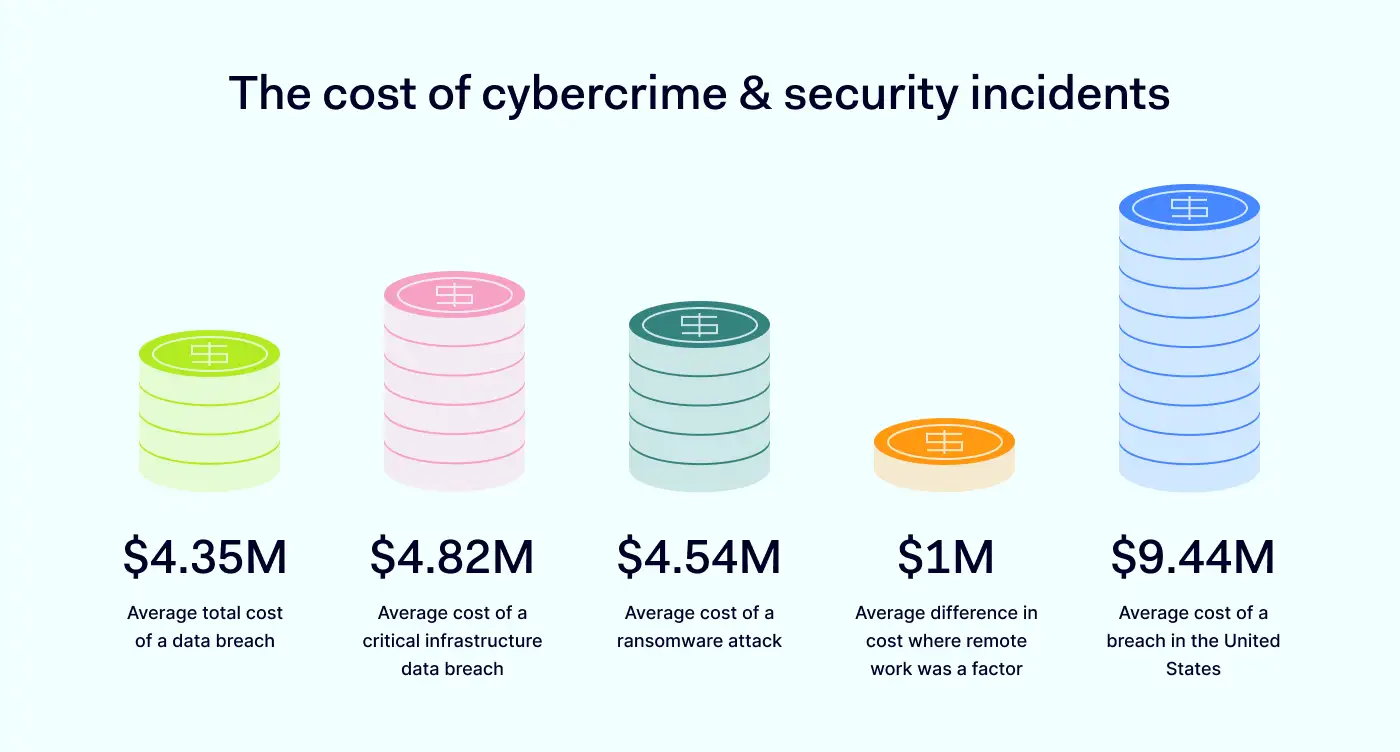
In this part, we delve into the cost of cybercrime in 2022 and examine the key findings that underscore the importance of organizations taking proactive steps to guard against potential cyber threats.
5. $4.35 million – average total cost of a data breach
In 2022, the average data breach cost hit an unprecedented peak of $4.35 million, surging by 2.6% from the previous year’s average cost of $4.24 million. This year-on-year increase has been consistent, with the average cost rising by a staggering 12.7% from $3.86 million as reported in 2020. These statistics demonstrate the relentless nature of cyber attacks, highlighting the need for constant vigilance and robust security measures to counter these threats.
4. $4.82 million – average cost of a critical infrastructure data breach
When analyzing critical infrastructure organizations, such as those operating in financial services, industrial, technology, energy, transportation, communication, healthcare, education, and public sector industries, the average cost of a data breach was notably higher at $4.82 million. This cost was $1 million more than the average cost of data breaches in other industries.
Shockingly, 28% of critical infrastructure organizations studied had been subjected to destructive or ransomware attacks, whereas 17% had encountered a breach due to their business partners’ security compromise. These findings underscore the importance of strengthening cyber security strategies for critical infrastructure organizations and their third-party partners to safeguard against potential cyber threats.
3. $4.54 million – average cost of a ransomware attack
Ransomware attacks accounted for 11% of all breaches, marking a 41% increase from the previous year’s figures of 7.8%. Despite this surge, the average cost of a ransomware attack experienced a slight decrease, from $4.62 million in 2021 to $4.54 million in 2022. However, this cost was still marginally higher than the average total data breach cost, which stood at $4.35 million.
These findings highlight the continued threat of ransomware attacks and the necessity for organizations to implement robust preventive measures to mitigate the associated risks.
2. $1 million – average difference in cost where remote work was a factor
Security breaches caused by remote work resulted in significantly higher costs compared to those without remote work involvement. On average, the costs associated with remote work-related breaches were nearly $1 million higher, with a reported cost of $4.99 million, as opposed to $4.02 million for breaches unrelated to remote work.
This difference amounts to remote work-related breaches costing approximately $600,000 more than the global average cost. These figures underscore the financial risks and consequences associated with remote work and the importance of implementing strong security measures to safeguard sensitive data when remote work is necessary.
1. $9.44 million – average cost of a breach in the United States
The top five countries and regions that experienced the highest average cost of a data breach were the United States, with a staggering $9.44 million, followed by the Middle East at $7.46 million, Canada at $5.64 million, the United Kingdom at $5.05 million, and Germany at $4.85 million. Notably, the United States has held the top position for 12 consecutive years.
Additionally, the country with the highest growth rate from the previous year was Brazil, with a significant increase of 27.8% from $1.08 million to $1.38 million. These findings reveal the persistence and costly nature of cyber attacks, irrespective of location, emphasizing the importance of maintaining robust cyber security measures to prevent such incidents.
To sum up 2022
As we close out 2022, it’s clear that cyber security continues to be a top concern for businesses of all sizes and industries. The year saw unprecedented levels of attacks, with organizations worldwide experiencing an average of 1168 attacks per week in Q4 alone.
Unsurprisingly, the human element was involved in a staggering 82% of all breaches, with phishing and stolen credentials continuing to be a significant concern. Despite the increase in attacks, however, many businesses still don’t have adequate security measures, and the cost of cybercrime continues to rise.
To protect their data and assets in 2023, organizations must prioritize implementing effective security strategies, risk management plans and staying up-to-date on the latest threats and prevention techniques.
If your organization needs top-notch cybersecurity solutions, NordLayer provides flexible and easy-to-implement tools for all businesses. Get in touch with our specialists today for more information.