Skip to content

VNC vs RDP: which remote desktop solution to choose

IT admins often use remote desktop solutions in their daily work. With these these tools, they can:

  • Remotely update, configure, and troubleshoot servers

  • Help users with technical issues or software problems

  • Perform maintenance or install software on remote computers

Choosing between Virtual Network Computing (VNC) and Remote Desktop Protocol (RDP) can be challenging. Both offer remote desktop solutions but cater to different needs and environments.

This article will explore their features, differences, and use cases.

What is VNC?

Virtual Network Computing (VNC) is a screen-sharing system that works across many platforms. It uses the Remote Framebuffer Protocol (RFB) to control another computer remotely.

VNC is platform-independent, making it a good choice for connecting different operating systems like Windows, macOS, and Linux.

How VNC works

VNC transmits keyboard and mouse events from one computer to another and relays the graphical screen updates. In other words, it sends the framebuffer (the image displayed on the screen) from the server to the client.
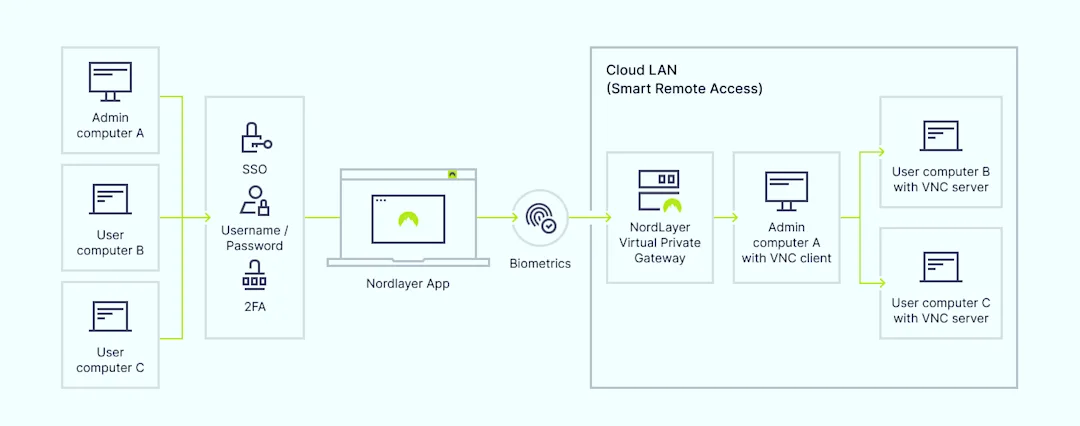
Here’s how it typically works:

  1. The user launches a VNC client and connects to the VNC server on the remote computer

  2. The server sends the screen updates to the client

  3. The client sends keyboard and mouse inputs to the server

Common VNC use cases

  • Cross-platform remote access. VNC connects to different operating systems, which is ideal for mixed-OS environments

  • Remote support. VNC provides technical help to users across various operating systems

  • Access home computers. Users can access their home devices from work or while traveling

Security concerns with VNC

VNC security depends on the specific implementation and additional configurations:

  • Inconsistent encryption. Not all VNC implementations provide strong encryption, which exposes sessions to potential interception

  • Authentication. Weak password encryption in some VNC versions can allow attackers to intercept credentials

NordLayer enhances VNC security with features like Smart Remote Access, secure VPN connections, and traffic encryption, ensuring that remote sessions are protected from unauthorized access and data breaches.

What is RDP?

Remote Desktop Protocol (RDP) is a proprietary protocol developed by Microsoft. It allows users to connect to another computer over a network connection.

RDP provides a graphical interface, enabling users to control the remote machine as if they were sitting in front of it. Commonly used in Windows environments, RDP supports multiple features, such as file transfer, printer sharing, and remote audio.

How RDP works

RDP transmits mouse movements and keystrokes from the user’s device to the remote computer via a dedicated network channel using TCP/IP. This channel operates on network port 3389. The user’s desktop is displayed on the computer they connect to, providing a seamless experience.
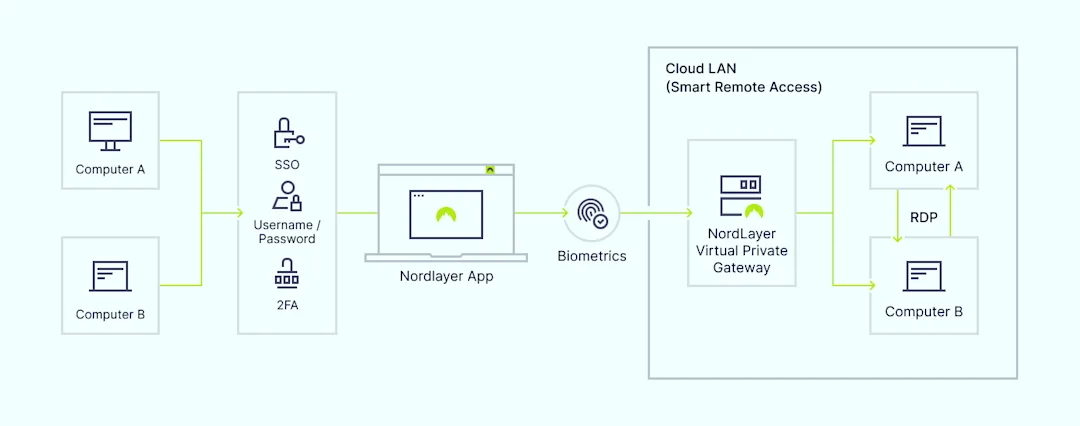
VNC vs RDP - How RDP works.png

IT administrators often use RDP to access files, run applications, and perform administrative tasks on remote servers or workstations.

Here’s how it typically works:

  1. The user initiates an RDP session using an RDP client

  2. The client connects to the remote computer’s RDP server, usually via port 3389

  3. The user’s input (keyboard and mouse) is transmitted to the remote computer

  4. The remote computer’s screen updates are sent back to the user’s client

Common RDP use cases

  • Accessing work computers remotely. RDP allows employees to access their workstations securely from any location

  • Server management. IT admins use RDP to manage servers remotely, perform updates, and troubleshoot issues

  • Remote support. Technicians can use RDP to provide remote support to users, resolving issues without being physically present

Security concerns with RDP

While RDP offers convenience, it is not inherently secure. It requires additional measures to ensure data integrity and prevent unauthorized access:

  • Weak authentication. RDP’s default settings may allow weak passwords, making it vulnerable to brute-force attacks

  • Encryption. RDP uses encryption, but it needs to be configured properly to ensure security

NordLayer addresses these vulnerabilities with advanced security features like two-factor authentication (2FA), Single Sign-On (SSO), and Identity and Access Management (IAM) tools.

VNC vs RDP: main differences

VNC and RDP serve similar purposes but have key differences that affect their use cases.
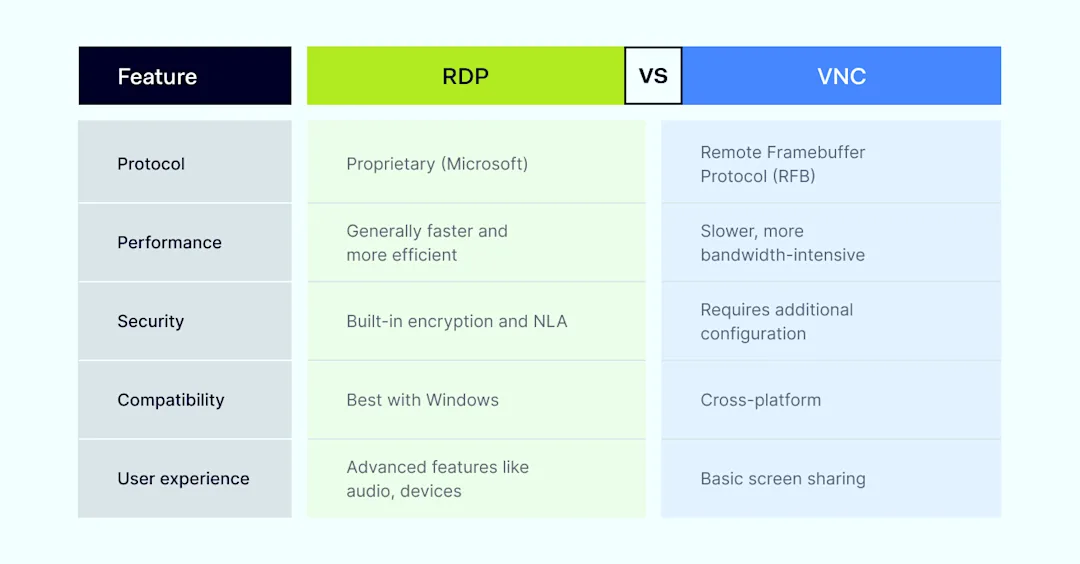
RDP-vs-VNC comparison

  • Protocol and performance. RDP uses a more efficient protocol than VNC, often resulting in faster performance and better bandwidth use. However, VNC offers better compatibility with different operating systems

  • Security. RDP includes built-in encryption and support for Network Level Authentication (NLA). VNC typically requires additional configuration or tools to secure connections, making it less secure out of the box

  • Compatibility. VNC is highly compatible across various operating systems, while RDP is optimized for Windows environments and may have limited functionality on non-Windows systems

  • User experience. RDP provides a smooth experience with features like remote audio and device redirection. In contrast, VNC offers basic screen sharing without these advanced features, focusing on compatibility and simplicity

VNC vs RDP: which one should you choose?

Choosing between VNC and RDP depends on your specific needs and environment.

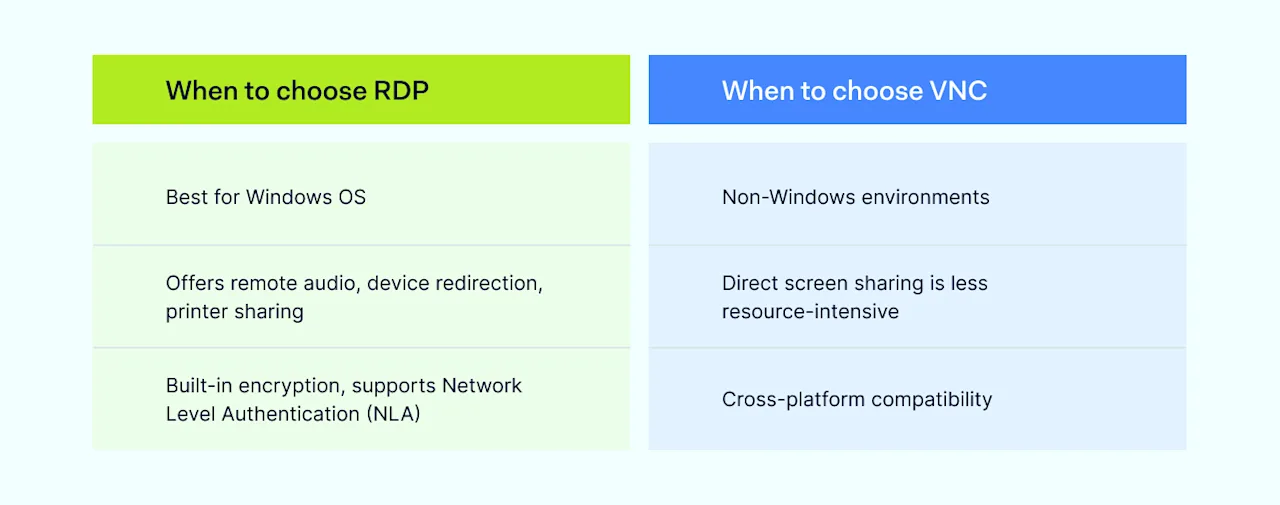
When to choose RDP-vs-When to choose VNC

When to choose RDP

  • Windows-centric environments. If your organization primarily uses Windows, RDP is optimized for this OS and provides a seamless experience

  • Need for advanced features. RDP offers advanced features like remote audio, device redirection, and printer sharing, which can enhance productivity

  • Higher security requirements. RDP has built-in encryption and support for NLA, providing better out-of-the-box security

When to choose VNC

  • Cross-platform compatibility. If you need to connect to different operating systems, VNC is a versatile choice

  • Simplicity and flexibility. VNC’s simplicity and ability to work across various platforms make it suitable for mixed-OS environments

How NordLayer can help

NordLayer offers secure remote access solutions that enhance the capabilities of both VNC and RDP.

NordLayer also integrates with existing IT infrastructure, adding a strong layer of security and management for remote work environments.

  • SSO. Simplifies user access to multiple applications with one set of credentials, which enhances security and user experience

  • 2FA. Adds an extra layer of security by requiring a second form of verification. It reduces the risk of unauthorized access

  • Smart Remote Access. Creates secure connections between devices and central network resources by using VPN-encrypted point-to-point connections for remote desktop access

  • Remote Access VPN. Acts like a secure bridge that connects you to your office network from anywhere by establishing an encrypted tunnel between your device and the designated network. It keeps your data private while providing access to important files and tools

  • AES-256 bit encryption. Creates a secure tunnel between endpoints, which blocks all traffic from outside the network

  • Device Posture Monitoring. Continuously checks the security posture of devices that access the network. It ensures compliance with security policies

  • ThreatBlock. Blocks access to malicious websites, reducing the risk of phishing and other cyber threats

  • Fixed IP. Utilizes a fixed IP address exclusively assigned to your company through a VPN for better control and security

  • IP masking. Replaces your real IP address with a new identity, which prevents easy physical location detection and enables access to geo-blocked services

In the debate of VNC vs RDP, the right choice depends on your specific needs, environment, and security requirements.

RDP is ideal for Windows-centric environments needing advanced features and better out-of-the-box security. VNC is suitable for cross-platform compatibility and simplicity.

About Version 2 Digital

Version 2 Digital is one of the most dynamic IT companies in Asia. The company distributes a wide range of IT products across various areas including cyber security, cloud, data protection, end points, infrastructures, system monitoring, storage, networking, business productivity and communication products.

Through an extensive network of channels, point of sales, resellers, and partnership companies, Version 2 offers quality products and services which are highly acclaimed in the market. Its customers cover a wide spectrum which include Global 1000 enterprises, regional listed companies, different vertical industries, public utilities, Government, a vast number of successful SMEs, and consumers in various Asian cities.

About NordLayer
NordLayer is an adaptive network access security solution for modern businesses – from the world’s most trusted cybersecurity brand, Nord Security.

The web has become a chaotic space where safety and trust have been compromised by cybercrime and data protection issues. Therefore, our team has a global mission to shape a more trusted and peaceful online future for people everywhere.

About NordLayer
NordLayer is an adaptive network access security solution for modern businesses – from the world’s most trusted cybersecurity brand, Nord Security.

The web has become a chaotic space where safety and trust have been compromised by cybercrime and data protection issues. Therefore, our team has a global mission to shape a more trusted and peaceful online future for people everywhere.

What is a passphrase — and how does it compare to a password?

Riddle: What works like a password but isn’t one?

Passwords continue to be the most used method for verifying your identity when logging into online services and applications—which isn’t necessarily an issue provided that you handle your passwords properly. Specifically, you must always make sure the complexity and length of your passwords are optimal.

A strong password should be at least 12 characters long and comprise a random combination of numbers, symbols, and uppercase and lowercase letters. While such a password may be difficult to remember, it’s always better to prioritize strength over memorability.

But what if we told you there’s an alternative—a credential that can be stored and managed just like passwords, yet is easier to remember and believed by many to offer even better security? Ever heard of passphrases? That’s the alternative we’re referring to.

What is a passphrase, exactly?

Generally speaking, a passphrase is a sequence of words or a complete sentence used for user authentication. It is, as you can imagine, typically longer than a password, especially because it can include spaces between words.

For example, let’s take a random phrase like ‘no more riddles in this article’—this entire 31-character sequence of words can be used as a passphrase. Of course, since most systems have no limits, your passphrases can be even longer. So, if you want to use one of Shakespeare’s sonnets or what’s written out on the first page of the American Constitution as your passphrase, you are free to do so.

The way you set up a passphrase for your online account is by entering it when a service or application prompts you to create a password. That’s why we said you can manage your passphrases just like you handle your passwords—the difference lies only in the combination of characters you use to log in.

Passphrase vs. password: which one is better?

Passphrases are widely recognized as safer than traditional passwords for several important reasons. Their extensive length and the option to include spaces between words can greatly enhance security against brute-force attacks. Crafting passphrases from meaningful phrases or sentences can significantly improve usability by making them easier to memorize.

In contrast, traditional passwords, with their shorter length and complex character requirements, can be challenging to remember and susceptible to cracking, posing a higher security risk in both scenarios.

When to use a passphrase and when to use a password

For optimal security, we recommend using passphrases since they can be both easy to remember and highly secure. Consisting of multiple words or a full sentence, passphrases are ideal for online accounts where usability and strong security are essential. In contrast, using a traditional password is more suitable in situations requiring shorter, more complex combinations that are challenging for automated tools to crack.


How to create a strong passphrase

If you want to create a truly strong passphrase, be sure to combine unrelated words or phrases that are memorable to you but difficult for others to guess. The words can describe anything, such as your favorite color, the type of animal you have, the title of your favorite movie, or the food you dislike—just make sure you select a few and arrange them sequentially.

You can also make your passphrases even stronger by including a mix of uppercase and lowercase letters, numbers, and symbols, just as you would do with passwords.

Where can you securely store and manage your passphrases?

Since the process of creating and using passphrases is similar to that of handling passwords, using a password manager for passphrases is highly recommended. However, it’s important to choose not just any password manager but one that offers features and design ensuring enhanced security and usability.

A good choice would be NordPass due to its encrypted vault, which allows you to securely store your credentials in one safe place. NordPass also offers convenient autosave and autofill functionalities that can simplify and enhance your login experience. If you prefer using passwords, NordPass can further improve your digital life with features like the Password Generator that instantly creates complex passwords and automatically stores them in your vault.

So, give NordPass a try and see what it can do to boost your cybersecurity.

Frequently Asked Questions (FAQ)

How often should I change my passphrase?

Ideally, you should change your passphrase every few months to enhance security. However, if you suspect it may have been compromised or there are any security concerns, you must update your passphrase immediately.

Can a passphrase be too long?

A passphrase can technically be as long as the system allows, but excessively long passphrases may become impractical to remember or type in accurately. So, it’s generally a good practice to balance length with usability when creating a passphrase.

What should I do if I forget my passphrase?

If you forget your passphrase, you should follow the recovery process provided by the service or application where the passphrase is used. This usually includes using account recovery options such as security questions, email verification, or getting in touch with customer support.

How can I remember my passphrases without writing them down?

To remember your passphrases without writing them down, just use a password manager. This will allow you to securely store and organize your passphrases, ensuring they’re accessible whenever needed without compromising your security.

Is it safe to store my passphrases in a password manager?

Storing your passphrases in a password manager is generally safe. However, the level of security can vary depending on the specific password manager you choose. Using a tool like NordPass ensures you receive robust protection, with features designed to keep your passphrases secure and protected against unauthorized access.

About Version 2 Digital

Version 2 Digital is one of the most dynamic IT companies in Asia. The company distributes a wide range of IT products across various areas including cyber security, cloud, data protection, end points, infrastructures, system monitoring, storage, networking, business productivity and communication products.

Through an extensive network of channels, point of sales, resellers, and partnership companies, Version 2 offers quality products and services which are highly acclaimed in the market. Its customers cover a wide spectrum which include Global 1000 enterprises, regional listed companies, different vertical industries, public utilities, Government, a vast number of successful SMEs, and consumers in various Asian cities.

About NordPass
NordPass is developed by Nord Security, a company leading the global market of cybersecurity products.

The web has become a chaotic space where safety and trust have been compromised by cybercrime and data protection issues. Therefore, our team has a global mission to shape a more trusted and peaceful online future for people everywhere.

Essential guide to end-user security awareness training

End-user security awareness training is crucial for teaching employees about cyber threats. These include phishing attacks and the importance of password security. The need for this education is on the rise. There has been a 29% increase in cyber attacks in the first quarter of 2024 compared to 2023.

Training methods vary, including interactive webinars, gamified modules, and simulated phishing exercises. Each method is suitable for different organizational needs. This guide will discuss what security awareness training involves. It will also cover why it’s necessary and how IT admins can implement it effectively.

What is end-user security?

End-user security involves measures and practices to protect an individual’s computer, data, and network access. It guards against cyber threats and unauthorized access attempts. This security includes password security, antivirus software, and firewalls.

End-user security specifically targets risks arising from human error and individual behaviors. These can lead to security breaches. Unlike network security, application security, information security, and operational security, end-user security focuses on the human factor. This is often the weakest link in corporate security.

The need for end-user security

The need for end-user security is quite obvious and naturally fundamental. Any business that relies on digital resources must prioritize it regardless of size or industry. Implementing security awareness training helps prevent unauthorized access. This access could lead to data breaches, which are costly and damaging to a company’s reputation.

Without end-user security, businesses are more vulnerable to malware and social engineering tactics. While it is impossible to completely protect end users from a social engineering attack, conducting effective security awareness training programs can greatly reduce these risks. These threats often target end users who may not be aware of the sophisticated methods used by cybercriminals.

Organizations without training may see a 30% increase in malicious link clicks. The cost of implementing strong end-user security measures is usually less than the losses from a cyber-attack.

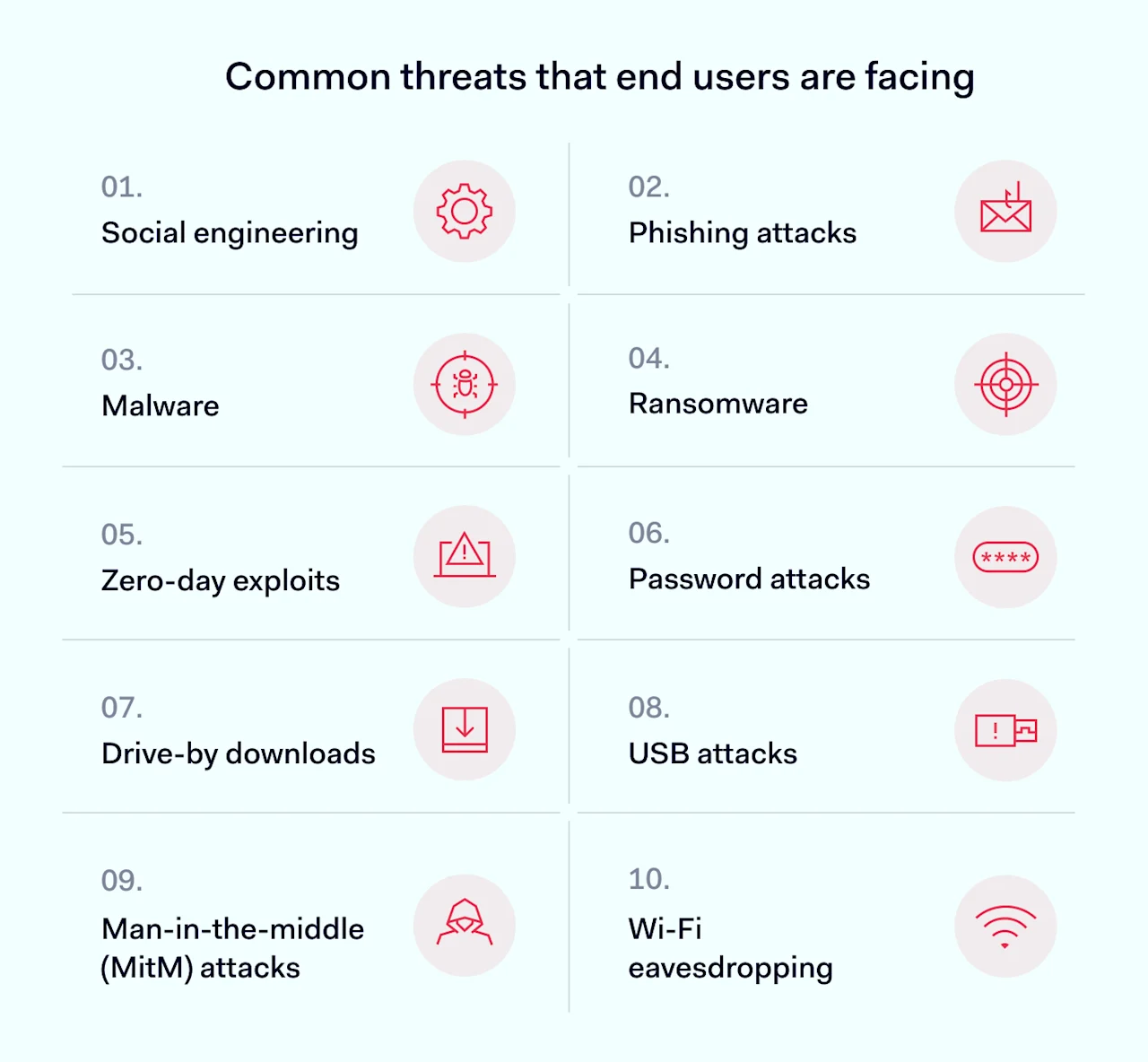
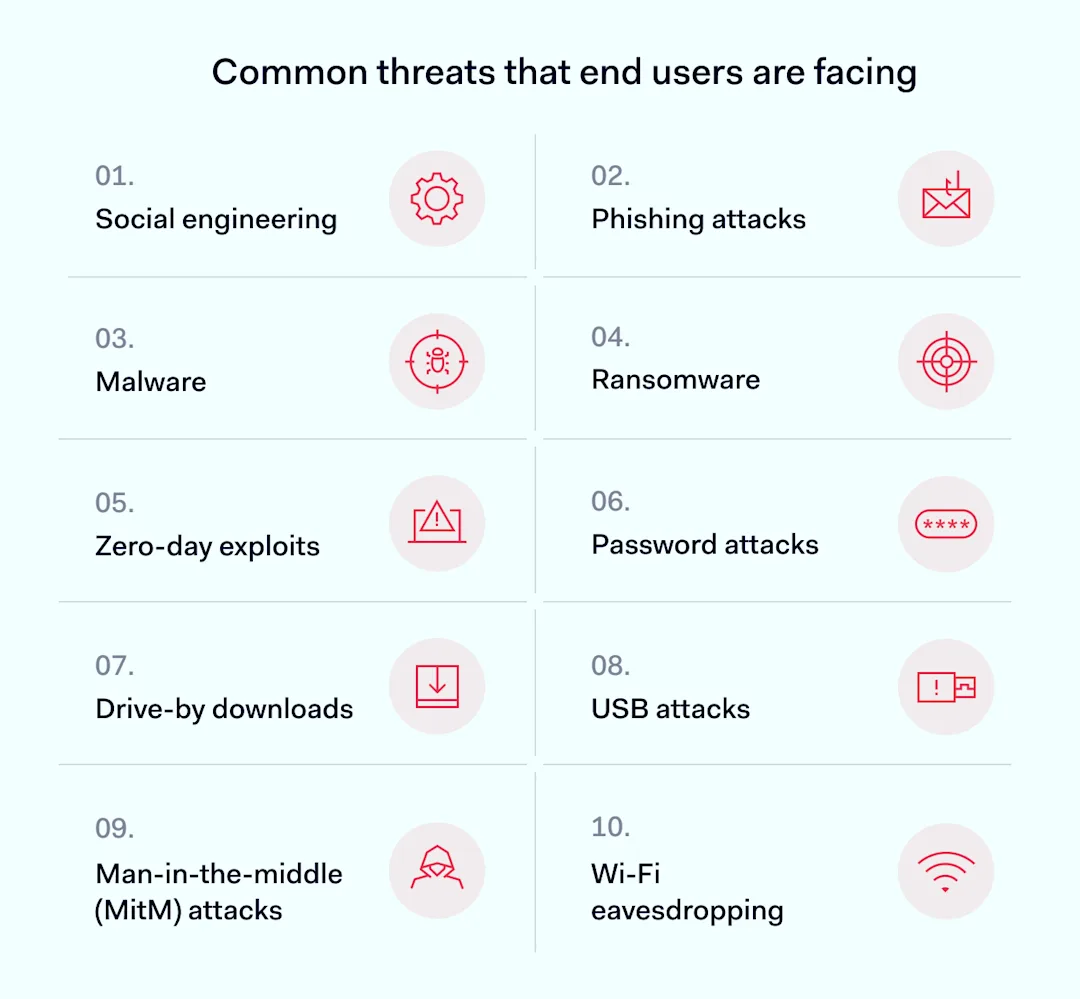
Common threats that end users are facing

End users often represent the front line in cybersecurity, yet they are also the primary targets for many cyber threats. This vulnerability can expose entire networks to significant risks if organizations don’t manage it properly. Here’s a breakdown of the common threats that end users encounter.

Common threats that end users are facing

  • Social engineering: tactics that manipulate users into providing confidential information or making security mistakes. It’s a significant threat because it relies on human error, which can never be eliminated.

  • Phishing attacks: deceptive emails or messages that trick users into revealing sensitive information. It’s the most widespread form of social engineering.

  • Malware: malicious software that an attacker installs on a user’s device without their knowledge. It can steal data, spy on activities, or gain unauthorized access to networks. It can silently cause widespread damage to an organization or the whole supply chain.

  • Ransomware: a type of malware that encrypts data and demands a ransom to restore access. Ransomware attacks often lead to significant financial losses and operational downtime. In 2023, the average cost of each ransomware attack was over $5 million. In total, businesses paid more than $1 billion in ransoms in 2023 for the first time, and experts predict that 2024 will present even greater challenges.

  • Zero-day exploits target unknown software vulnerabilities before fixes are available. End users often suffer from these exploits, as they frequently use vulnerable software. For example, the WannaCry ransomware exploited unpatched Windows systems, impacting users worldwide. Regular updates and patches are crucial for protecting end users.

  • Password attacks: attempts to crack or steal passwords to gain unauthorized access to systems and data. They can lead to breaches of multiple accounts if users reuse passwords.

  • Man-in-the-middle (MitM) attacks are when attackers intercept and possibly alter the communication between two parties. MitM attacks also can lead to data theft.

  • Wi-Fi eavesdropping: intercepting and monitoring data transmitted over poorly secured Wi-Fi networks. This type of attack is serious because it can lead to data breaches of sensitive personal and business information.

  • Drive-by downloads: unintentional download of malicious software to a device, which often occurs when visiting an infected website. The seriousness of these threats lies in their stealth and the ease with which they can infect a system.

  • USB attacks deliver malware through USB devices. These attacks bypass network security and affect the physical security of systems.

Various cyber threats target end users in different ways. However, social engineering is the most common threat. It affects nearly everyone at some point. Complex threats like zero-day exploits happen less often than phishing attacks.

End-user security might not fully prevent sophisticated zero-day exploits. Fortunately, these are rarer than phishing attacks. So, organizations can enhance their security by focusing on phishing awareness training. This significantly strengthens their defense against the most prevalent cyber threats.

Why you need security awareness for your business

The short answer is: you don’t want a devastating cyber attack on your business. Such an attack could cost a huge amount of money or even ruin the business. But let’s break this down into several parts.

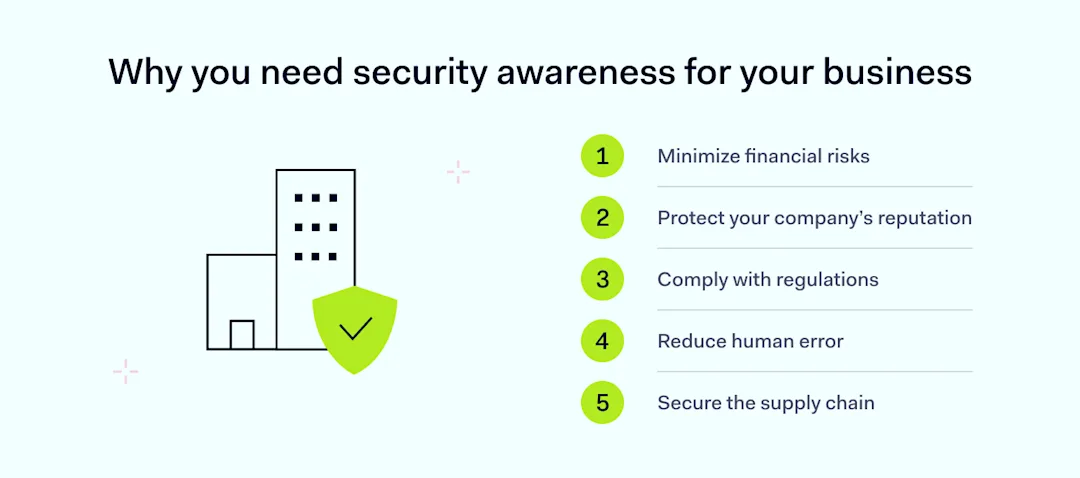
Why you need security awareness for your business

Minimize financial risks

Phishing campaigns are the starting point for about 90% of cybersecurity attacks. These lead to data breaches. These incidents can be extremely costly, and the average cost of data breaches is growing every year. The tools for cyber-attacks are also becoming less expensive. A well-structured security awareness training equips employees with the skills to identify and prevent such attacks. This can potentially save the company substantial sums in lost revenue and recovery costs.

Protect your company’s reputation

A single data breach can significantly damage your business’s reputation. This leads to a loss of customers and partners who value data security. For example, the case of 23andMe, which severely damaged its reputation after exposing the DNA data of its customers, underscores the risks. It remains uncertain whether the company will fully recover.

By integrating a comprehensive security awareness program, your business is committed to data protection. This can help maintain customer trust and business relationships.

Comply with regulations

Many industries face strict data protection regulations that charge significant fines for non-compliance. A proper security awareness training program teaches employees to handle sensitive information. This helps them comply with regulations and avoid costly legal issues. It includes finding new partners that value robust cybersecurity like ZTNA.

Reduce human error

Most security breaches come from human error. Implementing ongoing security training can greatly reduce these risks. Programs should cover password security, mobile device safety, and phishing attack recognition. Employees also learn about identity and access management. They become cautious about the data they share.

Secure the supply chain

If your business is part of a supply chain, a breach can impact more than your company. It can affect larger, critical businesses and have unpredictable consequences. A robust security program prevents employees from becoming the weak link in the chain.

Security awareness training can save a lot of money and even your business. It prevents financial losses, protects your reputation, and ensures legal compliance. It also reduces human error risks and secures your supply chain role.

For IT administrators, investing in effective training enhances business security and stability. This investment pays dividends by safeguarding against evolving threats.

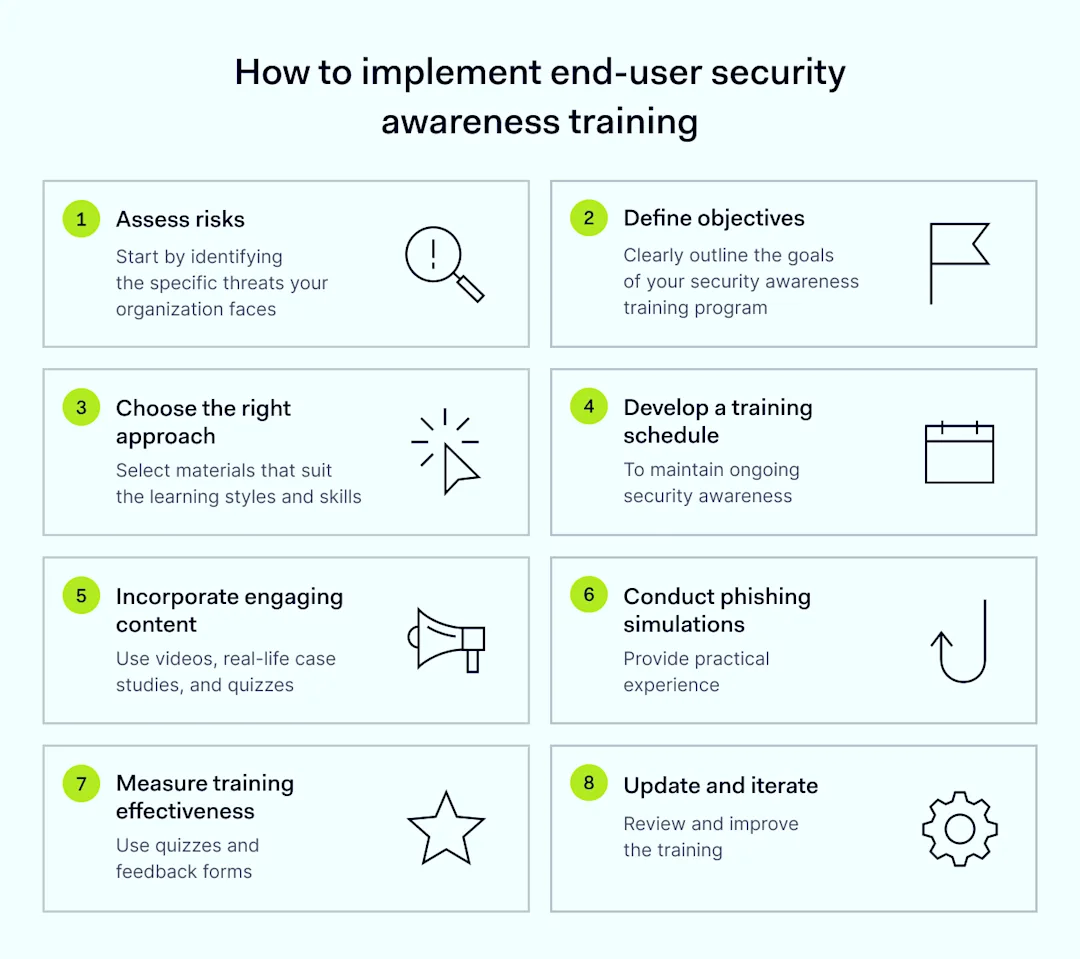
How to implement end-user security awareness training

Implementing end-user security training is straightforward but needs careful planning and updates.

How to implement end-user security awareness training

Here are the key steps:

  1. Assess risks. Start by identifying the specific threats your organization faces. These include phishing attacks, malware, or data breaches. Determine which data types and behaviors are most at risk. A SaaS cloud company might be vulnerable to customer data breaches. A manufacturing firm might be exposed through third-party vendors. List the most at-risk data and common compromise methods like social engineering.

  2. Define objectives. Clearly outline the goals of your security awareness training program. Instead of the generic ‘be safe online,’ specify the behaviors and skills employees need to develop. If your company faces diverse cybersecurity attacks, goals might include recognizing signs of a phishing attack and managing password security and access securely. This approach ensures that the security training is focused and measurable.

  3. Choose the right approach. Select training materials and platforms that suit the learning styles and technological skills of your workforce. An interactive quiz with real-life scenarios is often a good choice because it is gamified and relatable. If your team prefers traditional methods, like reading printed materials in Times New Roman on A4 paper, opt for that approach. Choose tools that ensure information is not only presented but retained.

  4. Develop a training schedule. Establish a regular training schedule to maintain ongoing security awareness. Start with mandatory cybersecurity awareness training for new hires, then incorporate monthly security tips via newsletters and weekly reminders on Slack. This helps keep remote employees engaged and aware of the latest cyber threats.

  5. Incorporate engaging content. Use a variety of videos, real-life case studies, interactive quizzes, and gamified elements to make learning both engaging and memorable. This variety helps prevent the training from becoming just another checkbox exercise and enhances employee awareness.

  6. Conduct phishing simulations. Challenge employees with simulated phishing attacks to provide practical experience identifying suspicious emails. For example, in the NordLayer office, QR codes occasionally appear that lead to a page warning against following unknown QR codes.

  7. Measure training effectiveness. After training sessions, assess their effectiveness using quizzes, feedback forms, and by monitoring changes in employee behavior. This is crucial for understanding the training’s impact and identifying areas for improvement. Without this evaluation, programs might become outdated and ineffective.

  8. Update and iterate. As cyber threats evolve, so must your training program. Regularly review and update the training content to include recent cyber incidents and emerging threats, ensuring the program remains relevant and effective.

Overall, this project requires a team, but the investment is worthwhile because it significantly reduces the likelihood of successful cyber-attacks. Remember, no organization is too small for an attack; it can happen even to those who have previously been attacked.

How can NordLayer help?

NordLayer does not offer cybersecurity training but enhances security through robust network protection. After implementing your security awareness program and educating employees, consider the next step of securing your network. NordLayer specializes in network protection solutions, crucial for controlling who can gain access to sensitive areas. This is particularly beneficial for teams that are working remotely, ensuring that computer security is maintained across all connections.

NordLayer also helps IT admins achieve cybersecurity frameworks like Zero Trust Network Access (ZTNA), complementing your employee awareness efforts. With plans starting at $7 per user per month, NordLayer offers an affordable way to bolster your security posture. For guidance on the best plan for your needs, please contact our sales team.

About Version 2 Digital

Version 2 Digital is one of the most dynamic IT companies in Asia. The company distributes a wide range of IT products across various areas including cyber security, cloud, data protection, end points, infrastructures, system monitoring, storage, networking, business productivity and communication products.

Through an extensive network of channels, point of sales, resellers, and partnership companies, Version 2 offers quality products and services which are highly acclaimed in the market. Its customers cover a wide spectrum which include Global 1000 enterprises, regional listed companies, different vertical industries, public utilities, Government, a vast number of successful SMEs, and consumers in various Asian cities.

About NordLayer
NordLayer is an adaptive network access security solution for modern businesses – from the world’s most trusted cybersecurity brand, Nord Security.

The web has become a chaotic space where safety and trust have been compromised by cybercrime and data protection issues. Therefore, our team has a global mission to shape a more trusted and peaceful online future for people everywhere.

About NordLayer
NordLayer is an adaptive network access security solution for modern businesses – from the world’s most trusted cybersecurity brand, Nord Security.

The web has become a chaotic space where safety and trust have been compromised by cybercrime and data protection issues. Therefore, our team has a global mission to shape a more trusted and peaceful online future for people everywhere.

Best Practices for Effective Content Filtering

Setting up a safe and secure online environment is critical for all organizations, whether they are public institutions, businesses, or educational establishments. Effective web filtering helps keep users safe from unwanted or harmful content, and boosts their productivity. This approach reduces the risks of digital exposure, making the online environment safer and more efficient for everyone involved.

Here at SafeDNS, there have been plenty of cases when users experienced issues with regards to filtering. Based on our experience and careful analysis, we’ve compiled several top filtering best practices to help organizations strengthen their online security through effective content filtering. Here’s what we recommend:

Update Filtering Rules and Signatures Frequently
These unique identifiers are what your system uses to identify known malicious software and neutralize them. Frequently updating these signatures keeps you sure that the latest malware threats can be fast-tracked for identification and actioning by your content filtering solution. This becomes very important because cybercriminals keep coming up with new strains of malware to bypass the detection algorithms.

As for URL blacklists, they are an incredibly important part of preventing internet access to known malicious websites. These lists must be updated regularly since new harmful sites are not only being created daily but also being discovered daily. Additionally, incorporating URL filtering can help block access to websites known for distributing malicious content.

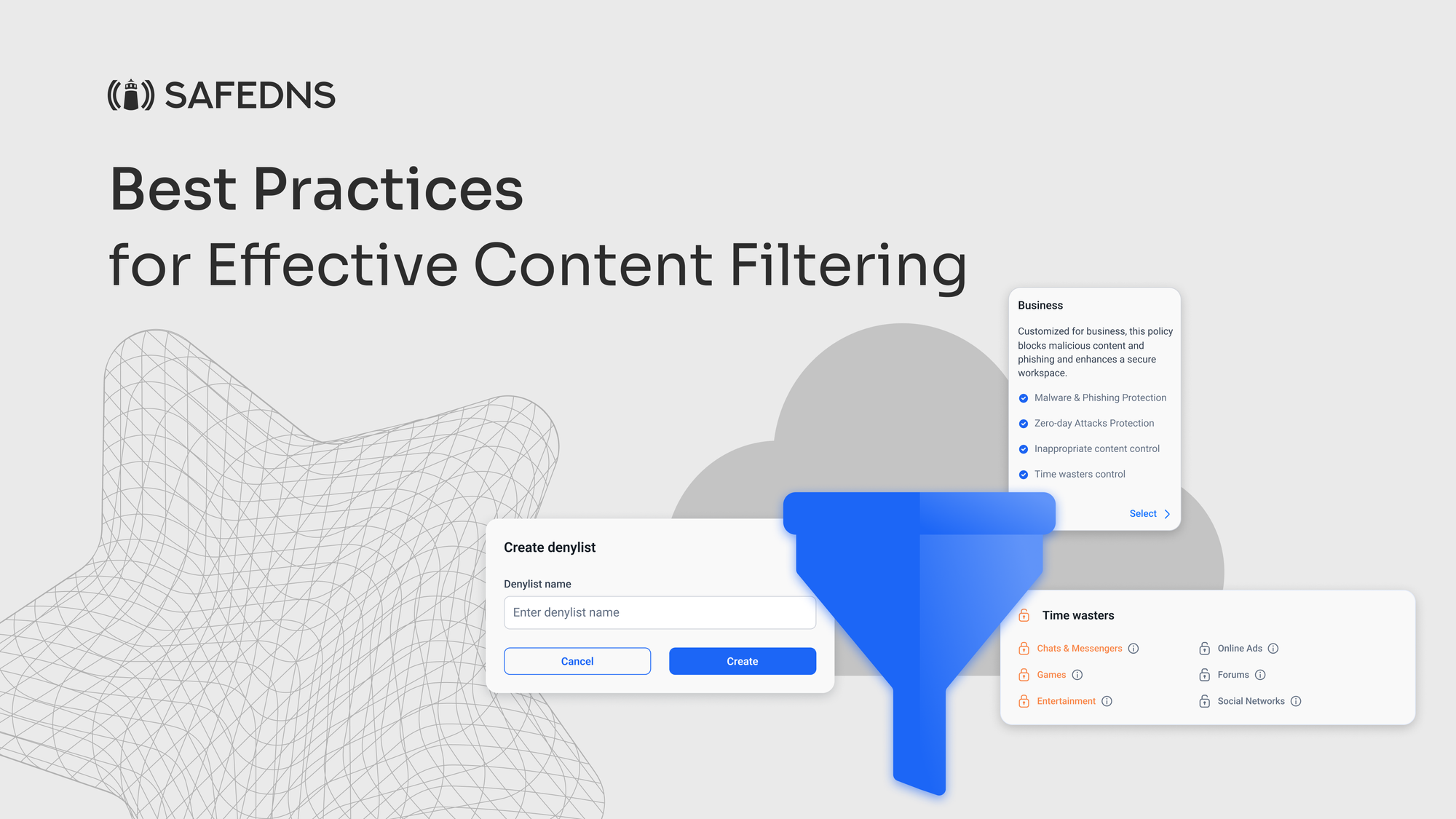
Custom Policy Configurations
If personalizing your sneakers is your style, why not apply the same approach to your content filtering policies? At SafeDNS, we provide a number of administrable filters like Time Wasters, General Sites, and Adult Related, among many others. This helps an organization in refining its content filtering policy with precision, addressing all specific details of that particular security requirement. Whether managing multiple user groups, locations, or device types, our content filtering solutions are agile enough to help businesses ensure a secure and productive digital environment, customized to their needs.

Remote Deployment of Content Filters
Remote deployment of content filters is more opportune now than ever, with the increasing digital nature of the work environment. With flexible and hybrid models of work gaining ground, organizations must establish comprehensive content filtering across devices and locations to ensure security and productivity.

One effective approach is to guide client-side installation, where employees are guided on how to install content filters on their devices. This allows active participation by users in securing their systems, provided clear and easy step-by-step instructions are provided. This operates more based on user engagement and reduces the requirement of direct intervention from the IT side, hence making it highly scalable across large and dispersed teams.

On the other hand, some organizations make use of remote IT control, whereby IT staff remotely access the systems of employees to install and configure content filters. Installation, in this case, will follow a standard and uniformity for all devices, hence offering greater control and standardization in the security measures to be implemented.

Clear Communication on Online Safety
Every organization should communicate online safety and content filtering effectively. The various groups that exist within the organizations, employees, customers, partners, and investors, have different requirements. These concerns pertain to the protection of privacy, access to resources for employees, and protection against insecure data and safe browsing of inappropriate content for customers. For the partners and investors, it is the robustness of cybersecurity and its impact on the operations.

Some key points of communication would be content filtering policies, guidelines on the usage of devices, description of security measures against cyber threats, IT support, training, and education. Sharing information freely will enable organizations to reduce fears, clarify any misconceptions, and increase stakeholder support and participation. The touting of positive impact from digital safety measures cements trust and indicates organizational achievement.

It is equally important to educate the parents/guardians on how their children are using their connected devices from the institutions. Most parents usually question the need for these gadgets, if it is safe to use them, and just how the information of their children is collected and secured, especially when the devices come home. This means being very transparent to the parents with respect to the type of information and sensitive data that is collected, its purpose, and security measures in place.

All-Round Threat Defense
Make sure your content filtering solution provides protection from all forms of credential theft, mobile malware, or virus outbreaks. Enhance your security by using tools like DLP and dynamic adult image analysis. Employing strategies to block access to malicious content and restrict access to unapproved sites is essential for all-round threat defense.

Real-Time Reporting and Analytics
Among the major factors that can provide the best content filtering practices is continuous tracking of stats and analytics. Continuous reporting systems and real-time analytics might put organizations at the center of information regarding activities and digital operations. Such practices improve transparency and instill trust in the commitment towards data security, regulatory compliance and operational efficiency.

Moreover, SafeDNS supports customers by issuing advanced reporting and real-time analytics, enabling customers to track data down to the most trifling details. Our latest feature offers updates down to the second, providing invaluable insights that will empower organizations to make better decisions about their digital safety strategies in the best possible time.

Every organization encounters the ongoing challenge of establishing a secure and efficient online environment. Effective web content filtering is essential, whether it’s protecting against malware and credential theft or ensuring that users can safely access the resources they need.

At SafeDNS, we are dedicated to helping you put into practice the best configurations that meet your organization’s unique requirements. Whether you’re looking to deploy advanced security measures, communicate effectively about online safety, or gain deeper insights through real-time reporting, SafeDNS is here to support you every step of the way.

About Version 2 Digital

Version 2 Digital is one of the most dynamic IT companies in Asia. The company distributes a wide range of IT products across various areas including cyber security, cloud, data protection, end points, infrastructures, system monitoring, storage, networking, business productivity and communication products.

Through an extensive network of channels, point of sales, resellers, and partnership companies, Version 2 offers quality products and services which are highly acclaimed in the market. Its customers cover a wide spectrum which include Global 1000 enterprises, regional listed companies, different vertical industries, public utilities, Government, a vast number of successful SMEs, and consumers in various Asian cities.

About SafeDNS
SafeDNS breathes to make the internet safer for people all over the world with solutions ranging from AI & ML-powered web filtering, cybersecurity to threat intelligence. Moreover, we strive to create the next generation of safer and more affordable web filtering products. Endlessly working to improve our users’ online protection, SafeDNS has also launched an innovative system powered by continuous machine learning and user behavior analytics to detect botnets and malicious websites.

Begin from the Endpoint: Why MSPs Need to Implement Device Posture Checks [Complete Guide]

Main Takeaways:

  • Enhance Security with Device Posture Checks: Understand the importance of device posture checks in securing endpoints and preventing unauthorized access.
  • Manage Unmanaged Devices and BYOD: Learn how to handle the challenges of Bring Your Own Device (BYOD) policies and the surge in unmanaged devices.
  • Regulatory Compliance and Preventive Measures: Discover how device posture checks aid in regulatory compliance and act as a preventive measure against data breaches.

As the world continues to go digital, the number of devices accessing corporate networks has surged dramatically. MSPs are tasked with securing not just corporate-issued devices but also personal devices used by employees and executives. A startling statistic reveals that 97% of executives access work accounts on their personal devices, introducing numerous vulnerabilities.

The challenge for MSPs is substantial: how to protect sensitive information on devices that may not be visible or directly controllable. This blog delves into the crucial role of device posture checks in fortifying security, especially in an era where remote work and Bring Your Own Device (BYOD) policies are prevalent. We will explore how these checks function, their benefits, and their application in enhancing overall cybersecurity.

How many devices are you responsible for securing? 

Probably a lot more than you would think, and not just limited to employees. 

A recent report found that 97% of executives access work accounts on personal devices.

But how can you protect what you don’t know or can’t keep track of on personal devices that access the corporate network from an unsecured endpoint? 

In this blog, we’ll explore the most vulnerable points of entry for attackers, the—endpoints, and how device posture checks can help add a security shield against these threats.

What is a Device Posture Check?

A device posture check (DPC) is a security assessment process that evaluates the current state and health of a device to determine if it complies with security policies.

Device posture checks enable you to define security rules before granting access to any sensitive resources. A DPC can also help you identify unknown devices in the network by assessing their configurations and if any suspicious behavior has been detected. 

Device posture checks are essential for securing remote access beyond the traditional office perimeter, where sensitive data resides in the cloud.  

Research found that more than 40% of data breaches can be traced back to unsecured endpoints. Without visibility into device health and device posture, an organization leaves many points of entry readily accessible for an attack. 

Managing Unmanaged Devices and BYOD in the Cloud

Access management is a complex never-ending security game. 

Data taken from a recent study found that the average enterprise has more than 1,000 SaaS apps, with 17% of those being rogue apps that are not managed by IT. 

But how you can secure what isn’t visible on the surface? 

Access permissions that haven’t been revoked can cause you a lot of trouble down the line. This applies to employees no longer with the organization or third-party contracts that either weren’t renewed or terminated altogether.  

BYOD usage exploded during the pandemic but has made remote security a prime concern for IT professionals. Despite the growing concerns, many companies have still not fully adopted BYOD policies. An IT report found that 47% of companies allow employees to access their resources on unmanaged devices. 

Think that’s bad? 

Now, factor in the sheer volume of unmanaged devices in an enterprise and the number of potentially compromised endpoints, and you have a lot to worry about. Without establishing defined policies and access segmentation, every endpoint becomes a prime target for a data breach.

And it gets even worse. 

Consider the number of stale user accounts and credentials floating around public cloud environments, just waiting to be exploited. This means that any endpoint can be breached at any given moment. We’re not even talking about the constant battle of updating the latest OS configurations and critical updates that need to be installed.  

Implementing strong authentication mechanisms such as MFA helps as a proactive measure but it doesn’t fully mitigate the risks associated with unmanaged devices and compromised endpoints. 

That’s where a DPC comes into the security picture. 

Device Posture Checks Use Cases 

Device posture checks can benefit organizations in several ways. 

  • Improve Regulatory Compliance: Protecting sensitive data is a top priority. Compliance penalties are quite expensive too. Device posture checks help ensure that all devices accessing the corporate network meet established security standards and comply with regulatory requirements. A DPC enables you to block access for untrusted devices and accounts by enforcing security policies and rules. Compliance becomes a more streamlined process when you know which devices have been authenticated. A DPC can also check device compliance over time to keep up with an infinite number of new devices and users that are added to the network daily. 
  • Prevent Unauthorized Access: Not every device should be granted access to the corporate network. Sounds fairly obvious, right? Not quite. MSPs are responsible for managing multiple enterprise clients who might enlist dozens of third-party admins to grant access permissions to users. But, what happens when an employee leaves the organization and their access hasn’t been revoked? Or a third party who’s contract has been terminated, yet still has access to shared Drive folders? Device posture checks enable you to limit access to employees and third-party contractors entirely based on user roles and permission sets. By the way, it pays to invest in cyber insurance coverage too. Having cyber insurance can help protect you from liability in a breach dispute and is highly recommended for all MSP and small business owners.
  • BYOD (Bring Your Own Device) Management: The pandemic helped fuel the work from home and anywhere remote model. Employees began using their personal devices to connect to the corporate network but also to visit potentially dangerous websites loaded with malware. That “anti-virus update” they accidentally installed could lead to a massive breach and trickle further if weak passwords and company accounts are left open. This shift to BYOD ushered in a new wave of remote cyber threats that range from man-in-the-middle (MITM) attacks to advanced phishing attacks and Ransomware as a Service (RaaS). Device posture checks provide you with the tools to enforce BYOD security policies and ensure that only secure devices are permitted to access the network. 

Endpoint Secured: Prevent Common Device Threats with Guardz 

Security begins at the endpoint. 

Guardz provides complete device posture checks and managed device protection as part of a comprehensive Endpoint Security solution. The Guardz platform detects outdated operating systems (OS) and continuously monitors endpoints to prevent common threats. Map device resources and enforce security policies companywide. 

Provide your clients with the assurance they need, whether you’re securing BYOD for remote workers in the cloud or on-prem. Leave no device or endpoint vulnerable to an attack. Secure your endpoints with Guardz. Get a demo today to learn more.

About Version 2 Digital

Version 2 Digital is one of the most dynamic IT companies in Asia. The company distributes a wide range of IT products across various areas including cyber security, cloud, data protection, end points, infrastructures, system monitoring, storage, networking, business productivity and communication products.

Through an extensive network of channels, point of sales, resellers, and partnership companies, Version 2 offers quality products and services which are highly acclaimed in the market. Its customers cover a wide spectrum which include Global 1000 enterprises, regional listed companies, different vertical industries, public utilities, Government, a vast number of successful SMEs, and consumers in various Asian cities.

About Guardz
Guardz is on a mission to create a safer digital world by empowering Managed Service Providers (MSPs). Their goal is to proactively secure and insure Small and Medium Enterprises (SMEs) against ever-evolving threats while simultaneously creating new revenue streams, all on one unified platform.

×

Hello!

Click one of our contacts below to chat on WhatsApp

×