Skip to content

How to disable Google Password Manager

Ready to make the next step in your password management journey and move on past the Google Password Manager? Well, you’re in the right place.

As much as Google’s password manager is convenient, some of you might be looking for higher levels of protection and flexibility. Be it more advanced encryption, in-depth insights on password strength, or the ability to handle your passwords seamlessly across any device, NordPass can serve as an excellent alternative. Let’s see why you may want to make the change and how you can disable Google’s password manager.

Important: Before you disable Google’s password manager

Before you disable the Google Password Manager, we highly recommend exporting all of your saved passwords. This step is critical in case something goes wrong during the transition to the new password manager. It also simplifies the process of importing all the login data into your next password manager such as NordPass, ensuring a seamless transition without the loss of any critical information. On top of that, having a copy of your stored passwords provides peace of mind; if you encounter any issues during the transition, you will still have a copy of your login credentials for your most important online accounts and services.

How to export your passwords from the Google Password Manager

Here’s a quick step-by-step guide for exporting your passwords from the Google Password Manager in Chrome:

  1. Open Google Chrome and go to Settings.

  2. Select the Autofill and Passwords tab and click Google Password Manager.

  3. Open Settings and select Download File.

  4. Enter your device’s password to export the passwords.

  5. Save the CSV file to your device.

That’s it! You’ve successfully exported your password from the Google Password Manager.

How to turn off Google Password Manager in Chrome on desktop

The Google Password Manager is turned on by default in all Chrome browsers. Switching it off is quick and easy though. Here’s how you can do it:

  1. Open Google Chrome and select your profile in the upper-right corner.

  2. Select the key icon under the profile image.

  3. Open Settings.

  4. Now switch off the toggle next to Offer to save passwords and Sign in automatically.

That’s it! The Google Password Manager on Chrome is now disabled.

How to turn off Google Password Manager on Android

Here’s a quick rundown of how you can turn off the Google Password Manager on your Android device:

  1. Open the Chrome app on your Android device.

  2. Tap the three dots in the top-right corner.

  3. Open Settings.

  4. Tap Password Manager.

  5. Select the gear icon next to Password Manager.

  6. Turn off the toggle next to Offer to save passwords and Auto sign-in.

You’re all done, the Google Password Manager is now turned off on your Android device.

How to turn off Google Password Manager on iOS

Here’s how you can turn off the Google Password Manager on your iOS device:

  1. Open the Chrome app on your iOS device.

  2. Tap the three dots in the bottom-right corner.

  3. Select Password Manager.

  4. Turn off the toggle next to Offer to save passwords.

How to set up a third-party password management solution

Transitioning from the Google Password Manager to a dedicated password manager such as NordPass is a significant step towards enhancing your online security and simplifying your online interactions.

NordPass is designed with user convenience and security in mind and offers a more tailored and robust password management experience. By setting up NordPass as your dedicated password manager, you’ll get a more secure and efficient way of managing your login credentials, credit card data, personal information, and more. The switch to NordPass is seamless and can be done in just a few simple steps. Here’s how you can set up NordPass as your primary password manager:

Download and install NordPass

  • Visit the NordPass website to download the extension or go to the App Store (iOS) or Google Play Store (Android) to get the mobile app.

  • Follow the setup instructions provided on the website or app store.

  • Sign up for a new account.

Import your passwords on desktop

Once you have NordPass installed, the next step is importing your passwords. This process ensures that all your login credentials from Google Password Manager are transferred to NordPass without any data loss. Here’s a rundown of how to do it:

  1. Open the NordPass extension on your browser.

  2. Open Settings.

  3. Navigate to the Import section.

  4. Select Google Password Manager or Google Chrome from the list of options.

  5. Click Import. (Alternatively, you can choose the Other option in the Import menu.)

  6. Now, upload the CSV file you previously exported from Google Password Manager.

That’s it! Your passwords from Google Password Manager will now appear in your NordPass Vault.

Import your passwords on mobile devices

  1. Open the NordPass application on your mobile device.

  2. Open Profile.

  3. Select the browser you want to import your login information from.

  4. Follow the steps on exporting your passwords from the specific browser.

Once you complete these steps, all saved passwords will appear in your NordPass vault.

Set up NordPass as your default password manager

To make the most out of NordPass, setting it as your default password manager will ensure all your new passwords and changes are automatically saved. Here’s how you can do that:

For Desktop:

  1. Download the NordPass browser extension from the Chrome Web Store or your preferred browser’s extension store.

  2. Install the extension and log in with your NordPass account.

For Android:

  1. Open the NordPass on your Android device.

  2. Select Profile and open Settings.

  3. Switch the toggle next to Turn on autofill.

  4. Select Open Autofill Service.

  5. Now select NordPass as the preferred autofill service in device settings.

That’s it! Now NordPass will allow you to autosave and autofill your credentials, which will essentially make NordPass your default password manager on your Android device.

For iOS:

  1. Open your device’s Settings.

  2. Go to Passwords.

  3. Tap Autofill Passwords.

  4. Select NordPass and disable any other services for the best autofill experience.

By following these steps, you will effortlessly transition to NordPass as your default password manager, enjoying a more secure, efficient, and comprehensive password management experience.


About Version 2 Digital

Version 2 Digital is one of the most dynamic IT companies in Asia. The company distributes a wide range of IT products across various areas including cyber security, cloud, data protection, end points, infrastructures, system monitoring, storage, networking, business productivity and communication products.

Through an extensive network of channels, point of sales, resellers, and partnership companies, Version 2 offers quality products and services which are highly acclaimed in the market. Its customers cover a wide spectrum which include Global 1000 enterprises, regional listed companies, different vertical industries, public utilities, Government, a vast number of successful SMEs, and consumers in various Asian cities.

About NordPass
NordPass is developed by Nord Security, a company leading the global market of cybersecurity products.

The web has become a chaotic space where safety and trust have been compromised by cybercrime and data protection issues. Therefore, our team has a global mission to shape a more trusted and peaceful online future for people everywhere.

Threat Protection Pro: Everyday online threats in numbers


According to new research by NordVPN, adult content, free video hosting sites, and sites that impersonate well-known and reputable brands have the most security and privacy threats, such as malware, intrusive ads, and trackers.

According to new research by NordVPN, a leading cybersecurity company, adult content, free video hosting sites, and sites that impersonate well-known and reputable brands have the most security and privacy threats, such as malware, intrusive ads, and trackers.

In May alone, NordVPN’s Threat Protection Pro feature blocked more than 5B intrusive ads, almost 40B trackers, and 60M malware infection attempts. With more than 50M malware-related incidents Americans are among the most affected among all Threat Protection Pro users globally. A thorough analysis of these suspended incidents revealed vital cybersecurity and privacy threats that users should be aware of and protect themselves.

“Every day, we face cyber threats without even noticing them. Even if we do not see malware or trackers with the naked eye or can handle the irritation caused by intrusive ads, it does not save us from severe privacy and cybersecurity issues. We should improve our knowledge and use trusted technology tools to avoid these threats. Most anti-malware features integrated into popular VPNs are usually limited to simple DNS filtering. NordVPN’s digital protection tool is now upgraded to Threat Protection Pro and helps users avoid hacking, tracking, phishing, scams, malware, and annoying ads and cookies,” says Adrianus Warmenhoven, a cybersecurity advisor at NordVPN.

Malware is malicious software: viruses, trojans, ransomware, and spyware designed to harm a user’s devices. It can steal sensitive data, encrypt important files, or even take over the devices, putting the criminal in complete control. The most common way users can get their devices infected with malware is by visiting malicious sites.

NordVPN research shows that from January 1 to May 31, Threat Protection Pro blocked more than 24M malicious links in adult content sites (or 8% from all blocked sites), as well as 16M links in uncategorized (5%), and 13M in web services (4%) sites.

Moreover, cybercriminals more often use deceptive misspellings of popular brands to trick victims into clicking phishing links and downloading infected files. As much as 99% of all phishing attacks use just 300 brands for deception. The most popular brands that users impersonated for spreading malware are Office365 (86K impersonated URLs discovered), Gazprom (60K), AT&T (28K), Facebook (19K), and Bet365 (15K)*.

“The brands themselves are not at fault — fakes like these also hurt their reputation, forcing companies to actively hunt them down. But high brand awareness can lull victims into a false sense of security and get them to lower their guard,” Warmenhoven says.

One device in The United States faces 89 malware attacks a month

The risk of getting infected with malware also varies by geographic region. These differences could be attributed to the varying levels of internet connectivity, economic development, and cybersecurity awareness in different countries.

NordVPN research showed that Threat Protection Pro blocked more than 50M attempts to infect American users’ devices during the research period. On average, one device owned by an American user is exposed to 89 malware-related incidents every month. In comparison, Ukraine is the most affected country, with 786 attempts to infect one device with malware per month.

Privacy-invading trackers reign in free video hosting websites

Web trackers are a broad category of privacy-invading tools that collect information on user activity. Trackers typically take the form of special scripts, browser cookies, or tracking pixels. Unfortunately, in the case of a data breach, the stored tracker data could end up falling into the hands of cybercriminals.

With this in mind, users should be highly attentive when using free video hosting (28% of all blocked trackers), online storage (13%), and search engines (13%), which, according to the research, are leaders in tracking user activities. Since January 1, Threat Protection Pro has blocked 39B trackers from free video hosting sites alone, while the online storage category is accountable for 18B trackers.

“Websites often share or sell data collected by trackers to third parties. But those who want to protect their privacy can use several tools to become less trackable. For example, VPN, which will change real IP address and virtual location, tracker blocker or privacy browsers”, says Warmenhoven.

Intrusive ads are not just annoying

Invasive and irrelevant ads popping up unexpectedly, blocking the host page, and opening new pages and windows are also the most common for free video hosting, adult content, and advertisement sites. Since the beginning of the year, Threat Protection Pro has detected and blocked billions of them: more than 2B, 1B, and 807M, respectively.

Moreover, intrusive ads are much more than just an annoying part of internet surfing; they are a matter of privacy and security. They can also infect users’ devices by linking to malicious sites, violate privacy by collecting data from web activity, and impact website loading speed.

How to stay safe from common cyber threats

To protect yourself from common cybersecurity threats like malware, trackers, and intrusive ads, Adrianus Warmenhoven advises to take these precautions:

  • Develop good cybersecurity habits. Cybercriminals prey on apathy, confusion, and ignorance, hoping that victims will forego due diligence. For example, most phishing attempts involve distorted names of popular brands.

  • Verify, download, scan, install. Malware executables may be disguised as or even hidden in legitimate files. Always verify the website you wish to download from, and always use anti-malware tools like Threat Protection Pro to inspect the files you download. This includes suspicious email attachments.

  • Be careful of where you go online. Certain web domain categories are much more likely to host malware that could compromise your device than others. If you visit websites that are likely to contain malware, pay attention to what you type, click, and download.

  • Let Threat Protection Pro keep you safe. Threat Protection Pro combines the best aspects of essential cybersecurity tools into one comprehensive security package. It will scan each file you download for malware, stop you from visiting malicious pages used for phishing, scams, and hosting malware, and block annoying ads.

Methodology: The statistics mentioned above were acquired by analyzing aggregated data gathered by NordVPN’s Threat Protection Pro service from January 1 to May 31, 2024. NordVPN is not endorsed by, maintained, sponsored by, affiliated, or in any way associated with the owners of the mentioned brands. Brands are indicated solely for the purpose of accurately reporting information related to brands that were most likely to be impersonated for spreading malware*.

ABOUT NORDVPN

NordVPN is the world’s most advanced VPN service provider, used by millions of internet users worldwide. NordVPN provides double VPN encryption and Onion Over VPN and guarantees privacy with zero tracking. One of the key features of the product is Threat Protection, which blocks malicious websites, malware during downloads, trackers, and ads. The latest service by the Nord Security team is Saily — a new global eSIM. NordVPN is very user friendly, offers one of the best prices on the market, and has over 6,200 servers covering 111 countries worldwide. For more information: https://nordvpn.com.

About Version 2 Digital

Version 2 Digital is one of the most dynamic IT companies in Asia. The company distributes a wide range of IT products across various areas including cyber security, cloud, data protection, end points, infrastructures, system monitoring, storage, networking, business productivity and communication products.

Through an extensive network of channels, point of sales, resellers, and partnership companies, Version 2 offers quality products and services which are highly acclaimed in the market. Its customers cover a wide spectrum which include Global 1000 enterprises, regional listed companies, different vertical industries, public utilities, Government, a vast number of successful SMEs, and consumers in various Asian cities.

About Nord Security
Nord Security is a cybersecurity company known for its flagship product, NordVPN. The company is dedicated to providing online security and privacy solutions to individuals and businesses globally.

Cybersecurity in the EU: The NIS2 Directive

Navigating the evolving landscape of network and information security is a pivotal concern in the current era. As technology becomes more complex, the need for comprehensive policies and regulations to safeguard critical infrastructure and digital services becomes ever more apparent. One such initiative set to drastically alter the cyber landscape is the NIS2 Directive.


What is the NIS2 Directive for cybersecurity?

The NIS2 Directive, or Network and Information Security Directive 2, is EU-wide legislation on cybersecurity. It was introduced as a robust step forward to heighten the overall level of cybersecurity within the European Union. The NIS2 Directive came into force in 2023 with the goal to modernize the existing legal framework of the original NIS Directive that was introduced in 2016.

This update came in response to the escalated digitization and evolving threat landscape.

The NIS2 Directive expands its coverage beyond the initial realm. It extends the cybersecurity rules to new sectors and entities. It is designed to reinforce the resilience and incident response capacities of public and private entities. It achieves this by fostering Member States’ preparedness and promoting cooperation among them.

For instance, it mandates that Member States be suitably equipped. This includes a Computer Security Incident Response Team (CSIRT) and a competent national network and information systems (NIS) authority.

What are the main goals behind NIS2?

The NIS2 Directive’s primary objective is to promote robust cybersecurity across the EU. This includes safeguarding vital sectors from cyber threats and boosting trust in important services.

It does this by:

  • Establishing a standardized level of cybersecurity protection measures across all EU member states.

  • Clearly identifying and regulating the sectors affected by the directive.

  • Expanding cyber security measures and tightening incident reporting rules.

  • Improving the cooperation and coordination among member states in handling cyber threats.

The aim of NIS2 is to establish a standardized level of protection across all EU member states. It clearly identifies affected sectors and minimum security requirements and unifies reporting obligations. It also introduces enforcement measures and sanctions. These efforts aim to protect critical infrastructure and EU citizens from cyberattacks.

One major improvement of NIS2 over its predecessor NIS 1 is its specific scope. Sectors affected include manufacturing, food, courier services, space, and digital infrastructure. Medium and large organizations operating within these sectors fall under the NIS2 scope.

NIS2 distinguishes between “essential” and “important” entities. Both types must comply with the same security measures. However, “essential” entities are under proactive supervision.

Changes include strengthened security requirements, enhanced enforcement, stricter incident reporting, and improved cooperation. It has rules for risk management, cybersecurity training, crisis management, and data encryption. It aims to eliminate the flexibility that led to vulnerabilities under the original NIS.

Incident reporting now has new mandatory stricter timeframes, with an initial report required within 24 hours of a cybersecurity issue. This enables authorities to respond better to potential threats. Moreover, NIS2 fosters cooperation and communication between member states. It does this by establishing a European Cyber Crisis Liaison Organization Network. This makes network security a collective effort.

How does the NIS2 Directive impact business?

The NIS2 Directive’s wider scope brings a broader range of businesses under its ambit. It particularly affects those providing critical infrastructure within the EU.

As such, it’s crucial for these entities to understand what the directive entails. You may need to prepare for enhanced risk management and incident reporting requirements.

One of the key areas for businesses to address under the NIS2 Directive is the security of network and information systems.

To meet the requirements of the directive, businesses are expected to establish a robust cybersecurity-risk management program. This program should include technical and organizational measures including authentication, authorization, encryption, and consistent monitoring for the security of network, information systems, and APIs.

Key steps to building a comprehensive network and information security program might include:

  • Conducting a comprehensive cybersecurity risk assessment. This should help identify any risks posed to your network, information systems, and APIs.

  • Implementing appropriate measures to manage identified risks. Key measures might include authentication, authorization, encryption, and consistent monitoring of your network and information systems.

  • Developing robust incident reporting mechanisms. You should establish systems that can detect and report security incidents related to your network and information systems.

  • Ensuring compliance with relevant regulations and standards. In addition to the NIS2 Directive, businesses should ensure they are compliant with other applicable regulations like the GDPR and other pertinent data protection laws.

  • Training and awareness. Finally, companies should educate their employees, contractors, and third-party providers about network and information system security practices. This could cover secure coding practices, secure deployment practices, and incident response procedures.

By focusing on these aspects, businesses can ensure that they are prepared for the NIS2 Directive. They can adequately protect their networks and systems from potential cyber threats. In addition, they will be better positioned to demonstrate their compliance to national cybersecurity authorities, thereby enhancing trust in their services or critical infrastructure.

Which sectors are affected by NIS2?

NIS2 Directive Affected Sectors

The NIS2 Directive expands its reach beyond the original NIS Directive, encompassing a broader range of sectors.

These include essential service operators in areas such as:

  • Energy

  • Transport

  • Banking

  • Healthcare

  • Digital service providers like online marketplaces, social networking platforms, and search engines

  • Research

  • ICT-Service management

  • Space

  • Entities providing domain name registration services

Businesses in these sectors must adhere to the regulations and requirements set forth by the NIS2 Directive.

When does NIS2 come into force?

The Member States have been given a window of 21 months until October 17, 2024, to transpose the measures outlined in the NIS2 Directive into national law.

The implication is clear: Businesses must prepare and adapt to the new network and information security landscape.

New Cybersecurity Directives – the CER Directive

Beyond the NIS2 Directive, another noteworthy legislation is the European Directive for Critical Entities Resilience (CER). The main difference between NIS2 and CER is that NIS2 is focused on cybersecurity, and CER is focused on physical security from natural disasters, floods, fires, etc.

The CER Directive replaces the European Critical Infrastructure Directive of 2008. It introduces stronger rules to enhance critical infrastructure against threats, including natural hazards, terrorist attacks, insider threats, and sabotage.

The CER Directive entered into force on January 16, 2023. Member States have until October 17, 2024, to transpose the requirements of the CER Directive into national law. By this date, each Member State is required to adopt and publish the measures necessary to comply with the directive. They must apply those measures from October 18, 2024.

Under the CER Directive, Member States must develop a strategy for enhancing the resilience of critical entities by January 17, 2026. This strategy aims to strengthen the ability of critical entities to prepare for, cope with, protect against, respond to, and recover from incidents that could disrupt the provision of essential services.

The CER Directive covers eleven sectors: energy, transport, banking, financial market infrastructures, health, drinking water, wastewater, digital infrastructure, public administration, space, and food. Member States are required to adopt a national strategy and conduct regular risk assessments.

The bottom line

The NIS2 Directive is poised to become a vital framework for cybersecurity in the EU. Businesses that fall under its scope must install rigorous technical, operational and organizational measures.

The deadline for national adoption of the directive is looming. Businesses must begin preparing to meet the NIS2 requirements.

In the context of the need for compliance with NIS2 regulations, NordPass offers valuable support as a password manager. Its features are designed to enhance your organization’s password security.

One key feature is the encrypted password vault. This securely stores all work-related passwords and information using the secure XChaCha20 encryption. NordPass’s zero-knowledge architecture ensures only authorized users can access the data.

NordPass also provides a password generator. It allows you to easily create strong and unique passwords that are resistant to guessing or brute-force attacks. The password health feature helps you assess the strength and security of your passwords. Identify any weaknesses or instances of password reuse that may put your accounts at risk.

Additionally, NordPass includes a data breach scanner. Automatically detect if any of your company’s domains or emails have been compromised in data breaches. This enables you to take immediate action to mitigate potential risks and protect your accounts. The password policy feature allows you to establish a robust password policy at the administrative level.

The activity log feature of NordPass provides transparency and accountability. This helps you maintain control over your company’s logins. Multi-factor authentication adds a layer of security, reducing the risk of unauthorized access.

These features help businesses enhance their password security and compliance with NIS2 regulations. This helps contribute to a more secure and resilient digital environment.

About Version 2 Digital

Version 2 Digital is one of the most dynamic IT companies in Asia. The company distributes a wide range of IT products across various areas including cyber security, cloud, data protection, end points, infrastructures, system monitoring, storage, networking, business productivity and communication products.

Through an extensive network of channels, point of sales, resellers, and partnership companies, Version 2 offers quality products and services which are highly acclaimed in the market. Its customers cover a wide spectrum which include Global 1000 enterprises, regional listed companies, different vertical industries, public utilities, Government, a vast number of successful SMEs, and consumers in various Asian cities.

About NordPass
NordPass is developed by Nord Security, a company leading the global market of cybersecurity products.

The web has become a chaotic space where safety and trust have been compromised by cybercrime and data protection issues. Therefore, our team has a global mission to shape a more trusted and peaceful online future for people everywhere.

2024 Twingate competitors and alternatives

As cyber threats grow more advanced and frequent, protecting sensitive data and ensuring secure remote access are top priorities. Reports show that cyber-attacks are increasing in complexity and number, a trend that shows no signs of slowing down.

IT administrators face challenges such as budget constraints, the need for easy-to-use solutions, scalable systems, and reliable customer support. To address these issues, many companies offer solutions that replace or improve traditional VPNs with more secure options.

This article compares various remote access solutions, highlighting their features, strengths, and drawbacks, with a focus on ease of use, scalability, and customer satisfaction.

Disclaimer: This article is based on third-party reviews and open-source online information accessed between June 6 and 10, 2024. NordLayer is not responsible for data accuracy, as competitor information is subject to change. The competitor information was gathered through manual research, including feature comparisons and product analysis.

Twingate overview

Twingate is a remote access solution that focuses on a Zero Trust model. It allows organizations to secure access to private apps, sensitive data, and environments both on-premise and in the cloud. Twingate aims to replace traditional VPNs with a simpler and more secure alternative that fits today’s work-from-anywhere needs.

Twingate capabilities

  1. Provides Zero Trust Network Access (ZTNA) tools to authenticate every user and device before granting network access.

  2. Supports clients on Android, iOS, Linux, macOS, and Windows.

  3. Connects up to 100 local networks, depending on the plan.

Strengths of Twingate

  1. Offers ease of use through a simple setup.

  2. Ensures security by providing encrypted user access.

  3. Provides flexibility by allowing detailed control over access management and network routes.

Limitations of Twingate

  1. Needs better organization and more features in the admin interface for improved usability.

  2. Offers a limited set of features and integrations that may not meet advanced needs.

  3. Lower plans lack support; only enterprise offers priority.

  4. Focuses on ZTNA; may not cover long-term, complex needs.

  5. Full tunnel support is still under development, which may limit functionality.

  6. Does not offer separate VPN subnets.

Disclaimer: This review is based on information from VPN review sites such as Gartner, Capterra, and G2, along with user feedback from Reddit and TrustRadius, accessed on June 6, 2024.

Now, let’s look at Twingate alternatives.

1. NordLayer

Overview of NordLayer

NordLayer is a network protection tool developed by Nord Security, the creators of NordVPN. It helps businesses work safely and flexibly by using Secure Service Edge (SSE) and Zero-Trust frameworks. It integrates with Azure AD, Okta, Google Cloud, OneLogin, and Amazon AWS.

NordLayer capabilities

NordLayer secures network connections for businesses. It creates safe connections to the internet, company networks, and cloud resources, supporting compliance and flexible working.

  1. Zero Trust Network Access. Provides secure access by verifying each user and device.

  2. Secure internet access. Protects employees who travel by securing remote access through public Wi-Fi. It blocks threats, allows geo-specific content, and ensures privacy.

  3. Network and resource access management. Manages access to company resources, connects remote devices, and supports hybrid resources.

  4. Achieving compliance. Monitors VPN activity, manages user access and encrypts data from untrusted networks.

  5. Integration with identity providers. Works seamlessly with existing identity provider systems.

  6. Scalability. Supports unlimited users and adapts to different business needs.

Strengths of NordLayer

The NordLayer website states that the solution is easy to use, offers powerful security features, and works efficiently.

  1. Modern network security. Developed with NordVPN’s standards for today’s businesses.

  2. Easy integration. Installs quickly with existing systems without extra hardware, and scales easily.

  3. Robust SSE framework. Combines ZTNA, SWG, and FWaaS into a powerful cloud-native service.

  4. High server speeds. Provides strong connections with fast loading speeds, up to 1Gbps.

  5. Quantum-safe encryption. Uses AES-256 and Chacha20 technologies for top-level security.

  6. Seamless integration. Works with identity providers like Google Workspace, Okta, Entra ID (Azure AD), JumpCloud, and OneLogin.

  7. 24/7 support. Offers round-the-clock assistance and dedicated account management.

  8. Unique technologies. Includes NordLynx, browser extension, and Smart Remote Access for efficiency.

  9. Diverse VPN protocols. Supports OpenVPN (UDP & TCP) and NordLynx for various needs.

  10. Money-back guarantee. Offers a 14-day money-back promise.

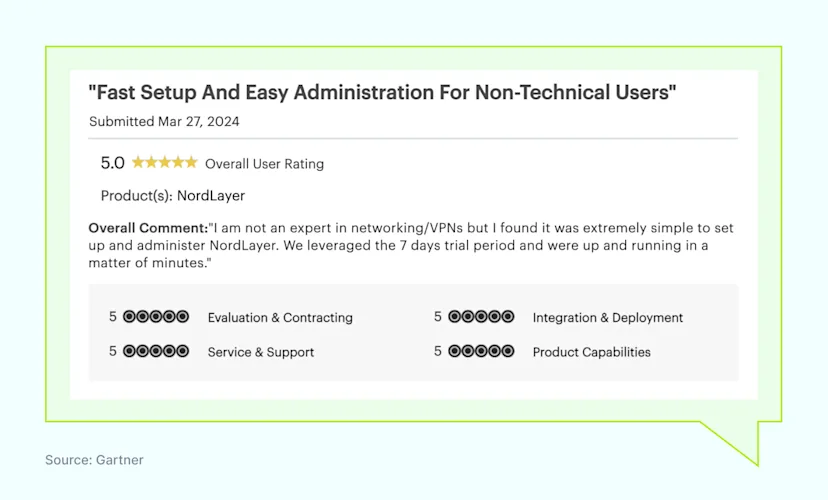
NordLayer Gartner review

Uniqueness of NordLayer

NordLayer stands out with unique elements tailored to IT admins who prioritize ease of use and speed. Here’s what makes NordLayer different:

  1. Browser extension. Secures web access easily.

  2. NordLynx VPN protocol. Offers the fastest VPN protocol made by NordLayer.

  3. ThreatBlock. Blocks malicious websites and threats.

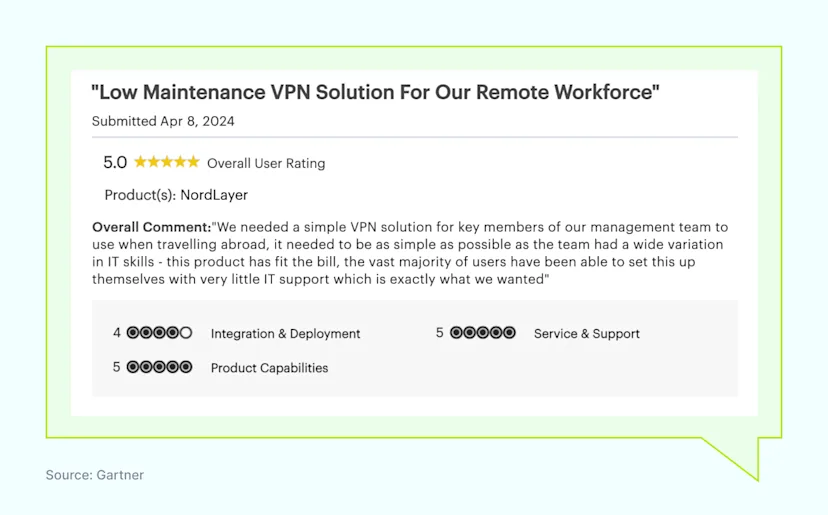
NordLayer Gartner review 2

Limitations of NordLayer

  1. Lacks API access for custom integrations.

  2. Does not integrate with SIEM solutions.

  3. Requires a minimum purchase of 5 licenses.

NordLayer provides a comprehensive remote access solution with secure access and flexible network management. It is a strong competitor among Twingate alternatives for securing a remote workforce.

NordLayer reviews

NordLayer receives positive reviews for its Zero Trust Network Access (ZTNA) solutions, Secure Web Gateway (SWG), and Security Service Edge (SSE) capabilities like Cloud Firewall (FWaaS).

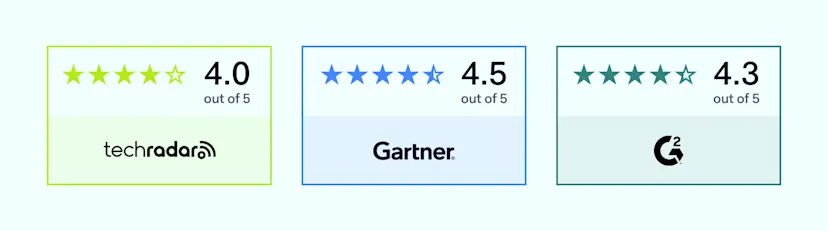
NordLayer is rated 4 out of 5 on TechRadar, 4.5 out of 5 on Gartner, which is the most authoritative source for technology reviews and insights, and 4.3 out of 5 on G2, a popular platform for user reviews and ratings of software products.

NordLayer reviews

NordLayer pricing

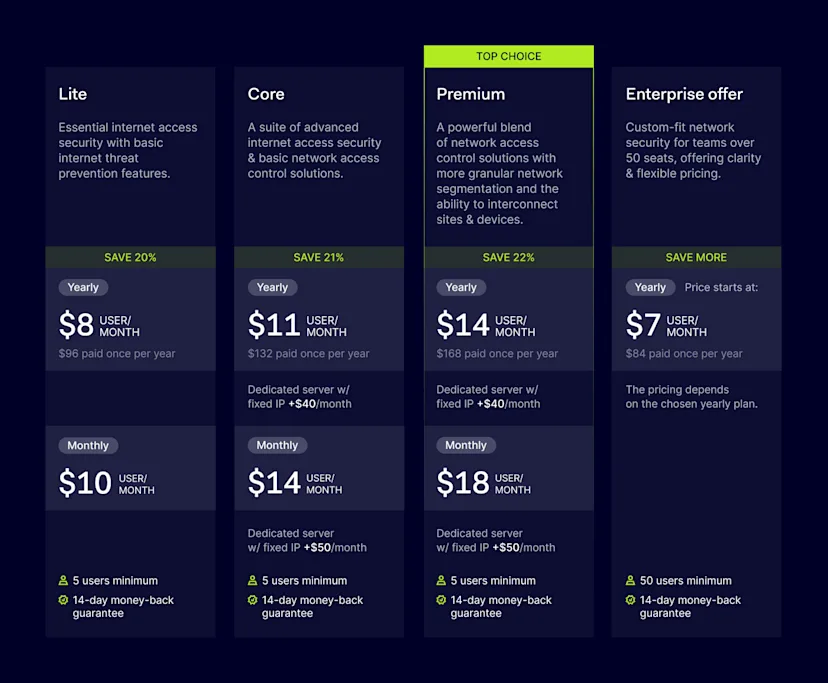
NordLayer offers several pricing plans. All plans support server speeds up to 1 Gbps, Shared Gateway locations in over 30 countries, and automatic user logout after a set time. Features like ThreatBlock,  Multi-Factor Authentication (MFA), Always On VPN, and Single Sign-On (SSO) are also available for all plans. You can choose from VPN protocols like NordLynx, OpenVPN (UDP), and OpenVPN (TCP). There is also a 60% discount for nonprofit organizations.

NordLayer requires at least 5 users per organization.

NordLayer pricing

2. Harmony SASE (formerly Perimeter 81)

Overview of Harmony SASE

Harmony SASE aims to simplify secure network, cloud, and application access for today’s mobile workforce. Its mission is to transform traditional network security into a unified approach based on the SASE framework.

Harmony SASE capabilities

Harmony SASE provides a variety of capabilities that are important for modern network security and access.

  1. Easy setup and configuration

  2. Reliable customer support

  3. Solid performance and speed

  4. Comprehensive access auditing

Strengths of Harmony SASE

Customers value Harmony SASE for its user-friendly nature.

  1. Simple and adaptable solution

  2. Quick deployment

Limitations of Harmony SASE

Users have expressed concerns about various limitations of Harmony SASE.

  1. Premium feature availability

  2. Customer support data access

  3. Limited country options

  4. Higher cost

Disclaimer: This product review is based on information from VPN review sites such as Gartner, Capterra, and Cybernews, along with customer feedback on these platforms, accessed on June 10, 2024.

3. Tailscale

Overview of Tailscale

Tailscale is a modern VPN service that creates secure private networks using the open-source WireGuard protocol. It forms a distributed mesh network, allowing direct communication between devices.

Tailscale capabilities

Tailscale’s main feature is its mesh network, which allows direct communication between devices.

  1. Mesh network for direct communication between devices

  2. Lightweight encrypted connections created by WireGuard.

  3. Magic DNS provides easy-to-remember domain names for devices in the network.

  4. Access control lists (ACLs) centralize policy management

Strengths of Tailscale

Customers find Tailscale to be a user-friendly solution that offers several benefits.

  1. Ease of use

  2. Scalability

  3. Cost-effective options

Limitations of Tailscale

Users have expressed concerns about issues such as data safety and the Tailscale feature set.

  1. Privacy concerns arise because it logs certain device metadata and is based in Canada, a Five Eyes country.

  2. Limited global reach lacks a global network of servers for geo-unblocking content.

  3. Dependency on third-party authentication requires external identity providers for authentication.

  4. Lack of full VPN features includes missing features like public IP masking and comprehensive geo-unblocking.

Disclaimer: This review is based on information from the Tailscale website; VPN review sites such as Capterra, TechRadar, and vpnMentor; along with user feedback from Reddit, accessed on June 6, 2024.

Choosing the right solution depends on your company’s size and needs. Each Twingate competitor offers different features and capabilities. NordLayer, Harmony SASE, and Tailscale provide secure access for a remote workforce, supporting Zero-Trust Network Access and robust security policies.

Evaluating these Twingate alternatives will help your business ensure secure access, support zero-trust principles, and maintain strong security policies for your remote workforce. Check out the Decision Maker’s Kit, a free tool from the NordLayer team, which helps you build a strategy for selecting the best solution for your organization and guides you through the process from start to finish.

About Version 2 Digital

Version 2 Digital is one of the most dynamic IT companies in Asia. The company distributes a wide range of IT products across various areas including cyber security, cloud, data protection, end points, infrastructures, system monitoring, storage, networking, business productivity and communication products.

Through an extensive network of channels, point of sales, resellers, and partnership companies, Version 2 offers quality products and services which are highly acclaimed in the market. Its customers cover a wide spectrum which include Global 1000 enterprises, regional listed companies, different vertical industries, public utilities, Government, a vast number of successful SMEs, and consumers in various Asian cities.

About NordLayer
NordLayer is an adaptive network access security solution for modern businesses – from the world’s most trusted cybersecurity brand, Nord Security.

The web has become a chaotic space where safety and trust have been compromised by cybercrime and data protection issues. Therefore, our team has a global mission to shape a more trusted and peaceful online future for people everywhere.

About NordLayer
NordLayer is an adaptive network access security solution for modern businesses – from the world’s most trusted cybersecurity brand, Nord Security.

The web has become a chaotic space where safety and trust have been compromised by cybercrime and data protection issues. Therefore, our team has a global mission to shape a more trusted and peaceful online future for people everywhere.

How we implemented traffic routing in Meshnet for increased security

featured image

How a classical VPN server works

First, we should understand how a classical VPN server operates. Meshnet uses the NordLynx protocol, which is based on WireGuard® – a simple, fast VPN that uses state-of-the-art cryptography. For this article, we’ll refer to WireGuard (wg) in our examples and graphics.

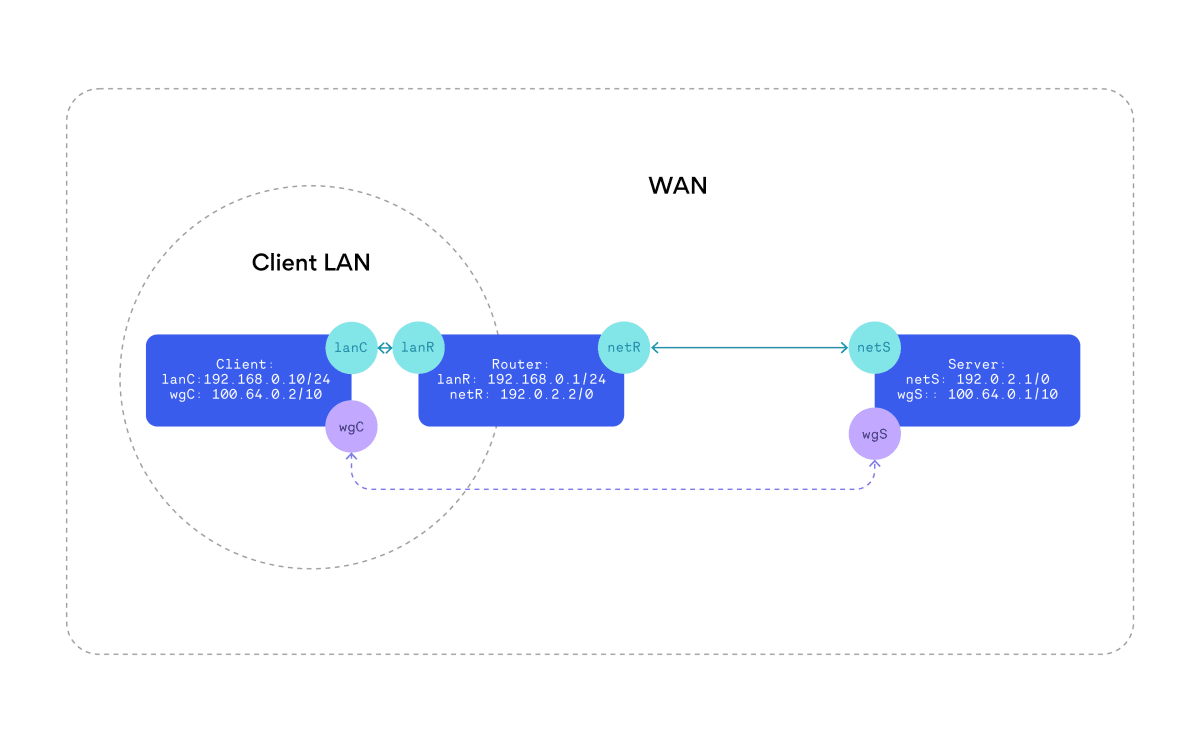
A standard configuration would look like this:

A standard VPN configuration.

To arrive at this setup, a couple of things need to happen.

First, let’s establish a secure tunnel (purple dotted connection):

  1. Virtual network interfaces, labeled as wgC and wgS, (which work like tun adapters) are created on both client and server sides.

  2. The client uses a UDP socket to establish a cryptographic session with the server’s address at 192.0.2.1:51820 (in the diagram above, subnet 192.0.2.0/24 stands for wide area network).

  3. Private IP addresses (100.64.0.2, 100.64.0.1) are assigned to the client and server respectively.

At this point, the client can ping the server using the IP address 100.64.0.1, and the server can ping the client at 100.64.0.2. All IP packets sent through the wgX interface are encrypted and sent via the global internet. The real path of the packet is something like this: wgC –(encapsulate)–> lanC –> lanR –> netR –> netS –(decapsulate)–> wgS

But to the OS, the wgX interface is just another network connection to where IP traffic can be routed, similar to a LAN router.

To the OS, a virtual interface is just like any other network connection.

Now if the client wants to conceal its real IP address, it can configure the routing table to direct all default traffic through the wgA interface (some precautions are needed to avoid routing the encrypted traffic itself, but that’s out of the scope of this article).

Meanwhile, the VPN server needs to be configured to function like a router, accepting incoming packets and forwarding them to their next destination. For this, two features are required:

IP forwarding

In most network stack implementations, if a packet arrives on a network interface, it can only be sent out on the same interface. So when the server receives a packet from the wgS interface that’s directed to an IP address outside the network’s subnet, it is dropped.

Enabling IP forwarding changes this behavior. Now, when a packet arrives at a network interface, it is checked against the network’s entire routing table. If another network interface provides a better match, the packet is forwarded to that interface.

Packet path on the server would look like this:  … -> wgS –(ip_fowarding)–> netS -> …

NATing

IP packets arriving at the VPN server will have a private IP address like 100.64.0.2, assigned to the wgC interface. In most cases, these packets will be directed to a publicly routable IP address. After the packet gets forwarded to the netC interface, it still can’t be sent out, because its source address falls within the private network range. The router uplink only deals with public IP addresses and wouldn’t know which device is sending the packet.

As such, NAT (network address translation) is used. For every packet that has a unique source IP, port, and in some cases destination, a unique mapping is created in the NATing table.

For example, if a TCP packet comes from 100.64.0.2:AAAA, it would be mapped to a 192.0.2.1:BBBB address (here AAAA is the port used by software on the client device, and BBBB is a randomly assigned unused port on the server).

The TCP’s packet’s source IP and port would then be exchanged for NAT mapped values, checksum adjusted, and finally sent out on its merry way to the wider internet.

If another computer responds to this BBBB port, the NATing table is consulted and destination IP and port values revert to the original values before the packet is sent to the wgC interface.

And that’s all for a very rudimentary setup!

Supportable platforms

The main challenge with these two requirements is that they limit the number of devices that can function as routers (apart from implementing a user space transport layer multiplexing/demultiplexing logic).

Typically, if we want to set up IP forwarding and NAT, we need root/administrator permissions. Most platforms with strong sandboxing like macOS App Store, iOS, and Android do not provide official APIs to enable this.

That leaves 3 “platforms” we do support:

Linux

Linux is the easiest one of the bunch because it has everything we need already built in, and our NordVPN service, running as root, can set everything up.

macOS Sideload

Unlike the App Store version (which I count as a separate platform), with macOS Sideload applications it’s possible to create launchd services that run with root permissions. This unlocks features that Darwin (the core Unix operating system of macOS) inherits from BSD like ip_forwarding and pf (packet filter), which are used to set up NATing and filtering.

Windows

Setting up IP forwarding is as trivial as a registry modification. However, even if Windows has an official NAT, we found it difficult to use during testing. It does not properly work with Windows Home editions. Being primarily designed for use with Hyper-V, a lot of undefined behaviors crop up when working with our custom adapter drivers. To work around this, we built and shipped our own implementation for NAT.

How Meshnet traffic routing works

Now that we know how a regular VPN server looks and works, we can compare it to how it operates in Meshnet:

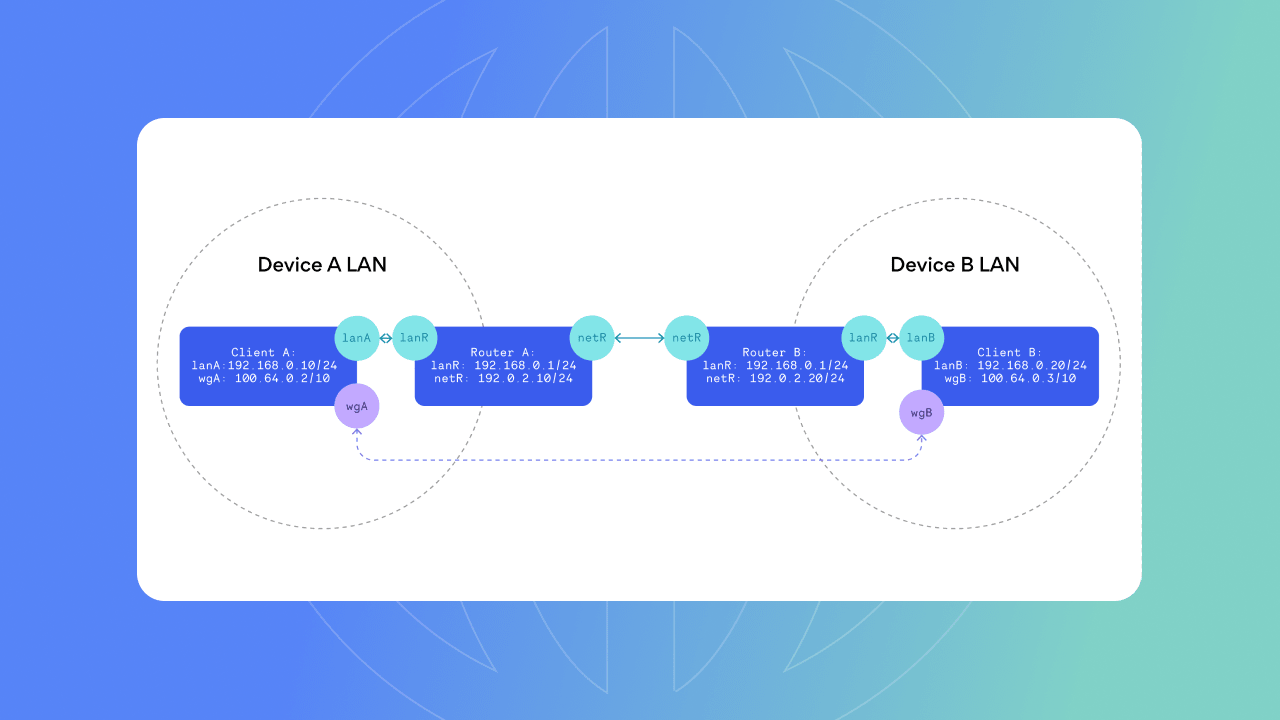
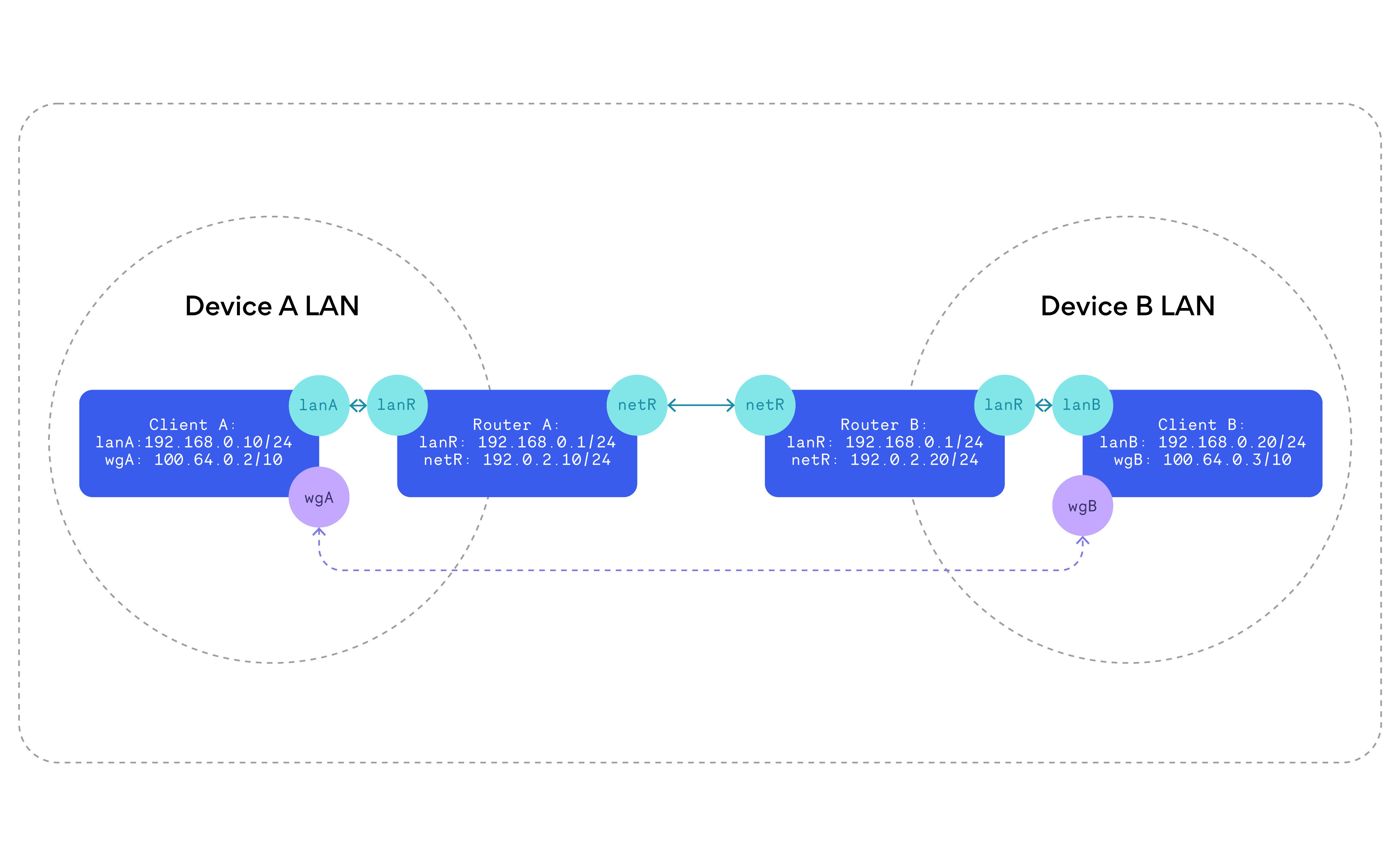
Diagram of Meshnet-enabled VPN configuration.

A Meshnet VPN configuration.

The first interesting difference to observe is that, unlike a VPN server, in general, both Meshnet devices will be located in their local area networks.

And without Meshnet’s NAT traversal capabilities, turning a device into a VPN server for easy connection by other devices would be challenging.

The second difference is that your dedicated VPN server will usually have not one, but two NATing steps.

  1. The client’s (device A) source IP is changed to the server’s IP (device B).

  2. The server’s IP (device B) is then changed to the router’s IP.

This unlocks some interesting behavior: If device A is your phone, and device B is your home PC, routing through B makes it appear to your network that your phone is actually your PC. This allows you to securely access your home network without needing API services hosted on a public server.

And if you use a service that only allows access from your home network, it becomes impossible to tell whether the network messages are coming directly from your home PC or a device routing through it.

At this point, if you are even slightly inclined towards security, some alarm bells may be ringing.

Security considerations

Traffic routing is a very powerful feature:

  • You can take over a local network.

  • The device functioning as a VPN server can inspect all traffic going through it.

  • Other devices can essentially mimic your device.

As such, we want the user to have as much control as possible, so a couple of flags exist to be set on each device per connection.

  • Allow traffic routing: Specifies if a device can route its traffic through the device acting as a VPN server at all

  • Allow local network access: Specifies if the device can communicate with other devices in the server’s local area network

Generally, when using this feature, we want to avoid behaviors that might not be obvious at first glance.

A great example of this is a security issue we found and mitigated during development:

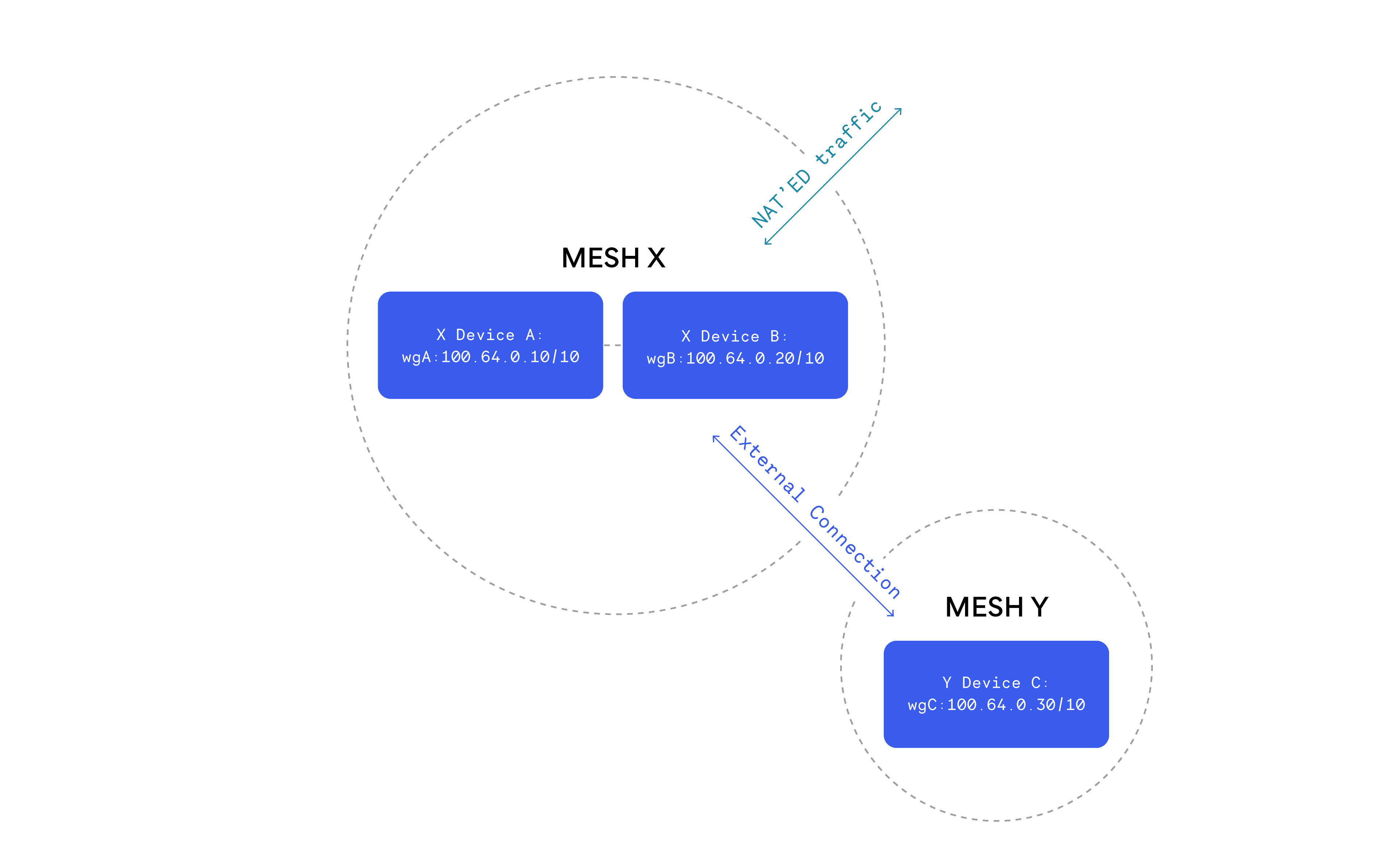
Traffic routing could cause unexpected security issues

Traffic routing could cause unexpected security issues.

Let’s say we have two Meshnet accounts: Mesh X with devices A and B, and Mesh Y with device C. Device C has an external connection to device B, which allows traffic routing for C.

Without any additional network rules, when C is routing through B and pings A’s private IP, it would actually reach A, even though they are not configured to be directly connected. It does not even require NAT to work in this case.

So without any explicit user input, device B has unintentionally exposed device A to device C.

To prevent this, we ensure that all such packets are dropped by B. The only way for C to reach A is to send a Meshnet invite and form a direct connection, making this relationship explicit.

In short, traffic routing is a relatively simple technical solution that unlocks many interesting capabilities in the Meshnet network.

Read more about Meshnet.

About Version 2 Digital

Version 2 Digital is one of the most dynamic IT companies in Asia. The company distributes a wide range of IT products across various areas including cyber security, cloud, data protection, end points, infrastructures, system monitoring, storage, networking, business productivity and communication products.

Through an extensive network of channels, point of sales, resellers, and partnership companies, Version 2 offers quality products and services which are highly acclaimed in the market. Its customers cover a wide spectrum which include Global 1000 enterprises, regional listed companies, different vertical industries, public utilities, Government, a vast number of successful SMEs, and consumers in various Asian cities.

About NordLayer
NordLayer is an adaptive network access security solution for modern businesses – from the world’s most trusted cybersecurity brand, Nord Security.

The web has become a chaotic space where safety and trust have been compromised by cybercrime and data protection issues. Therefore, our team has a global mission to shape a more trusted and peaceful online future for people everywhere.

About NordLayer
NordLayer is an adaptive network access security solution for modern businesses – from the world’s most trusted cybersecurity brand, Nord Security.

The web has become a chaotic space where safety and trust have been compromised by cybercrime and data protection issues. Therefore, our team has a global mission to shape a more trusted and peaceful online future for people everywhere.

×

Hello!

Click one of our contacts below to chat on WhatsApp

×