Congratulations! Your organization has been acquired.
It’s an exciting milestone, but one that also creates a flurry of questions and uncertainty. That ambiguity can translate down into tactical areas such as what toolset will the IT organization be working with.
Of course, the general approach to most acquisitions is that the smaller organization will be assimilated into the larger one, adopting their culture, policies, solutions, and approaches. While that may be the conventional wisdom and traditional approach to mergers and acquisitions (M&A), the good news is that smart acquirers are realizing that the companies that they are buying often have more progressive approaches to technology.
There is no reason that your organization can’t be one of those that ends up leading change and transformation with the parent. With tens of thousands of organizations leveraging JumpCloud, we have seen a significant number of transactions. We have seen some of the largest organizations in the world purchase nimble, fast moving organizations and then turn around only to leverage their solutions inside of the parent. A top notch technical organization should not immediately believe that their approaches to success won’t be valued or leveraged by the parent.
Communicating Value
To determine whether the parent is open to leveraging the acquisition’s technology, methodologies, and more, you can often analyze why the deal occurred in the first place. While customers and revenue are also often drivers, smart acquirers realize that they have more to gain from an acquisition than just financial benefits.
Often, larger organizations are interested in another organization’s technology, process, people, and systems. To that end, we see acquirers leveraging their acquisitions as pilots and lighthouse implementations for critical, new, and innovative approaches to their business.
Of course, this doesn’t just happen.
A parent organization needs to be open to learning and trying new and innovative approaches. The good news is that conversation and thoughtful communication can help make this happen.
The primary point that we see being successful in keeping innovative infrastructure is by focusing on the benefits.
Larger organizations are often in need of cultural change or transformation in some way. By connecting what an acquisition is doing as a potential trial implementation to that transformation, a parent organization can learn at low risk and then, if successful, more easily roll out the new approach within the parent organization.
Employees at the parent can even see the innovation in action, often reducing the anxiety of change. Smart acquirers are hoping to squeeze every last piece of value out of the companies that they buy and learning from their systems, processes, and people is a good way to do that.
Let Us Help
When it comes to IT management tools such as JumpCloud, the opportunity to test and understand cloud innovations is powerful. With JumpCloud, new organizations can enable their employees to take advantage of new IT resources while tightly controlling their environments.
Also, with a multi-tenant portal interface, parent organizations can easily implement the cloud directory service while also segmenting access controls. For those parent organizations that leverage Active Directory, JumpCloud can integrate with AD to provide the best of both worlds.
JumpCloud’s account management and technical support teams would be happy to meet with you or your parent organization to discuss the best ways to take advantage of this modern cloud identity management platform.
Contact us to start strategizing how your organization can best partner with its acquirer.
About Version 2 Digital
Version 2 Digital is one of the most dynamic IT companies in Asia. The company distributes a wide range of IT products across various areas including cyber security, cloud, data protection, end points, infrastructures, system monitoring, storage, networking, business productivity and communication products.
Through an extensive network of channels, point of sales, resellers, and partnership companies, Version 2 offers quality products and services which are highly acclaimed in the market. Its customers cover a wide spectrum which include Global 1000 enterprises, regional listed companies, different vertical industries, public utilities, Government, a vast number of successful SMEs, and consumers in various Asian cities.
About JumpCloud At JumpCloud, our mission is to build a world-class cloud directory. Not just the evolution of Active Directory to the cloud, but a reinvention of how modern IT teams get work done. The JumpCloud Directory Platform is a directory for your users, their IT resources, your fleet of devices, and the secure connections between them with full control, security, and visibility.
Editor’s note: this article is meant to be a helpful guide for Linux administrators and enthusiasts, and does not necessarily imply direct coverage within the JumpCloud Directory Platform. While JumpCloud has a wide array of features that support multiple Linux distributions, we recommend looking at our compatibility matrix to ensure adequate coverage for the distributions you support.
Encryption is considered to be a fundamental aspect of securing data. For Linux users, especially those using popular distributions such as Ubuntu, Debian, RedHat, Fedora, or others, selecting the appropriate encryption tools can significantly impact the security and performance of their system. We will comprehensively analyze existing and mostly used encryption tools available for these distributions so that we can explore features, strengths, and weaknesses.
Before providing different encryption tools, we need to understand the basic concepts of encryption. Encryption is the process of converting data into code to prevent unauthorized access. It is achieved by using algorithms that transform the original information which is in plain text format into an unreadable format or ciphertext. There are multiple approaches to encryption and also the security itself depends on the strength of the algorithm and the secrecy of the key that is used to encrypt and decrypt the data.
Key Types of Encryption
Symmetric Encryption: Uses the same key for both encryption and decryption. This type of encryption includes AES (Advanced Encryption Standard) and DES (Data Encryption Standard)
Asymmetric Encryption: This type utilizes a pair of keys, where a public key is used for encryption and a private key for decryption. Examples are RSA (Rivest-Shamir-Adleman) and ECC (Elliptic Curve Cryptography).
Different Types of Encryption Tools for Linux
Several encryption tools can be used in Linux, and each of these has its unique features and use cases. They also come with pros and cons. We will focus on the following tools:
GnuPG (GPG)
dm-crypt/LUKS
EncFS
eCryptfs
VeraCrypt
GNUPG (GPG)
GnuPG, or GPG is an open-source implementation of the OpenGPG standard. It is mainly used when encrypting files and communications, offering both symmetric and asymmetric encryption. It works across multiple Linux distributions, there is a proper key management where we can generate, sign, or revoke a key. It supports both file encryption and email encryption. The only drawback is that can be challenging for beginners due to the command line interface and also complex key management.
Let’s try to generate a GPG key pair, encrypt a file, and then decrypt it. In this example, we will use the latest Ubuntu 24.04 version.
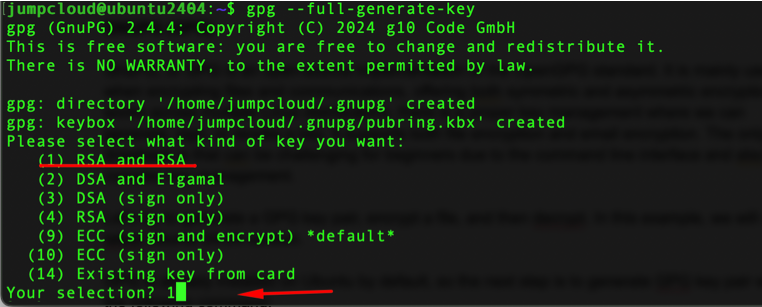
GPG is already installed on Ubuntu by default, so the next step is to generate a GPG key pair with the following command:
gpg ––full-generate-key
Choose the default setting under number 1, which is RSA and RSA.
Next, select the key size, where the 2048-bit setting is fine but the 4096-bit setting is more secure.
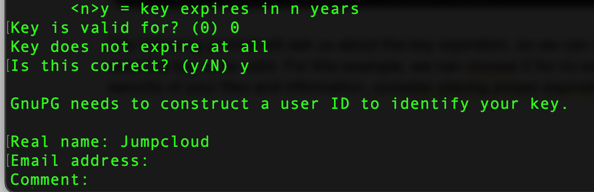
The following prompt will ask us about the key expiration, so we can choose for how long you want the key to be valid. For this example, we can choose 0 for no expiration. To increase the security of your files and information, consider placing proper expiration.
The next prompt is where we can add the real name, email address, and potential comment. These fields are not mandatory and at the bottom of the prompt, you can press O and Enter.
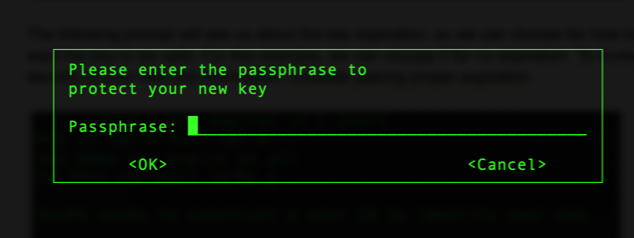
Now we need to enter the passphrase so we can protect our key. Make sure to place complex passwords and combinations of letters (both uppercase and lowercase), numbers, and special characters.
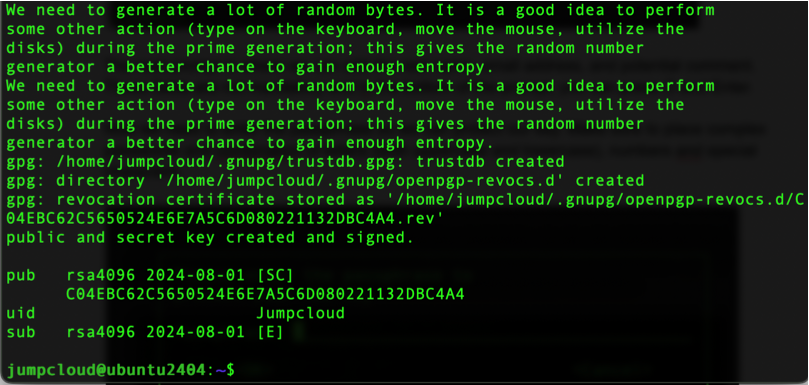
After the process, you will get a similar output:
Now we can first create a sample file and encrypt it with our newly generated GPG key:
echo “This is a secret message” > secret.txt
gpg ––encrypt -r jumpcloud secret.txt
Make sure to change the command according to your user ID.
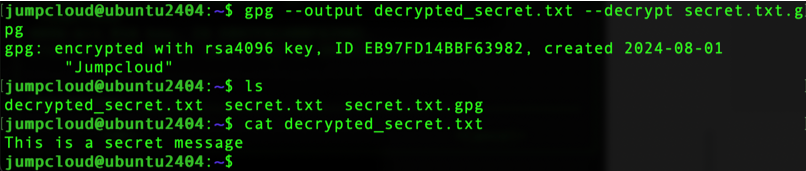
If we list the directory we will see that a new file has been created with the extension .gpg
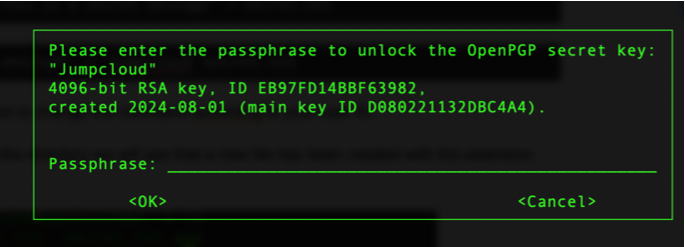
Now, we can decrypt our file by running the following command. Also, we will be prompted for the passphrase that we set up earlier.
After the decryption process, we can see that the contents of our file are the same as the one we encrypted.
dm-crypt/LUKS
Dm-crypt and LUKS are often mentioned together because they are complementary components used for disk encryption in Linux. Dm-crypt is a kernel-level disk encryption sub-system which a part of the Linux device mapper, and it can encrypt entire disks or partitions. Since it’s a part of the Linux kernel, this means that it offers highly efficient encryption while supporting various encryption algorithms and key sizes.
LUKS (Linux Unified Key Setup) is a standard for disk encryption and it is primarily designed to simplify the usage of dm-crypt. It provides a standardized on-disk format that ensures proper compatibility while simplifying the process of setting up and managing encrypted partitions. It also supports multiple passphrases, which allows easier key management and recovery.
In this process, when you configure the disk encryption you use tools like “cryptsetup” tool which will initialize LUKS on the partition and manage it. We have articles that cover the entire process of encryption with LUKS.
EncFS
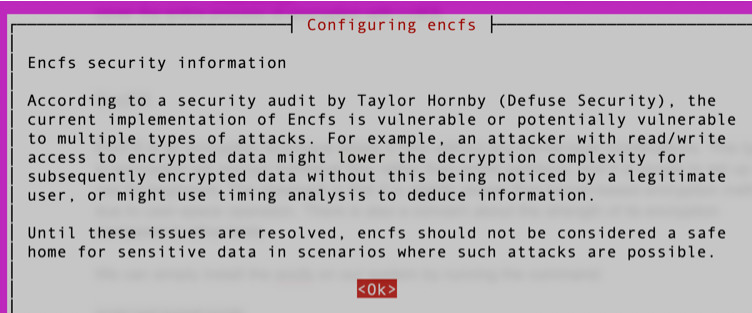
EncFS is an encryption tool where it runs without any kernel-level modifications. This type of encryption will encrypt individual files rather than entire partitions, and it is simple to set up and use for beginners. The drawback is that it is slightly slower than kernel-based encryption methods due to user-space operation. There is also a concern about the strength of its encryption compared to other tools.
If you try to install it on the latest version of Ubuntu, you will receive the following information:
eCryptfs
eCryptfs is a stacked cryptographic file system that allows you to encrypt certain directories. This tool will automatically encrypt and decrypt files as they are accessed. When it comes to integration, they are built into the Linux kernel, which ensures compatibility and performance. It is easy to use and generally, it has good performance due to kernel-level integration. One of the drawbacks is less flexibility regarding encryption options and configurations. There is also limited community support compared to other tools.
We can start by installing the utilities needed for this tool:
sudo apt install ecryptfs-utils
Next, we can create two directories, one for the encrypted data and one for the mount point.
mkdir ~/encrypted_data mkdir ~/decrypted_data
Now, we can mount the “encrypted_data” directory to “decrypted_data” using eCryptfs:
sudo mount -t ecryptfs ~/encrypted_data ~/decrypted_data
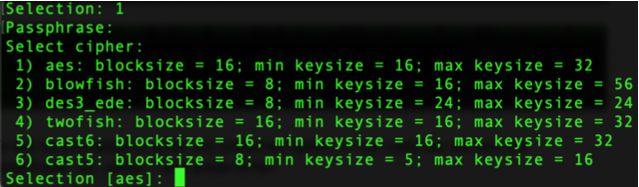
We will be prompted to enter our preferred option, in our case we will use the passphrase. So, press 1 and press Enter.
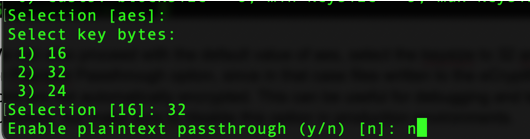
We can also proceed with the default value of aes, select the keysize to 32, and type n for the Plaintext Passthrough option, since in that case files written to the eCryptfs mount point are not automatically encrypted. This can be useful for debugging and testing purposes, but make sure to disable this option in production environments.
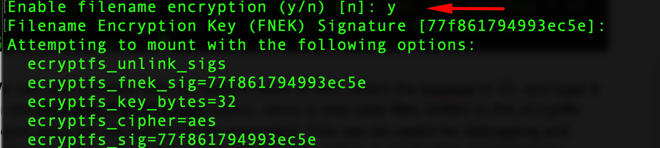
In this process, we will also enable filename encryption:
We can now use the “decrypted_data” directory as we would use any directory in our system. The files in this directory will be encrypted and stored in the “encrypted_data” directory.
Next, we can create a file in the decrypted directory.
echo “This is a secret message” > ~/decrypted_data/secret.txt
We can verify that the file is encrypted if we check the contents of our “encrypted_data” directory.
VeraCrypt
VeraCrypt is a popular open-source disk encryption tool that is derived from TrueCrypt. It can offer both full-disk encryption and virtual encrypted disks. It is available for different operating systems such as Linux, MacOS, and Windows. VeraCrypt also supports the creation of hidden volumes for increased security. It comes both with GUI as well as command-line options. Some of the drawbacks are slightly higher overhead when compared to native Linux tools and some advanced features can be complex to configure.
Comparing Encryption Tools Across Linux Distributions
Different Linux distributions (and their communities) may favor one tool over another. The same goes for compatibility, default configurations, and package management. Here is a breakdown of encryption tools for popular distributions.
Ubuntu and other Debian-based distributions
GnuPG: Essential part of the system, used for package signing and more.
dm-crypt/LUKS: Supported with extensive documentation where tools like “cryptsetup” are readily available.
EncFS: It is available in the repositories but due to security issues, it is not the preferred tool to use.
eCryptFS: Commonly used for home directory encryption; it’s not pre-configured and may require a manual setup for Debian.
VeraCrypt: This tool is available for installation through third-party repositories, and the basic setup is relatively easy to use.
Redhat, Fedora, and other RHEL derivatives
GnuPG: Mainly used for securing communications and package signing.
dm-crypt/LUKS: It’s a preferred method of disk encryption and it also has enterprise-level support for RedHat. Cryptsetup is readily available, similar to Debian-based distributions.
EncFS: It is available for installation, however, it is not preferred or recommended for enterprise environments due to security issues.
eCryptFS: Supported, with good documentation and community support. It is less used compared to dm-crypt/LUKS.
Veracrypt: Available through third-party repositories but it’s less commonly used in enterprise environments. It is directly supported by Fedora.
Choosing the Right Encryption Tool
Selecting the right encryption tool for your Linux operating system ultimately depends on your needs and the distribution you are using.
We can recommend dm-crypt/LUKS for full-disk encryption across all distributions. It is a great choice that offers strong security and it doesn’t affect the performance of your system.
When you need to encrypt specific files or directories, tools like GnuPG and eCryptFS provide enough protection as well as flexibility and ease of use. EncFS can be used for testing, but we are not recommending it for production environments. VeraCrypt is also a good choice for users who work across different operating systems and GUI can help with the configuration.
Choosing the exact encryption also depends on the requirements for your use case, security requirements, technical proficiency, and specific demands of your Linux distribution. By understanding the features and capabilities of each tool you can make an informed decision.
Version 2 Digital is one of the most dynamic IT companies in Asia. The company distributes a wide range of IT products across various areas including cyber security, cloud, data protection, end points, infrastructures, system monitoring, storage, networking, business productivity and communication products.
Through an extensive network of channels, point of sales, resellers, and partnership companies, Version 2 offers quality products and services which are highly acclaimed in the market. Its customers cover a wide spectrum which include Global 1000 enterprises, regional listed companies, different vertical industries, public utilities, Government, a vast number of successful SMEs, and consumers in various Asian cities.
About JumpCloud At JumpCloud, our mission is to build a world-class cloud directory. Not just the evolution of Active Directory to the cloud, but a reinvention of how modern IT teams get work done. The JumpCloud Directory Platform is a directory for your users, their IT resources, your fleet of devices, and the secure connections between them with full control, security, and visibility.
JumpCloud 的一大優勢在於,它讓公司企業在選擇技術方案時擁有更多靈活性。這意味著管理員和用戶可以根據需求,選擇最適合的 IT 工具,而不僅僅是那些與身份提供者兼容的工具。JumpCloud 支援多種協議(如 LDAP、SAML 2.0、RADIUS、RESTful API 等)以及多種作業系統(Windows、Mac、Linux)。
員工只需記住一組密碼,不再因為忘記密碼而被鎖住。當他們需要重置密碼時,也可以自行操作,無需 IT 部門的介入。此外,他們只需登入一次 JumpCloud 用戶入口,即可立即存取所有應用程式,避免浪費大量時間逐一登入不同系統。
雲端目錄服務的有形價值
除了無形價值外,JumpCloud 也在財務方面帶來顯著效益。以下是幾個主要的財務考量點。如果您想深入了解這些細節,可以向我們索取 ROI 計算器。
取代 Active Directory 及其附加元件
JumpCloud 是 Microsoft® Active Directory® 的完整雲端替代方案,淘汰 AD 能夠為企業節省大量時間和資金。Active Directory 是在本地環境中建立的,而當今的 IT 資源多數已轉向雲端,且種類繁多。使用 AD 需要額外的附加元件,每個元件都有成本。企業通常需要使用超過 8 種工具來管理混雜 IT 環境中的用戶存取權限。
Version 2 Digital is one of the most dynamic IT companies in Asia. The company distributes a wide range of IT products across various areas including cyber security, cloud, data protection, end points, infrastructures, system monitoring, storage, networking, business productivity and communication products.
Through an extensive network of channels, point of sales, resellers, and partnership companies, Version 2 offers quality products and services which are highly acclaimed in the market. Its customers cover a wide spectrum which include Global 1000 enterprises, regional listed companies, different vertical industries, public utilities, Government, a vast number of successful SMEs, and consumers in various Asian cities.
「影子 IT」聽起來像是一部恐怖電影的名字,但它在現實中確實存在,並且通常是由於員工想提升工作效率、表現更好。他們會尋找幫助他們提高生產力的解決方案,但這些解決方案往往是在沒有 IT 部門監控的情況下被採用。現代「影子 IT」主要是由 IT 部門未監管的 SaaS 應用程式組成,這可能導致營運效率低下、成本增長以及安全漏洞的出現。
Version 2 Digital is one of the most dynamic IT companies in Asia. The company distributes a wide range of IT products across various areas including cyber security, cloud, data protection, end points, infrastructures, system monitoring, storage, networking, business productivity and communication products.
Through an extensive network of channels, point of sales, resellers, and partnership companies, Version 2 offers quality products and services which are highly acclaimed in the market. Its customers cover a wide spectrum which include Global 1000 enterprises, regional listed companies, different vertical industries, public utilities, Government, a vast number of successful SMEs, and consumers in various Asian cities.
Version 2 Digital is one of the most dynamic IT companies in Asia. The company distributes a wide range of IT products across various areas including cyber security, cloud, data protection, end points, infrastructures, system monitoring, storage, networking, business productivity and communication products.
Through an extensive network of channels, point of sales, resellers, and partnership companies, Version 2 offers quality products and services which are highly acclaimed in the market. Its customers cover a wide spectrum which include Global 1000 enterprises, regional listed companies, different vertical industries, public utilities, Government, a vast number of successful SMEs, and consumers in various Asian cities.









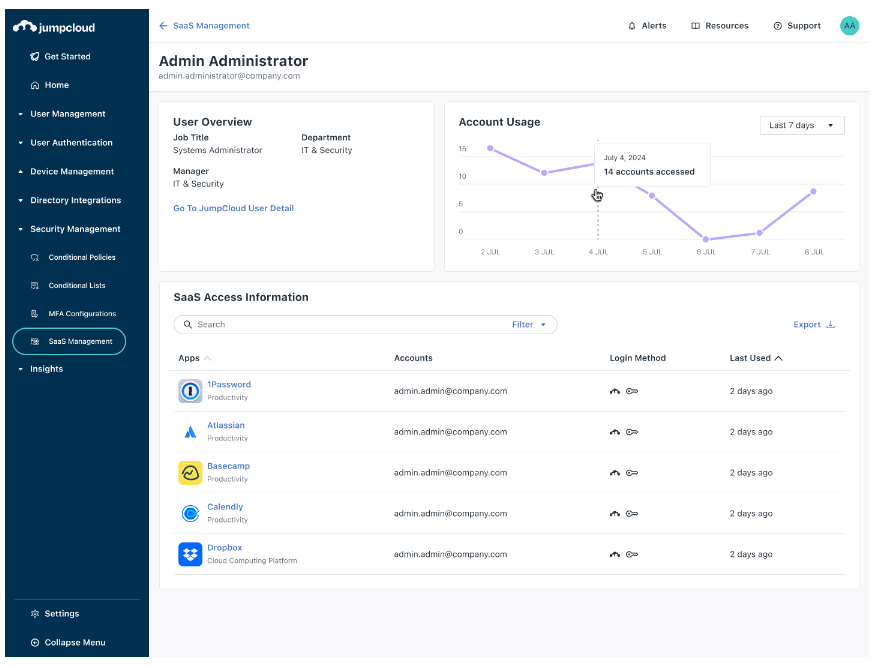
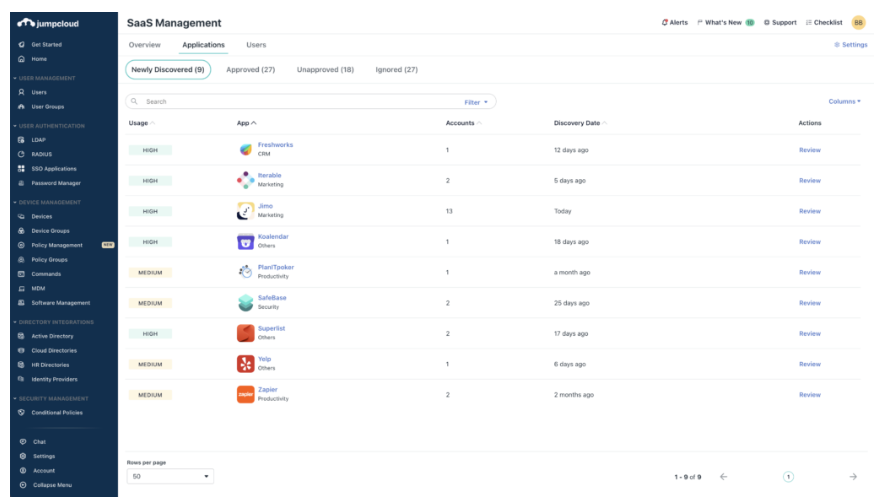 這款新工具能幫助 IT 管理員發現所有受管理設備上使用的 SaaS 應用程式,讓您清楚知道哪些應用被使用,以及使用者是誰。JumpCloud 的 SaaS 管理工具有助於控制 SaaS 增長,防止「影子 IT」,擴大單一登錄(SSO)的覆蓋,降低 SaaS 成本,確保公司企業內部的 SaaS 使用安全、合規並經過優化。
 JumpCloud 的 SaaS 管理解決方案使 IT 團隊能夠有效保護和管理公司企業內的 SaaS 應用程式。公司企業可以利用 JumpCloud 簡化 SaaS 應用的發現,防止「影子 IT」,擴展 SSO 覆蓋範圍,並在一個綜合平台上實現合規要求。