Skip to content

A Summary of the Palo Alto Networks Ransomware Threat Report 2022: Key Points You Must Know

2021 has shattered economies of almost every sector with the pandemic wreaking havoc worldwide. On top of it, most industries have had to contend with malicious cyber activities, as ransomware threats are some of the most challenging cyber threats organizations worldwide have to deal with. Almost every industrial sphere, including government departments, the education sector, the retail sector, and manufacturing establishments, has felt the impact of ransomware at some point.

Unit 42, the threat research team of Palo Alto Networks, has compiled a comprehensive 2022 Ransomware Threat Report highlighting ransomware activity worldwide. The report can help organizations perceive the seriousness of the situation and take remedial steps to prevent becoming victims of such cyber attacks and therefore jeopardizing the confidentiality, integrity, and availability of valuable information assets.

Source of the Report

Unit 42 relied mainly on the following two sources while generating the report:

  1. Actual cases handled by the unit that provided a realistic view of the extensive range of threat actors.
  2. Analysis of leak sites that included malicious activities like multi-extortion to coerce or even threaten victims to pay the ransom.

Crucial Statistics from the Report

Before going into the detailed summary of the 2022 Ransomware Threat Report, here are some important statistics to better understand the scope of this matter.

  • The average ransom demand grew 144%, from $900K in 2020 to 2.2M in 2021.
  • Simultaneously, the average ransom payment grew to $541K, a 78% increase from 2020.
  • The US remains the most targeted country with 60% of ransomware cases in 2021, followed by the European, Middle lEast, and African (EMEA) countries with 31%. The Asia-Pacific region was in the third position with 9% of ransomware cases.
  • Professional and legal services were the most targeted sectors, with 1,100 victim organizations, followed by the construction sector, with nearly 600.

(Data Source: Palo Alto RansomwareThreat Report 2022)

Understanding Ransomware 

Ransomware is a specialized malware used to paralyze organizational functioning by encrypting its data to extort money. They usually demand ransom in cryptocurrency to prevent establishing a trail. When the ransom is received, , the malicious actors provide the decrypting code, allowing the organization to retrieve its information assets.

Usually, threat actors use social engineering tactics like phishing emails to introduce malware into the target’s information systems. This scheme relies on the victims clicking on the malicious links, and therefore accidentally downloading the ransomware into the information system. Once the malware is installed, it takes over the functioning and stops access to critical data by encrypting it.

Change in Tactics

Malicious actors employed more sophisticated tactics, such as the ones mentioned below, in 2021 compared to 2020, as they widened their scope of attacks.

  • Ransomware-as-a-Service: Malicious actors started offering RaaS packages to anyone interested in launching an attack. It lowered the technical barrier for non-experts to access information systems and thus enhanced the speed of cyberattacks.
  • Multi-Extortion: Besides asking for the regular ransom, malicious actors started blackmailing their victims, threatening to leak critical information and launching DDoS attacks to extort ransom quickly.
  • The Exploitation of Zero-Day Vulnerabilities: Threat actors started taking advantage of zero-day vulnerabilities such as Log4Shell to launch ransomware and continued to exploit organizations that failed to patch them properly.

The Overall Ransomware Landscape

Below are the critical emerging trends concerning the transformation of the overall ransomware landscape over the years, according to the Palo Alto Networks Report. It can help organizations formulate effective defense and incident-response strategies.

Ransomware Actors’ Psychology

Ransomware has evolved over the years. Here are some latest psychological traits observed among ransomware actors.

  • Exploit Shortcuts: Today, ransomware actors hire the services of brokers who provide access to information systems, as it saves them time and effort. It has increased the scope of attacks as non-expert attackers can easily drop malware into an already compromised environment.
  • Go to Extremes: They have started using anonymized services like TOR (The Onion Router) to make it challenging for law enforcement authorities to track their activities and identify the indicators of compromise (IoC).
  • Innovation: Ransomware groups now use updated ransomware variants instead of standalone malware. For example, HelloKitty uses Linux and BlackCat uses Rust to launch attacks quickly.

Ransomware Trends for 2022

Consequent to the innovative tactics used by ransomware actors, the trends for 2022 have changed considerably, as is evident below.

  • Increase in Victim Shaming: Ransomware actors have increasingly started using techniques like double-extortion to prevent organizations from restoring data from backup alternatives and resuming operations. Threat actors like Black Matter, Grief, and Hive used such tactics. BlackCat and Suncrypt even use triple extortion tactics like threatening to launch DDoS attacks besides leaking confidential and sensitive information. Over 2,500 victims were publicly shamed in 2021.
  • Increase in RaaS: Malicious actors have now started offering Ransomware-as-a-Service to anyone who wants to hire them. Thus, it has widened the scope for ransomware attacks as individuals with little knowledge of ransomware can launch cyberattacks. Nearly 56 RaaS groups have been identified, and the number is expected to grow in 2022.
  • Exploiting Zero-Day Vulnerabilities: Ransomware actors have increased, exploiting zero-day vulnerabilities as an initial compromise vector. Malicious operators used nearly 42 such instances in 2021. Unpatched vulnerabilities are serious, as observed in the Kaseya attacks by REvil. Organizations should take note and act accordingly to plug such gaping holes instantly.

The Emergence of Ransomware Gangs 

2021 was the year of ransomware gangs, and thirty-five have been identified recently. Trends show that some groups lie low for a while before resurfacing to launch more powerful attacks. Conti was the most active ransomware gang, responsible for 15.5% of ransomware activity. REvil was the second with 7.1%, followed by HelloKitty and two others, each with a 4.8% share of the attacks.

(Data Source: Palo Alto RansomwareThreat Report 2022)

Below passages will give a brief idea of the major gangs and their activities:

  • Conti: Conti was the most active ransomware gang in 2021, with an initial ransom demand of $50K. It rose substantially to an average of $1.78M for the year, with the highest ransom demanded at $3M. The gang has affected more than 600 organizations since 2020, including law enforcement agencies, construction projects, emergency services, and hospitals.
  • REvil: REvil, also known as Sodinokibi, had the highest activity in 2020. But it dropped down to second place in 2021. However, their average ransom has increased to approximately $2.2M, and their highest demand has been $5.4M. REvil is a major provider of RaaS.
  • BlackCat: BlackCat is another main RaaS provider notorious for observing and soliciting affiliates in cybercrime forums. It allows affiliates to retain 80% to 90% of the ransom while keeping only the remaining 10 to 20% to themselves. The group attacked various sectors, including construction, retail, insurance, transport, professional services, automotive establishments, and pharmaceuticals.
  • Other Ransomware Actors: Other big ransomware names include AvosLocker, Hive, HelloKitty, LockBit 2.0, Mespinoza, and eChOraix.

Initial Ransom Amount Vs. Payment Amount

Generally, there is a difference between the initial ransom amount demanded and the payment amount due to various negotiations between the attackers and the victims. In one instance, BlackCat demanded a payment of $9M and even received $8.5M. On average, the ransom payout in 2021 was around 42.87% of the initial ransom demand.

(Data Source: Palo Alto RansomwareThreat Report 2022)

Multi-Extortion Techniques

Earlier, ransomware actors used to launch their attacks and send the ransom note to the victim. Once the victim pays the ransom, the attackers provide the decryption key enabling the target to access its data and resume its operations. However, this method had its shortcomings. The ransomware attacks do not exfiltrate data but only encrypt them. So, organizations having a separate backup could always restore the data and avoid paying the ransom.

Now, the ransomware actors have upgraded their modus operandi by exfiltrating data and threatening the victim about releasing it in the public domain, which could lead to massive data breaches and loss of reputation. Thus, there is a double extortion demand. One is the regular ransom for obtaining the decryption key, and the other is for the attackers’ refraining from exposing the data to the public. Such a scenario is known as double extortion. Maze popularized this method in 2019.

As mentioned earlier, Suncrypt and BlackCat threatened the victims to launch DDoS attacks on their organizations’ infrastructures if the ransom negotiation failed. Besides, they threatened to leak critical information on the dark web and taint their reputation. This type of extortion is known as triple extortion.

Critical Insights from Ransomware Leak Sites

Conti and LockBit 2.0 were the two most significant ransomware gangs to indulge in leaking critical information and leveraging double-extortion threats. Compared to 2020, there is an 85% increase in public postings involving 2,566 victims. Conti accounted for 511 postings, and LockBit, for 406.

Most Targeted Sectors

Ransomware actors did not spare any sector in 2021. The most targeted sector was the Professional and Legal Services industry, followed by the Construction industry. One reason is that many organizations in these sectors do not run on up-to-date software, becoming more prone to cyberattacks.

Besides, the malicious actors know that these industries lose their reputation quickly if their information systems are compromised, as they often provide services using their dedicated software. These sectors also work on tight deadlines, increasing the chances of paying the ransom amounts.
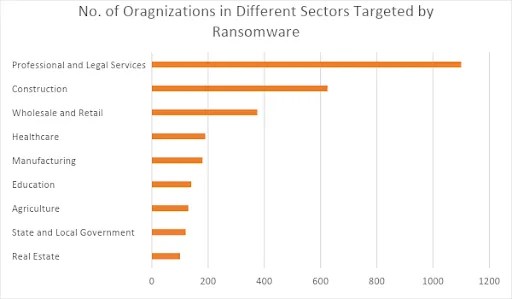
(Data Source: Palo Alto RansomwareThreat Report 2022)

Rebranding of Ransomware Gangs

Many ransomware gangs vanished from the scene following failures due to flaws in their ransomware. Many resurfaced later as new brands with more sophisticated technology. Attacker groups also lie low due to pressure from law enforcement agencies, internal struggles, and peer competition.

Ransomware in the Cloud

Today, organizations increasingly store their data and function in a cloud environment. However, the dynamic workloads in a multi-cloud environment can be challenging. Though there were no major instances of ransomware attacks on the cloud, it is only a matter of time, considering the valuable information assets stored there. The example of Log4j vulnerability highlights the need to secure the cloud environment and maintain a robust vulnerability management program.

Trends show that ransomware actors use cloud APIs to access and encrypt crucial information assets. Therefore, organizations should strengthen these aspects and use strict IAM (Identity and Access Management) practices to secure access to these APIs.

Ransomware Costs

Besides the financial loss of paying the ransom, the affected organizations suffer from other collateral damage, such as downtime, disruptions, reputational loss, time loss in recovery, legal expenses, and loss of information assets. The Palo Alto report states that 58% of organizations preferred paying the ransom, whereas 14% spent money more than once.

Recovery Time

Studies show that 41% of organizations recovered within one month of the ransomware attack, whereas 20% of victims recovered within three months. And while 29% took more than three months, 9% even took more than five to six months for recovery.

(Data Source: Palo Alto RansomwareThreat Report 2022)

Recommendations to Remain Resilient to Ransomware Attacks

Finally, Unit 42 recommends the following actions for organizations to stay more resilient to ransomware attacks.

  • Keep your information systems updated to take care of the evolving threat landscape.
  • Evaluate and analyze the impact of compromising your information assets.
  • Assess your readiness levels and have a clear incident response plan.
  • Implement and follow a Zero Trust policy.
  • Identify your exposed information assets.
  • Protect your systems from known and unknown threats.
  • Automate your systems and use secure cloud workloads.
  • Use IR retainers (contracts with incident response experts) to reduce response time.

Final Words

Ransomware has gradually become one of the worst cybersecurity threats in recent times. The situation can worsen in the forthcoming years, especially with more organizations working online. However, one can take remedial measures and enhance vigilance to prevent becoming a victim of a ransomware attack. The 2022 Ransomware Threat Report from Palo Alto Networks provides comprehensive information on ransomware trends and highlights the significance of treating this cyber threat with utmost seriousness.

Today, ransomware actors don’t just target bigger organizations, but everyone, including small businesses and even individuals, is on their radar. Thus, one needs to have adequate preventive measures to ensure threat actors cannot get their hands on the organization’s information assets in the first place. Besides, there must be a business recovery and continuity plan in place for the worst-case scenario when ransomware actors are able to infiltrate the information systems.

References

  1. Minutes, 10. (2021, December 12). Update: Prisma Cloud addresses Log4Shell: CVE-2021-44228, CVE-2021-45046 mitigations. Palo Alto Networks Blog. https://www.paloaltonetworks.com/blog/prisma-cloud/log-4-shell-vulnerability/
  2. Santos, D. (2022, June 3). Understanding REvil: REvil threat actors may have returned (updated). Unit 42. https://unit42.paloaltonetworks.com/revil-threat-actors/
  3. (N.d.). Paloaltonetworks.com. Retrieved August 6, 2022, from https://www.paloaltonetworks.com/content/dam/pan/en_US/assets/pdf/reports/2022-unit42-ransomware-threat-report-final.pdf

#ransomware #unit42 #threat #cybersecurity

About Version 2 Digital

Version 2 Digital is one of the most dynamic IT companies in Asia. The company distributes a wide range of IT products across various areas including cyber security, cloud, data protection, end points, infrastructures, system monitoring, storage, networking, business productivity and communication products.

Through an extensive network of channels, point of sales, resellers, and partnership companies, Version 2 offers quality products and services which are highly acclaimed in the market. Its customers cover a wide spectrum which include Global 1000 enterprises, regional listed companies, different vertical industries, public utilities, Government, a vast number of successful SMEs, and consumers in various Asian cities.

About VRX
VRX is a consolidated vulnerability management platform that protects assets in real time. Its rich, integrated features efficiently pinpoint and remediate the largest risks to your cyber infrastructure. Resolve the most pressing threats with efficient automation features and precise contextual analysis.

Common SD-WAN Challenges & How to Avoid Them

A Software-Defined Wide Area Network (SD-WAN) enables organizations to rely on a combination of transport services. The increasing use of SD-WAN for connecting enterprise networks improves productivity, reduces cost, and increases application performance.  

It is a feature-packed technology that centralizes security, management, networking, and more. Consequently, organizations with cloud solutions view SD-WAN as an infrastructure upgrade to operations. 

Wrong Approaches

A frequent occurrence with businesses is the focus on individual technical elements. Unfortunately, many such enterprises fail to realize  the need to address end-to-end solutions. 

Selection should encompass all available approaches with the choice that best suits the company’s needs, budget, and savviness. Another aspect to  consider is the fact that IT teams often fixate on price. Unfortunately, most of them misinterpret prices, opting for cheaper options resulting in  poor network performance .  

Such 0rganizations often soon encounter issues with high latency, prolonged downtimes, less supportive service-level agreements, and more. As enticing as cost savings can appear, ensure it never poses serious risk to your network connectivity or SD-WAN designs. 

Responding to this Challenge:

  • Ensure that all choices and approaches produce maximum results for the company’s network. 
  • Consider platforms with built-in cloud and security vendor access for appliances. 
  • Ensure to prioritize necessary performance features over novel ones. 
  • Technology evolves at a rapid pace, so plan accordingly with future long-term growth in mind.

Overlooking the Quality of Service (QoS) Concept for SD-WAN

One attribute that should never get overlooked is the QoS. An equally important aspect is the quality of experience. However, SD-WAN service providers never seem to offer end-to-end prioritization. Although it provides an efficient traffic segmentation and path selection, traffic movement often gets delayed. Therefore, seeking an SD-WAN approach with ‘fail safe’ technology features is crucial. 

These options must offer superior performance to MPLS across all applications. MPLS itself comes with end-to-end QoS via six settings for service-level categories, though also with delayed traffic movement.  

Responding to this Challenge:

  • Never compromise on the quality of service and quality of experience with network connectivity.  
  • Be sure to purchase local site-by-site internet underlay with low-cost service that provides high QoS and QoE along with various available features.Consult with experts to get the best-customized recommendations. 

SD-WAN Security Requirements

Some SD-WAN technology lacks security capabilities. Unfortunately, these security lapses often open the door to cyber threats. 

 For instance, there’s usually an edge security change with SD-WAN features such as virtual private network (VPN) deployment. In other scenarios, data get transferred with every migration to cloud solutions. Therefore, deploying hardware and virtualized instances with accessed security policies still comes with risks. 

 Responding to this Challenge 

  • Organizations should take time to research all vendor claims and ensure all security functions meet  company criteria. 
  • Strategize the integration of cyber security and networking solutions instead of separating the two. 
  • Make it a habit to add new layers of security systems where and when necessary. 
  • Try integrating existing security with SD-WAN solutions. 

SD-WAN Management Issues

Today’s SD-WAN solutions help to blur the lines between DIY and the type of management structure in place. Organizations never get to pick the management level traditionally. One of the drawbacks of the SD-WAN model is that it breaks most businesses’ existing centralized security inspections.  

Organizations often build hub network architectures designed around the consolidation of data streams. The idea is to backhaul traffic through a centralized channel into data centers. Firewalls are used to create  single security inspection points  so that packets get examined before making it into the data center. The presence of an SD-WAN architecture makes this method ineffective. 

By default, SD-WAN solutions lack integrated security that allows routing all traffic through a full security stack for inspection. There’s also the task of threat prevention before proceeding to its destination. 

 With SD-WAN,  lots of traffic moves outside the data center perimeter. As such, connections to the cloud from external sources like remote workers never go through the traditional inspection process. 

The outcome for organizations is a forced decision. They have the choice of forgoing the benefits of SD-WAN by backhauling traffic to the data center for inspection, or simply not securing traffic on the WAN at all. 

Responding to this Challenge:

  • Give the required training to the IT team and staff members  
  • Get dedicated staff that can oversee the end-to-end SD-WAN implementation 
  • Infuse post-implementation monitoring and management into the company’s activity. 

Cloud Connectivity Requirements

When it comes to selecting SD-WAN projects, vendors and the IT team require cloud connectivity to either AWS, Google, or Microsoft Azure. Therefore, SD-WAN vendors typically belong to one of three categories based on their cloud access capabilities. 

  • Native Cloud Access: This category includes built-in access to the vendor’s SD-WAN architecture . It involves using the cloud’s backbone infrastructure for connecting to branch office sites. For vendors that adopt the cloud as a global backbone, this is an everyday occurrence. However, this option is better for connecting to  local cloud data centers since the deployment of cloud gateway architecture is a unique system. 
  • Vendor Access Provision: This category entails vendors delivering SD-WAN appliances to a cloud environment through public gateways or private backbones. Such an option comes with more flexibility regarding  vendor features. Public gateways and private backbones route traffic more efficiently than the Internet. 
  •  Customer Access Provision: Here the customer is responsible for deploying the appliances in the local cloud-based data center with this option. This option offers cloud access in a more ad hoc and  simplified architecture. 

Responding to this Challenge:

  • Normalize analyzing deployment needs and internal application performance. 
  • After implementation, monitor application performance. It ensures that the business takes timely actions and prevents any form of disruption. 
  • It’s crucial to decide the bandwidth requirements and latency policies in a multi-cloud environment. An excellent way to achieve this is by evaluating service dependency on several micro-service segments.

These shortcomings aside, SD-WAN offers numerous benefits for organizations  looking to optimize and transform their corporate networks.

About Version 2 Digital

Version 2 Digital is one of the most dynamic IT companies in Asia. The company distributes a wide range of IT products across various areas including cyber security, cloud, data protection, end points, infrastructures, system monitoring, storage, networking, business productivity and communication products.

Through an extensive network of channels, point of sales, resellers, and partnership companies, Version 2 offers quality products and services which are highly acclaimed in the market. Its customers cover a wide spectrum which include Global 1000 enterprises, regional listed companies, different vertical industries, public utilities, Government, a vast number of successful SMEs, and consumers in various Asian cities.

About Portnox
Portnox provides simple-to-deploy, operate and maintain network access control, security and visibility solutions. Portnox software can be deployed on-premises, as a cloud-delivered service, or in hybrid mode. It is agentless and vendor-agnostic, allowing organizations to maximize their existing network and cybersecurity investments. Hundreds of enterprises around the world rely on Portnox for network visibility, cybersecurity policy enforcement and regulatory compliance. The company has been recognized for its innovations by Info Security Products Guide, Cyber Security Excellence Awards, IoT Innovator Awards, Computing Security Awards, Best of Interop ITX and Cyber Defense Magazine. Portnox has offices in the U.S., Europe and Asia. For information visit http://www.portnox.com, and follow us on Twitter and LinkedIn.。

Windows Registry Forensics – pt. 3

Intro


Continuing where I left off, I will look at some more tools you can use to look at the Registry of your Windows host, as well as some useful keys.


Tooling


I am sure there are many tools out there, created specifically for this purpose, and please feel free to search for them. I will cover the ones that I’ve used or know.

From previous parts, you know that the Registry Editor works only with live systems and can’t load exported hives, so keep that in the back of your mind.

When you need that offline functionality, you can use some of the following tools.


Zimmerman’s Registry Explorer


The author of this tool has created a bunch of tools that can be extremely handy for performing Digital Forensics. (Check out the stuff here)

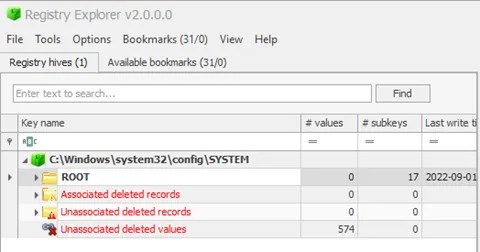
One of those tools is his Registry Explorer. Registry Explorer has the ability to load multiple hives at the same time, while it can also use/add data from the transaction logs into the hive, enriching it with more accurate data. It also has the Bookmarks functionality which will contain forensically valuable keys. You can use the bookmarks to immediately pull up some interesting keys and/or values.

Above, I just loaded one hive (SYSTEM) from my live system, and I already have 31 recommendations (bookmarks) from Registry Explorer. As a very simple demo, when I switch over to that tab, I can immediately glean some interesting information. For example, I can immediately pick up the hostname of the device.

I filtered out the bookmarks here, showing only the Device Name. As you can see, you even have a small window below with the category, name, path, and description of the key.

On the righthand side of this view, I can see my hostname.

Under Data, I can see the name of my device – 4w.

I will circle back to the Registry Explorer, but let me briefly introduce another tool, for the sake of your awareness.


RegRipper


A useful utility that can take the have as input and spit out a report which will try to extract data from (forensically) important keys/values within that specific hive. However, note that RegRipper doesn’t take transaction logs into consideration, which is also stated it in the repo’s readme file:

This tool does NOT automatically process hive transaction logs. If you need to incorporate data from hive transaction logs into your analysis, consider merging the data via Maxim Suhanov’s yarp + registryFlush.py, or via Eric Zimmerman’s rla.exe which is included in Eric’s Registry Explorer/RECmd.

Luckily, you can use the Registry Explorer for this.


SYSTEM – Registry Explorer

As you can see, Registry Explorer will even give you the ControlSet – Control Set is basically the hive that keeps the device configuration data that’s used for the control of the system startup.

From the image above, Registry Explorer apparently has some knowledge about the USB devices I’ve been plugging in these days…

Let’s check it out.

The first USB device on the list is an external DVD/Optical drive that I plugged in to transfer some stuff from a CD. (don’t @ me please, they still have some uses 😊)

And, as you can see, I’ve also plugged in four different USB devices, two of them being Kingston made flash drives. All with the timestamps, etc. (I really did this, as I was transferring/cleaning up some old stuff.)

All this goes to show how simple and useful the Bookmarks option that Registry Explorer has can be.


Specific Registry Keys


Here, I’d like to mention some specific keys/values that might be of interest to you. This can pertain to system, recently used apps, or even a user. That doesn’t matter.


OS Version


For the OS version, I just view the SOFTWARE\Microsoft\Windows NT\CurrentVersion key.

From Registry Explorer, one could ascertain that the device I’m doing this demo from is running Windows 11 Pro.

Current Control Set


As I mentioned before, this hive will have the device config data that is used for the control of the system startup. There are (usually) two sets – ControlSet001 and ControlSet002, within the SYSTEM hive.

Generally, ControlSet001 points to the Control Set your device used to boot. ControlSet002 will be what’s known as last known good config.

They can be found at SYSTEM\ControlSet001 and SYSTEM\ControlSet002.

Do note that there’s also a volatile Control Set, created by Windows, when the device is live, and it’s called CurrentControlSet – location: HKLM\SYSTEM\CurrentControlSet.

This is an important hive, and the one you will probably end up referring to for the most part of your investigation.

In the screenshot above I checked the SYSTEM\Select and within I’ve found the last known good entry which tells me that the ControlSet001 holds the last known good config.

SYSTEM\Select\LastKnownGood – key that will hold the last known good config, regarding the Control Sets.


Computer Name


This one is always important during the investigation, and you will look it up by checking the

SYSTEM\CurrentControlSet\Control\ComputerName\ComputerName

From Registry Explorer. On the righthand side of the app, you’ll see the keys and their values/data.

Timezone Information


This one is usually used to figure out the time zone of the device i.e., where it is located. It can help you figure out that timeline of events, which is of great importance to you – the investigator!

You would want to start here:

SYSTEM\CurrentControlSet\Control\TimeZoneInformation


Devices


This is all about tracking the USB devices that were plugged into the system. It will usually contain the vendor id, version of the USB device, and product id. This is cool as it can help you to identify devices themselves. These locations will also store timestamps for the devices that were plugged in.

 
SYSTEM\CurrentControlSet\Enum\USBSTOR
SYSTEM\CurrentControlSet\Enum\USB


(I already added this screenshot above, where I mentioned the USB I recently plugged in)

It’s also important to know when this USB was plugged in for the first and last time, and you can find that out by checking the

SYSTEM\<CurrentControlSet>\Enum\USBSTOR\<vendor_prod_version>\<serial>\Properties\<some_GUID>\<value>

The values you are interested in are – 0064, 0066, and 0067. 64 is the first connection time, 66 last connection time, and 67 the last removal time.


It would look something like this:

And, on the right hand side, I can see the timestamp associated with my Kingston USB that I’ve used.

For 0067 – when I removed the USB device:

It was on 28th of August, at 17:05. (Which I know is true)

Note that Registry Explorer already parses this data, and you can get it if you select the USBSTOR key.


USB Name


The name of the plugged in USB can be found here:


SOFTWARE\Microsoft\Windows Portable Devices\Devices

Under data, an investigator would figure out that the USB I used to be named – GADFLY.


Conclusion


And there you have it! More registry stuff. I’ve been focusing a bit more on the tooling, as it can really save you a lot of time and trouble. But, I will (sometime in the near future) also make a ‘compilation’ of sorts, regarding more of these interesting keys. Even though I covered some here, there’s a lot more stuff that will be of interest to an investigator.

Stay tuned!

Cover image by Immo Wegmann

#registry_forensics #windows #registry_explorer #regripper

About Version 2 Digital

Version 2 Digital is one of the most dynamic IT companies in Asia. The company distributes a wide range of IT products across various areas including cyber security, cloud, data protection, end points, infrastructures, system monitoring, storage, networking, business productivity and communication products.

Through an extensive network of channels, point of sales, resellers, and partnership companies, Version 2 offers quality products and services which are highly acclaimed in the market. Its customers cover a wide spectrum which include Global 1000 enterprises, regional listed companies, different vertical industries, public utilities, Government, a vast number of successful SMEs, and consumers in various Asian cities.

About VRX
VRX is a consolidated vulnerability management platform that protects assets in real time. Its rich, integrated features efficiently pinpoint and remediate the largest risks to your cyber infrastructure. Resolve the most pressing threats with efficient automation features and precise contextual analysis.

Transient assets: managing the unmanageable

Transient assets can introduce unique challenges to tracking asset inventory and securing your network, especially in the education sector. Students and faculty rely on a diverse range of personal devices and expect to be able to use them everywhere, resulting in high ratios of transient devices on those networks. The term “transient assets” refers to assets that regularly connect and disconnect from your network or other assets. As defined by Applied Risk, a “transient cyber asset is a portable device, such as an operational laptop, which is capable of processing or transporting executable code.” While laptops are often thought of first, mobile devices, IoT devices, and many other device types can be transient if they aren’t always connected to your network. While the surge of remote work and resultant bring-your-own-device (BYOD) has brought the challenge to the doorstep of many industries, the educational sector has been juggling the security implications of transient assets for years.

What’s the problem?

Transient devices aren’t inherently problematic, but failing to track them as part of your inventory can cause security gaps. While organizations that commonly have short-term visitors can segregate a guest network from the rest of the environment, some organizations that see a lot of transient devices need to allow authenticated access to their internal network and data.

Educational organizations tend to see some of the highest ratios of transient devices as students and faculty come and go. Students and faculty are often provisioned accounts and accesses much like staff or employees. As a result, it is especially important to effectively inventory and track these transient devices so that access to internal assets or data can be monitored.

The core security concern related to transient assets is that they are often unknown and unmanageable. While unmanaged devices are a challenge in their own right, transient devices are sometimes better described as unmanageable. Normal BYOD or device provisioning policies can require enrollment in management platforms, but that isn’t typically an option for handling transient devices. As an example in the education sector, students (and their parents or guardians) are unlikely to agree to have their personal devices monitored at the host-level, so the institution needs to be able to build their inventory from network scanning.

On the radar

Grabbing the list of unique MAC addresses connecting to your network over time is a common first step to understanding the scope of transient devices, but that method won’t tell you much about the asset or give you a complete inventory over time. Network scanning is essential to fill in the gaps, and an effective scanning tool can provide detailed information about the assets discovered. Not only will you have a list of IP:MAC address pairings, but you’ll know about device types, hardware, operating systems, and first and last seen dates. Once you have a sense of the scope of those attributes and network traits like commonly detected ports, protocols, and services, you can start categorizing assets until you have a clear picture of what assets show up where and when. From this baseline, you can better identify anomalies and abnormalities, supplementing your security tools with accurate asset attributes so that you can track down problems or security violations.

Zero unknown assets

Building a complete inventory of assets connecting to your network is easy with runZero. The unique combination of unauthenticated active network scanning with comprehensive asset fingerprinting will help you build and maintain a context-rich asset inventory. From there, you can leverage sites, tags, and rules to categorize assets based on the unique needs of your organization. runZero readily detects when assets get new IP addresses and can even notify you by email or Slack, reducing asset duplication in environments with high numbers of transient devices being assigned IP addresses dynamically. Paired with detailed asset attributes, you can use your runZero inventory to really understand what’s on your network at any given time.

About Version 2 Digital

Version 2 Digital is one of the most dynamic IT companies in Asia. The company distributes a wide range of IT products across various areas including cyber security, cloud, data protection, end points, infrastructures, system monitoring, storage, networking, business productivity and communication products.

Through an extensive network of channels, point of sales, resellers, and partnership companies, Version 2 offers quality products and services which are highly acclaimed in the market. Its customers cover a wide spectrum which include Global 1000 enterprises, regional listed companies, different vertical industries, public utilities, Government, a vast number of successful SMEs, and consumers in various Asian cities.

About runZero
runZero, a network discovery and asset inventory solution, was founded in 2018 by HD Moore, the creator of Metasploit. HD envisioned a modern active discovery solution that could find and identify everything on a network–without credentials. As a security researcher and penetration tester, he often employed benign ways to get information leaks and piece them together to build device profiles. Eventually, this work led him to leverage applied research and the discovery techniques developed for security and penetration testing to create runZero.

6 Tips for Enhancing Security Across Your Remote Workforce

Before the pandemic, 17% of employees in the US worked from home five days or more per week – a share that catapulted to 44% during the pandemic, and more than 60% after the pandemic.  The COVID-19 pandemic climaxed the remote working trend, as workers were forced to work from home – a trend that continues as many organizations have embraced remote work within their company culture.

With this growing trend, organizations should enlighten employees on data security and how everyone is responsible for protecting it.  They should also create certain practices and steps to strengthen their organization’s data security. Remote workers must prioritize safe practices, data security education. 

Since 2020 began, the expectations that surround remote work have dramatically changed. The levels at which employees are looking for work-from-home jobs at an increasing rate, and employers are adopting the technologies, culture, and processes to make it happen. Across the globe, more businesses have implemented flexible schedules where employees can work on-site, remotely, or both. An estimate by Upwork stated that 36.2 million Americans will be working remotely by 2025, an 87% increase from pre-pandemic levels. 

While these flexible work options bring a huge range of benefits for both employer and employee, they also bring some challenges, particularly around data protection. The increase in working remotely must prompt organizations also, to level up their network security. Organizations can no longer rely on traditional network security to prevent unwanted network access. What to do is not difficult. It just requires technologies that enable enhancing security. 

One of the main perks of working remotely is location flexibility,  but now that telecommuting has become commonplace data security is more of a concern. This stems from employees using unsecured Wi-Fi networks or bringing company devices with confidential data to public locations. It was reported that 86% of organizations believe that remote workers increase the chances of an organization‘s data security breach. 

So, what can organizations with large remote workforces do to properly secure network access? Here are some viable ways to get started: 

Enhancing Security with a Formal Cybersecurity Policy

The first step in protecting an organization’s data is ensuring all employees view data security as a priority. Believe it or not, today, so many employees might still not know that data security is one of those things they should be highly concerned about, at both professional and personal levels. 

Employees may assume that if they are not working directly with customer data or  higher in the organization’s hierarchy, that they don’t need to worry over data security. Organizations should not assume that their employees know anything about their role or best practices in cybersecurity. 

The best place to start is by creating a cybersecurity policy. Make all existing and new employees sign and review the policy so that everyone in the company holds responsibility for protecting employer data. 

Ensure All Internet Connections Are Secure

The most common way to open your company to a data security breach is to use an unsecured Wi-Fi network. As a remote worker, you know and understand the need to get out of your house now and then. Here, remote workers need to be aware of how to ensure they keep company data secure. 

The easiest way is to ensure employees use a virtual private network (VPN). When they use VPNs before signing into public Wi-Fi networks, the employee’s internet traffic  will be encrypted and monitored for any signs of infection. Remote workers can freely step out of the house, and companies can guarantee that their data is secure. 

Note that not all VPNs are created equal. To ensure your organization uses the appropriate VPN, verify the VPN you are using and ensure it covers every factor you need, not just last-stage encryption. Once you decide on the standards you want, review the reputation of the VPN provider and conduct a cost comparison. 

Keep Strong, Varied Passwords & Use a Password Manager

Another easy way to protect your organization’s data is using strong password hygiene. Many people still don’t consider password safety an important step to prevent data breaches. Many even admit that they use the same password across various programs and devices but informing remote workers about password protection is one of the major keys to securing your company’s data. 

Using a password manager to randomly generate passwords for you is another way to lessen cyber risk. The password manager will store all your passwords safely and prevent the need to remember their different passwords. 

Enhancing Security with Two-Factor Authentication

Many organizations are adopting two-factor authentication to improve their data security. This method authenticates the user by requiring a username and password, along with either entering a PIN sent to their cell phone or answering a secret question. Though passwords can often be stolen or compromised, two-factor verification, it is unlikely for another person to have the PIN or answer a security question. 

Enhancing security even further, organizations could move to multi-factor authentication that requires additional verification, including voice or fingerprint recognition, face identification and voice recognition. This is typically more expensive and complex, but could be warranted depending on the level of security needed by an organization. 

Use Encryption Software

Encryption software is another way organizations, and their remote workers can protect data. Suppose an employee’s device gets lost or stolen. In this case, the information on the lost or stolen device can find its way into the wrong hands and open the company to vulnerabilities and data breaches. Encryption software protects organization data by barring access from unauthorized or third-party users of those devices. 

In addition, the organization should be mindful that any programs used for chatting, applications, or email should use end-to-end encryption. Popular programs like Adobe Acrobat and Microsoft Office, for instance, can easily encrypt documents and files that your remote workers use and share amongst each other.  

Don’t Forget Firewalls, Antivirus Software & Antimalware

Ensure remote workers have up-to-date antivirus software, anti-malware and firewalls on all their devices. In cases where devices are stolen, organizations might also want to wipe the lost or stolen devices remotely. Mobile device management platforms can perform most or all of these services by allowing remote workers to continue using their devices while ensuring the safety of company data.  

Employees might need the help of their employer in ensuring that their devices have these protections installed in them. Employees don’t always have the same technical expertise, so organizations concerned about data security should be ready to offer technical support help. This could mean creating partnerships with tech support services close to their remote workers or forming an internal tech support team that can guide employees through the necessary steps. 

Remote work does not have to negate data security. Once these top cybersecurity procedures are implemented and remote workers are educated, they can become standard practices quickly that the entire organization can easily commit to. . 

Final Thoughts on Enhancing Security for Remote Workers

Diligence from all management and employees is required to ensure these security measures are followed. Following the above guidelines can strengthen your organization’s security posture while keeping your data safe and secure.  

About Version 2 Digital

Version 2 Digital is one of the most dynamic IT companies in Asia. The company distributes a wide range of IT products across various areas including cyber security, cloud, data protection, end points, infrastructures, system monitoring, storage, networking, business productivity and communication products.

Through an extensive network of channels, point of sales, resellers, and partnership companies, Version 2 offers quality products and services which are highly acclaimed in the market. Its customers cover a wide spectrum which include Global 1000 enterprises, regional listed companies, different vertical industries, public utilities, Government, a vast number of successful SMEs, and consumers in various Asian cities.

About Portnox
Portnox provides simple-to-deploy, operate and maintain network access control, security and visibility solutions. Portnox software can be deployed on-premises, as a cloud-delivered service, or in hybrid mode. It is agentless and vendor-agnostic, allowing organizations to maximize their existing network and cybersecurity investments. Hundreds of enterprises around the world rely on Portnox for network visibility, cybersecurity policy enforcement and regulatory compliance. The company has been recognized for its innovations by Info Security Products Guide, Cyber Security Excellence Awards, IoT Innovator Awards, Computing Security Awards, Best of Interop ITX and Cyber Defense Magazine. Portnox has offices in the U.S., Europe and Asia. For information visit http://www.portnox.com, and follow us on Twitter and LinkedIn.。