Skip to content

IoT Device Management & The Critical Role of NAC

Introduction 

IoT (Internet of Things) is a revolutionary technology with tremendously promising potential impact. It has grown exponentially, from industry to home, and the number of IoT devices will likely keep rising. However, this new technology also raises security concerns. As these devices become prevalent in the public sector and the home, IT specialists must be able to use them appropriately

A recent forecast shows that 27 billion internet-connected devices will be in place by 2025. As IoT technology becomes  more widespread, it is beginning to influence how individuals interact worldwide. To ensure safety for IoT devices, organizations must ensure that these devices are correctly configured and monitored.

Network Access Control (NAC) can address these IoT management and security issues by providing foundational protection against the rise of IoT threats.  

IoT Device Management, Onboarding & NAC 

IoT device management and onboarding involves securely linking IoT devices to internal networks. Organizations can then monitor and control IoT devices while securing their networks by enrolling them.

NAC is a foundational security tool that helps with this by significantly reducing unauthorized access to critical business assets while also remedying flaws in the device enrollment process. NAC is central in securing IT infrastructure against rogue IoT devices and other malicious threats. 

How NAC Facilitates IoT Device Management & Onboarding 

Below are some roles in which implementing NAC can help IoT devices management and onboarding:

Authentication 

IoT devices need to be authenticated before they can connect to a network to mitigate the threats such as man-in-the-middle and replay attacks. NAC helps mitigate this risk by blocking access between the user and the network until they are fully authenticated.  

Network Configuration 

NAC can also adjust the network configuration of IoT devices during onboarding. For example, if it is required for a device to connect to a specific subnet or VLAN, the NAC can automatically configure it to do so. 

Monitoring 

The security posture of IoT devices can significantly affect both the security of devices and their respective networks. It is critical to monitor the health of current devices and ensure that they are properly secured. NAC performs real-time monitoring and establishes monitoring policies. 

Event & Log Management 

NAC is responsible for gathering log and anomaly data from IoT devices. It can log various events, such as device-related information, user activity, firewall and gateway logs, reports on application and security configuration changes, etc. Users can use this data to troubleshoot problems in case of any issues arising from connected devices 

Data Management 

The collected data NAC gathers form connected IoT endpoints helps to improve the security configurations of specific devices. Moreover, NAC controls how information is exchanged between connected devices and an organization’s cloud services (i.e., IoT applications). 

Security Configuration 

NAC can be used to perform deep security configurations of IoT devices, such as determining if IoT device users are permitted to connect to the network. 

If a user is authorized, NAC can also configure IoT devices’ security settings and configurations accordingly. It can be further configured to check specific attributes, such as whether an IoT device has antivirus software installed or whether it uses particular firewall rules. 

Compliance 

Upon completion of the onboarding process, the IoT device will be validated for compliance with the organization’s security policies. NAC can help oversee corporate security compliance by requiring  updates and software patches, ensuring business services adhere to regulatory standards, and configurations adhere to the licensing policy. 

Implementing a NAC-Based IoT Device Management Solution 

In executing a NAC-based IoT device onboarding solution, NAC solutions must be available for an organization’s devices and cloud services. Users must also have access to the security control plane to configure policies for connected devices and make decisions based on them. The following steps help to implement the NAC-based IoT device onboarding solution: 

Identify IoT Devices that Require Onboarding 

NAC solutions can help organizations identify what IoT devices are connected to the network, how and when they were connected, and how their configuration changes over time. This information can be used to develop policies that optimize the secure operation of IoT devices. 

Enable IoT Devices for Onboarding 

Once the devices have been identified, it is crucial to ensure that they are onboarded securely. NAC solutions can help support this process by enforcing security policies for IoT devices and using identification services and rules to ensure that there are no exceptions. 

Enable Cloud Services for Onboarding 

The network’s security dramatically relies on the cloud applications’ security. This means that it is vital for organizations to ensure that the cloud applications are appropriately configured for security and adhere to policies. 

Apply IoT Device Management & Control Policies

Once the onboarding process has been completed and each device performs as expected, it is vital to ensure that the appropriate adjustments are made. NAC solutions can provide a way to quickly deploy security policies for IoT devices or schedule recurring tests to ensure they work as expected. 

Monitor IoT Device Health 

The network’s security depends on the health of all the connected devices – and IoT is no exception. To ensure that the security of each device is maintained, it is essential to ensure that they are operating  as expected. NAC solutions can monitor IoT device performance over time and provide specific alerts when a problem is identified in a device. 

Final Thoughts on NAC & IoT Device Management

NAC is a vital component of IoT device onboarding and is essential for an organization’s devices and cloud services. NAC can help ensure that devices are securely configured and performing as expected, while also ensuring that cloud applications are installed and configured securely. 

About Version 2 Digital

Version 2 Digital is one of the most dynamic IT companies in Asia. The company distributes a wide range of IT products across various areas including cyber security, cloud, data protection, end points, infrastructures, system monitoring, storage, networking, business productivity and communication products.

Through an extensive network of channels, point of sales, resellers, and partnership companies, Version 2 offers quality products and services which are highly acclaimed in the market. Its customers cover a wide spectrum which include Global 1000 enterprises, regional listed companies, different vertical industries, public utilities, Government, a vast number of successful SMEs, and consumers in various Asian cities.

About Portnox
Portnox provides simple-to-deploy, operate and maintain network access control, security and visibility solutions. Portnox software can be deployed on-premises, as a cloud-delivered service, or in hybrid mode. It is agentless and vendor-agnostic, allowing organizations to maximize their existing network and cybersecurity investments. Hundreds of enterprises around the world rely on Portnox for network visibility, cybersecurity policy enforcement and regulatory compliance. The company has been recognized for its innovations by Info Security Products Guide, Cyber Security Excellence Awards, IoT Innovator Awards, Computing Security Awards, Best of Interop ITX and Cyber Defense Magazine. Portnox has offices in the U.S., Europe and Asia. For information visit http://www.portnox.com, and follow us on Twitter and LinkedIn.。

What Solution Is Best For Your Offboarded Data?

Data security is one of the most prominent issues of the digital age. Constantly evolving and changing, data compliance can be a difficult area to navigate and can be a huge project for any IT department. When a user is offboarded, finding a solution to help you deliver the complex needs surrounding data can be a tricky challenge and if data compliance isn’t withheld to the letter, you could be left with some serious headaches.

In 2021, CloudM created the holy grail of solutions for your offboarded user data. Archive, an industry-first feature, was designed to help businesses by managing compliance, retaining/restoring data as needed, and purging the data when it’s longer needed.

As the footprint for data becomes more and more embedded within our civilization, Archive and other tools like it will become indispensable, helping you to navigate those difficult and sticky data headaches, and keeping you compliant.

So, what’s the best solution for you?

Well, there are three core solutions that will help you stay compliant and efficient, all whilst working to your needs and requirements as a business.

What can we learn from this?

Every business needs something different, and for that, there must be a relatively flexible solution. This is why Archive can work as a solution on its own or as a hybrid solution.

Get in touch with our team of experts for your free demo today.

Get Started

About Version 2 Digital

Version 2 Digital is one of the most dynamic IT companies in Asia. The company distributes a wide range of IT products across various areas including cyber security, cloud, data protection, end points, infrastructures, system monitoring, storage, networking, business productivity and communication products.

Through an extensive network of channels, point of sales, resellers, and partnership companies, Version 2 offers quality products and services which are highly acclaimed in the market. Its customers cover a wide spectrum which include Global 1000 enterprises, regional listed companies, different vertical industries, public utilities, Government, a vast number of successful SMEs, and consumers in various Asian cities.

About CloudM
CloudM is an award-winning SaaS company whose humble beginnings in Manchester have grown into a global business in just a few short years.

Our team of tech-driven innovators have designed a SaaS data management platform for you to get the most from your digital workspace. Whether it’s Microsoft 365, Google Workspace or other SaaS applications, CloudM drives your business through a simple, easy-to-use interface, helping you to work smarter, not harder.

By automating time-consuming tasks like IT admin, onboarding & offboarding, archiving and migrations, the CloudM platform takes care of the day-to-day, allowing you to focus on the big picture.

With over 35,000 customers including the likes of Spotify, Netflix and Uber, our all-in-one platform is putting office life on auto-pilot, saving you time, stress and money.

How to Avoid Account Takeover Risks from Push Bombing and MFA Fatigue Attacks

Organizations turn on multi-factor authentication (MFA) to secure access to corporate resources and increase their security posture. 

IT admins like using push notifications MFA for several reasons. Since most users have smartphones in their pockets at all times, push notifications offer minimal user friction. They are also ubiquitous (admins can enable them across different kinds of resources and endpoints unlike other methods) and offer security against “man in the middle” attacks. 

Recently, this trusted security measure has been facing a new kind of attack known as push bombing or MFA fatigue. Keep reading to learn more about how to reduce your risk.

What Is Push Bombing and MFA Fatigue?

When an organization uses push MFA, the user is required to approve the login or access request sent to their personal device in the form of a push notification. This is just one way (of many) to verify the user’s identity, but preferred given its UX benefits.

Push bombing is a method where an attacker uses a script or a bot to trigger multiple login attempts with stolen or leaked credentials and trigger a SPAM of multiple push notifications to the user’s mobile device. 

Here’s how it works: 

  1. An attacker repeatedly sends a user endless push notification streams with the intent to exacerbate them into accidentally approving the prompt. 
  2. Understandably, the user feels a sense of fatigue, and it’s easy to make mistakes out of frustration. They accept the prompt.
  3. Unfortunately, the trick works extremely well for account take over and breaches. The attacker now has access to the account in question. 

Alternatively, an attacker may also contact the user impersonating as an IT admin and convince them to approve the login attempt.

How JumpCloud Protect Helps Admins Combat Attacks 

Stronger Password Policy

Push attempts are triggered after an attacker gains access to a user’s password. The weaker the password the more likely an attacker is to obtain it through brute force and social engineering techniques. 

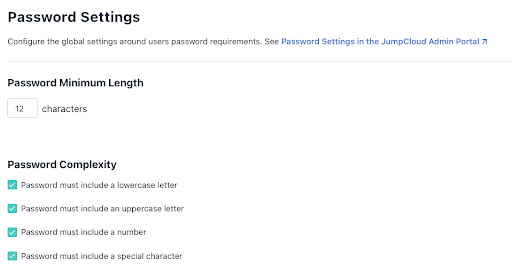
IT admins can use JumpCloud’s password settings to adopt a stronger password policy that meets the following requirements:

  • Greater than or equal to12 characters in length, including alphanumeric
  • Upper and lower case combinations
  • Changes password every 90 days

Admins should also use password aging to reduce risks due to re-use of older, leaked, or stolen credentials that a hacker may have obtained. Here’s what the Password Settings look like in the JumpCloud management portal: 

screenshot of password settings
screenshot of password aging

Admins can also use JumpCloud’s password manager to manage their user’s passwords, which reduces the friction associated with using lengthier passwords with increased security posture. JumpCloud Password Manager eliminates the need to remember a master password thereby reducing the risks due to password leaks or breaches.

Account Lock-Out

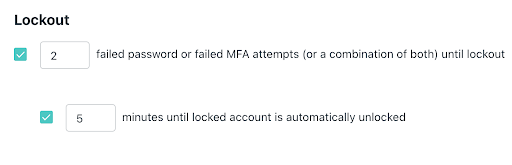
Admins can use JumpCloud’s account lock-out settings to set a limit for password and Push MFA retries. A user’s account will be locked if the user denies a login request sent in Push notification for a specified number of consecutive  attempts as determined by the settings. Admins can auto unlock the account after a certain duration to reduce user friction. 

screenshot of password lockout

Mobile Biometric

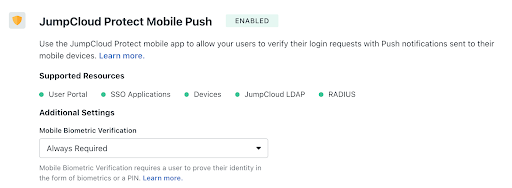
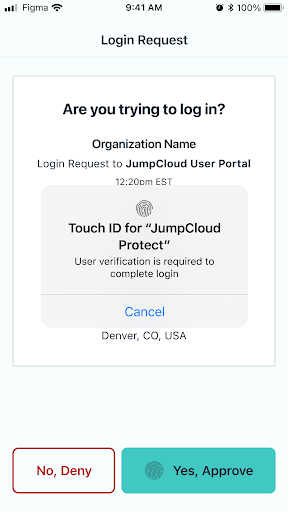
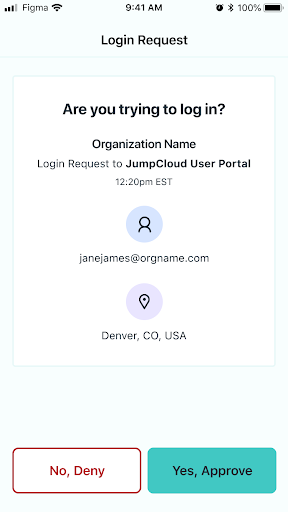
Admins can activate mobile biometric on Push MFA, so that a user is required to use their fingerprint or face recognition as an additional factor to approve a login request. Here’s a look at what both the admin and user sees during this process:

screenshot of JumpCloud protect mobile push
screenshot of login request

Conditional Access

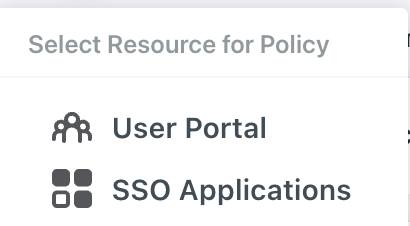
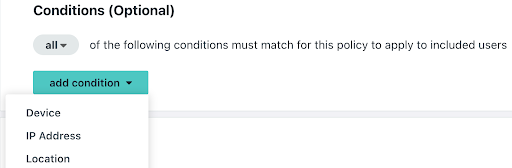
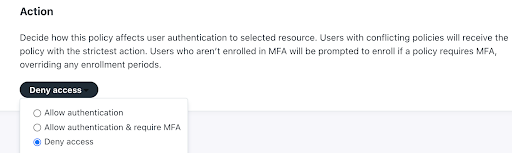
Admins can leverage JumpCloud conditional access policies for user portal and SSO application login attempts to restrict access from trusted devices or allow access only from the locations where an employee lives or places of travel. Simply select the Conditional Access option from the platform’s left-side navigation to open Conditional Access settings:

screenshot of policy resource
screenshot of conditions
screenshot of action for access

App and Location Information on Push Notifications

Admins can educate their users to check the application name for which the access request is made or the location from where the request was made before approving the request. 

While application name or a granular location information may not always be available, when it is present it will help flag potentially fraudulent access requests.

screenshot of login request

Avoid Account Takeovers with JumpCloud

As reported by Microsoft, requiring MFA has been shown to reduce  account takeover attacks by 99%. While MFA does offer resistance to attacks, hackers have, unfortunately, found a way to circumvent them with push bombing and MFA fatigue. 

So, it’s important for organizations to employ additional precautions such as adding phishing-resistant email tools and filters, educating users on stronger password practices for their personal and work accounts, and implementing stronger security practices to avoid security breaches.

JumpCloud continuously adds new features that increase the security posture of the platform to give IT admins and organizations peace of mind. IT admins can also better protect their organizations by adopting JumpCloud recommendations, starting with enforcing stronger password policies.

Ready to experience the ease of JumpCloud for your IT needs?

Click here to start your free account today.

About Version 2 Digital

Version 2 Digital is one of the most dynamic IT companies in Asia. The company distributes a wide range of IT products across various areas including cyber security, cloud, data protection, end points, infrastructures, system monitoring, storage, networking, business productivity and communication products.

Through an extensive network of channels, point of sales, resellers, and partnership companies, Version 2 offers quality products and services which are highly acclaimed in the market. Its customers cover a wide spectrum which include Global 1000 enterprises, regional listed companies, different vertical industries, public utilities, Government, a vast number of successful SMEs, and consumers in various Asian cities.

About JumpCloud
At JumpCloud, our mission is to build a world-class cloud directory. Not just the evolution of Active Directory to the cloud, but a reinvention of how modern IT teams get work done. The JumpCloud Directory Platform is a directory for your users, their IT resources, your fleet of devices, and the secure connections between them with full control, security, and visibility.

What you need to know about the OpenSSL 3.0.x critical vulnerability

The OpenSSL project team recently patched two buffer overflow vulnerabilities that affect 3.0.0 through 3.0.6 releases of  OpenSSL. These vulnerabilities exist within X.509 certificate verification (specifically within name constraint checking logic) and affect both client and server side applications. Attackers can exploit these vulnerabilities to cause a denial-of-service by crashing applications/services (CVE-2022-3786, CVE-2022-3602) or potentially achieve remote code execution (CVE-2022-3602). The OpenSSL project team fixed these vulnerabilities in OpenSSL 3.0.7. OpenSSL 1.x versions do NOT contain these vulnerabilities.

Is runZero affected by these OpenSSL vulnerabilities?

The runZero platform does not use OpenSSL. The runZero operations team is ensuring that appropriate updates and mitigations are being rolled out to all of our supporting systems, including endpoints, infrastructure, and supporting services.

What are the details around these vulnerabilities?

The OpenSSL project team put together a thorough blog post that covers the details.

How to find vulnerable OpenSSL 3.0.x in your network

You can use runZero to discover vulnerable 3.0.x versions of OpenSSL in your environment. We shipped initial support for remote OpenSSL version detection in runZero version v3.2.6 on Sunday, October 30th, and scans run by our SaaS users after this time will report OpenSSL in the software inventory along with the version number when possible. Self-hosted users can enable this feature by applying the v3.2.6 (or later) update and rescanning their environment. In both cases, the runZero Explorer will be automatically upgraded as needed before the scan is launched.

After your scans complete, you can find assets running OpenSSL endpoints using the query: product:openssl. This query also works for the services and software inventory.

The server-side exposure only applies to services that process client certificates. This is not a common configuration, but runZero already performs checks for it. To identify services running OpenSSL 3.0.x variants that may be vulnerable to exploitation, use the query _service.product:"OpenSSL:OpenSSL:3" AND tls.requiresClientCertificate:"true" in the service inventory search.

The runZero scanner will reliably detect OpenSSL 3.0.x versions on any TLS-enabled ports identified during a normal scan. This includes both 3.0.x and 1.1.x OpenSSL versions when TLS-enabled service uses either TLS 1.2 or 1.3. The current fingerprints handle protocols that expose TLS directly. STARTTLS and additional service support are due in the near future.

What is the impact of these vulnerabilities?

The two issues are in the punycode parsing function used to process email addresses within certificates. Punycode is a way to transform a domain name using a non-ASCII character set into a standardized label. Punycode formatting can also convert emoji unicode characters into usable domain names. For example, ☃.net is encoded as xn--n3h.net.

Both client and server applications using OpenSSL 3.0.x include the vulnerability. Exploitation requires presenting a malicious certificate to the application. This only occurs after certificate validation, which is a mitigating control, in theory. Unfortunately, some applications disable certificate validation, either entirely (in insecure mode) or via a custom validator in the application.

To attack an exposed service:

  1. An attacker would need to present a client-side certificate that triggers this issue, and
  2. The server would need to have client certificate authentication enabled.

Even under these conditions, the client certificate would either need a valid signature or the application would need to be configured to skip validation. The number of applications that meet these requirements vary from organization to organization.runZero automatically checks for the use of both OpenSSL 3.0.x and client-side certificate support (tls.requiresClientCertificate) by default.

The client-side scenario may be harder to solve. Utilities like curl and wget, system update frameworks like apt and yum, and other client-side applications, may be impacted if they disable certificate validation. Some scripts may disable validation (e.g., using curl -k) to work around missing root certificates. The script can validate the hash of the received file, but still potentially exposes the script’s host to attack by a server presenting a malicious certificate with a punycode email address attribute.

Servers that make outbound calls to other HTTP endpoints (e.g., APIs and webhooks) also fall under this client-side scenario. Finding these embedded client-side instances are trickier, since every binary on every platform is suspect until proven otherwise. While many applications use the system library for OpenSSL, quite a few also statically link the library. These instances must be individually patched even if the system libraries are up-to-date.

How to respond

First things first: identify any externally exposed network services using OpenSSL 3.0.x that support client certificate authentication. This is the most likely scenario for remote exploitation today. runZero Enterprise customers can use our hosted scan engines to quickly scan their externally-facing assets.

Next, categorize internal services using OpenSSL 3.0.x and leverage existing software inventory capabilities (like the SentinelOne and Miradore integrations in runZero) to make a list of systems that use OpenSSL 3.0.x. Ensure that these systems are configured to receive frequent updates. Spot check that updates are applied once available.

Finally, identify third-party, statically-linked applications that might be using OpenSSL. There is great work happening with YARA rules that can help.

How to remediate

Thorough remediation of this vulnerability requires:

  • Shifting all applications/services that use vulnerable OpenSSL 3.0.x software to OpenSSL 3.0.7.
  • Deleting all files associated with vulnerable OpenSSL 3.0.x software, to ensure nothing attempts to use them.

You can accomplish the above by doing the following per asset:

  • Update system and non-system OpenSSL 3.0.x libraries to 3.0.7.
  • Update installed applications that are statically linked to (or are packaged with) a vulnerable OpenSSL version.
  • Ensure older files associated with vulnerable OpenSSL 3.0.x versions are gone.

If your organization maintains applications or services which use OpenSSL:

  • Rebuild applications/services that statically link to a vulnerable OpenSSL 3.0.x version to link with 3.0.7.
  • Rebuild applications/services that repackage or specify a vulnerable OpenSSL 3.0.x version.

Software developers might also consider switching to a non-vulnerable TLS implementation, including the older OpenSSL 1.1.x branch, the LibreSSL project, or the BoringSSL project.

How to mitigate

If remediation in the near term is not an option, doing one of the following can help reduce your attack surface:

  • Disable TLS client authentication for services using a vulnerable OpenSSL version that have it enabled.
  • Stop running applications/services that use a vulnerable OpenSSL version (e.g., sshd, httpd, etc.).
  • Use access control rules in your firewalls or routers to block access to ports associated with services that use a vulnerable OpenSSL version on affected assets.
  • Disconnect from the network (or power down) devices that have services/applications/OSes using a vulnerable OpenSSL version.

Mitigation should be considered a temporary measure until remediation is possible.

How to stay on top of these vulnerabilities

Many individuals and organizations are compiling information on software affected by these OpenSSL vulnerabilities. See our Acknowledgements section below for links to those resources.

Acknowledgements


About Version 2 Digital

Version 2 Digital is one of the most dynamic IT companies in Asia. The company distributes a wide range of IT products across various areas including cyber security, cloud, data protection, end points, infrastructures, system monitoring, storage, networking, business productivity and communication products.

Through an extensive network of channels, point of sales, resellers, and partnership companies, Version 2 offers quality products and services which are highly acclaimed in the market. Its customers cover a wide spectrum which include Global 1000 enterprises, regional listed companies, different vertical industries, public utilities, Government, a vast number of successful SMEs, and consumers in various Asian cities.

About runZero
runZero, a network discovery and asset inventory solution, was founded in 2018 by HD Moore, the creator of Metasploit. HD envisioned a modern active discovery solution that could find and identify everything on a network–without credentials. As a security researcher and penetration tester, he often employed benign ways to get information leaks and piece them together to build device profiles. Eventually, this work led him to leverage applied research and the discovery techniques developed for security and penetration testing to create runZero.

JumpCloud Introduces Remote Assist To Extend Critical Device Management Capabilities

When the world went remote, people were surprised to learn that many aspects of their jobs looked pretty much the same as they did in the office. It turns out that accessing resources from the kitchen (or the beach, or a coffee shop, or a train) isn’t that different from doing it in the office. In fact, we make it our mission to make sure remote work can happen from anywhere, on your terms.

Remote tech support, however, isn’t quite the same experience when you can’t see or drive the user’s screen directly. It’s frustrating and inefficient at best, and at worst, it creates more issues than it solves. Between trying to understand the user’s issue and prescribing solutions via verbal or written instructions, every ticket seems to take twice as long as they should. 

But as remote work becomes a permanent part of today’s workplace (the average SME is now 57% remote or hybrid-remote), IT teams and MSPs must be able to effectively assist users remotely. To help teams streamline remote tech support, JumpCloud has introduced Remote Assist, which enables IT teams and MSPs to remotely view and control users’ devices. And we’ve got more good news: Remote Assist is free for all organizations and MSPs that use JumpCloud. 

How Does Remote Assist Work? 

JumpCloud Remote Assist facilitates remote tech support by allowing admins to remotely see and control a user’s device, regardless of their location. It includes the following capabilities:

  • Multi-OS support: Provide remote assistance to Windows and macOS devices, with Linux coming soon. 
  • Remote support straight from your browser: Offer remote assistance through your browser, from anywhere, with any device, and at any time, with no need to install additional tools. 
  • Multiple monitor support: View, control, and switch between any number of monitors connected to your remote Mac or Windows devices.
  • Audit Logging: Get centralized logging of all remote support sessions. 
  • Clipboard synchronization: Copy and paste text and images between remote and local devices (coming soon).
  • Role-based access control: Determine which technicians can access end user devices via the JumpCloud account role-based access controls.
  • Secure Peer-to-Peer Connection: Assist employees securely with fully secured, private sessions protected by unique session keys, end-to-end encryption, and direct peer-to-peer communications.

Note that the first release of JumpCloud Remote Assist focuses on attended access for macOS and Windows, with Linux and unattended access coming soon. 

Key Benefits of JumpCloud Remote Assist

Remote Assist is free to all organizations and MSPs without any restrictions on time, number of devices, sessions or technicians. It allows organizations to support an unlimited number of devices, regardless of the number of IT technicians using JumpCloud Remote Assist, for as long as they want. This ability to remotely assist users effectively (without incurring additional costs) is a critical component in making a smooth transition to the long-term remote-first paradigm.  

Benefits to Direct Customers:

  • Increased Productivity and Lower User Friction: End-users resolve their technical problems more quickly, allowing them to focus on productivity and minimize time lost while waiting on issue fixes.
  • Windows, macOS, and Linux Support: Remote assistance becomes available to everyone — not just Windows users. This boosts team productivity as well as the end-user experience. 
  • Faster Resolution for Help-Desk Tickets: IT teams can close helpdesk tickets faster, reducing time-to-resolution for your users and optimizing IT’s productivity time.

Benefits to MSPs:

  • Increased Reselling Margins: Centralize all your core capabilities such as identity, access, device management, and live remote assistance in the JumpCloud directory platform.
  • Reduced Operating Costs: Provide an easy and cost-effective way to manage multi-OS devices remotely.
  • Optimize Technician Time: Empower your IT admins to work efficiently and provide faster time-to-resolution for helpdesk issues. 

Part of a Holistic Solution

With the latest Remote Assist solution offering, JumpCloud adds and consolidates multiple tools into a single platform. Organizations and MSPs that use JumpCloud can now administer and troubleshoot end-user devices remotely, without relying on or paying for third-party solutions.

In addition, the combination of Remote Assist, mobile device management (MDM), and patch management provides critical device management capabilities that deliver more comprehensive value than ad hoc approaches to device management. That includes optimized resources, time, and tools for IT teams and better savings for the organization.

Because the JumpCloud Directory Platform works well with other IT solutions in the market, organizations and MSPs can choose to use their existing MDM and identity access management (IAM) solutions while utilizing JumpCloud Remote Assist for free. All it takes to register is installing the JumpCloud Agent. 

Get JumpCloud Remote Assist for Free!

JumpCloud is the only platform in the industry that consolidates live remote support with centralized identity, asset management and Secure, Frictionless AccessTM to all company resources.

JumpCloud Remote Assist is free for any organization to use, at any scale, for any number of devices, without any limits on time. Sign up for a free account to start working efficient remote assistance into your remote or hybrid strategy.

About Version 2 Digital

Version 2 Digital is one of the most dynamic IT companies in Asia. The company distributes a wide range of IT products across various areas including cyber security, cloud, data protection, end points, infrastructures, system monitoring, storage, networking, business productivity and communication products.

Through an extensive network of channels, point of sales, resellers, and partnership companies, Version 2 offers quality products and services which are highly acclaimed in the market. Its customers cover a wide spectrum which include Global 1000 enterprises, regional listed companies, different vertical industries, public utilities, Government, a vast number of successful SMEs, and consumers in various Asian cities.

About JumpCloud
At JumpCloud, our mission is to build a world-class cloud directory. Not just the evolution of Active Directory to the cloud, but a reinvention of how modern IT teams get work done. The JumpCloud Directory Platform is a directory for your users, their IT resources, your fleet of devices, and the secure connections between them with full control, security, and visibility.

×

Hello!

Click one of our contacts below to chat on WhatsApp

×